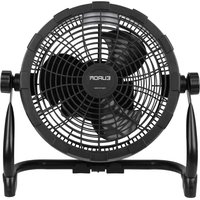
Airflow LED Cordless - Climate control Eurom - Free user manual and instructions
Find the device manual for free Airflow LED Cordless Eurom in PDF.


| Product type | Cordless fan with powerbank support |
| Brand | Eurom |
| Model | Airflow LED Cordless |
| Category | Climate control |
| Dimensions (W x D x H) | 39 x 38 x 18 cm |
| Weight | 1.8 kg |
| Power supply | 5 V DC via USB-C (powerbank, mains adapter, car adapter, USB-C port) |
| Rated power | 15 W max |
| Number of speeds | 9 settings |
| Decorative lighting | LED white high/low, yellow high/low |
| Perfumed oil compartment | Yes (for insect repellent or room fragrance) |
| Horizontal adjustment | Manual (angle adjustable by screw) |
| Suspension hook | Yes (for ceiling or pole mounting) |
| Protection class | Class III (very low voltage) |
| Warranty | 36 months (excluding powerbank) |
| Maintenance and cleaning | Unplug before cleaning; use a soft cloth; do not immerse |
| Safety | Do not use near water, flames, flammable substances; keep out of reach of children under 3 years |
Frequently Asked Questions - Airflow LED Cordless Eurom
User questions about Airflow LED Cordless Eurom
0 question about this device. Answer the ones you know or ask your own.
Ask a new question about this device
Download the instructions for your Climate control in PDF format for free! Find your manual Airflow LED Cordless - Eurom and take your electronic device back in hand. On this page are published all the documents necessary for the use of your device. Airflow LED Cordless by Eurom.
USER MANUAL Airflow LED Cordless Eurom
Airflow LED Cordless
NL3
EN 15
DE 26
FR 38
User manual
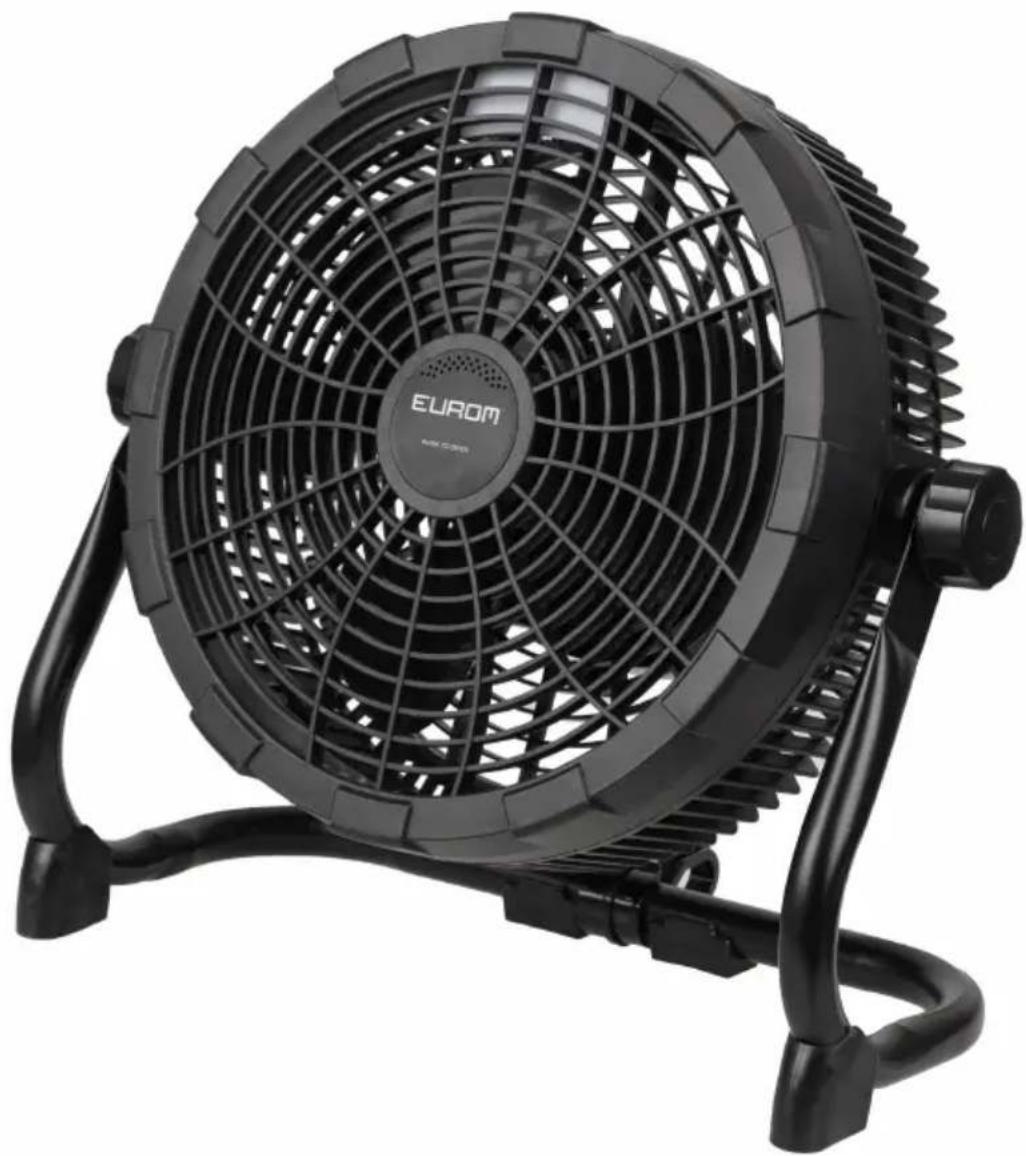
Model: Product code:
Airflow LED Cordless 384482
Varta powerbank and speed charger
Model: Product code:
Varta powerbank 20,000 mAh 346961
Varta speed charger 5V/3A 346978
Order links
Varta powerbank 20,000 mAh Varta speed charger 5V/3A


Airflow LED Cordless
Art.nr.384482
Batch B****
5VDC - 15 Watt - 3,0 A


Figuur 1.
EUROM - KOKOSSTRAAT 20 - 8281 JC - GENEMUIDEN - NETHERLANDS
Specifications
| Type Airflow LED Cordless | |
| Spanning: 5V DC | |
| Nominal vermogen: 15W (Max) | |
| Aansluiting: USB-C | |
| Kabel: Type-C-kabel | |
| Horizontale verplaatsing: Handmatig | |
| Beschermingsklasse: Klasse III | |
| Gewicht: 1,8kg | |
| Afmetingen: 39x38x18cm |
Beschrijving
Please read and understand these safety instructions. Incorrect use can cause injury and will void EUROM's warranty.
Children of less than 3 years should be kept away unless continuously supervised.
- This appliance can be used by children aged from 8 years and above and persons with reduced physical, sensory or mental capabilities or lack of experience and knowledge if they have been given supervision or instruction concerning use of the appliance in a safe way and understand the hazards involved.
Children shall not play with the appliance.
- Cleaning and maintenance shall not be made by children without supervision.
- If the supply cord (TYPE-C cord) is damaged, it must be replaced by an original replacement cable.
Safety warnings powerbank (powerbank not included)
- The device will only work without interruption when the powerbank has an output of 5 Volt and minimum 3 Ampere.
- Never connect the device on a voltage higher than 5 Volt.
- Do not use or store the powerbank near heat sources such as fire or heaters.
- Do not leave the powerbank in an enclosed vehicle.
Install the powerbank only in the powerbank holder of the device when using the device. - Never use the device powered by the powerbank with the powerbank not securely placed in the powerbank holder of the device.
- When charging the powerbank, remove the powerbank from the powerbank holder of the device. The powerbank gets hot during charging, so make sure the powerbank can safely release this heat to the surrounding air during charging.
- Do not charge the powerbank when the device is used with the power bank at the same time.
- Charge the powerbank only with the supplied charging cable.
- Keep the powerbank away from water or humid environments.
- Do not disassemble, damage, jolt or pierce the powerbank.
- Do not use the powerbank below 0^ Celsius or above 50^ Celsius, otherwise the charge and discharge function of the powerbank will be disabled due to an internal safety mechanism.
- Keep the powerbank away from children.
- Recommended operating and storage temperature for the powerbank: 10^ - 30^ Celsius.
The powerbank's optimal state of charge is between 30% and 70% . - If the powerbank is not used for a long time, store it with a charge status of about 70% and charge and discharge it every 3-6 months and place it in a cool, dry place. Otherwise, the performance of the powerbank will decrease or the powerbank's lifespan will be shorter.
-
Never try to open the powerbank. In case of misuse, the battery might emit a liquid. If you come in contact with this unintentionally, rinse the affected area with water. If the liquid comes in contact with eyes, then rinse with water and seek medical assistance. Liquid from a battery can cause irritation or burns.
-
This product must be removed in a correct manner, taking environmental considerations into account. Return this product to your local dealer or to the local recycling station where the powerbank is recycled or disposed of in a correct manner.
- Never burn the powerbank, even if it is damaged and can no longer be charged. Batteries explode when they are burned.
General safety instructions
- The device is delivered without adapters. The USB-C mains adapter or the USB-C car adapter must comply with the nationally applicable regulations as well as with international and regional safety norms. The USB-C mains adapter and USB-C car adapter must have an output of 5 Volt and minimum 3 Ampere.
- Before using the device, assemble it completely. Always keep the TYPE-C cord out of the USB-C socket on the device when assembling/disassembling. Do not place the powerbank in the holder on the device before the device is completely assembled. Never use the device when the guard is removed or damaged.
- Check device, powerbank (not included), TYPE-C cord, the USB-C mains adapter (not provided) or the USB-C car adapter (not provided) for damage before use. Check the TYPE-C-cord for the correct insulation, cuts, scrapes and the condition of the connectors. Do not turn on the device if you have discovered damage to the device, powerbank, TYPE-C cord, USB-C mains adapter or the USB-C car adapter, if the device is malfunctioning, if it has been dropped or if there are signs of any other defect. Return the complete product to the vendor or to a certified electrician for inspection and/or repair. Always ask for original parts. The device (incl. TYPE-C cord) may only be opened and/or repaired by properly authorised and qualified persons.
- Never use the device with a programmer, timer, separate remote-control system, or any other device that switches the device on automatically.
- Never connect the device to a dimmer.
- Avoid the use of extension cables. If unavoidable, use an approved cable with sufficient power. Completely unroll the cable.
- Before every use, check that the voltage on the socket to be used matches the input voltage indicated on the identification plate of the USB-C mains adapter or the USB-C car adapter.
- Always remove all the packaging before installing or using the device.
- Never let children play with the packaging material. Keep the packaging material out of the reach of children.
- Place and use the device on a dry, stable, and horizontal surface in an upright position. However, when the device is hung on the hanging hook, make sure it is sturdy enough and that the device has enough space to operate unobstructed. Minimum of 30~cm of free space is left around the device. (intake and exhaust opening). Keep a close eye on the operation.
- This device (including the powerbank, TYPE-C cord, USB-C mains adapter or a USB-C car adapter) is not suitable for use in wet or damp spaces such as bathrooms and laundry rooms. Do not place the device in the vicinity of taps, bathtub, shower, pool, fountains or other sources of moisture. Make sure it cannot fall into water and prevent water from getting into the device itself. If, at any time, the device does fall into water, unplug it immediately! Do not use a device that has a damp interior but have it repaired.
- This device is only to be used indoors or in outside dry conditions.
-
Do not use the device near gas appliances, fireplaces.
-
Keep device away from fire and do not expose them to direct sunlight.
- Do not use the device (including TYPE-C cord, USB-C mains adapter or a USB-C car adapter) at temperatures above 40^ , not in the vicinity of heating appliances and not in dusty areas.
- Never use the device near flammable or explosive substances or fuels. Flammable or explosive substances or fuels may cause an explosion. Only use the device in a clean and well-ventilated area.
- Never let the TYPE-C cord hang over the edge of a table or counter. Someone could trip over the cord or accidentally pull the cord.
- The TYPE-C cord may never come into contact with sharp, hot or moving objects, must not be wound around the device and must not be bent or rolled up too tightly.
- Do not place the device in an open window to avoid rain or on wet surfaces and avoid moisture spillage.
- Never hang things over the device. Ensure that curtains, clothing and other materials do not come into the vicinity of the device.
- Keep the intake and exhaust openings clean and free from dust and make sure that a minimum of 30~cm of free space is left around the device.
- Do not let any liquid or flammable detergent enter the device (including the powerbank, TYPE-C cord, USB-C mains adapter or a USB-C car adapter), to avoid electric shock and/or a fire hazard.
- Never insert a finger, pen or any other object through the protective grille when the device is in use!
- Never use any paint, cleaning sprays, or similar near the device when the device is switched on.
- This device should only be used in the way as set out in the booklet. Any other usage may be dangerous (could cause fire, injury, damage, electric shock etc.), will invalidate the guarantee.
- Keep long hair away from working device, to avoid hair getting tangled in device.
- Never immerse the device (including the powerbank, TYPE-C cord, USB-C mains adapter or a USB-C car adapter) in water or other liquids and never touch the device, cord or plug with wet hands or feet.
- Never pull the cable to disconnect it from the socket. Always grasp the plug and pull.
- Disconnect the device from the power source and immediately switch off the device when you hear strange noises, smell or see smoke.
- Do not leave a device operating unsupervised in a room.
- Always disconnect the device from the power source after use.
- Prevent the device from constantly blowing on small children, patients or people who have difficulty moving.
- The USB-C mains adapter (not provided) is a high-voltage part and therefore must never be opened, even if the device is switched off.
- Never let the product or TYPE-C cord become dusty. Regularly clean the device and TYPE-C from dust.
- First turn off the device and then disconnect the device from the power source before moving, cleaning or carrying out maintenance. Do that when the device is not in use as well. Pull on the plug to remove from the socket, never pull on the cable!
-
Be sure that the device is disconnected from the power source before removing the protective grille from the device for cleaning and maintenance work.
-
Never use cleaning solvents or abrasives to clean the device. Using the wrong cleaning products may damage the housing of the device. Always use the correct cleaning method specified in this user manual.
- Do not store or use the device:
in locations where it could become wet or fall into water;
near flammable, explosive or gaseous substances;
near acids, alkalis, oil or other corrosive substances.
Warranty
EUROM offers a 36-month warranty on this device (excluding the powerbank) from the date of purchase. The warranty does not cover wear and tear from normal use. The warranty expires if a defect is the result of unintentional or careless use of the device. The manufacturer, importer and supplier are not liable for incorrect connections.
Introduction
Thank you for choosing this EUROM device. You have purchased a quality device that you will enjoy for many years. Using this device with respect and care will reduce the risk of personal injury or material damage.

CAUTION
It is important to read and understand this instruction manual before assembling, installing and using the device.
This manual describes the correct and safe use of this device. Keep this manual for future reference. The manual is an essential part of the device and must be given to the new owner upon resale or exchange. This manual has been compiled with the utmost care. Nevertheless, we reserve the right to improve and adjust this manual at any time. The images used may differ.
The following symbols and terms are used in this manual to alert the reader to safety issues and important information:

WARNING
Indicates a hazardous situation which, if the safety instructions are not followed, can lead to injuries to the operator or bystanders, light and/or moderate damage to the product or to the environment.

CAUTION
Indicates a hazardous situation which, if the safety instructions are not followed, can lead to light and/or moderate damage to the product or to the environment.
Identification
| EUROM® POWERFUL PRODUCTS | Airflow LED Cordless Art.nr. 384482 Batch B***** |
| 5VDC - 15 Watt - 3,0 A | |
| CE | |
| EUROM - KOKOSSTRAAT 20 - 8281 JC - GENEMUIDEN - NETHERLANDS | |
Figure 8.
Specifications
| Type Airflow LED Cordless | |
| Voltage: 5V DC | |
| Rating power: 15W (Max) | |
| Connection: USB-C | |
| Cable: Type-C cord | |
| Horizontal adjustment: Manual | |
| Protection class: Class III | |
| Weight: 1.8kg | |
| Dimensions: 39x38x18cm |
Description
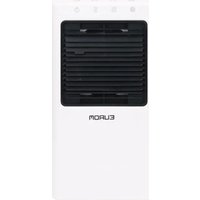
The Airflow LED Cordless is a powerbank operated fan with 9 speed settings. The device can be used with aromatic fragrance oil (for example to repel insects).
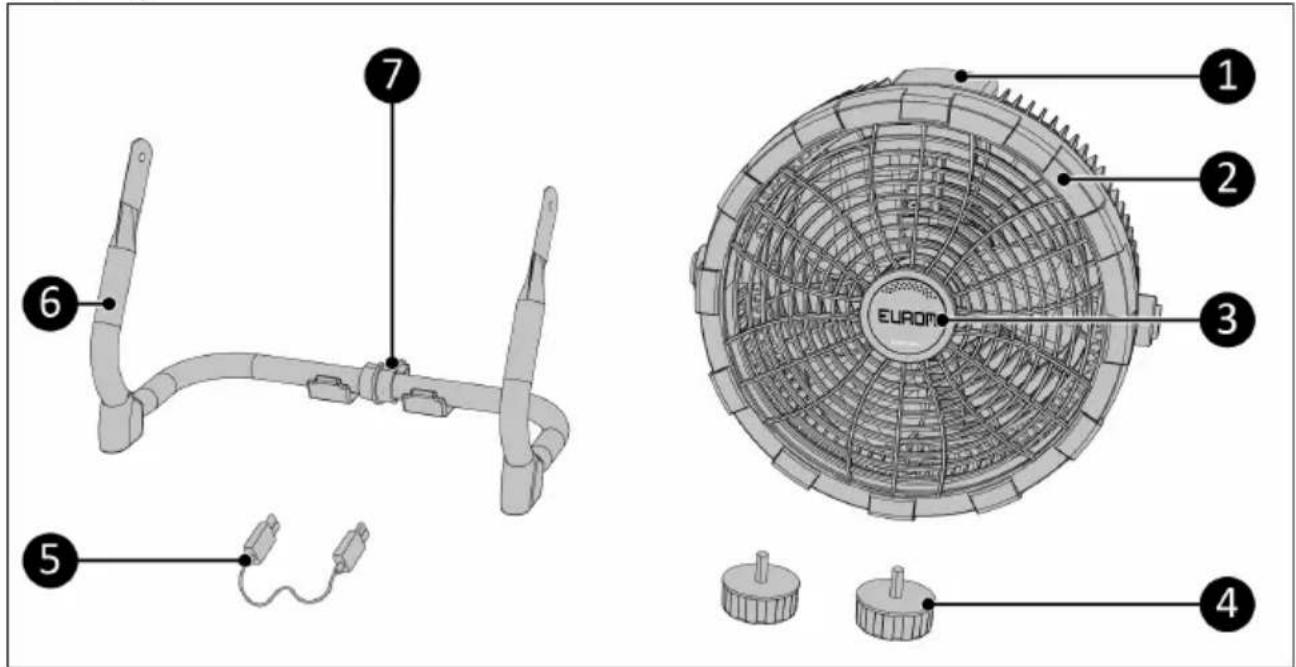
Unboxing
Figure 9.
| No. | Description No. Description | ||
| 1 | Handle 5 USB-C cable (Type-C cord) | ||
| 2 | Fan 6 Support | ||
| 3 | Compartment for aromatic fragrance oil (for example to repel insects) | 7 | Hanging hook |
| 4 | Adjustment screws |
Control panel
1.Light button
2. ON/OFF button
3. Wind speed button
4. Speed display
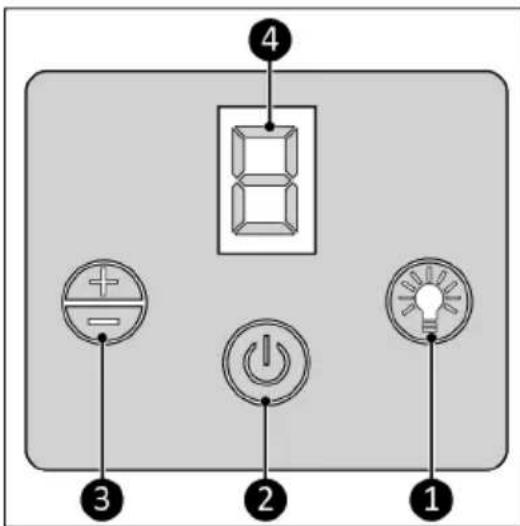
Figure 10.
Transport and storage
Clean the device before storing it.
- Do not crease the product by placing items on top of it during storage.
- Let the product cool down before storing it.
If the product remains unused for a long time the power bank should always be removed from the holder.
-Store this product in a ventilated, dry and cool place.
- Avoid heat and prolonged exposure to direct light.
Installation

WARNING
- The product should only be used with the suitable powerbank with an USB-C output from 5 Volt and minimum 3 Ampere. Never use powerbanks with other specifications!
- We strongly recommend use of the Varta powerbank (see the 2nd page of this manual).
- To charge the powerbank, use only the power cable supplied with the powerbank. Using any other power cable may cause irreparable damage to the product and the environment and may be dangerous.
- Read the separate manual from the powerbank before charging and using it.
Installing support
- Place the support (Figure 11, pos. 2) on a steady surface.
- Hold the fan (Figure 11, pos. 3) in the middle of the support and attach it with the 2 adjustment screws (Figure 11, pos. 1). Make sure the handle (Figure 11, pos. 4) is at the top.
- Adjust the angle of the fan by turning it manually and turn the adjustment screws clockwise to tighten the fan in place.
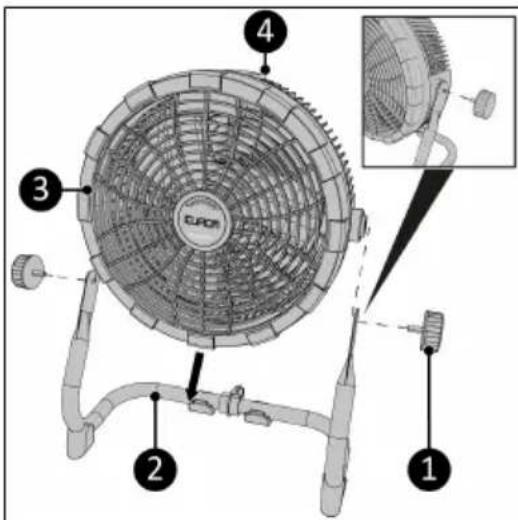
Figure 11.
Installing powerbank
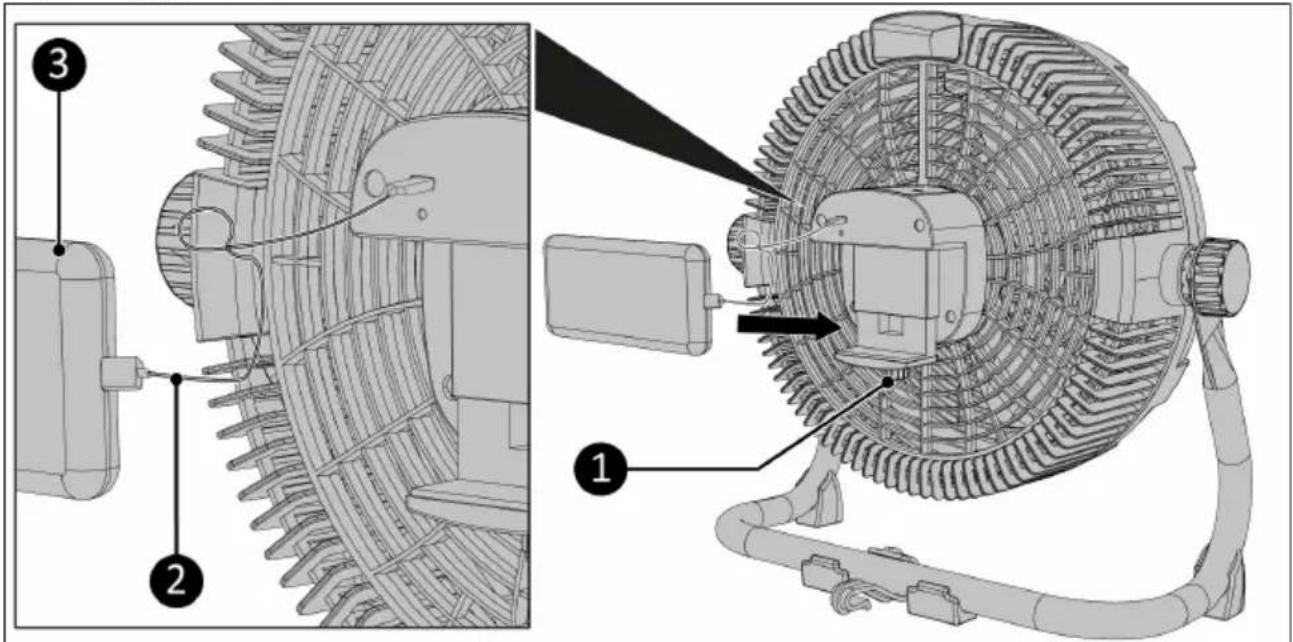
Figure 12.
- Turn the knob of the powerbank holder (Figure 12, pos. 1) counterclockwise to open the powerbank holder.
- Connect the powerbank (Figure 12, pos. 3) to the fan with the USB-C cable (Figure 12, pos. 2).
- Place the powerbank into the powerbank holder.
- Turn the knob of the powerbank holder (Figure 12, pos. 1) clockwise to close the powerbank holder until the powerbank is held securely in place.
Hanging the device on the ceiling
For easier operation of the control buttons it is recommended to hang the device as shown (Figure 13), with the control buttons facing downward.
- Rotate the hook on the support (Figure 13, pos. 1) to the right position.
- Hang the hook on a tent pole or other structure that can support the weight of the fan.
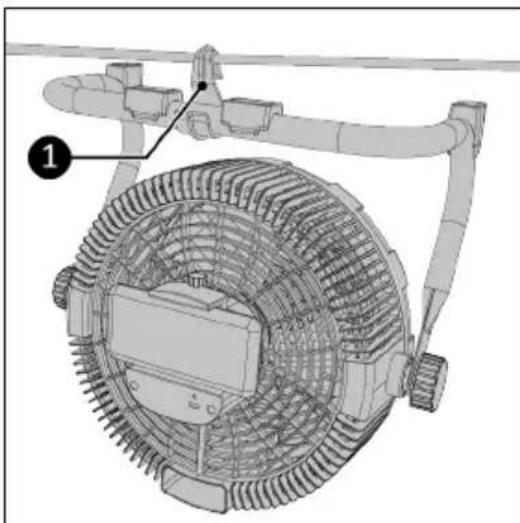
Figure 13.
Note:
Be careful when opening the anti-mosquito compartment in this position, as the sponge will fall out.
Operation

CAUTION
Make sure that the USB Type-C cord does not protrude through the fan grille.
There are 4 ways to power the Airflow LED Cordless:
1. By powerbank
- Connect one side of the Type-C cord to the USB-C output port of the powerbank.
- Connect the other side of the Type-C cord to the USB-C port on the device.
- Place the powerbank securely in the powerbank holder of the device.
2. Via 220/240 Volt 50 Hz socket
Use a USB-C mains adapter (not provided), which is intended for use with a household socket of 220-240 Volt / 50 Hz, output voltage of 5 Volt and an output capacity of minimum 3 Ampere. Never try to use a USB-C mains adapter with other voltages. The connection voltage and the frequency stated on the USB-C mains adapter must correspond with those of the socket that you use. The electrical installation must be equipped with a residual-current circuit breaker of 30mA.
- Connect one side of the Type-C cord to the USB-C output port of the adapter.
- Connect the other side of the Type-C cord to the USB-C port of the device.
- Connect the USB-C mains adapter to a suitable household socket.
3. Via a USB car adapter (the cigarette lighter)
Use a USB-C car adapter with an output voltage of 5 Volt and a output capacity of minimum 3 Ampere. Never try to use a USB-C mains adapter with other voltages. The connection voltage stated on the USB-C car adapter must correspond with those of the socket that you use and the electrical installation must be equipped with a circuit breaker.
- Connect one side of the Type C-cord to the USB-C output port of the adapter.
- Connect the other side of the Type-C cord to the USB-C port of the device.
- Connect the USB-C car adapter to a suitable cigarette lighter socket.
4. Via a 5 Volt USB-C port (e.g. a laptop or computer)
Use a USB-C port with an output voltage of 5 Volt and a output capacity of minimum 3 Ampere. Never try to use other USB-C ports.
- Connect one side of the Type-C cord to the USB-C output port.
- Connect the other side of the Type-C cord to the USB-C port on the device.
Turning on/off
-
Press the ON/OFF button to turn on the device.
The fan will start working with wind speed 6. The display will show 6. -
Press the ON/OFF button again to turn off the device.
Wind speed
The fan has 9 wind speeds which can be selected with the Wind speed button.
- Turn on the device.
- Press the Wind speed button once to increase the wind speed by one level. The display shows the active wind speed level (1-9).
- Keep pressing the Wind speed button to get to the desired wind speed. If the wind speed is at level 9 and the Wind speed button is pressed, the wind speed will change back to level 1.
Decorative lights
Press the Light button to adjust the setting of the decorative lights:
White high brightness
-White low brightness
- Yellow high brightness
- Yellow low brightness
OFF
Note:
The yellow lighting does not attract insects.
Compartment for aromatic fragrance oil (for example to repel insects)
- Disconnect the device from the power source.
- Press on the bottom of the round middle part of the front grille (Figure 14, pos. 1) to open the compartment.
- Remove the sponge (Figure 14, pos. 2) from the holder.
- Sprinkle the sponge with aromatic fragrance oil.
- If necessary, let the excess aromatic fragrance oil drain from the sponge.
- Place the soaked sponge back into the holder.
- Press on the top of the round middle part of the front grille to close the compartment.
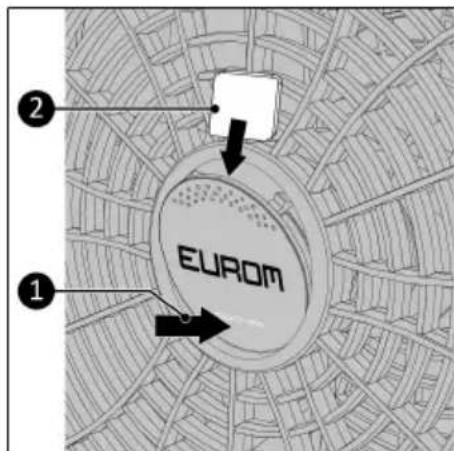
Figure 14.
Cleaning and maintenance

CAUTION
- Always disconnect the device from the power source before you clean it or service it.
- Never immerse the device in water or any other liquid.
- Never use abrasive, aggressive, or flammable cleaning agents such as bleach or alcohol to clean any part of the device.
- Regularly clean the outside of the fan to prevent dust from collecting.
Troubleshooting
When the fan is switching on and off continuously (especially at higher wind speed settings), the power source is insufficient. Immediately switch off the device and provide a suitable power source of 5 Volt and minimum 3 Ampere.
Disposal

This marking indicates that this product should not be disposed of with other household waste throughout the EU. To prevent possible harm to the environment or human health from uncontrolled waste disposal, recycle it responsibly to promote the sustainable reuse of material resources. To return your used device, please use the return and collection systems or contact the retailer where the product was purchased. They can take this product for environmentally safe recycling.
Airflow LED Cordless
Art.nr.384482
Batch B****
5VDC - 15 Watt - 3,0 A


EUROM - KOKOSSTRAAT 20 - 8281 JC - GENEMUIDEN - NETHERLANDS
Abbildung 15.
Spezifikationen
Airflow LED Cordless
Art.nr.384482
Batch B****
5VDC - 15 Watt - 3,0 A


Figure 22.
EUROM - KOKOSSTRAAT 20 - 8281 JC - GENEMUIDEN - NETHERLANDS
Spécifications
Installer le support
Airflow LED Cordless Version: v1.0
- Airflow LED Cordless
- User manual
- Varta powerbank and speed charger
- Order links
- Specifications
- Beschrijving
- Safety warnings powerbank (powerbank not included)
- General safety instructions
- Warranty
- Introduction
- CAUTION
- WARNING
- Identification
- Description
- Control panel
- Transport and storage
- Installation
- Installing support
- Installing powerbank
- Figure 12.
- Hanging the device on the ceiling
- Note:
- Operation
- By powerbank
- Via 220/240 Volt 50 Hz socket
- Via a USB car adapter (the cigarette lighter)
- Via a 5 Volt USB-C port (e.g. a laptop or computer)
- Turning on/off
- Wind speed
- Decorative lights
- Compartment for aromatic fragrance oil (for example to repel insects)
- Cleaning and maintenance
- Troubleshooting
- Disposal
- Spezifikationen
- Spécifications
- Installer le support
Brand : Eurom
Model : Airflow LED Cordless
Category : Climate control