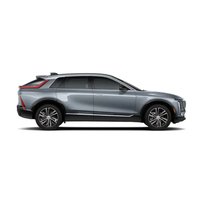
Lyriq (2026) - Car CADILLAC - Free user manual and instructions
Find the device manual for free Lyriq (2026) CADILLAC in PDF.


User questions about Lyriq (2026) CADILLAC
0 question about this device. Answer the ones you know or ask your own.
Ask a new question about this device
Download the instructions for your Car in PDF format for free! Find your manual Lyriq (2026) - CADILLAC and take your electronic device back in hand. On this page are published all the documents necessary for the use of your device. Lyriq (2026) by CADILLAC.
USER MANUAL Lyriq (2026) CADILLAC
Paper | Supporting responsible forestry
California Proposition 65 Warning

WARNING
Operating, servicing and maintaining a passenger vehicle or off-highway motor vehicle can expose you to chemicals including engine exhaust, carbon monoxide, phthalates, and lead, which are known to the State of California to cause cancer and birth defects or other reproductive harm. To minimize exposure, avoid breathing exhaust, do not idle engine except as necessary, service your vehicle in a well-ventilated area and wear gloves or wash your hands frequently when servicing your vehicle. For more information go to www.P65Warnings.ca.gov/passenger-vehicle.
Contents
Introduction ....1
Door Locks (In Case of Dead Battery) ......2
Seat Belts 2
Airbag System 2
Child Restraint Systems 2
Windshield Wiper/Washer 2
Warning Lights, Gauges, and Indicators ....3
Headlight Controls ....3
Hazard Warning Flashers 3
Driver Behavior 3
Brakes 4
Traction Control/Electronic Stability Control 4
Driver Assistance Systems ....4
Plug-In Charging 4
Hood 9
Underhood Compartment Overview .....10
Self-Sealing Tires 10
Jump Starting - North America 10
Transporting a Disabled Vehicle 13
Customer Assistance for Text Telephone (TTY) Users .... 14
Roadside Assistance Program 14
Reporting Safety Defects to the United States Government .... 15
Reporting Safety Defects to the Canadian Government ....15
Reporting Safety Defects to General Motors 15
Introduction
This document includes vehicle reference information for your vehicle. This document does not replace your Owner's Manual, which includes other important information, including warnings and precautions.
For complete operating information and instructions, see the Owner's Manual on the myCadillac app in the vehicle infotainment system, at www.cadillac.com, or on the myCadillac mobile app.
To verify your vehicle has a downloaded Owner's Manual in the infotainment system, go to the myCadillac app, touch the Settings icon, and touch Owner's Manual Details.
If your vehicle has a downloaded Owner's Manual, the downloaded version is accurate at the time of installation. To ensure you are viewing the most up-to-date, connected
version of the Owner's Manual, accept the Terms and Conditions and have an active Wi-Fi or data connection. Up-to-date versions of the Owner's Manual are also accessible at www.cadillac.com and on the myCadillac mobile app.
To view digital versions or to order printed versions of the Owner's Manual or warranty information, or to view additional vehicle information, scan the code below or visit cadillac.com/support/vehicle/manuals-guides (U.S.) or cadillaccanada.ca/en/support/vehicle/manuals-guides (Canada):


United States Canada
Keep this manual in the vehicle for quick reference.
Door Locks (In Case of Dead Battery)
Driver Door Key Lock Cylinder Access (In Case of Dead Battery)
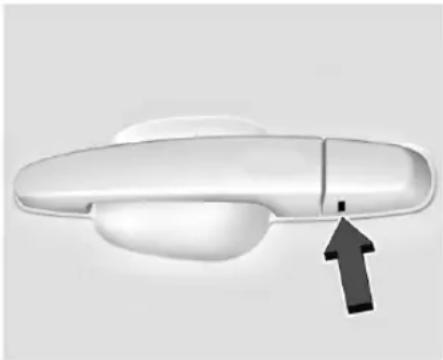
To access the driver door key lock cylinder and unlatch the door:
natural_image
Close-up of a white car door handle with a black arrow pointing to the side (no text or symbols)Sample Shown, Your Vehicle May Differ
- Insert the mechanical key into the slot at the bottom of the handle and push upward all the way until the cover frees. Do not pry or pull on the key.
-
Remove the cover.
-
Insert the mechanical key in the cylinder.
- Turn the mechanical key clockwise until it stops.
- Slowly turn the mechanical key counterclockwise while pulling the handle to unlatch the door.
- Repeat steps 4 and 5 if the door does not fully open.
To replace the cap:
- Align the top edge of the cover to the handle.
- Turn downward to snap cover into position.
- Check to ensure cap is fully seated.
Always make sure every vehicle occupant has properly adjusted their seat and head restraint, positioned and fastened their seat belt, and infants and young children are secured in appropriate child restraints. See your Owner's Manual for complete information on Seating and Restraints, Top Tether, and the LATCH System.
Your vehicle is equipped with airbags, marked in your vehicle with the word "AIRBAG". Airbags work together with seat belts and
other systems to help protect occupants in a crash. See your Owner's Manual for complete information on a seating, restraints, and airbags.
Child Restraint Systems
According to accident statistics, children are safer when properly restrained in a rear seating position. Infants and young children should always be secured in an appropriate child restraint. See your Owner's Manual for more information about child restraint usage, top tethers, and LATCH systems.
Windshield Wiper/Washer
Your vehicle is equipped with windshield wipers to help maintain visibility in inclement weather conditions. See your Owner's Manual for complete information about these systems.
With the vehicle on, move the windshield wiper lever to select the wiper speed.
For a single wipe, briefly move the wiper lever down. For several wipes, hold the wiper lever down.
Pull the windshield wiper lever toward you to spray windshield washer fluid and activate the wipers. The wipers will continue until
the lever is released or the maximum wash time is reached. When the windshield wiper lever is released, additional wipes may occur depending on how long the windshield washer has been activated.
Clear snow and ice from the wiper blades and windshield before using them. If frozen to the windshield, carefully loosen or thaw them. Damaged blades should be replaced.

Warning
In freezing weather, do not use the washer until the windshield is warmed. Otherwise the washer fluid can form ice on the windshield, blocking your vision.

Warning
Before driving the vehicle, always clear snow and ice from the hood, windshield, washer nozzles, roof, and rear of the vehicle, including all lights and windows. Reduced visibility from snow and ice buildup could lead to a crash.
Warning lights, gauges, and indicators can alert you to an issue with your vehicle. Some warning lights display briefly to show that they are working when you start the vehicle. However, if a warning light persists while driving, or if a gauge shows there may be a problem, be sure to refer to the sections under "Warning Lights, Gauges, and Indicators."
Paying attention to your vehicle's warning lights, gauges, and indicators and promptly addressing any issues may help you to prevent an expensive repair or personal injury. Postponing repairs can be costly and even dangerous.
Headlight Controls
Your vehicle is equipped with exterior lighting to help maintain visibility in dark and inclement weather conditions. See your Owner's Manual for complete information about these systems.
The headlight controls are part of your vehicle's virtual touch displays. Touch the light symbol on the infotainment screen, the control panel of the Driver Information Center (DIC), or the center console screen, to operate the headlights.
Hazard Warning Flashers
Your vehicle is equipped Hazard Warning Flashers to help increase your visibility in adverse conditions. See your Owner's Manual for complete information about these systems.
△: Press this button on the center stack, center console, or overhead console to make the front and rear turn signal lamps flash on and off. This warns others that you are having trouble. Press again to turn the flashers off. The turn signals do not work while the hazard warning flashers are on.
The hazard warning flashers turn on automatically if the airbags deploy.
Driver Behavior
Distracted, Drowsy, and Impaired Driving

Warning
Drinking alcohol or taking drugs and then driving is very dangerous. Your reflexes, perceptions, attentiveness, and judgment can be affected by even a small amount of
(Continued)
Warning (Continued)
alcohol or drugs. You can have a serious — or even fatal — collision if you drive after drinking or taking drugs.
Do not drive while under the influence of alcohol or drugs, or ride with a driver who has been drinking or is impaired by drugs. Find alternate transportation home; or if you are with a group, designate a driver who will remain sober.
Do not attempt to operate a vehicle if impaired in any way. This includes if under the influence of drugs or alcohol, exhibiting exhaustion, or while distracted.
Traveling with Children and Pets

Warning
Never leave a child, a helpless adult, or a pet alone in a vehicle, especially with the windows closed in warm or hot weather. They can be overcome by the extreme heat and suffer permanent injuries or even death from heat stroke.
If traveling with children, helpless adults, or pets, do not leave them unattended in the vehicle at any time. Always ensure to check for children, helpless adults, or pets before exiting the vehicle.
See your Owner's Manual for important information about your vehicle's braking systems, including the Antilock Braking System, which can help prevent a braking skid and maintain steering while braking hard.
Traction Control/Electronic Stability Control
The vehicle has a Traction Control System (TCS) and StabiliTrak/Electronic Stability Control (ESC). These systems help limit wheel spin and assist the driver in maintaining control, especially on slippery road conditions.
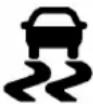
If equipped, this vehicle may have features that work together to help avoid crashes or reduce crash damage while driving, backing, and parking. Read the owner's manual for more important feature limitations and information before using these systems.
Plug-In Charging
Caution
To avoid damage to the vehicle, make sure the charging cord plug is in good condition, is not worn or damaged, and is connected securely to the vehicle's charging port. If vehicle charging is intermittent, disconnect the cord and inspect for damage. An excessively worn or damaged AC or DC charging cord plug may result in an intermittent connection and potential damage to the vehicle's charging port.
Plug-in charge times vary based on the battery condition, charge level, outside temperature, and charge station capability. See your owner's manual for charge mode selection.
Do not allow the vehicle to remain in temperature extremes for long periods without being driven or plugged in. When temperatures are below 0 °C (32 °F) and above 32 °C (90 °F), plug in the vehicle to maximize high voltage battery life.
In extreme temperature conditions, a full charge will take additional time.
Charging slows down as the battery recharges. Charge the battery to 80% for daily driving, or when driving in mountainous terrain. The vehicle can be charged above 80% for long trips when not driving in mountainous terrain.
GM recommends the following:
- Unless your drive requires a full charge, charge the high voltage battery to 80% or less.
- Avoid allowing the high voltage battery to fall below 20% charged, if possible. See your owner's manual.
- If your route includes steep mountain terrain or if you are towing a trailer, it is important that your battery charge level is 80% or less to maximize regenerative braking performance.
It is normal to hear fans, pumps, and electrical devices clicking while the vehicle is turned off and charging.
The vehicle does not require indoor charging area ventilation before, during, or after charging.
The vehicle cannot be driven while the charge cord is plugged into the vehicle.

Warning
Use of charge cord adaptors may cause electrical overheating, resulting in vehicle damage or personal injury. Only use GM approved adaptors with the charge cord.
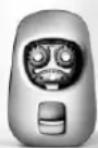
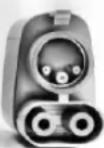
To charge your vehicle, it may be necessary to use a special adapter to match the format of the charger you intend to use. The most common adapter for GM vehicles is a North American Charging Standard on a DC Fast Charger to CCS (the connector on your vehicle). If you
use an adapter which is not sold, provided, or approved by General Motors and it causes damage to your vehicle's battery, said damage would not be covered under warranty.
There are several infotainment screens that will display depending on the current charging status. See your owner's manual.
If 12-volt battery power is lost, do not attempt to manually open the charge port door.
The charge port does not charge the 12-volt battery. Once the 12-volt battery is recharged or jumped, the charge port door can be opened and the vehicle can be charged.
Charging Override
A CHARGING OVERRIDE/INTERRUPTION OCCURRED message may display to indicate that a charging override or interruption has occurred due to one or more of the following events:
- Override of the charge settings by the owner.
- Unintended interruption of AC power at the vehicle's charge port.
- Interruption of charging by the utility company.
AC Charging
If equipped, a loss of AC power alert may sound briefly if AC power is lost for over one minute. This sound alert can be turned off. See your owner's manual.
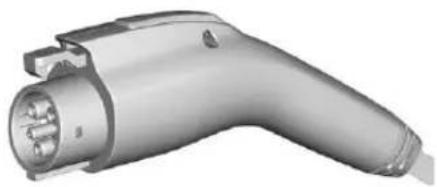
natural_image
3D rendering of an electric vehicle charging plug (no text or symbols visible)AC Charge Cord Vehicle Plug
To Start AC Charging
- Put the vehicle in P (Park).
natural_image
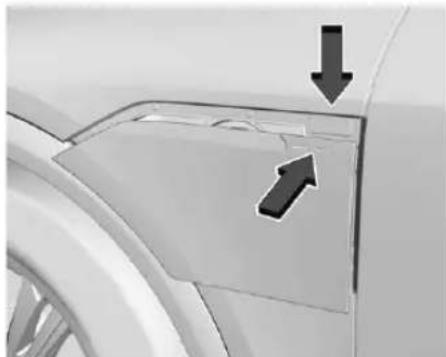
Close-up of a car's front panel showing a cutout with arrows indicating direction (no text or symbols)-
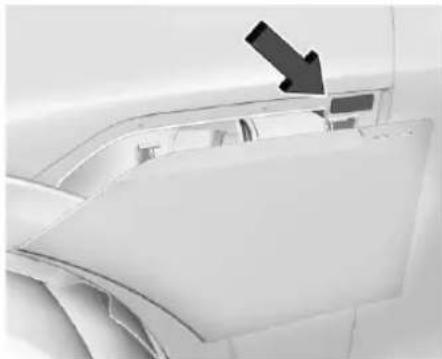
Push and release the top right corner of the charge port door to open it. In cold weather conditions, ice may form around the charge port door. Remove ice from the area before attempting to open or close the charge port door.
-
Open the liftgate, lift the load floor cover, and remove the charge cord.
-
Plug the charge cord into the electrical outlet. To verify the charge cord status, see your owner's manual. For instructions to set cord limit settings for a charge session, see your owner's manual.
-
Plug in the AC charge cord into the vehicle charge port. Make sure the AC vehicle plug is fully connected to the AC charge port. If it is not properly connected, the vehicle may not charge.
-
Verify that the charge status light turns on and an audible chirp occurs. See your owner's manual.
To End AC Charging
- Unlock the charge cord from the vehicle by pressing the button on the top of the charge cord plug. Unplug the charge cord from the vehicle. The charge port door will automatically close when the vehicle is shifted out of P (Park).
natural_image
Close-up of a car's front panel with a black arrow pointing to the door (no visible text or symbols)-
Press the button to manually close the charge port door.
-
Unplug the charge cord from the electrical outlet.
-
Place the charge cord into the storage compartment.
DC Charging
DC Charging Station Hardware

Warning
Do not use the charging station if the handle has defects such as cracks, exposed wires, burnt or missing pins, or any other damage. A damaged handle may result in personal injury and/or damage to the vehicle, the charging port or other property.
You can charge the vehicle using DC charging equipment typically found at service stations and other public locations.
This vehicle is compatible with a Combined Charging System 1 (CCS1) connector. Check the charging station DC vehicle plug for compatibility with the DC charge port on this vehicle.
When recharging at a DC charge station, the charging cable connected to the vehicle must be less than 10 m (33 ft) in length to meet functionality and regulatory requirements.
For maximum charging performance, and to prevent charging interruptions or damage to the high voltage battery and vehicle:
- Remove your hands from the charging handle once it has been plugged in. If not done, this can cause a charging interruption.
- Ensure that the charge cord plug clicks.
Follow the steps listed on the charging station to perform a DC vehicle charge.
If for any reason DC charging does not begin or is interrupted, check the DC charging station display for messages. Unplug the cord to restart the DC charging process.
To Start DC Charging
Caution
Do not attempt to disconnect the DC vehicle plug while charging is active. This action may damage the vehicle or charging station hardware.
- Put the vehicle in P (Park).
natural_image
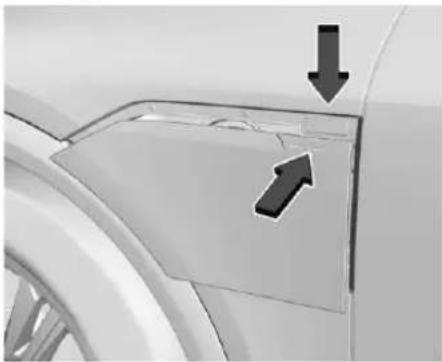
Close-up of a car's front panel with arrows pointing to the side panel (no text or symbols visible)- Push and release the top right corner of the charge port door to open it. In cold weather conditions, ice may form around the charge port door. Remove ice from the area before attempting to open or close the charge port door.
natural_image
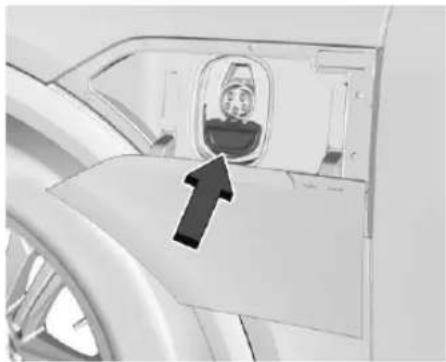
Interior view of a vehicle showing an airplane window with a person inside, marked by an arrow (no text or symbols visible)- Unlatch the DC charging dust cover and lower it fully.
- Plug in the DC charge cord into the vehicle charge port. Make sure that the DC vehicle plug is fully connected to the DC charge port. If it is not properly connected, the vehicle may not charge. Check the Driver Information Center (DIC) to make sure the vehicle plug is connected properly.
- Follow the steps listed on the charging station to start charging.
-
When charging is active, the DC vehicle plug is locked to the DC charge port and cannot be disconnected.
-
Verify that the charge status light turns on and an audible chirp occurs. See your owner's manual.
To End DC Charging
When the vehicle is fully charged, charging automatically stops and the plug unlocks. You can also manually stop charging using the button on the DC vehicle plug, the controls at the charging station, or by tapping "Stop" on the Charging screen on the infotainment display.
If the vehicle plug does not unlock from the vehicle charge port after a charge, contact Roadside Assistance or use the emergency manual charge cord release. See Roadside Assistance Program 14 and "Emergency Manual Charge Cord Release" later in this section.
- Unplug the DC vehicle plug from the DC charge port on the vehicle and close the dust cover.
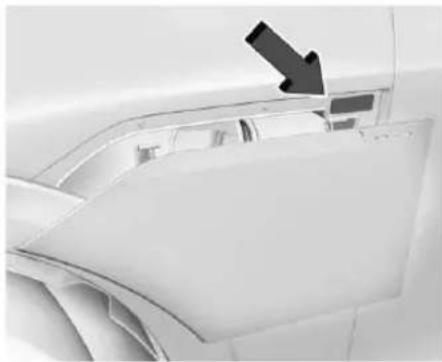
- The charge port door will automatically close when the vehicle is shifted out of P (Park).
natural_image
Close-up of a white car's front panel with a black arrow pointing to the side panel (no text or symbols visible)- Press the button to manually close the charge port door.
Emergency Manual Charge Cord Release
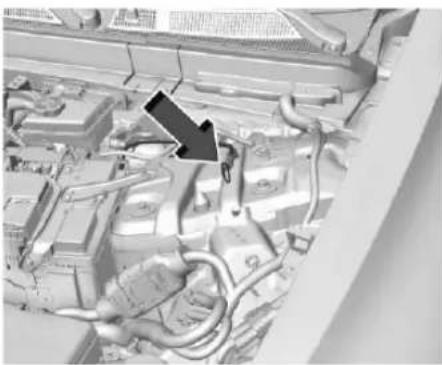
This vehicle is equipped with an emergency manual charge cord release in the event the DC vehicle plug does not release normally.
- Open the hood. See Hood 9.
natural_image
Close-up of an automotive engine bay with visible hoses and components (no text or symbols)- Pull the emergency manual charge cord release handle. The DC charge cord will release.
To Stop AC or DC Charging
Use the controls on the charging station to stop the charge process at any time.
To stop charging when inside the vehicle, use the Stop Charge button on the Charging screen. See "Active Charging" in your owner's manual.
Hood

Warning
Components under the hood can get hot. To help avoid the risk of burning unprotected skin, never touch these components until they have cooled, and always use a glove or towel to avoid direct skin contact.
To open the hood:
Caution
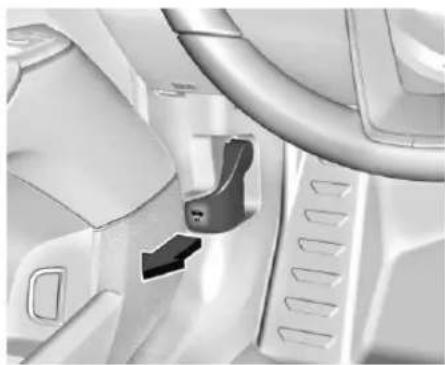
The hood release handle can become damaged if pulled while the driver side door is closed. Open the driver side door to pull the hood release handle. Do not use the hood release handle when the driver side door is closed.
- Open the driver's door to enable the hood release handle's full range of motion.
- Pull the hood release handle on the lower left side of the instrument panel.
natural_image
Close-up of a car seatbelt mechanism with visible brackets and control panel (no text or symbols)- Release the handle, then pull the handle again to fully open the hood.
- Go to the front of the vehicle and lift the hood open.
To close the hood:

Warning
Do not drive the vehicle if the hood is not latched completely. The hood could open fully, block your vision, and cause a crash. You or others could be injured. Always close the hood completely before driving.
- Be sure all filler caps are on properly, and all tools are removed.
- Lower the hood down until the strut system is no longer holding up the hood.
- Allow the hood to fall. Check to make sure the hood is latched completely. Repeat this process with additional force if necessary.
- If the hood does not latch, a message will display on the Driver Information Center (DIC) indicating the vehicle will not shift out of (P) Park. To override this function, press and hold the brake pedal until override completion message is displayed on DIC.
Underhood Compartment
Overview
natural_image
Interior view of a car dashboard with visible engine, motors, and structural components (no text or labels)-
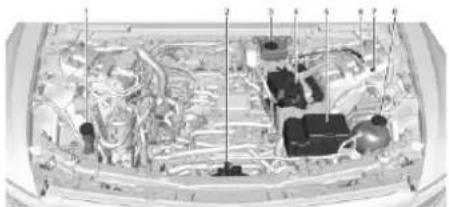
Windshield Washer Fluid Reservoir. See your owner's manual.
-
Hood Latch. See Hood 9.
- Brake Fluid Reservoir. See your owner's manual.
- Battery Positive (+) Terminal. See your owner's manual.
- Fuse Block. See your owner's manual.
- Charging Port Manual Cord Release. See Plug-In Charging 4.
- Battery Negative (−) Grounding Point. See Jump Starting - North America ➔ 10.
- High Voltage Battery Coolant Reservoir. See your owner's manual.
Self-Sealing Tires
| Caution |
| Do not drive on a deflated self-sealing tire as this could damage the tire. Make sure the tire is inflated to the recommended pressure or have it immediately repaired or replaced. |
This vehicle may have self-sealing tires. These tires have a material inside that can seal punctures from common road hazards, such
as nails and screws, in the tread area. The tire may lose air pressure if the sidewall is damaged or the tread puncture is too large. If the Tire Pressure Monitor System indicates the tire pressure is low, inspect the tire for damage and inflate it to the recommended pressure. If the tire is unable to maintain the recommended pressure, contact the nearest authorized GM servicing facility immediately for inspection and repair or replacement. To locate the nearest GM servicing facility, call GM Customer Assistance.
When tire replacement is needed, replace with a self-sealing tire, because the vehicle does not come with a spare tire or tire changing equipment.
Jump Starting - North America
For more information about the vehicle battery, see your owner's manual.
If the battery has run down, try to use another vehicle and some jumper cables to start your vehicle. Be sure to use the following steps to do it safely.

Warning
WARNING: Battery posts, terminals and related accessories can expose you to chemicals including lead and lead compounds, which are known to the State of California to cause cancer and birth defects or other reproductive harm. Wash hands after handling. For more information go to www.P65Warnings.ca.gov.
See California Proposition 65 Warning ➔ 1.

Warning
Batteries can hurt you. They can be dangerous because:
• They contain acid that can burn you.
• They contain gas that can explode or ignite.
• They contain enough electricity to burn you.
Use eye protection when handling the battery. If you do not follow these steps exactly, some or all of these things can hurt you.

Warning
Charging the 12-volt battery and the high voltage battery at the same time may result in overheating or failure. Do not attempt to charge the 12-volt battery and the high voltage battery at the same time. If jumpstarting fails, see your dealer for service.
Caution
The vehicle is equipped with an AGM/VRLA 12-volt battery, which can be damaged by using the incorrect type of trickle charger. An AGM/VRLA-compatible charger must be used, with the appropriate setting selected. Follow the trickle charger manufacturer instructions.
Caution
Ignoring these steps could result in costly damage to the vehicle that would not be covered by the vehicle warranty. Trying to start the vehicle by pushing or pulling it will not work, and it could damage the vehicle.
Caution
If the jumper cables are connected or removed in the wrong order, electrical shorting may occur and damage the vehicle. The repairs would not be covered by the vehicle warranty. Always connect and remove the jumper cables in the correct order, making sure that the cables do not touch each other or other metal.
text_image
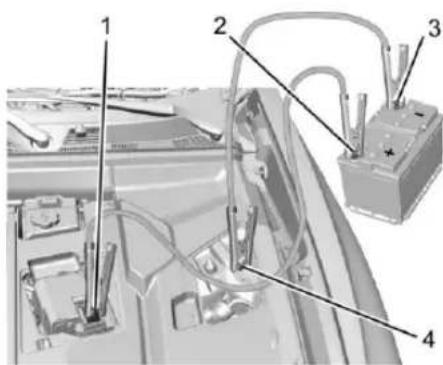
Technical diagram of a car battery assembly with numbered components and wiring labelsConnection Points and Sequence
- Discharged Battery Positive (+) Terminal
-
Good Battery Positive (+) Terminal
-
Good Battery Negative (-) Terminal
- Discharged Battery Negative (-) Grounding Point
The discharged battery positive (+) terminal and the discharged battery negative (−) grounding point are on the driver side of the vehicle.
The good battery negative (−) terminal and the good battery positive (+) terminal are on the battery of the vehicle providing the jump start.
The discharged battery positive (+) terminal and the discharged Battery Negative (−) Grounding Point are under a covers. Remove the cover to expose the terminal.
Caution
If the other vehicle does not have a 12-volt system with a negative ground, both vehicles can be damaged. Only use a vehicle that has a 12-volt system with a negative ground for jump starting.
- Check the other vehicle. It must have a 12-volt battery with a negative ground system.
Caution
If the vehicles touch each other while jump starting, a ground connection may occur that disables your vehicle and/or damages the electrical systems of one or both vehicles.
- Get the vehicles close enough so the jumper cables can reach, but make sure the vehicles are not touching each other.
To avoid the possibility of the vehicles rolling, set the parking brake firmly on both vehicles involved in the jump start procedure. Put the vehicles into P (Park). If the other vehicle has a manual transmission, put the vehicle in N (Neutral) before setting the parking brakes.
Caution
If any accessories are left on or plugged in during the jump starting procedure, they could be damaged. The repairs would not be covered by the vehicle warranty. Whenever possible, turn off or unplug all accessories on either vehicle when jump starting.
- Turn off both vehicles. Unplug unnecessary accessories plugged into the cigarette lighter or the accessory power outlet. Turn off the radio and all lights that are not needed.
- Open the hood. See Hood 9.
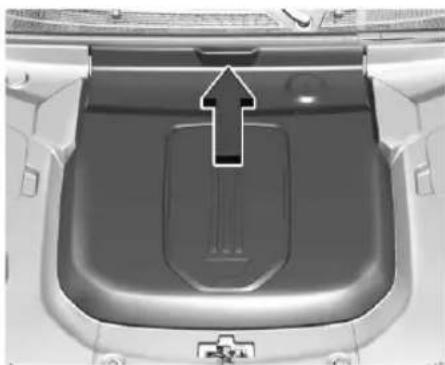
natural_image
Top-down view of a car's rear intake manifold with a black arrow pointing to the lid area (no text or symbols visible)- To open the lid, pull the handle to disengage the clips and remove the cover.
- Locate the battery positive (+) terminal and negative (−) grounding point.
-
Check that the jumper cables do not have loose or missing insulation. If they do, you could get a shock. The vehicles could be damaged too.
-
Connect one end of the red positive (+) cable to the discharged battery positive (+) terminal. Do not let the other end touch metal.
- Connect the other end of the red positive (+) cable to the good battery positive (+) terminal.
- Connect one end of the black negative (-) cable to the good battery negative (-) terminal. Do not let the other end touch anything until the next step.
- Connect the other end of the negative (−) cable to the discharged battery negative (−) grounding point.
- Now start the vehicle with the good battery and keep the vehicle running for a while.
- Try to start the vehicle that had the dead battery. If it will not start after a few tries, it probably needs service.
Jumper Cable Removal
Reverse steps 9–12 exactly when removing the jumper cables.
After starting the disabled vehicle and removing the jumper cables, allow it to idle for several minutes.
Transporting a Disabled Vehicle
Caution
Incorrectly transporting a disabled vehicle may cause damage to the vehicle. Use proper tire straps to secure the vehicle to the flatbed tow truck. Do not strap or hook to any frame, underbody, or suspension component not specified below. Do not move vehicles with drive axle tires on the ground. Damage is not covered by the vehicle warranty.
Caution
The vehicle may be equipped with an Electric Parking Brake (EPB) and/or an electronic shifter. In the event of a loss of 12-volt battery power, the EPB cannot be released, and the vehicle cannot be shifted to N (Neutral). Tire skates or
(Continued)
Caution (Continued)
dollies must be used under the non-rolling tires to prevent damage while loading/unloading the vehicle. Dragging the vehicle will cause damage not covered by the vehicle warranty.
Caution
The vehicle may be equipped with a tow eye. Improper use of the tow eye may cause damage to the vehicle and is not covered by the vehicle warranty. If equipped, use the tow eye to load the vehicle onto a flatbed tow truck from a flat road surface, or to move the vehicle a very short distance at a walking pace. The tow eye is not designed for off-road recovery. The vehicle must be in N (Neutral) with the Electric Parking Brake (EPB) released when using the tow eye.
Contact a professional towing service if the disabled vehicle must be transported. GM recommends a flatbed tow truck to transport a disabled vehicle. Use ramps to help reduce approach angles, if necessary.
If equipped, a tow eye may be located near the spare tire or emergency jack. Do not use the tow eye to pull the vehicle from snow, mud, sand, or a ditch. Tow eye threads may have right- or left-hand threads. Use caution when installing or removing the tow eye.
The vehicle must be in N (Neutral) and the electric parking brake must be released when loading the vehicle onto a flatbed tow truck.
- If the vehicle will not start but still has 12-volt battery power, press and hold the brake pedal for 60 seconds and shift into N (Neutral).
- If the vehicle is equipped with car wash mode and has 12-volt battery power, see "Car Wash Mode" in your owner's manual to place the vehicle in N (Neutral).
- If the 12-volt battery is dead and/or the vehicle will not start, the vehicle will not move. Try to jump start the vehicle. See Jump Starting - North America → 10 and if the jump start is successful, retry the "Car Wash Mode" procedure.
- If jump starting is unsuccessful, the vehicle will not move. Tire skates or dollies must be used under the non-rolling tires to prevent vehicle damage.
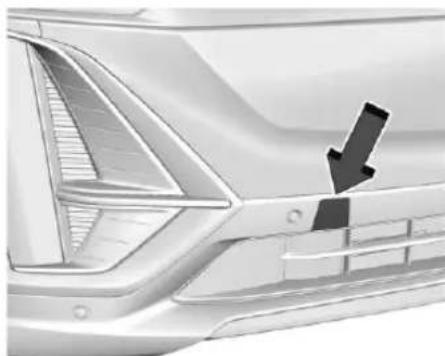
Front Tow Eye Attachment Point
natural_image
Close-up of a car's side profile showing the front and rear panels with a black arrow pointing to a specific area (no text or symbols visible)- Carefully open the cover on the fascia by using the small notch that conceals the tow eye socket.
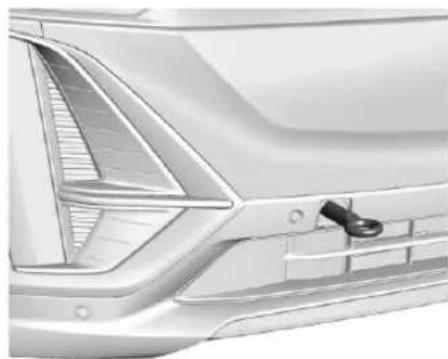
natural_image
Side profile of a modern car's front bumper and side panel (no visible text or symbols)- Install the tow eye into the socket and turn it until it is fully tightened. When the tow eye is removed, reinstall the cover with the notch in the original position.
Customer Assistance for Text Telephone (TTY) Users
To assist customers who are deaf, hard of hearing, or speech-impaired and/or who use Text Telephones (TTYs), please dial the national 711 relay service and contact 1-800-833-2438. TTY users in Canada can dial 1-800-263-3830.
Roadside Assistance Program
U.S.: 1-844-515-1420.
Canada: 1-844-637-1757.
Text Telephone (TTY) Users (U.S.
Only): 1-888-889-2438.
Reporting Safety Defects to the United States Government
If you believe that your vehicle has a defect which could cause a crash or could cause injury or death, you should immediately inform the National Highway Traffic Safety Administration (NHTSA) in addition to notifying General Motors.
If NHTSA receives similar complaints, it may open an investigation, and if it finds that a safety defect exists in a group of vehicles, it may order a recall and remedy campaign. However, NHTSA cannot become involved in individual problems between you, your dealer, or General Motors.
To contact NHTSA, you may call the Vehicle Safety Hotline toll-free at 1-888-327-4236 (TTY: 1-877-561-7439); go to https://www.safercar.gov; or write to:
Administrator, NHTSA
1200 New Jersey Avenue, S.E.,
Washington, D.C., 20590
You can also obtain other
information about motor vehicle safety
from https://www.safercar.gov.
Reporting Safety Defects to the Canadian Government
If you live in Canada, and you believe that the vehicle has a safety defect, notify Transport Canada immediately, and notify General Motors of Canada Company. Call Transport Canada at 1-800-333-0510; go to:
www.tc.gc.ca/recalls (English)
www.tc.gc.ca/rappels (French)
or write to:
Transport Canada
Motor Vehicle Safety Directorate
Defect Investigations and Recalls Division
80 Noel Street
Gatineau, QC J8Z 0A1
Reporting Safety Defects to General Motors
In addition to notifying NHTSA (or Transport Canada) in a situation like this, notify General Motors.
In the U.S., call 1-800-458-8006, or write:
Cadillac Customer Assistance Center
Cadillac Motor Car Division
P.O. Box 33169
Detroit, MI 48232-5169
In Canada, call 1-888-446-2000, or write:
Canadian Cadillac Customer Care Centre
General Motors of Canada Company 500 Wentworth Street W
Oshawa, ON L1J 0C5
In Mexico, call 800-466-0805 or 800-212-2345.
In other Central America and Caribbean
Countries, call 52-555-901-2369.

LYRIQ
RENSEIGNEMENTS DE RÉFÉRENCE SUR LE VÉHICULE


85032853 A
2026

MIX Paper | Supporting responsible forestry Papier | Pour une gestion forestière responsable Papel | Apoyando la silvicultura responsable FSC® C132124
Essuie-glace/Lave-glace ....3
natural_image
Close-up of a white car door handle with a black arrow pointing to the side (no text or symbols)Essuie-glace/Lave-glace
natural_image
3D rendering of an electric vehicle charging plug (no text or symbols visible)natural_image
Close-up of a car's front panel with arrows pointing to the edge (no text or symbols visible)natural_image
Close-up of a car's front panel showing the door and seat area with a black arrow pointing to the side (no text or symbols visible)natural_image
Close-up of a car's front panel corner with arrows pointing to the edge (no text or symbols visible)natural_image
Interior view of an airplane cockpit with a passenger inside, showing the window and side wheel (no text or symbols visible)natural_image
Close-up of a car's front panel showing the hood and side panels, with a black arrow pointing to a specific area (no text or symbols visible)natural_image
Interior view of a car engine bay with visible hoses and components (no text or symbols)natural_image
Close-up of a car interior showing steering wheel, dashboard, and seatbelt mechanism (no text or symbols visible)natural_image
Interior view of a car dashboard with visible engine, motors, and structural components (no text or labels)text_image
Technical diagram of a car battery pack with numbered components and wiring labelsnatural_image
Top-down view of a car's rear vent with a highlighted arrow pointing to the side panel (no text or symbols visible)natural_image
Close-up of a car's front bumper with a black arrow pointing to the side panel (no text or symbols visible)natural_image
Side profile of a modern car's front bumper and side panel (no text or symbols visible)Administrator, NHTSA 1200 New Jersey Avenue, S.E., Washington, D. C., 20590
500 Wentworth Street W
Oshawa, MARCHE L1J 0C5