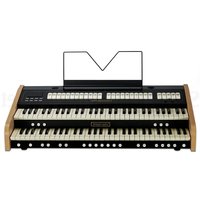
Cantorum Duo - Electronic musical instrument Viscount - Free user manual and instructions
Find the device manual for free Cantorum Duo Viscount in PDF.


| Product type | Electronic musical instrument (digital organ) |
| Brand | Viscount |
| Model | Cantorum Duo |
| Keyboards | 2 manuals (61 keys each, velocity-sensitive) |
| Pedalboard | External MIDI pedalboard (connectable via MIDI IN) |
| Sound generation | Physis technology (physical modeling) |
| Polyphony | 128 voices |
| Organ styles | 4 styles: Baroque, North European Baroque, Romantic, Symphonic |
| Effects | Reverb (8 types: Cathedral, Basilica, Gothic Church, etc.), Tremolo (adjustable speed and depth) |
| Equalizer | 7-band graphic EQ (100 Hz - 10 kHz) for internal amp and line outputs |
| Sequencer | Internal: MIDI recording and playback (Standard MIDI File format, up to 256 songs) |
| Combinations | 6 general combinations, Tutti, Crescendo (32 levels) – memorizable |
| Temperaments | Numerous historical temperaments (Meantone, Werckmeister, Kirnberger, etc.) |
| Connectivity | MIDI IN/OUT, USB (key), Jacks OUT 1/2 (L/Mono-R), Jacks PEDAL (2), SUSTAIN, EXPR., CRESC., INPUT (stereo), PHONES, mains power connector |
| Power supply | Mains 100-240 V, 50/60 Hz (cable included) |
| Power consumption | Approximately 40 W |
| Dimensions (W x D x H) | 120 cm x 45 cm x 30 cm (estimated) |
| Weight | Approximately 25 kg |
| Main functions | Style programming, combinations, MIDI settings, USB recording, operating system update |
| Maintenance and cleaning | Use a soft dry cloth; do not use detergents, solvents, or alcohol |
| Safety | Do not open the instrument; entrust any repairs to qualified personnel |
| Spare parts and repairability | Not specified; contact Viscount technical support |
| General information | Manufactured by Viscount; manual available in French (166 pages) |
Frequently Asked Questions - Cantorum Duo Viscount
User questions about Cantorum Duo Viscount
0 question about this device. Answer the ones you know or ask your own.
Ask a new question about this device
Download the instructions for your Electronic musical instrument in PDF format for free! Find your manual Cantorum Duo - Viscount and take your electronic device back in hand. On this page are published all the documents necessary for the use of your device. Cantorum Duo by Viscount.
USER MANUAL Cantorum Duo Viscount
| VOLUMES | |||
| PEDAL | -4 | OUT 1 | -8 |
| MAN I | MAX | OUT 2 | -8 |
| MAN II | -11 | INPUT | -30 |
![SETTINGS PAGE 3/3 SECURITY ▶ [ENTER] CONTROLS ▶ FACTORY SETT. ▶ SYSTEM ▶](/content/2026/04/723650/images/f17437bae7431666929d86dfe6910928c20a428792e69372dcd429274bb97a55.jpg)
| MIDI CHANNELS | ||
| TX | RX | |
| PEDAL | 4 | 4 |
| MANUAL I | 2 | 2 |
| MANUAL II | 1 | 1 |
| MANUAL I PAGE 1/3 | |
| Bourdon 16 | +3 |
| Principal 8 | +1 |
| Rohrflöte 8 | -2 |
| Viola 8 | 0 |
| Octave 4 | +4 |
other
| Category | Value | | -------- | ----- | | A | 1 | | B | 2 | | C | 3 | | D | 4 | | E | 5 | | F | 6 | | G | 7 | | H | 8 | | I | 9 | | J | 10 | | K | 11 | | L | 12 | | M | 13 | | N | 14 | | O | 15 | | P | 16 | | Q | 17 | | R | 18 | | S | 19 | | T | 20 | | U | 21 | | V | 22 | | W | 23 | | X | 24 | | Y | 25 | | Z | 26 | | AA | 27 | | AB | 28 | | AC | 29 | | AD | 30 | | AE | 31 | | AF | 32 | | AG | 33 | | AH | 34 | | AI | 35 | | AJ | 36 | | AK | 37 | | AL | 38 | | AM | 39 | | AN | 40 | | AO | 41 | | AP | 42 | | AQ | 43 | | AR | 44 | | AS | 45 | | AT | 46 | | AU | 47 | | AV | 48 | | AW | 49 | | AX | 50 | | AY | 51 | | AZ | 52 | | BA | 53 | | BB | 54 | | BC | 55 | | BD | 56 | | BE | 57 | | BF | 58 | | BG | 59 | | BH | 60 | | BI | 61 | | BJ | 62 | | BK | 63 | | BL | 64 | | BM | 65 | | BN | 66 | | BO | 67 | | BP | 68 | | BP1 | 69 | | BP2 | 70 | | BP3 | 71 | | BP4 | 72 | | BP5 | 73 | | BP6 | 74 | | BP7 | 75 | | BP8 | 76 | | BP9 | 77 | | BP10 | 78 | | BP11 | 79 | | BP12 | 80 | | BP13 | 81 | | BP14 | 82 | | BP15 | 83 | | BP16 | 84 | | BP17 | 85 | | BP18 | 86 | | BP19 | 87 | | BP20 | 88 | | BP21 | 89 | | BP22 | 90 | | BP23 | 91 | | BP24 | 92 | | BP25 | 93 | | BP26 | 94 | | BP27 | 95 | | BP28 | 96 | | BP29 | 97 | | BP30 | 98 | | BP31 | 99 | | BP32 | 100 | The chart displays a circular layout centered around 'Equal'. The labels above the diagram are 'Pure', 'ETS12 Mesentons', and 'ETS12'. The values are estimated based on the 'ETS12 Mesentons' label. The numbers inside the circle represent the corresponding values for each category. The text below it reads 'pure pure 5th ETS12: Equal Tempered 5th sec synthetic comms pc pythagorean comms'.other
| Phase | Value | |-------------|-----------| | Pure | -1/6 pc | | -1/6 pc | -1/6 pc | | -1/6 pc | -1/6 pc | | -1/6 pc | -1/6 pc | | -1/6 pc | -1/6 pc | | Pure | -1/6 pc | | Pure | -1/6 pc | | Pure | -1/6 pc | | Pure | -1/6 pc | | Pure | -1/6 pc | | Pure | -1/6 pc | | Pure | -1/6 pc | | Pure | -1/6 pc | | Pure | -1/6 pc | | Pure (Pune) | -1/6 pc | | Pure (BTIS12: Equal Tempered 5th sec synthetic commsp: pythagorean comms) | -1/6 pc | | Pure (Pune) | -1/6 pc | | Pure (BTIS12: Meanstone) | -1/6 pc | | Pure (Pune) | -1/6 pc | | Pure (BTIS12: Meanstone) | -1/6 pc | | Pure (Pune) | -1/6 pc | | Pure (BTIS12: Meanstone) | -1/6 pc | | Pure (Pune) | -1/6 pc | | Pure (BTS12: Meanstone) | -1/6 pc | | Pure (Pune) | -1/6 pc | | Pure (BTS12: Meanstone) | -1/6 pc | | Pure (Pune) | -1/6 pc | | Pure (BTS12: Meanstone) | -1/6 pc | | Pure (Pune) | -1/6 pc |CHAUMONT
other
| Line | Peak Amplitude | |------|----------------| | C | -1/4 sc | | D | -1/sc | | E | -1/sc | | F | -1/sc | | G | -1/sc | | H | -1/sc | | I | -1/sc | | J | -1/sc | | K | -1/sc | | L | -1/sc | | M | -1/sc | | N | -1/sc | | O | -1/sc | | P | -1/sc | | Q | -1/sc | | R | -1/sc | | S | -1/sc | | T | -1/sc | | U | -1/sc | | V | -1/sc | | W | -1/sc | | X | -1/sc | | Y | -1/sc | | Z | -1/sc | | AA | -1/sc | | AB | -1/sc | | AC | -1/sc | | AD | -1/sc | | AE | -1/sc | | AF | -1/sc | | AG | -1/sc | | AH | -1/sc | | AI | -1/sc | | AJ | -1/sc | | AK | -1/sc | | AL | -1/sc | | AM | -1/sc | | AN | -1/sc | | AO | -1/sc | | AP | -1/sc | | AQ | -1/sc | | AR | -1/sc | | AS | -1/sc | | AT | -1/sc | | AU | -1/sc | | AV | -1/sc | | AW | -1/sc | | AX | -1/sc | | AY | -1/sc | | AZ | -1/sc | | BA | -1/sc | | BB | -1/sc | | BC | -1/sc | | BD | -1/sc | | BE | -1/sc | | BF | -1/sc | | BG | -1/sc | | BH | -1/sc | | BI | -1/sc | | BJ | -1/sc | | BK | -1/sc | | BL | -1/sc | | BM | -1/sc | | BN | -1/sc | | BO | -1/sc | | BP | -1/sc | | BPB | -1/sc | | BT | -1/sc | | BTB | -1/sc | | BTW | -1/sc | | BTW | -1/sc | | BTX | -1/sc | | BTX | -1/sc | | BTY | -1/sc | | BTY | -1/sc | | BTZ | -1/sc | | BTZ | -1/sc | | BTY | -1/sc | | BTZ | -1/sc | | BTZ | -1/sc | | BTY | -1/sc | | BTX | -1/sc | | BTX | -1/sc | | BTX | BTZ |KELLNER 1975
polar_bar
Werckmeister IV | Category | Value | |---|---| | Pure | -1/3 pc | | Pure | -1/3 pc | | Pure | -1/3 pc | | Pure | -1/3 pc | | Pure | -1/3 pc | | Pure | -1/3 pc | | Pure | -1/3 pc | | Pure | -1/3 pc | | Pure | -1/3 pc | | Pure | -1/3 pc | | Pure | -1/3 pc | | Pure | -1/3 pc | Pore: pure 5th ETS12: Equal Tempered 5th sec synthetic comms pc: pythagorean commsWERCKMEISTER V (WERCKMEIST.5 a display)
other
| State | Transition State | |-------------|----------------------| | Pure | -1/4 pc | | Pure | +1/4 pc | | Pure | -1/4 pc | | Pure | -1/4 pc | | Pure | -1/4 pc | | Pure | -1/4 pc | | Pure | -1/4 pc | | Pure | -1/4 pc | | Pure | -1/4 pc | | Pure | -1/4 pc | | Pure | -1/4 pc | | Pure | -0.5/4 pc | | Pure | -0.5/4 pc | | Pure | -0.5/4 pc | | Pure | -0.5/4 pc | | Pure | -0.5/4 pc | | Pure | -0.5/4 pc | | Pure | -0.5/4 pc | | Pure | -0.5/4 pc | | Pure | -0.2/4 pc | | Pure | -0.2/4 pc | | Pure | -0.2/4 pc | | Pure | -0.2/4 pc | | Pure | -0.2/4 pc | | Pure | -0.2/4 pc | | Pure | -0.2/4 pc | | Pure | -0.1/4 pc | | Pure | -0.1/4 pc | | Pure | -0.1/4 pc | | Pure | -0.1/4 pc | | Pure | -0.1/4 pc | | Pure | -0.05/4 pc | | Pure | -0.05/4 pc | | Pure | -0.05/4 pc | | Pure | -0.05/4 pc | | Pure | -0.05/4 pc | | Pure | -0.02/4 pc | | Pure | -0.02/4 pc | | Pure | -0.02/4 pc | | Pure | -0.02/4 pc | | Pure | -0.02/4 pc | | Pure | -0.01/4 pc | | Pure | 0.01/4 pc | | Pure | 0.01/4 pc | | Pure | 0.01/4 pc | | Pure | 0.01/4 pc | | Pure | 0.01/4 pc | | Pure | 0.005/4 pc | | Pure | 0.005/4 pc | | Pure | 0.005/4 pc | | Pure | 0.005/4 pc | | Pure | 0.002/4 pc | | Pure | 0.002/4 pc | | Pure | 0.002/4 pc | | Pure | 0.002/4 pc | | Pure | 0.001/4 pc | | Pure | 0.001/4 pc | | Pure | 0.001/4 pc | | Pure | 0.0005/4 pc | | Pure | 0.0005/4 pc | | Pure | 0.0005/4 pc | | Pure | 0.0002/4 pc | | Pure | 0.0002/4 pc | | Pure | 0.0002/4 pc | | Pure | 0.0001/4 pc | | Pure | 0.0001/4 pc | | Pure | 0.0001/4 pc | | Pure | 0.0001/4 pc | | Pure | 0.0001/3 pc | | Pure | 0.0001/3 pc | | Pure | 0.0001/3 pc | | Pure | 0.0001/3 pc | | Pure | 0.0001/3 pc | | Pure | 0.0001/3 pc | | Pure | 0.0001/3 pc | | | Pure | 0.975/6 pc | | Pure | 1.975/6 pc | | Pure | 2.975/6 pc | | Pure | 3.975/6 pc | | Pure | 4.975/6 pc | | Pure | 5.975/6 pc | | Pure | 6.975/6 pc | | Pure | 7.975/6 pc | | Pure | 8.975/6 pc | | Pure | 9.975/6 pc | | Pure | 1.975/6 pc | | Pure | 2.975/6 pc | | Pure | 3.975/6 pc | | Pure | 4.975/6 pc | | Pure | 5.975/6 pc | | Pure | 6.975/6 pc | | | Pure | 7.975/6 pc | | | Pure | 8.975/6 pc | | | Pure | 9.975/6 pc | | | Pure | 1.975/6 pc | | | Pure | 2.975/6 pc | | | Pure | 3.975/6 pc | | | Pure | 4.975/6 pc | | | Pure | 5.975/6 pc | | | Pure | 6.975/6 pc | | | Pure | 7.975/6 pc | | | Pure | 8.975/6 pc | | | Pure | 9.975/6 pc | | | Pure | 1.975/6 pc | | | Pure | 2.975/6 pc | | | Pure (ETS12 Meanstone) | -1 / 4 pc | | Pure (ETS12 Meanstone) | +1 / 4 pc | | Pure (ETS12 Meanstone) | -1 / 4 pc | | Pure (ETS12 Meanstone) | +1 / 4 pc | | Pure (ETS12 Meanstone) | -1 / 4 pc | | Pure (ETS12 Meanstone) | +1 / 4 pc | | Pure (ETS12 Meanstone) | -1 / 4 pc | | Pure (ETS1₂ Meanstone) | +1 / 4 pc | | Pure (ETS12 Meanstone) | -1 / 4 pc | | Pure (ETS12 Meanstone) | +1 / 4 pc | | | Pure (ETS12 Meanstone) | -1 / 4 pc | | Werckmeister V Pure: puree 5th ETS12: Equal Tempered 5th sc: synthetic comms pc: pythagorean commaSILBERMANN
MEANTONE PURE MINOR 3rd (MEANTONE 3M a display)
other
Sauveur 2 | Segment | Semiconductor Type | |---|---| | Top | Pure | | Top | Pure | | Top | Pure | | Bottom | Pure | | Bottom | Pure | | Bottom | Pure | | Bottom | Pure | | Bottom | Pure | | Bottom | Pure | | Bottom | Pure | | Bottom | Pure | | Bottom | Pure | | Bottom | Pure | | Bottom | Pure | | Bottom | Pure | | Bottom | Pure | | Bottom | Pure | | Bottom | Pure | | Bottom | Pure | | Bottom | Pure | | Bottom | Pure | | Bottom | Pure | | Bottom | Pure | | Top | -1/5 sc | | Top | -1/5 sc | | Top | -1/5 sc | | Top | -1/5 sc | | Top | -1/5 sc | | Top | -1/5 sc | | Top | -1/5 sc | | Top | -1/5 sc | | Top | -1/5 sc | | Top | -1/5 sc | | Top | -1/5 sc | | Top | -1/5 sc |BARCA
other
| Category | Value | | -------------- | --------- | | Pure | -1/6 sc | | -skisma | -1/6 sc | | pure | -1/6 sc | | pure | -1/6 sc | | pure | -1/6 sc | | pure | -1/6 sc | | pure | -1/6 sc | | pure | -1/6 sc | | pure | -1/6 sc | | pure | -1/6 sc | | pure | -1/6 sc | | pure (within bar) | -1/6 sc | | pure (within bar) | -1/6 sc | | pure (within bar) | -1/6 sc | | pure (within bar) | -1/6 sc | | pure (within bar) | -1/6 sc | | pure (within bar) | -1/6 sc | | pure (within bar) | -1/6 sc | | Pure (within bar) | -1/6 sc | | Pure (within bar) | -1/6 sc | | Pure (within bar) | -1/6 sc | | Pure (within bar) | -1/6 sc | | Pure (within bar) | -1/6 sc | | Pure (within bar) | -1/6 sc | | Pure (within bar) | -1/4 sc | | Pure (within bar) | -1/4 sc | | Pure (within bar) | -1/4 sc | | Pure (within bar) | -1/4 sc | | Pure (within bar) | -1/4 sc | | Pure (within bar) | -1/4 sc | | Pure (within bar) | -1/4 sc | | Pure (within bar)| -1/4 sc | | Pure (within bar)| -1/4 sc | | Pure (within bar)| -1/4 sc | | Pure (within bar)| -1/4 sc | | Pure (within bar)| -1/4 sc | | Pure (within bar)| -1/4 sc | | Pure (within bar)| -1/4 sc | | Pure (within bar)| -0.9 sc | | Pure (within bar)| -0.9 sc | | Pure (within bar)| -0.9 sc | | Pure (within bar)| -0.9 sc | | Pure (within bar)| -0.9 sc | | Pure (within bar)| -0.9 sc | | Pure (within bar)| -0.9 sc | | Pure (within bar)| -0.9 sc | | Pure (within bar)| -0.9 sc | | Pure (within bar)| -0.9 sc | | Pure (within bar)| -0.9 sc | | Pure (within bar)| -0.9 sc | | Pure (within bar)| -0.9 sc | | Pure (within bar)| -0.9 sc | | Pure (within bar)| -0.9 sc | | | Pure (within bar)| -0.9 sc | | Pure (within bar)| -0.9 sc | | Pure (within bar)| -0.9 sc | | Pure (within bar)| -0.9 sc | | Pure (within bar)| -0.9 sc | | Pure (within bar)| -0.9 sc | | Pure (within bar)| -0.9 sc | | Barca | -1/6 sc | | Barca | -1/6 sc | | Barca | -1/6 sc | | Barca | -1/6 sc | | Barca | -1/6 sc | | Barca | -1/6 sc | | Barca | -1/6 sc | | Barca | -1/6 sc | | Barca | -1/6 sc | | Barra | -1/6 sc | | Barra | -1/6 sc | | Barra | -1/6 sc | | Barra | -1/6 sc | | Barra | -1/6 sc | | Barra | -1/6 sc | | Barra | -1/6 sc | | Barra | -1/6 sc |10.4 CONTENUTO DEI FILE .SET, .CMB, .STS, .STA e .ALL
FILE .SET
| PARAMETER | POSITION | |
| SELECTED STYLE system data | ||
| Local Off of each stop | ||
| PEDAL | VOLUMES function | |
| MAN. I VOLUMES function | ||
| MAN. II VOLUMES function | ||
| OUT 1 VOLUMES function | ||
| OUT 2 VOLUMES function | ||
| INPUT | VOLUMES function | |
| TUNING | Main page | |
| TEMPER. | Main page | |
| REVERB | SETTINGS menu | |
| KEYB. INVERS. | SETTINGS menu | |
| SHORT OCTAVE | SETTINGS menu | |
| INTERNAL | SETTINGS menu, EQUALIZER function | |
| OUT 1 SETTINGS menu, EQUALIZER function | ||
| OUT 2 SETTINGS menu, EQUALIZER function | ||
| PEDAL OUT 1 - OUT 2 | SETTINGS menu, EXTERNAL OUTPUTS function | |
| MANUAL I OUT 1 - OUT 2 | SETTINGS menu, EXTERNAL OUTPUTS function | |
| MANUAL II OUT 1 - OUT 2 | SETTINGS menu, EXTERNAL OUTPUTS function | |
| REVERB OUT 1 - OUT 2 | SETTINGS menu, EXTERNAL OUTPUTS function | |
| INPUT OUT 1 - OUT 2 | SETTINGS menu, EXTERNAL OUTPUTS function | |
| PEDAL TX - RX | SETTINGS menu, MIDI / MIDI CHANNELS function | |
| MANUAL I TX - RX | SETTINGS menu, MIDI / MIDI CHANNELS function | |
| MANUAL II TX - RX | SETTINGS menu, MIDI / MIDI CHANNELS function | |
| CONTROL | SETTINGS menu, MIDI / MIDI CHANNELS function | |
| PROGRAM | SETTINGS menu, MIDI / MIDI FILTERS function | |
| SYSEX | SETTINGS menu, MIDI / MIDI FILTERS function | |
| REAL TIME | SETTINGS menu, MIDI / MIDI FILTERS function | |
| NOTE TO COUPL. | SETTINGS menu, MIDI function | |
| OUT MODE | POSITION | |
| PEDAL | SETTINGS menu, VELOCITY SENSE function | |
| MANUAL I | SETTINGS menu, VELOCITY SENSE function | |
| MANUAL II | SETTINGS menu, VELOCITY SENSE function | |
| SAVE ENC+AP | SETTINGS menu, COMBINATIONS function | |
| SAVE ST/TR/OR | SETTINGS menu, COMBINATIONS function | |
| CRESC/EXPR | SETTINGS menu, PEDALS function | |
| EXPR CH->CRESC | SETTINGS menu, PEDALS function | |
| MIDI PEDALBOARD | SETTINGS menu, PEDALS function | |
| LCD CONTRAST | SETTINGS menu, CONTROLS function | |
| VOL. KNOB | SETTINGS menu, CONTROLS function | |
NOTE
FILE .CMB
| COMBINATIONS | CONTENT | NOTE |
| Tutti | all stops, all couplers, all tremulants, tremulants depth and speed*, ENC*, AP*, MIDI Program Change and Bank Select, Orchestra voices*, Style* | * recalled if enabled in COMBINATIONS function |
| all General combinations | all stops, all couplers, all tremulants, tremulants depth and speed*, ENC*, AP*, MIDI Program Change and Bank Select, Orchestra voices*, Style* | * recalled if enabled in COMBINATIONS function |
| Crescendo (16 steps) | all stops, all couplers, all tremulants |
FILE .STS
| PARAMETER | POSITION | |
| ENSEMBLE | STYLE menu | |
| TREMULANTS DEPTII | STYLE menu, TREMULANTS function | |
| TREMULANTS SPEED | STYLE menu, TREMULANTS function | |
| VOICES VOLUMES | STYLE menu, VOICES VOLUME function | |
| ORCHESTRA VOICES | STYLE menu, ORCHESTRA function |
NOTE
FILE .STA
| CONTENT | NOTE |
| the same of 4.sts files | 1 for each Style |
FILE .ALL
| CONTENT | NOTE |
| the same of 1 .sta files | |
| the same of 1 .cmb file | |
| the same of 1 .set file | |
| Local Off of cach stop |
10.5 COSA E' IL MIDI
Using default settings, channel messages are sent and received on the following MIDI channels:
- Ch.1: Manual II notes or controls
- Ch.2: Manual I notes or controls
- Ch.4: Pedal notes or controls
Ch.16 is a reserved channel (system)
Note On
Message which is generated when a key is pressed.
Data format: 9nH kkH vvH
n=channel number :0H-EH (1-15)
kk=note number :1EH-65H (30-101)
vv=note on velocity :01H-7FH (1-127)
:00H (0) Note Off
Note Off
Message which is generated when a key is released.
Data format: 8nH kkH vvH
9nH kkH 00H
n=channel number :0H-EH (1-15)
kk=note number :1EH-65H (30-101)
vv=note off velocity :00H-7FH (0-127)
ignored
- This message can be also received as Note On with velocity=0.
Control Change
Messages to control volumes, expressions and other system controls.
• Bank Select MSB (CC 0)
Controller transmitted in combination of Program Change and Bank Select LSB in order to select a specific bank of sound. It can be transmitted using the COMBIN. PRG function and when stored in the combinations and Tutti. It also can be received on channel 16 to select the Memory Bank.
Data format: BnH 00H vvH
n=channel number :0H-EH (1-15)
vv=bank MSB number :00H-7FH (0-127)
• Volume (CC 7)
Message which controls the sections volume.
Data format: BnH 07H vvH
n=channel number :0H-EH (1-15)
vv=volume value :00H-7FH (0-127)
- Expression (CC 11)
Message which controls the sections expression.
Data format: BnH 0BH vvH
n=channel number :0H-EH (1-15)
vv=expression value :00H-7FH (0-127)
• Bank Select LSB (CC 32)
Controller transmitted in combination of Program Change and Bank Select MSB in order to select a specific bank of sound. It can be transmitted using the COMBIN. PRG function and when stored in the combinations and Tutti.
Data format: BnH 20H vvH
n=channel number :0H-EH (1-15)
vv=bank LSB number :00H-7FH (0-127)
- Sustain (CC 64)
Message which controls the Sustain / Damper effect.
Data format: BnH 40H vvH
n=channel number :0H-EH (1-15)
vv=switch :00H (0) off
    (received as 00H-39)
:7FH (127) on
    (received as 40H-71)
• All Sounds Off (CC 120)
Terminates all voices currently on for the specific channel.
Data format: BnH 78H 00H
n=channel number :0H-EH (1-15)
- Reset All Controllers (CC 121)
Controllers are set to the default value.
Data format: BnH 79H 00H
n=channel number :0H-EH (1-15)
- This message is transmitted only.
• All Notes Off (CC 123)
Terminates all notes currently on for the specific channel.
Data format: BnH 7BH 00H
n=channel number :0H-EH (1-15)
Program Change
Messages for selecting sounds, timbres or programs in external modules. It also can be received by the organ to recall combinations, Tutti and Crescendo steps.
Data format: CnH mmH
Transmitted:
n=channel number :0H-EH (1-15) mm=Program Ch. number:00H-7FH (0-127)
Received:
n=channel number :FH (16) mm=Program Ch. number: 00H (0): general HR 01H-06H (1-6): general combinations 1-6 60H (96): Tutti OFF 61H (97): Tutti ON 6FH (111): Crescendo -- (OFF) 70H-7FH (112-127): Crescendo steps 1-16
STANDARD SYSTEM EXCLUSIVE MESSAGES
- Device Inquiry
Instrument information sent after switching on and when a Device Inquiry Request is received.
Data format: F0H 7EH 00H 06H 02H 31H 00H 1CH 20H 00H xxH yyH zzH vvH F7H
F0H: Exclusive status 7EH: Universal Non Realtime message 00H: channel 06H: general information 02H: device ID reply 31H: Viscount ID 00H 1CH: device family code 20H 00H: device family member code xxH yyH zzH vvH: software version F7H: End of Exclusive
- Master Fine Tuning
Parameter: Tuning
Video page: Main page
Data format: F0H 7FH 7FH 04H 03H vvH nnH F7H
F0H: Exclusive status 7FH: Universal Realtime message 7FH: channel (any) 04H: Sub-ID #1=Device Control message 03H: Sub-ID #2=Master Fine tuning vvH nnH: fine tuning value 00H 00H: A4=415,3 Hz 00H 40H: A4=440 Hz
7FH 7FH: A4=466,2 Hz F7H: End of Exclusive
- Temperament
Parameter: Temperament
Video page: Main page
Data format: F0H 7EH 7FH 08H 08H 03H 7FH 7FH [ss] ... F7H
F0H: Exclusive status 7EH: Universal Non Realtime message 7FH: channel (any) 08H: Sub-ID #1=MIDI Tuning standard 08H: Sub-ID #2=scale/octave tuning 1-byte form (Non Real-Time) 03H: channel/options byte 1 7FH: channel byte 2 7FH: channel byte 3 [ss]:12 byte tuning offset of 12 semitones from C to B 00H: -64 cents 40H: 0 cents 7FH: +64 cents F7H: End of Exclusive
VISCOUNT SYSTEM EXCLUSIVE MESSAGES
- Register on/off
Data format: F0H 31H snH xxH yyH F7H
FOH : Exclusive status 31H : Viscount ID sH : switch 0H=voice off 4H=voice on nH : channel number (0H - EH) xxH : voice id - first byte yyH : voice id - second byte F7H: End of Exclusive
- Tremulant Speed
Parameter: Spd
Video page: Style/ Tremulants
Data format: F0H 31H 2nH 5AH vvH F7H
F0H : Exclusive status 31H : Viscount ID 2nH : channel number (s=0H-EH) 5AH : tremulant speed vvH : speed value (04H-20H) F7H: End of Exclusive
- This message is transmitted when the Tremulant is switched on.
- Tremulant Depth
Parameter: Dpt
Video page: Style / Tremulant
Data format: F0H 31H 2nH 5CH vvH F7H
FOH : Exclusive status
31H : Viscount ID
2nH : channel number (s=0H-EH)
5CH : 1st tremulant depth
vvH : depth value (04H-20H)
F7H: End of Exclusive
- This message is transmitted when the Tremulant is switched on.
- When switched off, the tremulant depth value is transmitted as 00H
- Temperament
Parameter: Temper.
Video page: Main page
Data format: F0H 31H 2FH 31H vvH F7H
FOH : Exclusive status
31H : Viscount ID
2FH : system control
31H : temperament
vvH : temperament type
00H=Equal
10H=Kirnberger II
11H=Werckmeister III
12H=Pythagorean
13H=Meantone 3#
14H=Vallotti
15H=Chaumont
16H=Kellner 1975
17H=Kirnberger III
18H=Werckmeister IV
19H=Werckmeister V
1AH=Silbermann
1BH=Meantone 3b
1CH=Meantone 3M
1DH=Zarlino
1EH=Sauveur 1
1FH=Sauveur 2
20H=Barca
F7H: End of Exclusive
- Ensemble
Parameter: Ensemble
Video page: Style
Data format: F0H 31H 2FH 32H vvH F7H
FOH : Exclusive status
31H : Viscount ID
2FH : system control
32H : ensamble
vvH : ensamble value (00H-08H)
F7H: End of Exclusive
- Tuning
Parameter: Tuning
Video page: Main page
Data format: F0H 31H 2FH 67H 00H 0nH 0nH 0nH F7H
FOH : Exclusive status
31H : Viscount ID
2FH : system control
67H : fine tuning
0nH 0nH 0nH: nibblezed data of tuning value 02H 00H 0CH=-50 cents (A=427,47Hz) 04H 00H 00H=0 cents (A=440 Hz) 05H 0FH 04H=+50 cents (A=452,89Hz)
F7H: End of Exclusive
- Cancel
Data format: F0H 31H 2FH 6CH 00H F7H
FOH : Exclusive status
31H : Viscount ID
2FH : system control
6CH : cancel
00H : execute cancel
F7H: End of Exclusive
- Couplers on/off
Data format: F0H 31H 2FH 70H vvH F7H
FOH : Exclusive status
31H : Viscount ID
2FH : system control
70H : coupler
vvH : type and switch
00H=II/P on
10H=II/P off
01H=I/P on
11H=I/P off
03H=II/I on
13H=II/I off
F7H: End of Exclusive
- This message can be only received and recorded by the internal sequencer. It is not transmitted.
SYSTEM REAL TIME MESSAGES
FEH: Active Sensing
FEH is transmitted every 300 msec. whenever is no other MIDI data being transmitted.
IMPORTANT SAFETY INSTRUCTIONS
WARNING: READ THIS FIRST!
***
AVIS IMPORTANT!

WARNING
RISK OF ELECTRIC SHOCK DO NOT OPEN
AVIS
RISQUE DE CHOC ÉLECTRIQUE NE PAS OUVRIR

This symbol is intended to alert the user to the presence of uninsulated "dangerous voltage" within the product's enclosure that may be of sufficient magnitude to constitute a risk of electric shock to persons.
This symbol is intended to alert the user to the presence of important operating and maintenance (servicing) instructions in the literature accompanying the appliance.

TO REDUCE THE RISK OF FIRE OR ELECTRIC SHOCK: DO NOT EXPOSE THIS APPARATUS TO RAIN OR MOISTURE AND OBJECTS FILLED WITH LIQUIDS, SUCH AS VASES, SHOULD NOT BE PLACED ON THIS APPARATUS. DO NOT REMOVE COVER (OR BACK) NO USER-SERVICEABLE PARTS INSIDE REFER SERVICING TO QUALIFIED SERVICE PERSONNEL
ATTENTION
AFIN D'EVITER LES RISQUES DE FEU OU SCHOCK ÉLÉCTRIQUE: N'EXPOSEZ PAS CET INSTRUMENT À PLUIE OU HUMIDITÉ NE PAS OUVRIR LE COUVERCLE (OU PANNEAU ARRIERE) L'UTILISATEUR NE PEUT EFFECTUER AUCUNE REPARATION POUR TOUTE REPARATION EVENTUELLE, FAIRE APPEL A UN PERSONNEL QUALIFIE
"INSTRUCTIONS PERTAINING TO A RISK OF FIRE, ELECTRIC SHOCK, OR INJURY TO PERSONS"
WARNING:
1) Read these instructions.
2) Keep these instructions.
3) Heed all warnings.
4) Follow all instructions.
5) Do not use this apparatus near water.
6) Clean only with dry cloth.
7) Do not block any ventilation openings. Install in accordance with the manufacturer's instructions.
8) Do not install near any heat sources such as radiators, heat registers, stoves, or other apparatus (including amplifiers) that produce heat.
9) Do not defeat the safety purpose of the polarized or grounding-type plug. A polarized plug has two blades with one wider than the other. A grounding type plug has two blades and a third grounding prong. The wider blade or the third prong are provided for your safety. If the provided plug does not fit into your outlet, consult an electrician for replacement of the obsolete outlet.
10) Protect the power cord from being walked on or pinched, particularly at plugs, convenience receptacles, and the point where they exit from the apparatus.
11) Only use attachments/accessories specified by the manufacturer.
12) Use only with the cart, stand, tripod, bracket, or table specified by the manufacturer, or sold with the apparatus. When a cart is used, use caution when moving the cart/apparatus combination to avoid injury from tip-over.

13) Unplug this apparatus during lightning storms or when unused for long periods of time.
14) Refer all servicing to qualified service personnel. Servicing is required when the apparatus has been damaged in any way, such as power-supply cord or plug is damaged, liquid has been spilled or objects have fallen into the apparatus, the apparatus has been exposed to rain or moisture, does not operate normally, or has been dropped.
NOTE: The socket-outlet shall be installed near the equipment and shall be easily accessible. To completely disconnect this apparatus from the AC MAINS, disconnect the power supply cord plug from the AC receptacle.
SAVE THESE INSTRUCTIONS
***
INSTRUCTIONS A CONSERVER
INDEX
1. Important notes....2
1.1 Looking after the product....2
1.2 Notes about the manual 2
2. General description of the instrument ....4
3. Switching on and main video page....8
3.1 The Main Menu....9
4. Volume settings (Volumes function)....10
5. Instrument general settings (Settings menu)....11
5.1 Selecting reverb type (Reverb parameter) 12
5.2 Adjust equalizers (Equalizers functions)....13
5.3 Channeling signals on the audio outputs (External Outputs function)....14
5.4 MIDI settings (MIDI functions)....14
5.5 Regulating the notes velocity (Velocity Sens. function)....17
5.6 Combinations operating functions (Combinations function)....17
5.7 Configuration of the pedals and the MIDI pedalboard (Pedals function)....18
5.8 Saving the Program Change MIDI messages in the combinations (Combination Prg function) .....19
5.9 Security lock against unwanted changes (Security function)....19
5.10 Configuring the volume control and adjusting the display contrast (Controls function)....21
5.11 Restoring factory settings (Factory Settings function)....21
5.12 Upgrading the operating system (Op. Sys. upgrade function)....22
6. Programming organ styles (Style menu) 25
6.1 Adjusting the tremulants (Tremulants function) 25
6.2 Regulating the volume of each voice (Voices Volumes function) 26
6.3 Selecting the orchestral voices (Orchestra function)....27
7. Saving the organ configuration to files (File function) 28
7.1 Informations concerning the USB pen 28
7.2 Loading organ combinations and/or settings (File Load function)....29
7.3 Saving as file of organ combinations and/or settings (File Save function)....30
8. Playing and recording of musical sequences (Sequencer) 32
8.1 Playing back a songs (Play mode)....32
8.2 Recording a songs (Record mode) 34
8.3 Overdubbing a songs (Overdub mode) 36
9. Stop Local Off....39
10. Appendix....39
10.1 Demonstration songs....39
10.2 Temperament....39
10.3 Temperaments of the Cantorum Duo 41
10.4 Content dei file .set, .cmb, .sts, .sta e .all....46
10.5 What MIDI is....47
10.6 Detailed MIDI Implementation 49
1. IMPORTANT NOTES
1.1 LOOKING AFTER THE PRODUCT
- Do not apply excessive force to the organ's structures or the controls (knobs, stops, push-buttons, etc.).
- When possible, do not place the instrument close to units which generate strong interference, such as radios, TVs, computer videos, etc.
- Do not place the organ close to heat sources, in damp or dusty places or in the vicinity of strong magnetic fields.
- Do not expose the instrument to direct sunlight.
- Never insert foreign bodies inside the instrument or pour liquids of any kind into it.
- For cleaning, use only a soft brush or compressed air; never use detergents, solvents or alcohol.
- Always use good quality screened cables for connection to amplification or diffusion systems. When disconnecting cables from sockets, always take hold of the connector and not the cable itself; when winding cables, do not knot or twist them.
- Before making the connections ensure that the other units (especially amplification and diffusion systems) you are about to connect are switched off. This will prevent noisy or even dangerous signal peaks.
- Connect the net cable to an earthed socket.
- Check that the voltage corresponds to the voltage shown on the serial number plate of the organ.
- If the organ is to be out of use for lengthy periods, disconnect the plug from the power socket.
1.2 NOTES ABOUT THE MANUAL
• Take good care of this manual.
- This manual is an integral part of the instrument. The descriptions and illustrations in this publication are not binding.
- While the instrument's essential characteristics remain the same, the manufacturer reserves the right to make any modifications to parts, details or accessories considered appropriate to improve the product or for requirements of a constructional or commercial nature, at any time and without undertaking to update this publication immediately.
- All rights reserved; the reproduction of any part of this manual, in any form, without the manufacturer's specific written permission is forbidden.
- All the trademarks referred to in this manual are the property of the respective manufacturers.
- Read all the information carefully in order to obtain the best performances from your product and waste no time.
- The codes or numbers in square brackets ([]) indicate the names of the buttons, sliders, trimmers and connectors on the instrument. For example, [ENTER] refers to the ENTER button.
- Illustrations and screens showed are for information purposes only and may differ from your product.
- The instructions provided in this manual only concern the instrument's operating system version that was up to date when the document was released. Therefore, such instructions might not describe faithfully your current operating system release.
Please, visit the website www.viscountinstruments.com to check for the newest operating system release and manual.
This user manual is updated to version 1.0.0 of the instrument's operating system.
2. GENERAL DESCRIPTION OF THE INSTRUMENT
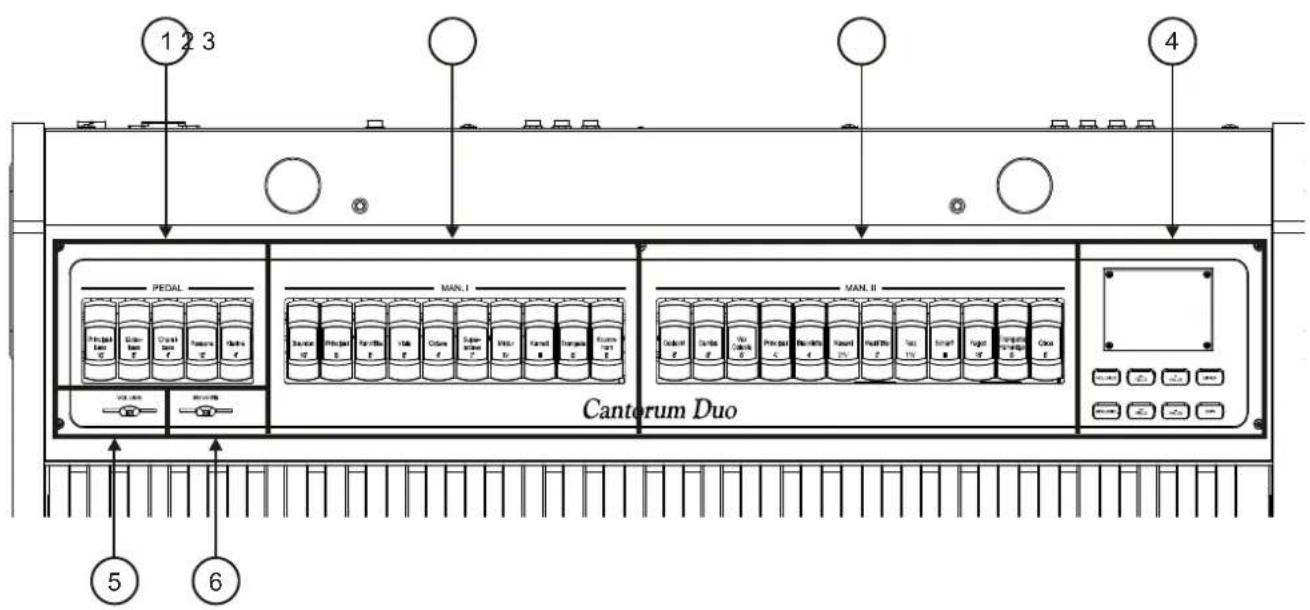
- [MAN. I] stops: registers for the Bass section are collected here. It is possible to play these registers through a MIDI pedalboard connected to the [MIDI IN] connector on the rear panel (see point 19) or with the first manual by activating the Automatic Pedal function (see point 13). In the case of a MIDI pedal, this must transmit the notes on the reception channel set for the Pedal section (see section 5.4).
- [MAN. I] stops: here are collected the stops for the Manual I section.
- [MAN. II] stops: here are collected the stops for the Manual II section.
- Control and programming section.
The buttons and the display in this sections allow the user to program and set up the instrument and the sequencer.
- [VOLUMES]: access the video page for all the volumes of the instruments.
- [SEQUENC.]: access the video pages for the use of the internal sequencer of the instrument.
- [FIELD ▲] and FIELD ▼: buttons used to move the cursor, identified by the field in reverse. [FIELD ▲] moves it in the field above or the previous field, FIELD ▼ in the field below or the next field.
- [VALUE +] and [VALUE -]: buttons which regulate the values of the parameters, whether they are numerical or alphanumeric. [VALUE +] increases, [VALUE -] decreases.
-
[EXIT] and [ENTER]: access and quit the display screens and menus, or confirm or cancel prompts made by the system. [ENTER] accesses menus/screens and confirms, [EXIT] quits menus/screens and cancels.
-
[VOLUME] slider: controls the overall volume of the organ.
- [REVERB] slider: controls the amount of reverberation effect.
-
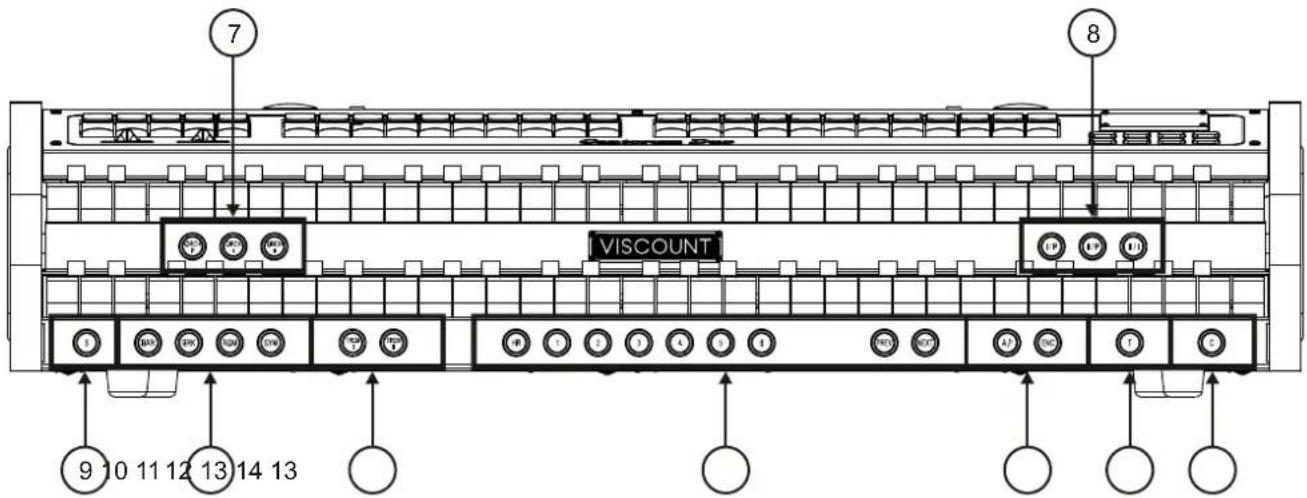
ORCHESTRA pistons: pistons for activation and deactivation of orchestral voices.
-
[ORCH P]: orchestral voice of Pedal.
- [ORCH I]: orchestral voice of Manual I.
- [ORCH II]: orchestral voice of Manual II.
It is possible to select the voice activated by each piston. For further information read par. 6.3.
- [S] piston: to save a general combination or the Tutti, after setting up the voices, press and hold the [S] piston; then press the piston corresponding to the combination you wish to save.
To save a Crescendo step, select it through the Crescendo pedal, press and hold [S], and then press the general memories [HR] piston. To copy the content of one step to another, first select the step you wish to copy, then press and hold the [S] piston, select the step in which you wish to paste the content, and finally press the general memories [HR].
Organ Styles, tremulant Speed and Depth and orchestra voices can be saved to any combination or Tutti. This allows a wider range of different combinations, adjusting the sound to play different songs. To use these functions, first you have to set the saving options through the COMBINATIONS function, described in par. 5.6.
N.B.
If the [S] piston LED light is off, this means that the SECURITY function for the combinations (see par. 5.9) is active. In this case it is not possible to modify combinations, Tutti and the Crescendo.
-
Style pistons: here are the style pistons for the selection of the organ style (see also chapt. 6).
After the selection, if the display shows the main video page (see chap. 3), a pop-up message appears for a few seconds, showing the Style name.
-
Tremulant thumb pistons: here are the thumb pistons for the activation / deactivation of the Tremulant for each section.
-
[TREM I]: [TREM I]: Manual I Tremulant.
- [TREM II]: [TREM I]: Manual II Tremulant.
11. General combinations.
- [1] / [6]: pistons to recall the combinations saved in the selected memory bank (see [PREV] / [NEXT] point). These combinations can be modified. To do so, follow the procedure described at point 9.
- [HR]: restores the voice setup prepared in manual mode before a memory was recalled.
-
[PREV.] / [NEXT]: general combinations sequencers. [PREV.] displays them in descending order, [NEXT] in ascending order. Keeping pressed the [S] thumb piston and acting these commands it is also possible to select the memory bank.
-
General organ controls: these are the controls that are not dedicated to a single section, but affect the whole instrument.
-
[A.P]: enables the Automatic Pedal which allows the pedal voices to be played on the first manual. In this case, the organ's pedal board is deactivated and the voices become monophonic, with priority to the lowest note.
- [ENC]: when the Enclosed function is active, the main volume can be controlled through the expression pedal connected to the [EXPR.] connector of the rear panel.
-
[C]: Cancel piston. Turns off all stops, tremulants, couplers and all other pistons on the manuals, then deletes and turns on the HR. In case you have chosen to save into combinations the status of [ENC] nad [A.P] pistons (see COMBINATIONS function in the par. 5.6), these are not turned off by Cancel.
-
[T] piston: piston that recalls Tutti. The Tutti can be modified, for further information read point 9.
- Couplers thumb pistons: here are the thumb pistons for the activation / deactivation of the couplers between the manuals and the pedalboard:
- [I/P]: coupler of the first manual with the pedal board
- [II/P]: coupler of the second manual with the pedal board.
- [II/I]: coupler of the second manual to the first.
-
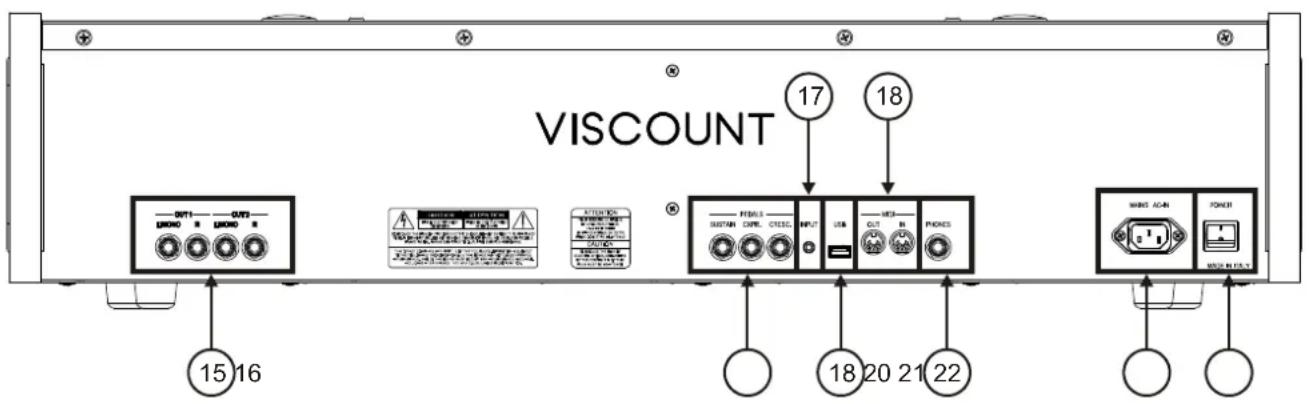
[OUT 1] and [OUT 2] audio outputs: Jack line outputs with the organ stereo signal, based on the settings of the video page described in par. 5.3. These outputs also has dedicated level and equalization controls (see par. 4 and 5.2). In case of stereo system, connect the [L/MONO] output to the left channel and the [RIGHT] output to the right channel. If a monophonic system is used, only connect the[L/MONO] connector.
-
[PEDALS] connectors: in these connectors it is possible to connect pedals to control the following functions:
-
[SUSTAIN]: connector for a switch-type pedal to control the Sustain effect for orchestral voices.
- [EXPR.]: continuous control of Man.II volume.
- [CRESC.]: With this pedal you can select the Crescendo level. These levels activate a fixed set of stops, linked with an equal number of loudness, from pianissimo to fortissimo.
The currently selected level is displayed on the main video page inside the "CRESCEN." box.
The Crescendo controls all the registers, and modifies the stops configuration. Each level of the crescendo can be programmed. To save the Crescendo configuration, see point 9.
N.B.
- When switching on, the instrument automatically detects the polarity of the switch pedal connected to the [SUSTAIN] connector. Do not hold down the pedal when turning the power on, to avoid reversing the operation of the pedal.
-
The [CRESC.] pedal can control also the volume of Pedal and Manual I. For further information about this function read par. 5.7.
-
[INPUT] connector: stereophonic line input for external audio signals. The external audio signal is added to the sound produced by Cantorum Duo.
-
Connettore [USB]: USB drive connector (drive not included with the instrument), where the organ settings and songs recorded with the internals sequencer can be saved.
-
[MIDI] connectors: connectors for connecting MIDI devices.
- [IN]: input connector for receiving data from an external MIDI unit to the Cantorum Duo. Connect to the MIDI output of the transmitting device (e.g. a sequencer).
- [OUT]: this connector transmits the MIDI data generated by Cantorum Duo. Connect to the MIDI input of the receiving device (e.g. an expander).
N.B.
- For further information about the MIDI interface, read par. 5.4, 10.5 and 10.6.
-
For further information about the USB devices, read par. 7.1.
-
[PHONES] connector: jack socket to which a headphone set can be connected. With headphones connected, the organ's internal amplification is cut off.
-
[MAINS AC-IN] socket: connector for the power cable supplied with the instrument.
-
[POWER] switch: switches the Cantorum Duo on and off.
3. SWITCHING ON AND MAIN VIDEO PAGE
After switching on the instrument, the display shows the introduction page,
then, the current version (Release) of the operating system,

the main video page appears in a few seconds,
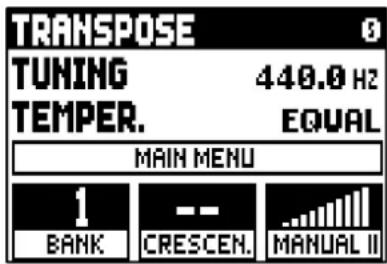
On the top of this video page are the following parameters:
o TRANSPOSER: set the transposer.
o TUNING: fine tuning of the pitch, indicated as the frequency of A3 (an 8' pipe).
o TEMPER. (Temperament): selector for setting historical temperaments of various periods (for a description of temperaments, see par. 10.2 and 10.3).
Here, as in all video pages, use the [FIELD ▲] and FIELD ▼ buttons to move the cursor. When selected by the cursor, fields invert colour.
To set the value of a parameter, select it with the cursor, then press use [VALUE +] and [VALUE -]. Some parameters have a central range value (e.g. -6 / 0 / +6); to modify the central value, press simultaneously the VALUE buttons. This will select the central value.
The display field MAIN MENU allows to access the main menu with all the organ configurations. To enter the menu, place the cursor on this field and press [ENTER].
To return to the main video page from the MAIN MENU, press [EXIT].
In the lowest part of the video page there are 3 that indicate:
o BANK: the current memory bank, selected through the pistons [S] and [PREV] or [NEXT];
o CRESC.: the currently selected Crescendo step;
o MANUAL II: Manual II expression level;
NOTES
- When the instrument is switched on, its transposition value is set to zero.
- Transposition does not have any effect on playback of songs with the internal sequencer (unlike recording, where the notes are acquired with the current transposition). A specific transposer is provided for this purpose (see chapt. 8).
- If after the power on the system displays the error message “OP.SYS FAILURE PLEASE INSERT USB PEN WITH RELEASE FILE”, please insert the USB drive with the update file in the [USB] connector under the manuals, then press [ENTER] and execute the update as described in the par. 5.12.
- If after the power on the system displays the error message “RELEASE CHECKSUM ERROR”, contact the technical support at service@viscount.it reporting the error type as it appears on the second line (SYSTEM or MODEL) and the numbers in the “M:”, “V:”, “S:” and “Release” fields. You will receive the files and information necessary to restore the instrument.
- At power up, if you see the message "PERIPHERALS UPDATE REQUESTED", press [ENTER] to perform the required operations to complete the update. If the message was displayed again contact the technical support at service@viscount.it, specifying the information displayed.
3.1 THE MAIN MENU
The Main Menu contains several lower-level menus with all the settings of the instrument, divided into groups.
Select the MAIN MENU field from the main video page. This page will appear:
![MAIN MENU SETTINGS ▶ [ENTER] STYLE ▶ COMBIN. PRG ▶ FILE ▶ DEMO ▶](/content/2026/04/723650/images/ab0adcdeaaed131054016fac145178365b6cbf2ea8afc76deb0262b058f4cccb.jpg)
As in the main video page the cursor is represented by the field with inverted colours. To move it, press the buttons [FIELD ▲] and FIELD ▼.
Here and in all the following video pages, some fields are used to access different pages. Select one of these fields and press the [ENTER] button to access the corresponding page; when these fields are selected, the name of the button appears on the right side of the field. Instead, when a field represents a parameter that can be adjusted, the display shows the current value. To adjust a value, press the buttons [VALUE+] and [VALUE-].
The fields of the MAIN MENU allow access to the following functions:
- SETTINGS: general instrument settings, equalizers, MIDI interface settings, audio outputs settings (rear panel), factory settings reset and operating system update. These functions are described in chapter 5.
o STYLE: program organ Styles. This function is described in chap. 6.
- COMBIN. PRG (Combination Program Change): add Program Change and Bank Select MIDI messages to combinations. This function is described in chap. 5.8.
- FILE: save and load files to and from an USB drive. Settings, Styles and combinations can be saved to an external memory, the procedure is explained in chapter 7.
o DEMO: the instrument plays a demo song. This function is described in par. 10.1.
4. VOLUME SETTINGS (VOLUMES function)
The Cantorum Duo organ allows the regulation of different volume controls, so as to guarantee a perfect sound balance between the various sections and between the internal and external amplification.
To visualize the volume screen, press the [VOLUMES] button:
| VOLUMES | ||
| PEDAL -4 | OUT 1 -8 | |
| MAN I MAX | OUT 2 -8 | |
| MAN II -11 | INPUT -30 | |
o PED (Pedal): pedal board divisional volume.
o MAN I (Manual I): first manual divisional volume.
o MAN II (Manual II): second manual divisional volume.
o OUT 1: volume of the two [OUT 1] outputs on the rear panel.
o OUT 2: volume of the two [OUT 2] outputs on the rear panel.
o INPUT: volume of the signal received by the [INPUT] connector on the rear panel.
To return to the previous video pages, press [VOLUMES] or [EXIT] or wait five seconds.
5. INSTRUMENT GENERAL SETTINGS (SETTINGS menu)
To access the SETTINGS menu, containing all the configuration options, select the SETTINGS field from the MAIN MENU; the following page will appear:
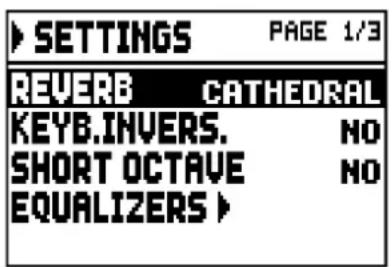
Use the [FIELD ▲] and FIELD ▼ buttons to move the cursor and scroll through all the fields:
![SETTINGS PAGE 2/3 EXT.OUTPUTS ▶ [ENTER] MIDI ▶ VEL.SENS. ▶ COMBINATIONS ▶ PEDALS ▶](/content/2026/04/723650/images/b58f95cb47a3e8de855228235f56b9f4cb5f24e464575b9d6384006336932aef.jpg)
![SETTINGS PAGE 3/3 SECURITY ▶ [ENTER] CONTROLS ▶ FACTORY SETT. ▶ SYSTEM ▶](/content/2026/04/723650/images/1247f4cda0fefd8d7233fd3c4d4d233c336a7b074af9802ab054fcfbf9eee1a9.jpg)
The following functions are available:
- REVERB: select the ambient, in order to simulate the reverb situation. The options span from a large church, full of acoustic reflections and with a strong reverb, to small rooms with a shorter and softer reverb. A detailed description of the reverb effect can be found in par. 5.1.
o KEYB.INVERS. (Keyboard Inversion): inversion of the manuals (activated by selecting YES) so that the registers of the Manual I section will play with the second manual and those of the Manual II section will sound with the first manual. To deactivate the function select NO.
o SHORT OCTAVE: select YES to activate the short octave on the first octave of pedalboard and manuals; this is necessary to play partitures written for ancient organs (between XVI and XVIII century) where the first octave consisted of these notes:

To deactivate this function, select NO.
- EQUALIZERS: set up equalizer, internal amplification and rear panel outputs. These functions are described in par. 5.2.
o EXT. OUTPUTS (External Outputs): select the audio signal of the [OUT 1] and [OUT 2] outputs (rear panel). This function is described in par. 5.3.
o MIDI: MIDI interface settings. These functions are described in par. 5.4.
o VEL. SENS. (Velocity Sensitivity): calibrate the velocity of the manuals and pedalboard when using Orchestra stops or transmitting MIDI note messages. This function is described in par. 5.5.
- COMBINATIONS: customize combinations in a dedicated video page. These functions are described in par. 5.6.
o PEDALS: configurazione dei pedali e della pedaliera MIDI eventualmente collegati ai connettori del pannello posteriore. Queste funzioni sono descritte nel par. 5.7.
o SECURITY: set the code to lock out the organ to prevent modifies at the instrument settings, combinations, Tutti and Crescendo. These functions are described in par. 5.9.
- CONTROLS: configuration of the [VOLUME] potentiometer and display contrast adjustment. This function is described in par. 5.10.
- FACTORY SETT. (Factory Settings): restores the factory settings. These functions are described in par. 5.11.
o SYSTEM: operating system information and update. These functions are described in par. 5.12.
To access a function, place the cursor on the field by using the buttons [FIELD ▲] and FIELD ▼, then press [ENTER]. To leave the SETTINGS menu, press [EXIT].
5.1 SELECTING REVERB TYPE (REVERB parameter)
Reverberation is the result of a series of sound reflections in a closed environment. Order and value of each reflection depend on many factors of the environment, such as the size of the room, the number and material of the objects inside the room, the listener's position and so on. The digital processors of the Cantorum Duo organs can recreate artificially the complex factors affecting the reverberation of a real pipe organ, generating the right reverberation to complete an already excellent sound quality.
The REVERBER parameter in the SETTINGS menu allows to select the kind of reverberation, ranging from great cathedral – with wide reflections - to small churches with short and soft reverberation. There is a total of eight styles.
Please note that the [REVERB] slider is placed on the upper panel. Use the potentiometer to adjust the reverb effect level.
The reverb styles are typical reverberation of a:
o CATHEDRAL: typical reverberation of a cathedral
o BASILICA: typical reverberation of a Basilica
o GOTHIC CHURCH: typical reverberation of a gothic church
o BAROQUE CHURCH: typical reverberation of a baroque church
- ROMANIC CHURCH: typical reverberation of a romanic church
o MODERN CHURCH: typical reverberation of a modern church
o PARISH: typical reverberation of a parish
o CAPPELLA: typical reverberation of a chapel
Press [EXIT] to exit the video page and save the new settings.
N.B.
The internal reverberation also affects the signal from the [INPUT] port located on the rear panel.
5.2 ADJUST EQUALIZERS (EQUALIZERS functions)
The Cantorum Duo is equipped with three graphic equalizers, one for the sound reproduced by the internal speakers and the other two for the signal present on the two pairs of audio outputs [OUT 1] and [OUT 2] on the rear panel. The sound generated by the instrument can be calibrated through the equalizers, in order to adapt to the environment and to the player's needs and personal taste.
To access the calibration page, select the EQUALIZERS field under the SETTINGS menu. The following video page will appear:
![EQUALIZERS INTERNAL ▶ [ENTER] OUT 1 ▶ OUT 2 ▶](/content/2026/04/723650/images/5dd351bb389d509d2fbf8bcb32b2b89a985f2904b6a9949b46cf0b50dcb7cbb1.jpg)
the page contains the following fields:
o INTERNAL: graphic equalizer for the internal amplifier (and therefore for the internal speakers).
o OUT 1: graphic equalizer for the [OUT 1] output pair, on the rear panel.
o OUT 2: graphic equalizer for the [OUT 2] output pair, on the rear panel.
This is the graphic equalizers calibration page:
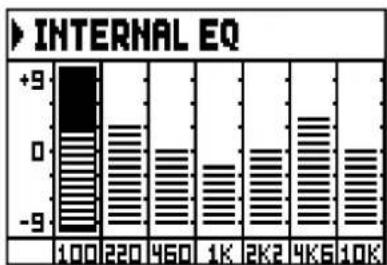
bar
INTERNAL EQ | Category | Value | |---|---| | 100 | +9 | | 220 | 0 | | 460 | 0 | | 1K | -9 | | 2K2 | 0 | | 4K6 | 0 | | 10K | 0 |In the lower part of the screen there are the seven central band frequencies. To move the cursor from one band to the other, use the buttons [FIELD ▲] e FIELD ▼.
Each band can be modified, using the buttons [VALUE +] and [VALUE -] from +9 dB (maximum signal gain) to -9 dB (maximum signal dampening). The level of gain or attenuation is graphically represented and can be compared to the grading scale on the left side of the screen.
The following graph shows how the graphic equalizers works.
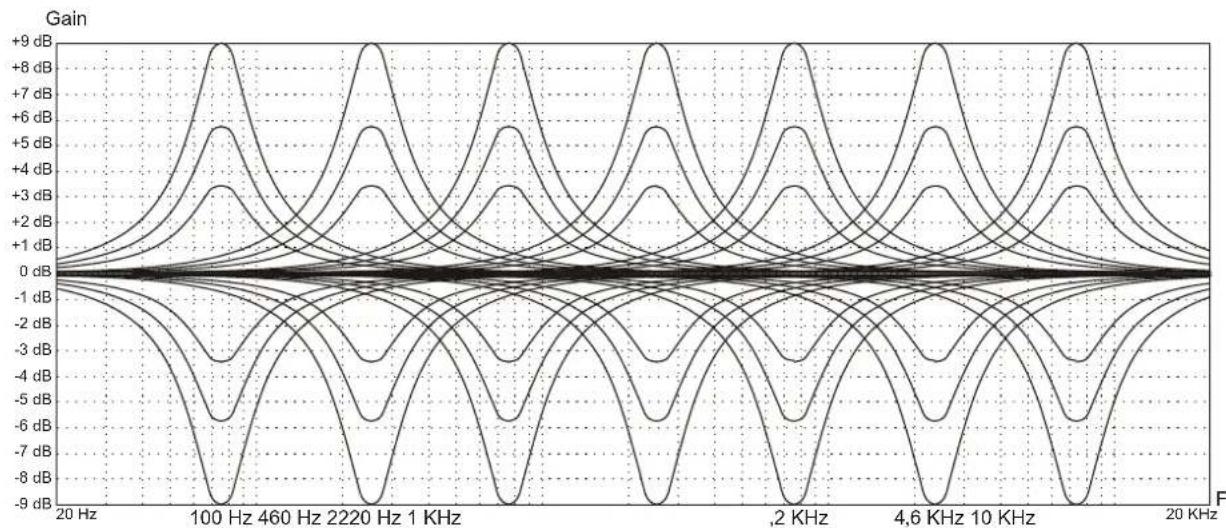
line
| Frequency | Gain (dB) | | --------- | --------- | | 20 Hz | 0 | | 100 Hz | 0 | | 460 Hz | 0 | | 2220 Hz | 0 | | 1 KHz | 0 | | 0.2 KHz | 0 | | 4.6 KHz | 0 | | 10 KHz | 0 | | 20 KHz | 0 |In all the equalizers, press [EXIT] to exit the video page and save the new settings.
N.B.
The equalizers also affect the signal from the [INPUT] port located on the rear panel.
5.3 CHANNELING SIGNALS ON THE AUDIO OUTPUTS (EXTERNAL OUTPUTS function)
Cantorum Duo has one more interesting function: it allows the user to select the sound source transmitted through the rear panel outputs. Thanks to this function, the external loudspeakers can be placed so as to simulate the actual position of the windchest in a pipe organ or choose whether outputs should transmit only the reverberated signal.
To access this function page, select the EXT. OUTPUTS field under the SETTINGS menu:
| EXTERNAL OUTPUTS | ||
| OUT 1 | OUT 2 | |
| PEDAL | √ | √ |
| MANUAL I | √ | √ |
| MANUAL II | √ | √ |
| REUERE | √ | √ |
| INPUT | √ | √ |
The two columns clearly represent the two audio outputs, [OUT 1] and [OUT 2].
To move the cursor, use the [FIELD ▲] and FIELD ▼ buttons.
To select the sound source press [VALUE +]. A checkmark will appear on the selected field(s).
Use the [VALUE -] button to delete the checkmark and deselect the sound source.
To quit the page and save the current settings, press [EXIT].
N.B.
The reverberated signal (REVERB field) always contains all organ sections and the signal from the [INPUT] port located on the rear panel.
5.4 MIDI SETTINGS (MIDI functions)
NOTE
For further information about the MIDI interface, see par. 10.5 and 10.6.
To access the MIDI interface settings of the organ, select the MIDI field under the SETTINGS menu. This first video page will appear:
| MIDI | |
| CHANNELS | [ENTER] |
| FILTERS | |
| NOTES TO COUPL. | YES |
| OUT MODE | OUT |
containing the following fields:
o CHANNELS: set up the receiving and transmitting MIDI channels.
- FILTERS: set up the MIDI filters for data reception and transmission.
- NOTES TO COUPL. (Note to Couplers): this control allows to select the notes to send through MIDI. By selecting YES and playing, for example, on the first manual with the II/I coupler switched on, the notes are transmitted on both channels of the Manual I and Manual II sections.
Select NO to send only the notes physically played (in this example, notes will be transmitted only on the Manual I channel).
- OUT MODE: select the operating mode of the [MIDI OUT] port. The following modes can be selected:
- OUT: standard operating mode, MIDI data is transmitted after the organ senses an action (e.g. when keys are played, stops selected, volume and expression pedal used, combinations recalled etc...).
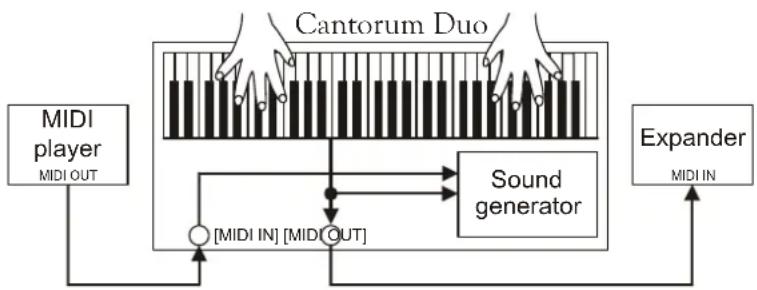
flowchart
graph TD
    A["MIDI player\nMIDI OUT"] --> B["Cantorum Duo"]
    B --> C["Sound generator"]
    C --> D["[MIDI IN"] [MIDI OUT]]
    D --> E["Expander\nMIDI IN"]
    E --> B
- THRU: the [MIDI OUT] port transmits only MIDI data received by the [MIDI IN] port and does not transmit any data about the actions applied on the organ. Use this option when the organ is part of a MIDI system; the instrument connected to the MIDI output of the organ does not respond to any action applied to the Cantorum Duo itself, but only receives the data from the instrument sending data to the Cantorum Duo [MIDI IN] port.
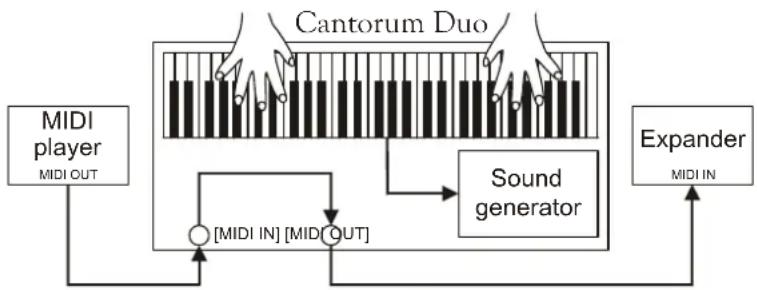
flowchart
graph TD
    A["MIDI player\nMIDI OUT"] --> B["Cantorum Duo"]
    B --> C["Sound generator"]
    C --> D["[MIDI IN"] [MIDI OUT]]
    D --> E["Expander\nMIDI IN"]
    E --> B
- OUT+THRU: the [MIDI OUT] port transmits MIDI data about actions applied to the organ, and the data received through the [MIDI IN] port.
Use this function when the organ is part of a MIDI system; the receiving instrument will respond to data generated by the Cantorum Duo and also to data from the instrument connected to the [MIDI IN] port.
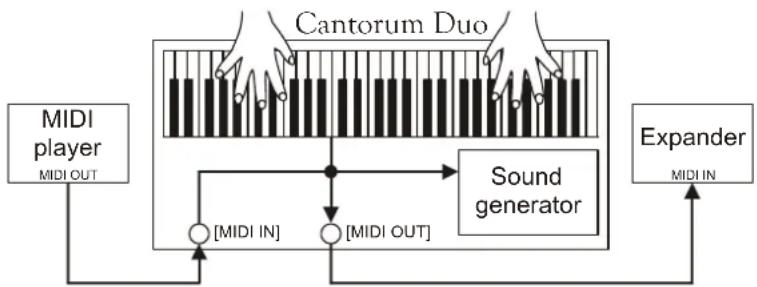
flowchart
graph TD
    A["MIDI player\nMIDI OUT"] --> B["Cantorum Duo"]
    B --> C["Sound generator"]
    C --> D["[MIDI IN"]]
    C --> E["[MIDI OUT"]]
    D --> F["Expander\nMIDI IN"]
    E --> F
- PIPE: the [MIDI OUT] port transmits MIDI data after actions applied to the organ and also the data received through the [MIDI IN] port. If a Cantorum Duo combination is recalled by a MIDI Program Change message received from an external device (for more information read par. 10.6) such as a MIDI sequencer, Cantorum Duo will transmit the content of the combination (stops, couplers, tremulant) to the [MIDI OUT] port.
Always use this mode when Cantorum Duo is connected to a digital pipe interface VPI (Viscount Pipe Interface), to ensure a complete compatibility between the two devices.
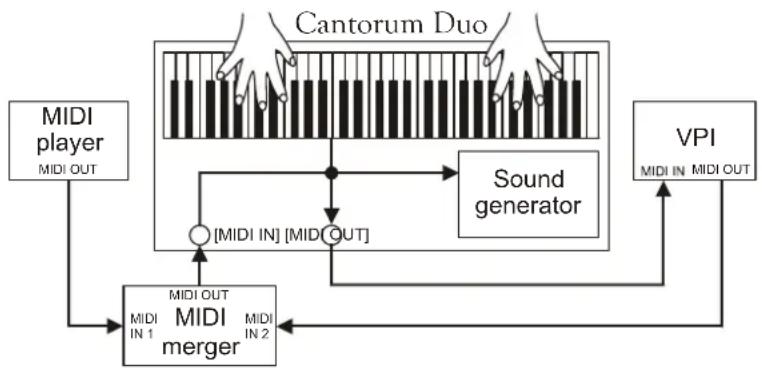
flowchart
graph TD
    A["MIDI player\nMIDI OUT"] --> B["MIDI OUT\nMIDI IN 1"]
    B --> C["MIDI out\nMIDI MERGER\nMIDI IN 2"]
    C --> D["Sound generator\n[MIDI IN"] [MID OUT]]
    D --> E["VPI\nMIDI IN MIDI OUT"]
    E --> F["Antenna"]
    style A fill:#f9f,stroke:#333
    style B fill:#ccf,stroke:#333
    style C fill:#cfc,stroke:#333
    style D fill:#fcc,stroke:#333
    style E fill:#cff,stroke:#333
    style F fill:#ffc,stroke:#333
SELECTING THE INPUT AND OUTPUT CHANNELS (MIDI CHANNELS function)
The organ can send out and receive MIDI messages on a single channel for each section. To set the MIDI channels, select the CHANNELS field in the MIDI menu. The following page will appear:
| MIDI CHANNELS | ||
| TX | RX | |
| PEDAL | 4 | 4 |
| MANUAL I | 2 | 2 |
| MANUAL II | 1 | 1 |
The column on the left lists the organ sections; for each section a channel from the TX (transmission channel) and RX (receiving channel) can be assigned. Press [EXIT] to leave the screen and save the settings. OFF mode disables the transmission and/or reception of all MIDI messages for the selected organ section.
To quit the page and save the current settings, press [EXIT].
FILTERS SETTINGS (MIDI FILTERS function)
A MIDI filter allows to block a particular message on all MIDI channels (if the signal is channelled). The Control Change filter, for example, blocks these MIDI messages in the [MIDI OUT] port, on all MIDI channels of the organ. In the same way, the receiving filter blocks PC on all channels (therefore they are not executed when recalling combinations, Tutti, Crescendo) received from the [MIDI IN] port.
To configure the MIDI filters, select the FILTERS field in the MIDI menu.
| MIDI FILTERS | ||
| TX | RX | |
| CONTROL | NO | NO |
| PROGRAM | NO | NO |
| SYSEX | NO | NO |
| REAL TIME | YES | YES |
For each section, set a fixed value (FIXED from 1 to 127) or three dynamic curves: SOFT, NORMAL or HARD. Press [EXIT] to leave and save the settings.
5.5 REGULATING THE NOTES VELOCITY (VELOCITY SENS. function)
This function sets the velocity of the notes played with Orchestra stops and transmitted through [MIDI OUT] port, for each section.
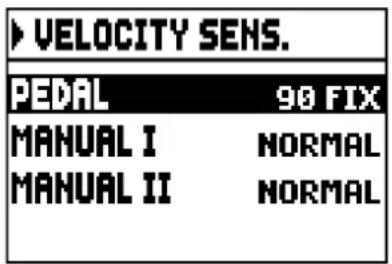
For each section, set a fixed value (FIXED from 1 to 127) or three dynamic curves: SOFT, NORMAL or HARD.
Press [EXIT] to leave and save the settings.
5.6 COMBINATIONS OPERATING FUNCTIONS (COMBINATIONS function)
The user can choose the set up of combinations and Tutti. To do so, access the SETTINGS menu and then select the COMBINATIONS field.
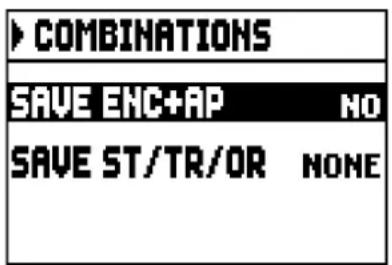
The available parameters are:
○ SAVE ENC+AP: activate (select YES) or deactivate (select NO) the option to save the status of the [ENC] and [A.P] pistons (see point 12 chapt. 2) to general combinations.
- SAVE ST/TR/OR: save organ Styles, tremulant Depth and Speed values, and orchestra stops with the following options:
- NONE: does not save organ Styles, tremulant parameters, orchestra stops.
- STYLE: save the currently selected organ Style (to select Style see point 10 at chapt. 2) so that it can be recalled by general combinations and Tutti.
- TREM: save the current tremulant Depth and Speed values (to adjust the tremulant values see par. 6.1) so that they can be controlled through general combinations and Tutti.
- ORCH: save the currently selected orchestra stops (to select them see par. 6.3) so that they can be controlled through general combinations and Tutti.
- TR+OR: save the tremulant Depth and Speed values (to adjust the tremulant values see par. 6.1) and the currently selected orchestra stops (to select them see par. 6.3) so that they can be controlled through general combinations and Tutti..
Press [EXIT] to leave the screen and save the current settings.
5.7 CONFIGURATION OF THE PEDALS AND THE MIDI PEDALBOARD (PEDALS FUNCTION)
In the PEDALS screen several functions are collected for the configuration of the pedals and MIDI pedalboard eventually connected.
You can select the operation of the pedal connected to the [CRESC.] connector on the rear panel, calibrate this pedal and the one connected to the [EXPR.] connector, if the operating range is not complete.
Cantorum Duo allows you to control the Crescendo also by receiving the MIDI message Control Change n.11 (Expression), transmitted by an external unit, such as an expression pedal of a MIDI pedalboard. On this screen, you can inform the system on which MIDI channel the CC11 is received.
For a correct operation, it is also necessary to inform the Cantorum Duo about the presence of a MIDI pedalboard connected to the [MIDI IN] port. In this condition the notes received on the MIDI channel assigned to the Pedal section are transposed according to the setting of the TRANSPOSE parameter of the main screen, they are not played if the Automatic Pedal is active, the velocity is recalculated according to the setting selected in the VELOCITY SENS function (see par. 5.5), and are retransmitted on the [MIDI OUT] port if you want send to an external MIDI device.
To display the screen containing the configuration functions, select the PEDALS item in the SETTINGS menu:
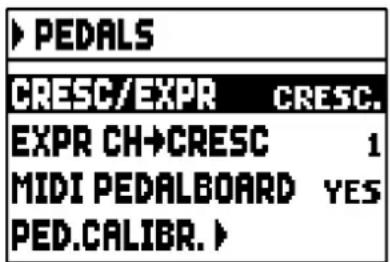
These parameters allow:
o CRESC/EXPR: selecting the CRESC. item, the pedal connected to the [CRESC.] connector selects the steps of the Crescendo. Selecting the M.I/PED item the pedal controls the volume of the Manual I and Pedal sections. In this case, in the main screen, the M.I/PED box is displayed instead of the CRESCENDO box. This box displays the current level of expression of the two sections.
o EXPR CH-> CRESC: select the MIDI channel on which the CC11 for Crescendo control is received.
o MIDI PEDALBOARD: select YES in case of MIDI pedalboard connected to the [MIDI IN] port. Otherwise select NO.
o PED.CALIBR.: place the cursor on this field and press [ENTER] to access the pedal calibration screen:
![PEDALS CALIBRATION PEDAL MIN MAX EXPRESSION 0 127 CRESCENDO 0 127 [ENTER] TO STORE CURR PEDAL](/content/2026/04/723650/images/9d5e6d42b857dc76080c7bdc54b2a41a746f5fb37fbacaea1e8f1765d4435aef.jpg)
Set the pedal to the minimum position (pedal fully raised) or maximum (pedal completely lowered) and press [ENTER]: the acquired value is stored in the corresponding MIN or MAX box. Perform the same procedure for the still unregistered position and any other connected pedal.
Program Change MIDI messages can recall, in a connected unit, a particular sound or program (patch). Thanks to this function you may select a desired voice from external module (such as an expander) connected to the [MIDI OUT] port.
You can also transmit Bank Select messages MSB (CC n. 0) and LSB (CC n.20) to select stop banks from an external source.
Select the COMBIN. PRG field in the MAIN MENU, then press [ENTER]:
| COMBINATION PRG | |||
| PRG | BANK | ||
| MSB | LSB | ||
| PEDAL | OFF | 0 | 0 |
| MAN I | OFF | 0 | 0 |
| MAN II | OFF | 0 | 0 |
The column on the left lists the organ section, and the associated Program Change and MSB and LSB Bank Select messages are shown in the PRG, BANK MSB and BANK LSB columns.
Please note that the MIDI messages of this screen are immediately sent to the corresponding section, and also saved in the combinations and Tutti. To do so, select the Program Change and Bank Select and fix the desired memory. This process might prove useful when, using an external expander, you wish to combine a voice from this unit with other stops.
When a MIDI message is not necessary, cancel it by selecting the OFF value.
To leave the screen and go back to the MAIN MENU press [EXIT].
5.9 SECURITY LOCK AGAINST UNWANTED CHANGES (SECURITY function)
In order to prevent any modification to the organ settings, the SECURITY function should be used. When active, combinations, Tutti, Crescendo steps and Local Off stops cannot be modified. Only the tuning parameters in the Main Page and Organ Style selection will be available.
To recall this function, select the SECURITY field in the SETTINGS menu.
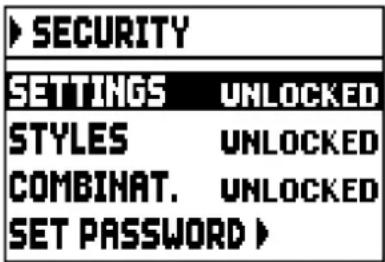
in this first screen you can set what you want to block:
o SETTINGS: general instrument settings (SETTINGS menu).
o STYLES: organ Styles parameters (STYLES menu).
o COMBINAT. (Combinations): combinations, Tutti and Crescendo.
To activate one or more lock options select the LOCKED field, then press [EXIT] to enter the unlock code (password):
![ENTER PASSWORD ENTER 4-DIGIT PASSWORD AND PRESS [ENTER]](/content/2026/04/723650/images/0e3ec0dc32b467bf0b6b800b3042042006fa2ef59e8a00faf3614888d70f04ec.jpg)
Press [VALUE +] and [VALUE -] to select the characters.
Use the [FIELD ▲] and FIELD ▼ buttons to move the cursor. Press [ENTER] to save the code, and [EXIT] to abort. The factory setting code is "0000".
When the organ has been successfully locked, the display shows the message “SECURITY OPTIONS SUCCESSFULLY CHANGED”.
When a section is blocked, it is possible to enter it, but in this case the following messages will appear:
- "SETTINGS ARE LOCKED": entering the SETTINGS menu;
- "STYLES ARE LOCKED": entering the STYLES menu;
If combinations, Tutti and Crescendo are blocked, the [S] piston light is off.
To unlock the combination save functions, and/or to unlock the settings you need to access the SECURITY function, then unlock the locked options by selecting the UNLOCKED field, then press [EXIT] to enter the unlock code. If the password is correct, the message “SECURITY OPTIONS SUCCESSFULLY CHANGED” will appear, otherwise “WRONG PASSWORD RETRY” that is the system requires the right password to proceed.
Furthermore, the password can be modified while a lock function is already active. To do so, select the SET PASSWORD field. Enter the current password to proceed:
![SET PASSWORD STEP 1/2 CURRENT PASSWORD: ■ ENTER CURRENT PASSWORD AND PRESS [ENTER]](/content/2026/04/723650/images/5335256faf2bd9343a794a5ee374e36f93ff6f0454338a9c6fa5e4962a3ef6f9.jpg)
and now enter the new password:
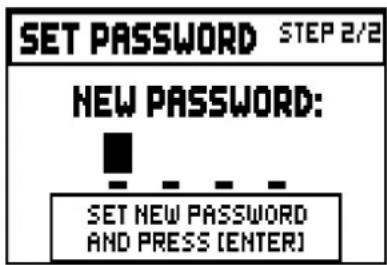
the following page confirms that the password has been successfully modified:
![SUCCESSFULLY PASSWORD HAS BEEN CHANGED THE NEW ONE IS Q 6 E 4 [EXIT] TO PROCEED](/content/2026/04/723650/images/78c180d502f3ce32fc92998d91c11c757bf94652c3a5739d082d916b75360c68.jpg)
As written on the display, press [EXIT] to return to the SECURITY main page.
5.10 CONFIGURING THE VOLUME CONTROL AND ADJUSTING THE DISPLAY CONTRAST (CONTROLS function)
With this function it is possible to select the operation mode of the [VOLUME] slider and adjust the display contrast. To access these settings, select CONTROLS in the SETTINGS menu:
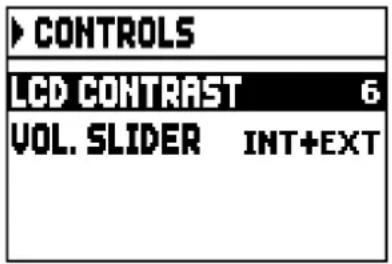
o LCD CONTRAST: adjust the LCD display contrast.
o VOL. KNOB: select the parameter to be controlled by the [VOLUME] slider. The available options are:
- INTERNAL: only the internal amplification volume.
- INT+EXT: internal amplification and line outputs volume. Line-out ports are located on the rear panel.
Press [EXIT] to return to the previous page.
5.11 RESTORING FACTORY SETTINGS (FACTORY SETTINGS function)
The organ has several options to restore the original (factory) settings. To recall this function select the FACTORY SETT. field in the SETTINGS menu:
![FACTORY SETTINGS ALL ▶ [ENTER] COMBINATIONS ▶ STYLE - ALL ▶ STYLE - CURR. ▶ SETTINGS ▶](/content/2026/04/723650/images/bd99138033f68328f49a72c738d7331ade5b2926d3cb1534286a8079aba7b790.jpg)
- ALL: all the instrument, i.e. the settings and functions of the SETTING menu, the four organ Styles (in other words the settings of the STYLE menu for all four organ Styles), all general combinations, Crescendo, Tutti, the Local Off status of stops.
o COMBINATIONS: all general combinations, Crescendo and Tutti.
o STYLE - ALL: the four organ Styles (i.e. the settings of the STYLE menu for all four organ Styles).
- STYLE – CURR.: the currently selected organ Style (i.e. the settings of the STYLE menu for the currently selected Style).
- SETTINGS: settings and functions of the SETTINGS menu and the Local Off status of stops.
To restore the factory settings, select one of these five modes and press [ENTER]. The display will show the settings that will be restored and will ask for confirmation.
![WARNING COMBINATIONS. STYLES, SETTINGS WILL BE RESTORED [ENTER] TO PROCEED [EXIT] TO CANCEL](/content/2026/04/723650/images/c2e244a4f01865eeb74a79a162507a954a0d05ee21ef26ed27f8bed6c484e223.jpg)
Press [ENTER] again to start the process or [EXIT] to abort it. When the process is complete, the "FACTORY SETTINGS SUCCESSFULLY RECALLED" message will appear.
In the previous phase, if the message “SOME PARAMETERS ARE LOCKED” is showed please check the SECURITY options (par. 5.9) as it is not possible to proceed with the restore operation.
5.12 UPGRADING THE OPERATING SYSTEM (OP. SYS. UPGRADE function)
Every time the Cantorum Duo operating system is updated, the update file will be available on the website www.viscountinstruments.com. First download the file, then copy it to the main (root) folder of an USB drive. Connect the pen drive to the [USB] connector of the instrument, located on the rear panel (see point 18 chap. 2); wait a few seconds then select the SYSTEM field under the SETTINGS menu:
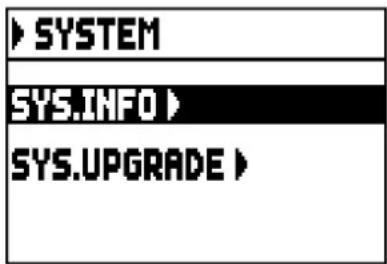
now select the SYS. UPGRADE field. The system displays the Cantorum Duo update file(s) (different updates can be stored in the same USB pen, when updating select the file you wish to install) on your USB drive:
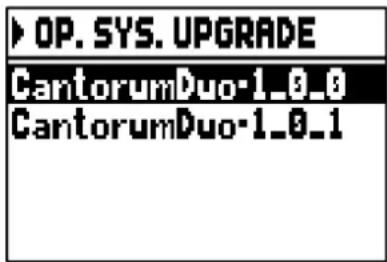
use the [FIELD ▲] and FIELD ▼ buttons to select the file you wish to install, then press [ENTER].
The system informs you that the currently running operating system will be replaced with the version on your USB drive:
WARNING
THE CURRENT OPERATING SYSTEM WILL BE OVERWRITTEN
[ENTER] TO PROCEED [EXIT] TO CANCEL
press [EXIT] to abort the operation, or press [ENTER] to proceed with the install procedure: a pop-up will appear on the display that shows the advancement of the operation; when the procedure is complete, the organ will automatically restart.
IMPORTANT NOTES
- The USB drive used for the update must be formatted with FAT or FAT32 file system (not NTFS or other), otherwise the drive will not be recognized by the system.
- Do not switch off the organ or disconnect the USB flash drive during the update phase.
-
If a problem occurs during the update procedure (the instrument suddenly shuts down or the progress bar stops for one minute or longer) try one of these procedures:
-
switch on or reboot the instrument while the USB drive is connected, then press [ENTER] when the system requests to complete the update.
- if there is no such request, start the update again, following the procedure described in this paragraph.
-
if the system displays the error message “RELEASE CHECKSUM ERROR” after restarting the system, write an email to the technical assistance service (service@viscount.it) reporting the error type as it appears on the second line (SYSTEM or MODEL) and the numbers in the “M:”, “V:”, “S:” and “Release” fields. You will receive the files and information necessary to restore the instrument.
-
At power up, if you see the message "PERIPHERALS UPDATE REQUESTED", press [ENTER] to perform the required operations to complete the update.
- If the system displays the error message “FILE LOAD FAILED – USB PEN ERROR”, delete the update file from your USB drive, then save it again to the pen drive. Should the problem persist, try with a different USB drive.
- The system displays the error message “USB PEN NOT PRESENT” when accessing the function without a USB drive connected to the instrument, or when the pen drive has not been recognized.
VERIFYING THE OPERATING SYSTEM VERSION (SYS. INFO function)
Use this function to verify the release of the operating system currently running on your instrument, then look for available updates on the website www.viscountinstruments.com. To do so, select the SYSTEM field on the display under the SETTINGS menu:
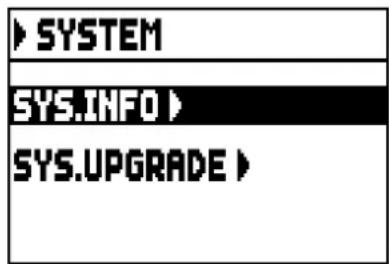
now select the SYS.INFO field:
![SYSTEM INFO RELEASE: 1.0.0 MOD:CANTORUM DUO VER:EU SUBV:STANDARD [EXIT] TO QUIT](/content/2026/04/723650/images/240a9f523c5b4386b93c773c69fe4e06c4023fbd4b71d013fae09ad9486ffc13.jpg)
The RELEASE field indicates the currently installed version, and the organ model is displayed below. Press [EXIT] to return to the previous page.
6. PROGRAMMING ORGAN STYLES (STYLE menu)
The Style indentifies the sound configuration of the organ, i.e. the actual voice activated by each stop. The many organ styles allow the musician to use several sound configurations, as if several different instruments were present at the same time in the same place.
The Cantorum Duo has four organ styles, each one refers to a particular aesthetic of sound: Baroque, Barock, Romantic and Symphonic. As already described at point 10 of chap. 2, Styles can be selected through the dedicated pistons: BAR, BRK, ROM and SYM. On the main video page, each time a Style is selected its name appears on the display. All four styles can be customized: the user can adjust the tuning difference among pipes, tremulant Speed and Depth for each section, stops volume and orchestra voices.
To modify a Style, recall the desired Style, then select the STYLES field in the MAIN MENU. The following page will appear:
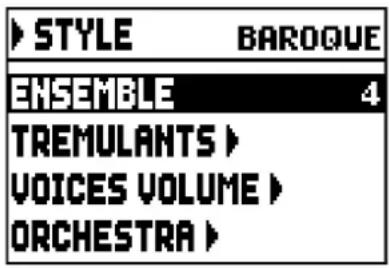
The fields on this menu perform the following functions:
o ENSEMBLE: level of tiny natural differences in pitch between one organ pipe and another, simulating the tuning error that occurs in the organ's pipes due to wear over time and variations in temperature.
The values range from 0 (pipes perfectly tuned) to 8 (maximum pitch instability).
o TREMULANTS: adjust the speed and depth of the tremulant for each manual (par. 6.1).
o VOICES VOLUMES: set the volume for each stop (par. 6.2).
o ORCHESTRA: select orchestra voices (par 6.3).
To access a function, use the buttons [FIELD ▲] and FIELD ▼ to place the cursor on the corresponding field, then press [ENTER].
To quit the STYLE menu, press [EXIT].
NB
Any general combination and Tutti can recall the organ Style that was in use when the combination was saved. However in order to save Styles to combinations, the corresponding option of the COMBINATIONS function must be activated. For further information see par. 5.6.
6.1 ADJUSTING THE TREMULANTS (TREMULANTS function)
In a pipe organ it is of the utmost importance that the air pressure remain constant, so as to obtain a steady and sustained sound. However, mechanical devices were introduced to generate periodical variations in the air flow.
These variations created the “tremulant” effect on the sound, which made some lead registers more pleasant, and the tone of the reeds colourful.
By using the [TREM 1] and [TREM II] thumb pistons it is possible to enable and disable the effect in question.
The speed and depth of the modulation can be adjusted for each Style. To access the setting page, select the TREMULANTS field under the STYLES menu:
| TREMULANTS | ||
| SPD | DPT | |
| MANUAL I | 16 | 16 |
| MANUAL II | 16 | 16 |
That show the current SPD (speed) or DPT (depth) and values of the manuals' tremulant.
Press [EXIT] to go back to the STYLES menu and save the new settings.
IMPORTANT NOTE
Any general combination and Tutti can recall the tremulant Depth and Speed parameters. To save Depth and Speed to combinations, activate the corresponding option through the COMBINATIONS function (see par. 5.6).
6.2 REGULATING THE VOLUME OF EACH VOICE
(VOICES VOLUMES function)
The volumes for each single stop can be adjusted in a range of -12 dB to +6 dB, and allows a perfect balance of the overall sound of the organ.
Select the VOICES VOLUMES field, in the STYLES menu. The display will show the organ sections, select the section that contains the voice you wish to adjust:
![VOICES VOLUME PEDAL [ENTER] MANUAL I MANUAL II](/content/2026/04/723650/images/56533187e5e0f30ddd9f8d7a85201a87c6a2527c8e074252886ab4871ca29347.jpg)
Use the buttons [FIELD ▲], FIELD ▼ and [ENTER] to select the field.
A quick alternative to adjust the volumes is pressing and holding the desired stop for a few seconds. This can be done both on this page or on the volume settings page.
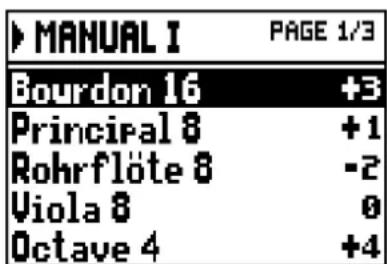
During the edit the stop will be on and can be played for better, quicker adjustment. Other stops can also be switched on to assess the overall effect of the changes. To quit the function and save the values press [EXIT]. The changes made will be automatically saved in the current organ style.
6.3 SELECTING THE ORCHESTRAL VOICES (ORCHESTRA function)
As described in chap. 2, in the set of voices of the Cantorum Duo are also present a series of orchestral timbres.
To select an orchestra voice, access the STYLES menu and then select the ORCHESTRA field. The display shows:
| ORCHESTRA | ||
| VOICE | SUS. | |
| PED | CELLO 16 | NO |
| MI | PIANO | YES |
| MII | STRINGS | YES |
For each division, in the VOICE column you can select the orchestral voice while in the SUS. column you can enable or disable the Sustain pedal function.
For easier detection, the thumb piston being programmed is switched on based on the position of the cursor on the display.
To quit the function press [EXIT]. The changes made will be automatically saved in the current organ style.
NB
Any general combination and Tutti can recall orchestra voices; this means that the stops can be used to activate different voices, according to the current combination/Tutti. To save orchestra voices to combinations or Tutti, the corresponding option must be activated through the COMBINATIONS function (see par. 5.6).
7. SAVING THE ORGAN CONFIGURATION TO FILES (FILE function)
The Cantorum Duo can save the complete organ configuration (or parts of it) to a USB drive.
The configuration can then be recalled at any time. The main purpose of this function is to offer an almost unlimited number of configurations; furthermore, a saved configuration can be used on a different organ of the same series. To access the save and load function, select FILE on the MAIN MENU.
The video page:
![► FILE LOAD ► [ENTER] SAVE ►](/content/2026/04/723650/images/492c39a8efe5fa76e830e2610991d54226bb82b2c37cfae11d5f52574a34b89f.jpg)
contains two functions:
o LOAD: load files from a pen drive (par. 7.2).
o SAVE: save the organ configuration to a pen drive (par 7.3).
To access a function, place the cursor on the corresponding field using the buttons [FIELD ▲] and FIELD ▼ then press [ENTER].
To leave the FILE menu press [EXIT].
7.1 INFORMATIONS CONCERNING THE USB PEN
When connecting a new or just formatted pen drive to the organ, access to the FILE menu the system will automatically create two directories in the drive: "organ". Inside this folder, five sub-folders are automatically created. They are:
- "alls": this folder contains the .all files, with all the settings and functions of the SETTINGS and STYLE (the four Styles) menus, all general combinations, Tutti, Crescendo steps, the selected Style and the Local Off status of stops.
- “combinations”: this folder contains the .cmb files, with all the data on general combinations, Crescendo steps and Tutti.
- “settings”: this folder contains the .set files, with all the settings from the SETTINGS menu, the selected Style and the Local Off status.
- “songs”: this folder contains the .mid files of the songs recorded through the internal sequencer.
- “styles_all”: this folder contains the .sta files, with the settings from the STYLES menu regarding all four styles.
- “styles_single”: this folder contains the .sts files, with the settings (STYLES menu) of the saved style.
These are system folders to arrange files, and they must not be deleted or renamed, otherwise the saved files will be lost.
For a detailed description on the content of the .all, .set, .sta, .sts and .cmb files, read par. 10.4.
N.B.
- Once the USB pen is inserted please wait some seconds before displaying the FILE menu.
- The system displays the error message “USB PEN NOT PRESENT” when accessing the FILE functions without a USB drive connected to the instrument, or when the pen drive has not been recognized. Should this happen, check that the pen drive is not damaged and has the correct format.
- To copy files with a computer to a USB drive that has never been used with the organ, it is necessary to create the folders (described above) manually. Files must be placed in the dedicated folder; follow the instructions on the folders and their function.
- Always use USB pens formatted with FAT or FAT32 file system (no NTFS).
- The folders "alls", "combinations", "settings", "styles_all" and "styles_single" can contain up to a maximum of 64 files. The "songs" folder can contain up to 256.
- File names cannot be longer than 30 characters (including the file extension).
7.2 LOADING ORGAN COMBINATIONS AND/OR SETTINGS (FILE LOAD function)
The Cantorum Duo organs can save the current configurations. The FILE LOAD function allows to recall into the work memory these configurations and combinations already saved to the USB pen and therefore use them.
To load a file, select the LOAD field under the FILE menu:
![FILE LOAD ALL ▶ [ENTER] COMBINATIONS ▶ STYLE - ALL ▶ STYLE - SINGLE ▶ SETTINGS ▶](/content/2026/04/723650/images/d940a022201a2bcd483d49d527c102389510e7239465b543289cd4a2f2c6dbd1.jpg)
select what you wish to load:
o ALL: the complete organ configuration.
o COMBINATIONS: all general combinations, Tutti, Crescendo steps.
o STYLE - ALL: the 4 organ styles.
o STYLE - CURR.: a single Style.
o SETTINGS: the general organ settings, from the SETTINGS menu.
Once the loading option has been selected, the display shows the corresponding files on the USB drive:
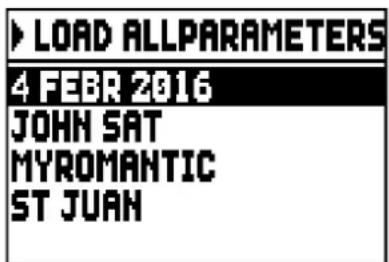
if there are no files for the selected file type, the display shows the message "NO FILES".
Once the file has been selected, press [ENTER], then confirm to proceed:
![WARNING COMBINATIONS. STYLES, SETTINGS WILL BE RESTORED [ENTER] TO PROCEED [EXIT] TO CANCEL](/content/2026/04/723650/images/aeca1c966b42eef57956a89dcf6e48875da4c8095a3957ad0665b747492b277c.jpg)
When the file has been loaded, the message "FILE SUCCESSFULLY LOADED" will appear.
N.B.
- When a single Style is loaded, it can only replace a Style of the same type (a Baroque Style replaces Baroque, Romantic replaces Romantic etc.). To identify Styles easily, the system always suggests the Style type as file name when saving Styles.
- Please keep in mind that when loading a file, all the corresponding information (settings, combinations, Styles etc.) currently in use on the organ will be lost. To avoid it, it is recommended to save the current organ data to a USB drive (see par. 7.3) before loading a file.
- The system shows the error message “FILE LOAD FAILED – INCOMPATIBLE MODEL” when attempting to load a file saved with a different organ model.
- The system shows the error message "FILE LOAD FAILED - INCOMPATIBLE RELEASE" when attempting to load a file saved using a more recent version of the operating system.
- The error message “FILE LOAD FAILED – CORRUPTED FILE” means that the file is damaged.
7.3 SAVING AS FILE OF ORGAN COMBINATIONS AND/OR SETTINGS (FILE SAVE function)
To save settings and combinations into the USB pen drive, select the SAVE field under the FILE menu:
![FILE SAVE ALL ▶ [ENTER] COMBINATIONS ▶ STYLE - ALL ▶ STYLE - CURR. ▶ SETTINGS ▶](/content/2026/04/723650/images/af55f6555196e417819a4d38564239ad0052ce7b05ddf2ade93dcbb4860e16ed.jpg)
in this first screen you can select what you desire to save:
- ALL: the whole configuration of the organ.
o COMBINATIONS: all the general combination, all the step of Crescendo, the Tutti.
o STYLE - ALL: the 4 Organ Style.
o STYLE - CURR.: the Organ Style currently selected.
o SETTINGS: the general settings under the SETTINGS menu.
Once the save option has been selected, the following page appears:
![SAVE ALLPARAMETERS FILE NAME: [ENTER] TO SAVE [EXIT] TO CANCEL](/content/2026/04/723650/images/99506b321b46a92b0d5da8aa5aad6501119453c4b28b100dc8111f80ccfb0820.jpg)
where it is possible to give a name to the saved file. To select the characters, use the buttons [VALUE +] and [VALUE -], to move the cursor use the buttons [FIELD ▲] and FIELD ▼. When the name is complete, press [ENTER] to save the file.
When the saving procedure has been successfully completed, the message “FILE SUCCESSFULLY SAVED” will appear.
N.B.
- When a single Style is loaded, it can only replace a Style of the same type (a Baroque Style replaces Baroque, Romantic replaces Romantic etc.). To identify Styles easily, the system always suggests the Style type as file name when saving Styles.
- If there is already a file with the same name and extension in the USB drive, you have the option to overwrite that file; the system shows the following message: "FILE ALREADY EXISTS". Now press [ENTER] to proceed or [EXIT] to enter a different name. Please keep in mind that overwritten files will be lost and the data contained within cannot be recovered.
- In the case of "FILE SAVE FAILED" error, retry the operation. If the error occurs again, check that there is enough space in the USB stick. If the error still occurs, the USB stick could be damaged so try using a different stick or format it with a computer.
8. PLAYING AND RECORDING OF MUSICAL SEQUENCES (SEQUENCER)
The organ is equipped with an internal sequencer (digital recorder). The sequencer can record songs played on the instrument, controls used and MIDI data received through the [MIDI IN] port.
Recordings can then be saved on the USB stick as MIDI files (Standard MIDI file, format 1 to 125 beats per minute, 384 ticks per quarter note) and played back at any time.
To recall the sequencer press the [SEQUENC.] button beside the display. The screen for selection of the system's three operating modes is displayed:
![SEQUENCER PLAY ▶ [ENTER] TRANSPOSE ① RECORD ▶ OVERDUB ▶](/content/2026/04/723650/images/986443c64bb786ef8370353c4e6ff426790a409c2698074c65d564b7cc4ff7bb.jpg)
o PLAY: playback of the performances saved in the USB pen (par. 8.1).
o TRANSPOSER: applies a semitone transposition to the songs played by the sequencer.
o RECORD: recording of songs of music (par. 8.2).
o OVERDUB: overdub of songs of music (par. 8.3)
N.B.
- To copy files with a computer to a USB drive that has never been used with the organ, it is necessary to create the folders (described in the par. 7.1) manually. Files must be placed in the dedicated folder; follow the instructions on the folders and their function.
- Always use USB pens formatted with FAT or FAT32 file system (no NTFS).
- The .mid files recorded and/or played by the sequencer are saved to the "songs" folder. The folder can contain a maximum of 256 files.
- File names cannot be longer than 30 characters (including the file extension).
- Transposition set in the Main Page does not have any effect on playback of songs (unlike recording, where the notes are acquired transposed).
8.1 PLAYING BACK A SONGS (PLAY mode)
In the sequencer mode selection screen described above, select the PLAY field. The display shows the mid files stored in the USB pen:
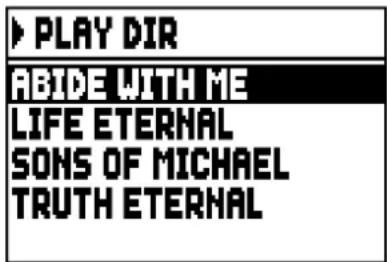
if there are no files, the message "NO FILES" will appear.
Now select the MIDI file you wish to play back:
![PLAY TEMP0 100% ABIDE WITH ME 00:00 ▼FLD=◀ -VAL=T- ▲FLD=◀ +VAL=T+ [ENTER] TO START [EXIT] TO QUIT](/content/2026/04/723650/images/3c9134fa611146db3f763d67c9aff8fab6265ea084221f5b3ba683e2b5998653.jpg)
The new screen provides information about all the controls necessary for use of the sequencer:
- [ENTER]: starts playback of the songs.
- [EXIT]: quits the sequencer function.
- [FIELD ▲]: fast forward.
- [VALUE -]: slow down play speed. It can be seen on top left as percentage (100% in the picture above).
- [VALUE +]: increase play speed. It can be seen on top left as percentage (100% in the picture above).
Once the playback of a song has been started, the display changes to:
![PLAY TEMP0 100% ABIDE WITH ME 00:19 ▼FLD=◀ -VAL=T- ▲FLD=◀ +VAL=T+ [ENTER] TO CONTINUE [EXIT] TO STOP](/content/2026/04/723650/images/700d09c232c48e4085fb86d627658425b1e3378b327874927176e9a71481e40d.jpg)
furthermore, the functions of the buttons [ENTER] and [EXIT] have changed:
- [ENTER]: pause / play the track.
- [EXIT]: stop the reproduction.
[FIELD ▲], FIELD ▼, [VALUE -], [VALUE +] keep the functions already described.
N.B.
- Once the USB pen is inserted please wait some seconds before selecting the PLAY mode.
- The system displays the error message “USB PEN NOT PRESENT” when selecting the PLAY mode without a USB drive connected to the instrument, or when the pen drive has not been recognized. Should this happen, check that the pen drive is not damaged and has the correct format.
- The error message "FILE LOAD FAILED" means that the file is damaged or bigger than 250 KB (maximum files size that you can play with this sequencer).
USING RECORDED AND/OR MODIFIED SONGS WITH DEDICATED SOFTWARE
MIDI files recorded by the internal sequencer can be modified with the most common MIDI editing softwares. This might prove useful to correct errors of the recording or to generally improve the track.
However, we strongly advice inexperienced users not to do so.
When modifying a MIDI file, please follow these rules:
- Do not modify the tracks channel. If it necessary, respect the internal sequencer channelling. The sections are channelled as follows:
■ Pedal: 1
■ Man.I: 2
■ Man.II: 3
The internal sequencer also assigns a name to the track while recording, that corresponds to the sections playing a track. Most computer software can read the track names:
■ “Pedal” track: Pedal
■ "Great" track: Man.I
■ “Swell” track: Man.II
- “Volumes” track: divisional volumes and expression pedal
■ “Stops” track: stops conditions
There are other tracks for internal use and future developments only, that should not be altered.
- Divisional modules are recorded as Control Change 7 events. Expression pedals position as Control Change 11. These Control Change channel are identical to the previous ones.
- The stops settings, together with cancel, enclosed, coupling settings etc. are recorded as System Exclusive. We advice you not to alter these codes. If you wish to add or remove stops from a recording, you should know its exclusive system code. To do so, you should monitor the MIDI OUT port of the organ and, switching on and off a stop, check the MIDI code transmitted. Add or remove this code only from the “Stops” track.
- When saving the MIDI file do not change the resolution of 384 tpqn (tick per quarter note).
The sequencer can also paly non-recorded tracks. Again, keep in mind that:
- The track channelling may not be consistent with the internal sequencer. Reset the channels according to what described above.
- Stop codes might not be present in a MIDI track. In this case we advice you overdub (see par. 8.3) with the desired stop combination.
- Divisional volumes and expression pedal may be lacking from a MIDI track. Again, we advice you overdub the tracks.
8.2 RECORDING A SONGS (RECORD mode)
In the sequencer mode video page, select the RECORD field. The display will show:
![RECORD NEW SONG NEW SONG 00:00 [ENTER] TO START [EXIT] TO QUIT](/content/2026/04/723650/images/c323a991f9203daf8ca7ab667f552ed47a80b4989f327d9c43e5e8b5a0a8d748.jpg)
As in Play mode, the screen again carries information about the functions of the buttons:
- [ENTER]: pause /restart recording.
- [EXIT]: stop recording.
Once recording has started, the functions change to:
![RECORD NEW SONG NEW SONG 00:03 [ENTER] TO PAUSE [EXIT] TO STOP](/content/2026/04/723650/images/68c42aba39e0bdf8fea05755d223f34d4387f05bed93b97163f91cc385bb188d.jpg)
- [ENTER]: pause /restart recording.
- [EXIT]: stop recording.
Press [EXIT] to end the session. The display will show the screen allowing the recording just made to be saved:
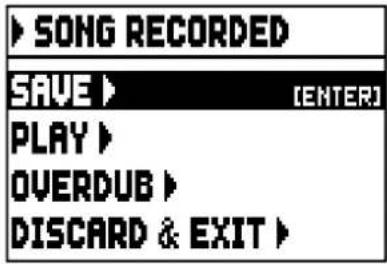
o SAVE: saving of the recording as a MIDI file.
o PLAY: playback of the recoding before saving it.
o OVERDUB: creation of a new recording to be added to the sequence just acquired (see par. 8.3).
o DISCARD AND EXIT: delete the recording and quit sequencer Record mode.
If the SAVE field is selected, the system prompts the user to assign a name to the MIDI sequence about to be saved:
![SAVE SONG FILE NAME: [ENTER] TO SAVE [EXIT] TO CANCEL](/content/2026/04/723650/images/32d6fe52d785bfdeb044f6ba9c6be8fad9a82c658b0037b332b77f33f80a120a.jpg)
When composing the name, use the [FIELD ▲] and FIELD ▼ buttons to move the cursor and [VALUE +] and [VALUE -] to select the character. To confirm the name and proceed to save the data, press the [ENTER] button; use [EXIT] to return to the previous screen, aborting the saving operation.
The message "FILE SUCCESSFULLY SAVED" confirms that the file has been saved.
If [EXIT] is pressed while in the save screen (i.e. when the recording has been acquired but not saved), the system warns that the recording is about to be lost:
![WARNING DISCARD THE SEQUENCE TAKE? [ENTER] TO CONFIRM [EXIT] TO GO BACK](/content/2026/04/723650/images/a0336315ca71bc695b38044cd5a40cf85bb1fba5fdbdb21a9819db10cf28c003.jpg)
and that [ENTER] must be pressed to confirm that you wish to quit and delete the data acquired, or [EXIT] to return to the save screen.
N.B.
- The system displays the error message “USB PEN NOT PRESENT” when trying to save a MIDI sequence without a USB drive connected to the instrument, or when the pen drive has not been recognized. Should this happen, check that the pen drive is not damaged and has the correct format.
- In the case of "FILE SAVE FAILED" error, retry the operation. If the error occurs again, check that there is enough space in the USB stick. If the error still occurs, the USB stick could be damaged so try using a different stick or format it with a computer.
8.3 OVERDUBBING A SONGS (OVERDUB mode)
The internal sequencer record, play, but also overdub already recorded MIDI tracks. It can be done accessing the OVERDUB function:
- in the Sequencer main page (see the beginning of chapt .8) and selecting a MIDI file;
- at the end of a recording session (see par. 8.2).
The system will ask whether to substitute the settings (stops, coupling, tremulant, MIDI controls, general controls) recorded in the track with the ones currently selected. Press [ENTER] to use the new settings or [EXIT] to leave them as they are.
![WARNING REPLACE PANEL IN THE SONG WITH CURRENT SETTINGS [ENTER] TO REPLACE [EXIT] TO KEEP](/content/2026/04/723650/images/bde5f6da39e5cdb2e4d235cddf6ca6ca73ac7ceae33d143f4e1765980a8b50ea.jpg)
The system will ask the same question, this time regarding the divisional volumes and expression pedal.
![WARNING REPLACE VOLUMES IN THE SONG WITH CURRENT SETTINGS [ENTER] TO REPLACE [EXIT] TO KEEP](/content/2026/04/723650/images/60cff83f22e84dc0adced966d5e4147d7f81a330b4e7204fddda959d71a8c45e.jpg)
Now the sequencer is ready to overdub:
![OVERDUB TEMPO 100% ABIDE WITH ME 00:00 -VAL=T- +VAL=T+ [ENTER] TO START [EXIT] TO QUIT](/content/2026/04/723650/images/7a54c0b951f5f390d2a719073280a2056b8fc0469f540adf76467956cf05168d.jpg)
The screen carries information about the functions of the buttons:
- [ENTER]: start recording.
- [EXIT]: leave the sequencer.
- [VALUE -]: decrease play /recording speed. It can be seen on top left as percentage (100% in the picture above).
- [VALUE +]: increase play / recording speed. It can be seen on top left as percentage (100% in the picture above).
As the recording begins, the controls change again:
![OVERDUB TEMP0 100% ABIDE WITH ME 00:08 -VAL=T- +VAL=T+ [ENTER] TO PAUSE [EXIT] TO STOP](/content/2026/04/723650/images/b4a78bd33de265e0437cf32cab77adfd5c524b87f75ddb26afa966eb9e222278.jpg)
- [ENTER]: pause / start recording.
- [EXIT]: stop recording.
[VALUE -], [VALUE +] maintain the functions described above.
Press [EXIT] to quit the recording. The system will ask you to accept the overdubbing:
![OVERDUB DONE ACCEPT ▶ [ENTER] TRIM & ACCEPT ▶ PLAY ▶ PLAY FROM OUD ▶ DISCARD ▶](/content/2026/04/723650/images/78cc5f6f9417e95e905d71360de2c38cb689f8f177c2e7def7a379c79c2f119c.jpg)
You can choose one of the following options:
- ACCEPT: accept the overdubbing. In case the overdub track is shorter than the original songs, it will not be shortened.
- TRIM AND ACCEPT: accept the overdubbing. If the overdub track is shorter than the original song, this will be trimmed to end together with the overdubbing.
- PLAY: play the song with the overdubbing, so as to assess the track. The changes will not be saved yet.
○ PLAY FROM OVD (overdub): plays the song, starting from the first event of last overdubbing, so as to assess the track. The changes will not be saved yet.
o DISCARD: discards the overdubbing.
Select ACCEPT or TRIM AND ACCEPT to move to the saving screen. Now it is possible to save the song with a different name.
Selecting PLAY or PLAY FROM LAST OVD will activate the sequencer play mode. Press [EXIT] to return to the previous screen.
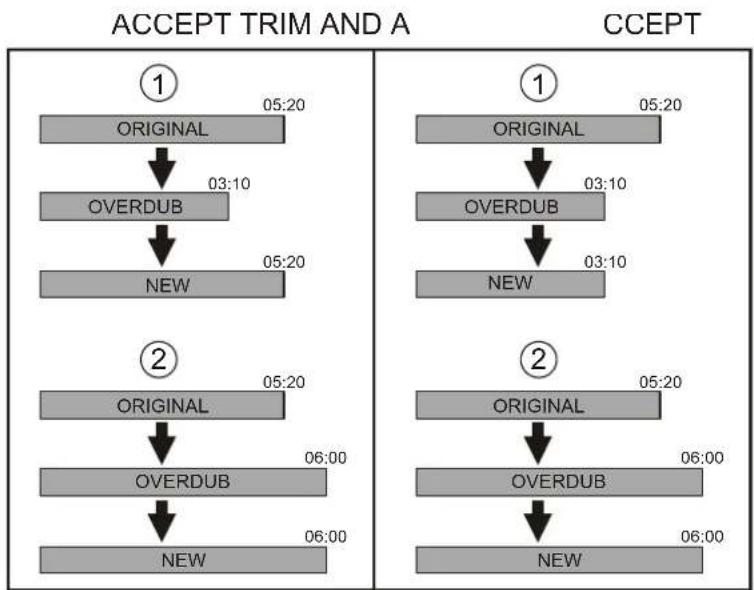
flowchart
graph TD
    subgraph ACCEPT_TRIM_AND_A
        A1["ORIGINAL"] --> B1["OVERDUB"]
        B1 --> C1["NEW"]
        D1["ORIGINAL"] --> E1["OVERDUB"]
        E1 --> F1["NEW"]
    end
    subgraph CCEPT
        G1["ORIGINAL"] --> H1["OVERDUB"]
        H1 --> I1["NEW"]
        J1["ORIGINAL"] --> K1["OVERDUB"]
        K1 --> L1["NEW"]
    end
    A1 --> B1 --> C1 --> E1 --> F1 --> G1 --> H1 --> I1 --> J1
    style A1 fill:#f9f,stroke:#333
    style B1 fill:#ccf,stroke:#333
    style C1 fill:#cfc,stroke:#333
    style E1 fill:#fcc,stroke:#333
    style F1 fill:#cff,stroke:#333
    style G1 fill:#ffc,stroke:#333
    style H1 fill:#cfc,stroke:#333
    style I1 fill:#fcc,stroke:#333
Press [EXIT] to quit the screen. The display will show:
![WARNING DISCARD THE SEQUENCE TAKE? [ENTER] TO CONFIRM [EXIT] TO GO BACK](/content/2026/04/723650/images/4eeb9973b3d52e84ab377d5df481e150d405c360cab3a791e1e29fe55948209d.jpg)
Warning you that the overdubbing will be lost. Press [ENTER] to continue – and therefore discard the recording – or [EXIT] to return to the previous screen.
N.B.
- The system displays the error message “USB PEN NOT PRESENT” when trying to save a MIDI sequence without a USB drive connected to the instrument, or when the pen drive has not been recognized. Should this happen, check that the pen drive is not damaged and has the correct format.
- The error message "FILE LOAD FAILED" means that the file is damaged or bigger than 128 KB (maximum files size that you can overdub).
- In the case of "FILE SAVE FAILED" error, retry the operation. If the error occurs again, check that there is enough space in the USB stick. If the error still occurs, the USB stick could be damaged so try using a different stick or format it with a computer.
9. STOP LOCAL OFF
Setting a stop in Local Off mode means that it will not be played by the organ's internal sound generation system, but the relative MIDI (System Exclusive code) message will be transmitted, so that it can be turned on and played on a connected instrument.
To set a stop in Local Off mode, while the main screen is on the display, press the [S] (Set) piston, keep it pressed and also press the [C] (Cancel) button. The LEDs of all the stops will light up and the display will show the video page:
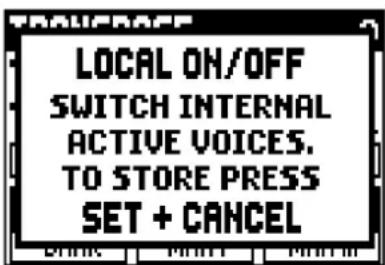
To set a voice in Local Off mode, operate its draw-stop or rocker switch so that its light goes out.
After setting the setup required, press [S] and [C] together to save it.
Accessing the Local Off setting function after this will trigger display of the status of the stops as follows:
- Light on: stop in Local On mode (plays with internal generation)
- Light off: stop in Local Off status
10. APPENDIX
10.1 DEMONSTRATION SONGS
The organ has a number of demonstration (demo) tracks to allow you to fully appreciate the quality its sound qualities and/or those of the changes you have made.
To recall playback of the demo tracks, select the DEMO field from the menu MAIN MENU.
Use the [FIELD ▲] and FIELD ▼ buttons to select each song of music. Press [ENTER] to start and stop each song. Press [EXIT] to leave the DEMO function.
10.2 TEMPERAMENT
Tuning a fixed intonation instrument (e.g. organs) consists of creating a chain of twelve fifths, properly crafted so that at the extremes the interval can be reduced, through division or multiplication, to a perfect octave. A perfect fifth is achieved when two sounds have a frequency ratio of 3:2. If from any sound we calculate twelve ascending perfect fifths, the sound obtained is (3/2)^12 . With 7 octaves instead, the result is a 27 frequency. If we compare these values we find that (3/2)^12 is slightly higher than 2^7 . Rounding off after the fourth decimal, we find that:
(3/2)^12 = 129,7463 , while 2^7 = 128,0000 . The ratio between these two value is called Pythagorean comma.
It can be defined as the surplus of twelve perfect fifth compared to seven octaves, both starting from the same sound.
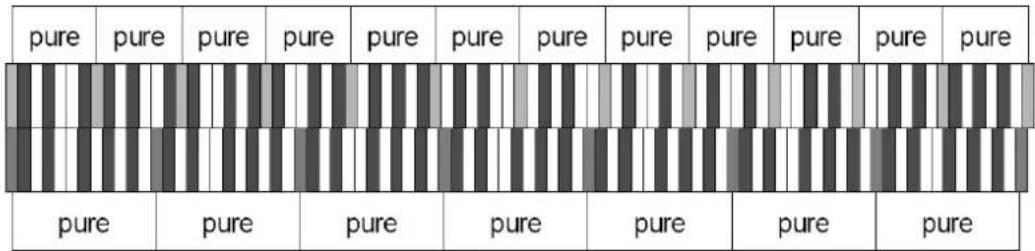
The picture is not in scale (otherwise the comma would be almost invisible) but it gives a graphical understanding of the problem.
Now, dividing the Pythagorean comma in 12 equal parts, and subtracting this value to each pure fifth, the result is a twelve-fifth chain, ending with the same value as seven octaves.
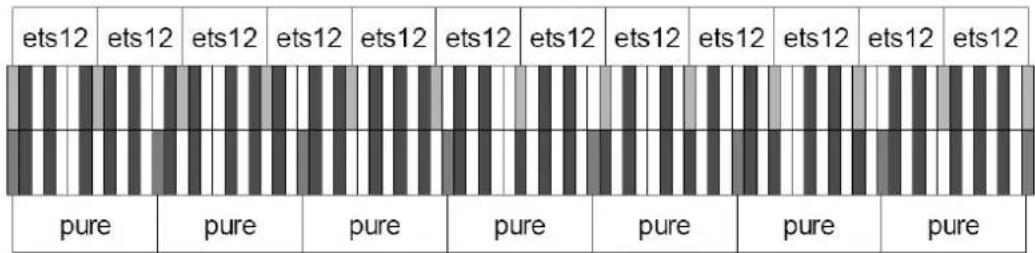
This is the Equal Temperament System (with the comma split in twelve parts).
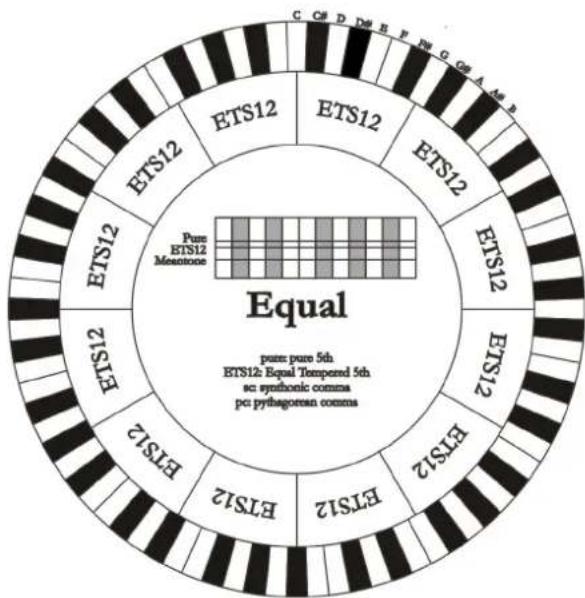
The Pythagorean comma can be split in larger parts and divided among a few (less than 12) fifths. This leads to other temperaments, such as the Werckmeister III, which spreads the comma in four, equal parts, between C-G, G-D, D-A, and B-F#. A very important interval in the history of tuning is the major third. A chain of four pure fifths makes (3/2)^4 . A major third interval is represented by a 5/4 ratio. Therefore, rounding off, the frequency of a major third, generated by Pythagorean fifths is 1,2656, while a natural major third is 1,2500. This surplus is called Syntonic comma. A series of four fifths, each one reduced by 14 of Syntonic comma, makes a perfect major third. These fifths are called “meantone”. If a temperament recovers only one syntonic comma, it still needs to compensate the small difference between Pythagorean and syntonic comma. This difference is called skisma. For example, the Kirnberger II temperament is based on the syntonic comma. It spreads the comma equally between D-A and A-E and the skisma between F# and C#. A series of three natural major thirds makes a frequency of (5/4)^3 . The difference between that and the octave is called enharmonic comma. When a temperament makes up for more than the Pythagorean comma, usually one fifth is much wider than the rest and becomes unusable. It is called the wolf fifth.
10.3 TEMPERAMENTS OF THE CANTORUM DUO
In addition to equal temperament, with the Cantorum Duo you can play other temperaments described below.
KIRNBERGER II (KIRNBERGER2 on display)
Based on two fifths, reduced by half syntonic comma, and one fifth reduced by a skisma. There are three pure majors: C, G, D. Therefore, the major triads on C and G are pure. Same goes with the minor triads, on E and B. The four major thirds on C#, G#, Eb, Bb are Pythagorean. The coexistence of pure and tempered chords gives a peculiar character to this tuning.
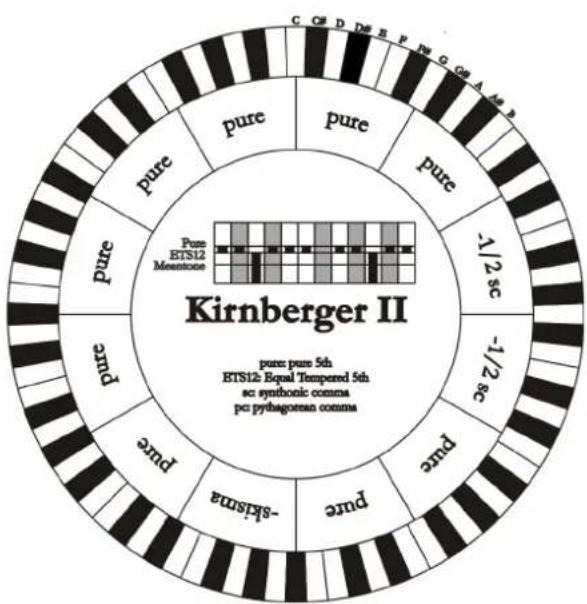
other
| Category | Value | | -------------- | ----- | | Pure | pure | | Pure | pure | | Pure | pure | | Pure | pure | | Pure | pure | | Pure | pure | | Pure | pure | | Pure | pure | | Pure | pure | | Pure | pure | | Pure | pure | | Pure | pure | | Pure | pure | | Pure | pure | | Pure | pure | | | Pure | pure | | Pure | pure | | Pure | pure | | Pure | pure | | Pure | pure | | Pure | pure | | Pure | pure | | Pure | pure | | Pure | pure | | Pure | pure | | Pure | pure | | Pure | pure | | Pure | pure | | Pure | pure | | Pue | -1/2sc | | Pue | -1/2sc | | Pue | -1/2sc | | Pue | -1/2sc | | Pue | -1/2sc | | Pue | -1/2sc | | Pue | -1/2sc | | Pue | -1/2sc | | Pue | -1/2sc | | Pue | -1/2sc |WERCKMEISTER III (WERCKMEIST.3 on display)
Based on four fifths, each reduced by 14 Pythagorean comma – the others are pure. Creates three Pythagorean major thirds on: C#, F#, G#. As the number of alteration in the piece performed increases, so does the harmonic tension.
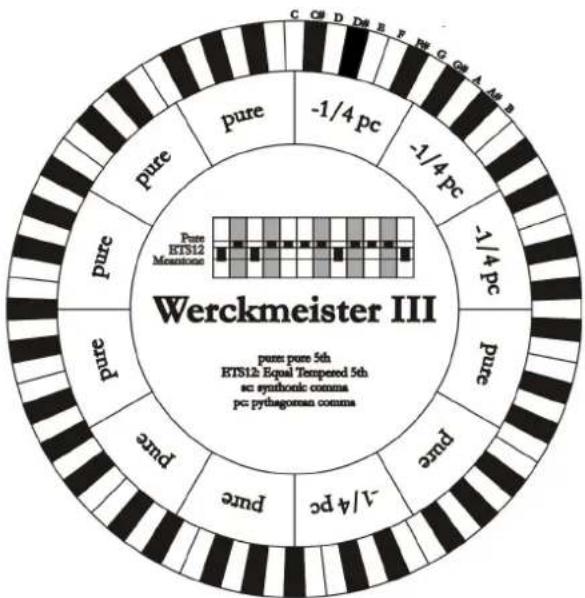
other
| Transition State | Value | | ---------------- | --------- | | Pure | -1/4 pc | | Pure | -1/4 pc | | Pure | -1/4 pc | | Pure | -1/4 pc | | Pure | -1/4 pc | | Pure | -1/4 pc | | Pure | -1/4 pc | | Pure | -1/4 pc | | Pure | -1/4 pc | | Pure | -1/4 pc |PYTHAGOREAN
Based on eleven pure Pythagorean fifths and a wolf fifth on G#. This tuning can be used to play monodies, and music that does not use thirds in general. Most useful for curiosity and educational ends.
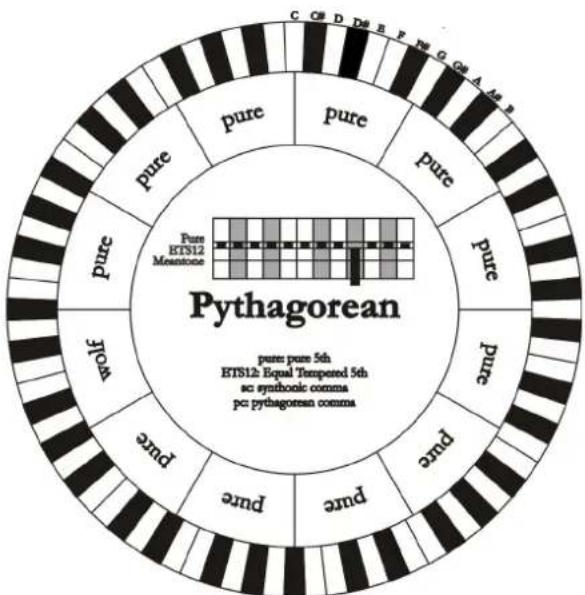
This tuning is the prototype of all temperaments based on fifths reduced by 14 of syntonic comma. This generates eight pure major thirds: Eb, Bb, F, C, G, D, A, E. However, the other thirds are unsuable (B, F#, G#). The fifths are defined as meantone fifths: shorter than pure fifths but still sounding well. Only one, G#, fills all the gap created by 11 others and becomes a wolf fifth. Tonalities with little alterations sound very pleasant. Well characterised chromatic scale. Move the wolf on C# to use the G# key as Ab.
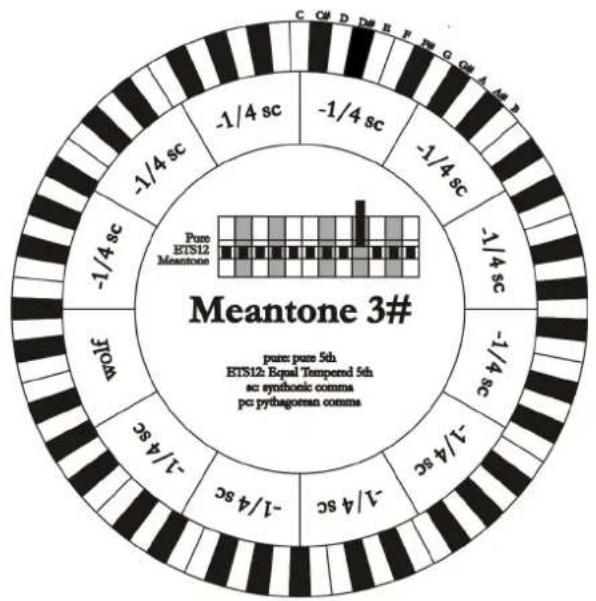
other
Meantone 3# Pure: pure 5th ETS12: Equal Tempered 5th sc: synthetic comms pc: pythagorean comms.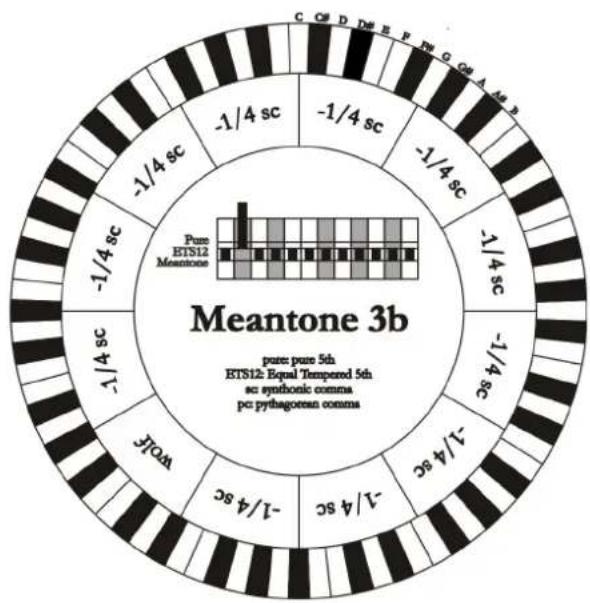
other
| Semitone | Frequency | | -------- | --------- | | -1/4 sc | 1/4 sc | | -1/4 sc | -1/4 sc | | -1/4 sc | -1/4 sc | | -1/4 sc | -1/4 sc | | -1/4 sc | -1/4 sc | | -1/4 sc | -1/4 sc | | -1/4 sc | -1/4 sc | | -1/4 sc | -1/4 sc | | -1/4 sc | 0 | | -1/4 sc | 0 | | -1/4 sc | 0 | | -1/4 sc | 0 | | -1/4 sc | 0 | | -1/4 sc | 0 | | -1/4 sc | 0 | | -1/4 sc | 0 | | -1/4 sc | 0 | | -7/4 sc | 0 | | -7/4 sc | 0 | | -7/4 sc | 0 | | -7/4 sc | 0 | | -7/4 sc | 0 | | -7/4 sc | 0 | | -7/4 sc | 0 | | -7/4 sc | 0 | | -7/4 scVALLOTTI
Based on six fifths, each decreased by 1/6 of Pythagorean comma. The others are pure fifths. The major thirds on Eb–B, Bb–E, F–A are equivalent, as the ones on C, G and D. Thirds on F#, C# and G# are Pythagorean instead.
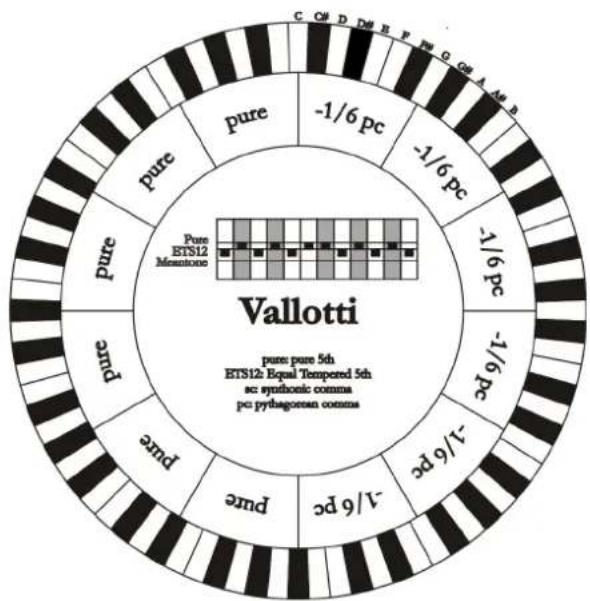
other
| Category | Value | | -------- | --------- | | Pure | -1/6 pc | | Pure | -1/6 pc | | Pure | -1/6 pc | | Pure | -1/6 pc | | Pure | -1/6 pc | | Pure | -1/6 pc | | Pure | -1/6 pc | | Pure | -1/6 pc | | Pure | -1/6 pc | | Pure | -1/6 pc |CHAUMONT
A meantone temperament; the wolf fifth has been improved by enlarging the fifths on Eb and Bb. There are six pure major thirds: F, C, G, D, A, E. The third major on B, although not very pleasant, can still be used.
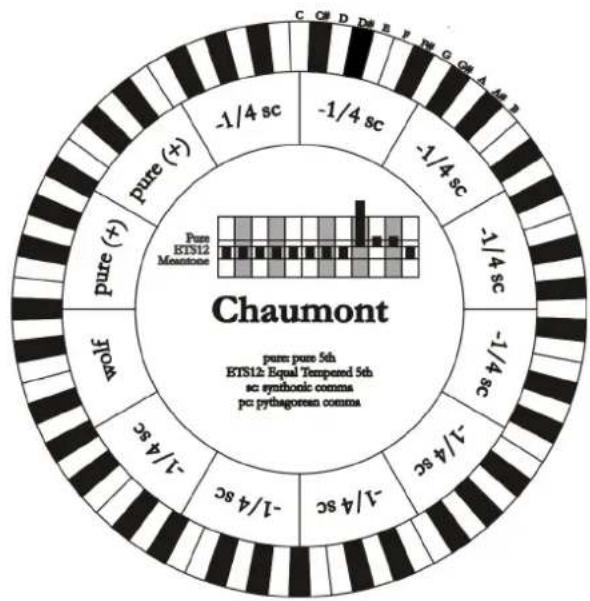
other
| Category | Value | | -------- | --------- | | Pure | -1/4 sc | | Pure (+) | -1/4 sc | | Pure (+) | -1/4 sc | | Pure (+) | -1/4 sc | | Pure (+) | -1/4 sc | | Pure (+) | -1/4 sc | | Pure (+) | -1/4 sc | | Pure (+) | -1/4 sc | | Pure (+) | -1/4 sc | | Pure (+) | -1.4 sc | | Pure (+) | -1.4 sc | | Pure (+) | -1.4 sc | | Pure (+) | -1.4 sc | | Pure (+) | -1.4 sc | | Pure (+) | -1.4 sc | | Pure (+) | -1.4 sc | | Pure (+) | -1.4 sc | | Pure (+) | -1.4 sc |KELLNER 1975
This tuning was created by Kellner, who figured out its structure from the symbols on the first page of the "Wohltemperierte Klavier" by Bach, 1722. The tuning is based on five fifths, each reduced of 1/5 of Pythagorean comma. This originates three Pythagorean major thirds, on: C#, F#, G#. None of the thirds is pure. The major third closer to being pure is on C.
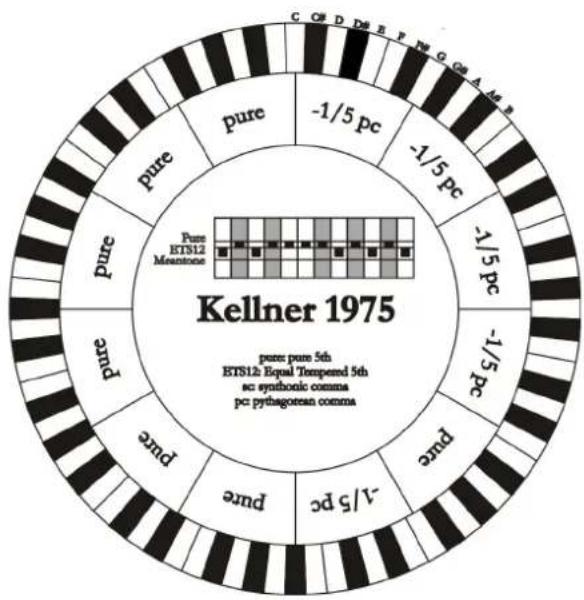
other
| Type | Value | |------------|-----------| | Pure | -1/5 pc | | Pure | -1/5 pc | | Pure | -1/5 pc | | Pure | -1/5 pc | | Pure | -1/5 pc | | Pure | -1/5 pc | | Pure | -1/5 pc | | Pure | -1/5 pc | | Pure | -1/5 pc | | Pure | -1/5 pc | | | Pure | -1/5 pc | | Pure | -1/5 pc | | Pure | -1/5 pc | | Pure | -1/5 pc | | Pure | -1/5 pc | | Pure | -1/5 pc | | Pure | -1/5 pc | | Pure | -1/5 pc | | Pure | -1/5 pc |KIRNBERGER III (KIRNBERGER3 on display)
Based on four fifths, each one reduced by 14 of syntonic comma, and one fifth reduced of the remaining skisma. There is only one pure major third on C. From most to least pure, they are G, D, A and F, Bb, Eb. E, B and F# are equivalent one with the other. Pythagorean major thirds are on C# and G#. Pieces with many alterations are well characterised.
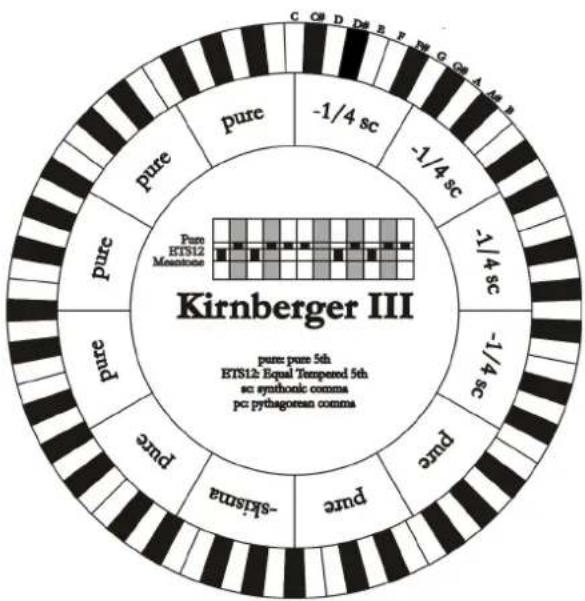
other
| Category | Value | | -------------- | --------- | | Pure | -1/4 sc | | -1/4 sc | -1/4 sc | | -1/4 sc | -1/4 sc | | -1/4 sc | -1/4 sc | | -1/4 sc | -1/4 sc | | -1/4 sc | -1/4 sc | | -1/4 sc | -1/4 sc | | -1/4 sc | -1/4 sc | | Pure | -1/4 sc | | -1/4 sc | -1/4 sc | | -1/4 sc | -1/4 sc | | -1/4 sc | -1/4 sc | | -1/4 sc | -1/4 sc | | -1/4 sc | -1/4 sc | | -1/4 sc | -1/4 s | | Pure | -1/4 sc | | -1/4 sc | -1/4 sc | | -1/4 sc | -1/4 sc | | -1/4 sc | -1/4 sc | | -1/4 sc | -1/4 sc | | -1/4 sc | -1/4 s | | Pure | -1/4 s | | -1/4 s | -1/4 s | | -1/4 s | -1/4 s | | -1/4 s | -1/4 s | | -1/4 s | -1/4 s | | -1/4 s | -1/4 s | | Pure | -1/4 s | | -1/4 s | -1/4 s | | -1/4 s | -1/4 s | | -1/4 s | -1/4 s | | -1/4 s | -1/4 s | | -1/4 s | -1/4 s | | Pure | -siksmia | | -1/4 s | Pure | | -1/4 s | Pure | | -1/4 s | Pure | | -1/4 s | Pure | | Kirnberger III | Pure: pure 5th, ETS12: Equal Tempered 5th sec synthetic comma pc pythagorean commaWERCKMEISTER IV (WERCKMEIST.4 on display) Based on five fiths, each reduced of 1/3 of Pythagorean comma, and two more thirds increased of the same amount. Very pleasant with mostly unaltered tonalities, it becomes “harder” as the alterations increase.
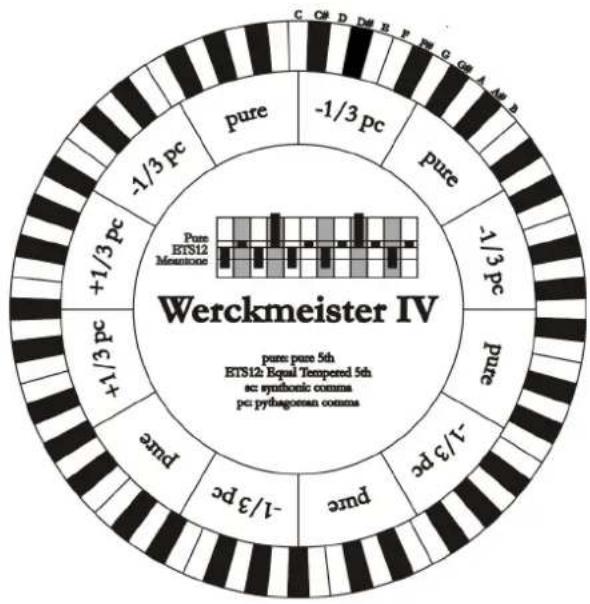
pie
Werckmeister IV | Category | Value | |---|---| | Pure | -1/3 pc | | -1/3 pc | Pure | | +1/3 pc | Pure | | +1/3 pc | Pure | | Pure | -1/3 pc | | -1/3 pc | Pure | | Pure | -1/3 pc | | Pure | -1/3 pc | | Pure | -1/3 pc | | Pure | -1/3 pc | | Pure | -1/3 pc | | Pure | -1/3 pc | | Pure | -1/3 pc | | Pure | -1/3 pc | | Pure | -1/3 pc | | Pure | -1/3 pc | | Pure | -1/3 pc | | Pure | -1/3 pc |WERCKMEISTER V (WERCKMEIST.5 on display) Based on five fifths reduced by 1/5 of Pythagorean comma, and one fifth increased of the same amount. This tuning is rarely used as there is no tonality that is much euphonic.
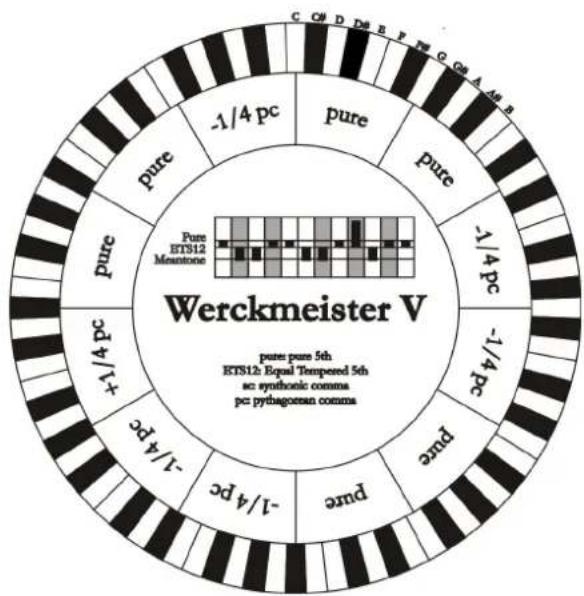
other
| Mutation Type | Value | | ------------- | ----- | | Pure | -1/4 pc | | -1/4 pc | +1/4 pc | | -1/4 pc | +1/4 pc | | Pure | -1/4 pc | | -1/4 pc | -1/4 pc | | Pure | +1/4 pc | | -1/4 pc | +1/4 pc | | Pure | -1/4 pc | | -1/4 pc | -1/4 pc | | Pure | +1/4 pc | | -1/4 pc | +1/4 pc | | Pure | -1/4 pc | | -1/4 pc | -1/4 pc | | Pure | +1 / 4 pc | | -1/4 pc | +1 / 4 pc | | Pure | -1 / 4 pc | | -1/4 pc | -1 / 4 pc | | Pure | +1 / 4 pc | | -1/4 pc | +1 / 4 pc | | Pure | -1 / 4 pc | | -1/4 pc | -1 / 4 pc | | Pure | +1 / 4 pc | | -1/4 pc | +1 / 4 pc | | Pure | -1 / 4 pc | | -1/4 pc }SILBERMANN
Based on fifths reduced of 1/6 of syntonic comma. Wolf fifth is located on G#. Thirds that in meantone tuning are pure, here are 1/3 syntonic comma wider. The wolf fifth is less prominent, not cacophonic yet not completely acceptable.
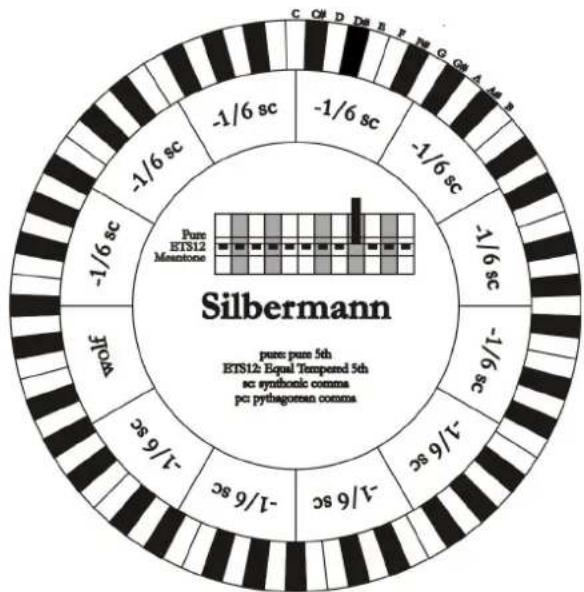
polar_bar
Silbermann | Mutation | Value | | :--- | :--- | | Pure ETS12 Mesantone | -1/6 sc | | Pure ETS12 Mesantone | -1/6 sc | | Pure ETS12 Mesantone | -1/6 sc | | Pure ETS12 Mesantone | -1/6 sc | | Pure ETS12 Mesantone | -1/6 sc | | Pure ETS12 Mesantone | -1/6 sc | | Pure ETS12 Mesantone | -1/6 sc | | Pure ES12 Mesantone | -1/6 sc | | Pure ES12 Mesantone | -1/6 sc | | Pure ES12 Mesantone | -1/6 sc | | Pure ES12 Mesantone | -1/6 sc | | Pure ES12 Mesantone | -1/6 sc | | Pure ES12 Mesantone | -1/6 sc | | Pure ES12 Mesantone | -1/5 sc | | Pure ES12 Mesantone | -1/5 sc | | Pure ES12 Mesantone | -1/5 sc | | Pure ES12 Mesantone | -1/5 sc | | Pure ES12 Mesantone | -1/5 sc | | Pure ES12 Mesantone | -1/5 sc | | Pure ES12 Mesantone | -1/5 sc | | Pure ES12 Mesant one | -1/6 sc | | Pure ES12 Mesant one | -1/6 sc | | Pure ES12 Mesant one | -1/6 sc | | Pure ES12 Mesant one | -1/6 sc | | Pure ES12 Mesant one | -1/6 sc | | Pure ES12 Mesant one | -1/6 sc | | Pure ES12 Mesant one | -1/6 sc | | Pure ES12 Mesant two | -1/6 sc | | Pure ES12 Mesant two | -1/6 sc | | Pure ES12 Mesant two | -1/6 sc | | Pure ES12 Mesant two | -1/6 sc | | Pure ES12 Mesant two | -1/6 sc | | Pure ES12 Mesant two | -1/6 sc | | Pure ES12 Mesant two | -1/6 sc | | Pure ETS12 Mesant one | -1/6 sc | | Pure ETS12 Mesant one | -1/6 sc | | Pure ETS12 Mesant one | -1/6 sc | | Pure ETS12 Mesant one | -1/6 sc | | Pure ETS12 Mesant one | -1/6 sc | | Pure ETS12 Mesant one | -1/6 sc | | Pure ETS12 Mesant one | -1 / 6 sc | | Pure ETS12 Mesant one | -1 / 6 sc | | Pure ETS12 Mesant one | -1 / 6 sc | | Pure ETS12 Mesant one | -1 / 6 sc | | Pure ETS12 Mesant one | -1 / 6 sc | | Pure ETS12 Mesant one | -1 / 6 sc | | Pure ETS12 Mesant one | -0.9 / 6 sc | | Pure ETS12 Mesant one | -0.9 / 6 sc | | Pure ETS12 Mesant one | -0.9 / 6 sc | | Pure ETS12 Mesant one | -0.9 / 6 sc | | Pure ETS12 Mesant one | -0.9 / 6 sc | | Pure ETS12 Mesant one | -0.9 / 6 sc |MEANTONE PURE MINOR 3rd (MEANTONE 3M on display)
This temperament is built with fifths narrowed by 1/3 of syntonic comma. The wolf fifth on G# is very large and completely unusable. The nine minor thirds based on C, G, D, A, E, B, F#, C#, G# are pure.
The eight major thirds based on Eb, Bb, F, C, G, D, A, E, are narrower, with respect to the pure, by 1/3 of syntonic comma. Again in this temperament the chromatic scale has a particular character.
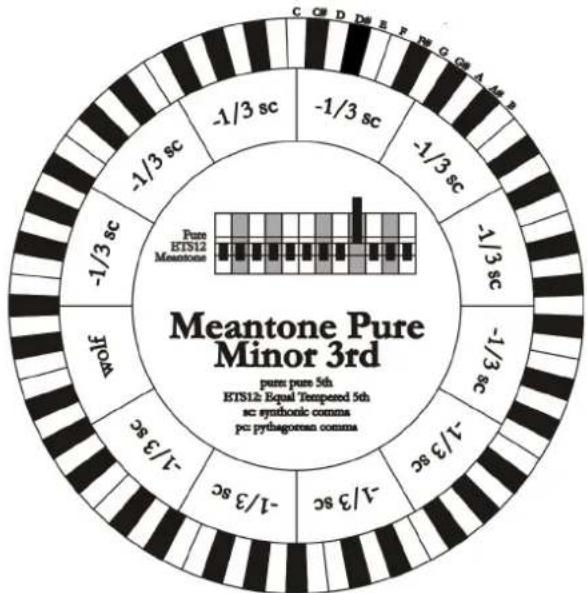
other
| Semitode | Value | |----------|-----------| | Pure ETS12 Moutons | -1/3 sc | | Pure ETS12 Moutons | -1/3 sc | | Pure ETS12 Moutons | -1/3 sc | | Pure ETS12 Moutons | -1/3 sc | | Pure ETS12 Moutons | -1/3 sc | | Pure ETS12 Moutons | -1/3 sc | | Pure ETS12 Moutons | -1/3 pc | | Pure ETS12 Moutons | -1/3 pc | | Pure ETS12 Moutons | -1/3 pc | | Pure ETS12 Moutons | -1/3 pc | | Pure ETS12 Moutons | -1/3 pc | | Pure ETS12 Moutons | -1/3 pc | | Pure ETS12 Moutons | -1 / 3 sc | | Pure ETS12 Moutons | -1 / 3 sc | | Pure ETS12 Moutons | -1 / 3 sc | | Pure ETS12 Moutons | -1 / 3 sc | | Pure ETS12 Moutons | -1 / 3 sc | | Pure ETS12 Moutons | -1 / 3 sc | | Pure ETS12 Moutons | -1 /3 sc | | Pure ETS12 Moutons | -1 / 3 sc | | Pure ETS12 Moutons | -1 / 3 sc | | Pure ETS12 Moutons | -1 / 3 sc | | Pure ETS12 Moutons | -1 / 3 sc | | Pure ETS12 Moutons | -1 / 3 sc | | Pure ETS12 Moutons | -0.5 / 3 sc | | Pure ETS12 Moutons | -0.5 / 3 sc | | Pure ETS12 Moutons | -0.5 / 3 sc | | Pure ETS12 Moutons | -0.5 / 3 sc | | Pure ETS12 Moutons | -0.5 / 3 sc | | Pure ETS12 Moutons | -0.5 / 3 sc |ZARLINO
Eleven fifths are reduced by 2/7 of syntonic comma. The wolf fifth, very wide and therefore unusable, lies on G#. Eight third majors are usable and reduced by 1/7 of syntonic comma.
Well characterised chromatic scale.
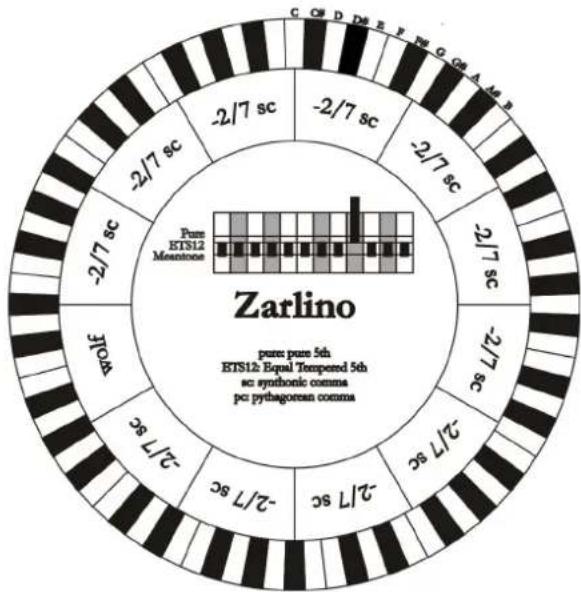
other
| Category | Value | | -------- | ----- | | C | -2/7 sc | | D | -2/7 sc | | E | -2/7 sc | | F | -2/7 sc | | G | -2/7 sc | | H | -2/7 sc | | I | -2/7 sc | | J | -2/7 sc | | K | -2/7 sc | | L | -2/7 sc | | M | -2/7 sc | | N | -2/7 sc | | O | -2/7 sc | | P | -2/7 sc | | Q | -2/7 sc | | R | -2/7 sc | | S | -2/7 sc | | T | -2/7 sc | | U | -2/7 sc | | V | -2/7 sc | | W | -2/7 sc | | X | -2/7 sc | | Y | -2/7 sc | | Z | -2/7 sc | | AA | -2/7 sc | | AB | -2/7 sc | | AC | -2/7 sc | | AD | -2/7 sc | | AE | -2/7 sc | | AF | -2/7 sc | | AG | -2/7 sc | | AH | -2/7 sc | | AI | -2/7 sc | | AJ | -2/7 sc | | AK | -2/7 sc | | AL | -2/7 sc | | AM | -2/7 sc | | AN | -2/7 sc | | AO | -2/7 sc | | AP | -2/7 sc | | AQ | -2/7 sc | | AR | -2/7 sc | | AS | -2/7 sc | | AT | -2/7 sc | | AU | -2/7 sc | | AV | -2/7 sc | | AW | -2/7 sc | | AX | -2/7 sc | | AY | -2/7 sc | | AZ | -2/7 sc | | BA | -2/7 sc | | BB | -2/7 sc | | BC | -2/7 sc | | BD | -2/7 sc | | BE | -2/7 sc | | BF | -2/7 sc | | BG | -2/7 sc | | BH | -2/7 sc | | BI | -2/7 sc | | BJ | -2/7 sc | | BK | -2/7 sc | | BL | -2/7 sc | | BM | -2/7 sc | | BN | -2/7 sc | | BO | -2/7 sc | | BP | -2/7 sc | | BPAN | -2/7 sc | | BCA | -2/7 sc | | BCAH | -2/7 sc | | BCAH | -2/7 sc | | BCAH | -2/7 sc | | BCAH | -2/7 sc | | BCAH | -2/7 sc | | BCAH | -2/7 sc | | BCAH | -2/7 sc | | BCAH | -2/7 sc | | BCAH | -2 / 3 sc | | BCAH | -2 / 3 sc | | BCAH | -2 / 3 sc | | BCAH | -2 / 3 sc | | BCAH | -2 / 3 sc | | BCAH | -2 / 3 sc | | BCAH | -2 / 3 sc | | BCAH | -2 / 3 sc | | BCAH | 0 / 3 sc | | BCAH | 0 / 3 sc | | BCAH | 0 / 3 sc | | BCAH | 0 / 3 sc | | BCAH | 0 / 3 sc | | BCAH | 0 / 3 sc | | BCAH | 0 / 3 sc | | BCAH | 0 / 3 sc | | BCA | 0 / 3 sc | | BCA | 0 / 3 sc | | BCA | 0 / 3 sc | | BCA | 0 / 3 sc | | BCA | 0 / 3 sc | | BCA | 0 / 3 sc | | BCA | 0 / 3 sc | | BCA | 0 / 3 sc | | BCA | 0 |SAUVEUR 1 - SAUVEUR 2
The Saveur 1 tuning is based on eleven fifths, reduced by 1/5 of syntonic comma. Wolf fifth lies on G#. In Saveur 2 the fifth on F# is pure. The eight third majors of the meantone are somewhat wider here, so the “wolf” is less prominent. Well tuned tonalities are particularly “warm” and pleasant.
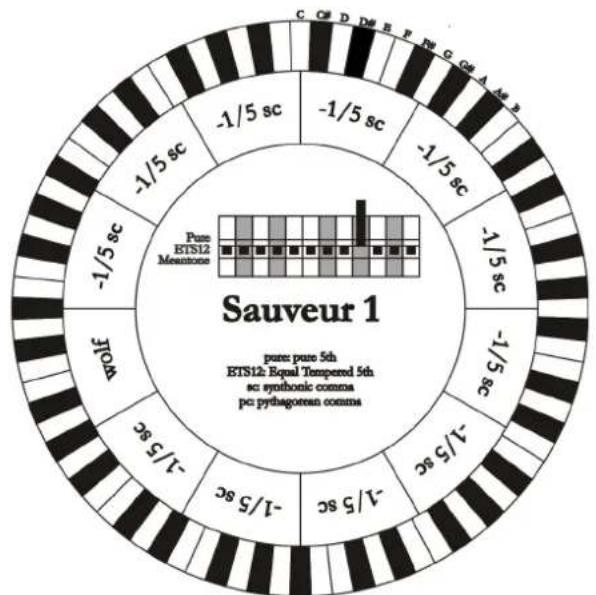
other
| Segment | Value | |---------|-----------| | Top Left | -1/5 sc | | Top Right| -1/5 sc | | Bottom Left | -1/5 sc | | Bottom Right | -1/5 sc | | Bottom Right | -1/5 sc | | Bottom Left | -1/5 sc | | Bottom Right | -1/5 sc | | Bottom Right | -1/5 sc | | Bottom Left | -1/5 sc | | Bottom Right | -1/5 sc | | Bottom Right | -1/5 sc | | Bottom Left | -1/5 sc | | Bottom Right | -1/5 sc | | Bottom Right | -1/5 sc | | Bottom Left | -1/5 ssc | | Bottom Right | -1/5 ssc | | Bottom Right | -1/5 ssc | | Bottom Left | -1/5 ssc | | Bottom Right | -1/5 ssc | | Bottom Right | -1/5 ssc | | Bottom Left | -1/5 ssc | | Bottom Right | -1/5 ssc | | Bottom Right | -1/5 ssc | | Bottom Right | -1/5 ssc | | Bottom Left | -1/5 ssc | | Bottom Right | -1/5 ssc | | Bottom Right | -1/5 ssc | | Bottom Left | -1/5 ssc | | Bottom Right | -1/5 ssc | | Bottom Right | -1/5 ssc | | Bottom Right | -1/5 ssc | | Bottom Left | -1/5 ssc | | Bottom Right | -1/5 ssc | | Bottom Right | -1/5 ssc | | Bottom Left | -1/5 ssc | | Bottom Right | -1/5 ssc | | Bottom Right | -1/5 ssc | | Bottom Right | -1/5 ssc | | Bottom Left | -1/5 ssc | | Bottom Right | -1/5 ssc | | Bottom Right | -1/5 ssc | | Bottom Left | -1/5 ssc | | Bottom Right | -1/5 ssc | | Bottom Right | -1/5 ssc | | Bottom Right | -1 / 5 sc | | Bottom Left | -1/5 sc | | Bottom Right | -1/5 sc | | Bottom Right | -1/5 sc | | Bottom Left | -1/5 sc | | Bottom Right | -1/5 sc | | Bottom Right | -1/5 sc | | Bottom Right | -1/5 sc | | Bottom Left | -1/5 sc | | Bottom Right | -1/5 sc | | Bottom Right | -1/5 sc | | Bottom Left | -1/5 sc | | Bottom Right | -1/5 sc | | Bottom Right | -1/5 sc | | Bottom Right | -1/5 sc | | Bottom Left | -1/5 sc | | BottomRight | -1/5 sc | | BottomRight | -1/5 sc | | BottomRight | -1/5 sc | | Bottom Left | -1/5 sc | | BottomRight | -1/5 sc | | BottomRight | -1/5 sc | | BottomRight | -1/5 sc | | Bottom Left | -1/5 sc | | BottomRight | -1/5 sc | | BottomRight | -1/5 sc | | BottomRight | -0.7 / 3 sc| | BottomLeft | -0.7 / 3 sc| | BottomRight | -0.7 / 3 sc| | BottomRight | -0.7 / 3 sc| | BottomRight | -0.7 / 3 sc| | BottomLeft | -0.7 / 3 sc| | BottomRight | -0.7 / 3 sc| | BottomRight | -0.7 / 3 sc| | BottomRight | -0.7 / 3 sc| | BottomLeft | -0.7 / 3 sc| | BottomRight | -0.7 / 3 sc| |BottomRight | -0.7 / 3 sc| | BottomRight | -0.7 / 3 sc| | BottomLeft | -0.7 / 3 sc| | BottomRight | -0.7 / 3 sc| | BottomRight | -0.7 / 3 sc| | BottomRight | -0.7 / 3 sc| | BottomLeft | -0.7 / 3 sc| | BottomRight* ETS12: Equal Tempered 5th* sec synthetic comma pc pythagorean comma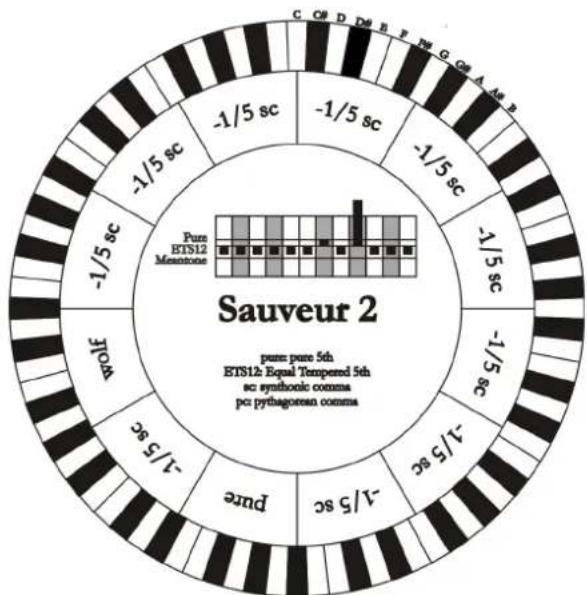
other
| Semiterrone | Frequency | | ----------- | --------- | | Poly | -1/5 sc | | Mono | -1/5 sc | | Pune | -1/5 sc | | ETS12 Meantone | -1/5 sc | | Pure | -1/5 sc | | Poly | -1/5 sc | | Mono | -1/5 sc | | Pune | -1/5 sc | | ETS12 Meantone | -1/5 sc |BARCA
The Barca temperament is based on six fifths (from C) reduced by 1/6 of syntonic comma each, and one fifth (on Eb) reduced of the remaining skisma. Therefore there are no Pythagorean thirds, and tonalities with many alterations still sound well.
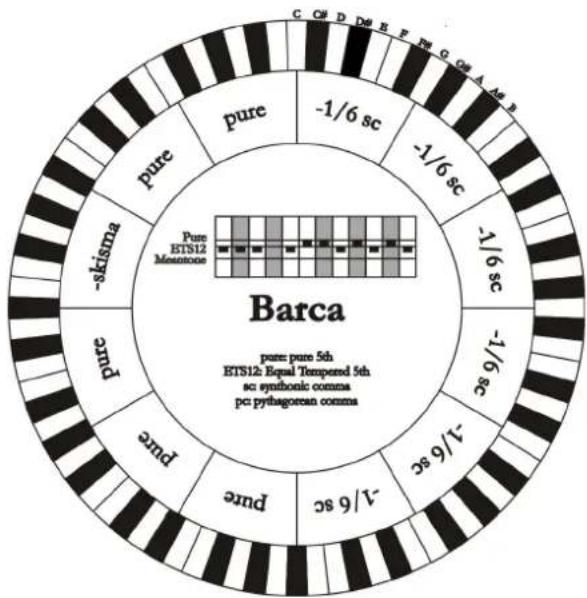
other
| Sequence | Value | | -------- | --------- | | Pure | -1/6 sc | | -1/6 sc | -1/6 sc | | -1/6 sc | -1/6 sc | | -1/6 sc | -1/6 sc | | -1/6 sc | -1/6 sc | | -1/6 sc | -1/6 sc | | -1/6 sc | -1/6 sc | | -1/6 sc | -1/6 sc | | Pure | -1/6 sc | | Pure | -1/6 sc | | Pure | -1/6 sc | | Pure | -1/6 sc | | Pure | -1/6 sc | | Pure | -1/6 sc | | Pure | -1/6 sc | | Pure | -1/6 sc | | Pure | -1/6 sc | | Pure (Skisma) | -1/6 sc | | Pure (Skisma) | -1/6 sc | | Pure (Skisma) | -1/6 sc | | Pure (Skisma) | -1/6 sc | | Pure (Skisma) | -1/6 sc | | Pure (Skisma) | -1/6 sc | | Pure (Skisma) | -1/6 sc | | Pure (Skisma) (Equal Tempered 5th sc) | -1/6 sc | | Pure (Skisma) (Equal Tempered 5th sc) | -1/6 sc | | Pure (Skisma) (Equal Tempered 5th sc) | -1/6 sc | | Pure (Skisma) (Equal Tempered 5th sc) | -1/6 sc | | Pure (Skisma) (Equal Tempered 5th sc) | -1/6 sc, pythagorean comma | | Pure (Skisma) (Equal Tempered 5th sc) | -1/6 sc, pythagorean comma | | Pure (Skisma) (Equal Tempered 5th sc) | -1/6 sc, pythagorean comma | | Pure (Skisma) (Equal Tempered 5th sc) | -1/6 sc, pythagorean comma | | Pure (Skisma) (Equal Tem Peak) | -1/6 sc, pythagorean comma | | Pure (Skisma) (Equal Tem Peak) | -1/6 sc, pythagorean comma | | Pure (Skisma) (Equal Tem Peak) | -1/6 sc, pythagorean comma | | Pure (Skisma) (Equal Tem Peak) | -1/6 sc, pythagorean comma | | Pure (Skisma) (Equal Tem Lead) | -1/6 sc, pythagorean comma | | Pure (Skisma) (Equal Tem Lead) | -1/6 sc, pythagorean comma | | Pure (Skisma) (Equal Tem Lead) | -1/6 sc, pythagorean comma | | Pure (Skisma) (Equal Tem Lead) | -1/6 sc, pythagorean comma | | Pure (Skisma) (Equal Tem Peak) | -1/6 sc, pythagorean comma | | Pure (Skisma) (Equal Tem Peak) | -1/6 sc, pythagorean comma | | Pure (Skisma) (Equal Tem Peak) | -1/6 sc, pythagorean comma | | Pure (Skisma) (Equal Tem End)| -1/6 sc, pythagorean comma | | Pure (Skisma) (Equal Tem End)| -1/6 sc, pythagorean comma | | Pure (Skisma) (Equal Tem End)| -1/6 sc, pythagorean comma | | Pure (Skisma) (Equal Tem End)| -1/6 sc, pythagorean comma | | Pure (Skisma) (Equal Tem End)| -1/ 6 sc, pythagorean comma | | Pure (Skisma) (Equal Tem End)| -1/6 sc, pythagorean comma | | Pure (Skisma) (Equal Tem End)| -1/6 sc, pythagorean comma | | Pure (Skisma) (Equal Tem End)| -1/6 sc, pythagorean comma | | Pure (Skisma) (Equal Tem End)| -1/6 sc, Pythagorean comma | | Pure (Skisma) (Equal Tem End)| -1/6 sc, Pythagorean comma | | Pure (Skisma) (Equal Tem End)| -1/6 sc, Pythagorean comma | | Pure (Skisma) (Equal Tem End)| -1/6 sc, Pythagorean comma | | Pure (Skisma) (Equal Tem End)| -1/6 sc, Pythagorean comma |10.4 CONTENT DEI FILE .SET, .CMB, .STS, .STA e .ALL
FILE .SET
| PARAMETER | POSITION | |
| SELECTED STYLE system data | ||
| Local Off of each stop | ||
| PEDAL | VOLUMES function | |
| MAN. I VOLUMES function | ||
| MAN. II VOLUMES function | ||
| OUT 1 VOLUMES function | ||
| OUT 2 VOLUMES function | ||
| INPUT | VOLUMES function | |
| TUNING | Main page | |
| TEMPER. | Main page | |
| REVERB | SETTINGS menu | |
| KEYB. INVERS. | SETTINGS menu | |
| SHORT OCTAVE | SETTINGS menu | |
| INTERNAL | SETTINGS menu, EQUALIZER function | |
| OUT 1 SETTINGS menu, EQUALIZER function | ||
| OUT 2 SETTINGS menu, EQUALIZER function | ||
| PEDAL OUT 1 - OUT 2 | SETTINGS menu, EXTERNAL OUTPUTS function | |
| MANUAL I OUT 1 - OUT 2 | SETTINGS menu, EXTERNAL OUTPUTS function | |
| MANUAL II OUT 1 - OUT 2 | SETTINGS menu, EXTERNAL OUTPUTS function | |
| REVERB OUT 1 - OUT 2 | SETTINGS menu, EXTERNAL OUTPUTS function | |
| INPUT OUT 1 - OUT 2 | SETTINGS menu, EXTERNAL OUTPUTS function | |
| PEDAL TX - RX | SETTINGS menu, MIDI / MIDI CHANNELS function | |
| MANUAL I TX - RX | SETTINGS menu, MIDI / MIDI CHANNELS function | |
| MANUAL II TX - RX | SETTINGS menu, MIDI / MIDI CHANNELS function | |
| CONTROL | SETTINGS menu, MIDI / MIDI CHANNELS function | |
| PROGRAM | SETTINGS menu, MIDI / MIDI FILTERS function | |
| SYSEX | SETTINGS menu, MIDI / MIDI FILTERS function | |
| REAL TIME | SETTINGS menu, MIDI / MIDI FILTERS function | |
| NOTE TO COUPL. | SETTINGS menu, MIDI function | |
| OUT MODE | POSITION | |
| PEDAL | SETTINGS menu, VELOCITY SENSE function | |
| MANUAL I | SETTINGS menu, VELOCITY SENSE function | |
| MANUAL II | SETTINGS menu, VELOCITY SENSE function | |
| SAVE ENC+AP | SETTINGS menu, COMBINATIONS function | |
| SAVE ST/TR/OR | SETTINGS menu, COMBINATIONS function | |
NOTE
| PARAMETER | POSITION | |
| CRESC/EXPR SETTINGS menu, PEDALS function | ||
| EXPR CH->CRESC SETTINGS menu, PEDALS function | ||
| MIDI PEDALBOARD SETTINGS menu, PEDALS function | ||
| LCD CONTRAST SETTINGS menu, CONTROLS function | ||
| VOL. KNOB SETTINGS menu, CONTROLS function | ||
NOTE
FILE .CMB
| COMBINATIONS | CONTENT | NOTE | |
| Tutti | all stops, all couplers, all tremulants, tremulants depth and speed*, ENC*, AP*, MIDI Program Change and Bank Select, Orchestra voices*, Style* | * recalled if enabled in COMBINATIONS function | |
| all General combinations | all stops, all couplers, all tremulants, tremulants depth and speed*, ENC*, AP*, MIDI Program Change and Bank Select, Orchestra voices*, Style* | * recalled if enabled in COMBINATIONS function | |
| Crescendo (16 steps) all stops, all couplers, all tremulants | |||
FILE .STS
| PARAMETER | POSITION | |
| ENSEMBLE | STYLE menu | |
| TREMULANTS DEPTH STYLE | mcnu, TREMULANTS function | |
| TREMULANTS SPEED STYLE | menu, TREMULANTS function | |
| VOICES VOLUMES | STYLE menu, VOICES VOLUME function | |
| ORCHESTRA VOICES | STYLE menu, ORCHESTRA function |
NOTE
FILE .STA
| CONTENT | NOTE |
| the same of 4 .sts files | 1 for each Style |
FILE .ALL
| CONTENT | NOTE |
| the same of 1 .sta files | |
| the same of 1 .cmb file | |
| the same of 1 .set file | |
| Local Off of each stop |
10.5 WHAT MIDI IS
The MIDI interface (Musical Instrument Digital Interface) allows instruments of different makes and kinds to communicate with each other, using this very specific protocol of codes. This allows the creation of systems of MIDI instruments, offering much greater versatility and control than is possible with single instruments. To make this communication possible, all MIDI instruments have two or three 5-pin DIN connectors called:
- MIDI IN: The connector through which the instrument receives the MIDI data transmitted by other units.
- MIDI OUT: The connector through which the instrument sends the MIDI data it has generated to other units.
- MIDI THRU: This connector, not always provided on all instruments, is used for connecting several units in series, since it transmits the MIDI data exactly as they are received by the respective MIDI IN port.
Most instruments equipped with MIDI interface transmit MIDI messages which specify, for example, which note has been played and with what dynamic, by means of the MIDI OUT connector. If this connector is connected to the MIDI IN connector of another MIDI instrument, such as an expander, the second instrument will respond exactly to the notes played on the transmitter instrument.
The same type of information transfer is used for recording MIDI sequences. A computer or a sequencer can be used to record the MIDI data generated by the transmitter instrument. If these recorded data are sent back to the instrument, it automatically repeats the recorded performance.
MIDI is able to transmit a multitude of digital data by means of just one cable, and thus just one
connector. this is thanks to the MIDI channels. There are 16 MIDI channels, and in a similar way as for radio communications in which two stations can only communicate if they are tuned to the same frequency (or channel), two MIDI instruments connected together are only able to communicate if the transmitter instrument channel is the same as the receiver instrument channel.
MIDI messages subdivide into channel messages and system messages. The following is a short description of these messages:
CHANNEL MESSAGES
NOTE ON
This message is transmitted when a note is depressed on the keyboard. Each Note On message contains the following information:
Note On: when a key has been struck;
Note Number: the key which has been pressed, and therefore the relative note played;
Velocity: note velocity (i.e. the force applied when the key was struck).
Note messages are expressed as a number from 0 to 127, with middle C represented by number 60.
NOTE OFF
This message is transmitted when a key struck previously is released.
When it is received, the sound of the note relating to the key is switched off. Each Note On message contains the following information:
Note Off: a key has been released;
Note Number: which key has been released;
Velocity: velocity (i.e. how fast the note was released).
N.B.:
A Note On message with Velocity=0 is considered equivalent to a Note Off message.
PROGRAM CHANGE
This message is used to select the programs or sounds of the receiver instrument.
There is also a specific standard called General MIDI which describes which sound should be recalled for each Program Change received. This association is usually described by means of a table included in the user manual of the instrument which adopts the standard.
This message contains the following information:
Program Change: voice or program change;
Program Change Number: the number of the program or voice to be activated;
CONTROL CHANGE
These are control messages (often associated to trimmers or pedals) used to add expression to the performance, allowing you to set (and control in real time if necessary) voice parameters such as volume (CC n.7) or the position of the swell pedals (CC n.11), etc.
This message contains the following information:
Control Change: a controller has been adjusted
Controller Number: which controller has been adjusted
Controller Position: the position of the controller
SYSTEM MESSAGES
SYSTEM EXCLUSIVE
These messages can only be interpreted by an instrument made by the same producer as the transmitter device (in some cases only by the same model). They mainly relate to the instrument's sound generation and programming parameters. The organ uses these messages to control all the internal parameters and for switching the voices on and off.
REAL TIME
These messages are used for the real-time control of specific modules or functions of a connected instrument. These messages include the Start, Stop, Pause/Continue and Clock commands.
START: the sequencer has started to record or play back a MIDI sequence
STOP: the sequencer has been stopped
PAUSE / CONTINUE: the sequencer has been set in stop status
CLOCK: the sequencer speed
N.B.
The organ does not transmit / receive the messages described above. They are described for your information only.
The Real Time messages also include the Active Sensing code, sent to keep the dialogue between two MIDI instruments alive. When the receiver instrument does not receive any MIDI data or the Active Sensing code in a time interval of about 300 milliseconds, it considers the MIDI connection to have been deactivated, so it switches off any notes still active. Remember that the transmission and reception of this message is optional, so not all instruments are equipped to handle it.
10.6 DETAILED MIDI IMPLEMENTATION
CHANNEL MESSAGES
Using default settings, channel messages are sent and received on the following MIDI channels:
- Ch.1: Manual II notes or controls
- Ch.2: Manual I notes or controls
- Ch.4: Pedal notes or controls
Ch.16 is a reserved channel (system)
Note On
Message which is generated when a key is pressed.
Data format: 9nH kkH vvH
n=channel number :0H-EH (1-15)
kk=note number :1EH-65H (30-101)
vv=note on velocity :01H-7FH (1-127)
:00H (0) Note Off
Note Off
Message which is generated when a key is released.
Data format: 8nH kkH vvH 9nH kkH 00H
n=channel number :0H-EH (1-15)
kk=note number :1EH-65H (30-101)
vv=note off velocity :00H-7FH (0-127)
ignored
- This message can be also received as Note On with velocity=0.
Control Change
Messages to control volumes, expressions and other system controls.
• Bank Select MSB (CC 0)
Controller transmitted in combination of Program Change and Bank Select LSB in order to select a specific bank of sound. It can be transmitted using the COMBIN. PRG function and when stored in the combinations and Tutti. It also can be received on channel 16 to select the Memory Bank.
Data format: BnH 00H vvH
n=channel number :0H-EH (1-15)
vv=bank MSB number :00H-7FH (0-127)
• Volume (CC 7)
Message which controls the sections volume.
Data format: BnH 07H vvH
n=channel number :0H-EH (1-15)
vv=volume value :00H-7FH (0-127)
- Expression (CC 11)
Message which controls the sections expression.
Data format: BnH 0BH vvH
n=channel number :0H-EH (1-15)
vv=expression value :00H-7FH (0-127)
• Bank Select LSB (CC 32)
Controller transmitted in combination of Program Change and Bank Select MSB in order to select a specific bank of sound. It can be transmitted using the COMBIN. PRG function and when stored in the combinations and Tutti.
Data format: BnH 20H vvH
n=channel number :0H-EH (1-15)
vv=bank LSB number :00H-7FH (0-127)
- Sustain (CC 64)
Message which controls the Sustain / Damper effect.
Data format: BnH 40H vvH
n=channel number :0H-EH (1-15)
vv=switch :00H (0) off
    (received as
    :7FH (127) on
    (received as
• All Sounds Off (CC 120)
Terminates all voices currently on for the specific channel.
Data format: BnH 78H 00H
n=channel number :0H-EH (1-15)
- Reset All Controllers (CC 121)
Controllers are set to the default value.
Data format: BnH 79H 00H
n=channel number :0H-EH (1-15)
- This message is transmitted only.
• All Notes Off (CC 123)
Terminates all notes currently on for the specific channel.
Data format: BnH 7BH 00H
n=channel number :0H-EH (1-15)
Program Change
Messages for selecting sounds, timbres or programs in external modules. It also can be received by the organ to recall combinations, Tutti and Crescendo steps.
Data format: CnH mmH
Transmitted:
n=channel number :0H-EH (1-15)
mm=Program Ch. number:00H-7FH (0-127)
Received:
n=channel number :FH (16)
mm=Program Ch. number:
00H (0): general HR
01H-06H (1-6): general combinations 1-6
60H (96): Tutti OFF
61H (97): Tutti ON
6FH (111): Crescendo -- (OFF)
70H-7FH (112-127): Crescendo steps 1-16
STANDARD SYSTEM EXCLUSIVE MESSAGES
- Device Inquiry
Instrument information sent after switching on and when a Device Inquiry Request is received.
Data format: F0H 7EH 00H 06H 02H 31H 00H 1CH 20H 00H xxH yyH zzH vvH F7H
F0H: Exclusive status
7EH: Universal Non Realtime message
00H: channel
06H: general information
02H: device ID reply
31H: Viscount ID
00H 1CH: device family code
20H 00H: device family member code
xxH yyH zzH vvH: software version
F7H: End of Exclusive
- Master Fine Tuning
Parameter: Tuning Video page: Main page
Data format: F0H 7FH 7FH 04H 03H vvH nnH F7H
FOH: Exclusive status
7FH: Universal Realtime message
7FH: channel (any)
04H: Sub-ID #1=Device Control message
03H: Sub-ID #2=Master Fine tuning
vvH nnH: fine tuning value
00H 00H: A4=415,3 Hz
00H 40H: A4=440 Hz
7FH 7FH: A4=466,2 Hz
F7H: End of Exclusive
- Temperament
Parameter: Temperament
Video page: Main page
Data format: F0H 7EH 7FH 08H 08H 03H 7FH 7FH [ss] ... F7H
FOH: Exclusive status
7EH: Universal Non Realtime message
7FH: channel (any)
08H: Sub-ID #1=MIDI Tuning standard
08H: Sub-ID #2=scale/octave tuning 1-byte form (Non Real-Time)
03H: channel/options byte 1
7FH: channel byte 2
7FH: channel byte 3
[ss]:12 byte tuning offset of 12 semitones from C to B
00H: -64 cents
40H: 0 cents
7FH: +64 cents
F7H: End of Exclusive
VISCOUNT SYSTEM EXCLUSIVE MESSAGES
- Register on/off
Data format: F0H 31H snH xxH yyH F7H
F0H : Exclusive status
31H : Viscount ID
sH : switch
    0H=voice off
    4H=voice on
nH : channel number (0H - EH)
xxH : voice id - first byte
yyH : voice id - second byte
F7H: End of Exclusive
- Tremulant Speed
Parameter: Spd
Video page: Style/ Tremulants
Data format: F0H 31H 2nH 5AH vvH F7H
F0H : Exclusive status
31H : Viscount ID
2nH : channel number (s=0H-EH)
5AH : tremulant speed
vvH : speed value (04H-20H)
F7H: End of Exclusive
- This message is transmitted when the Tremulant is switched on.
- Tremulant Depth
Parameter: Dpt
Video page: Style / Tremulant
Data format: F0H 31H 2nH 5CH vvH F7H
F0H : Exclusive status
31H : Viscount ID
2nH : channel number (s=0H-EH)
5CH : 1st tremulant depth
vvH : depth value (04H-20H)
F7H: End of Exclusive
- This message is transmitted when the Tremulant is switched on.
- When switched off, the tremulant depth value is transmitted as 00H
- Temperament
Parameter: Temper.
Video page: Main page
Data format: F0H 31H 2FH 31H vvH F7H
FOH : Exclusive status
31H : Viscount ID
2FH : system control
31H : temperament
vvH : temperament type
00H=Equal
10H=Kirnberger II
11H=Werckmeister III
12H=Pythagorean
13H=Meantone 3#
14H=Vallotti
15H=Chaumont
16H=Kellner 1975
17H=Kirnberger III
18H=Werckmeister IV
19H=Werckmeister V
1AH=Silbermann
1BH=Meantone 3b
1CH=Meantone 3M
1DH=Zarlino
1EH=Sauveur 1
1FH=Sauveur 2
20H=Barca
F7H: End of Exclusive
- Ensemble
Parameter: Ensemble
Video page: Style
Data format: F0H 31H 2FH 32H vvH F7H
FOH : Exclusive status
31H : Viscount ID
2FH : system control
32H : ensemble
vvH : ensemble value (00H-08H)
F7H: End of Exclusive
- Tuning
Parameter: Tuning
Video page: Main page
Data format: F0H 31H 2FH 67H 00H 0nH 0nH 0nH F7H
F0H : Exclusive status
31H : Viscount ID
2FH : system control
67H : fine tuning
OnH 0nH 0nH: nibblezed data of tuning value
02H 00H 0CH=-50 cents (A=427,47Hz)
04H 00H 00H=0 cents (A=440 Hz)
05H 0FH 04H=+50 cents (A=452,89Hz)
F7H: End of Exclusive
- Cancel
Data format: F0H 31H 2FH 6CH 00H F7H
F0H : Exclusive status
31H : Viscount ID
2FH : system control
6CH : cancel
00H : execute cancel
F7H: End of Exclusive
- Couplers on/off
Data format: F0H 31H 2FH 70H vvH F7H
FOH : Exclusive status
31H : Viscount ID
2FH : system control
70H : coupler
vvH : type and switch
    00H=II/P on
    10H=II/P off
    01H=I/P on
    11H=I/P off
    03H=II/I on
    13H=II/I off
F7H: End of Exclusive
- This message can be only received and recorded by the internal sequencer. It is not transmitted.
SYSTEM REAL TIME MESSAGES
FEH: Active Sensing
FEH is transmitted every 300 msec. whenever is no other MIDI data being transmitted.

Disposal of old Electrical & Electronic Equipment (Applicable throughout the European Union and other European countries with separate collection programs)
Dir. 2002/95/CE, 2002/96/CE e 2003/108/CE
This symbol, found on your product or on its packaging, indicates that this product should not be treated as household waste when you wish to dispose of it. Instead, it should be handed overt to an applicable collection point for the recycling of electrical and electronic equipment. By ensuring this product is disposed of correctly, you will help prevent potential negative consequences to the environment
and human health, which could otherwise be caused by inappropriate disposal of this product. The recycling of materials will help to conserve natural resources. For more detailed information about the recycling of this product, please contact your local city office, waste disposal service or the retail store where you purchased this product.

This product complies with the requirements of EMCD 2004/108/EC and LVD 2006/95/EC.
FCC RULES
NOTE: This equipment has been tested and found to comply with the limits for a Class B digital Device, pursuant to Part 15 if the FCC Rules. These limits are designed to provide reasonable protection against harmful interference in a residential installation. This equipment generates, uses and can radiate radio frequency energy and, if not installed and used in accordance with the instruction, may cause harmful interference to radio communications. However, there is no guarantee that the interference will not occur in a particular installation. If this equipment does cause harmful interference to radio or television reception, which can be determined by turning the equipment off and on, the user is encouraged to try to correct the interference by one or more of the following measures:
- Reorient or relocate the receiving antenna.
- Increase the separation between the equipment and receiver.
- Connect the equipment into an outlet on a circuit different from that to which the receiver is connected.
- Consult the dealer or an experienced Radio/Tv technician for help.
The user is cautioned that any changes or modification not expressly approved by the party responsible for compliance could void the user's authority operate the equipment.
INFORMATIONS FCC
| VOLUMES | |||
| PEDAL | -4 | OUT 1 | -8 |
| MAN I | MAX | OUT 2 | -8 |
| MAN II | -11 | INPUT | -30 |
![SETTINGS PAGE 3/3 SECURITY ▶ [ENTER] CONTROLS ▶ FACTORY SETT. ▶ SYSTEM ▶](/content/2026/04/723650/images/7c2e736ef1d88387b5b413a104b6eff1f1bbe8811c367bde9380049297ec3294.jpg)
| EXTERNAL OUTPUTS | ||
| OUT 1 | OUT 2 | |
| PEDAL | √ | √ |
| MANUAL I | √ | √ |
| MANUAL II | √ | √ |
| REUERE | √ | √ |
| INPUT | √ | √ |
| MIDI CHANNELS | ||
| TX | RX | |
| PEDAL | 4 | 4 |
| MANUAL I | 2 | 2 |
| MANUAL II | 1 | 1 |
other
| State | Energy Level Transition | |-------|--------------------------| | Pure | -1/4 pc | | ETS12 Meanstone | -1/4 pc | | Pure | -1/4 pc | | ETS12 Meanstone | -1/4 pc | | Pure | -1/4 pc | | ETS12 Meanstone | -1/4 pc | | Pure | -1/4 pc | | ETS12 Meanstone | -1/4 pc | | Pure | -1/4 pc | | ETS12 Meanstone | -1.4 pc | | Pure | -1/4 pc | | ETS12 Meanstone | -1.4 pc | | Pure | -1/4 pc | | ETS12 Meanstone | -1.4 pc | | Pure | -1/4 pc | | ETS12 Meanstone | -1.4 pc | | Pure | -1/4 pc | | ETS12 Meanstone | -0.8 pc | | Pure | -1/4 pc | | ETS12 Meanstone | -0.8 pc | | Pure | -1/4 pc | | ETS12 Meanstone | -0.8 pc | | Pure | -1/4 pc | | ETS12 Meanstone | -0.8 pc | | Pure | -1/4 pc | | ETS12 Meanstone (Pune) | -0.8 pc | | Pure | -1/4 pc | | ETS12 Meanstone (Pure) | -0.8 pc | | Pure | -1/4 pc | | ETS12 Meanstone (Pure) | -0.8 pc | | Pure | -1/4 pc | | ETS12 Meanstone (Pure) | -0.8 pc | | Pure | -1/4 pc | | ETS12 Meanstone (Pure) | -0.8 pc | | Pure | -1/4 pc | | | ETS12 Meanstone (Pure) | -0.8 pc | | Pure | -1/4 pc | | ETS12 Meanstone (Pure) | -0.8 pc | | Pure | -1/4 pc | | | ETS12 Meanstone (Pure) | -0.8 pc | | Pure | -1/4 pc | | | ETS12 Meanstone (Pure) | -0.8 pc | | Pure | -1/4 pc | | | ETS12 Meanstone (Pure) | -0.8 pc | | Pure | -1/4 pc | | | ETS12 Meanstone (Pure)| -0.8 pc | | Pure | -1/4 pc | | | ETS12 Meanstone (Pure)| -0.8 pc | | Pure | -1/4 pc | | | ETS12 Meanstone (Pure)| -0.8 pc | | Pure | -1/4 pc | | | ETS12 Meanstone (Pure)| -0.8 pc | | Pure | -0.8 pc | | ETS12 Meanstone (Pure)| -0.8 pc | | Pure | -0.8 pc | | ETS12 Meanstone (Pure)| -0.8 pc | | Pure | -0.8 pc | | ETS12 Meanstone (Pure)| -0.8 pc | | Pure | -0.8 pc | | ETS12 Meanstone (Pure)| -0.8 pc | | Pure | -0.8 pc | | ETS12 Meanstone (Pure)| -0.8 pc | | Pure | -0.8 pc | | ETS12 Meanstone (Pure)| -0.8 pc | | Pure | -0.8 pc | | ETS12 Meanstone (Pure)| -0.8 pc | | Pure | -0.8 pc | | ETS32 Meanstone (Pure) | -0.8 pc | | Pure | -0.8 pc | | ETS32 Meanstone (Pure) | -0.8 pc | | Pure | -0.8 pc | | ETS32 Meanstone (Pure) | -0.8 pc | | Pure | -0.8 pc | | ETS32 Meanstone (Pure) | -0.8 pc | | Pure | -0.8pc | | ETS32 Meanstone (Pure) | -0.8pc | | Pure | -0.8pc | | ETS32 Meanstone (Pure) | -0.8pc | | Pure | -0.8pc | | ETS32 Meanstone (Pure) | -0.8pc | | Pure | -0.8pc | | ETS32 Meanstone (Pure) | -0.8pc | | Pure | -0.9pc | | ETS32 Meanstone (Pure) | -0.9pc | | Pure | -0.9pc | | ETS32 Meanstone (Pure) | -0.9pc | | Pure | -0.9pc | | ETS32 Meanstone (Pure) | -0.9pc | | Pure | -0.9pc | | ETS32 Meanstone (Pure) | -0.9pc | | Pure | -0 .9pc | | ETS32 Meanstone (Pure) | -0.9pc | | Pure | -0.9pc | | ETS32 Meanstone (Pure) | -0.9pc | | Pure | -0.9pc | | ETS32 Meanstone (Pure) | -0.9pc | | Pure | -0.9pc | | ETS32Meanstone (Pure) | -0.9pc | | Pure | -0.9pc | | ETS32Meanstone (Pure) | -0.9pc | | Pure | -0.9pc | | ETS32Meanstone (Pure) | -0.9pc | | Pure | -0.9pc | | ETS32Meanstone (Pure) | -0.8pc | | Pure | -0.9pc | | ETS32Meanstone (Pure) | -0.9pc | | Pure | -0.9pc | | ETS32Meanstone (Pure) | -0.9pc | | Pure | -0.9pc | | ETS32Meanstone (Pure) | -0.9pc | | Pure | -0 .9pc | | ETS32Meanstone (Pure) | -0.9pc | | Pure | -0 .9pc | | ETS32Meanstone (Pure) | -0.9pc | | Pure | -0 .9pc | | ETS32Meanstone (Pure) | -0.9pc | | Pure | -0 .9pc | | ETS32Nonline | -0.9pc | | Pure | -1/4 pc | | Pure | -1/4 pc | | Pure | -1/4 pc | | Pure | -1/4 pc | | Pure | -1/4 pc | | Pure | -1/4 pc | | Pure | -1/4 pc | | Pure | -1/4 pc | | Pure | -1/4 pc | | Pure | -1/4 pc |PYTHAGOREAN
other
Meantone 3# Pure: pure 5th ETS12: Equal Tempered 5th sc: synthetic comms pc: pythagorean comms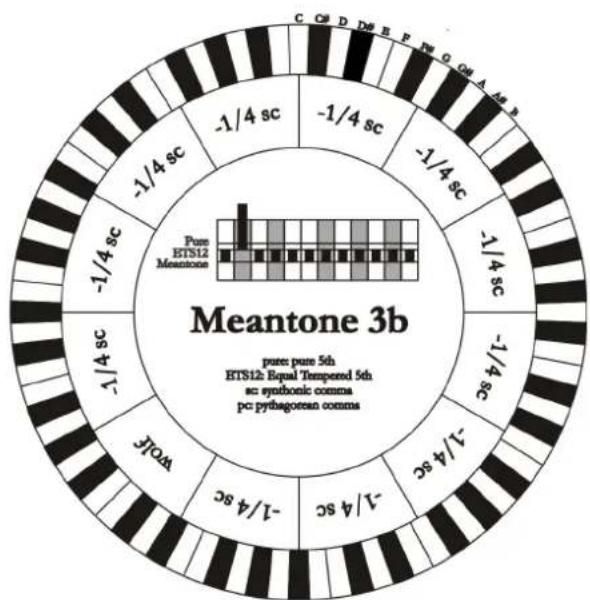
other
| Segment | Value | |---------|-----------| | Pure ETS12 Meantone | -1/4 sc | | Pure ETS12 Meantone | -1/4 sc | | Pure ETS12 Meantone | -1/4 sc | | Pure ETS12 Meantone | -1/4 sc | | Pure ETS12 Meantone | -1/4 sc | | Pure ETS12 Meantone | -1/4 sc | | Pure ETS12 Meantone | -1/4 s | | Pure ETS12 Meantone | -1/4 s | | Pure ETS12 Meantone | -1/4 s | | Pure ETS12 Meantone | -1/4 s | | Pure ETS12 Meantone | -1/4 s | | Pure ETS12 Meantone | -1/4 s | | Pure ETS12 Meantone | -1 / 4 sc | | Pure ETS12 Meantone | -1 / 4 sc | | Pure ETS12 Meantone | -1 / 4 sc | | Pure ETS12 Meantone | -1 / 4 sc | | Pure ETS12 Meantone | -1 / 4 sc | | Pure ETS12 Meantone | -1 / 4 sc | | Pure ETS12 Meantone | -1 /4 sc | | Pure ETS12 Meantone | -1 / 4 sc | | Pure ETS12 Meantone | -1 / 4 sc | | Pure ETS12 Meantone | -1 / 4 sc | | Pure ETS12 Meantone | -1 / 4 sc | | Pure ETS12 Meantone | -1 / 4 sc | | Pure ETS12 Meantone | -0.7 / 4 sc | | Pure ETS12 Meantone | -0.7 / 4 sc | | Pure ETS12 Meantone | -0.7 / 4 sc | | Pure ETS12 Meantone | -0.7 / 4 sc | | Pure ETS12 Meantone | -0.7 / 4 sc | | Pure ETS12 Meantone | -0.7 / 4 sc |VALLOTTI
other
Werckmeister V | Label | Description | |---|---| | Pure | Pure ETS12 Messtone | | Pure | -1/4 pc | | Pure | -1/4 pc | | Pure | -1/4 pc | | Pure | -1/4 pc | | Pure | +1/4 pc | | Pure | +1/4 pc | | Pure | -1/4 pc | | Pure | pure ETS12 Messtone (c) pythagorean comma (pc) synthetic comma (sc) symmetric comma (ETS12: Equal Tempered 5th sec).SILBERMANN
other
| Category | Value | | -------- | --------- | | Meantone | -1/3 sc | | Pure ETS12 | -1/sc | | Meantone | -1/3 sc | | Meantone | -1/sc | | Meantone | -1/sc | | Meantone | -1/sc | | Meantone | -1/sc | | Meantone | -1/sc | | Meantone | -1/sc | | Meantone | -1/sc | | Meantone | -1/sc | | Meantone | -1/sc | | Meantone | -1/sc | | Meantone | -1/sc | | Meantone | -1/sc | | Meantone | -1/sc | | Meantone | -1/sc | | Meantone | -1/sc | | Meantone | -1/sc | | Meantone | -1/sc | | Meantone | -1/sc | | Meantone | -1/sc | | Meantone | -1/sc | | Meantone | -1/sc | | Meantone | -1/sc | | Meantone | -1/sc | | Meantone | -1/sc | | Meantone | -1/sc | | Meantone | -1/sc | | Meantone | -1/sc | | Meantone | -1/sc | | Meantone | -1/sc | | Meantone | -1/sc | | Meantone | -1/sc |ZARLINO
other
| Category | Value | | -------- | ----- | | Pure ETS12 Mesitopes | -1/5 sc | | PurePure 5th ETS12 | -1/5 sc | | ETS12 Equal Tempered 5th sc syntheticis comms pc pythagorean comms | -1/5 sc | | ETS12 Specific Comms | -1/5 sc | | Pure ETS12 Mesitopes | -1/5 sc | | PurePure 5th ETS12 | -1/5 sc | | ETS12 Equal Tempered 5th sc syntheticis comms pc pythagorean comms | -1/5 sc | | Pure ETS12 Mesitopes | -1/5 sc | | PurePure 5th ETS12 | -1/5 sc | | ETS12 Equal Tempered 5th sc syntheticis comms pc pythagorean comms | -1/5 sc | | Pure ETS12 Mesitopes | -1/5 sc | | PurePure 5th ETS12 | -1 / 5 sc | | ETS12 Equal Tempered 5th sc syntheticis comms pc pythagorean comms | -1 / 5 sc | | Pure ETS12 Mesitopes | -1 / 5 sc | | PurePure 5th ETS12 | -1 / 5 sc | | ETS12 Equal Tempered 5th sc syntheticis comms pc pythagorean comms | -1 / 5 sc | | Pure ETS12 Mesitopes | -1 / 5 sc | | PurePure 5th ETS12 | -1 / 5 sc | | ETS12 Equal Tempered 5th sc synthetic is comms pc pythagorean comms | -1 / 5 sc | | Pure ETS12 Mesitopes | -1 / 5 sc | | PurePure 5th ETS12 | -1 / 5 sc | | ETS12 Equal Tempered 5th sc synthetic is comms pc pythagorean comms | -1 / 5 sc | | Pure ETS12 Mesitopes | -1 / 5 sc | | Rawly ETS12 Mesitopes | -1 / 5 sc | | RawlyPure 5th ETS12 | -1 / 5 sc | | RawlyETS12 Mesitopes | -1 / 5 sc | | RawlyPure 5th ETS12 | -1 / 5 sc | | RawlyETS12 Mesitopes | -1 / 5 sc | | RawlyPure 5th ETS12 | -1 / 5 sc | | RawlyETS12 Mesitopes | -1 / 5 sc | | RawlyPure 5th ETS12 (comms) | -1 / 5 sc | | RawlyETS12 Mesitopes (comms) | -1 / 5 sc | | RawlyPure 5th ETS12 (comms) | -1 / 5 sc | | RawlyETS12 Mesitopes (comms) | -1 / 5 sc | | RawlyPure 5th ETS12 (comms) | -1 / 5 sc | | RawlyETS12 Mesitopes (comms) | -1 / 5 sc | | Pure ETS12 Mesitopes (comms) | -1 / 5 sc | | PurePure 5th ETS12 (comms) | -1 / 5 sc | | PureETS12 Mesitopes (comms) | -1 / 5 sc | | PurePure 5th ETS12 (comms) | -1 / 5 sc | | PureETS12 Mesitopes (comms) | -1 / 5 sc | | PurePure 5th ETS12 (comms) | -1 / 5 sc | | PureETS12 Mesitopes (comms) | -1/5 sc | | PurePure 5th ETS12 (comms) | -1/5 sc | | PurePure 5th ETS12 (comms) | -1/5 sc | | PurePure 5th ETS12 (comms) | -1/5 sc | | PurePure 5th ETS12 (comms) | -1/5 sc | | PurePure 5th ETS12 (comms) | -1/5 sc | | PurePure 6th ETS12 (comms) | -1/5 sc | | PurePure 6th ETS12 (comms) | -1/5 sc | | PurePure 6th ETS12 (comms) | -1/5 sc | | PurePure 6th ETS12 (comms) | -1/5 sc | | PurePure 6th ETS12 (comms) | -1/5 sc |
other
| Semiterrone Type | Frequency (sc) | | ---------------- | -------------- | | Pure ETIS12 Meantose | -1/5 sc | | Pure ETIS12 Equal Tempered 5th sc synthetic comma pc pythagorean comma | -1/5 sc | | Pure ETIS12 Equal Tempered 5th sc synthetic comma pc pythagorean comma | -1/5 sc | | Pure ETIS12 Equal Tempered 5th sc synthetic comma pc pythagorean comma | -1/5 sc | | Pure ETIS12 Equal Tempered 5th sc synthetic comma pc pythagorean comma | -1/5 sc | | Pure ETIS12 Equal Tempered 5h sc synthetic comma pc pythagorean comma | -1/5 sc | | Pure ETIS12 Equal Tempered 5h sc synthetic comma pc pythagorean comma | -1/5 sc | | Pure ETIS12 Equal Tempered 5h sc synthetic comma pc pythagorean comma | -1/5 sc | | Pure ETIS12 Equal Tempered 5h sc synthetic comma pc pythagorean comma | -1/5 sc | | Pure ETIs12 Meantose | -1/5 sc | | Pure ETIs12 Meantose | -1/5 sc | | Pure ETIs12 Meantose | -1/5 sc | | Pure ETIs12 Meantose | -1/5 sc | | Pure ETIs12 Meantose | -1/5 sc | | Pure ETIs12 Meantose | -1/5 sc | | Pure ETIs12 Meantose | -1 / 5 sc | | Pure ETIs12 Meantose | -1 / 5 sc | | Pure ETIs12 Meantose | -1 / 5 sc | | Pure ETIs12 Meantose | -1 / 5 sc | | Pure ETIs12 Meantose | -1 / 5 sc | | Pure ETIs12 Meantose | -1 / 5 sc | | Pure ETIs12 Meantose | -0.5 sc | | Pure ETIs12 Meantose | -0.5 sc | | Pure ETIs12 Meantose | -0.5 sc | | Pure ETIs12 Meantose | -0.5 sc | | Pure ETIs12 Meantose | -0.5 sc | | Pure ETIs12 Meantose | -0.5 sc | | Pure ETIs12 Meantose | -0.5 sc | | | Pure ETIs12 Meantose | -0.5 sc | | Pure ETIs12 Meantose | -0.5 sc | | Pure ETIs12 Meantose | -0.5 sc | | Pure ETIs12 Meantose | -0.5 sc | | Pure ETIs12 Meantose | -0.5 sc | | Pure ETIs12 Meantose | -0.5 sc | | Pure ETI32 Meantose | -0.5 sc | | Pure ETIs12 Meantose | -0.5 sc | | Pure ETIs12 Meantose | -0.5 sc | | Pure ETIs12 Meantose | -0.5 sc | | Pure ETIs12 Meantose | -0.5 sc | | Pure ETIs12 Meantose | -0.5 sc | | Pure ETIs12 MeantOSE | -0.5 sc | | Pure ETIs12 MeantOSE | -0.5 sc | | Pure ETIs12 MeantOSE | -0.5 sc | | Pure ETIs12 MeantOSE | -0.5 sc | | Pure ETIs12 MeantOSE | -0.5 sc | | Pure ETIs12 MeantOSE | -0.5 sc | | Pure ETIs12 MeantOSE | -0 .5 sc | | Pure ETIs12 MeantOSE | -0 .5 sc | | Pure ETIs12 MeantOSE | -0 .5 sc | | Pure ETIs12 MeantOSE | -0 .5 sc | | Pure ETIs12 MeantOSE | -0 .5 sc | | Pure ETIs12 MeantOSE | -0 .5 sc | | Pure ETIs12 MeantOSE | -0 .5 sc | | | Pure ETIs12 MeantOSE | -0 .5 sc | | Pure ETIs12 MeantOSE | -0 .5 sc | | Pure ETIs12 MeantOSE | -0 .5 sc | | Pure ETIs12 MeantOSE | -0 .5 sc | | Pure ETIs12 MeantOSE | -0 .5 sc | | Pure ETIs12 MeantOSE | -0 .5 sc | | Pure ETI32 MeantOSE | -0.5 sc | | Pure ETIs12 MeantOSE | -0.5 sc | | Pure ETIs12 MeantOSE | -0.5 sc | | Pure ETIs12 MeantOSE | -0.5 sc | | Pure ETIs12 MeantOSE | -0.5 sc | | Pure ETIs12 MeantOSE | -0.5 sc | | Pure ETIs12 MeantOSc synthetic comma pc pythagorean comma pc pythagorean comma pc pythagorean comma pc pythagorean comma pc pythagorean comma pc pythagorean comma pc pythagorean comma pc pythagorean comma pc pythagorean comma pc pythagorean comma pc pythagorean comma pc pythagorean comma pc pythagorean comma pc pythagorean comma pc pythagorean comma pc pythagorean comma pc pythagorean comma pc pythagorean comma pc pythagorean comma pc pythagorean comma pc pythagAE commsaBARCA
other
Barca Pure: pure 5th ETS12: Equal Tempered 5th sa synthetic comms pc pythagorean comms Pure: pure 5th ETS12: Equal Tempered 5th sa synthetic comms pc pythagorean comms10.4 CONTENU DES FICHIERS .SET, .CMB, .STS, .STA et .ALL
FILE .SET
| PARAMETER | POSITION | |
| SELECTED STYLE system data | ||
| Local Off of each stop | ||
| PEDAL | VOLUMES function | |
| MAN. I VOLUMES function | ||
| MAN. II VOLUMES function | ||
| OUT 1 VOLUMES function | ||
| OUT 2 VOLUMES function | ||
| INPUT | VOLUMES function | |
| TUNING | Main page | |
| TEMPER. | Main page | |
| REVERB | SETTINGS menu | |
| KEYB. INVERS. | SETTINGS menu | |
| SHORT OCTAVE | SETTINGS menu | |
| INTERNAL | SETTINGS menu, EQUALIZER function | |
| OUT 1 SETTINGS menu, EQUALIZER function | ||
| OUT 2 SETTINGS menu, EQUALIZER function | ||
| PEDAL OUT 1 - OUT 2 | SETTINGS menu, EXTERNAL OUTPUTS function | |
| MANUAL I OUT 1 - OUT 2 | SETTINGS menu, EXTERNAL OUTPUTS function | |
| MANUAL II OUT 1 - OUT 2 | SETTINGS menu, EXTERNAL OUTPUTS function | |
| REVERB OUT 1 - OUT 2 | SETTINGS menu, EXTERNAL OUTPUTS function | |
| INPUT OUT 1 - OUT 2 | SETTINGS menu, EXTERNAL OUTPUTS function | |
| PEDAL TX - RX | SETTINGS menu, MIDI / MIDI CHANNELS function | |
| MANUAL I TX - RX | SETTINGS menu, MIDI / MIDI CHANNELS function | |
| MANUAL II TX - RX | SETTINGS menu, MIDI / MIDI CHANNELS function | |
| CONTROL | SETTINGS menu, MIDI / MIDI CHANNELS function | |
| PROGRAM | SETTINGS menu, MIDI / MIDI FILTERS function | |
| SYSEX | SETTINGS menu, MIDI / MIDI FILTERS function | |
| REAL TIME | SETTINGS menu, MIDI / MIDI FILTERS function | |
| NOTE TO COUPL. | SETTINGS menu, MIDI function | |
| OUT MODE | POSITION | |
| PEDAL | SETTINGS menu, VELOCITY SENSE function | |
| MANUAL I | SETTINGS menu, VELOCITY SENSE function | |
| MANUAL II | SETTINGS menu, VELOCITY SENSE function | |
| SAVE ENC+AP | SETTINGS menu, COMBINATIONS function | |
| SAVE ST/TR/OR | SETTINGS menu, COMBINATIONS function | |
| CRESC/EXPR | SETTINGS menu, PEDALS function | |
| EXPR CH->CRESC | SETTINGS menu, PEDALS function | |
| MIDI PEDALBOARD | SETTINGS menu, PEDALS function | |
| LCD CONTRAST | SETTINGS menu, CONTROLS function | |
| VOL. KNOB | SETTINGS menu, CONTROLS function | |
NOTE
FILE .CMB
| COMBINATIONS | CONTENT | NOTE |
| Tutti | all stops, all couplers, all tremulants, tremulants depth and speed*, ENC*, AP*, MIDI Program Change and Bank Select, Orchestra voices*, Style* | * recalled if enabled in COMBINATIONS function |
| all General combinations | all stops, all couplers, all tremulants, tremulants depth and speed*, ENC*, AP*, MIDI Program Change and Bank Select, Orchestra voices*, Style* | * recalled if enabled in COMBINATIONS function |
| Crescendo (16 steps) | all stops, all couplers, all tremulants |
FILE .STS
| PARAMETER | POSITION | |
| ENSEMBLE | STYLE menu | |
| TREMULANTS DEPTII | STYLE menu, TREMULANTS function | |
| TREMULANTS SPEED | STYLE menu, TREMULANTS function | |
| VOICES VOLUMES | STYLE menu, VOICES VOLUME function | |
| ORCHESTRA VOICES | STYLE menu, ORCHESTRA function |
NOTE
FILE .STA
| CONTENT | NOTE |
| the same of 4.sts files | 1 for each Style |
FILE .ALL
| CONTENT | NOTE |
| the same of 1 .sta files | |
| the same of 1 .cmb file | |
| the same of 1 .set file | |
| Local Off of cach stop |
10.5 QU'EST-CE QUE LE MIDI?
Using default settings, channel messages are sent and received on the following MIDI channels:
- Ch.1: Manual II notes or controls
- Ch.2: Manual I notes or controls
- Ch.4: Pedal notes or controls
Ch.16 is a reserved channel (system)
Note On
Message which is generated when a key is pressed.
Data format: 9nH kkH vvH
n=channel number :0H-EH (1-15)
kk=note number :1EH-65H (30-101)
vv=note on velocity :01H-7FH (1-127)
:00H (0) Note Off
Note Off
Message which is generated when a key is released.
Data format: 8nH kkH vvH
9nH kkH 00H
n=channel number :0H-EH (1-15)
kk=note number :1EH-65H (30-101)
vv=note off velocity :00H-7FH (0-127)
ignored
- This message can be also received as Note On with velocity=0.
Control Change
Messages to control volumes, expressions and other system controls.
• Bank Select MSB (CC 0)
Controller transmitted in combination of Program Change and Bank Select LSB in order to select a specific bank of sound. It can be transmitted using the COMBIN. PRG function and when stored in the combinations and Tutti. It also can be received on channel 16 to select the Memory Bank.
Data format: BnH 00H vvH
n=channel number :0H-EH (1-15)
vv=bank MSB number :00H-7FH (0-127)
• Volume (CC 7)
Message which controls the sections volume.
Data format: BnH 07H vvH
n=channel number :0H-EH (1-15)
vv=volume value :00H-7FH (0-127)
- Expression (CC 11)
Message which controls the sections expression.
Data format: BnH 0BH vvH
n=channel number :0H-EH (1-15)
vv=expression value :00H-7FH (0-127)
• Bank Select LSB (CC 32)
Controller transmitted in combination of Program Change and Bank Select MSB in order to select a specific bank of sound. It can be transmitted using the COMBIN. PRG function and when stored in the combinations and Tutti.
Data format: BnH 20H vvH
n=channel number :0H-EH (1-15)
vv=bank LSB number :00H-7FH (0-127)
- Sustain (CC 64)
Message which controls the Sustain / Damper effect.
Data format: BnH 40H vvH
n=channel number :0H-EH (1-15)
vv=switch :00H (0) off
    (received as 00H-39)
:7FH (127) on
    (received as 40H-71)
• All Sounds Off (CC 120)
Terminates all voices currently on for the specific channel.
Data format: BnH 78H 00H
n=channel number :0H-EH (1-15)
- Reset All Controllers (CC 121)
Controllers are set to the default value.
Data format: BnH 79H 00H
n=channel number :0H-EH (1-15)
- This message is transmitted only.
• All Notes Off (CC 123)
Terminates all notes currently on for the specific channel.
Data format: BnH 7BH 00H
n=channel number :0H-EH (1-15)
Program Change
Messages for selecting sounds, timbres or programs in external modules. It also can be received by the organ to recall combinations, Tutti and Crescendo steps.
Data format: CnH mmH
Transmitted:
n=channel number :0H-EH (1-15) mm=Program Ch. number:00H-7FH (0-127)
Received:
n=channel number :FH (16) mm=Program Ch. number: 00H (0): general HR 01H-06H (1-6): general combinations 1-6 60H (96): Tutti OFF 61H (97): Tutti ON 6FH (111): Crescendo -- (OFF) 70H-7FH (112-127): Crescendo steps 1-16
STANDARD SYSTEM EXCLUSIVE MESSAGES
- Device Inquiry
Instrument information sent after switching on and when a Device Inquiry Request is received.
Data format: F0H 7EH 00H 06H 02H 31H 00H 1CH 20H 00H xxH yyH zzH vvH F7H
F0H: Exclusive status 7EH: Universal Non Realtime message 00H: channel 06H: general information 02H: device ID reply 31H: Viscount ID 00H 1CH: device family code 20H 00H: device family member code xxH yyH zzH vvH: software version F7H: End of Exclusive
- Master Fine Tuning
Parameter: Tuning
Video page: Main page
Data format: F0H 7FH 7FH 04H 03H vvH nnH F7H
F0H: Exclusive status 7FH: Universal Realtime message 7FH: channel (any) 04H: Sub-ID #1=Device Control message 03H: Sub-ID #2=Master Fine tuning vvH nnH: fine tuning value 00H 00H: A4=415,3 Hz 00H 40H: A4=440 Hz
7FH 7FH: A4=466,2 Hz F7H: End of Exclusive
- Temperament
Parameter: Temperament
Video page: Main page
Data format: F0H 7EH 7FH 08H 08H 03H 7FH 7FH [ss] ... F7H
F0H: Exclusive status 7EH: Universal Non Realtime message 7FH: channel (any) 08H: Sub-ID #1=MIDI Tuning standard 08H: Sub-ID #2=scale/octave tuning 1-byte form (Non Real-Time) 03H: channel/options byte 1 7FH: channel byte 2 7FH: channel byte 3 [ss]:12 byte tuning offset of 12 semitones from C to B 00H: -64 cents 40H: 0 cents 7FH: +64 cents F7H: End of Exclusive
VISCOUNT SYSTEM EXCLUSIVE MESSAGES
- Register on/off
Data format: F0H 31H snH xxH yyH F7H
FOH : Exclusive status 31H : Viscount ID sH : switch 0H=voice off 4H=voice on nH : channel number (0H - EH) xxH : voice id - first byte yyH : voice id - second byte F7H: End of Exclusive
- Tremulant Speed
Parameter: Spd
Video page: Style/ Tremulants
Data format: F0H 31H 2nH 5AH vvH F7H
F0H : Exclusive status 31H : Viscount ID 2nH : channel number (s=0H-EH) 5AH : tremulant speed vvH : speed value (04H-20H) F7H: End of Exclusive
- This message is transmitted when the Tremulant is switched on.
- Tremulant Depth
Parameter: Dpt
Video page: Style / Tremulant
Data format: F0H 31H 2nH 5CH vvH F7H
FOH : Exclusive status
31H : Viscount ID
2nH : channel number (s=0H-EH)
5CH : 1st tremulant depth
vvH : depth value (04H-20H)
F7H: End of Exclusive
- This message is transmitted when the Tremulant is switched on.
- When switched off, the tremulant depth value is transmitted as 00H
- Temperament
Parameter: Temper.
Video page: Main page
Data format: F0H 31H 2FH 31H vvH F7H
FOH : Exclusive status
31H : Viscount ID
2FH : system control
31H : temperament
vvH : temperament type
00H=Equal
10H=Kirnberger II
11H=Werckmeister III
12H=Pythagorean
13H=Meantone 3#
14H=Vallotti
15H=Chaumont
16H=Kellner 1975
17H=Kirnberger III
18H=Werckmeister IV
19H=Werckmeister V
1AH=Silbermann
1BH=Meantone 3b
1CH=Meantone 3M
1DH=Zarlino
1EH=Sauveur 1
1FH=Sauveur 2
20H=Barca
F7H: End of Exclusive
- Ensemble
Parameter: Ensemble
Video page: Style
Data format: F0H 31H 2FH 32H vvH F7H
FOH : Exclusive status
31H : Viscount ID
2FH : system control
32H : ensamble
vvH : ensamble value (00H-08H)
F7H: End of Exclusive
- Tuning
Parameter: Tuning
Video page: Main page
Data format: F0H 31H 2FH 67H 00H 0nH 0nH 0nH F7H
FOH : Exclusive status
31H : Viscount ID
2FH : system control
67H : fine tuning
0nH 0nH 0nH: nibblezed data of tuning value 02H 00H 0CH=-50 cents (A=427,47Hz) 04H 00H 00H=0 cents (A=440 Hz) 05H 0FH 04H=+50 cents (A=452,89Hz)
F7H: End of Exclusive
- Cancel
Data format: F0H 31H 2FH 6CH 00H F7H
FOH : Exclusive status
31H : Viscount ID
2FH : system control
6CH : cancel
00H : execute cancel
F7H: End of Exclusive
- Couplers on/off
Data format: F0H 31H 2FH 70H vvH F7H
FOH : Exclusive status
31H : Viscount ID
2FH : system control
70H : coupler
vvH : type and switch
00H=II/P on
10H=II/P off
01H=I/P on
11H=I/P off
03H=II/I on
13H=II/I off
F7H: End of Exclusive
- This message can be only received and recorded by the internal sequencer. It is not transmitted.
SYSTEM REAL TIME MESSAGES
FEH: Active Sensing
FEH is transmitted every 300 msec. whenever is no other MIDI data being transmitted.

Viscount Cantorum Duo Version: 1.0
| FUNCTION... | TRANSMITTED | RECEIVED | REMARKS |
| BASIC DefaultCHANNEL Changed | 1, 2, 4 1 ÷ 15 | 1, 2, 4 1 ÷ 15 | |
| MODE DefaultMessagesAltered | Mode 3*************** | Mode 3*************** | |
| NOTENUMBER True Voice | 30÷10136÷96 | 30÷10130÷101 | |
| VELOCITY Note ONNote OFF | OO | OO | |
| AFTER Key'sTOUCH Ch's | XX | XX | |
| PITCH BENDER | X | X | |
| CONTROL 0 Bank Select MSB *1CHANGE 7 Volume | OO | OO | |
| 11 ExpressionBank Select LSB | OO | ||
| 64 Sustain O | OO | ||
| 120 All sounds off | OO | ||
| 121 Reset ADControllers | X | ||
| 123 All Notes Off | O | ||
| PROGRAM *2CHANGE True# | O | O | |
| SYSTEM EXCLUSIVE | O | O | |
| SYSTEM Song PosCOMMON Song SelTune | XX | XX | |
| X | X | ||
| X | X | ||
| SYSTEM ClockREAL TIME Commands | XX | XX | |
| AUX Local On-OffMESSAGES All notes offActive SenseReset | XX | XX | |
| NOTES:*1: this message can be received on ch.16 for selecting Memory Bank*2: this message can be received on ch.16 for selecting combinations, Tutti and Crescendo steps. | |||
Mode 1: Omni On, Poly
Mode 2: Omni On, Mono
O=YES
Mode 3: Omni Off, Poly
Mode 4: Omni Off, Mono
X=NO

VISCOUNT
Viscount International S.p.A.
Via Borgo, 68 / 70 - 47836 Mondaino (RN), ITALY
Tel: +39-0541-981700 Fax: +39-0541-981052
Website: www.viscountinstruments.com
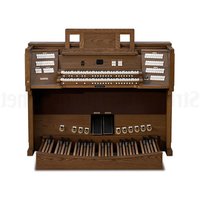
- CHAUMONT
- KELLNER 1975
- WERCKMEISTER V (WERCKMEIST.5 a display)
- SILBERMANN
- MEANTONE PURE MINOR 3rd (MEANTONE 3M a display)
- BARCA
- CONTENUTO DEI FILE .SET, .CMB, .STS, .STA e .ALL
- COSA E' IL MIDI
- Note On
- Note Off
- Control Change
- • Bank Select MSB (CC 0)
- • Volume (CC 7)
- - Expression (CC 11)
- • Bank Select LSB (CC 32)
- - Sustain (CC 64)
- • All Sounds Off (CC 120)
- - Reset All Controllers (CC 121)
- • All Notes Off (CC 123)
- Program Change
- Transmitted:
- Received:
- STANDARD SYSTEM EXCLUSIVE MESSAGES
- - Device Inquiry
- - Master Fine Tuning
- - Temperament
- VISCOUNT SYSTEM EXCLUSIVE MESSAGES
- - Register on/off
- - Tremulant Speed
- - Tremulant Depth
- - Ensemble
- - Tuning
- - Cancel
- - Couplers on/off
- SYSTEM REAL TIME MESSAGES
- IMPORTANT SAFETY INSTRUCTIONS
- WARNING
- AVIS
- ATTENTION
- "INSTRUCTIONS PERTAINING TO A RISK OF FIRE, ELECTRIC SHOCK, OR INJURY TO PERSONS"
- WARNING:
- INDEX
- Important notes....2
- General description of the instrument ....4
- Switching on and main video page....8
- Volume settings (Volumes function)....10
- Instrument general settings (Settings menu)....11
- Programming organ styles (Style menu) 25
- Saving the organ configuration to files (File function) 28
- Playing and recording of musical sequences (Sequencer) 32
- Stop Local Off....39
- Appendix....39
- IMPORTANT NOTES
- LOOKING AFTER THE PRODUCT
- NOTES ABOUT THE MANUAL
- GENERAL DESCRIPTION OF THE INSTRUMENT
- N.B.
- General combinations.
- SWITCHING ON AND MAIN VIDEO PAGE
- NOTES
- THE MAIN MENU
- VOLUME SETTINGS (VOLUMES function)
- INSTRUMENT GENERAL SETTINGS (SETTINGS menu)
- SELECTING REVERB TYPE (REVERB parameter)
- ADJUST EQUALIZERS (EQUALIZERS functions)
- CHANNELING SIGNALS ON THE AUDIO OUTPUTS (EXTERNAL OUTPUTS function)
- MIDI SETTINGS (MIDI functions)
- SELECTING THE INPUT AND OUTPUT CHANNELS (MIDI CHANNELS function)
- FILTERS SETTINGS (MIDI FILTERS function)
- REGULATING THE NOTES VELOCITY (VELOCITY SENS. function)
- COMBINATIONS OPERATING FUNCTIONS (COMBINATIONS function)
- CONFIGURATION OF THE PEDALS AND THE MIDI PEDALBOARD (PEDALS FUNCTION)
- SECURITY LOCK AGAINST UNWANTED CHANGES (SECURITY function)
- CONFIGURING THE VOLUME CONTROL AND ADJUSTING THE DISPLAY CONTRAST (CONTROLS function)
- RESTORING FACTORY SETTINGS (FACTORY SETTINGS function)
- UPGRADING THE OPERATING SYSTEM (OP. SYS. UPGRADE function)
- THE CURRENT OPERATING SYSTEM WILL BE OVERWRITTEN
- IMPORTANT NOTES
- VERIFYING THE OPERATING SYSTEM VERSION (SYS. INFO function)
- PROGRAMMING ORGAN STYLES (STYLE menu)
- NB
- ADJUSTING THE TREMULANTS (TREMULANTS function)
- IMPORTANT NOTE
- REGULATING THE VOLUME OF EACH VOICE
- (VOICES VOLUMES function)
- SELECTING THE ORCHESTRAL VOICES (ORCHESTRA function)
- SAVING THE ORGAN CONFIGURATION TO FILES (FILE function)
- INFORMATIONS CONCERNING THE USB PEN
- LOADING ORGAN COMBINATIONS AND/OR SETTINGS (FILE LOAD function)
- SAVING AS FILE OF ORGAN COMBINATIONS AND/OR SETTINGS (FILE SAVE function)
- PLAYING AND RECORDING OF MUSICAL SEQUENCES (SEQUENCER)
- PLAYING BACK A SONGS (PLAY mode)
- USING RECORDED AND/OR MODIFIED SONGS WITH DEDICATED SOFTWARE
- However, we strongly advice inexperienced users not to do so.
- RECORDING A SONGS (RECORD mode)
- OVERDUBBING A SONGS (OVERDUB mode)
- STOP LOCAL OFF
- APPENDIX
- DEMONSTRATION SONGS
- TEMPERAMENT
- TEMPERAMENTS OF THE CANTORUM DUO
- KIRNBERGER II (KIRNBERGER2 on display)
- WERCKMEISTER III (WERCKMEIST.3 on display)
- PYTHAGOREAN
- VALLOTTI
- KIRNBERGER III (KIRNBERGER3 on display)
- MEANTONE PURE MINOR 3rd (MEANTONE 3M on display)
- ZARLINO
- SAUVEUR 1 - SAUVEUR 2
- CONTENT DEI FILE .SET, .CMB, .STS, .STA e .ALL
- WHAT MIDI IS
- CHANNEL MESSAGES
- N.B.:
- SYSTEM MESSAGES
- SYSTEM EXCLUSIVE
- REAL TIME
- DETAILED MIDI IMPLEMENTATION
- FCC RULES
- INFORMATIONS FCC
- CONTENU DES FICHIERS .SET, .CMB, .STS, .STA et .ALL
- QU'EST-CE QUE LE MIDI?
- VISCOUNT
Brand : Viscount
Model : Cantorum Duo
Category : Electronic musical instrument