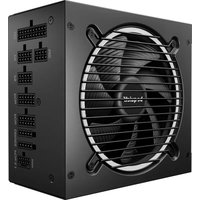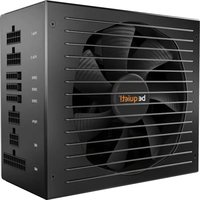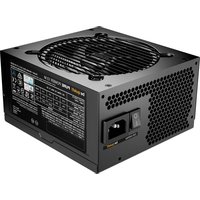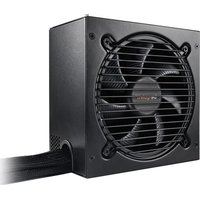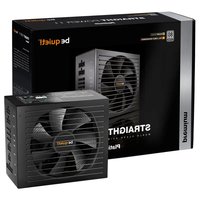
Straight Power 11 650W - PC Power Supply Be Quiet! - Free user manual and instructions
Find the device manual for free Straight Power 11 650W Be Quiet! in PDF.


User questions about Straight Power 11 650W Be Quiet!
0 question about this device. Answer the ones you know or ask your own.
Ask a new question about this device
Download the instructions for your PC Power Supply in PDF format for free! Find your manual Straight Power 11 650W - Be Quiet! and take your electronic device back in hand. On this page are published all the documents necessary for the use of your device. Straight Power 11 650W by Be Quiet!.
USER MANUAL Straight Power 11 650W Be Quiet!
Introduction. 5
Safety instructions 5
Compatibility 5
Installing your new power supply 5
Safety functions 6
Troubleshooting 6
Frequent problems 7
Accessories 7
Notes on disposal. 7
Warranty* 8
Manufacturer's details 8
Copyright 8
Technical data 32
DEUTSCH
Label 32
Voltage regulation 33
Operating conditions 33
Minimal load 33
Rail Splittings 33
Dimensions 34
Distribution and Pin assignment 34
Connectivity and cable lengths 36
1. INTRODUCTION
We are delighted that you have chosen to use a be quiet! power supply from our Straight Power 11 series in your PC. Please read and follow all the information contained in these instructions carefully prior to installation. Should you have any further question, please contact our customer service. See contact information in item Manufacturer's details.
2. SAFETY INSTRUCTIONS
The power supply is only guaranteed to function properly if the instructions are followed.
Caution: Only use the supplied cable set. Using cables that were not included (e.g. cables of older power supply unit series) may lead to defects!
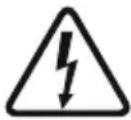
Never open the power supply case. The electronic components inside the case generate a high voltage that is dangerous to humans. Even after disconnecting the power supply from the network, some parts still have high voltages. For this reason, a power supply adapter should only be opened by an authorised technician.
Opening the device voids your warranty.
- Never handle the power supply with wet or damp hands when in operation.
- Never insert objects into the power supply's apertures/fans.
- Note that the power supply is designed for use indoors in conditions without high levels of moisture in the ambient air. Using the power supply outdoors will lead to serious damage.
- Never work on the power supply while it is connected to the mains. In this case, always set the power switch to "0" and / or disconnect the power plug.
- In the event of a short circuit in the device, unplug the mains cable and do not use the device.
Make sure that your PC is not located directly next to a heating system or any other source of heat.
Make sure that your computer case is sufficiently ventilated by means of additional fans; with today's complex and powerful systems a power supply is incapable of dissipating the heat produced in the PC case without additional support.
If you want to clean your power supply, disconnect it completely from the mains and never use a damp cloth or cleaning agent. Clean the power supply from the outside using a dry cloth.
Before using the power supply, allow it to warm up to room temperature for one hour to prevent condensation accumulating in the power supply.
3. COMPATIBILITY
The be quiet! Straight Power 11 series power supplies are compatible with all recent popular power supply and motherboard specifications such as:
- Intel ATX12V Power Supply Design Guide Version 2.4 (and downwardly compatible to V2.31, V2.3, V2.2, V2.01, V2.0)
ATX System Design Guide Version 2.2 and Version 2.1 - BTX Version 1.0a
E-ATX Server Dual Motherboards via 8-Pin Connector
EPS12V Version 2.92
Intel C6/C7 Status for the new processor generation
Energy Star 6.1 guidelines
ErP ready
4. INSTALLING YOUR NEW POWER SUPPLY
Please read „Safety instructions" before you begin the installation.
Note: You will need a screwdriver to fit the power supply in your PC. Only use the screws provided with the power supply because they have the correct thread.
Caution: Only use the supplied cable set. Using cables that were not included (e.g. cables of older power supply unit series) may lead to defects!
First remove your old power supply. To do so, proceed as follows:
- Carefully disconnect your PC from any power sources and unplug all cables connected to the PC.
- Open the PC case, taking care to follow the manufacturer's instructions.
- Disconnect all plugs from the motherboard and all other components, such as FDDs, HDDs, or optical drives. Make sure that there are no plugs from the old power supply connected to any of the components.
- Now remove the screws at the rear of the power supply and carefully pull the power supply out of the PC case. Take special care that no cables get caught in the components and damage them.
Fitting your new be quiet! Straight Power 11 power supply:
- Place the new power supply in the space provided in the PC case and connect to the rear panel using the four screws provided. Do not use excessive force.
- Plug the 20/24 pin connector into the socket provided on the motherboard. If you have a 24 pin connection, place the remaining 4 pins in the correct position before you plug the connector into the socket. If you have a motherboard with a 20 pin connector, fold the additional 4 pins to one side.
- Now plug the 12V-P4 or P8 connector for the CPU into the socket provided on the motherboard.
5. SAFETY FUNCTIONS
All be quiet! power supplies have numerous safety functions. They are designed to protect the power supply and the components connected to it against damage. If one of these safeguards is triggered, the system will reboot or power off in most cases. If this happens, you should immediately check the PC for errors.
For more info on troubleshooting see the "Troubleshooting" chapter.
The be quiet! Straight Power 11 series has the following safety functions:
OCP (Over current protection)
If the load on the individual circuits exceeds the specified limit, the power supply is automatically switched off.
UVP (Undervoltage protection)
This safeguard is triggered if the voltage on the circuits drops below a certain limit. The power supply is automatically switched off in this case.
OVP (Overvoltage protection)
The overvoltage safeguard is triggered if the voltage in the circuits is too high; the power supply is deactivated.
SCP (Short circuit safeguard)
The fuse protecting the power supply's secondary circuits prevents physical defects of the power supply and of the components connected to it.
OTP (Temperature safeguard)
In the case of excessive heat build-up in the power supply, the power supply immediately and automatically switches off. You cannot switch it back on until it has cooled down. Please ensure that the PC has sufficient cooling.
OPP (overload protection)
This safeguard is triggered if the total output of the power supply exceeds the specified maximum load. This can happen if the output of power supply is insufficient for the system (incorrectly dimensioned).
6. TROUBLESHOOTING
Please note: If you have an ATX system, the power supply is enabled by the motherboard in order to boot the PC. For this reason, please refer to the motherboard or case manual to check whether the on/off switch is connected correctly.
Caution: There is a risk of fatal injury when working on power sources. If you notice traces of smoke, damaged
cables and exposure to liquids, immediately disconnect the power from the mains and do not use it again. Never open the power supply case. High-voltage components in the interior of the power supply may still be live after a longer period of disuse.
Please have any and all necessary repairs conducted by an authorized expert! Opening the device will void your warranty.
If the system in which you installed the power supply does not work properly, check for these possible sources of error first:
- Check that the mains cable to the power supply is correctly and firmly plugged into the power supply and the socket. Ideally, you should use a separate power socket for the computer power supply.
- Check whether all connectors are correctly plugged in, and make any necessary adjustments, such as in case of incorrect polarity.
- Check the connection between the on/off switch on the case to the motherboard. Refer to the motherboard manual if needed! Switch the power supply on by setting the switch to position "l" and then pressing the on/off switch on the case. If the power supply still does not switch on, continue with the next item.
- Check your system for possible short circuits or faulty hardware, making sure that you switch off the computer and disconnect all devices not required for the computer to start. Switch the computer back on. Repeat this process and connect one device after each reboot, until you discover the fault. If the power supply does not react due to a short circuit, wait for at least 5 minutes before switching back on as the device is equipped with overload protection.
7. FREQUENT PROBLEMS
Problem: The selected voltages (via BIOS/UEFI) are to low/high
If you check the power supply voltages via the BIOS/UEFI on the motherboard or the operating system, note that they may be displayed incorrectly. This typically results from imprecise measurements by motherboard and does not necessarily imply a genuine problem.
Problem: After installing a new graphics card, the PC will not power on, or it crashes frequently.
You have installed a new higher performance graphics card in your system and now your PC fails to boot, or it crashes immediately with minimal workload. The power supply is inadequately dimensioned for your graphics card. Before making a purchase, please refer to our PSU calculator tool on www.bequiet.com. The tool will help you to find the right be quiet! power supply from our range of products.
Important note:
If the power supply does not work, make sure that you have read these instructions thoroughly and have ruled out the problems referred to earlier on. If the problems persist, please contact our customer service department immediately.
8. ACCESSORIES
The power supply package includes the following accessories: Cable management cable set, mains lead, operating manual, cable ties, screws for installing the power supply.
9. NOTES ON DISPOSAL
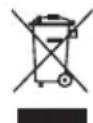
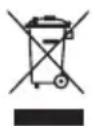
Due to European directives* you are no longer allowed to dispose of used electrical and electronic devices as unsorted domestic waste. The devices must be collected separately. The trash can on wheels pictogram indicates the need to dispose of the device separately.
Please help to protect the environment and make sure, once you have decided to stop using the device, that you dispose of it responsibly via the correct collection system.
In Germany, you are legally** required to dispose of used devices separately, instead of as domestic waste. Your local waste disposal authority has set up one or more collection points at which used devices from private households in your area can be handed in free of charge. In some cases waste disposal authorities will pick up used devices, even from private households. Please refer to your local household waste collection brochure, or visit your town hall or community administration office, for more information on handing in or collecting used devices in your area.
- Complies with Directive of the European Parliament and of European Council on waste electrical and electronic equipment (WEEE).
** Corresponds to the law on sale, return and sustainable disposal of electrical and electronic equipment (Electrical and Electronic Equipment Act - ElektroG)
10. WARRANTY
- 5-year manufacturer's warranty for consumers (original purchase from authorised be quiet! dealers only).
- Your original purchase receipt will be required before warranty performance is rendered. Please keep it in a safe place.
- Opening the device, manipulations and / or technical modifications of any kind and damage due to external mechanical force will void your warranty.
To read the warranty terms and conditions in full, see Service/Warranty Conditions on the homepage at bequiet. com.
Our General Terms and Conditions of Business apply; for details, please refer to bequiet.com on the internet.
11. MANUFACTURER'S DETAILS
Listan GmbH & Co. KG Biedenkamp 3a, 21509 Glinde Germany
For support in Germany, you can call our free service hotline,
Monday through Friday 09:00 - 17:30 hrs.
Tel. 0049 40 736 7686-44 Fax 0049 40-7367686-69
Email: service@bequiet.com
Internet page and PSU Calculator: www.bequiet.com
12. COPYRIGHT
- You are not allowed to reproduce, disclose, publish or store the contents of this documentation, or excerpts of it, without the prior written consent of Listan.
- be quiet! is a registered trademark of Listan GmbH & Co. KG. Other products and company names mentioned in this documentation may be brands or trademarks of their respective owners.
- In accordance with company policy, all Listen products are subject to ongoing development. Listen reserves the right to make changes and improvements to any product described in this documentation without prior announcement.
- Under no circumstances shall Listan be held liable for loss of data and income, or for any specific, incidental, direct, or indirect damage, however it arises.
- The content of this documentation represents the current state-of-art. Listan does not assume, whether expressed or implicit, any liability for the correctness or completeness of the content of this documentation, including, but not limited to the implicit guarantee of market suitability and aptitude for a special purpose, unless applicable laws or jurisdiction stringently stipulate such a liability.
Listan retains the right to make changes to this documentation or to withdraw the documentation at any time without prior announcement.
1. EINLEITUNG
Listan Poland Sp. z o.o.
SCP (3aunTa oT KOpOTKOrO 3AmbIKaHnA
PpeoHnTeB 3aunuaet BTOpHbIe cen n 6noka nTaHn I NOKIOUeHHbIe KOMNOHeHTbl OT KOPOTKO 3aMbKaHn.
OTP (3aunta ot nepereba)
B cnyuae ype3mep Hor noBbIeHn TEmnpaTpyb BHytpn 6JIOKa NITAHN, OH ABOTMaTneCKN BbIKIOHTcR.
BbI He cMOxKeTe eRO BkJIHOHTb, NOKa TEMnepaTpya He ONyCTNTc DO HOpMaJbHOrO yPOBn. IoxKaIyncta, y6eDntecb, YTO KOMNbOTep OCHaUeH DOCTaTOuHBIM OXJaXKDeHNEM.
OPP (3aunta o npeperpy3kn)
JaHHa CnCTema 3aunTbI cpaabaBaeT, ecn cyMMapHa BbIXoHra MOUHOCTb 6NoKa NITaHna NpeBBiHaET yKa3aHHb MaKcMmaJIbHbI yPOBeHb. 3TO MoKeT PpOu3OHTN, ecn BbIXoHOn MOUHOCTn 6NoKa NITaHna HeoCTaTOUHO DnCCTeMbI.
6. NONCK HENCPABHOCTEIN
BHMaHne:
Ecnn Bblncnoj3yeTe ATX-cnCTemy,6NOK nTahnaA kTBNpyeTcYepe3 cnCTemHyIO nLaty dIa 3arpykn PIK.
Ioxayncta, o6paTtecB K ONcaHIO CnCTeMHo IJaTbI INN KOpnyCa, YTo6bl y6eINTBcB B npabInbHOCTN IOdkJIOUeHn BBIKIOuHaTeJI.
IpeynpejxneHc: CyueCTByeOnaCHocTb IJRA JN3Hn Ppnpa6ote C NCTOCHKOM NITAHnE.EcJI Bbl 3amTeNJnCJeBbI DbIMa, NOBpeXDeHHbIE KaBeIN NJI IN BO3dEICTBNE XIKKOCTe, HEmeDJIeHHO OTCOeHNHTe NITAHnE OT CeTI Ne He NCNOJIb3yIte 6JOK NITAHnR CHOBA.
Hukorda He OTKpbBaIte Kopnyc 6Joka NITAHN. BbICOKOBJbTHbIE KOMNOHEHTBI 6Joka NITAHN MOryt no- npexhemy 6bTb NOHapraXeHHem daxe NOcNE dINTeJIbHO BPemeHN C MOMENTA OTKIOUHeHIN.
Ioxayncta, npoBOnTe Bce Heo6xOumbIe peMOHTbIe pa60TbI, nCnoJb3y ycnyr n ABTOpuHHO 3Kcnepta!
OtkpbItne Kopnyca yctpoiCTBa npuBeTe K noTepe rapaHTm.
EcnncTeMa, B KOTOpO yCTaHOBHeN 6nOK nHTaHn, He pa6oTaET DOJXHBIM o6pa3OM, npOBepbTe BO3MOxHbI npuHbI OUn6ok:
- Y6eIntecb, yTO cTeB0 K6eJIb 3JIeKTPoNITAHnI npaBnJIbHO n HaJExKHO NOkJIIOueH K nopTy NITAHnI pO3ETke. ONTImaJIbHO INCNoJIb3OBaTB OTdJIbHYo PO3ETKY dJIr NITAHnI KOMNbIoTEpa.
- Y6eIITecb, yTO BCE pa3bEmbl npaBnJIbHO NOdkJIOUeHbI IN BHeCInTe KOppeKTHIBbl, HApPIMep, B Cnyae HeippaBnJIbHOI NOJIaRPHOCTN.
- PpOBepbTe coeHNHe Hne BblKIOHateTn KOpNcA C cncTeMHo nlaToI. Pn Heo6xoJIMocn 6paTntecb K nHCTpykCm nCtEmHO nPaTb! BkIOUHTe 6lOK nITaHn, yCTaHOBn BEpeKIOHATeNB B NOLOXHeHn "I" n 3aTEM HAKAB KJIABuSy BKIOUeHn Ha Kopnyce. Ecn CnCTema He BkIOUaETc, nepeINTE K CJeDyIOUeMy NHyK TY.
- PpOBepbTe BaUy CnCTeMy Ha npEIMet KOpOTKOro 3aMbIkaHnN IIN HeNCnPpABHO O6OpYIOBaHn, y6eINBwncbpeq 3TtM, YTO KOMNbIbTeP BvIKJIIOueH n BCE HeKpTNuHbIe KOMNoHEHTb CnCTeMbI OTCoEINHeHb. BKJIOaHTeKOMNbIbTeP. NOBTopNTe 3TOT npOceCC, NOkJIIOuaO nd HO yCTpoNcTBO 3a dpyrIM npN KaJdoN HOB0 3aRpy3ke, noka He OhapyXnte HeNCnPpABHbI KOMNoHET. EclN 6Lok NiTaHn He BKJIIOHaETc N3-3a KOpOTKOro 3aMbIkaHn, NoIOxDInTe He MeHee 5 MmHyT, npExKe Yem BKJIIOuAtb CHObA.
7. YACTbIE NPOBJEMbl
Поблма: Вьбанhoe HanpxkeHЯ (pepe3 BIOS/UEFI) сишkom Hn3Koe/BbICOKoe
Ecnn Bbl npOBepnHn HapjKeHne 6Ioka nITaHnuepe3 BIOS/UEFI cnCTemHO nnlNaTb nll OnpaunOHNO cnCTeMbI, OTMeTNM, YTO OHN MOrY T OTo6paKaTbCn HeKOppeKTHO. IOno6HoE MoKET BO3HnKHyTb N3-3a HeToCHbIX N3MepeHn CNCTeMHON PJIaTb IN HeO6raTeJIbHO O3Haayet, YTO eCTb npo5nema.
Ipo6Jema: Nocne yctaHOBKn HOBoN BnDeOKapTbI KOMNbIOTeP He BKIOUaETcN Nn cacto 3aBncaeT.
Bb yctahOBnHOByIO 6oJIe npOn3BOUInTeJbHyIO BnDEOKApTy B CnCTeMy I TeNepb KOMNbIOTep He 3aRpyXaETcnn 3aBep7aeT pa6O Ty npu MNImMaJbHO 3aRpyKeHHocTN. Bo3MOxHO, y 6Loka NITaHn HEDocTaTOUHO MOUHOCNTI JRA BaWe BnDEOKapTbI. PpeKJe Yem CdeNaTb NOKyIKy, NOXaNyIcTA, ObaPATNEcB K HaWe INpOrpaMME No paCHTy MOUHOCTI 6Loka NITAHn HA caIte www.bequiet.com. 3TOT INHCTpyMeH NTOMOXET Bam nOIO6paTb IpaBnblHbI 6Lok NITAHn be quiet!
BaxHo:
Ecnn 6nok nntahn He pa6oTaET, y6eInTeCb, YTO Bbl TuaTeIbH No pOuHTaJI N HCTpyKUHO N NCKJIOHIN BCE yNOMaHyTbe np6bnEbl. Ecnn np6bnema CoXpaHareTcR, CBxNtEcB C HaUM OTJeIOM OScIyKUBAHN KJNEHToB.
8. AKCECCYAPbl
KOMJIeKTaunB 6Ioka NITAHIN BKNIOaET CJeDyUOune akceccyapbl: KOMJIeKT KaBeNe, cTeBOH KaBeJb, pyKOBOCTBO NO 3KcnNyaTaun, CTAAKKn DnRA KaBeNe, BNHTBI nA yCTaHOBNKn 6JOKa NITAHIN.
9. 3AMEUHINI NO YTNJN3AUHN
CornacHo eBpOneckm DnpeKTHBaM* 60JIbWe He pa3peWaeTcR yTuIN3NpuOBaTb NcIOJIb3OBAHHble 3JIeKTPuHeCKNe I 3JIeKTPoHHbIe YCTPOHCTBa KAK HecOpTnpoBAHHbIe 6blTOBbIe OTXOJIb. YCTPOINCTBa DOJXHbI CO6npaTbcra OTJeJIbHO.
Icnoj3ynte Iy tyni3aun MycOpHbI 6ak C COOTBeTCTByIOUm O6O3HaueHnEM.
Pomornte 3aunTb OKpykaOu cypey, y6eNTecb B TOM, UTO NCnOJIb3yeTe noDxOJaUcCTemy c6opa, ecnn peunyn ytnnnsnpoBaT yctpOCTBO.
B TepMaHn No 3aKohy N0JIb3ObaTeIb 6o3aH* yTUNI3NpuOBaT b cnoJIb3ObaHHbIe np6Opbl OToJIbHO, a He BMeCTc C 6bITOBbIMN OTXODAMN. BocNoJIb3yIteCb MeCTHO cJyK6oB NO yTUNI3aUIMN OTXODOB, B COOTBeTCTBYIOUeM IyHKTE CdaH N Bi CMoKeTe yTUNI3NpuOBaT b acTHOE yCTpOietBO 6ecPJAthO. B HEKOtOpbIX cJyuaRx OTXoDbI MOYr 6bITb 3a6paHHbIMN n3 DomA COOTBeTCTByIOUeI cJyK6oB.
* CoOTBeTCTByeT Tpe6OBaHm DnpeKtNBbI Ebponeckoro naplaMeHa n CoBeta EC o6 otXoax 3neKtpueckoro n 3JIeKTPoHHOrO obOpdyobAHn (WEEE).
** CoOTBeTCTByeT 3aKOHy O npOdaXe, Bo3BpaTe n yTuJIn3aUnn 3JeKTpueckoro n 3JeKtpoHnO o6OpydoBaHn
10.「APAHTNIA
- 5-letnra rapaHTn npOn3BODnteI nI na noTpe6nteIe (IJIa o6OpydoBaHn, KynIeHHoro TObko y abTopu3OBaHHbIX npEcdTabTeIe be quiet!).
-Дя rapaHTmHOrO cnUyA noTpe6yeTcOpuHaJIbHaK BntaHcIe, NOtTBepXdIoUaJgФakT NOKyPkn. Ioxayncta, xpaHnTe ee B HndexxHOM MeCTe. - OTKpbItne Kopnyca yCTpoiCTBa, MaHnIpyaunu n/IInn TexHnueckne n3MeHeHna IIO6oRo poJa n NOBpeKdEHHa 13-3a BHeUHeRo MExAHueCKOrO BO3DeNCTBnR npNBedeT K Notepe rapaHTn.
-Подрбно ознakомьтесь суловая м rapаHTи в раздени «Сервс/Гаразпя» на домшень странице www. bequiet.com
11. NOДРОБHOCTHO ПОНЗВОДNTЕЛ
Per the terms and conditions of this limited warranty as given below, be quiet! warrants its new products to be free of defects resulting from faulty materials and faulty manufacturing for the length of the warranty period.
I. APPLICABILITY
This non-transferrable warranty is applicable to newly purchased, previously unopened be quiet! products and is enforceable by only the original consumer purchaser. Proof of purchase is required for warranty service, so should be retained. be quiet! does not provide warranty registration services.
II. WARRANTY PERIOD
For eligible products, parts and labor are warranted for the appli-cable warranty period from the date of purchase. The applicable warranty period varies by product model, and is identified in your user documentation, on the product package, or as listed below. Should any of these warranty periods differ, the longest specified warranty period will apply. Replaced products will be warranted for the remainder of the original warranty period or thirty days, whichever is longer.
III. EXCLUSIONS
The following are not covered by the warranty:
- Normal wear and tear.
- Any product which has been modified without permission from be quiet!, or on which the serial number or warranty sticker has been defaced, modified, or removed.
- Damage, deterioration or malfunction resulting from:
Accident, abuse, misuse or improper use, neglect, connection to an improper voltage source, unauthorized product modification, or failure to follow instructions included with the product.
Fire, water, lightning, or other acts of nature.
Repair or attempted repair by anyone not authorized by be quiet!.
Shipping or transport damage (claims must be made with the carrier).
Any other cause which does not relate to a defect in materials or manufacturing workmanship.
- Cartons, cases, batteries, cabinets, tapes, accessories or other consumables used with this product.
- be quiet!, Inc. does not warrant that this product will meet your requirements. It is your responsibility to determine the suitability of this product for your purpose.
- Removal or installation charges.
- Shipping charges.
- Any incidental charges.
IV. EXCLUSION OF DAMAGES
be quiet! 's sole obligation and liability under this warranty is limited to the repair or replacement of a defective product at its option. be quiet! shall not, in any event, be liable for any special, incidental, indirect, or consequential damages whatsoever, including but not limited to loss of profits, revenue, or data (whether direct or indirect), damages resulting from interruption of service and loss of business, or for liability in tort relating to this product or resulting from its use or possession, even if be quiet! has been advised previously of the possibility of such damages.
V. LIMITATIONS OF IMPLIED WARRANTYES
There are no other warranties, expressed or implied, including but not limited to those of merchantability or fitness for a particular purpose. The duration of implied warranties is limited to the warranty length specified in Paragraph II.50
VI. LOCAL LAW AND YOUR WARRANTY
This warranty gives you specific legal rights. You may also have other rights granted under local law. These rights may vary.
VII. NO OTHER WARRANTY
No be quiet! employee, dealer, or other agent is authorized to make any modification, extension, or addition to this warranty.
VIII. TO OBTAIN TECHNICAL SUPPORT OR WARRANTY SERVICE
Please see your product owner's manual or visit the Online Support section at www.bequiet.com for details and contact information. You will need to provide proof of purchase for warranty service.
TECHNICAL DATA
Technische Daten, Données technique, Datos technique, Dane technicze, Téxniuèckne xapaktepructikn
1. LABEL
| AC Input | 6-3A100-240Vac5 | ||||||||
| DC Output | 3.3V | 5V 12V1 | 12V2 | 12V3 | 12V4 | -12V | 5VSB | ||
| 450W | Max. Current | 24A | 24A | 18A | 18A | 19A | 19A | 0.3A | 3A |
| 37.5A | |||||||||
| Max. Combined Power | 120W | 450W | |||||||
| 450W | |||||||||
| AC Input | 8-4A100-240Vac | ||||||||
| DC Output | 3.3V | 5V 12V | 1V 12V | 2 12V3 | 2V4 | -12V | 5VSB | ||
| 550W | Max. Current | 18A 18A | 20A 20A | 0.3A | 3A24A | ||||
| 45.8A | |||||||||
| Max. Combined Power | 130W | 549.6W 3.6W 15W | |||||||
| 550W | |||||||||
| AC Input | 8-4A100-240Vac5 | ||||||||
| DC Output | 3.3V | 5V | 12V1 | 12V2 | 12V3 | 12V4 | -12V | 5VSB | |
| 650W | Max. Current | 24A | 24A | 18A | 18A | 22A | 22A | 0.3A | 3A |
| 54.1A | |||||||||
| Max. Combined Power | 140W | 649.2W | 3.6W | 15W | |||||
| 650W | |||||||||
| AC Input | 100 - 240Vac 50 - 60Hz 10 - 5A | |||||||
| DC Output | 3.3V 5V 12V1 | 12V2 | 12V3 | 12V4 | -12V | 5VSB | ||
| 750W | Max. Current | 25A 25A | 20A | 20A 24A 24A | 0.5A | 3A | ||
| 62.5A | ||||||||
| Max. Combined Power | 150W | 750W | 6W | 15W | ||||
| 750W | ||||||||
| AC Input | 100 - 240Vac 50 - 60Hz 10 - 5A | |||||||
| DC Output | 3.3V 5 V 12V1 | 12V2 | 12V3 | 12V4 | -12V | 5VSB | ||
| 850W | Max. Current | 25A 25A | 21A | 21A 26A | 26A | 0.5A | 3A | |
| 70.8A | ||||||||
| Max. Combined Power | 150W | 849.6W | 6W | 15W | ||||
| 850W | ||||||||
| AC Input | 100 - 240Vac 50 - 60Hz 13 - 6.5A | |||||||
| DC Output | 3.3V 5 V 12V1 | 12V2 | 12V3 | 12V4 | -12V | 5VSB | ||
| 1000W | Max. Current | 25A 25A | 22A | 22A 30A | 30A | 0.5A | 3A | |
| 83.3A | ||||||||
| Max. Combined Power | 150W | 999.6W | 6W | 15W | ||||
| 1000W | ||||||||
2. VOLTAGE REGULATION
| DC Output | 3.3V | 5V | 12V1 | 12V2 | 12V3 | 12V4 | -12V | 5VSB |
| Tolerance | +/- 3% | +/- 3% | +/- 3% | +/- 3% | +/- 3% | +/- 3% | +/- 4% | +/- 3% |
| Ripple/Noise (max.) | 40mV | 40mV | 80mV | 80mV | 80mV | 80mV | 80mV | 40mV |
3. OPERATING CONDITIONS
| Environment | Temperature | Rel. Humidity |
| Operation | 0 ~ 40°C | up to 85% (non-condensing) |
| Storage | -40 ~ 70°C | up to 98% (non-condensing) |
4. MINIMAL LOAD
| 3.3V | 5V | 12V1 | 12V2 | 12V3 | 12V4 | -12V | 5VSB | |
| 1000W | OA | OA | OA | OA | OA | OA | OA | OA |
| 850W | OA | OA | OA | OA | OA | OA | OA | OA |
| 750W | OA | OA | OA | OA | OA | OA | OA | OA |
| 650W | OA | OA | OA | OA | OA | OA | OA | OA |
| 550W | OA | OA | OA | OA | OA | OA | OA | OA |
| 450W | OA | OA | OA | OA | OA | OA | OA | OA |
5. RAIL SPLITTINGS
| 12V1 | 12V2 | 12V3 | 12V4 | |
| 1000W | SATA, HDD, FDD, 24pin | CPU (P4 / P8) | PCIe 1/2 | PCIe 2/3 |
| 850W | SATA, HDD, FDD, 24pin | CPU (P4 / P8) | PCIe 1/2 | PCIe 2/3 |
| 750W | SATA, HDD, FDD, 24pin | CPU (P4 / P8) | PCIe 1/2 | PCIe 2/3 |
| 650W | SATA, HDD, FDD, 24pin | CPU (P4 / P8) | PCIe 1 | PCIe 2 |
| 550W | SATA, HDD, FDD, 24pin | CPU (P4 / P8) | PCIe 1 | PCIe 2 |
| 450W | SATA, HDD, FDD, 24pin | CPU (P4 / P8) | PCIe 1 | PCIe 2 |

Please make sure you balance the load across the 12 volt rails 12V3 und 12V4:
- When using two PCIe cables, connect PCIe 1 and PCIe 3
- When you only need one PCIe cable, connect PCIe 2

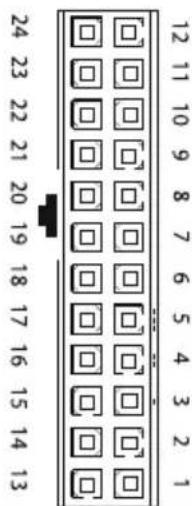
24 PIN ATX power connector
| Pin Signal Pin Signal | |||
| 1 +3.3VDC 13 | +3.3VDC +3.3Vdef.sense | ||
| 2 +3.3VDC 14 -12VDC | |||
| 3 COM 15 COM | |||
| 4 +5VDC 16 PS_ON/OFF | |||
| 5 COM 17 COM | |||
| 6 +5VDC 18 COM | |||
| 7 COM 19 COM | |||
| 8 PWR_OK 20 | |||
| 9 | +5VSB | 21 | +5VDC |
| 10 | +12VDC | 22 | +5VDC |
| 11 | +12VDC | 23 | +5VDC |
| 12 +3.3VDC 24 COM |
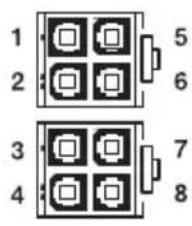
+12V power connector
| Pin Signal Pin Signal | |||
| 1 | COM | 5 | +12VDC |
| 2 | COM | 6 | +12VDC |
| 3 | COM | 7 | +12VDC |
| 4 | COM | 8 | +12VDC |
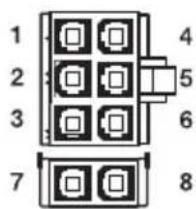
PCI express VGA connector
| Pin Signal Pin Signal | |||
| 1 | +12VDC | 4 | COM |
| 2 | +12VDC | 5 | COM |
| 3 | +12VDC | 6 | COM |
| 7 COM 8 COM | |||
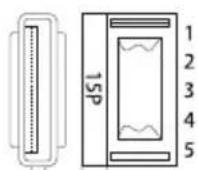
SATA power connector
| Pin Signal Pin Signal | |||
| 1 | 3.3V | 4 | COM |
| 2 | COM | 5 | +12VDC |
| 3 | +5VDC | ||
Peripheral Devices & FDD power connector
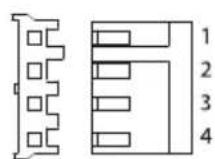
| Pin Signal Pin Signal | |||
| 1 | +5VDC | 3 | COM |
| 2 | COM | 4 | +12VDC |

8. CONNECTIVITY AND CABLE LENGTHS
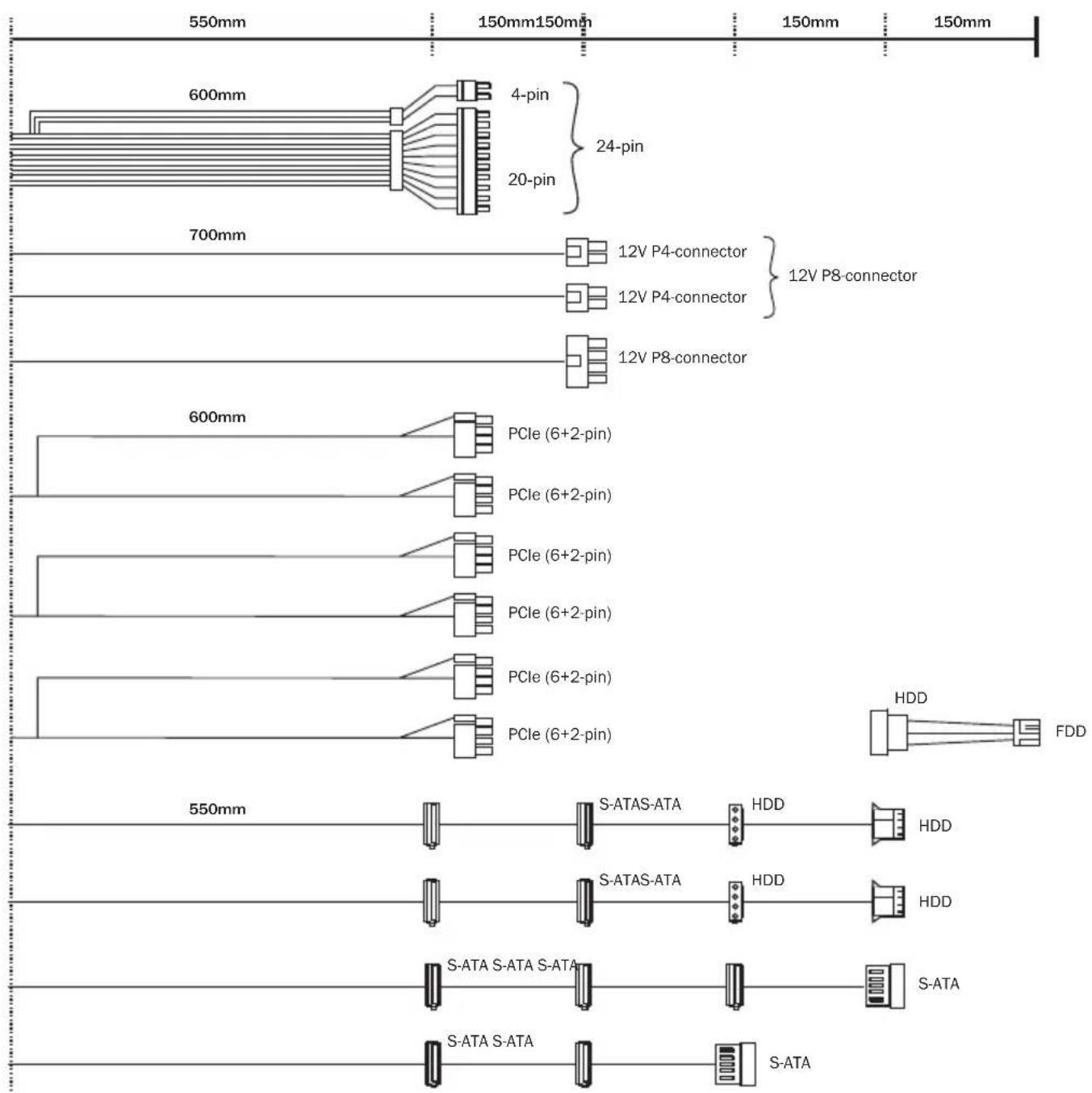
1000W
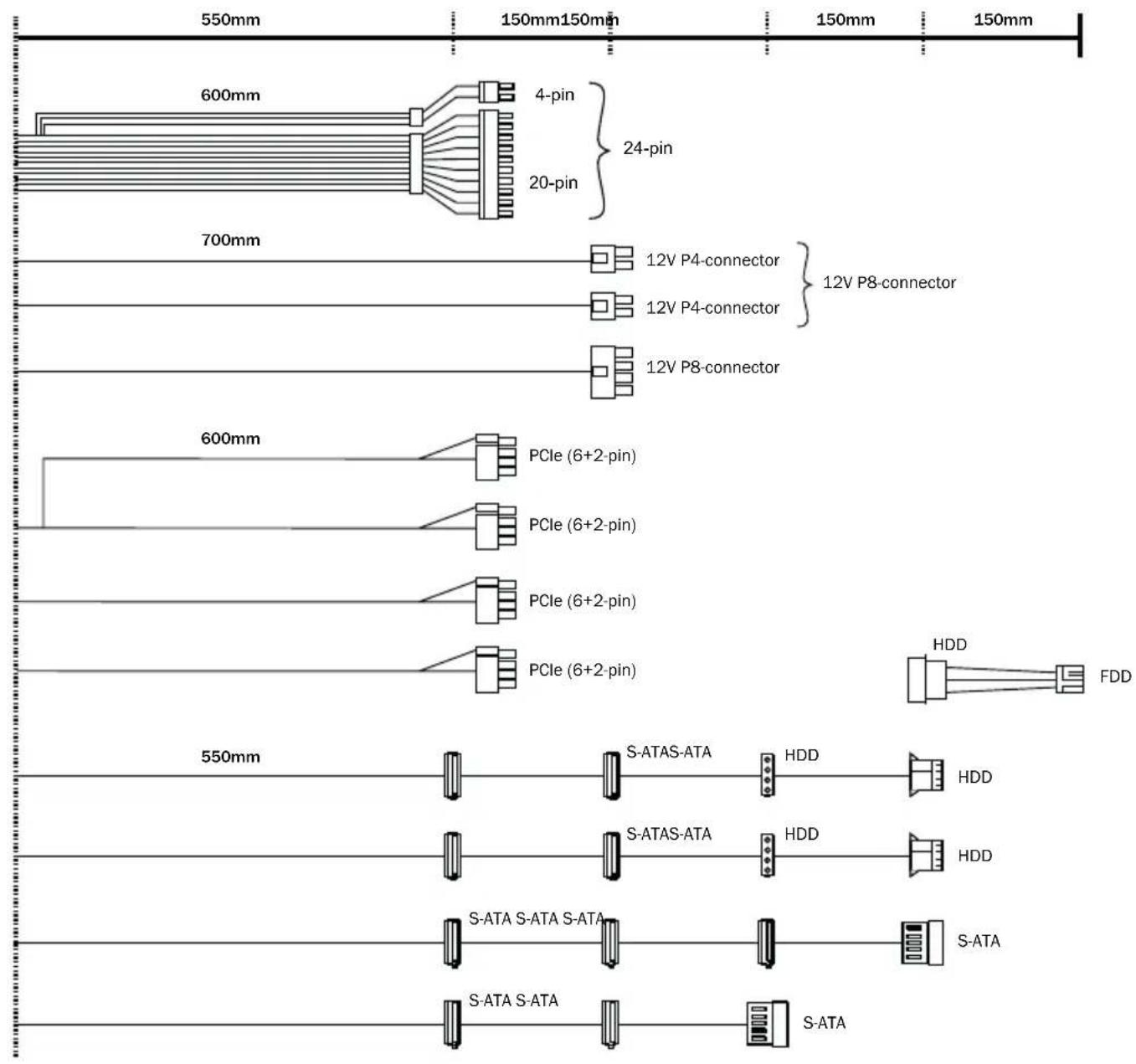
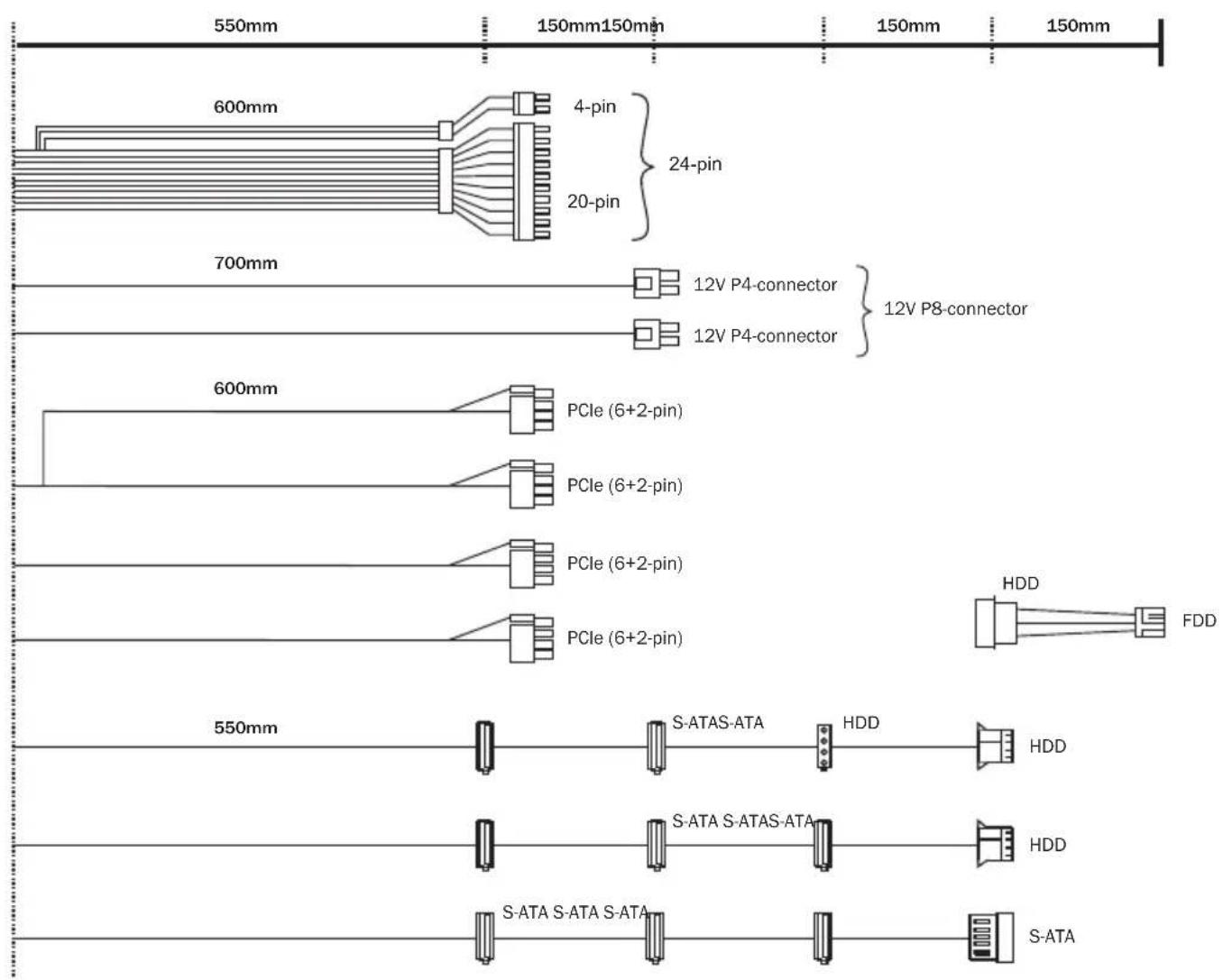
650W
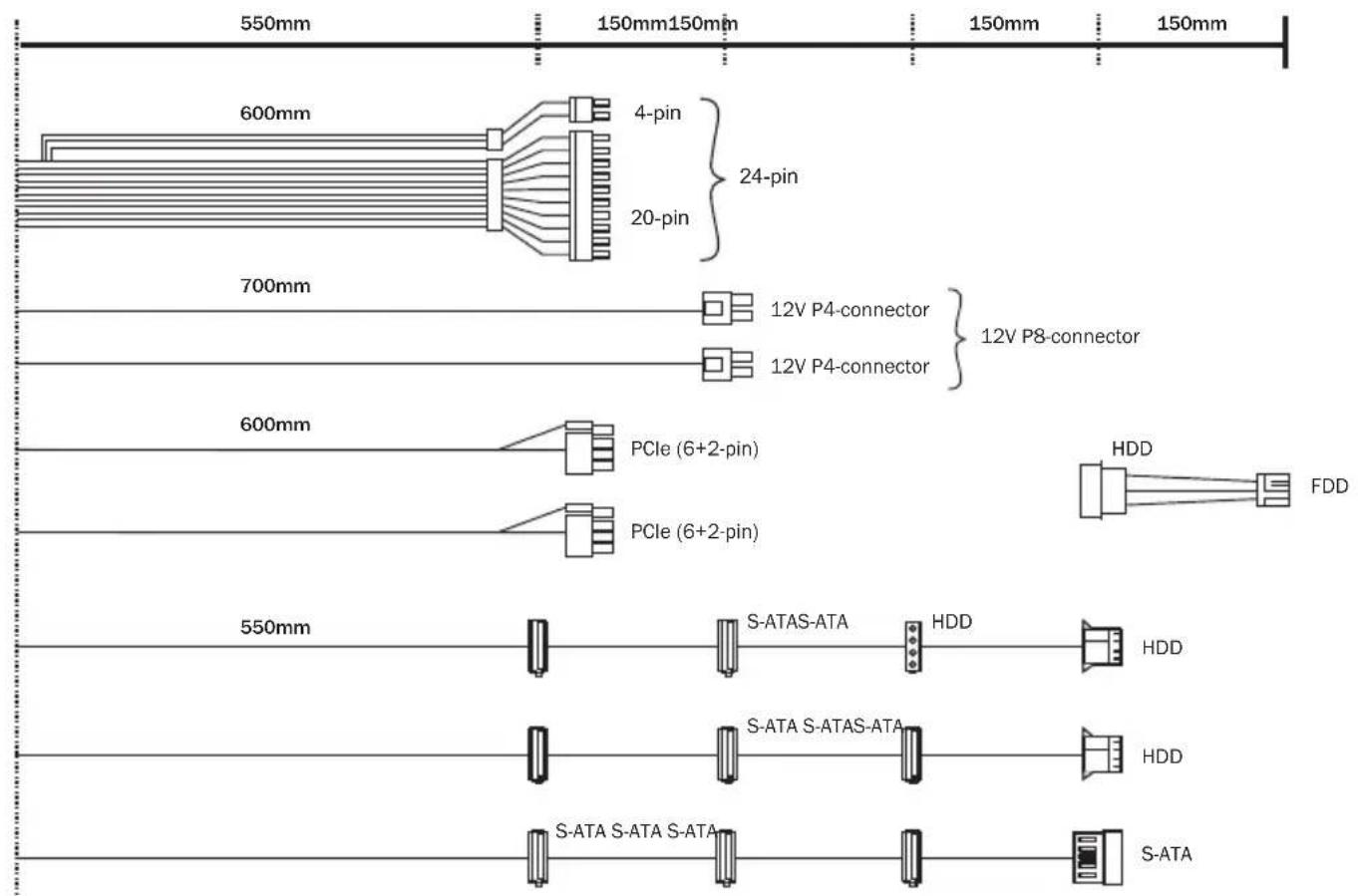
550W

450W