
SS-8640 - Radio Sogo - Free user manual and instructions
Find the device manual for free SS-8640 Sogo in PDF.
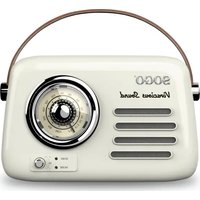


| Product type | Rechargeable retro radio with Bluetooth |
| Brand | Sogo |
| Model | SS-8640 |
| Category | Radio |
| Power supply | Rechargeable lithium-ion battery 3.7V, 1500 mAh |
| Charging | USB-C port, 5V power adapter not included |
| Charging time | 2 to 3 hours |
| Battery life | 4 to 6 hours |
| Speaker | 3 inches, 5 W power |
| Amplifier | RMS power 3 W |
| Frequency response | 2.4 GHz (Bluetooth) |
| Bluetooth version | 5.3 |
| Bluetooth range | 10 meters |
| Bluetooth pairing name | SOGO SS-863540 |
| Connection modes | Bluetooth, USB, auxiliary input (AUX), FM radio |
| FM radio | Yes, with frequency selector |
| Max USB memory | 64 GB |
| LED indicators | Charge (red), BT/AUX (blue), FM/USB (red/blue) |
| Maintenance | Soft, dry cloth, avoid abrasive products |
| Safety | Do not immerse, do not repair yourself, do not use while charging |
| Integrated battery | Not user-replaceable |
| Repairability | Repair only by authorized technician |
| Manufacturer | SOGO (made in China) |
| Importer | Sanysan Appliances S.L., Valencia, Spain |
| After-sales service | www.sogosat.com, sogosat@sogosat.com, 0034 902 222 161 |
Frequently Asked Questions - SS-8640 Sogo
User questions about SS-8640 Sogo
0 question about this device. Answer the ones you know or ask your own.
Ask a new question about this device
Download the instructions for your Radio in PDF format for free! Find your manual SS-8640 - Sogo and take your electronic device back in hand. On this page are published all the documents necessary for the use of your device. SS-8640 by Sogo.
USER MANUAL SS-8640 Sogo
SS-8635
SS-8640
RADIO RETRO CON ALTAVOZ BLUETOOTH RETRO RADIO WITH BLUETOOTH SPEAKER RADIO RÉTRO AVEC HAUT-PARLEUR BLUETOOTH RÁDIO RETRO COM ALTO-FALANTE BLUETOOTH RETRO-RADIO MIT BLUETOOTH-LAUTSPRECHER RADIO RETRÒ CON ALTOPARLANTE BLUETOOTH
Caution: please read and preserve these important instructions
This manual can be downloaded from our website, www.sogo.es in the following languages.
SPANISH, CATALAN, ENGLISH, FRENCH, PORTUGUESE, GERMAN, ITALIAN AND MORE
ref. SS-8635
SS-8640


1. IMPORTANT NOTICE

1. IMPORTANT NOTICE
• Always read the instruction book carefully before using. - This manual can be downloaded from our web page www.sogo.es - Keep these instructions for future reference.
2. SAFETY INSTRUCTIONS FOR THE USER
I. Restrictions
- Never immerse the Retro radio or the charging cable in water or any other liquid. In the event of the Retro radio falling in water, take it to an authorized service agent for repair before reusing.
- Do not place or operate the Retro radio on or near hot surfaces (e.g., stove plates) or open flames. In case of hardware problems, do not attempt to repair the product yourself. Repairs should only be carried out by qualified technicians.
- Never use accessories that are not recommended by the manufacturer.
- The use of accessories not recommended or sold by the appliance manufacturer may result in fire, electric shock, or irreparable damage to the product.
- Do not use the radio for any purpose other than described in this manual.
- Do not leave the radio charging longer than recommended by the manufacturer, as this may damage the battery or the radio itself.
- Do not use the radio while it is charging,
otherwise it may also damage the radio.
- Do not drop, disassemble, deform, modify, or insert any objects into this product, as operating damage may result.
- Do not attempt to repair, modify, or disassemble the product yourself. This product does not contain any user-serviceable components, and tampering may void the warranty.
- Do not clean the product with alcohol, ammonia-based cleaners, or abrasive cleaners.
- Do not place this product in contact with any sharp objects, as this may cause scratches and operating damage.
- Do not attempt to replace the product battery; it is built-in and not user-changeable. Children should be supervised to ensure that they do not play with the appliance.
- Cleaning and user maintenance shall not be performed by children.
II. Precautions during the usage of the product
- Keep the radio away from direct sunlight, fire, or other high-voltage equipment.
- WARNING: The device may get warm during charging. Always ensure the radio is turned off when you plug and unplug the device. If the device is not turned off, you may damage the radio or injure yourself.
- Observe all signs and displays that require an electrical device or RF radio product to be switched off in designated areas.
- Dispose of the product and the product's battery in accordance with local laws and regulations.
- In case of radio malfunction, or if it has been damaged in any manner, return it to the nearest authorized service facility for examination, repair or adjustment.
3. Product Features
- Rechargeable retro radio with Bluetooth connection
- FM radio
- 3" speaker
- 5 W speaker output
- 3 W amplifier output
- Classic control button
- Battery capacity: 3.7V, 1500mAh
- LED indicator lights
- Low noise level ≥65dB
- BT range 10M
- Charging time 2-3h
- Working time 4-6H
- Frequency 2.4G
- Multiple connection modes: BT, auxiliary cable, USB, FM radio,
- Stylish leather handle
4. Technical Specifications
Output power
Sound Sensitivity
Frequency response
Bluetooth version
Bluetooth Range
Bluetooth Pairing Name Maximum USB
Memory
Battery Capacity
Battery Type
Working Time
Charging Time
Slot
Connection
3W RMS Power
≥65dB
2.4G
V5.3
10 metres
SOGO SS-863540
64 GB
3.7V 1500 mAh
Lithium Ion
4-6 hrs (max.)
2-3 hrs
USB card (64GB),
Aux. Cable, Bluetooth
5. Key functions description:
- Power button
- Type C charging port
- Charging indicator
- USB port
- Auxiliary jack
- Mode
- Previous track
- Play / Pause
- Next track
- FM frequency dial
- BT / AUX indicator
- Volume knob
- FM / USB indicator
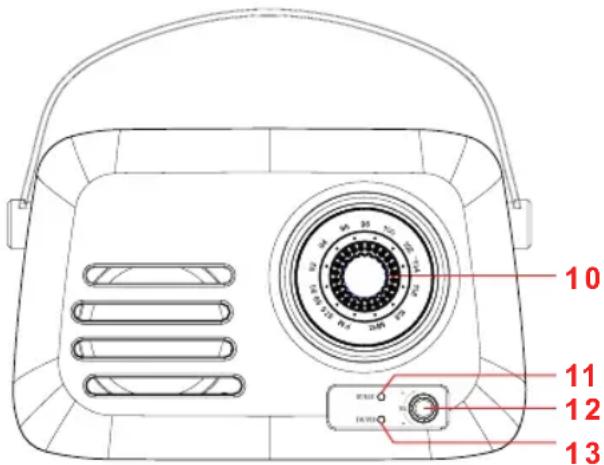
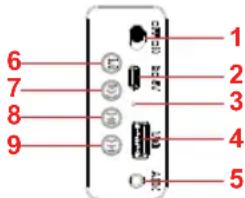
- Power button: This button is located on the back of the retro radio. With this button, we can turn on the radio and play music. By pressing the same button again, the device can be turned off.
- Type C charging port: This radio is provided with a Type C charging port. Insert the Type C connector of the charging cable (provided with the unit) to charge the radio.
- Charging indicator: This radio has a charging indicator. When we connect the device with the charging cable and the other side to a wall outlet using a charging adapter, the charging indicator turns on and stays illuminated in red. Once the battery is fully charged, it turns off.
- USB port: With the help of the USB port, we can connect any USB drive that contains music and listen to it.
- Auxiliary jack: With the help of an auxiliary cable, we can connect any device like an MP4 player, radio, or any other device and enjoy the content.
- Mode: With this button, we can change the working mode of the retro radio. This radio is provided with multiple connection modes like Bluetooth, Aux cable, USB, and FM radio.
- Previous track: In USB mode or Bluetooth mode, we can change from one track to the previous track. To do so, we need to keep pressing the same button until we reach our desired song.
- Play / Pause: After turning on the device, choose between USB, Bluetooth, or Auxiliary cable mode. Once we have chosen the mode, we can play and pause the music anytime.
- Next track: In USB mode or Bluetooth mode, we can change the track to the next track. To do so, we need to keep pressing the same button until we reach our desired song.
- FM frequency dial: With the help of this dial, we can tune into the FM station as per our desire.
- BT / Auxiliary indicator: This indicator light stays turned on in Bluetooth or Auxiliary mode. In Bluetooth mode, the blue light keeps flashing quickly, while in Auxiliary mode the same blue light flashes slowly. When the unit is in auxiliary mode and plays music, the indicator light turns red and keeps flashing slowly.
- Volume knob: With the help of this knob, we can increase and decrease the volume of the device.
- FM / USB indicator light: This light turns on in FM and USB connection modes. In USB mode, this indicator light keeps flashing slowly in blue. In FM mode, this indicator light turns on in constant red.
6. Multiple connection modes:
Radio function mode:
To bring the unit into radio function mode, simply turn on the radio by pressing the power button, and the device automatically enters radio mode. Once the device is in radio mode, you can select FM stations using the FM frequency dial and enjoy the music.
Note: Radio function mode is the default function of this device.
Bluetooth function mode
1) Power control: Press the power button (1) to turn on the radio. A sound will be heard indicating the device is on. 2) Press the mode button and select Bluetooth mode among the multiple modes of connections. 3) Turn on the Bluetooth function of your external Bluetooth device, then search for the Bluetooth device named "SOGO SS-863540" and select it to pair and connect. If your device connects to the Bluetooth and you are asked for a password by the external device, enter the password "0000" and finally your external device will be connected to the retro radio. After a successful pairing, a tone will be heard. 4) Now, with the help of the external Bluetooth device, you can play any kind of music through the retro radio.
USB mode
Insert a USB drive into the USB port (4) to play music stored on the drive. In USB mode, the retro radio will play music automatically.
Auxiliary cable mode
With the help of an auxiliary cable, you can connect any device like an MP4 player, radio, or any other device and enjoy the content.
Aux-In / Line-In
With the help of the Aux-In input, we can connect all musical devices such as radios, laptops,
televisions, and all devices that do not have Bluetooth connection function.
To connect the devices, you need an audio cable. Connect one end to the radio's Aux-In and the other end to the device you want to connect, and the device will automatically connect with the radio.
Aux-In mode is automatic; once you insert the auxiliary cable, the radio automatically enters this mode.
With the help of the device, you can play music and songs.
NOTE: In this mode, all functions are controlled by the external device, but the Play/Pause button can still be used.
7. Charging instructions:
How to charge the Retro radio:
This unit has been provided with a USB Type-C charging cable. To charge the radio, connect the radio to a charging adapter and plug it into a wall outlet. You can use any charging adapter, including the one you use to charge your mobile phone.
When the device is completely discharged, a sound can be heard as a low power indication, which indicates that the device needs to be charged.
Insert the Type-C connector of the USB charging cable into the charging port (2) on the back of the retro radio. Insert the USB charging connector of the charging cable into the USB port on a computer, USB charging device, or 5V USB adapter (not included) and plug into a wall outlet.
The charging indicator (3) will turn red while the radio is in charging mode, and the light will go out once it is fully charged.
Note:
- This unit does not include a USB charging adapter, but any USB charging adapter can be used, including your common mobile phone charging adapter.
- To increase battery life and ensure smooth working, it is recommended to charge fully.
8. Cleaning and maintenance
When cleaning the product, use a soft or dry cloth. In case of severe stains, use a damp cloth. Do not use abrasive cleaners, as they can damage the paint, plastic, or even the radio itself.
Keep it away from sunlight and do not keep it in hot and humid atmosphere.
Make sure to remove the power adaptor cable and keep it in a cool and dry place.
9. Disposal of electronic goods
DISPOSAL OF BATTERY-OPERATED UNITS
Do not dispose of battery-operated units as normal rubbish; always recycle them in a proper manner and according to local municipal laws. You can recycle them by taking them to government-authorized disposal centers or specialized bins, which you can find in any nearby big supermarkets, electronics or electro-domestic products stores, or malls that have these types of facilities available.

1. IMPORTANT NOTICE
integrated lithium-ion
4-6 hours (max.)
2-3 hours
USB card (64GB),
Aux-in/Bluetooth

1. IMPORTANT NOTICE

1. IMPORTANT NOTICE
DECLARATION OF CONFORMITY
DECLARATION OF CONFORMITY
This device complies with EU RED Directive 2014/53/EU related to Health and Safety from usage of Radio spectrum in household electronic equipment.
Electromagnetic Compatibility Directive 2014/30/EU.
Directive 2015/863/EU on the restriction of the use of certain hazardous substances in electrical.
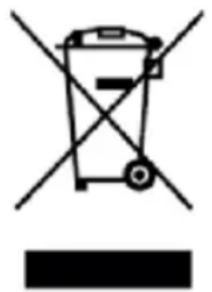
This symbol on the product or on the packaging indicates that this product cannot be disposed of as normal rubbish or household waste. All electrical, electronic equipment and battery-operated units must be recycled in a proper manner and according to local municipal laws. You can recycle them by taking them to government authorized disposal centers or specialized bins which you can find in any nearby big supermarkets, electronics or electro domestics products stores or malls that have these types of facilities available.
Designed by: SOGO based on European quality standards. Imported by: Sanysan Appliances S.L, NIF: B98753056, C/ Barcas 2, 2, 46002 Valencia, Spain. Product manufactured in China. After-sales service: www.sogosat.com sogosat@sogosat.com / 0034 902 222 161
- IMPORTANT NOTICE
- SAFETY INSTRUCTIONS FOR THE USER
- RESTRICTIONS
- PRECAUTIONS DURING THE USAGE OF THE PRODUCT
- PRODUCT FEATURES
- TECHNICAL SPECIFICATIONS
- OUTPUT POWER
- SOUND SENSITIVITY
- FREQUENCY RESPONSE
- BLUETOOTH VERSION
- BLUETOOTH RANGE
- BLUETOOTH PAIRING NAME MAXIMUM USB
- MEMORY
- BATTERY CAPACITY
- BATTERY TYPE
- WORKING TIME
- CHARGING TIME
- SLOT
- CONNECTION
- W RMS POWER
- ≥65DB
- G
- V
- METRES
- SOGO SS
- GB
- V 1500 MAH
- LITHIUM ION
- HRS (MAX.)
- HRS
- USB CARD (64GB)
- AUX. CABLE, BLUETOOTH
- KEY FUNCTIONS DESCRIPTION
- MULTIPLE CONNECTION MODES
- RADIO FUNCTION MODE
- BLUETOOTH FUNCTION MODE
- USB MODE
- AUXILIARY CABLE MODE
- CHARGING INSTRUCTIONS
- HOW TO CHARGE THE RETRO RADIO
- NOTE
- CLEANING AND MAINTENANCE
- DISPOSAL OF ELECTRONIC GOODS
- DISPOSAL OF BATTERY-OPERATED UNITS
- DECLARATION OF CONFORMITY
Brand : Sogo
Model : SS-8640
Category : Radio