
KM0232-T4 - Television Krüger&Matz - Free user manual and instructions
Find the device manual for free KM0232-T4 Krüger&Matz in PDF.


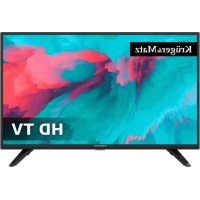
| Product type | Television |
| Brand | Krüger&Matz |
| Model | KM0232-T4 |
| TV standard | DVB-T/T2/C (analog and digital) |
| Antenna input | 1x RF |
| HDMI inputs | Yes |
| USB input | Yes |
| Composite AV input | Yes (via RCA) |
| Headphone output | Yes (3.5 mm jack) |
| Digital audio output | SPDIF coaxial |
| CI+ module | Yes (for encrypted channels) |
| Remote control | Included, with numeric keys and functions |
| Wall mounting | Possible (bracket not included) |
| Table stand | Included (two screw-in feet) |
| Power supply | AC 100-240V, 50/60 Hz |
| Standby consumption | Minimal (standby mode) |
| Cleaning | Soft damp cloth |
| Operating temperature | 5°C to 35°C (estimate) |
| Operating humidity | Max 80% without condensation |
| Energy class | Not specified |
Frequently Asked Questions - KM0232-T4 Krüger&Matz
User questions about KM0232-T4 Krüger&Matz
0 question about this device. Answer the ones you know or ask your own.
Ask a new question about this device
Download the instructions for your Television in PDF format for free! Find your manual KM0232-T4 - Krüger&Matz and take your electronic device back in hand. On this page are published all the documents necessary for the use of your device. KM0232-T4 by Krüger&Matz.
USER MANUAL KM0232-T4 Krüger&Matz
natural_image
Completely black image with no visible content, text, or symbols.

ACHTUNG
UM DAS RISIKO VON
natural_image
Illustration of a computer monitor with lightning bolts and a hand holding a device, no text or symbols presentWarnung

natural_image
Simple line drawing of a computer monitor with a curved frame and a base, emitting steam lines (no text or symbols)Achtung

natural_image
Illustration of a TV with a 'X' symbol crossed out, next to a hanging cloth and falling objects (no text or symbols)Warnung

natural_image
Simple line drawing of a flat-screen monitor with a cross mark on the stand (no text or symbols)Achtung

natural_image
Simple line drawing of a monitor with a crossed X symbol and a flower on top, surrounded by stars (no text or symbols)Warnung

natural_image
Cartoon illustration of a person lying on a computer screen with a crossed-out X symbol (no text or symbols present)Achtung

natural_image
Technical line drawing of a device chassis with mounting brackets and connectors (no text or symbols)Schritt 1
natural_image
Technical line drawing of a device chassis with mounting brackets and connectors (no text or symbols)Schritt 2
natural_image
Simple line drawing of a ladder with a power button on top (no text or symbols)natural_image
Technical line drawing of a computer monitor with cable and power outlet (no text or symbols)natural_image
Technical line drawing of a mechanical device with attached wires and a close-up view of internal components (no text or symbols)The symbol indicates that dangerous voltages constituting a risk of electric shock are present within this unit.

The symbol indicates that there are important operating and maintenance instructions in the literaturaccompanying this unit.
IMPORTANT SAFETY INSTRUCTION
1) Read these instructions.
2) Keep these instructions.
3) Heed all warnings.
4) Follow all instructions.
5) Do not use this apparatus near water.
6) Clean only with dry cloth.
7) Do not block any ventilation openings, install in accordance with the instructions.
8) Do not install near any heat sources such as radiations, heat registers, stoves, or other apparatus (including amplifiers) that produce heat.
9) Do not defeat the safety purpose of the polarized plug. If the provided plug does not fit into your outlet, consult an electrician for replacement of the obsolete outlet.
10) Protected the power cord from being walked on or pinched particularly at plugs, convenience
receptacles, and the point where they exit from the apparatus.
11) Only use attachments/accessories specified by the manufacturer.
12) Unplug this apparatus during lighting storms or when unused for long periods of time.
13) Refer all servicing to qualified service personnel. Servicing is required when the apparatus has been damaged in anyway, such as power-supply cord or plug is damaged, liquid has been spilled or objects have fallen into the apparatus, the apparatus has been exposed to rain or moisture, does not operate normally, or has been dropped.
14) Mains plug is used as the disconnect device, the disconnect device shall remain readily operable.
15) The ventilation should not be impeded by covering the ventilation openings with items, such as newspapers, table-cloth, curtains, etc.
16) No naked flame sources, such as lighted candles, should be placed on the apparatus.
17) Attention should be drawn to the environmental aspects of battery disposal.
18) The use of apparatus in moderate climate.
19) The apparatus shall not be exposed to dripping or splashing and that no objects filled with liquids, such as vases, shall be placed on the apparatus.
Warning
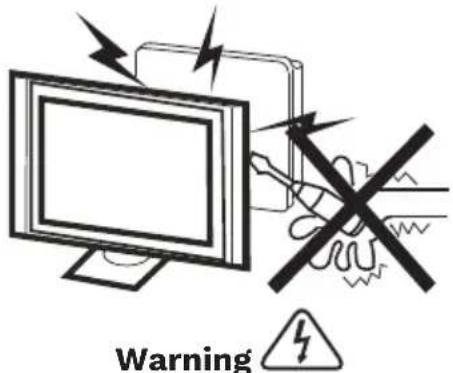
High voltages are used in the operation of this television receiver. Do not remove the cabinet back from your set. Refer servicing to qualified service personnel.
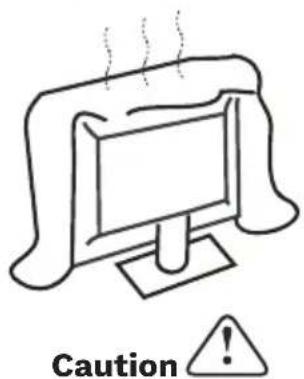
Do not block the ventilation holes in the back cover. Adequate ventilation is essential to prevent failure of electrical components.
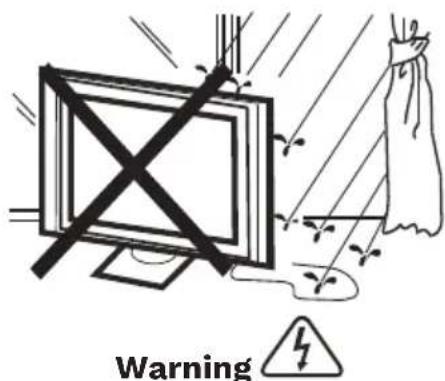
To prevent fire or electrical shock hazard, do not expose the television receiver to rain or moisture.
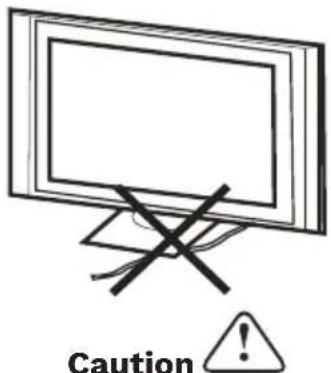
Do not trap the power supply cord under the television receiver.
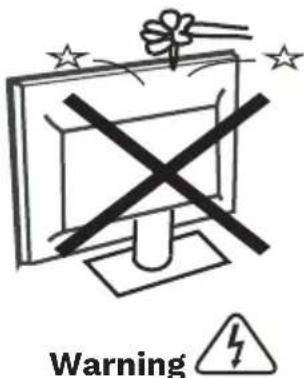
Do not drop or push objects into the television cabinet slots or openings. Never spill any kind of liquid on the television receiver.
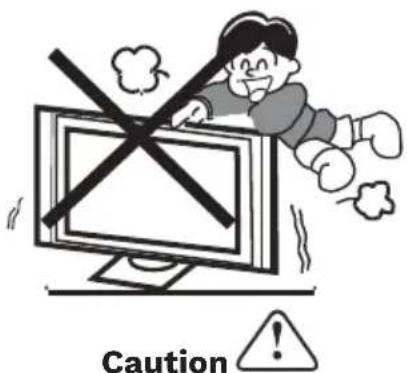
Never stand on, lean on, or suddenly push the television or its stand. You should pay special attention to children. Serious injury may result if it should fall.
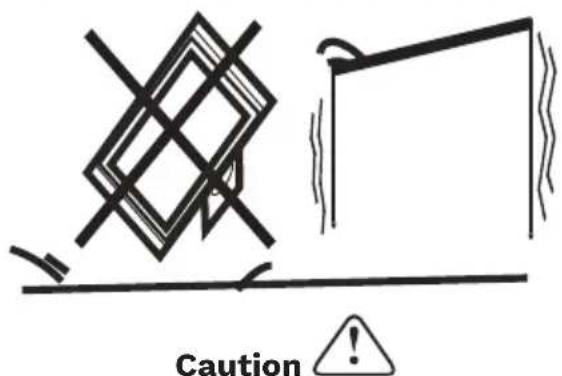
Do not place your television on an unstable cart, stand, shelf or table. Serious injury to an individual, and damage to the television, may result if it should fall.
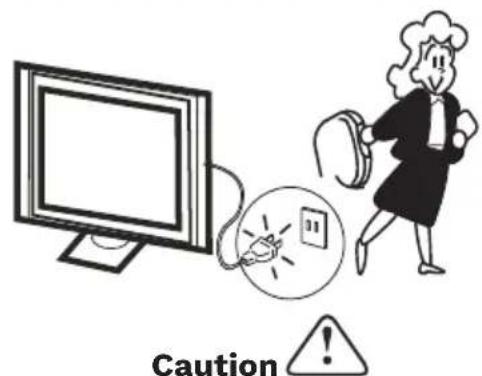
When the television receiver is not used for an extended period of time, it is advisable to disconnect the AC power cord from the AC outlet.
INSTALLATION
- Locate the TV in the room where light does not strike the screen directly.
- Total darkness or a reflection on the picture screen can cause eyestrain. Soft and indirect lighting is recommended for comfortable viewing.
- Allow enough space between the TV and the wall to permit ventilation.
- Avoid excessively warm locations to prevent possible damage to the cabinet or premature component failure.
- Do not cover the ventilation openings when using the TV.
Minimum distances
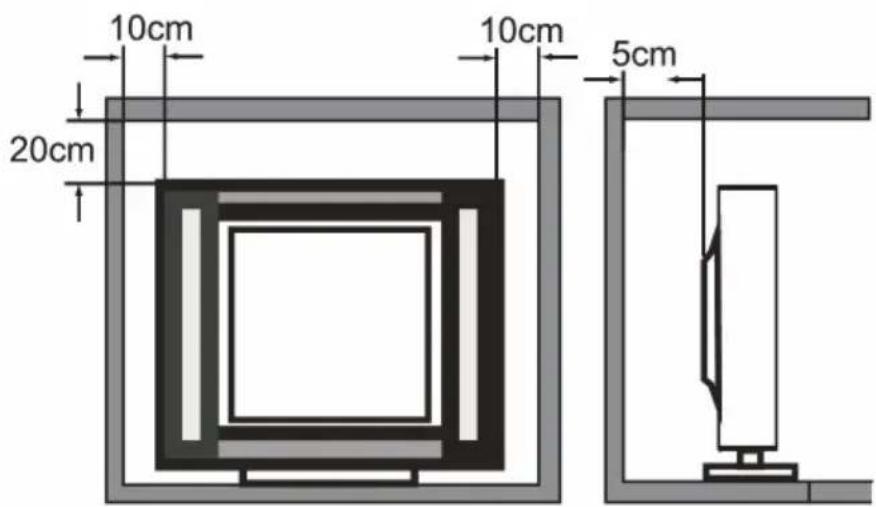
Base stand assembly instruction
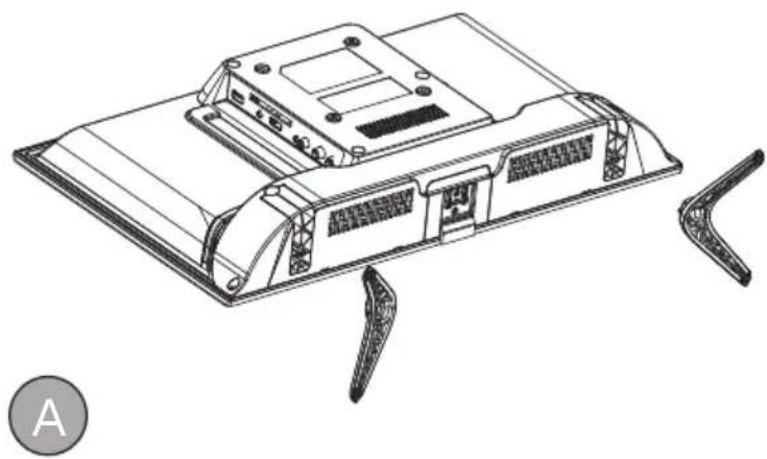
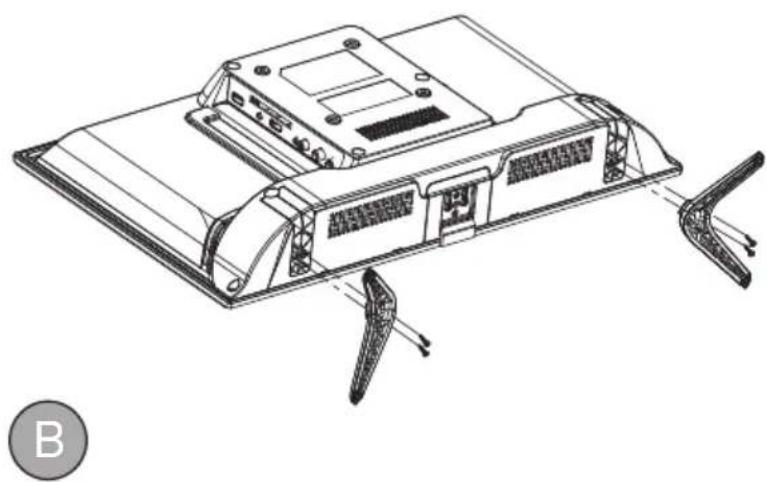
When you install the base, the need to face down flat on the TV platform. Before installing (or removing) the stand, unplug the AC power cord from the AC outlet before performing the operation, laying cushion in place the TV will be placed to prevent damage to the TV.
natural_image
Technical line drawing of a device chassis with connectors and a labeled section A (no text or symbols on the diagram itself)Step 1
Locate the 2 pcs of bottom bracket into the gap on the back of the TV, and check that it is securely held in place as in illustration A) below.
natural_image
Technical line drawing of a device chassis with mounting brackets and connectors (no text or symbols)Step 2
Lock the 2 pcs screws in the designated location as in illustration B) below. Check each screw is firmly tightened.
Warning:
Be sure to follow the instructions for installation, if the base is not installed correctly, it may result in the TV falling over. To remove the stand, perform the steps in reverse order, the base can not adjust the angle. During the installation process, be careful to avoid damage to the TV and your hand caught and ground to the bottom of the TV.
Mounting on a wall
IMPORTANT This operation requires two people!
To ensure a safe installation, comply with the following safety instructions:
- Disconnect from power supply before mounting.
- Check that the wall can support the weight of the TV set and wall mount assembly.
- Follow the mounting instructions provided with the wall mount.
- The TV set must be installed on a vertical wall.
- Make sure to use only screws suitable for the material of the wall.
- Make sure that the TV set cables are placed in such a way that there is no danger of tripping over them.
- Mounting the TV set on the wall should be performed only by professionals.
BUTTON ON THE TV SET
Note: The location, names and availability of the buttons may vary according to the TV model. Please refer to the actual product.
natural_image
Simple line drawing of a toggle switch with power button (no text or symbols)- Press the button to turn on the TV.
SOCKETS
Note: The location, names and availability of the sockets may vary according to the TV model.
| Socket Function | |
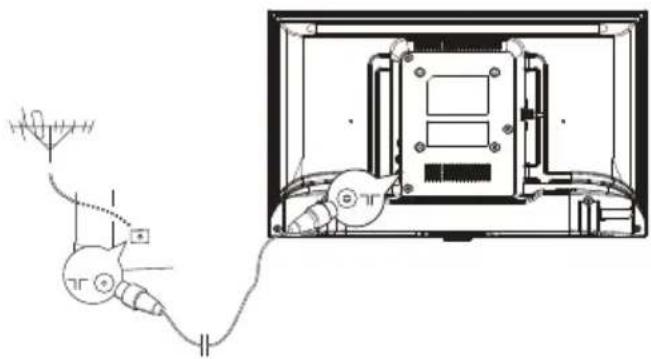
| RF input:1x analogue DVB-T/T2/C | Connect with ground-based television with an antenna cable. Connect plug of an antenna cable to the ANTENNA INPUT. |
| Headphones output (3,5 mm jack) | Connect headphones to the TV set. |
| CI+ slot Technology that allows | you to insert a CI module that allows your TV set to receive scrambled TV channels. |
| HDMI input Transmits video and | audio data from external device such as DVD or Blu-Ray player, video game console or PC (with compatible video card) to your TV set with a HDMI cable. |
| USB input Connect USB storage | device. |
| AV composite input Designed to | transmit video and audio data from external devices such as PVR, camera, DVD player, video game console to the TV set with RCA cable. |
| SPDIF (Coaxial) output Transmits | audio data from the TV set to external devices such as amplifier or speaker set with coaxial cable. |
REMOTE CONTROL
Most of your television's functions are available via the menus that appear on the screen. The remote control supplied with your set can be used to navigate through the menus and to configure all the general settings.
Note! The location, names and availability of the buttons on the remote control may vary according to the TV model. Some buttons may not be available on your remote control.
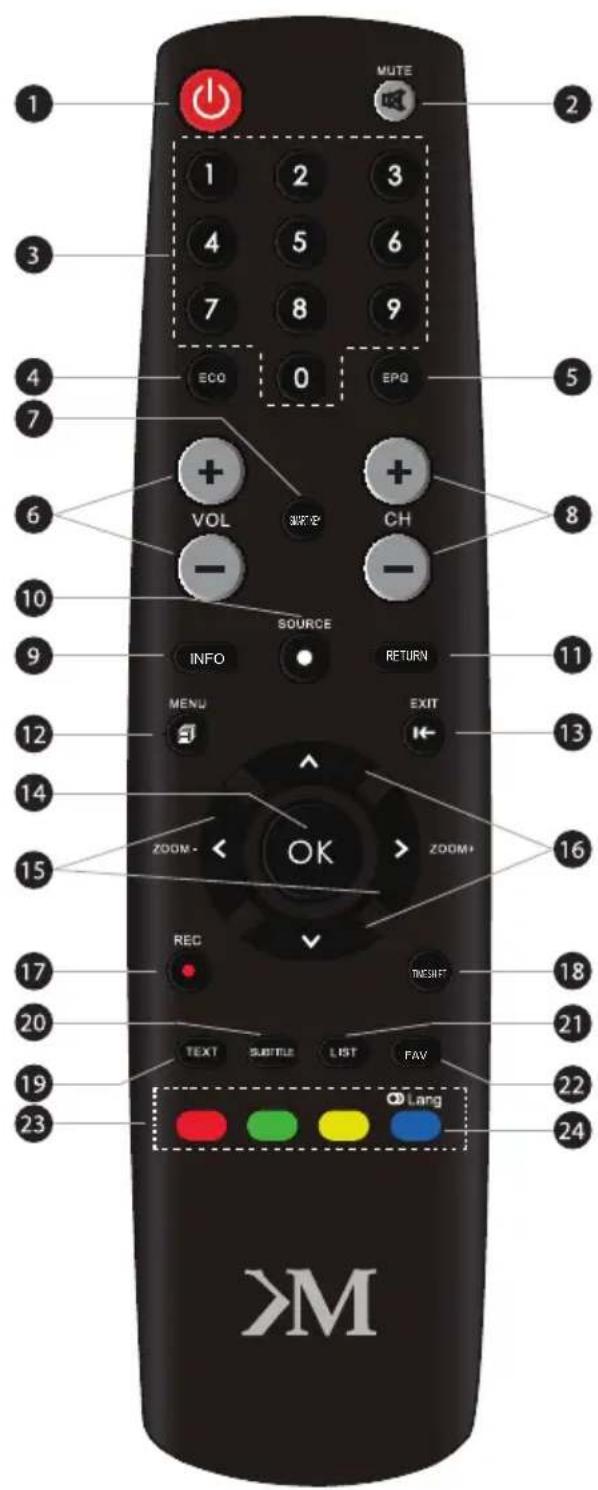
- ⏻: Switch the TV between on and standby mode
- ✗: Switch the sound off/on
- Number key
- ECO: Select desired power saving mode
- EPG: Enter Electronic Program Guide
- VOL +/- : Increase/decrease volume
- SMART KEY: Enter additional functions menu
- CH +/- : Next/previous channel
- INFO: Display program information (if available)
- ● SOURCE: Display and select input source
- RETURN: Return to the previous menu
- ☐MENU: Enter main menu
- ←EXIT: Exit the menu
- OK: Confirm an entry or selection
- <> Use to navigate the menu and adjust options
- Use to navigate the menu and adjust options
- REC: No function
- TIMESHIFT: No function
- TEXT: Display Teletext
- SUBTITLE: Display subtitle menu
- LIST: Display channel list
- FAV: Display favorite channel list
- Color buttons: Additional function
- ☉Lang: Select audio language
BASIC OPERATION
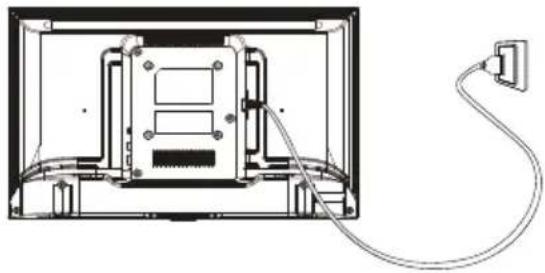
- Connect the device to power supply socket.
natural_image
Diagram of an open computer monitor with cable and power outlet, no text or symbols present- Connect the antenna cable into the appropriate RF input.
natural_image
Technical line drawing of a mounted antenna connected to a device inside a container (no text or symbols)Switch the TV on and off
-
When the TV is connected to power supply, it will be turned on directly or be in standby mode (power LED is on). If the TV is in standby mode, press the Power button to turn it on.
-
To put the TV set into standby mode, press the Power button on the TV set or remote control. The TV set remains on, but with low energy consumption. To switch off the TV set, unplug it from power supply.
Note: For some models, press the Power button to switch off the TV set.
INITIAL SETUP
The first time you switch the TV set on, the Welcome screen appears, which guides you through the initial setup process. Follow the on-screen instructions to finish the initial setup process such as selecting the language, scanning channels and more. During each step, either make a choice or skip the step. If you skip a step, you can perform the setup later from the settings menu.
LEARN MORE
For more information on this device visit: www.krugermatz.com.
Visit www.krugermatz.com website for more products and accessories.
In case of any doubts or questions reach out to our Frequently Asked Questions section.
Dear Customer,
Hereby, Lechpol Electronics Leszek Sp.k. declares that this device is in compliance with Directive 2014/53/EU. The full text of the EU declaration of conformity is available at the following internet address: www.lechpol.pl.
English
Correct Disposal of This Product
(Waste Electrical & Electronic Equipment)


Z
(Applicable in the European Union and other European countries with separate collection systems) This marking shown on the product or its literature, indicates that it should not be disposed with other household wastes at the end of its working life. To prevent possible harm to the environment or human health from uncontrolled waste disposal, please separate this from other types of wastes and recycle it responsibly to promote the sustainable reuse of material resources. Household users should contact either the retailer where they purchased this product, or their local government office, for details of where and how they can take this item for environmentally safe recycling. Business users should contact their supplier and check the terms and conditions of the purchase contract This product should not be mixed with other commercial wastes for disposal.
Made in China for Lechpol Electronics Leszek Sp.k., ul. Garwolińska 1, 08-400 Miętne.
HDMI
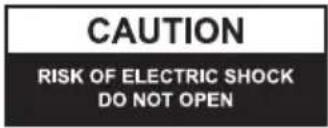

ATENCIÓN
PARA EVITAR EL RIESGO DE SUFRIR UNA DESCARGA ELÉCTRICA, NO DEBE RETIRARSE LA CARCASA DEL TELEVISOR. LOS TRABAJOS DE SERVICIO TÉCNICO DEBERÁN SER REALIZADOS EXCLUSIVAMENTE POR PERSONAL CUALIFICADO.
natural_image
Technical line drawing of a device chassis with mounting brackets and connectors (no text or symbols)Paso 1
natural_image
Technical line drawing of a device chassis with mounting brackets and connectors (no text or symbols)Paso 2
natural_image
Simple line drawing of a toggle switch with power button (no text or symbols)natural_image
Diagram of a computer monitor with cable and power outlet, no text or symbols presentnatural_image
Illustration of a computer monitor with lightning bolts and a hand holding a device, no text or symbols present.Attention

natural_image
Simple line drawing of a computer monitor with a stand and smokestack (no text or symbols)Attention

natural_image
Illustration of a TV with a 'X' symbol crossed out, next to a cloth hanging from a rope (no text or symbols)Attention

natural_image
Simple line drawing of a flat-screen TV with a black X mark on the stand (no text or symbols)Attention

natural_image
Simple line drawing of a monitor with a cross symbol and a flower on top, surrounded by stars (no text or symbols)Attention

natural_image
Cartoon illustration of a person lying on a computer monitor with a crossed-out black X symbol (no text or symbols present)Attention

natural_image
Simple line drawing of a geometric shape with intersecting lines and a rectangular frame (no text or symbols)Attention

natural_image
Illustration of a person running away from a computer screen connected to a cable with a fuse and a small electrical socket (no text or symbols)Attention

natural_image
Technical line drawing of a device casing with mounting brackets and connectors (no text or symbols)Etape 1
natural_image
Technical line drawing of a device chassis with mounting brackets and connectors (no text or symbols)Etape 2
natural_image
Simple line drawing of a toggle switch with power button (no text or symbols)natural_image
Technical line drawing of a device rear panel with cable and plug, no text or symbols presentnatural_image
Technical line drawing of a mechanical device with attached wires and components, no visible text or symbolsnatural_image
Illustration of a computer monitor with lightning bolts and a hand holding a crossed-out black X (no text or symbols)Let op

natural_image
Simple line drawing of a computer monitor with a steaming roof (no text or symbols)Let op

natural_image
Illustration of a TV with a cross symbol crossed out, next to a cloth hanging from a rope (no text or symbols)Let op

natural_image
Simple line drawing of a flat-screen TV with a black X mark on the stand (no text or symbols)Let op

natural_image
Simple line drawing of a monitor with a cross symbol crossed out, surrounded by stars and a flower (no text or symbols)Let op

natural_image
Cartoon illustration of a person running away from a computer monitor with a crossed-out X symbol (no text or symbols present)Let op

natural_image
Simple line drawing of a geometric shape with intersecting lines and a partial rectangle, no text or symbols present.Let op

natural_image
Illustration of a person running away from a computer screen connected to a cable with a fuse (no text or symbols present)Let op

natural_image
Technical line drawing of a device chassis with mounting brackets and connectors (no text or symbols)Stap 1
natural_image
Technical line drawing of a device chassis with connectors and ventilation slots (no text or symbols)Stap 2
natural_image
Simple line drawing of a toggle switch with power button (no text or symbols)Z
natural_image
Technical line drawing of a mounted device with cable and power outlet (no text or symbols)natural_image
Technical line drawing of a mechanical device with attached wires and a close-up view of internal components (no text or symbols)natural_image
Technical line drawing of a device chassis with mounting brackets and connectors (no text or symbols)Krok 1
natural_image
Technical line drawing of a device chassis with mounting brackets and connectors (no text or symbols)Krok 2
natural_image
Simple line drawing of a toggle switch with power button (no text or symbols)natural_image
Technical line drawing of a device rear panel with cable and power outlet (no text or symbols)natural_image
Technical line drawing of a cable and motor assembly with no visible text or symbolsnatural_image
Illustration of a computer monitor with lightning bolts and a hand holding a device, no text or symbols presentAvertisement

natural_image
Simple line drawing of a computer monitor with a curved frame and a base, emitting steam lines (no text or symbols)Atentie

natural_image
Simple line drawing of a TV with a cross symbol crossed out, next to a cloth hanging from a rope (no text or symbols)Avertisement

natural_image
Simple line drawing of a flat-screen monitor with a black X mark on the stand (no text or symbols)Atentie

natural_image
Simple line drawing of a computer monitor with a crossed X symbol and a flower on top (no text or symbols)Avertisement

natural_image
Cartoon illustration of a person lying on a computer monitor with a crossed-out X symbol (no text or symbols present)Atentie

natural_image
Technical line drawing of a device chassis with mounting brackets and connectors (no text or symbols)Etapa 1
natural_image
Technical line drawing of a device chassis with mounting brackets and connectors (no text or symbols)Etapa 2
natural_image
Simple line drawing of a toggle switch with power button (no text or symbols)natural_image
Technical line drawing of a computer monitor with cable and power outlet (no text or symbols)www.krugermatz.com
Krüger&Matz is a registered trademark

- ACHTUNG
- Schritt 1
- Schritt 2
- IMPORTANT SAFETY INSTRUCTION
- INSTALLATION
- Minimum distances
- Base stand assembly instruction
- Step 1
- Step 2
- Warning:
- Mounting on a wall
- BUTTON ON THE TV SET
- SOCKETS
- REMOTE CONTROL
- BASIC OPERATION
- Switch the TV on and off
- INITIAL SETUP
- LEARN MORE
- Dear Customer,
- English
- ATENCIÓN
- Paso 1
- Paso 2
- Etape 1
- Etape 2
- Stap 1
- Stap 2
- Krok 1
- Krok 2
- Etapa 1
- Etapa 2
Brand : Krüger&Matz
Model : KM0232-T4
Category : Television