MDC22P1ABB - Dishwasher MIDEA - Free user manual and instructions
Find the device manual for free MDC22P1ABB MIDEA in PDF.


User questions about MDC22P1ABB MIDEA
0 question about this device. Answer the ones you know or ask your own.
Ask a new question about this device
Download the instructions for your Dishwasher in PDF format for free! Find your manual MDC22P1ABB - MIDEA and take your electronic device back in hand. On this page are published all the documents necessary for the use of your device. MDC22P1ABB by MIDEA.
USER MANUAL MDC22P1ABB MIDEA
Dish Washer
USER MANUAL
MDC22P1ABB
THANK YOU LETTER
Thank you for choosing Midea! Before using your new Midea product, please read this manual thoroughly to ensure that you know how to operate the features and functions that your new appliance offers in a safe way.
CONTENTS
THANK YOU LETTER 01
SAFETY INSTRUCTIONS 02
SPECIFICATIONS 08
PRODUCT OVERVIEW 10
PRODUCT INSTALLATION 11
OPERATION INSTRUCTIONS 15
CLEANING AND MAINTENANCE 25
TROUBLESHOOTING 28
TRADEMARKS, COPYRIGHTS AND LEGAL STATEMENT 31
DISPOSAL AND RECYCLING 32
WARRANTY 34
SAFETY INSTRUCTIONS
Intended Use
- The following safety guidelines are intended to prevent unforeseen risks or damage from unsafe or incorrect operation of the appliance. Please check the packaging and appliance on arrival to make sure everything is intact to ensure safe operation. If you find any damage, please contact the retailer or dealer.
- Please note modifications or alterations to the appliance are not allowed for your safety concern. Unintended use may cause hazards and loss of warranty claims.
Explanation of Symbols

Danger
This symbol indicates that there are dangers to the life and health of persons due to extremely flammable gas.

Warning of electrical voltage
This symbol indicates that there is a danger to life and health of persons due to voltage.

Warning
The signal word indicates a hazard with a medium level of risk which, if not avoided, may result in death or serious injury.

Caution
The signal word indicates a hazard with a low degree of risk which, if not avoided, may result in minor or moderate injury.

Attention
The signal word indicates important information (e.g. damage to property), but not danger.

Observe instructions
This symbol indicates that a service technician should only operate and maintain this appliance in accordance with the operating instructions.
Read these operating instructions carefully and attentively before using/commissioning the unit and keep them in the immediate vicinity of the installation site or unit for later use!

DANGER: Risk of Fire/Flammable materials
- When using your dishwasher, follow the precautions listed below:
- Installation and repair can only be carried out by a qualified technician.
- This appliance is intended to be used in household and similar applications such as:
-staff kitchen areas in shops, offices and other working environments;
-farm houses;
-by clients in hotels, motels and other residential type environments;
-bed and breakfast type environments.
- This appliance can be used by children aged from 8 years and above and persons with reduced physical, sensory or mental capabilities or lack of experience and knowledge if they have been given supervision or instruction concerning use of the appliance in a safe way and understand the hazards involved.
- Children shall not play with the appliance. Cleaning and user maintenance shall not be done by children without supervision.
- This appliance is not intended for use by persons (including children) with reduced physical, sensory or mental capabilities, or lack of experience and knowledge, unless they have been given supervision or instruction concerning use of the appliance by a person responsible for their safety.
- Packaging material could be dangerous for children!
-
This appliance is for indoor household use only.
• To protect against the risk of electrical shock, do not immerse the unit, cord or plug in water or other liquid. -
Please unplug before cleaning and performing maintenance on the appliance.
- Use a soft cloth moistened with mild soap, and then use a dry cloth to wipe it again.

Earthing Instructions
- This appliance must be earthed. In the event of a malfunction or breakdown, earthing will reduce the risk of an electric shock by providing a path of least resistance of electric current. This appliance is equipped with an earthing conductor plug.
- The plug must be plugged into an appropriate outlet that is installed and earthed in accordance with all local codes and ordinances.
- Improper connection of the equipment-earthing conductor can result in the risk of an electric shock.
- Check with a qualified electrician or service representative if you are in doubt whether the appliance is properly grounded.
- Do not modify the plug provided with the appliance if it does not fit the outlet.
- Have a proper outlet installed by a qualified electrician.
- Do not abuse, sit on, or stand on the door or dish rack of the dishwasher.
- Do not operate your dishwasher unless all enclosure panels are properly in place.
- Open the door very carefully if the dishwasher is operating, there is a risk of water squirting out.
- Do not place any heavy objects on or stand on the door when it is open. The appliance could tip forward.
- When loading items to be washed:
1) Locate sharp items so that they are not likely to damage the door seal;
2) Warning: Knives and other utensils with sharp points must be loaded in the basket with their points facing down or placed in a horizontal position.
- Some dishwasher detergents are strongly alkaline. They can be extremely dangerous if swallowed. Avoid contact with the skin and eyes and keep children away from the dishwasher when the door is open.
- Check that there are no detergent residues after completion of the wash cycle.
- Do not wash plastic items unless they are marked “dishwasher safe” or the equivalent.
- For unmarked plastic items not so marked, check the manufacturer's recommendations.
- Use only detergent and rinse agents recommended for use in an automatic dishwasher.
- Never use soap, laundry detergent, or hand washing detergent in your dishwasher.
• The door should not be left open, since this could increase the risk of tripping.
- If the supply cord is damaged, it must be replaced by the manufacturer or its service agent or a similarly qualified person in order to avoid a hazard.
- During installation, the power supply must not be excessively or dangerously bent or flattened.
- Do not tamper with controls.
- The appliance needs to be connected to the main water valve using new hose sets. Old sets should not be reused.
- To save energy, in stand by mode, the appliance will switch off automatically while there is no any operation in 30 minutes.
- The maximum number of place settings to be washed is 6.
- The maximum permissible inlet water pressure is 1MPa.
- The minimum permissible inlet water pressure is 0.04MPa.
Disposal
- For disposing of package and the appliance please go to a recycling center.
Therefore cut off the power supply cable and make the door closing device unusable. - Cardboard packaging is manufactured from recycled paper and should be disposed in the waste paper collection for recycling.
- By ensuring this product is disposed of correctly, you will help prevent potential negative consequences for the environment and human health, which could otherwise be caused by inappropriate waste handling of this product.
- For more detailed information about recycling of this product, please contact your local city office and your household waste disposal service.
- DISPOSAL: Do not dispose this product as unsorted municipal waste. Collection of such waste separately for special treatment is necessary.
SPECIFICATIONS
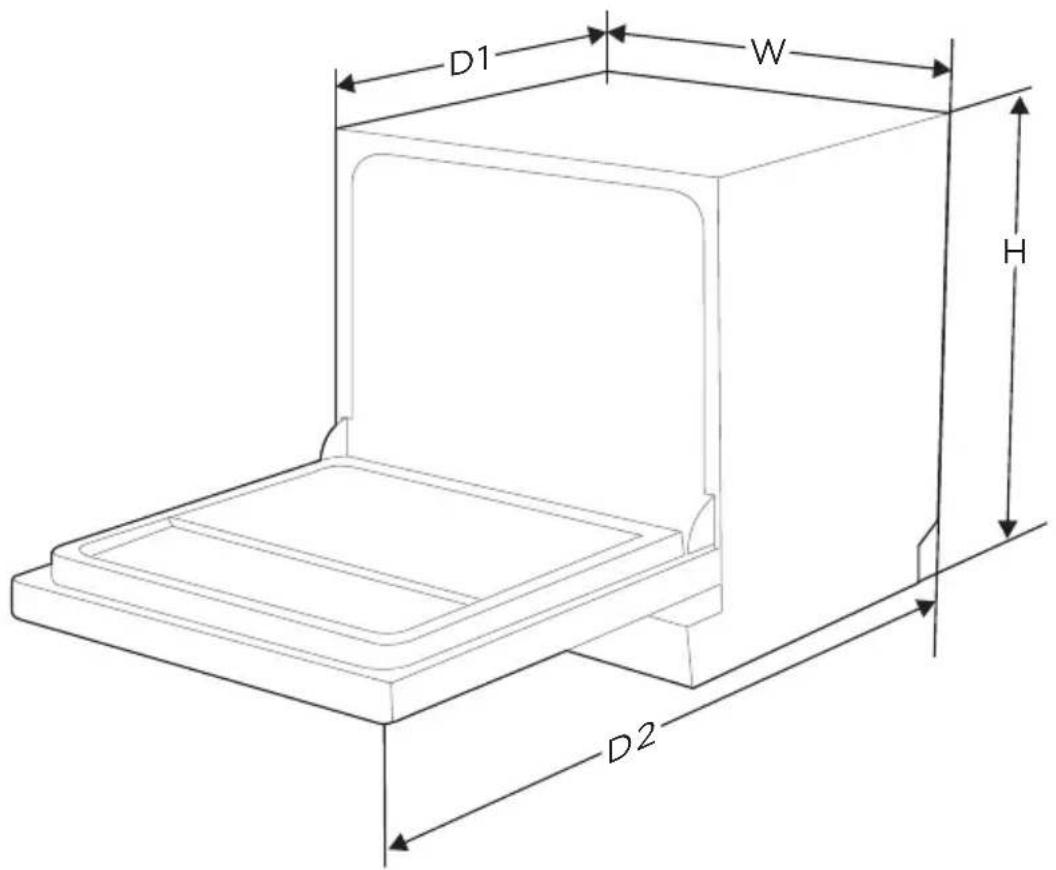
| Height (H) | 17 14 inches |
| Width (W) | 21 58 inches |
| Depth (D1) | 19 1116 inches (with the door closed) |
| Depth (D2) | 32 inches (with the door opened 90°) |
| Product information sheet | |
| Standard place setting | 6 |
| Rated voltage / frequency | AC 120V/60Hz |
| Used water pressure | 5.8-145 psi (40-1000 kPa) |
Product information sheet
| Standard place setting | 6 |
| Standard cleaning cycle | Normal |
| Energy consumption of the standard cleaning cycle | 0.38-0.42 kWh |
| Water consumption of the standard cleaning cycle | 6.3-14.4 L |
| Annual energy consumption | 155 kWh |
| Noise level | 52 dB(A) re 1 pW |
| Mounting | Portable |
| Could be built-in | No |
| Rated power uasge (Heater) | 600W |
| Rated voltage / frequency | AC 120V/60Hz |
| Used water pressure | 5.8-145 psi (40-1000 kPa) |
PRODUCT OVERVIEW
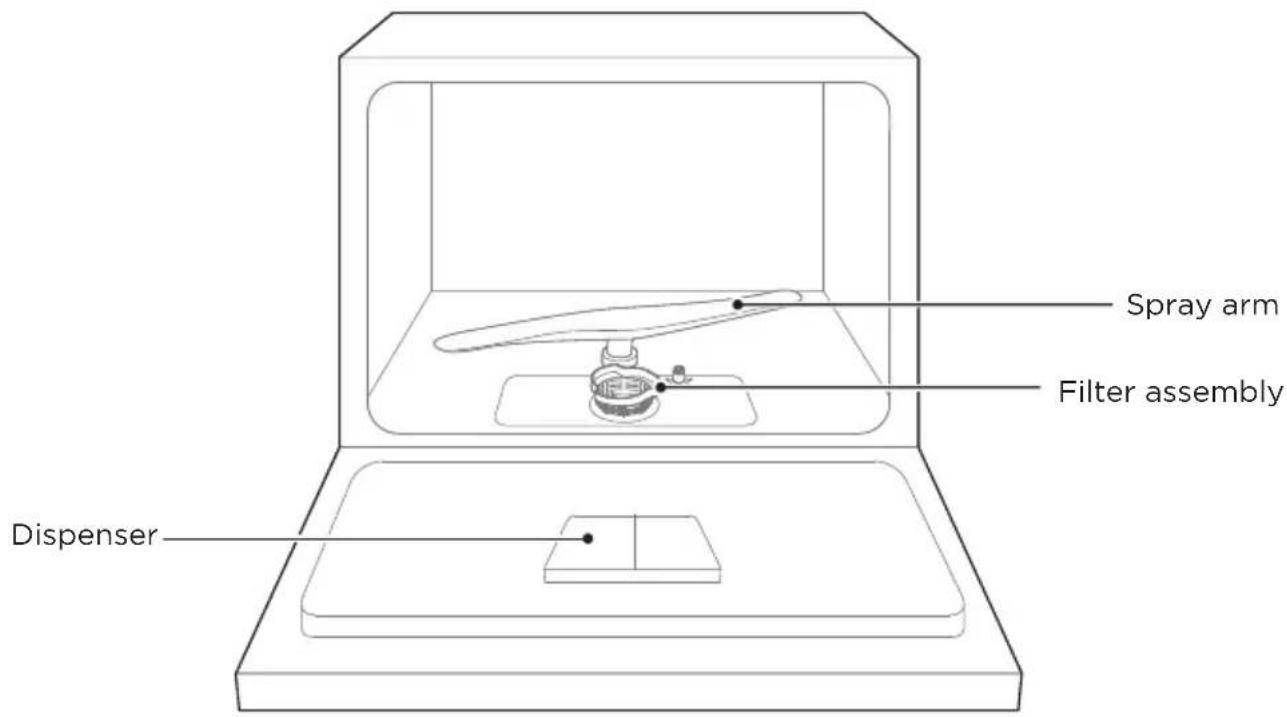
Product

IMPORTANT
To get the best performance from your dishwasher, read all operating instructions before using it for the first time.
natural_image
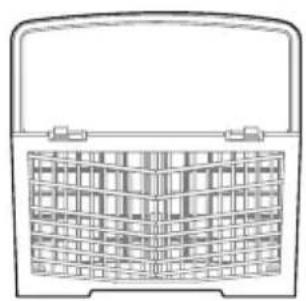
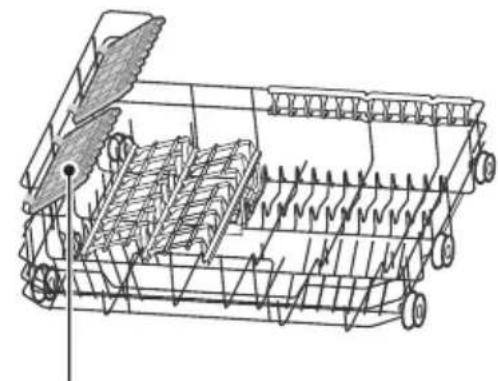
Line drawing of a basket with a handle and grid pattern (no text or symbols)Cutlery basket
natural_image
Technical line drawing of a mechanical harvesting machine with multiple blades and a central blade (no text or labels)Cup rack
basket

NOTE
Pictures are only for reference, different models may be different.
PRODUCT INSTALLATION

WARNING

Electrical Shock Hazard
Disconnect electrical power before installing dishwasher.
Failure to do so could result in death or electrical shock.

Attention
The installation of the pipes and electrical equipments should be done by professionals.
About Power Connection

WARNING
For personal safety:
Do not use an extension cord or an adapter plug with this appliance.
Do not, under any circumstances, cut or remove the earthing connection from the power cord.
Electrical requirements
Please look at the rating label to know the rating voltage and connect the dishwasher to the appropriate power supply. Use the required fuse 10A/13A/16A, time delay fuse or circuit breaker recommended and provide separate circuit serving only this appliance.
Electrical connection
Ensure the voltage and frequency of the power being corresponds to those on the rating plate. Only insert the plug into an electrical socket which is earthed properly. If the electrical socket to which the appliance must be connected is not appropriate for the plug, replace the socket, rather than using a adaptors or the like as they could cause overheating and burns.

Ensure that proper earthing exists before use
Positioning The Appliance
Position the appliance in the desired location. The back should rest against the wall behind it, and the sides, along the adjacent cabinets or walls. The dishwasher is equipped with water supply and drain hoses that can be positioned either to the right or the left sides to facilitate proper installation.
Back View
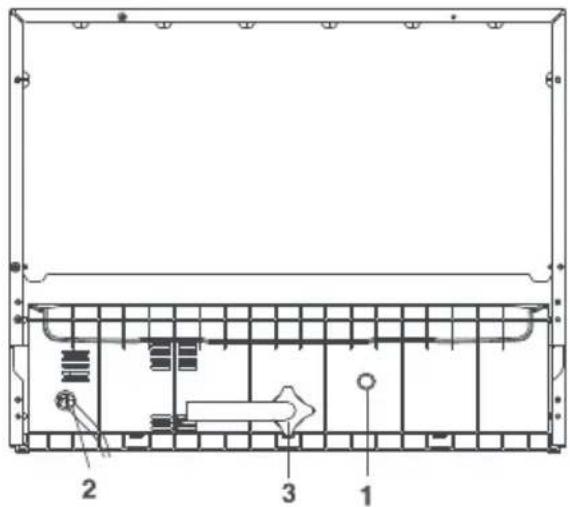
Rear of Dishwasher:
- Drain Port
- Power Cord
- Inlet Port
Your dishwasher comes equipped with a quick connect assembly (includes inlet and drain hose). The faucet adapter must be installed on the faucet before you can connect the dishwasher. This adapter is included inside your dishwasher, The faucet adapter is compatible with faucets inclusive of either male(outside)or female (inside)threaded faucet connections.
Quick Connect Assembly
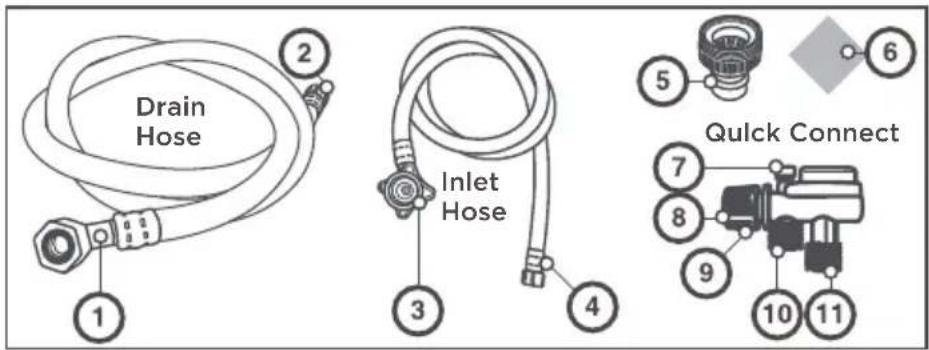
Quick Connect Assembly
Drain Hose:
1.Drain port connection
2.Quick connectconnection
Inlet Hose:
- Inlet port connection
- Quick connectconnection
Faucet Adapter:
5.Faucet Adapter
6. Faucet washer
Quick Connect:
- Pressure relief valve
8.Faucet adapterconnection
9.Locking collar
10.Inlet hose connection
11.Drain hose connection
WARNING
In order to avoid that there is more water staying in the inlet hose, please close the faucet after using
- Screw the faucet adapter onto (or into) the faucet tap. Check for leaks (use Teflon tape to eliminate if necessary).
- Connect the six-sided connection of the drain hose to the drain port connection on the back of the dishwasher cabinet. Do not over-tighten (to avoid damage to threads).
- Connect the star-shaped connection of the inlet hose to the inlet port on the back of the dishwasher cabinet. Do not over-lighten (to avoid damage to threads).
- Connect the circular connection of the drain hose onto the longer (bottom) male connection on the quick connect.
- Connect the circular connection of the inlet hose onto the shorter (top) male connection on the quick connect.
- Attach the quick connect onto the faucet adapter, by pulling down the outer locking collar on the quick connect, while pushing the quick connect upward onto the faucet adapter.
- When the quick connect snaps onto the faucet adapter, release the locking collar. Verify the connection is secure.
- Slowly open the hot water line and check for any sign of water leaks at all hose connections. If leaks are located, immediately close the water supply and repair the hose connections.
Important
- Once you open the water supply line, (even if it is closed immediately thereafter), the inlet hose will be pressurized.
- To relieve water pressure from inside the inlet hose, (make sure the water line (faucet) is closed): press and hold the red pressure relief button on the quick connect until the flow of water stops.
FAILURE TO RELIEVE WATER PRESSURE, BEFORE DISCONNECTING THE QUICK-CONNECT FROM THE FAUCET, WILL RESULT IN BACK-PRESSURE OVER-SPRAY. THE TEMPERATURE OF INCOMINGWATER CAN BE VERY HOT, AND BACK-PRESSURE OVER-SPRAY COULD CAUSE SEVERE BURNS AND/OR SCALDING.
DANGER
DO NOT LET CHILDREN DISCONNECT THE DISHWASHER; CLOSE SUPERVISION OF CHILDRENIS ALWAYS IMPORTANT AROUND APPLIANCES.
NOTE:
Hard water conditions will adversely affect the washing performance of your dishwasher. Hard water conditions will also contribute to 'llme' (white film substance) deposits and/or 'scalling' on the stainless steel surface of the dishwasher tub and heater element, located in the sump underneath the removable filter screen. To assist in minimizing these conditions, it is recommended to periodically operate/rinse the inside of the dishwasher (empty) using 1 cup of white vinegar at least once a week.
Disconnecting your Dishwasher
- Shut off the water supply at the faucet.
- Disconnect the power supply cord
Starting the Dishwasher
The following things should be checked before starting the dishwasher.
- The dishwasher is level and fixed properly.
- The inlet valve is open.
- There is a leakage at the connections of the conducts.
- The wires are tightly connected.
- The power is switched on.
- The inlet and drain hoses are knotted.
- All packing materials and printings should be taken out from the dishwasher.

Attention:
After installation, please make sure to keep this manual.
The content of this manual is very helpful to the users.
OPERATION INSTRUCTIONS
Control Panel
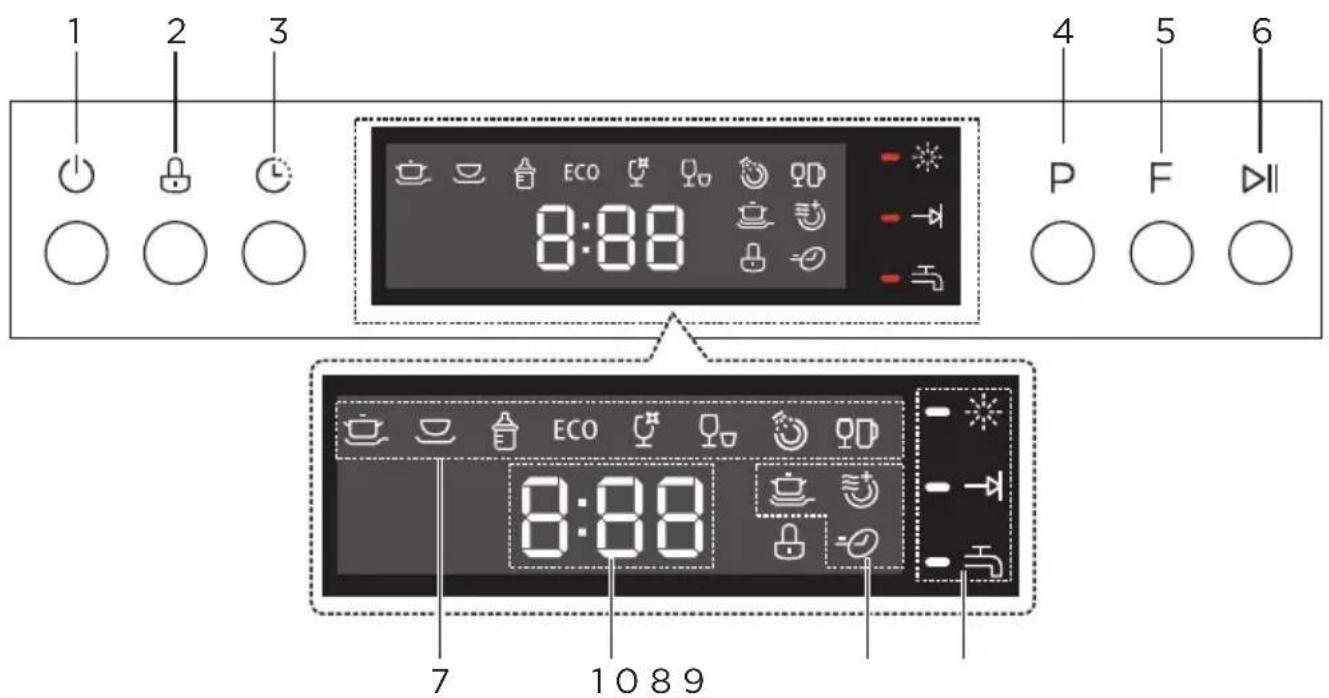
| Description | |||
| No.1 | [2WCD] Power | • Press this button to turn on your dishwasher,the screen lights up. | |
| No.2 |  Child lock Child lock | • This function allows you to lock the buttons on the control panel, so children cannot accidentally start the dishwasher by pressing the buttons on the panel. Only the Power button remains active. | |
| No.3 | [WZBW] Delay start | • Press the Delay button to increase the delay start time. Delay a cycle for up to 24 hours in one-hour increments. After setting the delay time, press the Start/Pause button to start. | |
| No.4 | P Program | • Select the appropriate washing program, the selected program indicator will be lit. | |
| No.5 | F Function | • Press the button to select a function, corresponding indicator will be lit. | |
| No.6 | ▶II Start/Cancel | • To start the selected washing program. Press the button for 3 seconds to cancel the program when the dishwasher is working. | |
| No.7 |  Heavy Heavy | • For heavily soiled items include pots and pans. With dried on food. | |
| [DC0A] Normal | • This is the standard program suitable for normally soiled loads, such as pots, plates, glasses and lightly soiled pans. | ||
 BabyCare BabyCare | • For washing baby bottles. | ||
| Description | |||
| No.7 | ECO | ECO | For normally soiled loads, such as pots, plates, glasses and lightly soiled pans. |
| [SD40] | For lightly soiled crockery and glass.Glass | ||
| [XAB4] | Speed | A shorter wash for lightly soiled loads that do not need drying. | |
 | Rinse | To rinse dishes that you plan to wash later that day. | |
 | Mini-party | For lightly soiled loads, such as glasses, crystal and fine china. | |
| No.8 Function indicator | [43DS] | Power Wash | If you want to wash very dirty, hard to clean dishes, please select this function. |
 | Extra Drying | If you want to dry your dishes more completely, please select this function. | |
 | Express | Reduce the program time. | |
| No.9 Warning indicator |  | Rinse Aid | If the “※” indicator is lit, it means the dishwasher is low on dishwasher rinse aid and needs to be refilled. |
 | Program end | If the “→” indicator is lit, it means the program is end. | |
 | Water Faucet | If the “→” indicator is lit, it means the water faucet closed. | |
| No.10 Screen | 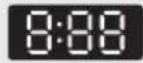 | To show the reminding time, delay time, error code etc. | |
Programmes
The table below shows which programs are best for the levels of food residue on them and how much detergent is needed. It also show various information about the programs. Consumption values and program duration are only indicative except for the ECO program.
| Program | Description Of Cycle | Detergent Pre/Main Wash | Running Time(min) | Energy (kWh) | Water (L) |
 Heavy Heavy | Pre-wash 1Pre-wash (60°C)Main wash(65°C)RinseRinseLast Rinse(68°C)Drying | 0/13.84g | 100 | 12.50.49 | |
 Normal(*Test cycle) Normal(*Test cycle) | Pre-washPre-washMain wash(48-52°C)RinseRinseRinseRinse(65°C)Drying | DOE:0/6.92gAHAM:0/13.84g | 127-155 | 6.3-14.40.38-0.42 | |
 BabyCare BabyCare | Pre-washPre-wash(50°C)Wash(55°C)RinseRinseRinse(70°C)Drying | 0/13.84g | 12.70.5190 | ||
| ECO ECO | Pre-washPre-washWash(50°C)RinseRinse(60°C)Drying | 0/13.84g | 75 | 10.50.32 | |
 Glass Glass | Pre-washWash(50°C)RinseRinse(60°C)Drying | 0/13.84g | 0.2870 | 8.5 | |
 Speed Speed | Pre-wash(45°C)Pre-wash(50°C)Wash(55°C)Rinse(55°C)Rinse(60°C) | 0/13.84g | 45 | 10.50.31 | |
| Rinse | Pre-washMain-wash | / | 4.30.0324 | ||
 Mini-party Mini-party | Main Wash45°C)RinseRinse(55°C) | / | 20 | 6.50.18 |
Preparing And Loading Dishes
Consider buying utensils which are identified as dishwasher-proof.
For particular items, select a program with the lowest possible temperature.
To prevent damage, do not take glass and cutlery out of the dishwasher immediately after the program has ended.
For washing the following cutlery/dishes
Are not suitable
Cutlery with wooden, horn china or mother-of-pearl handles
Plastic items that are not heat resistant
Older cutlery with glued parts that are not temperature resistant
Bonded cutlery items or dishes
Pewter or cooper items
Crystal glass
Steel items subject to rusting
Wooden platters
Items made from synthetic fibres
Are of limited suitability
Some types of glasses can become dull after a large number of washes
Silver and aluminum parts have a tendency to discolor during washing
Glazed patterns may fade if machine washed frequently
Recommendations for loading the dishwasher
Scrape off any large amounts of leftover food. Soften remnants of burnt food in pans. It is not necessary to rinse the dishes under running water.
For best performance of the dishwasher, follow these loading guidelines.
(Features and appearance of baskets and cutlery baskets may vary from your model.)
Place objects in the dishwasher in the following way:
tems such as cups, glasses, pots, pans, etc. must face downwards.
Curved items, or ones with recesses, should be loaded aslant so that water can run off.
All utensils are stacked securely and can not tip over.
All utensils are placed in the way that the spray arms can rotate freely during washing.
Load hollow items such as cups, glasses, pans etc. With the opening facing downwards so that water cannot collect in the container or a deep base.
Dishes and items of cutlery must not lie inside one another, or cover each other.
To avoid damage, glasses should not touch one another.
The upper basket is designed to hold more delicate and lighter dishware such as glasses, coffee and tea cups.
Long bladed knives stored in an upright position are a potential hazard!
Long and sharp items of cutlery such as carving knives must be positioned horizontally in the upper basket.
Please do not overload your dishwasher. This is important for good results and for reasonable consumption of energy.

NOTE
Very small items should not be washed in the dishwasher as they could easily fall out of the basket.
LOADING THE BASKETS
Loading the basket (6 place setting)
The upper basket has been designed for small plates, mugs, glasses, and plastic items marked "dishwasher safe". Load your plates into the dishwasher in two half rows, so that the front of each plate faces the back of the plate in front of it, and the open sides of the plates at the center of the dishwasher face each other.
When loading dishes, pull the upper basket out sufficiently so you can load it without striking the counter.
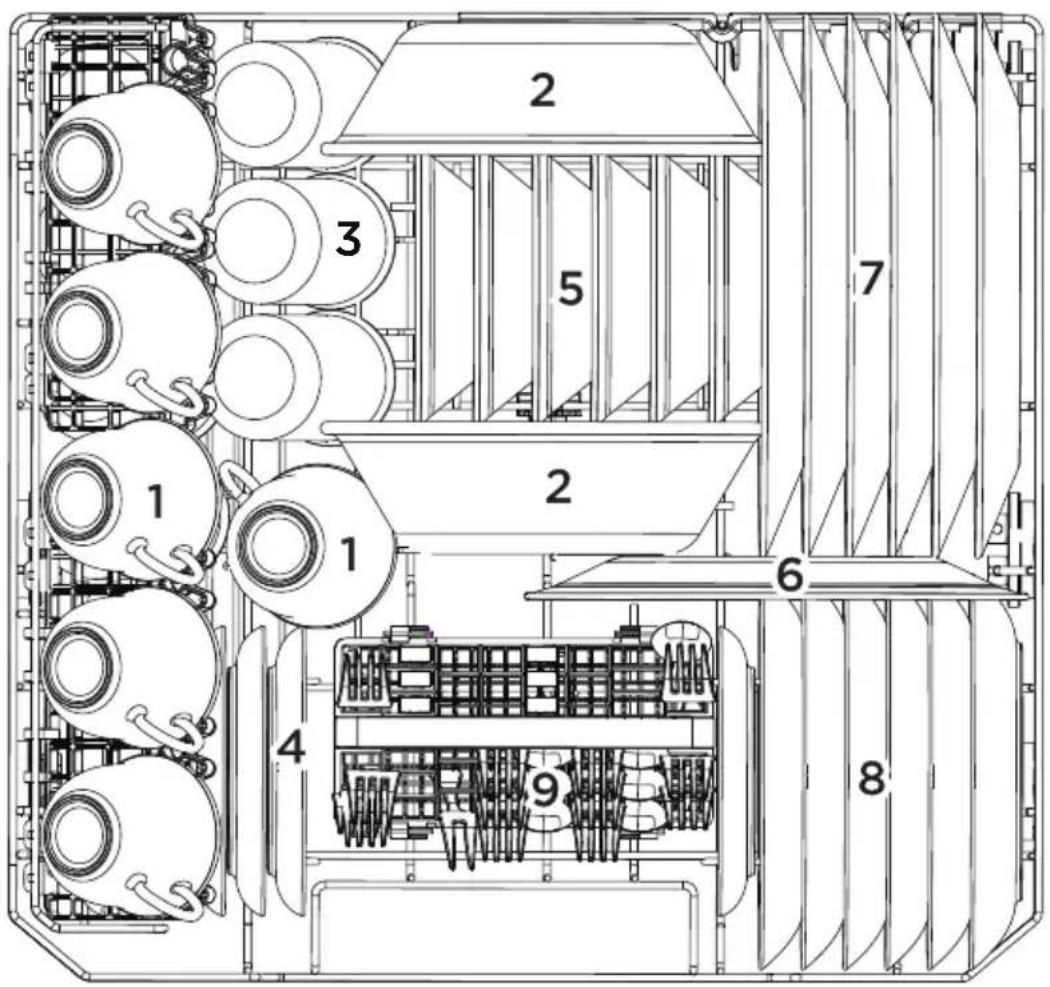
| Number Item | |
| 1 | Cups |
| 2 | Serving bowl |
| 3 | Glasses |
| 4 | Saucers |
| 5 | Fruit bowl |
| Number Item | |
| 6 | Oval platter |
| 7 | Dinner plates |
| 8 | Bread and butter plates |
| 9 | Cutlery basket |
Loading the cutlery basket
The silverware basket can be divided into three separate modules that can be used in both upper and lower racks
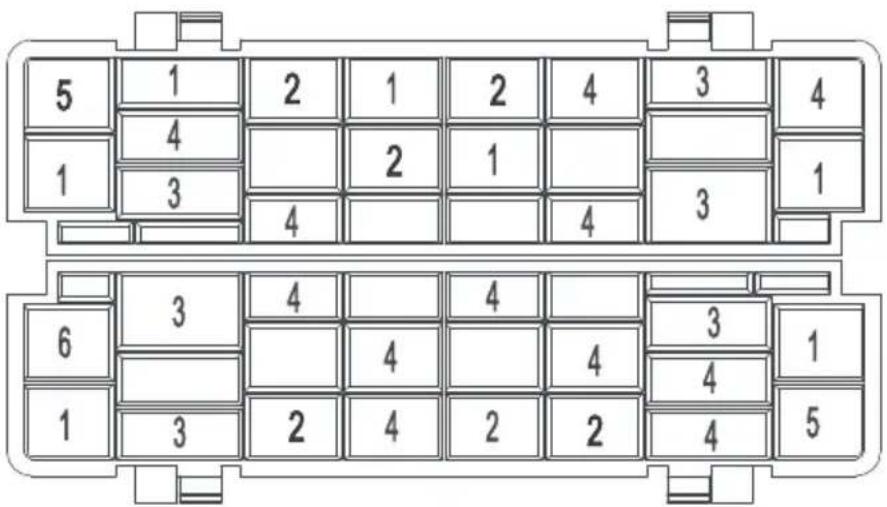
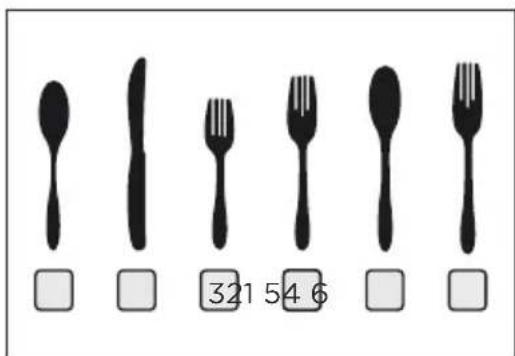
| Number Item | |
| 1 | Soup spoons |
| 2 | Knives |
| 3 | Salad forks |
| 4 | Forks |
| 5 | Large spoons |
| 6 | Large forks |
WARNING
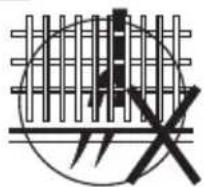
Do not let any item extend through the bottom.
Always load sharp utensils with the sharp point down!
Be sure nothing protrudes though bottom of the basket or rack to block the lower spray.
Removing the dishes
To prevent water dripping from the upper basket into the lower basket, we recommend that you empty the lower basket first, followed by the upper basket.
WARNING

Items will be hot! To prevent damage, do not take glass and cutlery out of the dishwasher for around 15 minutes after the program has ended.
Function Of The Rinse Aid And Detergent
The rinse aid is released during the final rinse to prevent water from forming droplets on your dishes, which can leave spots and streaks. It also improves drying by allowing water to roll off the dishes. Your dishwasher is designed to use liquid rinse aids.
WARNING
Only use branded rinse aid for dishwasher. Never fill the rinse aid dispenser with any other substances (e.g. Dishwasher cleaning agent, liquid detergent). This would damage the appliance.
When to refill the rinse aid dispenser
TAdd rinse aid into the dispenser, when the rinse aid symbol(※) is illuminated on the LED Display.
WARNING
Proper Use of Detergent
Use only detergent specifically made for dishwashers use. Keep your detergent fresh and dry.
Do not fill detergent into the dispenser until you are ready to start the dishwasher.
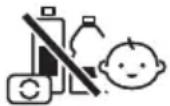
Dishwasher detergent is corrosive! Keep dishwasher detergent out of the reach of children.
Filling The Rinse Aid Reservoir
The rinse aid is released during the final rinse to prevent water from forming droplets on your dishes, which can leave spots and streaks. It also improves drying by allowing water to roll off the dishes. Your dishwasher is designed to use liquid rinse aids.
-
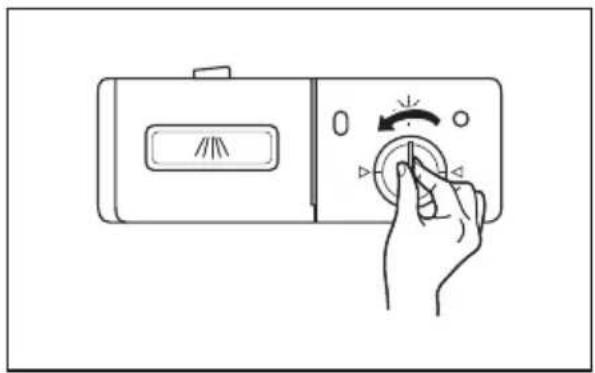
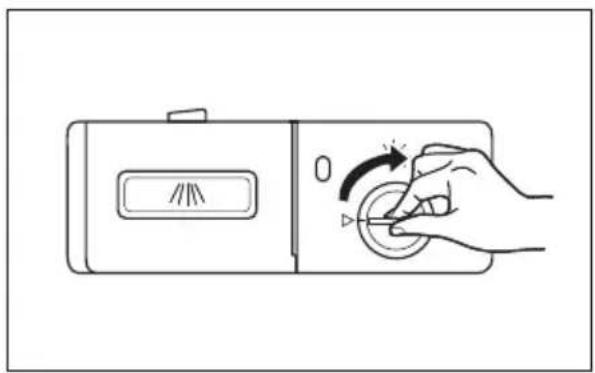
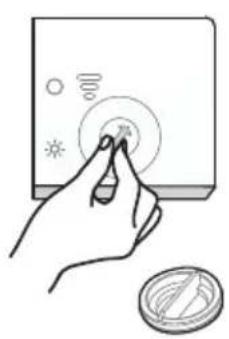
Remove the rinse aid reservoir cap 2 by rotating it counterclockwise.
-
Carefully pour in the rinse-aid into its dispenser, whilst avoiding it to overflow.
natural_image
Line drawing of a hand pressing a button on a device (no text or symbols)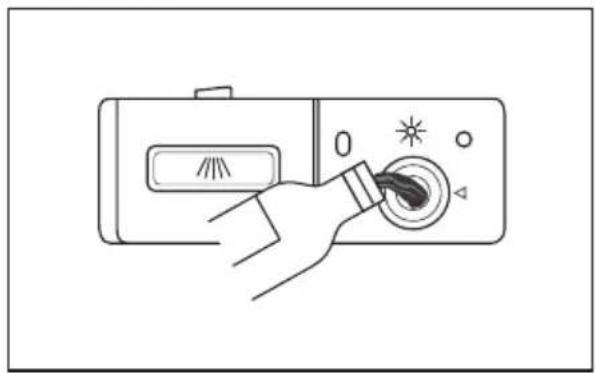
natural_image
Line drawing of a hand pressing down on a device's screen with a starburst icon (no text or symbols)- Close the rinse aid reservoir cap by rotating it clockwise.
natural_image
Line drawing of a hand pressing a button on a device (no text or symbols)Adjusting the rinse aid reservoir
natural_image
Hand pressing a button on a device with a circular indicator and sun icons (no text or symbols)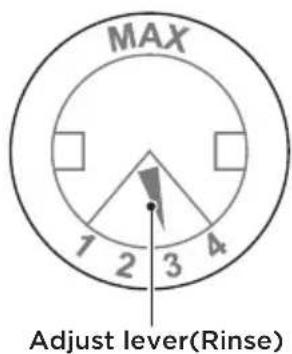
Turn the rinse aid indicator dial to a number between 1 and 4. The higher the number, the more rinse aid the dishwasher uses.
If the dishes are not drying properly or are spotted, adjust the dial to the next higher number until your dishes are spot-free. Reduce it if there are sticky whitish stains on your dishes or a bluish film on glassware or knife blades.
Filling The Detergent Dispenser
-
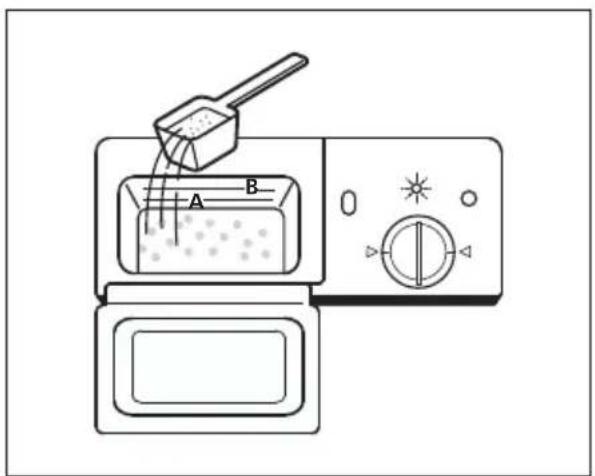
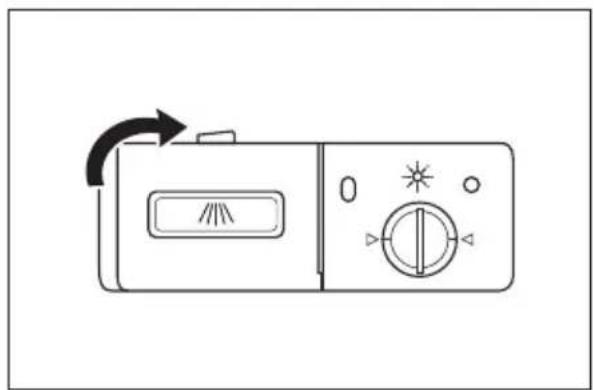
Press the release latch on the detergent dispenser to open the cover.
-
Fill detergent to the lower fill line A. (15 grams) for lightly soiled dishes such as glassware. For a normal soil level fill to the MAX fill line B (25 grams).
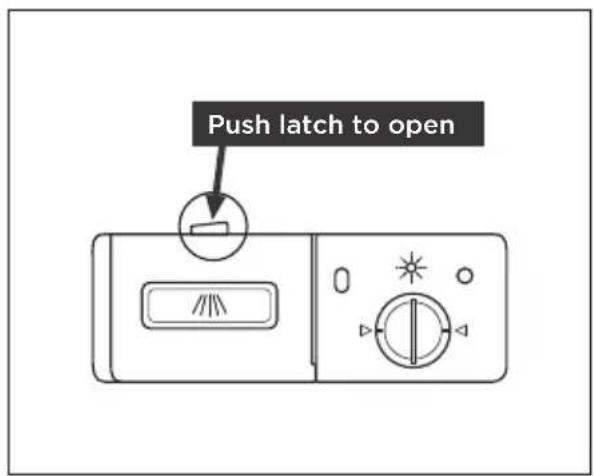
- Close the cover and press on it until it locks into place.
natural_image
Line drawing of a portable radio control with directional arrows and display (no text or symbols)
NOTE
Be aware that depending on the soiling of water, setting may be different. Please observe the manufacturer's recommendations on the detergent packaging.
Saving Energy
- Pre-rinsing of tableware items leads to increased water and energy consumption and is not recommended.
- Washing tableware in a household dishwasher usually consumes less energy and water in the use phase than hand dishwashing when the household dishwasher is used according to the instructions.
Starting A Program
- Pour in the detergent.
- Insert the plug into the socket. The power supply refer to last page "Product fiche". Make sure that the water supply is turned on to full pressure.
- Open the door, press the Power button.
- Choose a program, the response light will turn on. Then press the Start/Pause button, the dishwasher will start its cycle after a few seconds.
Changing The Programs
Premise: You can modify the washing program at the beginning of the cycle. Otherwise, the detergent may have already been released, and the appliance may have already drained the wash water. If this is the case, the detergent dispenser must be refilled (see the section entitled “Loading the Detergent”).
To change the washing program, press the Start/pause button to pause the machine, then pressthe program button more than three seconds to set the machine into standby, then you canchanae the program to the desired cycle settina.(See the section entitled "Starting a wash cycle")
The lights show the state of the dishwasher:
a) All phase lights off----Stand by
b)The displaynoblinking ----Paused
c) The display blinking ----Running
Forget To Add A Dish?
A forgotten dish can be added any time before the detergent dispenser opens. If this is the case, follow the instructions below:
- Open the door a little to stop the dishwasher, after the spray arm stop working, you can open the door completely.
- Add the forgotten dishes.
- Press the Start/Cancel button, then close the door within four seconds, the dishwasher will start after 10 seconds.
CLEANING AND MAINTENANCE
External Care
The door and the door seal
Clean the door seals regularly with a soft damp cloth to remove food deposits. When the dishwasher is being loaded, food and drink residues may drip onto the sides of the dishwasher door. These surfaces are outside the wash cabinet and are not accessed by water from the spray arms. Any deposits should be wiped off before the door is closed.
The control panel
If cleaning is required, the control panel should be wiped with a soft damp cloth only.

WARNING
To avoid penetration of water into the door lock and electrical components, do not use a spray cleaner of any kind.
Never use abrasive cleaners or scouring pads on the outer surfaces because they may scratch the finish. Some paper towels may also scratch or leave marks on the surface.
Internal Care
Filtering system
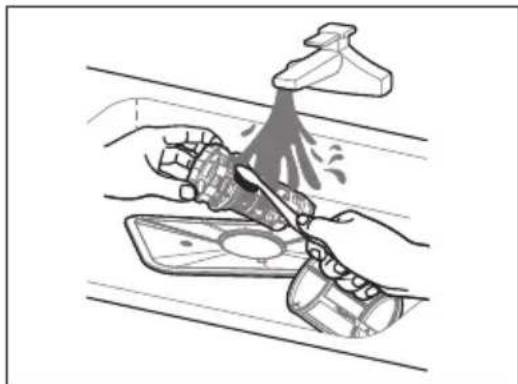
The filtering system in the base of the wash cabinet retains coarse debris from the washing cycle, including foreign objects such as tooth picks or shards. The collected coarse debris may cause the filters to clog. Check the condition of the filters regularly, carefully remove foreign objects and clean the parts of the filtering system if necessary with water. Follow the steps below to clean the filter.

WARNING
Pictures are only for reference, different models of the filtering system and spray arms may be different.
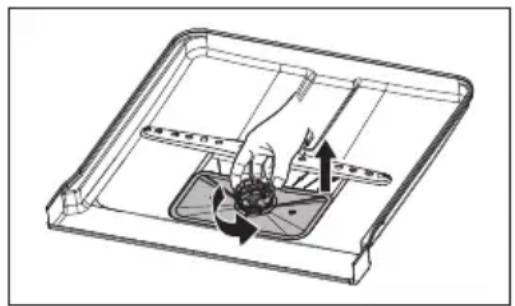
- Hold the coarse filter and rotate it anticlockwise to unlock the filter. Lift the filter upwards and out of the dishwasher.
natural_image
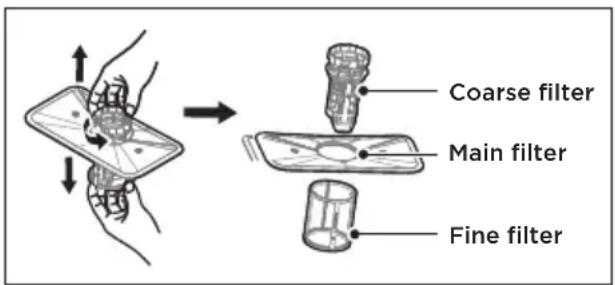
Technical line drawing of a mechanical assembly with internal components and directional arrows (no text or symbols)- The fine filter can be pulled off the bottom of the filter assembly. The coarse filter can be detached from the main filter by gently squeezing the tabs at the top and pulling it away.
-
Larger food remnants can be cleaned by rinsing the filter under running water. For a more thorough clean, use a soft cleaning brush.
-
Reassemble the filters in the reverse order of the disassembly, replace the filter insert, and rotate clockwise to the close arrow.
natural_image
Illustration of hands using a tool to spray or spray onto a surface, no text or symbols present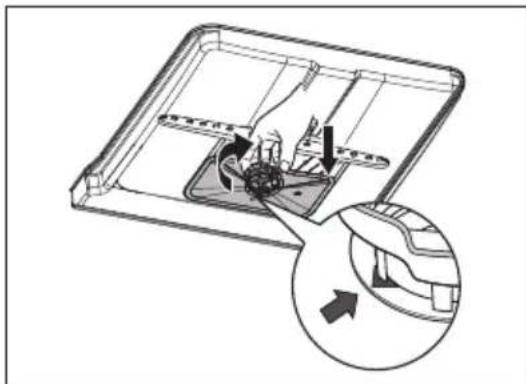
natural_image
Diagram of a mechanical device with internal components and an inset showing a close-up view of the component (no text or symbols present)
WARNING
Do not over tighten the filters. Put the filters back in sequence securely, otherwise coarse debris could get into the system and cause a blockage.
Never use the dishwasher without filters in place. Improper replacement of the filter may reduce the performance level of the appliance and damage dishes and utensils.
Cleaning the Spray Arms
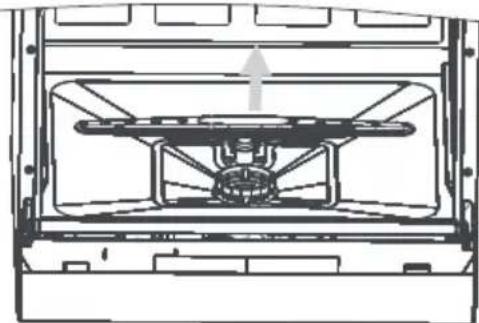
The spray arms can be easily removed for periodic cleaning of the nozzles, to prevent possible clogging. Wash themunder running water and carefully replace them in their seats. Checking that their rotary movement is in no way impeded.
Grasp the middle of the spray arm, pull it upwards to removeit. Wash the arms under a jet of running water and return them carefully to their seat. After reassembly, check that the sprayarms turn freely. Otherwise, check that they have been installed correctly.
natural_image
Technical line drawing of a mechanical assembly or housing component (no text or symbols visible)Caring For The Dishwasher
Frost precaution
Please take frost protection measures on the dishwasher in winter. Every time after washing cycles, please operate as follows:
- Cut off the electrical power to the dishwasher at the supply source.
- Turn off the water supply and disconnect the water inlet pipe from the water valve.
- Drain the water from the inlet pipe and water valve. (Use a pan to gather the water)
- Reconnect the water inlet pipe to the water valve.
- Remove the filter at the bottom of the tub and use a sponge to soak up water in the sump.
After every wash
After every wash, turn off the water supply to the appliance and leave the door slightly open for a while so that moisture and odors are not trapped inside.
Remove the plug
Before cleaning or performing maintenance, always remove the plug from the socket.
No solvents or abrasive cleaning
To clean the exterior and rubber parts of the dishwasher, do not use solvents or abrasive cleaning products. Only use a cloth with warm soapy water. To remove spots or stains from the surface of the interior, use a cloth dampened with water an a little vinegar, or a cleaning product made specifically for dishwashers.
When not in use for a long time
It is recommend that you run a wash cycle with the dishwasher empty and then remove the plug from the socket, turn off the water supply and leave the door of the appliance slightly open. This will help the door seals to last longer and prevent odors from forming within the appliance.
Moving the appliance
If the appliance must be moved, try to keep it in the vertical position. If absolutely necessary, it can be positioned on its back.
Seals
One of the factors that cause odours to form in the dishwasher is food that remains trapped in the seals. Periodic cleaning with a damp sponge will prevent this from occurring.
TROUBLESHOOTING
Before Calling For Service
Reviewing the charts on the following pages may save you from calling for service.
| Possible reason SolutionProblem | ||
| Dishwasher doesn't start | Fuse blown, or the circuit break tripped. | Replace fuse or reset circuit breaker. Remove any other appliances sharing the same circuit with the dishwasher. |
| Power supply is not turned on. | Make sure the dishwasher is turned on and the door is closed securely. Make sure the power cord is properly plugged into the wall socket. | |
| Water pressure is low | Check that the water supply is connected properly and the water is turned on. | |
| Door of dishwasher not properly closed. | Make sure to close the door properly and latch it. | |
| Water not pumped form dishwasher | Twisted or trapped drain hose. | Check the drain hose. |
| Filter clogged. Check the filter system. | ||
| Kitchen sink clogged. | Check the kitchen sink to make sure it is draining well. If the problem is the kitchen sink that is not draining, you may need a plumber rather than a serviceman for dishwashers. | |
| Foam in the tub | Wrong detergent. | Use only the special dishwasher detergent to avoid suds. If this occurs, open the dishwasher and let suds evaporate. Add 1 liter of cold water to the bottom of the dishwasher. Close the dishwasher door, then select any cycle. Initially, the dishwasher will drain out the water. Open the door after draining stage is complete and check if the suds have disappeared. Repeat if necessary. |
| Spilled rinse aid. Always wipe up rinse aid spills immediately. | ||
| Stained tub interior | Detergent with colourant may have been used. | Make sure that the detergent has no colourant. |
| White film on inside surface | ·Hard water minerals. | To clean the interior, use a damp sponge with dishwasher detergent and wear rubber gloves. Never use any other cleaner than dishwasher detergent otherwise, it may cause foaming or suds. |
| There are rust stains on cutlery | ·The affected items are not corrosion resistant. | Avoid washing items that are not corrosion resistant in the dishwasher. |
| Knocking noise in the dishwasher | ·A spray arm is knocking against an item in a basket | Interrupt the program and rearrange the items which are obstructing the spray arm. |
| Rattling noise in the dishwasher | ·Items of crockery are loose in the dishwasher. | Interrupt the program and rearrange the items of crockery. |
| Knocking noise in the water pipes | ·This may be caused by on-site installation or the cross-section of the piping. | This has no influence on the dishwasher function. If in doubt, contact a qualified plumber. |
| The dishes are not clean | ·The dishes were not loaded correctly. | See the “Preparing And Loading Dishes”. |
| ·The program was not powerful enough. | Select a more intensive program. | |
| ·Not enough detergent was dispensed. | Use more detergent, or change your detergent. | |
| ·Items are blocking the movement of the spray arms. | Rearrange the items so that the spray can rotate freely. | |
| ·The filter combination is not clean or is not correctly fitted in the base of wash cabinet. This may cause the spray arm jets to get blocked. | Clean and/or fit the filter correctly. Clean the spray arm jets. | |
| Cloudiness on glassware. | ·Combination of soft water and too much detergent. | Use less detergent if you have soft water and select a shorter cycle to wash the glassware and to get them clean. |
| Black or grey marks on dishes | ·Aluminium utensils have rubbed against dishes | Use a mild abrasive cleaner to eliminate those marks. |
| Detergent left in dispenser | ·Dishes block detergent dispenser | Re-loading the dishes properly. |
| The dishes aren't drying | Improper loading | Use gloves if detergent residue can be found on dishes to avoid skin irritations. |
| Too little rinse-aid | Increase the amount of rinse-aid/refill the rinse-aid dispenser. | |
| Dishes are removed too soon | Do not empty your dishwasher immediately after washing. Open the door slightly so that the steam can come out. Take out the dishes until the inside temperature is safe to touch. Unload the lower basket first to prevent the dropping water from the upper basket. | |
| Wrong program has been selected. | With a short program, the washing temperature is lower, decreasing cleaning performance.Choose a program with a long washing time. | |
| Use of cutlery with a low-quality coating. | Water drainage is more difficult with these items. Cutlery or dishes of this type are not suitable for washing in the dishwasher. | |

WARNING
Self-repair or non-professional repair may cause serious risks to the safety of the user of the appliance and impact warranty.
ERROR CODES
If there is a malfunction the dishwasher will display an error code. The following table shows possible error codes and their causes.
| Problem | Possible reason | Solution |
| E1 | • Longer inlet time. | Faucets is not opened, or water intake is restricted, or water pressure is too low. |
| E3 | • Not reaching required temperature. | Malfunction of heating element. |
| E4 | • Overflow. | Some element of dishwasher leaks. |
| Ed | • Failure of communication between main PCB with TFT PCB | Open circuit or break of wiring for the communication |

WARNING
- If overflow occurs, turn off the main water supply before calling a service.
- If there is water in the base pan because of an overfill or small leak, the water should be removed before restarting the dishwasher.
- If there is an error code that cannot be solved, please request professional assistance.
TRADEMARKS, COPYRIGHTS AND LEGAL STATEMENT
Midea logo, word marks, trade name, trade dress and all versions thereof are valuable assets of Midea Group and/or its affiliates (“Midea”), to which Midea owns trademarks, copyrights and other intellectual property rights, and all goodwill derived from using any part of an Midea trademark. Use of Midea trademark for commercial purposes without the prior written consent of Midea may constitute trademark infringement or unfair competition in violation of relevant laws.
This manual is created by Midea and Midea reserves all copyrights thereof. No entity or individual may use, duplicate, modify, distribute in whole or in part this manual, or bundle or sell with other products without the prior written consent of Midea.
All the described functions and instructions were up to date at the time of printing this manual. However, the actual product may vary due to improved functions and designs.
DISPOSAL AND RECYCLING
Important instructions for environment
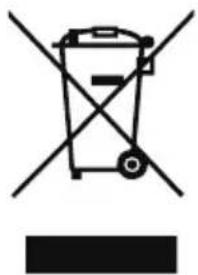
Compliance with the WEEE Directive and Disposing of the Waster Product: This product complies with EU WEEE Directive (2012/19/EU). This product bears a classification symbol for waster electrical and electronic equipment (WEEE).
This symbol indicates that this product shall not be disposed with other household wastes at the end of its service life. Used device must be returned to official collection point for recycling of electrical electronic devices. To find these collection systems please contact to your local authorities or retailer where the product was purchased. Each household performs important role in recovering and recycling of old appliance. Appropriate disposal of used appliance helps prevent potential negative consequences for the environment and human health.
natural_image
Symbol of a trash bin crossed with no text or labels, accompanied by a black rectangular block below (no text or symbols present)Compliance with RoHS Directive
The product you have purchased complies with EU RoHS Directive (2011/65/EU). It does not contain harmful and prohibited materials specified in the Directive.
Package information
Packaging materials of the product are manufactured from recyclable materials in accordance with our National Environment Regulations. Do not dispose of the packaging materials together with the domestic or other wastes. Take them to the packaging material collection points designated by the local authorities.

natural_image
Recycling symbol with three chasing arrows forming a triangle (no text or labels)DATA PROTECTION NOTICE
For the provision of the services agreed with the customer,
we agree to comply without restriction with all stipulations of applicable data protection law, in line with agreed countries within which services to the customer will be delivered, as well as, where applicable, the EU General Data Protection Regulation (GDPR).
Generally, our data processing is to fulfil our obligation under contract with you and for product safety reasons, to safeguard your rights in connection with warranty and product registration questions. In some cases, but only if appropriate data protection is ensured, personal data might be transferred to recipients located outside of the European Economic Area.
Further information are provided on request. You can contact our Data Protection Officer via MideaDPO@midea.com. To exercise your rights such as right to object your personal date being processed for direct marketing purposes, please contact us via MideaDPO@midea.com. To find further information, please follow the QR Code.
MIDEA DISHWASHER LIMITED WARRANTY
ATTACH YOUR RECEIPT HERE. PROOF OF PURCHASE IS REQUIRED TO OBTAIN WARRANTY SERVICE.
Please have the following information available when you call the Customer Service Center:
■ Name, address and telephone number
■ Model number and serial number
A clear, detailed description of the problem
■ Proof of purchase including dealer or retailer name and address
IF YOU NEED SERVICE:
- Before contacting us to arrange service, please determine whether your product requires repair. Some questions can be addressed without service. Please take a few minutes to review the Troubleshooting section of the User Manual, or visit http://us.Midea.com/support
- All warranty service is provided exclusively by our authorized Midea Service Providers, in the U.S. and Canada.
Midea Customer Service
In the U.S.A. or Canada, call 1-866-646-4332.
If outside the 50 States of the United States or Canada, contact your authorized Midea dealer to determine whether another warranty applies.
LIFETIME LIMITED WARRANTY
WHAT IS COVERED
FIRST YEAR LIMITED WARRANTY (PARTS AND LABOR)
For one year from the date of delivery, if this major appliance is installed, operated and maintained according to instructions attached to or furnished with the product, Midea America Corporation (hereafter “Midea”) will pay for factory specified replacement parts and repair labor to correct defects in materials or workmanship that existed when this major appliance was purchased, or at its sole discretion replace the product. In the event of product replacement, your appliance will be warranted for the remaining term of the original unit’s warranty period.
LIFETIME LIMITED WARRANTY (STAINLESS STEEL TUB AND INNER DOOR LINER ONLY)
For the lifetime of the product from the date of delivery, when this major appliance is installed, operated and maintained according to instructions attached to or furnished with the product, Midea will pay for factory specified parts and repair labor for the following components to correct non-cosmetic defects in materials or workmanship that existed when this major appliance was purchased:
■ Stainless steel tub
■ Inner door liner
YOUR SOLE AND EXCLUSIVE REMEDY UNDER THIS LIMITED WARRANTY SHALL BE PRODUCT REPAIR OR REPLACEMENT AS PROVIDED HEREIN. Service must be provided by a Midea designated service company. This limited warranty is valid only in the 50 States of the United States or Canada and applies only when the major appliance is used in the country in which it was purchased. This limited warranty is effective from the date of original consumer purchase. Proof of original purchase date is required to obtain service under this limited warranty.
LIFETIME LIMITED WARRANTY
WHAT IS NOT COVERED
- Commercial, non-residential or multiple-family use, or use inconsistent with published user, operator or installation instructions.
- In-home Instruction on how to use your product.
- Service to correct improper product maintenance or installation, installation not in accordance with electrical or plumbing codes or correction of household electrical or plumbing (i.e. house wiring, fuses, plumbing or water inlet hoses).
- Consumable parts (i.e. light bulbs, batteries, air or water filters, etc.).
- Defects or damage caused by the use of non-genuine Midea parts or accessories.
- Damage from accident, misuse, abuse, fire, floods, electrical issues, acts of God or use with products not approved by Midea.
- Repairs to parts or systems to correct product damage or defects caused by unauthorized service, alteration or modification of the appliance.
- Cosmetic damage including scratches, dents, chips, and other damage to appliance finishes unless such damage results from defects in materials and workmanship and is reported to Midea within 30 days.
- Routine maintenance of the product.
- Discoloration, rust or oxidation of surfaces resulting from caustic or corrosive environments including but not limited to high salt concentrations, high moisture or humidity or exposure to chemicals.
- Pick-up or delivery. This product is intended for in-home repair.
- Travel or transportation expenses for service in remote locations where an authorized Midea servicer is not available.
- Removal or reinstallation of inaccessible appliances or built-in fixtures (i.e. trim, decorative panels, flooring, cabinetry, islands, countertops, drywall, etc.) that interfere with servicing, removal or replacement of the product.
- Service or parts for appliances with original model/serial numbers removed, altered or not easily identified.
The cost of repair or replacement under these excluded circumstances shall be borne by the customer.
DISCLAIMER OF IMPLIED WARRANTIES
IMPLIED WARRANTIES, INCLUDING ANY IMPLIED WARRANTY OF MERCHANTABILITY OR IMPLIED WARRANTY OF FITNESS FOR A PARTICULAR PURPOSE, ARE LIMITED TO ONE YEAR OR THE SHORTEST PERIOD ALLOWED BY LAW. Some states and provinces do not allow limitations on the duration of implied warranties of merchantability or fitness, so this limitation may not apply to you. This warranty gives you specific legal rights, and you also may have other rights that vary from state to state or province to province.
DISCLAIMER OF REPRESENTATIONS OUTSIDE OF WARRANTY
Midea makes no representations about the quality, durability, or need for service or repair of this major appliance other than the representations contained in this warranty. If you want a longer or more comprehensive warranty than the limited warranty that comes with this major appliance, you should ask Midea or your retailer about buying an extended warranty.
LIMITATION OF REMEDIES; EXCLUSION OF INCIDENTAL AND CONSEQUENTIAL DAMAGES
YOUR SOLE AND EXCLUSIVE REMEDY UNDER THIS LIMITED WARRANTY SHALL BE PRODUCT REPAIR AS PROVIDED HEREIN. MIDEA SHALL NOT BE LIABLE FOR INCIDENTAL OR CONSEQUENTIAL DAMAGES. Some states and provinces do not allow the exclusion or limitation of incidental or consequential damages, so these limitations and exclusions may not apply to you. This warranty gives you specific legal rights, and you also may have other rights that vary from state to state or province to province.

make yourself at home

www.midea.com
○○○○○○○○○○○○
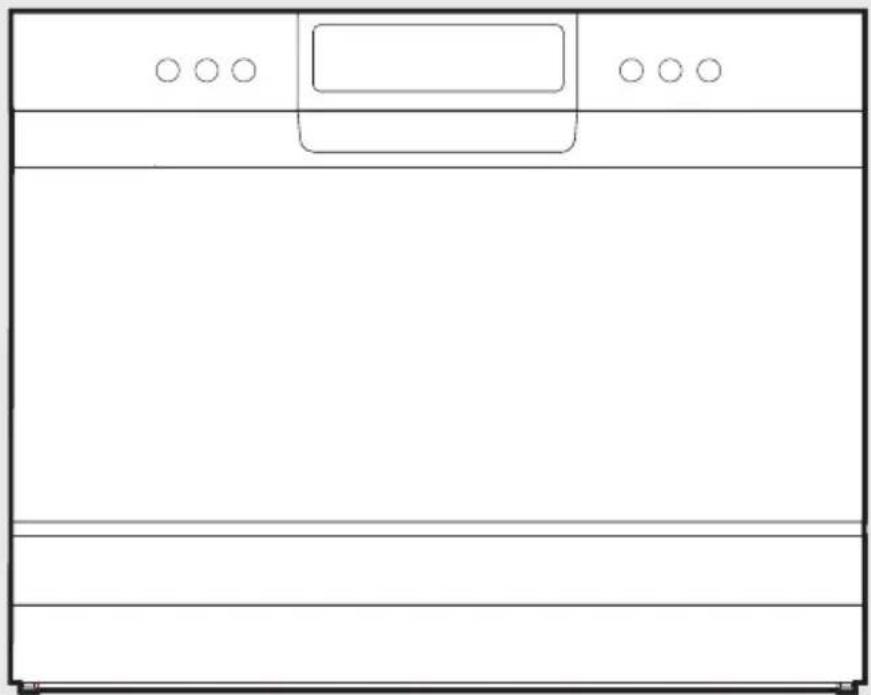
natural_image
Simple line drawing of a rectangular container with three circular handles and a blank bottom panel (no text or symbols)Lave-vaisselle
MODE D'EMPLOI
MDC22P1ABB
APERÇU DU PRODUIT 11
INSTALLATION DU PRODUIT 12
INSTRUCTIONS D'UTILISATION 16
NETTOYAGE ET ENTRETIEN 26
DÉPANNAGE 29
MARQUES, DROITS D'AUTEUR ET DÉCLARATION LÉGALE 33
ÉLIMINATION ET RECYCLAGE 34
AVIS DE PROTECTION DES DONNÉES 35
GARANTIE 36
INSTRUCTIONS DE SÉCURITÉ
Usage prévu
INSTALLATION DU PRODUIT
AVERTISSEMENT

natural_image
Abstract geometric pattern with intersecting lines and a central circle (no text or symbols)natural_image
Line drawing of a hand pressing a button on a device (no text or symbols)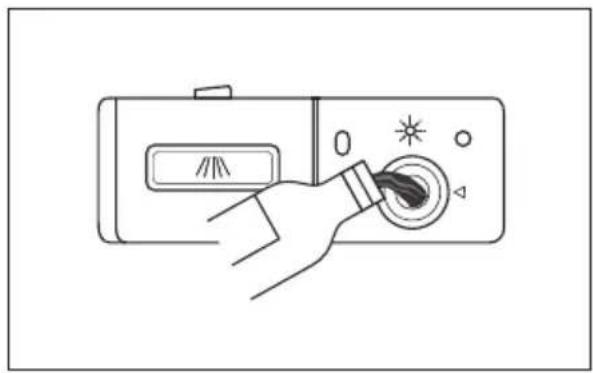
natural_image
Line drawing of a hand pressing a button on a device with a starburst icon (no text or symbols)natural_image
Line drawing of a hand using a device to press or rotate a button (no text or symbols present)natural_image
Hand pressing a button on a device with icons and a coin nearby (no text or symbols)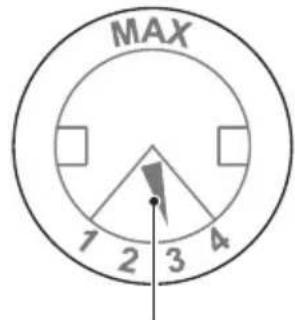
natural_image
Line drawing of a portable radio device with control panel and indicator lights (no text or symbols)
REMARQUE
natural_image
Technical line drawing of a mechanical assembly with internal components and directional arrows (no text or symbols)natural_image
Illustration of a hand cleaning a surface with a tool, no text or symbols present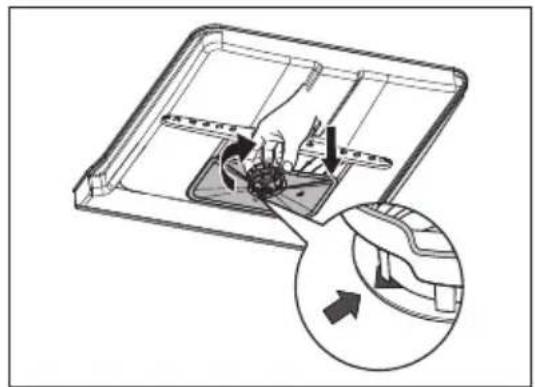
natural_image
Diagram of a mechanical device with internal components and an inset showing a directional arrow (no text or symbols)AVERTISSEMENT
natural_image
Technical line drawing of a mechanical assembly with no visible text or symbolsnatural_image
Symbol of a trash bin crossed with two crossed lines and a solid black rectangle below (no text or labels)Respect de la directive RoHS
natural_image
Recycling symbol with three chasing arrows forming a triangle (no text or labels)AVIS DE PROTECTION DES DONNÉES
make yourself at home

www.midea.com
00000000000000
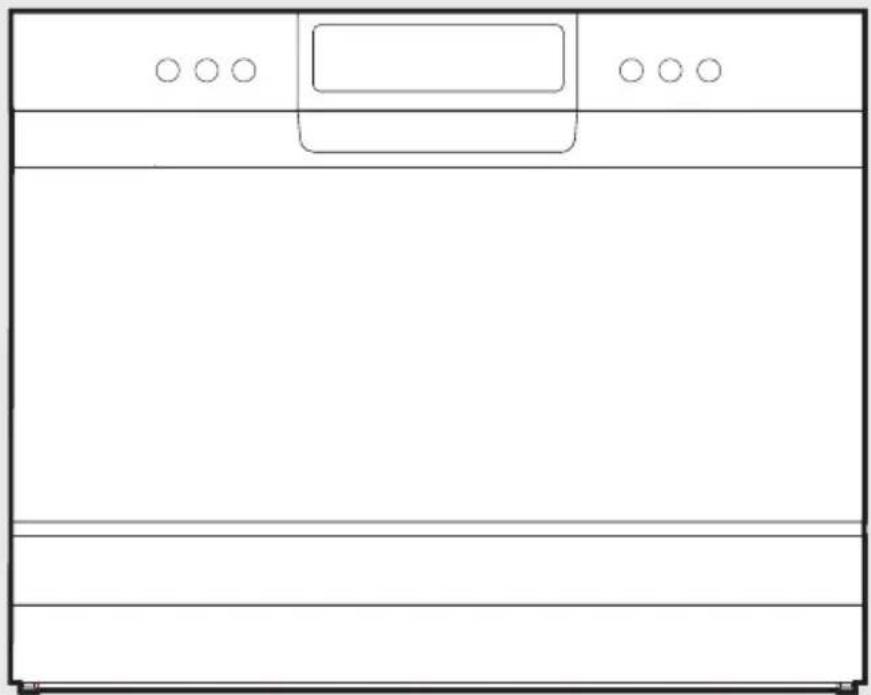
natural_image
Simple line drawing of a rectangular container with three circular handles and a blank bottom panel (no text or symbols)Lavavajillas
MANUAL DEL USUARIO
MDC22P1ABB
natural_image
Line drawing of a hand pressing a button on a device (no text or symbols)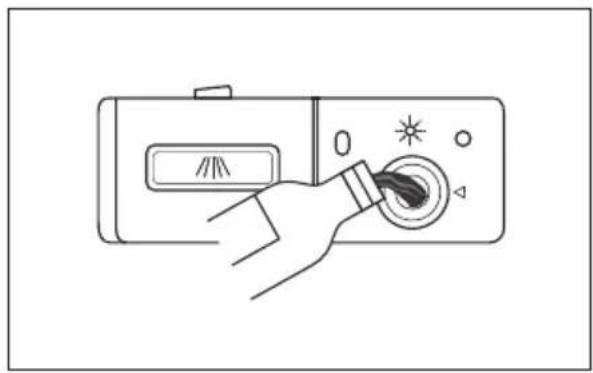
natural_image
Line drawing of a hand pressing a button on a device with star and triangle symbols (no text or labels)natural_image
Line drawing of a hand operating a device with a rotary knob and indicator lights (no text or symbols)natural_image
Hand pressing a button on a device with icons and a coin nearby (no text or symbols)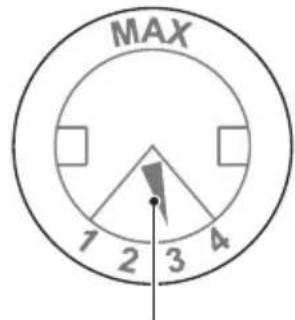
natural_image
Line drawing of a portable radio control with directional arrows and control buttons (no text or symbols)
NOTA
natural_image
Technical diagram of a mechanical device with internal components and directional arrows indicating motion (no text or symbols)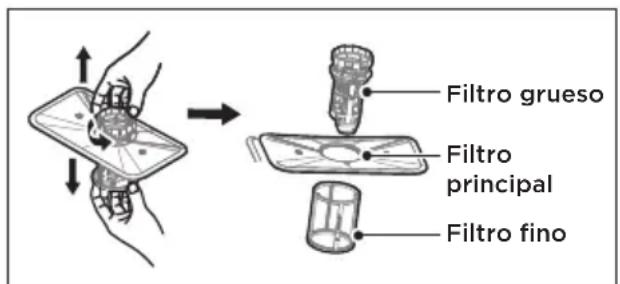
natural_image
Illustration of hands using a tool to spray or spray onto a surface, with no visible text or symbols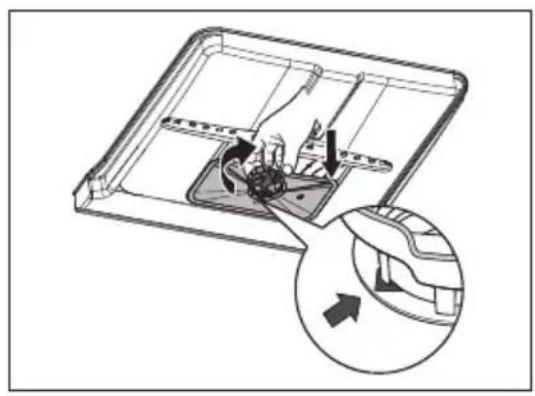
natural_image
Diagram of a mechanical device with internal components and an inset showing a circular component (no text or symbols)ADVERTENCIA
natural_image
Technical line drawing of a mechanical component with no visible text or symbolsCuidado del lavavajillas
natural_image
Symbol of a trash bin crossed with no text or labels, accompanied by a solid black rectangle below (no text or symbols present)natural_image
Recycling symbol with three chasing arrows forming a triangle (no text or labels)make yourself at home

www.midea.com
00000000000000

- USER MANUAL
- THANK YOU LETTER
- CONTENTS
- SAFETY INSTRUCTIONS
- Intended Use
- Explanation of Symbols
- Danger
- Warning of electrical voltage
- Warning
- Caution
- Attention
- Observe instructions
- DANGER: Risk of Fire/Flammable materials
- Earthing Instructions
- Disposal
- SPECIFICATIONS
- Product information sheet
- PRODUCT OVERVIEW
- Product
- IMPORTANT
- NOTE
- PRODUCT INSTALLATION
- About Power Connection
- Electrical requirements
- Electrical connection
- Ensure that proper earthing exists before use
- Positioning The Appliance
- Rear of Dishwasher:
- Quick Connect Assembly
- NOTE:
- Disconnecting your Dishwasher
- Starting the Dishwasher
- Attention:
- OPERATION INSTRUCTIONS
- Programmes
- Preparing And Loading Dishes
- For washing the following cutlery/dishes
- Are not suitable
- Are of limited suitability
- Recommendations for loading the dishwasher
- (Features and appearance of baskets and cutlery baskets may vary from your model.)
- LOADING THE BASKETS
- Loading the basket (6 place setting)
- Loading the cutlery basket
- Removing the dishes
- Function Of The Rinse Aid And Detergent
- Filling The Rinse Aid Reservoir
- Filling The Detergent Dispenser
- Saving Energy
- Starting A Program
- Changing The Programs
- Forget To Add A Dish?
- CLEANING AND MAINTENANCE
- External Care
- The door and the door seal
- The control panel
- Internal Care
- Filtering system
- Cleaning the Spray Arms
- Caring For The Dishwasher
- Frost precaution
- After every wash
- Remove the plug
- No solvents or abrasive cleaning
- When not in use for a long time
- Moving the appliance
- Seals
- TROUBLESHOOTING
- Before Calling For Service
- ERROR CODES
- TRADEMARKS, COPYRIGHTS AND LEGAL STATEMENT
- DISPOSAL AND RECYCLING
- Important instructions for environment
- Compliance with RoHS Directive
- Package information
- DATA PROTECTION NOTICE
- MIDEA DISHWASHER LIMITED WARRANTY
- ATTACH YOUR RECEIPT HERE. PROOF OF PURCHASE IS REQUIRED TO OBTAIN WARRANTY SERVICE.
- IF YOU NEED SERVICE:
- Midea Customer Service
- LIFETIME LIMITED WARRANTY
- WHAT IS COVERED
- FIRST YEAR LIMITED WARRANTY (PARTS AND LABOR)
- LIFETIME LIMITED WARRANTY (STAINLESS STEEL TUB AND INNER DOOR LINER ONLY)
- WHAT IS NOT COVERED
- DISCLAIMER OF IMPLIED WARRANTIES
- DISCLAIMER OF REPRESENTATIONS OUTSIDE OF WARRANTY
- LIMITATION OF REMEDIES; EXCLUSION OF INCIDENTAL AND CONSEQUENTIAL DAMAGES
- MODE D'EMPLOI
- INSTRUCTIONS DE SÉCURITÉ
- Usage prévu
- INSTALLATION DU PRODUIT
- AVERTISSEMENT
- REMARQUE
- Respect de la directive RoHS
- AVIS DE PROTECTION DES DONNÉES
- MANUAL DEL USUARIO
- NOTA
- ADVERTENCIA
- Cuidado del lavavajillas
Brand : MIDEA
Model : MDC22P1ABB
Category : Dishwasher