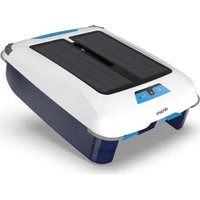
Skimbot - Vacuum Cleaner POLARIS - Free user manual and instructions
Find the device manual for free Skimbot POLARIS in PDF.


| Product Type | Solar Pool Surface Cleaner |
| Brand | Polaris |
| Model | Skimbot |
| Power Source | Solar panel + rechargeable Lithium Iron Phosphate (LiFePO4) battery |
| Autonomy | Until evening after a sunny day |
| Collection bin capacity | Approximately 2 liters |
| Main functions | Collection of leaves, debris, dust, pollen, and hair from the pool surface; automatic navigation with obstacle sensors; night position lights |
| Propulsion system | Two rear paddle wheels (propulsion) and one front paddle wheel (collection) |
| Filtration | Fine mesh filter |
| Battery | Rechargeable, not user replaceable |
| Recommended charging time | Approximately 3 hours in full sun |
| Light indicators | Charge LED (solid green: charged, blinking green: charging, solid red: low battery); Power LED (solid green: running, solid green with blinks: standby) |
| Routine maintenance | Empty and clean debris bin after each use; clean solar panels with a damp cloth; manually remove debris from paddle wheels if needed |
| Safety | Do not submerge; do not use high-pressure cleaner; do not swim during operation; supervise children; store between 0°C and 50°C |
| Usage | For pool only, on surface; not suitable for children or persons with reduced capabilities without supervision |
| Storage temperature | Between 0°C (32°F) and 50°C (122°F) |
| Warranty | Registration required via provided card; contact retailer or technical support |
Frequently Asked Questions - Skimbot POLARIS
User questions about Skimbot POLARIS
0 question about this device. Answer the ones you know or ask your own.
Ask a new question about this device
Download the instructions for your Vacuum Cleaner in PDF format for free! Find your manual Skimbot - POLARIS and take your electronic device back in hand. On this page are published all the documents necessary for the use of your device. Skimbot by POLARIS.
USER MANUAL Skimbot POLARIS
natural_image
Line drawing of a rectangular electronic device with internal compartments and ports (no text or symbols)Skimbot® Solar Surface Cleaner
FSKIMBOT
WARNING
FOR YOUR SAFETY – For anything other than the routine cleaning and maintenance described in this guide, this product must be serviced by a qualified professional with sufficient experience in pool equipment installation and maintenance so that all of the instructions in the product's complete installation and operations manual can be followed exactly. All safety instructions in the complete manual must be followed explicitly in order to prevent injury hazards. Improper installation and/or operation may void the warranty. Failure to follow warning notices and instructions may result in property damage, personal injury, or death.
Table of Contents
Section 1. Important Safety Instructions......3
Section 2. General Information......4
2.1 Product Overview 4
2.2 Components....4
Section 3. Operation....5
3.1 Getting Started 5
3.2 Power and Charging 5
3.3 Nighttime Running Lights 6
Section 4. Maintenance....6
4.1 Emptying and Cleaning the Debris Tray and Collection Chamber....6
4.2 Removing Debris from Paddles....6
4.3 Cleaning....6
4.4 Storage 6
Section 5. Recycling & Disposal......6
Section 6. Troubleshooting .... 7
THANK YOU FOR PURCHASING THIS POLARIS CLEANER.
YOUR POLARIS ROBOTIC CLEANER HAS BEEN DESIGNED AND MANUFACTURED TO BE EASILY INSTALLED AND TO PROVIDE LOW MAINTENANCE OPERATION. PRIOR TO INSTALLING YOUR NEW POLARIS CLEANER, PLEASE DO THE FOLLOWING:
1) Complete and return the warranty registration card.
2) Record your purchase information on the spaces provided below.
3) Attach your invoice (or a copy) to this page.
Taking these steps will help ensure prompt warranty service, should it be required. If service is required, please contact your original dealer. If the original dealer does not perform warranty service, please visit polarispool.com to locate an independent service company near you.
If you are unable to locate a service company, please call our Technical Support department at 1.800.822.7933.
RECORD YOUR POLARIS CLEANER DATA HERE:
Date of Purchase ____ Purchased From ____ Serial Number ____
(located on underside of cleaner)
City ____ State/Province ____ Zip/Postal Code ____
Section 1. Important Safety Instructions
READ AND FOLLOW ALL INSTRUCTIONS
WARNING
- For use in swimming pool only.
- The Skimbot might look like a pool toy to some children and may lure them into the swimming pool when no one is looking.
- Ensure that children DO NOT attempt to access cleaner while it is operating.
• ALWAYS WATCH CHILDREN AROUND WATER. - NEVER leave children in the pool or around the pool without supervision.
- This cleaner is not suitable for use by children and people with reduced physical, sensory or mental capabilities or inexperienced people who are not familiar with the product. Children should be supervised to ensure that they do not play with the appliance, even when it is not in operation.
- Do not swim or dive while the Skimbot is on the pool surface. The unit must be removed from the water before swimming because it presents a potential safety hazard to swimmers.
- Do not submerge the Skimbot. Submerging the Skimbot may cause damage and void the warranty.
- Do not push the Skimbot underwater. It is not designed to withstand water pressure if submerged. Water entering the robot could corrode and damage its internal parts.
- If at any time you detect any physical damage to the cleaner chassis, such as swollen or cracked casing, STOP and do not continue discharging or charging the battery.
- Do not store or expose the cleaner to ambient temperatures below 32^ (0^) or above 122^ (50^) .
- Do not smoke around, or allow the cleaner to be near sparks or flames. The batteries can generate gases which could possibly ignite.
- Do not expose cleaner to fire or excessive temperature. Exposure to fire or temperature above 265^ F ( 130^ C) may cause explosion.
- Never attempt to disassemble the Skimbot. The battery can produce a short circuit causing severe burns. Avoid contact between any wires or metal items that could cause sparks and short-circuit the battery. If a battery leak occurs, avoid any contact with the leaking fluids and place the Skimbot in a plastic bag. Wear complete eye protection, gloves, and protective clothing when disposing of cleaner. If leaking fluids come in contact with skin and clothing, wash immediately with plenty of soap and water. If leaking fluids come in contact with the eyes, do not rub eyes, immediately flush eyes with cool running water for at least 15 minutes and do not rub them. Seek medical attention as soon as possible.
- Do not use a battery-operated appliance that is damaged or modified. Damaged or modified batteries may exhibit unpredictable behavior resulting in fire, explosion, or risk of injury.
BATTERY LIFE & DISPOSAL OF LITHIUM BATTERIES
- Regulations and laws pertaining to the recycling and disposal of batteries vary from country to country as well as by state and local governments. You should check the laws and regulations where you live.
- There are several facilities that recycle batteries. The Rechargeable Battery Recycling Corporation's website, www.rbrc.org, is an excellent source for finding a facility that can handle these types of batteries. If you are not sure if your waste facility can handle batteries, contact them and verify whether they are permitted.
- This Skimbot contains a maintenance-free, rechargeable lithium iron phosphate battery pack, which must be disposed of properly. Recycling is required.
SAVE THESE INSTRUCTIONS
Section 2. General Information
2.1 Product Overview
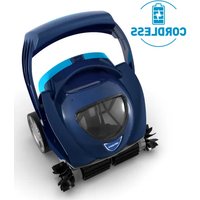
The Polaris Skimbot Solar Surface Cleaner cleans pools by combining the force of solar power and intelligent technology to effortlessly travel the pool's surface, collecting leaves, debris, dust, pollen, and hair before they sink to the bottom.
This lightweight robotic surface cleaner charges itself in the sun, storing up solar power to clean your pool whenever you're not in it and ensuring the pool is swim-ready when you are. Powered by the sun and a rechargeable lithium iron phosphate battery, Skimbot does not require hoses or power cords to operate.
2.1.1 Propulsion and Debris Collection
Skimbot is propelled through the water by two paddle wheels located at the rear of the unit (where the control panel is located). The front paddle wheel captures debris in the collection chamber inside the apparatus. As water enters the collection tray, it passes through a fine mesh filter which removes large debris as well as very small particles. Skimbot's storage capacity is approximately 2L.
2.1.2 Navigation
The Skimbot has sensors in the front for navigation. When the robot approaches an object, it will automatically detect the obstruction and correct its course to avoid the object.
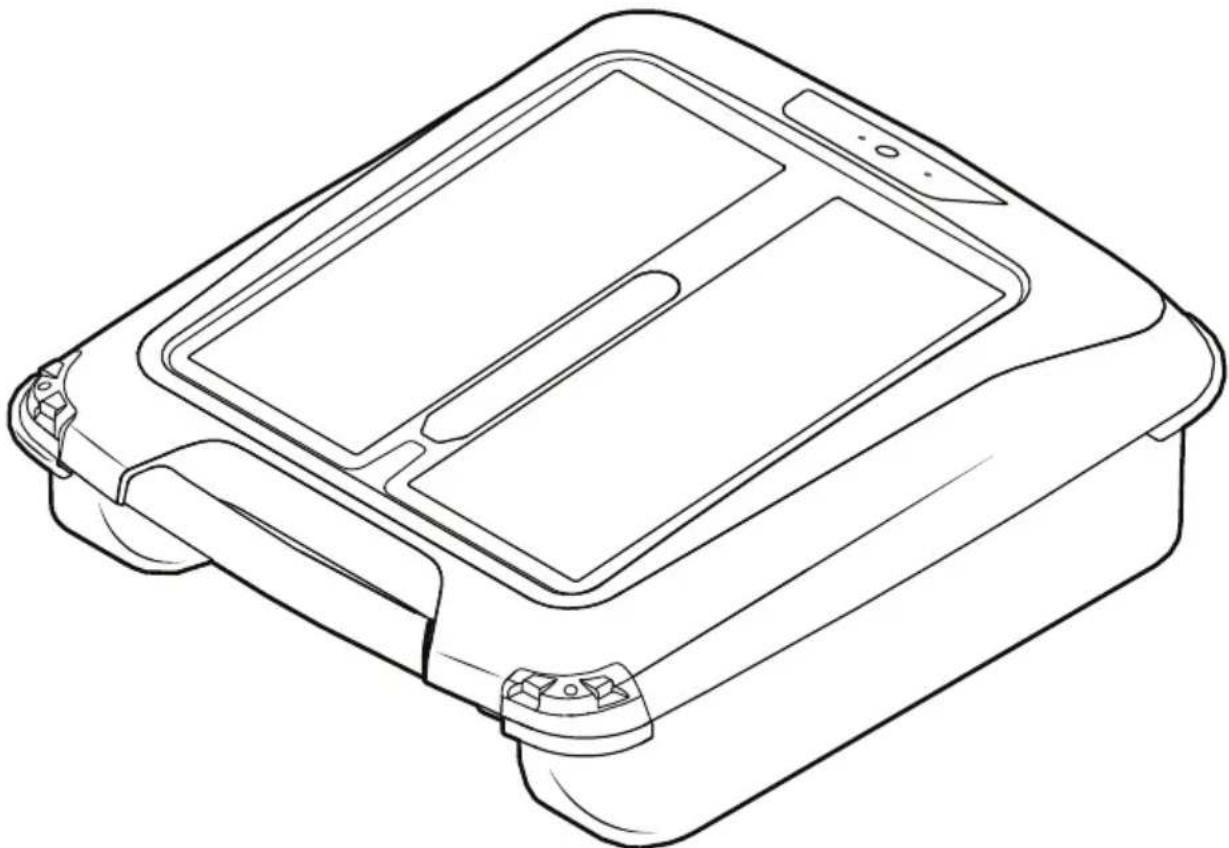
2.2 Components
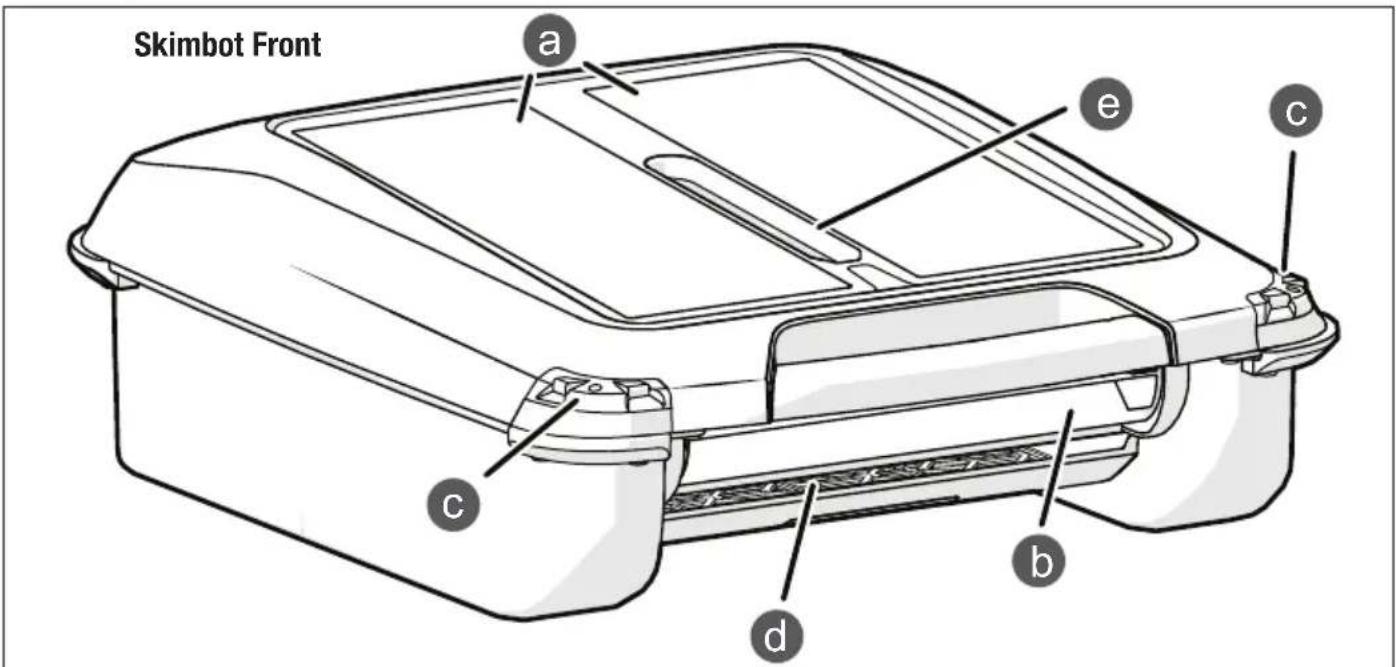
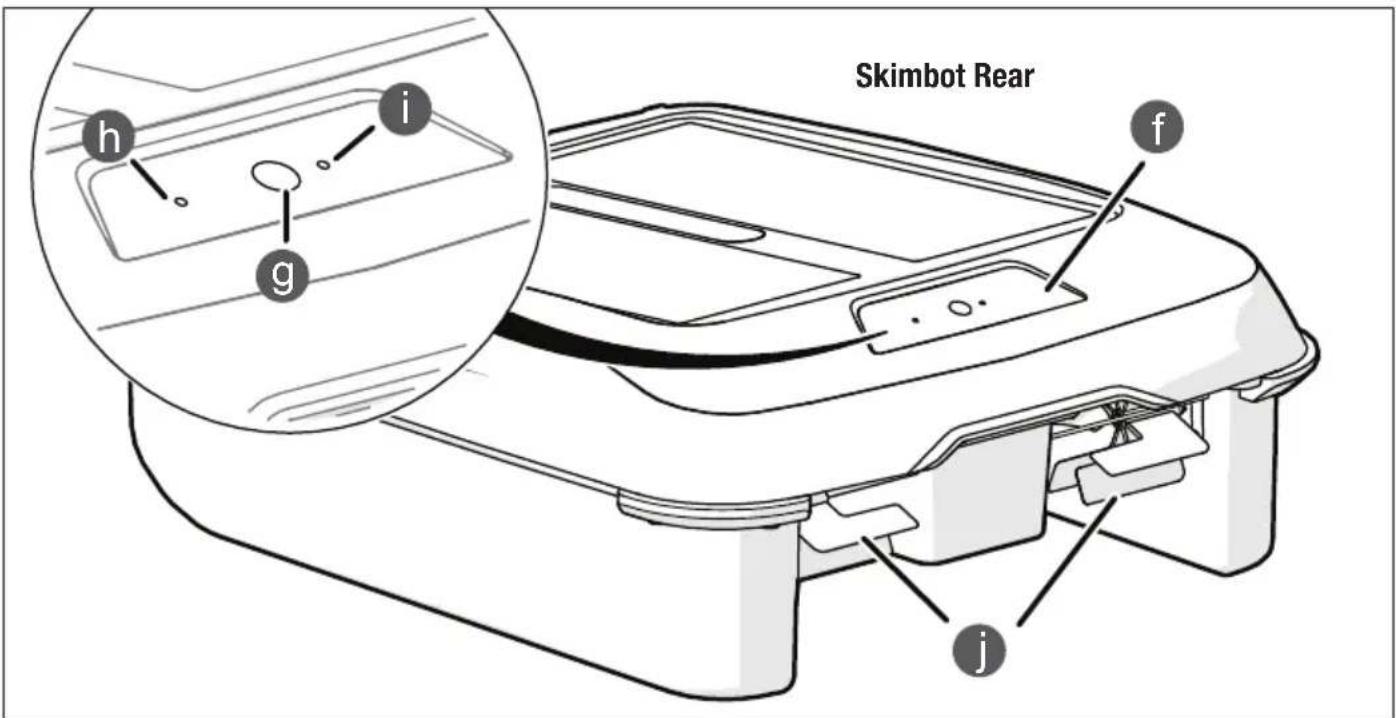
| Item Part |
| a Solar Panel |
| b Front Paddle Wheel |
| c Obstacle Sensors & Nighttime Running Lights |
| d Debris Collection Tray |
| e Debris Viewing Window |
Section 3. Operation
3.1 Getting Started
- Skimbot may or may not arrive with power sufficient to operate properly. If your pool is in direct sun, place Skimbot in the pool and press the power button. If your pool is not in direct sun or if it is later in the day, it is recommended that before use, Skimbot be placed in direct sunlight, in standby mode, for 3 hours to charge the battery.
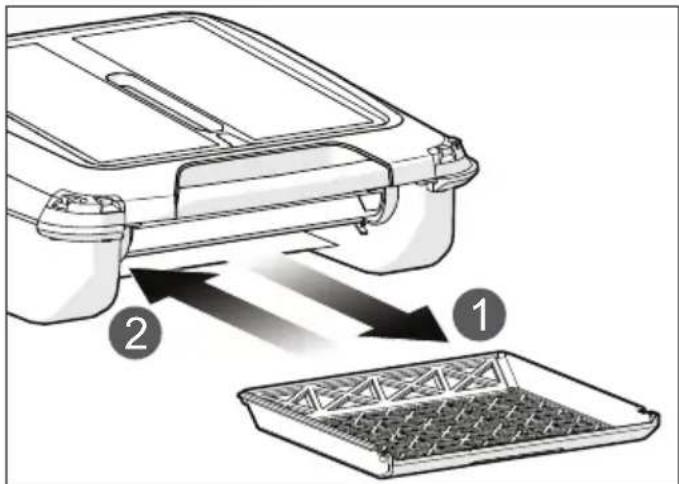
- Ensure the debris collection tray (d) is properly locked into place. To lock the tray:
1) Remove the debris tray by sliding it out the front of the unit.
2) Slide the debris tray back into Skimbot and listen for the click that indicates it is locked in place. This ensures the debris will be captured in the collection area and will not flow through the unit.
- Lower Skimbot gently into the pool, using both hands to hold the unit at the front by the handle and the back under the control panel (f). Position the unit so the front is facing toward the center of the pool.
- Press the power button (g). The green POWER light will come on and the paddle wheels will rotate in a forward direction.
- Skimbot will traverse the pool, skimming debris off the surface for as long as there is charge in the battery. It only needs be removed when the pool is in use.
3.2 Power and Charging
Skimbot is powered by direct sunlight, and it collects and stores surplus solar power in the rechargeable battery. On a normal sunny day, enough power will be stored in the battery to allow the unit to continue operating through the evening.
| Item Part | |
| f Control Panel | |
| g Power Button | |
| h Charge Indicator LED | |
| i Power Indicator LED | |
| j Split Rear Paddle Wheels |
Although the power is on, at times Skimbot will not have enough energy to operate. This can happen in the shade, in the evening, or in the morning before the sun has time to charge the unit.
3.2.1 Charging
On a sunny day, enough power will be generated to operate Skimbot. For faster charging, on a sunny day when the ambient temperature is below 110°F, remove the cleaner from the pool. With the cleaner on, place the cleaner in standby mode by pressing the power button once. The paddle wheels will stop and the CHARGE light will flash green while the POWER light remains solid green with the occasional flash off. When fully charged, the CHARGE light will turn solid green. To restart the cleaner, press the power button once.
If Skimbot is in the pool and not moving, there is no need to remove it. When solar energy becomes available, the unit will recharge itself and start operating again. This can happen when the cleaner is in a lot of shade, in the evening, and in the morning.
When the solar panels are charging the battery, the CHARGE light will flash green. This can occur whether the unit is on or in standby mode. When the unit is first placed in the sun, it may take a few minutes before the CHARGE light begins to flash. Once the battery is fully charged, the CHARGE light will stop flashing and remain solid green.
3.2.2 Indicator/Information LEDs
Skimbot's control panel (f) has two indicator LEDs that provide information at a quick glance.
| [3706] Charge LED (h) | [375H]  | ||
| Fully Charged Solid Green Power | Solid Green | ||
| Charging Flashing Green | Power Off | Off | |
| Low Battery | Solid Red | Standby Mode | Solid Green, Brief Flash Off |
| Not Charging | Off | Power On, Insufficient Charge | Off, Brief Flash Green |
3.2.3 Low Battery
When the battery is too low to run Skimbot, the unit will shut down automatically. This may occur primarily in the evening, once the pool has been in shade for some time or on a cloudy day when the energy available from the sun is low. When this happens, the CHARGE LED will turn solid red, indicating a low battery. If Skimbot is on but doesn't have enough power to operate, the POWER light will be off with the occasional green flash.
3.3 Nighttime Running Lights
Skimbot is equipped with two LED nighttime running lights (c) that flash only at night or when there is no sunlight or artificial light hitting the solar panels. These are provided for safety so the cleaner is always visible in the pool when it's dark. If the battery gets very low, the lights will eventually stop flashing.
Section 4. Maintenance
4.1 Emptying and Cleaning the Debris Tray and Collection Chamber
The debris tray should be cleaned regularly. The viewing window (e) on top of Skimbot makes it possible to see when the debris collection chamber is becoming full. To empty and clean the tray and chamber:
- Switch off the unit, and lift from the pool while keeping the unit flat by grasping the front handle and underneath the control panel on the back with both hands.
- Remove the debris tray (d) by sliding it out the front of the unit.
- Empty the tray and collection chamber into a trash can or compost bin.
- Rinse the debris tray after emptying to remove any fine debris. You may also choose to wash out the debris collection chamber (the space in the unit's body where the debris tray sits) using a low-pressure stream from a garden hose.
CAUTION
DO NOT USE A HIGH-PRESSURE STREAM OF WATER TO CLEAN SKIMBOT.
-
Slide the clean debris tray back into Skimbot and listen for the click that indicates it is locked in place.
-
Return the unit to the pool and press the power button.
4.2 Removing Debris from Paddles
During operation, debris may get stuck in Skimbot's front paddle wheel (b). If this occurs, the unit will reverse the stuck paddle wheel to try and free the debris. When the debris is cleared, it will continue operation. If Skimbot cannot clear the debris on its own, you must manually clear it. After, press the power button again to continue operation.
4.3 Cleaning
After a period of weeks or months, the Skimbot may begin to accumulate calcium or mineral deposits along the water line and also on the solar panels. Before these deposits become severe and either cause damage to the unit or impact its performance, clean the Skimbot using the following procedure:
- Use a sponge or damp cloth to wipe down the unit and solar panels, removing any dirt or mineral deposits.
WARNING
Do not use a high-pressure washer or any tool to scrape the solar panels as this may cause damage to the cleaner and void the warranty.
-
Use a damp cloth to clean the sensor areas (c) to prevent dirt or debris from affecting cleaner performance.
-
Dry using a soft dry cloth.
4.4 Storage
4.4.1 Everyday Storage
While the pool is in use, remove Skimbot, turn the cleaner off or place in standby mode to continue charging. Store the cleaner in a protected and dry place with temperatures between 110^ F and 32^ F.
4.4.2 Long-Term Storage / Winterization
Clean the solar panels, debris collection tray, and cleaner body well before storing.
Charge the battery fully. The microprocessor may later cause the CHARGE light to come on, sometimes after a day or two, to drain the battery down to its optimum long term storage voltage. It will go out automatically at the ideal storage voltage.
Place Skimbot in a dry place. The storage temperate cannot be below 32^ F. Store on a flat surface, and do not place heavy objects on top of the unit in storage.
NOTE: After Skimbot has sat idle for months, it may be necessary to place cleaner in the sun to charge. It also may be necessary to manually rotate the paddle wheels before powering up.
Section 5. Recycling & Disposal
ATTENTION
The battery is not a serviceable or replaceable component. Do not attempt to service the battery.
Battery and cleaner must be disposed of in accordance with local requirements.
Always dispose of batteries in a sustainable way in approved collection bins or at authorized collection centers in accordance with local law. Contact your local authority for more information.
See “Important Safety Instructions” for additional battery information.
Section 6. Troubleshooting
| Issue Possible Cause Solution | ||
| Skimbot isn't turning on. No indicator lights are on. | Battery is completely discharged. Place the unit in direct sunlight for at least one hour and try again. If indicator lights turn on, place cleaner in standby mode and charge completely. | |
| Solar panels are dirty. Clean solar panels with a damp, soft cloth to allow for full sun exposure. | ||
| Skimbot is not moving. Cleaner may not have sufficient sunlight or battery charge. | If there is shade, it is late in the day, or early in the morning, Skimbot may not work until there is sufficient sunlight to power the cleaner. | |
| Place unit in full sun to charge. | ||
| Ensure solar panels are clean and unobstructed. | ||
| Skimbot is moving in circles. | One of the paddle wheels may be obstructed. | Inspect paddle wheels to ensure they are free from debris or obstructions. |
| Power cycle Skimbot by turning the unit off, waiting a few minutes, and turning Skimbot back on. | ||
| Skimbot is constantly hitting the wall. | Sensors are dirty or obstructed. Clean the sensors with a damp, soft cloth and then wipe dry. | |
| Skimbot gets trapped in the built-in skimmer. | Flow to the skimmer may be too high. | With Skimbot cleaning the pool's surface, the amount of flow from the built-in skimmer can be reduced. |
| Place a pool noodle at the front of the built-in skimmer to provide a barrier. | ||
| Skimbot is not capturing surface debris. | Debris tray is not properly installed. | Remove cleaner from the pool, and inspect debris tray sides and tray rails on the cleaner body. Remove any debris that may be affecting installation. Replace debris tray, ensuring it is positioned correctly and slides smoothly on rails. When installed correctly, there will be a soft click. |
| Debris tray ends up on the bottom of the pool. | ||
natural_image
Line drawing of a rectangular electronic device with internal compartments and ports (no text or symbols)4.4 Entreposage....15
natural_image
Line drawing of a rectangular electronic device with internal compartments and ports (no text or symbols)Robot limpiador solar de superficies Skimbot®
FSKIMBOT
ADVERTENCIA
- Skimbot® Solar Surface Cleaner
- WARNING
- Table of Contents
- Section 1. Important Safety Instructions......3
- Section 2. General Information......4
- Section 3. Operation....5
- Section 4. Maintenance....6
- Section 5. Recycling & Disposal......6
- Section 6. Troubleshooting .... 7
- Section 1. Important Safety Instructions
- READ AND FOLLOW ALL INSTRUCTIONS
- BATTERY LIFE & DISPOSAL OF LITHIUM BATTERIES
- SAVE THESE INSTRUCTIONS
- Section 2. General Information
- Product Overview
- Propulsion and Debris Collection
- Navigation
- Components
- Section 3. Operation
- Getting Started
- Power and Charging
- Charging
- Indicator/Information LEDs
- Low Battery
- Nighttime Running Lights
- Section 4. Maintenance
- Emptying and Cleaning the Debris Tray and Collection Chamber
- CAUTION
- Removing Debris from Paddles
- Cleaning
- Storage
- Everyday Storage
- Long-Term Storage / Winterization
- Section 5. Recycling & Disposal
- ATTENTION
- Robot limpiador solar de superficies Skimbot®
- ADVERTENCIA
Brand : POLARIS
Model : Skimbot
Category : Vacuum Cleaner