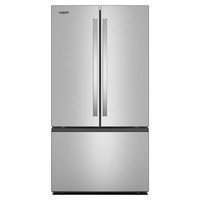
WRFF3136SZ - Fridge WHIRLPOOL - Free user manual and instructions
Find the device manual for free WRFF3136SZ WHIRLPOOL in PDF.


User questions about WRFF3136SZ WHIRLPOOL
0 question about this device. Answer the ones you know or ask your own.
Ask a new question about this device
Download the instructions for your Fridge in PDF format for free! Find your manual WRFF3136SZ - WHIRLPOOL and take your electronic device back in hand. On this page are published all the documents necessary for the use of your device. WRFF3136SZ by WHIRLPOOL.
USER MANUAL WRFF3136SZ WHIRLPOOL
Proper Disposal of Your Old Refrigerator 5
REFRIGERATOR CARE 6
Cleaning 6
Lights 7
Refrigerator Shelves 7
Opening and Closing Doors 8
Holiday and Moving Care 9
INSTALLATION INSTRUCTIONS 9
Getting Started 9
Unpack the Refrigerator----10
Location Requirements 10
Electrical Requirements 11
Leveling and Door Adjustment 12
Water Supply Requirements 12
Connect the Water Supply 13
Complete the Installation 14
USING THE CONTROLS 15
Using the Controls 15
Sabbath Mode 17
REFRIGERATOR USE 17
Water and Ice Dispensers (on some models) 17
Ice Maker and Storage Bin (on some models) 19
Internal Water Operation (on some models) 19
Filters And Accessories 20
DOOR AND HANDLE INSTRUCTIONS 22
Remove And Replace Refrigerator Doors 22
Remove and Replace Freezer Door 25
Handle Installation and Removal 27
Shelves, Bins And Drawers 28
Freezer Storage Compartments 29
PERFORMANCE DATA SHEET 30
MANUEL D'UTILISATION DU RÉFRIGÉRATEUR À PORTE À DOUBLE BATTANT ET CONGÉLATEUR EN BAS
Table des matières
SÉCURITÉ DU RÉFRIGÉRATEUR ....34
Your safety and the safety of others are very important.
We have provided many important safety messages in this manual and on your appliance. Always read and obey all safety messages.

This is the safety alert symbol.
This symbol alerts you to potential hazards that can kill or hurt you and others.
All safety messages will follow the safety alert symbol and either the word "DANGER" or "WARNING." These words mean:
DANGER
WARNING
You can be killed or seriously injured if you don't immediately follow instructions.
You can be killed or seriously injured if you don't follow instructions.
All safety messages will tell you what the potential hazard is, tell you how to reduce the chance of injury, and tell you what can happen if the instructions are not followed.
IMPORTANT SAFETY INSTRUCTIONS
WARNING: To reduce the risk of fire, electric shock, or injury to persons when using your appliance, follow basic precautions, including the following:
■ Children should be supervised to ensure that they do not play with the appliance.
This appliance is not intended for use by persons (including children) with reduced physical, sensory, or mental capabilities, or lack of experience and knowledge, unless they have been given supervision or instruction concerning use of the appliance by a person responsible for their safety.
■ Do not use an extension cord.
If power supply cord is damaged, it must be replaced by the manufacturer, its service agent, or a similarly qualified person in order to avoid a hazard.
■ Connect to potable water supply only.
This appliance is intended to be used in household and similar applications such as: staff kitchen areas in shops, offices, and other working environments; farm houses and by clients in hotels, motels, and other residential-type environments; bed and breakfast-type environments; and catering and similar non-retail applications.
■ Do not store explosive substances such as aerosol cans with a flammable propellant in this appliance.
■ Use the new hose-sets supplied with the appliance and that old hose-sets should not be reused.
■ Do not use replacement parts that have not been recommended by the manufacturer (e.g., parts made at home using a 3D printer).
- Keep ventilation openings, in the appliance enclosure or in the built-in structure, clear of obstruction.
■ Do not use mechanical devices or other means to accelerate the defrosting process, other than those recommended by the manufacturer.
■ Do not damage the refrigerant circuit.
■ Do not use electrical appliances inside the food storage compartments of the appliance, unless they are of the type recommended by the manufacturer.
■ Ice maker kit can be added to some models. See serial tag inside the food compartment of appliance for ice maker kit model information.
A qualified service technician must install the water line and ice maker. See installation instructions supplied with ice maker kit for complete details.
■ When positioning the appliance, ensure the supply cord is not trapped or damaged.
■ Do not locate multiple portable socket-outlets or portable power supplies at the rear of the appliance.
SAVE THESE INSTRUCTIONS
Proper Disposal of Your Old Refrigerator
WARNING: Risk of child entrapment. Before you throw away your old refrigerator or freezer:
■ Take off the doors.
■ Leave the shelves in place so that children may not easily climb inside.
WARNING
Suffocation Hazard
Remove doors or lid from your old appliance.
Failure to do so can result in death or brain damage.
IMPORTANT: Child entrapment and suffocation are not problems of the past. Junked or abandoned freezers or refrigerators, are still dangerous, even if they will sit for "just a few days." If you are getting rid of your old refrigerator or freezer, please follow these instructions to help prevent accidents.
Important information to know about disposal of refrigerants:
Dispose of refrigerator in accordance with Federal and Local regulations. Refrigerants must be evacuated by a licensed, EPA certified refrigerant technician in accordance with established procedures.
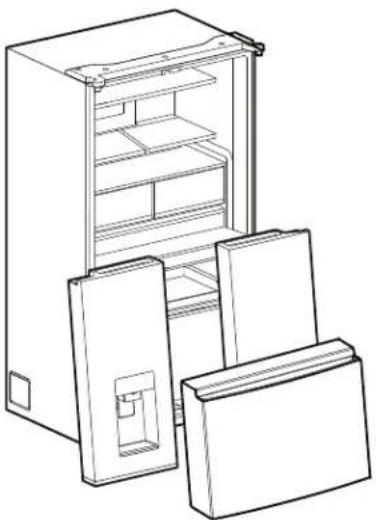
natural_image
Line drawing of an open refrigerator with doors and shelves (no text or symbols)REFRIGERATOR CARE
Cleaning
WARNING
Explosion Hazard
Risk of Fire or Explosion.
Flammable Refrigerant Used.
Do Not Use Mechanical Devices to Defrost Refrigerator.
Do Not Puncture Refrigerant Tubing.
Both the refrigerator and freezer sections defrost automatically. However, clean both sections about once a month to avoid odor buildup. Wipe up spills immediately.
IMPORTANT:
Because air circulates between all sections, any odors formed in one section will transfer to the other. You must thoroughly clean all sections to eliminate odors. To avoid odor transfer and drying out of food, wrap or cover foods tightly.
■ Do not use abrasive or harsh cleaners such as window sprays, scouring cleansers, flammable fluids, muriatic acid, cleaning waxes, concentrated detergents, bleaches or cleansers containing petroleum products on doors and cabinet, plastic parts, interior and door liners or gaskets. Do not use paper towels, scouring pads, or other harsh cleaning tools.
For stainless steel models, stainless steel is corrosion resistant and not corrosion-proof. To help avoid corrosion of your stainless steel, keep your surfaces clean by using the following cleaning instructions.
Cleaning the Touch Screen Display on the Dispenser Panel (on some models):
- Make sure the refrigerator is unplugged or the power is disconnected before wiping the screen to avoid unintentionally changing the settings.
- Mix a solution of mild detergent in warm water. Dampen a soft, lint-free cloth with the solution and gently wipe the screen.
NOTE : Do not spray or wipe liquids directly onto the screen or over-saturate the cloth. - Plug in refrigerator or reconnect power.
Exterior Cleaning
IMPORTANT : Damage to smooth finish due to improper use of cleaning products or using non-recommended cleaning products is not covered under the warranty. Sharp or blunt instruments will mar the finish.
- Unplug refrigerator or disconnect power.
- Using a clean sponge or soft cloth and a mild detergent in warm water, wash, rinse, and thoroughly dry stainless steel and painted metal exteriors.
To keep your stainless steel refrigerator looking like new and to remove minor scuffs or marks, it is suggested that you use the manufacturer's approved stainless steel cleaner and polish. This cleaner is for stainless steel parts only. Refer to the Quick Start Guide for ordering information.
NOTE: When cleaning stainless steel, always wipe in the direction of the grain to avoid cross-grain scratching. Do not allow the stainless steel cleaner and polish to come into contact with any plastic parts such as the trim pieces, dispenser covers, or door gaskets. If unintentional contact does occur, clean plastic part with a sponge and mild detergent in warm water. Dry thoroughly with a soft cloth.
- Plug in refrigerator or reconnect power.
Please see the exterior cleaning information specific to your model.
Fingerprint-Resistant Stainless
Style 1: Smooth Door/Painted Metal
| DO USE | DO NOT USE |
| ■ Soft, clean cloth | ■ Abrasive cloths■ Paper towels or newsprint■ Steel-wool pads |
| ■ Warm, soapy water with a mild detergent | ■ Abrasive powders or liquids■ Window sprays■ Ammonia■ Acidic or vinegar-based cleaners■ Oven cleaners■ Flammable fluids |
NOTE: Paper towels scratch and may dull the clear coat of the painted door. To avoid possible damage, use only soft, clean cloths to polish and wipe the door.
Style 2: Stainless Steel
| DO USE | DO NOT USE |
| ■ Soft, clean cloth | ■ Abrasive cloths■ Paper towels or newsprint■ Steel-wool pads |
| ■ Warm, soapy water with a mild detergent | ■ Abrasive powders or liquids■ Ammonia■ Citrus-based cleaners■ Acidic or vinegar-based cleaners■ Oven cleaners |
| ■ For heavy soil, use only a manufacturer's approved stainless steel cleaner and polish | ■ Abrasive powders or liquids■ Ammonia■ Citrus-based cleaners■ Acidic or vinegar-based cleaners■ Oven cleaners■ Abrasive cloths■ Paper towels or newsprint■ Steel-wool pads |
NOTES:
If unintentional contact does occur, clean plastic part with a sponge and mild detergent in warm water. Dry thoroughly with a soft cloth.
■ Avoid exposing stainless steel appliances to caustic or corrosive elements such as high-salt, high-moisture, or high-humidity environments. Damage due to exposure to these elements is not covered under the warranty.
■ Just because a cleaner is a liquid does not mean it is nonabrasive. Many liquid cleansers formulated to be gentle on tile and smooth surfaces still damage stainless steel.
■ When cleaning stainless steel, always wipe in the direction of the grain to avoid cross-grain scratching.
■ Citric acid permanently discolors stainless steel. To avoid damaging the finish of your stainless steel refrigerator:
Do not allow these substances to remain on the finish:
- Mustard
• Citrus-based sauces
- Tomato juice
• Citrus-based products
- Marinara sauce
Interior Cleaning
IMPORTANT: Refrigerator shelves with under-shelf, LED lighting are not dishwasher safe.
- Unplug refrigerator or disconnect power.
- Hand wash, rinse, and dry removable parts and interior surfaces thoroughly. Use a clean sponge or soft cloth and a mild detergent in warm water.
- Plug in refrigerator or reconnect power.
Condenser Cleaning
text_image
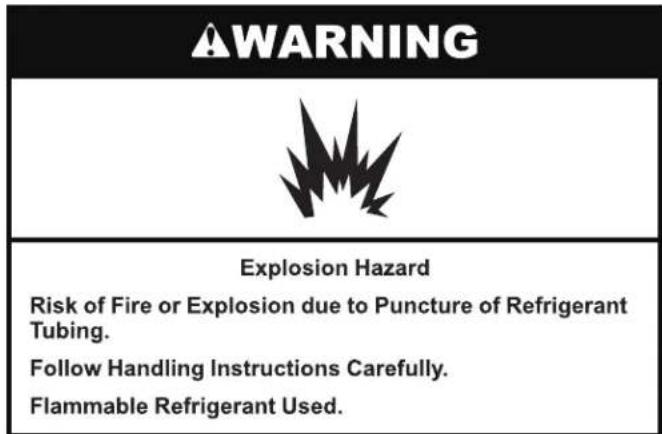
WARNING Explosion Hazard Risk of Fire or Explosion due to Puncture of Refrigerant Tubing. Follow Handling Instructions Carefully. Flammable Refrigerant Used.There is no need for routine condenser cleaning in normal home operating environment. If the environment is particularly greasy or dusty or there is significant pet traffic in the home, the condenser should be cleaned every 6 months to ensure maximum efficiency.
- Unplug refrigerator or disconnect power.
- Remove the base grille.
- Use a vacuum cleaner with a soft brush to clean the grille, the open areas behind the grille, and the front surface area of the condenser.
- Replace the base grille when finished.
- Plug in refrigerator or reconnect power.
NOTE: If you are unable to clean the condenser, please call for service.
Lights
The lights in both the fresh food and freezer compartments are LEDs. If the lights do not illuminate when the door is opened, call for assistance or service. Refer to the Quick Start Guide for contact information.
Refrigerator Shelves
Important information to know about glass shelves and covers:
Do not clean glass shelves or covers with warm water when they are cold. Shelves and covers may break if exposed to sudden temperature changes or impact, such as bumping. Tempered glass is designed to shatter into many small, pebble-size pieces. This is normal. Glass shelves and covers are heavy. Use both hands when removing them to avoid dropping.
The shelves in your refrigerator are adjustable to match your individual storage needs.
Storing similar food items together in your refrigerator and adjusting the shelves to fit different heights of items will make finding the exact item you want easier. It will also reduce the amount of time the refrigerator door is open, and save energy.
Opening and Closing Doors
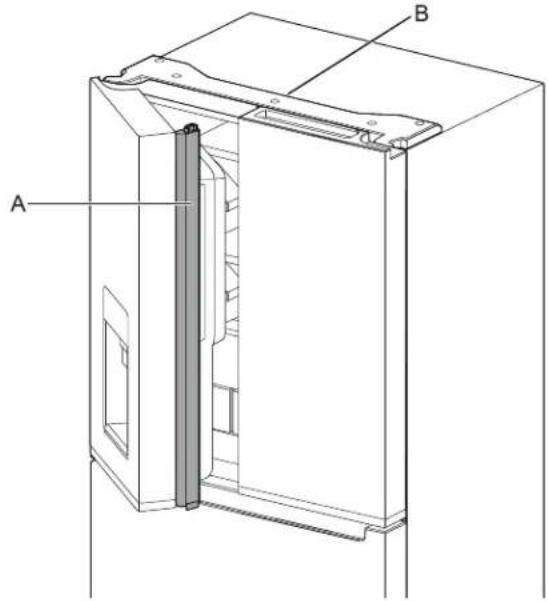
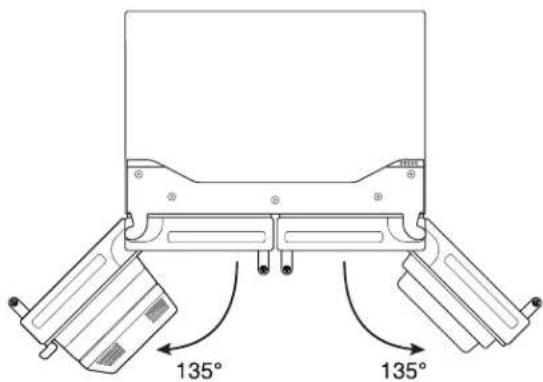
There are two fresh food compartment doors. The doors can be opened and closed either separately or together. There is a vertically hinged seal on left refrigerator door.
■ When left-side door is opened, hinged seal automatically folds inward so that it is out of the way.
■ When both doors are closed, the hinged seal automatically forms a seal between two doors.
NOTE: When closing the door, the hinged seal should be in correct position (be bent inside). Otherwise it will hit the right door or the fixing shaft.
natural_image
Technical line drawing of a door frame with labeled components A and B (no text or symbols beyond labels)A. Hinged seal
B. Hinge cover
The fresh food compartment door switch is located in top left and right hinge cover.
■ For Freezer space, door switch is located in the bottom left support.
■ The door switch uses magnet to sense door opening/closing.
■ Ensure there are no magnet or electronic devices (Speaker, Coolvox® etc.) within 7.62 cm of the hinge cap.
NOTE: The light will not turn on if door opening is not detected.
Half Shelf Height Adjustment
Half shelf height can be adjusted by changing its location from bottom support to upper support and vice versa.
■ Refer to "Shelves, Bins and Drawers" for detail.
text_image
135° 135°The Ice Dispenser (on some models)
IMPORTANT:
If the ice cubes are hollow or have an irregular shape, it could be because of low water pressure. See the "Water Supply Requirements" section.
■ Ice travels from the ice storage bin through the dispenser chute to the dispenser. To turn off the ice maker, see the "Ice Maker and Storage Bin" section.
■ The dispenser may continue to make noise and ice may continue to dispense for several seconds after releasing the dispenser button or paddle.
To Clean the Ice Dispenser Chute:
Humidity causes ice to naturally clump together. Ice particles can build up until the ice dispenser chute becomes blocked.
If ice is not dispensed regularly, it may be necessary to empty the ice storage bin and clean the ice delivery chute, the ice storage bin, and the area beneath the storage bin every 2 weeks.
If necessary, remove the ice clogging the storage bin and delivery chute using a plastic utensil.
■ Clean the ice delivery chute and the bottom of the ice storage bin using a warm, damp cloth, and then dry thoroughly.
To Dispense Ice - Paddle Dispensing
- Select the desired type of ice by pressing CUBED ICE or CRUSHED ICE.
WARNING
Cut Hazard
Use a sturdy glass when dispensing ice.
Failure to do so can result in cuts.
- Press a sturdy glass against the dispenser paddle. Hold the glass close to the dispenser opening, so ice does not fall outside of the glass.
IMPORTANT: You do not need to apply a lot of pressure to the paddle to activate the ice dispenser. Pressing hard will not make the ice dispense faster or in greater quantities.
- Remove the glass to stop dispensing.
NOTE: Ice may continue to dispense for several seconds after removing the glass from the dispenser paddle. The dispenser may continue to make noise for a few seconds after dispensing.
The Dispenser Light (on some models)
■ When you use the dispenser, the light will automatically turn on.
Holiday and Moving Care
Holidays
If You Choose to Leave the Refrigerator On While You're Away:
- Use up any perishables and freeze other items.
- Press the Mode button to choose the Vacation feature.
-
If your refrigerator has an automatic ice maker, and is connected to the household water supply, turn off the water supply to the refrigerator. Property damage can occur if the water supply is not turned off.
-
If you have an automatic ice maker, turn off the ice maker. ■ Press the ice maker off.
-
Empty the ice bin.
If You Choose to Turn Off the Refrigerator Before You Leave:
NOTE: Please power off while on Holiday.
- Remove all food from the refrigerator.
- If your refrigerator has an automatic ice maker:
■ Turn off the water supply to the ice maker at least one day ahead of time. - Empty the ice bin.
- Clean refrigerator, wipe it, and dry well.
- Tape rubber or wood blocks to the tops of both doors to prop them open far enough for air to get in. This stops odor and mold from building up.
NOTE: In vacation mode, the water and ice dispensers do not work.
Moving
When you are moving your refrigerator to a new home, follow these steps to prepare it for the move.
- If your refrigerator has an automatic ice maker:
■ Turn off the water supply to the ice maker at least one day ahead of time.
■ Disconnect the water line from the back of the refrigerator.
■ When last load of ice drops, press the switch to Off (O) either on the ice maker or the control, depending on your model. - Remove all food from the refrigerator and pack all frozen food in dry ice.
- Empty the ice bin.
- Unplug refrigerator
- Clean, wipe, and dry thoroughly.
- Take out all removable parts, wrap them well, and tape them together so they don't shift and rattle during the move.
- Depending on the model, raise the front of the refrigerator so it rolls more easily or raise the leveling screws so they do not scrape the floor. See the "Adjust the Doors" or "Leveling and Door Adjustment" sections.
- Tape the doors closed and tape the power cord to the back of the refrigerator.
When you get to your new home, put everything back and refer to the "Installation Instructions" section for preparation instructions. Also, if your refrigerator has an automatic ice maker, remember to reconnect the water supply to the refrigerator.
INSTALLATION INSTRUCTIONS
Getting Started
Installation Checklist
Electrical Power
WARNING

Electrical Shock Hazard
Plug into a grounded 3 prong outlet.
Do not remove ground prong.
Do not use an adapter.
Do not use an extension cord.
Failure to follow these instructions can result in death, fire, or electrical shock.
■ Plug refrigerator into a earthed socket.
Doors
If doors need to be removed during installation, see the "Remove and Replace Refrigerator Doors" and "Remove and Replace Freezer Door Fronts" sections.
■ Doors seal completely.
■ Refrigerator is level. Adjust leveling feet so they are snug against the floor.
■ Doors are even across the top. (Use door alignment feature if necessary).
Final Checks
■ Remove all shipping material.
■ Set temperature controls to the recommended setting.
■ Save instructions and other literature.
In order to receive a more complete assistance, please register your product, refer to the Quick Start Guide for more information.
Unpack the Refrigerator
WARNING
Excessive Weight Hazard
Use two or more people to move and install or uninstall appliance.
Failure to do so can result in back or other injury.
Refrigerator Delivery
A minimum door opening of 33" (838 mm) is required. If door opening is 36" (914 mm) or less, then removal of doors, drawer, and hinges is required.
■ Cart the refrigerator from the side for all door openings.
Remove the Packaging
■ Remove tape and glue residue from surfaces before turning on the refrigerator. Rub a small amount of liquid dish soap over the adhesive with your fingers. Wipe with warm water and dry.
- Do not use sharp instruments, rubbing alcohol, flammable fluids, or abrasive cleaners to remove tape or glue. These products can damage the surface of your refrigerator. For more information, see "Refrigerator Safety."
■ Dispose of/recycle all packaging materials.
When Moving Your Refrigerator:
Your refrigerator is heavy. When moving the refrigerator for cleaning or service, be sure to cover the floor with cardboard or hardboard to avoid floor damage. Always pull the refrigerator straight out when moving it. Do not wiggle or "walk" the refrigerator when trying to move it, as floor damage could occur.
Clean Before Using
After you remove all of the packaging materials, clean the inside of your refrigerator before using it. See the cleaning instructions in "Refrigerator Care."
Important information to know about glass shelves and covers:
Do not clean glass shelves or covers with warm water when they are cold. Shelves and covers may break if exposed to sudden temperature changes or impact, such as bumping. Tempered glass is designed to shatter into many small, pebble-size pieces. This is normal. Glass shelves and covers are heavy. Use both hands when removing them to avoid dropping.
Location Requirements
WARNING
Explosion Hazard
Keep flammable materials and vapors, such as gasoline, away from appliance.
Use nonflammable cleaner.
Failure to do so can result in death, explosion, or fire.
To ensure proper ventilation for your refrigerator, allow for a 0.5" (1.25 cm) space on each side and 0.5" (1.25 cm) space at the top. Allow for a 2" (5 cm) space behind the refrigerator. If your refrigerator has an ice maker, allow extra space at the back for the water line connections. When installing your refrigerator next to a fixed wall, leave a 3.75" (9.5 cm) minimum space between the refrigerator and wall to allow the door to swing open.
NOTE: This refrigerator is intended for use in a location where the temperature ranges from a minimum of 50^ F ( 10^ C) to a maximum of 110^ F ( 43^ C). The preferred room temperature range for optimum performance, which reduces electricity usage and provides superior cooling, is between 60^ F ( 15^ C) and 90^ F ( 32^ C). It is recommended that you do not install the refrigerator near a heat source, such as an oven or radiator.
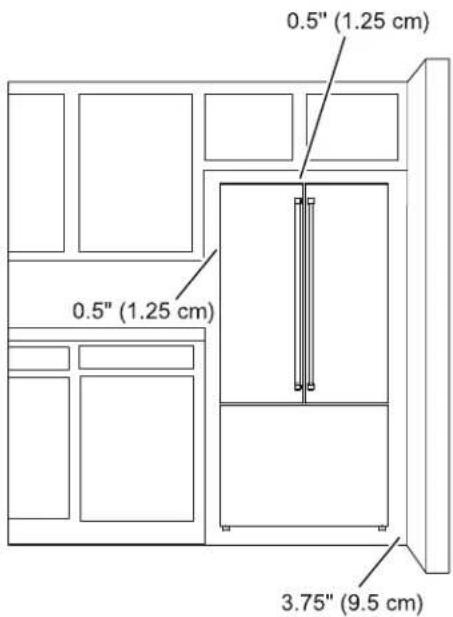
text_image
0.5" (1.25 cm) 0.5" (1.25 cm) 3.75" (9.5 cm)Electrical Requirements
WARNING
Electrical Shock Hazard
Plug into a grounded 3 prong outlet.
Do not remove ground prong.
Do not use an adapter.
Do not use an extension cord.
Failure to follow these instructions can result in death, fire, or electrical shock.
IMPORTANT: Installation and electrical connection must be carried out by a qualified technician according to the manufacturer's instructions and in compliance with the local safety regulations.
■ The refrigerator is designed to operate on a separate 115 V, 60 Hz circuit.
■ Make sure the voltage specified on the rating plate corresponds to that of your home.
It must be possible to disconnect the appliance from the power supply by unplugging it or by means of a main two pole switch installed upstream of the socket.
If the supply cord is damaged, it must be replaced by the manufacturer, its service agent or similarly qualified persons in order to avoid a hazard.
■ Do not use a cord that shows cracks or abrasion damage along its length or at either the plug or connector end.
Before you move your refrigerator into its final location, it is important to make sure you have the proper electrical connection:
Recommended Earthing Method
A 115 V, 60 Hz AC only 15 A or 20 A fused, grounded electrical supply is required. It is recommended that a separate circuit serving only your refrigerator and approved accessories be provided. Use an outlet that cannot be turned off by a switch. Do not use an extension cord.
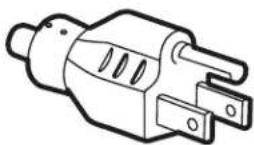

Type B
IMPORTANT: If this product is connected to a GFCI (Ground Fault Circuit Interrupter) protected outlet, nuisance tripping of the power supply may occur, resulting in loss of cooling. Food quality and flavor may be affected. If nuisance tripping has occurred, and if the condition of the food appears poor, dispose of the food.
NOTE: Before performing any type of installation or cleaning, or removing a light bulb, turn cooling off or turn the control (Thermostat, Refrigerator or Freezer Control depending on the model) to Off. On models with a digital temperature control, press the minus sign touch pads repeatedly until a dash (-) appears in both the freezer and refrigerator displays. Disconnect the refrigerator from the electrical source. When you are finished, reconnect the refrigerator to the electrical source and turn cooling on or reset the control (Thermostat, Refrigerator or Freezer Control depending on the model) to the desired setting. See the "Quick Start Guide".
Leveling and Door Adjustment
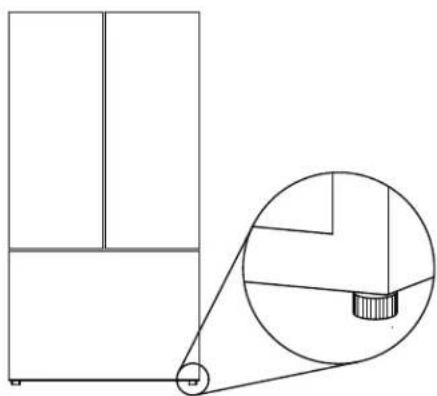
The refrigerator has two front leveling legs. Adjust the legs to alter the tilt from front-to-back or side-to-side.
Adjust the refrigerator's tilt using instructions below:
- Turn the leveling leg to the left to raise that side of the refrigerator. To the opposite side, you can lower the refrigerator. It may take several turns to raise or lower the refrigerator.
- The adjustment range of the leveling legs is limited. If the ground unevenness is greater than 8 mm, please call the service for help.
- If left or right side door is lower than another side, please adjust the leveling leg to raise or lower the refrigerator.
natural_image
Technical line drawing of a cabinet with an inset showing a mechanical component (no text or symbols)- Use a household tool to lift the refrigerator up as required, This will make adjusting leveling legs easier.
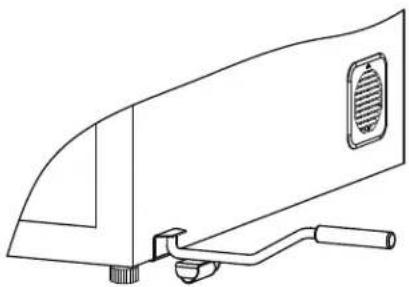
natural_image
Line drawing of a door handle assembly with a vent and handle (no text or symbols)Water Supply Requirements
A cold water supply with water pressure between 20 psi and 145 psi (138 kPa and 1,000 kPa) is required to operate the water dispenser and ice maker. If you have questions about your water pressure, call a licensed, qualified plumber.
NOTE: If the water pressure is less than what is required, the flow of water from the water dispenser could decrease or ice cubes could be hollow or irregular shaped.
Reverse Osmosis Water Supply
IMPORTANT: The pressure of the water supply coming out of a reverse osmosis system and supplying the water inlet valve of the refrigerator needs to be between 20 psi and 145 psi (138 kPa and 1,000 kPa).
If a reverse osmosis water filtration system is connected to your home cold water supply, the water pressure to the reverse osmosis system needs to be a minimum of 40 psi to 60 psi (276 kPa to 414 kPa).
If the water pressure to the reverse osmosis system is less than 40 to 60 psi (276 to 414 kPa):
■ Check to see whether the sediment filter in the reverse osmosis system is blocked. Replace the filter if necessary.
- Allow the storage tank on the reverse osmosis system to refill after heavy use. The tank capacity could be too small to keep up with the requirements of the refrigerator.
NOTE: Faucet-mounted reverse osmosis systems are not recommended.
If your refrigerator has a water filter, it may further reduce the water pressure when used in conjunction with a reverse osmosis system. Remove the water filter. See the "Filters And Accessories" section.
If you have questions about your water pressure, call a licensed, qualified plumber.
Connect the Water Supply
Read all directions before you begin.
IMPORTANT:
■ Connect to a potable water supply only.
Do not use with water that is microbiologically unsafe or of unknown quality without adequate disinfection before or after the system. Systems certified for cyst reduction may be used on disinfected waters that may contain filterable cysts.
■ Plumbing shall be installed in accordance with the International Plumbing Code and any local codes and ordinances.
■ Copper and PEX tubing connections from the household water line to the refrigerator are acceptable and will help avoid off-taste or odor in your ice or water. Check for leaks.
If PEX tubing is used instead of copper, we recommend the following Part Numbers: W10505928 (7 ft [2.14 m] jacketed PEX), 8212547 (5 ft [1.52 m] PEX), or W10267701 (25 ft [7.62 m] PEX).
■ Install tubing only in areas where temperatures will remain above freezing.
Tools Needed:
Gather the required tools and parts before starting installation.
■ Flat-blade screwdriver
■ 7/16" and 1/2" open-end wrenches or 2 adjustable wrenches
■ 1/4" nut driver
NOTE: Do not use a piercing-type or 3/16" (4.76 mm) saddle valve, which reduces water flow and clogs easier.
Connect to Water Line
IMPORTANT: If you have turned the refrigerator on before the water was connected, turn off the ice maker.
- Unplug refrigerator or disconnect power.
- Turn off main water supply. Turn on nearest faucet long enough to reduce water pressure in the water line.
- Use a 3/4"-14" shut-off valve or equivalent. The refrigerator is provided with a household supply line with the installation kit that connects to the shut-off valve and to the refrigerator.
NOTE: Appliance is equipped with a water installation kit. To assure proper connection to your water supply, use proper sealing material in the connection. Check if connection is sealed properly after some hours of operation.
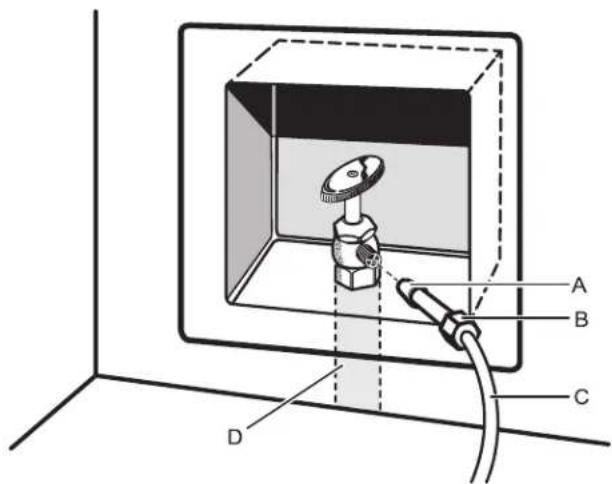
text_image
A B C DA. Sleeve
B. Nut
C. Copper tubing (to
refrigerator)
D. Household supply line
- Now you are ready to connect the copper or PEX tubing to the shutoff valve. Use 1/4" (6.35 mm) O.D. (outside diameter) soft copper or PEX tubing to connect the shutoff valve and the refrigerator.
■ Ensure that you have the proper length needed for the job. Be sure both ends of the copper tubing are cut square.
Slip compression sleeve and compression nut onto copper tubing as shown. (PEX tubing has compression sleeves and compression nuts preinstalled.) Insert end of tubing into outlet end squarely as far as it will go. Screw compression nut onto outlet end with adjustable wrench. Do not overtighten.
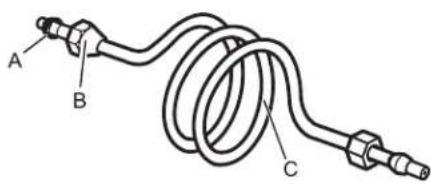
text_image
A B CA. Compression sleeve
C. Copper tubing
B. Compression nut
- Place the free end of the tubing into a container or sink, and turn on main water supply to flush out tubing until water is clear. Turn off shutoff valve on the water pipe.
NOTE: Always drain the water line before making the final connection to the inlet of the water valve, to avoid possible water valve malfunction.
- Bend the copper tubing to meet the water line inlet, located on the back of the refrigerator cabinet as shown. Leave a coil of copper tubing to allow the refrigerator to be pulled out of the cabinet or away from the wall for service.
Connect to Refrigerator
Follow the connection instructions specific to your model.
- Remove plastic cap from water valve inlet port. Attach the copper tubing to the valve inlet using a compression nut and sleeve as shown. Tighten the compression nut. Do not overtighten. Confirm copper tubing is secure by pulling on copper tubing.
- Create a service loop with the copper tubing. Avoid kinks when coiling the copper tubing. Secure copper tubing to refrigerator cabinet with a "P" clamp.
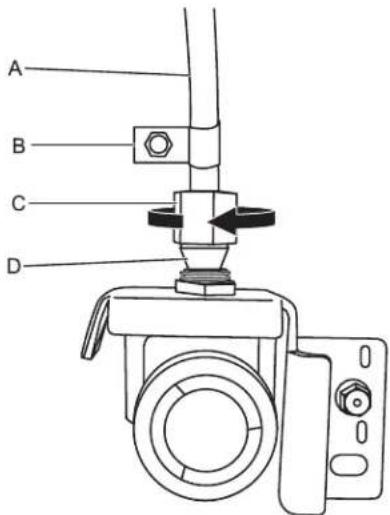
text_image
A B C DA. Copper tubing
B. "P" clamp
C. Compression nut
D. Compression sleeve
- Turn on water supply to refrigerator and check for leaks. Correct any leaks.
- If ice is desired, turn on the ice maker.
NOTE: Allow 24 hours to produce the first batch of ice. Discard the first three batches of ice produced. Allow three days to completely fill the ice storage bin.
Complete the Installation
WARNING
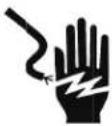
Electrical Shock Hazard
Plug into a grounded 3 prong outlet.
Do not remove ground prong.
Do not use an adapter.
Do not use an extension cord.
Failure to follow these instructions can result in death, fire, or electrical shock.
- Plug into a grounded 3-prong outlet.
NOTE: Allow 24 hours to produce the first batch of ice.
Discard the first three batches of ice produced. Allow 3 days to completely fill the ice storage bin.
- Flush the water system. See "Water and Ice Dispensers."
USING THE CONTROLS
Using the Controls
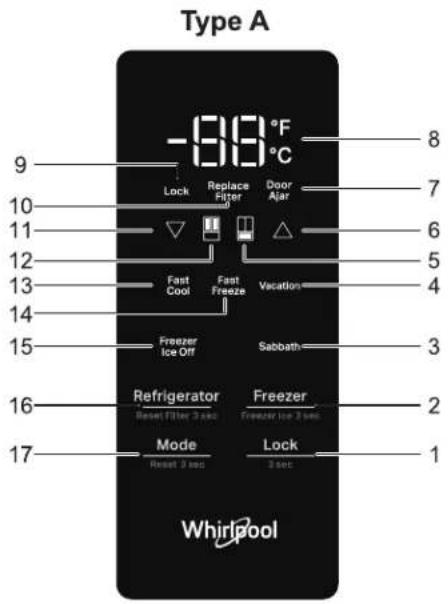
text_image
Type A -89°F °C 9 10 11 12 13 14 15 16 17 Lock Replace Filter Door Ajar Fast Cool Fast Freeze Vacation Freezer Ice Off Sabbath Refrigerator Reset Filter 3 sec Freezer Freezer Ice 3 sec Mode Reset 3 sec Lock 3 sec Whirlpool 8 7 6 5 4 3 2 1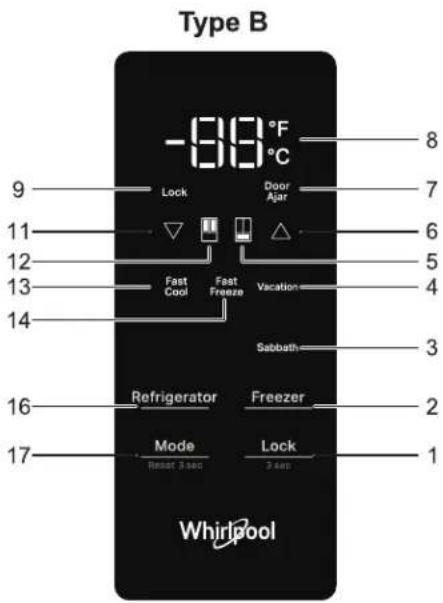
text_image
Type B -89°F °C 8 7 6 5 4 3 2 1 8 7 6 5 4 3 2 1 Clock Door Ajar Fast Cool Fast Freeze Vacation Sabbath Refrigerator Freezer Mode Lock Reset 3 sec 3 sec Whirlpool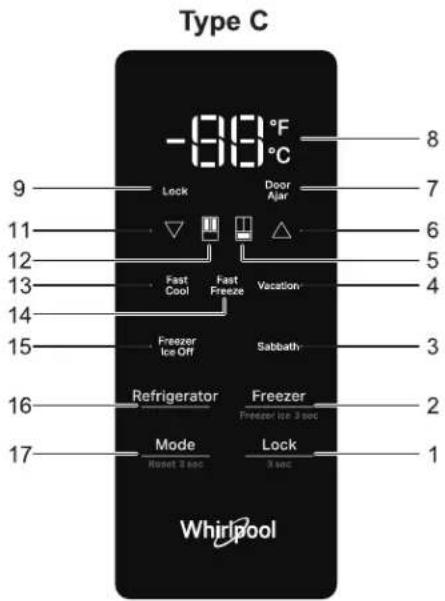
text_image
Type C -89°F °C 8 7 6 5 4 3 2 1 9 11 12 13 14 15 16 17 Lock Door Ajar Fast Cool Fast Freeze Vacation Freezer Ice Off Sabbath Refrigerator Freezer Freezer Ice 3 sec Mode Lock Reset 3 sec 3 sec WhirlpoolIMPORTANT: Before operating this appliance, make sure it has been properly installed according to the appliance's Owner's Manual.
The touch-activated controls are located on the left refrigerator door. The control panel includes information about various buttons and indicators. Refrigerator and freezer temperature indicator shows last temperature set point.
-
Lock BUTTON (Hold 3 seconds to toggle Lock)
-
Freezer BUTTON (Hold 3 seconds to toggle Freezer Ice)
-
Sabbath INDICATOR
-
Vacation INDICATOR
-
Freezer Compartment INDICATOR
-
Temperature up BUTTON
-
Door Ajar INDICATOR
-
Celsius/Fahrenheit INDICATOR
-
Lock INDICATOR
-
Replace Filter INDICATOR
-
Temperature down BUTTON
-
Refrigerator Compartment INDICATOR
-
Fast Cool INDICATOR
-
Fast Freeze INDICATOR
-
Freezer Ice Off INDICATOR
-
Refrigerator BUTTON (Hold 3 seconds to Reset Filter)
-
Mode BUTTON (Hold 3 seconds to Reset Mode)
NOTE: Refer to the options and indicators based on applicable models.
Temperature Settings
| Compartment | Temperature range |
| Refrigerator | 33°F to 42°F (1°C to 6°C) |
| Freezer | -5°F to 5°F (-21°C to -15°C) |
When adjusting temperature set points, use the following chart as a guide:
| CONDITION | TEMPERATURE ADJUSTMENT |
| Refrigerator too cold | Refrigerator setting 1°higher |
| Refrigerator too warm | Refrigerator setting 1°lower |
| Freezer too cold | Freezer setting 1° higher |
| Freezer too warm/too little ice | Freezer setting 1° lower |

Viewing and Adjusting Temperature Set Points
Adjusting Fresh Food and Freezer Compartment Temperature:
For your convenience, your refrigerator and freezer controls are preset at the factory.
When you first install your refrigerator, make sure that the controls are still set to the recommended set points. The factory recommended set points are 37^ F ( 3^ C) for the refrigerator and 0^ F (-18°C) for the freezer. Pressing Temperature up button or Temperature down button will toggle temperature set points.
IMPORTANT:
■ Wait 24 hours before you put food into refrigerator. If you add food before refrigerator has cooled completely, your food may spoil.
NOTE: Adjusting the set points to a colder than recommended setting will not cool compartments any faster.
If the temperature is too warm or too cold in the refrigerator or freezer, first check the air vents to be sure they are not blocked before adjusting the controls.
■ The recommended settings should be correct for normal household use. The controls are set correctly when milk or juice is as cold as you like and when ice cream is firm.
NOTE: Areas such as a garage, basement or porch may have higher humidity or extreme temperatures. You may need to adjust the temperature away from the recommended settings to accommodate for these conditions.
■ Wait at least 24 hours between adjustments. Recheck the temperatures before other adjustments are made.
Mode Button
■ Press the Mode button to active the function and then press again to choose the modes: "Fast Cool", "Fast Freeze", "Vacation", "Sabbath". For example, when the Sabbath is selected, the Sabbath INDICATOR flashes, and after 3 seconds the Sabbath mode is activated, the Sabbath INDICATOR will be illuminated.
■ Press and hold Mode button for 3 seconds to reset mode.
Fast Cool
The Fast Cool feature assists with periods of high refrigerator use, full grocery loads, or temporarily warm room temperatures.
■ Unlock the user interface. See "Key Lock" item for details.
■ To activate or turn off Fast Cool, see "Mode Button" item for details.
■ When feature is activated, the Fast Cool feature will remain on for 2.5 hours unless manually turned off.
Fast Freeze
The Fast Freeze feature assists with periods of high freezer use, full grocery loads, or temporarily warm room temperatures.
■ Unlock the user interface. See "Key Lock" item for details.
■ To activate or turn off Fast Freeze, see "Mode Button" item for details.
■ After placing fresh food in the freezer, 24 hours on Fast Freeze function is generally sufficient; After 24 hours the fast freeze function automatically deactivates.
NOTE: The Fast Cool feature and the Fast Freeze feature can be activated simultaneously.
Vacation Mode
This mode is designed to avoid your appliance from wasting energy during times when it's not in regular use (when you are on vacation for example). By selecting this function the temperature of fresh food compartment will automatically be set to 53.6°F (12°C).
■ Unlock the user interface. See "Key Lock" item for details.
■ To activate or turn off Vacation Mode, see "Mode Button" item for details.
Press Mode button to choose Fast Cool or Fast Freeze will turn off the vacation feature.
IMPORTANT: If this mode is selected then all food and drinks must be removed from fresh food compartment.
Freezer Ice Maker
■ Unlock the user interface. See "Key Lock" item for details.
■ Press and hold 3 seconds the Freezer button to activate or deactivate the Freezer Ice maker.
When the freezer Ice maker off, the Freezer Ice icon will be illuminated.
NOTE: The default setting of Freezer ice maker is on.
Temperature Unit (°C or °F)
■ Unlock the user interface. See "Key Lock" item for details.
■ Press and hold "Temperature up" and "Temperature down" buttons for 3 seconds temperature unit between Degree Celsius and Degree Fahrenheit.
Door Open Alarm
■ The Door Open Alarm feature sounds an alarm and blinks the "Door Ajar" icon when any of the three doors is open for 5 minutes or more.
■ The alarm will repeat every 2 minutes. Close all doors to turn it off.
NOTE: To mute audible alarm while keeping the doors open, such as while cleaning inside of refrigerator, touch any button on control panel. The alarm sound will be temporarily turned off, but the Door Ajar icon will still be displayed on the control panel.
Key Lock
■ Press and hold the Lock button for 3 seconds to activate lock feature.
■ To deactivate lock, press and hold the Lock button for 3 seconds. The lock feature will ignore all interaction with control panel until the user unlocks the control panel. This feature is meant to avoid unintentional changing of settings.
Lighting
IMPORTANT : The lights in both the refrigerator and freezer compartments use LED technology. If the lights do not illuminate when the door or drawer is opened, call for assistance or service. Refer to the Quick Start Guide for contact information.
Sabbath Mode
■ Unlock the user interface. See "Key Lock" item for details.
■ To activate or turn off Sabbath Mode, see "Mode Button" item for details.
■ The Sabbath mode stays active for 80 hours once it is activated. After that, it will be deactivated automatically.
■ When the refrigerator is in Sabbath mode, the buttons, the display, and the internal lights do not function. The refrigerator and freezer, however, continue to cool.
REFRIGERATOR USE
Water and Ice Dispensers (on some models)
Water and Ice Control

| Keypad | Feature | Instructions |
| Reset Filter | Filter Reset | After replacing the filter, long press 3 seconds, the filter replacement icon will go out, and the filter service life will be reset. |
| Lock | Lock | Press 3 seconds to lock or unlock the display. |
| Cubed | Ice Function | Press this button to select whole ice cubes. |
| Crushed | Ice Function | Press this button to select crushed ice. |
| Ice Maker Off | Ice Maker Off | Press and hold this button for 3 seconds to turn ON or OFF ice maker. |
IMPORTANT:
■ Allow 3 hours for the refrigerator to cool down and chill water.
■ Allow 24 hours to produce the first batch of ice. Discard the first 3 batches of ice produced.
■ The dispensing system will not operate if the left-hand refrigerator door is open.
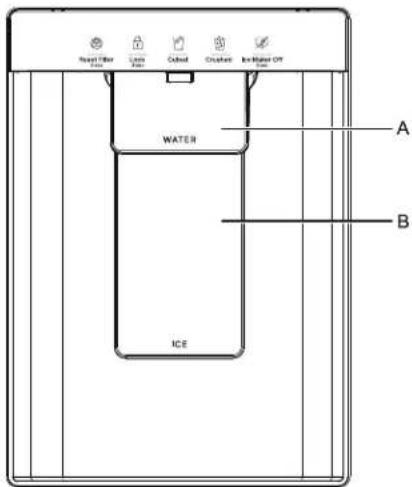
text_image
Water ICE A BA. Water dispenser paddle
B. Ice dispenser paddle
Flush the Water System
Air in the water dispensing system can cause the water dispenser to drip. After connecting the refrigerator to a water source or replacing the water filter, flush the water system.
Flushing the water dispensing system forces air from the water line and filter and prepares the water filter for use. Additional flushing may be required in some households.
NOTE: As air is cleared from the system, water may spurt out of the dispenser.
- Using a sturdy container, depress and hold the water dispenser paddle for 5 seconds.
- Release the dispenser paddle for 5 seconds. Repeat steps 1 and 2 until water begins to flow.
- Once water begins to flow, continue depressing and releasing the dispenser pad (5 seconds on, 5 seconds off) until a total of 3 gallons (12 L) has been dispensed.
Dispensing
Touch CUBED or CRUSHED for your ice selection.
NOTES:
For crushed ice, cubes are crushed before being dispensed. This may cause a slight delay when dispensing crushed ice. Noise from the ice crusher is normal and pieces of ice may vary in size.
■ When changing from crushed to cubed, a few ounces of crushed ice will be dispensed along with the first cubes.
The Water Dispenser
IMPORTANT:
Dispense at least 1 qt. (1 L) of water every week to maintain a fresh supply.
If the flow of water from the dispenser decreases, it could be caused by low water pressure.
■ With the water filter removed, dispense 1 cup (237 mL) of water. If 1 cup of water is dispensed in 8 seconds or less, the water pressure to the refrigerator meets the minimum requirement.
If it takes longer than 8 seconds to dispense 1 cup (237 mL) of water, the water pressure to the refrigerator is lower than recommended. See "Water Supply Requirements" and online "Troubleshooting" for more information.
Ice Maker and Storage Bin (on some models)
IMPORTANT: To avoid low ice production and poor quality ice, flush the water system before turning on the ice maker. See the "Water Dispenser" section.
■ Following installation, allow 24 hours to produce the first batch of ice. Discard the first 3 batches of ice produced. Allow 2 to 3 days to fill the ice storage bin.
The quality of your ice will be only as good as the quality of the water supplied to your ice maker. Avoid connecting the ice maker to a softened water supply. Water softener chemicals (such as salt) can damage parts of the ice maker lead to poor quality ice. If a softened water supply cannot be avoided, make sure the water softener is operating properly and is well maintained.
If the ice in the storage bin clumps together, break up ice using a plastic utensil and discard. Do not use anything sharp to break up the ice. This can cause damage to the ice bin and the dispenser mechanism.
■ Do not store anything in the ice storage bin.
■ Ice maker kits shall be installed only by the manufacturer or it's service technicians.
Style 1 - Ice Maker in the Refrigerator (on some models)
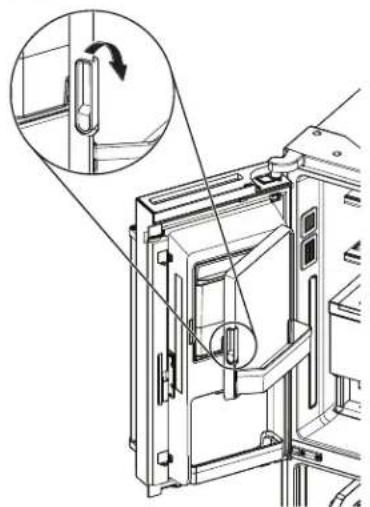
The ice maker is located on the left door behind the bins. Ice cubes are ejected into the ice storage bin located on the left-hand refrigerator door.
Remove and Replace the Ice Storage Bin
To open the Ice Maker box, pull the ice maker door lever until the door releases.
natural_image
Technical line drawing of a door frame assembly with an inset showing a rotating lever mechanism (no text or symbols)■ Remove the ice storage bin by inserting your fingers into the hole at the base of the bin and pulling the latch to release the bin from the compartment. Lift the storage bin up and pull it straight out.
■ Replace the storage bin inside the ice compartment and push down to make sure it is firmly in place.
Ice Production Rate
■ Your ice maker should produce approximately 3.5 lbs (1.6 kg) of ice per day under normal operation.
Turn the Ice Maker On/Off
■ To Turn on your Ice Maker, navigate to the Ice maker section under Ice Maker Off/3sec.
■ To Turn off your Ice Maker, navigate to the Ice maker section under Ice Maker Off/3sec.
NOTE:
- Your ice maker has an automatic shutoff. The sensor will automatically stop ice production if the storage bin is full or the door is open. The control will remain in the On position.
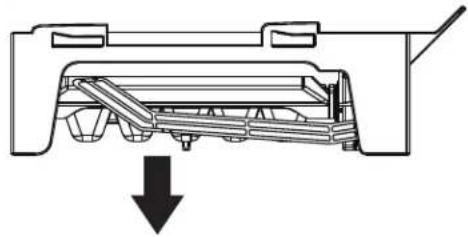
Style 2 - Ice Maker in the Freezer (on some models)
The ice maker is powered on by default.
Press and hold Freezer button on user interface to manually turn the ice maker ON or OFF.
The sensor will automatically stop ice production if the storage bin is full or the door is open.
natural_image
Cross-sectional diagram of a mechanical device showing internal components and a downward arrow (no text or symbols)NOTE: Turn off the ice maker before removing the ice storage bin to serve ice or to clean the bin. This will keep the ice cubes from dropping out of the ice maker and into the freezer compartment. After replacing the ice storage bin, turn on the ice maker.
Wash the ice storage bin with mild soap and warm water.
Slide the ice storage bin under the ice maker and push it toward the back as far as it will go.
Ice Production Rate
Allow 24 hours to produce the first batch of ice. Discard the first three batches of ice produced.
Allow 3 days to completely fill the ice storage bin. The ice maker should produce approximately 3 lbs (1.4 kg) (8 to 12 batches) of ice in a 24-hour period.
Once the ice box is full, if you want to make more ice, use an ice spatula to move the ice inside the ice box towards the door.
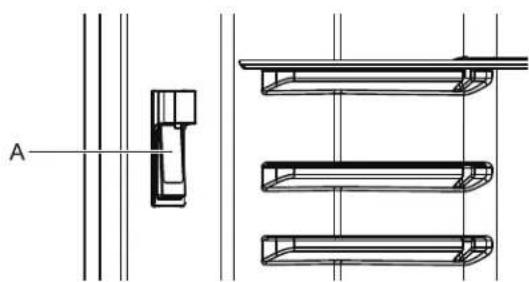
Internal Water Operation (on some models)
■ Press and hold the water paddle to turn on water dispensing.
■ Release the water paddle to turn off the water dispensing.
NOTE: Put the water cup as close as possible to the water paddle when dispensing water. Release the water paddle and wait 1 more second before moving the water cup away. Otherwise, there may be water spill out of the cup.
natural_image
Technical line drawing of a mechanical assembly with three views (no text or symbols)A. Water dispenser paddle
Filters And Accessories
Do not use with water that is microbiologically unsafe or of unknown quality without adequate disinfection before or after the system. Systems certified for cyst reduction may be used on disinfected waters that may contain filterable cysts.
Water Filter Installation
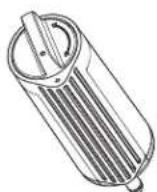
- Locate the filter housing in the upper left corner of the refrigerator and remove the filter cover.
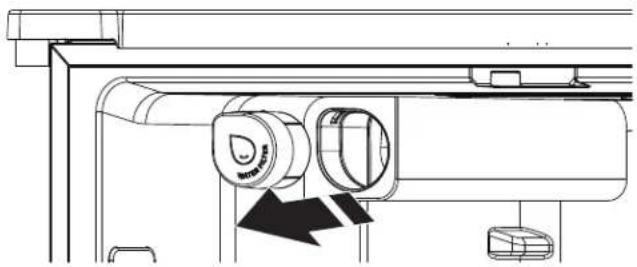
natural_image
Technical line drawing of a mechanical device with no visible text or symbols- Take the filter out of the packaging and remove the protective cover on the filter.
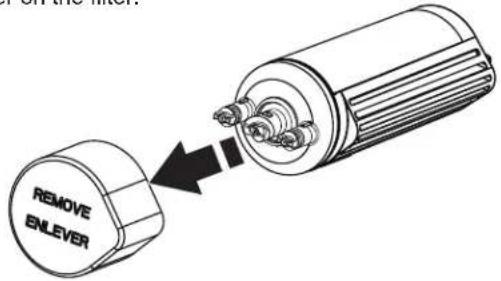
text_image
REMOVE ENLEVER- Make sure the locking knob is in the non-locking position.
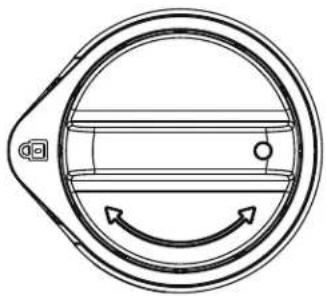
natural_image
Pure mechanical diagram showing a circular component with internal horizontal bands and directional arrows, no text or symbols present.- Insert the filter into the filter housing.
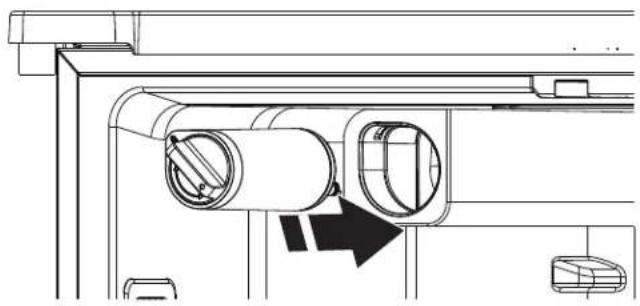
natural_image
Technical line drawing of a mechanical assembly with cylindrical components and a directional arrow (no text or symbols)- Turn the locking knob clockwise 180° to keep the filter locked.
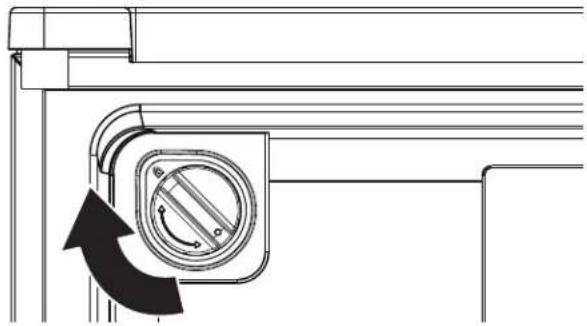
natural_image
Technical diagram showing a mechanical component with an arrow indicating rotational motion (no text or symbols present)- Re-install the filter cover.
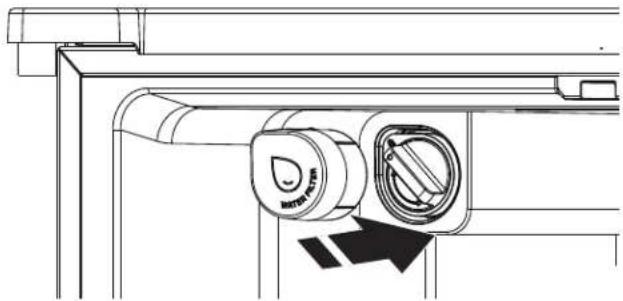
natural_image
Technical line drawing of a mechanical device with two circular components and a label (no readable text or symbols)NOTE: If the filter is not installed correctly, water may dispense at a lower flow rate and there will be slower ice production. Improper filter installation may also cause the water filter housing to leak.
Replace and Install the Water Filter
The water filter should be replaced every 6 months based on a flow rate of 0.52 gpm (1.97 lpm) that filters 200 gallons (757 L) of water.
To order a replacement filter, contact us. See the "Accessories" section in the Use and Care Guide for information on ordering.
- Locate the filter housing in the upper left corner of the refrigerator and remove the filter cover.
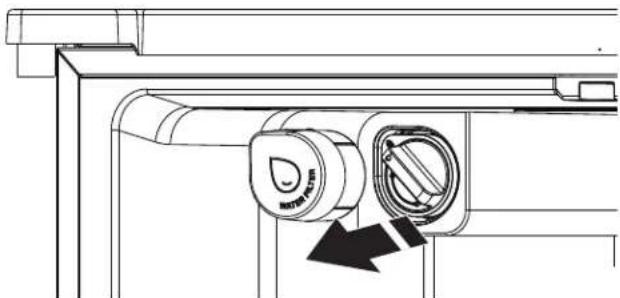
natural_image
Technical line drawing of a mechanical device with a circular component and directional arrow (no text or symbols)- Turn the locking knob 180° counterclockwise so that the filter is in the non-locking state.
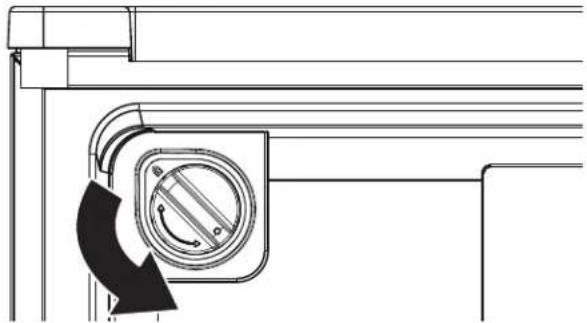
natural_image
Technical line drawing of a mechanical component with a curved arrow indicating rotation (no text or symbols)- Remove the old filter outwards.
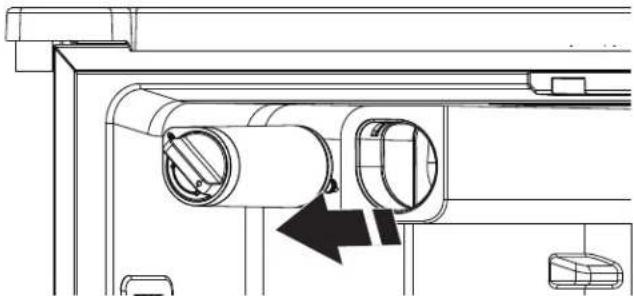
natural_image
Technical line drawing of a mechanical component with internal components and directional arrows (no text or symbols)- Pick up the new filter and remove the shield from the filter.
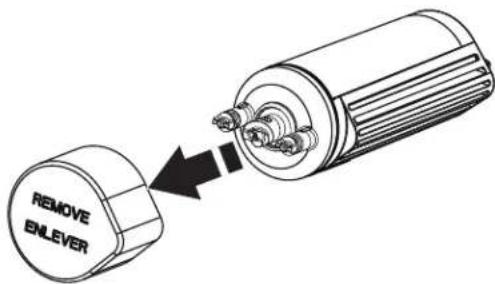
text_image
REMOVE ENLEVER- Make sure the locking knob is in the non-locking position.
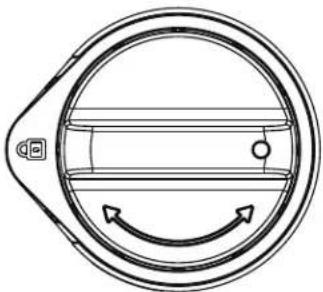
natural_image
Pure mechanical diagram showing a circular component with internal channels and directional arrows, no text or symbols present.- Insert the filter into the filter housing.
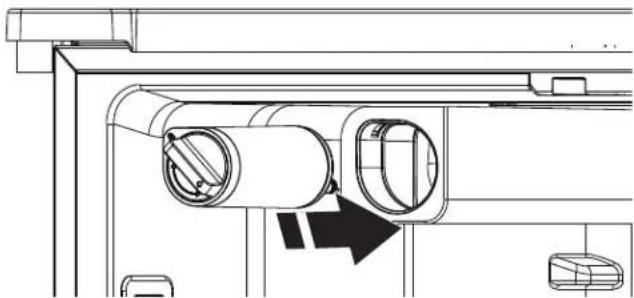
natural_image
Technical line drawing of a mechanical assembly with cylindrical components and a black arrow indicating direction (no text or symbols)- Turn the locking knob clockwise 180° to keep the filter locked.
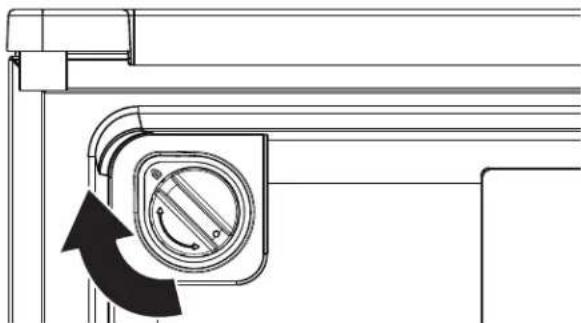
natural_image
Technical diagram of a mechanical component with a circular component and directional arrow (no text or symbols)- Re-install the filter cover.
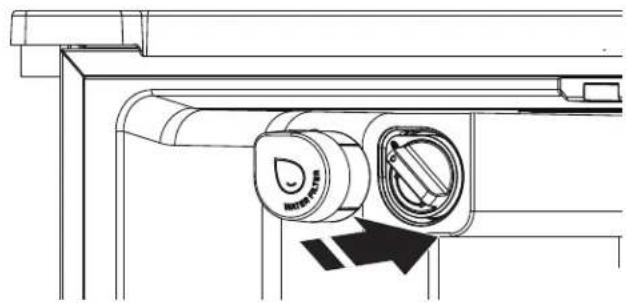
natural_image
Technical line drawing of a mechanical device with a water drop component (no text or symbols)The Water Filter Status Lights
The Water Filter Status indicator displays the status of the water filter.
The "Replace Filter" or "Reset Filter" icon (depending on the modles) will illuminate and blink continuously during dispensing when the rated volume of water has passed through the filter or 6 months have passed since the filter was installed. A new water filter should be installed immediately when the "Replace Filter" or "Reset Filter" light is illuminated.
■ After 14 days at Replace Filter stage, the "Replace Filter" or "Reset Filter" icon will glow at all times and blink continuously during dispensing. Also, an alert chime will sound three times following dispensing. The water filter should be replaced at least every 6 months. After changing the water filter, the user needs to reset the filter status light. Press and hold the "Reset filter" or "Refrigerator" (depending on the modles) button for 3 seconds to reset the Water filter status. After that, the icon "Replace Filter" or "Reset filter" will turn OFF.
NOTE: "Replace filter" will remain illuminated if the filter is not reset on the user interface(UI).
Online Ordering Information
To order a replacement filter, contact us at www.whirlpool.com/Parts & Accessories. See the "Quick Start Guide" for details.
DOOR AND HANDLE INSTRUCTIONS Remove And Replace Refrigerator Doors
NOTE: Measure the width of your door opening to see whether or not you need to remove refrigerator doors to move refrigerator into your home. If door removal is necessary, see the following instructions.
IMPORTANT: If refrigerator was previously installed and you are moving it out of the home, turn refrigerator control off before you begin removing the doors. Unplug refrigerator or disconnect power. Remove food and adjustable door or utility bins from doors.
TOOLS NEEDED: 6 mm socket wrench, 5 mm socket wrench and #2 Phillips screwdriver.
WARNING
Electrical Shock Hazard
Disconnect power before removing doors.
Failure to do so could result in death or electrical shock.
Style 1 - Ice Maker in the Left-Hand Door
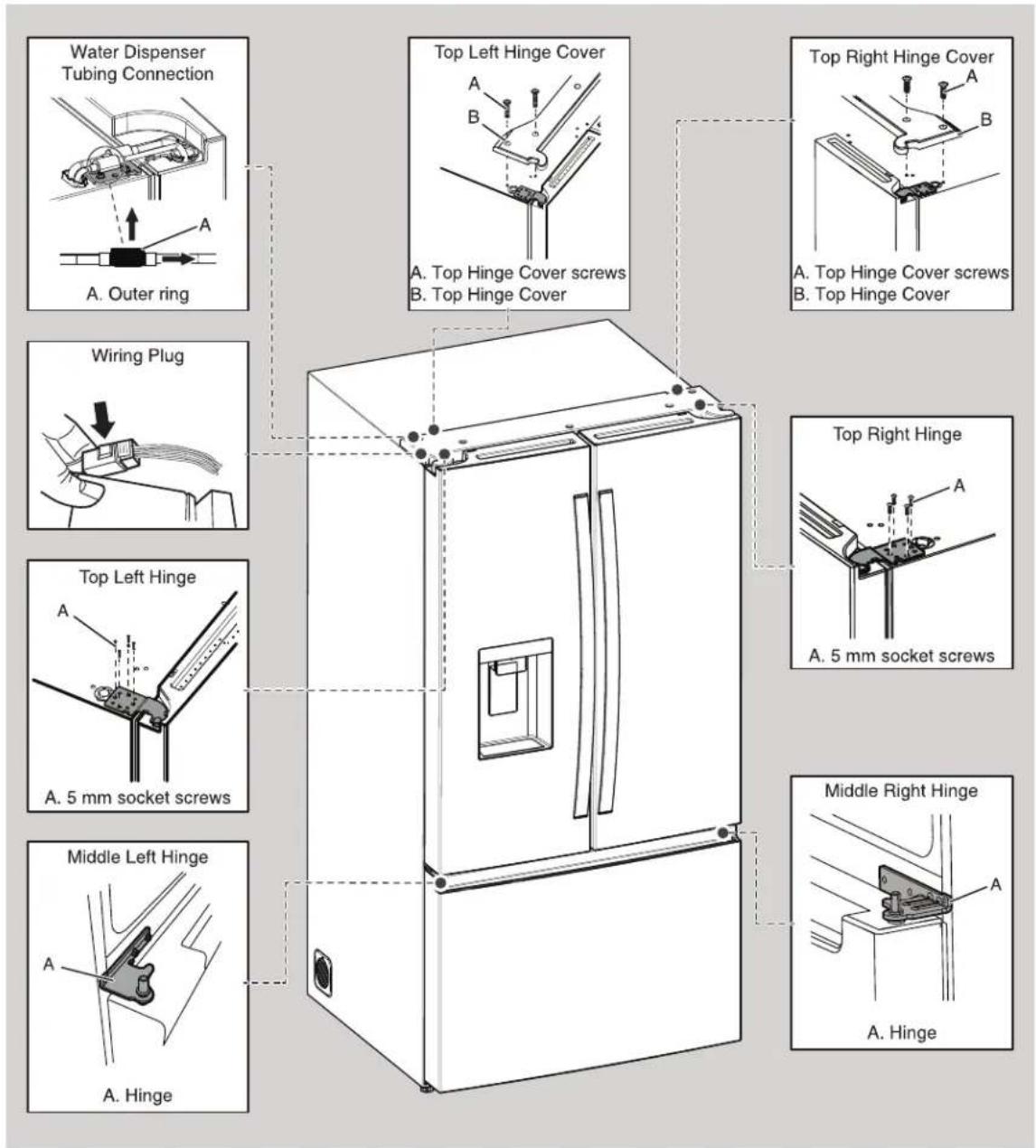
text_image
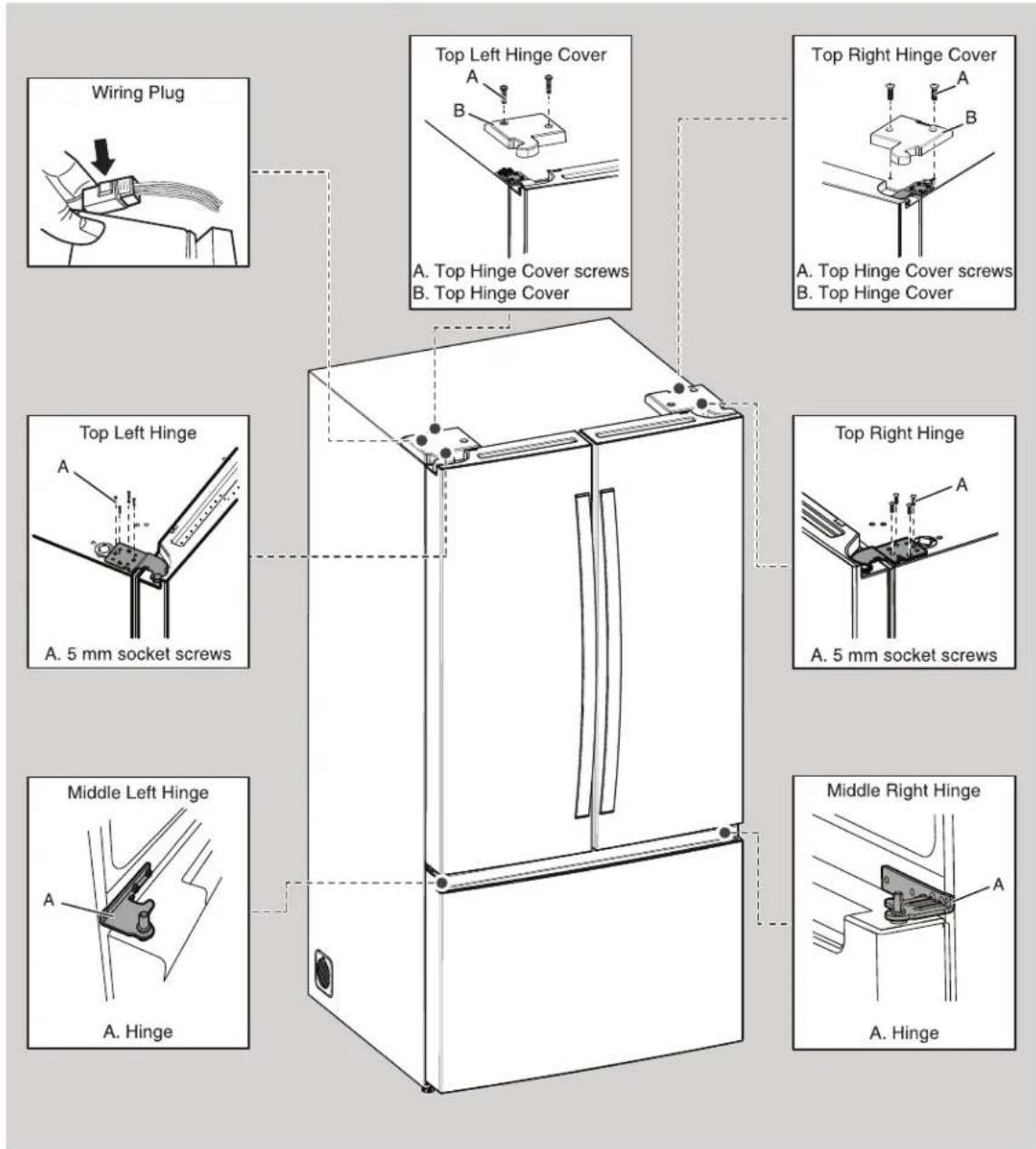
Water Dispenser Tubing Connection A. Outer ring Top Left Hinge Cover A. Top Hinge Cover screws B. Top Hinge Cover Top Right Hinge Cover A. Top Hinge Cover screws B. Top Hinge Cover Wiring Plug Top Left Hinge A. 5 mm socket screws Top Right Hinge A. 5 mm socket screws Middle Left Hinge A. Hinge Middle Right Hinge A. HingeRemove And Replace Refrigerator Doors
NOTE: Measure the width of your door opening to see whether or not you need to remove refrigerator doors to move refrigerator into your home. If door removal is necessary, see the following instructions.
IMPORTANT: If refrigerator was previously installed and you are moving it out of the home, turn refrigerator control off before you begin removing the doors. Unplug refrigerator or disconnect power. Remove food and adjustable door or utility bins from doors.
TOOLS NEEDED: 6 mm socket wrench, 5 mm socket wrench and #2 Phillips screwdriver.

WARNING
Electrical Shock Hazard
Disconnect power before removing doors.
Failure to do so could result in death or electrical shock.
Style 2 - Non-Ice Maker in the Left-Hand Door
text_image
Wiring Plug Top Left Hinge Cover A. Top Hinge Cover screws B. Top Hinge Cover Top Right Hinge Cover A. Top Hinge Cover screws B. Top Hinge Cover Top Left Hinge A. 5 mm socket screws Top Right Hinge A. 5 mm socket screws Middle Left Hinge A. Hinge Middle Right Hinge A. HingeRemove Refrigerator Doors
WARNING

Electrical Shock Hazard
Disconnect power before removing doors.
Failure to do so could result in death or electrical shock.
Remove Right-Hand Door
- Unplug refrigerator or disconnect power.
- Keep refrigerator doors closed until you are ready to lift them free from the cabinet.
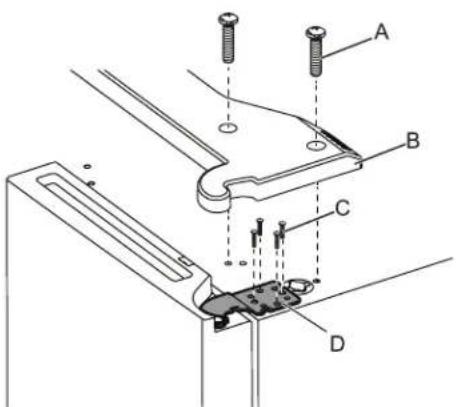
NOTE: Provide additional support for refrigerator door while the hinges are being removed. Do not depend on the door gasket magnets to hold the door in place while you are working. - Using a Phillips screwdriver, remove cover from top hinge.
- Using 5 mm socket wrench, remove four screws from top hinge and set aside.
text_image
Technical diagram of a mechanical assembly with labeled parts A, B, C, and DA. Top hinge cover screw
B. Top hinge cover
C. 5 mm socket screws
D. Top hinge
WARNING
Excessive Weight Hazard
Use two or more people to lift the appliance door.
Failure to do so can result in back or other injury.
- Lift refrigerator door from the middle hinge pin. The top hinge will come away with the door.
Remove Left-Hand Door
IMPORTANT: The wiring for UI run through left-hand door hinge, so they must be disconnected before removing the door.
Style 1 - Ice Maker in the Left-Hand Door
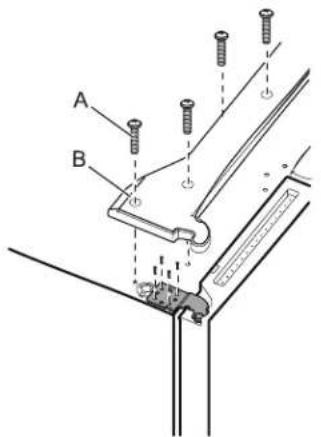
- Using a Phillips screwdriver, remove cover from top hinge.
text_image
A BA. Top hinge cover screw
B. Top hinge cover
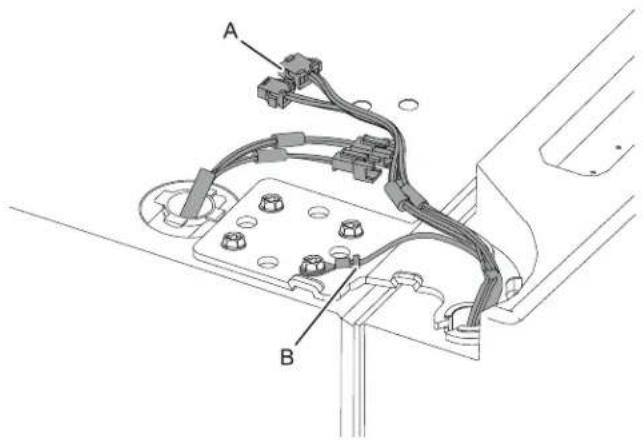
- Disconnect two wiring plugs located on top of the door hinge.
■ Grasp each side of wiring plugs. With your left thumb, press down to release the catch and pull the sections of the plugs apart.
text_image
A BA. Wiring Plug
B. Ground (earth) connector
- Disconnect the water dispenser tubing located on top of the door hinge. Firmly pull up on the clasp. Then, pull the tubing out of the fitting.
NOTE: The water dispenser tubing remains attached to the left-hand refrigerator door.
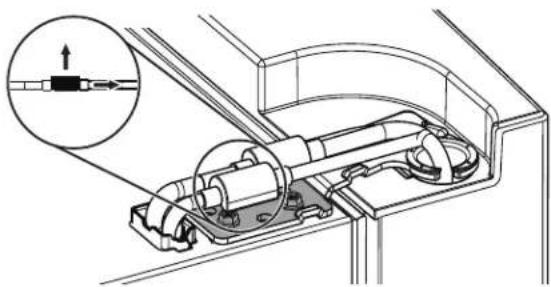
natural_image
Technical line drawing of a mechanical assembly with an inset showing a close-up of a component (no text or symbols present)- Using 5 mm socket wrench, remove four internal screws from top hinge and set aside.
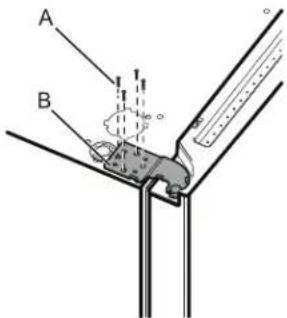
text_image
A BA. 5 mm socket screws
B. Top Hinge
NOTE: Provide additional support for refrigerator door while hinges are being removed. Do not depend on the door gasket magnets to hold the door in place while you are working.
- Lift refrigerator door from bottom hinge pin. The top hinge will come away with door.
NOTE: It may not be necessary to remove brake feet assemblies to move the refrigerator through a doorway.
■ Only if necessary, use 6 mm socket wrench and #2 Phillips screwdriver to remove middle hinge.
Style 2 - Non-Ice Maker in the Left-Hand Door
- Using a Phillips screwdriver, remove cover from top hinge.
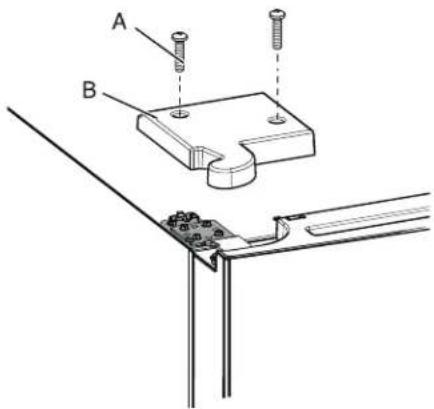
text_image
A BA. Top hinge cover screw
B. Top hinge cover
- Using 5 mm socket wrench, remove four internal screws from top hinge and set aside.
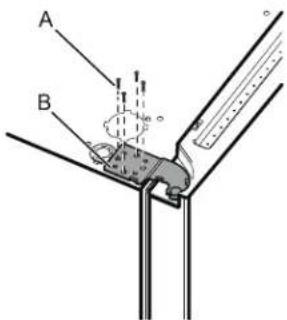
text_image
A BA. 5 mm socket screws
B. Top Hinge
NOTE: Provide additional support for refrigerator door while hinges are being removed. Do not depend on the door gasket magnets to hold the door in place while you are working.
- Lift refrigerator door from bottom hinge pin. The top hinge will come away with door.
NOTE: It may not be necessary to remove brake feet assemblies to move the refrigerator through a doorway.
■ Only if necessary, use 6 mm socket wrench and #2 Phillips screwdriver to remove middle hinge.
Replace Right-Hand Refrigerator Door
- Set right-hand door onto middle hinge pin.
- Insert top hinge pin into open hole in top of refrigerator door.
- Using four 5 mm socket screws, fasten hinge to cabinet. Do not tighten screws completely.
Replace Left-Hand Refrigerator Door
- Set left-hand door onto middle hinge pin.
- Using four 5 mm socket screws, fasten hinge to cabinet. Do not tighten screws completely.
- Reconnect electrical wiring.
■ Push together two sections of wiring plug.
■ Reconnect earth wire to hinge screw.
Final Steps
- Completely tighten eight 5 mm socket screws.
- Replace top hinge covers.
Remove and Replace Freezer Door
Depending on the width of your door opening, it may be necessary to remove the freezer door to move the refrigerator into your home.
IMPORTANT:
If the refrigerator was previously installed and you are moving it out of the home, before you begin, turn the refrigerator control off, and unplug the refrigerator or disconnect power.
■ Remove food and any adjustable door or utility bins from doors.
■ Two people may be required to remove and replace the freezer door.
Tools Needed: Phillips screwdriver.
Remove And Replace The Freezer Door Or Remove The Freezer Drawer
NOTE: Whether it is removing the freezer door, replacing the freezer door, or removing the freezer drawer, you must first complete steps 1 to 3, and then select steps 4, 5, and 6 according to your needs
- Open the freezer door to its full extension.
- Lift the top drawer up and push it forward to the inside of the cabinet.
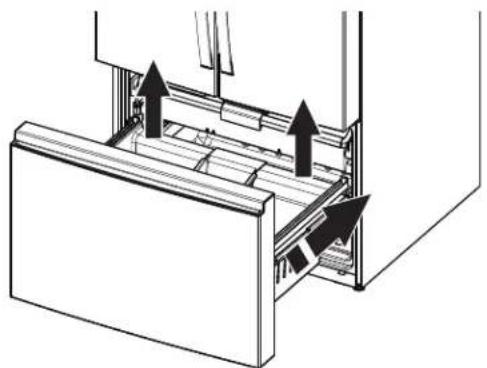
natural_image
Technical diagram of a mechanical assembly with directional arrows indicating movement or force (no text or symbols present)- Take off the bottom drawer, put it outside the cabinet.
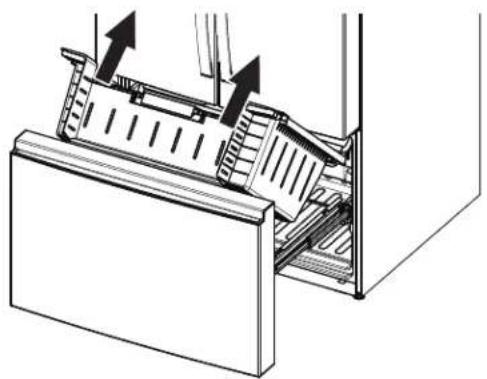
natural_image
Technical illustration of a mechanical assembly with arrows indicating motion or force (no text or symbols present)4. Remove The Freezer Door
Use a Phillips screwdriver to remove the screws connecting the freezer door to the guide rail, one screw on each side, lift the freezer door, and remove the door.
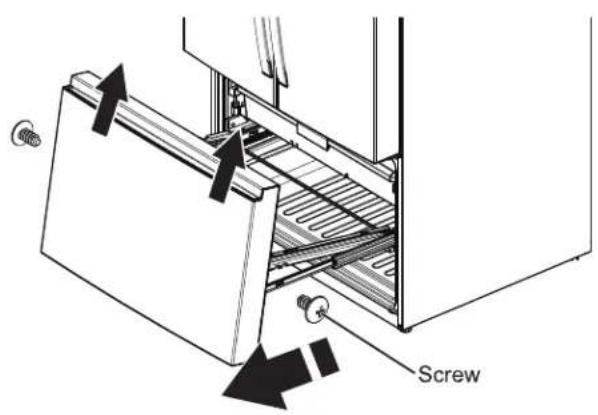
text_image
Screw5. Replace The Freezer Door
Use a Phillips screwdriver to remove four screws on each side of the door and metal support, then remove the door and replace it with a new one.
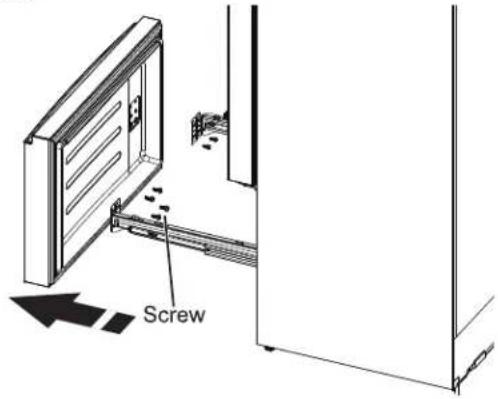
text_image
Screw6. Remove The Freezer Top Drawer
NOTE: Remove the freezer top drawer only by after-sales service professionals.
■ Find a suitable Phillips screwdriver with a total length of less than 80mm.
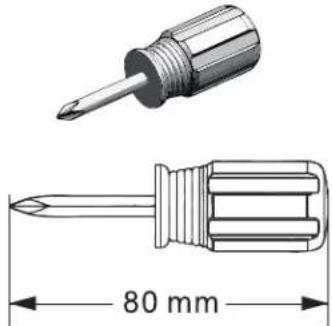
natural_image
Technical illustration of a screwdriver with dimensional annotation (80 mm height), no text or symbols present.Put the head of the screwdriver into the buckle slot under the left stop gear, exert upward and outward forces on the buckle to release the buckle, and remove the left stop gear.
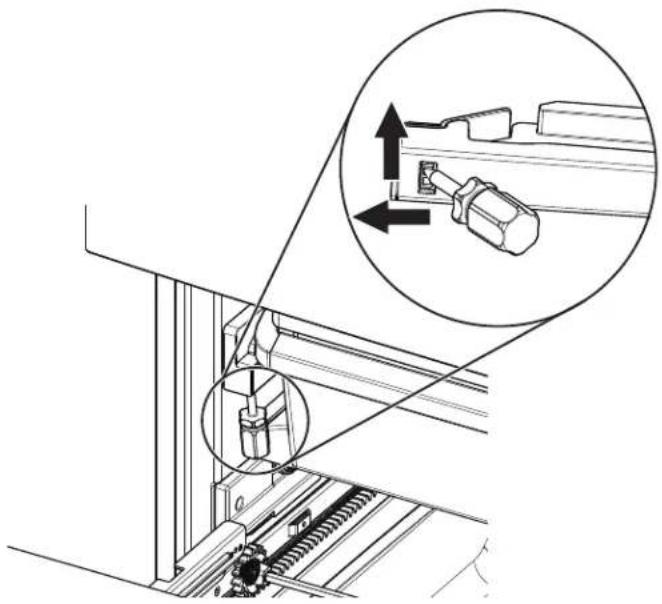
natural_image
Technical line drawing of a mechanical assembly with an inset showing a close-up of a component being inserted (no text or symbols present)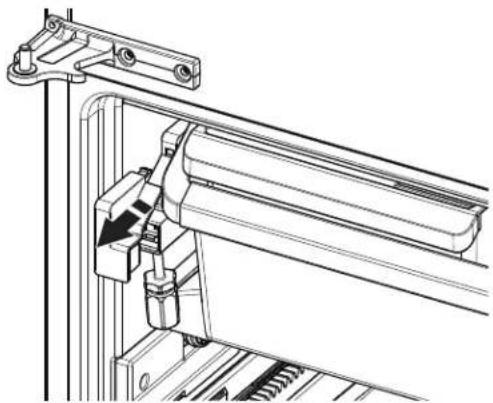
natural_image
Technical line drawing of a mechanical assembly with no visible text or symbols■ Pull the top drawer out to the stop position and lift the drawer up and out.
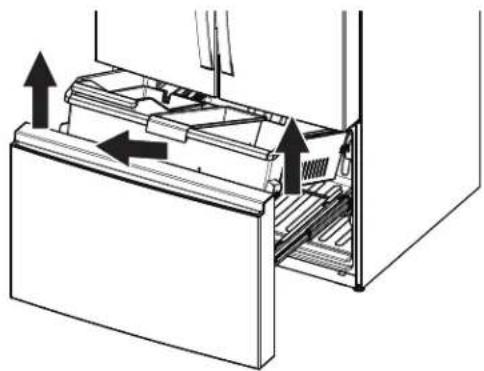
natural_image
Technical diagram of a refrigerator interior showing airflow direction (no text or labels)Final Steps
WARNING

Electrical Shock Hazard
Plug into a grounded 3 prong outlet.
Do not remove ground prong.
Do not use an adapter.
Do not use an extension cord.
Failure to follow these instructions can result in death, fire, or electrical shock.
- Plug into an grounded (earthed) socket.
- Return all removable parts and food to the drawers.
Handle Installation and Removal
Parts Included: refrigerator door handles (2), 1/4" hex head socket wrenches (1), instructionsto install thehandles in the doors(1).
Install Handles
NOTE: The handle kit is provided with instructions to install the handles in the doors. Please follow it carefully.
Shelves, Bins And Drawers
Shelves and Shelf Frames
The half shelves in your refrigerator are adjustable to match your individual storage needs. Storing similar food items together in your refrigerator and adjusting the shelves to fit different heights of items will make finding the exact item you want easier. It will also reduce the amount of time the refrigerator door is open, and save energy.
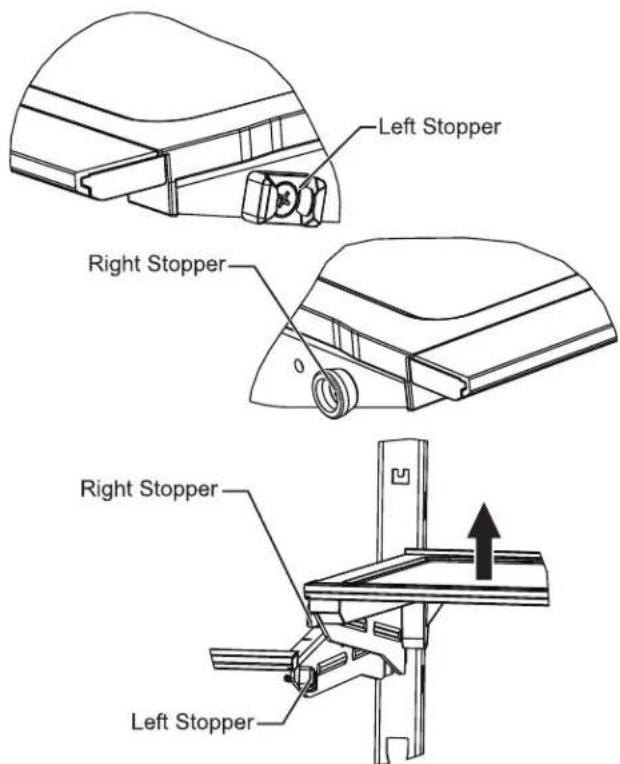
To remove and replace a half shelf with shelf frame:
- Remove the shelf by holding the front edge of left half shelf, and tilt the right half shelf up until the left and right stopper is separated.
text_image
Left Stopper Right Stopper Right Stopper Left Stopper- Uplift the whole shelf out of the shelf supports.
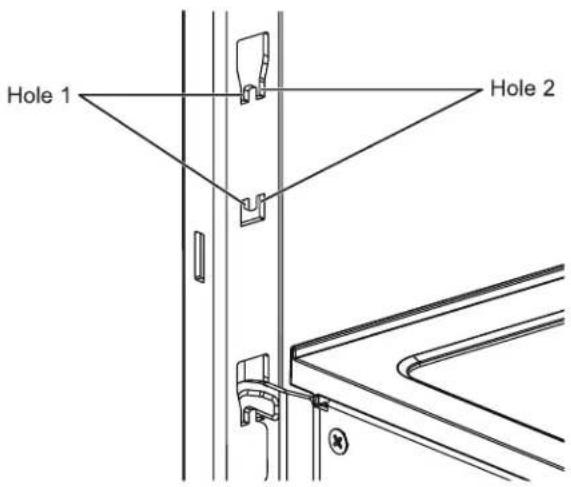
- Replace the shelf by guiding the upper fixed leg into the shelf support. Tilt the front of the shelf up until upper fixed leg drop into the shelf supports.
text_image
Hole 1 Hole 2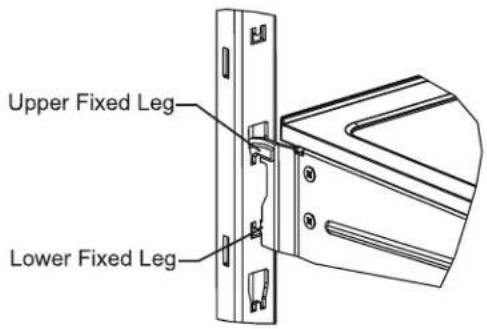
text_image
Upper Fixed Leg Lower Fixed LegNOTE: Hole 1 can only be used for left half shelf support, and Hole 2 can only be used for right half shelf support, if placed incorrectly, the shelf will be unstable and can not be used.
4. Lower the front of the shelf and make sure that the lower fixed leg is in position.
Full glass shelves
IMPORTANT:
■ Full glass shelf height are not adjustable.
■ If you want to take out crisper glass cover, you need to remove the Refrigerator Doors first.
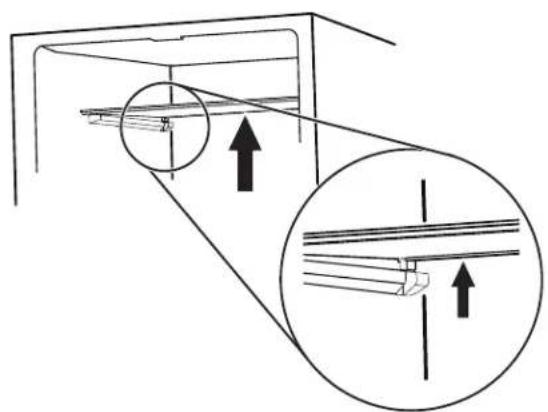
To remove and replace full glass shelf:
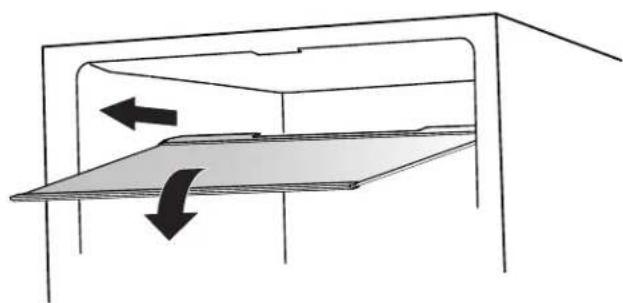
- Hold the bottom of the glass shelf with hands and lift it up until the stopper at the rear of the shelf is free from the ribs.
natural_image
Technical diagram showing mechanical assembly with pulleys and a magnified inset view (no text or symbols)- Move the glass shelf forward and lower the front shelf down until the rear trim is out of supports.
natural_image
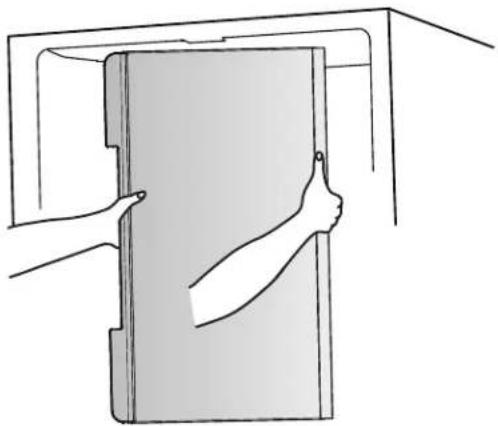
Simple line drawing of a table with arrows indicating direction, no text or symbols present- Take out the shelf, and be careful not to damage the refrigerator door.
- If step 3 isn't easy to operate, rotate the glass shelf to the position shown in the figure, and then take it out.
natural_image
Line drawing of two hands holding a rectangular object, no text or symbols presentCrisper Drawers
To remove and replace the drawers:
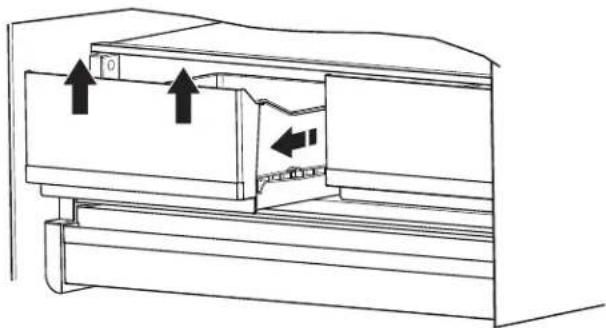
- Grasp the handle at the bottom of the drawer and slide the drawer straight out to the stop. Lift the drawer off the bottom guide.
- Replace the drawer by placing it on the bottom drawer guide and pushing it past the drawer stop into position.
natural_image
Technical line drawing of a mechanical device with arrows indicating movement or force (no text or symbols)Refrigerator Door Bins
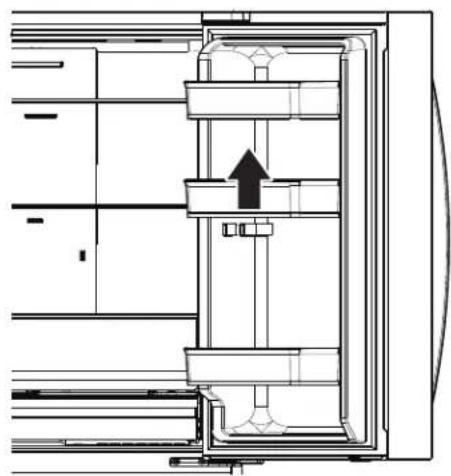
The bins on your refrigerator door are adjustable to meet your individual storage needs. The bins make it easy to customize door storage to hold gallon containers.
natural_image
Technical line drawing of a refrigerator interior showing internal compartments and doorways (no text or labels)Freezer Storage Compartments
■ Use these drawers to freeze a bigger amount of fresh or cooked food (in the best or in the fastest way).
■ Fast Freeze option allows you to store all your frozen food.
PERFORMANCE DATA SHEET
Water Filtration System
Model W11569863 (PID), W11569861 (Without PID)
Replacement element model numbers: EDRARXD1/EDRARXD1B/W11536439/WHRARXD1/
WHRARXD1B/ KADARXD1/ KADARXD1B/ MAYARXD1/ MAYARXD1B/W11486187
Capacity 200 Gallons (757 Liters) with PID W11569863, 100 Gallons (379 Liters) without PID W11569861.
System tested and certified by UL LLC against NSF/ANSI Standard 42, 53, 401 and CSA B483.1 for the reduction of contaminants specified on the Performance Data Sheet.
This system has been tested according to NSF/ANSI Standards 42, 53, 401, and CSA B483.1 for the reduction of the substances listed below. The concentration of the indicated substances in water entering the system was reduced to a concentration less than or equal to the permissible limit for water leaving the system, as specified in NSF/ANSI Standards 42, 53, 401, and CSA B483.1.
Test Parameters: pH = 7.5 ± 0.5 unless otherwise noted. Flow = 0.52 gpm (1.97 Lpm). Pressure = 60 psig (413.7 kPa). Temp. = 68°F to 71.6°F (20°C to 22°C). Rated service capacity = 200 gallons (757 liters) W11569863 with PID, 100 gallons (379 liters) W11569861 without PID.
The compounds certified under NSF 401 have been deemed as “emerging compounds/incidental contaminants.” Emerging compounds/incidental contaminants compounds that have been detected in drinking water supplies at trace levels. While occurring at only trace levels, these compounds can affect the public acceptance/ perception of drinking water quality.
| Substance Reduction Aesthetic Effects | Influent Challenge Concentration | Reduction Requirements | Average % Reduction | Minimum % Reduction |
| Chlorine Taste/Odor | 2.0 mg/L ± 10% | ≥ 50% reduction | 99.39 | 99 |
| Particulate Class I* | At least 10,000 particles/mL | ≥ 85% reduction | 99.52 | 99.33 |
| Contaminant Reduction | Influent Challenge Concentration | Reduction Requirements | Average % Reduction | Minimum % Reduction |
| Lead: @ pH 6.5 / @ pH 8.5 | 0.150 mg/L ± 10% | 0.005 mg/L | 99.29/99.84 | 99.07/99.46 |
| Mercury: @ pH 6.5 / @ pH 8.5 | 0.006 mg/L ± 10% | 0.002 mg/L | 97.38/92.78 | 92.98/75.86 |
| Asbestos | 10^7 to 10^8 fibers/L†† | ≥ 99% | > 99 | > 99 |
| Cysts† | 50,000/L min. | ≥ 99.95% | ≥ 99.997 | > 99.997 |
| Atrazine | 0.009 mg/L ± 10% | 0.003 mg/L | > 98.98 | > 98.95 |
| Benzene | 0.015 mg/L ± 10% | 0.005 mg/L | > 99.28 | > 99.17 |
| Carbofuran | 0.080 mg/L ± 10% | 0.040 mg/L | 83.93 | 58.7 |
| Lindane | 0.002 mg/L ± 10% | 0.0002 mg/L | 95.22 | 95 |
| P-Dichlorobenzene | 0.225 mg/L ± 10% | 0.075 mg/L | 99.95 | 99.95 |
| Tetrachloroethylene | 0.015 mg/L ± 10% | 0.005 mg/L | 99.33 | 99.29 |
| Toxaphene | 0.015 mg/L ± 10% | 0.003 mg/L | 99.27 | 99.17 |
| O-Dichlorobenzene | 1.8 mg/L± 10% | 0.6 mg/L | > 99.995 | > 99.995 |
| Toluene | 3.0 mg/L ± 10% | 1.0 mg/L | > 99.996 | > 99.996 |
| Styrene | 2.0 mg/L ± 10% | 0.1 mg/L | > 99.995 | > 99.993 |
| 1,2,4-Trichlorobenzene | 0.210 mg/L ± 10% | 0.07 mg/L | > 99.55 | > 99.42 |
| Trichloroethylene | 0.3 mg/L ± 30% | 0.005 mg/L | > 99.96 | > 99.95 |
| Endrin | 0.006 mg/L± 10% | 0.002 mg/L | 92.32 | 83.93 |
| Ethylbenzene | 2.1 mg/L ± 10% | 0.7 mg/L | > 99.99 | > 99.99 |
| 2,4 - D | 0.210 mg/L ± 10% | 0.07 mg/L | 98.89 | 94.76 |
| Turbidity | 11 NTU ± 10% | 0.5 NTU | 98.88 | 98.17 |
| Atenolol | 200 ± 20% | 30 ng/L | 95.27 | 94.98 |
| Carbamazepine | 1400 ± 20% | 200 ng/L | 96.2 | 96.09 |
| Linuron | 140 ± 20% | 20 ng/L | 93.53 | 92.31 |
| Meprobamate | 400 ± 20% | 60 ng/L | 94.54 | 94.32 |
| Trimethoprim | 140 ± 20% | 20 ng/L | 96.27 | 95.94 |
| DEET | 1400 ± 20% | 200 ng/L | 96.32 | 96.21 |
| Metolachlor | 1400 ± 20% | 200 ng/L | 96.67 | 96.5 |
| Bisphenol A | 2000 ± 20% | 300 ng/L | 95.07 | 94.82 |
| Estrone | 140 ± 20% | 20 ng/L | 96.27 | 96.15 |
| Nonylphenol | 1400 ± 20% | 200 ng/L | 92.61 | 90.48 |
| Naproxen | 140 ± 20% | 20 ng/L | 96.09 | 95.83 |
| Ibuprofen | 400 ± 20% | 60 ng/L | 95.44 | 95.13 |
| TCPP | 5000 ± 20% | 700 ng/L | 92.78 | 92.59 |
| TCEP | 5000 ± 20% | 700 ng/L | 96.62 | 96.55 |
| Phenytoin | 200 ± 20% | 30 ng/L | 95.6 | 95.12 |
| VOC** | 0.300 mg/L ± 10% | 0.015 mg/L | >99.58 | >96.21 |
It is essential that operational, maintenance, and filter replacement requirements be carried out for the product to perform as advertised. Property damage can occur if all instructions are not followed.
■ The disposable cartridge must be changed at least every 6 months. Spent adsorption media will not be regenerated and used.
■ Use replacement EDRARXD1/B, WHRARXD1/B, KADARXD1/B, MAYARXD1/. 2024 suggested retail price of \59.99 U.S.A./\69.99 Canada. Prices are subject to change without notice. Available at www.everydropwater.com
■ The filter monitor system measures the amount of water that passes through the filter and alerts you when it is time to replace the filter. To learn how to check the water filter status, see "Using the Controls" or "Water Filtration System" in the User Instructions or User Guide.
■ After changing the water filter, flush the water system. See "Water and Ice Dispensers" or "Water Dispenser" in the User Instructions or User Guide.
These contaminants are not necessarily in your water supply. While testing was performed under standard laboratory conditions, actual performance may vary.
■ The product is for cold water use only.
■ The water system must be installed in compliance with state and local laws and regulations.
■ Actual performance may vary as the testing was performed under standard laboratory conditions.
■ Do not use with water that is microbiologically unsafe or of unknown quality without adequate disinfection before or after the system. Systems certified for cyst reduction may be used on disinfected waters that may contain filterable cysts. EPA Est. No. 85075-SG-001
■ Refer to the "Warranty" section (in the User Instructions or User Guide) for the Manufacturer's limited warranty, name and telephone number.
| Application Guidelines/Water Supply Parameters | |
| Water Supply | Potable City or Well |
| Water Pressure | 30 psi - 120 psi (207 kPa - 827 kPa) |
| Water Temperature | 33°F - 100°F (0.6°C - 37.8°C) |
| Service Flow Rate | 0.52 gpm (1.97 Lpm). @ 60 psi (413.7 kPa) |
- Your water filtration system will withstand up to 120 pounds per square inch (psi) water pressure. If your water supply is higher than 80 psi, install a pressure reducing valve before installing the water filtration system.
■ Conforms to NSF/ANSI 53 for VOC reduction. See Table below for individual contaminants and reduction performance.
*Class I particle size: >0.5 to >1 um
**This VOC performance accounts for 39 contaminant removals based on VOC surrogate testing †Based on the use of polystyrene microsphere
Fibers greater than 10 um in length
Performance data sheet reduction claims for organic chemicals included by surrogate testing
| Substance | Influent challenge concentration (mg/L) | Maximum permissible product water concentration (mg/L) |
| alachlor | 0.050 | 0.001 |
| altrazine | 0.100 | 0.003 |
| benzene | 0.081 | 0.001 |
| carbofuran | 0.190 | 0.001 |
| carbon tetrachloride | 0.078 | 0.0018 |
| chlorobenzene | 0.077 | 0.001 |
| chloropicrin | 0.015 | 0.0002 |
| 2,4-d | 0.110 | 0.0017 |
| dibromochloropropane (DBCP) | 0.052 | 0.00002 |
| o-dichlorobenzene | 0.080 | 0.001 |
| p-dichlorobenzene | 0.040 | 0.001 |
| 1,2-dichloroethane | 0.088 | 0.0048 |
| 1,1-dichloroethylene | 0.083 | 0.001 |
| cis-1,2-dichloroethylene | 0.170 | 0.0005 |
| trans-1,2-dichloroethylene | 0.086 | 0.001 |
| 1,2-dichloropropane | 0.080 | 0.001 |
| cis- 1,3-dichloropropylene | 0.079 | 0.001 |
| dinoseb | 0.170 | 0.002 |
| endrin | 0.053 | 0.00059 |
| ethylbenzene | 0.088 | 0.001 |
| ethylene dibromide (EDB) | 0.044 | 0.00002 |
| haloacetonitriles (HAN) | ||
| bromochloroacetonitrile | 0.022 | 0.0005 |
| dibromoacetonitrile | 0.024 | 0.0006 |
| dichloroacetonitrile | 0.0096 | 0.0002 |
| trichloraacetonitrile | 0.015 | 0.0003 |
| haloketones (HK) | ||
| 1,1-dichloro-2-propanone | 0.0072 | 0.0001 |
| 1,1,1-trichloro-2-propanone | 0.0082 | 0.0003 |
| heptachor | 0.025 | 0.00001 |
| heptachor epoxide | 0.0107 | 0.0002 |
| hexachlorobutadiene | 0.044 | 0.001 |
| hexachlorocyclopentadiene | 0.060 | 0.000002 |
| lindane | 0.055 | 0.00001 |
| methoxychlor | 0.050 | 0.0001 |
| pentachlorophenol | 0.096 | 0.001 |
| simazine | 0.120 | 0.004 |
| styrene | 0.150 | 0.0005 |
| 1,1,2,2-tetrachloroethane | 0.081 | 0.001 |
| tetrachloroethylene | 0.081 | 0.001 |
| toluene | 0.078 | 0.001 |
| 2,4,5-TP (Silvex) | 0.270 | 0.0016 |
| tribromoacetic acid | 0.042 | 0.001 |
| 1,2,4-trichlorobenzene | 0.160 | 0.0005 |
| 1,1,1-trichloroethane | 0.084 | 0.0046 |
| 1,1,2-trichloroethane | 0.150 | 0.0005 |
| trichloroethylene | 0.180 | 0.0010 |
| trihalomethanes (includes) | ||
| chloroform (surrogate chemical) | ||
| bromoform | 0.300 | 0.015 |
| bromodichloromethane | ||
| chlorodibromomethane | ||
| xylenes (total) | 0.070 | 0.001 |
Consumer Support 1.800.442.9991
By Whirlpool Corporation
2000 North M63
Benton Harbor, MI 49022
natural_image
Line drawing of an open refrigerator with doors and shelves (no text or symbols)text_image
135° 135°natural_image
Pure technical line drawing of a cabinet and pulley system without any text, numbers, or symbolsnatural_image
Line drawing of a door handle assembly with a vent and handle (no text or symbols)text_image
Next Filter Top Filter Oiled Crushed Air Motor Off A Bnatural_image
Technical line drawing of a mechanical assembly with an inset showing a rotating component (no text or symbols present)natural_image
Cross-sectional diagram of a mechanical device showing internal components and a downward arrow indicating motion (no text or symbols)natural_image
Technical line drawing of a mechanical assembly with three views (top, front, side) and no visible text or symbolsnatural_image
Technical line drawing of a mechanical device with no visible text or symbolstext_image
REMOVE ENLEVERnatural_image
Pure mechanical diagram showing a circular component with internal channels and directional arrows, no text or symbols present.natural_image
Technical line drawing of a mechanical assembly with pipes and housing (no text or symbols)natural_image
Technical diagram showing a mechanical component with an arrow indicating rotational motion (no text or symbols present)natural_image
Technical line drawing of a mechanical assembly with two circular components and a handle (no text or symbols)natural_image
Technical line drawing of a mechanical component with a circular dial and arrow indicator (no text or symbols)natural_image
Technical line drawing of a mechanical component with a circular housing and curved arrow indicating rotation (no text or symbols)natural_image
Technical line drawing of a mechanical assembly with pipes and components, no visible text or symbolstext_image
REMOVE ENLEVERnatural_image
Pure diagram of a circular mechanical component with internal channels and directional arrows, no text or symbols present.natural_image
Technical line drawing of a mechanical assembly with cylindrical components and a directional arrow (no text or symbols)natural_image
Technical diagram showing a mechanical component with an arrow indicating rotational motion (no text or symbols present)natural_image
Technical line drawing of a mechanical component with a circular component and a downward arrow (no text or symbols)text_image
Technical diagram showing labeled mechanical components with annotations A, B, C, and Dtext_image
Technical diagram showing installation of a mechanical bracket with labeled parts A and B, including screws and fasteners.natural_image
Technical diagram of a mechanical assembly with a magnified inset showing a component (no text or symbols present)text_image
Technical diagram showing installation of a mechanical component with labeled parts A and B, including screws and bolts.natural_image
Technical diagram of a door frame assembly with directional arrows indicating movement (no text or symbols)natural_image
Technical line drawing of a mechanical assembly with arrows indicating motion or force (no text or symbols)natural_image
Technical illustration of a screwdriver with a 80 mm length dimension (no text or symbols on the diagram itself)natural_image
Technical line drawing of a mechanical assembly with an inset showing a close-up of a component being inserted (no text or symbols present)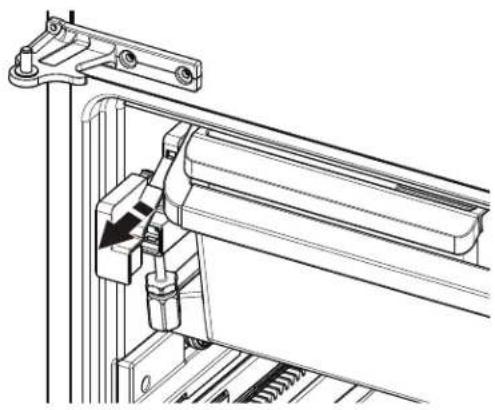
natural_image
Technical line drawing of a mechanical assembly with no visible text or symbolsnatural_image
Technical diagram of a refrigerator interior showing airflow direction (no text or labels)Étapes finales
AVERTISSEMENT
natural_image
Technical diagram showing mechanical components with arrows indicating motion or force direction (no text or symbols present)natural_image
Diagram of a roof structure with two opposing arrows indicating flow or movement (no text or symbols)natural_image
Line drawing of a hand holding a rectangular object inside a cabinet (no text or symbols)Tiroirs à légumes
natural_image
Technical line drawing of a mechanical assembly with arrows indicating direction (no text or symbols)natural_image
Technical line drawing of a refrigerator interior showing internal compartments and doorways (no text or labels)Assistance client 1.800.442.9991
natural_image
Line drawing of an open refrigerator with doors and shelves (no text or symbols)natural_image
Technical line drawing of a mechanical device with labeled components A and B (no text or symbols beyond labels)text_image
135° 135°natural_image
Technical line drawing of a cabinet with a pulley system and a magnified inset showing a mechanical component (no text or symbols)natural_image
Line drawing of a mechanical device with a vent and handle (no text or symbols)text_image
New Filter Top Left Closed Crushed Box Master Off Top A Bnatural_image
Technical line drawing of a mechanical device with an inset showing a component being inserted (no text or symbols present)natural_image
Cross-sectional diagram of a mechanical device showing internal components and a downward arrow indicating motion (no text or symbols)natural_image
Technical line drawing of a mechanical assembly with three views (no text or symbols)natural_image
Technical line drawing of a mechanical device with two circular components and directional arrows indicating motion (no text or symbols)text_image
REMOVE ENLEVERnatural_image
Technical line drawing of a circular mechanical component with internal channels and directional arrows (no text or symbols)natural_image
Technical line drawing of a mechanical assembly with pipes and components (no text or symbols)natural_image
Technical diagram showing a mechanical component with an arrow indicating rotational motion (no text or symbols present)- Tape el filtro.
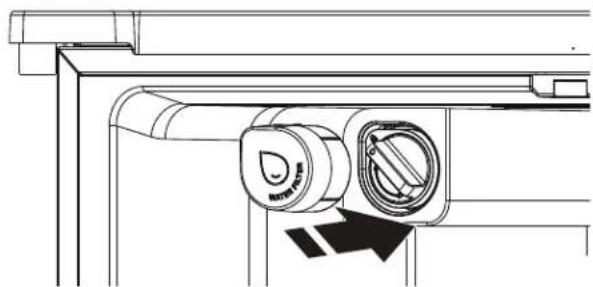
natural_image
Technical line drawing of a mechanical device with two circular components and a droplet symbol (no text or labels)natural_image
Technical line drawing of a mechanical component with a valve and circular housing (no text or symbols)natural_image
Technical line drawing of a mechanical component with a circular housing and curved arrow indicating rotation (no text or symbols)natural_image
Technical line drawing of a mechanical assembly with cylindrical components and a directional arrow (no text or symbols)text_image
REMOVE ENLEVERnatural_image
Pure mechanical diagram showing a circular component with internal horizontal bands and directional arrows, no text or symbols present.natural_image
Technical line drawing of a mechanical assembly with pipes and components (no text or symbols)natural_image
Technical diagram of a mechanical component with an arrow indicating rotational motion (no text or symbols)- Tape el filtro.
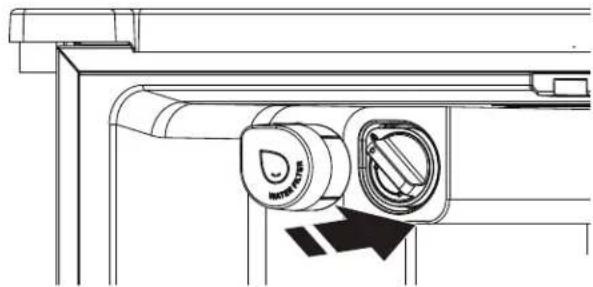
natural_image
Technical line drawing of a mechanical device with two circular components and a downward arrow indicating motion (no text or symbols)text_image
Technical diagram showing labeled mechanical components with annotations A, B, C, and D indicating parts of a device or assembly.text_image
Technical diagram showing installation of a mechanical bracket with labeled parts A and B, including screws and fasteners.text_image
Technical diagram showing labeled components A and B in a mechanical assembly, likely for automotive or electrical wiring.natural_image
Technical diagram of a mechanical assembly with a magnified inset showing a component detail (no text or symbols present)text_image
Technical diagram showing installation of a mechanical bracket with labeled parts A and B, including screw fasteners and mounting holes.natural_image
Technical diagram of a mechanical assembly with directional arrows indicating movement or force (no text or symbols present)natural_image
Technical line drawing of a mechanical assembly with arrows indicating motion or force (no text or symbols)natural_image
Technical illustration of a screwdriver with 80 mm length dimension (no text or symbols on the diagram itself)natural_image
Technical line drawing of a mechanical assembly with an inset showing a component being inserted (no text or symbols present)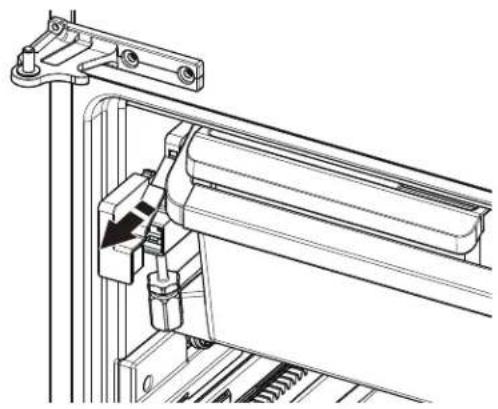
natural_image
Technical line drawing of a mechanical assembly with no visible text or symbolsnatural_image
Technical diagram of a mechanical assembly with arrows indicating direction (no text or symbols present)Pasos finales
ADVERTENCIA