
Tapo TC85 KIT - Surveillance Camera TP-LINK - Free user manual and instructions
Find the device manual for free Tapo TC85 KIT TP-LINK in PDF.
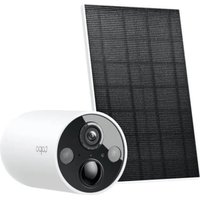


| Product Type | Wireless Outdoor Surveillance Camera |
| Brand | TP-Link |
| Model | Tapo TC85 KIT |
| Video Resolution | 2K QHD (2304 x 1296) |
| Night Vision | Yes, up to 10 meters |
| Viewing Angle | 130° (diagonal) |
| Power Supply | Built-in rechargeable battery + included solar panel |
| Battery Capacity | 5200 mAh |
| Operating Temperature | -20 °C to 45 °C |
| Weight (with floodlight, without solar panel) | 680 g |
| Maximum Mounting Height | 2 m |
| Connectivity | Wi-Fi 2.4 GHz |
| Audio | Built-in microphone and speaker (two-way audio) |
| Motion Detection | Yes, with push alerts |
| Storage | microSD card (up to 256 GB) or Tapo Care cloud subscription |
| Protection Rating | IP65 (water and dust resistant) |
| Housing Material | UV-resistant plastic |
| Solar Panel Included | Yes, low maintenance |
| Compatible App | Tapo (iOS and Android) |
| Security | AES 128-bit encryption, secure connection |
| Maintenance | Clean the lens with a soft dry cloth |
| Repairability | Light source not replaceable, battery not replaceable |
Frequently Asked Questions - Tapo TC85 KIT TP-LINK
User questions about Tapo TC85 KIT TP-LINK
0 question about this device. Answer the ones you know or ask your own.
Ask a new question about this device
Download the instructions for your Surveillance Camera in PDF format for free! Find your manual Tapo TC85 KIT - TP-LINK and take your electronic device back in hand. On this page are published all the documents necessary for the use of your device. Tapo TC85 KIT by TP-LINK.
USER MANUAL Tapo TC85 KIT TP-LINK
For technical support, user guides, warranty, and more information
© 2025 TP-Link
Quick Start Guide
Solar-Powered Security Camera
7100001757 REV1.1.0
CONTENTS
1 / English 2 / Português Brasil 3 / Hrvatski 4 / Български 5 / Français 6 / Čeština 7 / Bahasa Indonesia 8 / Magyar 9 / Қазақша 10 / 日本語 11 / 中文 12 / Español
(Latinoamérica)
Get the Tapo app from the App Store or Google Play, and log in.

2 SETUP CAMERA
Press and hold the power button on your camera for about 3 seconds to turn it on.
Tap the + button in the app and select your camera model. Follow app instructions to complete setup.
Português Brasil
1 DOWNLOAD APP
Download the Tapo app from the App Store or Google Play, and log in.

2 CONFIGURATION
TP-Link hereby declares that the battery camera is in compliance with the essential requirements and other relevant provisions of directives 2014/53/EU, 2009/125/EC, 2011/65/EU and (EU)2015/863.
The original EU Declaration of Conformity may be found at https://www.tapo.com/support/ce/.
TP-Link hereby declares that the battery camera is in compliance with the essential requirements and other relevant provisions of the Radio Equipment Regulations 2017.
The original UK Declaration of Conformity may be found at https://www.tapo.com/support/ukca/.
For Solar Panel:
TP-Link hereby declares that the solar panel is in compliance with the essential requirements and other relevant provisions of directives 2014/30/EU, 2014/35/EU, 2011/65/EU and (EU)2015/863.
The original EU declaration of conformity may be found at https://www.tapo.com/support/ce/.
TP-Link hereby declares that the solar panel is in compliance with the essential requirements and other relevant provisions of the Electromagnetic Compatibility Regulations 2016 and Electrical Equipment (Safety) Regulations 2016.
The original UK declaration of conformity may be found at https://www.tapo.com/support/ukca/.
Bulgarian:
For the camera:
TP-Link hereby declares that the device complies with the essential requirements and other relevant provisions of Directive 2014/53/EU, 2009/125/EC, 2011/65/EU and (EU)2015/863.
For the Declaration of Conformity, please refer to https://www.tapo.com/support/ce/. For more information!
TP-Link hereby declares that the device is in compliance with the essential requirements and other relevant provisions of Directives 2014/30/EU, 2014/35/EU, 2011/65/EU, and (EU) 2015/863.
You can find the EU Declaration of Conformity at https://www.tapo.com/support/ce/.
Czech:
For Camera:
You can find the EU Declaration of Conformity at https://www.tapo.com/support/ce/.
Estonian:
For Camera:
Hereby, TP-Link declares that the battery-powered camera complies with the essential requirements and other relevant provisions of Directives 2014/53/EU, 2009/125/EU, 2011/65/EU, and (EU) 2015/863.
English: Safety Information
For Camera:
- Do not attempt to disassemble, repair, or modify the device. If you need service, please contact us.
- Do not use a damaged charger or USB cable to charge the device.
- Do not use any other chargers than those recommended.
- Do not use the device where wireless devices are not allowed.
- Keep the device away from fire or hot environments. DO NOT immerse in water or any other liquid.
- The adapter shall be easily accessible.
- This equipment can be powered only by equipment that complies with Power Source Class 2 (PS2) or Limited Power Source (LPS) defined in the standard IEC 62368-1.
- Operating Temperature: -20°C to 45°C. The light source of this luminaire is not replaceable; when the light source reaches its end of life, the whole luminaire shall be replaced. (Only for floodlight cameras) Weight of the floodlight camera (solar panel excluded): 680 g (23.99 oz). (Only for floodlight cameras) Maximum projected area of the floodlight: 14739.6 mm² (22.85 sq in). (Only for floodlight cameras) This product contains a light source of energy efficiency class E. (Only for floodlight cameras)



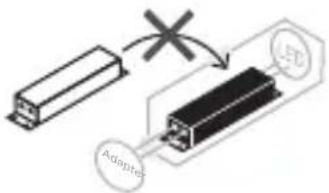
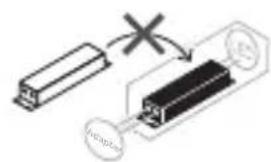
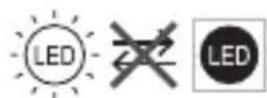
Non-replaceable light source
Non-replaceable control gear
CAUTION!
Avoid replacing a battery with an incorrect type that can defeat a safeguard. Avoid disposing of a battery into fire or a hot oven, or mechanically crushing or cutting a battery, which can result in an explosion. Do not leave a battery in an extremely high temperature surrounding environment that can result in an explosion or the leakage of flammable liquid or gas. Do not leave a battery subjected to extremely low air pressure that may result in an explosion or the leakage of flammable liquid or gas.
For Solar Panel
- Keep the device away from fire or hot environments. DO NOT immerse in water or any other liquid.
- Do not attempt to disassemble, repair, or modify the device. If you need service, please contact us.
- Avoid scratching and hitting the surface of the solar panel during use.
- Avoid contact with highly corrosive substances during use.
- The suitable temperature for Tapo Solar Panel and accessories is -20°C to 45°C. The working temperature range for battery charging should be maintained at 0°C to 45°C.
- Make sure the USB connector is fully plugged into your Tapo device.
- Make sure you follow the user manual to install the solar panel correctly.
- Make sure the waterproof gasket and other accessories can protect the connectors on your Tapo device.
The mounting height should not be higher than 2 meters.
Please read and follow the above safety information when operating the device. We cannot guarantee that no accidents or damage will occur due to improper use of the device. Please use this product with care and operate at your own risk.
Warning: Electrical safety
Camera:
Please read and follow the safety instructions below when using the device. If any repairs are needed, please contact us. - Do not use the device if the power cord or USB cable is damaged. - Do not place the device near heat sources or in direct sunlight. - Do not immerse the device in water or other liquids. - The adapter must be replaced with the correct type. - This device complies with the requirements of standard IEC 62368-1 for Class 2 (PS2) or Limited Power Source (LPS) power supplies. Operating temperature: -20°C to 45°C. If the device is used outside this temperature range, it may be damaged. (For cameras with projectors only) - Projector camera weight (including panel): 680 g (23.99 oz). (For cameras with projectors only) - Maximum projector sound level: 14739.6 mm² (22.85 sq in). (For cameras with projectors only) This product contains a Class E energy efficiency rating. (For cameras with projectors only)
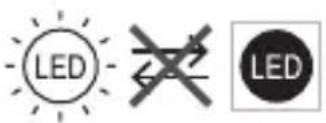
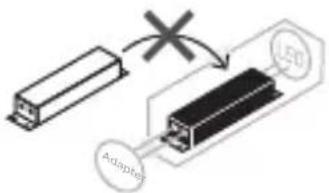
Unused power supply
Unused controller
WATCH OUT!
Do not replace or remove the battery yourself, as this may damage the device. Do not expose the battery to fire or high heat, as it may explode. Do not subject the battery to mechanical shock, cut, or puncture. Do not expose the battery to water, other liquids, or gases. Do not store the battery in high-temperature environments; do not store the battery in extremely low temperatures, as this may cause leakage, corrosion, or gas emission.
For solar panel:
Do not install the device near fire or high heat sources. Do not immerse it in water or other liquids. Do not touch the device with wet hands or while it is operating. If you need service, contact us. When handling the device, avoid touching the lens, and do not shake it. When handling, avoid contact with corrosive substances. - The operating temperature for the solar panel and accessories is -20°C to 45°C. The recommended charging temperature range for the battery is 0°C to 45°C. The USB port on the solar panel is not waterproof. - For proper orientation of the solar panel, do not place it in a location where it will be shaded. The solar panel's USB ports are protected against water splashes.
Do not shake.
The mounting height should not be higher than 2 meters.
The device must be installed in accordance with the manufacturer's instructions. Do not use the device if it is damaged or has been dropped. Handle the device with care and follow the safety instructions.
China:
Kerala's sins:


Brand : TP-LINK
Model : Tapo TC85 KIT
Category : Surveillance Camera