
Color LaserJet Pro MFP 3302fdw - Multifunction Printer HP - Free user manual and instructions
Find the device manual for free Color LaserJet Pro MFP 3302fdw HP in PDF.
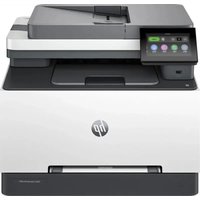


| Product type | Color laser multifunction printer |
| Brand | HP |
| Model | Color LaserJet Pro MFP 3302fdw |
| Dimensions (L × D × H) | 420 × 390 × 323 mm (approx.) |
| Weight | 22.3 kg (approx.) |
| Power supply | 220-240 V AC, 50/60 Hz |
| Power consumption (average) | Printing: 400 W, Standby: 1 W |
| Main functions | Print, copy, scan, fax |
| Color printing speed | Up to 21 ppm (A4) |
| Print resolution | 600 x 600 dpi |
| Paper capacity (tray 2) | 250 sheets |
| Paper capacity (tray 1) | 1 sheet (priority feed) |
| Supported paper sizes | A4, A5, A6, envelopes, labels |
| Network connections | Wi-Fi (802.11 a/b/g/n/ac), Ethernet, USB, Wi-Fi Direct |
| Display | Color touchscreen |
| Automatic duplex printing | Yes |
| Scanning | To email, network folder, USB, SharePoint |
| Fax | Yes (with memory and number blocking) |
| Toner cartridges | 4 cartridges (cyan, magenta, yellow, black) |
| Maintenance and cleaning | Clean the glass, rollers, and separation pad |
| Security | Administrator password, dynamic security |
| Spare parts and repairability | Cartridges, paper trays, imaging unit user-replaceable |
Frequently Asked Questions - Color LaserJet Pro MFP 3302fdw HP
User questions about Color LaserJet Pro MFP 3302fdw HP
0 question about this device. Answer the ones you know or ask your own.
Ask a new question about this device
Download the instructions for your Multifunction Printer in PDF format for free! Find your manual Color LaserJet Pro MFP 3302fdw - HP and take your electronic device back in hand. On this page are published all the documents necessary for the use of your device. Color LaserJet Pro MFP 3302fdw by HP.
USER MANUAL Color LaserJet Pro MFP 3302fdw HP
HP Color LaserJet Pro
© Copyright 2024 HP Development Company, L.P.
Trademarks
Print via Wi-Fi Direct 30
Customer support....170
Complete the following steps to install and open HP software, connect your printer, and begin using the app.
- Go to hpsmart.com to download and install the HP software app on your device.
NOTE:
- iOS, Android, Windows 10 and above, and macOS: You can download HP software from the respective app stores for the device.
- Open HP software after installation.
- iOS/Android: From the mobile device desktop or app menu, tap HP software.
- Windows 10 and above: From the computer desktop, click Start, and then select HP software from the app list. •macOS: From the Launchpad, select HP software.
- Sign in to the HP Smart app using the HP account created during setup.

- Close the tray.
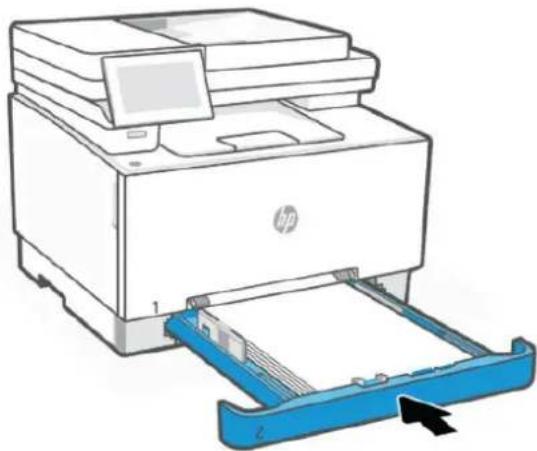
- Close the cover.
Print via Wi-Fi Direct
| Nom/numéro de cartouche Référence Pays d'utilisation | ||
| HP 218A Black Original LaserJet Toner Cartridge W2180A North America and Greater Asia only | ||
| HP 218X Black Original LaserJet Toner Cartridge W2180X | North America and Greater Asia only | |
| HP 218A Cyan Original LaserJet Toner Cartridge | W2181A | North America and Greater Asia only |
| HP 218X Cyan Original LaserJet Toner Cartridge | W2181X | North America and Greater Asia only |
| HP 218A Yellow Original LaserJet Toner Cartridge W2182A | North America and Greater Asia only | |
| HP 218X Yellow Original LaserJet Toner Cartridge W2182X | North America and Greater Asia only | |
| HP 218A Magenta Original LaserJet Toner Cartridge W2183A | North America and Greater Asia only | |
| HP 218X Magenta Original LaserJet Toner Cartridge | W2183X | North America and Greater Asia only |
| HP 219A Black Original LaserJet Toner Cartridge W2190A UK, Ireland, and Europe only* | ||
| Nom/numéro de cartouche Référence Pays d'utilisation | ||
| HP 219X Black Original LaserJet Toner Cartridge W2190X UK, Ireland, and Europe only* | ||
| HP 219A Cyan Original LaserJet Toner Cartridge W2191A UK, Ireland, and Europe only* | ||
| HP 219X Cyan Original LaserJet Toner Cartridge W2191X UK, Ireland, and Europe only* | ||
| HP 219A Yellow Original LaserJet Toner Cartridge W2192A UK, Ireland, and Europe only* | ||
| HP 219X Yellow Original LaserJet Toner Cartridge W2192X | UK, Ireland, and Europe only* | |
| HP 219A Magenta Original LaserJet Toner Cartridge | W2193A UK, Ireland, and Europe only* | |
| HP 219X Magenta Original LaserJet Toner Cartridge | W2193X UK, Ireland, and Europe only* | |
| HP 222A Black Original LaserJet Toner Cartridge | W2220A | Latin America, ISE, Greater Asia, India, and China only |
| HP 222X Black Original LaserJet Toner Cartridge | W2220X | Latin America, ISE, Greater Asia, India, and China only |
| HP 222A Cyan Original LaserJet Toner Cartridge | W2221A | Latin America, ISE, Greater Asia, India, and China only |
| HP 222X Cyan Original LaserJet Toner Cartridge | W2221X | Latin America, ISE, Greater Asia, India, and China only |
| HP 222A Yellow Original LaserJet Toner Cartridge | W2222A | Latin America, ISE, Greater Asia, India, and China only |
| HP 222X Yellow Original LaserJet Toner Cartridge | W2222X | Latin America, ISE, Greater Asia, India, and China only |
| HP 222A Magenta Original LaserJet Toner Cartridge | W2223A | Latin America, ISE, Greater Asia, India, and China only |
| HP 222X Magenta Original LaserJet Toner Cartridge | W2223X | Latin America, ISE, Greater Asia, India, and China only |

NOTE:
For more information, visit www.support.hp.com, select your country/region and language, find your printer, click Product Information, and then select Product specifications.
HP Color LaserJet Pro MFP 3301-3304/3388 One-year limited warranty

Your rights as an Australian consumer are different to those stated in the document above.
You should disregard any limitations or exclusions in the above document and refer to the information below.
- When you buy a good from HP as a consumer, the goods come with guarantees that cannot be excluded under the Australian Consumer Law. You are entitled to a replacement or refund for a major failure and for compensation for any other reasonably foreseeable loss or damage. You are also entitled to have the goods repaired or replaced if the goods fail to be of acceptable quality and the failure does not amount to a major failure.
- This means that there is no defined warranty period for HP goods supplied to Australian consumers.
- Instead, the goods should, for example, be fit for the purposes for which they are commonly supplied for such a period as a reasonable consumer fully acquainted with the state and condition of the goods would expect. This period may vary depending on the product.
- You should contact HP if you are concerned that one of HP's products fails to satisfy any of the guarantees listed below. HP will discuss with you the specific nature and circumstances of that good and whether the particular fault/issue falls within the scope of the statutory guarantees.
Nothing in HP's Limited Warranty excludes, restricts, or modifies any condition, warranty, guarantee, right or remedy you may have at law (including a consumer guarantee under the Australian Consumer Law) which cannot be lawfully excluded or limited.
The relevant guarantees are as follows:
- Quality – goods supplied by HP must be of acceptable quality. The test for acceptable quality is whether a reasonable consumer, fully aware of the state and condition of the goods, would find them:
- safe, durable, and free from defects;
- acceptable in appearance and finish; and
- fit for all the purposes for which goods of that kind are commonly supplied.
This must take into account the nature and price of the goods, and any statements on packaging or labeling.
- Disclosed Purpose – goods or services supplied by HP that HP represents are reasonably fit for a purpose expressly disclosed by a consumer must be reasonably fit for that purpose.
- Description – goods supplied by HP must match the description provided by HP.
- Sample – goods supplied by HP must match any sample shown to you by HP.
- Title – a consumer who purchases a good from HP must receive clear title to the good.
- Due care and skill – services provided to you by HP must be provided with due care and skill.
- Express warranties – HP will be legally required to comply with the express warranty that is set out in its terms and conditions.
- Reasonable time – repair services provided by HP must be provided within a reasonable time.
If you think that you are entitled to any of the above remedies or any remedy under the HP Worldwide Limited Warranty and Technical Support Document, please contact HP:
HP PPS Australia Pty Ltd
Rhodes Corporate Park, Building F, Level 5
1 Homebush Bay Drive
Rhodes, NSW 2138
Australia
To initiate a support request, please use the numbers below or visit www.hp.com.au and select the "Customer Service" option for the most current list of phone support numbers.
| Product Phone | |
| Support for all HP Products except those listed separately below | 13 10 47If dialing internationally: +61 2 8278-1039 |
| DeskJet, Office Jet, PSC, All-in-One, Photosmart & Personal LaserJet Series 1000, P1000, M1000 and Colour LaserJet CP1000 Series and model CM1415 | 1300 721 147If dialing internationally: +61 2 8934 4380 |
For further information on consumer rights, visit www.consumerlaw.gov.au and www.accc.gov.au.
New Zealand
In New Zealand, the hardware and software come with guarantees that cannot be excluded under the New Zealand consumer law. In New Zealand, Consumer Transaction means a transaction involving a person who is purchasing goods for personal, domestic, or household use or consumption and not for the purpose of a business. New Zealand consumers who are purchasing goods for personal, domestic or household use or consumption and not for the purpose of a business ("New Zealand Consumers") are entitled to repair, replacement or refund for a failure and compensation for other reasonably foreseeable loss or damage. A New Zealand Consumer (as defined above) may recover the costs of returning the product to the place of purchase if there is a breach of the New Zealand consumer law; furthermore, if it will be of significant cost to the New Zealand Consumer to return the goods to HP then HP will collect such goods at its own cost.
Table B-2 Support phone numbers
| Product Phone | |
| Support for all HP Products except those listed separately below | 0800 449 553If dialing internationally: +61 2 8031-8317 |
| DeskJet, Office Jet, PSC, All-in-One, Photosmart & Personal Laser Jet Series 1000, P1000, M1000 and Colour Laser Jet CP1000 Series and model CM1415 | 0800 441 147If dialing internationally: +61 2 8934 4380 |
The HP Limited Warranty is a commercial guarantee voluntarily provided by HP. The name and address of the HP entity responsible for the performance of the HP Limited Warranty in your country/region is as follows:
UK: HP Inc UK Limited, Cain Road, Amen Corner, Bracknell, Berkshire, RG12 1HN
Ireland: Hewlett-Packard Ireland Limited, Liffey Park Technology Campus, Barnhall Road, Leixlip, Co. Kildare
Malta: Hewlett-Packard Europe B.V., Amsterdam, Meyrin Branch, Route du Nant-d'Avril 150, 1217 Meyrin, Switzerland
United Kingdom: The HP Limited Warranty benefits apply in addition to any legal rights to a guarantee from seller of nonconformity of goods with the contract of sale. These rights expire six years from delivery of goods for products purchased in England or Wales and five years from delivery of goods for products purchased in Scotland. However various factors may impact your eligibility to receive these rights. For further information, please consult the following link: Consumer Legal Guarantee (www.hp.com/go/eu-legal) or you may visit the European Consumer Centers website (commission.europa.eu). Consumers have the right to choose whether to claim service under the HP Limited Warranty or against the seller under the legal guarantee.
Ireland: The HP Limited Warranty benefits apply in addition to any statutory rights from seller in relation to nonconformity of goods with the contract of sale. However various factors may impact your eligibility to receive these rights. Consumer statutory rights are not limited or affected in any manner by HP Care Pack. For further information, please consult the following link: Consumer Legal Guarantee (www.hp.com/go/eu-legal) or you may visit the European Consumer Centers website (commission.europa.eu). Consumers have the right to choose whether to claim service under the HP Limited Warranty or against the seller under the legal guarantee.
Malta: The HP Limited Warranty benefits apply in addition to any legal rights to a two-year guarantee from seller of nonconformity of goods with the contract of sale; however various factors may impact your eligibility to receive these rights. Consumer statutory rights are not limited or affected in any manner by the HP Limited Warranty. For further information, please consult the following link: Consumer Legal Guarantee (www.hp.com/go/eu-legal) or you may visit the European Consumer Centers website (commission.europa.eu). Consumers have the right to choose whether to claim service under the HP Limited Warranty or against the seller under two-year legal guarantee.
Romania: HP Inc Romania SRL, 5 Fabrica de Glucoza Str., Building F, Ground Floor and Floor 8, 2nd District, Bucharest
Slovenia: Hewlett-Packard Europe B.V., Amsterdam, Meyrin Branch, Route du Nant-d'Avril 150, 1217 Meyrin, Switzerland
HP PPS Australia Pty Ltd
Rhodes Corporate Park, Building F, Level 5
1 Homebush Bay Drive
Rhodes, NSW 2138
Australia
© Copyright 2023 HP Development Company, L.P.
Customer assistance
Table B-3 Customer assistance
www.hp.com/go/energystar
https://www.hp.com/br-pt/sustainable-impact/planet-product-recycling.html
https://www.hp.com/us-en/sustainable-impact/document-reports.html#filters=resource_category-category_ecolabel
This product, as well as its related consumables and spares, complies with the reduction in hazardous substances provisions of the "India E-waste Rule 2016." It does not contain lead, mercury, hexavalent chromium, polybrominated biphenyls or polybrominated diphenyl ethers in concentrations exceeding 0.1 weight % and 0.01 weight % for cadmium, except where allowed pursuant to the exemptions set in Schedule 2 of the Rule.
WEEE (Turkey)
The Table of Hazardous Substances/Elements and their Content
As required by China's Management Methods for Restricted Use of Hazardous Substances in Electrical and Electronic Products

This form has been prepared in compliance with the provisions of SJ/T 11364.
○: Indicates that the content of said hazardous substance in all of the homogenous materials in the component is within the limits required by GB/T 26572.
X: Indicates that the content of said hazardous substance exceeds the limits required by GB/T 26572 in at least one homogenous material in the component.
All parts named in this table with an "X" are in compliance with the China RoHS "List of Exceptions to RoHS Compliance Management Catalog (or China RoHS Exemptions)".
All parts named in this table with an "X" are in compliance with the European Union's RoHS Legislation.
Note: The referenced Environmental Protection Use Period Marking was determined according to normal operating use conditions of the product such as temperature and humidity.
https://www.hp.com/us-en/sustainable-impact/document-reports.html#filters=resource_category-category_ecolabel
Taiwan Declaration of the Presence Condition of the Restricted Substances Marking
| 單元 Unit | 限用物質及其化學符號Restricted substances and its chemical symbols | |||||
| 鉛Lead(Pb) | 汞Mercury(Hg) | 鎘Cadmium(Cd) | 六價鉻Hexavalent chromium( Cr+6 ) | 多溴聯苯Polybrominated biphenyls(PBB) | 多溴二苯醚Polybrominated diphenyl ethers(PBDE) | |
| 列印引擎Print engine | - | ○ | ○ | ○ | ○ | ○ |
| 外殼和紙匣External Casing and Trays | ○ | ○ | ○ | ○ | ○ | ○ |
| 電源供應器Power Supply | - | ○ | ○ | ○ | ○ | ○ |
| 電線Cables | ○ | ○ | ○ | ○ | ○ | ○ |
| 印刷電路板Print printed circuit board | - | ○ | ○ | ○ | ○ | ○ |
| 控制面板Control panel | - | ○ | ○ | ○ | ○ | ○ |
| 碳粉匣Cartridge | ○ | ○ | ○ | ○ | ○ | ○ |
| 掃描器組件Scanner assembly | - | ○ | ○ | ○ | ○ | ○ |
| 備考1. “超出0.1 wt %”及“超出0.01 wt %”係指限用物質之百分比含量超出百分比含量基準值。Note 1: “Exceeding 0.1 wt %” and “exceeding 0.01 wt %” indicate that the percentage content of the restricted substance exceeds the reference percentage value of presence condition.備考2. “○”係指該項限用物質之百分比含量未超出百分比含量基準值。Note 2: “○” indicates that the percentage content of the restricted substance does not exceed the percentage of reference value of presence.備考3. “—”係指該項限用物質為排除項目。Note 3: The “-” indicates that the restricted substance corresponds to the exemption. | ||||||
To access the latest user guides or manuals for your product, go to hp.com/support. Select Find your product, and then follow the on-screen instructions.
Consult the website www.hp.com/go/environment
- INGESTION HAZARD: This product contains a button cell or coin battery.
- DEATH or serious injury can occur if ingested.
- A swallowed button cell or coin battery can cause Internal Chemical Burns in as little as 2 hours.
- KEEP new and used batteries OUT OF REACH of CHILDREN.
- Seek immediate medical attention if a battery is suspected to be swallowed or inserted inside any part of the body.

WARNING
INGESTION HAZARD: This product contains a button cell or coin battery.
Products bearing the CE marking and UK marking comply to applicable EU Directives and the equivalent UK Statutory Instruments and can operate in at least one EU Member State and in United Kingdom.
The full EU and UK Declaration of Conformity can be found at the following website: hp.eu/certificates
(Search with the product model name or its Regulatory Model Number (RMN), which may be found on the regulatory label.)
The point of contact for regulatory matters:
For EU: HP REG 23010, 08028 Barcelona, Spain
For UK: HP Inc UK Ltd, Regulatory Enquiries, Earley West, 300 Thames Valley Park Drive, Reading, RG6 1PT
Email: techregshelp@hp.com
HP Inc. 1501 Page Mill Rd, Palo Alto, CA 94304, USA
Industry Canada CS-03 requirements:
WARNING: The Industry Canada label identifies certified equipment. This certification means that the equipment meets certain telecommunications network protective, operational, and safety requirements as prescribed in the appropriate Terminal Equipment Technical Requirement document(s). The Department does not guarantee that the equipment will operate to the user's satisfaction. Before installing this equipment, users should ensure that it is permissible for the equipment to be connected to the facilities of the local telecommunications company. The equipment must also be installed using an acceptable method of connection. The customer should be aware that compliance with the above conditions may not prevent degradation of service in some situations. Repairs to certified equipment should be coordinated by a representative designated by the supplier. Any repairs or alterations made by the user to this equipment, or equipment malfunctions, may give the telecommunications company cause to request the user to disconnect the equipment. Users should ensure for their own protection that the electrical ground connections of the power utility, telephone lines, and internal metallic water pipe system, if present, are connected together. This precaution can be particularly important in rural areas.
CAUTION: Users should not attempt to make such connections themselves, but should contact the appropriate electric inspection authority, or electrician, as appropriate. The Ringer Equivalence Number (REN) of this device is shown on the regulatory chassis label.
This product meets the applicable Innovation, Science and Economic Development Canada technical specifications.
WARNING: The Ringer Equivalence Number (REN) indicates the maximum number of devices allowed to be connected to a telephone interface. The termination of an interface may consist of any combination of devices subject only to the requirement that the sum of the RENs of all the devices not exceed five (5).
The standard connecting arrangement code (telephone jack type) for equipment with direct connections to the telephone network is CA11A.
The grant of a Telepermit for any item of terminal equipment indicates only that Telecom has accepted that the item complies with minimum conditions for connection to its network. It indicates no endorsement of the product by Telecom, nor does it provide any sort of warranty. Above all, it provides no assurance that any item will work correctly in all respects with another item of Telepermitted equipment of a different make or model, nor does it imply that any product is compatible with all of Telecom's network services.
This equipment may not provide for the effective hand-over of a call to another device connected to the same line.
This equipment shall not be set up to make automatic calls to the Telecom "111" Emergency Service.
This product has not been tested to ensure compatibility with the FaxAbility distinctive ring service for New Zealand.
This equipment complies with Part 68 of the FCC rules and the requirements adopted by the ACTA. On the back of this equipment is a label that contains, among other information, a product identifier in the format US:AAAEQ##TXXXX. If requested, this number must be provided to the telephone company.
The REN is used to determine the quantity of devices, which may be connected to the telephone line. Excessive RENs on the telephone line may result in the devices not ringing in response to an incoming call. In most, but not all, areas, the sum of the RENs should not exceed five (5.0). To be certain of the number of devices that may be connected to the line, as determined by the total RENs, contact the telephone company to determine the maximum REN for the calling area.
This equipment uses the following USOC jacks: RJ11C.
FCC-compliant telephone cord, jack and modular plug should be used with this equipment. This equipment is designed to be connected to the telephone network or premises wiring using a compatible modular jack, which is Part 68 compliant. This equipment cannot be used on telephone company-provided coin service. Connection to Party Line Service is subject to state tariffs.
If this equipment causes harm to the telephone network, the telephone company will notify you in advance that temporary discontinuance of service may be required. If advance notice is not practical, the telephone company will notify the customer as soon as possible. Also, you will be advised of your right to file a complaint with the FCC if you believe it is necessary.
The telephone company may make changes in its facilities, equipment, operations, or procedures that could affect the operation of the equipment. If this happens, the telephone company will provide advance notice in order for you to make the necessary modifications in order to maintain uninterrupted service.
If trouble is experienced with this equipment, please see the numbers in this manual for repair and (or) warranty information. If the trouble is causing harm to the telephone network, the telephone company may request you remove the equipment from the network until the problem is resolved.
The customer can do the following repairs: Replace any original equipment that came with the device. This includes the print cartridge, the supports for trays and bins, the power cord, and the telephone cord (if provided). It is recommended that the customer install an AC surge arrestor in the AC outlet to which this device is connected. This is to avoid damage to the equipment caused by local lightning strikes and other electrical surges.
Exposure to radio frequency radiation
ATTENTION: The radiated output power of this device is far below the FCC radio frequency exposure limits. Nevertheless, the device shall be used in such a manner that the potential for human contact during normal operation is minimized.
In order to avoid the possibility of exceeding the FCC radio frequency exposure limits, human proximity to the antenna shall not be less than 20 cm during normal operation.
This device complies with Part 15 of FCC Rules. Operation is subject to the following two conditions: (1) this device may not cause interference, and (2) this device must accept any interference, including interference that may cause undesired operation of the device.
ATTENTION: Based on Section 15.21 of the FCC rules, changes or modifications to the operation of this product without the express approval by HP may invalidate its authorized use.
This device incorporates a radio-transmitting (wireless) device. For protection against radio transmission exposure, it is recommended that this device be operated no less than 20 cm from the head, neck, or body.
For Indoor Use. This digital apparatus does not exceed the Class B limits for radio noise emissions from digital apparatus as set out in the radio interference regulations of the Canadian Department of Communications. The internal wireless radio complies with RSS 210 of Industry Canada.
ATTENTION: When using IEEE 802.11a wireless LAN, this product is restricted to indoor use, due to its operation in the 5.15- to 5.25-GHz frequency range. Industry Canada requires this product to be used indoors for the frequency range of 5.15 GHz to 5.25 GHz to reduce the potential for harmful interference to co-channel mobile satellite systems. High-power radar is allocated as the primary user of the 5.25- to 5.35-GHz and 5.65- to 5.85-GHz bands. These radar stations can cause interference with and/or damage to this device.
WARNING! Exposure to Radio Frequency Radiation. The radiated output power of this device is below the Industry Canada radio frequency exposure limits. Nevertheless, the device should be used in such a manner that the potential for human contact is minimized during normal operation.
To avoid the possibility of exceeding the Industry Canada radio frequency exposure limits, human proximity to the antennas should not be less than 20 cm.
The telecommunications functionality of this product may be used in the following European countries/regions:
Austria, Belgium, Bulgaria, Cyprus, Czech Republic, Denmark, Estonia, Finland, France, Germany, Greece, Hungary, Iceland, Ireland, Italy, Latvia, Liechtenstein, Lithuania, Luxembourg, Malta, Netherlands, Norway, Poland, Portugal, Romania, Slovak Republic, Slovenia, Spain, Sweden, Switzerland, and United Kingdom.
This radio communication equipment has the electromagnetic field strength in compliance with the Safety Standard for the Use of Radio Communication Equipment on Human Health announced by the National Telecommunications Commission.
Brand : HP
Model : Color LaserJet Pro MFP 3302fdw
Category : Multifunction Printer