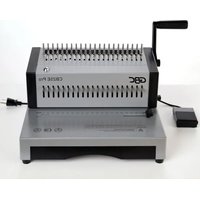
CombBind CB25E Pro - Binder GBC - Free user manual and instructions
Find the device manual for free CombBind CB25E Pro GBC in PDF.


| Product Type | Electric Plastic Comb Binding Machine |
| Brand | GBC |
| Model | CombBind CB25E Pro |
| Operating Mode | Electric (pedal) and manual (handle) |
| Punching Capacity (20 lb paper) | 25 sheets |
| Punching Capacity (PVC cover) | 2 covers (8+ mil) |
| Binding Capacity (20 lb paper) | 500 sheets |
| Maximum Comb Diameter | 2 inches (51 mm) |
| Compatible Paper Size | US Letter (8.5 x 11 inches) |
| Number of Punches | 21 disengageable punches |
| Margin Depth Selector | Yes (button on the left) |
| Dimensions (L x H x D) | 15.4 x 9.9 x 13.9 inches (391 x 251 x 353 mm) |
| Weight | 40.8 lb (18.5 kg) |
| Power Supply | 120 V, 60 Hz, 2 A AC |
| Noise Level | Less than 70 dB |
| Confetti Drawer | Yes, empty regularly |
| Pedal | Included, connects at the back |
| Warranty | 1 year limited (parts and labor) |
| Maintenance | Empty the confetti drawer regularly; do not immerse; unplug before cleaning |
| Safety | Keep hands away from moving parts; do not punch staples; use on a flat surface; do not obstruct air intakes |
| Included Accessories | Punching handle, pedal, punching guide |
Frequently Asked Questions - CombBind CB25E Pro GBC
User questions about CombBind CB25E Pro GBC
0 question about this device. Answer the ones you know or ask your own.
Ask a new question about this device
Download the instructions for your Binder in PDF format for free! Find your manual CombBind CB25E Pro - GBC and take your electronic device back in hand. On this page are published all the documents necessary for the use of your device. CombBind CB25E Pro by GBC.
USER MANUAL CombBind CB25E Pro GBC
natural_image
Black-and-white photo of two GBC and CB25E Pro printer units with spines, no visible text or symbols on the devices themselves.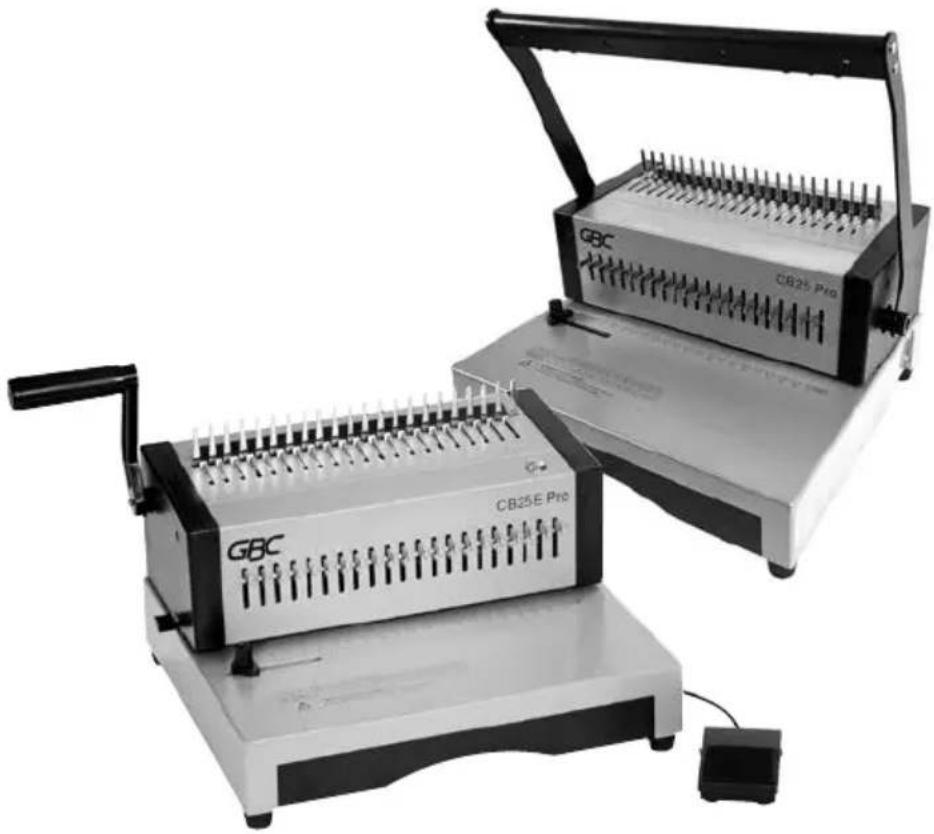
natural_image
Two GBC-branded industrial machines with spools of thread, one open and one closed, no visible text or symbols on the devices themselves.
For service addresses, go to https://www.gbc.com/service-support-center/service-center/
GBC Technical Service
To order replacement accessories, service, parts, or an Equipment Maintenance Agreement, please contact GBC Technical Service and Support at:
United States
ACCO Brands USA LLC
4 Corporate Drive Lake Zurich, IL 60047-8997
1-800-723-4000
www.gbc.com
Canada
Ontario and Quebec - 1-800-268-3310
All other Provinces - 1-800-268-3447 Local 905-595-3100
Callcentre@GBCCanada.com
Mexico
(55) 1500 5778
Lada SIN costo: 01 800 759 6825
ACCO Brands reserves the right to make changes to this publication and to the products described in it without notice. All specifications and information concerning products are subject to change without notice. Reference in this publication to information or products protected by copyright or patent does not convey any license under the rights of ACCO Brands or others. ACCO Brands assumes no liability arising from infringements of patents or any other rights of third parties.
GBC® and CombBind® are registered trademarks of General Binding LLC.
This publication is copyrighted © 2024 by ACCO Brands. All rights reserved
natural_image
Diagram of a mechanical device with spring-loaded handle and arrow indicating direction (no text or symbols)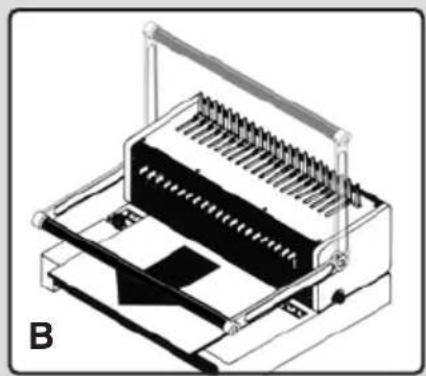
natural_image
3D technical illustration of a mechanical device with spring-loaded components and a labeled section B (no text or symbols on the device itself)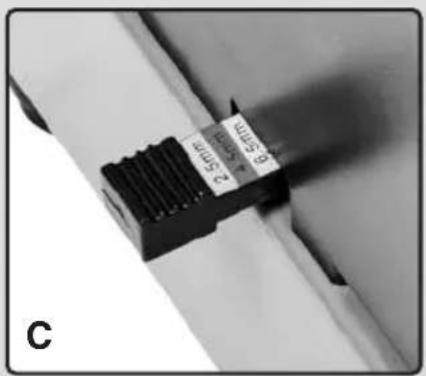
natural_image
Diagram of a mechanical tool interacting with a spring-loaded component, showing a magnified inset of the spring (no text or symbols present)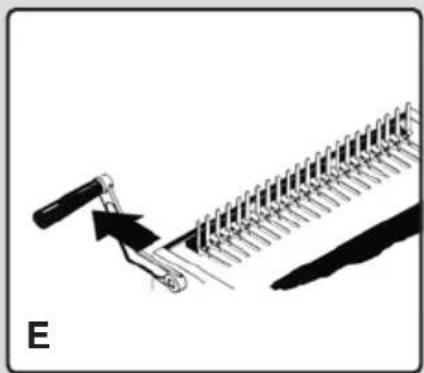
natural_image
Diagram of a mechanical tool interacting with a rack-like structure, labeled 'E' (no text or symbols on the diagram itself)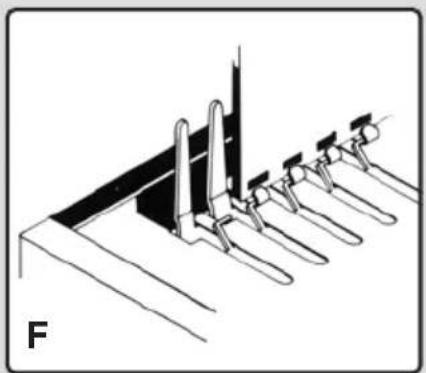
natural_image
Diagram of a mechanical assembly with multiple vertical supports and a central vertical component (no text or symbols)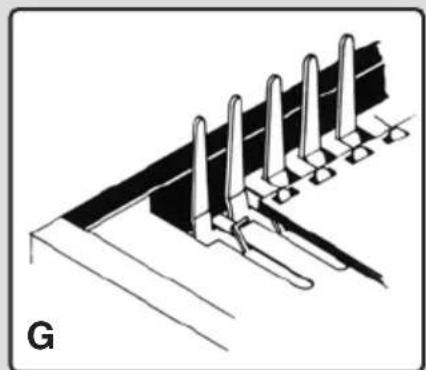
natural_image
Technical line drawing of a structural support system with multiple vertical supports and a base plate (no text or symbols)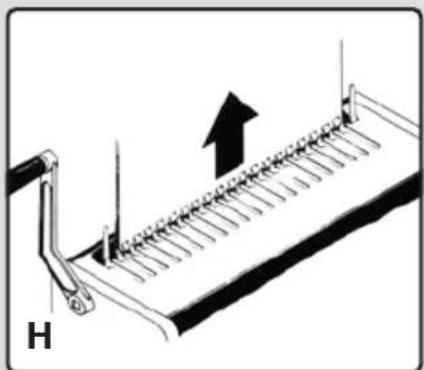
natural_image
Diagram of a mechanical device with a spring-like structure and an upward arrow, labeled 'H' (no text or symbols on the diagram itself)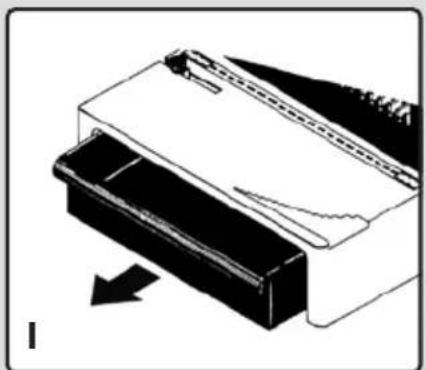
natural_image
Diagram of a mechanical component with an arrow indicating direction (no text or symbols present)Specifications
| Operation Mode Manual Electric | ||
| Max. Punch Capacity (20 lb) 25 sheets 25 sheets | ||
| Max. Punch Capacity (PVC Covers) 2 (8+ mil) 2 (8+ mil) | ||
| Max. Approx. Binding Capacity (20 lb) 500 sheets 500 sheets | ||
| Paper Formats US Letter US Letter | ||
| Max. Binding Element 2" (51mm) 2" (51mm) | ||
| De-Selection Pins Full 21 disengageable Full 21 disengageable | ||
| Margin Depth Selector | √ | √ |
| Machine Dimensions (W x H x D inch) | 15.4 x 9.9 x 13.9 | 15.4 x 9.9 x 13.9 |
| Noise (dB) | - | <70dB |
| Weight (lb) | 32.0 (14.5kg) | 40.8 (18.5kg) |
| Power | - | 120V 60 Hz AC 2A |
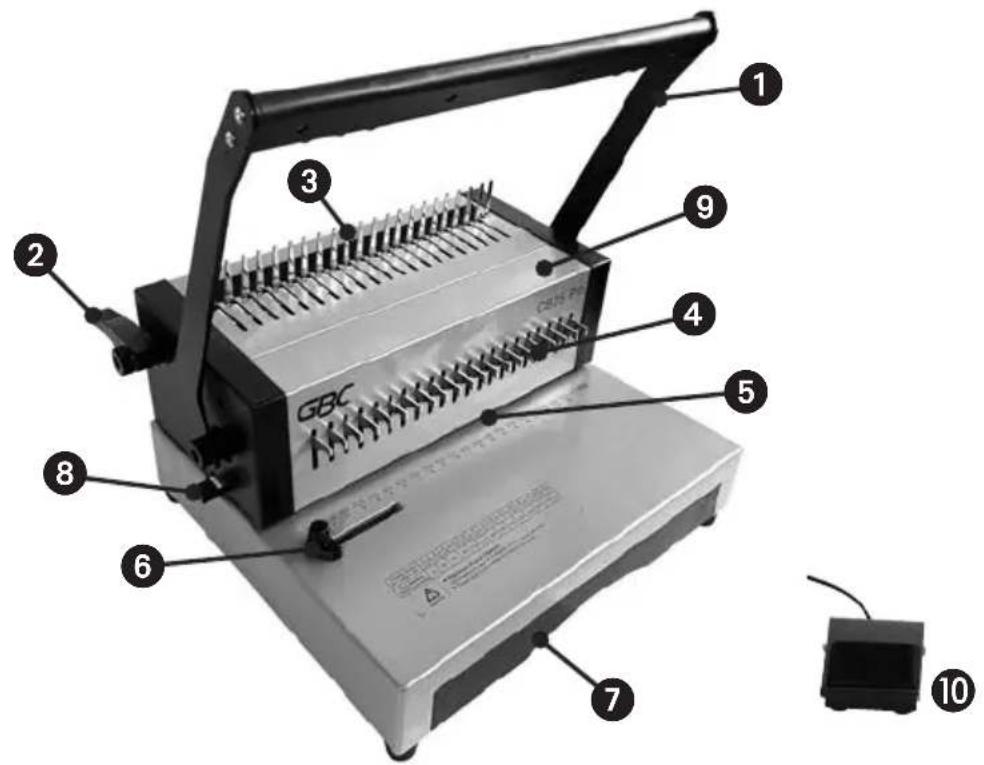
Location of controls
① Punching Handle (CB25 Pro only)
② Comb Opening Handle
③ Comb Opening Teeth
④ De-selectable punching pins
⑤ Punching Slot
⑥ Paper Edge Guide
⑦ Clippings Drawer
8 Margin Adjuster
9 On/Off Switch
⑩ Foot Pedal (CB25E Pro only)
⚠ Safety instructions
YOUR SAFETY AS WELL AS THE SAFETY OF OTHERS IS IMPORTANT TO ACCO BRANDS. IN THIS INSTRUCTION MANUAL AND ON THE PRODUCT ARE IMPORTANT SAFETY MESSAGES. READ THESE MESSAGES CAREFULLY.
- In order to avoid overloading your machine, please refer to the maximum punch guide located on the front of your machine before punching.
- When punching PVC/PP covers, we recommend the cover be punched with some paper either side.
- DO NOT punch metallic objects such as staples or paper clips.
- Please empty the waste tray regularly.
- Ensure that the machine is operated on a flat stable surface.
- Never lift the machine by the punching handle. Always use the hand grips located on the side of the machine.

Please read and keep these important safety instructions

Warning: Moving Parts hazard, keep hands away from moving parts.
- To avoid risk of injury DO NOT put your fingers into the wire binding channel.
- The binder is not to be exposed to temperature / humidity conditions that would cause condensation. Maximum ambient temperature: 104^
- This equipment is not suitable for use in locations where children are likely to be present.
- Use the device in a suitable, properly installed, grounded and easily accessible mains power socket. Locate near the outlet and do not use extension cords. Make sure the device can be disconnected from the mains at all times.
⚠ Safety warnings - CB25E Pro
• DO NOT obstruct air inlets and outlets.
- DO NOT use the binder if the power cord (mains cable) is damaged.
- DO NOT place the power cord where it may be tripped over or pulled. Ensure it does not come into contact with hot surfaces such as pipes or radiators. Make sure the cable is not squashed or pinched.
- DO NOT use an extension cable unless it is absolutely necessary and then only use one of a suitable current rating (10A or greater).
- DO NOT leave the binder connected to the electricity supply when not in use.
- DO NOT immerse the binder in water or other liquids. Doing so will result in ELECTRIC SHOCK.
- DO NOT attempt to disassemble the binder. Always consult a qualified person.
Service

WARNING: Do not attempt to service or repair the punch. Failure to observe this warning could result in severe personal injury or death.
Disconnect the plug from the socket outlet and contact GBC Technical Service when one or more of the following has occurred.
- The power supply cord or attachment plug is damaged.
- Liquid has been spilled into the punch.
- The punch is malfunctioning after being mishandled.
- The punch does not operate as described in these instructions.
Setting up
1 Attach the handle to the machine and push in firmly to secure.
② CB25E Pro only - Turn the power switch on (located on top of machine).
③ CB25E Pro only - Plug in footswitch at rear of machine.
Punching - CB25 Pro
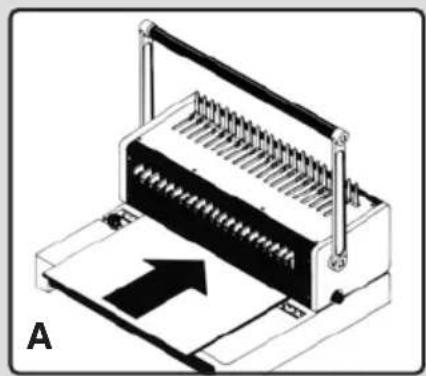
With the handle in the upright position, insert sheets into machine, making sure they are flush into the machine. Use the side guide to adjust the position of the document before punching (fig. A).
2 Pull the handle down to punch. Return the handle to original upright position. Remove paper (fig. B).
Note: The black knob on the left side of the machine is used to select the margin depth. This feature is ideal for thicker documents that require wider margins for easy page turning and more secure binding (fig. C).
Punching - CB25E Pro
1 Put sheets flush into the machine (use the side guide to adjust the position of the document before punching) (fig. A).
2 Step on the foot pedal to punch.
Note: The black knob on the left side of the machine is used to select the margin depth. This feature is ideal for thicker documents that require wider margins for easy page turning and more secure binding (fig. C).
Binding
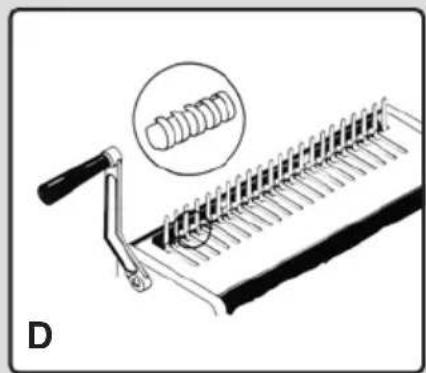
1 Place binding element, open side up, behind metal fingers (fig. D).
2 Push handle to the rear to open rings (fig. E).
3 Insert paper vertically, front cover facing you (fig. F).
4 Lay down paper horizontally (fig. G).
5 Return handle to upright position to close rings.
6 Lift vertically to remove bound document (fig. H).
Custom binding
21 de-selectable punching pins make it possible to punch virtually any length of document. Simply select or deselect the pins to adjust the punching pattern as required.
Maintenance
Always remember to regularly empty the drawer of clippings (fig. 1).
Warranty
Limited 1 Year Warranty; USA, Mexico, and Canada
ACCO Brands USA LLC, ACCO Brands, 4 Corporate Drive, Lake Zurich, IL 60047 (in Mexico, ACCO Brands Mexicana, Neptuno 43, Fraccionamiento Nueva Industrial Vallejo México 07700 D.F. México), (in Canada, ACCO Brands Canada Inc., 7381 Bramalea Road, Mississauga ON L5S1C4) (each, respectively, "ACCO Brands") warrants to the original purchaser that this ACCO Brands product is free from defects in workmanship and material under normal use and service for a period of: one (1) year for parts and labor after purchase.
ACCO Brands' obligation under this warranty is limited to replacement or repair, at ACCO Brands' option, of any warranted part found defective by ACCO Brands without charge for material or labor. Any replacement, at ACCO Brands' option, may be the same product or a substantially similar product that may contain remanufactured or refurbished parts. This warranty shall be void in the following circumstances:
(i) if the product has been misused, (ii) if the product has been damaged by negligence or accident, or (iii) if the product has been altered by anyone other than ACCO Brands or ACCO Brands' authorized agents.
For warranty execution, please call: 1-800-541-0094 in the USA 1-800-263-1063 in Canada 01-(55)-1500-5700 / 5778 in Mexico
Or go to www.gbc.com to register your product.
TO THE EXTENT ALLOWED BY APPLICABLE LAW, THIS WARRANTY IS IN LIEU OF ALL OTHER EXPRESSED WARRANTIES. REPRESENTATIONS OR PROMISES INCONSISTENT WITH OR IN ADDITION TO THIS WARRANTY ARE UNAUTHORIZED AND SHALL NOT BE BINDING ON ACCO BRANDS. TO THE EXTENT PERMITTED BY APPLICABLE LAWS, ANY IMPLIED WARRANTIES (IF APPLICABLE) ARE LIMITED IN DURATION TO THE DURATION OF THIS WARRANTY. SOME STATES AND JURISDICTIONS DO NOT ALLOW LIMITATIONS ON HOW LONG AN IMPLIED WARRANTY LASTS, SO THE ABOVE LIMITATION MAY NOT APPLY TO YOU. TO THE EXTENT PERMITTED BY APPLICABLE LAW, IN NO EVENT SHALL ACCO BRANDS BE LIABLE FOR ANY SPECIAL, INCIDENTAL, PUNITIVE, EXEMPLARY, CONSEQUENTIAL OR SIMILAR DAMAGES, WHETHER OR NOT FORSEEABLE. SOME STATES AND JURISDICTIONS DO NOT ALLOW THE EXCLUSION OR LIMITATION OF SPECIAL, INCIDENTAL, PUNITIVE, EXEMPLARY, CONSEQUENTIAL, OR SIMILAR DAMAGES, SO THE ABOVE EXCLUSION OR LIMITATION MAY NOT APPLY TO YOU.
FOR CONSUMERS WHO HAVE THE BENEFIT OF CONSUMER PROTECTION LAWS OR REGULATIONS IN THEIR JURISDICTION OF PURCHASE OR, IF
DIFFERENT, IN THEIR JURISDICTION OF RESIDENCE, THE BENEFITS CONFERRED BY THIS WARRANTY ARE IN ADDITION TO ALL RIGHTS AND REMEDIES CONVEYED BY SUCH CONSUMER PROTECTION LAWS AND REGULATIONS.
To the extent permitted by law, this warranty is not transferable and will automatically terminate if the original product purchaser sells or otherwise disposes of the product.
This warranty gives you specific legal rights. Other rights, which vary from jurisdiction to jurisdiction, may exist. In addition some jurisdictions do not allow (i) the exclusion of certain warranties, (ii) limitations on how long an implied warranty lasts and/or (iii) the exclusion or limitation of certain types of costs and/or damages, so the above limitations may not apply.
FCC CLASS B Notice
Note: This equipment has been tested and found to comply with the limits for a Class B digital device, pursuant to part 15 of the FCC Rules. Operation is subject to the following two conditions:
• This device may not cause harmful interference.
- This device must accept any interference received, including interference that may cause undesired operation.
These limits are designed to provide reasonable protection against harmful interference in a residential installation.
This equipment generates, uses and can radiate radio frequency energy and, if not installed and used in accordance with the instructions, may cause harmful interference to radio communications.
However, there is no guarantee that interference will not occur in a particular installation. If this equipment does cause harmful interference to radio or television reception, which can be determined by turning the equipment off and on, the user is encouraged to try to correct the interference by one or more of the following measures:
- Reorient or relocate the receiving antenna.
- Increase the separation between the equipment and receiver.
- Connect the equipment into an outlet on a circuit different from that to which the receiver is connected.
- Consult the dealer or an experienced radio/TV technician for help.
Canada CLASS B Notice
This Class B digital apparatus complies with CAN ICES-003 (B) / NMB-3 (B)
Modifications
Any modifications made to this device, that are not approved by ACCO Brands, may void the authority granted to the user by the FCC and/or by Industry Canada to operate this equipment.
Spécifications
GBC CombBind CB25 Pro GBC CombBind CB25E Pro
Perforation - CB25 Pro
Perforation - CB25E Pro
ACCO Brands (Returns Center)
101 Bolton Ave. 9E
Booneville, MS 38829
In USA call 1-800-541-0094
©2024ACCO Brands.
All rights reserved.
ACCO Brands Canada Inc
7381 Bramalea Road
Mississauga L5S 1C4
Ontario, Canada
1-800-268-3447
©2024 ACCO Brands


- GBC Technical Service
- United States
- Canada
- Mexico
- Location of controls
- ⚠ Safety instructions
- Please read and keep these important safety instructions
- ⚠ Safety warnings - CB25E Pro
- Service
- Setting up
- Punching - CB25 Pro
- Punching - CB25E Pro
- Binding
- Custom binding
- Maintenance
- Warranty
- Limited 1 Year Warranty; USA, Mexico, and Canada
- FCC CLASS B Notice
- Canada CLASS B Notice
- Modifications
- Perforation - CB25 Pro
- Perforation - CB25E Pro
Brand : GBC
Model : CombBind CB25E Pro
Category : Binder