SHXORA20W - Heating SHX - Free user manual and instructions
Find the device manual for free SHXORA20W SHX in PDF.


User questions about SHXORA20W SHX
0 question about this device. Answer the ones you know or ask your own.
Ask a new question about this device
Download the instructions for your Heating in PDF format for free! Find your manual SHXORA20W - SHX and take your electronic device back in hand. On this page are published all the documents necessary for the use of your device. SHXORA20W by SHX.
USER MANUAL SHXORA20W SHX
natural_image
Exterior view of a black electric heater with grid pattern and control panel (no visible text or symbols)HERZLICHEN GLÜCKWUNSCH!
VIELEN DANK, DASS SIE SICH FÜR DIESES PRODUKT VON SHX ENTSCHIEDEN HABEN.

natural_image
Technical line drawing of a mechanical component with no visible text or symbols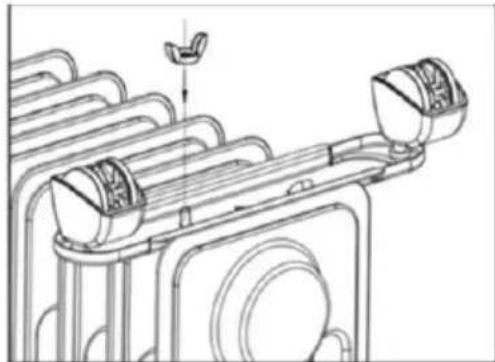
natural_image
Technical line drawing of a mechanical assembly with no visible text or symbolsBeschreibung
text_image
Diagram of a water heater with labeled components including control panel, display screen, and numbered parts 1 to 5.text_image
Diagram of a device control panel with labeled buttons and indicator lights, showing function keys and status indicators.text_image
QR code with central red logo containing the text 't' and a signal icontext_image
Add Manually Auto Scaled Inspector Lighting Balance Large Balance Box Balance Adjustments Editor & Insulator Settled & Tensile Set Balance Control Balance Tensile Tensile Energy Enterprise Industry & Agriculture Tools Settings Power (kW) Electric (kW) Electric (kW) Electric (kW) Electric (kW) Electric (kW) Electric (kW) Electric (kW) Electric (kW) Electric (kW) Electric (kW) Electric (kW) Electric (kW) Electric (kW) Electric (kW) Electric (kW) Electric (kW) Electric (kW) Electric (kW) Electric (kW) Electric (kW) Elastic Box Elastic Box Elastic Box Elastic Box Elastic Box Elastic Box Elastic Box Elastic Box Elastic Box Elastic Box Elastic Box Elastic Box Elastic Box Elastic Box Elastic Box Elastic Box Elastic Box Elastic Box Elastic Box Elastic Box Elastic Box Elastic Box Elastic Box Elastic Box Elastic Box Elastic Boxtext_image
Select 2.4 GHz Wi-Fi Network and enter password. If your Wi-Fi to 0.01ms, please exit a way for 2.4GHz. Connect user setting method Wi-Fi 2.4GHz Wi-Fi Password Buytext_image
Choose Wi-Fi and enter password Wi-Fi OK OKtext_image
Added successfully SXX / Device added successtext_image
Sunny 2015 Accessories Accessories Accessories Air Devices ...text_image
Add Manually Auto Smart External Text Options Lighting Tennis Large Pan-Box Inverter Cable Dial Header Dial Header Electric Market Dial Header Electronic Market Electronic Electronic Electronic Electronic Electronic Electronic Electronic Electronic Electronic Electronic Electronic Electronic Electronic Electronic Electronic Electronic Electronic Electronic Electronic Electronic Electronic Electronic Electronic Electronic Electronic Electronic Electronic Electronic Electronic Electronic Electronic Electronic Electronic Electronic Electronic Electronic Electronic Electronic Electronic Electronic Electronic Electronic Electronic Electronic Electronic Electronic Electronic Electronic Electronic Electronic Electrical Control Panel 100% Electrical Control Panel 100% Electrical Control Panel 100% Electrical Control Panel 100% Electrical Control Panel 100% Electrical Control Panel 100% Electrical Control Panel 100% Electrical Control Panel 100% Electrical Control Panel 100% Electrical Control Panel 100% Electrical Control Panel 100% Electrical Control Panel 100% Electronic Control Panel 100% Electronic Control Panel 100% Electronic Control Panel 100% Electronic Control Panel 100% Electronic Control Panel 100% Electronic Control Panel 100% Electronic Control Panel 100% Electronic Control Panel 100% Electronic Control Panel 100% Electronic Control Panel 100% Electronic Control Panel 100% Electronic Control Panel 100% Electronic Control Panel 25% (25%) Electronic Control Panel 25% (25%) Electronic Control Panel 25% (25%) Electronic Control Panel 25% (25%) Electronic Control Panel 25% (25%) Electronic Control Panel 25% (25%) Electronic Control Panel 25% (25%) Electronic Control Panel 25% (25%) Electronic Control Panel 25% (25%) Electronic Control Panel, 25% (25%) Electronic Control Panel, 25% (25%) Electronic Control Panel, 25% (25%) Electronic Control Panel, 25% (25%) Electronic Control Panel, 25% (25%) Electronic Control Panel, 25% (25%) Electronic Control Panel, 25% (25%) Electronic Control Panel, 25% (25%)text_image
Select 2.4 GHz Wi-Fi Network and enter password. If your WiFi is 30Hz, please set it for 2.4GHz. Connect user setting notified.text_image
Cancel Choose Wi-Fi and enter password WiFi Password Notetext_image
Added successfully XOX / Online added successnatural_image
Exterior view of a black electric heater with grid pattern and control panel (no visible text or symbols)FÉLICITATIONS !
MERCI D'AVOIR CHOISI CE PRODUIT DE SHX.

natural_image
Technical line drawing of a mechanical component with no visible text or symbols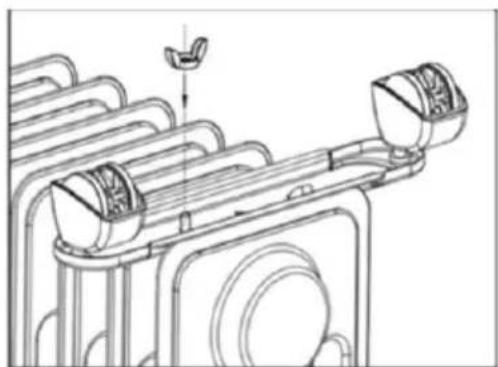
natural_image
Technical line drawing of a mechanical assembly with no visible text or symbolsDescription
text_image
Diagram of a water heater with numbered labels pointing to its componentstext_image
Diagram of a device control panel with labeled buttons and indicator lights, showing connections between numbered components.text_image
QR code with central red logo containing stylized 't' and signal wavestext_image
Add Manually Audio Ticket Inspector Lighting Switches Large Furniture Help... Switches Accessories Applications Applications Editor & Inspection Security & Services Help... Switches Comfort Comforter Tools Help Switches Comforters Tools Help Switches Comforters Tools Help Switches Comforters Tools Help Switches Comforters Tools Help Switches Comforters Tools Help Switches Comforters Tools Help Switches Comforters Tools Help Switches Comforters Tools Help Switches Comforters Tools Help Switches Comforters Tools Help Switches Comforters Tools Help Switches Comforters Tools Help Switches Comforters Tools Help Sensors & Applicators & Others Add Manual Tools Tools Switches Power Power100% Power200% Power300% Power400% Power500% Power600% Power700% Power800% Power900% Power1000% Power1100% Power1200% Power1300% Power1400% Power1500% Power1600% Power1700% Power1800% Power1900% Power2000% Power2100% Power2200% Power2300% Power2400% Power2500% Power2600% Power2700% Power2800% Power2900% Power3000% Power3100% Power3200% Power3300% Power3400% Power3500% Power3600% Power3700% Power3800% Power3900% Power4000% Power4100% Power4200% Power4300% Power4400% Power4500% Power4600% Power4700% Power4800% Power4900% Power5000% Power5100% Power5200% Power5300% Power5400% Power5500% Power5600% Power5700% Power5800% Power5900% Power6000% Power6100% Power6200% Power6300% Power6400% Power6500% Power6600% Power6700% Power6800% Power6900% Power7000% Power7100% Power7200% Power7300% Power7400% Power7500% Power7600% Power7700% Power7800% Power7900% Power8000% Power8100% Power8200% Power8300% Power8400% Power8500% Power8600% Power8700% Power8800% Power8900% Power9000% Power9100% Power9200% Power9300% Power9400% Power9500% Power9600% Power9700% Power9800% Power9900% Power100text_image
Select 2.4GHz Wi-Fi Network and enter password. If your Wi-Fi to 90%, please get up for 2.4GHz. Sustainable regular setting method Hi-Fi 2.4GHz Wi-Fi Password Nexttext_image
Choose Wi-Fi and enter password Wi-Fi OK OKtext_image
Added successfully SXX / Device added successtext_image
Sunny 2015 Accessories Accessories Accessories Air Devices ...text_image
Select 2.4 GHz Wi-Fi Network and enter password. If your WiFi is 30Hz, please set it for 2.4GHz. Connect user setting notified.text_image
Cancel Choose Wi-Fi and enter password WiFi Password Nametext_image
Added successfully XOX / Online added successnatural_image
Exterior view of a black electric heater with grid pattern and control panel (no visible text or symbols)CONGRATULAZIONI!
GRAZIE PER AVER SCELTO QUESTO PRODOTTO DI SHX.

natural_image
Technical line drawing of a mechanical component with no visible text or symbols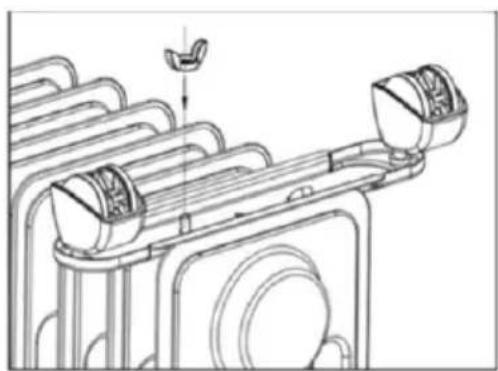
natural_image
Technical line drawing of a mechanical assembly with no visible text or symbolsDescrizione del
text_image
Diagram of a water heater with labeled components including control panel, display screen, and numbered parts 1 to 5.text_image
Diagram of a smart home control panel with labeled buttons and indicator lightstext_image
QR code with central red logo containing stylized 't' and signal iconnatural_image
Black electric heater with grid pattern and digital display (no visible text or symbols)GEFELICITEERD!
BEDANKT VOOR HET KIEZEN VAN DIT PRODUCT VAN SHX.

natural_image
Technical line drawing of a mechanical component with no visible text or symbols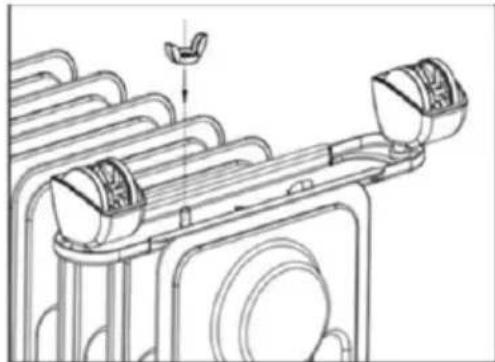
natural_image
Technical line drawing of a mechanical assembly with no visible text or symbolsBeschrijving van de

text_image
Diagram of a water heater with numbered labels pointing to its componentstext_image
Diagram of a smart home control panel with labeled buttons and indicator lightstext_image
QR code with central red logo containing stylized 't' and signal icontext_image
Select 2.4 GHz Wi-Fi Network and enter password. If your WiFi is 30Hz, please add to 2.4GHz. Connect user setting required.text_image
Cancel Choose Wi-Fi and enter password WiFi Password Notetext_image
Added successfully XXX Online added successVeiligheidsuitrusting:
natural_image
Exterior view of a black electric heater with grid pattern and control panel (no visible text or symbols)¡ENHORABUENA!
GRACIAS POR ELEGIR ESTE PRODUCTO DE SHX.

natural_image
Technical line drawing of a mechanical component with no visible text or symbols
natural_image
Technical line drawing of a mechanical assembly with no visible text or symbolsDescripción de la
text_image
Diagram of a water heater with labeled components including control panel, display screen, and numbered parts 1 to 5.text_image
Diagram of a device control panel with labeled buttons and indicator lights, showing connections between numbered components.text_image
QR code with central red logo containing stylized 't' and signal icontext_image
Add Manually Auto Scaled Inspector Lighting Balance Large Balance Box Balance Adjustments Editor & Insulator Settled & Tensile Set Balance Control Balance Tensile Tensile Energy Enterprise Industry & Agriculture Tools Settings Power (kW) Electric (kW) Electric (kW) Electric (kW) Electric (kW) Electric (kW) Electric (kW) Electric (kW) Electric (kW) Electric (kW) Electric (kW) Electric (kW) Electric (kW) Electric (kW) Electric (kW) Electric (kW) Electric (kW) Electric (kW) Electric (kW) Electric (kW) Electric (kW) Elastic Box Elastic Box Elastic Box Elastic Box Elastic Box Elastic Box Elastic Box Elastic Box Elastic Box Elastic Box Elastic Box Elastic Box Elastic Box Elastic Box Elastic Box Elastic Box Elastic Box Elastic Box Elastic Box Elastic Box Elastic Box Elastic Box Elastic Box Elastic Box Elastic Box Elastic Boxtext_image
Select 2.4 GHz Wi-Fi Network and enter password. If your Wi-Fi to 0.01ms, please opt at any for 2.4 GHz. Common regular setting method Wi-Fi 2.4 GHz Wi-Fi Password Buytext_image
Choose Wi-Fi and enter password Wi-Fi Password Newtext_image
Added successfully XXX / Service added) successtext_image
Sunny 2015 Accessories Accessories Accessories Air Devices ...text_image
Add Manually Auto Scan Electronic Lighting Beliefs Large Furniture Inches Anchairs Agriculture Transitions & Recovery Sensory & Trains & Existing Current Subtotal Transport Energy Experiences ion Industry & Reconstruction Auto Scant Text Sessions Home 26-45 Hotel 26-45 Hotel (Cyclical) Interior Cable Dial Header 26-45 Electric Bikelet 26-45 Electric Bikelet 26-45 Electric Bikelet 26-45 Electric Bikelet 26-45 Electric Bikelet 26-45 Electric Bikelet 26-45 Electric Bikelet 26-45 Electric Bikelet 26-45 Electric Bikelet 26,45-45,45- Electric Bikelet 26,45-45,45- Electric Bikelet 26,45-45,45- Electric Bikelet 26,45-45,45- Electric Bikelet 26,45-45,45- Electric Bikelet 26,45-45,45- Electric Bikelet 26, 45-45,45- Electric Bikelet 26,45-45,45- Electric Bikelet 26,45-45,45- Electric Bikelet 26,45-45,45- Electric Bikelet 26,45-45,45- Electric Bikelet 26,45-45,45- Elastic Bikelet 26,45-45,45- Elastic Bikelet 26,45-45,45- Elastic Bikelet 26,45-45,45- Elastic Bikelet 26,45-45,45- Elastic Bikelet 26,45-45,45- Elastic Bikelettext_image
Select 2.4 GHz Wi-Fi Network and enter password. If your WiFi is 30Hz, please set it for 2.4GHz. Connect user setting notified.text_image
Cancel Choose Wi-Fi and enter password Wi-Fi Password Nonetext_image
Added successfully XOX / Device added successnatural_image
Exterior view of a black electric heater with grid pattern and control panel (no visible text or symbols)GRATULUJEME!
DĚKUJEME, ŽE JSTE SI VYBRALI TENTO PRODUKT OD SPOLEČNOSTI SHX.

natural_image
Technical line drawing of a mechanical component with no visible text or symbols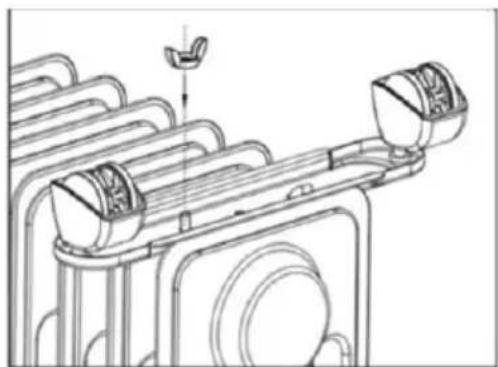
natural_image
Technical line drawing of a mechanical assembly with no visible text or symbolsPopis
text_image
Diagram of a water heater with labeled components including control panel, display screen, and wheelstext_image
Diagram of a smart home control panel with labeled buttons and indicator lightstext_image
QR code with central red logo containing stylized 't' and signal icontext_image
Sunny 2013 Accessories Accessories Accessories Accessories Accessories Accessories Accessories Accessories Accessories Accessories Accessories Accessories Accessories Accessories Accessories Accessories Accessories Accessories Accessories Accessories Accessories Accessories Accessories Accessories Accessories Accessories Accessories Accessories Accessories Accessories Accessories Accessories Accessories Accessoriestext_image
Select 2.4 GHz Wi-Fi Network and enter password. If your WiFi is 30Hz, please set it for 2.4GHz. Connect user setting notified.text_image
Cancel Choose Wi-Fi and enter password Wi-Fi Password Nonetext_image
Added successfully XOX Device added successnatural_image
Exterior view of a black electric heater with grid pattern and control panel (no visible text or symbols)GRATULUJEME!
ĎAKUJEME, ŽE STE SI VYBRALI TENTO PRODUKT OD SPOLOČNOSTI SHX.

natural_image
Technical line drawing of a mechanical component with no visible text or symbols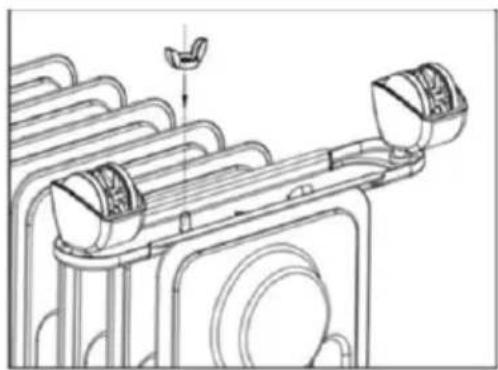
natural_image
Technical line drawing of a mechanical assembly with no visible text or symbolsOpis
text_image
Diagram of a water heater with numbered labels pointing to its componentstext_image
Diagram of a smart home control panel with labeled buttons and indicator lightstext_image
QR code with central red logo containing stylized 't' and signal icontext_image
Sunny 2017 Current Temporal Excellent Moderate/Post 1 Excellent Moderate & Quality All Devices -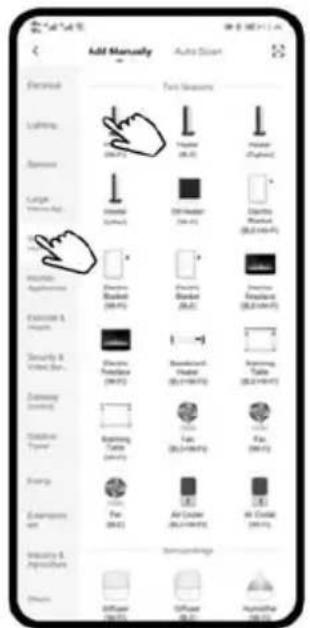
text_image
Add Manually Auto Strip Forward Text Severeans Lighting Camera Camera (RGB) Large Image App Internal External Dial Header Dial Header Internal Internal External External External External External External External External External External External External External External External External External External External External External External External External External External External External External External External External External External External External External External External External External External External External External External External External External External Internal Internal Internal Internal Internal Internal Internal Internal Internal Internal Internal Internal Internal Internal Internal Internal Internal Internal Internal Internal Internal Internal Internal Internal Internal Internal Internal Internal Internal Internal Internal Internal Internal Internal Internal Internal Internal Internal Internal Internal Internal Internal Internal Internal Internal Internal Internal Internal Internal Internal External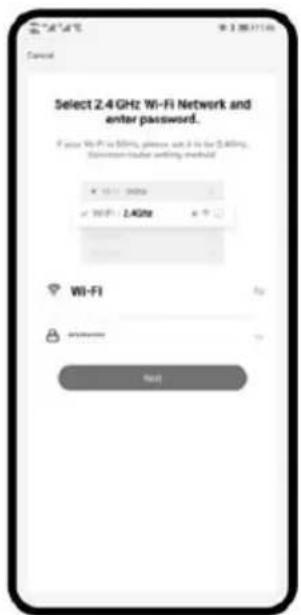
text_image
Select 2.4 GHz Wi-Fi Network and enter password. If your Wi-Fi is 50%, please use it for 2.4GHz. Savannah-trader writing manual Wi-Fi OKStlačte "+" v pravom hornom rohu a prejdite na d'alší krok.
Vyberte položku "Malé spotrebiče" a potom "Ohrievač".
Vyberte siet' WLAN 2,4 GHz a zadajte heslo. Potom stlačte tlačidlo "Next".
text_image
Cancel Choose Wi-Fi and enter password Wi-Fi Password Next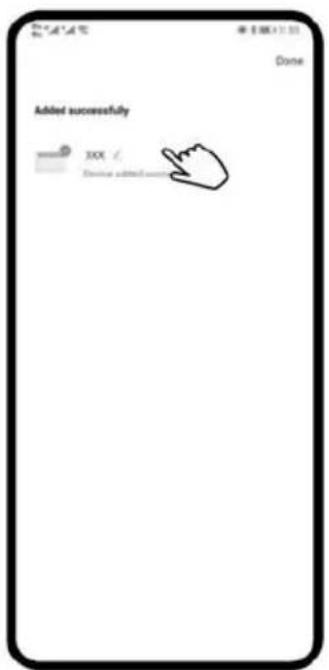
text_image
Added successfully XXX Chinese added user Donenatural_image
Exterior view of a black electric heater with grid pattern and control panel (no visible text or symbols)FELICITĂRI!
VĂ MULTUMIM CĂ AȚI ALES ACEST PRODUS DE LA SHX.

natural_image
Technical line drawing of a mechanical component with no visible text or symbols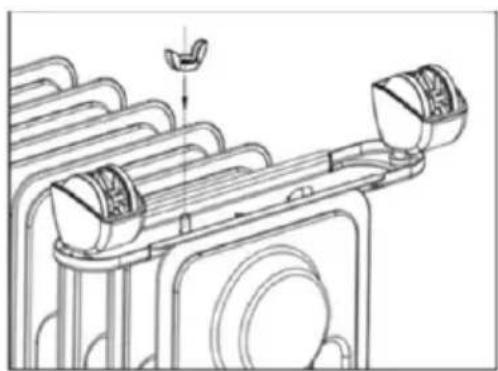
natural_image
Technical line drawing of a mechanical assembly with no visible text or symbolsDescriere a
text_image
Diagram of a water heater with numbered labels pointing to its componentstext_image
Diagram of a device control panel with labeled buttons and indicator lights, showing connections to power, switches, and alarm.text_image
QR code with central red logo containing stylized 't' and signal icontext_image
Select 2.4 GHz Wi-Fi Network and enter password. If your Wi-Fi is 50%, please use it for 2.4GHz. Savannah-trader writing method Wi-Fi My-10000000000 确定text_image
Cancel Choose Wi-Fi and enter password Wi-Fi Password Next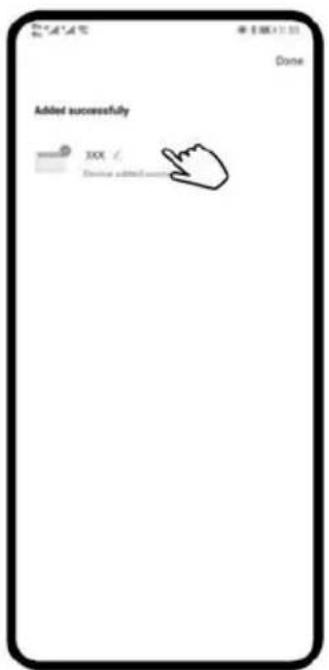
text_image
Added successfully XXX Chinese added user Donetext_image
Sunny 2015 Accessories Accessories Accessories Air Devices ...text_image
Add Manually Auto Scan Electronic Lighting Balance Large Forward Area Switches Applications Transitions & Recovery Sensing & Tracing & Existing Current Subtotal Transport Energy Experiences Energy & Reconstruction Auto Scans: Text Sessions Home (2014) Hotel (2015) Hotel (2016) Electric (2017) Electric (2018) Electric (2019) Electric (2020) Electric (2021) Automotive (2022) Automotive (2023) Automotive (2024) Air Condition (2025) Air Condition (2026) Air Condition (2027) Air Condition (2028)text_image
Select 2.4 GHz Wi-Fi Network and enter password. If your WiFi is 30Hz, please set it for 2.4GHz. Connect user setting notified.text_image
Cancel Choose Wi-Fi and enter password Wi-Fi Password Nonetext_image
X Forward 1 (Device) Added 1 successfully XXX NEXTtext_image
Added successfully XOX Device added successnatural_image
Black electric heater with grid pattern and digital display (no visible text or symbols)GRATULACJE!
DZIEKUJEMY ZA WYBRANIE TEGO PRODUKTU FIRMY SHX.

natural_image
Technical line drawing of a mechanical component with no visible text or symbols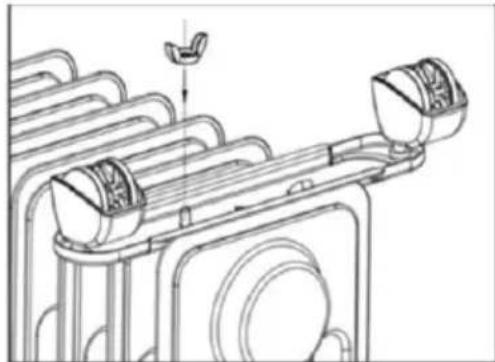
natural_image
Technical line drawing of a mechanical assembly with no visible text or symbolsOpis
text_image
Diagram of a water heater with labeled components including control panel, display screen, and wheelstext_image
Diagram of a device control panel with labeled buttons and indicator lights, showing connections to power, switches, and alarm.text_image
QR code with central red logo containing stylized 't' and signal icontext_image
Select 2.4 GHz Wi-Fi Network and enter password. If your Wi-Fi is 50%, please use it for 2.4GHz. Savannah-trader writing manual Wi-Fi OKtext_image
Cancel Choose Wi-Fi and enter password Wi-Fi Password Next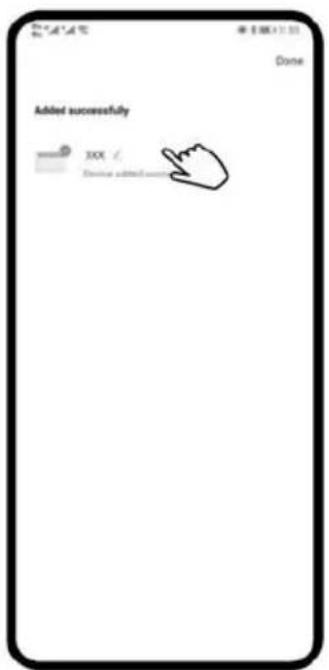
text_image
Added successfully XXX Chinese added user Donenatural_image
Black electric heater with grid pattern and digital display (no visible text or symbols)ČESTITAMO!
HVALA, KER STE IZBRALI TA IZDELEK IZ SHX.

natural_image
Technical line drawing of a mechanical component with no visible text or symbols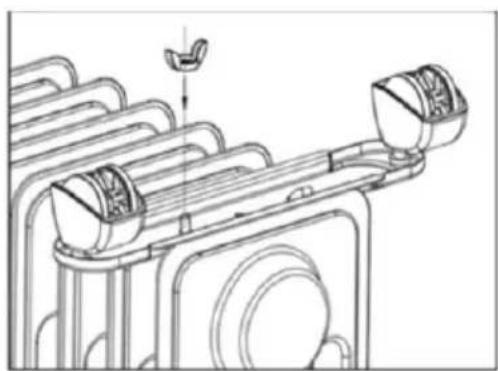
natural_image
Technical line drawing of a mechanical assembly with no visible text or symbolsOpis
text_image
Diagram of a water heater with numbered labels pointing to its components and status indicators.text_image
Diagram of a smart home control panel with labeled buttons and indicator lightstext_image
QR code with central red logo containing stylized 't' and signal icontext_image
Add Manually Auto Screen Forward Text Severeen Lighting None Large Size Size Horizontal Horizontal Horizontal Horizontal Horizontal Horizontal Horizontal Horizontal Horizontal Horizontal Horizontal Horizontal Horizontal Horizontal Horizontal Horizontal Horizontal Horizontal Horizontal Horizontal Horizontal Horizontal Horizontal Horizontal Horizontal Horizontal Horizontal Horizontal Horizontal Horizontal Horizontal Horizontal Horizontal Horizontal Horizontal Horizontal Horizontal Horizontal Horizontal Horizontal Horizontal Horizontal Horizontal Horizontal Horizontal Horizontal Horizontal Horizontal Horizontal Horizontal Functional Functional Functional Functional Functional Functional Functional Functional Functional Functional Functional Functional Functional Functional Functional Functional Functional Functional Functional Functional Functional Functional Functional Functional Functional Functional Functional Functional Functional Functional Functional Functional Functional Functional Functional Functional Functional Functional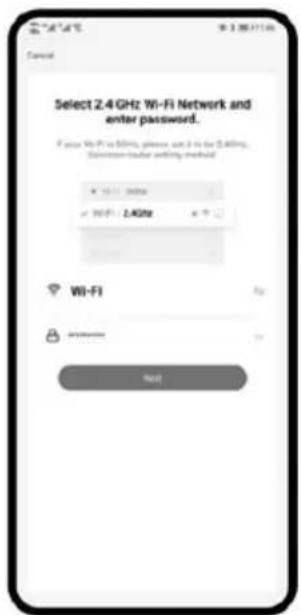
text_image
Select 2.4 GHz Wi-Fi Network and enter password. If your Wi-Fi is 50%, please use it for 2.4GHz. Savannah-trader writing method Wi-Fi My-10000000000 确定text_image
Cancel Choose Wi-Fi and enter password Wi-Fi Password Next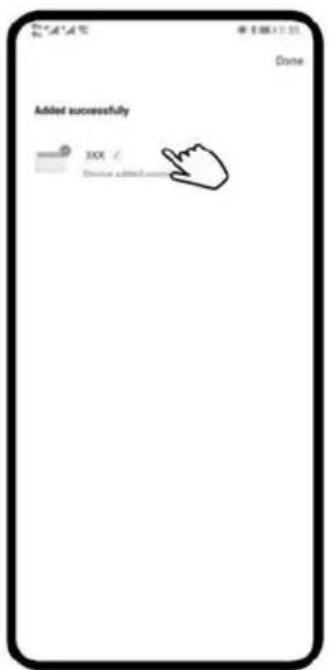
text_image
Added successfully XXX Chinese added user DoneIzberite omrežje WLAN 2,4 GHz in vnesite geslo. Nato pritisnite "Naprej".
text_image
Add Manually Auto Smart Electronic Lighting Dimensions Large Horizontal Size Inverted Cable Diameter Size Electrical Balance Transitions Transitions Transitions Transitions Transitions Transitions Transitions Transitions Transitions Transitions Transitions Transitions Transitions Transitions Transitions Transitions Transitions Transitions Transitions Transitions Transitions Transitions Transitions Transitions Transitions Transitions Transitions Transitions Transitions Transitions Transitions Transitions Transitions TransitionsIzberite "Majhne naprave" in nato "Grelnik".
text_image
Select 2.4 GHz Wi-Fi Network and enter password. If your WiFi is 300ms, please add 6 or 8 for 2.4GHz. Connect user setting required.Izberite omrežje WLAN 2,4 GHz in vnesite geslo. Nato pritisnite "Naprej".
text_image
Cancel Choose Wi-Fi and enter password Wi-Fi Password NoteIzberite omrežje WLAN 2,4 GHz in vnesite geslo. Nato pritisnite "Naprej".
text_image
Power 1 device installed automaticly X805 NEXTtext_image
Added successfully XOX / Device added successVarnostna oprema:
natural_image
Black electric heater with grid pattern and digital display (no visible text or symbols)ČESTITAMO!
HVALA VAM ŠTO STE ODABRALI OVAJ SHX PROIZVOD.

natural_image
Technical line drawing of a mechanical component with no visible text or symbols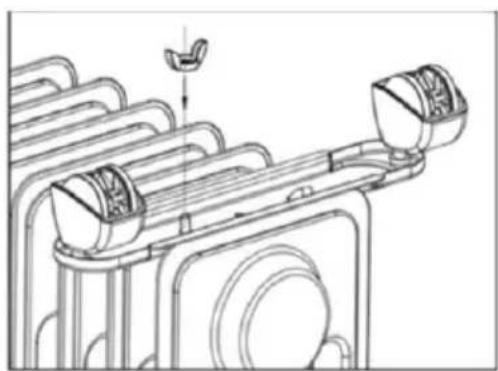
natural_image
Technical line drawing of a mechanical assembly with no visible text or symbolsOpis
text_image
Diagram of a water heater with labeled components including control panel, digital display, and numbered parts 1 to 5.text_image
Diagram of a device control panel with labeled buttons and indicator lights, showing connections to power, switches, and alarm.text_image
QR code with central red logo containing stylized 't' and signal icontext_image
Select 2.4 GHz Wi-Fi Network and enter password. If your Wi-Fi is 50%, please use it for 2.4GHz. Savannah-trader writing method Wi-Fi My-10000000000 确定Odaberite WiFi mrežu od 2,4 GHz i unesite lozinku. Zatim pritisnite "Dalje".
text_image
Cancel Choose Wi-Fi and enter password Wi-Fi Password NextOdaberite WiFi mrežu od 2,4 GHz i unesite lozinku. Zatim pritisnite "Dalje".
text_image
Added successfully XXX Chinese added successtext_image
Sunny 2015 Accessories Accessories Accessories Air Devices ...text_image
Select 2.4 GHz Wi-Fi Network and enter password. If your WiFi is 30Hz, please set it for 2.4GHz. Connect user setting notified.Odaberite WiFi mrežu od 2,4 GHz i unesite lozinku. Zatim pritisnite "Dalje".
text_image
Cancel Choose Wi-Fi and enter password Wi-Fi Password NoteOdaberite WiFi mrežu od 2,4 GHz i unesite lozinku. Zatim pritisnite "Dalje".
text_image
X Penset 1 device installed 1 successfully XXX NEXTtext_image
Added successfully XOX Device added successSigurnosni uređaji:
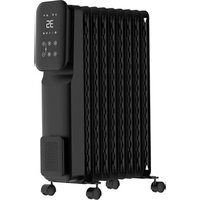
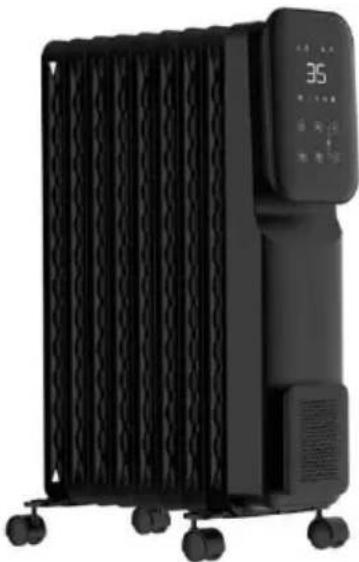
Oil radiator SHXORA20W
natural_image
Exterior view of a black electric heater with grid pattern and control panel (no visible text or symbols)CONGRATULATIONS!
THANK YOU FOR CHOOSING THIS PRODUCT FROM SHX.

This product is only suitable for well-insulated rooms or for occasional use.
EN
PLEASE READ THE OPERATING INSTRUCTIONSCAREFULLY BEFORE STARTING ASSEMBLY,INSTALLATION, OPERATION OR MAINTENANCE.
PROTECT YOURSELF AND OTHERS BY FOLLOWING THE SAFETY INSTRUCTIONS. FAILURE TO FOLLOW THE INSTRUCTIONS COULD RESULT IN PERSONAL INJURY AND/OR PROPERTY DAMAGE AND/OR INVALIDATE THE WARRANTY!
Intended use
This appliance is intended exclusively for heating living spaces in households and must not be used for any other purpose.
IMPORTANT INFORMATION ON SAFETY, STANDARD
AND ELECTRICAL CONNECTION


-
Only use this appliance in accordance with the guidelines in the operating instructions. Any other use not recommended by the manufacturer could result in fire, electric shock or personal injury.
-
Caution - Some parts of the product can become very hot and cause burns. Special care must be taken when children and vulnerable persons are present. Always allow the appliance to cool down before cleaning or dismantling it.
-
Remove the packaging and make sure that the appliance is not damaged. If in doubt, do not use the appliance and contact your dealer.
- Before connecting to the mains, you must check that the type of current and mains voltage match the specifications on the appliance rating plate.
- The electrical socket into which you connect the appliance must not be defective or loose and must be suitable for the required current load and, above all, reliably earthed.
- Avoid using an extension cable, as this could overheat and cause a fire.
- The appliance must not be installed directly under a wall socket. If in doubt, have your electrical installation checked by a qualified electrician.
- It is prohibited to adapt or modify the properties of this appliance in any way whatsoever. Only use replacement parts and accessories recommended by the manufacturer (failure to do so may invalidate the warranty).
- Do not use this heater if it shows visible signs of damage.
- Do not operate the appliance unattended. If you leave the room, always switch off the appliance.
- Do not use the device in small rooms where people are present who are unable to leave the room independently, unless they are constantly monitored.
- Children must not play with the appliance.
- Children under the age of 3 must be kept away from the appliance unless they are constantly supervised.
- Children aged 3 years and under and younger than 8 years may only switch the appliance on and off if they are supervised or have been instructed in the safe use of the
appliance and have understood the resulting dangers, provided that the appliance is placed or installed in its normal position of use. Children aged 3 years and younger than 8 years must not insert the plug into the socket, regulate the appliance, clean the appliance and/or carry out user maintenance.
- This appliance can be used by children aged from 8 years and above and persons with reduced physical, sensory or mental capabilities or lack of experience and knowledge if they have been given supervision or instruction concerning use of the appliance in a safe way and understand the hazards involved. Children must not play with the appliance. Cleaning and user maintenance must not be carried out by children without supervision.
- Keep children away from packaging material. Choking hazard if swallowed!
- This appliance is not equipped with a device for regulating the room temperature.
- The appliance is not suitable for continuous and precision operation.
- Do not use this heater if it has been dropped.
- This appliance is only intended for use in dry indoor areas.
- Do not use the appliance in the vicinity of water or high humidity, e.g. in a damp cellar, next to a swimming pool, bathtub or shower. Ensure that no water can penetrate the appliance.
-
Do not use the appliance in the direct vicinity of petrol, gas, oil, alcohol or other explosive and highly flammable liquids or gases.
-
To reduce the risk of fire, keep the air outlet of the appliance at least one metre away from all highly flammable substances such as e.g:
a. pressurised vessels (e.g. spray containers)
b. Furniture and textiles of any kind
-
Only use this heater on a horizontal and stable surface.
-
Never cover the appliance during operation and the cool-down phase.
-
Make sure that no objects touching the heating surface get between the appliance and the mounting wall.
-
Always switch off the appliance before disconnecting the mains plug.
-
Unplug the appliance when not in use, before cleaning or when maintenance is required. Cleaning and user maintenance must not be carried out by children without supervision. Do not touch the plug with wet hands to avoid electric shocks.
ATTENTION | RISK OF INJURYThe appliance becomes hot during operation!Never touch the appliance during operation→ this could lead to serious BURNS. |
ATTENTION | FIRE HAZARDThe appliance must not be covered during operation! |
ATTENTION | SAFETY DISTANCEKeep a safe distance of at least one metre from easily flammable objects such as furniture, curtains, paper, etc.!LOCATIONAlways position the appliance so that the air can flow in and out unhindered.RISK OF BURNSThe appliance becomes very hot during use and can cause burns. Special care must be taken when children and vulnerable persons are present.RISK OF OVERHEATINGDo not heat rooms with a volume of less than 4m3 |
Symbols on the device
Significance:
Symbol:

Caution! Do not cover! The symbol on the appliance indicates that it is not permitted to hang objects (e.g. towels, clothing, etc.) above the appliance or directly in front of it. The heater must not be covered in order to avoid overheating and the risk of fire!
Recycling, disposal, declaration of conformity
 | RECYCLINGThe packaging materials can be recycled. It is therefore recommended to dispose of them in sorted waste |
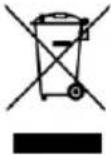 | DISPOSALThe "crossed-out wheelie bin" symbol requires the separate disposal of waste electrical and electronic equipment (WEEE). Electrical and electronic equipment may contain hazardous and environmentally harmful substances. Therefore, do not dispose of them in unsorted residual waste, but at a designated collection point for waste electrical and electronic equipment. This will help to protect resources and the environment. For further information, please contact your dealer or the local authorities. Directive 2012/19/EU |
 | DECLARATION OF CONFORMITYWe hereby confirm that this product complies with the essential requirements, regulations and directives of the EU. You can view the detailed declaration of conformity at any time under the following link:https://www.schuss-home.at/downloads |
Errors and technical modifications excepted.
Scope of delivery
- Oil radiator
- Stand
- Operating instructions
Assembly
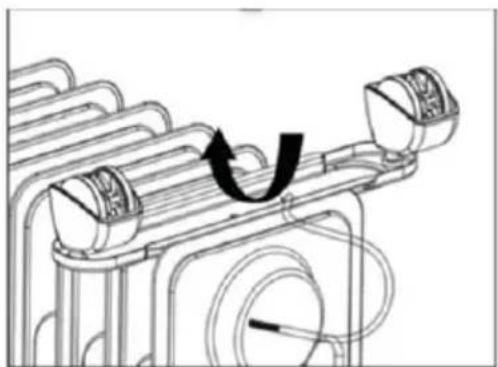
- Place the heater upside down on a flat surface. To prevent damage to the heater, place the heater on a soft surface (e.g. a towel, carpet or similar).
- Hook the metal plates with the pre-assembled rollers into the U-shaped hooks on one side and fasten the metal plates with the wing nuts provided. The metal plates are fitted between the first two and last two slats.
- Place the radiator upright. Wait one minute before connecting the radiator to the socket.
natural_image
Technical line drawing of a mechanical component with no visible text or symbols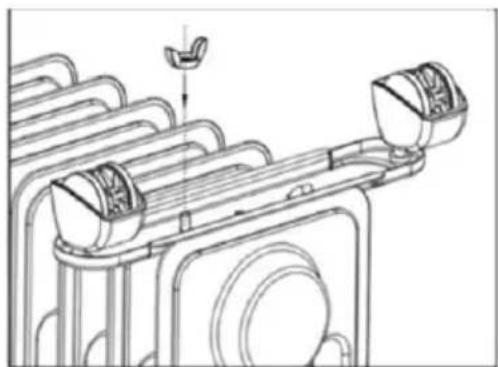
natural_image
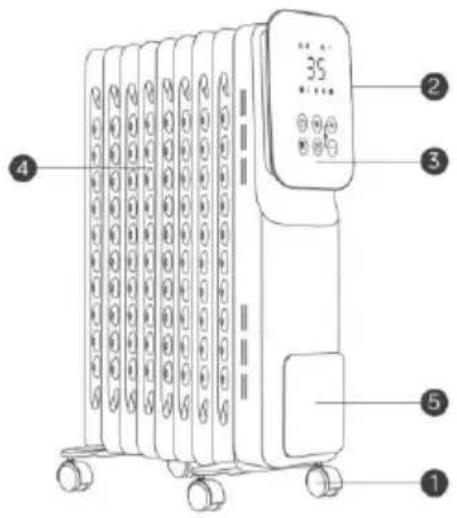
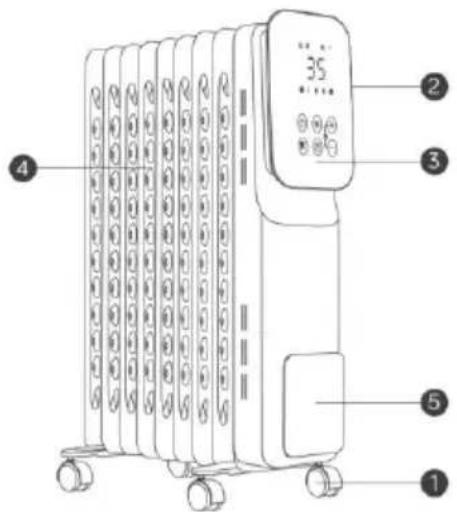
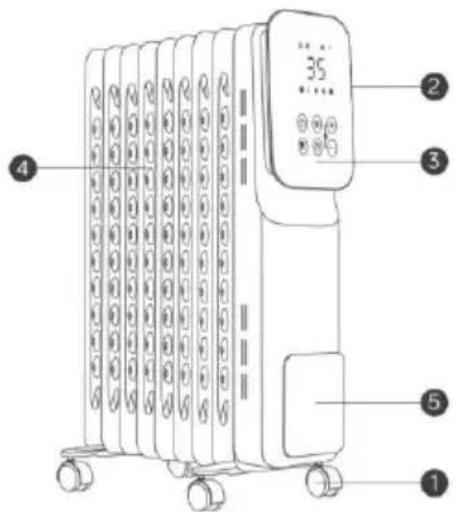
Technical line drawing of a mechanical assembly with no visible text or symbolsDescription of the
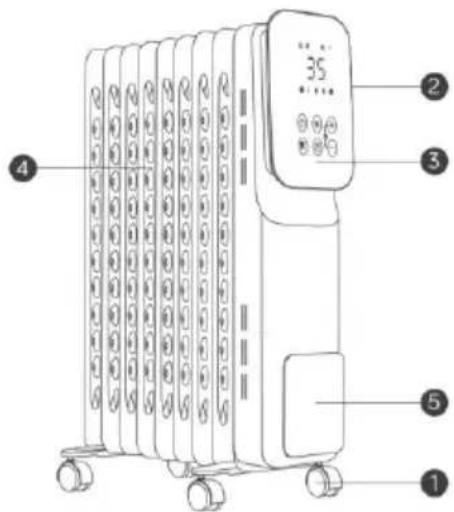
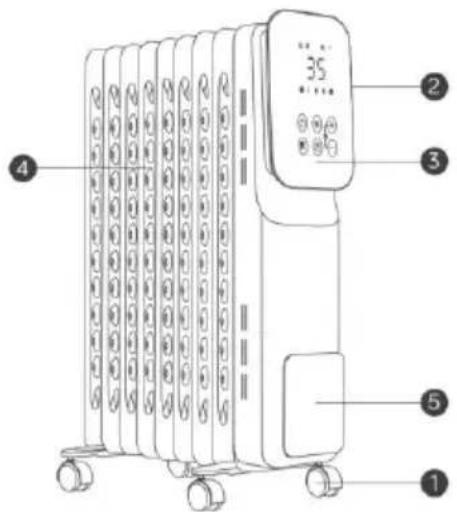
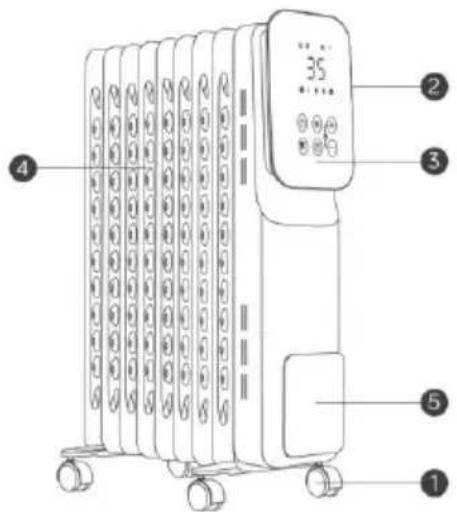
text_image
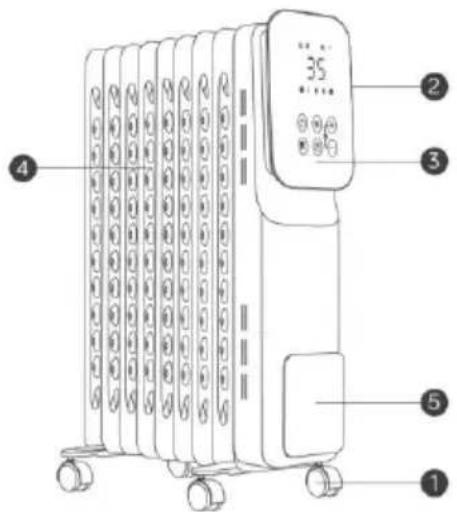
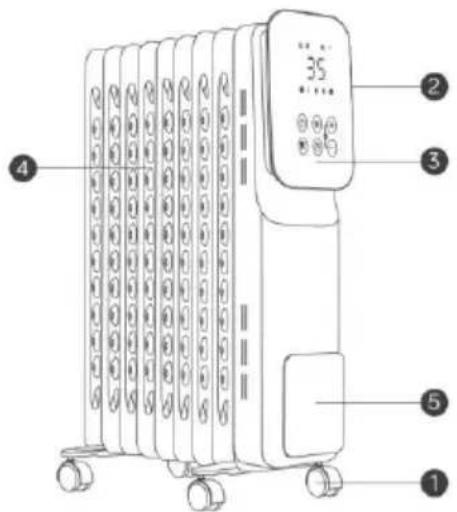
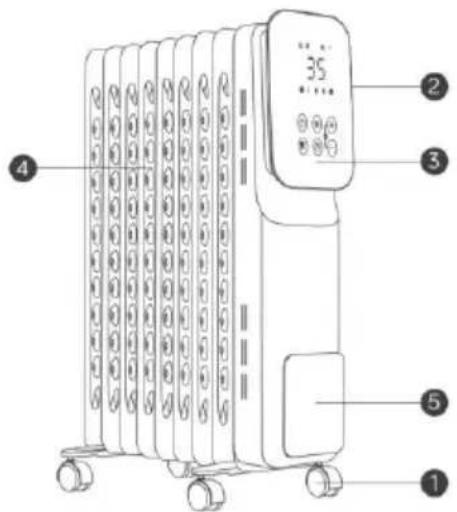
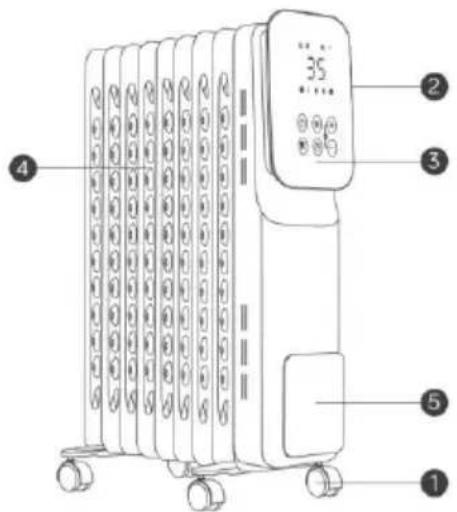
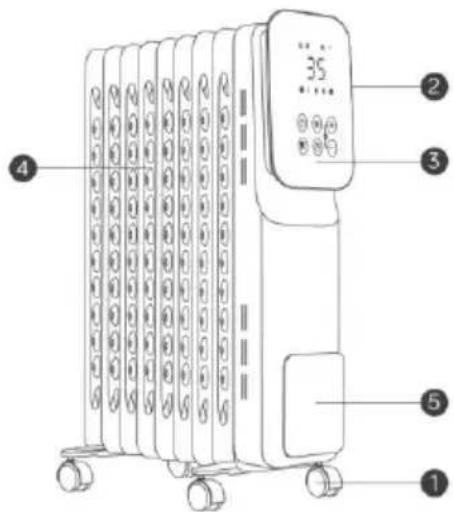
35 4 5 1| 1 | Castors |
| 2 | On/off switch |
| 3 | Front control panel |
| 4 | Heating louvres |
| 5 | Holder for the mains cable |
Commissioning of the service area
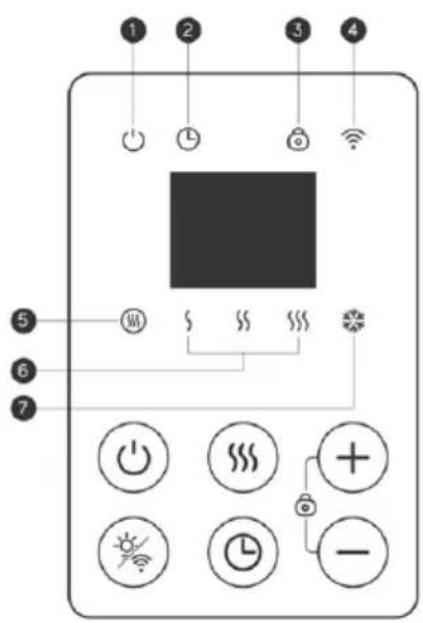
text_image
Diagram of a device control panel with labeled buttons and indicator lights, showing function keys and status indicators.| 6 buttons | |
| [1K24Z] | On/off switch |
 | Power control |
 | Timer switch |
 | Brightness settings/WLAN reset |
| [644K] | Temperature / Timer plus |
| [2AX8] | Temperature / Timer minus |
 | Childproof lock |
 | |
| Standby: On/Off | |
| Timer | |
| Childproof lock | |
| WLAN function | |
| Heinz advert | |
| Heat output | |
| Frost protection |
Hint
Connect the appliance to a safely earthed socket AC220-240V, 50-60 Hz.
- Press the on/off toggle switch and press ⏻ to start the heater.
- Press "+ " or "- " to set the target temperature in the range of 10^ C - 35^ C .
- Press the "button to adjust the heating level.
| § | 800W |
| §§ | 1200W |
| §§§ | 2000W |
 | Automatic frost protection, which switches the heater on when the room temperature falls below 7°C.This helps to reduce the likelihood of water pipes freezing and bursting.In anti-freeze mode, "AF" is displayed on the screen and an indicator light illuminates. It is not possible to adjust the target temperature in this mode. |
- Press the "💡" button to switch the 24-hour timer on or off. "00" means that the timer function is deactivated. Press "+" or "-" to set the timer to 0-24 hours. The indicator light is activated.
- Press the " 🔥 " button to set the display brightness to 100%, 50%, 25% or display off.
- When the heater is heating, the display lights up.
- Press⊕ and⊖ simultaneously for 3 seconds to lock or unlock the screen. - The heater is equipped with a boost function. If you press the "###" button for longer than 3 seconds, the heater will heat continuously for 12 hours,
deactivating the temperature sensor. In this mode, "HH" is displayed on the screen.
- The screen light dims automatically after 60 seconds of inactivity.
WLAN connection
Use your phone to scan the QR code below or search for the "TUYA SMART" app to download it and create a free account. You can also visit www.tuya.com for more information.

text_image
QR code with central red logo containing stylized 't' and signal iconPress and hold the " " button for more than 3 seconds, the indicator in the top right corner will flash rapidly. Open the Tuya app to connect the heater.
1.fast connection:
Activate Bluetooth on your mobile phone and then follow the steps below.
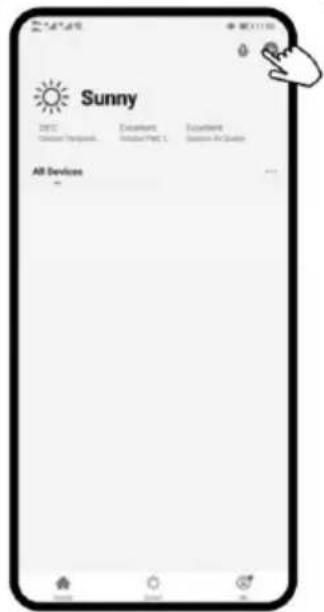
text_image
Sunny 2017 Current Temporal Excellent Moderate/Post 1 Excellent Moderate/Post 2 All Devices -
text_image
Add Manually Auto Screen Forward Text Severeen Lighting None Large Size Size Horizontal Horizontal Horizontal Horizontal Horizontal Horizontal Horizontal Horizontal Horizontal Horizontal Horizontal Horizontal Horizontal Horizontal Horizontal Horizontal Horizontal Horizontal Horizontal Horizontal Horizontal Horizontal Horizontal Horizontal Horizontal Horizontal Horizontal Horizontal Horizontal Horizontal Horizontal Horizontal Horizontal Horizontal Horizontal Horizontal Horizontal Horizontal Horizontal Horizontal Horizontal Horizontal Horizontal Horizontal Horizontal Horizontal Horizontal Horizontal Horizontal Horizontal Vertical Vertical Vertical Vertical Vertical Vertical Vertical Vertical Vertical Vertical Vertical Vertical Vertical Vertical Vertical Vertical Vertical Vertical Vertical Vertical Vertical Vertical Vertical Vertical Vertical Vertical Vertical Vertical Vertical Vertical Vertical Vertical Vertical Vertical Vertical Vertical Vertical Vertical Vertical Vertical Vertical Vertical Vertical Vertical Vertical Vertical Vertical Vertical Vertical Vertical External
text_image
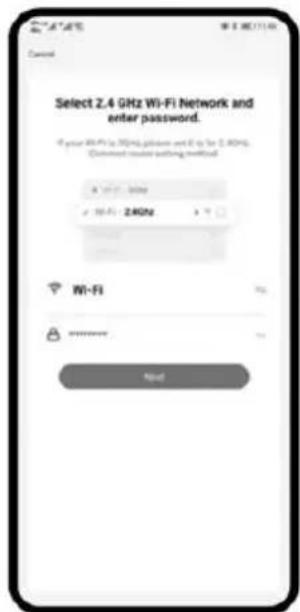
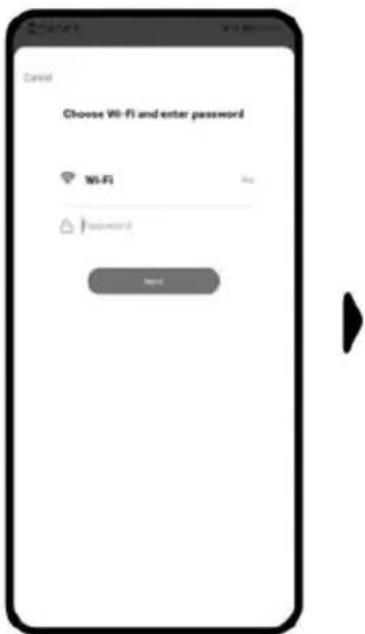
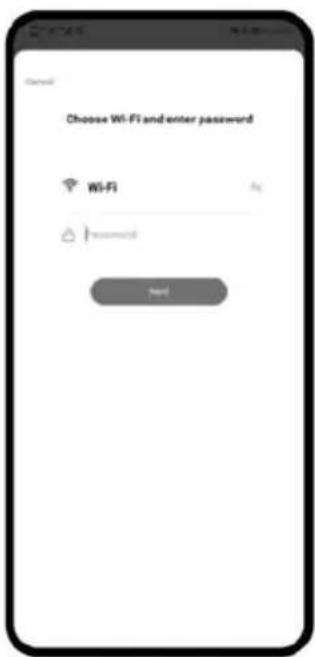
Select 2.4 GHz Wi-Fi Network and enter password. If your Wi-Fi is 50%, please use it for 2.4GHz. Savannah-trader writing method Wi-Fi My-10000000000 确定| Press "+" in the top right-hand corner and go to the next step. | Select "Small appliances" and then "Heater". | Select the 2.4 GHz WLAN network and enter the password. Then press "Next". |
 |  | |
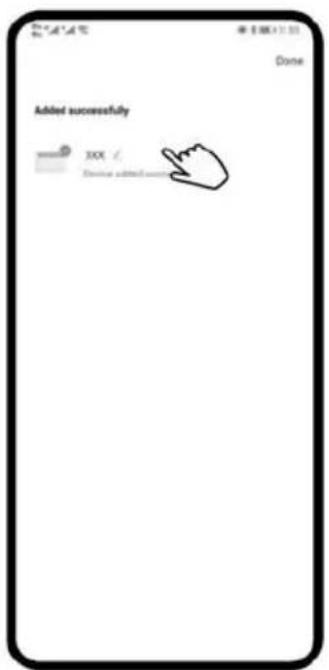
| Select the 2.4 GHz WLAN network and enter the password. Then press "Next". | You can press to change the name of the product. |
2. normal connection:
If Bluetooth is not activated, please follow the next step.

text_image
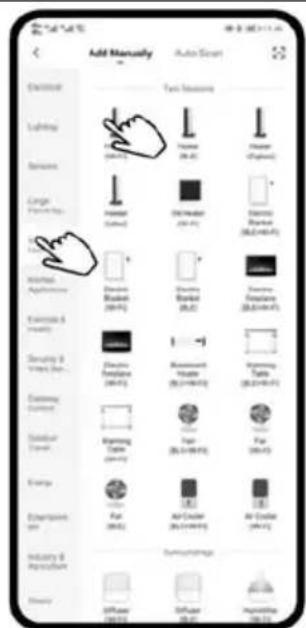
Sunny 2015 Accessories Accessories Accessories Air Devices ...Press "+" in the top right-hand corner and go to the next step.
text_image
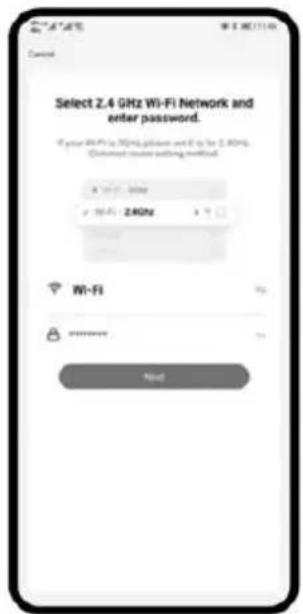
Add Manually Auto Smart Switch Lighting Dimensions Large Pan-Link Infrared Aptograph Transitions & Dimensions Sensory & Video Scan... Customing Content Subtotal Color Energy Extrapolation Size Industry & Reconstruction Auto Security Text Options Fixed Maximable Noise Audio Audio Mask Audio Mask Audio Mask Audio Mask Audio Mask Audio Mask Audio Mask Audio Mask Audio Mask Audio Mask Audio Mask Audio Mask Audio Mask Audio Mask Audio Mask Audio Mask Audio Mask Audio Mask Audio Mask Audio Mask Audio Mask Audio Mask Audio Mask Audio Mask Audio Mask Audio Mask Audio Mask Audio Mask Audio Mask Audio Mask Audio Mask Audio Mask Audio Mask Audio MaskSelect "Small appliances" and then "Heater".
text_image
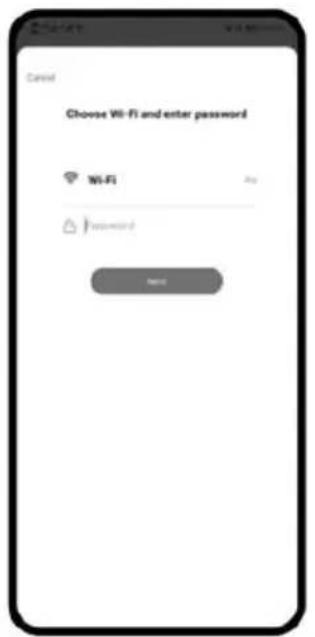
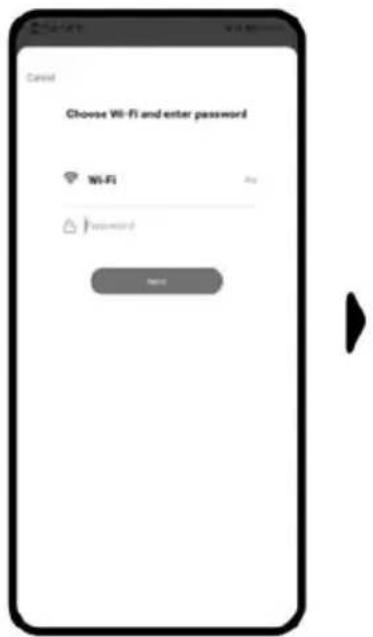
Select 2.4 GHz Wi-Fi Network and enter password. If your WiFi is 30Hz, please set it for 2.4GHz. Connect user setting notified.Select the 2.4 GHz WLAN network and enter the password. Then press "Next".
text_image
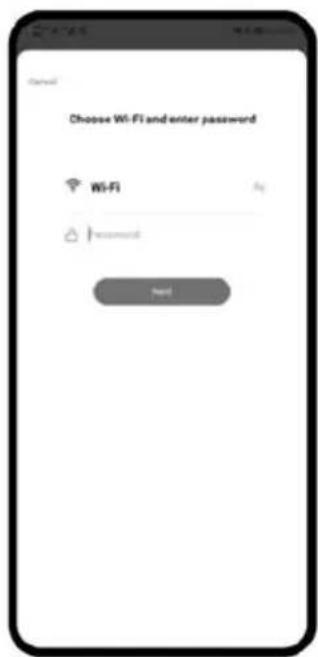
Cancel Choose Wi-Fi and enter password Wi-Fi Password NoneSelect the 2.4 GHz WLAN network and enter the password. Then press "Next".
text_image
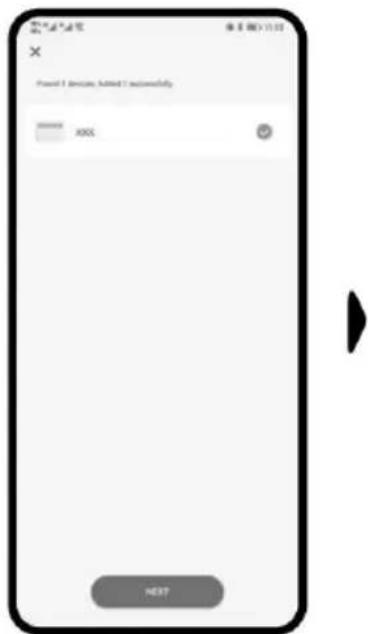
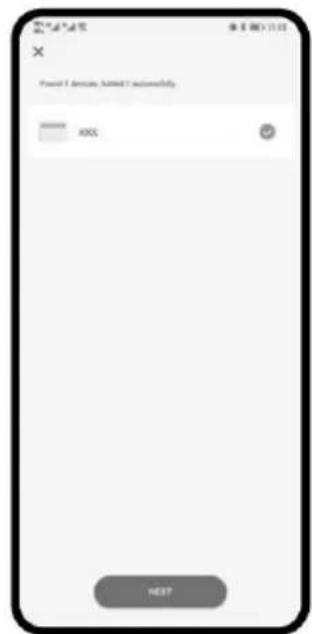
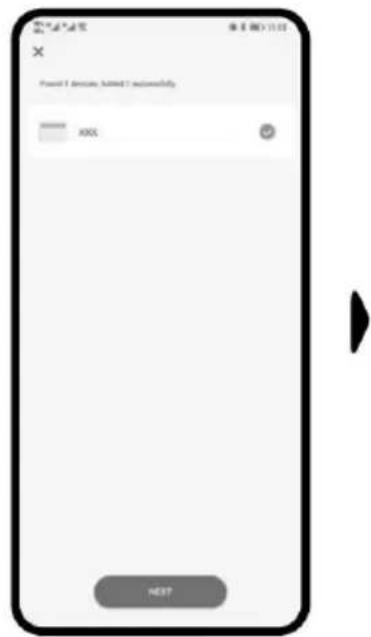
X Forward 1 (Device) Added 1 successfully XXX NEXTYou can press to change the name of the product.
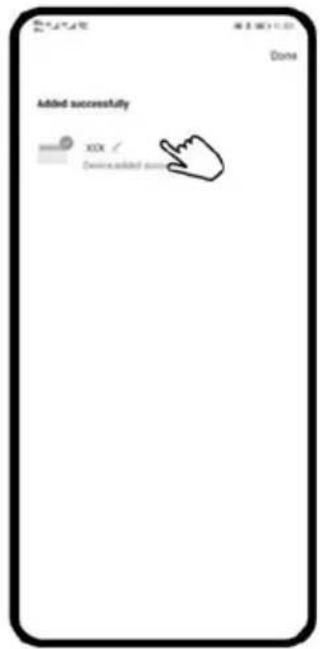
text_image
Added successfully XOX / Device added successSafety equipment:
Anti-tip protection
This appliance has a safety function that automatically switches the heater off if it accidentally tips over. To reset the function, pull the plug out of the socket for a few minutes, remove the cause of the tipping over and then plug the appliance back in. If it is still not possible to reset the function, please contact your dealer or our service centre.
Overheating protection
Your heater is equipped with a safety device that switches the appliance off if it overheats. If the safety device has been activated, switch off the appliance, unplug it and allow it to cool down completely. Check for blocked air inlets or outlets and then try to restart the appliance. If the appliance still does not work or the safety device switches it off again, take the appliance to your nearest service centre for inspection or repair.
Cleaning & maintenance :
- Always disconnect the heater from the power source and allow it to cool down completely before cleaning or maintenance.
- Use a hoover to remove dust from the grilles.
- Clean the outside of the appliance with a damp cloth and then dry the heater with a dry cloth. Never immerse the appliance in water and do not allow water to drip into the appliance.
Storage:
- Always disconnect the appliance from the power source, allow it to cool down completely and clean it.
- If you do not use the appliance for a longer period of time, put the appliance back in the original box together with the operating instructions and store it in a dry and ventilated place.
- Do not place any heavy objects on top of the box during storage, as this may damage the appliance.
TECHNICAL INFORMATION
| Item number: | SHXORA20W |
| Input voltage: | 220-240W |
| Frequency: | 50-60Hz |
| Power consumption: | Max. 2000W |
| Setting options: | 800/1200/2000W |
| Thermostat: | 10-35°C |
| Weight | 10.2 kg |
| Dimensions | 440 x 630 x 245 mm |
| Contact address for further information: | Schuss Home Electronic GmbH Scheringgasse 3, A-1140 Vienna Service line: +43 (1) 97 0 21 www.schuss-home.at FB-No.: 236974 t / FB-Court: Vienna |
Information required for electric individual room heaters
| Item number SHXORA20W | ||||||
| Specification | Symbol | Value | Unit | Specification | Unit | |
| Heat output | Only for electric storage single-room heaters: Type of heat supply control | |||||
| Nominal heat output | P_nom | 2,0 | kW | Manual control of the heat supply with integrated thermostat | N/A | |
| Minimum heat output (guide value) | P_min | 0,8 | kW | Manual control of the heat supply with feedback of the room and/or outside temperature | N/A | |
| Maximum continuous heat output | P_max,c | N/A | kW | Electronic control of the heat supply with feedback of the room and/or outside temperature | N/A | |
| Auxiliary power consumption | Heat output with fan support | N/A | ||||
| With Nominal heat output | el_max | 0,000 | kW | Type of heat output/room temperature control | ||
| With Minimum heat output | el_min | 0,000 | kW | Single-stage heat output, no room temperature control | No | |
| In the Ready state | el_sB | 0,001 | kW | Two or more manually adjustable levels, no room temperature control | No | |
| Room temperature control with mechanical thermostat | No | |||||
| With electronic room temperature control | No | |||||
| Electronic room temperature control and time-of-day control | Yes | |||||
| Electronic room temperature control and weekday control | No | |||||
| Other control options | ||||||
| Room temperature control with presence detection | No | |||||
| Room temperature control with open window detection | No | |||||
| With remote control option (WiFi) | No | |||||
| With adaptive control of the heating start | No | |||||
| With operating time limit | No | |||||
| With black ball sensor | No | |||||
| Contact details: | Schuss Home Electronic GmbH Scheringgasse 3 - 1140 Vienna - Austria https://www.schuss-home.at/ | |||||
WARRANTY
With this quality product from SHX, you have made a decision in favour of innovation, durability and reliability.
This SHX device is guaranteed for 2 years from the date of purchase in Austria and Germany!
If, contrary to expectations, service work on your device should nevertheless be necessary during this period, we hereby guarantee you a free repair (spare parts and labour) or (at Schuss's discretion) replacement of the product. If neither repair nor replacement is possible for economic reasons, we reserve the right to issue a time value credit note.
In any case, please contact the customer hotline as a first step (see instructions for use - "Contact addresses for further information and service line").
Please note that any repair work carried out by unauthorised workshops will immediately invalidate this warranty.
This guarantee does not cover
- Damage due to non-compliance with the operating instructions
- Repair or replacement of parts due to normal wear and tear
• Devices that are used - even partially - for commercial purposes
• Devices mechanically damaged by external influences (fall, impact, breakage, improper use, etc.) as well as signs of aesthetic wear and tear
• Devices that have been handled improperly
• Devices that have not been opened by our authorised service workshop - Unfulfilled consumer expectations
- Damage caused by force majeure, water, lightning, overvoltage
- Devices for which the type designation and/or serial number on the device has been changed, deleted, made illegible or removed
• Defects due to extraordinary soiling - services outside our authorised workshops, the transport costs to an authorised workshop or to us and back and the associated risks
We would like to emphasise that a lump sum of € 60 (indexed based on CPI 2015, June 2020) will be charged within the warranty period in the event of operating errors or if no error is detected.
The provision of a warranty service (repair or replacement of the device) does not extend the absolute< warranty period of 2 years from the date of purchase.
The 2-year guarantee is only valid on presentation of the proof of purchase (name and address of the dealer as well as the complete device designation must be included) and the corresponding guarantee certificate, on which the device type and the serial number (visible on the box and on the back or bottom of the device) must be noted! If the warranty certificate is not presented, only the statutory warranty applies!
We expressly point out that the statutory warranty rights are not affected by this guarantee and remain unaffected.
Schuss Home Electronic GmbH and its vicarious agents shall only be liable for damages in the event of gross negligence or wilful intent. Liability for loss of profit, expected but unrealised savings, consequential damage and damage arising from third-party claims is excluded.
You can find the contact address of the relevant service centre on our homepage www.schuss-home.at.
Congratulations on your choice. We hope you enjoy using your SHX device!
ADDRESS
SHX Distribution
Schuss Home Electronic GmbH
A-1140 Vienna, Scheringgasse 3
Tel.: +43 (0)1/ 970 21
Type designation:
Serial number:......
EU-DECLARATION OF CONFORMITY

SCHUSS
HOME ELECTRONIC
This declaration of conformity is issued under the sole responsibility of the manufacturer.
(1)
Schuss Home Electronic GmbH
Scheringgasse 3
1140 Wien, AUSTRIA
(II)
Declares, that the product
Manufacturer
Hersteller
is conformity with following directives, norms and/or regulations:
(III)
of 16 April 2014 amending Directives 2003/71/EC and 2009/138/EC and Regulations (EC) No 1060/2009, (EU) No 1094/2010 and (EU) No 1095/2010 in respect of the powers of the European Supervisory Authority (European Insurance and Occupational Pensions Authority) and the European Supervisory Authority (European Securities and Markets Authority)
Article 3.1(a) Safety:
EN 60335-2-30:2009 + A11:2012 + A1: 2020
EN 60335-1:2012 + A11:2014 + A13:2017 + A1:2019 + A2:2019 + A14:2019 + A15:2021
Article 3.1(a) Health:
EN 62311:2008
EN IEC 62311:2020
EN 62233: 2008
Article 3.1(b) EMC:
EN 301 489-1 V2.2.3
EN 301 489-17 V3.2.4
EN IEC 55014-1:2021
EN IEC 55014-2:2021
EN IEC 61000-3-2:2019+A1:2021
EN 61000-3-3:2013+A1:2019+A2:2021
Article 3.2 Radio:
EN 300 328 V2.2.2
EMC Directive (EMC): 2014/30/EU Directive of the European Parliament and of the Council of 26 February 2014 on the harmonisation of the laws of
the Member States relating to electromagnetic compatibility; Official Journal of the EU L96, 29/03/2014, p. 79–106
Low Voltage Directive (LVD):2014/35/EU Directive of the European Parliament and of the Council of 26 February 2014 on the harmonisation of the laws of the Member States relating to the making available on the market of electrical equipment designed for use within certain voltage limits; Official Journal of the EU L96, 29/03/2014, p. 357–374
Ökodesign-Richtlinie Energy-Related-Products-Directive (ErP)2009/125/EC;
Official Journal EU L285/10-35 (31.10.2009) and associated regulation 2015/1188
RoHS Directive: 2011/65/EU Directive of the European Parliament and of the Council of 8 June 2011 on the restriction of the use of certain
hazardous substances in electrical and electronic equipment; Official Journal of the EU L174, 1/07/2011, p. 88–110
Reach SVHC(EC)NO. 1907/2006 Schuss Home Electronic GmbH hereby confirms that in the products we supply, there are no substances of very high concern (SVHC) in the candidate list (last ECHA update from June 14, 2023, 235 substances) above 0.1% in accordance with Article 33 of the REACH Regulation (EC) No .1907/2006 are included.
Place and date of issue:
Vienna, 2024-09-02
Declaration reference:
SCHUSS HOME ELECTRONIC GMBH
Scheringgasse 3, 1140 Wien, AUSTRIA
Authorized representative of manufacture
Scharl, Alexander
Senior product and purchasing manager i.V..
Name, Funktion / name, function
Unterschrift / signature
| English [En] | EU DECLARATION OF CONFORMITYManufacturer [I] declares under its sole responsibility that the products [II] are in conformity with the requirements of the EU Directives, Regulations and Harmonised standards [III]. |
| German [De] | EU-KONFORMITÄTSERKLÄRUNGDer Hersteller [I] erklärt in alleiniger Verantwortung, dass die Produkte [II] allen Anforderungen der EU-Richtlinien, Verordnungen und harmonisierten Normen [III] entsprechen. |
| French [Fr] | DÉCLARATION UE DE CONFORMITÉLe fabricant [I] déclare sous sa seule responsabilité que les produits [II] sont conformes aux exigences des directives, règlements et normes harmonisées [III] de l’UE. |
| Spanish [Es] | DECLARACIÓN DE CONFORMIDAD UEEl fabricante [I] declara bajo su exclusiva responsabilidad que los productos [II] están en conformidad con los requisitos de las directivas, regulaciones y normas armonizadas de la UE [III]. |
| Italian [It] | DICHIARAZIONE DI CONFORMITÀ UEIl produttore [I] dichiara sotto la sua unica responsabilità che i prodotti [II] sono conformi ai requisiti delle direttive, dei regolamenti e degli standard armonizzati della UE [III]. |
| Greek [El] | ΔΗΛΩΣΗ ΣΥΜΜΟΡΦΩΣΗΣ EEΟ κατασκευαστής [I] δηλώνει αποκλειστικά με δική του ευθύνη ότι τα προϊόντα [II] συμμορφώνονται με τις απαιτήσεις των Οδηγιών, των Κανονισμών και των Εναρμονισμένων προτύπων της ΕΕ [III]. |
| Portuguese | DECLARAÇÃO DE CONFORMIDADE UE |
| [Pt] | O fabricante [I] declara sob sua inteira responsabilidade que os produtos [II] estão em conformidade com os requisitos das diretivas, regulamentos e normas harmonizadas da UE [III]. |
| Croatian [Hr] | EU IZJAVA O USKLAĐENOSTIProizvođač [I] izjavljuje pod punom materijalnom odgovornošću da su proizvodi [II] u skladu sa zahtjevima EU direktiva, propisa i harmoniziranih standarda [III]. |
| Czech [Cs] | EU PROHLÁŠENÍ O SHODĚVýrobce [I] prohlašuje na vlastní výlučnou odpovědnost, že výrobky [II] jsou ve shodě s požadavky směrnic, předpisů a harmonizovaných norem EU [III]. |
| Danish [Da] | EU OVERENSSTEMMELSESERKLÆRINGProducenten [I] erklærer under eget ansvar, at produkterne [II] er i overensstemmelse med kravene i direktiverne, forordningerne og de harmoniserede standarder fra EU [III]. |
| Dutch [NI] | EU-CONFIRMITEITSVERKLARINGFabrikant [I] verklaart op eigen verantwoordelijkheid dat de producten [II] in overeenstemming zijn met de eisen van de EG-richtlijnen, voorschriften en geharmoniseerde normen [III]. |
| Estonian [Et] | EL-i VASTAVUSDEKLARATSIOONTootja [I] kinnitab ja kannab ainuisikuliselt vastutust selle eest, et tooted [II] on toodetud kooskõlas Euroopa Liidu direktiivide, standardite ja muude normatiivdokumentidega [III]. |
| Finnish [Fi] | EU-VAATIMUSTENMUKAISUUSVAKUUTUSValmistaja [I] vakuuttaa omalla vastuullaan, että tuotteet [II] ovat EU:n direktiivien, asetusten ja yhdenmukaistettujen standardien [III] vaatimusten mukaisia. |
| Hungarian | EU MEGFELELŐSÉGI NYILATKOZAT |
| [Hu] | A Gyártó [I] nyilatkozza, hogy kizárólagos felelősséget vállal a termékek [II] EU irányelveknek, szabályozásoknak és harmonizált szabványoknak való megfeleléséről [III]. |
| Latvian [Lv] | ES ATBILSTÍBAS DEKLARÁCIJARažotājs [I] deklarē uz savu atbildību, ka produkti [II] atbilst ES direktīvu, regulu un saskaņoto standartu [III] prasībām. |
| Lithuanian | ES ATITIKTIES DEKLARACIJA |
| [Lt] | Gamintojas [I] savo išskirtine atsakomybe pareiškia, kad gaminiai [II] atitinka ES direktyvų, reglamentų ir darniųjų standartų reikalavimus [III]. |
| Norwegian | EU-SAMSVARSERKLÆRING |
| [No] | Produsent [I] erklærte under sitt eget ansvar at sine produkter [II] er i samsvar med kravene i EU- direktivene, forskrifter og harmoniserte standarder [III]. |
| Polish [PI] | DEKLARACJA ZGODNOŚCI UEProducent [I] deklaruje z pełną odpowiedzialnością, że produkty [II] są zgodne z postanowieniami dyrektyw, regulacji oraz norm zharmonizowanych UE [III]. |
| Romanian | DECLARAȚIA DE CONFORMITATE UE |
| [Ro] | Producătorul [I] declară pe propria răspundere că produsele [II] sunt în conformitate cu cerințele Directivelor, Normelor și Standardelor armonizate UE [III]. |
| Slovak [Sk] | VYHLÁSENIE O ZHODE EUVýrobca [I] vyhlasuje na svoju vlastnú zodpovednosť, že výrobky [II] sú v súlade s požiadavkami smerníc, nariadení a harmonizovaných noriem EÚ [III]. |
| Slovenian [SI] | IZJAVA EU O SKLADNOSTIProizvajalec [I] s polno odgovornostjo izjavlja, da so izdelki [II] v skladu z zahtevami direktiv, uredb in usklajenih standardov EU [III]. |
| Swedish [Sv] | EU FÖRKLARING OM ÖVERENSSTÄMMELSE Tillverkaren [I] deklarerar å eget ansvar att produkterna [II] efterlever kraven enligt EU-direktiven, förordningarna och harmoniserade normer [III]. |