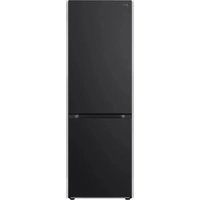
GBV3100AEP - Fridge LG - Free user manual and instructions
Find the device manual for free GBV3100AEP LG in PDF.


| Product Type | Refrigerator-Freezer |
| Brand | LG |
| Model | GBV3100AEP |
| Dimensions (W x D x H) | 595 x 682 x 2030 mm (approximate) |
| Power Supply | 220-240 V ~ 50 Hz |
| Climate Class | SN, N, ST, T (10 °C to 43 °C) |
| Refrigerator Temperature Range | 1 °C to 7 °C |
| Freezer Temperature Range | -15 °C to -23 °C |
| Smart Functions | Express Cool, Express Freeze, Vacation, Wi-Fi (LG ThinQ), Smart Diagnosis |
| Fresh Converter | Compartment with humidity control for vegetables, fish, or meat |
| Fresh Vegetable Drawer | Humidity control for vegetables or fruits |
| Lighting | LED (energy efficiency class G) |
| Defrost | Automatic in the refrigerator compartment |
| Cleaning | Soft cloth and mild detergent; do not use abrasive or flammable products |
| Safety | Button lock (Lock), high temperature alarm, child safety |
| Refrigerant | R600a (isobutane) |
| Spare Parts | Available for 7 years (seals: 10 years) |
| Repairability | Only by an authorized LG service center |
| Warranty | 24 months minimum |
| Included Accessories | Ice tray, bottle holder, foldable shelf (depending on model) |
Frequently Asked Questions - GBV3100AEP LG
User questions about GBV3100AEP LG
0 question about this device. Answer the ones you know or ask your own.
Ask a new question about this device
Download the instructions for your Fridge in PDF format for free! Find your manual GBV3100AEP - LG and take your electronic device back in hand. On this page are published all the documents necessary for the use of your device. GBV3100AEP by LG.
USER MANUAL GBV3100AEP LG
Read this owner's manual thoroughly before operating the appliance and keep it handy for reference at all times.
EN ENGLISH
EL EΛΛΗΝΙΚΑ
HU MAGYAR NO
NORSK
SQ SHQIP
BG БЪЛГАРСКИ
ES ESPAÑOL
IT ITALIANO
PL POLSKI
SR SRPSKI
CA CATALÀ
ET EESTI
LT LIETUVIU
PT PORTUGUÊS
SV SVENSKA
CZ ČEŠTINA
FI SUOMI
LV LATVIEŠU
RO ROMÂNĂ
DA DANSK
FR FRANÇAIS
МК МАКЕДОНС
SK SLOVENČINA
DE DEUTSCH
HR HRVATSKI
NL NEDERLANDS
SL SLOVENŠČINA
MFL70584315
Rev.17_083024
www.lg.com
Refer to the owner's manual on LG website for more detailed information.
Copyright © 2019-2024 LG Electronics. All Rights Reserved
TABLE OF CONTENTS
This manual may contain images or content different from the model you purchased.
This manual is subject to revision by the manufacturer.
SAFETY INSTRUCTIONS ....3
IMPORTANT SAFETY INSTRUCTIONS 3
INSTALLATION ....10
Dimensions and Clearances 10
Ambient Temperature 10
OPERATION 11
Notes for Operation 11
Fresh Converter (*) 12
Fresh Vegetable Drawer (*) 12
Control Panel 14
SMART FUNCTIONS ....16
LG ThinQ Application 16
MAINTENANCE ....18
Notes for Cleaning 18
Disposal of Your Old Appliance 18
TROUBLESHOOTING....19
Additional Information Of The Manual
This is a short version of Owner's Manual. For more information, please visit the LG website at http://www.lg.com
Troubleshooting
SAFETY INSTRUCTIONS
EN
The following safety guidelines are intended to prevent unforeseen risks or damage from unsafe or incorrect operation of the appliance.
The guidelines are separated into 'WARNING' and 'CAUTION' as described below.

This symbol is displayed to indicate matters and operations that can cause risk. Read the part with this symbol carefully and follow the instructions in order to avoid risk.

WARNING
This indicates that the failure to follow the instructions can cause serious injury or death.

CAUTION
This indicates that the failure to follow the instructions can cause the minor injury or damage to the product.
IMPORTANT SAFETY INSTRUCTIONS

WARNING
To reduce the risk of explosion, fire, death, electric shock, injury or scalding to persons when using this product, follow basic precautions, including the following:
Children in the Household
- This appliance is not intended for use by persons (including children) with reduced physical, sensory or mental capabilities, or lack of experience and knowledge, unless they have been given supervision or instruction concerning use of the appliance by a person responsible for their safety. Children should be supervised to ensure that they do not play with the appliance.
- If the appliance is equipped with a lock (some models only), keep the key out of reach of children.
For use in Europe:
- This appliance can be used by children aged from 8 years and above and persons with reduced physical, sensory or mental capabilities or lack of experience and knowledge if they have been given supervision or instruction concerning use of the appliance in a safe way and understand the hazards involved. Children shall not play with the appliance. Cleaning and user maintenance shall not be made by children without supervision.
- Children aged from 3 to 8 years are allowed to load and unload refrigerating appliances.
Installation
- This appliance should only be transported by two or more people holding the appliance securely.
- Ensure that the socket outlet is properly grounded, and that the earth pin on the power cord is not damaged or removed from the power plug. For more details on grounding, inquire at an LG Electronics customer information centre.
- This appliance is equipped with a power cord having an equipment-grounding conductor and a grounding power plug. The power plug must be plugged into an appropriate socket outlet that is installed and grounded in accordance with all local codes and ordinances.
- If the power cord is damaged or the hole of the socket outlet is loose, do not use the power cord and contact an authorized service centre.
- Do not plug the appliance into a multi socket adapter which does not have a power cable (mounted).
- Do not modify or extend the power cable.
- The appliance should be connected to a dedicated power line which is separately fused.
- Do not use a multi socket outlet which is not properly grounded (portable). In case of using a properly-grounded multi socket outlet (portable), use the multi socket outlet with the current capacity of the power code rating or higher and use the multi socket outlet only for the appliance.
- Install the appliance in a place where is easy to unplug the power plug of the appliance.
-
Be careful not to point the power plug up or let the appliance lean against the power plug.
•Install the appliance on a firm and level floor. -
Do not install the appliance in a damp and dusty place. Do not install or store the appliance in any outdoor area, or any area that is subject to weathering conditions such as direct sunlight, wind, rain, or temperatures below freezing.
- Do not place the appliance in direct sunlight or expose it to the heat from heating appliances such as stoves or heaters.
- Be careful not to expose the rear of the appliance when installing.
- Be careful not to let the appliance door fall during assembly or disassembly.
- Be careful not to pinch, crush, or damage the power cable during assembly or disassembly of the appliance door.
- Do not connect a plug adapter or other accessories to the power plug.
Operation
- Do not use the appliance for any purpose (storage of medical or experimental materials or shipping) other than any domestic household food storage use.
- Unplug the power plug during a severe thunderstorm or lightening or when not in use for a long period of time.
- Do not touch the power plug or the appliance controls with wet hands.
- Do not bend the power cable excessively or place a heavy object on it.
- If water penetrates electrical parts of the appliance, disconnect power plug and contact an LG Electronics customer information centre.
- Do not place handsor metallic objects inside the area emitting the cold air, cover or heat releasing grille on the back.
- Do not apply excessive force or impact to the back cover of the appliance.
- Do not put animals, such as pets into the appliance.
- Be careful of nearby children when you open or close the appliance door. The door may bump the child and cause injury.
- Avoid the danger of children getting trapped inside the appliance. A child trapped inside the appliance can cause suffocation.
-
Do not place heavy or fragile objects, containers filled with liquid, combustible substances, flammable objects (such candles, lamps, etc.), or heating devices (such as stoves, heaters, etc.) on the appliance.
-
If there is a gas leakage (isobutane, propane, natural gas, etc.), do not touch the appliance or power plug and ventilate the area immediately. This appliance uses a refrigerant gas (isobutane,R600a). Although it uses a small amount of the gas, it is still combustible gas. Gas leakage during appliance transport, installation or operation can cause fire, explosion or injury if sparks are caused.
- Do not use or store flammable or combustible substances (ether, benzene, alcohol, chemical, LPG, combustible spray, insecticide, air freshener, cosmetics, etc.) near the appliance.
- Immediately unplug the power plug and contact an LG Electronics customer information centre if you detect a strange sound, odour, or smoke coming from the appliance.
- Fill with potable water only into icemaker or dispenser water tank.
- Do not damage the refrigerant circuit.
- Do not place any electronic appliance (such as heater and mobile phone) inside the appliance.
Maintenance
- Disconnect the power cord before cleaning the appliance or replacing the inside lamp (where fitted).
- Securely plug the power plug in the socket outlet after completely removing any moisture and dust.
- Never unplug the appliance by pulling on the power cable. Always grip the power plug firmly and pull straight out from the socket outlet.
- Do not spray water or inflammable substances (toothpaste, alcohol, thinner, benzene, flammable liquid, abrasive, etc.) over the interior or exterior of the appliance to clean it.
- Do not clean the appliance with brushes, cloths or sponges with rough surfaces or which are made of metallic material.
- Only qualified service personnel from LG Electronics service centre should disassemble, repair, or modify the appliance. Contact an LG Electronics customer information centre if you move and install the appliance in a different location.
- Do not use a hair drier to dry the inside of the appliance or place a candle inside to remove the odours.
- Do not use mechanical devices or other means to accelerate the defrosting process.
Disposal
- When discarding the appliance, remove the door gasket while leaving the shelves and baskets in place and keep children away from the appliance.
- Dispose of all packaging materials (such as plastic bags and styrofoam) away from children. The packaging materials can cause suffocation.
Technical Safety
- Keep ventilation openings, in the appliance enclosure or in the built-in structure, clear of obstruction.
- Do not use electrical appliances inside the refrigerator.
- The refrigerant and insulation blowing gas used in the appliance require special disposal procedures. Consult with service agent or a similarly qualified person before disposing of them.
- Refrigerant leaking out of the pipes could ignite or cause an explosion.
- The amount of refrigerant in your particular appliance is shown on the identification plate inside the appliance.
- Never start up an appliance showing any signs of damage. If in doubt, consult your dealer.
- This appliance is intended to be used in household and similar applications only. It should not be used for commercial, or catering purposes, or in any mobile application such as a caravan or boat.
- Do not store explosive substances such as aerosol cans with a flammable propellant in this appliance.
- This refrigerating appliance is not intended to be used as a built-in appliance.
- This appliance is not for use in portable or mobile installations, such as marine or RV uses, where it will be in motion while operating.
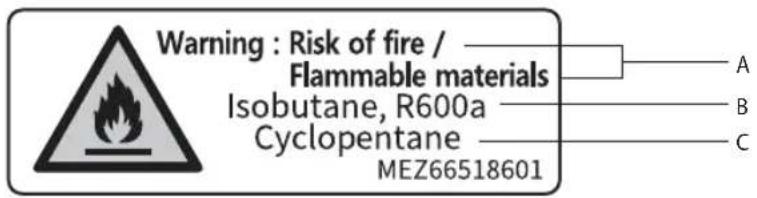
Risk of Fire and Flammable Materials
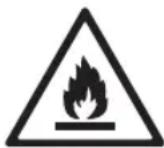
This symbol alerts you to flammable materials that can ignite and cause a fire if you do not take care.
- This appliance contains a small amount of isobutane refrigerant (R600a), but it is also combustible. When transporting and installing the appliance, care should be taken to ensure that no parts of the refrigerating circuit are damaged.
- If a leak is detected, avoid any naked flames or potential sources of ignition and air the room in which the appliance is standing for several minutes. In order to avoid the creation of a flammable gas air mixture if a leak in the refrigerating circuit occurs, the size of the room in which the appliance is used should correspond to the amount of refrigerant used. The room must be 1 m ^2 in size for every 8 g of R600a refrigerant inside the appliance.
- When positioning the appliance, ensure the supply cord is not trapped or damaged.
- Do not locate multiple portable socket-outlets or portable power supplies at the rear of the appliance.
CAUTION
To reduce the risk of minor injury to persons, malfunction, or damage to the product or property when using this product, follow basic precautions, including the following:
Installation
- Do not tilt the appliance to pull or push it when transporting.
- Make sure not to get a body part such as a hand or foot stuck while moving the appliance.
Operation
- Do not touch frozen food or the metal parts in the freezer compartment with wet or damp hands. It may cause frostbite.
- Do not place glass containers, bottles or cans (especially those containing carbonated drinks) in the freezer compartment, shelves or ice bin that will be exposed to temperatures below freezing.
- The tempered glass on the front side of the appliance door or the shelves can be damaged by an impact. If it is broken, do not touch it with hands.
- Do not hang from the appliance doors, storage room, shelf or climb up into it.
- Do not store an excessive amount of water bottles or containers for side dishes on the door baskets.
- Prevent animals from nibbling on the power cable or water hose.
- Do not open or close the appliance door with excessive force.
- If the hinge of the appliance door is damaged or operates improperly, stop using the appliance and contact an authorized service centre.
- Do not clean glass shelves or covers with warm water when they are cold.
- Never eat frozen foods immediately after they have been taken out in the freezer compartment.
- Make sure not to get a hand or foot stuck upon opening or closing the appliance door.
Maintenance
- Do not insert the shelves upside down. The shelves may fall.
- To remove frost from the appliance, contact an LG Electronics customer information centre.
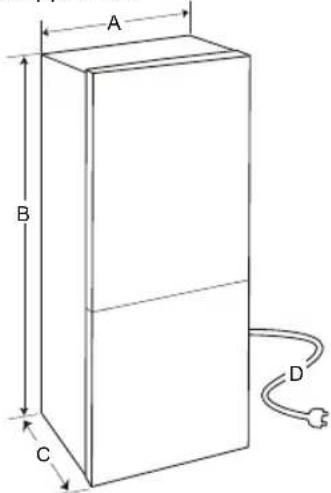
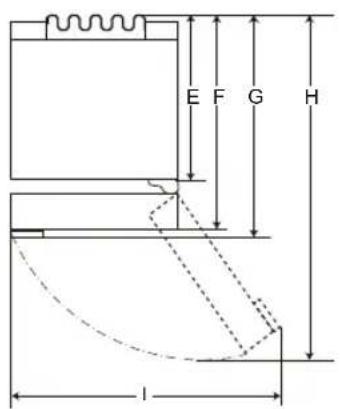
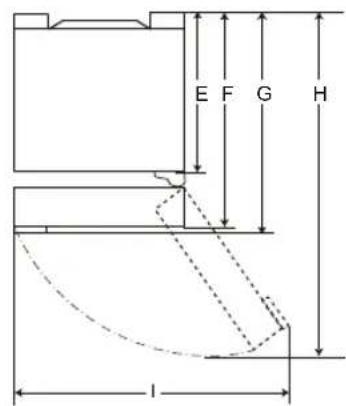
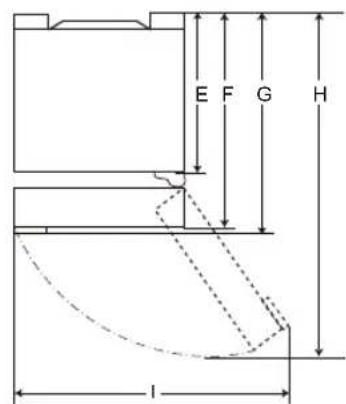
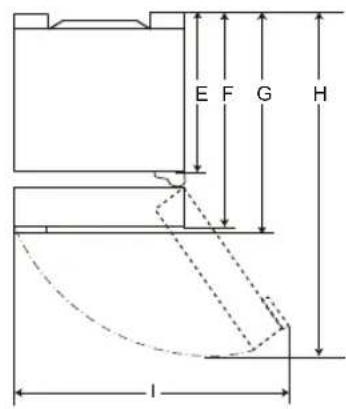
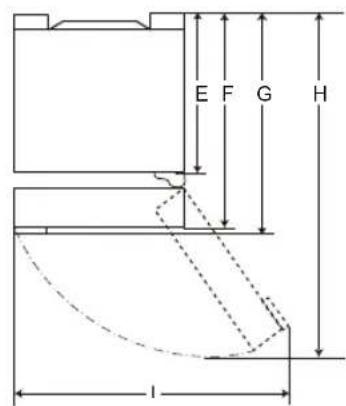
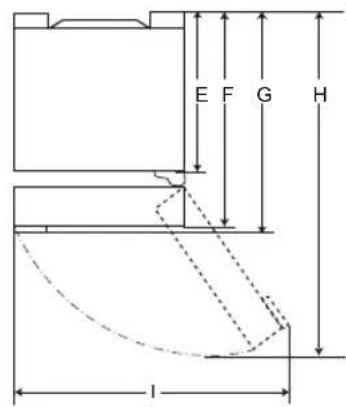
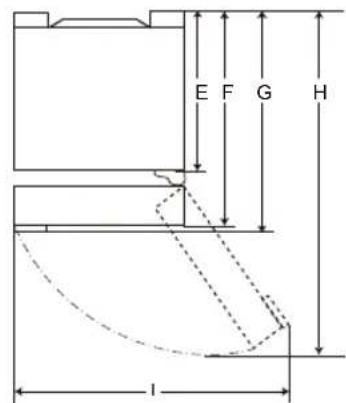
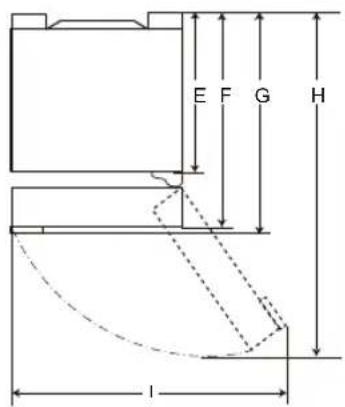
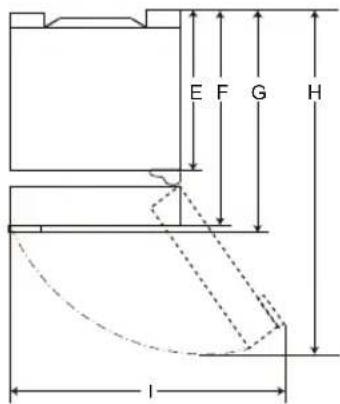
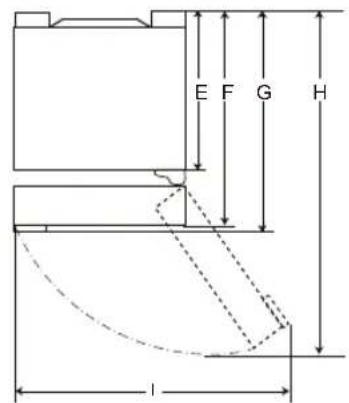
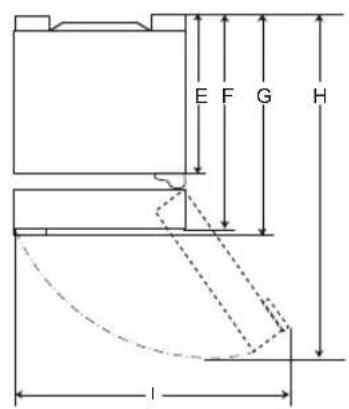
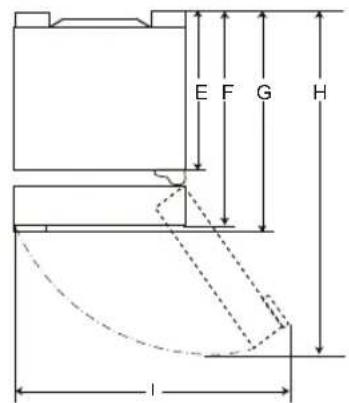
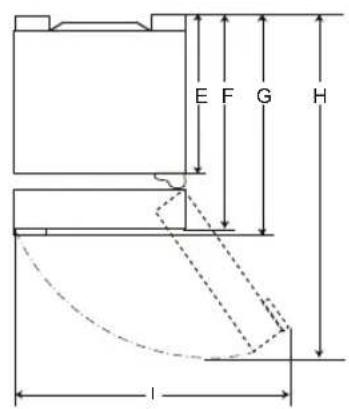
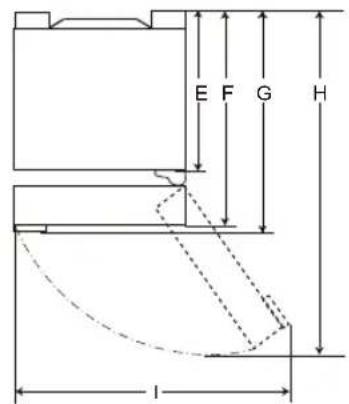
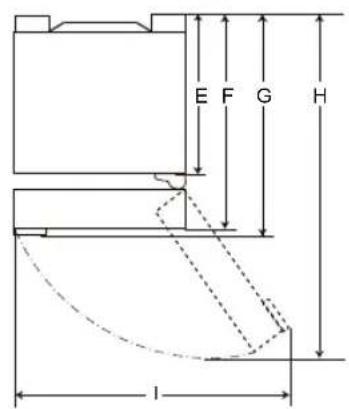
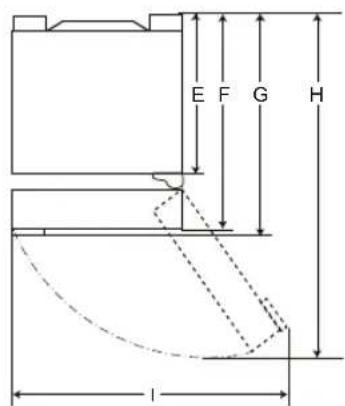
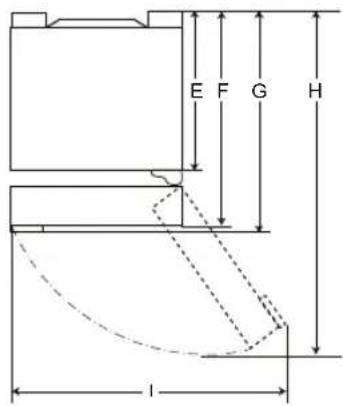
Dimensions and Clearances
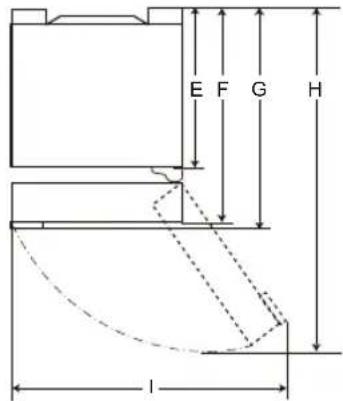
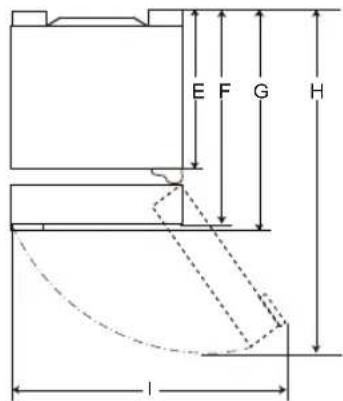
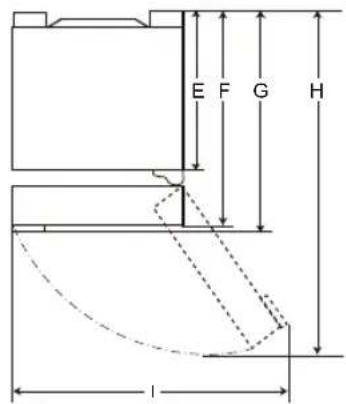
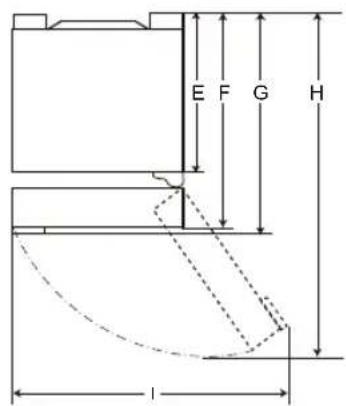
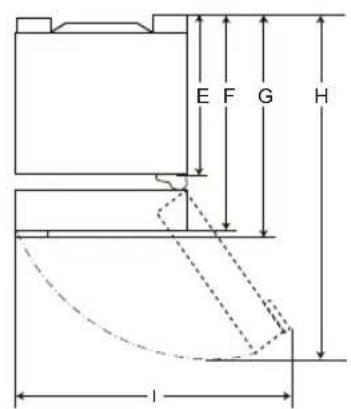
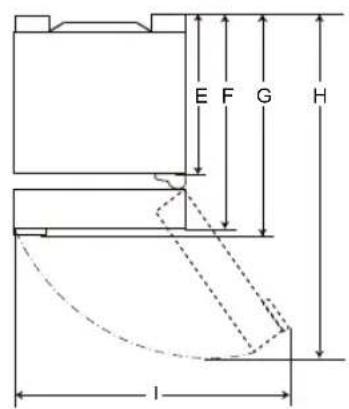
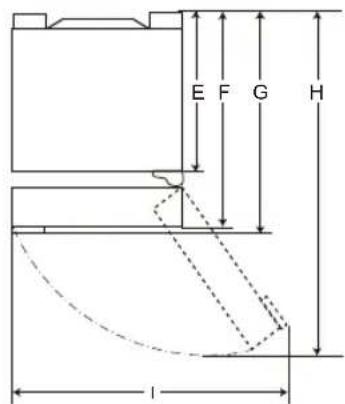
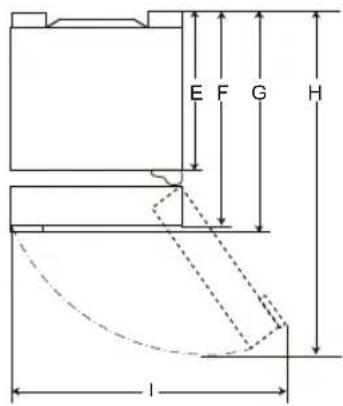
Too small of a distance from adjacent items may result in the degradation of freezing capability and increased electricity costs. Allow over 50 mm of clearance from each adjacent wall when installing the appliance.
1
2
| 1 | 2 | |||
| Size [mm] | ||||
| Pocket Handle | Bar Handle | Pocket Handle | Bar Handle | |
| A 5 | 95 595 595 | 595 | ||
| B 1 | 860 / 2 030 1 860 / 2 030 | 1 860 / 2 030 1 860 / 2 030 | ||
| C 6 | 82 718 675 712 | |||
| D | 2 100 | 2 100 | 2 100 | 2 100 |
| 616 | 616 610 610E | |||
| 682 682 | 675 675F | |||
| - | 718 | - 712G | ||
| H | 1 230 | 1 237 | 1 225 | 1 232 |
| I | 995 | 995 995 995 | ||
NOTE
- The measurements in the table above are approximate.
Ambient Temperature
- The appliance is designed to operate within a limited range of ambient temperatures, depending on the climate zone.
- The internal temperature could be affected by the location of the appliance, the ambient temperature, the frequency of door opening and so on.
- The climate class can be found on the rating label.
| Climate Class | Ambient Temperature Range °C |
| SN (Extended Temperate) | +10 - +32 |
| N (Temperate) | +16 - +32 |
| ST (Subtropical) | +16 - +38 |
| T (Tropical) | +16 - +43 / +10 - +43* |
*Australia, India, Kenya
NOTE
- The appliances rated from SN to T are intended to be used at an ambient temperature between 10^ and 43^ .
Notes for Operation
- Users should keep in mind that frost can form. If the door is not closed completely, if the humidity is high during the summer, or if the freezer door is opened frequently.
- Ensure there is sufficient space between food stored on the shelf or door basket to allow the door to close completely.
- Opening the door for long periods can cause a significant increase of the temperature in the compartments of the appliance.
- If the refrigerating appliance is left empty for long periods, switch off, defrost, clean, dry, and leave the door open to prevent mould developing within the appliance.
Suggestion for Energy Saving
- Ensure there is sufficient space between stored foods. This allows cold air to be circulated evenly and lowers electricity bills.
- Store hot food only after it has cooled in order to prevent dew or frost.
- When storing food in the freezer compartment, set the freezer temperature lower than the temperature indicated on the food.
- Do not put food near the temperature sensor of the fridge compartment. Keep a distance of at least 3 cm from the sensor.
- Note that a temperature rise after defrosting has a permissible range in the appliance specifications. If you wish to minimise the impact this may have on the food storage due to a temperature rise, seal or wrap the stored food in several layers.
- The automatic defrosting system in the appliance ensures that the compartment remains free of ice buildup under normal operating conditions.
- For the most efficient use of energy, keep all inner parts (e.g. door bins, drawers and shelves) on their original location.
- Do not set the temperature of the appliance lower than needed.
Storing Foods Effectively
- Store frozen food or refrigerated food inside sealed containers.
- Check the expiration date and label (storage instructions) before storing food in the appliance.
-
Do not store food for a long period of time if it spoils easily at a low temperature.
-
Avoid refreezing any food which has been completely thawed. Freezing any food which has been completely thawed again will lower its taste and nutrition.
- Do not wrap and store vegetables with newspaper. Printing material of newspaper or other foreign substances may smear and contaminate food.
- Do not overfill the appliance. Cold air can not circulate properly if the appliance is overfilled.
- If you set an excessively low temperature for food, it may become frozen. Do not set a temperature lower than the required temperature for the food to be stored correctly.
- For more space, you can remove bottle rack, egg tray, ice tray and fresh converter drawer.
- Store raw meat and fish in suitable containers in the refrigerator, so that it is not in contact with or drip onto other food.
- Place the refrigerated food or frozen food in each fridge or freezer compartment immediately after purchasing.
- Food may freeze or spoil if stored at the wrong temperature. Set the refrigerator to the correct temperature for the food being stored.
Max Freezing Capacity
- The Express Freeze function will set the freezer to its maximum freezing capacity. This generally takes up to 24 hours and automatically switches off.
- If the maximum freezing capacity is to be used, Express Freeze must be switched on for 7 hours before fresh produce is placed in the freezer compartment.
Freezing the Maximum Amount of Food
- To get better air circulation, insert all drawers.
- If large quantities of food are to be stored, all the freezer drawers shall be taken out of the appliance and the food shall be stacked directly on the freezer shelf (or shelves) in the freezer compartment.
NOTE
- To remove the drawers, first remove the food from drawers and then pull out the drawers carefully. Not doing so could cause injury or damage to the drawers.
- The shape of each drawer may be different, insert in the right position.
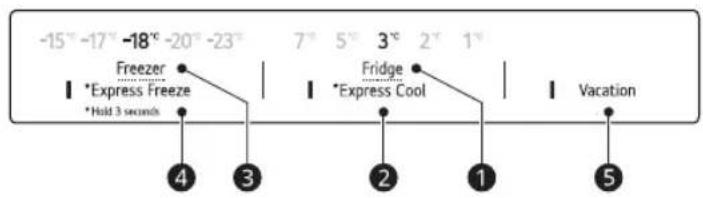
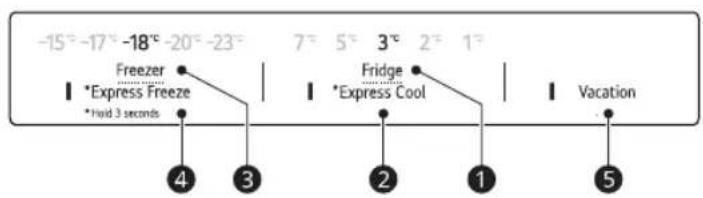
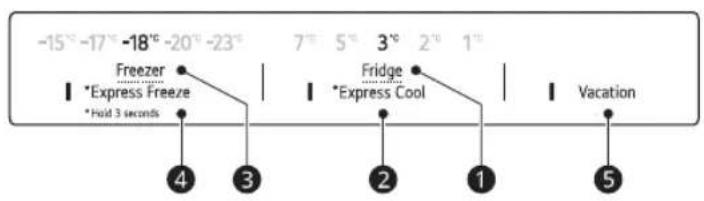
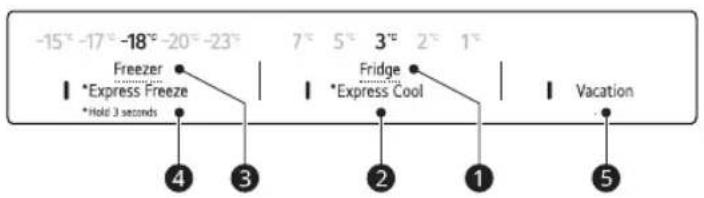
Setting the Temperature
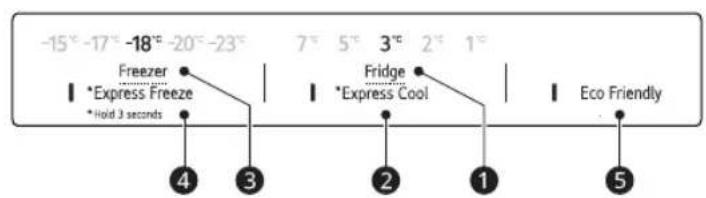
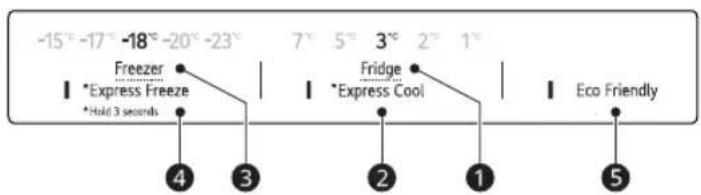
This sets the fridge temperature or freezer temperature
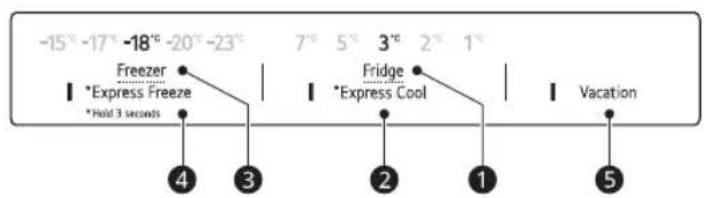
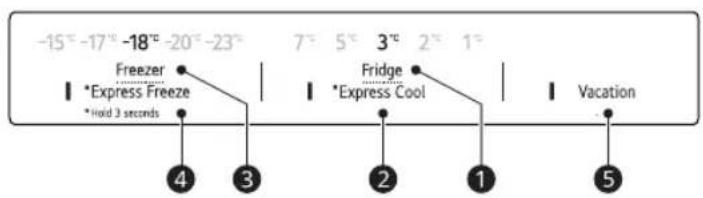
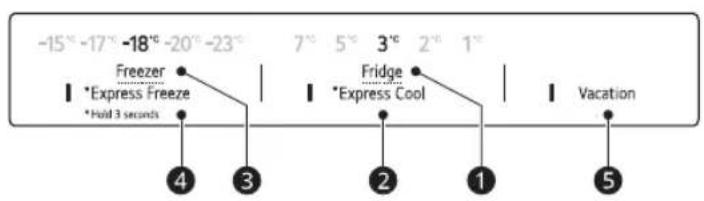
Press the Fridge button or Freezer button to adjust the temperature.
- The temperature can be adjusted.
- Fridge : from 1 °C to 7 °C
– Freezer : from -15 °C to -23 °C
- The initial temperature is set.
- Fridge : 3 °C
- Freezer: -18 °C
The actual inner temperature varies depending on the food status, as the indicated setting temperature is a target temperature, not actual temperature within the appliance.
NOTE
- The default temperature setting may vary depending on the appliance.
- For optimal food preservation, increasing or decreasing 1 °C or one level from the default temperature is recommended for each compartment.
- Wait until 2 or 3 hours have passed after connecting the appliance to the outlet before storing food in the appliance.
- For ice making in normal climates, the freezer temperatures should be set to -18^ or colder.
High Temperature Alarm
This feature is only available on some models. The high temperature alarm is a function that warns when the temperature of the freezer increases enough to be a problem. The freezer temperature display LED flashes and the alarm sounds.
- This alarm sounds in the following cases:
- When the appliance is turned on for the first time (therefore the freezer temperature is high).
- When the freezer door is open for a long time or opens very frequently.
- When the power goes out for a long period of time
- When larger amounts of hot food are placed into the freezer.
Turning off the Alarm
Press the Freezer button until the alarm stops ringing. The LED stops flashing when the freezer compartment sufficiently cools down.
Fresh Converter (\*)
As a chill compartment, the temperature in the fresh converter can be controlled by sliding the lever ①, where located in front of compartment, in either direction.
Do not store vegetables and fruits with Fish or Meat mode in the chill compartment as they may freeze due to the lower temperature.
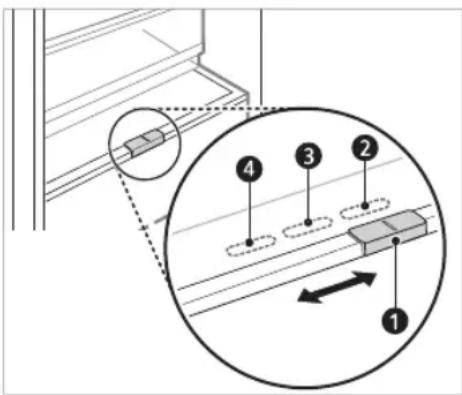
2 For storing vegetables.(Recommended)
3 For storing fish.
4 For storing meat.
NOTE
- (*): This feature varies depending on the model purchased.
Fresh Vegetable Drawer ( \* )
Vegetable compartment can adjust the humidity by moving the knob ①.
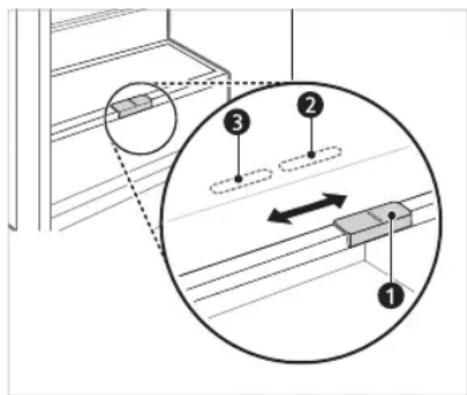
② For storing vegetables.(Recommended)
③ For storing fish.
NOTE
- (*): This feature varies depending on the model purchased.
Food Storage Compartments Storing Food in the Fridge Compartment
- Fridge Shelf
- This is where refrigerated foods and other items are stored.
-
The shelf height can be adjusted by inserting the shelf in another groove of different height.
-
Store the foods with higher moisture content at the front of the shelf.
- The actual number of shelves will differ from model to model.
- Bottle Rack (\*)
- This is where drinks tall bottles or containers are stored.
- Folding Shelf (\*)
- This is where refrigerated foods and high items are stored.
- Fresh Vegetable Drawer (\*)
- This is where fruits and vegetables are stored to help maintain freshness by adjusting the humidity controller.
- The appearance or components of the appliance may differ from model to model.
- Fresh Converter (\*)
- As a chill compartment, this is where meat, fish and vegetables are stored. Help maintain freshness by adjusting the humidity controller located in the back of the fridge compartment.
- For more space, you can use chill area without chill compartment drawer.
- Movable Egg Tray
- This is where eggs are stored.
- You can move it to and use it at a desired position as needed. However, do not use it as the ice bin or place it on the shelf on top of the fridge or the vegetables drawer.
- Fridge Door Basket
- This is where small packages of refrigerated foods, drinks and sauce containers are stored.
• Water Dispenser Tank (\*)
- This is where water to supply the dispenser or the automatic icemaker is stored. It requires manual filling. (Non plumbed models only)
Storing Food in the Freezer Compartment
- IcTeray
- This is where ice is produced and stored.
- For more space, you can remove the ice tray or ice cubes bucket.
- Freezer Drawer
- This is for long-term storage of frozen items.
- To freeze food items quickly, store the food on the left side of the top drawer. Food items will freeze most quickly in the drawer.
NOTE
• (*): This feature varies depending on the model purchased.
- For more information about other compartments, visit lg.com and download owner's manuals.
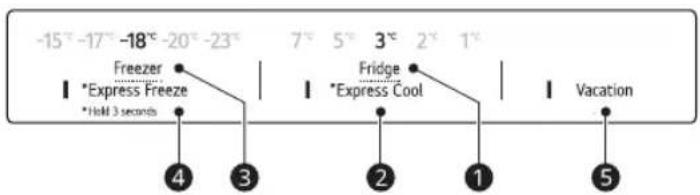
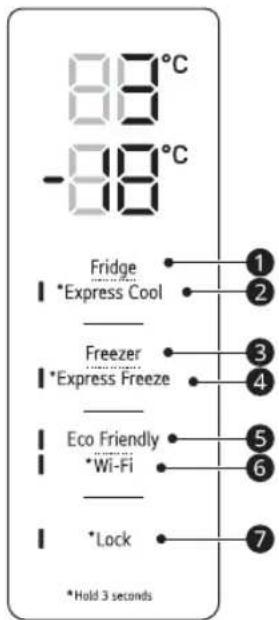
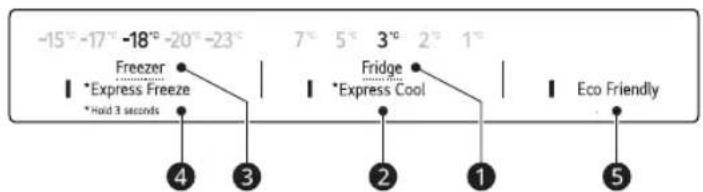
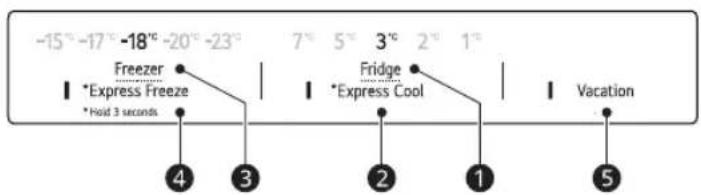
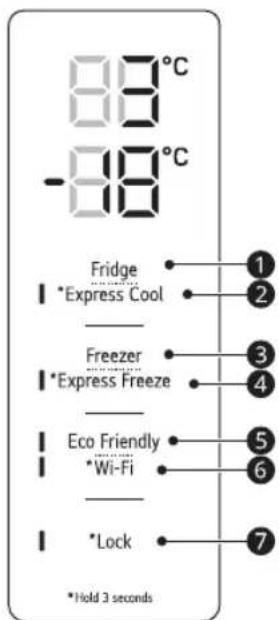
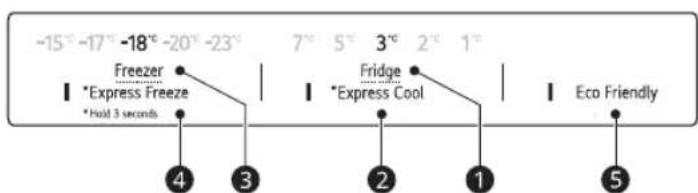
Control Panel
The actual control panel may differ from model to model.
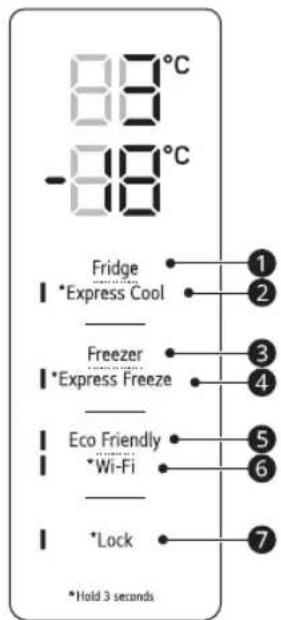
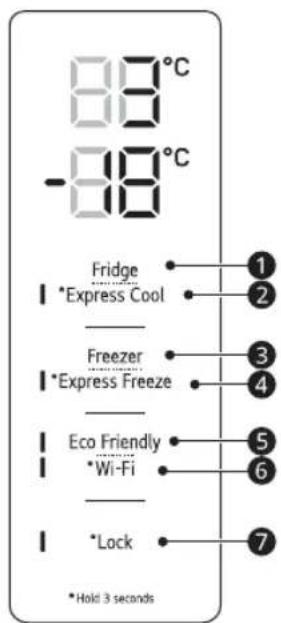
Control Panel and Functions
*1 This feature is only available on some models.
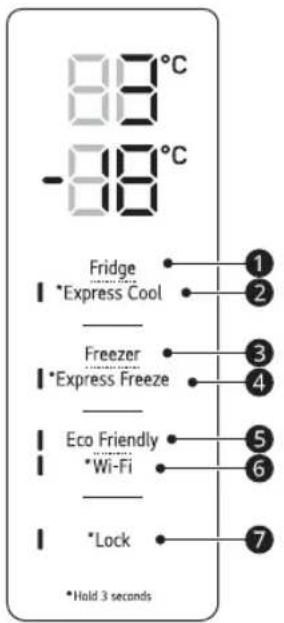
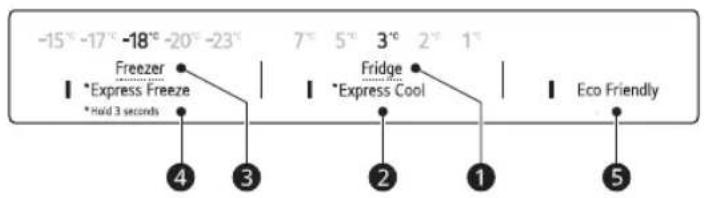
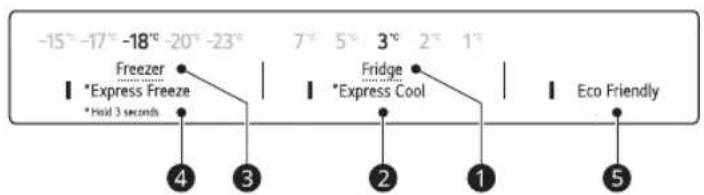
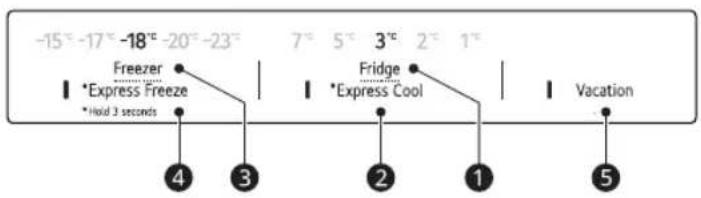
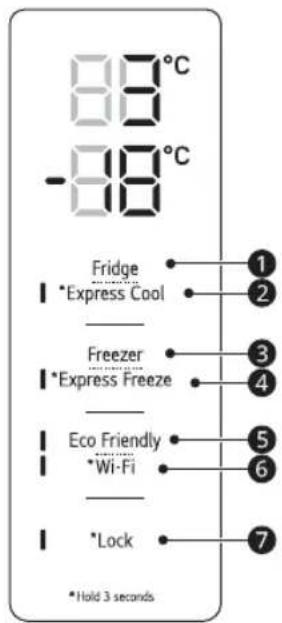
The control panel can be found either on the Fridge Door or inside the Fridge depending on the model.
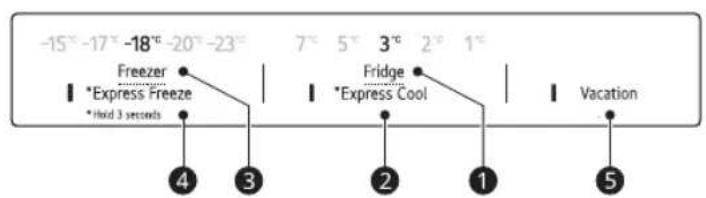
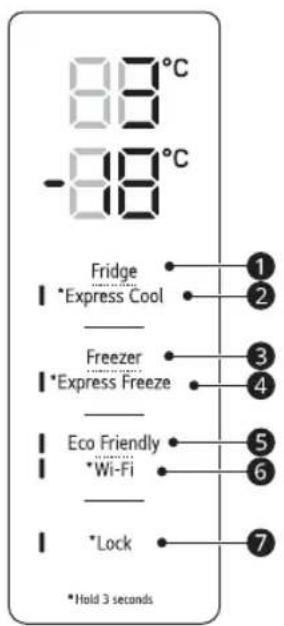
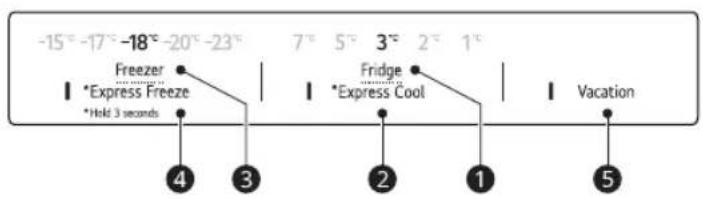
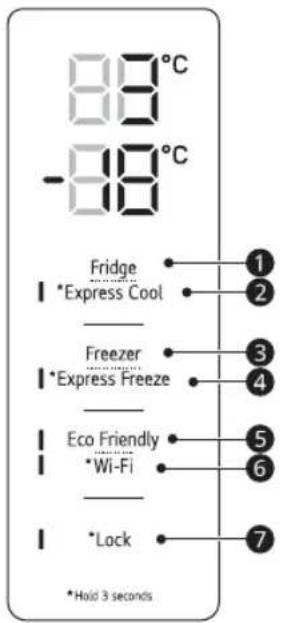
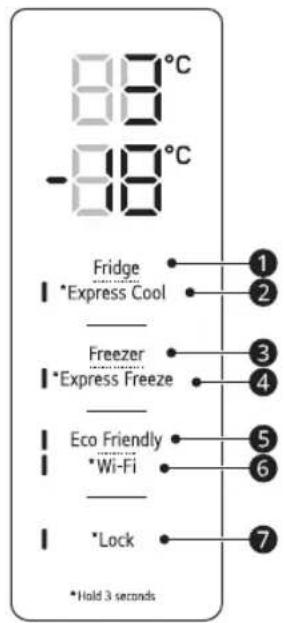
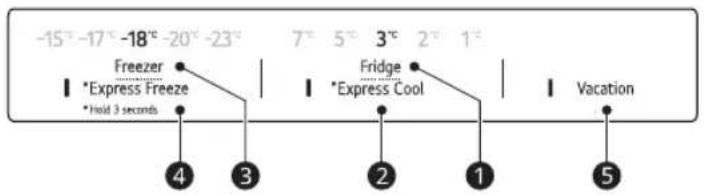
Type A
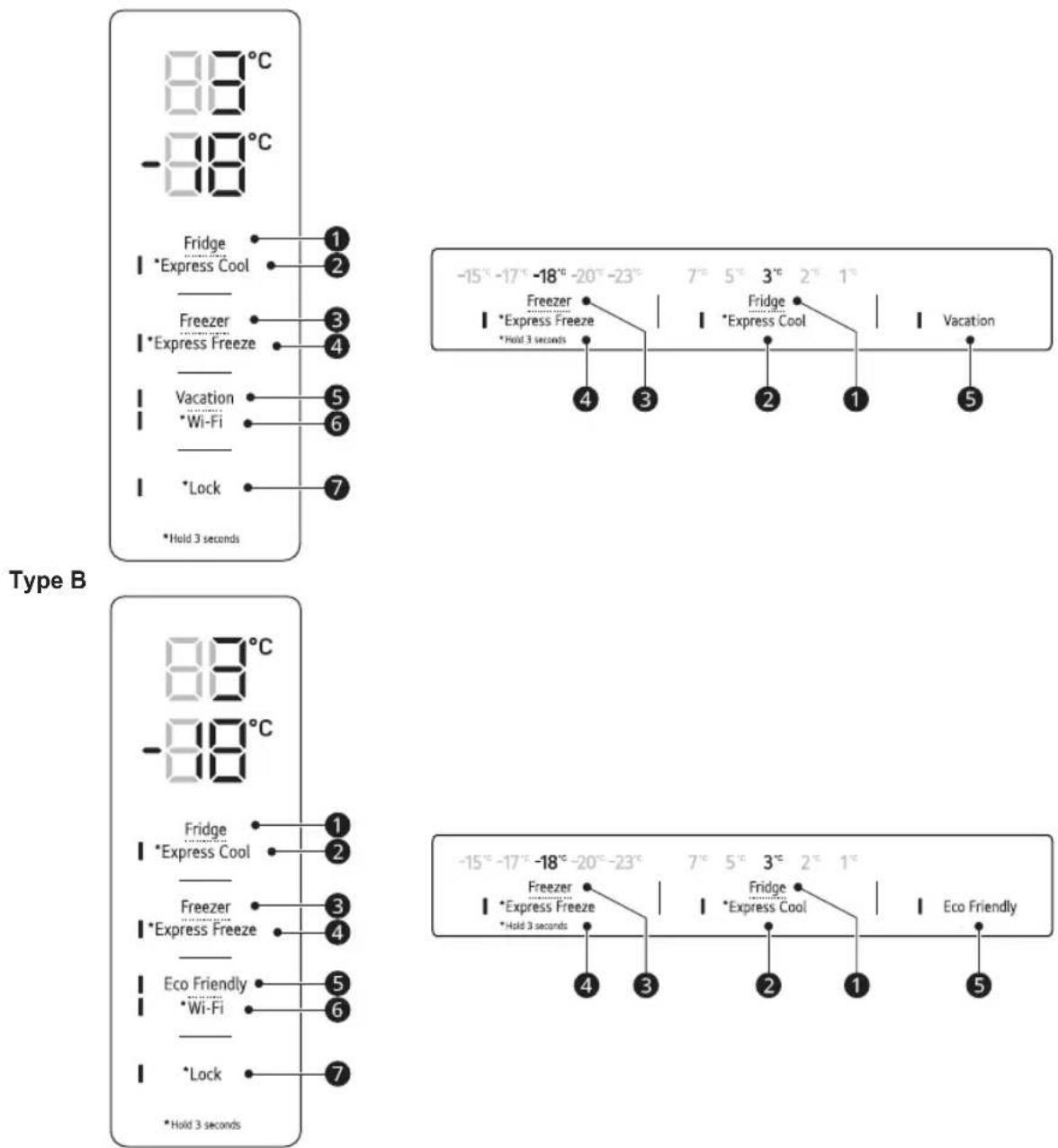
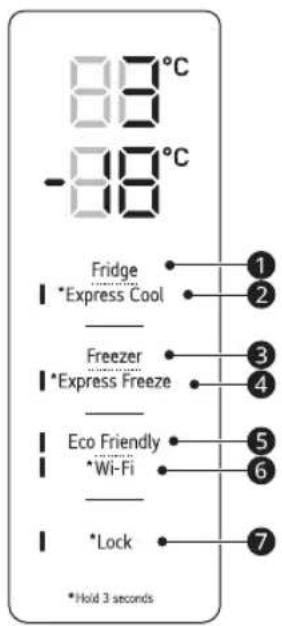
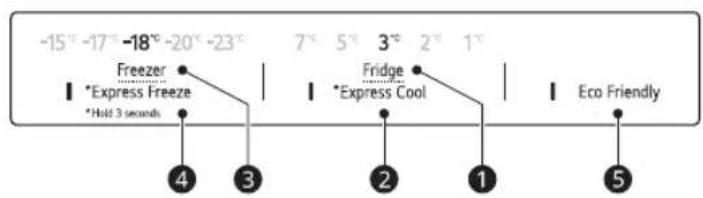
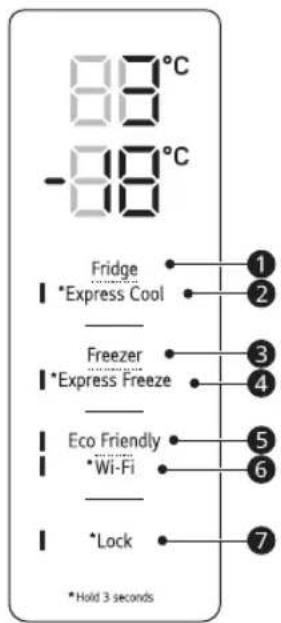
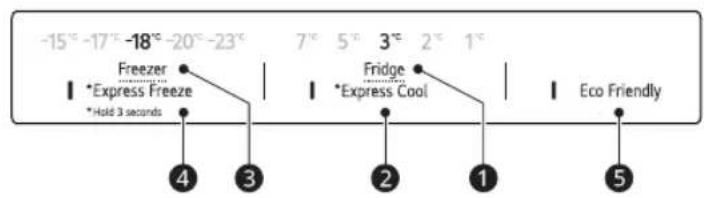
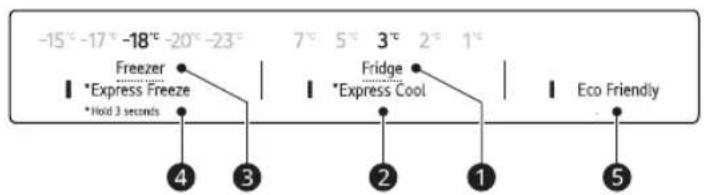
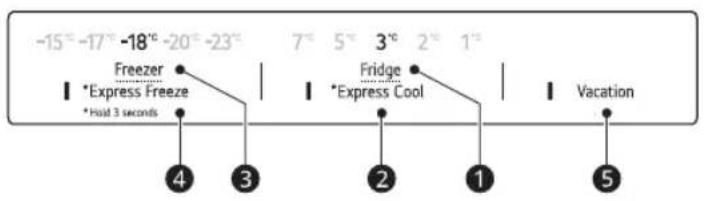
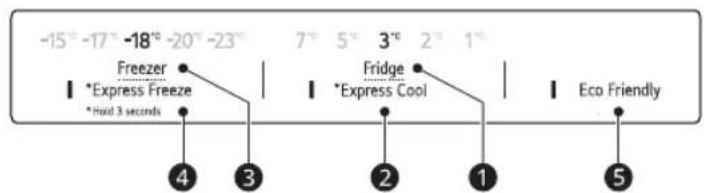
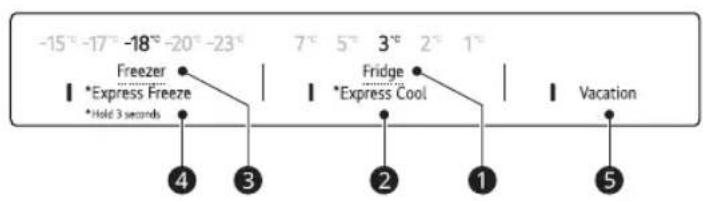
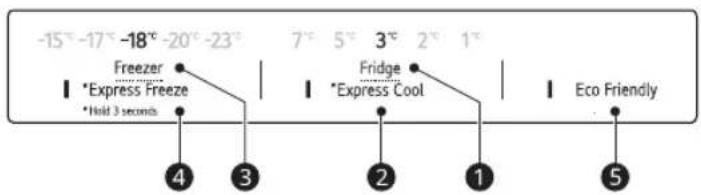
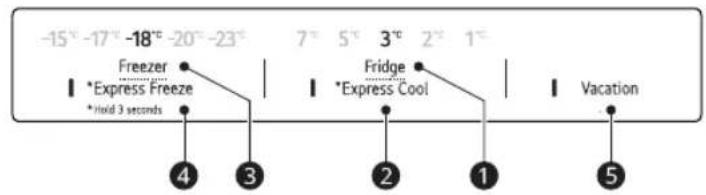
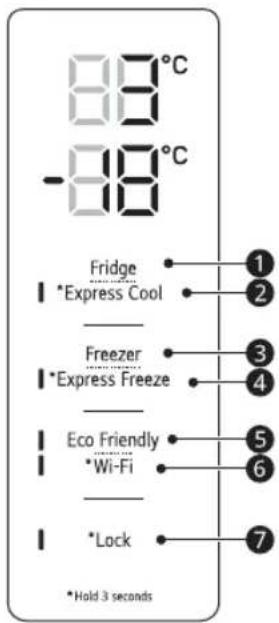
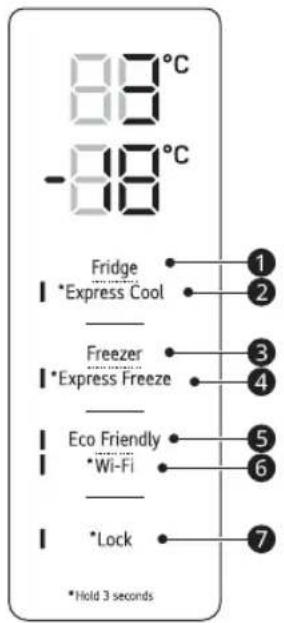
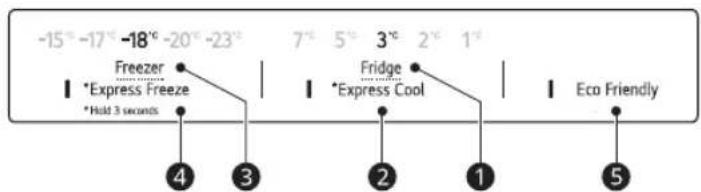
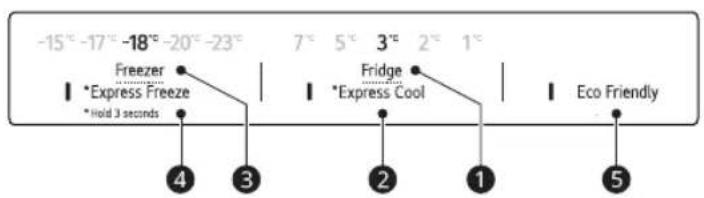
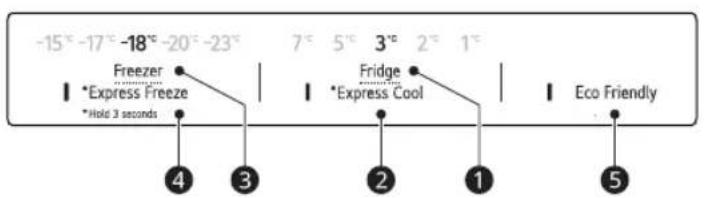
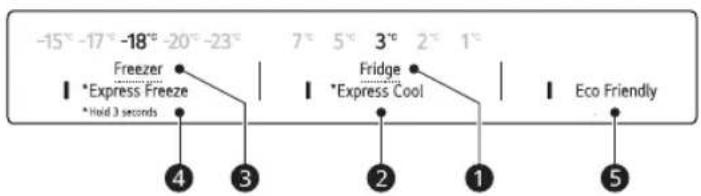
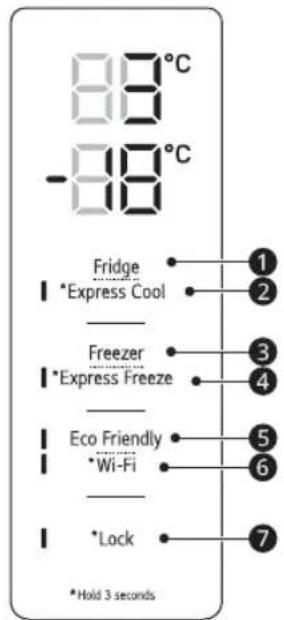
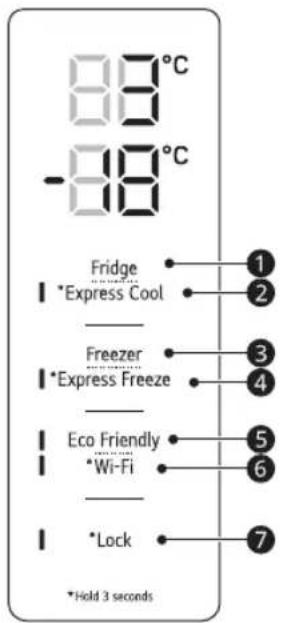
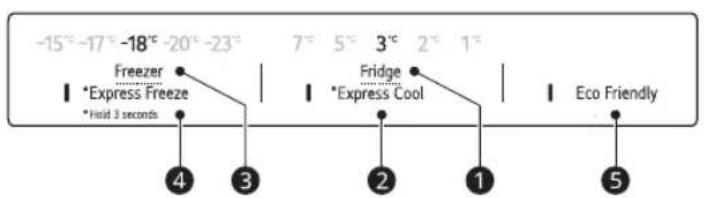
1 Fridge
Press this button repeatedly to select a desired temperature between 1 °C and 7 °C. • The default fridge temperature is 3 °C.
② Express Cool
This function can quickly cool a large amount of foods such as vegetable, fruit and so on. - This function is enabled and disabled in turn each time you press the button for 3 seconds.
3 Freezer
Press this button repeatedly to select a desired temperature between -15 °C and -23 °C. • The default freezer temperature is -18 °C.
4 Express Freeze
This function can quickly freeze a large amount of ice or frozen foods.
- Press the Express Freeze button to activate the function for 24 hours. The function automatically shuts off after 24 hours.
- This function is enabled and disabled in turn each time you press the button for 3 seconds.
- When this mode is on, noise may occur and energy consumption may increase.
⑤ Vacation
This function is useful when you are away on a holiday. When this function is on, the fridge temperature is 7^ C and the freezer temperature -15^ C. When this function is off, the fridge and freezer temperature return to the previous temperature settings.
- This function is enabled and disabled in turn each time you press the button.
- When this mode is on, the other buttons except Lock and Wi-Fi buttons will not operate.
• Eco Friendly has been renamed Vacation.
CAUTION
- When this function is on, be careful about storing foods that require a lower temperature than the default temperature.
- When you return home, remember to turn this function off to unlock the other buttons and return the refrigerator to its previous temperature settings.
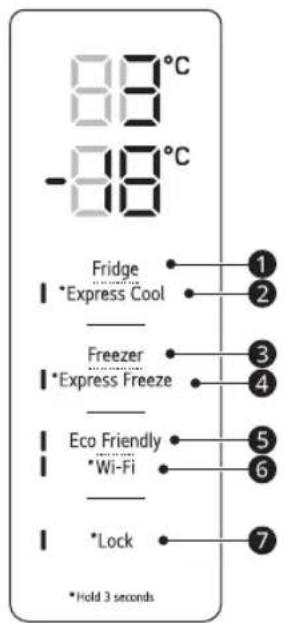
⑥ Wi-Fi ^*1
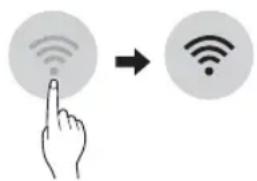
This button allows the appliance to connect to a home Wi-Fi network. Refer to SMART FUNCTIONS for information on the initial setup of the LG ThinQ application.
⑦ Lock \*1
This locks the buttons on the control panel.
- To lock the control panel buttons, press and hold the Lock button for 3 seconds until the function is activated.
- To disable the function, press and hold the Lock button for 3 seconds until the function is deactivated.
NOTE
- For optimal food preservation, increasing or decreasing 1 °C or one level from the default temperature is recommended for each compartment.
- The displayed temperature is the target temperature, and not the actual temperature inside the appliance.
- The actual temperature inside the appliance depends on the following factors: room temperature, the amount of food and how often the doors are opened, where the appliance is. Set the temperatures by considering these factors.
- The control panel will turn off automatically for energy saving.
- If there is any finger or skin contacts to the control panel while cleaning it, the button function may operate.
LG ThinQ Application
This feature is only available on models with Wi-Fi.
The LG ThinQ application allows you to communicate with the appliance using a smartphone.
LG ThinQ Application Features
Communicate with the appliance from a smartphone using the convenient smart features.
Smart Diagnosis
- If you experience a problem while using the appliance, this smart diagnosis feature will help you diagnose the problem.
Settings
- Allows you to set various options on the appliance and in the application.
NOTE
- If you change your wireless router, internet service provider, or password, delete the registered appliance from the LG ThinQ application and register it again.
- The application is subject to change for appliance improvement purposes without notice to users.
• Functions may vary by model.
Before Using LG ThinQ Application
1 Check the distance between the appliance and the wireless router (Wi-Fi network).
- If the distance between the appliance and the wireless router is too far, the signal strength becomes weak. It may take a long time to register or installation may fail.
2 Turn off the Mobile data or Cellular Data on your smartphone.
3 Connect your smartphone to the wireless router.
NOTE
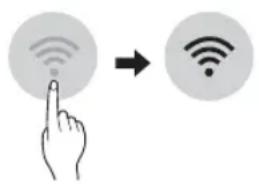
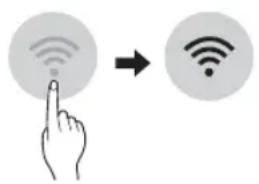
- To verify the Wi-Fi connection, check that the icon on the control panel is lit.
- The appliance supports 2.4 GHz Wi-Fi networks only. To check your network frequency, contact your Internet service provider or refer to your wireless router manual.
- LG ThinQ is not responsible for any network connection problems or any faults, malfunctions, or errors caused by network connection.
- If the appliance is having trouble connecting to the Wi-Fi network, it may be too far from the router. Purchase a Wi-Fi repeater (range extender) to improve the Wi-Fi signal strength.
- The Wi-Fi connection may not connect or may be interrupted because of the home network environment.
- The network connection may not work properly depending on the Internet service provider.
- The surrounding wireless environment can make the wireless network service run slowly.
- The appliance cannot be registered due to problems with the wireless signal transmission. Unplug the appliance and wait about a minute before trying again.
- If the firewall on your wireless router is enabled, disable the firewall or add an exception to it.
-
The wireless network name (SSID) should be a combination of English letters and numbers. (Do not use special characters.)
-
Smartphone user interface (UI) may vary depending on the mobile operating system (OS) and the manufacturer.
- If the security protocol of the router is set to WEP, you may fail to set up the network. Please change it to other security protocols (WPA2 is recommended) and register the product again.
Installing the LG ThinQ Application
Search for the LG ThinQ application from the Google Play Store or Apple App Store on a smart phone.
- Follow instructions to download and install the application.
Connecting to Wi-Fi
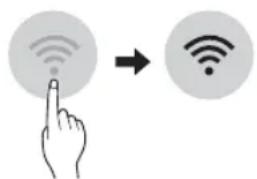
The Wi-Fi button, when used with the LG ThinQ application, allows the appliance to connect to a home Wi-Fi network. The icon shows the status of the appliance's network connection. The icon illuminates when the appliance is connected to the Wi-Fi network.
Initial Appliance Registration
- Run the LG ThinQ application and follow the instructions in the application to register the appliance.
Re-registering the Appliance or Registering Another User
- Press and hold the Wi-Fi button for 3 seconds to temporarily turn it off. Run the LG ThinQ application and follow the instructions in the application to register the appliance.
NOTE
- To disable the Wi-Fi function, press and hold the Wi-Fi button for 3 seconds. 📄con will be turned off.
Open Source Software Notice Information
To obtain the source code under GPL, LGPL, MPL, and other open source licenses that have the obligations to disclose source code, that is contained in this product, and to access all referred license terms, copyright notices and other relevant documents please visit http://opensource.lge.com. LG Electronics will also provide open source code to you on CD-ROM for a charge covering the cost of performing such distribution (such as the cost of media, shipping, and handling) upon email request to opensource@lge.com.
This offer is valid to anyone in receipt of this information for a period of three years after our last shipment of this product.
Notes for Cleaning
- When removing a shelf or drawer from inside the appliance, remove all stored foods from the shelf or drawer to prevent injury or damage to the appliance.
- Otherwise, injury may occur due to the weight of stored foods.
- If cleaning the outside air vents of the appliance by means of vacuuming, then the power cord should be unplugged from the outlet to avoid any static discharge that can damage the electronics or cause an electric shock.
- Detach the shelves and drawers and clean them with water, and then dry them sufficiently, before replacing them.
- Regularly wipe the door gaskets with a wet soft towel.
- Door basket spills and stains should be cleaned as they can compromise storage ability of the basket and could even be damaged.
- After cleaning, check if the power cable is damaged, warm or improperly plugged.
- Keep the air vents on the exterior of the appliance clean.
- Blocked air vents can cause fire or appliance damage.
- When cleaning the inside or outside of the appliance, do not wipe it with a rough brush, toothpaste, or flammable materials. Do not use cleaning agents containing flammable substances.
- This may cause discoloration or damage to the appliance.
- Flammable substances: alcohol (ethanol, methanol, isopropyl alcohol, isobutyl alcohol, etc.), thinner, bleach, benzene, flammable liquid, abrasive, etc.
- For the appliance exterior, use a clean sponge or soft cloth and a mild detergent in warm water. Do not use abrasive or harsh cleaners. Dry thoroughly with a soft cloth.
- Never clean the shelves or containers in the dishwasher.
- The parts may become deformed due to the heat.
- Regularly clean surfaces that can come in contact with food.
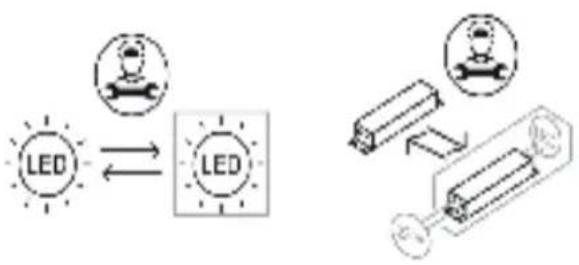
- If the appliance is equipped with an LED lamp, do not remove lamp cover and LED lamp in any attempt to repair or service it. Please, contact an LG Electronics customer information centre.
Disposal of Your Old Appliance
- This crossed-out wheeled bin symbol indicates that waste electrical and electronic products (WEEE) should be disposed of separately from the municipal waste stream.
- Old electrical products can contain hazardous substances so correct disposal of your old appliance will help prevent potential negative consequences for the environment and human health. Your old appliance may contain reusable parts that could be used to repair other products, and other valuable materials that can be recycled to conserve limited resources.
- You can take your appliance either to the shop where you purchased the product, or contact your local government waste office for details of your nearest authorised WEEE collection point. For the most up to date information for your country please see www.lg.com/global/recycling.
Before Calling for Service
Customer Care and Service
Contact an LG Electronics customer information centre.
• To find information on LG authorized service centre, visit our website at www.lg.com.
- Only qualified service personnel from LG authorized service centre should disassemble, repair, or modify the appliance.
- The minimum warranty period of this refrigerating appliance is 24 months.
- To purchase spare parts, contact an LG Electronics customer information centre or our website at www.lg.com.
- Spare parts referenced in Regulation EU 2019/2019 are available for 7 years (only door gaskets are available for 10 years).
NOTE
- For more information about the energy efficiency of the appliance, visit https://eprel.ec.europa.eu and search using the model name (valid from 1st March 2021).
- Regulation EU 2019/2019, valid from 1st March 2021, is related to the Energy Efficiency classes by Regulation EU 2019/2016.
- Scan the QR code on the energy label supplied with the appliance, which provides a web link to the information related to the performance of the appliance in the EU EPREL database. Keep the energy label for reference and all other documents supplied with the appliance (valid from 1st March 2021).
- The model name can be found on the rating label of the appliance.
• This product contains a light source of energy efficiency class G.
flowchart
graph LR
    A["Light Source"] <--> B["Interconnection"]
    B --> C["Battery"]
    C --> D["Analog Battery"]
    D --> E["Analog Battery"]
1
2
| 1 | 2 | |||
| Размер [мм] | ||||
| Джобна дръжка | Лостова дръжка | Джобна дръжка | Лостова дръжка | |
| A | 595 595 595 | 595 | ||
| B | 1 860 / 2 030 | 1 860 / 2 030 | 1 860 / 2 030 | 1 860 / 2 030 |
| C | 682 718 675 | 712 | ||
| D | 2 100 | 2 100 | 2 100 | 2 100 |
| 616 | 616 610 | 610 | ||
| F | 682 682 | 675 | 675 | |
| G | - | 718 | - | 712 |
| H | 1 230 | 1 237 | 1 225 | 1 232 |
| I | 995 | 995 995 | 995 | |
ЗАБЕЛЕЖКА
Тип В
1 Fridge
ЗАБЕЛЕЖКА
INSTRUCCIONS DE SEGURETAT
CA
1
2
| 1 | 2 | |||
| A 5 | 95 595 595 | 595 | ||
| B 1 | 860 / 2 030 1 860 / 2 030 | 1 860 / 2 030 1 860 / 2 030 | ||
| C 6 | 82 718 675 712 | |||
| D | 2 100 | 2 100 | 2 100 2 100 | |
| 616 | 616 610 610E | |||
| 682 682 | 675 675F | |||
| - | 718 | - 712G | ||
| 1 230 | 1 237 1 225 1 232H | |||
| I | 995 | 995 995 995 | ||
NOTA
② Per a emmagatzemar verdures. (Recomanat)
③ Per a emmagatzemar peix.
4 Per a emmagatzemar carn
NOTA
2
③ Per a emmagatzemar peix.
NOTA
Tipus B
① Fridge
NOTA
1
2
| 1 | 2 | |||
| Velikost [mm] | ||||
| Kapsovitá rukojeť | Tyčová rukojeť Kapšovitá rukojeť | Tyčová rukojeť | ||
| A | 595 595 595 | 595 | ||
| B | 1 860 / 2 030 | 1 860 / 2 030 | 1 860 / 2 030 | 1 860 / 2 030 |
| C | 682 718 675 | 712 | ||
| D | 2 100 | 2 100 | 2 100 | 2 100 |
| 616 | 616 610 610 | |||
| 682 682 | 675 675 | |||
| G | - | 718 | - | 712 |
| H | 1 230 | 1 237 | 1 225 | 1 232 |
| I | 995 | 995 995 | 995 | |
POZNÁMKA
- The appearance or components of the appliance may differ from model to model.
- Konvertor Fresh Converter (\*)
Typ B
1 Fridge
POZNÁMKA
Fejlfinding
SIKKERHEDSINSTRUKTIONER
DA
1
2
| 1 | 2 | |||
| Størrelse [mm] | ||||
| Lommehåndtag Stanghåndtag Lommehåndtag | Stanghåndtag | |||
| A | 595 | 595 | 595 | 595 |
| B | 1 860 / 2 030 | 1 860 / 2 030 | 1 860 / 2 030 | 1 860 / 2 030 |
| C | 682 | 718 | 675 | 712 |
| D | 2 100 | 2 100 | 2 100 | 2 100 |
| E | 616 | 616 | 610 | 610 |
| F | 682 | 682 | 675 | 675 |
| G | - | 718 | - | 712 |
| H | 1 230 | 1 237 | 1 225 | 1 232 |
| I | 995 | 995 | 995 | 995 |
BEMAERK
Type B
1 Fridge
BEMAERK
Typ B
① Fridge
HINWEIS
Επιλυση προβληματων
1
2
① Fridge
ΣΗΜΕΙΩΣΗ
1
2
| 1 | 2 | |||
| Tamaño [mm] | ||||
| Asa de bolsillo Asa de barra Asa de bolsillo Asa de barra | ||||
| A | 595 595 | 595 | 595 | |
| B | 1 860 / 2 030 | 1 860 / 2 030 | 1 860 / 2 030 | 1 860 / 2 030 |
| C | 682 | 718 | 675 | 712 |
| D | 2 100 | 2 100 | 2 100 | 2 100 |
| E | 616 | 616 | 610 | 610 |
| F | 682 682 | 675 | 675 | |
| G | - | 718 | - | 712 |
| H | 1 230 | 1 237 | 1 225 | 1 232 |
| I | 995 | 995 | 995 | 995 |
NOTA
Tipo B
1 Fridge
3 Conecte el smartphone al router inalámbrico.
NOTA
Olulised ohutusjuhised 3
PAIGALDAMINE ....10
Vea selgitamine
OLULISED OHUTUSJUHISED

OHT
1
2
| 1 | 2 | |||
| Suurus [mm] | ||||
| Süviskäepide Eenduv käepid e | Süviskäepide Eenduv käepid e | |||
| A 595 595 595 | 595 | |||
| B | 1 860 / 2 030 | 1 860 / 2 030 | 1 860 / 2 030 | 1 860 / 2 030 |
| C | 682 718 675 | 712 | ||
| D | 2 100 | 2 100 | 2 100 | 2 100 |
| 616 | 616 610 | 610 | ||
| F | 682 682 | 675 | 675 | |
| G | - | 718 | - | 712 |
| H | 1 230 | 1 237 | 1 225 | 1 232 |
| I | 995 | 995 995 | 995 | |
TÄHELEPANU
Tüüp B
① Fridge
TÄHELEPANU
Additional Information Of The Manual
Vianetsintä
TURVALLISUUSOHJEET
1
2
| 1 | 2 | |||
| Koko [mm] | ||||
| Taskukahva Vedin | Taskukahva Vedin | |||
| A | 595 595 | 595 | 595 | |
| B | 1 860 / 2 030 | 1 860 / 2 030 | 1 860 / 2 030 | 1 860 / 2 030 |
| C | 682 718 | 675 | 712 | |
| D | 2 100 | 2 100 | 2 100 | 2 100 |
| E | 616 | 616 | 610 | 610 |
| F | 682 682 | 675 | 675 | |
| - | 718 | -712 | ||
| H | 1 230 | 1 237 | 1 225 | 1 232 |
| I | 995 | 995 | 995 | 995 |
HUOMAUTUS
Tyyppi B
① Fridge
HUOMAUTUS
FONCTIONS SMART ....17
Application LG ThinQ 17
MAINTENANCE ....19
Dépannage
CONSIGNES DE SÉCURITÉ
FR
1
2
Type B
1 Fridge
Application LG ThinQ
REMARQUE
18
SIGURNOSNE UPUTE ....3
VAŽNE SIGURNOSNE UPUTE 3
POSTAVLJANJE ....10
Dimenzije i slobodan prostor 10
Temperatura okoline....10
RAD 11
Napomene za rad....11
Rješavanje problema
VAŽNE SIGURNOSNE UPUTE

UPOZORENJE
1

2
| 1 | 2 | |||
| Veličina [mm] | ||||
| Usađena ručka | Metalna ručka | Usađena ručka | Metalna ručka | |
| A | 595 | 595 | 595 | 595 |
| B | 1 860 / 2 030 | 1 860 / 2 030 | 1 860 / 2 030 | 1 860 / 2 030 |
| C | 682 | 718 | 675 | 712 |
| D | 2 100 | 2 100 | 2 100 | 2 100 |
| E | 616 | 616 | 610 | 610 |
| F | 682 | 682 | 675 | 675 |
| G | - | 718 | - | 712 |
| H | 1 230 | 1 237 | 1 225 | 1 232 |
| I | 995 | 995 | 995 | 995 |
NAPOMENA
- Mjerenja u gornjoj tablici su približna.
Temperatura okoline
- Uređaj je dizajniran za rad u ograničenom rasponu temperature okoline, ovisno o klimatskoj zoni.
- Na unutarnju temperaturu uređaja može utjecati položaj uređaja, temperatura okoline, učestalost otvaranja vrata i slično.
- Klimatski razred naznačen je na tipskoj naljepnici uređaja.
| Klimatski razred Raspon temperature okoline °C | |
| SN (Produženo Umjereno) +10 – +32 | |
| N (Umjereno) +16 – +32 | |
| ST (Suptropsko) +16 – +38 | |
| T (Tropsko) +16 - +43 / +10 - +43* | |
2 za pohranu povrća. (Preporučeno)
③ za pohranu ribe.
4 za pohranu mesa.
NAPOMENA
• (*): Ova se značajka razlikuje ovisno o kupljenom modelu.
2 za pohranu povrća. (Preporučeno)
③ za spremanje voća.
NAPOMENA
• (*): Ova se značajka razlikuje ovisno o kupljenom modelu.
Vrsta B
① Fridge
Uzastopno pritišćite ovu tipku da biste odabrali željenu temperaturu između 1 °C i 7 °C.
- Zadana je temperatura hladnjaka 3 °C.
② Express Cool
Uz pomoć ove funkcije mogu se brzo zamrznuti veće količine hrane kao što su povrće, voće itd.
- Funkcija se uključuje i isključuje svaki put kada pritisnete tipku na 3 sekunde.
③ Freezer
Uzastopno pritišćite ovu tipku da biste odabrali željenu temperaturu između -15 °C i -23 °C.
- Zadana je temperatura zamrzivača -18 °C.
4 Express Freeze
Uz pomoć ove funkcije mogu se brzo zamrznuti veće količine leda ili smrznutih namirnica.
- Pritisnite gumb Express Freeze za aktiviranje funkcije tijekom 24 sata. Funkcija se automatski isklju čuje nakon 24 sata.
- Funkcija se uključuje i isključuje svaki put kada pritisnete tipku na 3 sekunde.
- Kada je ovaj funkcija uključena, može se stvarat i buka i potrošnja energije može porasti.
5 Vacation
Funkcija je korisna kada ste na odmoru jer smanjuje potrošnju energije. Kada je ova funkcija uključena, temperatura hladnjaka je 7°C, a temperatura zamrzivača je -15 °C. Kada je ova funkcija isključena, temperatura hladnjaka i zamrzivača vraća se na prethodne postavke temperature.
- Funkcija se uključuje i isključuje svaki put kada pritisnete tipku.
- Kada je ova funkcija uključena, neće raditi nijedna tipka osim tipki Lock i Wi-Fi.
- Funkcija Eco Friendly preimenovana je u Vacation .
OPREZ
3 Povežite svoj pametni telefon s bežičnim usmjerivačem.
NAPOMENA
- Da biste provjerili Wi-Fi vezu, provjerite svijetli li ikona 📂 na upravljačkoj ploči.
- Uređaj podržava samo Wi-Fi mreže od 2,4 GHz. Da biste provjerili mrežnu frekvenciju, obratite se davatelju internetskih usluga ili vidite priručnik za bežični usmjerivač.
- LG ThinQ nije odgovoran za bilo kakve probleme mrežne veze ili bilo kakve pogreške, kvarove ili greške uzrokovane mrežnom vezom.
- Ako uređaj ima problema pri povezivanju s Wi-Fi mrežom, možda je predaleko od usmjernika (router). Nabavite Wi-Fi repetitor (proširivač raspona) kako biste poboljšali jačinu Wi-Fi signala.
- Wi-Fi veza se možda neće uspostaviti ili može biti prekinuta zbog okoline kućne mreže.
- Mrežna veza možda neće ispravno raditi, ovisno o davatelju internetskih usluga.
- Okolno bežično okruženje može uzrokovati spori rad bežične mreže.
- Uređaj se ne može registrirati zbog problema s bežičnim prijenosom signala. Isključite uređaj i pričekajte oko minutu prije ponovnog pokušaja.
- Ako je na bežičnom usmjerivaču uključen vatrozid (firewall), onemogućite vatrozid ili dodajte izuzetak.
-
Naziv bežične mreže (SSID) trebao bi biti kombinacija latiničnih slova i brojeva. (Nemojte koristiti posebne znakove)
-
Korisničko sučelje (UI) pametnog telefona može varirati ovisno o mobilnom operativnom sustavu (OS) i proizvođaču.
- Ako je sigurnosni protokol usmjerivača podešen na WEP možda nećete moći postaviti mrežu. Promijenite ga na druge sigurnosne protokole (preporučuje se WPA2) i ponovno registrirajte proizvod.
Hibaelhárítás
BIZTONSÁGI ELŐÍRÁSOK
HU
1
2
| 1 | 2 | |||
| Méret [mm] | ||||
| Zseb fogantyú Rúd fogantyú Zseb fogantyú Rúd fogantyú | ||||
| A | 595 595 | 595 | 595 | |
| B | 1 860 / 2 030 | 1 860 / 2 030 | 1 860 / 2 030 | 1 860 / 2 030 |
| C | 682 718 | 675 | 712 | |
| D | 2 100 | 2 100 | 2 100 | 2 100 |
| E | 616 | 616 | 610 | 610 |
| F | 682 682 | 675 | 675 | |
| G | - | 718 | - | 712 |
| H | 1 230 | 1 237 | 1 225 | 1 232 |
| I | 995 | 995 | 995 | 995 |
MEGJEGYZÉS
MEGJEGYZÉS
ISTRUZIONI PER LA SICUREZZA
1
2
| 1 | 2 | |||
| Dimensioni [mm] | ||||
| Maniglia a tasca Maniglia a barre Maniglia a tasca Maniglia a barre | ||||
| A | 595 595 | 595 | 595 | |
| B | 1 860 / 2 030 | 1 860 / 2 030 | 1 860 / 2 030 | 1 860 / 2 030 |
| C | 682 718 | 675 | 712 | |
| D | 2 100 | 2 100 | 2 100 | 2 100 |
| E | 616 | 616 | 610 | 610 |
| F | 682 682 | 675 | 675 | |
| G | - | 718 | - | 712 |
| 1 230 | 1 237 1 225 | 1 232 | ||
| I | 995 | 995 | 995 | 995 |
NOTA
Tipo B
① Fridge
3 Collegare lo smartphone al router wireless.
NOTA
NURODYMAI DËL SAUGOS ....3
Trikčių šalinimas
NURODYMAI DÉL SAUGOS
LT
1
2
| 1 | 2 | |||
| Dydis [mm] | ||||
| |leista rankena lšsikišusi rankena |leista rankena lšsikišusi rankena | ||||
| A | 95 595 595 | 595 | ||
| B | 1 860 / 2 030 | 1 860 / 2 030 | 1 860 / 2 030 | 1 860 / 2 030 |
| C | 682 718 675 | 712 | ||
| D | 2 100 | 2 100 | 2 100 | 2 100 |
| 616 | 616 610 | 610 | ||
| F | 682 682 | 675 | 675 | |
| G | - | 718 | - | 712 |
| H | 1 230 | 1 237 | 1 225 | 1 232 |
| I | 995 | 995 995 | 995 | |
PASTABA
B tipas
1 Fridge
PASTABA
1
2
| 1 | 2 | |||
| Izmërs [mm] | ||||
| legremdëts rokturis Stiënveida rokturis legremdëts rokturis Stiënveida rokturis | ||||
| A | 595 595 595 | 595 | ||
| B | 1 860 / 2 030 | 1 860 / 2 030 | 1 860 / 2 030 | 1 860 / 2 030 |
| C | 682 718 675 | 712 | ||
| D | 2 100 | 2 100 | 2 100 | 2 100 |
| 616 | 616 610 | 610 | ||
| F | 682 682 | 675 | 675 | |
| G | - | 718 | - | 712 |
| H | 1 230 | 1 237 | 1 225 | 1 232 |
| I | 995 | 995 995 | 995 | |
PIEZIME
B tips
① Fridge
PIEZIME
1
2
| 1 | 2 | |||
| Големина [mm] | ||||
| Вградена рачка Рачка-шипка Вградена рачка | Рачка-шипка | |||
| A 595 595 | 595 | 595 | ||
| B | 1 860 / 2 030 | 1 860 / 2 030 | 1 860 / 2 030 | 1 860 / 2 030 |
| C | 682 718 | 675 | 712 | |
| D | 2 100 | 2 100 | 2 100 2 100 | |
| E | 616 | 616 | 610 | 610 |
| F | 682 682 | 675 | 675 | |
| G | - | 718 | - | 712 |
| 1 230 | 1 237 | 1 225 1 232 | ||
| I | 995 | 995 | 995 | 995 |
НАПОМЕНА
НАПОМЕНА
SMART FUNCTIONS ....16
PROBLEEMOPLOSSING ....19
Probleemoplossing
VEILIGHEIDSVOORSCHRIFTEN
NL
1
2
| 1 | 2 | |||
| Grootte [mm] | ||||
| Zaktype handvat Staaftype handvat Zaktype handvat | handvat Staaftype handvat | |||
| A 595 595 595 | 595 | |||
| B | 1 860 / 2 030 | 1 860 / 2 030 | 1 860 / 2 030 | 1 860 / 2 030 |
| C | 682 718 675 | 712 | ||
| D | 2 100 | 2 100 | 2 100 | 2 100 |
| 616 | 616 610 | 610 | ||
| F | 682 682 | 675 | 675 | |
| G | - | 718 | - | 712 |
| H | 1 230 | 1 237 | 1 225 | 1 232 |
| I | 995 | 995 995 | 995 | |
OPMERKING
OPMERKING
Fejlfinding
1
2
| 1 | 2 | |||
| Størrelse [mm] | ||||
| Integrert håndtak Eksternt håndtak Integrert håndtak Eksternt håndtak | ||||
| A | 595 595 595 | 595 | ||
| B | 860 / 2 030 1 860 / 2 030 | 1 860 / 2 030 | 1 860 / 2 030 | |
| C | 682 718 675 | 712 | ||
| D | 2 100 | 2 100 | 2 100 | 2 100 |
| 616 | 616 610 | 610 | ||
| F | 682 682 | 675 | 675 | |
| G | - | 718 | - | 712 |
| H | 1 230 | 1 237 | 1 225 | 1 232 |
| I | 995 | 995 995 | 995 | |
MERK
- Målingene i tabellen ovenfor er omtrentlige.
Omgivelsestemperatur
Anbefalinger for strømsparing
Type B

① Fridge
MERK
INSTRUKCJE BEZPIECZEŃSTWA
PL
1
2
| 1 | 2 | |||
| Wymiary [mm] | ||||
| Uchwyt wpuszczany Uchwyt drązkowy Uchwyt wpuszczany Uchwyt drązkowy | ||||
| A | 595 595 | 595 | 595 | |
| B | 1 860 / 2 030 | 1 860 / 2 030 | 1 860 / 2 030 | 1 860 / 2 030 |
| C | 682 718 | 675 | 712 | |
| D | 2 100 | 2 100 | 2 100 | 2 100 |
| E | 616 | 616 | 610 | 610 |
| F | 682 682 | 675 | 675 | |
| G | - | 718 | - | 712 |
| H | 1 230 | 1 237 | 1 225 | 1 232 |
| I | 995 | 995 | 995 | 995 |
UWAGA
PL
Typ B
① Fridge
UWAGA
INSTRUÇÕES DE SEGURANÇA
1
②
| 1 | 2 | |||
| Tamanho [mm] | ||||
| Alça Portátil Alça da Barra Alça Portátil Alça da Barra | ||||
| A | 595 | 595 | 595 | 595 |
| B | 1 860 / 2 030 | 1 860 / 2 030 | 1 860 / 2 030 | 1 860 / 2 030 |
| C | 682 | 718 | 675 | 712 |
| D | 2 100 | 2 100 | 2 100 2 100 | |
| E | 616 | 616 | 610 | 610 |
| F | 682 | 682 | 675 | 675 |
| G | - | 718 | - | 712 |
| 1 230 | 1 237 | 1 225 1 232 | ||
| I | 995 | 995 | 995 | 995 |
OBSERVAÇÃO
② Use para guardar legumes. (Recomendado)
Tipo B
1 Fridge
OBSERVAÇÃO
INSTRUCTIUNI DE SIGURANTĂ ....3
INSTRUCTIUNI DE SIGURANTĂ IMPORTANTE....3
INSTALARE ....10
Depanare
INSTRUCTIUNI DE SIGURANTĂ
RO
1
2
| 1 | 2 | |||
| Dimensiune [mm] | ||||
| Mâner de buzunar Mâner de bară Mâner de buzunar Mâner de bară | ||||
| A | 595 | 595 | 595 | 595 |
| B | 1 860 / 2 030 | 1 860 / 2 030 | 1 860 / 2 030 | 1 860 / 2 030 |
| C | 682 | 718 | 675 | 712 |
| D | 2 100 | 2 100 | 2 100 | 2 100 |
| E | 616 | 616 | 610 | 610 |
| F | 682 | 682 | 675 | 675 |
| G | - | 718 | - | 712 |
| 1 230 | 1 237 1 225 | 1 232 | ||
| I | 995 | 995 | 995 | 995 |
NOTĂ
NOTĂ
BEZPEČNOSTNÉ POKYNY ....3
DÔLEŽITÉ BEZPEČNOSTNÉ POKYNY....3
INŠTALÁCIA 10
Rozmery a vzdialenosti 10
Teplota okolia....10
PREVÁDZKA 11
Riešenie problémov
BEZPEČNOSTNÉ POKYNY
SK
DÔLEŽITÉ BEZPEČNOSTNÉ POKYNY

VAROVANIE
1

2
| 1 | 2 | |||
| Rozmer [mm] | ||||
| Zapustená rukovát' Tyčová rukovát' Zapustená rukovát' Tyčová rukovát' | ||||
| A | 595 | 595 | 595 | 595 |
| B | 1 860 / 2 030 | 1 860 / 2 030 | 1 860 / 2 030 | 1 860 / 2 030 |
| C | 682 | 718 | 675 | 712 |
| D | 2 100 | 2 100 | 2 100 | 2 100 |
| E | 616 | 616 | 610 | 610 |
| F | 682 | 682 | 675 | 675 |
| G | - | 718 | - | 712 |
| H | 1 230 | 1 237 | 1 225 | 1 232 |
| I | 995 | 995 | 995 | 995 |
POZNÁMKA
POZNÁMKA
Odpravljanje težav
VARNOSTNA NAVODILA
SL
1
2
| 1 | 2 | |||
| Velikost [mm] | ||||
| Stranski ročaj Zunanji ročaj Stranski ročaj Zunanji ročaj | ||||
| A | 595 595 595 | 595 | ||
| B | 1 860 / 2 030 | 1 860 / 2 030 | 1 860 / 2 030 | 1 860 / 2 030 |
| C | 682 718 675 | 712 | ||
| D | 2 100 | 2 100 | 2 100 | 2 100 |
| 616 | 616 610 | 610 | ||
| F | 682 682 | 675 | 675 | |
| G | - | 718 | - | 712 |
| H | 1 230 | 1 237 | 1 225 | 1 232 |
| I | 995 | 995 995 | 995 | |
OPOMBA
OPOMBA
UDHËZIME SIGURIE
1
2
| 1 | 2 | |||
| Madhësia [mm] | ||||
| Dorezë xhepi | Dorezë shufër Dorezë xhepi Dorezë shufër | |||
| A | 595 595 595 | 595 | ||
| B | 1 860 / 2 030 1 860 / 2 030 | 1 860 / 2 030 | 1 860 / 2 030 | |
| C | 682 718 675 | 712 | ||
| D | 2 100 | 2 100 | 2 100 | 2 100 |
| 616 | 616 610 | 610 | ||
| F | 682 682 | 675 | 675 | |
| G | - | 718 | - | 712 |
| H | 1 230 | 1 237 | 1 225 | 1 232 |
| I | 995 | 995 | 995 | 995 |
SHËNIM
SHËNIM
VAŽNA BEZBEDNOSNA UPUTSTVA 3
MONTAŽA 9
Dimenzije i razmaci 9
Temperatura prostora....9
RAD 10
Napomene za rad....10
Pretvarač svežine (*) 11
Rešavanje problema
VAŽNA BEZBEDNOSNA UPUTSTVA

UPOZORENJE
1
2
| 1 | 2 | |||
| Veličina [mm] | ||||
| Uvučena drška Izdvojena drška Uvučena drška Izdvojena drška | ||||
| A | 595 595 595 | 595 | ||
| B | 1 860 / 2 030 | 1 860 / 2 030 | 1 860 / 2 030 | 1 860 / 2 030 |
| C | 682 718 675 | 712 | ||
| D | 2 100 | 2 100 | 2 100 | 2 100 |
| 616 | 616 610 | 610 | ||
| F | 682 682 | 675 | 675 | |
| G | - | 718 | - | 712 |
| H | 1 230 | 1 237 | 1 225 | 1 232 |
| I | 995 | 995 995 | 995 | |
NAPOMENA
- Mere u gornjoj tabeli su približne.
Temperatura prostora
- Ovaj uređaj je osmišljen da radi na temperaturi ograničenog opsega u zavisnosti od trenutne klimatske zone.
- Na temperaturu unutrašnjosti uređaja mogu uticati mesto na kojem je uređaj postavljen, temperatura prostora, učestalost otvaranja vrata i tako dalje.
- Podaci o klimatskoj klasi ovog uređaja mogu se naći na nalepnici s tehničkim podacima.
| Klimatska klasa Opseg temperature | prostora izražen u °C |
| SN (Produženo Umereno) +10 - +32 | |
| N (Umereno) +16 - +32 | |
| ST (Suptropsko) +16 - +38 | |
| T (Tropsko) +16 - +43 / +10 - +43* |
2 Za čuvanje povrća. (Preporučeno)
③ Za čuvanje ribe.
4 Za čuvanje mesa.
NAPOMENA
- (*): Ova funkcija se razlikuje u zavisnosti od kupljenog modela.
NAPOMENA
- Da biste proverili Wi-Fi vezu, proverite da li je oznaka osvetljena na kontrolnoj tabli.
- Uređaj podržava samo Wi-Fi mreže od 2,4 GHz. Da biste proverili mrežnu frekvenciju, obratite se internet provajderu ili pogledajte priručnik za bežični ruter.
- LG ThinQ ne snosi odgovornost za probleme sa povezivanjem na mrežu niti za bilo koje smetnje, kvarove ili greške izazvane povezivanjem na mrežu.
- Ako uređaj ne može da se poveže na Wi-Fi mrežu, možda je suviše daleko od rutera. Kupite pojačivač Wi-Fi signala (proširivač opsega) da biste pojačali Wi-Fi signal.
- Veza sa Wi-Fi mrežom možda neće biti uspostavljena ili će biti prekinuta zbog uslova u kojima funkcioniše kućna mreža.
- Povezivanje na mrežu možda neće funkcionisati ispravno zbog pružaoca internet usluga.
- Zbog okolnih bežičnih mreža možda će vaša bežična mreža biti spora.
- Uređaj se ne može da se registruje zbog problema s bežičnim prenosom signala. Isključite uređaj i sačekajte oko jednog minuta pre nego što pokušate ponovo.
- Ako je na bežičnom ruteru uključen zaštitni zid, isključite zaštitni zid ili dodajte izuzetak.
-
Naziv bežične mreže (SSID) treba da se sastoji od kombinacije latiničnih slova i brojeva. (Nemojte da koristite posebne znakove)
-
Korisnički interfejs pametnog telefona može da se razlikuje u zavisnosti od mobilnog operativnog sistema i proizvođača.
- Ako je sigurnosni protokol rutera podešen na WEP možda nećete moći da podesite mrežu. Molimo da promenite na druge sigurnosne protokole (preporučuje se WPA2) i ponovo registrujte proizvod.
Instalacija aplikacije LG ThinQ
Pretražite aplikaciju LG ThinQ u radnji Google Play Store & Apple App Store putem pametnog telefona.
- Pratite uputstva za preuzimanje i instalaciju aplikacije.
INNEHÅLLSFÖRTECKNING
Felsökning
SÄKERHETSANVISNINGAR
SV
1
2
| 1 | 2 | |||
| Storlek [mm] | ||||
| Fickhandtag Stånghandtag Fickhandtag Stånghandtag | ||||
| A | 595 595 595 | 595 | ||
| B | 1 860 / 2 030 | 1 860 / 2 030 | 1 860 / 2 030 | 1 860 / 2 030 |
| C | 682 | 718 675 | 712 | |
| D | 2 100 | 2 100 | 2 100 | 2 100 |
| 616 | 616 610 | 610 | ||
| F | 682 682 | 675 | 675 | |
| G | - | 718 | - | 712 |
| H | 1 230 | 1 237 | 1 225 | 1 232 |
| I | 995 | 995 995 | 995 | |
ANMÄRKNING
3 Anslut din smartphone till den trådlösa routern.
ANMÄRKNING
① Smart Diagnosis Unit (*)
⑦ Fresh Converter (*)
② LED Lamp
8 Movable Egg Tray
③ Fridge Shelf
9 Fridge Door Basket
4 Bottle Rack (*)
10 Water Dispenser Tank (*)
⑤ Folding Shelf (*)
11 Ice Tray
⑥ Fresh Vegetable Drawer (*)
12 Freezer Drawer
NOTE
• (*): This feature varies depending on the model purchased.
Warning for flammable material
A
Warning: Risk of fire / Flammable materials /
- TABLE OF CONTENTS
- SAFETY INSTRUCTIONS ....3
- INSTALLATION ....10
- OPERATION 11
- SMART FUNCTIONS ....16
- MAINTENANCE ....18
- TROUBLESHOOTING....19
- Additional Information Of The Manual
- Troubleshooting
- SAFETY INSTRUCTIONS
- WARNING
- CAUTION
- IMPORTANT SAFETY INSTRUCTIONS
- Children in the Household
- For use in Europe:
- Installation
- Operation
- Maintenance
- Disposal
- Technical Safety
- Risk of Fire and Flammable Materials
- Dimensions and Clearances
- NOTE
- Ambient Temperature
- Notes for Operation
- Suggestion for Energy Saving
- Storing Foods Effectively
- Max Freezing Capacity
- Freezing the Maximum Amount of Food
- Setting the Temperature
- High Temperature Alarm
- Turning off the Alarm
- Fresh Converter (\*)
- Fresh Vegetable Drawer ( \* )
- Food Storage Compartments Storing Food in the Fridge Compartment
- - Fridge Shelf
- - Bottle Rack (\*)
- - Folding Shelf (\*)
- - Fresh Vegetable Drawer (\*)
- - Fresh Converter (\*)
- - Movable Egg Tray
- - Fridge Door Basket
- • Water Dispenser Tank (\*)
- Storing Food in the Freezer Compartment
- - IcTeray
- - Freezer Drawer
- Control Panel
- Control Panel and Functions
- Fridge
- ② Express Cool
- Freezer
- Express Freeze
- ⑤ Vacation
- ⑥ Wi-Fi *1
- ⑦ Lock \*1
- LG ThinQ Application
- LG ThinQ Application Features
- Smart Diagnosis
- Settings
- Before Using LG ThinQ Application
- Installing the LG ThinQ Application
- Connecting to Wi-Fi
- Initial Appliance Registration
- Re-registering the Appliance or Registering Another User
- Open Source Software Notice Information
- Notes for Cleaning
- Disposal of Your Old Appliance
- Before Calling for Service
- Customer Care and Service
- ЗАБЕЛЕЖКА
- INSTRUCCIONS DE SEGURETAT
- NOTA
- 2
- ① Fridge
- POZNÁMKA
- - Konvertor Fresh Converter (\*)
- SIKKERHEDSINSTRUKTIONER
- BEMAERK
- HINWEIS
- Επιλυση προβληματων
- ΣΗΜΕΙΩΣΗ
- PAIGALDAMINE ....10
- Vea selgitamine
- OLULISED OHUTUSJUHISED
- OHT
- TÄHELEPANU
- TURVALLISUUSOHJEET
- HUOMAUTUS
- FONCTIONS SMART ....17
- MAINTENANCE ....19
- CONSIGNES DE SÉCURITÉ
- Application LG ThinQ
- REMARQUE
- SIGURNOSNE UPUTE ....3
- POSTAVLJANJE ....10
- RAD 11
- Rješavanje problema
- VAŽNE SIGURNOSNE UPUTE
- UPOZORENJE
- NAPOMENA
- Temperatura okoline
- ③ Freezer
- Vacation
- OPREZ
- Hibaelhárítás
- BIZTONSÁGI ELŐÍRÁSOK
- MEGJEGYZÉS
- ISTRUZIONI PER LA SICUREZZA
- NURODYMAI DËL SAUGOS ....3
- Trikčių šalinimas
- NURODYMAI DÉL SAUGOS
- PASTABA
- B tipas
- PIEZIME
- НАПОМЕНА
- PROBLEEMOPLOSSING ....19
- Probleemoplossing
- VEILIGHEIDSVOORSCHRIFTEN
- OPMERKING
- MERK
- Omgivelsestemperatur
- Anbefalinger for strømsparing
- INSTRUKCJE BEZPIECZEŃSTWA
- UWAGA
- INSTRUÇÕES DE SEGURANÇA
- OBSERVAÇÃO
- INSTRUCTIUNI DE SIGURANTĂ ....3
- INSTALARE ....10
- INSTRUCTIUNI DE SIGURANTĂ
- NOTĂ
- BEZPEČNOSTNÉ POKYNY ....3
- INŠTALÁCIA 10
- PREVÁDZKA 11
- Riešenie problémov
- BEZPEČNOSTNÉ POKYNY
- DÔLEŽITÉ BEZPEČNOSTNÉ POKYNY
- VAROVANIE
- Odpravljanje težav
- VARNOSTNA NAVODILA
- OPOMBA
- UDHËZIME SIGURIE
- SHËNIM
- MONTAŽA 9
- RAD 10
- Rešavanje problema
- VAŽNA BEZBEDNOSNA UPUTSTVA
- Temperatura prostora
- Instalacija aplikacije LG ThinQ
- INNEHÅLLSFÖRTECKNING
- SÄKERHETSANVISNINGAR
- ANMÄRKNING
- Warning for flammable material
Brand : LG
Model : GBV3100AEP
Category : Fridge