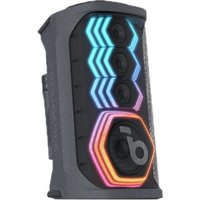
Rave 3 - Loudspeaker soundcore - Free user manual and instructions
Find the device manual for free Rave 3 soundcore in PDF.


| Product type | Portable speaker |
| Brand | Soundcore |
| Model | Rave 3 |
| Dimensions | 255 x 245 x 505 mm |
| Weight | 8.37 kg |
| Power supply | 100-240V AC, 50/60 Hz (input), DC 5V 2.4A (output) |
| Audio power | 160 W |
| Battery capacity | 20000 mAh |
| Charging time | 4 hours |
| Battery playback time | 24 hours (varies by volume and content) |
| Bluetooth version | V5.0 |
| Bluetooth range | 20 m |
| Supported USB formats | FAT32, MP3, WMA |
| Main functions | Bluetooth, True Wireless Stereo, Bass Up, light effects, AUX input, microphone input, wired party chain (RCA) |
| Dedicated app | Soundcore App (equalizer, light effects, firmware update) |
| Care and cleaning | Do not use corrosive cleaners or oil |
| Safety | Do not drop, disassemble, or immerse. Avoid extreme temperatures. |
| Spare parts and repairability | Buttons, inputs, reset hole. Use original cables. |
| General information | Portable party speaker with dual Bluetooth connection and built-in microphone |
Frequently Asked Questions - Rave 3 soundcore
User questions about Rave 3 soundcore
0 question about this device. Answer the ones you know or ask your own.
Ask a new question about this device
Download the instructions for your Loudspeaker in PDF format for free! Find your manual Rave 3 - soundcore and take your electronic device back in hand. On this page are published all the documents necessary for the use of your device. Rave 3 by soundcore.
USER MANUAL Rave 3 soundcore
EN Safety Instructions
- Avoid dropping,
- Do not disassemble.
• Do not submerge in water. - Avoid extreme temperatures.
• Do not use the device outdoors during thunderstorms.
• Use original or certified cables. - Do not use any corrosive cleaner / oil to clean.
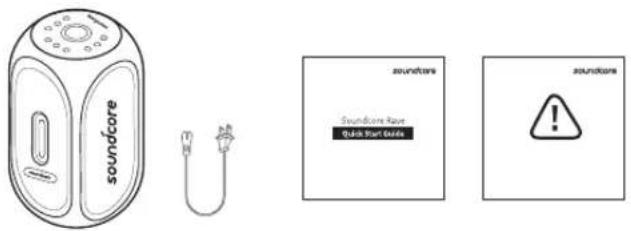
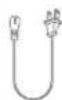
What's Included
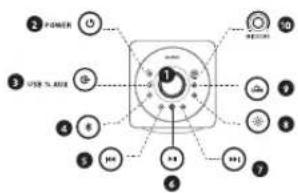
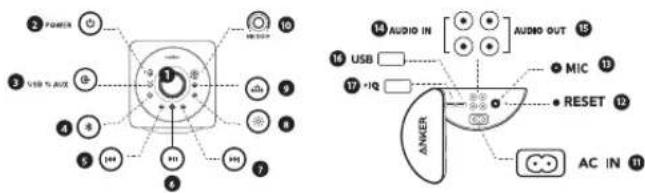
At a Glance
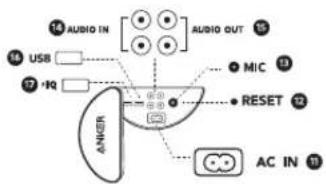
![2 POWER 3 USB AUX 4 5 6 7 8 9 10 11 12 13 AUDIO IN [●●●] AUDIO OUT 14 15 16 USB □ 17 -18 • MIC 13 • RESET 12 • AC IN 11 • ANRER](/content/2026/04/716550/images/7e3851cf8cc97088124de590cfc2a0846fcc14f8b84a83f40497bab696c13c7c.jpg)
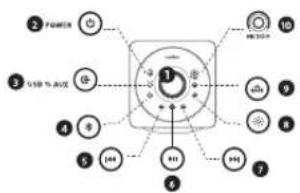
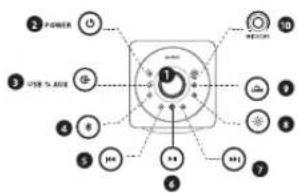
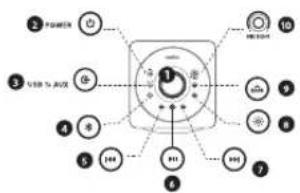
① Central Volume Knob (For speaker volume control)
2 Power Button / Power Indicator
Source Input Button / Source Input Indicator
4 Bluetooth Button / Bluetooth Indicator
5 Previous Track Button
6 Multi-function Button
7 Next Track Button
● Light Effects Button / Light Effects Indicator
Bass Up Button / Bass Up Indicator
10 MIC ECHO Volume Knob (For microphone volume control)
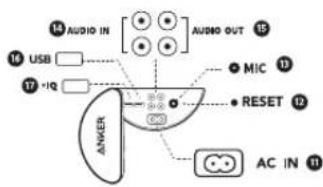
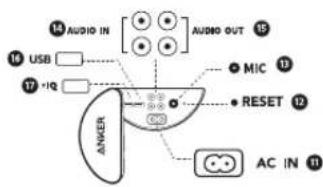
AC Power Input
12 Reset Hole
B Mic Input
14 Audio IN
Audio OUT
16 USB Port
17 Power IQ USB Port
EN Using Your Soundcore Rave
- Turn On / Off
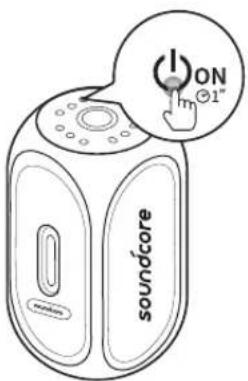
ON Press and hold for 1 second
OFF Press and hold for more than 2 seconds
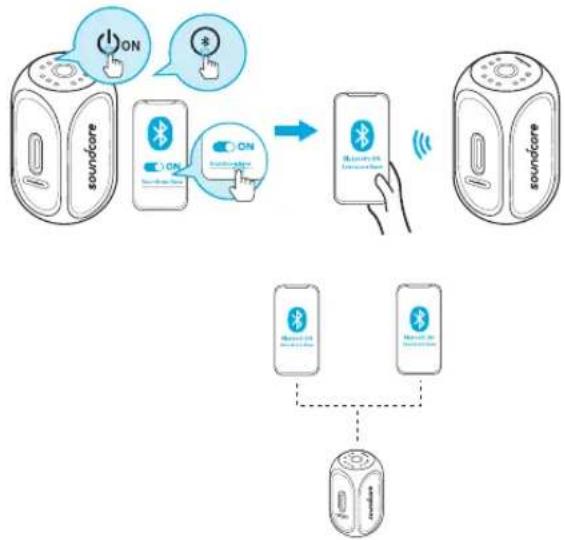
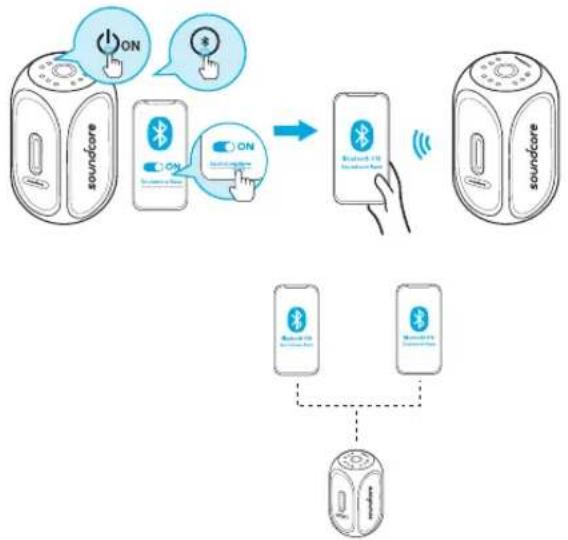
a. Bluetooth Mode
flowchart
graph TD
    A["soundcare"] -->|ON| B["Bluetooth"]
    B -->|ON| C["soundcare"]
    C -->|ON| D["Bluetooth"]
    D -->|Wireless| E["soundcare"]
    E --> F["Bluetooth"]
    F --> G["Bluetooth"]
    G --> H["Ground"]

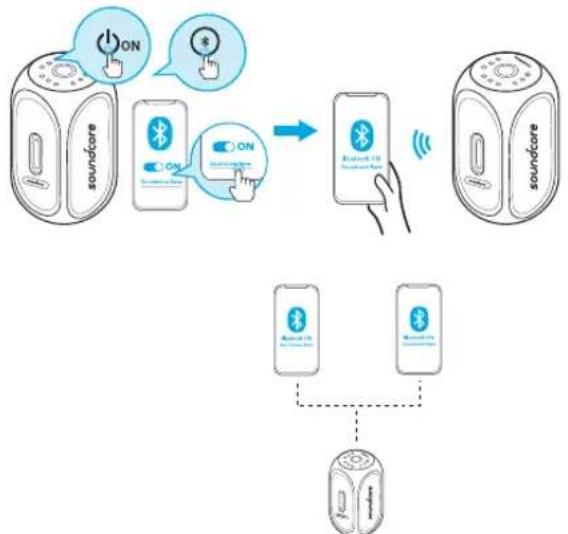
Soundcore Rave can pair up to 2 mobile devices via Bluetooth(Dual Bluetooth Connection).
EN

Flashing Blue Bluetooth Pairing Mode

id Blue Connected to a device

Enter True Wireless Stereo Group Mode / Disconnect True Wireless Stereo

Double Flashing Blue True Wireless Stereo Group Mode

id Blue Connected to True Wireless Stereo
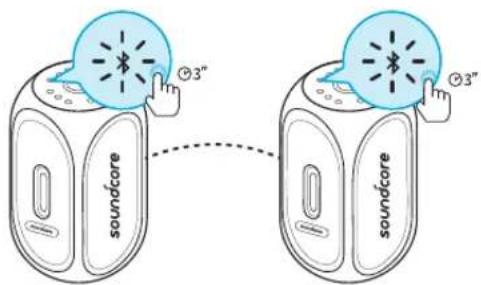

With True Wireless Stereo technology, you can pair your Soundcore Rave with another Soundcore Rave to explore the best sound effects with left and right sound channels separated on both speakers.

Play / Pause

Play Next Song

Play Previous Song

Press to turn Bass Up on and off

Press and hold for 2 seconds to switch between Indoor / Outdoor modes.

Activate Siri / Other Voice Control Software

Volume Up / Down
Check available Light Effects modes on Soundcore App.

When turned on, Soundcore Rave will automatically connect to the last connected device if available. If not, press the Bluetooth pairing button to activate pairing mode.
To pair a different device, press the Bluetooth button to re-enter pairing mode. Then repeat the pairing steps.
Having connection problems? Remove Soundcore Rave from your device's Bluetooth history and ensure it's less than 3 feet away. Then try pairing again. To get the best sound quality, make sure there is a clear line of sight between the connected device and your speaker.

b. Source Input
flowchart
graph TD
    A["Device with 2.5V/100A ports"] -->|AUX| B["Laptop with 12/4/100A port"]
    B -->|AUX| C["USB"]
    B -->|AUX| D["AUX"]
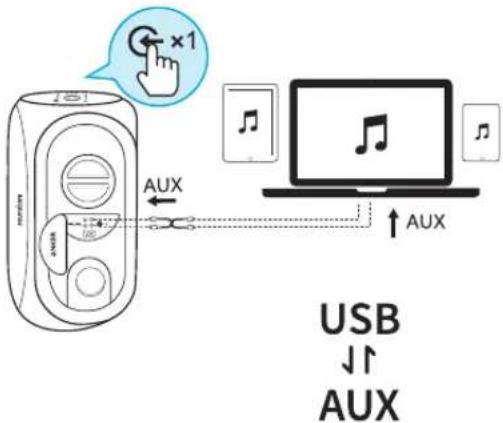
Plug in an audio cable or insert USB drive, then press the source input button to switch between AUX in mode and USB mode(support FAT32 / MP3 / WMA formats).

Solid Green(Source input indicator) AUX in mode
Solid White(Source input indicator) USB mode
*SoundLine AUX cable sold separately.

When using AUX mode, control audio playback via the connected device.
c. Connect Multiple Rave Speakers
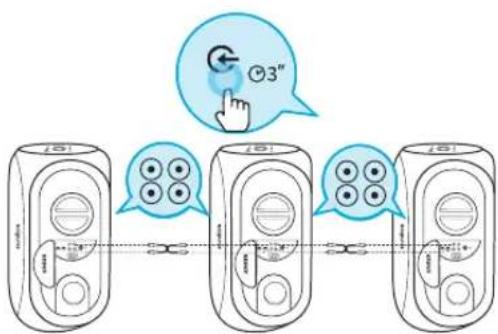
Soundcore Rave can connect to other Soundcore Raves via RCA cables to form a wired party chain.

d. Microphone Connection
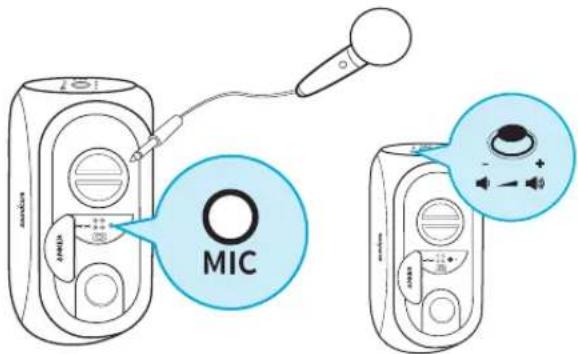
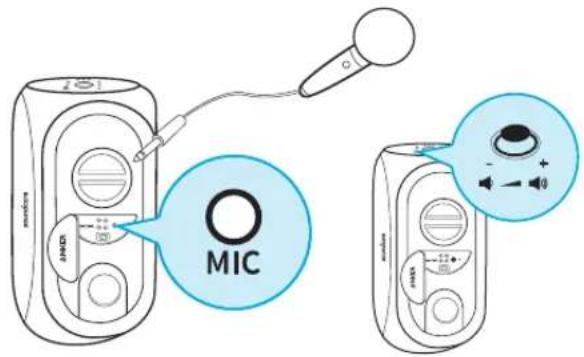
Connect the microphone to MIC IN port. You can adjust the microphone volume by turning the MIC ECHIO volume knob.
- Charging your Soundcore Rave
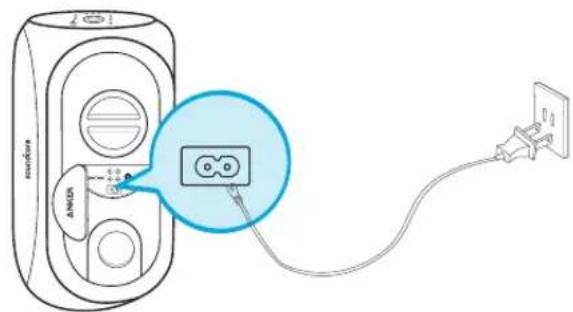

Battery level <10%
O
Battery level <25%
○ ○
Battery level 25%-55%
○ ○ ○
Battery level 51%\~75%
○ ○
Battery level 75%\~100%

Slow Flashing White(Power indicator) Charging
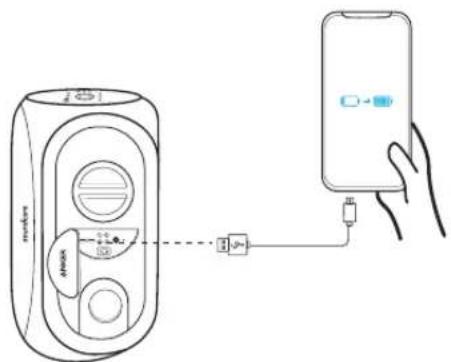
EN You can charge your mobile device through the Power IQ USB port on Soundcore Rave.

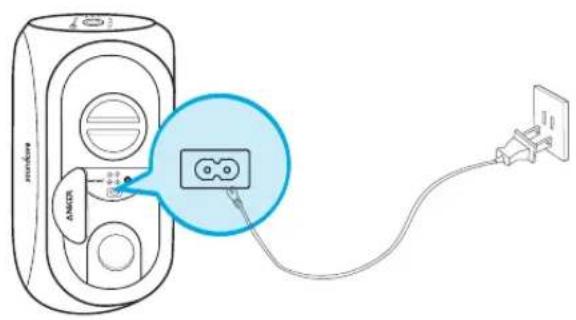
Use the included AC power cable to charge your Soundcore Rave and make sure it is fully charged before its first use.
Disconnect your speaker from the charger when fully charged. Do not charge your speaker for extended periods.
4. Beat-Driven Light Show
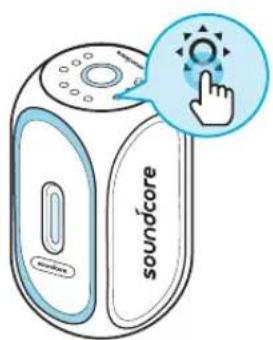

Press to turn Light Effects On / Off
Note: Flash can be turned off in Soundcore app individually.
EN 5. Soundcore App
Download the Soundcore app for an enhanced product experience. Follow onscreen instructions to set up Soundcore app.

When not in use, store your speaker in a cool place.
Please note that your rights under applicable law governing the sale of consumer goods remain unaffected by the warranties given in this Limited Warranty.
Specifications

Specifications are subject to change without notice.
Input: 100V-240V AC, 50/60Hz
Output: DC 5V, 2.4A(MAX)
Audio output: 160W
Battery capacity: max. 20000 mAh
Charging time: 4.0 hours
Playtime (varies by volume level and music content): 24 hours
Size: 255 x 245 x 505 mm
Weight (without packaging): 8.37 kg / 295.2 oz
Bluetooth version: V5.0
Bluetooth range: 20 m / 66 ft
Soundcore App
- Light effect
- Update firmware
- Wave Equalizer
- Stereo or Boost mode
- Rename
- More

Apple and the Apple logo are trademarks of Apple Inc.

Google Play and the Google Play logo are trademarks of Google Inc.
natural_image
Line drawing of a soundcore device with a separate plug, no text or symbols present
DE Auf einen Blick

Akkustand < 10 %

Akkustand < 25 %

Akkustand < 25% - 55%

Akkustand < 51% \~ 75%

Akkustand < 75% \~ 100%


Apple and the Apple logo are trademarks of Apple Inc.

GETITON
Google Play
Google Play and the Google Play logo are trademarks of Google Inc.
Récapitulatif
![POWER USB % AUX 1 2 3 4 5 6 7 8 9 10 AUDIO IN [●●●] AUDIO OUT 15 USB 16 17 +IQ MIC 13 RESET 12 ANKER AC IN 11](/content/2026/04/716550/images/17c775bab1007cad6559c84a8994b7169de58a99fcdcb9815b743c92456bf388.jpg)


Apple and the Apple logo are trademarks of Apple Inc.

Google Play and the Google Play logo are trademarks of Google Inc.


Apple and the Apple logo are trademarks of Apple Inc.

GETITON
Google Play
Google Play and the Google Play logo are trademarks of Google Inc
Vista general



Apple and the Apple logo are trademarks of Apple Inc.
Google Play and the Google Play logo are trademarks of Google Inc.
Bezpečnostní pokyny

Úroveň baterie < 10 %

Úroveň baterie < 25 %

Úroven baterie 25 až 55 %


- Light effect
- Update firmware
- Wave Equalizer
- Stereo or Boost mode
- Rename
- More


Download on the
App Store
Apple and the Apple logo are trademarks of Apple Inc.

GETITON
Google Play
Google Play and the Google Play logo are trademarks of Google Inc
Et overblik
![2 POWER 3 USB AUX 4 + 5 100 6 7 8 9 10 11 12 13 AUDIO IN [●●●] AUDIO OUT 14 15 16 USB □ 17 18 • MIC 13 • RESET 12 • AC IN 11 • ANGER](/content/2026/04/716550/images/0f7b35f62d8dab74862ad8668b7411dadd5b87f87ee9182e0ddeae2e00ef1c32.jpg)


Batteriniveauet <10%

Batterinivcauet <25%

Batteriniveauet 25%-55%

Batteriniveauet 51%\~75%

Batteriniveauet 75%\~100%


- Light effect
- Update firmware
- Wave Equalizer
- Stereo or Boost mode
- Rename
- More
Apple and the Apple logo are trademarks of Apple Inc.

Google Play and the Google Play logo are trademarks of Google Inc.
Turvallisuusohjeet


Akkutaso <10%

Akkutaso <25%

Akkutaso 25\~55 %

Akkutaso 51\~75%

Akkutaso 75\~100%


- Light effect
- Update firmware
- Wave Equalizer
- Stereo or Boost mode
- Rename
- More


Download on the
App Store
Apple and the Apple logo are trademarks of Apple Inc.

GETITON
Google Play
Google Play and the Google Play logo are trademarks of Google Inc
In één oogopslag
① Centrale volumeknop (voor instellen luidsprekervolume)
2 Aan/uit-knop / Voedingsindicator
● Ingangsbronknop / Ingangsbronindicator
4 Bluetooth-knop / Bluetooth indicator
5 Vorige track-knop
- Multifunctionele knop
7 Volgende track-knop
● Lichteffectenknop / Lichteffectenindicator
Bass Up-knop / Bass Up-indicator
10 MIC ECHO-volumeknop (voor instellen microfoonvolume)
Voedingsingang
12 Resetopening
13 Mic-ingang
14 Audio-ingang
15 Audio-uitgang
16 USB-poort
17 Power IQ-USB-poort

flowchart
graph TD
    A["Device with USB/UX interface"] -->|AUX| B["Laptop with two identical icons"]
    B -->|AUX| C["User interface icon with '×1' button"]
    style A fill:#f9f,stroke:#333
    style B fill:#ccf,stroke:#333
    style C fill:#cfc,stroke:#333

Batterijniveau <10%

Batterijniveau <25%


- Light effect
- Update firmware
- Wave Equalizer
- Stereo or Boost mode
- Rename
- More
Apple and the Apple logo are trademarks of Apple Inc.

Google Play and the Google Play logo are trademarks of Google Inc.
natural_image
Line drawing of a soundcore device with a separate plug, no text or symbols present
NO Kort oppsummert

Soundcore Rave kan kobles til andre Soundcore Rave via RCA-kabler for å danne en fellestrådet kjede.
d. Mikrofontilkobling
Koble mikrofonen til MIC INN porten. Mikrofonvolumnet kan justeres ved å vri på MIC ECI IO-volumknappen.

NO 3. Lade Soundcore Rave

Batterinivá <10 %

Batterinivá < 25 %


- Light effect
- Update firmware
- Wave Equalizer
- Stereo or Boost mode
- Rename
- More

Download on the
App Store
Apple and the Apple logo are trademarks of Apple Inc.


GETITON
Google Play
Google Play and the Google Play logo are trademarks of Google Inc
Överblick
![2 POWER 3 USB MAX 4 10 5 144 6 111 7 10 11 AUDIO IN [●●●] AUDIO OUT 15 16 USB □ 17 1Q • MIC 13 • RESET 12 • AC IN 11 AMER](/content/2026/04/716550/images/cd704ace850e728b79299143ed32a3f966ae953bdaf082424af010fc9e978859.jpg)

flowchart
graph TD
    A["Device with USB/UX interface"] -->|AUX| B["Laptop with two identical icons"]
    B -->|AUX| C["User interface icon with '×1' button"]
    style A fill:#f9f,stroke:#333
    style B fill:#ccf,stroke:#333
    style C fill:#cfc,stroke:#333

Batterinivå <10 %

Batterinivå <25 %

Batterinivå 25%\~55%

Batterinivå 51%\~75%


- Light effect
- Update firmware
- Wave Equalizer
- Stereo or Boost mode
- Rename
- More

Apple and the Apple logo are trademarks of Apple Inc.

Google Play and the Google Play logo are trademarks of Google Inc.


Apple and the Apple logo are trademarks of Apple Inc.

GETITON
Google Play
Google Play and the Google Play logo are trademarks of Google Inc
Visão Rápida


Apple and the Apple logo are trademarks of Apple Inc.
Google Play and the Google Play logo are trademarks of Google Inc.
安全にご使用いただくために
オン 1 秒間長押し
オフ 2 秒間長押し
JP a. Bluetooth モード
flowchart
graph TD
    A["soundcare Device"] -->|ON| B["Mobile Phone"]
    C["soundcare Device"] -->|ON| B
    D["soundcare Device"] -->|ON| B
    B -->|Wireless Signal| E["soundcare Phone"]
    E --> F["Mobile Phone"]
    F --> G["Mobile Phone"]
    style A fill:#f9f,stroke:#333
    style C fill:#f9f,stroke:#333
    style D fill:#f9f,stroke:#333
    style E fill:#ccf,stroke:#333
    style F fill:#ccf,stroke:#333
    style G fill:#ccf,stroke:#333


バッテリー残量 10% 未満
O
バッテリー残量 25% 未満
○○
バッテリー残量 25% \~ 55%
○
バッテリー残量 51% \~ 75%
○
バッテリー残量 75% \~ 100%


Apple and the Apple logo are trademarks of Apple Inc.

GETITON
Google Play
Google Play and the Google Play logo are trademarks of Google Inc
KO 안전 지침
개요
![14 AUDIO IN [●●●] AUDIO OUT 15 16 USB □ 17 +12 ● MIC 13 ● RESET 12 △N/AER AC IN 11](/content/2026/04/716550/images/ab5d15ad8f395948cd985cbcbcae802f76ee572c696b4cebb178e4c633c9f0f8.jpg)


배터리 수준 10% 미만
O
배터리 수준 25% 미만
○ ○
배터리 수준 25%\~55%
○ ○ ○
배터리 수준 51%\~75%
○ ○ ○ ○
배터리 수준 75%\~100%


놀러서 빛 효과를 켜기/끄기
- Light effect
- Update firmware
- Wave Equalizer
- Stereo or Boost mode
- Rename
- More
Apple and the Apple logo are trademarks of Apple Inc.
Google Play and the Google Play logo are trademarks of Google Inc.
安全须知
开长按1秒
关长按2秒以上
CN a. 蓝牙模式
flowchart
graph TD
    A["soundcare"] -->|ON| B["Bluetooth 10"]
    C["Bluetooth 10"] -->|ON| D["Bluetooth 10"]
    E["soundcare"] -->|ON| F["Bluetooth 10"]
    G["soundcare"] --> H["Bluetooth 10"]
    I["Mobile Phone"] --> J["Mobile Phone"]
    K["Mobile Phone"] --> L["Mobile Phone"]


电池电量<10%

电池电量<25%

电池电量为25%\~55%

电池电量为51%\~75%

电池电量为75%\~100%

白灯慢闪(电源指示灯)正在充电

Apple and the Apple logo are trademarks of Apple Inc.

GETITON
Google Play
Google Play and the Google Play logo are trademarks of Google Inc
إرشادات السلامة
نظرة سريعة
| 10%> مستوىprobability | [X7H9] |
| 25%> مستوىprobability |  |
| 55% 25% مستوىprobability ما بين | ( ) |
| 75% 51% مستوىprobability ما بين |  |
| 100% 75% مستوىprobability ما بين | ○ ○ |
| أبيض وامض ببطه (موشر الطاقة) قيد الشحن | [VZXK2] |

AR
Apple and the Apple logo are trademarks of Apple Inc.

GETTON
Google Play
Google Play and the Google Play logo are trademarks of Google Inc.
Declaration of Conformity
Hereby, Anker Innovations Limited declares that the radio equipment type A3391 is in compliance with Directive 2014/53/EU. The full text of the EU declaration of conformity is available at the following internet address: https://www.soundcore.com/
Maximum output power: 4dBm
Frequency band: 2.4G band (2.4000GHz-2.4835GHz)
Anker Innovations Limited
Room 1318-19, Hollywood Plaza, 610 Nathan Road, Mongkok, Kowloon, Hong Kong
Customer Service
For FAQs and more information, please visit:
soundcore.com/support


@SoundcoreAudio@soureaudio@soundcoreau
- EN Safety Instructions
- EN Using Your Soundcore Rave
- EN
- b. Source Input
- Beat-Driven Light Show
- EN 5. Soundcore App
- Specifications
- Soundcore App
- DE Auf einen Blick
- Bezpečnostní pokyny
- Turvallisuusohjeet
- NO Kort oppsummert
- NO 3. Lade Soundcore Rave
- 安全にご使用いただくために
- JP a. Bluetooth モード
- KO 안전 지침
- 개요
- 安全须知
- CN a. 蓝牙模式
- إرشادات السلامة
- نظرة سريعة
- Declaration of Conformity
- Customer Service
Brand : soundcore
Model : Rave 3
Category : Loudspeaker