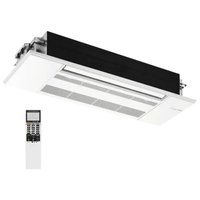
MLZ-KP09NA2 - Air Conditioning MITSUBISHI - Free user manual and instructions
Find the device manual for free MLZ-KP09NA2 MITSUBISHI in PDF.


| Product type | Reversible air conditioning |
| Brand | Mitsubishi |
| Model | MLZ-KP09NA2 |
| Cooling capacity | 9000 BTU/h (2,6 kW) |
| Heating capacity | 9000 BTU/h (2,6 kW) |
| Power supply | 230 V / 50 Hz |
| Indoor unit dimensions | Approx 30 × 30 × 30 cm |
| Outdoor unit dimensions | Approx 70 × 50 × 30 cm |
| Indoor unit weight | Approx 10 kg |
| Outdoor unit weight | Approx 30 kg |
| Operating modes | Automatic, Cooling, Heating, Dehumidification, Ventilation |
| Special functions | Smart Set, Sleep, Econo Cool, Auto Restart |
| Timer | Simple on/off and weekly timer (up to 28 programs) |
| Remote control | Wireless, with AAA batteries (×2) |
| Filters | Washable air filter, anti-allergic enzyme filter (optional, part number MAC-408FT-E) |
| Maintenance | Clean the air filter every 2 weeks, anti-allergic filter every 3 months |
| Safety | Ground fault circuit interrupter, overheat protection, automatic shutdown in case of malfunction |
| Repairability index | Not communicated |
| Warranty | Extended manufacturer warranty subject to online registration within 90 days |
Frequently Asked Questions - MLZ-KP09NA2 MITSUBISHI
User questions about MLZ-KP09NA2 MITSUBISHI
0 question about this device. Answer the ones you know or ask your own.
Ask a new question about this device
Download the instructions for your Air Conditioning in PDF format for free! Find your manual MLZ-KP09NA2 - MITSUBISHI and take your electronic device back in hand. On this page are published all the documents necessary for the use of your device. MLZ-KP09NA2 by MITSUBISHI.
USER MANUAL MLZ-KP09NA2 MITSUBISHI
CEILING CASSETTE TYPE AIR CONDITIONERS
INDOOR UNIT
MLZ-KP09NA2 MLZ-KP12NA2 MLZ-KP18NA2

English is original.
- To use this unit correctly and safely, be sure to read these operating instructions before use.
SAFETY PRECAUTIONS 1
PREPARATION BEFORE OPERATION 3
NAME OF EACH PART 4
SELECTING OPERATION MODES 5
■ FAN SPEED AND AIRFLOW DIRECTION ADJUSTMENT 6
SMART SET OPERATION 6
SLEEP OPERATION 7
■ ECONO COOL OPERATION 7
TIMER OPERATION (ON/OFF TIMER) 7
■ WEEKLY TIMER OPERATION 8
■ CLEANING 9
■ WHEN YOU THINK THAT TROUBLE HAS OCCurred 11
■ WHEN THE AIR CONDITIONER IS NOT GOING TO BE USED FOR A LONG TIME 12
■ INSTALLATION PLACE AND ELECTRICAL WORK 12
■ SPECIFICATIONS 12
SAFETYPRECAUTIONS
- Since rotating parts and parts which could cause an electric shock are used in this product, be sure to read these "Safety Precautions" before use.
- Since the cautionary items shown here are important for safety, be sure to observe them.
After reading this manual, keep it together with the installation manual in a handy place for easy reference. - Be sure to receive a guarantee card from your dealer and check that the purchased date and shop name, etc. are entered correctly.
Marks and their meanings
WARNING: Incorrect handling could cause serious hazard, such as death, serious injury, etc. with a high probability.
CAUTION: Incorrect handling could cause serious hazard depending on the conditions.
| WARNING | |
| ○ | Do not connect the power cord to an intermediate point, use an extension cord, or connect multiple devices to a single AC outlet. ·This may cause overheating, fire, or electric shock. |
| Make sure the power plug is free of dirt and insert it securely into the outlet. ·A dirty plug may cause fire or electric shock. | |
| Do not bundle, pull, damage, or modify the power cord, and do not apply heat or place heavy objects on it. ·This may cause fire or electric shock. | |
| Do not turn the breaker OFF/ON or disconnect/connect the power plug during operation. ·This may create sparks, which can cause fire. ·After the indoor unit is switched OFF with the remote controller, make sure to turn the breaker OFF or disconnect the power plug. | |
| Do not expose your body directly to cool air for a prolonged length of time. ·This could be detrimental to your health. | |
| The unit should not be installed, relocated, disassembled, altered, or repaired by the user. ·An improperly handled air conditioner may cause fire, electric shock, injury, or water leakage, etc. Consult your dealer. ·If the power supply cord is damaged, it must be replaced by the manufacturer or its service agent in order to avoid a hazard. | |
| When installing, relocating, or servicing the unit, make sure that no substance other than the specified refrigerant (R410A) enters the refrigerant circuit. ·Any presence of foreign substance such as air can cause abnormal pressure rise and may result in explosion or injury. ·The use of any refrigerant other than that specified for the system will cause mechanical failure, system malfunction, or unit break-down. In the worst case, this could lead to a serious impediment to securing product safety. | |
Meanings of symbols used in this manual
:Be sure not to do.
: Be sure to follow the instruction.
: Never insert your finger or stick, etc.
: Never step onto the indoor/outdoor unit and do not put anything on them.
: Danger of electric shock. Be careful.
: Be sure to disconnect the power supply plug from the power outlet.
: Be sure to shut off the power.
| This appliance is not intended for use by persons (including children) with reduced physical, sensory or mental capabilities, or lack of experience and knowledge, unless they have been given supervision or instruction concerning use of the appliance by a person responsible for their safety. | |
| Children should be supervised to ensure that they do not play with the appliance. | |
| Do not insert your finger, a stick, or other objects into the air inlet or outlet. · This may cause injury, since the fan inside rotates at high speeds during operation. | |
| In case of an abnormal condition (such as a burning smell), stop the air conditioner and disconnect the power plug or turn the breaker OFF. · A continued operation in the abnormal state may cause a malfunction, fire, or electric shock. In this case, consult your dealer. | |
| When the air conditioner does not cool or heat, there is a possibility of refrigerant leakage. In this case, consult your dealer. If a repair involves recharging the unit with refrigerant, ask the service technician for details. · The refrigerant used in the air conditioner is safe. Normally, it does not leak. However, if refrigerant leaks and comes in contact with a heat source such as a fan heater, kerosene heater, or cooking stove, it will create a harmful gas. | |
| The user should never attempt to wash the inside of the indoor unit. Should the inside of the unit require cleaning, contact your dealer. · Unsuitable detergent may cause damage to plastic material inside the unit, which may result in water leakage. Should detergent come in contact with electrical parts or the motor, it will result in a malfunction, smoke, or fire. |
SAFETYPRECAUTIONS
CAUTION
| Do not touch the air inlet or the aluminum fins of the indoor/outdoor unit. • This may cause injury. |
| Do not use insecticides or flammable sprays on the unit. • This may cause a fire or deformation of the unit. |
| Do not expose pets or houseplants to direct airflow. • This may cause injury to the pets or plants. |
| Do not place other electric appliances or furniture under the indoor/outdoor unit. • Water may drip down from the unit, which may cause damage or malfunction. |
| Do not leave the unit on a damaged installation stand. • The unit may fall and cause injury. |
| Do not step on an unstable bench to operate or clean the unit. • This may cause injury if you fall down. |
| Do not pull the power cord. • This may cause a portion of the core wire to break, which may cause overheating or fire. |
| Do not charge or disassemble the batteries, and do not throw them into a fire. • This may cause the batteries to leak, or cause a fire or explosion. |
| Do not operate the unit for more than 4 hours at high humidity (80% RH or more) and/or with windows or outside door left open. • This may cause the water condensation in the air conditioner, which may drip down, wetting or damaging the furniture. • The water condensation in the air conditioner may contribute to growth of fungi, such as mold. |
| Do not use the unit for special purposes, such as storing food, raising animals, growing plants, or preserving precision devices or art objects. • This may cause deterioration of quality, or harm to animals and plants. |
| Do not expose combustion appliances to direct airflow. • This may cause incomplete combustion. |
| Never put batteries in your mouth for any reason to avoid accidental ingestion. • Battery ingestion may cause choking and/or poisoning. |
| Before cleaning the unit, switch it OFF and disconnect the power plug or turn the breaker OFF. • This may cause injury, since the fan inside rotates at high speeds during operation. |
| When the unit will be unused for a long time, disconnect the power plug or turn the breaker OFF. • The unit may accumulate dirt, which may cause overheating or fire. |
| Replace all batteries of the remote controller with new ones of the same type. • Using an old battery together with a new one may cause overheating, leakage, or explosion. |
| If the battery fluid comes in contact with your skin or clothes, wash them thoroughly with clean water. • If the battery fluid comes in contact with your eyes, wash them thoroughly with clean water and immediately seek medical attention. |
| Ensure that the area is well-ventilated when the unit is operated together with a combustion appliance. • Inadequate ventilation may cause oxygen starvation. |
| Turn the breaker OFF when you hear thunder and there is a possibility of lightning strike. • The unit may be damaged if lightning strikes. |
| After the air conditioner is used for several seasons, perform inspection and maintenance in addition to normal cleaning. • Dirt or dust in the unit may create an unpleasant odor, contribute to growth of fungi, such as mold, or clog the drain passage, and cause water to leak from the indoor unit. Consult your dealer for inspection and maintenance, which require specialized knowledge and skills. |
| Do not operate switches with wet hands. • This may cause electric shock. |
| Do not clean the air conditioner with water or place an object that contains water, such as a flower vase, on it. • This may cause fire or electric shock. |
| Do not step on or place any object on the outdoor unit. • This may cause injury if you or the object falls down. |

IMPORTANT
Dirty filters cause condensation in the air conditioner which will contribute to the growth of fungi such as mold. It is therefore recommended to clean air fi filters every 2 weeks.
For installation
| WARNING | |
| Consult your dealer for installing the air conditioner. • It should not be installed by the user since installation requires spe-cialized knowledge and skills. An improperly installed air conditione may cause water leakage, fi re, or electric shock. | |
| Provide a dedicated power supply for the air conditioner. • A non-dedicated power supply may cause overheating or fi re. | |
| Do not install the unit where fl ammable gas could leak. • If gas leaks and accumulates around the outdoor unit, it may cause an explosion. | |
| Ground the unit correctly. • Do not connect the ground wire to a gas pipe, water pipe, lightning rod, or a telephone ground wire. Improper grounding may cause electric shock. | |
| CAUTION | |
| Install a Ground Fault Interrupt (GFI) circuit breaker depending on the installation location of the air conditioner (such as highly humid areas). • If the Ground Fault Interrupt (GFI) breaker is not installed, it may cause electric shock. | |
| Ensure that the drain water is properly drained. • If the drain passage is improper, water may drip down from the indoor/outdoor unit, wetting and damaging the furniture. | |
| In case of an abnormal condition Immediately stop operating the air conditioner and consult your dealer. | |
PREPARATIONBEFOREOPERATION
Before operation: Insert the power supply plug into the power outlet and/or turn the breaker on.
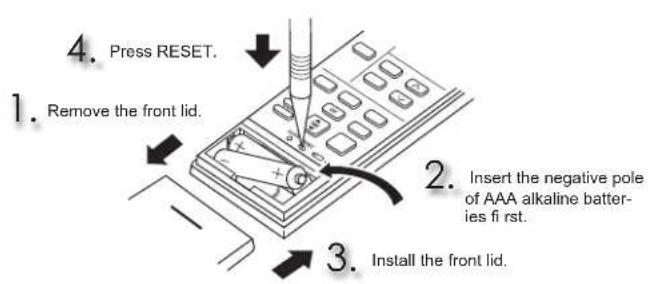
Note:
- Make sure the polarity of the batteries is correct.
- Do not use manganese batteries and leaking batteries. The remote controller could malfunction.
- Do not use rechargeable batteries.
- The battery replacement indicator lights up when the battery is running low. In about 7 days after the indicator starts lights up, the remote controller stops working.
- Replace all batteries with new ones of the same type.
- Batteries can be used for approximately 1 year. However, batteries with expired shelf lives last shorter.
- Press RESET gently using a thin instrument. If the RESET button is not pressed, the remote controller may not operate correctly.
Setting current timeInstalling the remote control
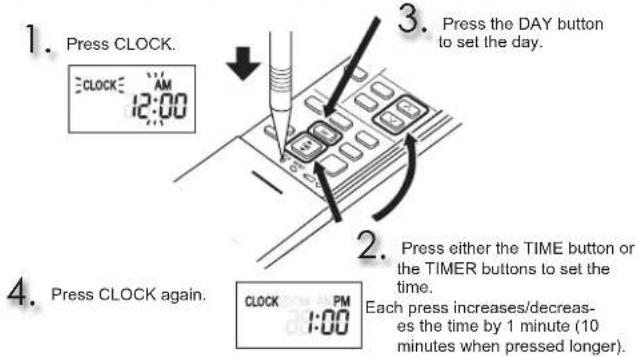
Note:
- Press CLOCK gently using a thin instrument.

Changing temperature units (^^)
Unit is preset with ^ F
- Press RESET while the temperature buttons are pressed.
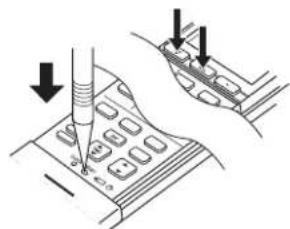
Note:
- Press RESET gently using a thin instrument.
To change temperature unit from ^ C to ^ F , press RESET.
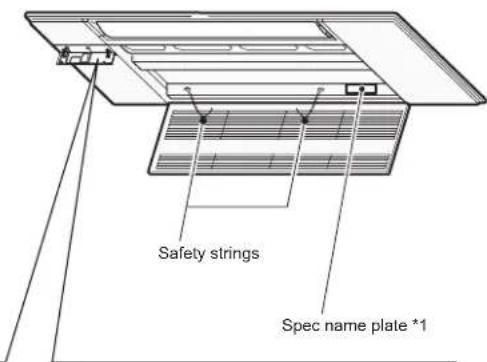
NAMEOFEACHPART

Display section
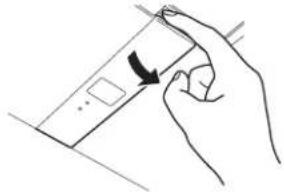
Open the display cover
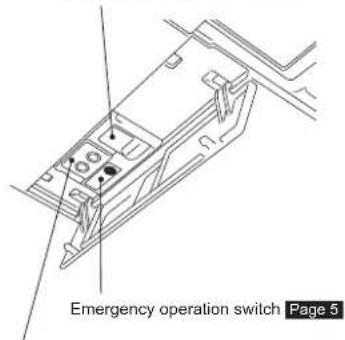
Remote control receiving section
Operation indicator lamp
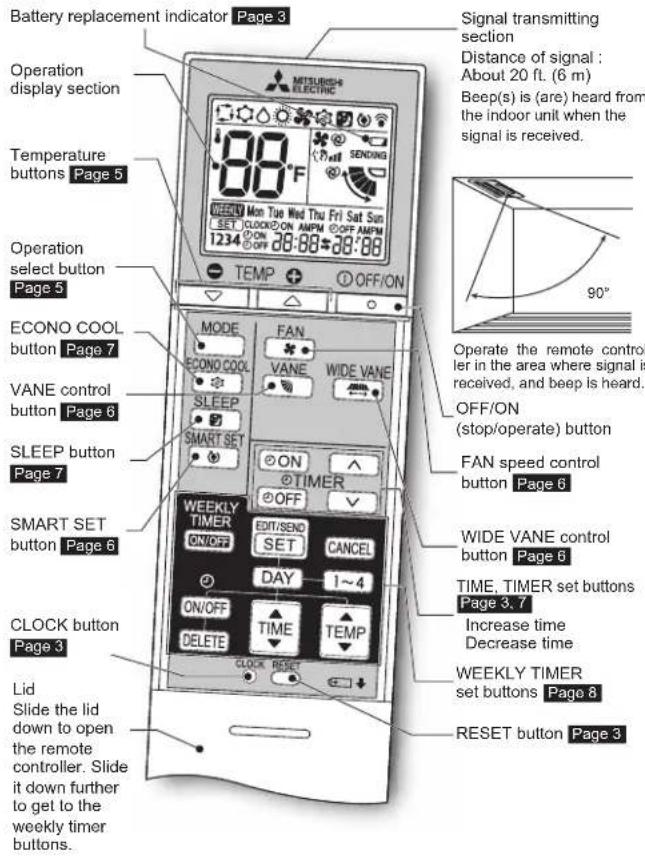
Remote controller
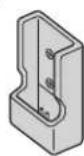
Remote controller holder
Install the remote controller holder in a place where the signal can be received by the indoor unit.
Only use the remote controller provided with the unit.
Do not use other remote controllers.
If two or more indoor units are installed in proximity to one another, an indoor unit that is not intended to be operated may respond to the remote controller.
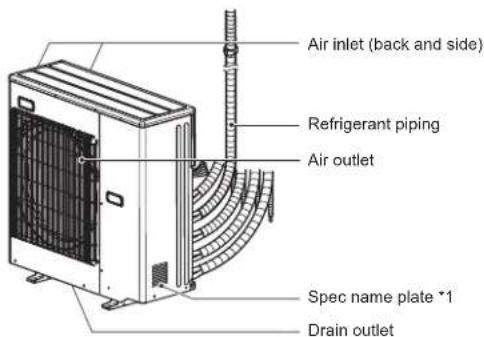
Outdoor unit
Outdoor units may be different in appearance.
^注 1 The manufacturing year and month is indicated on the spec name plate.
to start the operation.

Press MODE to select operation mode. Each press changes mode in the following order:


ss on to set the temperature.
Each press raises or lowers the temperature by 1^ (0.5^)

① OFF/ON
ESS
to stop the operation.
Note:
Operation indicator lamp
The operation indicator lamp shows the operation state of the unit.
| Indication O | Operation state Room temperature | |
| The unit is operating to reach the set temperature | About 4°F (2°C) or more away from set temperature | |
| ○ | The room temperature is approaching the set temperature | About 2 to 4°F (1 to 2°C) from set temperature |
| Standby mode (Refer to multi system operation) | - |

Lit Blie
ing
O
lot lit.
Multi system operation
Two or more indoor units can be operated by one outdoor unit. When several indoor units are operated simultaneously, cooling and heating operations cannot be done at the same time. When COOL is selected with one unit and HEAT with another or vice versa, the unit operated later becomes standby mode.
Water may condense when HEAT is operated with other units within 3 hours after COOL/DRY operation is stopped.
To prevent water condensation, perform HEAT with temperature set to 61^ (16°C) for about 30 minutes after COOL/DRY operation.

AUTO mode (Auto changeover)
The unit selects the operation mode according to the difference between the room temperature and the set temperature. During AUTO mode, the unit changes mode (COOL HEAT) when the room temperature is about 4^ ( 2^ ) away from the set temperature for more than 15 minutes.
Note:
During multi system operation, the unit may not be able to switch operation mode between COOL and HEAT. In this case, the indoor unit becomes standby mode (Refer to table of Operation indicator lamp).

COOL mode
Enjoy cool air at your desired temperature.
Note:
Do not operate COOL mode at low outside temperature (less than 14^[-10^] ). Water condensed in the unit may drip and wet or damage furniture, etc.

DRY mode
Dehumidify your room. The room may be cooled slightly. Temperature cannot be set during DRY mode.

HEAT mode
Enjoy warm air at your desired temperature.

FAN mode
Circulate the air in your room.
Temperature cannot be set during FAN mode.
Note:
After COOL/DRY mode operation, it is recommended to operate in the FAN mode to dry inside the indoor unit.
Emergency operation
When the remote controller cannot be used...
Emergency operation can be activated by pressing the emergency operation switch (E.O.SW) on the indoor unit.
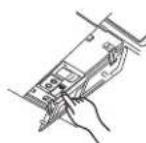
Each time the E.O.SW is pressed, the operation changes in the following order:
Operation indicator lamp
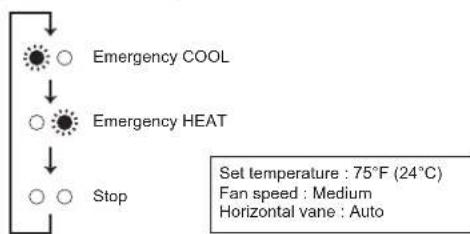
Note:
The first 30 minutes of operation is test run. Temperature control does not work, and fan speed is set to High.
Auto restart function
If a power failure occurs or the main power is turned off during operation, "Auto restart function" automatically starts operation in the same mode as the one set with the remote controller just before the shutoff of the main power. When timer is set, timer setting is cancelled and the unit starts operation when power is resumed.
If you do not want to use this function, please consult the service representative because the setting of the unit needs to be changed.
FANSPEED AND AIRFLOW DIRECTION ADJUSTMENT
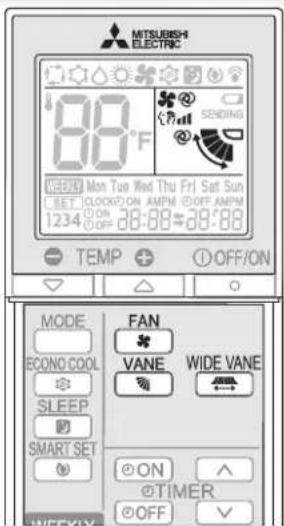
Press FAN select fan speed. Each press changes fan speed in the following order:

- Two short beeps are heard from the indoor unit when set to AUTO.
Press VANESelectairflowdirection.Eachpress changesairflowdirectionin the followingorder:

- Two short beeps are heard from the indoor unit when set to AUTO.
Airflow direction
(AUTO) .........The vane is set to the most effcient airift ow direction. COOL/DRY: horizontal position. HEAT: downward position.
(Manual).For efficient air conditioning, select upper position for COOL/DRY, and lower position for HEAT.
(Swing).The vane moves up and down intermittently.
WIDE VANE
Press to change horizontal airflow direction.
The vertical vane moves for about 30 seconds.
- After 30 seconds, the vertical vane moves to its original position. In this case, press "MDVE" again.
WIDE VANE
Press to set horizontal airflow direction.
The vertical vane stops and the airflow direction is set.
SMARTSETOPERATION
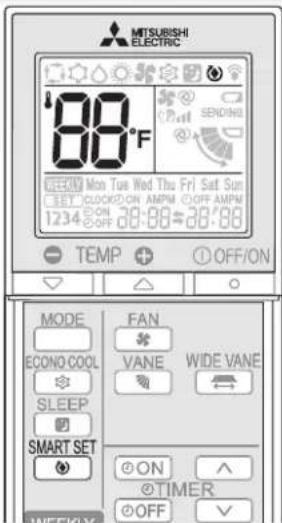
SMART SET
Press during COOL, or HEAT mode page 5 to select SMART SET mode.
2 Set the temperature, fan speed, and airflow direction.
The same setting is selected from the next time by simply pressing
- Two settings can be saved. (One for COOL, one for HEAT)
- Select the appropriate temperature, fan speed, and airflow direction according to your room.
SMART SET
Press again to cancel SMART SET operation.
SMART SET operation also is cancelled when the MODE button is pressed.
SMART SET operation
- A simplified set back function enables to recall the preferred (preset) setting with a single push of the button. Press the button again and you can go back to the previous setting in an instance.
SMART SET operation cannot be set on the weekly timer.
SMART SET operation and SLEEP operation cannot be set at the same time.
Example of use:
- Low energy mode
Set the temperature 4 to 6^ (2 to 3^ ) warmer in COOL and cooler in HEAT mode. This setting is suitable for unoccupied room, and while you are sleeping. - Saving frequently used settings
Save your preferred setting for COOL and HEAT. This enables you to select your preferred setting with a single push of the button.
SLEEP OPERATION
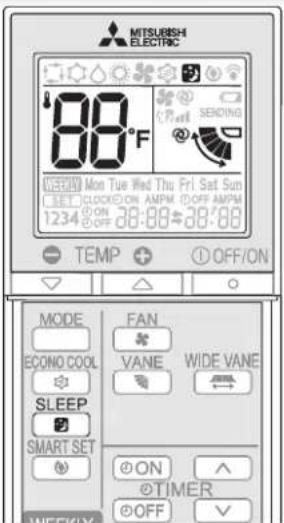

SLEEP Press during COOL, DRY, HEAT or FAN mode page 5 to select SLEEP operation.
Fan speed
:AUTO
Horizontal vane
: Position set on the remote controller
Operation indicator lamp
Dimly lit

Press (Increase) and (Decrease) to set the temperature of SLEEP operation.
- Once the above procedure is completed, the settings will be saved.
- After the settings are saved, a single push of during operation activates SLEEP operation with the same settings every time.
- Temperature for SLEEP operation cannot be set during DRY or FAN mode.

SLEEP Press again to cancel SLEEP operation.
The operation returns to the previous settings.
- SLEEP operation is also cancelled when the FAN button is pressed or the operation mode is changed.

Set temperature for SLEEP operation.
For about 30 minutes after pressed, the set temperature remains as set for the operation running when the SLEEP button is pressed. It will change to the set temperature for SLEEP operation in about 30 minutes. Pressing again returns the operation to the previous settings.
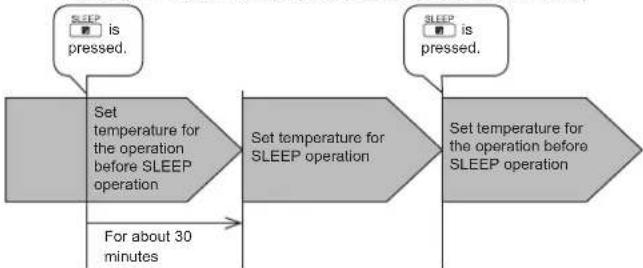
Note:
- ON/OFF timer is available during SLEEP operation.
- When a preset ON time for the weekly timer arrives during SLEEP operation, the weekly timer operation has priority. SLEEP operation will be cancelled, and the operation set on the weekly timer will start.
ECONOCOOL OPERATION
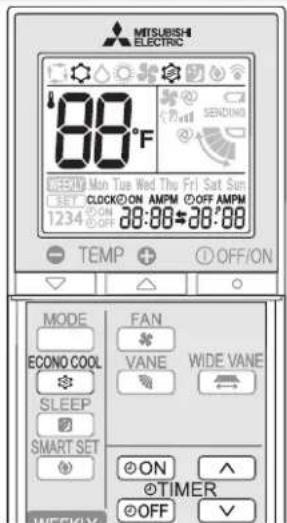
ECONO COOL
Press dering COOL mode NO COOL operation.
5 art ECO-
The unit performs swing operation vertically in various cycle according to the temperature of the unit. Set temperature is set 4^ (2^) higher automatically.
ECONO COOL
Press agaih to cancel ECONO COOL operation.
VANE WIDE VANE
- Pressing also cancels ECONO COOL operation.
What is "ECONO COOL"?
Swing airflow (change of air flow) makes you feel cooler than stationary airflow.
The set temperature and the airflow direction are automatically changed by the microprocessor.
It is possible to perform cooling operation with keeping comfort.
As a result energy can be saved.
Press ON during operation to set the timer.
ON (ON timer): The unit turns ON at the set time.
OFF(OFF timer) : The unit turns OFF at the set time.
- @opn @spinks.
- Make sure that the current time and day are set correctly. Page 3

Press (Increase) and (Decrease) to set the time of timer.
Each press increases or decreases the set time by 10 minutes.
- Set the timer while ON or off blinking.

Press ON or OFF again to cancel timer.
Note:
- ON and OFF timers can be set together. mark indicates the order of timer operations.
If power failure occurs while ON/OFF timer is set, see page 5 "Auto restart function".
- A maximum of 4 ON or OFF timers can be set for individual days of the week.
- A maximum of 28 ON or OFF timers can be set for a week.
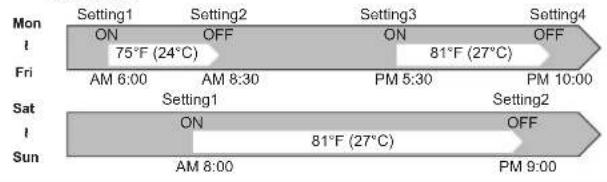
E.g.: Runs at 75^ (24^) from waking up to leaving home, and runs at 81^ (27^) from getting home to going to bed on weekdays. Runs at 81^ (27^) from waking up late to going bed early on weekends.
Note:
The simple ON/OFF timer setting is available while the weekly timer is on. In this case, the ON/OFF timer has priority over the weekly timer; the weekly timer operation will start again after the simple ON/OFF timer is complete.
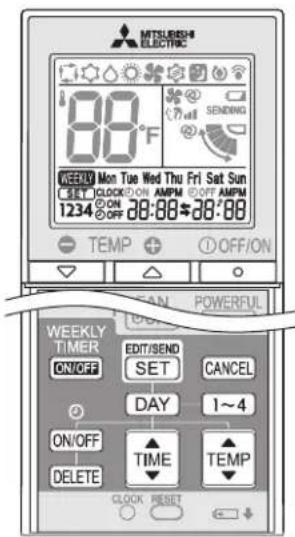
Setting the weekly timer
- Make sure that the current time and day are set correctly.

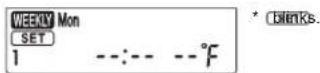
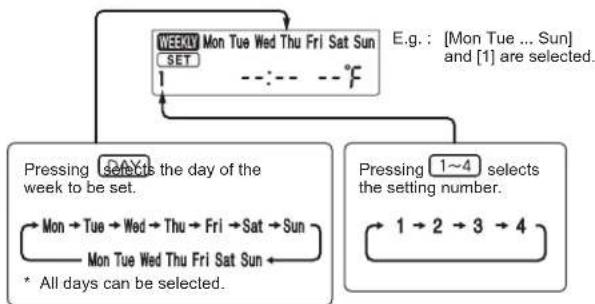
2 Press DAY and 1-4 to select setting day and number.
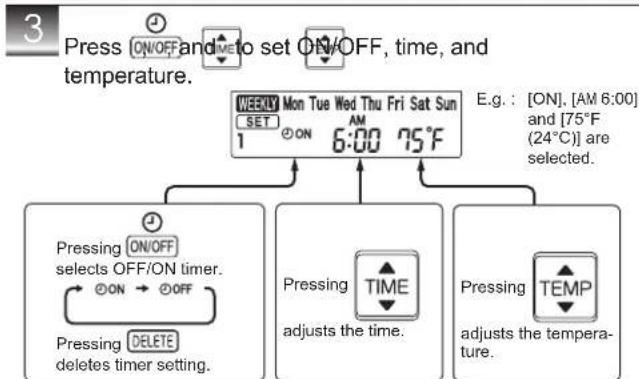
Hold down the button to change the time quickly. The temperature can be set between 61^ and 88^ (16°C and 31°C) at weekly timer.
Press and to continue setting the timer for other days and/or numbers.
4 Press complete and transmit the weekly timer setting.
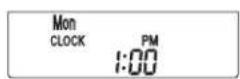
which was blinking goes out, and the current time will be displayed.
Note:
- Press CONTEND SED transmit the setting information of weekly timer to the indoor unit. Point the remote controller toward the indoor unit for 3 seconds.
- When setting the timer for more than one day of the week or one number, SET does not have to be pressed per each setting. Press SET once after all the settings are complete. All the weekly timer settings will be saved.
- Press SET to enter the weekly timer setting mode, and press and hold Edit 5 seconds to erase all weekly timer settings. Point the remote controller toward the indoor unit.
5 Press WEEKLY TIMER to turn the weekly timer ON. ( WEEKLY lights.)
When the weekly timer is ON, the day of the week whose timer setting is complete, will light.
Press WEEKLY TIMER again to turn the weekly timer OFF. ( WEEKLY goes out.)
Note:
The saved settings will not be cleared when the weekly timer is turned OFF.
Checking weekly timer setting
Press Enter the weekly timer setting mode.
2 Press OK to view the setting of the particular day or number.
Press to the weekly timer setting.

CLEANING
Instructions:
- Switch off the power supply or turn off the breaker before cleaning.
- Be careful not to touch the metal parts with your hands.
- Do not use hearing, thinning, polishing powder, or insect
- Do not use benzine, thinner, polishing powder, or insecticide.
-
When dirt stands out, wash it with kitchen neutral detergent diluted with lukewarm water to the specified concentration, then wipe off the detergent with a damp towel.
-
Do not expose parts to direct sunlight, heat, or fl ames to dry.
- Do not use water hotter than 122^ ( 50^ ).
- Do not use a scrubbing brush, a hard sponge, or the like.
- Do not soak or rinse the horizontal vane.
Open Close
- Press the tabs on the intake grille.
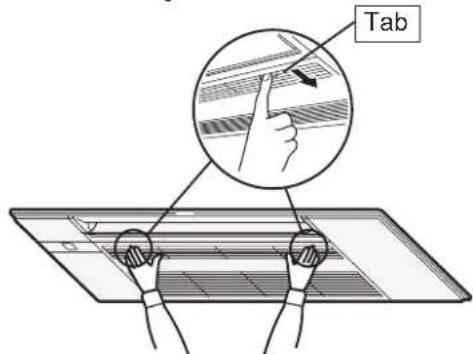
- Open the intake grille while holding it.
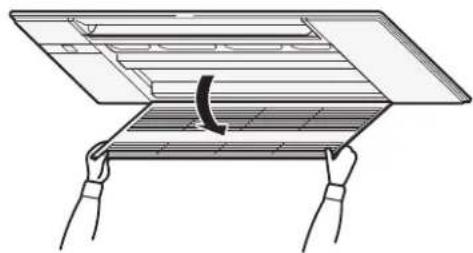
- Close the intake grille.
- Make sure that the safety strings do not hang out of the intake grille.
- Press around the each tab of the intake grille until a "click" is heard and press the center.
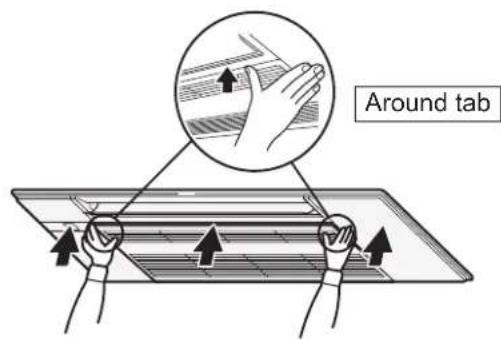
CLEANING
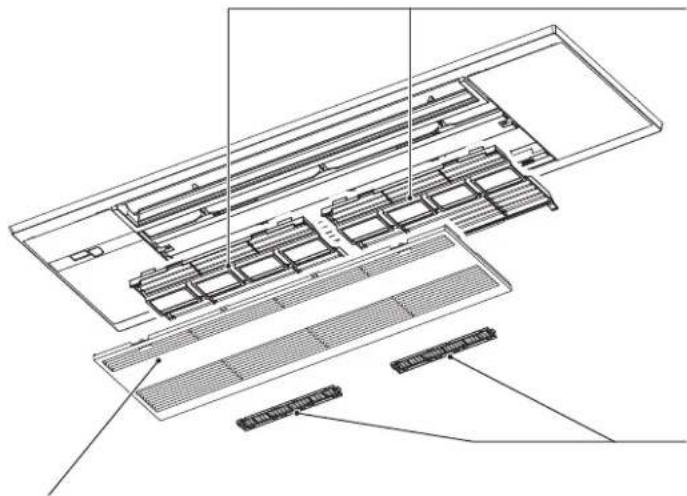
Intake grille
- Slide the shafts and unhook the safety strings to remove.
- Wipe with a soft dry cloth, or wash it with water using soft cloth, sponge, etc.
- Do not soak it in water for more than two hours.
- Dry it well in shade before installing it.
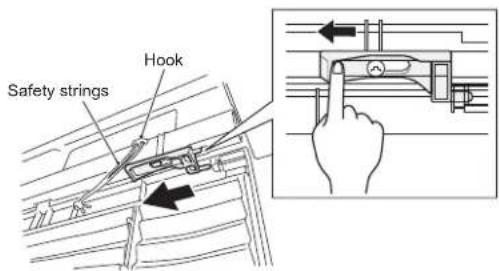
- Install the intake grille by following the removal procedure in reverse.
WARNING
Make sure to hook the safety string of the intake grille. Not doing so may cause injury due to the intake grille
Air fi lter (Air purifying fi lter)
Clean every 2 weeks
- Remove dirt by a vacuum cleaner, or rinse with water.
- Dry it well in shade before installing it
Install the tabs into the intake grille hole.
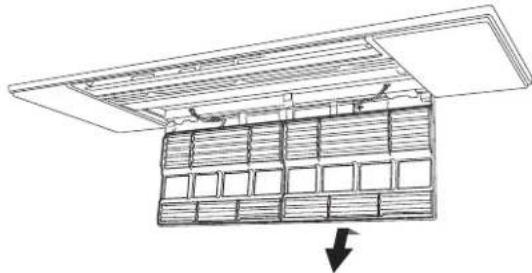
Air cleaning filter
(Anti-Allergy Enzyme filter, option)
Back side of air fi lter
Clean every 3 months:
- Remove dirt by a vacuum cleaner.
When dirt cannot be removed by vacuum cleaning:
Soak the filter and its frame in lukewarm water before rinsing it.
(Diluted mild detergents can be used when dirt cannot be removed.)
After washing, dry it well in shade.
Every year:
- Replace it with a new air cleaning filter for best performance.
- Parts Number MAC-408FT-E
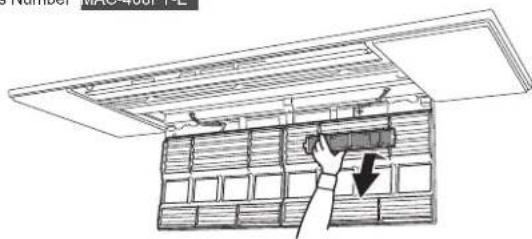

Important
- Clean the filters regularly for best performance and to duce power consumption.
- Dirty fi iters cause condensation in the air conditioner which will contribute to the growth of fungi such as mold. It therefore recommended to clean air fi iters every 2 weeks.
WHEN YOU THINK THAT TROUBLE HAS OCCURRED
Even if these items are checked, when the unit does not recover from the trouble, stop using the air conditioner and consult your dealer.
Symptom Explanation & Check points
| Indoor Unit | |
| The unit cannot be operated. | ·Is the breaker turned on? ·Is the ON timer set? Page7 |
| The unit cannot be operated for about 3 minutes when restarted. | ·This protects the unit according to instructions from the microprocessor. Please wait. |
| Mist is discharged from the air outlet of the indoor unit. | ·The cool air from the unit rapidly cools moisture in the air inside the room, and it turns into mist. |
| The swing operation of the HORIZONTAL VANE is suspended for a while, then restarted. | ·This is for the swing operation of the HORIZONTAL VANE to be performed normally. |
| The air flow direction changes during operation. The direction of the horizontal vane cannot be adjusted with the remote controller. | ·In the heating operation, if the air flow temperature is too low or when defrosting is being done, the horizontal vane is automatically set to horizontal position. |
| The operation is stopped for about 10 minutes in the heating operation. | ·Defrosting of the outdoor unit is being done. Since this is completed in max.10 minutes, please wait. (When the outside temperature is too low and humidity is too high, frost is formed.) |
| The unit starts operation by itself when the main power is turned on, though it isn't operated with the remote controller. | ·These models are equipped with an auto restart function. When the main power is turned off without stopping the unit with the remote controller and is turned on again, the unit starts operation automatically in the same mode as the one set with the remote controller just before the shutoff of the main power. Refer to "Auto restart function". Page 5 |
| The indoor unit which is not operating becomes warm and a sound, similar to water flowing, is heard from the unit. | ·A small amount of refrigerant continues to flow into the indoor unit even though it is not operating. |
| The indoor unit discolors over time. | ·Although plastic turns yellow due to the influence of some factors such as ultraviolet light and temperature, this has no effect on the product functions. |
| Outdoor Unit (Multi system) | |
| When heating operation is selec- lected, operation does not start right away. | · When operation is started during defrosting of outdoor unit is done, it takes a few minutes (max 10 minutes) to blow out warm air. |
| The fan of the outdoor unit does not rotate even though the compressor is running. Even if the fan starts to rotale, it stops soon. | · When the outside temperature is low during cool- ing operation, the fan operates intermittently to maintain sufficient cooling capacity. |
| Water leaks from the outdoor unit. | · During COOL and DRY operations, pipe or pipe connecting sections are cooled and this causes water to condense. · In the heating operation, water condensed on the heat exchanger drips down. · In the heating operation, the defrosting operation makes water frozen on the outdoor unit melt and drip down. |
| White smoke is discharged from the outdoor unit. | · In the heating operation, vapor generated by the defrosting operation looks like white smoke. |
| Remote controller | |
| The display on the remote controller does not appear or it is dim. The indoor unit does not respond to the remote control signal. | Are the batteries exhausted? Page 3Is the polarity (+, -) of the batteries correct? Page 3Are any buttons on the remote controller of other electric appliances being pressed? |
| Does not cool or heat | |
| The room cannot be cooled or heated suffi clently. | Is the temperature setting appropriate? Page 5Is the fan setting appropriate? Please change fan speed to Med. or High.Is the fi lller clean? Page 9, 10Is the fan or heat exchanger of the indoor unit clean? Page 9, 10Are there any obstacles blocking the air inlet or outlet of the indoor or outdoor unit?Is a window or door open?It may take a certain time to reach the setting temperature or may not reach that depending on the size of the room, the ambient temperature, and the like. |
Symptom Explanation & Check points
| Does not cool or heat | |
| The room cannot be cooled suffi cientsly. | ·When a ventilation fan or a gas cooker is used in a room, the cooling load increases, resulting in an insuffi client cooling effect. ·When the outside temperature is high, the cooling effect may not be suffi cients. |
| The room cannot be heated suffi cientsly. | ·When the outside temperature is low, the heating effect may not be suffi cients. |
| Air does not blow out soon in the heating operation. | ·Please wait as the unit is preparing to blow out warm air. |
| Airflow | |
| The air from the indoor unit smells strange. | ·Is the filiter clean? Page 9, 10 ·Is the fan or heat exchanger of the indoor un clean? Page 9, 10 ·The unit may suck in an odor adhering to the wall carpet, furniture, cloth, etc. and blow it out with the air. |
| Sound | |
| Cracking sound is heard. · This | sound is generated by the expansion/con- traction of the intake grille, etc. due to change in temperature. |
| The sound as burbling is heard. | ·This sound is heard when the outside air is ab- sorbed from the drain hose by turning on the range hood or the ventilation fan, making water fl owing in the drain hose to spout out. This sound is also heard when the outside air blows into the drain hose in case the outside wind is strong. |
| Burbling sound is heard from the indoor unit when DRY/ COOL operation is stopped. | ·This is the sound of drained water fl owing back- ward in the drain piping in the ceiling. |
| Mechanical sound is heard from the indoor unit. | ·This is the switching sound in turning on/off the fan or the compressor. |
| The sound of water fl owing is heard. | ·This is the sound of refrigerant or condensed water fl owing in the unit. |
| Hissing sound is sometimes heard. | ·This is the sound when the fl ow of refrigerera inside the unit is switched. |
| The sound of motor and swirl- ing sound is heard from the indoor unit. | ·This is the sound of water condensed during COOL/DRY operation being drained from the indoor unit. ·Sound of water draining may also be heard from indoor units which are not operating. (The sound will stop automatically. Please wait.) |
| Timer | |
| Weekly timer does not operate according to settings. | ·Is the ON/OFF timer set? Page 7 ·Transmit the setting information of the weekly time to the indoor unit again. When the information is successfully received, a long beep will sound from the indoor unit. If information fails to be received, 3 short beeps will be heard. Ensure information is successfully received. Page 8 ·When a power failure occurs and the main power turns off, the indoor unit built-in clock will be incor- rect. As a result, the weekly timer may not work normally. Be sure to place the remote controller where the signal can be received by the indoor unit Page 4 |
| The unit starts/stops the oper- tion by itself. | ·Is the weekly timer set? Page 8 |
| Dirt | |
| The ceiling and wall around the indoor unit get dirty. | ·Please clean the periphery of the air conditioner frequently. ·It may prevent the dirt to lower the wind blowing to the ceiling by adjusting the vertical wind direction. |
In the following cases, stop using the air conditioner and consult your dealer.
- When water leaks or drips from the indoor unit.
- When the upper operation indicator lamp blinks.
- When the breaker trips frequently.
- The remote control signal is not received in a room where an electronic ON/OFF type fluorescent lamp (inverter-type fluorescent lamp, etc.) is used.
- Operation of the air conditioner interferes with radio or TV reception. An amplifier may be required for the affected device.
- When an abnormal sound is heard.
- When any refrigerant leakage is found.
WHEN THE AIR CONDITIONER IS NOT GOING TO BE USED FOR A LONG TIME
1 Operate by COOL mode with the highest temperature set or FAN mode for 3 to 4 hours. Page 5 This dries the inside of the unit.
2 Press OFF/ON to stop the operation.
3 Turn off the breaker and/or disconnect the power supply plug.
4 Remove all batteries from the remote controller.
When using the air conditioner again:
Clean the air filter. Page 9, 10
2 Check that the air inlet and outlet of the indoor and outdoor units are not blocked.
3 Check that the earth is connected correctly.
Refer to the "PREPARATION BEFORE OPERATION", and follow the instructions. Page 3
INSTALLATIONPLACE AND ELECTRICAL WORK
Installation place
Avoid installing the air conditioner in the following places.
Where there is much machine oil.
- Salty places such as the seaside.
- Where sulfide gas is generated such as hot spring, sewage, waste water.
- Where oil is splashed or where the area is filled with oily smoke (such as cooking areas and factories, in which the properties of plastic could be changed and damaged).
- Where there is high-frequency or wireless equipment.
- Where the air from the outdoor unit air outlet is blocked.
- Where the operation sound or air from the outdoor unit bothers the house next door.
- The mounting height of indoor unit 7 ft. (2.2 m) is recommended. If it is impossible, please consult your dealer.
- Do not operate the air conditioner during interior construction and fi nishing work, or while waxing the fl oor. Before operating the air conditioner, ventilate the room well after such work is performed. Otherwise, it may cause volatile elements to adhere inside the air conditioner, resulting in water leakage or scattering of dew.
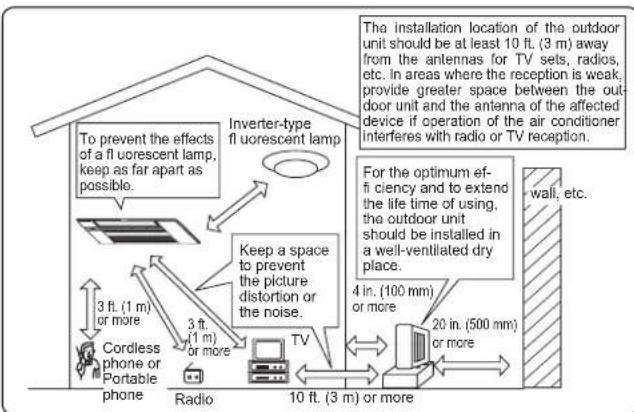
Electrical work
- Provide an exclusive circuit for the power supply of the air conditioner.
- Be sure to observe the breaker capacity.
If you have any questions, consult your dealer.
SPECIFICATIONS
Guaranteed operating range
| Indoor Outdoor | |||
| Cooling | Upper limit | 90°F (32.2°C) DB73°F (22.8°C) WB | *Note 1 |
| Lower limit | 67°F (19.4°C) DB57°F (13.9°C) WB | ||
| Heating | Upper limit | 80°F (26.7°C) DB- | |
| Lower limit | 70°F (21.1°C) DB- | ||
DB: Dry Bulb
WB: Wet Bulb
Note:
- As for the specifi cations, please confirm your dealer and/or refer to the catalogue.
- If the outdoor temperature is below the lower limit of guaranteed operating range, the outdoor unit may stop operation until the outdoor temperature exceeds the lower limit.

INDICE
Lieud'st installation
U.S. Product Warranty and Registration Information
Congratulations on the purchase of your new Mitsubishi Electric Trane HVAC US Cooling & Heating system and thank you for trusting us with your personal comfort.
Your installing contractor may have registered your products on your behalf. To check the registration status or to complete your product registration, please visit us at http://www.metahvac.com/.
Be sure to have the model and serial number for each of your indoor and outdoor units ready before starting the registration process.
If you need assistance registering your products, call or write to us at:
Mitsubishi Electric Trane HVAC US LLC
ATTN: Customer Care Center
1340 Satellite Boulevard
Suwanee, GA 30024
Phone: 1.800.433.4822
E-mail: CustomerCare@hvac.mea.com
For the residents of Canada
Mitsubishi Electric
HVAC Warranty Registration (Canada)
Congratulations on the purchase of your new Mitsubishi Electric heat pump or air conditioning system.
In order to benefit from our extended warranty, your installing contractor must register your system's products on our website on your behalf within 90 days of installation. The extended warranty covers the system's parts and compressor for an extended period from the date of installation. Product model and serial numbers are required for online registration.
To register, please ask your installing contractor to visit the warranty registration page at www.mitsubishielectricmeq.ca, complete the registration and provide you with confirmation of registration.
PLEASE NOTE: Regular maintenance as specified in the owner's manual is essential to your system performing according to manufacturer specifications over the applicable warranty period. Please review the terms of the product warranty at mitsubishihelectric.ca
If you require assistance, please contact: info@mitsubishihielectric.ca
Mitsubishi Electric
Enregistrement de la garantie HVAC (Canada)
- CEILING CASSETTE TYPE AIR CONDITIONERS
- INDOOR UNIT
- SAFETY PRECAUTIONS 1
- SAFETYPRECAUTIONS
- Marks and their meanings
- Meanings of symbols used in this manual
- CAUTION
- IMPORTANT
- For installation
- PREPARATIONBEFOREOPERATION
- Note:
- Setting current timeInstalling the remote control
- Changing temperature units (°F→^°C)
- NAMEOFEACHPART
- Remote controller holder
- Operation indicator lamp
- Multi system operation
- AUTO mode (Auto changeover)
- COOL mode
- DRY mode
- HEAT mode
- FAN mode
- Emergency operation
- When the remote controller cannot be used...
- Auto restart function
- FANSPEED AND AIRFLOW DIRECTION ADJUSTMENT
- Airflow direction
- WIDE VANE
- SMARTSETOPERATION
- SMART SET
- Set the temperature, fan speed, and airflow direction.
- SMART SET operation
- Example of use:
- SLEEP OPERATION
- ECONOCOOL OPERATION
- What is "ECONO COOL"?
- Setting the weekly timer
- Checking weekly timer setting
- CLEANING
- Instructions:
- Open Close
- Intake grille
- WARNING
- Air fi lter (Air purifying fi lter)
- Air cleaning filter
- (Anti-Allergy Enzyme filter, option)
- Back side of air fi lter
- WHEN YOU THINK THAT TROUBLE HAS OCCURRED
- WHEN THE AIR CONDITIONER IS NOT GOING TO BE USED FOR A LONG TIME
- When using the air conditioner again:
- INSTALLATIONPLACE AND ELECTRICAL WORK
- Installation place
- Electrical work
- SPECIFICATIONS
- INDICE
- Lieud'st installation
- U.S. Product Warranty and Registration Information
- For the residents of Canada
- Mitsubishi Electric
- HVAC Warranty Registration (Canada)
- Enregistrement de la garantie HVAC (Canada)
Brand : MITSUBISHI
Model : MLZ-KP09NA2
Category : Air Conditioning