ACER ACC310 - Hand truck

ACC310 - Hand truck ACER - Free user manual and instructions

Find the device manual for free ACC310 ACER in PDF.
📄 216 pages English EN Download 💬 AI Question
Notice ACER ACC310 - page 3

User questions about ACC310 ACER

0 question about this device. Answer the ones you know or ask your own.

Ask a new question about this device

The email remains private: it is only used to notify you if someone responds to your question.

No questions yet. Be the first to ask one.

Download the instructions for your Hand truck in PDF format for free! Find your manual ACC310 - ACER and take your electronic device back in hand. On this page are published all the documents necessary for the use of your device. ACC310 by ACER.

USER MANUAL ACC310 ACER

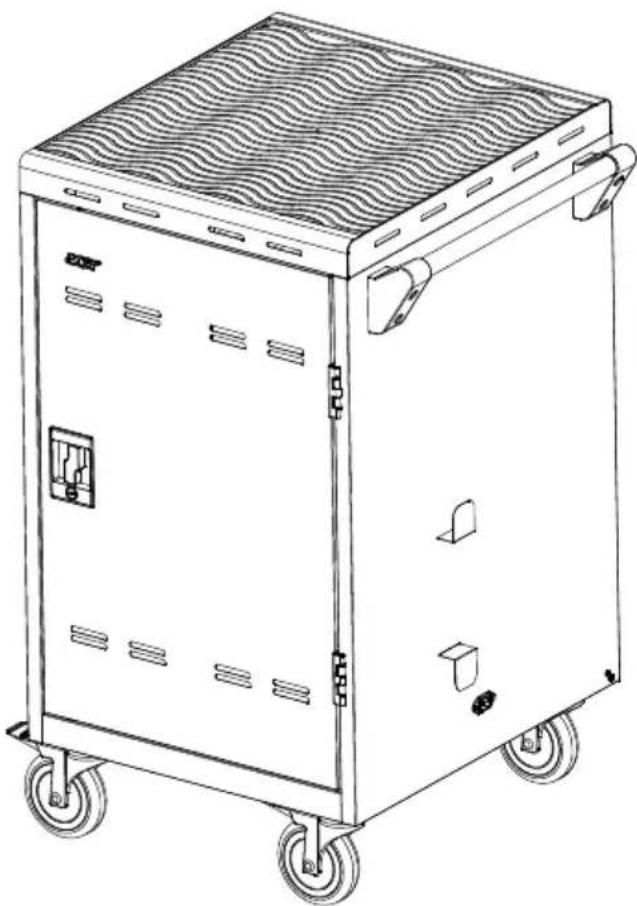
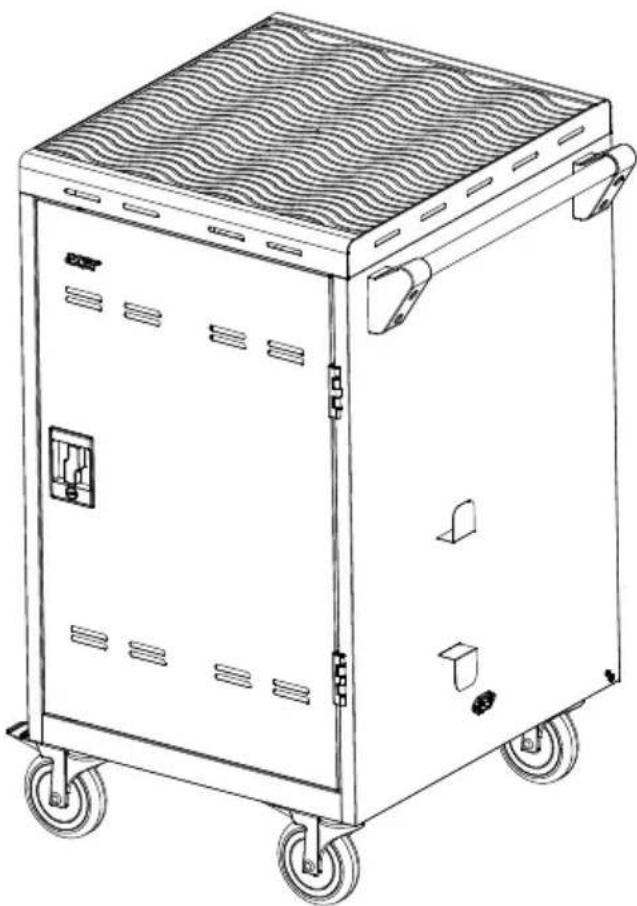
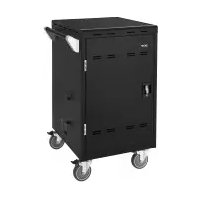
natural_image Line drawing of a modular electric vehicle chassis with wheels and internal compartments (no text or symbols)

Acer Charging Cart

(24 slots, EU type)

ACC310

User Manual

Warranty

ACER ACC310 - ACC310 - 1

WARNING

ALWAYS FOLLOW SAFETY PRECAUTIONS

■ Death or serious injury may occur when children climb on audio and/or video equipment furniture. A remote control or toys placed on the furnishing may encourage a child to climb on the furnishing and as a result the furnishing may tip over on to the child.
■ Relocating audio and/or video equipment to furniture not specifically designed to support audio and/or video equipment may result in death or serious injury due to the furnishing collapsing or over turning onto a child.

ACER ACC310 - ALWAYS FOLLOW SAFETY PRECAUTIONS - 1

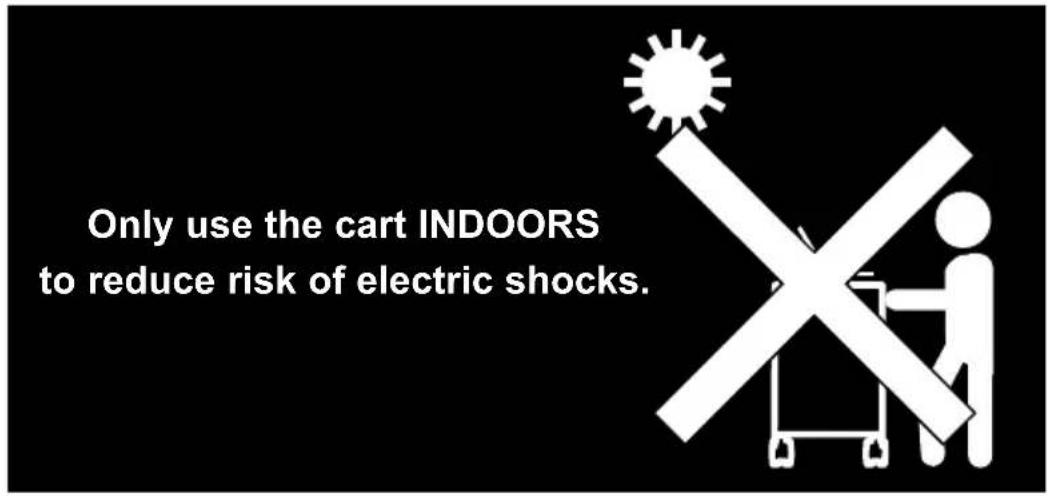
text_image Only use the cart INDOORS to reduce risk of electric shocks.

ACER ACC310 - ALWAYS FOLLOW SAFETY PRECAUTIONS - 2

text_image ONLY ADULTS should move the cart.

ACER ACC310 - ALWAYS FOLLOW SAFETY PRECAUTIONS - 3

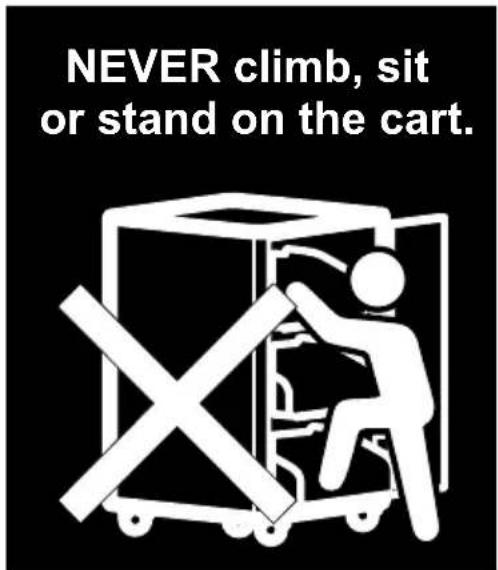
text_image NEVER climb, sit or stand on the cart.

ACER ACC310 - ALWAYS FOLLOW SAFETY PRECAUTIONS - 4

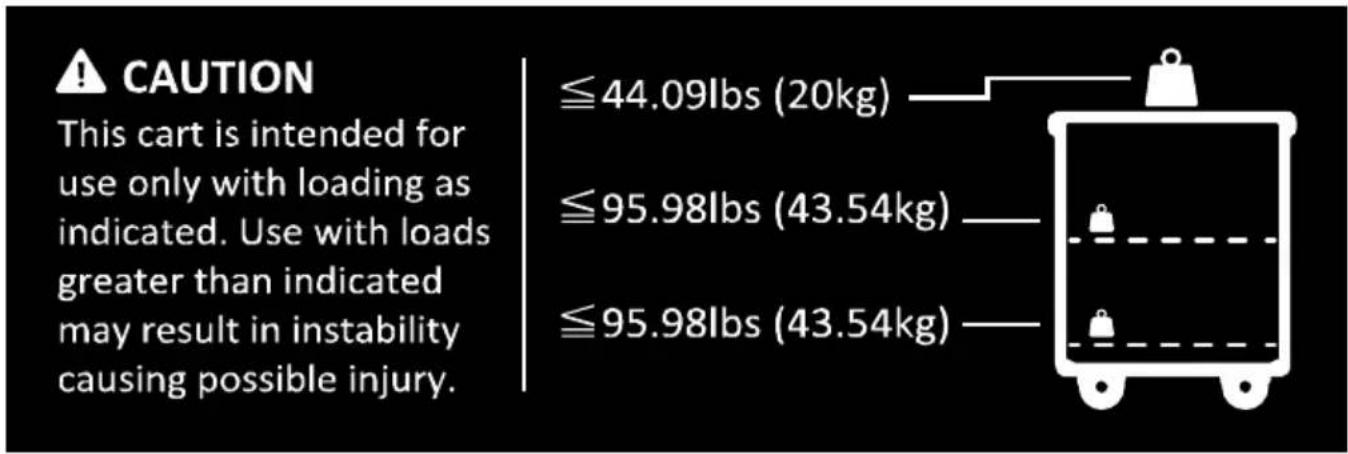
text_image CAUTION This cart is intended for use only with loading as indicated. Use with loads greater than indicated may result in instability causing possible injury. ≤44.09lbs (20kg) ≤95.98lbs (43.54kg) ≤95.98lbs (43.54kg)

CAUTION

■ DO NOT allow anyone to sit, stand or climb on the cart.
■ DO NOT lift the cart.
■ DO NOT block the ventilation holes used for air circulation.
■ DO NOT overload objects on the cart shelves. (work platform maximum loading = 20kg / 44.09lbs; each shelf maximum loading = 15kg / 30.07lbs).
■ DO NOT put any devices over the maximum loading weight on top of the cart.
■ When moving the cart, DO NOT put any devices (ex: TV, Monitor, Documents camera...etc.) on top of cart.
■ DO NOT use a TV/monitor on top of the cart.
■ Disconnect the power from the outlet before moving the cart.
■ While moving the cart, make sure the power cord is secured and tightly wrapped.
■ When moving carts over uneven flooring, please try to slightly lift and stabilize the cart to avoid damage.

European Community Compliance Statement (Class A)

CE This product is herewith confirmed to comply with the essential requirements and other relevant provisions of EMC Directive 2014/30/EU, Low Voltage Directive 2014/35/EU, and RoHS Directive 2011/65/EU.

Warning: This is a class A product. In a domestic environment, this product may cause radio interference in which case the user may be required to take adequate measures.

DISCLAIMER

No warranty or representation, either expressed or implied, is made with respect to the contents of this documentation, its quality, performance, merchantability, or fitness for a particular purpose. Information presented in this documentation has been carefully checked for reliability; however, no responsibility is assumed for inaccuracies. The information contained in this documentation is subject to change without notice.

In no event will Acer Information Inc. be liable for direct, indirect, special, incidental, or consequential damages arising out of the use or inability to use this product or documentation, even if advised of the possibility of such damages.

TRADEMARKS

"Acer" is a trademark owned by Acer Information Inc. Other trademarks used herein for description purpose only belong to each of their companies.

©2023 Acer Information Inc. All rights reserved. | April 10, 2023

All rights of this object belong to Acer Information Inc. Reproduced or transmitted in any form or by any means without the prior written permission of Acer Information Inc. is prohibited. All information or specifications are subject to change without prior notice.
ACER ACC310 - COPYRIGHT - 1

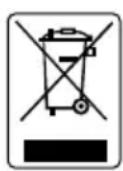
The mark of Crossed-out wheeled bin indicates that this product must not be disposed of with your other household waste. Instead, you need to dispose of the waste equipment by handing it over to a designated collection point for the recycling of waste electrical and electronic equipment. For more information about where to drop off your waste equipment for recycling, please contact your household waste disposal service or the shop where you purchased the product.

Contents

Package Contents ....1

Dimensions....1

Diagram 2

Door Lock 3

Secure the Cart....4

Installation....5

Adapter Installation ....5

Cable Management ....6

Charging Cart 7

Troubleshooting 8

Specifications....9

Appendix – Earthing ....10

Package Contents

The following items are included in the package. Please check if each item is available before using.
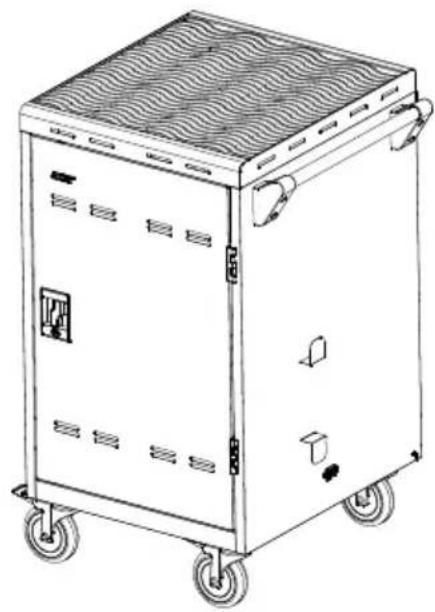
ACER ACC310 - Package Contents - 1

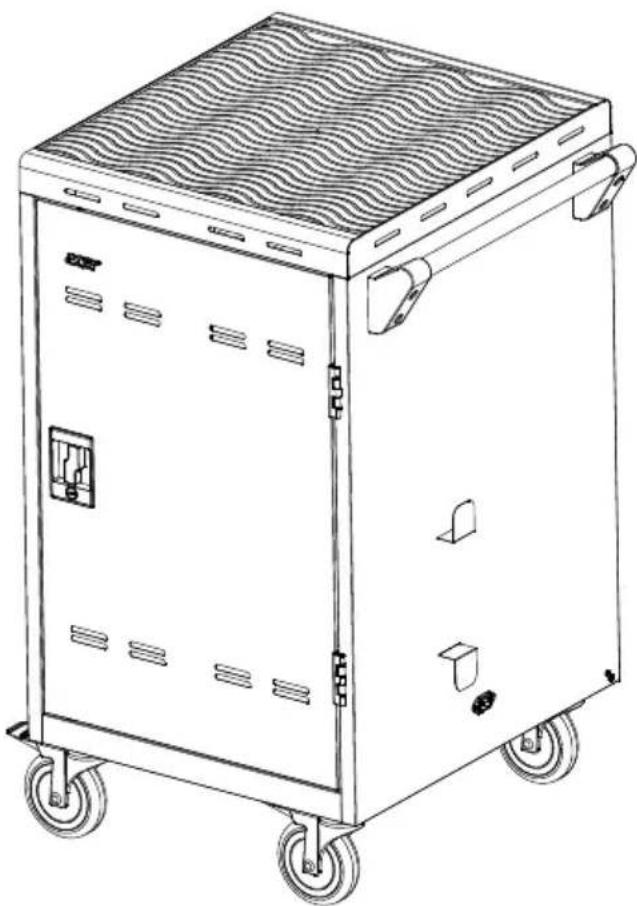
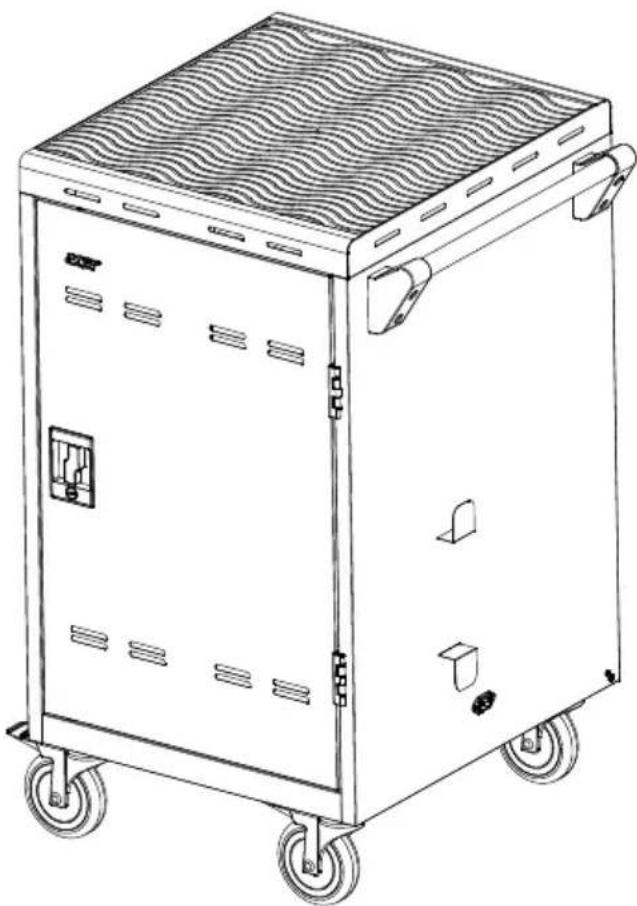
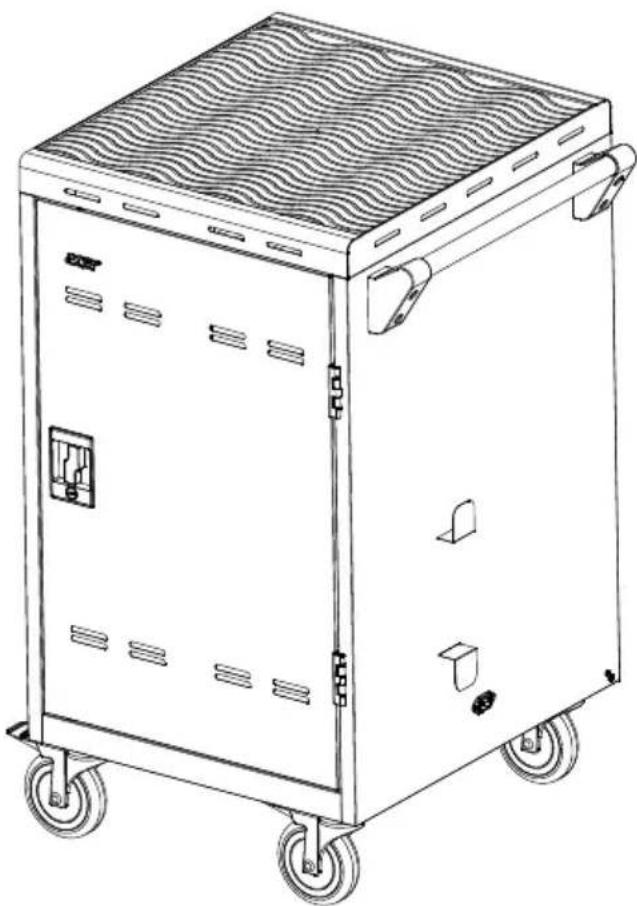
natural_image Line drawing of a portable industrial machine with wheels and ventilation slots (no text or symbols)

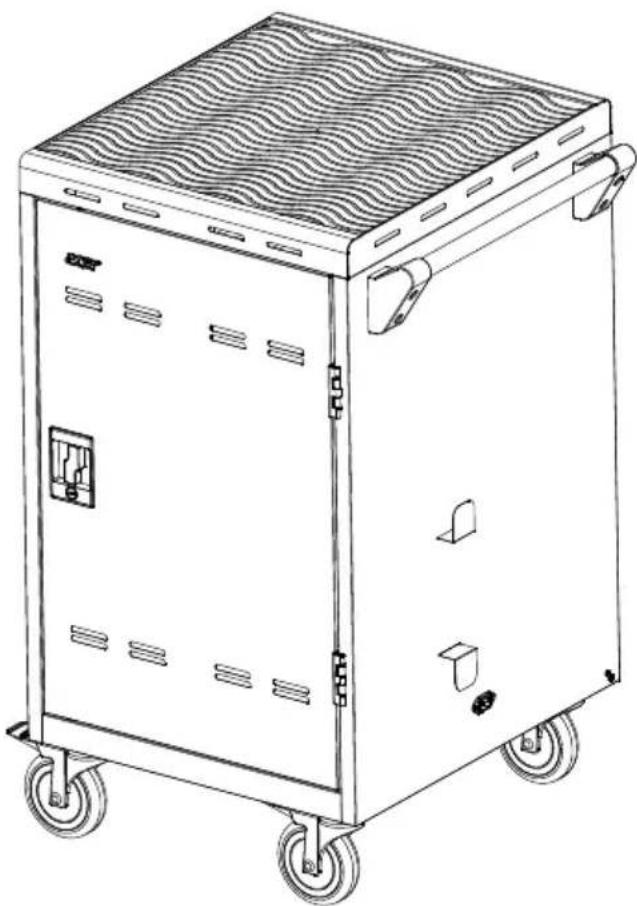
ACC310

ACER ACC310 - Package Contents - 2

text_image Acer Acer Charging Cart (31 slots, EU type) ACC318 User Manual Rearrity

User Manual

ACER ACC310 - Package Contents - 3
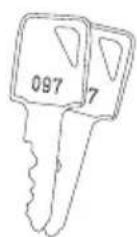
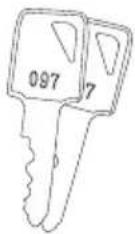
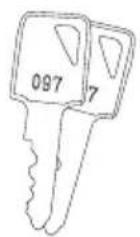
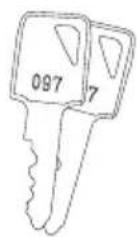
Door key x4

ACER ACC310 - Package Contents - 4

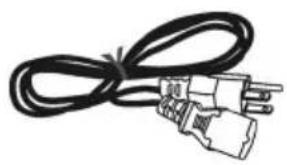
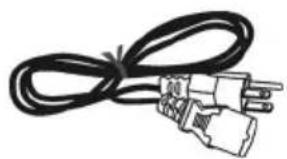
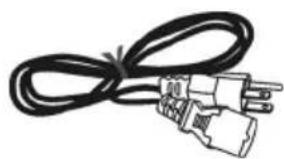
natural_image Coiled black cable with two connectors (no text or symbols visible)

Power Cord*

*The power cord type may vary as they are country dependent.

Dimensions
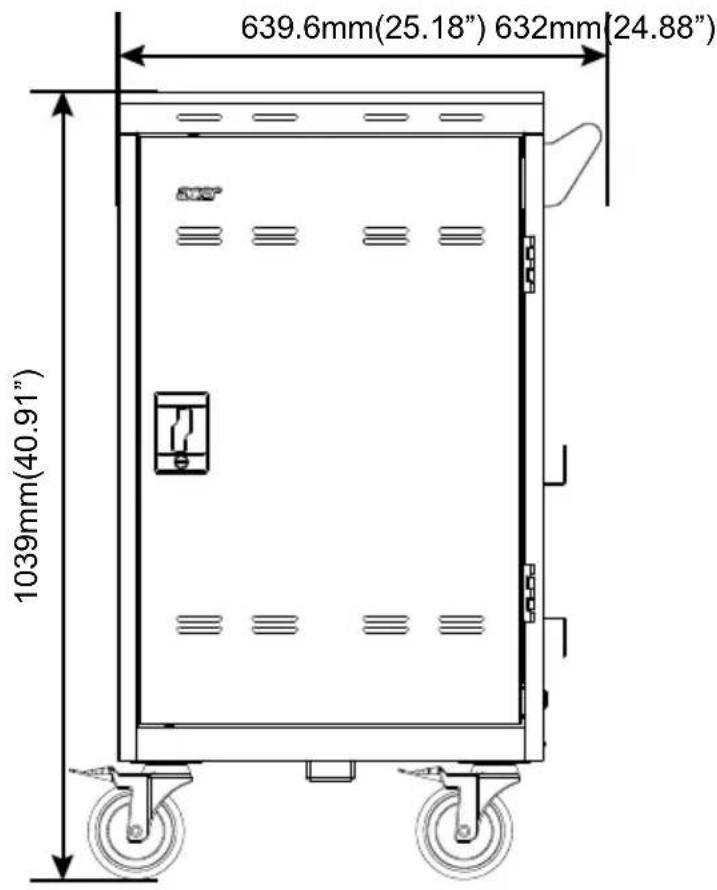
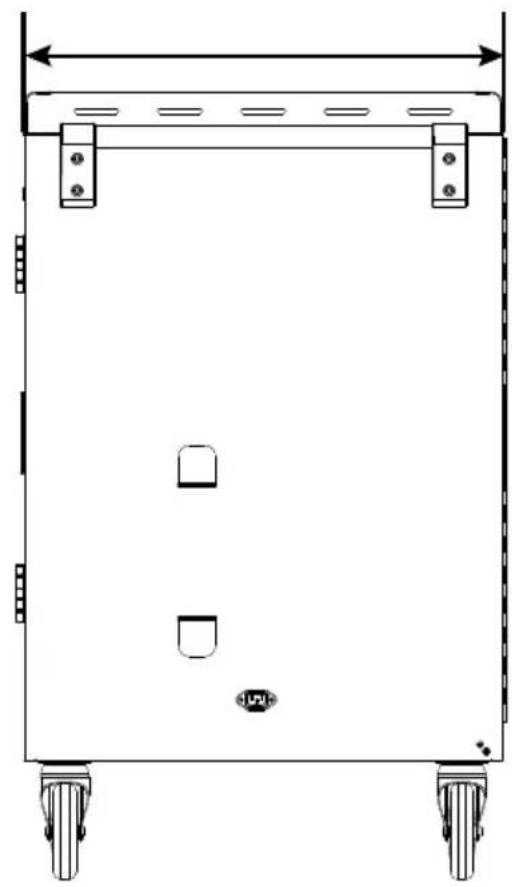
ACER ACC310 - Package Contents - 5

text_image 639.6mm(25.18") 632mm 24.88" 1039mm(40.91"

ACER ACC310 - Package Contents - 6

natural_image Technical line drawing of a rectangular mechanical device with four wheels and mounting feet (no text or symbols)

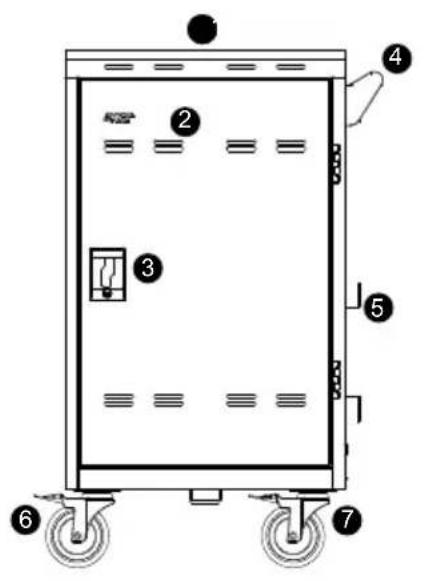
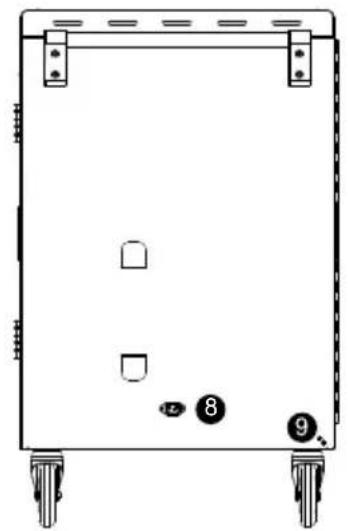
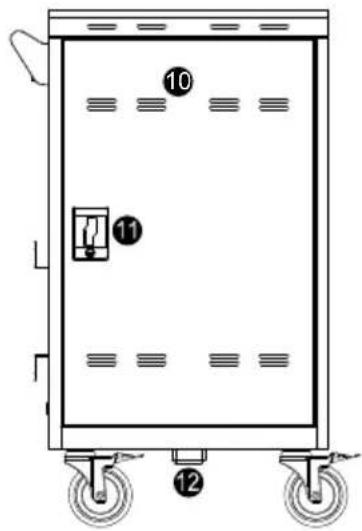
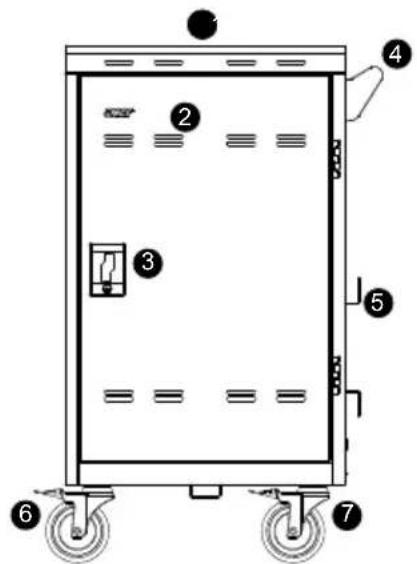
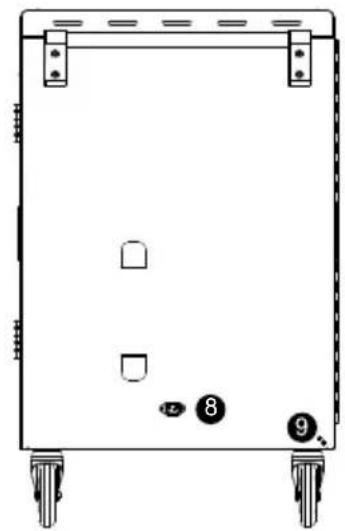
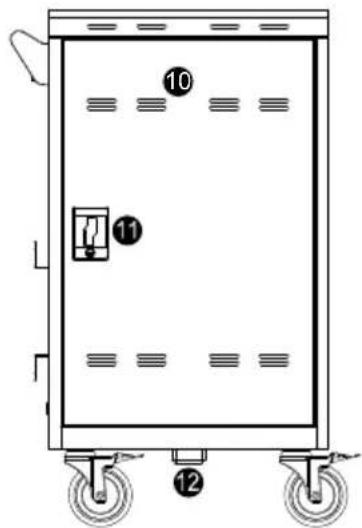
Diagram

ACER ACC310 - Diagram - 1

text_image Diagram of a rectangular industrial machine with numbered components and labeled parts

ACER ACC310 - Diagram - 2

natural_image Front view of a rectangular mechanical device with four wheels and small circular components (no text or symbols)

ACER ACC310 - Diagram - 3

text_image Diagram of an electrical cabinet with numbered components and labeled parts

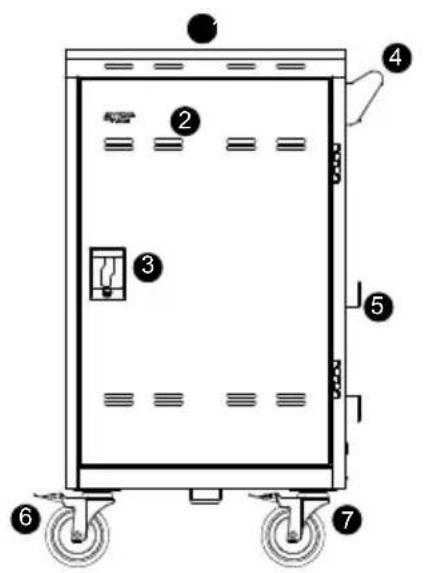
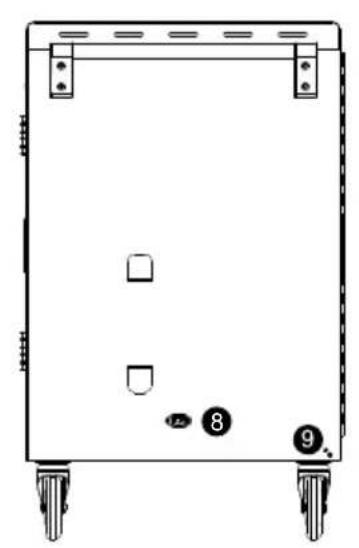
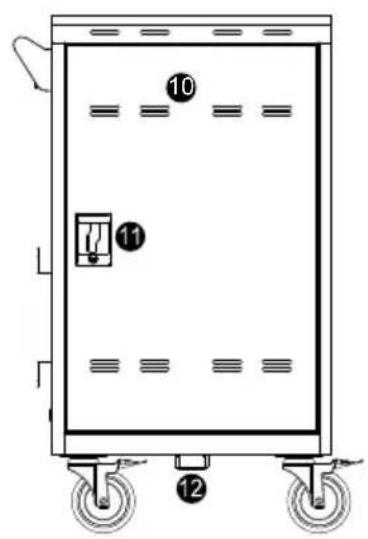
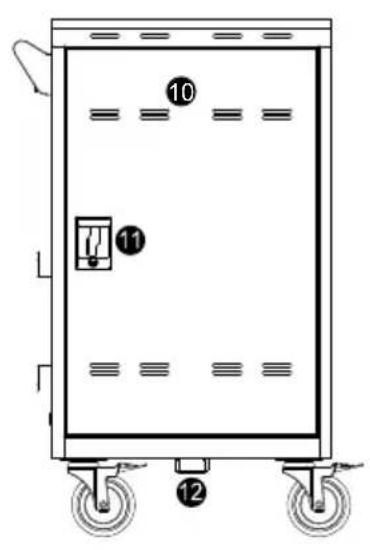
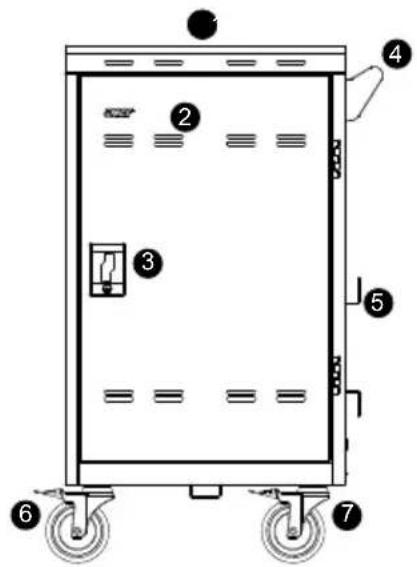
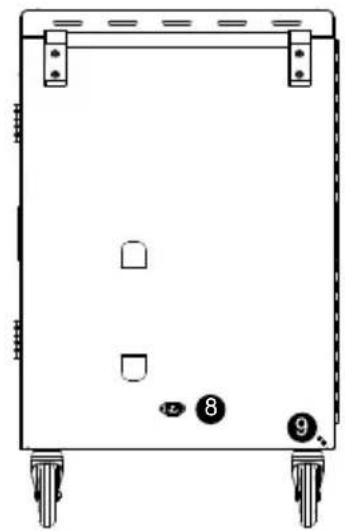
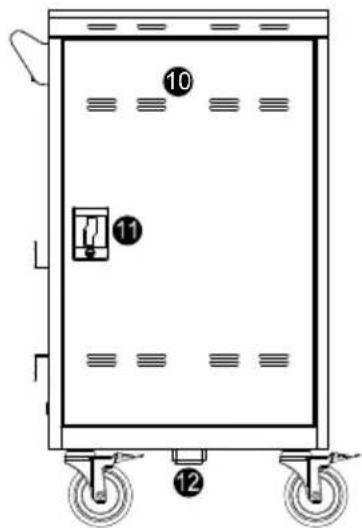
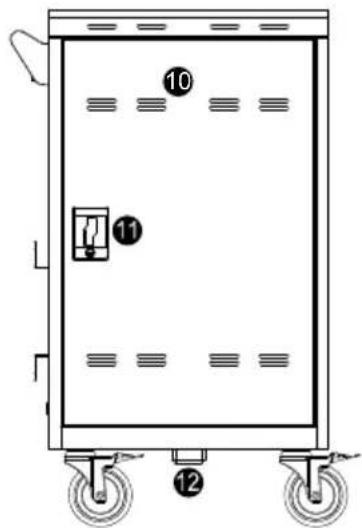
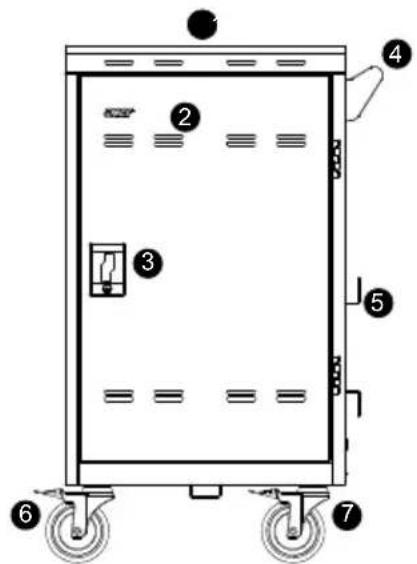
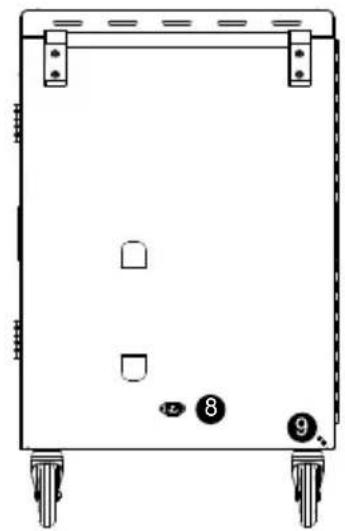
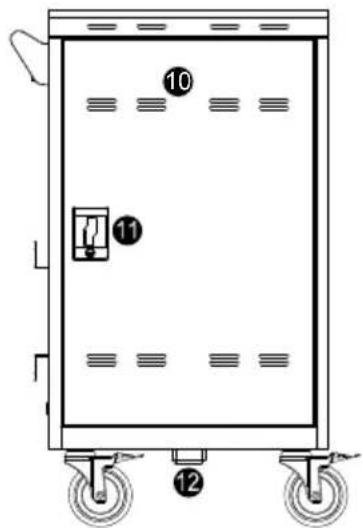
Front Side Back

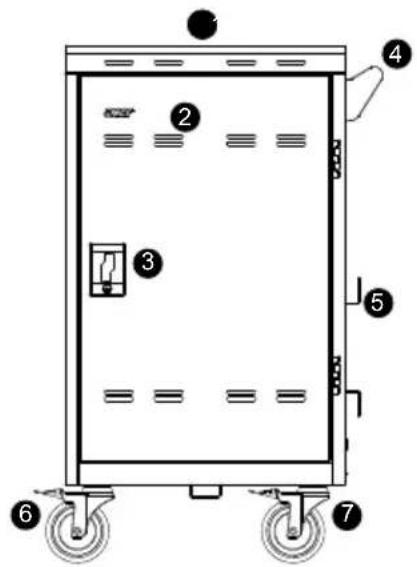
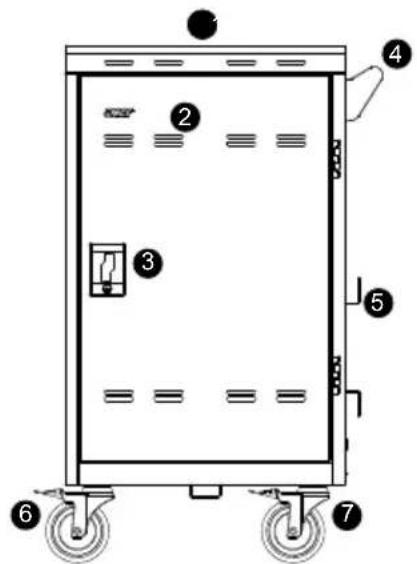
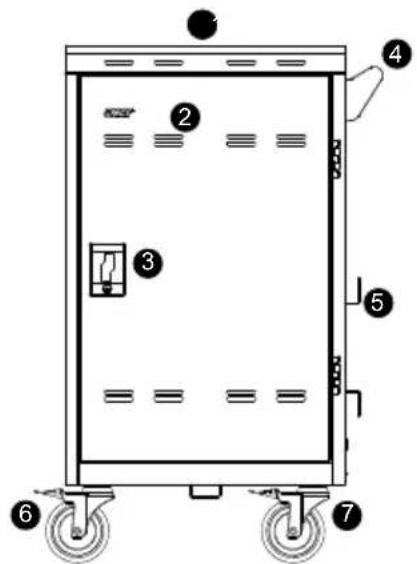
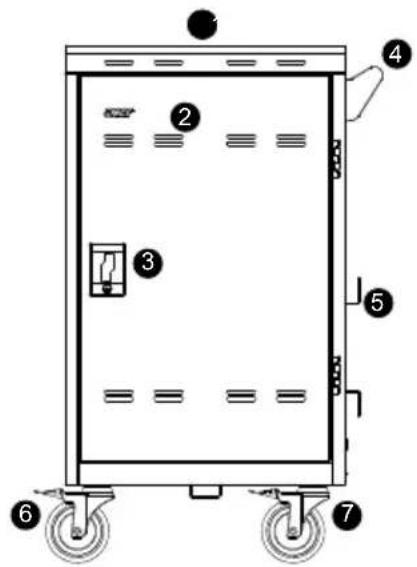
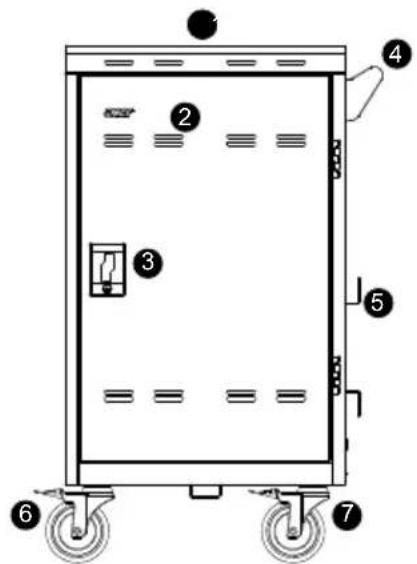
  1. Work platform
  2. Ventilation holes
  3. Door lock
  4. Handle
  5. Power cable wrap brackets
  6. 5" directional lock caster*
  7. 5" locking caster

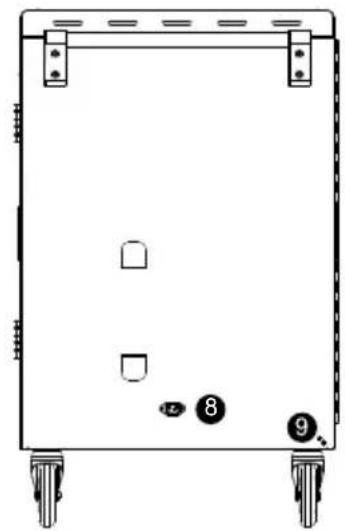
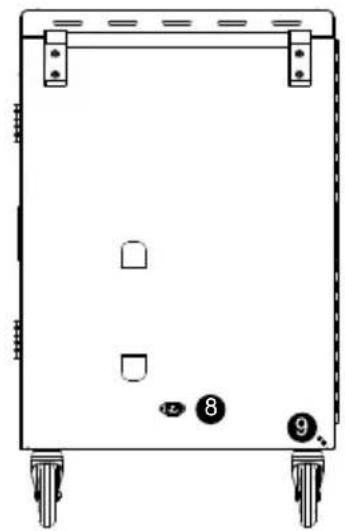
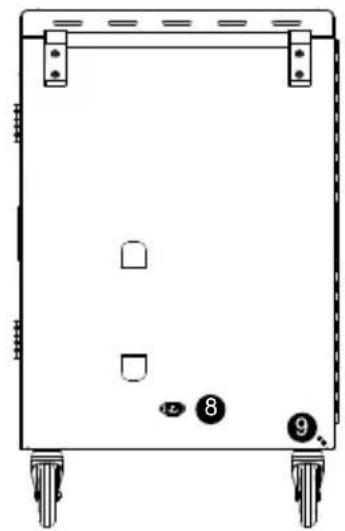
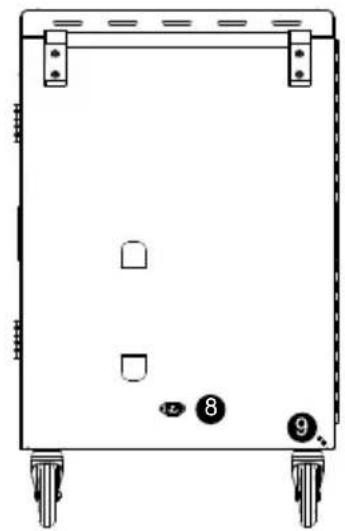
  8. Power inlet

  9. Earthing screw

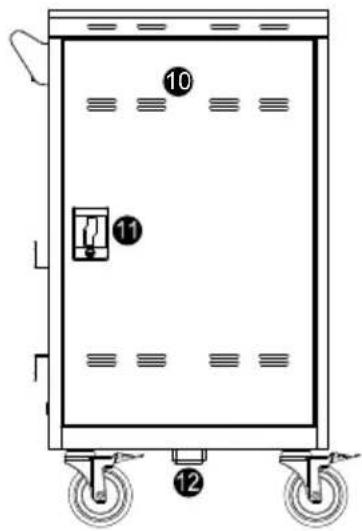
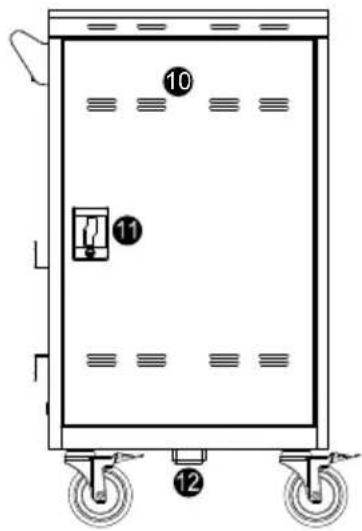
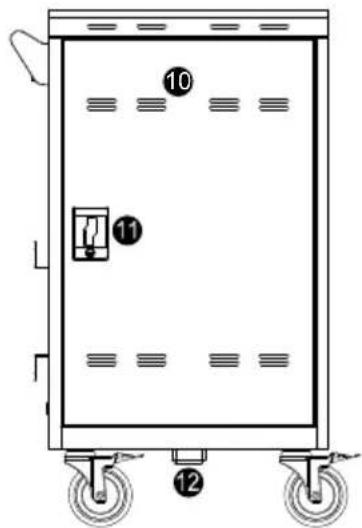
  10. Ventilation holes

  11. Door lock
  12. Security hook

*Keep the cart rolling in the fixed direction

Door Lock
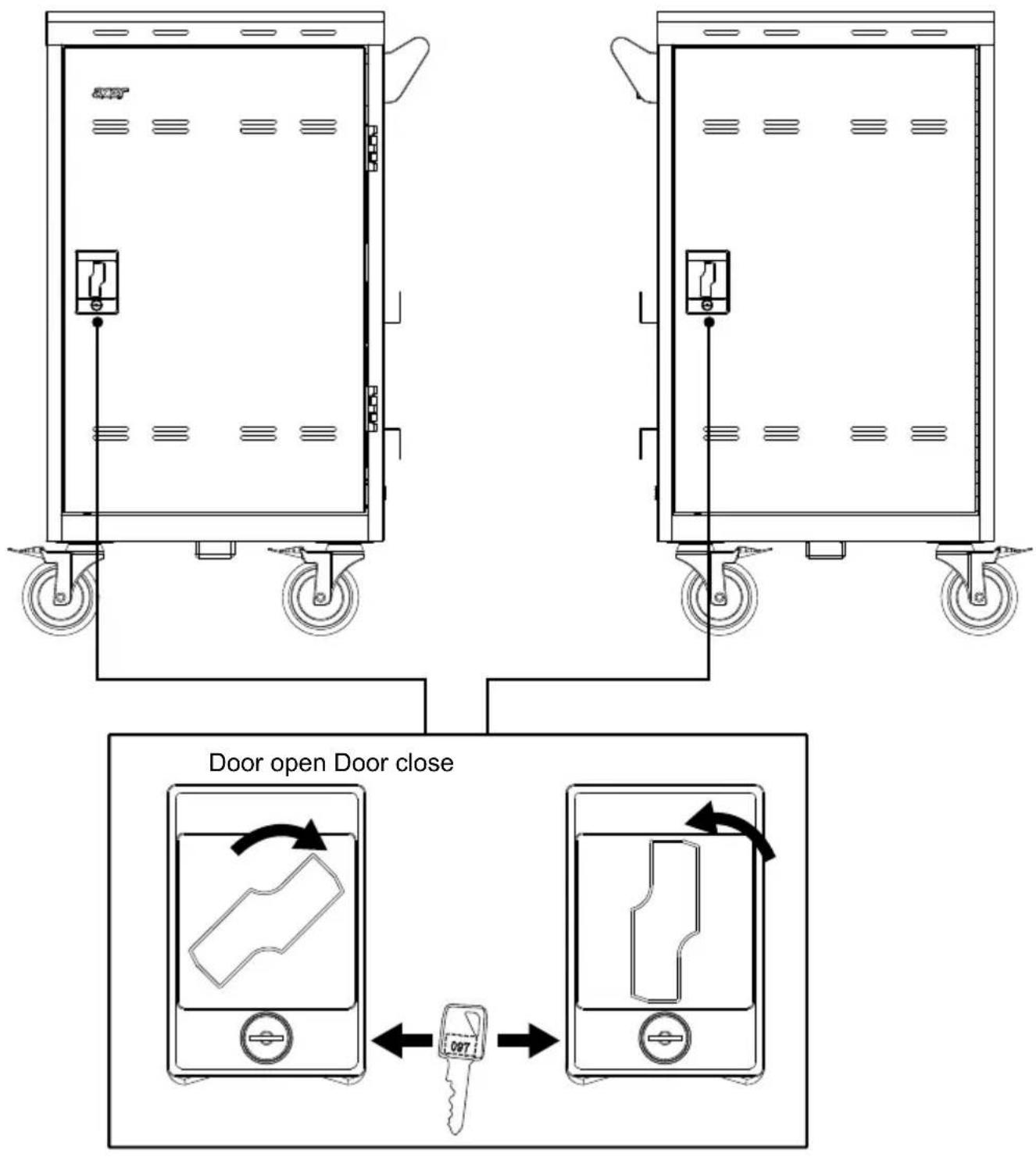
ACER ACC310 - Front Side Back - 1

text_image Door open Door close 097

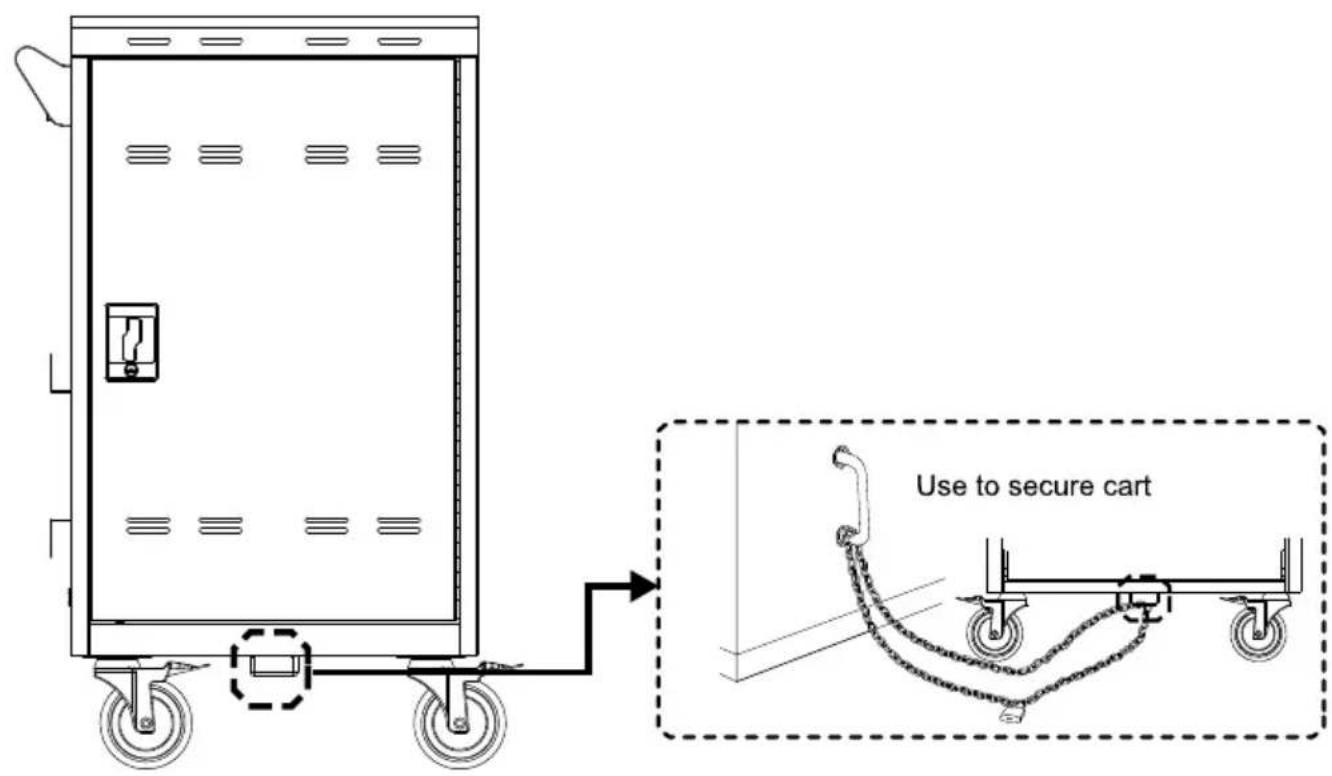
Secure the Cart
ACER ACC310 - Front Side Back - 2

text_image Use to secure cart

Installation

[Note]

  1. It is recommended to use cable ties (optional) to secure and manage cables.
  2. It is recommended to allocate 2 persons for efficient device cabling.

Adapter Installation

  1. Open the rear door.
  2. Place the power adapter into the individual adapter compartment.
  3. Pass the DC-end of the adapter cable to the front of the cart through the space provided.
  4. Plug-in the AC-end power cord to the corresponding power AC socket.
  5. Bundle the cable and secure it with a cable tie or zip-tie (not supplied).
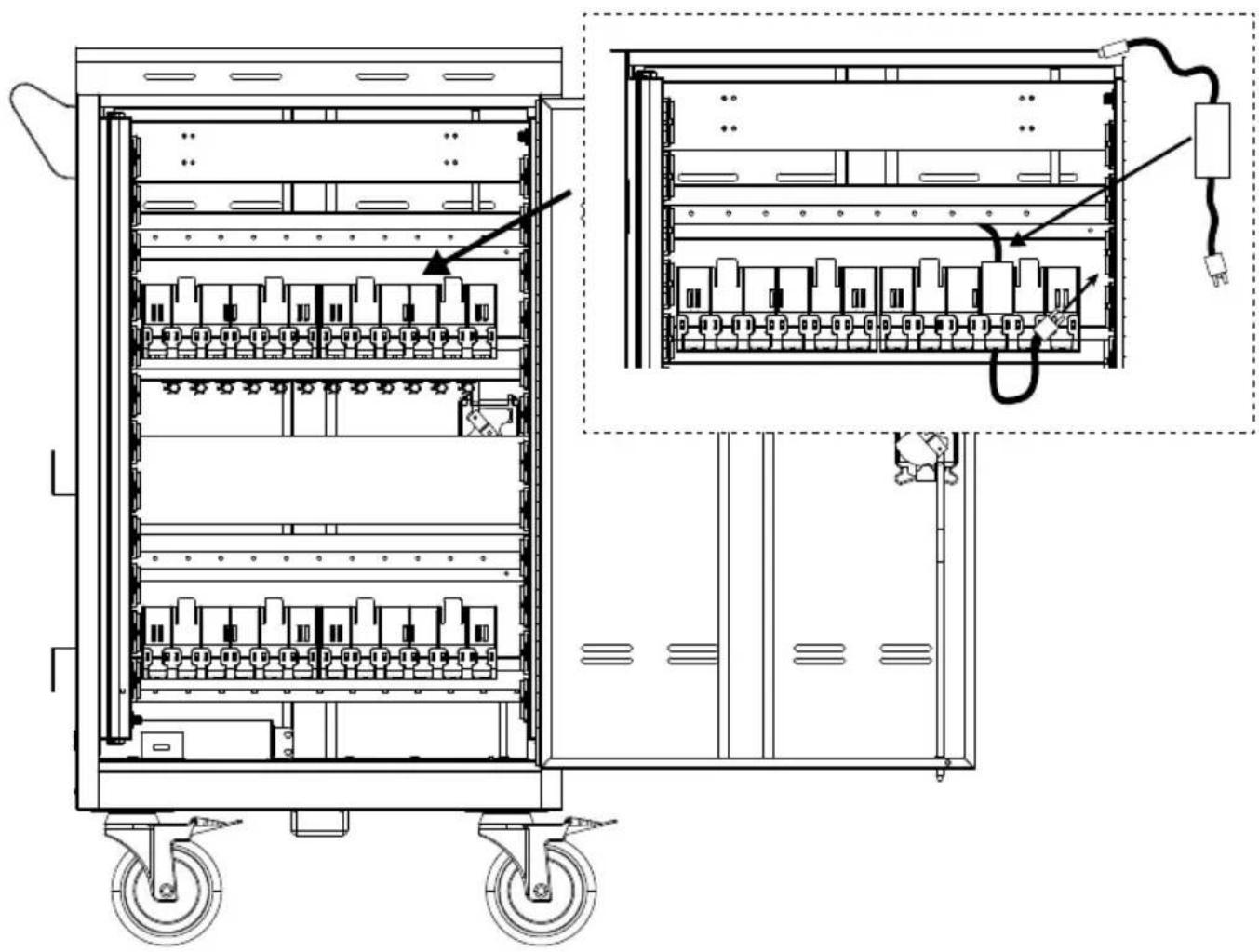
ACER ACC310 - Adapter Installation - 1

natural_image Technical line drawing of an electrical cabinet with wheels and internal components, showing wiring connections (no text or labels)

Cable Management

  1. Open front door.
  2. Route the cable through the cable hook as figure shown.
  3. Place the mobile device into the bay.
  4. Plug in the DC-connector to the mobile device.
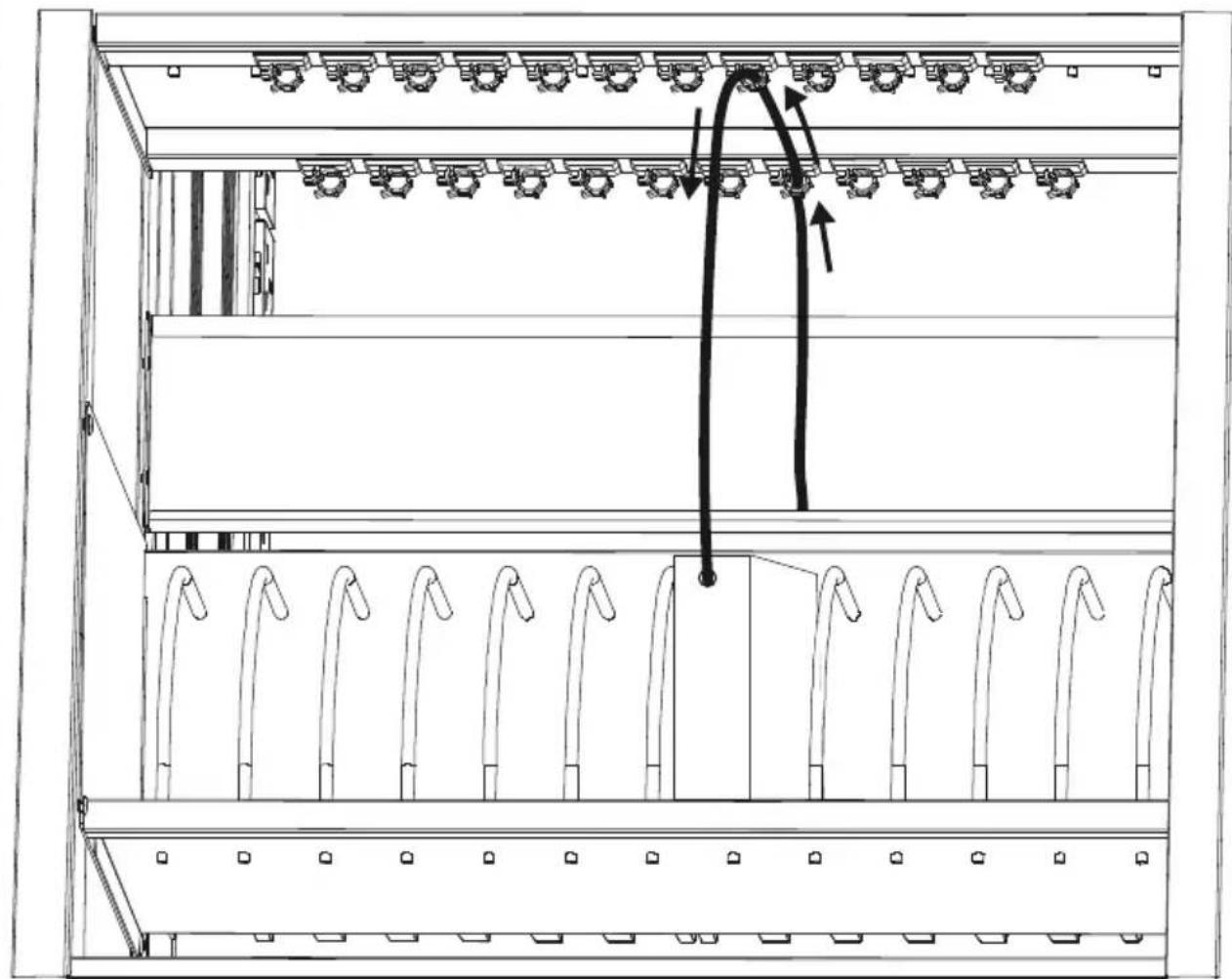
ACER ACC310 - Cable Management - 1

natural_image Technical line drawing of a server rack with multiple racks and a central panel, showing no text or symbols.

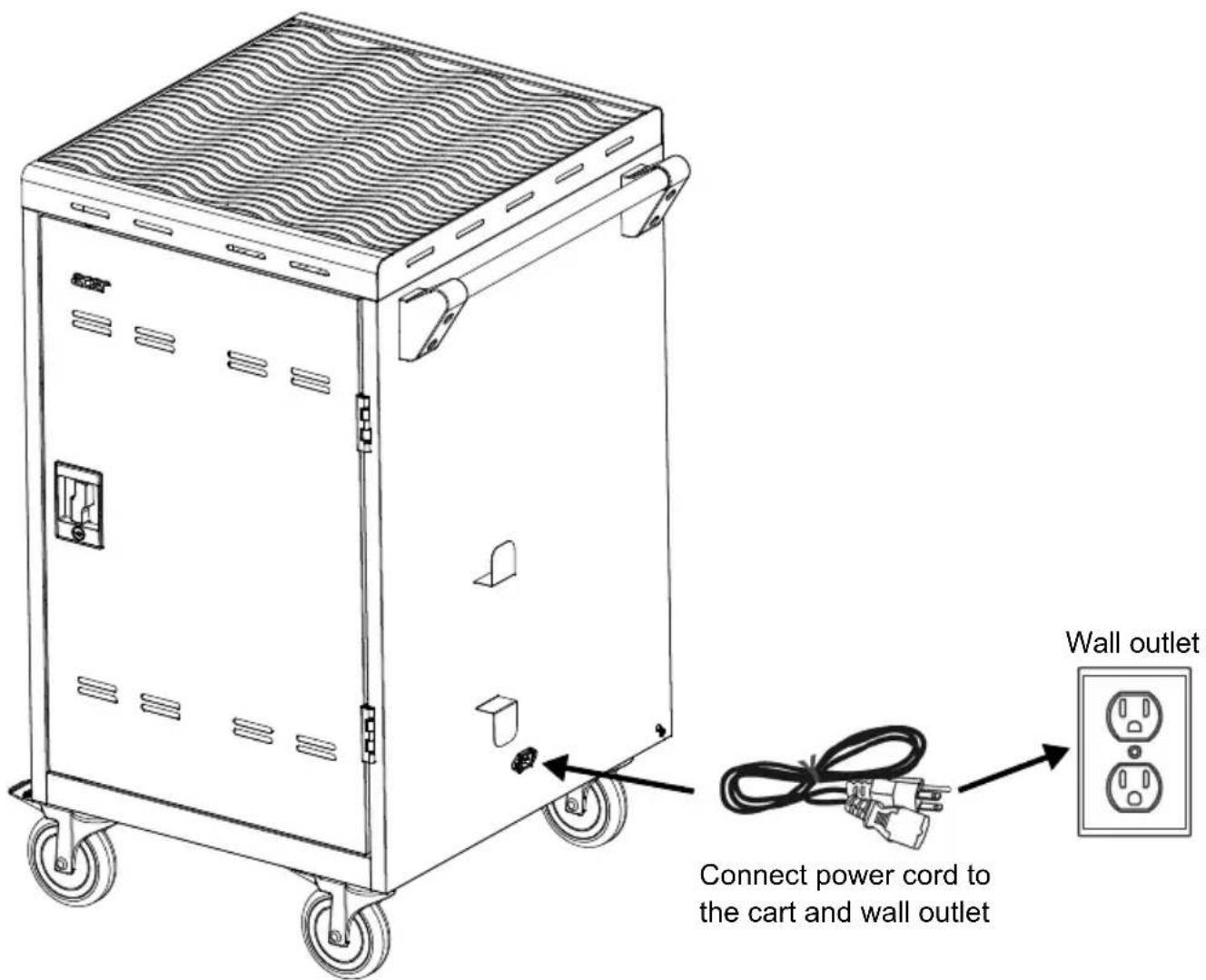
Charging Cart

ACER ACC310 - Charging Cart - 1

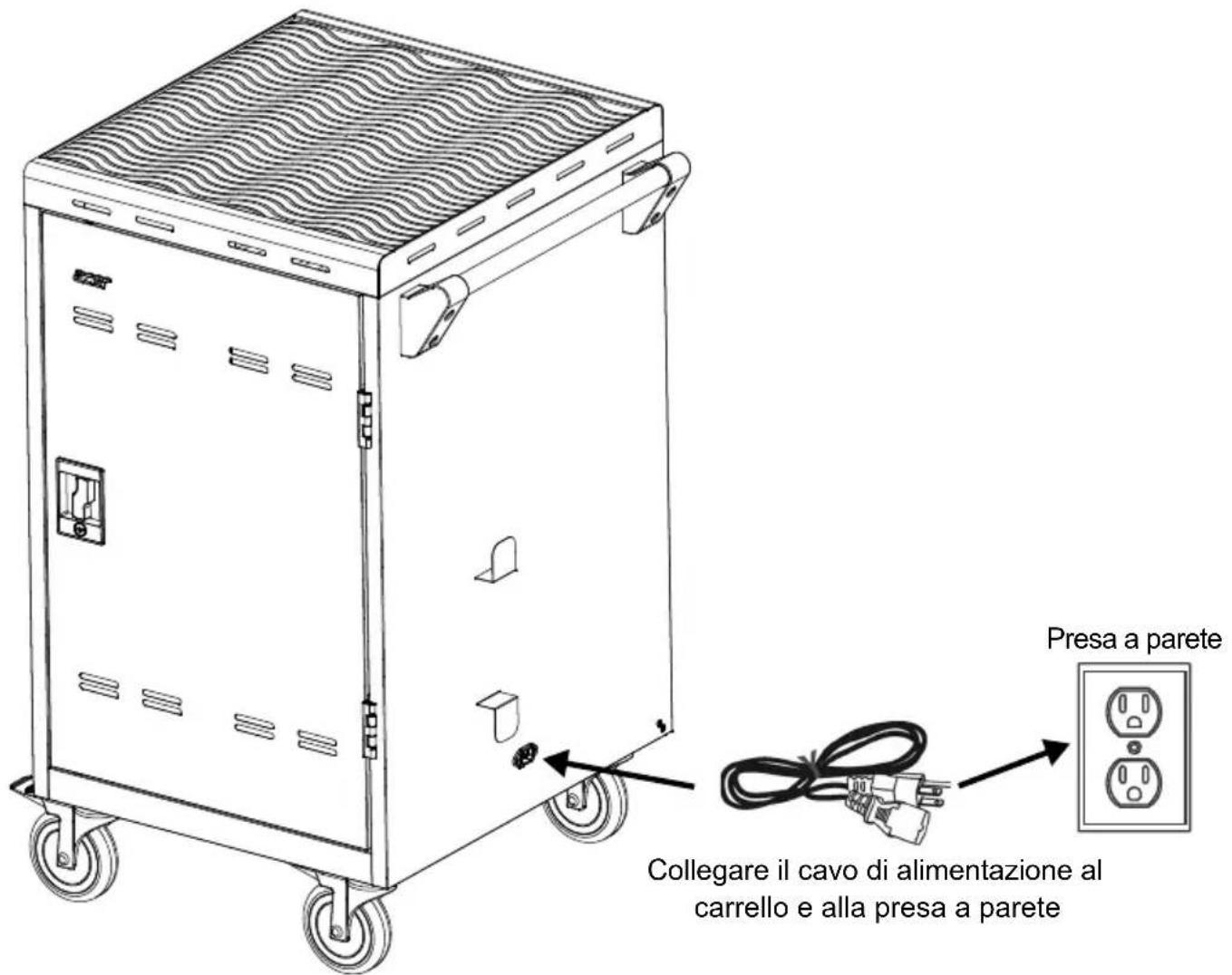
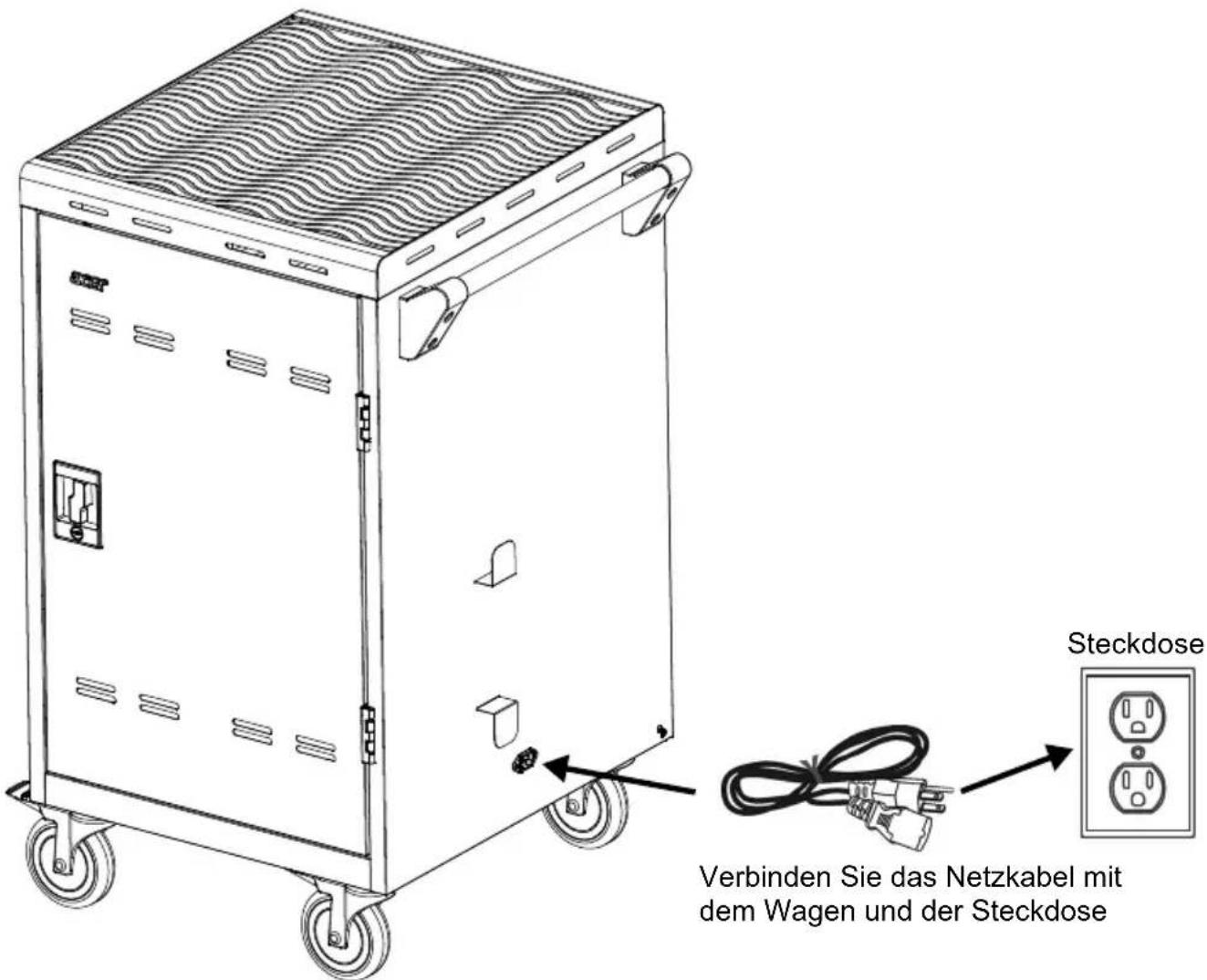
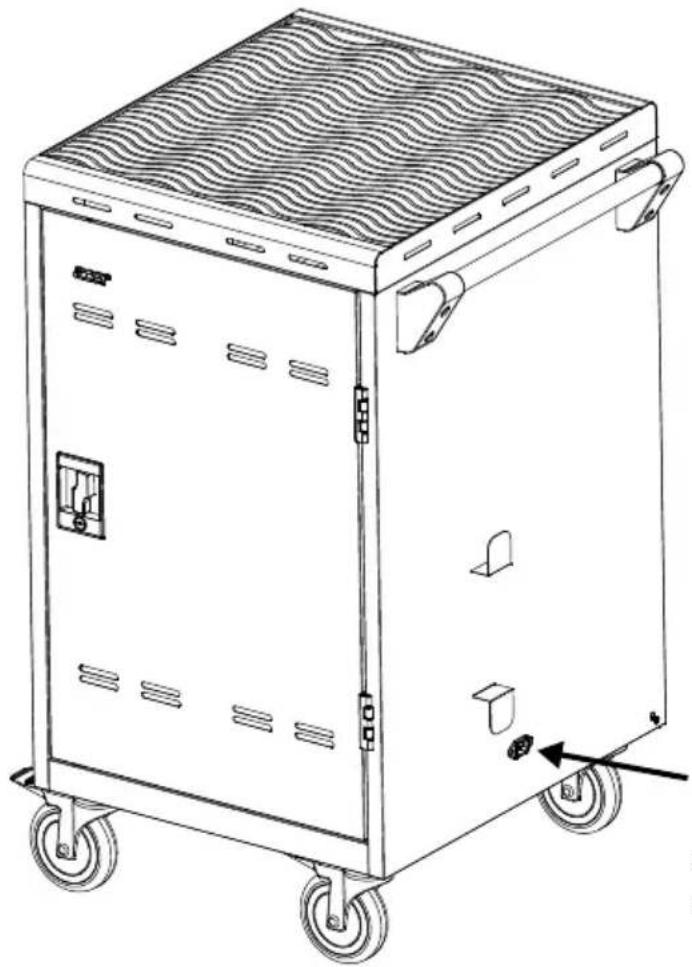
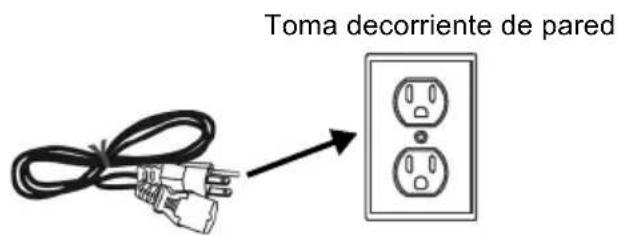
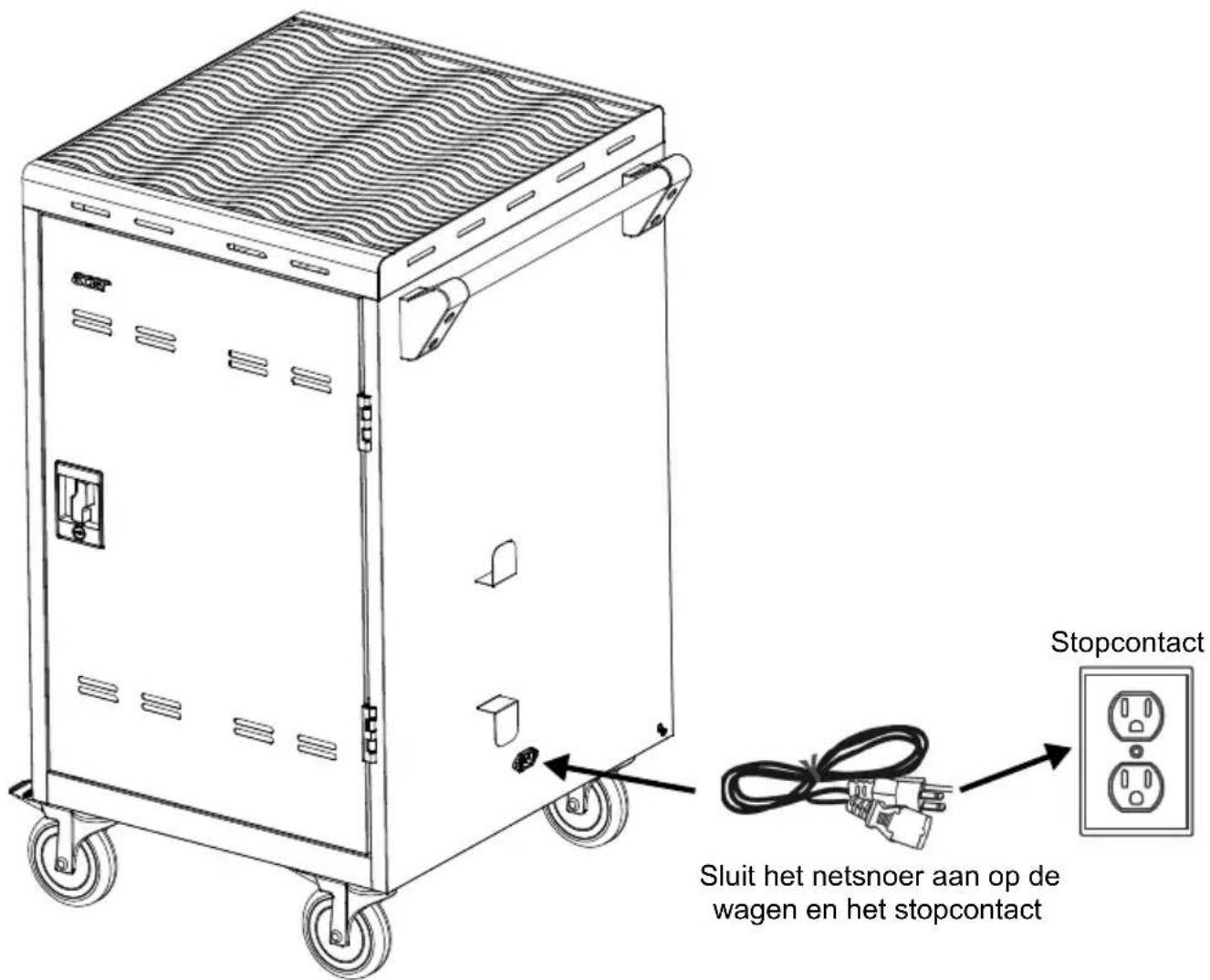
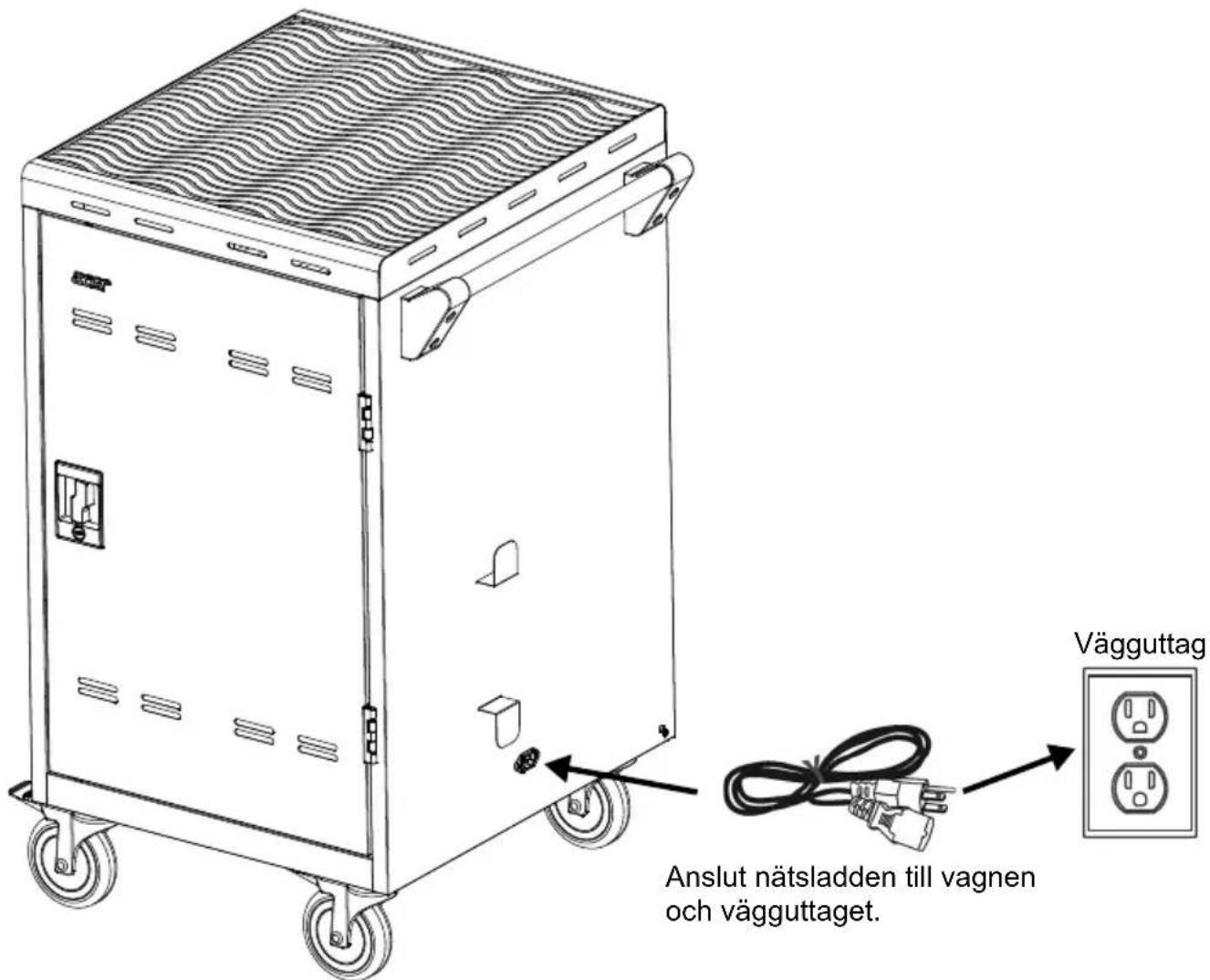
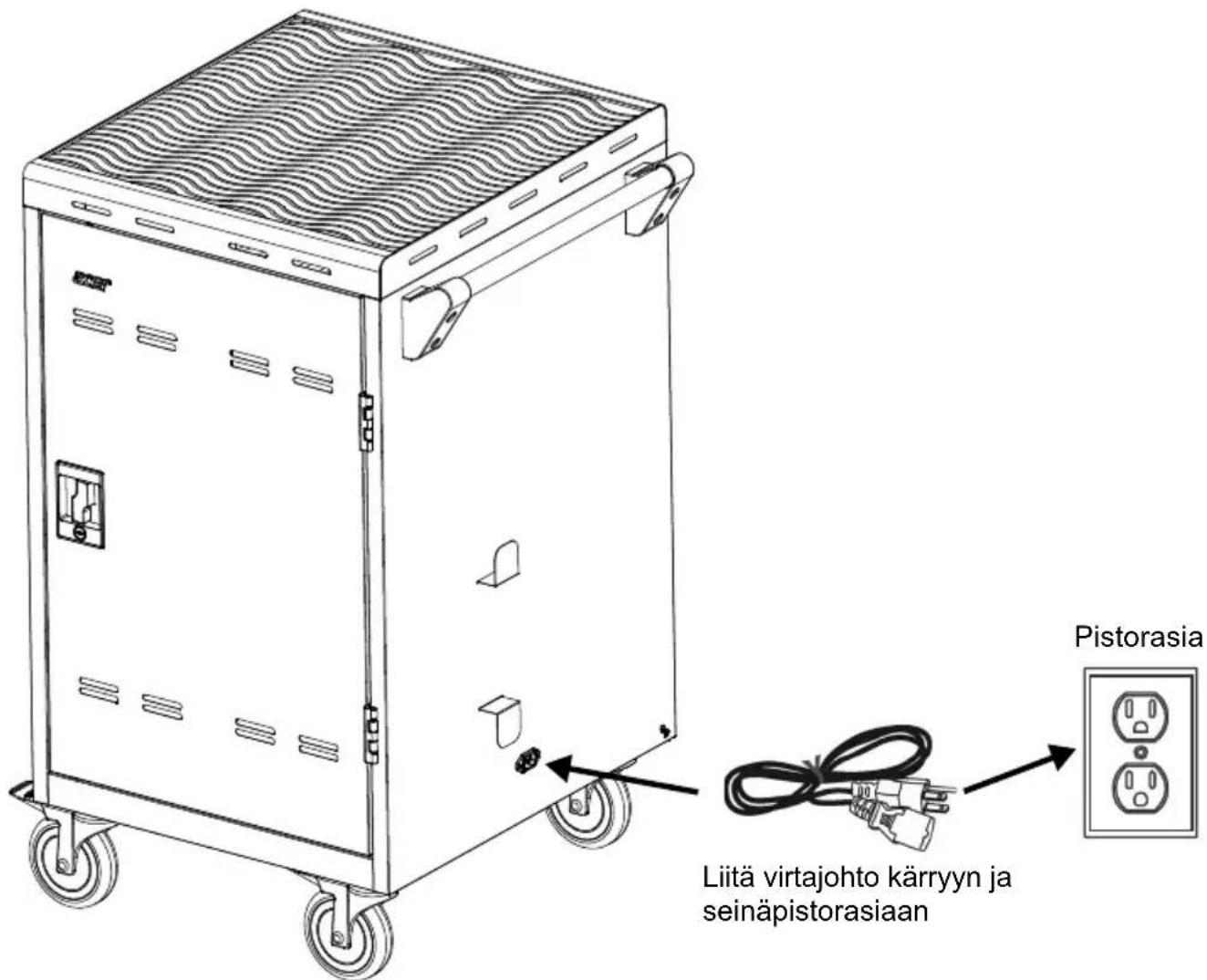
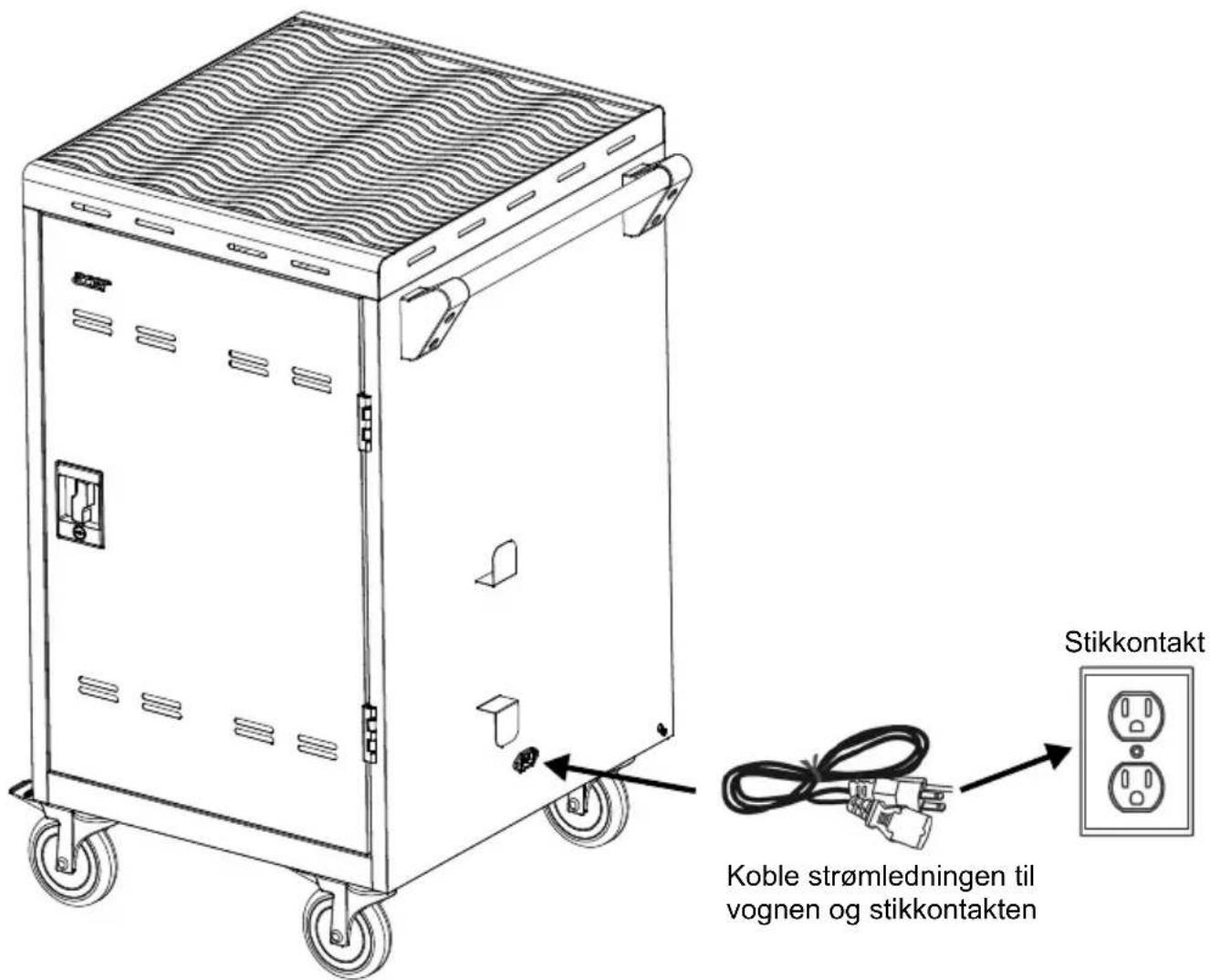
text_image Wall outlet Connect power cord to the cart and wall outlet

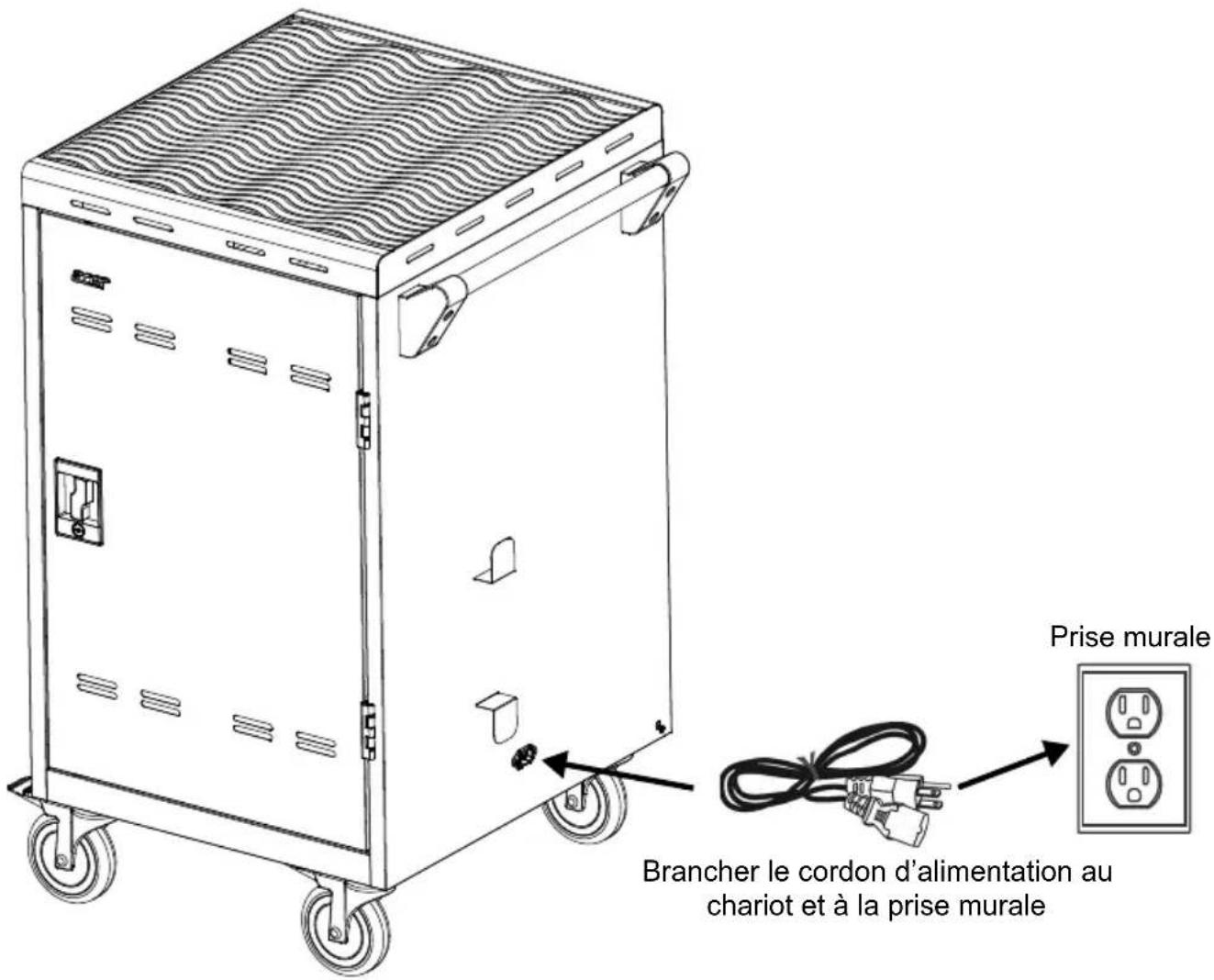
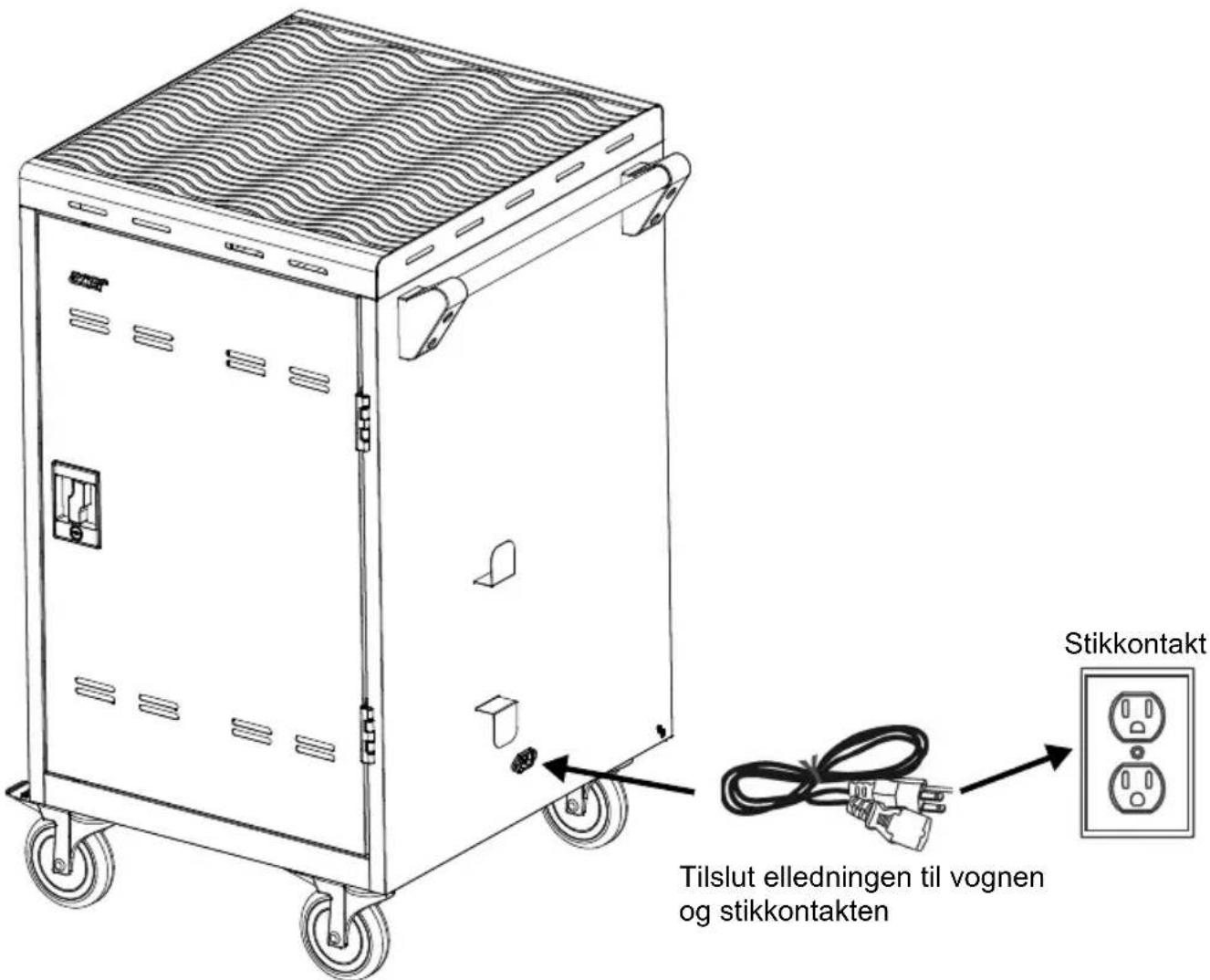
[Note] The power inlet and power cord type may vary as they are country dependent.

Troubleshooting

Q: Why are all of my devices plugged in but not charging?

A: 1. Make sure power cords are undamaged.

  1. Make sure power cords are firmly inserted into the available socket with the stable current.

  2. Make sure the power plug and current consumption are compliant with your country specification standards.

Q: How do I know if my devices will exceed more than the allotted current?

A: Have a qualified electrician verify the current consumption of your devices. Perform the test with devices installed and batteries discharged.

Q: When I plug in the device it trips the circuit breaker. What is wrong?

A: You may have other equipment or appliances sharing the same circuit that is causing a circuit overload. Have a qualified electrician check that adequate power is available in the circuit.

Specifications

ModelACC310
Capacity24 (two shelves, 12 bays per shelf)
Supported DevicesMobile devices up to 15.6"
Charging TypeSmart Cycling Charge
Power SpecificationAC IN: 220~240V, 50/60Hz, 8APower Strip: 220~240V, 50/60Hz, 8A
SecurityFront Doors: 2-point steel locking mechanismRear Doors: 2-point steel locking mechanism
CastersFour 5" casters: two are lockable and two directional lock
Door Hinge180°
Work Platform Loading20kg (44.09lbs)
Shelf Loading(ea.)43.54kg (95.98lbs)
Adapter Shelves Loading(ea.)3kg(6.6lbs)
Working Temperature0°~30°C
Working RH%10%~90%
Storage Temperature-40°C~60°C
Storage RH%5%~95%
Cart Dimensions(W x D x H)639.6 (W) x 632 (D) x 1039 (H)mm25.18"(W) x 24.88"(D) x 40.91"(H)
Slot Dimensions(W x D x H)Upper side drawer :32(W) x 395(D) x 300.8(H)mm1.26"(W) x 15.55"(D) x 11.84"(H)Lower side drawer:32(W) x 395(D) x 341.5(H)mm1.26"(W) x 15.55"(D) x 13.44"(H)
Weight without Devices52 Kg (114.64lbs)

[Note 1] Specifications are subject to change without prior notice.

[Note 2] Supported Devices: please check actual device size, including power cable for compatibility with device compartment size. If in doubt please contact Acer for confirmation.

Appendix – Earthing

[Caution]

High touch current, Connect to earth before connecting to supply.

(Yellow/Green wire min. 14AWG)

[Note]

Installation of the protective earthing connection of the socket-outlet by a skilled person.
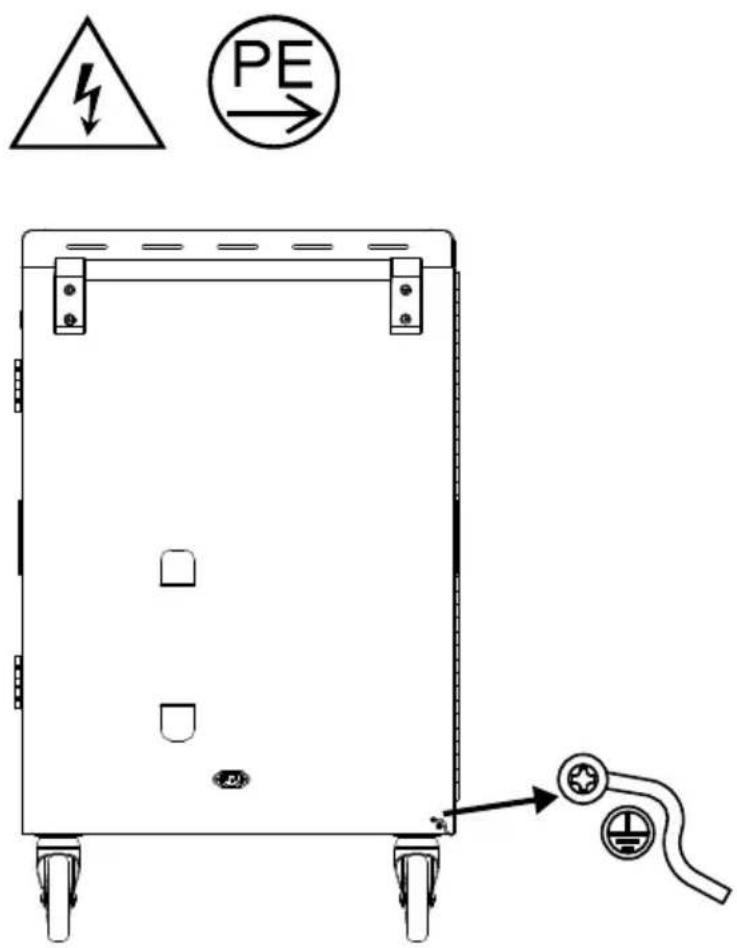
ACER ACC310 - [Note] - 1

text_image Diagram of a battery pack with warning symbol and PE indicator, showing electrical hazard symbol and grounding point.

EU Declaration of Conformity

We,

Acer Incorporated

8F, 88, Sec. 1, Xintai 5th Rd., Xizhi, New Taipei City 221

And,

Acer Italy s.r.l.

Viale delle Industrie 1/A, 20044 Arese (MI), Italy

Tel: +39-02-939-921, Fax: +39-02 9399-2913

www.acer.it

Product: Acer Charging Cart

Trade Name: Acer

Model Number: ACC320, ACC310

We, Acer Incorporated, hereby declare under our sole responsibility that the product described above is in conformity with the relevant Union harmonization legislation: EMC Directive 2014/30/EU, Low Voltage Directive 2014/35/EU, and RoHS Directive 2011/65/EU. The following harmonized standards and/or other relevant standards have been applied:

EN 55032:2015+A11:2020, Class A

EN 55035:2017+A11:2020

EN IEC 61000-3-2:2014

EN 61000-3-3:2013+A1:2019+A2:2021

EN 62368-1:2014+A11:2017

EN IEC 63000: 2018

Year to begin affixing CE marking: 2023.

$$ \mathrm {N u J a n} $$

RU Jan / Sr. Manager

Acer Incorporated (Taipei, Taiwan)

2023/04/12

Date
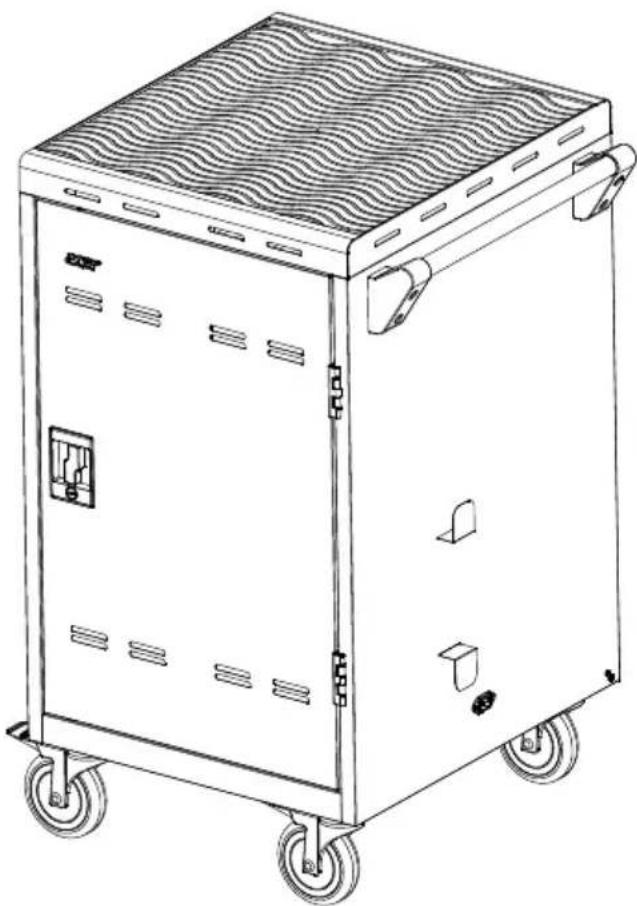
ACER ACC310 - EU Declaration of Conformity - 1

natural_image Line drawing of a modular electric vehicle chassis with wheels and internal compartments (no text or symbols)
natural_image Symbolic illustration of a person crossing a barrier with a sun symbol above (no text or numbers present)
natural_image White pictogram of a person pushing a cart on a black background (no text or symbols)
natural_image Symbolic illustration of a person climbing a cart with a 'X' mark, no text or symbols present

ACER ACC310 - EU Declaration of Conformity - 2

ATTENZIONE

natural_image Simple line drawing of a container with two hanging bells and a bell on top, no text or symbols present.

ATTENZIONE

natural_image Line drawing of a portable industrial machine with wheels and ventilation slots (no text or symbols)

ACC310

ACER ACC310 - ATTENZIONE - 1

natural_image Coiled black cable with three terminal connectors (no text or symbols visible)
natural_image Technical line drawing of a rectangular mechanical device with four wheels and mounting brackets (no text or symbols)

Diagramma

ACER ACC310 - Diagramma - 1

text_image Technical diagram of a rectangular industrial machine with numbered components and labeled parts

ACER ACC310 - Diagramma - 2

natural_image Front view of a rectangular mechanical device with wheels and mounting feet (no text or symbols visible)

ACER ACC310 - Diagramma - 3

text_image Diagram of a rectangular industrial machine with numbered components and wheels, likely an electrical cabinet or storage unit.
natural_image Technical line drawing of an electrical cabinet with wheels and internal components, showing wiring connections (no text or symbols)

Gestione dei cavi

natural_image Technical line drawing of a server rack with multiple racks and a curved arrow indicating motion (no text or symbols)

Carrello di carica

ACER ACC310 - Carrello di carica - 1

text_image Technical diagram of a battery pack with warning symbols and electrical connections

8F, 88, Sec. 1, Xintai 5th Rd., Xizhi, New Taipei City 221

E,

Acer Italy s.r.l.

Acer Incorporated (Taipei, Taiwan)

2023/04/12

Date

ACER ACC310 - Carrello di carica - 2

natural_image Line drawing of a modular electric vehicle chassis with wheels and ventilation slots (no text or symbols)

Chariot de chargement Acer (24 emplacements, type UE) ACC310

natural_image White pictogram of a person pushing a cart on a pole (no text or symbols)
natural_image Symbolic illustration of a person climbing a cart with a 'X' mark, no text or symbols present

ACER ACC310 - Chariot de chargement Acer (24 emplacements, type UE) ACC310 - 1

ATTENTION

natural_image Simple line drawing of a container with two hanging bells and a top handle, no text or symbols present.

ATTENTION

natural_image Line drawing of a portable industrial machine with wheels and control panel (no text or symbols)

ACC310

ACER ACC310 - ATTENTION - 1

text_image acer Chariot de chargement Acer (24 emplacements, type UE) ACC310 Manuel d'Évaluation Gazada
natural_image Coiled black cable with two connectors (no text or symbols visible)
natural_image Technical line drawing of a four-wheel cart with mounting feet and side-mounted sensors (no text or symbols)

Diagramme

ACER ACC310 - Diagramme - 1

text_image Technical diagram of a cabinet or enclosure with numbered components and labeled parts

ACER ACC310 - Diagramme - 2

natural_image Front view of a rectangular mechanical device with mounting feet and numbered components (no text or symbols)

ACER ACC310 - Diagramme - 3

text_image Diagram of a cabinet or enclosure with numbered components, likely an electrical cabinet or control unit.

Avant Côté Arrière

natural_image Technical line drawing of an electrical cabinet with wheels and internal components, showing wiring connections (no text or symbols)

Gestion des câbles

natural_image Technical line drawing of a server rack with multiple racks and a curved arrow indicating a connection point (no text or symbols present)

Chariot de chargement

ACER ACC310 - Chariot de chargement - 1

text_image Technical diagram of a battery pack with warning symbols and grounding symbol, including a warning triangle and PE symbol.

8F, 88, Sec. 1, Xintai 5th Rd., Xizhi, New Taipei City 221

Et,

Acer Italy s.r.l.

Viale delle Industrie 1/A, 20044 Arese (MI), Italie

Tél : +39-02-939-921, Fax : +39-02 9399-2913

www.acer.it

RU Jan / Sr. Manager

Acer Incorporated (Taipei, Taiwan)

2023/04/12

Date

ACER ACC310 - Chariot de chargement - 2

natural_image Line drawing of a modular electric vehicle chassis with wheels and ventilation slots (no text or symbols)
natural_image Symbolic illustration of a person crossing a barrier with a sun symbol above, representing interference or safety (no text present)
natural_image White icon of a person pushing a cart on a black background (no text or symbols)
natural_image Symbolic illustration of a person climbing a cart with a 'X' mark, no text or symbols present

ACER ACC310 - Chariot de chargement - 3

ACHTUNG

natural_image Simple line drawing of a container with two hanging bells and a handle, no text or symbols present.

ACHTUNG

natural_image Line drawing of a portable industrial machine with wheels and ventilation slots (no text or symbols)

ACC310

ACER ACC310 - ACHTUNG - 1

natural_image Coiled black cable with three terminal connectors (no text or symbols visible)

Netzkabel*

natural_image Technical line drawing of a rectangular mechanical device with four wheels and mounting tabs (no text or symbols)

Diagramm

ACER ACC310 - Diagramm - 1

text_image Technical diagram of a cabinet or enclosure with numbered components and labeled parts

ACER ACC310 - Diagramm - 2

natural_image Front view of a rectangular electronic device with mounting feet and labeled components (no text or symbols beyond numbers)

ACER ACC310 - Diagramm - 3

text_image Diagram of a rectangular electrical cabinet with numbered components and labeled parts

Vome Seite Zurück

natural_image Technical line drawing of an electrical cabinet with wheels and internal components, showing wiring connections (no text or symbols)

Kabelverlegung

natural_image Technical line drawing of a server rack with multiple racks and a curved arrow indicating a connection point (no text or symbols present)

Ladewagen

ACER ACC310 - Ladewagen - 1

text_image Diagram of a battery pack with warning symbols and electrical connection points, including a fuse and grounding symbol.

8F, 88, Sec. 1, Xintai 5th Rd., Xizhi, New Taipei City 221

Und,

Acer Italy s.r.l.

Viale delle Industrie 1/A, 20044 Arese (MI), Italien

Tel.: +39-02-939-921, Fax: +39-02 9399-2913

www.acer.it

Produkt: Acer Ladewagen

Markenname: Acer

Modellnummer: ACC320, ACC310

RU Jan / Sr. Manager

Acer Incorporated (Taipei, Taiwan)

2023/04/12

Datum

ACER ACC310 - Ladewagen - 2

natural_image Line drawing of a modular electric vehicle chassis with wheels and ventilation slots (no text or symbols)

Carrito de carga Acer (24 conectores, tipo UE) ACC310

Manual del usuario

Garantía

ACER ACC310 - Carrito de carga Acer (24 conectores, tipo UE) ACC310 - 1

ADVERTENCIA

natural_image Symbolic illustration of a person crossing a barrier with a sun symbol above, representing interference or safety (no text present)
natural_image Silhouette of a person pushing a cart on a pole (no text or symbols)
natural_image Symbolic illustration of a person climbing a cart with a 'X' mark, no text or symbols present

ACER ACC310 - ADVERTENCIA - 1

PRECAUCIÓN

natural_image Simple line drawing of a two-decker cart with wheels and a double-headed lock, no text or symbols present.

PRECAUCIÓN

natural_image Line drawing of a portable industrial machine with wheels and ventilation slots (no text or symbols)

ACC310

ACER ACC310 - PRECAUCIÓN - 1

text_image acer Cambio de carga Acer (34 correctors, type UE) ACC319 Manual del ###arter Bancette

Manual del usuario

natural_image Coiled black cable with two terminal connectors (no text or symbols visible)
natural_image Technical line drawing of a four-wheel cab with mounting feet and side-mounted wheels (no text or symbols)

Diagrama

ACER ACC310 - Diagrama - 1

text_image Technical diagram of a cabinet or enclosure with numbered components and labeled parts

ACER ACC310 - Diagrama - 2

natural_image Front view of a rectangular electronic device with mounting feet and labeled components (no text or symbols beyond numbers)

ACER ACC310 - Diagrama - 3

text_image Diagram of a rectangular electrical cabinet with labeled components including wheels and numbered parts 10, 11, and 12.

Frontal Lateral Trasera

natural_image Technical line drawing of an electrical cabinet with wheels and internal components, showing wiring connections (no text or symbols)

Gestión del cable

natural_image Technical line drawing of a server rack with multiple racks and a curved arrow indicating motion (no text or symbols)

Carrito de carga

ACER ACC310 - Carrito de carga - 1

natural_image Line drawing of a portable industrial machine with wheels and a wavy top panel (no text or symbols)

ACER ACC310 - Carrito de carga - 2

text_image Toma decorriente de pared
text_image Technical diagram of a battery pack with warning symbols and grounding symbol, including a fault sign and PE directional arrow.

8F, 88, Sec. 1, Xintai 5th Rd., Xizhi, New Taipei City 221

Y,

Acer Italy s.r.l.

Acer Incorporated (Taipei, Taiwan)

2023/04/12

Fecha

ACER ACC310 - Carrito de carga - 3

natural_image Line drawing of a modular electric vehicle chassis with wheels and ventilation slots (no text or symbols)

Acer Oplaadwagen

(24 sleuven, EU type)

ACC310

natural_image Line drawing of a portable industrial machine with wheels and ventilation grilles (no text or symbols)

ACC310

ACER ACC310 - ACC310 - 1

natural_image Coiled black cable with three terminal connectors (no text or symbols visible)

Netsnoer*

natural_image Technical line drawing of a rectangular mechanical device with four wheels and mounting tabs (no text or symbols)

Diagram

ACER ACC310 - Diagram - 1

text_image Technical diagram of a cabinet or enclosure with numbered components and labeled parts

ACER ACC310 - Diagram - 2

natural_image Front view of a rectangular electronic device with mounting feet and labeled components (no text or symbols beyond numbers)

ACER ACC310 - Diagram - 3

text_image Diagram of a rectangular electrical cabinet with labeled components including wheels and numbered parts 10, 11, and 12.
natural_image Technical line drawing of an electrical cabinet with wheels and internal components, showing wiring connections (no text or symbols)

Kabelbeheer

natural_image Technical line drawing of a server rack with multiple racks and a curved arrow indicating a connection point (no text or symbols present)

Oplaadwagen

ACER ACC310 - Oplaadwagen - 1

8F, 88, Sec. 1, Xintai 5th Rd., Xizhi, New Taipei City 221

En,

Acer Italy s.r.l.

Viale delle Industrie 1/A, 20044 Arese (MI), Italy

Tel: +39-02-939-921, fax: +39-02 9399-2913

www.acer.it

Product: Acer Oplaadwagen

Handelsnaam: Acer

RU Jan / Sr. Manager

Acer Incorporated (Taipei, Taiwan)

2023/04/12

Datum

ACER ACC310 - Oplaadwagen - 2

natural_image Line drawing of a modular electric vehicle chassis with wheels and ventilation slots (no text or symbols)

Acer laddvagn (24 portar, EU-typ) ACC310

natural_image White pictogram of a person pushing a cart on a pole (no text or symbols)
natural_image Symbolic illustration of a person climbing a cart with a cross mark, no text or symbols present

! VAR AKTSAM

natural_image Simple line drawing of a container with two hanging weights, no text or symbols present

VAR AKTSAM

natural_image Line drawing of a portable industrial machine with wheels and ventilation slots (no text or symbols)

ACC310

ACER ACC310 - VAR AKTSAM - 1

text_image Acer Acer Iaddvagn (24 portier, EU-typ) ACC310 Användurhandbok Saranti

Användarhandbok

ACER ACC310 - VAR AKTSAM - 2
Dörrnyckel x4

ACER ACC310 - VAR AKTSAM - 3

natural_image Coiled black cable with three terminal connectors (no text or symbols visible)

Nätsladd*

natural_image Technical line drawing of a four-wheel cart with mounting feet and side-mounted wheels (no text or symbols)

Diagram

ACER ACC310 - Diagram - 1

text_image Technical diagram of a cabinet or enclosure with numbered components and labeled parts

ACER ACC310 - Diagram - 2

natural_image Front view of a rectangular electronic device with mounting feet and labeled components (no text or symbols beyond numbers)

ACER ACC310 - Diagram - 3

text_image Diagram of a cabinet or enclosure with numbered labels pointing to its front panel and interior compartments.

Fram Sida Bakåt

natural_image Technical line drawing of an electrical cabinet with wheels and internal components, showing wiring connections (no text or labels)

Kabelhantering

natural_image Technical line drawing of a server rack with multiple racks and a curved arrow indicating motion (no text or symbols)

Laddvagn

ACER ACC310 - Laddvagn - 1

text_image Diagram of a battery pack with warning symbols and electrical connection points, including a fuse and grounding symbol.

8F, 88, Sec. 1, Xintai 5th Rd., Xizhi, New Taipei City 221

Och,

Acer Italy s.r.l.

Viale delle Industrie 1/A, 20044 Arese (MI), Italy

Tel: +39-02-939-921, Fax: +39-02 9399-2913

www.acer.it

Produkt: Acer laddvagn

Varunamn: Acer

Modellnummer: ACC320, ACC310

RU Jan / Sr. Manager

Acer Incorporated (Taipei, Taiwan)

2023/04/12

Datum

ACER ACC310 - Laddvagn - 2

natural_image Line drawing of a modular electric vehicle chassis with wheels and ventilation slots (no text or symbols)
natural_image Symbolic illustration of a person using a tool to switch over a sun, with no text or symbols present.
natural_image White silhouette of a person pushing a cart on a black background (no text or symbols)
natural_image Silhouette of a person climbing a vehicle with a cross symbol (no text or numbers present)

ACER ACC310 - Laddvagn - 3

HUOMIO

natural_image Simple line drawing of a container with two hanging weights on top, no text or symbols present

HUOMIO

natural_image Line drawing of a portable industrial machine with wheels and ventilation slots (no text or symbols)

ACC310

ACER ACC310 - HUOMIO - 1

text_image acer Acer-latussükürry (24 pellekus, EU-tyssen) ACC310 Köytörske Tössos

Käyttöohje

ACER ACC310 - HUOMIO - 2
Oven avain x4

ACER ACC310 - HUOMIO - 3

natural_image Coiled black cable with two connectors (no text or symbols visible)

Virtajohto*

natural_image Technical line drawing of a rectangular mechanical device with four wheels and mounting tabs (no text or symbols)

Kaavio

ACER ACC310 - Kaavio - 1

text_image Technical diagram of a cabinet or enclosure with numbered components and labeled parts

ACER ACC310 - Kaavio - 2

natural_image Front view of a rectangular electronic device with mounting feet and labeled components (no text or symbols beyond numbers)

ACER ACC310 - Kaavio - 3

text_image Diagram of a rectangular electrical cabinet with labeled components and wheels, showing internal circuitry and numbered parts.
natural_image Technical line drawing of an electrical cabinet with internal components and wiring, showing no text or symbols

Kaapelin hallinta

natural_image Technical line drawing of a server rack with multiple racks and a curved arrow indicating a connection point (no text or symbols present)

Latauskärry

ACER ACC310 - Latauskärry - 1

8F, 88, Sec. 1, Xintai 5th Rd., Xizhi, New Taipei City 221

Ja,

Acer Italy s.r.l.

Viale delle Industrie 1/A, 20044 Arese (MI), Italy

Puh: +39-02-939-921, Fax: +39-02 9399-2913

www.acer.it

Tuote: Acer-latauskärry

Kauppanimi: Acer

Mallinumero: ACC320, ACC310

Acer Incorporated (Taipei, Taiwan)

2023/04/12

Päivämäärä

ACER ACC310 - Latauskärry - 2

natural_image Line drawing of a modular electric vehicle chassis with wheels and ventilation slots (no text or symbols)

Acer ladevogn (24 spor, EU-type) ACC310

Brukerhåndbok

Garanti

ACER ACC310 - Acer ladevogn (24 spor, EU-type) ACC310 - 1

ADVARSEL

F∅LG ALLTID SIKKERHETSINSTRUKSJONER

natural_image Symbolic illustration of a person crossing a barrier with a sun symbol above, no text or numbers present
natural_image White silhouette of a person pushing a cart on a black background (no text or symbols)
natural_image Symbolic illustration of a person climbing a cart with a 'X' mark, no text or symbols present

ACER ACC310 - F∅LG ALLTID SIKKERHETSINSTRUKSJONER - 1

FORSIKTIG

other | Category | Weight (lbs) | |---|---| | ≤ 44.09 lbs (20kg) | — | | ≤ 95.98 lbs (43.54kg) | — | | ≤ 95.98 lbs (43.54kg) | — |

FORSIKTIG

Vedlegg – Jording....10

Pakkens innhold

natural_image Line drawing of a portable industrial machine with wheels and ventilation slots (no text or symbols)

ACC310

ACER ACC310 - Pakkens innhold - 1

text_image acer Acer Iadevogn (24 spor, EU-type) ACC310 Univalentbedtck Gesamt

Brukerhåndbok

ACER ACC310 - Pakkens innhold - 2
Dørnøkkel x4

ACER ACC310 - Pakkens innhold - 3

natural_image Coiled black cable with three connectors (no text or symbols visible)

Strømledning*

natural_image Front view diagram of a four-wheel cart with wheels and side-mounted buttons, no text or symbols present

Diagram

ACER ACC310 - Diagram - 1

text_image Technical diagram of a cabinet or enclosure with numbered components and labeled parts

ACER ACC310 - Diagram - 2

natural_image Front view of a rectangular electronic device with mounting feet and labeled components (no text or symbols beyond numbers)

ACER ACC310 - Diagram - 3

text_image Diagram of an electrical cabinet with numbered components and labeled parts

Front Side Bakside

natural_image Technical line drawing of an electrical cabinet with wheels and internal components, showing wiring connections (no text or symbols)

Kabelhändtering

natural_image Technical line drawing of a server rack with multiple racks and a curved arrow indicating a connection point (no text or symbols present)

Ladevogn

ACER ACC310 - Ladevogn - 1

text_image Diagram of a battery pack with warning symbols and electrical connection points, including a fuse and grounding symbol.

8F, 88, Sec. 1, Xintai 5th Rd., Xizhi, New Taipei City 221

Og,

Acer Italy s.r.l.

RU Jan / Sr. Manager

Acer Incorporated (Taipei, Taiwan)

2023/04/12

Dato

ACER ACC310 - Ladevogn - 2

natural_image Line drawing of a modular electric vehicle chassis with wheels and ventilation slots (no text or symbols)

Acer opladningsvogn

(24 stik, EU typen)

ACC310

Brugervejledning

Garanti

ACER ACC310 - ACC310 - 1

ADVARSEL

F∅LG ALTID SIKKERHEDSFORANSTALTNINGERNE

natural_image Symbolic illustration of a person using a tool to switch over a sun, with no text or symbols present.
natural_image White pictogram of a person pushing a cart on a pole (no text or symbols)
natural_image Symbolic illustration of a person climbing a cart with a large 'X' mark, no text or symbols present

! FORSIGTIG

natural_image Simple line drawing of a container with two hanging weights and a handle, no text or symbols present.

FORSIGTIG

natural_image Line drawing of a portable industrial machine with wheels and control panel (no text or symbols)

ACC310

ACER ACC310 - FORSIGTIG - 1

text_image ACER Acer oplasningsvogn (GM disk, SU type) ACC310 Biochemicline Gewert

Brugervejledning

ACER ACC310 - FORSIGTIG - 2
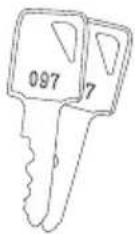
Dørnøgle x4

ACER ACC310 - FORSIGTIG - 3

natural_image Coiled black cable with three terminal connectors (no text or symbols visible)

Elledning*

natural_image Technical line drawing of a four-wheel cart with wheels and side-mounted buttons (no text or symbols)

Diagram

ACER ACC310 - Diagram - 1

text_image Technical diagram of a cabinet or enclosure with numbered components and labeled parts

ACER ACC310 - Diagram - 2

natural_image Front view of a rectangular electronic device with mounting feet and labeled components (no text or symbols beyond numbers)

ACER ACC310 - Diagram - 3

text_image Diagram of an electrical cabinet with numbered components and labeled parts
natural_image Technical line drawing of an electrical cabinet with wheels and internal components, showing wiring connections (no text or symbols)

Kabelstyring

natural_image Technical line drawing of a server rack with multiple racks and a curved arrow indicating a connection point (no text or symbols present)

Opladningsvogn

ACER ACC310 - Opladningsvogn - 1

text_image Technical diagram showing a battery pack with warning symbols and an electrical plug, including a fault symbol and PE indicator.

8F, 88, Sec. 1, Xintai 5th Rd., Xizhi, New Taipei City 221

Og,

Acer Italy s.r.l.

Viale delle Industrie 1/A, 20044 Arese (MI), Italy

Tlf.: +39-02-939-921, Fax: +39-02 9399-2913

www.acer.it

RU Jan / Sr. Manager

Acer Incorporated (Taipei, Taiwan)

2023/04/12

Dato

ACER ACC310 - Opladningsvogn - 2

text_image acer

Warranty

Garantie

Garantie

Garanzia

Garantía

Garantie

Garanti

Takuu

Garanti

Garanti

Garantia

Záruka

Záruka

Jótállás

Gwarancja

Гарантія

UK

Acer warrants any Acer product, including genuine Acer parts and components (offered as “Options” and/or “Accessories”) which have been installed in your Acer product at the time of purchase:

  • Carry In Service (Customer returns defective product to nearest Acer center)
  • Consumable Parts (batteries): 6 months warranty
  • Accessories (Adapters, headsets, mice, Keyboards, docking stations, stylus pens, dongles and cables, ...): 24 months warranty
  • CastMaster Tx: 36 months warranty
  • Halo Smart Speaker: 12 months warranty
  • Charging Cart: Parts only-5Y mechanical. Parts / 2Y electronic parts

Acer terms & conditions apply. For more information please visit our website or contact an Acer call center.

This Limited Warranty does not limit any more expansive rights you may have by applicable law. Consumers have legal rights under applicable legislation governing the sale of consumer goods and this Limited Warranty does not exclude, limit or suspend any such applicable rights.

DE

Адреса: 8F, 88, Sec.1, Xintai 5th Rd. Xizhi, New Taipei City 221

Manual assistant
Powered by Anthropic
Waiting for your message
Product information

Brand : ACER

Model : ACC310

Category : Hand truck