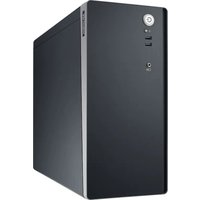
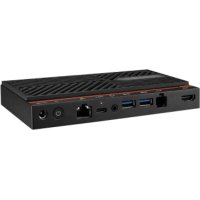
AIR-510-000A1 - Industrial computer Advantech - Free user manual and instructions
Find the device manual for free AIR-510-000A1 Advantech in PDF.


| Product Type | Industrial Computer |
| Brand | Advantech |
| Model | AIR-510-000A1 |
| Dimensions (approx.) | 200 x 150 x 50 mm |
| Weight (approx.) | 2 kg |
| Power Supply | 12 VDC, UL certified power adapter (Tma = 40°C) |
| Processor | Intel Celeron or equivalent |
| RAM Memory | 4 GB (expandable) |
| Storage | SSD 64 GB |
| Operating System | Windows 10 IoT Enterprise or Linux |
| Interfaces | 2x USB, 1x HDMI, 1x Ethernet, serial ports |
| Operating Temperature | 0°C to 50°C |
| Storage Temperature | -20°C to 60°C |
| Relative Humidity | 10% to 90% (non-condensing) |
| Maintenance and Cleaning | Disconnect before cleaning; use a damp cloth, no liquid detergents or aerosols |
| Safety | Do not open the device; protect from moisture; do not cover ventilation openings |
| Spare Parts and Repairability | Battery replaceable only with identical model; repair by qualified personnel |
| General Information | User manual available for free download; noise level ≤ 70 dB(A) |
Frequently Asked Questions - AIR-510-000A1 Advantech
User questions about AIR-510-000A1 Advantech
0 question about this device. Answer the ones you know or ask your own.
Ask a new question about this device
Download the instructions for your Industrial computer in PDF format for free! Find your manual AIR-510-000A1 - Advantech and take your electronic device back in hand. On this page are published all the documents necessary for the use of your device. AIR-510-000A1 by Advantech.
USER MANUAL AIR-510-000A1 Advantech
The documentation and the software included with this product are copyright 2024 by Advantech Co., Ltd. All rights are reserved. Advantech Co., Ltd. reserves the right to make improvements in the products described in this manual at any time without notice. No part of this manual may be reproduced, copied, translated or transmitted in any form or by any means without the prior written permission of Advantech Co., Ltd. Information provided in this manual is intended to be accurate and reliable. However, Advantech Co., Ltd. assumes no responsibility for its use, nor for any infringements of the rights of third parties, which may result from its use.
Acknowledgements
AIR-500 series are trademarks of Advantech Co., Ltd.
All other product names or trademarks are properties of their respective owners.
Product Warranty (2 years)
Advantech warrants to you, the original purchaser, that each of its products will be free from defects in materials and workmanship for two years from the date of purchase.
This warranty does not apply to any products which have been repaired or altered by persons other than repair personnel authorized by Advantech, or which have been subject to misuse, abuse, accident or improper installation. Advantech assumes no liability under the terms of this warranty as a consequence of such events.
Because of Advantech's high quality-control standards and rigorous testing, most of our customers never need to use our repair service. If an Advantech product is defective, it will be repaired or replaced at no charge during the warranty period. For out-of-warranty repairs, you will be billed according to the cost of replacement materials, service time and freight. Please consult your dealer for more details.
If you think you have a defective product, follow these steps:
- Collect all the information about the problem encountered. (For example, CPU speed, Advantech products used, other hardware and software used, etc.) Note anything abnormal and list any onscreen messages you get when the problem occurs.
- Call your dealer and describe the problem. Please have your manual, product, and any helpful information readily available.
- If your product is diagnosed as defective, obtain an RMA (return merchandise authorization) number from your dealer. This allows us to process your return more quickly.
- Carefully pack the defective product, a fully-completed Repair and Replacement Order Card and a photocopy proof of purchase date (such as your sales receipt) in a shippable container. A product returned without proof of the purchase date is not eligible for warranty service.
- Write the RMA number visibly on the outside of the package and ship it prepaid to your dealer.
Packing List
Before setting up the system, check that the items listed below are included and in good condition. If any item is not in accord with the table, please contact your dealer immediately.
1 x AIR-510 Barebone P/N: AIR-510-000A1
1xCPUCooler P/N:1970005349T001
2 x Four 2.5" Storage Metal Tray P/N: 1960115564N000
32 x Screw M3x5L to fix 2.5" SSD and P/N: 1930005836-01 storage tray
4 x CABLE TIE (P.G. GT-160M) P/N: 1992822010
Declaration of Conformity
CE
This product has passed the CE test for environmental specifications. Test conditions for passing included the equipment being operated within an industrial enclosure. In order to protect the product from being damaged by ESD (Electrostatic Discharge) and EMI leakage, we strongly recommend the use of CE-compliant industrial enclosure products.
FCC Class B
Note: This equipment has been tested and found to comply with the limits for a Class B digital device, pursuant to part 15 of the FCC Rules. These limits are designed to provide reasonable protection against harmful interference in a residential installation. This equipment generates, uses and can radiate radio frequency energy and, if not installed and used in accordance with the instructions, may cause harmful interference to radio communications. However, there is no guarantee that interference will not occur in a particular installation. If this equipment does cause harmful interference to radio or television reception, which can be determined by turning the equipment off and on, the user is encouraged to try to correct the interference by one or more of the following measures:
Reorient or relocate the receiving antenna.
Increase the separation between the equipment and receiver.
Connect the equipment into an outlet on a circuit different from that to which the receiver is connected.
Consult the dealer or an experienced radio/TV technician for help.
Technical Support and Assistance
- Visit the Advantech website at www.advantech.com/support where you can find the latest information about the product.
- Contact your distributor, sales representative, or Advantech's customer service center for technical support if you need additional assistance. Please have the following information ready before you call:
Product name and serial number
Description of your peripheral attachments
- Description of your software (operating system, version, application software, etc.)
A complete description of the problem
The exact wording of any error messages
Warning!Warnings, if not observed, indicate conditions where there is risk of personal injury!

Caution! Cautions are included to help you avoid damaging hardware or losing data.

To assist us in making improvements to this manual, we welcome comments and constructive criticism. Please send all such - in writing - to:
support@advantech.com
- Read these safety instructions carefully.
- Keep this User Manual for later reference.
- Disconnect this equipment from any AC outlet before cleaning. Use a damp cloth. Do not use liquid or spray detergents for cleaning.
- For plug-in equipment, the power outlet socket must be located near the equipment and must be easily accessible.
- Keep this equipment away from humidity.
- Put this equipment on a reliable surface during installation. Dropping it or letting it fall may cause damage.
- The openings on the enclosure are for air convection. Protect the equipment from overheating. DO NOT COVER THE OPENINGS.
- Make sure the voltage of the power source is correct before connecting the equipment to the power outlet.
- Position the power cord so that people cannot step on it. Do not place anything over the power cord.
- All cautions and warnings on the equipment should be noted.
- If the equipment is not used for a long time, disconnect it from the power source to avoid damage by transient overvoltage.
- Never pour any liquid into an opening. This may cause fire or electrical shock.
- Never open the equipment. For safety reasons, the equipment should be opened only by qualified service personnel.
- If one of the following situations arises, get the equipment checked by
service personnel:
The power cord or plug is damaged.
Liquid has penetrated into the equipment.
The equipment has been exposed to moisture.
The equipment does not work well, or you cannot get it to work according to the user's manual.
The equipment has been dropped and damaged.
The equipment has obvious signs of breakage.
- DO NOT LEAVE THIS EQUIPMENT IN AN ENVIRONMENT WHERE THE STORAGE TEMPERATURE MAY GO BELOW -20^ C (-4^ F) OR ABOVE 60^ C (140^ F). THIS COULD DAMAGE THE EQUIPMENT. THE EQUIPMENT SHOULD BE IN A CONTROLLED ENVIRONMENT.
- CAUTION: DANGER OF EXPLOSION IF BATTERY IS INCORRECTLY REPLACED. REPLACE ONLY WITH THE SAME OR EQUIVALENT TYPE RECOMMENDED BY THE MANUFACTURER, DISCARD USED BATTERIES ACCORDING TO THE MANUFACTURER'S INSTRUCTIONS.
- This product is intended to be supplied by an UL certified power supply, Tma= 40 degrees Centigrade or equivalent statement provided in operating manual, if power unit is not provided.
The sound pressure level at the operator's position according to IEC 704-1:1982 is no more than 70 dB (A).
DISCLAIMER: This set of instructions is given according to IEC 704-1. Advantech disclaims all responsibility for the accuracy of any statements contained herein.
Safety Precaution - Electricity
Follow these simple precautions to protect yourself from harm and the products from damage.
- To avoid electrical shock, always disconnect the power from your PC chassis before you work on it.
- For the sake of the equipment, disconnect power before making any configuration changes.
The sudden rush of power as you connect a jumper or install a card may damage sensitive electronic components.
- Electronic components are also vulnerable to damage by electrostatic discharge. An electrostatic charge can build up on the human body, especially where the air is dry. At minimum, dissipate potential body charge before hand-dling any electronic board by touching a conductive surface on the chassis. Only then remove circuit boards from their antistatic bags. Handle boards by the edges or mounting brackets only; do not touch components or connecting pins.
Contents
Chapter 1 General Information
1.1 Specifications
1.2 Environmental Specification
1.3 Power Supply Options
1.4 Dimensions
1.5 Front View Diagram
1.6 Rear View Diagram
Chapter 2 System Setup and Diagrams
2.1 Open the Chassis Cover
2.2 Installing Storage
2.3 Installing Brackets Illustration (Optional)
2.4 Installing System Mount Kit
Chapter 3 BIOS Setting
3.1 Introduction
Chapter 1
General Information
1.1 Specifications
| 14th Processor System | CPU | i9-14900/ i9-14900T | i7-14700/ i7-14700T | i5-14500/ i5-14500T | i5-14400/ i5-14400T | i3-14100/ i3-14100T | Intel® Processor 300 | Intel® Processor 300T | ||
| Core Number (Performance and Efficient core) | 8P+16E | 8P+12E | 6P+8E | 6P+4E | 4P | 2P | 2P | |||
| Max. Speed | 5.8/ 5.5GHz | 5.4/ 5.2GHz | 5.00GHz/ 4.8GHz | 4.7GHz/ 4.5GHz | 4.7GHz/ 4.4GHz | 3.9GHz | 3.4GHz | |||
| Smart cache | 36M | 33M | 24M | 20M | 12M | 6M | 6M | |||
| TDP | 65W/35W | 65W/35W | 65W/35W | 65W/35W | 60W/35W | 46W | 35W | |||
| 13th Processor System | CPU | i9-13900E/ i9-13900TE | i7-13700E/ i7-13700TE | i5-13500E/ i5-13500TE | i3-13100E/ i3-13100TE | i9-13900 | i7-13700 | i5-13500 | i5-13400 | i3-13100 |
| Core Number (Performance and Efficient core) | 8P+16E | 8P+8E | 6P+8E | 4P+0E | 8P+16E | 8P+8E | 6P+8E | 6P+4E | 4P+0E | |
| Max. Speed | 5.20GHz/ 5.00GHz | 5.10 GHz/ 4.80 GHz | 4.60 GHz/ 4.50 GHz | 4.40 GHz/ 4.10 GHz | 5.60 GHz | 5.20 GHz | 4.80 GHz | 4.80 GHz | 4.50 GHz | |
| Intel Smart Cache | 36MB/ 36MB | 30MB/ 30MB | 24MB/ 24MB | 12MB/ 12MB | 36MB | 30MB | 24MB | 20MB | 12MB | |
| TDP (W) | 65W/35W | 65W/35W | 65W/35W | 60W/35W | 35W | 35W | 65W | 65W | 60W | |
| 12th Processor System | CPU | i9-12900E/ i9-12900TE | i7-12700E/ i7-12700TE | i5-12500E/ i5-12500TE | i3-12100E/ i3-12100TE | G7400E/ G7400TE | G6900E/ G6900TE | i9-12900 | i7-12700 | i5-12500 |
| Core Number (Performance and Efficient core) | 8P+8E | 8P+4E | 6P+0E | 4P+0E | 2P+0E | 2P+0E | 8P+8E | 8P+4E | 6P+0E | |
| Max. Speed | 5.0GHz/ 4.8GHz | 4.8GHz/ 4.7GHz | 4.5GHz/ 4.3GHz | 4.2GHz/ 4.0GHz | 3.6GHz/ 3.0GHz | 3.0GHz/ 2.4GHz | 5.10GHz | 4.9GHz | 4.6GHz | |
| Intel Smart Cache | 30MB/ 30MB | 25MB/ 25MB | 18MB/ 18MB | 12MB/ 12MB | 6MB/6MB | 4MB/4MB | 30MB | 25MB | 18MB | |
| TDP (W) | 65W/35W | 65W/35W | 65W/35W | 60W/35W | 46W/35W | 46W/35W | 65W | 65W | 65W | |
| Chipset | O670E | |||||||||
| BIOS | AMI BIOS UEFI 256 Moils SPI | |||||||||
| Memory | Technology | DDR5 up to 4400 MT/s | ||||||||
| Max. Capacity | 192 GB (48GB per DIMM) | |||||||||
| Socket | 4 x 288-pin UDIMM (Non-ECC) | |||||||||
| Discrete GPU Slot | PCIe Slot | PCIe Gen5 x16 | ||||||||
| Qty | 1 | |||||||||
| TDP | Up to 350W | |||||||||
| Built-In Display | Chipset | Intel® UHD Graphics 770/ 730/ 710 (depends on CPU model) | ||||||||
| Graphic Engine | Direct x 12. OpenCL 4.5 | |||||||||
| DP | 2, up to 4096 x 2304 @ 60Hz | |||||||||
| HDMI | 1, up to resolution 4096 x 2160 @ 60Hz Supports HDR | |||||||||
| Ethernet | LAN1 | 10/100/1000 Mbps Intel i219-LM GbE, support Wake On Lan | ||||||||
| LAN2 | 10/100/1000/2500 Mbps Intel i226 GbE, support Wake On Lan | |||||||||
| Audio | Interface | Realtek ALC88S, High Definition Audio, Line-out/Mic-in | ||||||||
| Others | Watch dog Timer | 255-level timer interval, setup by software | ||||||||
| TPM | TPM 2.0 | |||||||||
| I/O Interface | Serial Port | 6 (5 x RS-232, 1 x RS-232/422/485 with auto flow control) Optional | ||||||||
| USB | 3 x USB 3.2 (Gen2 x 1.5G) | |||||||||
| DIO | 8bit DIO | |||||||||
| Extensions | PCIe Slot | 1 x PCIe x4 Gen4.0 | ||||||||
| Storage | SDD | 8 x 2.5" SATAIII hard drive bay with Max Height 98mm | ||||||||
| NVME | 1 x M.2 M Key 2280 NVMe PCIe x4 | |||||||||
| Software Support | Microsoft Windows | Windows 10 IoT 2021 LTSC/ Windows 11 IoT Enterprise | ||||||||
| Linux | Ubuntu Desktop version Is TBD | |||||||||
| Power Requirements | Power Type | AC In | ||||||||
| Power Input Voltage | 100 - 240 V | |||||||||
| Power Supply | 850W bull-in | |||||||||
| Mechanical | Mounting | Rack mounting (Optional) | ||||||||
| Dimensions (W x H x D) | 380 x 176 x 466.83 mm | |||||||||
| Weight | 11 kg | |||||||||
| Environment | Operating Temperature | Without PCIe cards peripherals: 0-40 °C | ||||||||
| Vibration During Operation | With SSD: 1 Grms, IEC 60068-2-64, random, 5 - 500 Hz, 1 hr/axis. | |||||||||
| Shock During Operation | With SSD: 10 G, IEC 60068-2-27, half sine, 11 ms duration | |||||||||
| Storage Temperature | -40 - 85 °C | |||||||||
| Relative Humidity | 95% @ 40 °C (non-condensing) | |||||||||
| EMC | CE/FCC Class B, CCC, BSMI | |||||||||
| Safety | CB, UL, CCC, BSMI | |||||||||
1.2 Environmental Specification
| Table 1.2: Environmental Specification | |
| Environment | Operating Temperature 0 ~ 40°C (32 ~ 122°F) with SSD |
| Non-operating Temperature -20 ~ 60 °C (-4 ~ 140°F) | |
| Humidity 95% @ 40°C, non-condensing | |
| Vibration (5 ~5 00Hz) 1 Grms (For SSD) | |
1.3 Power Supply Options
| Table 1.3 Power Supply Options | |
| Part No. | PS-5851-1 |
| Watt | 850W |
| Input Rating | 100 ~ 240 Vac, 10A, 50/60Hz |
| Output voltage | +3.3 V@ 20A, +5 V@ 20A +12 V @ 70.5A, -12 V@ 0.3A +5 Vsb @ 2.5A |
The customers need to calculate the power budget of the intended applications.
1.4 Dimensions
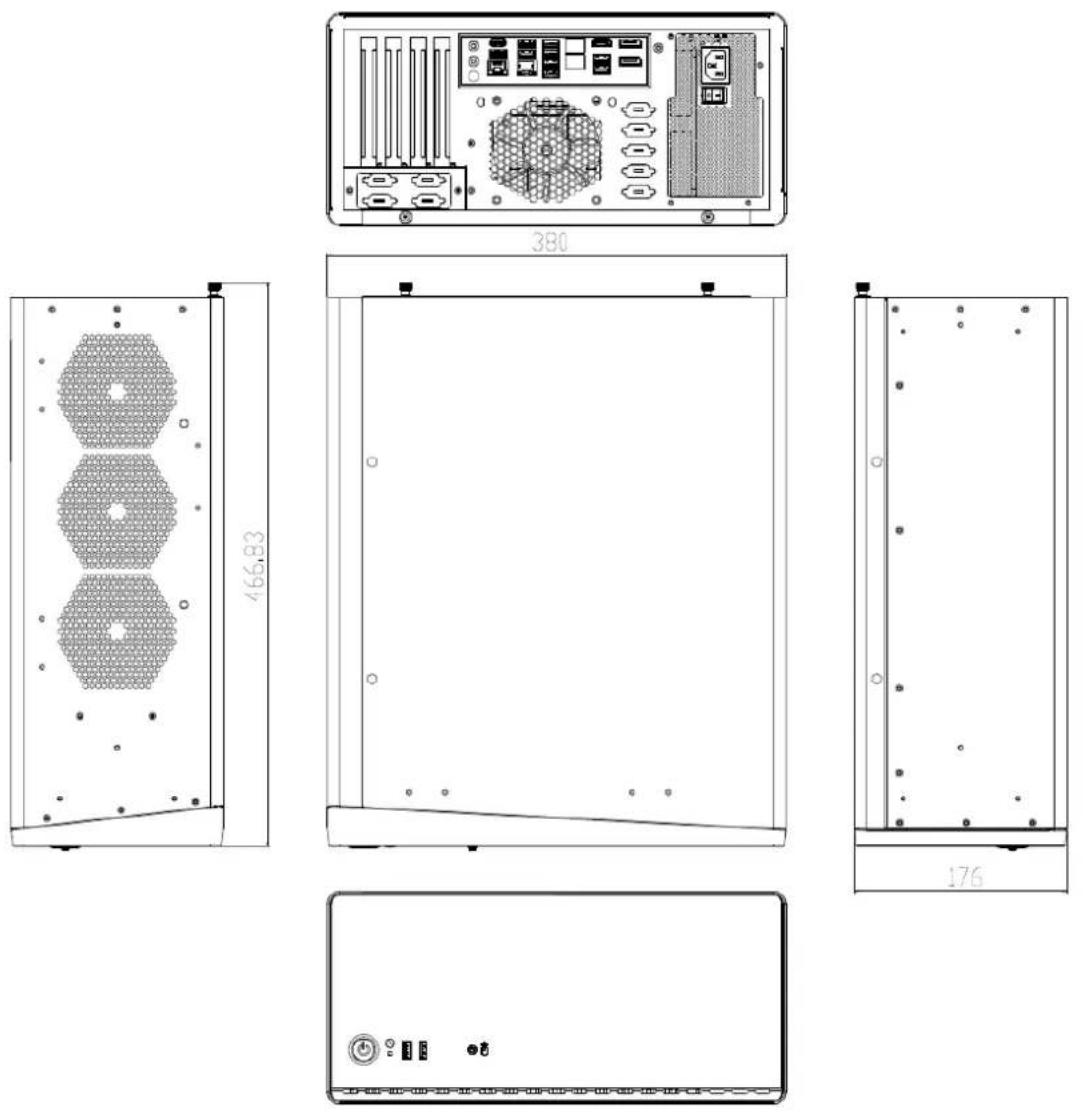
Figure 1.1 Dimensions(Unit:mm)
1.5 Front View Diagram
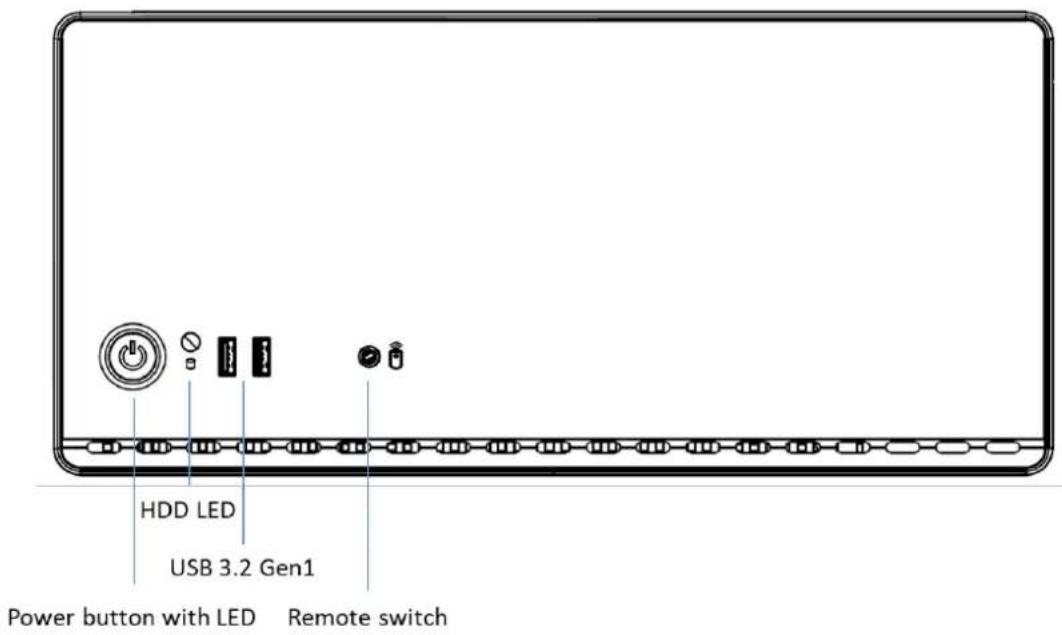
Figure 1.2 Front View Diagram
1.6 Rear View Diagram
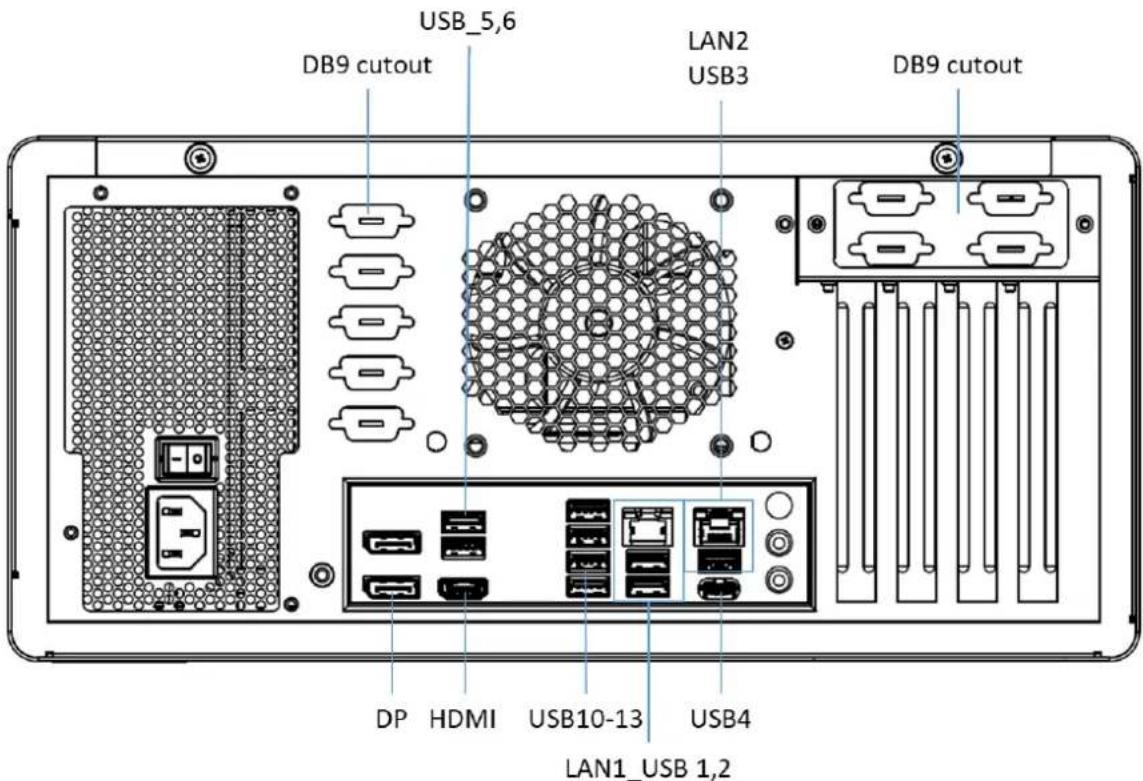
Figure 1.3 Rear View Diagram (Default)
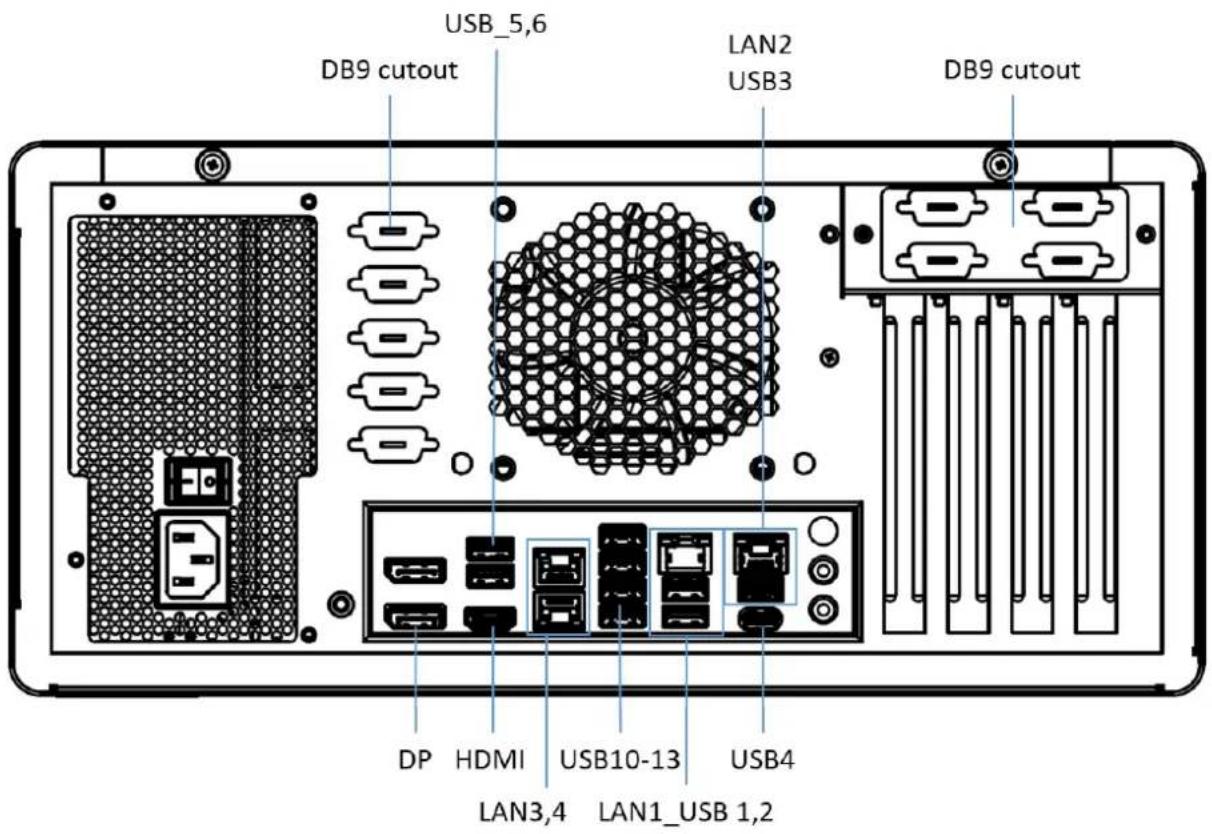
Figure 1.4 Rear View Diagram (Optional)
Chapter 2
System Setup and Diagrams
2.1 Open the Chassis Cover
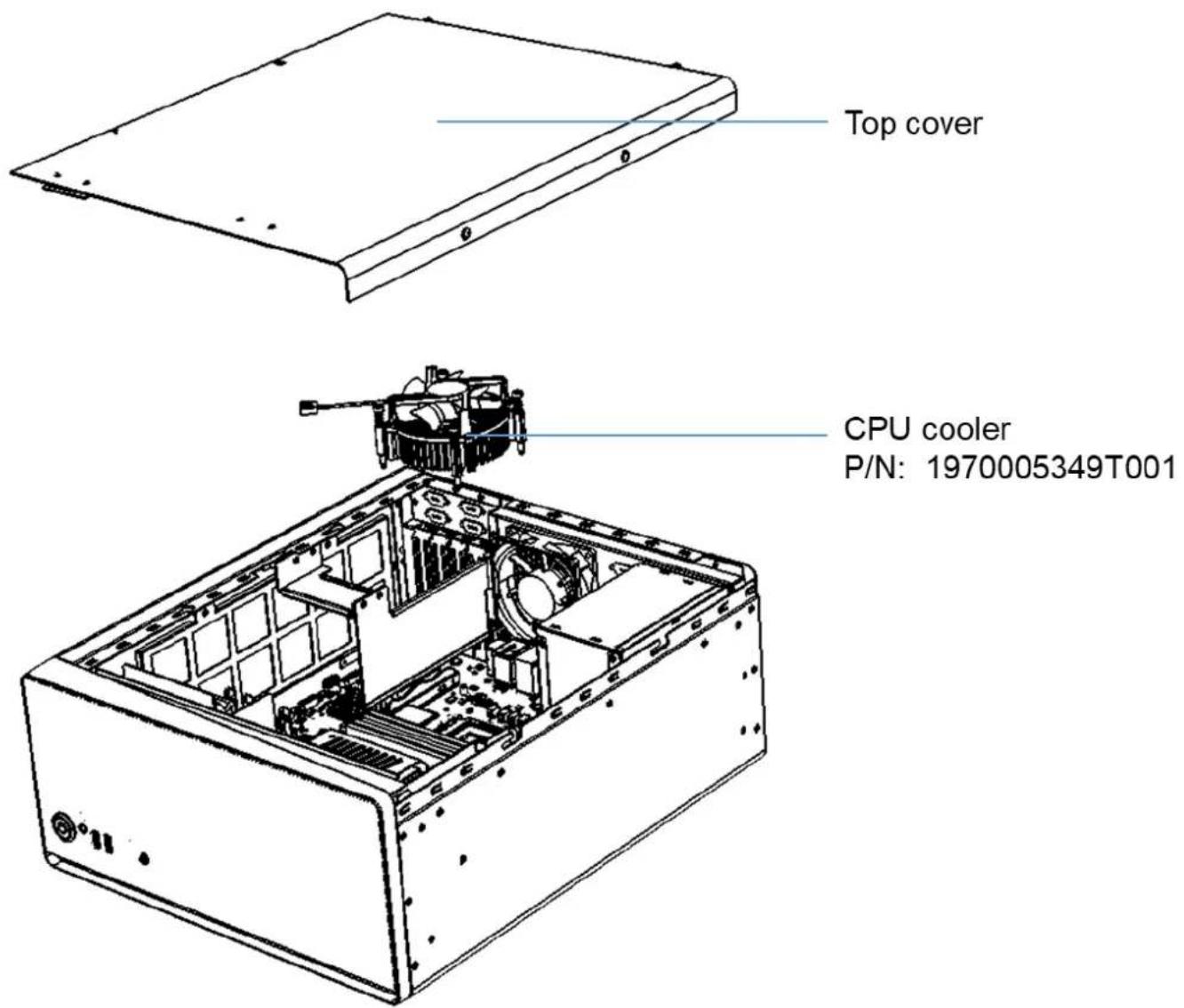
Figure 2.1 Open the Chassis Cover
2.2 Installing Storage
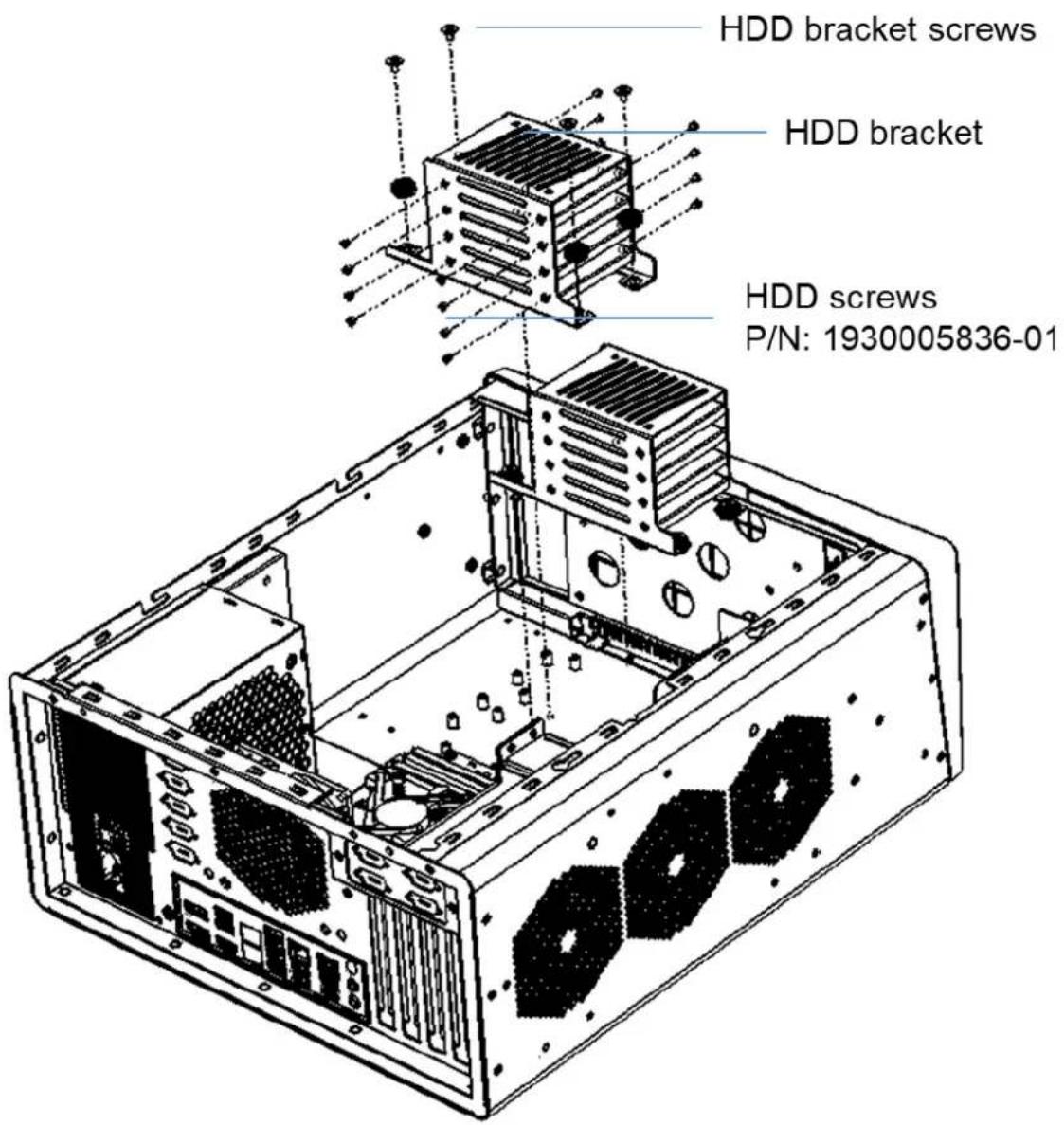
Figure 2.2 Installing Storage/組裝硬盘/組裝硬盤
2.3 Installing Brackets Illustration (Optional)
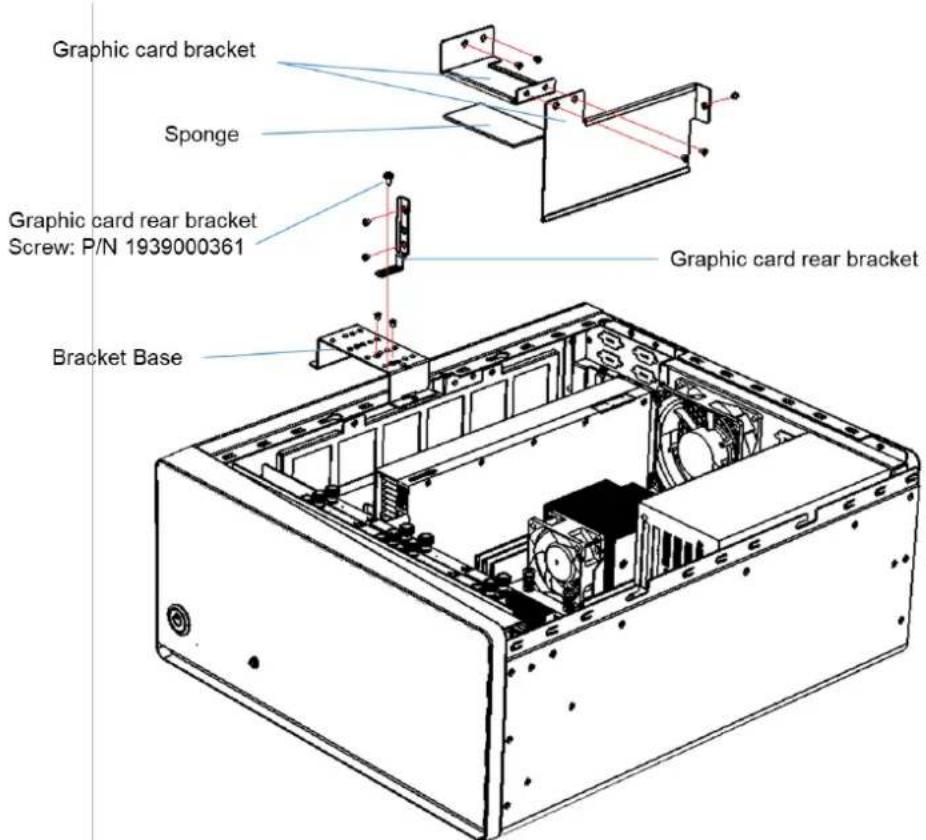
Figure 2.3.1 Installing Graphic Card Bracket
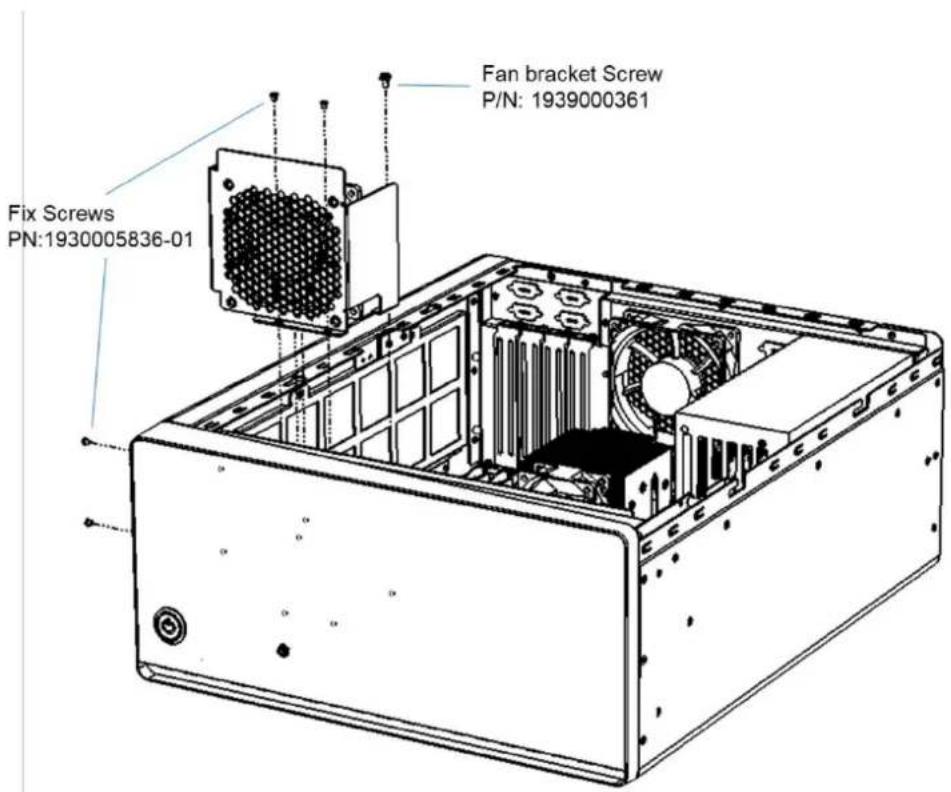
Figure 2.3.2 Installing Fan Bracket
AIR-510 Manual
2.4 Installing System Mount Kit
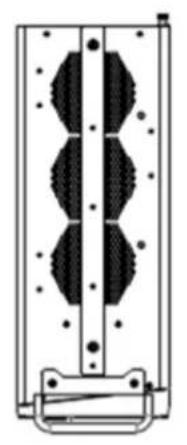
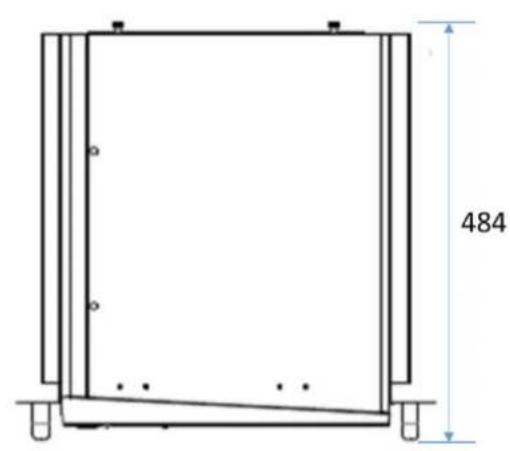
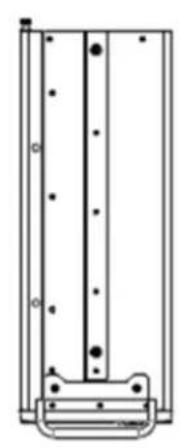
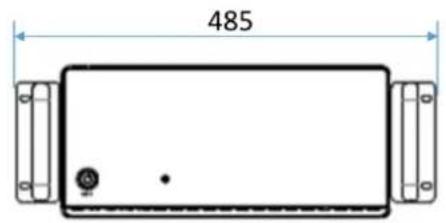
Figure 2.4.1 System with Rack Mount Kit Size(unit: mm)/安装机柜固定支架尺寸/系統安裝機櫃固定支架尺寸
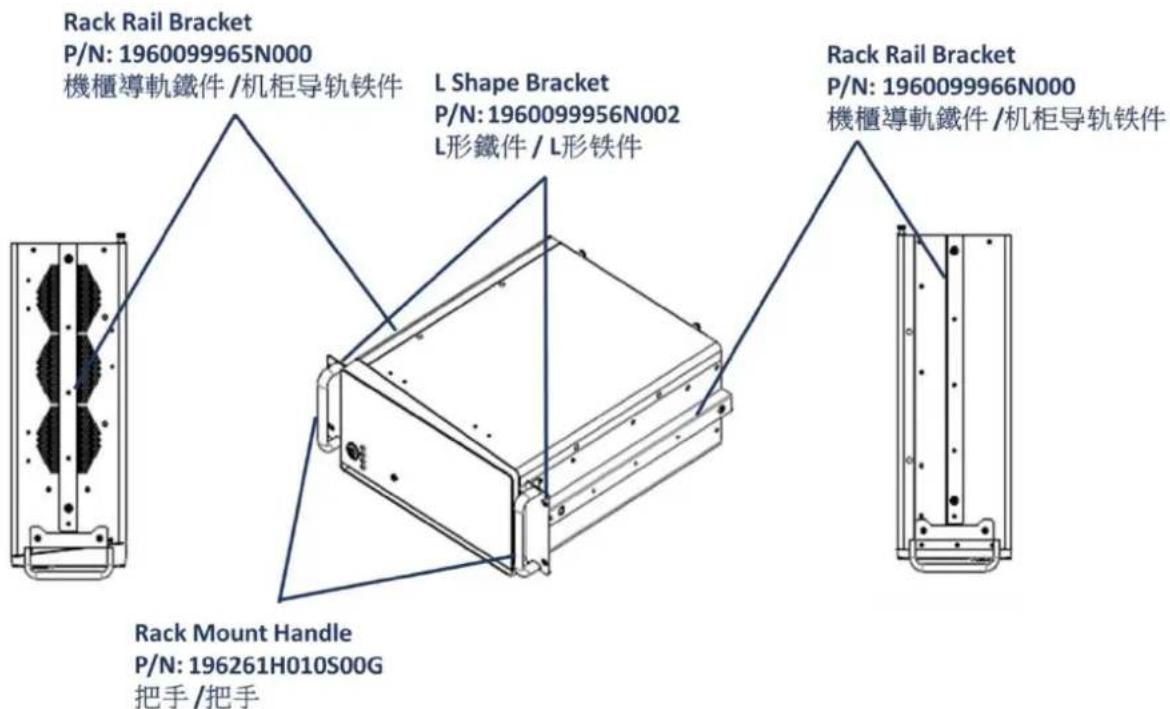
Figure 2.4.2 Installing Rack Mount Kit
Chapter
3
BIOS Setting
3.1 Introduction
AIR-510 BIOS setting please refer to the AIMB-588 B1 user manual
https://www.advantech.com/zh-tw/support/details/manual?id=1-2LNLQCL
ADVANTECH
Enabling an Intelligent Planet
www.advantech.com
Please verify specifications before quoting. This guide is intended for reference purposes only.
All product specifications are subject to change without notice.
No part of this publication may be reproduced in any form or by any means, electronic, photocopying, recording or otherwise, without prior written permission of the publisher.
All brand and product names are trademarks or registered trademarks of their respective companies.
© Advantech Co., Ltd. 2024
- Acknowledgements
- Product Warranty (2 years)
- Packing List
- Declaration of Conformity
- CE
- FCC Class B
- Technical Support and Assistance
- Safety Precaution - Electricity
- Contents
- Chapter 1 General Information
- Chapter 2 System Setup and Diagrams
- Chapter 3 BIOS Setting
- Chapter 1
- Specifications
- Environmental Specification
- Power Supply Options
- Dimensions
- Front View Diagram
- Rear View Diagram
- Chapter 2
- Open the Chassis Cover
- Installing Storage
- Installing Brackets Illustration (Optional)
- Installing System Mount Kit
- Chapter
- 3
- Introduction
- ADVANTECH
- www.advantech.com
Brand : Advantech
Model : AIR-510-000A1
Category : Industrial computer