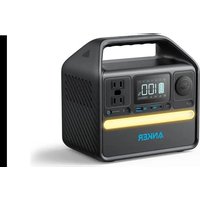
PowerHouse 522 - Generator Anker - Free user manual and instructions
Find the device manual for free PowerHouse 522 Anker in PDF.


| Product Type | Portable Power Station (Generator) |
| Brand | Anker |
| Model | PowerHouse 522 |
| Dimensions | 21.6 × 21.14 × 14.4 cm |
| Net Weight | 3.9 kg |
| Battery Capacity | 320 Wh |
| Battery Type | Lithium-ion (not specified) |
| DC Input | 11-28 V, 9 A (100 W max) |
| AC Output | 120 V, 2.5 A, 60 Hz, 300 W |
| Car Outlet Output | 12 V, 10 A |
| USB-A Output | 5 V, 2.4 A (7 W max) |
| USB-C1 Output (Input/Output) | 5 V/9 V/15 V/20 V, 3 A (60 W max) |
| USB-C2 Output | 5 V, 3 A / 9 V, 2.25 A (20 W max) |
| Discharge Temperature | -20 °C to 40 °C |
| Charge Temperature | 0 °C to 40 °C |
| Display | LCD with battery indicators, power, eco mode, alerts |
| Power Saving Mode | Yes, can be enabled/disabled |
| Flashlight | Yes, with SOS mode (long press 2 s) |
| Reset | Via reset hole with paperclip (1 s) |
| Maintenance | Charge to 100% after use; store between 0-40 °C; recharge every 3 months in storage |
| Safety | Do not expose to water, fire, temperatures > 130 °C; do not disassemble; use only recommended accessories |
| Repairability | Contact Anker support (support@anker.com) |
Frequently Asked Questions - PowerHouse 522 Anker
User questions about PowerHouse 522 Anker
0 question about this device. Answer the ones you know or ask your own.
Ask a new question about this device
Download the instructions for your Generator in PDF format for free! Find your manual PowerHouse 522 - Anker and take your electronic device back in hand. On this page are published all the documents necessary for the use of your device. PowerHouse 522 by Anker.
USER MANUAL PowerHouse 522 Anker
For FAQs and more information, please visit:
anker.com/support

@anker_official @anker_jp

@AnkerDeutschland @AnkerJapan @Anker

@AnkerOfficial @Anker_JP
For tutorial videos, FAQs, manuals, and more information, please visit:
https://support.anker.com Or scan the QR code below:
ANKER SOLIX
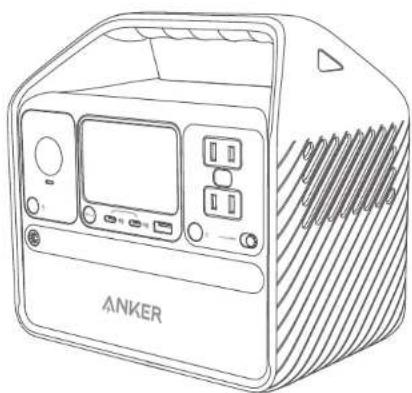
natural_image
Line drawing of an ANKER portable air conditioner unit with control panel and ventilation slots (no text or symbols on device body)Anker 522 Portable Power Station
USER MANUAL
PAP 22
Raccolta Carta

Product Number: A1721
51005003880 V1
bar
| Language | Value | |---|---| | English | 07 | | 日本語 | 08 | | Français | 16 | | (Other) | 23 |Overview
Recharging
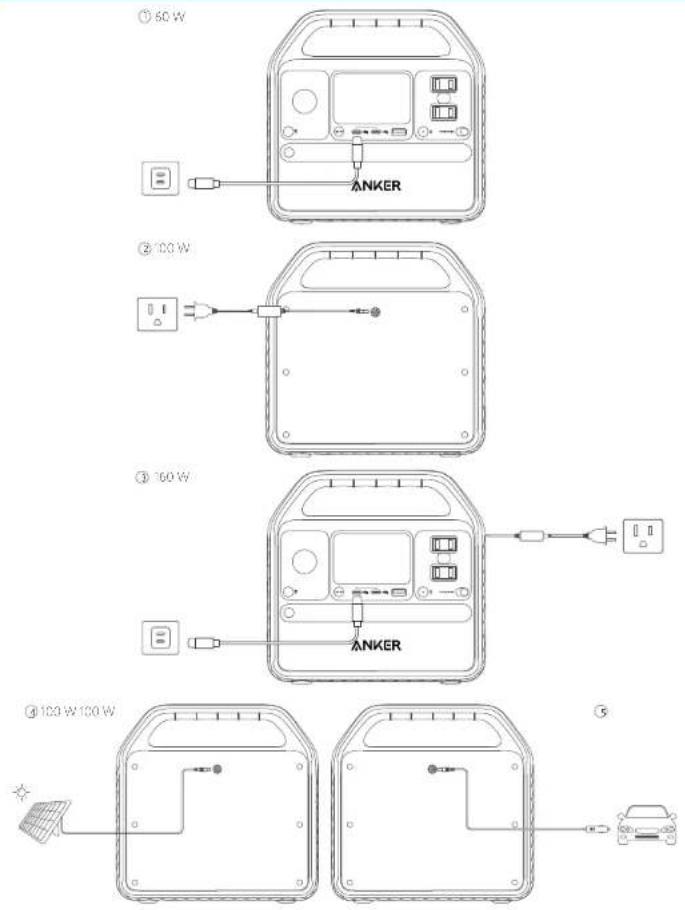
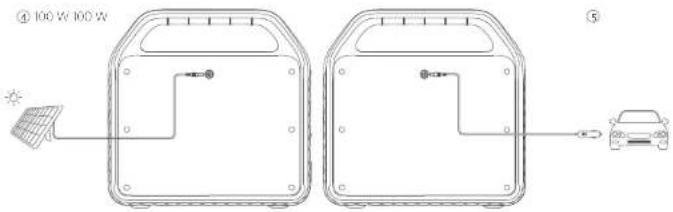
- Please fully charge the product before using it for the first time.
- When your portable power station only has 1% battery remaining, the indicators will flicker to remind you to recharge the device.
Charging
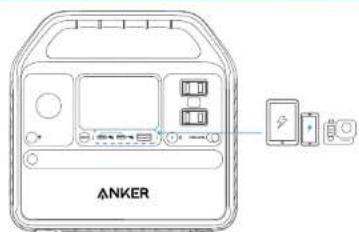
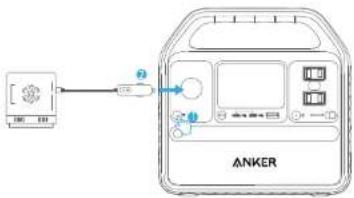
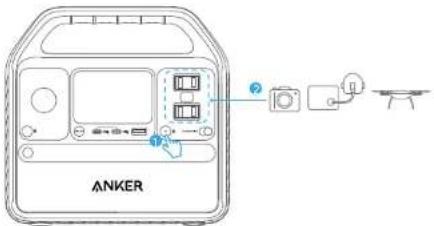
- The USB-A and USB-C ports support plug and charge. When devices are plugged in, they will start charging automatically; when devices are unplugged, they will turn off automatically.
- The car socket and AC output port do not support plug and charge. Use the corresponding or/off buttons to turn them on before charging.
- To avoid draining the battery, we recommend keeping Power Saving Mode turned on except when you are charging low-powered devices like CPAP machines and cameras.
Power Saving Mode
Switching on the power saving mode prevents washing power by automatically turning off the Power Station once all your devices are fully charged.
Switching off the power saving mode will enable stable charging over an extended period, such as for time-lapse photography or for sleeping with a CPAP machine.
LCD Screen Guide


Power Saving Mode


High-Temperature Alert
- When this icon shows, stop using the product and leave it to cool down until the icon disappears.


Low Temperature Alert
- When this icon shows, stop using the product until the icon disappears.


USB-C Input/Output Port


USB-A Output


Car Charging


AC Charging and Voltage Frequency
Press the AC output port on/off button for 2 seconds to switch the frequency.


Remaining Battery


Remaining Battery in Hours


Current Input Power


Current Output Power
Flashlight Mode
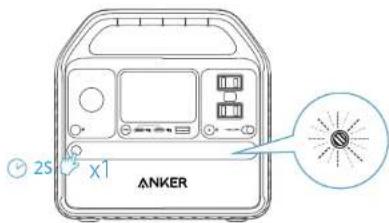
Press the button once to turn on the ambient light
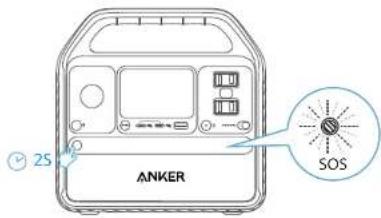
Hold the button for 2 seconds to turn on SO5 mode.
Trouble Shooting
Resetting Your Power Station
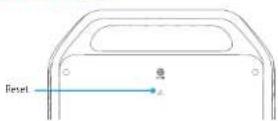
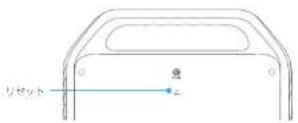
If your Power Station isn't working correctly, insert a paper clip or pin into the reset hole for 1 second for a factory reset. If the Power Station still doesn't work, please contact support@anker.com.
FAQ
Q1: What's the max power output of the AC port?
300W, and if you use the AC port for devices greater than 300W, the product will automatically turn off.
Q2: Can I recharge the product while charging connected devices?
Yes
Q3: Can this product power a CPAP?
Yes, but do not forget to turn off the Power Saving Mode First.
05
Q4: Will this product lose power automatically if not powered off?
Yes, when the car socket or AC control button is turned on, even if no devices are being charged, there will still be a certain amount of no-load power consumption. To avoid draining the battery, we recommend keeping Power Saving Mode turned on except when you are charging low-powered devices like CPAP machines and cameras.
Q5: What kind of solar charger can charge this product?
Any 11V-28V solar charger with a DC 8mm (DC 7909) male connector.
Specifications
| Cell Capacity 320 Wh | |
| DC Input 11-28V | =9A (100W Max) |
| Car Charger Output 12V | =10A |
| AC Output, 120V~2.5A,60H/300W | |
| USB-A Output 5V 2.4A (12W Max) | = |
| USB-C Input 5V | =3A/9V=3A/15V=3A/20V=3A (60W Max) |
| USB-C Output 5V | =3A/9V=3A/15V=3A/20V=3A (60W Max) |
| USB-C Output 5V | =3A/9V=25A (20W Max) |
| Discharging Temperature 4°F-104°F / 20°C 40°C | |
| Charging Temperature | 32°F-104°F / 0°C-40°C |
| Size | 21.6'2" 14"14.4cm/8.5"8.32"5.6/inches |
| Net Weight | 3.9kg/8.6lbs |
Attention

Not permitted on aircraft.
IMPORTANT SAFETY INSTRUCTIONS
WARNING - When using this product, basic precautions should always be followed, including the following Read all the instructions before using the product.
• To reduce the risk of injury, close supervision is necessary when the product is used near children.
- Do not put fingers or hands into the product.
- Do not expose the product to rain or snow.
- Use of a power supply or charger not recommended or sold by the product manufacturer may result in a risk of fire or injury to persons.
To reduce risk of damage to the electric plug and cord, pull the plug rather than the cord when disconnecting the product.
- Do not use the product in excess of its output rating. Overload outputs above rating may result in a risk of fire or injury to persons.
- Do not use the product that is damaged or modified. Damaged or modified batteries may exhibit unpredictable behavior resulting in fire, explosion or risk of injury.
Do not operate the product with a damaged cord or plug, or a damaged output cable.
06
- Do not disassemble the product. Take it to a qualified service person when service or repair is required. Incorrect reassembly may result in a risk of fire or electric shock.
- Do not expose to fire or high temperatures. Exposure to fire or temperatures above 130°C may cause explosion. To reduce the risk of electric shock, unplug the power pack form the outlet before attempting any instructed servicing.
- Have servicing performed by a qualified repair person using only identical replacement parts. This will ensure that the safety of the product is maintained:
- When charging a device, the product may feel warm, this is a normal operating condition and should not be cause for concern.
When charging the internal battery, work in a well ventilated area and do not restrict ventilation in any way
- Do not clean the product with harmful chemicals or detergents.
- Misuse, dropping or excessive force may cause product damage.
- When disposing of secondary cells or batteries, keep cells or batteries of different electrochemical systems separate from each other.
- Do not use or store the power station in direct sunlight for an extended period, such as in a car, cargo bed, or any other place where it will be exposed to high temperatures. Doing so may cause the product to malfunction, deteriorate, or generate heat.
- Do not use the product for applications such as data servers or medical equipment where a malfunction in an emergency could seriously endanger human life or properly.
Storage and Maintenance instructions
-
Store the product between 32°F-104°F (0°C-40°C). Avoid exposing the product to rain or using the product in a humid environment.
-
To preserve the battery lifespan, charge to 100% after using if you plan to store your power station, recharge to 100% every 3 months.
-
Keep the product on a flat surface when using, charging, and storing.
FCC Statement
This device complies with Part 15 of the FCC Rules. Operation is subject to the following two conditions: (1) This device may not cause harmful interference, and (2) this device must accept any interference received, including interference that may cause undesired operation.
Warning: Changes or modifications not expressly approved by the party responsible for compliance could void the user's authority to operate the equipment.
Note: This equipment has been tested and found to comply with the limits for a Class B digital device, pursuant to Part 15 of the FCC Rules. These limits are designed to provide reasonable protection against harmful interference in a residential installation.
This equipment generates, uses, and can reduce radio frequency energy and, if not installed and used in accordance with the instructions, may cause harmful interference to radio communications. However, there is no guarantee that interference will not occur in a particular installation. If this equipment does cause harmful interference to radio or television reception, which can be determined by turning the equipment off and on, the user is encouraged to try to correct the interference by one or more of the following measures:
(1) Reorient or relocate the receiving antenna
(2) Increase the separation between the equipment and receiver.
(3) Connect the equipment into an outlet on a circuit different from that to which the receiver is connected.
(4) Consult the dealer or an experienced radio / TV technician for help.
The following importer is the responsible party.
Company Name: Fantasia Trading LLC
Address: 5350 Ontario Mills Pkwy, Suite 100, Ontario, CA 91764
Telephone: +1 800-988-7973
IC Statement
This Class B digital apparatus complies with Canadian ICES 003.
This digital apparatus complies with CAN ICFS-003 (B)/NMB-003(B)
外觀

トラブルシューティング
リセット方法
This Class 3 digital apparatus complies with Canadian ICES-003.
This digital apparatus complies with CAN ICS-003 (B)/NM3-003 (B).
Customer Service
DE: Kundenservice
IT: ServizioClienti
support.mea@anker.com (For Middle East and Africa Only)

(US/CA) +1 (800)988 7973
(UK) +44 (U) 1604 936200
(DE) 491069 9579 7960
49 (800) 0002522 (Anker SOLIX)
(Middle East & Africa) +971 520750842
(UAE) 971 8000320817
(KSA) +966 8008500030
(Kuwait) +965 22069086
Egyptl -20 B000000826
(AU) +61 3 8331 4800
(TR) +90 0850 460 14 14
(RUI -8 (800) 511-86-23
(India) +91 18003138831
(中国) +86 400 0550 036
(日本)0344557823
(한국) +82 02 1661 9246