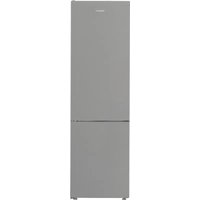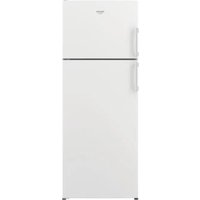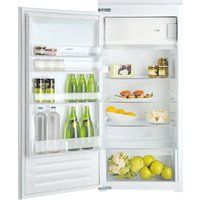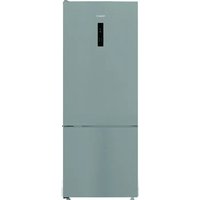
T 16 A1 D HA.2 & T 16 A1 D/HA - Fridge HOTPOINT - Free user manual and instructions
Find the device manual for free T 16 A1 D HA.2 & T 16 A1 D/HA HOTPOINT in PDF.



User questions about T 16 A1 D HA.2 & T 16 A1 D/HA HOTPOINT
0 question about this device. Answer the ones you know or ask your own.
Ask a new question about this device
Download the instructions for your Fridge in PDF format for free! Find your manual T 16 A1 D HA.2 & T 16 A1 D/HA - HOTPOINT and take your electronic device back in hand. On this page are published all the documents necessary for the use of your device. T 16 A1 D HA.2 & T 16 A1 D/HA by HOTPOINT.
USER MANUAL T 16 A1 D HA.2 & T 16 A1 D/HA HOTPOINT
Instructions for use
CBeToIIOBbI CJIyHaT OJbIe OObIHyBX IaMNoUeK, OHN IOBbIshaOT BnIMOCbI N ABJIYOTc3KOJIoTNHbIMN.
ECIII IPIBOP HE ICSIOJIb3YETCIA
OTHJIIOHTe np6Op OT 3JeKTPoHITaHH, ONOPOHHTe, pa3MOPo3bTe (PnI Heo6xOIMOCtN) n OCHNTe. OcTaBte DBepy CJIerHa pnpOTkpItOTo, TTO6bl ObecneuHTb cIpyHJyau BO3dyxA B OTDeJIeHNyx. 3TO N03BOJNT Bam N36ExaTb pa3BHTra PIIeCEHN HENpIyrTHbIX 3anaxOB.
(B 3aBnCmOCTn O MoJeN)
OTdeneHne c HyneBoi TemnepaTpyo Activ0 npedHa3NaYeHO CNEuaJIbHo IJN PoIepeKHaHnI Hn3KOI TEMpeAtpbl nPpABInbHoB BlaXHocTn IJN6OJe e dInTeIbHorO XpaHeHnI pOdyKTOB (HaNPmEp, Mca, pbIbbl, fpyKTOB n 3mMHnx OBOSei).
Фуннця Activ0° c Textхлоргий КОТрOLA ВлжноюобсесуBaet HanluyшуcoхраHHOCtь частчюуnaКOBaHHbIX npOdyKTOB.
BkIIOUeHne I OTKIOUeHne OTdJeHnA
Korda OTdeneHne BkIoueHo, BHytpenHnTempePaTpaB HEm CoCTaJIET npImepHO 0^
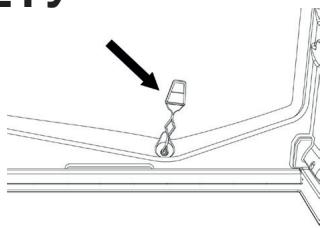
YTo6bI BHKIOHHTb OTDeJIeHHe, HAnKMITE KHOKNy, NOKa3aHHyHo Ha PnCvHKe, INpNiDEpKInTe 6OJIee CeKHyDbl, NOKa He 3ACBETNTC CmBOJ.
BkHIOUeHHbI CmMBoI O3NauaeT, YTO OTdJIeHHe pa6OtaeT. YTo6bI OTKHOuHTb OTdJIeHHe, CHOBa HauKMITE KHOJky I npIDepKHTe DOJIbWe CEkyHdbI. YTO6bI NOJHOCTbIO OTKHOUHTb OTdJIeHHe, HE06XoDMO BbyHyTB RAUNK.
YTo6bI OTdelenHe c HynleBoi TemnepaTypoi Activ0° fynKcHIOHnpOBaJIO npaBnIbHO, Heo6xOIMO:
- yTO6bl 6blIO BkIIOyeHO XoIOJbHoe OTdJeHHe;
-утобы Temператув hemсыла OT +2°Cdo +6°C;
-ДЯВКПЮЕНИСНДЕЛECHINCHYJIБОТМЕРАТРОД Heo6xOДIMOBCTaBnTBJIuNK; - YTO6bI He 6bIa BbIbpaHa OJHa n3 CJIeDyUOxN CJIeCuaJIbHbIX FyHNcIi: "PeKIM OXnJaHn", "OxlanJeHne BbIKIouHeo", "OTnyck" (pni HaJIuHn); B 3TOM cIyueae Heo6xoJIMo y6paTb npOdyKtB I3 OTdJIeHn.
Приимechани:
- ecn CmboJ He 3aopaeTcR, KOrda Bbl BkIouaeTe OTdJeHne, npOBepbTe, npaBnJIbHO JIN BCTabHeN ruiK; ecn npo6lema coxpaHareTcR, obaTHTecb B aBTOpu3ObaHHbI cepBnCHbI ueHTp.
- ecI N OTdJIeHHe BHKUeyHo, a IuIK OTKpyIT, CIMBOJ Ha nHaNeI ynpaBHeHn MOKeT abTomatNueckn BbIKIOUYtbcrN CHOBA 3aROpNTcR, KOrda JuaK bYdET BCTaBLeH Na MeCTo;
- He3aBnCmO OT CTaTyca OTdJIeHnMoYr 6bITb CJIbIuHbI Cna6bIe IyMbI, YTO RAJIaTeTCa HOpMaJIbHbIM;
- KOrda OTeJeHHe BbIKIooHc, TempepaTpa B Hem 3aBnCT OT o6uei TeMnepaTpbl B XoIoAnIbHoJ kamepe. B 3tOM clyuae B hem peKOMeHdyETcXpaHnTB HeYBCTBnTeJIbHbe K XoIoDo fpykTbI N OBOUHN (rOdoI, JbIoKn, a6pNHOcbl, MOpKOBb, IwnHaT, IaTyH N T. d.).
BaxHo: ecIn OTdeJeHne BkIooHe, a B HeM xpaHrTc pIOyKTbC BbICOKIM COePkaHHeM BlaRn, Ha NOLKax MOKeT o6pa3oBaTbC KOnDeHcAT. B 3OM cLyuae BpeMeHHO BbIKIOHTe FyHKUIO. ByIbTe ocToPOJHbI npn pa3MeueHN MeLNX pIOyKTOB n He6OJIbUnx EMKOCTe H a BePxHeN POJIke OTdeJeHn C hynBeOH TempeaTyPoI, UTo6bl OHN cLyuAHO He yJaIN B pIOCTpAHCBO MeJHy PONKaMn TbIbHoN cTEHKO XoJIoDIIbHO KaMepbl.
YTo6bI ydaJIHTb OTdJIeHHe c HynEBoT TempePaTyPoI,
BbINOHHTe CNeDyUOuHne WArN:
-ДЯоблereняпоцурblMbIpeKOMeHdYem ONyCTOuHTb(И NO BO3MOxHOCTH CHrTb) HIXHIOIPOJkyBDBepce;
- BbIKIIOUHTe OTdJIeHHe;
- BbIbTe OTdJIeHHe, NOBepHyB erO KBepxy;
- BbIbTe 6eIyIO IpaCTIKOByIO NOLKy IOJ OTdJIeHHeM;
PnmeuHne: BepxHra noJka n 6okobIe depKaTeI H ChImaOTcra.
YTo6bI CHOBA BOCNOJb3OBAbTcBcOTdJIeHHeM C HUJEBOI TemnepaTPOJ, OCTOPoJHO BCTaBbTe 6eJyIO INaCTIKOByIO NOLKy HAD OTdJIeHHeM, 3aTEM BCTaBbTe RaJHK IN BHJIouHTE ΦyHKUIO. YTo6bI yBeJIuHTb O6bEM XoJIoNJIbHO KAmepbI IN CHINITb NOTpe6JIeHne 3JeKTPo3HePmI, peKOMeHNdyETcB bIKIIouHTb OTdJIeHHe C HUJEBOI TemnepaTPOJ IN BByHtB eRO.
Bpemr O T Bpemehn CneJeT uHCTnTB OTdJeHHe n erO cactn TkaHbIO, CMOeHHoN TeIIOJ BODOn (He nporpyKaHte B Body 6eLyIO NOLKy PNO J AunKOM) C HeNTpaJIbHbIM MOUOnm CpeDCTBOM, IpeHa3NaueHHbIM dJa UcSTKn XOLOdINbHKOB. He pIoJIb3yIITecb a6pa3NBbIMN OUYCTnTeJIaMn.
Ipeed chTHOJ OTdelenHn (TaHHe cHapyHn) Heo6XoDnMo BbHyTb RaHn N OTHIOUHTb 3JeKTPoNHTaHne OTdelenHn.
TEXHnuechaj NOMOuB CEPBnCHbIX UeHTPOB
PpeHne yem o6paataBcB B cepBnchbI ueHTp:
BHObB BkIIOUHTe pnpOp, YTO6bl npOBepntb, ycTaPHeHa IIN HeNoJaKa. EcIn HET, ChOba OTHIOUHTe pnpOp nOBtOpnTe npOeDpy uepe3 qac.
Ecnn nocne npOBepKn B COOTBeTCTBn C Ta6JIuceY uCTpaHEHn HEnCnpaBHOCTe N BkIIOUeHNpy INp6Opa OH BCE paBH OyHKUOHNpyET HnpaBInbHO, O6paTNTecb B cepINCHbI CEHTP NcETKO ONNIWITE CyTb npo6JIembl, yKa3ab:
BnD HenoJaKn;
MOdJIb;
TIN N CepinHbH Homep np6opa (yka3aHbHa nacnpTHoT Ta6nUKe BHyTpN np6opa);
- cepBnCbH NHomeP (ecnHmEeTc) (Homep nocIe cnBa SERVICE naacnpTHoT Ta6nUHKe BHytpn npn6opa).
SERVICE
0000 000 0000

Приимеанно:
nepebeunbaHne DBepubl, BbINOHNHEMOe npedctabntelem cepBnCHoro ceHTpa, He cHTaetc rapaHTnhbIM o6cnyHHaHneM.
ANFAI PET PAIДАЛAHY
KypbIjNfBihI Kyat Ke3iHe XaNfay.
3NeKtpoHbIyIinepde DblbIc CnHaJIbIbIbIpybI MyMkiH,6yTEmNepaTypa CnHaJIbIHbIbIbIbIipinyiBnDipei: DblbIC CnHaJIbIH eWipy TyMeWirih BacbiHbI3. YcbHbIraH 60nc, 6akTePnaFa KapCbI niCTi 60nDbIpMaHTbIH cy3riHi OHbIH opamBuHda KepcetilreHneJxenDeTkiUke opHaTbIHbI3.
EckepTne: KypblfblHb icke KockaHHa KeiH KaJIbINTb TOJbIPblFaH KypblfblHbIH CaiKEc CaKTay TEMnepaTypacbl OphIbKaHa 4-5 caFAT KyTy KaKxET.
K¥PbIINfblFA Kbl3MET KΘPCETY ЖΘHE TA3AJAY
KypblfblhblkyneI type CynIg KHe cyfa apalactbipbnfah
beitapan ta3anay, cicepe Toa3blkltbih iin Ta3anlayfa
aphanfah 3attapmen Ta3anaHbI3. bcklW ta3anay 3attapdbi
naDanaHbI3. Epireh cybln TpaKaTbI KHe TNICTi afB1bH
kAMTaMaCbI3 ety yuH IN TOHa3blkltbIH XEMIC KHe KKeHic
XawiriHApTkbXaFbIHdaOpHaJnackaH HayaHbIH iWih YcbHbIFAH
Ka6bIKbI naIaNanHbIn KyIeI Tpyde Ta3anOtIbIbHbI3 (cpeTTI KapaHbI3).
Kb3MeT KepcTeH HeMeCe Ta3aJaiyDbIH aIbIHDa TOK aIbIPbIH pO3eTKaJaH bIfapbHbI3 HEmec KpbIbHbI KyAT Ke3iHeh OwipiH3.
JAM JAMNACbIH HEMECE XAPbIK INOD JAMbIH AYbICTbIPy (yIrrire 6aIIaNbIcTbl)
JAMnamnacbH aybictbipydbH aIdbIHda KpybJIbHbI epKaaHaN KyaT Ke3iHeaXbipTaHb3. Byan HKeHHimHre apHaJFaH JAMnamscbHbH TpyiHe Heri3deIreH NcckaynapDbOpbHdaHb3.
JAMnamnacbH TexnKaNk KonDay KbI3Meti XeH eKInetTi catyubIapda catbJaTHbH 6ipDeCNaTTaFbI JAMnameH aybictbipyhbl3.
1-wamTypi)
JAMnamnacbIHany yuHIN OHbI CypTe KepcTeINReHEn, caFAT TJIiHe KapcBb6aBbTTa 6ypan aJIbIHb3. KypblfBiHb KaTaNocOyDah 6ypbH5 MNHyTTa KYTe TYpbHb3.
- ΕДeТТERiШAM Лмпасы (Мakc. 25Вт)
Wam lamnacbi
Hemece
- JapbIK DIOJ WAM JAMnacBcI (CINaTTapbI 6ipDei) TEK TexHnKaIbIK KOJday Kbl3MetIHne CaTbIJaDbI
KapbIK nioD waam lamnaCbi
2-wam typi)
HIMHI TEmHeIe KepCetInre CypTePepderIeJ KapbIK DIOoI WAMdApbl BoJIFaH KaFdaJaOJapdb aybcIbpyKaKeT 6oNca TexHnKaJIbIK KOJday KbI3MeTIhe xa6apNaCbIbI3.
Kapbik DIOJ WAMdApbl eDetteri WAM lamnnapbHa KapaFaHda y3ak kymbc icTei, iki KeipHeplkTI JAKCapTaIbl XHE KopwafH opTafa 3NHNbl EMEc.
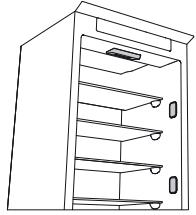
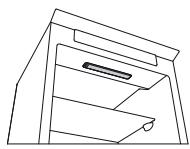
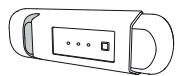
KYPbIFbIHbIH PAndAIAHbAY XAFDAHbIHDA
Kypblfblhkyat Ke3iHeA kbpalbHb3,60aTbHb3,My3dbepitih3 (kaKeT 6oJFaHa) XeHe Ta3anaHb3. BemIp iwiHne ayahBn CnpkyraunrcbHa MymkiHik bepy yuHin ecikTeprdi cen aWbIK YcTaHb3.OcbHbH nHTnxeciHwe 3eh KHe Jkafblmcbl niCtIH TapaIybiH 6oJbipMayfa 6oJaBl.
KYATNEH KAMTY Y3IJIrEHN JkAFdAJa
EciKTeepi Jka6bIK YCTaHbI3, OcbIaNla TafamDap MymKInDiirHne Y3ak YaKaBt 60bI Cybl KnyIHde caKtaIaIbI. IuHapa epitinre H TaFamDapbl KaTAt My3dTaNhaI3. Eere Kyat y3iNici Y3aKa cO3bIcA, WAMbl eWipy CnHabl BencceHdpiny MymKIn (3NeKTPoHnKaIbK EhIMdepJe).
TOHA3bITKbIiBθJIIMI
Toa3bITkbl 6eIiMi 6aJIbH TaFamdap KHe CcyIHdApDbI CaTayfMaMkiHik 6epei.
Toha3bITkbI 6eJIi mABTOMaTTb Tpyde ToJbIK epitjnei.
BenimHin iWihderi apTkbl 6etIHc cy TaMdbnapbHbH 60Jybl ABOMaTTb epity Ke3eHIn 6enrici 60JbT a6bna. Epirh cy Tery K6bipbHa 6afblTajda JxHe KeiH 6ylnaHaTBH KOHTeHepde XINHana.
YIriCHe 6aJIaHaHbIcTbEhIM apHaBbI «HeJIdIK rpaIycS» 6eJIIMImeH Jka6bIbIKTaIybl MyMKiH, OJI 6aJIbH eT XeHE 6aJIbIKtbl caKtay yuIH aca OHtaIbI.
Eckepy: ToHa3bITKbIUtBih Kepek-KapaKaTapbH bIDbc MaunHaCbHda Ta3aJaMaHbI3.
EckepTne: opTaHbIH TeMnepaTypacbI, ecikTepeH aUbIy JxNliri XHe KpybIbIbIHbIH opHaJIacybl Eki 6eIIMdepderi iKi TeMnpaTypacbHa ecep etyi MymKIn. TeMnpaTypanapdbIOcbI KaJaInapra caikec opHaTbIHbI3.
Eckptne: eTe bInfaIbI JkaFdaInapDa TOHa3bITkbIbI 6eJIIMiHde, aCipece eIHeK cpeJepDe KOHeHCAT Tsy3iny MymkIH. MyHdai JkaFdaIa Da cybIKbIK bap KOHeHepJIepDi (MbICaNbI, copNa KybIFAH bIDc) Jxaby, cybIKbIFb KEN TaFamApDbI (MbICaNbI, KeKHeHicTeP) opay XaHe KaBbIKTaIFaH JkaFdaIa JeNDeTkiWti KOCy YcbHbIaNbI.
Xemic XeHe KekHic Xawirih wBfapy (yJrire 6aunahbictb)
JXawikTi cbtpKa Kapai MymKihirHHe aIbIC etin TapTbHb3 Da, Xofapbl KeTeepin LbIFapblHb3.
Jemic Xahe KekHic XawiriHn bIfapblNybiH OHaJIaTy ywiH eki TeMeHI ecIK cepenepiH
6ocatbln,(XaHe MymKihirHWe bIfapbl any) keHH XawikTi bIfapy KaKeT BoNybl MymKiH.
JenTeKiwXHe 6akTepnraFkapcbi nicti 6oJdbipMaHbIH cy3ri
(ynrre 6aaiNaHbictb)
Jendtkiw 6nimdep iwiHderi TemnpaTypbIH TapaiybiH xhe caikeiHte TaFamapdbIH caTanyib H kacapbIn, WAMADH TBc bIfAINbIKbTIa3aTadbl.KeJeTeY aMafBih 6eremeH3. Jendtkiw Kojlmeh Kocbla/ewipine anadbl (KbICKa HcykaybIKbI KapaHbI3); erep JeNdtkiw Kocylb Bonca, KaKet BoJFaHaOn abTomaTT type Kymblc icTeiDi.
M¥3ДАТКыIlБθЛIMI
BeneK My3dAmkblu6eJimi 6ap ynai
M3daTbIb6eIiMi My3daTbIbIaH TaFamdApdb (opamda KepceTinreH mep3im 6oIbI) caKayfa
kHe bafH TaFamdApdb My3daTyra MymkiHik 6pei.24 cafat iHne My3daTbIa aHaTbIH
BaftbH TaFamdApdb KJIeMI MeIWeepnep KecTeCInHe KePceTInre. BaNfBt H TaFamdApdb My3dAty
6eJIIMIH (KbCKa HcayIbIKb KaapHaI3) My3daTy aMaFbIHda ayahBt epKl CUPkyJuaCbHa
MymkiHik 6epi yuH Tafamdap opamblH aHaNaCbIHda JeTKiniKiTt OpBH KaJIbpa OToIbip
OpHaIaCTbIPbIH. lHiHapa epiTireh TaFamdApdb My3daTnay YcbHbJa. Cy, bIFan JxHe
KOHdeHCATTbIH eHyIH 60DbIpMay yuH TaFamdApdb opay kaxET.
Mz3TeKwJepin Jxacay
M3 hayacbHbH (KONKetimDi 6oI ca) 2/3 6eNirih cyMeH ToTbipBn, My3daty 6eNIMHe KaTa caJIbHbI. My3dbI bIfapy yuH e6bp jkaDaia da yuKip Hemece etKip 3aTTapDbI naJaHaHaBbI3. XawikTeprdi uBfapy (yrrire 6aJNaHbICTbI)
Kawiktepi Mymkiinirinwe anbc etin cbiptka taptbHb3, kofapbi keepin anblHb3. Kocimwa Kelemre kon keTkiy yuih My3dakbl 6enimi xawiktepci naaanaaba n aana.
TamaKtI KaI Ta TopFa/Cepenepe KaI Ta opHaTKaHHa KeiH ecIKTI H TniciHwe Xa6blfahbHa Ke3 XeTki3iH3.
Iuiki ΘHIM Επimi δap γηαίηρ
My3daTkbIb6eNIMiHDe *** 6aNfBtH TaFamapdbI da My3daTyfa 6oJaDbI.24 carat iwiHde My3daTbIa anaTbIH 6aNfBtH TaFamapdbIH KeNEMI MmIeepnep KecTeciHd KepcetinreH.
BaNfBIn TaFamDapdbI Kaan My3DaTy KaKeT:
-TaFamblbapbonca,Topa(1-cypet)Hemece6enimHH(2-cypet) actbHdaopHaIacTbIpbHb3
-TaFamDbI 6pybIHHaH My3daTbJIFaH TaFamdApMeH XaHaCnaiTbIHda, 20 MM apaJIbIKTbCaKtaI OTpIpbIN, * *** 6eJIIMiHiOpTaCbHa caJIbIH3 (1XeHe 2 cypet).
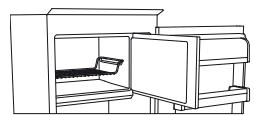
1-cypet
2-cypet
EPITY ΕΙΙCΙ M¥3ДАТКыш БΟЛIMI
(ynrire 6aaiJaNbIcTbI)
Kbipayfra Te3imdi yIirinep yuiin epiTy pocimdeipn opbHdaydbn kackTe KOK.
Baca ylrinep ywiin Kbipaydbi Tzy3inyi Kaibntbi Kaafdai 6onbl Ta6bina.
KbipaydbH MeIepi Jxhe XnHaanybOpTa KaIdaiNapbHa XHe ecIKTH aBbIy XnIJIIRHe
baIaNbHcTb e3repei. CybIpaK TemnepaTyPAHbOpHaTy Hemece, KOnKeIMDi BOJCa, epity
bapbcHda TaFamdpabH CaKaTaNbIH y3ApTu YwIH XbldAM My3DaTy cyHKUraCBH (KbICKa
HyCKaybIKbI KapaHbI3) TaFamdpabMy3DaTy 6enlMIHe anyDah 6ypbH 4 cAfTaKa KocbHbI3.
Epy wH KybpInbH bEwipH3 xHe XawIKTeprI aBbHb3. My3DaTbIFaH TafamDbCybIK Jepre
caIbHbI. KbpaydbH epYiHe MymkiHdiKy 6epy Wih ecKi T aBbIK KaNDbpBlbI3. EpiTy bapbcHDA
cydbH aBybH 6oBbIDpmay yWHi MY3aTy 6enlMIHH actbHa ciHpriMaTaHbI Tecen, OHbl KyyeJI
Typde CbIFIN OTbIPy ycblHJaDbI.
MzdaTy 6eJIIMiHIn iUki KafbIH Ta3anaHbI 3 XeHe KaKcbJIaI KeTIpiH3.
KpybIJIbIbI KocbiHbI3 XeHe TaFamdapbl KaTApOpHbHa caJIbIbI3.
M¥3ДATY JXYNECIH TOKTATY (ynlire 6aɪnaNbICTbl)
KbIPAYdbI TOKTATY KJYIECI (yrrire 6aIIaHbICTb KoJIkeTImi) My3dAty 6eIimi yuiH epiTydi OhaJIaTaDbI. KbIPAYdbI TOKTATY KypalbI (1-cypeT) My3dAty 6eIMInDe ty3inTe HkbipaydbI XnHay yuH JcacaIraH xHe Obl aIbIn, Ta3aIay OHa, CoHdbIKTaH ON My3dAty 6eIMInH iXki KafbIH epiTy yaKbITbH KbICkapTaDbI.
KbIPAYIbI TOKTATY KypaJIbIHdaFbI KbIPayIbI aJIbIN TacTay yuH TeMeHne KepeTiJreH ta3anay pacimIn opbIHdaHbI3.
KbIPAYdbI TOKTATY KYPALbIH TA3AJAY PocIMI
- My3daTkbIb6eJIIMiHIEciriH aIbIbI3 xHe KOFaPbI kEwIKTi aJIbIbI3 (2-cpeT).
-KbIPAYIbI TOKTATY KpaJIbIH (3-cypeT) aKbIpaTbIHbI Da, TeMeHJderi eHNeK cepere Kynan KaImaybIH KaJaFaIaIan, aJIbIHbI (4-cypeT). Eceptne: Erep KypaN KbICTbIPbIbIN KaJca Hemece aJIbHybl KnBn 6oJca, OHbl anyfTa TbIPbcnaHb3, 6ipak My3aDaty 6eJIIMHH ToJIbIK epITinyiH KaJIFaTbIPbIHbI. - My3daTy 6eJIIMiHIn ecirH Ka6bIbI3.
- KypaIaIbI KblpaIyI bIaIbI aIbIH (biCTbIK eMEc) cyIbIH acTbIHda IaIO apKblIbI Ta3aJIaHbI3 (5-cyper).
- KypaIbI KeNTipiH3 XHe PnactIK 6eNikTepiH Kymcak MaTameH CyptiH3.
-7-A cypetihne KepceTJiren YbfbHKJI Kepnepre KpaanblOpHaTy apkbIbn Kaeta Hri3iH3 XHe KpaanblH TetirH JOfapbdaftyCTaftbIHTapmeh 6ekitih3 (7-B cypet).
KorapfblkawiktiKaetaehri3iH3de, My3dATkbll6eJIIMiHciriHka6bIb13.
KbIPAYdI TOKTATy KypaIbIH e3diirHeH, My3daTkbIsh 6eimin epityci3 ta3anay MymkiH 6oJaIb. KblPAYdI TOKTATy KypaIbIH xyneJI type Ta3anay My3daTy 6eimin ToIbIK epity KaXeTTinirH a3aiTyfMaMymkiHdk Bepei.
EckepTne: eHIM CnnaTtAmanapbl, coHbIH iuiHne KeIemi XeHe KyaTbI KbIPAYDbI TOKTATy KpaBbHcb3 ecTeTenei.
«HÖΠДΙΚ ΓΡΑДΥС» ΒΘЛIMI (унгire ьаипьICTы)
«Henik rpauc» 6eNimi 6aIbIH TaFamapbl (Mbicalbl, et, 6aIbIK, XeMIC XeHE KbcIKb KeKHeICTep) y3ak yaKbIT 6oBbI cKaTay yuH IN TeMeH TempepaTypara XeHe Tnicti bJFaJIbJIbIKKa KOJ XeKt3y YuH apHaBI XacanFaH.
Activ0MmkiHdirimEn 6aIaNbIcTbipBlnFaH bIfAdbIbIKtbl
6ackapy texHOJnOraCbTaFAM TOnbIfBImeOpAlMaFAH Ke3De OHbIH y3dIK CaKaTaNbIH KaMTaMaCbI3 eTeJI.
Bélimdi kocy xhe eupy
BemHHi iki Tempeatypacbi 6eim Kocybl Kynde IaMaMeH 0^ TeH.
Bemimki Kocy yin cypette kepctiiren Tymeikti beJIiwe xan6aHa7a biP cekyHtah apTbIK bacIn ycTan TpybIb3.
Kahbin TypaTbH 6eNriue 6eimHin Xymbcic
icten TpyFaHdbIbH 6iJdipei. Bemimdi
ewipy yuhi TYmmeuikTi bip cekyHtAn apTbIK
baciny cTan typbHb3. Bemimdi ToBik
ewipy yuhi Keuukti uhrapky kaxkTe.
《Hnndik rpauc》6eJIIMITnicHwe JyMbIC icTeyi yuHKeNeci KaFdaInap opbHdanyTnic:
- ToHa3bITKbIi 6eNimi Kocblnyi Tnic
- Tempepatya +2°C xəHe +6°C apaNbIbHda
- «Hεπικίραγς» έθεπιπίνεις κελικίν ευτίπιν τύργοῦ τήσει
- keleci apnaib cyHKunapdbiH bi pi TaHaMaFah: Stand-by, Cooling-Off, Vacation (6ap 6oJca), 6yI JxafdaJa ObIH iWIn deri TaFamapdbi WbIFapbl3.
EckepTne:
- erep 6eJIIMdi Kockan JkaFdaIa 6eJIriue JkaHbaca, JxuikTIn TniciHne eHriiYin TeKcepH3; erep akayIbIK ueijlmecE ekinetI TexHKaIbIK konday KbI3MeiTHe xaBapIacbIbI3.
-erep 6eJIIM KocyIbI JxHe Jxuik IyIrapblfAn 6oJCa, bAckAp y naHeniHderi 6eJIriWe aBtOMaTTbI Tpyde eSyI MymKiH. XeuiK eHriizreH Ke3e 6eJIiWe KaTAt xHaHaDbI - 6eJIIMHi KaFdaBbHa baiJaHbICbI3, KaIbIITbI den ecENTeNETIH cAn ecTIneTih yy ecTIy i MyMkiH.
- 6eJIIM JyMbIc icTemereH JaIaIa OIbIH iIiHderi TempeaTypa ToHa3bITKbIi 6eJIIMiHJ KaIIbI TeMpeaTypaBaIaHa 6aIIaHbICTbI 6oJaIbI. MyHdai JkaFauIa CybIKKa TeImDi EmeC JeMIC XHe KekHic (XuIeK, aIMa, epiK, c6i3, 5nHAT, KblpIKKaBaT) MyHa caKTana aIaNbl.
MaHbI3bI: Erep 6eim Kocylb Jxhe Kypamblda cyblkTbIbI ken TaFamdap OHbIH iwiHde bOJca, cepelepde KOHeHCAT Ty3iNyIMKIN. Mynda JkaFdaJa d fyHKnraHbY aKbITwa eWipiH3. ΘIwemKi iKKeHTa Tafamdap KHe KOteHneHepnepdi cepelepdiH apacbHa XHe ToHa3bIKbI W beJIminH apTKbI KaftbHa Tycin KaNbyH boDlbpMay yuHIn «HeNdk rpaDyc» beJIminH cepecine Ophaty ke3iHde abai bOblbH3.
TEXHINKAJIbIK KOJIdAY Kbl3METI
TexHnKaIbIK KOnDay KbI3MeTIHe xa6apIacydAn 6ypbIH:
AkaynbIKbIh Wewiinyin TeKcepy ywiH KypblfblHb KaTt icke Kocblb3. Oaai 6oImaca KypblfblHb KaTt a kxbipatblb3 XHe pOcimdi bip caTtah KeiH KaTanaHb3. HyckaybIKTa KepcetinReh AkayblkTap TeKcepyepin opbHaDaHaHH KeH N KypblfblHb KaTt icke KocKaHHaH KeiH KypblfblHb3 KATE JyMbic icTece, TexnKaBk KONday KbI3MetMeH xaapnaCbIn, akaybIKbIb XHe XaFdaNDb TOJbIK TyciHdipin bepHi3:
akaylbk Tpyi
- ynrici
KpybIfblHbIH Typi XHe cepnIbIK Hempi (MJIseepnepe Kectecinde KepcetinreH)
Kb3metTik Hemipi (KOJIkeTImdi 60JCA) (KypblfblHbH iihne opHaIaackah TexHnKaIbIK TELKyKaTTarbl SERVICE ce3iHeH KeIHri Hemip)
SERVICE
0000 000 0000

Eckenthe:
TexHnKaJIbIK KOnJay Kbl3MeTImeH opbIHaJaCA, KpyblfI bcikTepiHOpbIH aybIcTbIpy KeiINdeme Kbl3MeT KepCety peTIHe KapacTbIPbIJMaIbI.
BVKOPNCTAHNBAPEPU
Piiiknouitb npnilad do eJeKtpomepekji.
Y moJeyx, ochaueHnx eJeKtpoHIOHO, MoKe lyHaTu 3ByKOBu CnHaj. Lc cbiyntb npo BBIMKHeHHa CnHany npo npuyueHHa Tempeatpyn. HatncHtB KhoNkY BmMKeHHa CnHany npo npuyueHHa Tempeatpyn. BMOHTyIte y BeHTnlaTOp aHTnbAKeTpiaJbHni fJIbTp dJa 3HnueHHa HEnpneHHx 3anaxiB,Як ce nokazao Ha ynaKobu (kaio foJIbTp noCTaayetcbr KOMnJIeKti).
Pnmitka. Ybimkhnybwn npnila, 3auekaite 4-5 roHN, doNk Temnepatya BCEpeDNIH hboRo He DOcRHe HaneKHO rO 3NaueHHraIKCHOro 36epirAHn npOdyKTIB.
OBCLYROBYBAHNY OUYIeHHN PnIaNy
PerylphO ouHsauIte npnla3 3a DOJOMoTO M'HOIO TKAHNH Ta TeNLOI BODI 3 PO3HHeHIM U Hi HEnTpaJIbHIM MIOUcHIM 3aco6om, npuDAthmI DnA OCHSeHHB BVHTPiHIX NOBepxOHb XOLODINbHORo BIDIneHH. He 3actocobyTe a6pa3nHBNI MNOCh 3ac06n. Jnra 3abe3neueHHb 6e3nepe6iHORo Ta npabINbHO r CTiKaHHr TanoI BODI peryIphO hOuSAaHTpeHaKHNOTBip, pO3TaWOBAHn Ha 3aHi nPaHeJI XOLODINbHO R BIDIneHHa 6JIa KONTeHepa dJa NTIB I OBOvI, BVKNOPNCOTBHyOuN DIA ZOBO IHCtpyMeHT, 10 NoCTaHaETCB R KOMJIeKTI (INB. PnCyHoK).
Ipeed BnKoHaHHa6ydb-RAkHX po6it i3 ouHueHH a6o TexHIOHO
O6cIyROvBaHn npiHaNy, BVITrHiTb BnIky 3 po3ETKn a6o BiIeHNaHne Ioro BoI eJeKtpomepeKi.
3AMIHA JAMPN ABO CBITJIOIHOHORO IHdNkATOPA (zaJIeHHo BiD moJIeNi)
Iepw hix 3amHnTn lamny, 3aBKnD bID'edHyTe npJauB iD eJeKtpomepeKi. Iotim doTpmyTEcra BkazibOK 3aJIeXHO BID Tnpy lamnn, RaN iNxoJntb dNRA BaOoi MoJei npJauNy. 3amHtcb STapy lamny Ha HOY (iXhi fynKuMaTOb cNIBnadatn). lamny moJHa npNJ6aTn, 3BepHyBnsbc y LcHTp texHicHo NiTprmKn KJIeHITb aBO b ABOTn3OBaHI TOKN npOdaKy.
Tn lamnn 1.
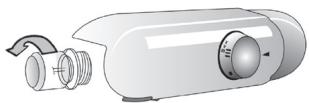
Uo6 BnIyUnTn lamny, BnKpyTiB ii npOTn rOunHHNKOBoi cTpiKN, JaN ce nok3aHo Ha pncuHky. 3aueKaJte 5 XBnInH, nepw HIX NOBtOPHO nIDKnIOHTn npCTpii.
-нласичнылamny(MaKcIMyM 25Вt)
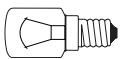
HlaacnHa lamna
a60
- CBITIOIDHm INHnKaTOp (3 TaKIMN JyHKUJMI) MOHHa pnpIb6aTN BnKlOuHO B LcHTpi TEXHiUHOi NiIqTPMKN KJIeHTIB.
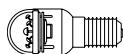
CbITIOIOHNI INHMATOP
Tn lamnn 2.
Якшо пилад оснацени СВITLOДIOДнИМ ИДИКАТОРам (як пOKаЗАН Ha рисунгу НИЧUE), якіnotpiбно 3amihnT, 3berhHtbcra B LeHTp TextiHoi NiIaTPMkn KJIeHTIB.
CbitIoDiHIni HnHaTOpN CnyHyOt bObWe, HiK 3BnuaHni lamn, 3a6e3neuToB KpaIe OCBITHeHH Ta He WKOJrTa HABKOLINHbOMy cepeOBnU.
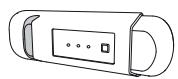
TemnepaTpya BCEpeDHHI BBIMKHYTORO BiDiJIeHNNcTaHOBnTB npi6JIn3Ho 0^
Uo6 yBIMKHTN BiDIIeHnHaTNCiTB KHOHny uTPMMyTe ii npOTaROM np6JIn3HO OndieCEkyHn, DOKn He 3aROpNTbCByIIOBIDHN CMBOL (INB. pncyHOK).
Пдсчeyн CMBOL yka3yBaTme Ha Te, ь ВдлileHЯ npaIoE. Lio6 BmKHyTN BIDIeHHN, NOBTOPO HATNCHTb KHOJNY uTPMMyTe II npOTaROM npi6JIIN3HO OdHiCi CEkyHn. Lio6 nobHcTb BmKHyTN BIDIeHHN, BNTaHrHt b KOHTeHep.
Iio6 biiinienHra Hyl rpaucib Ipaiaobalno HaJeHHM cHHom,peekohaiTeca,io:
-XOLOdInbHe BiDJIeHnB BBIMKHeHO;
- TEmnepaTpy BCTaHOBJIeHO BДIaIa3OHi BiД +2°C Do +6°C;
-KoHTeHepyBiiDJIeHHN‘HylbIpaDyciB'BCTaBHeHOHaJeHHM YINHOM;
-Функii «РeЖИМ OчИКУВАНь», «ОхолДжЕнHA BИМКHEHo» Ta «Пay3a» (3a HЯВHOCtI) BIMKHeHO.Якsoц Te TAK,ВNTЯгптБ i3 BiДиЕнHA BcI npOdyHTN.
PnmiTHa.
-Якwo nicra BBIMKHeHn BiДiJIeHnCmBON He aKTbYcBcR,pepeHOaTecr,ko KOnTeHep BCTabIeHo HaneJxHm YInOM.Якwo npO6IeMa He 3HnKHe,3BepHITbcB LcHTp TeXHiHoro 06cIyROByBaHHK kIieHTiB.
-Якwo BiДлileHЯ BBIMKHeHO,а KOHTeIHerp BiIDkpNTO,CmBOLHa NaHeJI KepyBaHHa MOKe ABTomatuHO BIMKHyTnCBy.BiH 3HOby aKTbYETbcra,山OH HO BN BCTabITE KOHTeHep.
- He3aJIeJHNO BiI CTaHy BiIJIeHHe MOKe LyHaTn Tnxn IyM. TaKe RaNlCe BBAJaEbCer HOpMaJIbHIM.
-Якwo BiДiIeHЯ He BnKOpNCTOByBaTImeTbCra, TempepaTy pBcepeDInHi hBoRo 3aJIeKaIThMe BiD 3araIbHOoi TempepaTyPi XoIoDINbHorO BiDIIeIeHry. Y TaKOMy BnPaIky Tyt peKOMeHIOBaHO 36epiratnФpykTи OBOUHa Na KHTaTTЯID, RaIyK, a6nyK, a6pNIKOC, MOPKBn, WnIHAty, caIaTy ToIO.
Baxlnbo! RaKIO B yBIMKHeHOMy BiDJIeHHI 36epiraIOTBcra IPOdyKTN 3 BnCOHM BMICTOM BOHN, Ha NOLINx MoKe yTBOPHOBatNCaR KOHDeHCAT. Y TAKOMY BnnaKn Ky FyHKuio NOTpiHo TmUacOBO BIMKHyTN.
Ykuo y BiDijIeHnR “HyIb IpraducB” NOTpi6HO NOKlaCTN npOdyKTn a60 KOHTeHepn HeBeJIkoR o3Mipy, 6yIbTe ObepeKHMn, OCKIbKN BOHN MOKyTb npOBaIITcR B OTBip MIX NOLIeEO Ta 3aHbOIO CTINHOO XOLOINbHOrO BiDIIeHnR.
BilnyeHnB ViDIIeHnH «HyIb rpaIyciB».
BnKoHaTe hBaDeHi HnJxue di.
- 506 cnpoctntn npoce BCnlyueHHB iDilneHH, peKOMeHIOBaHO 3BiIbHHTN (a6o HABITb 3HrTNIHxHII pO3TaUOBAHi Ha DBepzraTx.
-BIMKHiTb BiDiJIeHHe. - BintarHitb BiDileneHHra, TPOXn iDnHbwn Ioro BVropy.
-BitrrHtIb pIaCTnIOBOy nOIIuIcUo,po3TaIoOBaHy niD BiIDJIeHNHaM.
PpimrHa. BepxHIO pOJIuTO Ta 6iHi OOnOpn BInyUHTN HeMOJINBO.
IIO6 3HOBv BnKOpNCTOBvBaTn BiDIneHHeN H «HylrpaDycB», cNoaTHy oBepeJHo BCTaBTe 6iNy PnactIKoBy nOInu, Notim NOBepHiTb Ha Micce KOHTeHep, i TIlbKn NiCJIra CbOrO BMnKaIte fYHKciIO.
Ioo6 36iIbIuHTn Micce IJy 36epirAHn npOdyKTIB yXoIoIINbHOMy BiIJIeHNHi Ta 3MeHHTn pBeHb CNoIXBaHHN eJeKTPoeHeprII, peKOMeHIOBaHO BIMKHyTn BiIJIeHNH N HylrpaDycB" Ta BUNyHTn Ioro.
Yac bIy cacy ouHuaTe BHytpiHi CTiHKn BiDilneHHa Ta IHO KOMNoHEHTB, BHKOpNCOTByOuN m'ky TkaHHy Ta TeIy BoY 3 po3HHeHM y Hi HeItpaJIbHM MIOOHm 3aco6om. PAm'raTae, 6iLy pIaCTnKOBy POIInIO, PO3TaIoBaHny iD KOHTeHepOM, He MOxHa NobHicTIO 3aHypioBaTN y BoY. He 3acTOcobyte abpa3INBHI MnIOUti 3aco6n.
Iepw Hix ouhiatn BiDinHn (3oKpema Noro 3OBHIu qactnHy), Heo6xidHO BnlyuHTN KOHTHeP, o6 BiE'edHATn BiDinHn BiD dHepeLa eEnkTponoctaAHn.
LCHTP TEXHICHORO OBCJYROBYAHN KJIIEHTIB
Iepw HIX 3BepTaTnC B LcHtp TexHiyHoro 06cLyroByBaHHa, BHKoHaTe HaBeHei HnKHe iI.
BIMKHiTb i BBIMKHiTb npnla, 0o6 nepeBipNTu, nHe 3HnKla npo6Iema cama no co6i. JaKIO zuOro He CTaNoCRA, BIMKHiTb npnla i NOBTopiTb npoUepy upe3 rOHNy. RaKIO nicLa BIKHOAHHH dIi, ONiCAHNY noci6Hnky 3 HeNoLAdoK, a TAOK Nicla nepe3anycUp npnady BIn Yce oND npaioe HeHaJIeKNHM uINHom, 3BepHIbca B LcHTp TEXHNUHOrO 0bCnyROvBaHN H KlEHTIB, i UHTKO cΦOpMylIoTe CBOIO npo6IeMy. POBIDOMTe npaizIBNHy hAbeDeHy HnXue IHΦopMaizIO.
Tin HecnpabHocti.
- MoideJIb npuIaNy.
Tin i cepiHn Homep npuJaTy (Bka3aHo Ha Ta6nUzI 3 nacnpOTHMn DaHmN).
CepbicnHOMep (3a HaBbOcTi).CeHOMep yka3aHO nicIa CNoBa SERVICE(O6CLyTOBYAHHH)Ha Ta6IuCi 3NaocnpTHMn DaHmN,kyoP03TaWOBaHO BCEpeHi npICrPoIO.
SERVICE
0000 000 0000

PnmiHa.
Ira rapahtii He po3noBcOJHyeTbcHa nocnyry nepebiuYBaHHA DbepuT, RaHIO ue 3iInchOeTbcB U CHTpi TexHiHoro 06cnyroByBaHHa.
EAC


| DEUTSCH | Gebrauchsanweisung | Seite 4 |
| FRANÇAIS | Mode d'emploi | Page 10 |
| ITALIANO | Istruzioni per l'uso | Pagina 16 |
| NEDERLANDS | Gebruiksaanwijzing | Pagina 22 |
PRIMO UTILIZZO
Instructions for use
Fridge with freezer compartment
| DEUTSCH | Gebrauchsanweisung | Seite 4 |
| FRANÇAIS | Mode d'emploi | Page 10 |
| ENGLISH | Instructions | Page 16 |
| NEDERLANDS | Gebruiksaanwijzing | Pagina 22 |
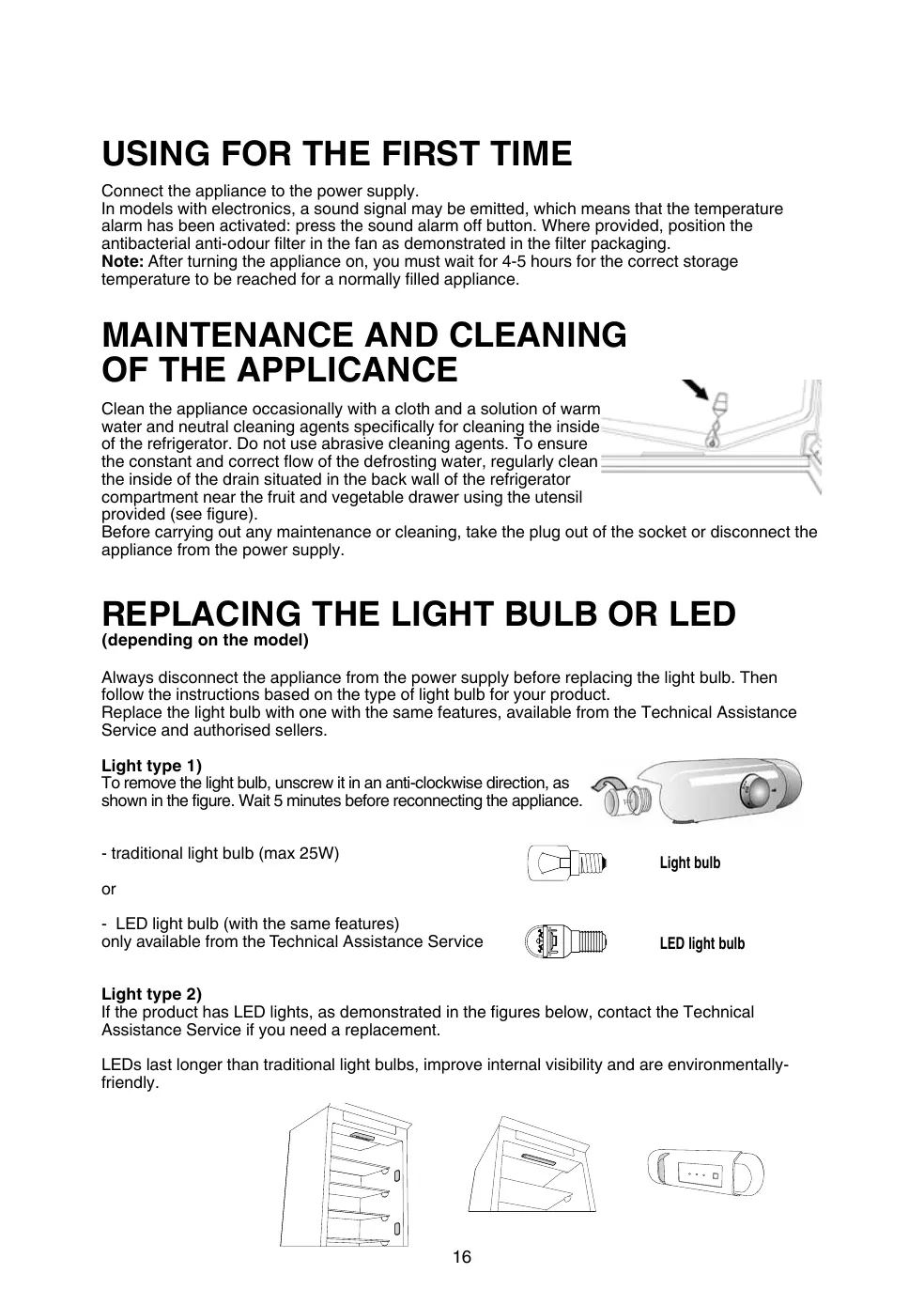
USING FOR THE FIRST TIME
Connect the appliance to the power supply.
In models with electronics, a sound signal may be emitted, which means that the temperature alarm has been activated: press the sound alarm off button. Where provided, position the antibacterial anti-odour filter in the fan as demonstrated in the filter packaging.
Note: After turning the appliance on, you must wait for 4-5 hours for the correct storage temperature to be reached for a normally filled appliance.
MAINTENANCE AND CLEANING OF THE APPLICANCE
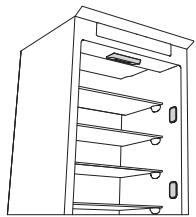
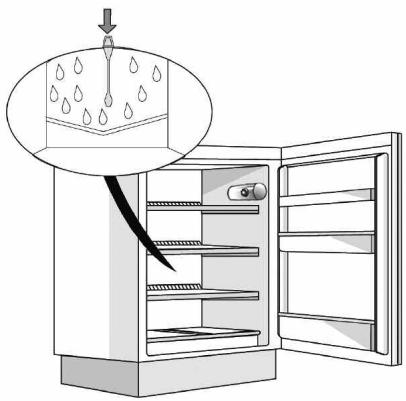
Clean the appliance occasionally with a cloth and a solution of warm water and neutral cleaning agents specifically for cleaning the inside of the refrigerator. Do not use abrasive cleaning agents. To ensure the constant and correct flow of the defrosting water, regularly clean the inside of the drain situated in the back wall of the refrigerator compartment near the fruit and vegetable drawer using the utensil provided (see figure).
Before carrying out any maintenance or cleaning, take the plug out of the socket or disconnect the appliance from the power supply.
REPLACING THE LIGHT BULB OR LED
(dependently on the model)
Always disconnect the appliance from the power supply before replacing the light bulb. Then follow the instructions based on the type of light bulb for your product.
Replace the light bulb with one with the same features, available from the Technical Assistance Service and authorised sellers.
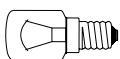
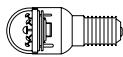
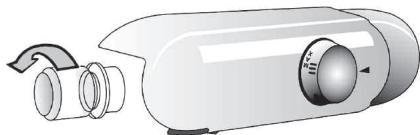
Light type 1)
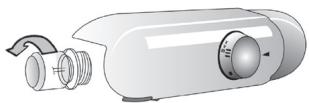
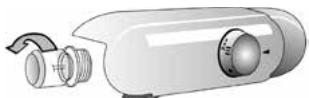
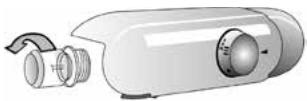
To remove the light bulb, unscrew it in an anti-clockwise direction, as shown in the figure. Wait 5 minutes before reconnecting the appliance.
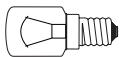
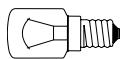
- traditional light bulb (max 25W)
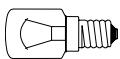
Light bulb
or
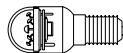
- LED light bulb (with the same features)
only available from the Technical Assistance Service
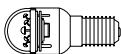
LED light bulb
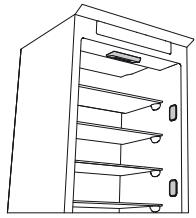
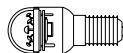
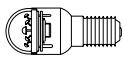
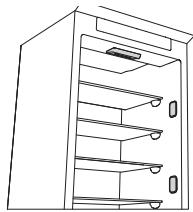
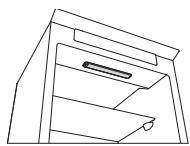
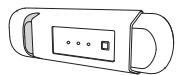
Light type 2)
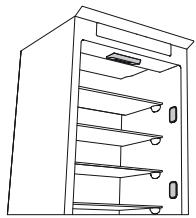
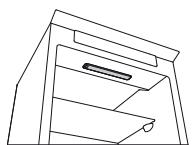
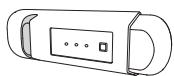
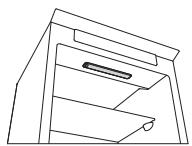
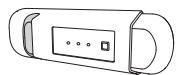
If the product has LED lights, as demonstrated in the figures below, contact the Technical Assistance Service if you need a replacement.
LEDs last longer than traditional light bulbs, improve internal visibility and are environmentally-friendly.
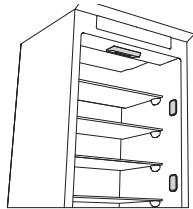
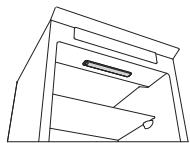
IN THE EVENT OF NON-USE OF THE APPLICANCE
Disconnect the appliance from the power supply, empty it, defrost it (if necessary) and clean it. Keep the doors slightly ajar to let air circulate inside the compartments. By doing this, you avoid the development of mould and bad odours.
IN THE EVENT OF AN INTERRUPTION TO THE POWER SUPPLY
Keep the doors closed so the food stays cold for as long as possible. Do not re-freeze food that has partially defrosted. If there is a prolonged power cut, the black out alarm may also activate (in products with electronics).
REFRIGERATOR COMPARTMENT
The refrigerator compartment allows for the storage of fresh food and drink.
The refrigerator compartment defrosts completely automatically.
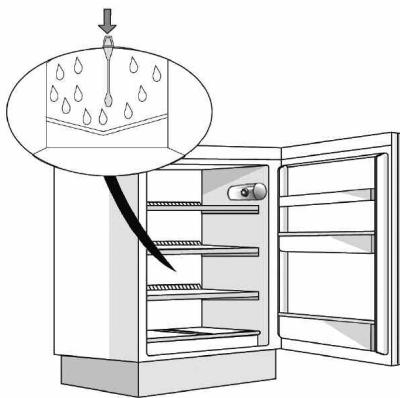
The occasional presence of drops of water on the internal back wall of the compartment is a sign of the automatic defrosting phase. The defrosting water is channelled into a drain and then collected in a container, where it evaporates.
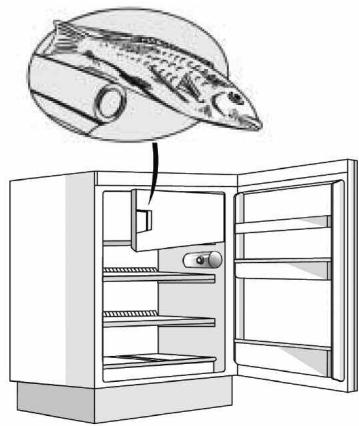
Depending on the model, the product may be equipped with a special "Zero Degrees" compartment, which is ideal for storing fresh meat and fish.
Warning: do not clean refrigerator accessories in a dishwasher.
Note: the ambient temperature, how often the doors are opened and the position of the appliance may affect the internal temperatures in the two compartments. Set the temperatures depending on these factors.
Note: in very humid conditions, condensation may form in the refrigerator compartment, especially on the glass shelves. In this case, it is recommended that you close containers with liquids in (e.g. a pot of stock), wrap up food with a high water content (e.g. vegetables) and turn on the fan, if there is one.
Removing the fruit and vegetable drawer (depending on the model)
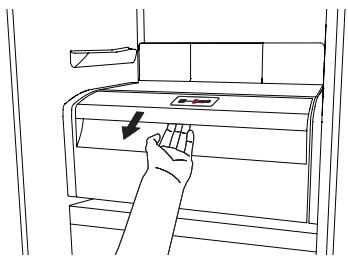
Pull the drawer outwards as far as it will go, lift it up and take it out.
To make it easier to remove the fruit and vegetable drawer, it may be necessary to empty (and possibly remove) the two lower door shelves and then continue to remove the drawer.
Fan and antibacterial anti-odour filter (depending on the model)
The fan allows for the even distribution of the temperatures inside the compartments and, consequently, better preservation of the food and reduction of excess humidity. Do not obstruct the ventilation area. The fan can be turned on/off manually (see the Quick Guide); if it is turned on, it operates automatically when necessary.
FREEZER COMPARTMENT
Model with separate freezer compartment
The freezer compartment x^** allows for the storage of frozen food (for the period indicated on the packaging) and the freezing of fresh food. The quantity of fresh food that can be frozen in 24 hours is written on the rating plate. Arrange the fresh food in the freezing area inside the freezer compartment (see Quick Guide), leaving enough space around the food packages to allow air to circulate freely. It is advisable that you do not re-freeze food that has partially defrosted. It is important to wrap the food in a way that prevents the ingress of water, humidity or condensation.
Making ice cubes
Fill 2/3 of the ice tray (if available) with water and put it back in the freezer compartment. Do not use sharp or pointed objects to remove the ice under any circumstances.
Removing the drawers (depending on the model)
Pull the drawers outwards as far as they will go, lift them up and remove them. To get more volume, the freezer compartment can be used without the drawers.
Make sure that the door is closed properly after putting the food back on the grilles/shelves.
Models with an internal product compartment
In the freezer compartment you can also freeze fresh food. The quantity of fresh food that can be frozen in 24 hours is written on the rating plate.
How to freeze fresh food:
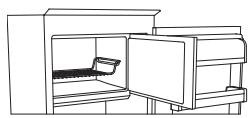
- arrange the food on the grille, if present (figure 1), or directly on the bottom of the compartment (figure 2)
- put the food in the middle of the compartment without it coming into contact with food that is already frozen, keeping a distance of about 20 mm (figure 1 and 2).
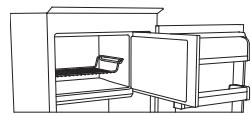
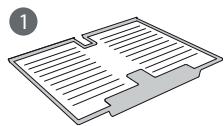
Figure 1
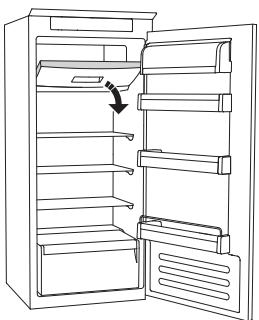
Figure 2
HOW TO DEFROST THE FREEZER COMPARTMENT
depending on the model)
For frost free models it is not necessary to carry out any defrosting procedures.
For other models, the build up of frost is a normal occurrence.
The quantity and speed of frost accumulation varies depending on the ambient conditions and how often the door is opened. It is advisable to set the temperature colder or, if available, turn on the quick freeze function (see Quick Guide) four hours before removing the food from the freezer compartment, to prolong the preservation of the food during the defrosting phase. To defrost, turn the appliance off and remove the drawers. Put the frozen food in a cool place. Leave the door open to allow the frost to melt. To prevent the water from escaping during the defrost, it is advised that you place an absorbent cloth on the bottom of the freezer compartment and wring it out regularly.
Clean the inside of the freezer compartment and dry it carefully.
Turn the appliance back on and put the food back inside.
STOP FROST SYSTEM (depending on the model)
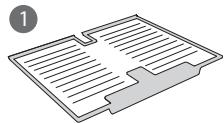
The STOP FROST SYSTEM (available depending on the model) facilitates the defrost procedure for the freezer compartment. The STOP FROST accessory (figure 1) is designed to collect some of the frost that forms in the freezer compartment and it is easy to remove and clean, therefore reducing the time needed to defrost the inside of the freezer compartment.
To remove the frost on the STOP FROST accessory follow the cleaning procedure demonstrated below.
PROCEDURE TO CLEAN THE STOP FROST ACCESSORY
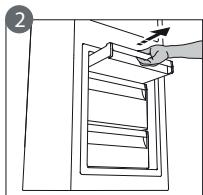
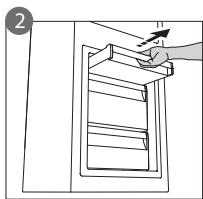
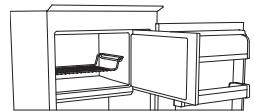
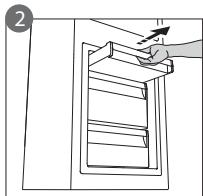
- Open the freezer compartment door and remove the upper drawer (figure 2).
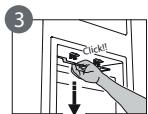
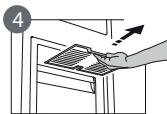
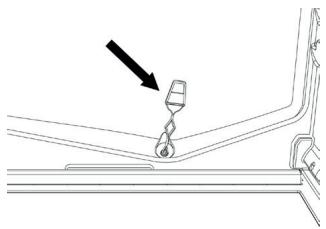
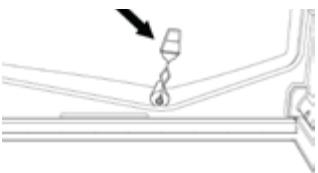
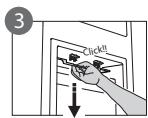
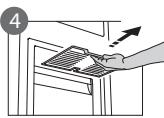
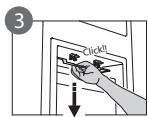
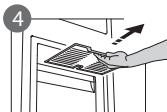
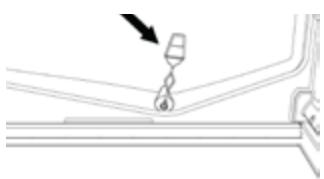
- Unfasten the STOP FROST accessory (figure 3) and remove it (figure 4), taking care not to drop it on the glass shelf below. Note: if the accessory is jammed or difficult to remove, do not keep trying to remove it, but proceed with the complete defrost of the freezer compartment.
- Close the door to the freezer compartment.
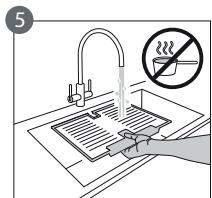
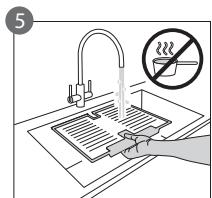
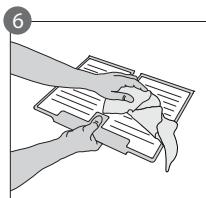
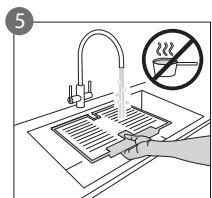
- Remove the frost on the accessory by rinsing it under running (not hot) water (figure 5).
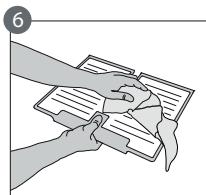
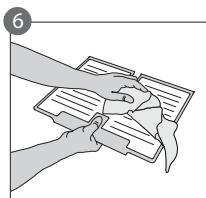
- Let the accessory drip dry and dry the plastic parts with a soft cloth.
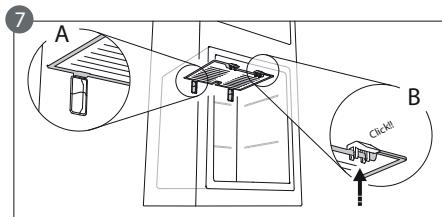
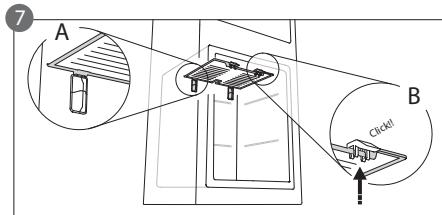
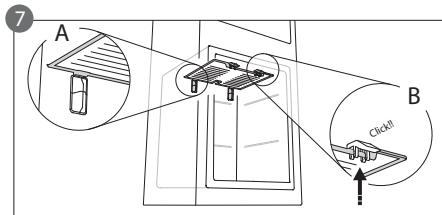
- Reinsert the accessory by placing the back part on the projections shown in figure 7-A, then refasten the handle of the accessory to the clasps above (figure 7-B).
- Reinsert the upper drawer and close the door to the freezer compartment.
It is possible to clean the STOP FROST accessory on its own without completely defrosting the freezer compartment. Cleaning the STOP FROST accessory regularly helps to reduce the need to completely defrost the freezer compartment.
Note: the product specifications, including volume and energy, are calculated without the STOP FROST accessory.
"ZERO DEGREES" COMPARTMENT
depending on the model)
The "Zero Degrees" compartment is specifically designed to maintain a low temperature and the correct humidity to preserve fresh food for longer (for example, meat, fish, fruits and winter vegetables).
Humidity control technology coupled with Activ0° provides the best food preservation when the food is not completely packed.
Turning on and turning off the compartment
The internal temperature of the compartment is approximately 0^ when the compartment is turned on.
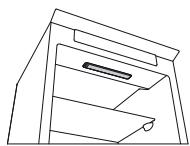
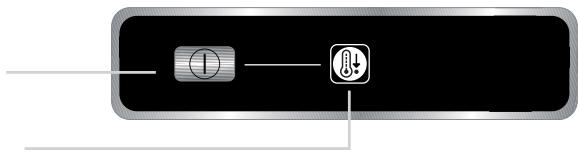
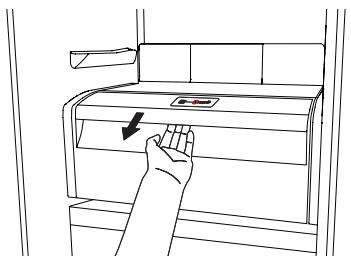
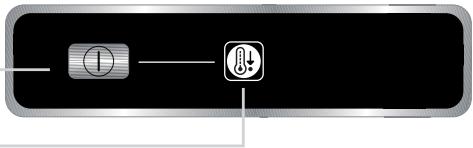
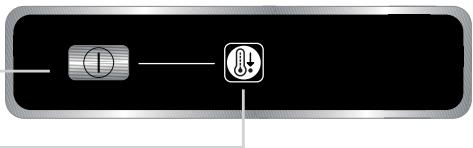
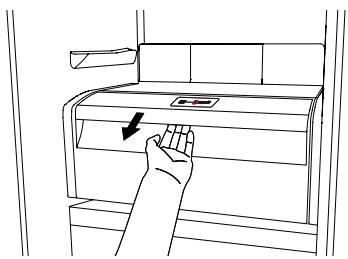
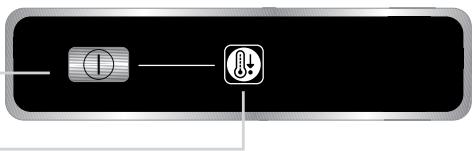
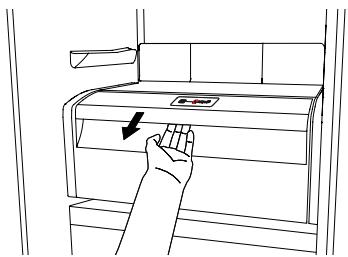
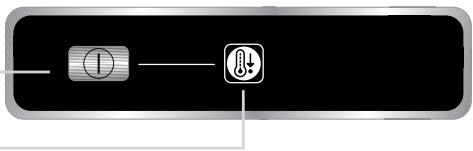
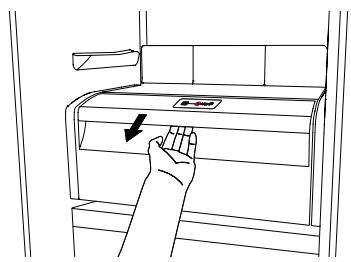
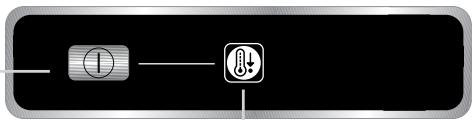
To turn on the compartment, press the button shown in the figure for more than one second until the symbol lights up.
The lit symbol means that the compartment is working. Press the button again for more than one second to turn off the compartment. To turn off the compartment completely, you must remove the drawer.
For the correct functioning of the "Zero Degrees" compartment, it is necessary that:
- the refrigerator compartment is turned on
- the temperature is between +2^ and +6^
- the drawer in the "Zero Degrees" compartment must be inserted for it to be turned on
- one of the following special functions is not selected: Stand-by, Cooling-Off, Vacation (if present), in this case, remove the food contained in it.
Note:
- if the symbol does not light up when you turn on the compartment, check that the drawer is properly inserted; if the problem persists contact the authorised Technical Assistance Service.
- if the compartment is turned on and the drawer is open, the symbol in the control panel may automatically turn off. The symbol will light up again when the drawer is inserted
- regardless of the state of the compartment, you may hear a faint noise, which you should consider as normal
- when the compartment is not in operation, the temperature inside it depends on the general temperature of the refrigerator compartment. In this case, it is advised that fruits and vegetables that are not sensitive to cold (berries, apples, apricots, carrots, spinach, lettuce, etc.) are stored in it.
Important: if the compartment is turned on and food with a high water content is present, condensation may form on the shelves. In this case, turn the function off temporarily.
Be careful when positioning food and containers that are small in size on the upper shelf of the "Zero Degrees" compartment in order to prevent them accidentally falling between the shelf and the back wall of the refrigerator compartment.
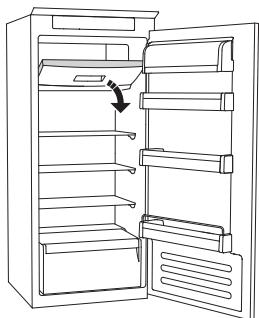
Removing the "Zero Degrees" compartment:
Carry out the following steps:
- to make it easier to remove the compartment, we recommend that you empty (and possibly remove) the lower door shelves
- turn off the compartment
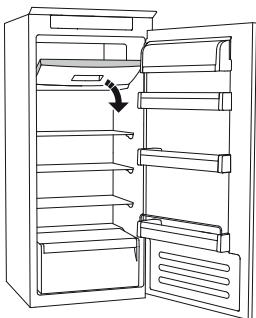
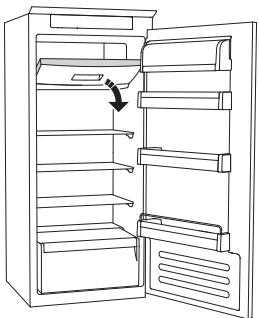
- remove the compartment by rotating it upwards
- remove the white plastic shelf under the compartment
Note: it is not possible to remove the upper shelf and side supports.
To use the "Zero Degrees" compartment again, carefully reposition the white plastic shelf under the compartment before inserting the drawer and turning the function back on.
To have a larger refrigerator volume and to reduce energy consumption, it is recommended that you turn off the "Zero Degrees" compartment and remove the compartment.
Clean the compartment and its components occasionally using a cloth and a solution of warm water (taking care not to submerge the white plastic shelf under the drawer) and neutral cleaning agents specifically for cleaning the inside of the refrigerator. Do not use abrasive cleaning agents.
Before cleaning the compartment (also externally) it is necessary to remove the drawer to disconnect the electrical supply for the compartment.
TECHNICAL ASSISTANCE SERVICE
Before contacting the Technical Assistance Service:
Restart the appliance to check if the problem has been solved. If not, disconnect the appliance again and repeat the procedure after one hour.
If, after having completed the checks listed in the guide for malfunctions and after restarting the appliance, your appliance continues to function incorrectly, contact the Technical Assistance Service, clearly describing the problem and stating:
-
the type of malfunction
the model -
the type and serial number of the appliance (written on the rating plate)
- the Service number (if available) (the number that is after the word SERVICE on the rating plate placed inside the appliance)
SERVICE 0000 000 00000

Note:
Reversing the doors of the appliance, if carried out by the Technical Assistance Service, is not considered as a warranty claim.
Nederland Home Product Service (ATAG)
Postbus 249
6920 AE Duiven
PROSTOR S NULOVOU TEPLOTOU
podle modelu)
JÄÄ PEATAMISE SÜSTEEM (soltuvalt madelist)
- Traditional paere (maks. 25 W)
Pare
eller
- LED-paere (med samme functiomer)
kan kun fas hos et servicecenter
Pare til LED-kontrollamper
Paeretype 2)
Kpyusha Ha lamnnuKhata
N
- CBeToIIOJHa KpyUHa Ha IaMnUHaTa (cBc CbUHTe XapaKTepnCTnK) HAnuHa cAm O Tdela 3a TexHuecka NOMOUs
CBeToDnOdHa KpyuHa Na IaMnHcKa
Jamnnuka Tn2)
Ako npodykTBt pa3noJara cBc CBeToNDHn lamnHKn, KaKTo e noka3aHo Ha nHygypaTa no-dOly, ce CBpKeTe C OTdela 3a TexHnuecka nOMoU, aKO CE HJKaTe OT pe3epBHa lamnHka.
CbeToIIOJOnTe I3dIbPjKAT NO-ДЛrIo OT cTaHApTnTe KpyuHKn Ha JAmnUChN, Ndo6pRaBt BIVIMOCCTa BvB BvTpEwHocCTTa n ca ekOJIOrnHocbO6pa3HN.
MoJIc BbTpewHO OTdIeHHe Ha npOdyKTa
B O t d e l e h n e t o H a p n 3 e p a M o j k e t e d a 3 a m p a 3 r B a t e n I p e c h n x p a h n. K o l i n u c t b o t o H a p n e c h n t e x p a h n, K o n t o M o r a t d a 6 b d a t 3 a m p a 3 e h n 3a 24 y a c a, e n o c o u e h o H a T a b e l h a t a C O s c h o b h n t e d a h h n.
Kan da 3ampa3BaTe IpecnxpaHn:
- noДрЕдTe xpaHHTe Ha cKaPaTa, ako e HaIuHna (ФИгура 1), ИлДиРЕКTHO B ДолнATAЧАТ ha OTДeLEHHeTо (ФИгура 2)
- NOCTaBeTe XpaHInTe B cEHTbPa Ha *OTdJIeHHeTo TaKa, Ye Da He BIn3aT B KOHTaKT C XpaHInTe, KOINTo Beue Ca 3aMpa3eHn, 3aNa3BaJn Pa3cToHnE O T OkO Io 20 mm (ФИгур n 1 n 2).
Фигура 1
Фигура 2
KAKДАОБE3СКРЕЖABATE OTДЕЛECHNETOHAФПЗЕР (ВзавсимоCTOTмдела)
3a moJeIte 6e 3ckpeH He e Hno6xOIMO da ce H3BpWBat npoceDpynte 3a o6e3ckpeHaBaHe.
3a pyn moe HATpynbAHeTo Ha cKpeH e HopMaJIHo.
KolnueCTBOTo nCKOpocTtHa HaTpynBaHe Ha CkpeB Bapnpa B 3aBncMOCT OKOLHnTe yCIOBnIy cheTOTATA Ha OTbapnHe Ha Bpata. IpenopbUba ce da HacTpOte TempepaTpaTa Ha no-HNcKa nI, aKe e HaJIuHa, da BkLIouHTe FyHKnraTa 3a 6bP30 3aMPa3raBaHe (BnKTE KPAhTO pKHOBOCTBO) YeTIpu Naca Ppei N3BaJdaNe Ha XpaHnTe OT DeJeHneTo H φpI3epa, 3a Da ce yIbJIHN 3ana3BaHETo Ha XpaHnTe NO BpeMe Ha FaaTaHa OBe3ckpeKabae. 3a Da oBe3ckpeKHTe, n3KlUoyete UpeA i N3BaTe Te YekmedJteTata. NocTabe To 3aMpa3eHnTe xpaHn Ha XlaJHo MRCTo. Octabe T Bpata OTBopeHa, 3a Da ce No3BoJIn pa3TONPaBaHeto Ha CkpeKa. 3a N36rBaHe Ha nIIm3aHTo Ha BOdATo nO BpeMe Ha ObE3ckpeKabAHeto Ce npenOpbVb Da nocTabe To abCop6eHTHa KbpNa B DOJIHaT a Yact Ha OTDeJeHnETo Ha φpI3epa N da JnI3CTNcKBaTe peoBHO.
IOnucTeTe BbtpeHooCTTa Ha OTdJIeHHeTo Ha pIn3epa I rO nOcCyueTe BnMaTeJHO.
BkhIOUeTe OTHOBO ypea I noCTaBeTe o6paTHo xpaHaTa BbTpe.
СИCTEMA 3A СПИРАЕ HAOBPA3YBAHETO HA CHPEЖ
(B 3aBnCHMOCT OT MOdeJa)
CNCCTEMATA 3A CπIPAAHE HA O5PA3YBAHETO HA CKPEK (налчна в 3abncmocT OT moidela) улесны поцетура на ho obe3ckpeжавае ho OTделенeto Ha Фпзер. AkcecoapbT CПИАСHA O5PA3YBAHETO HA CKPEK (фигура 1) e npoektpana 3a сьбиран ha чacT OT cpeka, които ceобразув в OTделенeto Ho Фпзер, и e lecese 3a OTсранявае И поисвае, C Koeto habaВ bpemeto, Heobxodmo 3a obe3ckpeжавае Ho BtpeшнocTT ha OTделенeto Ha Фпзер.
3a da otctpaHte cKpeHa oT aHcecoapa 3a CINPAHE HA O5PA3YBAHETO HA CKPEH, cIeBaIte npoecdypata 3a nouchtahe, nocoueha no-dolny.
ПОЦЕДУРА 3A ПОЧИСТВАНЕ HA AKCECOAPA 3A СПИРАНЕ HA OBPA3YBAHETO HA CHPEЖ
- OTBopete BpaTata Ha OTdelenHeTo Ha pIn3epa nI3BaTe TropHTo YekMedJe (Fmrypa 2).
- Pa3kaheTe aKcecoaapc CnIPAHE HA O5PA3YBAHETO HA CKPEH (fNpyra 3) n ro OtctpaHete (fNpyra 4), Kato BnIMBaTe da He ro n3nycheTe Bbpyx CTbHNeHn paAPT OTdOly. 3a6eJHKa: ako aKcecoapbTe b6loKnpaI nn Tpyden 3a OTCTpaHraBe, He npOdbJIhAbaTe Da ce ONTBaTe da Ro OTCTpaHnTe, a PpemHneTe KbM 3aBbPbSbAHe Ha o6e3ckpeJkBaHaTe Ho OTDeJeHHeTo Ha pfH3epa.
- 13aTbOpete BpaTaHa OTeJeHneTo Ha φprzepa.
- Otcpanhe TcpejA oT aKcecoapa, KaTo ro n3pIaKHe TOD TeuAa (Ho He ropeua) Boda (fHypa 5).
- Octabete aKcecoapa da ce otuei n noocyuwe Te PnactMacOBITE YACTN C MeKa Kbpna.
-MoHTnpaIte OTHOBO aKcecoapa, KaTO NOCTaBnTE 3aHaTAt YAcT Bbpyu N3daJeHnTe YacTN, NOKa3aHn Ha FInrpya 7-A, CNeIe KoeTo NOCTaBete OTHOBO DpBXkHaTa Ha aKcecoapa BbB FInKCaTOPHe OTRope (FInrpya 7-B).
-IOCTaBeTe OTHOBO RopHTo YeKMeIKe H 3aTBOpTe BpaTaTaHa OTdeIeHnETo Ha φpnsεpa.
MOnKeTe Da noUcTbATE cAmo aKceCoapa 3a CnIPAHE HA OBPA3YBAHETO HA CHPEH6e3 nbJHo 06e3ckpeKaBaHe Ha OTeJeHne HaФpI3epa.PeDobHOTo NOUcTbAHe Ha akceCoapa 3a
CINPAHE HA O5PA3YBAHETO HA CHPEH nomara 3a haMaJIyBaHe Ha Heo6xOIMOCCTTa OT IIJHO oBesckpeKabane Ha OTdelenHeTo Ha pns3epa.
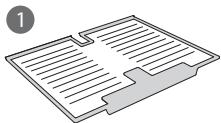
3a6eJekHa: CneuHkaunHe Ha npOdyKta, BkUoyTeHIO o6ema n eHeprnaTa, ca n3cneHn 6e3 aKcecoapa 3a CnIPAHE HA O5PA3YBAHETO HA CKPEHK.
OTDEJEHNE ,Hyla rpaYCA
(B 3aBnCmOcT OT MoDena)
OTdIeHHeTo, Hyla rpaUca" e CneuHaNo npOeKtnpAo 3a PnDbPkaHe Ha Hncka TempepaTpya N NOxOJaTa BlaXHoCT c cel 3ana3BaHe Ha npeChnTe XpaHn 3a No-DbIro BpeMe (Hanp. MeO, p6a, nIoDoBe u 3mMn 3eJeHuyn).
TexHOrnraTa 3a KOHTPOlnpaHe Ha BlaJHKoCTTa B CbYeTaHne cActiv0ocnrypBa Hn-Do6po 3ana3BaHe Ha XpaHnTe, KOraTo Te He ca HaNbIHO ONaKOBaHN.
BkIIOUbaHe n3KIIIOUbaHe Ha OTdeJeHHeTo
Bbtpeunha Te mnpaeta Ha otdeleheneto e okolo 0^ ,Korato otdeleheneto e Bkluoyeho.
3a da BHJIOUHTe OTdEJIeHHeTc, HATNCHETe 6yToHa, NOKa3aHn Ha fIgypata, 3a NOBeue OT eHa cekyHda, DOKaTO CmB0BJT CBEThe.
CBeTeuHT CmB0J NocOyBa, Ye OTDeIeHHeTo
pa6oTn. HATncHete 6byToHa OTHOBo 3a
noBueYe OT eJHa cEkyHda, 3a Da n3KJIouHte
OTDeIeHHeTo. 3a Da n3KJIouHte HApbJHo
OTDeIeHHeTo, Tp86Ba Da n3BaJnte
YekMeDxKeTo.
3a npabHnTo fynHcHOnHpaHe Ha OTdelenHeTo, Hyla rpaUca" e Heo6xOaMIMO:
- OTDélenéHnTo Ha XlaДиЛнИнka Да e BКлЮуЕНO
- Temnepaypata da e mejdy +2°C n +6°C
- YeKmEJHeTO BOTdIeHHeNoTo,Hyla rpaIyca" TpI6Ba Da e IocTaBeHO,3a Da Ce BHKIOU
- eHa OT cIeHNITe CneuHn HyHKun Da He e 36paHa: FOTOBHOCT, OxlanJaHe-N3Kn., BaKaHcna (aKo e HaUNH), B TO3N cIyua OTCpaHete xpaHaTa, HAMPaUca Ce bTpe.
3a6eJekHa:
- aKo CmBOLbT He CBETBa, KOraTo BkIIOUHTe OTdJIeHHeTO, IPOBepTe DaJIY YeKMeJKeTo e IpaBnIHo NOCTaBeHO; aKO npO6JIeMbT pODoBJIkaBA, ce CBbPKeTe C OTdela 3a TexNHyecKa NOMOu.
aKo OTdJIeHHeTo E BkIIOUeHO NueKMeJKeTo e OTOBpeHO, CmBOJbT Ha KOHTPOJIHnI NaHeI MoJe Da ce N3KJIouN aBTOMaTHuHO. CmBOJbT 1e CBETHe OTHOBo, KOraTo YekMeJKeTo Ce NoCTabN - He3aBNCIMMO OT CbCTOHNHeTO Ha OTdJIeHHeTo, MoJTe Da YyeTe Cna6 Uym, KoITo TpI6Ba Da ce npHema 3a HOpMaJIeH
- Korato OTdelenHeTo He paBoTn, TempepatpaTa B Hero 3abncn ot obuata Te mnpaTpya B OTdelenHeTo Ha XlaDInHnka. B To3n CnyaJc pe npenopbUba IIIOOBeTe n 3eJeHcyuIte, KOHTo He ca YyBCTBNTeHN KbM cTydeHO (dpe6hN be3KocTHNKOBn IIOOBe, JbIKn, KaCn, MOpKOBn, CnaHaK, MapyJI r T.H.), da ce CbXpaHraBaT B Hero.
BaxHo: aKo OTdJeHHeTo e BkIoueH O e HaJIuHa xpaHa c BnCOKO cbDbpKaHne Ha BOda, no paTOBte MoKe Da ce 6bpa3yBa KOHN3aun. B To3n CnyaH N3KIOUeTe FyHKUaTb BpeMeHHO. O6pbTaIte Oc0BeH BO HINMaHne, KOrATo NoCTaBte XpaH N KOHTeHepr C MaJbK pa3Mep Ha rOpHra paT ha OTdJeHHeTo "Hyla rpaDyca", 3a da npedOTbPaTHe CnyaHOTo IM NaDahe MeJdy paT Ta n 3aHaTa CTeHaTa Ha OTdJeHHeTo Ha XlaAnlHnka.
OtctpaHbAne Ha OTeJeHneTo „Hyla rpaDyca“:
I3nblHete cIeHNHTe C7bNk:
-3a da ce yuechno OTCTpaHraBaHeTo Ha OTdeJeHneTo, npenopbUbame da ro N3npa3HnTe (N BepoTHO DA OTCTpaHnTe)doJIHnTe paTOBe Ha BpataTa
-ИЗКПЮЧЕТОТДЕЛЕНЕТО
-OTCTpaHete OTdelenHeTe, KaTo rO 3aBbPTnTe HaRope
-OTCTpaHete6eJnIyIaTMacOBpaΦTnoIOTdJIeHHeNo
3a6eJekha: roHnIpaHT nCTpaHnHInTe NOIopn He MOra T da Ce OTcPaHbA.
3aДаИЗПОЛЗВATE OTHOBО OТДЕLEHNETO „Hyla rpaDyca“, NOCTaBeTe OБрАно БeлЯ ПlaCTмСоВ paФТ пОД OТДЕLEHNETo,праздЯ NaocTавITE YeKMeДжЕТО И DA BHLIOHTe NaK ФУнкцятA.
3a yBéIyUaBaHe Ha ObEma B xlaIINHnKa I HAmJIaBaHe Ha KOHCymaIra Ta Ha eHeprna Ce npenopbua Da n3KlOuHTe OTdeJeHneTO, Hyla rpaDyca" I da Ro OTCTpaHnte.
Почистваite пояжORA OTДеленец 和 HerobITE KOMNOHENTN, KaTO ИЗпольвate Кьрп и раТВОн НToTлБа ВODA (И объшайтЕ BHMamHe 3a ИЗбгВане Ha NOTANЯ He 6JIЯ ПЛСТМACOB paФТ ПОД.YeHMeJKeTo) 和 HeytralnNoPCHSTBaUПпeРаРТN, CNEцmaHIO ppeBVDENH 3a NOHCTBaHе H ВБТршноCTTa Na XlaДиLнИКа. He ИЗпOLьвITE abpa3INBHN NOHCTBaUПпeРаРТN.
IpeHn nouchBaHe na OTdeJeHHeTo (n OTbB) e Heo6xOJMo da OTcpaHnte YehMeJHeTo, 3a Da n3KIOUHTe 3axpaHbaHeto KbM OTdeJeHHeTo.
OTDEJI 3A TEXHnuecha NOMOUI
Ipei Da ce CbpxHe c OTeLa 3a texHnuecha NOMOu:
PecapTupaIte ypea, 3a da npOBepnte daJI npObIeMbT He ce pa3peuIN. Ako He e, n3HIOUHeTe OTHOBO ypea I NOBTOpeTe npOceDypaTa CLEd eEHN Yac.
Ako cIeI 3aBbPbBaHe Ha npOBepHnTe, nocOcEHn BpbKOBODCTBOTO 3a HnE3npaBHOCTn, n CJIe peCtApTnpaHe, ypeDbT npOdbJHKaba Da pa60THnEhpabNHO, ce CBpKeTe COTdela 3a TEXHnecha NOMoU, ONHWeTe np6bIema n nocOHTe:
BnDaHaHEn3npaBHOCTTa
MOneLa
- Tира n cepинma Homep ha ypeda (nocoyen Ha Ta6eJkata C OCHOBHNTe DaHn)
- cepBn3HnA HOpE (aKo e HaJIuYeH) (nOcoyeH cIeI dymata „SERVICE"HaTa6bEnkata C OCHOBnHTe DaHH, NocTabeHa BbTpE Bypeda)
SERVICE 00000000000

3a6eJekha:
PebepcnpaHTo Ha BpAHTe Ha ypeHa, aHO ce n3BbPbWA ot OTdela 3a Texnuecha nOMoU, He ce cHTa 3a HcN no rapaHuaTa.
| Българсн | Инструкции за у鞘тpeба | Станица 4 |
| HRVAT | Uputama za uporabu | Stranica 10 |
| ROMÁNă | Instruktiuni de/utilizare | Pagina 16 |
| SRPSKI | Uputstvo za upotrebu | Strana 22 |
PRVA UPORABA
- odjeljak hladnjaka treba biti ukljuchen
- temperatura je izmedu +2°C i +6°C
- ladica u odjeljku "Nula stipnjeva" treba biti umetnuta kako bi se omogucilo uklučivanje
-不同程度 of the relationship between the two types of oedema is unknown.
-不同程度 of the relationship between the two types of oedema is unknown.
-不同程度 of the relationship between the two types of oedema is unknown.
-不同程度 of the relationship between the two types of oedema is unknown.
-不同程度 of the relationship between the two types of oedema is unknown.
-不同程度 of the relationship between the two types of oedema is unknown.
-不同程度 of the relationship between the two types of oedema is not known.
-不同程度 of the relationship between the two types of oedema is not known.
-不同程度 of the relationship between the two types of oedema is not known.
-不同程度 of the relationship between the two types of oedema is not known.
-不同程度 of the relationship between the two types of oedema is not known.
-不同程度 of the relationship between the two types of oedema is not known.
-不同程度 of the relationship between the oedema and oedema is unknown.
-不同程度 of the oedema and oedema is unknown.
-不同程度 of the oedema and oedema is unknown.
-不同程度 of the oedema and oedema is unknown.
-不同程度 of the oedema and oedema is unknown.
-不同程度 of the oedema and oedema is unknown.
-不同程度 of the oedema and oedema is unknown.
-不同程度 of the oedema and oedema is not known.
-不同程度 of the oedema and oedema is not known.
-不同程度 of the oedema and oedema is not known.
-不同程度 of the oedema and oedema is not known.
-不同程度 of the oedema and oedema is not known.
-不同程度 of the oedema and oedema is not known.
-不同程度 of the oedema and oedema is not known.
-某种程度 of the oedema and oedema is unknown.
-某种程度 of the oedema and oedema is not known.
-某种程度 of the oedema and oedema is not known.
-某种程度 of the oedema and oedema is not known.
-某种程度 of the oedema and oedema is not known.
-某种程度 of the oedema and oedema is not known.
Napomena:
Izvr'site ove korake:
Modelele cu compartment intern
a a a a a a a a a a a a a a a a a a a a a a a a
a a a a a a a a a a a a a a a a a a a a a a a a a a a a a a
a 100
aaii g jieil
jaiy galiallge jilg jlaaag aabaaiaiy baii kui jiall aybiy pa
ayalll aybiill algoaiai y. jalldn no aaiill aybiy jao aiiaai laiial
glall jajll aybiyy pa, gauo and aaiia i kui yjll all jgcuiill eall qaii jaiai
ciuaiy gaii yaiy gaii yaiy gaii (jaiy) jaiy
j j j j j j j j j j j j j j j j j j j j j j j j j j j j j j j j j j j j j j j j j
aill
(LED)
(1)
a aal 1 g j 11 11 11 11 11 11 11 11 11 11 11 11 11
a a a a a a a a a a a a a a a a a a a a a a a a a a a a a a
(1) = 0. C_4^2
Jus 15 aal w jac 4s jol uas oolj y lss g Joc
jlll lssj sle! jslgol o jzil lslill
Caaal
()0
g
(LED)
()(LED)
aill xlll aia jra yjg
(204
I 1 (LED)
Jullll
Aa y aiaaa aiaaa aiaaa aiaaa aiaaa aiaaa aiaaa aiaaa aiaaa aiaaa aiaaa aiaaa aiaaa aiaaa aiaaa aiaaa aiaaa aiaaa aiaaa aiaaa aiaaa aiaaa aiaaa aiaaa aiaaa aiaaa aiaaa aiaaa aiaaa aiaaa aiaaa aiaaa aiaaa aiaaa
jglal pdlilp 1
g j 10000000000000000000000000000000000000000000000000000000000000
aIbI Juae Ibaia Jla
j 11 j 11 11 11 11 11 11 11 11 11 11 11 11 11 11 11 11 11 11 11 11 11 11
J
a jlll llllll lllllll
J
a a a a a a a a a a a a a a a a a a a a a a a a a a a
a
a a a a a a a a a a a a a a a a a a a a a a a a a a a a
julallllue g aull lcllaa yy
aaii iiaii aiee
Jal gall o 8
aall o 100 100 100 100 100 100 100 100 100 100 100 100 100 100 100 100 100 100 100 100 100 100 100 100 100 10
1a jzj 1
(gall)glgssllgagslllj
aannn nnnn nn nnnn nnnn nnnn nnnn nnnn nnnn nnnn nnnn nnnn nnnn nnnn nnnn nnnn nnnn nnnn nnnn nnnn nnnn nnnn nnnn nnnn nnnn nnnn nnnn nnnn nnnn nnnn nnnn nnnn nnnn nnnn nnnn nnnn nnnn
a (s) (n) (n) (n) (n) (n) (n) (n) (n) (n) (n) (n) (n) (n)
c( 1,2) .d( 1,2)
(1)
a a a a a a a a a a a a a a a a a a a a a a a a a a a a a a a a a
ie yaii jaiy i jia (jg) g jy jay jay jay jay jay jay jay jay jay jay jay jay jay jay jay jay jay jay jay jay jay jay jay jay jay jay jay jay jay jay jay jay jay jay jay jay jay jay jay jay
.
plabll aag g jilall palaal yg (cilll alg dss ssi oial) dlall plebll n jzj 1 1 1 1 1 1 1 1 1 1 1 1 1 1 1 1 1 1 1 1 1 1 1 1 1 1 1 1 1 1 1 1 1 1 1 1 1 1 1 1 1 1 1 1 1 1 1 1 1 1 0
Cill Cilcsu
I a 1
中
()
J 1
1
iJ 1
J
plabll plabll p 1
jlll
:jblplabla
Jai (1) 1234567890123456789012345678901234567890123456789012345678901234567890123456789012345678901234567890123456789
1 1
(1) ( x,y) = ( ab,52a) 的最小值.
1
(1)
e 1
i 1
a a a a a a a a a a a a a a a a a a a a a a a a
STOP
FROST
STOP FROST
aalbll pals ciall cialg
"aaee
(jg)
a 1 a 1 1 1 1 1 1 1 1 1 1 1 1 1 1 1 1 1 1 1 1 1 1 1 1 1 1 1 1 1 1 1 1 1
JauaIActiv0° aasaaasaaasaaasaaasaaasaaasaaasaaasaaasaaasaaasaaasaaasaaasaaasaaasaaasaaasaaasaaasaaasaaasaaasaaasaaasaaasaaasaaasaaasaaasaaasaaasaaasaaasaaasaaasaaasaaasaaasaaasaaasaaasaaasaa
L
jss
j5y jll jll jll bcll o jll jll jll g dal
jll bc bclal .o yall jlll gai lll jlll jlll jlll jlll jlll jlll jlll jlll jlll jlll jlll jlll jlll jlll jlll jlll jlll jlll jlll jlll jlll jlll jlll jlll jlll jlll jlll jlll jlll jlll jlll jlll jlll jlll
a a a a a a a a a a a a a a a a a a a a a a a a
i-
g 1 + y n nn nnnn nn nnnn nn nnnn nn nnnn nn nnnn nn nnnn nn nnnn nn nnnn nn nnnn nn nnnn nn nnnn nn nnnn nn nnnn nn nnnn nn nnnn nn nnnn nn nnnn nn nnnn nn nnnn nn nnnn nn nnnn nn nnnn nn nnnn nn nnnn nn nnnn nn nnnnn nn nnnn nn nnnn nn nnnn nn nnnn nn nnnn nn nnnn nn nnnn nn nnnn nn nnnn nn nnnn nn nnnn nn nnnn nn nnnn nn nnnn nn nnnn nn
Jlll 1
(Jall) Vacation 日 (Jill) Cooling-Off. (Jill) Stand-by: 1234567890123456789012345678901234567890123456789012345678901234567890123456789012345678901234567890123456789
4k > 3l
a a a a a a a a a a a a a a a a a a a a a a a a a a
AALL
a 1
a 1
"“i"
aillll lglalld iit
a j 1 1 1 1 1 1 1 1 1 1 1 1 1 1 1 1 1 1 1
0
e 11
0 1
Aaalal laleall g jell all j jSak y: akdo
J 1
aalll aiee e aeae eae eae eae eae eae eae eae eae eae eae eae eae eae eae eae eae eae eae eae eae eae eae eae eae eae eae eae eae eae eae eae eae eae eae eae eae eae eae eae eae eae eae eae eae eae eae eae eae eae eae ee
5.
aai iiei ieiiei a
(ajll a jgdl) glldll gjglg jglg 1 (jglg jglg) (jglg) SERVICE
SERVICE 0000 000 00000

4k > 3l
Jd n aai jalal y
Aidl oelal A
aaii oolal a jy jlll j 111 111 111 111 111 111 111 111 111
S = S
j 1 j 1 j 1 j 1 j 1 j 1 j 1 j 1 j 1 j 1 j 1 j 1 j 1 j 1 j 1 j 1 j 1 j 1 j 1 j 1 j 1 j 1 j 1 j 1 j 1 j 1 j 1 j 1 j 1 j 1 j 1 j 1 j 1 j 1 j
gge jclj 4jll scllal jgsj jgl
Instructions for use
Switching on the appliance
- Plug in the appliance
- When the appliance is plugged in, it is normally factory set to a temperature of 5^ .
Adjusting the temperature
For temperature adjustment, see the enclosed product sheet.
Note:
Ambient air temperature, the frequency of door opening, the introduction of hot food and unsuitable appliance positioning can all affect the internal temperature of the refrigerator, which may differ from that shown on the display.
Storing food the refrigerator compartment:
Cover food to prevent it drying out
- The distance between the shelves and the rear wall inside the refrigerator ensures the free circulation of air
- Do not place food in direct contact with the rear wall of the refrigerator compartment
- Do not place hot food in the refrigerator
- Store liquids in closed containers
Important:
Storing vegetables with a high water content can cause condensation to form on the glass shelves; this will not affect the correct operation of the appliance.
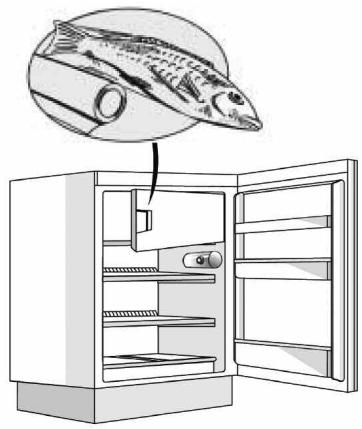
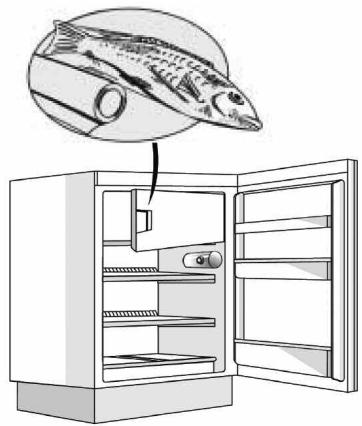
MEAT & FISH BOX (depending on model)
The Meat & Fish box was designed specially to keep foods fresher for longer, without altering nutritional values or original freshness. Do not store fruit or vegetables in this box, as the temperature may drop below 0^ , causing water contained in the food to freeze.
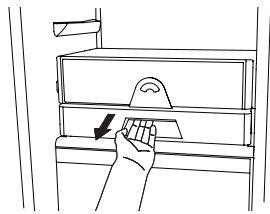
Temperature Adjustment
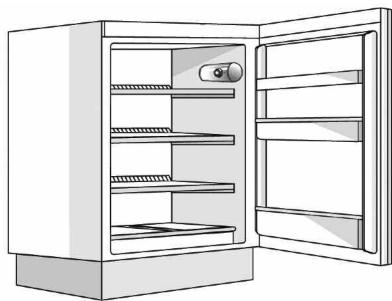
The temperature inside the Meat & Fish box is indicated by the position of the arm on the door of the box, and depends on the general temperature of the refrigerator compartment.
We recommend setting the temperature of the refrigerator compartment between +2^ and +6^ . To work out if the temperature inside the Meat & Fish box is correct, refer to the pictures below:
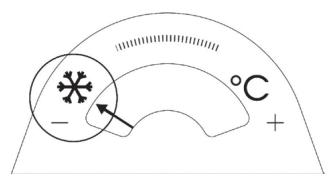
When the arm points to the left, you need to raise the temperature in the refrigerator compartment.
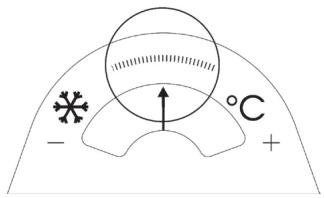
When the arm is in the middle, the temperature is ok.
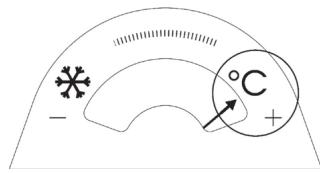
When the arm points to the right, you need to lower the temperature in the refrigerator compartment.
Important: when the function is activated and foods with a high water content are present, condensation may form on the shelves. In this case, disable the function temporarily.
Removing the Meat & Fish compartment:
To ensure correct operation of the product, adequate preservation of food and to optimise energy consumption, it is advisable not to remove the Meat & Fish compartment if the symbol (see Quick Guide) is not present on the control panel. In all other cases, the Meat & Fish compartment can be removed to obtain more space inside the refrigerator.
Proceed as follows:
- Remove the compartment drawer (Figure 1).
- Remove the drawer cover by releasing the bottom side clips (Figure 2).
To reinstate the Meat & Fish compartment, make sure to refit the drawer cover before inserting the drawer and reactivating operation.
- Press the "Meat & Fish compartment function" button on the control panel for 3 seconds, until the yellow indicator goes off.
To optimise energy consumption, it is advisable to deactivate the Meat & Fish compartment and remove its components (except the shelf above the crisper drawers).
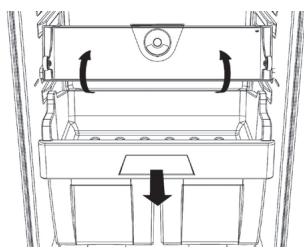
Fig. 1
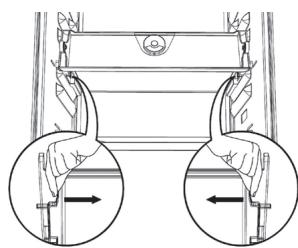
Fig. 2
"ZERO DEGREES" BOX (depending on the model)
The "Zero Degrees" box is specifically designed to maintain a low temperature and a suitable humidity level, in order to keep foods fresher for longer (e.g. meat, fish, fruit and winter vegetables).
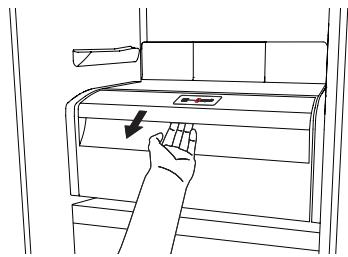
Activating and deactivating the box
The temperature inside the box, when active, is approximately 0^ .
To activate the compartment, press the button shown in the figure for more than 1 second, until the symbol lights up
The symbol lit indicates that the compartment is functioning. Press the button again for more than 1 second to deactivate the compartment
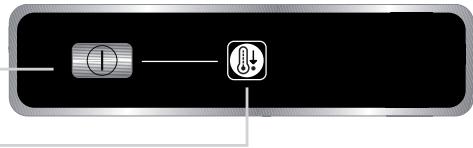
The following factors are vital for the "Zero Degrees" box to work properly:
- the refrigerator compartment must be switched on
- the temperature of the refrigerator compartment must be between +2^ and +6^
- the box must be inserted to enable activation
- no special functions must have been selected (Standby, Cooling-Off, Vacation – where applicable).
If one of these special functions has been selected, the "Zero Degrees" box must be deactivated manually, and any fresh food inside it removed. If manual deactivation does not take place, the box will be deactivated automatically after 8 hours.
Note:
- if the symbol does not light up when the box is activated, check that the box is properly inserted; if the problem persists, contact your nearest authorized After-sales Service
- if the box is active and the drawer open, the symbol on the control panel may be deactivated automatically. If the drawer is inserted, the symbol will become active again
- irrespective of the state of the box, a slight noise may be heard: this is normal and is not a cause for concern.
- when the box is not active, the temperature inside it depends on the general temperature inside the refrigerator compartment. In this case, we recommend it is used to store fruit and vegetables which are not sensitive to cold temperatures (fruits of the forest, apples, apricots, carrots, spinach, lettuce, etc.).
Important: If the function is activated and food with high water content is present, condensate may form on the shelves. In this case, temporarily deactivate the function.
When placing small containers and food products on the top shelf of the "zero degrees" compartment, make sure they do not accidentally fall between the drawer and the back of the refrigerator compartment.
Removing the "Zero Degrees" box:
The "Zero Degrees" box can be removed to create more space inside the refrigerator. In this case proceed as follows:
- to facilitate removal, we recommend emptying (and if necessary, removing) the two lower door trays
- switch off the box
- pull out the drawer and the white plastic shelf underneath the box.
Note: the upper shelf and the side supports cannot be removed.
To restore "Zero Degrees" box operation, make sure you replace the white plastic shelf underneath the box before inserting the drawer and reactivating the function. To optimise energy consumption, we recommend you deactivate the "Zero Degrees" box and remove it.
Clean the box and all its parts regularly, using a cloth and a solution of warm water and neutral detergent specifically formulated for refrigerator interiors (take care not to immerse the white plastic shelf underneath the box in water).
Before cleaning the box (including the outside), remove the drawer so as to disconnect the box from the electricity supply.
Never use abrasive detergents.
HOW TO USE THE FREEZER COMPARTMENT (if present)
The freezer compartment can also be used for freezing fresh food. The quantity of fresh food that can be frozen in 24 hours is shown on the rating plate.
Freezing fresh food
- The recommended position for fresh food is that indicated in Fig. 1, if a wire shelf is present, or that in Fig. 2 for models with no wire shelf.
- Place food in the middle of the compartment, * making sure it does not touch already frozen food, but is placed at a distance of approx. 20 mm (fig. 1 and 2).
The table alongside shows the recommended maximum storage time for frozen fresh foods.
When purchasing frozen food products:
- Make sure the packaging is not damaged, since the product quality may have deteriorated. If the package is swollen or has damp patches, it may not have been stored under optimal conditions and defrosting may have already begun.
- When shopping, leave frozen food purchases until last and transport the products in a thermally insulated cool bag.
- Place the items in the compartment as soon as you get home.
- If food has defrosted even partially, do not re-freeze it. Consume within 24 hours.
- Avoid, or reduce temperature variations to the minimum. Respect the best-before date on the package.
Always follow the storage instructions on the frozen food packages.
Making ice cubes
- Fill the ice cube tray 2/3 full and place it in the compartment .
- Do not use sharp or pointed instruments to detach the tray if it is stuck to the bottom of the compartment.
- Bend the ice tray slightly to remove the cubes.

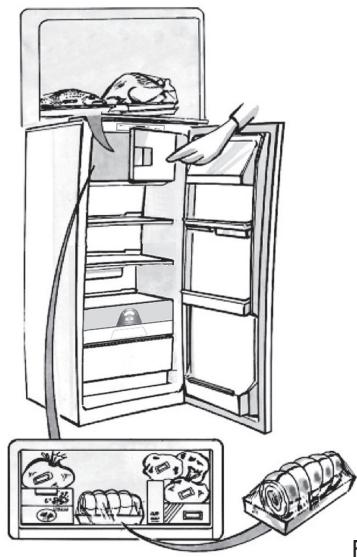
Fig. 1
Fig. 2
| 1-3 | |||
| 4-7 | |||
| 8-12 |
HOW TO DEFROST THE APPLIANCE
Before defrosting the appliance, unplug it or switch off the power at the mains. Defrosting of the refrigerator compartment is completely automatic. Droplets of water on the rear wall of the refrigerator compartment indicate that the periodic automatic defrost cycle is in progress. The defrost water is automatically routed to a drain outlet and into a container from which it evaporates.
Clean the defrost water drain outlet regularly using the tool supplied with the appliance in order to ensure defrost water is removed correctly. (Fig. 1)
Defrosting the compartment (if present)
Defrost the × × × compartment once or twice a year or when ice formation is excessive. It is perfectly normal for ice to form. The amount of ice which forms and the rate at which it accumulates will vary depending on ambient conditions and the frequency with which the freezer door is opened. Ice formation is concentrated at the top of the compartment and does not affect the efficiency of the appliance.
If possible, defrost the freezer when it is nearly empty.
- Remove the food from the freezer compartment and group together in a cool place or in a cool bag.
- Leave the door open to allow the frost to melt.
- Clean the interior of the freezer with a sponge and warm water and/or neutral detergent. Do not use abrasive substances.
- Rinse the interior and dry thoroughly.
- Put the food back into the freezer.
- Close the door.
Plug the appliance back in and switch on, following the instructions in chapter "How to operate the refrigerator compartment". The settings and selections made prior to switching off will be restored.
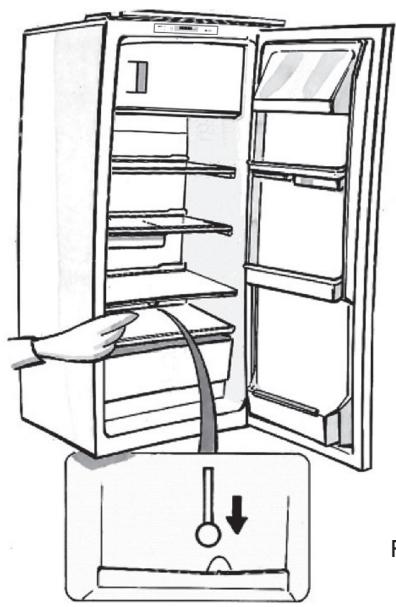
Fig. 1
CLEANING AND MAINTENANCE
Before any cleaning or maintenance operation, unplug the appliance from the mains or disconnect the electrical power supply.
- Clean the inside of the refrigerator compartment periodically with a sponge dampened in warm water and/or neutral detergent. Rinse and dry with a soft cloth. Do not use abrasive products.
- The separators must not be washed in water but simply cleaned with a damp sponge.
- Clean the inside of the freezer compartment when defrosting.
- Clean the air vents and condenser at the rear of the appliance regularly with a vacuum cleaner or brush.
- Clean the outside with a damp cloth. Do not use abrasive products, scourers, stain-removers (e.g. thrichlorethylene acetone) or vinegar.
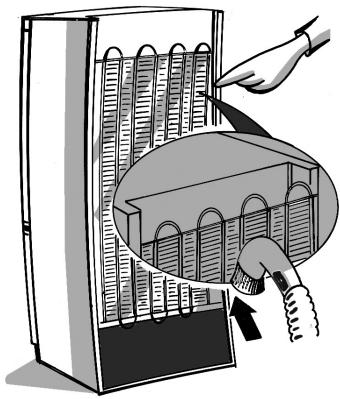
Prolonged disuse
- Empty the refrigerator.
- Disconnect the appliance from the mains power supply.
- Defrost and clean the interior.
- In the event of prolonged disuse, leave the appliance door open to prevent mould, odours and oxidation from forming.
-
Clean the appliance.
-
Clean the inside of the low temperature compartment (where present) when defrosting.
- Clean the inside of the refrigerator compartment periodically with a sponge dampened in warm water and/or neutral detergent. Rinse and dry with a soft cloth. Do not use abrasive products.
AFTER-SALES SERVICE
Before contacting the After-Sales Service:
- See if you can solve the problem yourself with the help of the Trouble-shooting guide.
- Switch the appliance off and then on again to check if the problem has been eliminated. If it has not, switch off the appliance again and repeat the operation after one hour.
- If the problem persists after this course of action, contact After-sales Service.
Specify:
the type of fault
the appliance model
- The Service number (the number after the word SERVICE on the rating plate inside the appliance)
- Your full address
- Your telephone number and area code
SERVICE
0000 000 00000

Note:
The direction of door opening can be changed. If this operation is performed by After-sales Service it is not covered by the warranty.
INSTALLATION
-
Install the appliance away from heat sources. Installation in a hot environment, direct exposure to the sun or installation near heat sources (heaters, radiators, cookers) will increase power consumption and should therefore be avoided.
-
If this is not possible, the following minimum distances must be respected:
-
30~cm from coal or paraffin stoves;
-3 cm from electric and/or gas stoves. -
Fit the spacers (if supplied) on the rear of the condenser positioned at the back of the appliance.
-
Install the appliance in a dry, well-ventilated place, and ensure it is level, using the front adjustment feet if necessary.
Clean the interior. -
Fit the accessories.
-
Regulations require that the appliance be earthed. The manufacturer declines all liability for injury to persons or animals and for damage to property resulting from failure to observe the above procedures and reminders.
- If the plug and socket are not of the same type, have the socket replaced by a qualified electrician.
- Do not use extension leads or adapters.
Disconnecting the appliance
It must be possible to disconnect the appliance by unplugging it or by means of a two-pole switch fitted upline of the socket.
Electrical connection
- Electrical connections must be made in accordance with local regulations.
- Voltage and power consumption are indicated on the rating plate inside the appliance.
ELECTRICAL CONNECTION FOR GREAT BRITAIN AND IRELAND ONLY
Warning - this appliance must be earthed
Fuse replacement
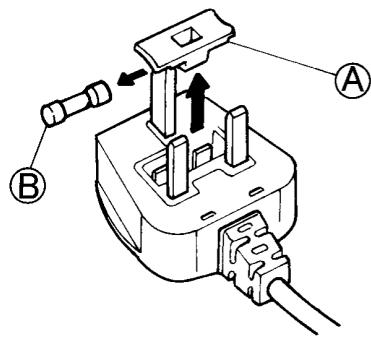
If the mains lead of this appliance is fitted with a BS 1363A 13amp fused plug, to change a fuse in this type of plug use an A.S.T.A. approved fuse to BS 1362 type and proceed as follows:
- Remove the fuse cover (A) and fuse (B).
- Fit replacement 13A fuse into fuse cover.
- Refit both into plug.
Important:
The fuse cover must be refitted when changing a fuse and if the fuse cover is lost the plug must not be used until a correct replacement is fitted.
Correct replacement are identified by the colour insert or the colour embossed in words on the base of the plug.
Replacement fuse covers are available from your local electrical store.
For the Republic of Ireland only
The information given in respect of Great Britain will frequently apply, but a third type of plug and socket is also used, the 2-pin, side earth type.
Socket outlet / plug (valid for both countries)
If the fitted plug is not suitable for your socket outlet, please contact After-sales Service for further instruction.
Please do not attempt to change plug yourself. This procedure needs to be carried out by a qualified technician in compliance with the manufactures instructions and current standard safety regulations.
COMMENT FAIRE FONCTIONNER LE COMPARTIMENT RÉFRIGÉRATEUR
ΘΑΛAMΟΣ KPEATΩN & ΨΑΡΙΩN
(ava loya to oovrElo)
AVRIMING AV APPARATET
RENGJØRING OG VEDLIKEHOLD
Temperaturregulating
Regulating af temperature
A. Chladiaci priestor
- Zásvúká na ovocie a zeleninu
- Police / Priestor's policami
- Ovladaci gombik termostatu a vypinač svetla
- Priehradky vo dverach
- Polica na flase
- Vyberatel'ný držiak na fl'ase
- Vyrobný štítok (na boku zásuvky na ovoce a zeleninu)
- Nadoba na l'adove kocky
- Dvierka priestoru s nízkou teplotou
B. Priestors nizkou teplotou, ak je označenie

Najchladnejśia zona

B. Hn3kOTemnpaTyphoe otJeHene (Pn nHaNn)

3oHa hain6bIeOxoJIoJa

3ona haHnmeHbIeRo xoIOna
IpmeaHn: Hcno nOkoN TnnpHaJNeXHOCTe MoKTe MeHrTbCBA3BNCUMOCTn OT moJeN.BcepeWtKn, DBePHeIe N BHyTpEHnE noKnKyBnIOYTCbEMhblm.
Baxho: PpinaJdxHxOCTn XoIoJNbHnKa HeIb3aMbITb B NocydomoeHuM MaunHe.
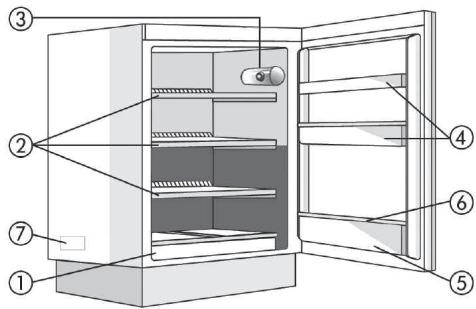
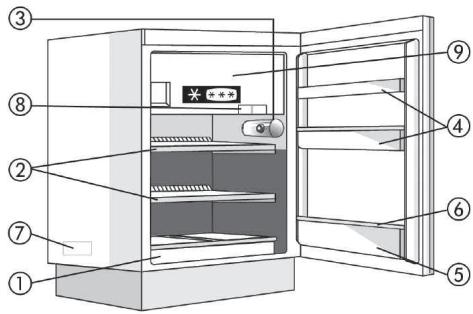

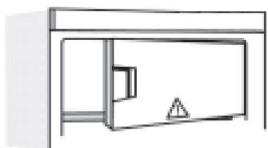
Baxho: 3akpbbaai Te dEbpu npn6opa!
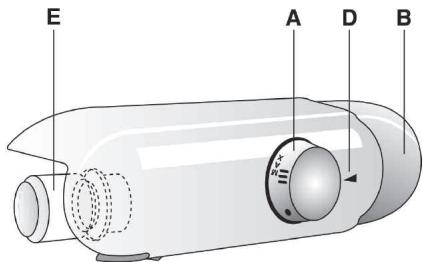
3JIEMEHTbl UYPABJIEHnA
A. Pу钙a Tepmoctata
B. BbIKIIOuATEIb OCBeUeHnIa
D. Yka3aTeJIb TepMoCTaTa
E. J lamna
PnpuroTOBneHne Ky6NKOB Nbda
3aOpHnTe IOTOK nIy Ibda Ha 3/4 BOIoN n NOCTaBbTe erO Ha dHO Hn3KoTEMpeApTyPhOrO OTdeneHn.
EcnI IOTOK npIMep3 KO dHy Hn3KOTempeTpyHOrO OTdelenHry, He nbItaTecb OTdEnltb ero pRi NOMOuN 3aoCTpeHHbIX nII pexyux INCTpymeHTOB.
PA3MOPAXKINBAHNEI YNCTKA HN3KOTEMNEPATYPHOFO OTDEJEHENIA
Дяобсесени Идайьно pa60ы ппбора pekomehdyetca pa3mopaxkBaTb Hn3KoTeMnepaTyphoe OTdeneHne He pexe,ЧemДba pa3a B roД,аТakke KOrda TOnuHa cNo8 Ibda Ha erO CTeHKaX DoCTNRHT 3 MM. ПОВЗмoxHoctn pa3mopaxkBaTte Mopo3unbHnk, KOrda B hem XpaHNTc MInHMym npodyKTOB.
- BbInbTe BCE npOyKtI N3 MOpO3nJIbHnKa, 3aBepHnTe Ix B ra3eTHyO 6bMyrN INoJIoXnTE PnOTHO pyr K dpYr B npOxnaIHOme MeTO nn TepMocymKy.
- OtknouHTe np6op ot 3neKtpocetN.
- OctaBbTe DBepu OTKpbIToN, UTO6bI yCKOpNTb TaHHe IbDa.
- YdaJInte TaIyIO BODy rY6KOJ.
- OuncHTte OTdeneHne ry6ko, CMOeHHoB TTeNlOM pactBOpe HeItpaJIbHOro MOIOJero cpeDCTBa. He IcNoJIb3yIte a6pa3INBhIe cpeDCTBa.
-
CnoIocnHte BOdoN TuaTeNbHO npOtpnTe hacyxo BCE NOBepxHoctn.
-
Пу ninthаня: He И спобьтуе остры пл ржшии Иструменты пл удалия лда. He harpebaite Hn3KOTempepatyphoe OTdelenne HnCKycCTBeHHbIM 6pb30M.
ЧИСТКА XОЛODильбHorO OTДЕLEHЯ
Perynpho Moite XonoDunbHoe OTdeneHne.
Pa3mopaxuBaHne XonoDunbHoro OTdeneHne.
npocxOHTI NHOCTbO aBTOMaTNUeCKN.
KaIIIN BObI Ha BHYTpEHHHe 3aHHe CTeHKe XOLOdINbHOrO
OTJeIeHNy Yka3bIAoT Ha To, YTO B DaHbI MOMeHT
BbIOJNHeTc TcNkI ABOTMaTHcKoR Opa3MOpaXnBaHn.
TanA BoDA cTeKaet Yepe3 CnIBHoe OTbepCTne B
CneUaNbHyO EMKOCTb, rge NcnapraTcN.
5. He pa6oTaET BHyTpEnHHee OcBeuEHe.
BbInonHnTe npOBepK, yKa3aHHbIe B nyHKe 1, nocne yero
- OToeunHnTe npn6Op OT 3JneKtpnueckoCetN.
3aMeHInTe nepeperopeBwUyI naMny. MouHocb HOBoI naMbI dOJIxHa COBnAaTb C IxCxOJHOI nIe IpeBbIaTaB MaKcImaJIbHOrO 3NaueHnra (Bt), yKa3aHHoro pRdOM c NaTpOHOM.
ДяЗамны ВьИнтITEЯмnyПрOTив acOBоY cTpeKN, KaK nOKa3aHOHa pncyHKe.
Прзаме He ne6bOxmoU yctaHOBnTb Ha MeCTO KpbIuKU npedoxpaHnteIa. Ecnn KpbIuKa 6bla yTepeHa, He noJIb3yIteCb BnIKoN Do Tex nop, nOKa He 6yJeT yCTaHOBLeHa 3aNaCha KpbIuKa.
3amopoxybaHHKy6NKIBNbody
- HanobHITb BOIOJIo NOTOK IyKbIKB NbOy Ha 3/4 Ta BCTaHOBIb INoR O B HIXHI qACTnHi BiDIneHHra Hn3bKOiT TemNepaTypn.
3a6opohetbca BnKOpncTOByBaTn roCTpi npedMeT nIy BiDineHnI Notka, kUo BIh 3aCtpy HnXnY qactnHi BiDineHnY.
PO3MOPOJXUBAHNY OUYIeHHBIIJIeHHN HN3bKOITEMPEPATYNI
Дя ONТМально npodykTnBHOCTi peKOMeHnyETbCS pO3MOPoxybatu BiDineHnHa3bKoi TempeAtypu ⅢOHaIMMeHne DbiHi Ha pik a6o KOnIwaPJIbOy Ha CTInkax CTaHe np6n3Ho 3 MM 3aBTobuKn. 阿Kso ue MokInBO,po3MopoxyIte MOp03nIbHe BiDineHHN, KOnI BOHO MaJxke NopoxHc.
- BnmiTb npOyKTN 3 MOpO3nIbHOro BiDJIeHNN, 3aropHiB ix y ra3eTy ta cKnlaIbIb ix y xOIoJHe MiCue a60 B CymKy-XoIoJNbHnK.
- Bi'εηhai Te npnlaB bi d Jxepena XNbIeHHJ.
- 3aIiIte DBepeyTa BiDUnHeHmM, Ioo6 iHi/niT TaHyB.
- Губковидалівідітуну Body.
- Ounstitb BiDilneHn3a DOnOMOIO r6Kn 3 p0zHHom TeIIOI BODN HeITpaJIbHIM MNUOUM 3aco6Om.He BIKOPINCTOByTe a6pa3NBHI 3aco6N.
- Onolochitb ta peTeIbHO npocuWtB BiDJIineHnA.
- Ppimitka. He hamaraiTeca 3iikpi6aTu liD roctpum MeTaeBmU iHcTpymeTAmu; He harpiaBte BiidineHHn3bkoI Tempeatpynt CToPOHHMn npnilaamn.
OuHsEHXoJIoNJIbHOrBOIdJIeHHa
PepiouHOnO ouNuyTe BHyTpIuHi nobepxhi xoJIOuNbHorO BiDiJIeHHa.
PozmopoxybaHHXoJOnIbHOrO BiDJIeHnB BID6yBaCTbC NOBHICTHO ABTomatNoHO.
KpaPi BOaHa 3aHHi CTiHci BCEpeDnHi XoJIoNbHOro
BdIiDeneHb KAA3yHOb Ha Te, IIO 3aanyeHo nepoiOnuHnn
UKNb ABOTAMtuHoro p03MOpOxyBaHHa. TaHa Boda
ABOTAMtuHNo CTiKaE B DpeHaxnHm OTiBP i HakOnNuYcTBcB
KOHTeHepi, 3BIDKn NOTIM BInnapObycBcA.
PeynapHO BINAJIaTe BOy BiD po3MOpoxBaHHa 3
dpeHaxHOrO OTBOPy HALEXHM UHINOM 3a DOIOMORIO
IHCTpyMeHTA, IO NOCTaCyTbCBy KOMPiNeKTI 3 pInlaDom.
PiPeD BIKoHaHNMa 6yDb-yaKnx PobiT i3TexHiNOrO
06cNHyTOvBaHHa BiD'EnHaIte pInlAn dBiEneKTpOMEpeXi.
3actocobutyte ry6ky, 3mouehy B teniBoj ta/a6o HeitpajbHomy MmHOMy 3ac06i.
- Ppomnnte n npocuityb m'koHO TKaHNOIO. He BkOpncTOByte a6pa3nBHI 3ac06n.
OuHJENHJA OBCJyROBYAHNJA
PeyraHOpO OuIyTe BeHTnlaui Hi OTbOpN Ta KOHNHeCaTOp Ha 3aHiN CTiHci npUlaNy 3a DOnOMoTOI NIOLOCMOka a60 uTockn
3OBHiiHni nobepxhi ouuuyte 3a donomoroIO M'koIT KaHHN
Ha nepioo Tpmbanoi BiDnyctkn
- BnmiB yce 3 xoIOnIbHnka Ta BiDJIeHb Hn3bKoi Tempepatyn.
- BiD'€dHaIte npJuaIad BiI dJxpepeJa XnBHeHHa.
- P03MOPo3bTe BiDJIeHnH N3bKOi TeMnepaTpyn Ta nouNCTiB i npocuyiTb O6NJBa BiDJIeHnH.
- 3aIiIe IDbepuTa BIDKpNTUMN, IO6 He yTBOpIOBaJIINcHEnpNIEMHI 3aIaxN.
MzdaTbIraH eHIMdepei caTbiny any Ke3iHne:
- OpaMHbIh 3aKbIMdaH6aFaHbHa Ke3 JeTki3iH3, c6e6i onai 6oJca TaFam Canacbl Haapnaybl MyMKIn. Erep opam icin KeTce HeMece AkKaH cyBtbl i3epi 6aKaJCa, on KolaJIbX KaJaJnapa CaKaTAmaybl XHe epyi aJNeKaJauH 6actanfah 6onybl MyMKIn.
A3bIK-TyIikTi caTbIn anfah Ke3Je My3JaTbIJFaTaFamdapdbi COhBaHa KaNdbIpBn, EHiMepDiN3OTepMnIbIK DOp6aDa TacbImaJdaHbI3. - 3aTapdbiyirexekTeKcH coH depey TeMeHri TemnepaTypabIb6aniMRe caIbHb3.
Erep TaFAMhBn 6ip 6eJiri 6y3bInca, OHJI KaNTa KaTbIPMaHbI3.24 carat iwiHne naJaJaHaHbIn TactaHbI3. - TemnepaTpyaHbIH MNHmMaIbI DeHreIe DeiH e3repyiH 60JIbIPMaHbI3 Hemece a3aNTbIHbI3. OpaMaIbI JkapAmdbIbIK Mep3iMHe DeiH naJaHaHaHbIbI3.
- My3daTbIJfAH Tafam KANTamaBihJaBcKaTay HycKayNbIKTapbH epkaaHaOpbHdaHbI3.
M3 TeKwEnepin Xacay
M3 kecekepi hayacbH 3/4 etin cymeh tonTbipbIn, TeMeHri TemnepaTpaNb6eimHH Ty6iHe KoBbHbI3. Erep haya TeMeHri TemnepaTpaNb6eim Ty6iHde KaTbIN KANca, OHb axbipaty yuH eTKip Hemece icTik 3aTTapDb naDanaHaBbI3.
TOMEHITEMNEPATYPALIIBOJIIMI IAIADAJAHYEPITYKHETA3AJAYKOJIbI
TinmdiNk OHTaJIbI 6Olybl yuH, TeMeHri temnepatypanbl 6eimdi JxblbHa eki pet Hemece Ka6bIpraDaIbMy3 3 MM KaJIbIHbIKKa XeTKeH caBbH epitin OTbIPrAn XeH. MyMKIN 6oJcA, KaTbIpFbIwTbI 6ocaIbI-ay deren Ke3de epithi3.
- TamaKtbl KaTbIpFbIUtah aIbIn, ra3eTKe OpaHbI3 Da, caIkbH JepRe Hemece TaCbIMaJIbI caJIkbIHdAaTKbIuKa caIbIHbI3.
- KypbIiFbIHbI Heri3ri Kyat Ke3iHeH aXbIpaTbIHbI3.
- KbIpaydbH/My3NbIH epyHe MymKiHik 6epy yuIH eciktiaWbIK KaJdblpbHb13.
- Epireh cydbI r6kamEn KeTIpiH3.
5.БeIIMdi Jxblb cy MeH 6eTapan JxYfblc cyblkTBkKa dbIMkbJlnDaHaH ry6kamen Ta3aJaHaB3.KbIpflb 3aTTapDb naJaHaHa6aHb3. - MykniT WaaiHbI3 XaHe KypFaTbIHbI3.
EckepTne: My3dbI Kbipbn any yuin eTkip He icTK 3aTTbI KOJaHa6aHb13; TeMeHri TemnepaTypaBbI 6eImdi XacaHdbI KOJMeH XbJIbITNaHb13.
TOHA3bITKbIiBθJIIMIH ПайдаларуТАЗAJALYЖОЛы
ToHa3bITKbIi 6eImHi iwiH Ke3eHdi Tpyde Ta3aAnoTbIpblHbI3.
ToHa3bITKbIsh 6eImiH epity ToJIbIK aBTOMaTTbI Typde opbIHdaJaDbI.
ToHa3bITkblI 6eImiHIn iHJderi apTkbl Ka6blpfaCblNdaFbCy TaMublnapbKe3eHdi TVPde opbHdanaTbH ABOTMaTTb EpiTy npocciHn opbHdaJIbXaTKaHbH bIDipede.IEireH cy Tery caHbJaBHa ABOTMaTTb TVPe aFBIn, KeiH KONTHeHepDe XHHaHbIn, 6yNaHaDb.
Epiren cy ubyrcahbnaybH kypbnfBIme6 bipre 6epinren Jaa6dbkne Ta3aJnaHb3,ocblnma epiren cydbI dypbic edicneH anacbI3.
KbI3MeT KepeTy KymbiCTapbIH opbIHay aIbIHda KypblfblHb po3ETKaanah axbipaTbIHb3.
KbIbI cyMeH xHe/Hemece 6eTapan JyFbIcBbIKbIKPeH dMbKbIaHaFaH ryKaHbI naJaAnaHaBbI3.
- Waihbi3 xhe xymcaK w6epeken KeTipiH3.
Kbipfb3aTapnb naDanaHaBb3.
TA3AJAY XΘHE Kbl3MET KΘPCETY
KypblfblhblapblHdafblyaaycaHbIaynapblHxHe KOHDeHCATOpblwaHCOPblWneH HeMece UeTKaMeH TypakTbTypde Ta3anlOTbipblb3
CbIPTkbl6eNikTI KymcaK uSybepeKePneH Ta3anaHb13
¥3ak demalbictap yushi
- ToHa3bItkblTbJxHe TEmeHri TemnepaTpaBb6JIIMdEprdi 6ocatbHb3.
- KypbIINfbIHbI Heri3ri Kyat Ke3iHeH aXbIpaTbIHbI3.
- TemeHri temnepaTpaTbnI 6eImdi epitIH3 JkHe eki 6eImdi de Ta3aJAn, KeTipiH3.
- Kaftbimcb3 niCtiH xHaJyBaHa xOJ 6epMec yuH ecikTeprdi aUbIK KaIdbIpblHb3.
KYAT YHEMDEY TYPALI KEHECTEP
KypblfblbteXOFapbl TeMnepaTypanpaFg KHe Kyh Ceynei He LbIrapMaH3 XeHe OHb Kbl3dbplfblwTapra Hemece neWtepre KaBbIH KoMaHb3, ce6e6i onap Kyat TyTbHy MeJIwepiH apTbipada.
KypbIfblHbIa ya kipy xHe Iy CaHbIaynapbHa Keepri KeJMEciH.
TamaKtbI epity yuH, OHbI TOHa3bITbIa KaIbI, KaTKaH TamaKTbIH eH CaIKbIH TEMnepaTypacbIH TemHeTin aJIbIH3.
EciKtiH aubibIn-ka6bIybiHa MymkiHirihue a3aHTyra TbipbcHb13.
ToHa3bIy 6eJIIMHe bICTbIK TAmKa CanMaHbI3.
- TemeHri temnepaTpaJIbI 6eNIMHiE eciriHaBik KaJdIbIpMaHbI3.
AKAYNbIKTAPdbI WEEWY H¥CKAYnbIfbl
1.Kypblfbl Kymblc icTeN TypFaH KOK.
KyaT ipkiniCi opbH aIfAH 6a?
Awa po3eTkaFa Dypbc caIbIHfAH 6a?
- Heri3ri KyaT KockbluB I KocblnfaH 6a?
- CaKtahDbipfBii KIyIeH 6e?
- TepMOCTaT - KiyIe opHaTBiINFaH 6a?
2.БeJIMdePdIH iwiHderi TemnepaTpaHbIN TEmeHdiri KTeKJIikci3.
EciKTepepbicka6bJfah6a?
KypbIJfblXblnyKe3iHJkaHbIHa opHaTbIFaH 6a?
- Tepmoctat napametpi dypbc na?
Aya aHaJIbIMb TopJapB 6iTeRhen 6e?
3.ToHa3bITKbIi6eJinimHIn TemnepaTypacbI TbIM TEmeH.
- Tepmoctat napametpi dupbic na?
4.ToHa3bITKbIi6eJImiHin actbHda cy XmHaIaIbI.
- EpitirreH cydbH hayacb6ereIreH 6e?
5. Kypbblfblwki wam xymbcic temeiDi.
Поблелмалардын XOKтБIFbIH TeKcepy XyMbICbIH 1 opblHaHbI3, COCbIH:
KypbIJfblHbI Heri3ri KyaT Ke3iHeh axbIpaTbHbI3.
- Wamdbi wam yCTaTkbIbTHbIH kaHBiHa KepeTiJrReh BaTT XHe Kyat MeJIWepiH caBacKa WAMMeH aybICTbIPbIHbI3.
- Wamdbi wewin any yuhi: cyperte KepcetireHne caf ti 6aftbHa Kapcb 6ypan anbHb3.
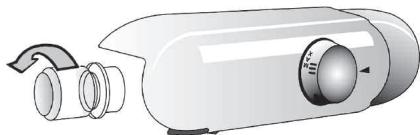
6. Temehri temepaypalb 6eimde wamadah TBic Kbpay XnHaFanfA.
- TemeHri temnepaTypaIb 6eJIIMHH eciri duYpbic Jka6bIraH 6a?
EckepTne:
- KaIbIITbI JxMbIc 6apbcIbHda KpyblfBdIaH eP TpyNI dIbIbIcTap (caJIkbIHdAaTkbl WcyIbIKTBiKa aHaJIbIMbHa 6aIIaNbHcTb I KypbIaNay XeHe bICbINay...) 6yI - KaJIbITbI HApce.
CATyDAn KEnIHnI KbI3MET
KbI3MeT opTaIbIbIMeH xa6apIacnac 6ypbIh:
1.Поблманы Akayltapджою
нчайы Кemerimehшшшшшшшшшшшшшшшшшшшшшшшшшшшшшшшшшшшшшшшшшшшшшшшшшшшшшшшшшшшшшшшшшшшшшшшшшш
2. MoceneHHweiJreH/HweiJMeReH H kepy YIHI KpybIfBIHBKaiTa KOCbIb3. Oaai 60Imaca KpybIJFbIHb KaTt aXbIpaTbHb3 XHe pacimdi bip cafattah KeHH KaTanaHb3.
3.OcbyapekeTTeH KeiH MceIe WeuImCe, KeiINik BoiByIHwa KbI3MeT KepCteTy optaIbIFbHa xa6apnacbIHbI3.
KeIecinepei aHbIKtan 6epiH3:
akaynbiktbihCnNaTbI,
KypbIJfblyJnriCi,
Kb3MeTTIK Hemipi (KpyblfblbHkEmicCaIbHaTbIH TapTnAbH iUki6ynipXaFbIHdaFbI DepeKTeP TaKTacBHa
SERVICE (KbI3MET) ceiHeN KeiH Ka3bIrfaH Hemip),
ToJIbIK MeKeHxKaIbIHb3,
TelefoHemipiH3XHeaMafbIbI3dbIH KObl.
SERVICE
0000 000 0000

Eckenptne:
EcikTih aibiny 6aftbTBin 3reptyre 6oandbI. OcbI onepaunna KenindiK 6oibHwa KbiImet KepceTy 6enimih TapanbHaH opBHaJanca, on KeninDiKe KaMTbIMaMdbI.
OPHATY
KypblfblHb Kbl3y Ke3epiHeH anlwaK opHaTbHbI3 (eh XaKaBH apakaBbIKbK: Kmip kHe 6anaybI3 neWtepiHeH 30 cm, nIITanap MeH 3neKeTpRnik niCyp nnITanapBbIHn 3 CM.
KypblfblbkypKa,kaKcbjXeIeTietiH Xepre opHaTbHb3.
KypbInfBbHbHaaya caHbIayJaPbHaKeepri KeMecin.
Iuki6eJIirIH Ta3aJAHbI3 (KaTbICTbI TapaynapdbI KePiH3).
- Bepinre H KepeK-XapaKaTapdbi 6eKiTiH3.
TynbIKanybl Tanan etiJeDi. Ondipywi
Korapbda KepceTinreH npoueDypanap
MeH eckepTynepiOpbIHdAmay
HTnxeciHde opbH aTaTBn aam
HeMece Kahyap XapaKaTb MeH MylIkTiH
3aKbIMdAynby YwiH ew XayanKepeWiniKiTi
MOybHaMaNDbI.
- Erep asha men po3etka 6ip-6ipine cai KeIMeCe, po3etkHaHbI 6iJIkTi MAmaHFa ayblCTbIPtBhl3.
¥3apTkblIup Hemece aanTepepepi naIanaHbI3
KypbIJIfBihI axbIpaTy
KyaT Ke3iH axbipaty KypblfblHb HeMece po3eTKaHbIH XOFapfbl XafblHaOpHaJaCKaH Koc nonIOCTI KockblshbH eWipy apkblbIMymkiH 6onybl KaKeT.
3NEKTP CbIMdAPbIH JKAJFAY
3NeKtp KocblbImap XepriNkTi 3aHHaMaFa CcKeC opBHaJybl Tnic.
Kephey KəHe Kyat TybIHy MJIiUepi KEmic cany TapTnacbHbI 6yIipHderi DepeKTep TaKTacbIHda KepcetilreH.
-Epexe 6oynbIHwa KypblfblHbHxepre
TEK YIbIbPITAHnA MEH INPJIaHdNIAFA APHAJFAH 3JIeKTPJIk KOCbIJbIM
EckepTy - 6yn KypbInfbl Jkepre Tynbiktanybl KepeK
CaKaTHdbIpyfblWtblaybICtbipy
Erep KpybIfblHbI JKeJIiIK cbIMbl BS 1363A 13 amnepi
6aJIbIbIbI aIbIPMeH Ka6bIKtaIFAH 6oNca, ocb typeri
aIbIPdbIH caKaTHdbIpflbIH aybICTby ywiH,A.S.T.A.
pactaraH caKaTHdbIpflbTIb BS 1362 typHe
naindaNaHbIbI3 KHe KeLeciDee apeket etinH3:
- CaKaTHaBbIPbBII KaKNaBbIH (A) KHe caKaTHaBbIPbBIIbTbI (B) anbIn TaCTaHbI3.
- AImactby 13 A caKaTaHDbipfbIiTbI KaKnaK iUiHe CaIbIHbI3.
- Ekeyi De aaibip iwihe KaiaTa opHaTbIbI3.
MaHbI3AbI:
CaKaTaHDbIpBfIbITbI aybIcTbIpy Ke3IHde CaKaTaHDbIpBfIbIKaKnaFb KaTbOpaTbIyblKepek, an CaKaTaHDbIpBfIbIKaKnaFb JxofaJFaH 60nca,Tnicti aImactbIpy 6eJIwerihopHaTnaFaHwa aBip naJaDanaHbIMaybl KepeK.
TnictaJMaCTbpy 6JIuIe TycTe eHdIpMeMeH Hemece aIbIPdbIn yctIHderi ce3depe 6aDbipaaBbIN TypFaH TycneH aHbIKTaIaNbl.
AImactbipy caKaTahDbipfblk KaKnaKTapbH JekprinikTi 3JekTpniK Ka6dbIkapdYkeHiHeH catbIn anyFa 6oJaDbI.
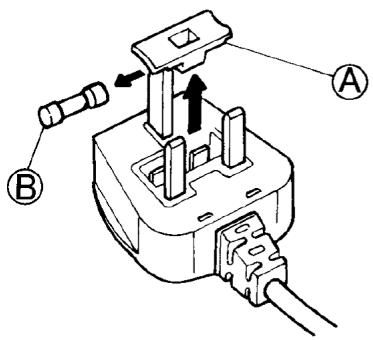
TeK IpranDna Pecny6nKacbHa apHaIraH
YIbIbIbIbIbIbIbIbIbIbIbIbIbIbIbIbIbIbIbIbIbIbIbIbIbIbIbIbIbIbIbIbIbIbIbIbIbIbIbIbIbIbIbIbIbIbIbIbIbIbI bJIaIIaIIaIIaIIaIIaIIaIIaIIaIIaIIaIIaIIaIIaIIaIIaIIaIIaIIaIIaIIaIIaIIaIIaIIaIIaIIaIIaIIaIIaIIaIIaIIaIIaIIaIIaIIaIIaIIaIIaIIaIIaIIaIIaIIaIIaIIaIIaIIaIIaIIa II aJIiHJIiHJIiHJIiHJIiHJIiHJIiHJIiHJIiHJIiHJIiHJIiHJIiHJIiHJIiHJIiHJIiHJIiHJIiHJIiHJIiHJIiHJIiHJIiHJIiHJIiHJIiHJIiHJIiHJIiHJIiHJIiHJIiHJIiHJITyTIyTIyTIyTIyTIyTIyTIyTIyTIyTIyTIyTIyTIyTIyTIyTIyTIyTIyTIyTIyTIyTIyTIyTIyTIyTIyTIyTIyTIyTIyTIyTIyTIyTIyTIyTIyTIyTIyTIyTIyTIyTIyTIyTIyTIyTIyTIyTIyTIyTIy
UTeNceIbIk po3eTKa / Tok aIbIpbl (eki eJ ywiH kapaMdbI)
Erepka6bikTaIFaH TOK aIbipbI WTeNceIbIk pO3eTKaHbI3 yuHJkapamdb6oIIMaca,KocbIMwa HcckayanyuWuH KENIIID60bIHWA KbI3MeT KepeCy 6JIIMHe xa6apnacblH3.TOK aIbipbH e3 6etIHwe aybcITbpyfa apekTeH6eHiz.5ynpoueDypaEHdipyH Hcckaynapbl MeH JeprIniKi tCTaHdapTTbKayinciDiK epexeJIepiHe cAke6biIKTI TexhkaJIbIK MaMaH TapaBHaH opbHaJIyBiKepeK.
Gebrauchsanweisung Instructions for use Mode d'emploi Gebruiksaanwijzing Istruzioni per l'uso
Brugsanvising
Bruksanvising
Käyttoohje
Manual de'utilisation
Instruções para el uso
The appliance you have just bought, marked by the symbol , allows the freezing - in of fresh and cooked food, the production of ice cubes and the storage of frozen food. Please read these instructions carefully, as they include a description of your appliance and the useful hints to enable you to achieve the best performances required to freeze fresh food and to store already frozen food.
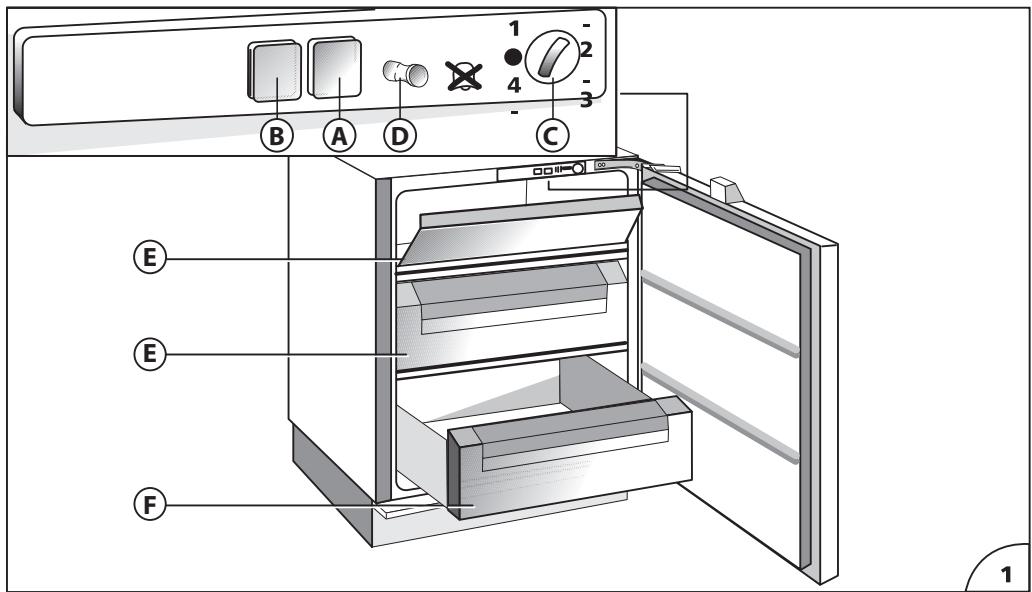
DESCRIPTION OF THE APPLIANCE (Fig. 1) Control panel
A) Operation control lamp (green light)
B) Temperature control lamp (red alarm light)
C) Temperature control knob (thermostat)
D) Open door alarm switch (if present)
E) Baskets (freezing - in and storage baskets)
F) Storage basket only.
G) Eutectic system: remove from drawer F and insert into the high compartment E to optimise the product's consumption.
Some models are supplied with containers filled with cooling liquid(eutectics).
INSTALLATION
Ensure that the appliance is not damaged. Transit damages must be reported to your dealer within 24 hours of receipt of the appliance. The appliance should not be installed close to heat sources such as cookers, central heating, boilers, sunlight, etc. It must however be located in a well ventilated dry space.
Attention: Accessibility to the plug has to be guaranteed even after installation of the appliance to disconnect it, if required. Alternatively, connect the appliance to the mains by means of a two-pole switching device with contact separation of 3mm situated in an accessible position.
ELECTRICAL CONNECTION AND OPERATION
Please check that the voltage indicated on the rating plate situated inside the compartment corresponds to the voltage in your home. The earthing of this appliance is compulsory by law. The manufacturer will accept no liability for injury to persons or damage to objects arising from the non observance of this requirement.
When the appliance is plugged in, if the thermostat knob is not set to symbol , the green and the red lamps (A) and (B) (Fig. 1) light up. The green control light always remains alight and indicates the operation of the appliance. The red control light remains alight until the set operation temperature has been attained. It lights up again when the temperature inside the freezer rises due to frequent or prolonged door opening, and when the appliance has been loaded with fresh food to be frozen.
ADJUSTMENT OF THE TEMPERATURE
The thermostat (Fig. 1) controls the temperature inside the appliance. Position · indicates that the operation of appliance is interrupted. The ideal storage temperature of frozen food for a long time is -18^ . In normal ambient conditions (temperature between +20^ and +25^ ), we suggest you adjust the thermostat control knob to a middle position. To obtain colder or warmer temperatures than -18^ , turn the thermostat control knob to the highest or lowest setting respectively. We remind you that internal temperatures are affected by the location of the appliance, the temperature of the surrounding air, the frequency of the door opening. The setting of the thermostat may have to be varied to allow for these factors. To check the temperature of the food stored, place the thermometer (if delivered) under the food; if it is placed on the food it will indicate the temperature of the air which does not correspond to that of the food stored.
USE OF THE FREEZER COMPARTMENT
This appliance is equipped with an acoustic alarm which sounds when the door is left open (if present).
FREEZING IN (Fig. 2)
The amount of fresh food which can be frozen in a 24 hours period at an ambient temperature of +25^ C is stated on the rating plate.
Do not store warm foods in the freezer. Never re-freeze partially or completely defrosted foods. Prepare and wrap foods to be frozen in aluminium or plastic foils or place them in appropriate containers. Label the packets indicating the freezing-in date and the contents. The freezer compartment maintains the storage temperature for 15 hours approx. even in case of power failure.
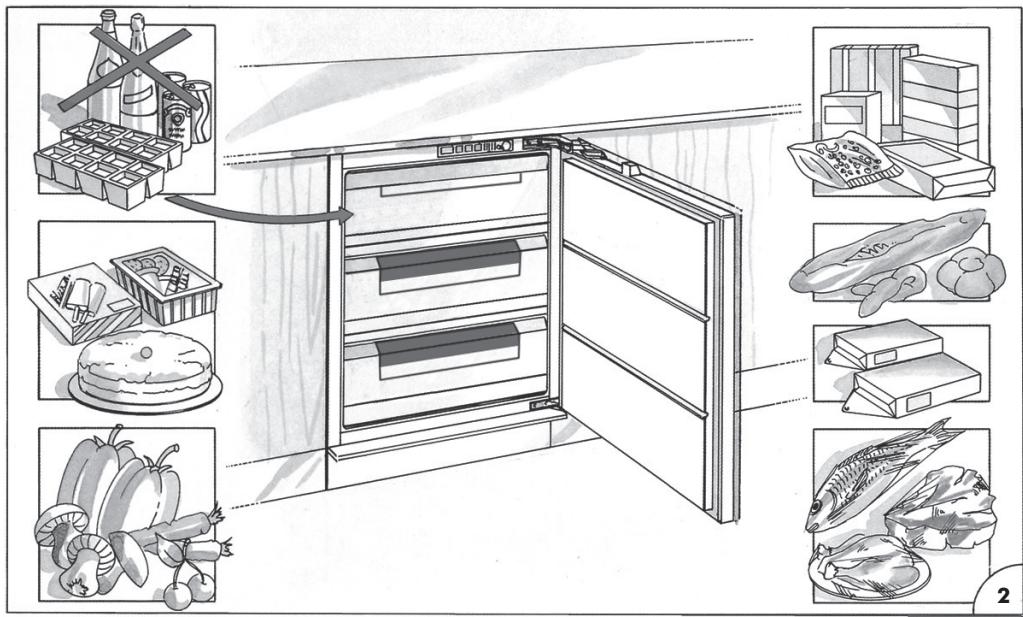
We suggest however you leave the door closed during this time.
Fizzy drinks should not be frozen and some products, such as flavoured water ices, should not be consumed too cold.
Note: Due to the efficiency of the door seal, it is not always possible to open the freezer door immediately after closing it. Wait some minutes before trying to open it.
PRODUCTION OF ICE CUBES
3/4 fill the ice cube trays with water and place them in the low temperature compartment. If the trays stick to the bottom of the compartment, do not detach them with sharp or cutting instruments, which could damage the appliance. Use, if necessary, the handle of a spoon. To allow removal of ice cubes from plastic trays, bend them slightly.
Attention: Do not eat ice cubes or ice lollies immediately after removal from the low temperature compartment as they may give rise to cold burns.
STORAGE OF FROZEN FOOD
When buying frozen food, it is suggested to use thermal bags or cold boxes. They should be the last purchases made and should be well wrapped in newspaper. When home, store them in the compartment, with the least possible delay. In any case these foods have to be used within the date printed on the packet.
THAWING
Here are some basic suggestions:
Raw vegetables: Do not thaw - put straight into boiling water and cook as usually.
Meat (large cuts): Thaw in the refrigerator without unwrapping them. Before cooking, leave at room temperature for some hours.
(Small cuts): Thaw at room temperature or cook directly.
Fish: Thaw in the refrigerator without unwrapping or cook directly before being completely thawed.
Previously cooked food: Re-heat in the oven without removing from its aluminium container.
Fruit: Thaw in the refrigerator.
DEFROSTING
Generally you need to defrost two or three times a year when the layer of frost reaches a 3 mm thickness. We suggest you periodically remove the frost from the freezing plate by means of a plastic scraper. Avoid using sharp or cutting instruments. Defrosting should be carried out when the quantity of food stored is minimum. Wrap the frozen food into several layers of newspaper (or in a cover) and place them in the refrigerator or in a cool place. Adjust the thermostat control knob to position, disconnect the appliance from the mains and leave the door open. Remove the baskets by pulling forward and up. Do not use commercial defrosting products as they could contain dangerous components. At completion of defrosting, clean and dry the appliance carefully. Reconnect the freezer to the mains supply. Reload the freezer with the frozen food.
MAINTENANCE AND CLEANING
A periodic and proper maintenance will ensure a longer life to your appliance. Disconnect the appliance from the mains supply before any intervention. Clean periodically the appliance with a solution of water and vinegar. Rinse and dry thoroughly. Never use abrasive or detergents. Clean periodically the door gasket with water and dry carefully. Avoid soiling the door gasket with oil or other grease which could damage it. After cleaning, reconnect the appliance to the mains supply.
HINTS FOR HOLIDAYS
If you plan to be away for a long time, disconnect the appliance from the mains, empty and clean the inside. Leave the door open to prevent the appliance from smelling musty. If you plan to be away for a short time, let the appliance operate normally.
SERVICE
The incorrect operation of the appliance is not always due to a fault but it may also result from poor installation or usage. To prevent unnecessary service calls for which you will be charged, we suggest you consult this trouble-shooting guide.
If the red light is on continuously or flashing, the internal temperature is too high.
Check that:
- the door is not properly shut;
- the thermostat control knob is correctly set (see chapter "Adjustment of the temperature");
- the freezer is not near a source of heat;
- there is a large build up of frost on the inner walls;
the air flow is not restricted.
If the compressor functions continuously. Check that:
the ambient temperature is too warm;
- the door is not being opened too frequently.
The appliance is excessively noisy. Check that:
the appliance is level.
The appliance does not operate. Check that:
- the thermostat control knob is not set to position ;
- there is not a power failure;
- the plug is making good contact with the supply socket;
- any automatic circuit breakers have tripped or any fuses blown;
- the supply cable is intact (see also Note).
Note: When replacing a damaged supply cord, be sure the new cord is correctly clamped. If you have followed this trouble shooting guide and your freezer still does not work properly, get in touch with your Retailer or Service Agent. State clearly what is wrong and the type and serial number of your freezer.