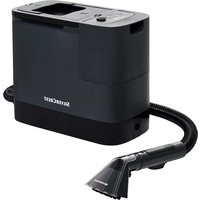
SHAZDB 29.6 A1 - Vacuum Cleaner SILVERCREST - Free user manual and instructions
Find the device manual for free SHAZDB 29.6 A1 SILVERCREST in PDF.
User questions about SHAZDB 29.6 A1 SILVERCREST
0 question about this device. Answer the ones you know or ask your own.
Ask a new question about this device
Download the instructions for your Vacuum Cleaner in PDF format for free! Find your manual SHAZDB 29.6 A1 - SILVERCREST and take your electronic device back in hand. On this page are published all the documents necessary for the use of your device. SHAZDB 29.6 A1 by SILVERCREST.
USER MANUAL SHAZDB 29.6 A1 SILVERCREST
text_image
PDF ONLINE www.lidl-service.comOperating instructions
FR BE
ASPIRATEUR CYCLONIQUE SANS FIL
Mode d'emploi
CZ
AKU VYSAVAČ
Návod k obsluze
SK
AKUMULÁTOROVÝ CYKLÓNOVÝ VYSÁVAČ
Návod na obsluhu
DK
BATTERIDREVET ZYKLON ST∅VSUGER
text_image
Diagram of a device connector with labeled parts 17 and 18, showing internal structure and connection points.
4x

14

13

12
Contents
Introduction....2
Intended use 2
Warnings and symbols used .... 2
Important safety instructions....3
Package contents and transport inspection....6
Appliance description 7
Technical data 8
Before first use 9
Setting up the appliance 9
Mounting the wall bracket and accessories holder 11
Getting started 12
Information about the battery 12
Charging the battery 13
Operation and use 15
Switching the appliance on 16
Selecting an operating mode 16
Dismantling the appliance 17
Using the accessories 18
After use....20
Cleaning 20
Emptying the dust container and cleaning the filter 20
Cleaning the rotary brush 24
Cleaning the appliance 26
Storage 26
Disposal 26
Disposal of the appliance 27
Disposal of the packaging 27
Disposal of batteries 27
Ordering replacement parts 28
Kompernass Handels GmbH warranty 28
Service 30
Importer 30
Introduction
Congratulations on the purchase of your new appliance. You have selected a high-quality product.
The operating instructions are part of this product. They contain important information about safety, usage and disposal. Before using the product, please familiarise yourself with all operating and safety instructions. Use the product only as described and for the specified range of applications. Please also pass on all documents to any future owner.
Intended use
This appliance may only be used for vacuuming dry surfaces or dry vacuumed material. Do not vacuum people or animals with this appliance. Any other usage or modification of the appliance is deemed to be improper and carries a significant risk of accidents. The manufacturer accepts no liability for damages caused by improper use or incorrect operation of the appliance. The appliance is not intended for commercial use.
Warnings and symbols used
The following warnings and symbols are used in these operating instructions, on the packaging and on the appliance (where applicable):
![]() | DANGER! A warning with this symbol and the signal word "DANGER" indicates an imminently hazardous situation which will result in death or serious injury if not avoided. |
![]() | WARNING! A warning with this symbol and the signal word "WARNING" indicates a potentially hazardous situation which could result in death or serious injury if not avoided. |
![]() | CAUTION! A warning with this symbol and the signal word "CAUTION" indicates a potentially hazardous situation which could result in a minor or moderate injury if not avoided. |
![]() | ATTENTION! A warning with this symbol and the signal word "ATTENTION" indicates a potential situation which could result in property damage if not avoided. |
![]() | Note: A note provides additional information that will assist you in using the appliance. |
| --- | DC current/voltage |
| ~ | AC current/voltage |
Important safety instructions

▶ Never use the vacuum cleaner if the cable, plug or housing are damaged.
▶ To prevent accidents, have defective plugs and/or power cables replaced immediately by an authorised specialist, our Customer Service or a similarly qualified person.
▶ Have all repairs carried out by a specialist workshop. Under no circumstances should you open the appliance yourself. Repairs that are not carried out by a specialist workshop could lead to physical injuries.
Before switching on the appliance, make sure that the mains voltage corresponds to the voltage indicated in the technical data for the appliance.
▶ Never touch the mains adapter or the appliance with wet or damp hands.
▶ Do not use the mains adapter with an extension cable; connect the mains adapter directly to a power socket.

Do not charge or use the appliance outdoors.
WARNING! RISK OF INJURY!
- Do not change any accessories while the appliance is switched on.
- Do not use the vacuum cleaner for vacuuming up water or other liquids.
- Do not use the vacuum cleaner for vacuuming up sharp objects or glass shards.
- Do not use the vacuum cleaner for vacuuming up burning matches, glowing embers or cigarette butts.
▶ Do not use the vacuum cleaner for vacuuming up chemical products, stone dust, gypsum, cement or similar particles.
This appliance is not suitable for use with inflammable and explosive substances or chemical and aggressive liquids.
▶ Always store the appliance indoors. To prevent accidents, keep the appliance in a dry location when not in use.
▶ Under extreme conditions, leaks in the battery cells may occur. In the event that battery fluid comes into contact with skin or eyes, the affected area must be rinsed off with water immediately. Contact a physician.
This appliance may be used by children aged 8 years and above and by persons with limited physical, sensory or mental capabilities or lack of experience and knowledge, provided that they are under supervision or have been told how to use the appliance safely and are aware of the potential risks.
- Do not allow children to play with the appliance. Cleaning and user maintenance tasks may not be carried out by children unless they are supervised.
▶ Take special care when using the vacuum cleaner on stairs.
! ATTENTION! PROPERTY DAMAGE!
▶ Use only accessories recommended by the manufacturer.
- The mains adapter may not be used for other purposes. Never carry the wall bracket or the mains adapter by the cable. Do not pull on the cable when you want to move the appliance.
▶ Always grip the power plug to disconnect the appliance from the power supply.
▶ Always be sure to keep the vacuum cleaner away from heating elements, ovens or other heated appliances and surfaces.
▶ Make sure that the ventilation slits are never obstructed. A blocked ventilation circuit can result in overheating and damage to the appliance.

text_image
UN 3481The product is equipped or supplied with a lithium-ion battery. Do not throw the rechargeable battery into a fire and do not subject it to high temperatures. There is a risk of an explosion!
- Do not use the vacuum cleaner without the HEPA filter inserted.
- Do not use the mains adapter for a different product and do not attempt to charge this appliance with a different mains adapter. Use only the mains adapter supplied with this appliance (model SHAZDB 29.6 A1-1).
Package contents and transport inspection
1) Remove all parts of the appliance and the operating instructions from the packaging.
2) Remove all packaging materials and any films and labels.
The package contents include the following components (see fold-out page for illustrations):
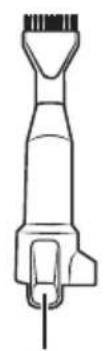
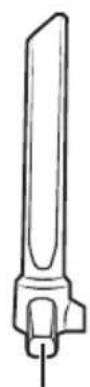
- Cordless cyclone vacuum cleaner
- Suction pipe
- Floor brush
- Crevice nozzle
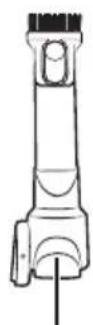
● Round brush nozzle (with brush attachment) - 2-in-1 combination brush
- Wall bracket
- Accessories holder
● Installation materials (4 screws, 4 wall plugs) - Mains adapter
- Replaceable battery
- Operating instructions
i Note
▶ Check the package for completeness and signs of visible damage.
▶ If any items are missing or damaged as a result of defective packaging or transportation, please contact the Service Hotline (see section Service).
Appliance description
(See fold-out page for illustrations)
① Battery release button
② Replaceable battery
③ Charging socket
4 Ventilation slits
⑤ HEPA filter
6 Stainless steel filter
⑦ Dust container
8 Dust container release button
9 Dust container lid
10 Mains adapter
11 Barrel plug
12 2-in-1 combination brush
13 Crevice nozzle
14 Round brush nozzle (with brush attachment)
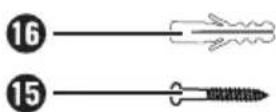
15 Screws
16 Wall plug
⑰ Accessories holder
18 Wall bracket
19 Rotary brush release
20 Rotary brush holder
21 Rotary brush
22 Floor brush
23 Floor brush release button
24 Suction pipe
25 Suction pipe release button
26 Operating mode
27 Timer
28 Battery indicator
29 Display (battery indicator/timer/operating mode)
30 On/Off switch
31 Operating mode button M (1 Eco/2 Auto/3 Boost)
Technical data
Appliance
| Input voltage 36 V | --- |
| Input current 0.8 A | |
| Power consumption 400 W | |
| Polarity |
Batteries
| Capacity 2500 mAh | |
| Battery | 29.6 V---(8 x 3.7 V lithium-ion batteries) |
| Running time with full bat-tery charge | 1 Eco: approx. 35 minutes2 Auto: approx. 20 minutes3 Boost: approx. 10 minutes |
Mains adapter
| Manufacturer | KOMPERNASS HANDELS GMBH, BURGSTRASSE 21, 44867 BOCHUM, GERMANY Registered court: AG Bochum Register number: HRB 4598 |
| Model SHAZDB 29.6 A1-1 | |
| Input voltage | 100–240 V ~ |
| Input AC frequency | 50/60 Hz |
| Output voltage | 36.0 V --- |
| Output current | 0.8 A |
| Output power | 28.8 W |
| Average efficiency in operation | 87.9% |
| Efficiency at low load (10%) | 81.7% |
| Power consumption at no load | 0.10 W |
| Input current | 1 A |
| Polarity | |
| Protection class | II / (double insulation) |
| Efficiency class | 6 VI |
i Note
▶ No user action is required to switch the product between 50 and 60 Hz. The product switches automatically to either 50 or 60 Hz.
Before first use
Setting up the appliance
1) Push the suction pipe 24 onto the appliance until it audibly clicks into place (see Fig. 1).

natural_image
Technical line drawing of a mechanical device with a close-up view showing internal components (no text or symbols)Fig. 1
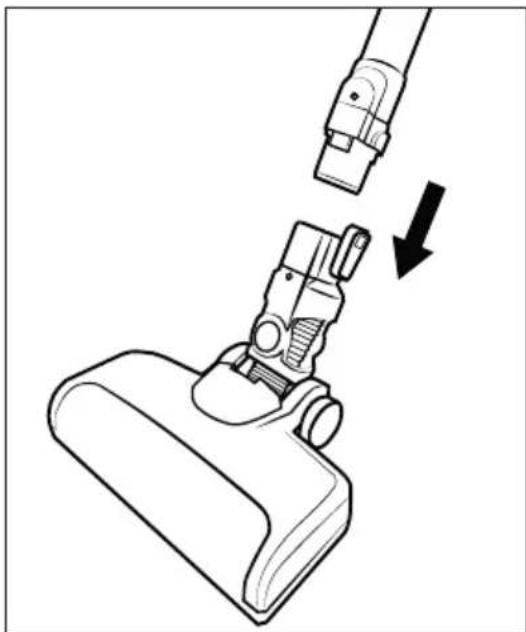
2) Push the suction pipe 24 into the floor brush 22 until it audibly clicks into place (see Fig. 2).
natural_image
Line drawing of a vacuum cleaner with a downward arrow indicating motion (no text or symbols)Fig. 2
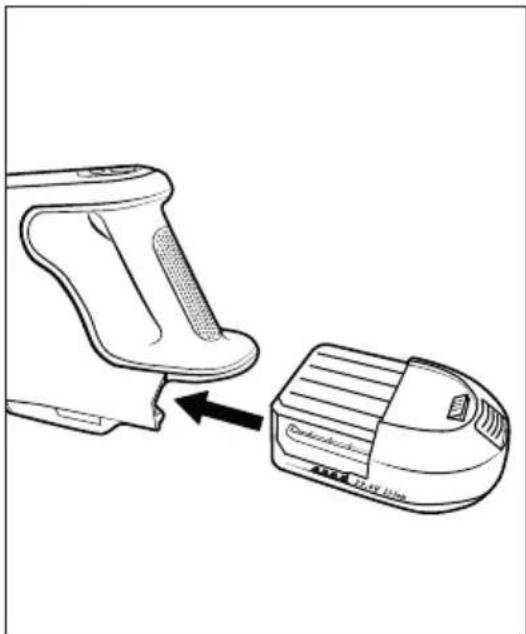
3) Push the battery ② into the appliance until it audibly clicks into place (see Fig. 3).
natural_image
Line drawing of a device being placed on top, showing a handle and a separate device (no text or symbols present)Fig. 3
Mounting the wall bracket and accessories holder
DANGER!
▶ Ensure that there are no power cables or other conduits or pipes in the wall at the location where you intend to bore the holes for the wall bracket and accessories holder ⑱/⑰. Drilling into a current-carrying electric cable can be potentially fatal!
1) Remove the wall bracket ⑱ from the accessories holder ⑰. Insert the barrel plug ⑪ of the mains adapter ⑩ into the wall bracket ⑱ as shown in the illustration below. Secure the barrel plug ⑪ by turning it (see Fig. 4).
Fig. 4
2) Find a suitable mounting location for the wall bracket and accessories holder 18/17:
- The wall bracket and accessories holder ^18 / ^17 must be mounted with sufficient distance to the floor to ensure easy insertion and removal of the appliance from the wall bracket ^18 .
-A mains socket must be accessible for the mains adapter10.
3) Use the accessories holder 17 to mark the four drill holes on the wall (see Fig. 5).
Fig. 5
4) Drill the marked holes with a 5-mm drill.
5) Push the supplied wall plugs 16 into the holes.
6) Place the wall bracket ⑱ in the accessories holder ⑰ and screw the wall bracket and accessories holder ⑱/⑰ in place using the screws ⑮ provided.
7) You can put the crevice nozzle 13, the round brush nozzle 14 and the 2-in-1 combination brush 12 on the accessories holder 17.
8) Connect the mains adapter 10 to a mains socket.
Getting started
Information about the battery
The vacuum cleaner is powered by a rechargeable, replaceable lithium-ion battery. Before using the vacuum cleaner for the first time, the battery ② must be charged for around 4-5 hours.
To care for the battery ^2 , we recommend the following: Disconnect the mains adapter ^10 from the mains socket after the battery ^2 is charged.
i Note
The appliance is equipped with a temperature monitor to protect the battery ②. At high ambient temperatures, the charging process may be interrupted or the appliance may switch off automatically in rare cases:
—The battery indicator ^28 flashes at one second intervals during charging. Charging is interrupted and automatically resumed as soon as the temperature of the appliance has dropped.
- The battery indicator 28 flashes five times at one second intervals during operation. The appliance switches off automatically. Allow the appliance to cool down for about 20-30 minutes before switching it on again.
Charging the battery
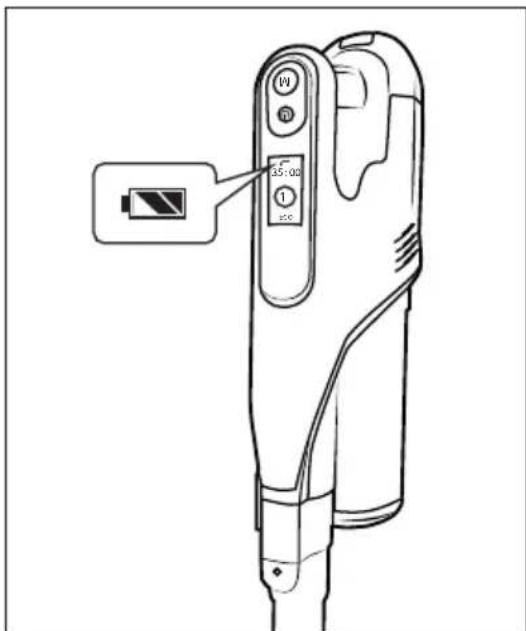
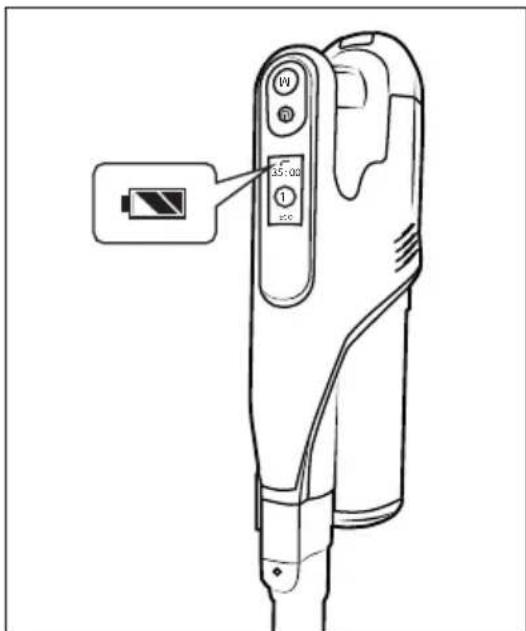
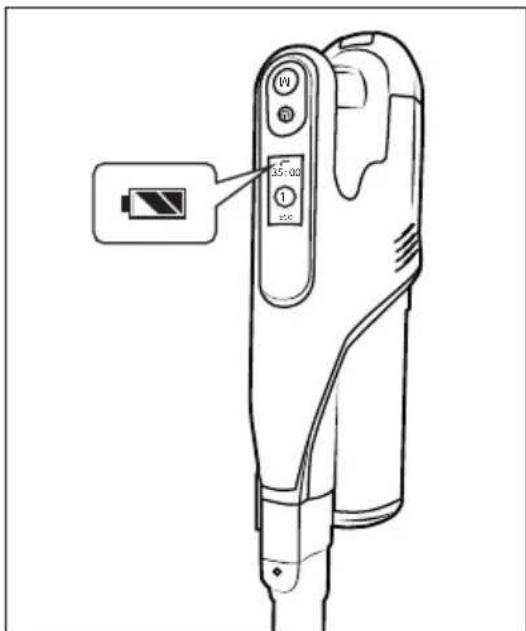
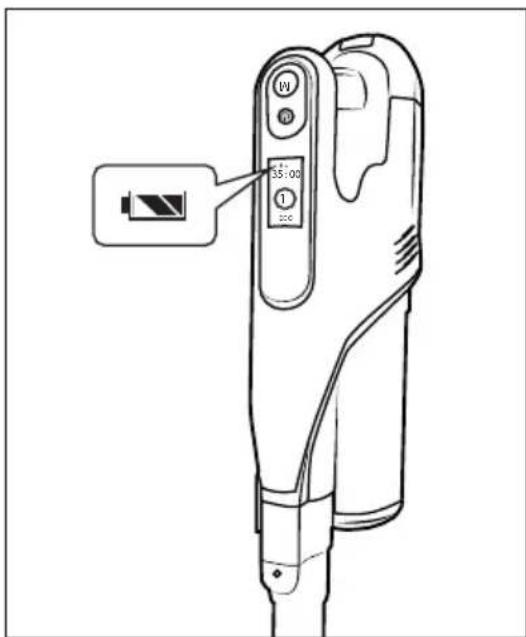
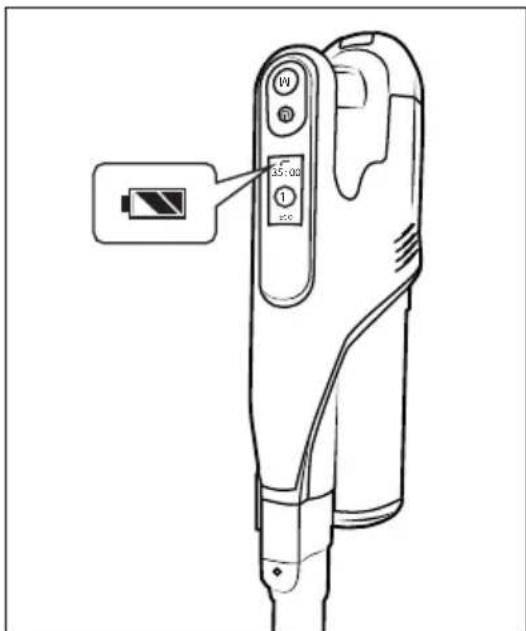
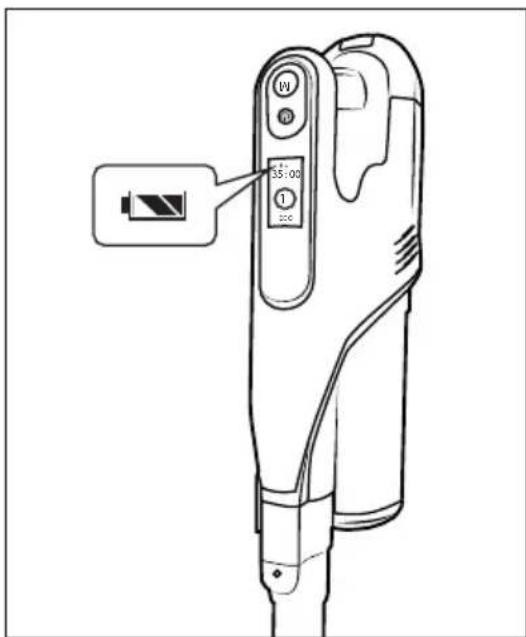
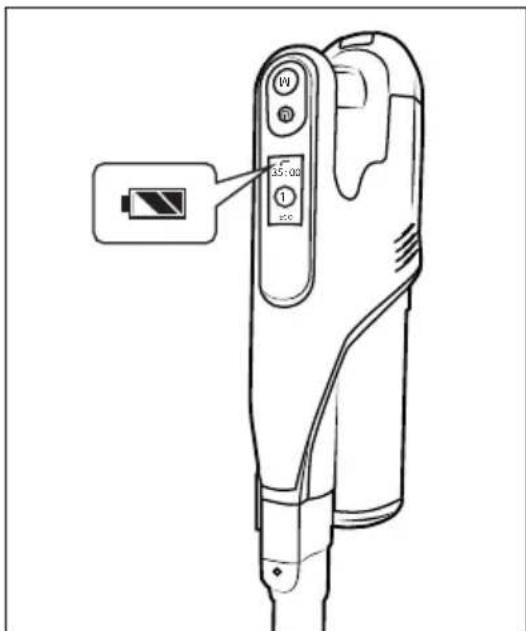
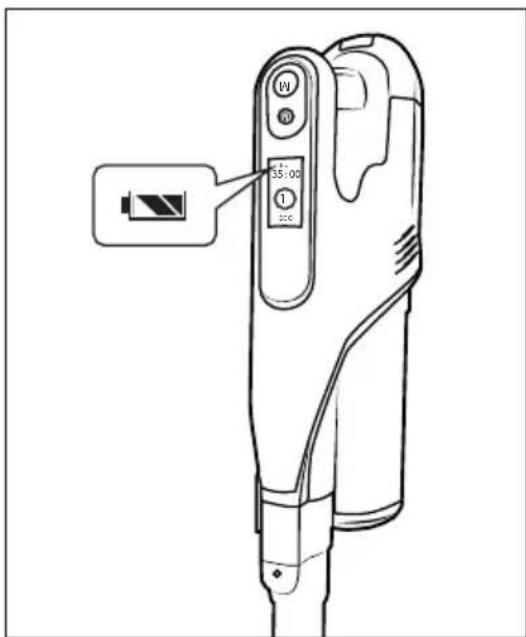
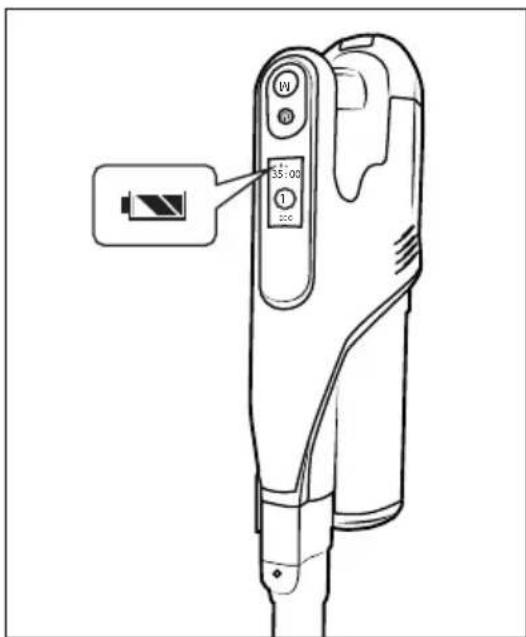
Place the vacuum cleaner in the wall bracket 18 from above so that the barrel plug 11 slips into the charging socket 3 on the bottom of the appliance. The battery indicator 28 starts flashing and the charging process starts (see Fig. 6 and 7).
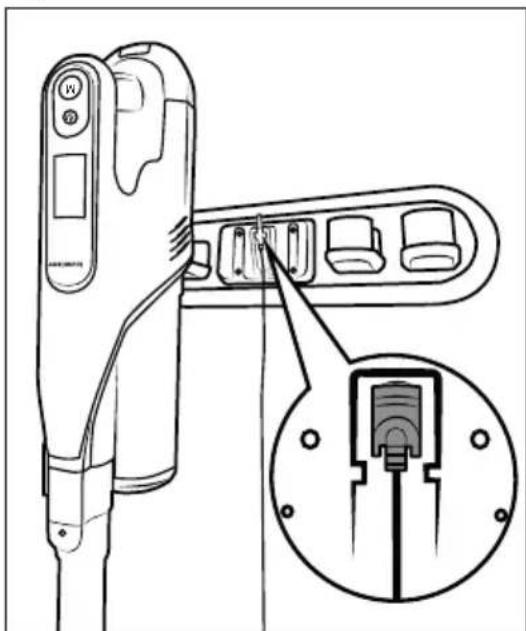
natural_image
Line drawing of a device with an inset showing a close-up of its internal components (no text or symbols)Fig. 6

text_image
Technical diagram of a handheld device with labeled buttons and a battery icon pointing to the right button.Fig. 7
When charging is complete, which can take about 4-5 hours if the battery ^2 is completely discharged, the battery indicator ^28 lights up.
Battery indicators
Four different battery indicators 28 are used in the display 29 to show the actual charging status of the battery 2:

The battery is fully charged.

The battery is charged to approx. 50%.

The battery has only a small amount of charge left.

The battery is empty.
i Note
▶ Recharge the battery ② as soon as the battery indicator ⑳ shows a low remaining charge of the battery ②.
The appliance switches off shortly after an empty battery is displayed.
The vacuum cleaner can also be charged directly via the mains adapter 10. To do this, remove the barrel plug 11 from the wall bracket 13 by turning it slightly and insert it into the charging socket 3 on the appliance (see Fig. 8).
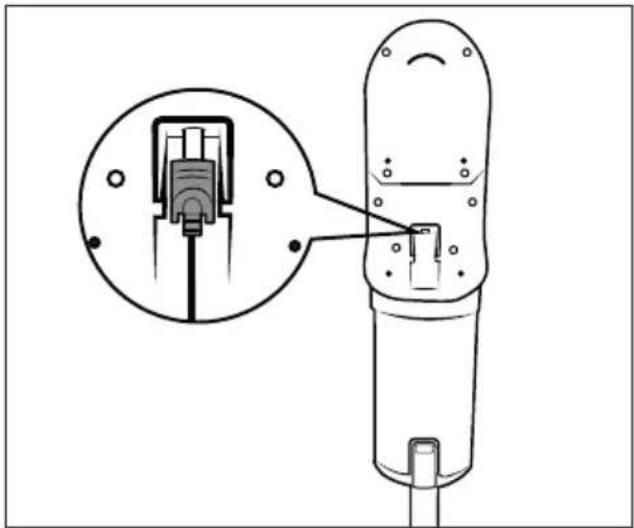
natural_image
Technical diagram of a mechanical device with an inset showing a close-up of a component (no text or symbols present)Fig. 8
Operation and use
① ATTENTION!
The suction openings of the appliance and the floor brush 22 and the suction pipe 24 must be free at all times and must not be blocked. Blockages lead to overheating and damage to the motor.
▶ Make certain that the HEPA dust filte ^5 is always inserted before using the appliance.
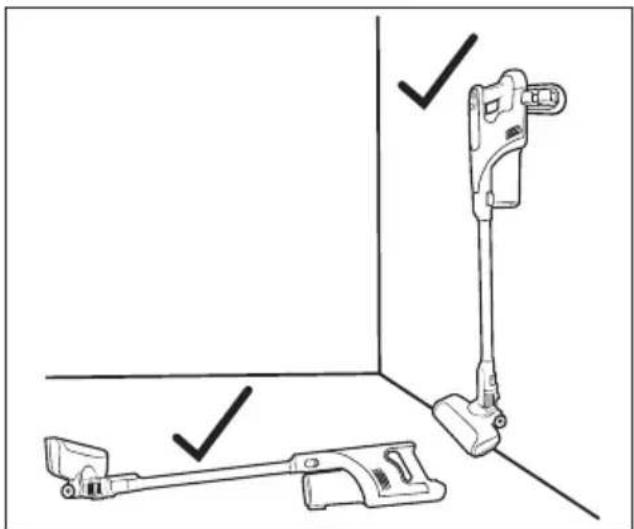
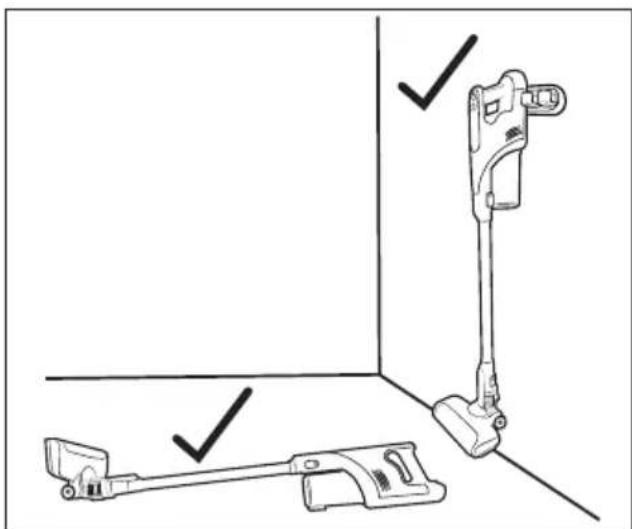
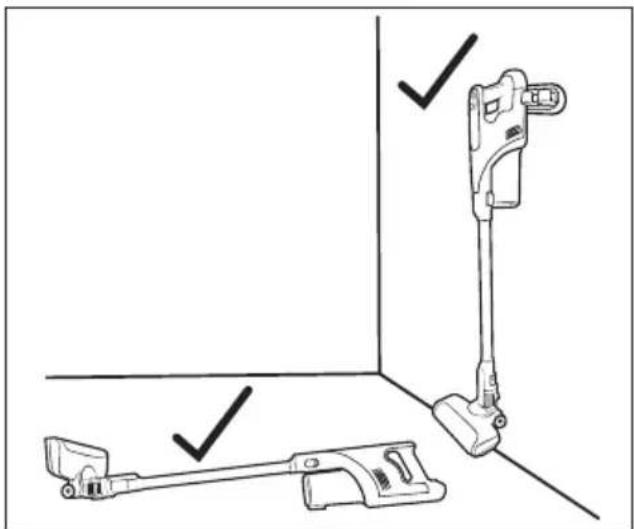
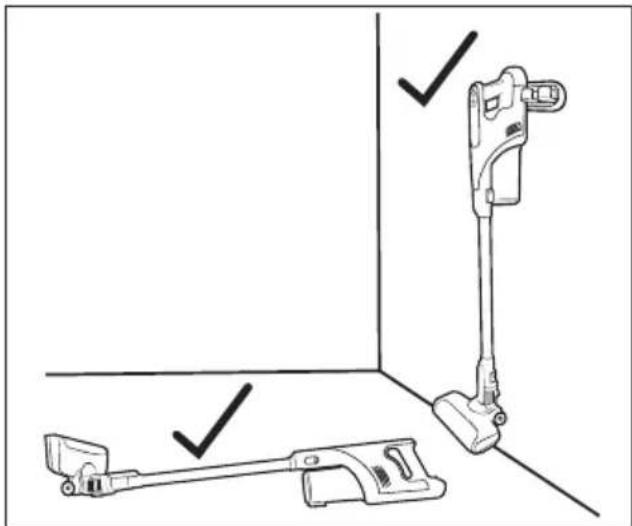
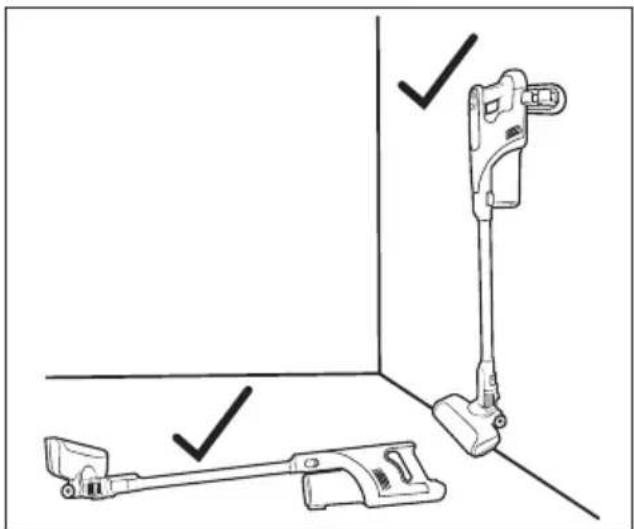
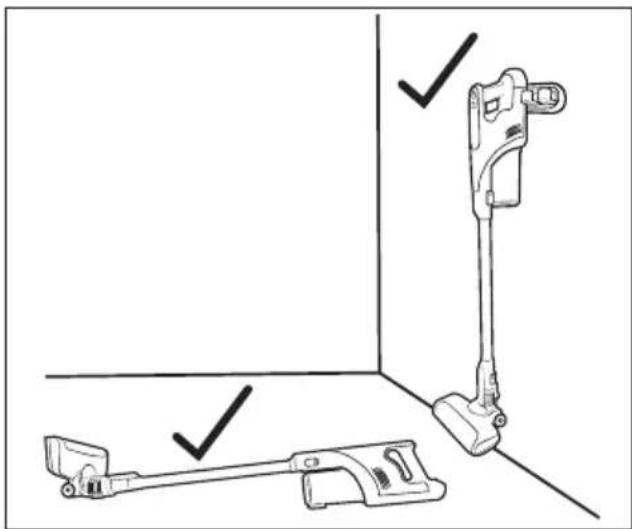
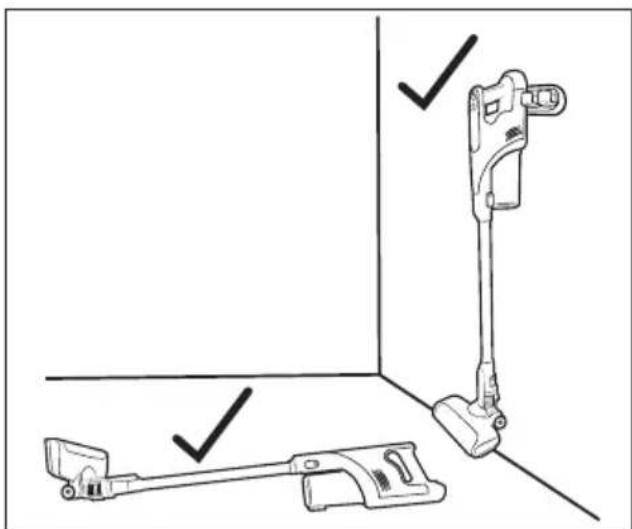
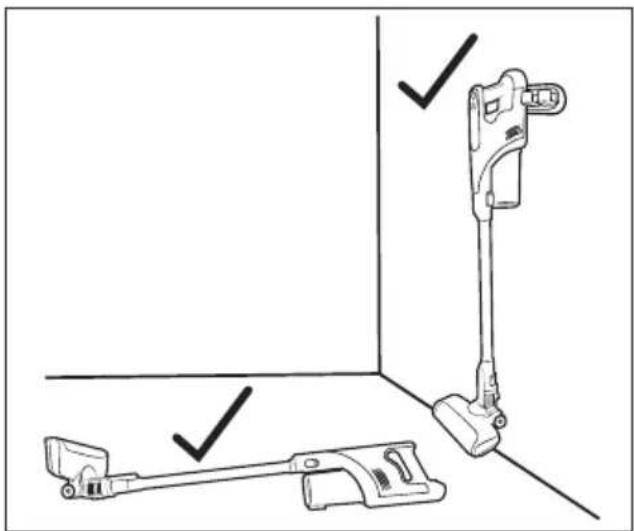
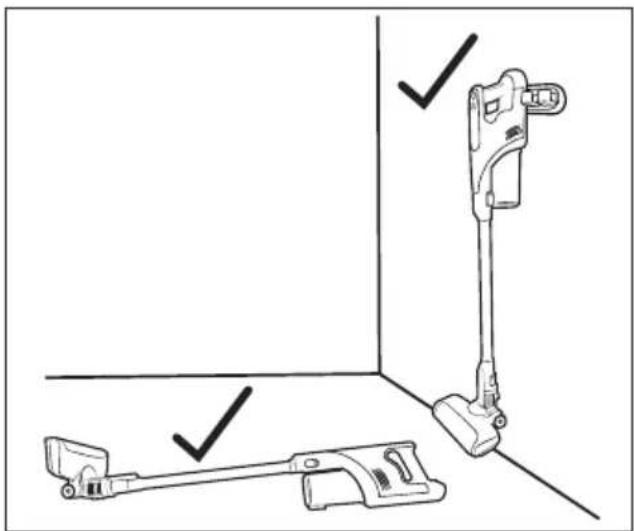
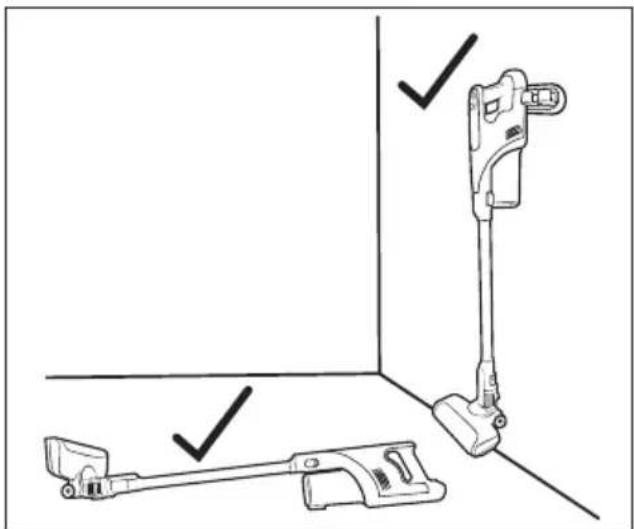
▶ Do not place the vacuum cleaner upright when you want to put it down or take it out of your hand in the meantime. To do this, place the vacuum cleaner in the wall bracket ⑱ or lay it on the floor (see Fig. 9 and 10). The vacuum cleaner may otherwise tip over and be damaged and possibly damage other objects when tipping over.
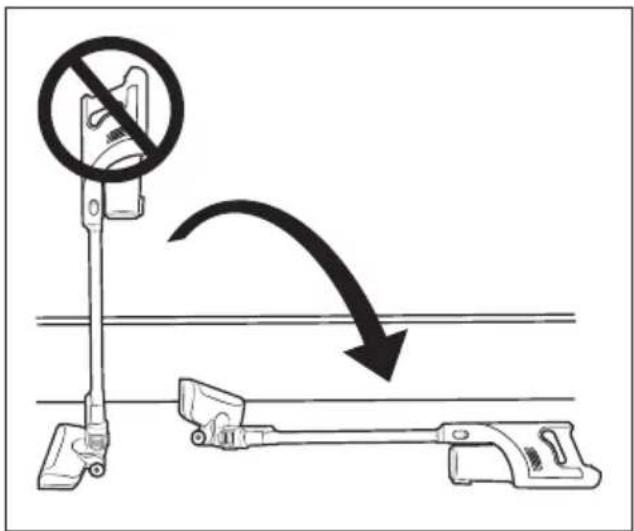
text_image
Diagram illustrating a mechanical device with a circular no-smoking symbol and an arrow indicating motion or change.Fig. 9

natural_image
Technical line drawing of a vacuum cleaner with three labeled parts (no text or symbols present)Fig. 10
Switching the appliance on
1) Remove the vacuum cleaner from the wall bracket ⑱. When you are not using the wall bracket ⑱, pull the barrel plug ⑪ out of the charging socket ③ on the underside of the appliance.
2) Press the On/Off switch ⏻ 30 to switch on the appliance. The display 29 shows the battery indicator 28 with the remaining running time 27 (timer) and the operating mode 26 (1 Eco/2 Auto/3 Boost).
i Note
The appliance always starts in operating mode 1 Eco after being switched on.
Selecting an operating mode
The appliance has three different operating modes, each of which differs in terms of suction power and running time. Press the M 31 button to select the operating mode:
1 Eco
- For vacuuming hard floors, delicate carpets and carpeting with low soiling.
- The appliance consumes less battery power and the running time is therefore longer.
- Running time with fully charged battery approx. 35 minutes.
2 Auto
- For vacuuming hard floors and carpeting with light to medium soiling.
- The brush speed is automatically adjusted depending on the floor covering to optimise the running time.
- Running time with fully charged battery approx. 20 minutes.
3 Boost
- For vacuuming hard floors and carpeting with heavy soiling
- Due to the high suction power, the best suction result is achieved with a short running time.
- Running time with fully charged battery approx. 10 minutes.
Dismantling the appliance
Suction pipe
To remove the suction pipe from the appliance, hold down the suction pipe release button and pull the suction pipe off the suction opening of the appliance (see Fig. 11).
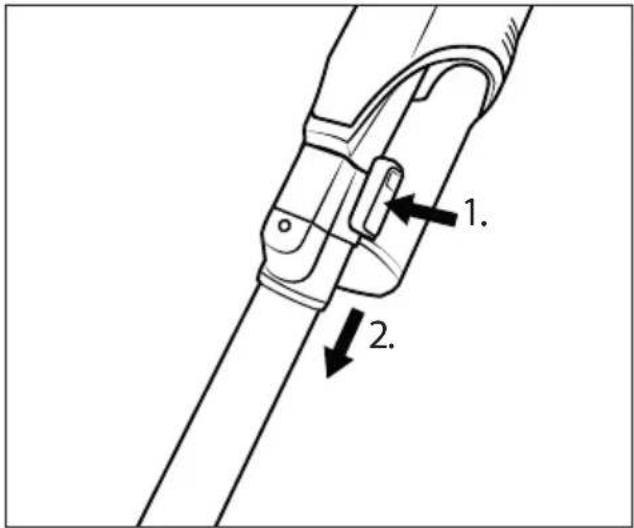
text_image
Technical diagram of a mechanical clamp or bracket assembly with numbered parts and directional arrows indicating assembly steps.Fig. 11
Floor brush
To remove the floor brush from the suction pipe, hold down the floor brush release button and pull the suction pipe off the floor brush (see Fig. 12).
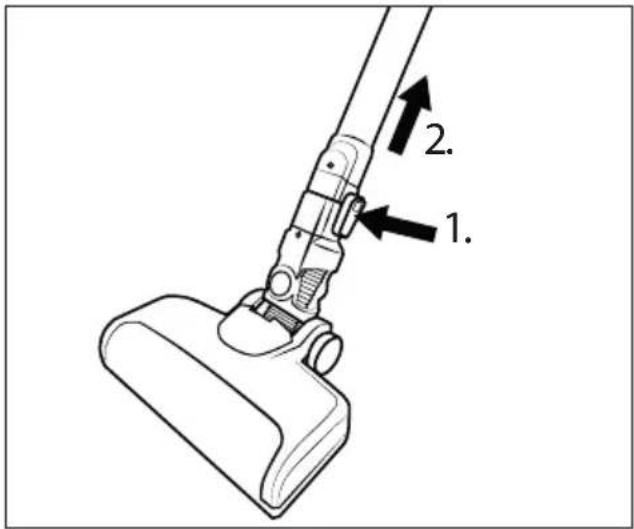
text_image
1. 2.Fig. 12
Battery
To remove the batter ^2 from the appliance, press and hold the battery release button ① and pull the battery ② out of the appliance (see Fig. 13).
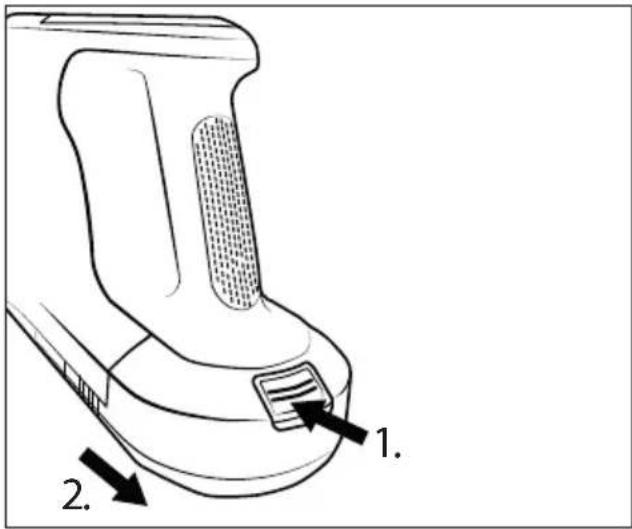
text_image
1. 2.Fig. 13
Using the accessories
i Note
Before using an accessory, you must remove the floor brush ^22 . To remove the floor brush ^22 , see section Dismantling the appliance.
▶ You can use the accessories with or without the suction pip ^24 as required. To remove the suction pipe ^24 , see section Dismantling the appliance.
The package contents include three different nozzles/brushes for different areas of application as accessories:
Crevice nozzle
-Use the crevice nozzle ^13 to clean narrow, hard-to-reach places such as joints or corners.
2-in-1 combination brush
- The 2-in-1 combination brush ^12 can be used as a wide nozzle or as a brush. Press and hold the release button and slide the brush attachment forward or backward as needed. Use the 2-in-1 combination brush ^12 to vacuum drawers or storage compartments, for example, or to dust keyboards or delicate surfaces with the soft brush attachment.
Round brush nozzle (with brush attachment)
-Use the round brush nozzle ^14 with its hard bristles for deep-seated dirt on coarse carpets or heavily soiled car interiors. The brush attachment can be removed from the nozzle to vacuum rounded inserts or storage compartments in the car, for example.
♦ Push the accessory onto the suction pipe ^24 or onto the suction opening of the appliance until it clicks into place (see Fig. 14). Make sure that the locking mechanism is in the correct position.
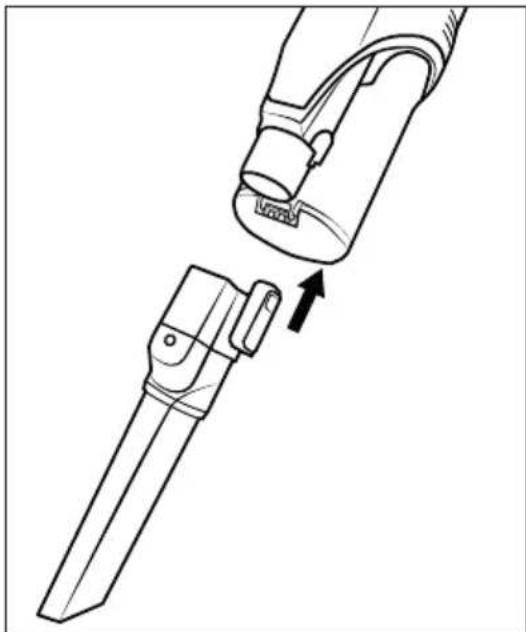
natural_image
Technical line drawing of a mechanical device with a handle and lever assembly (no text or symbols)Fig. 14
To remove the accessory, press and hold the release button on the accessory, then pull the accessory off the suction pipe 24 or the suction opening of the appliance (see Fig. 15).
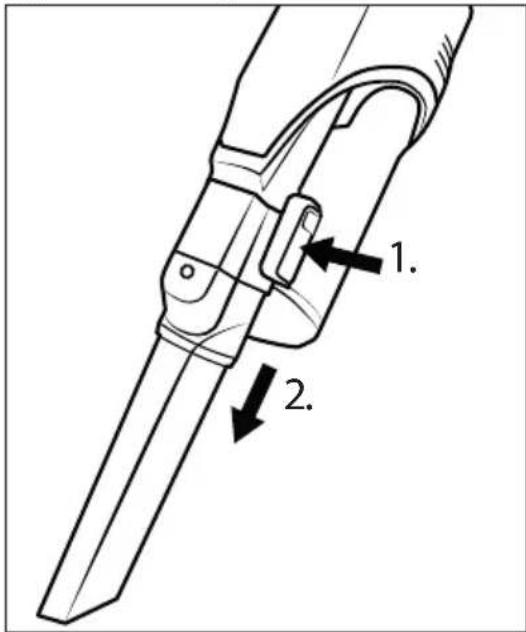
text_image
Technical diagram of a mechanical device with labeled parts 1 and 2, showing internal components and directional arrows.Fig. 15
After use
After use, press the On/Off switch ⏻ 30 to switch off the appliance. The display 29 goes out.
◆ Remove accessories from the appliance and place them on the accessories holder 17 for storage.
◆ Place the vacuum cleaner in the wall bracket⑱. Start charging when the battery ② has only a small amount of charge left □.
Cleaning
WARNING!
▶ Always switch off the appliance before cleaning it.
Emptying the dust container and cleaning the filter
(i) Note
▶ Empty the dust container ⑦ and clean the stainless steel filter ⑥ and the HEPA filter ⑤ when the dust container ⑦ level reaches the MAX mark.
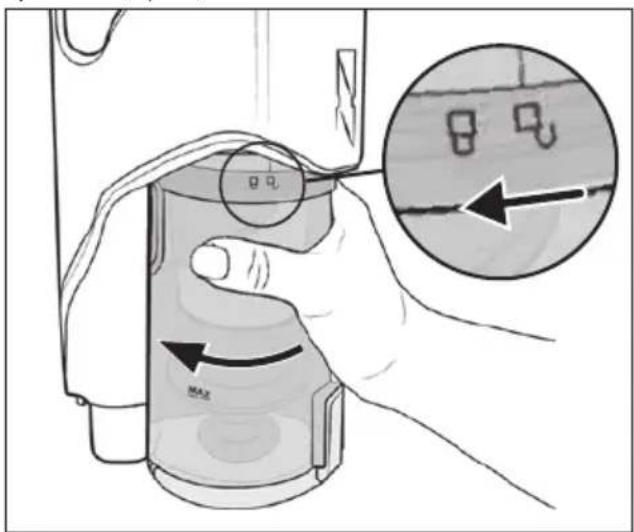
1) To remove the dust container ⑦ from the appliance, turn it towards the symbol (open) until it can be detached from the appliance (see Fig. 16).
text_image
Diagram illustrating a hand holding a container with a magnified inset showing internal components labeled '8' and 'u'.Fig. 16
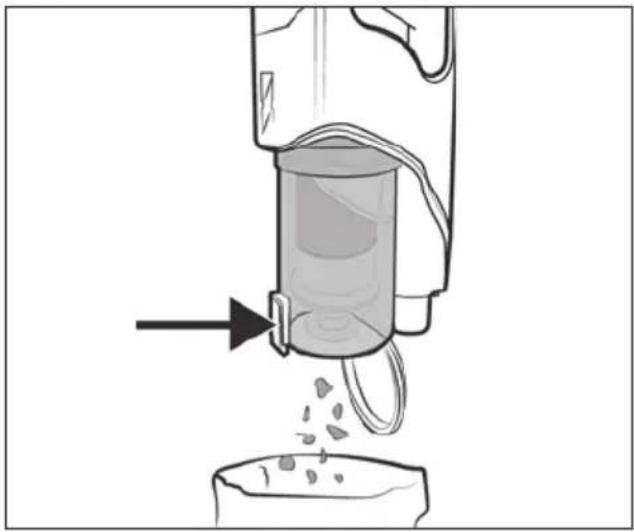
2) Hold the dust container ⑦ in a waste bin and press the dust container lid release button ⑧. The dust container lid ⑨ opens and the contents are emptied into the waste bin (see Fig. 17). Then close the dust container lid ⑨.
natural_image
Diagram of a vacuum cleaner pouring liquid into a container (no text or symbols)Fig. 17
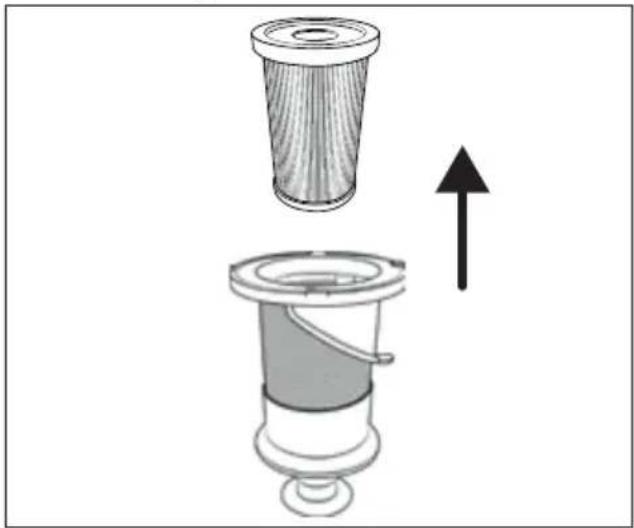
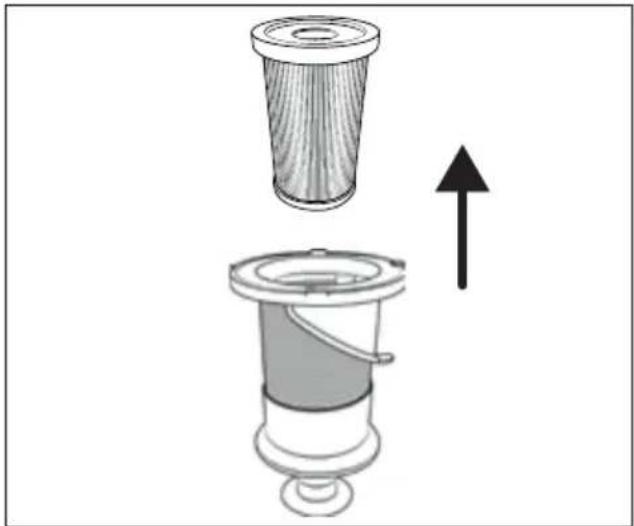
3) Remove the HEPA filter ⑤ from the stainless steel filter ⑥ by reaching into the opening of the HEPA filter ⑤ and pulling it out of the stainless steel filter ⑥ (see Fig. 18).
natural_image
Diagram of a mechanical component with a top view and an arrow indicating upward motion (no text or symbols)Fig. 18
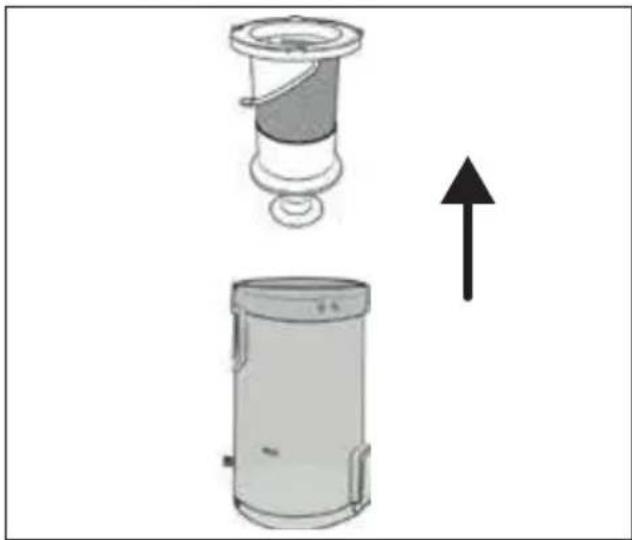
4) Remove the stainless steel filter ⑥ from the dust container ⑦ by reaching into the opening of the stainless steel filter ⑥ and pulling it out of the dust container ⑦ (see Fig. 19).
natural_image
Diagram showing a mechanical device with a top component and a side view of its base, both with an upward arrow indicating motion (no text or symbols present)Fig. 19
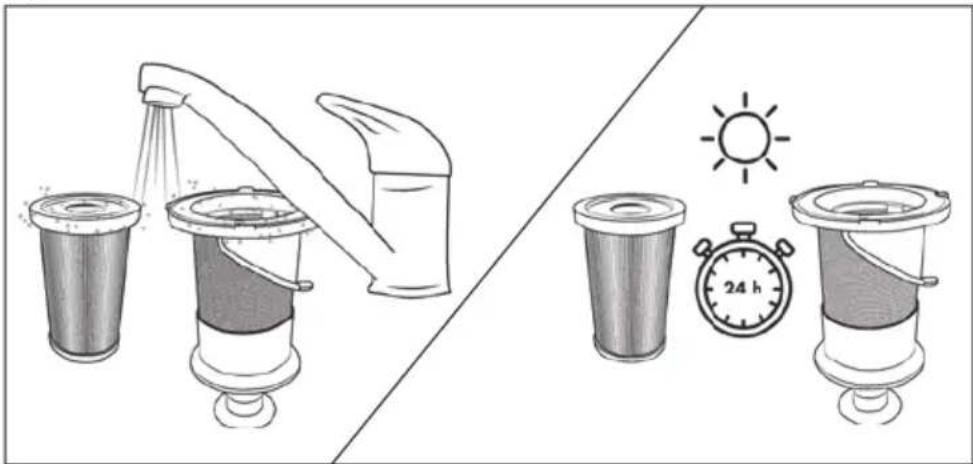
5) Rinse the HEPA filter ⑤ and the stainless steel filter ⑥ under cold or lukewarm water. Allow the HEPA filter ⑤ and the stainless steel filter ⑥ to air dry completely before putting them back into the dust container ⑦ (see Fig. 20).
natural_image
Illustration of a water dispenser with a watering can and two washers, alongside a stopwatch showing 24 hours (no text or symbols on main objects)Fig. 20
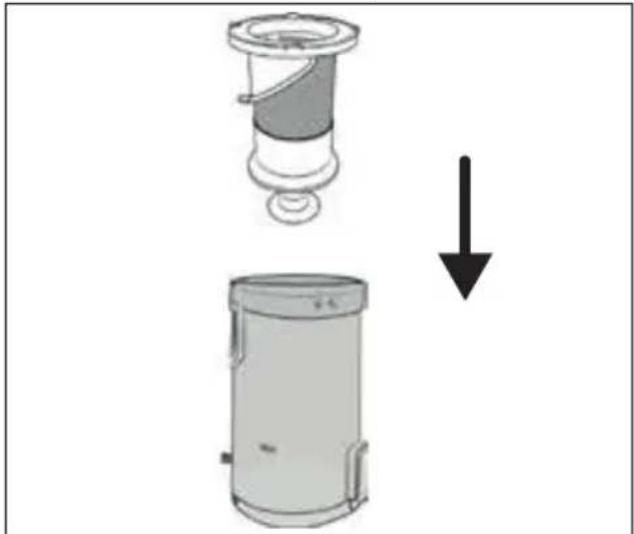
6) Insert the stainless steel filter ⑥ into the dust container ⑦ and push it all the way down (see Fig. 21). Pay attention to the different sized locks on the stainless steel filter ⑥. The stainless steel filter ⑥ can only be inserted into the dust container ⑦ in one position due to these locks.
natural_image
Diagram showing a mechanical device with a downward arrow indicating a process or transformation (no text or symbols present)Fig. 21
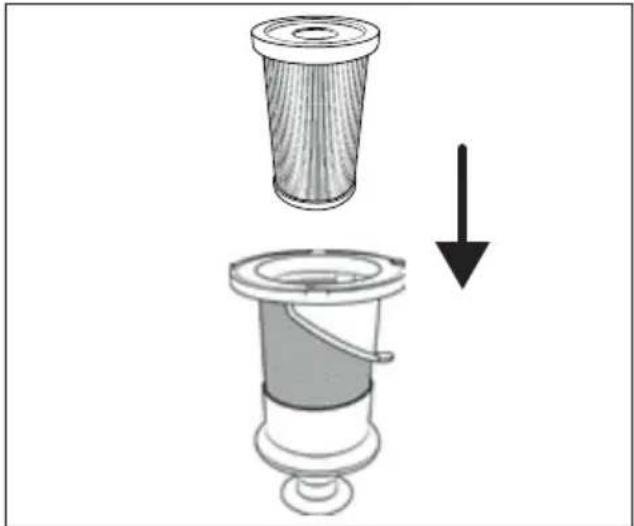
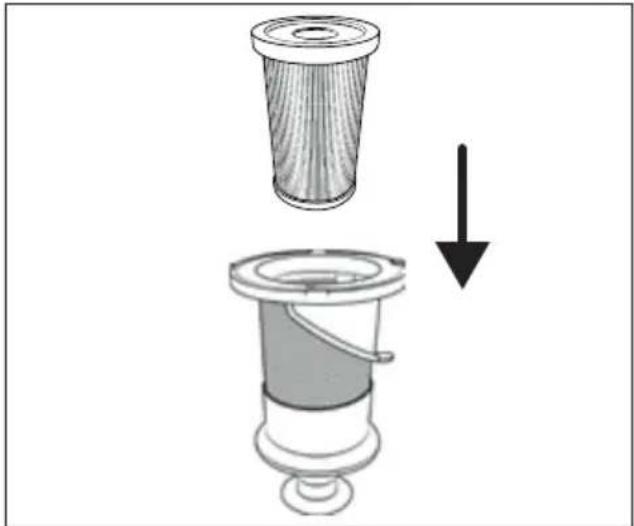
7) Insert the HEPA filter ⑤ into the stainless steel filter ⑥ (see Fig. 22).
natural_image
Diagram showing a mechanical component with a downward arrow indicating a process or transformation (no text or symbols present)Fig. 22
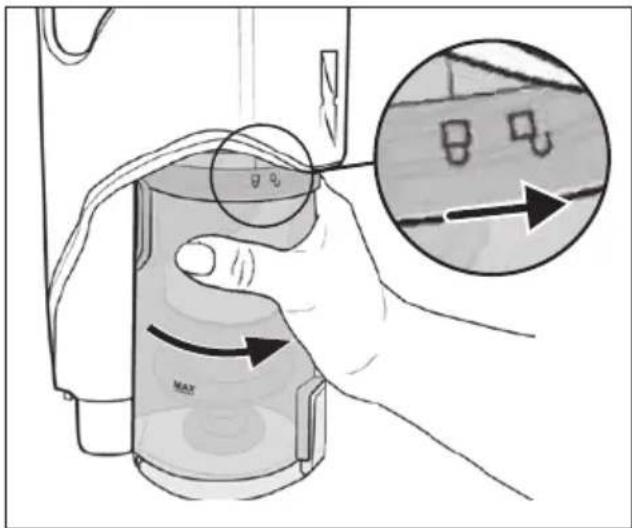
8) Put the dust container ⑦ back into the appliance and turn it in the direction of the symbol (close) until it is firmly seated in the appliance (see Fig. 23).
text_image
Diagram showing a hand holding a device with directional arrows and a magnified inset highlighting a component detail.Fig. 23
Cleaning the rotary brush
! ATTENTION!
▶ Only use the appliance with the rotary brush 21 properly mounted.
1) Remove the floor brush 22 from the suction pipe 24 or from the appliance (see section Dismantling the appliance). Turn the floor brush 22 upside down.
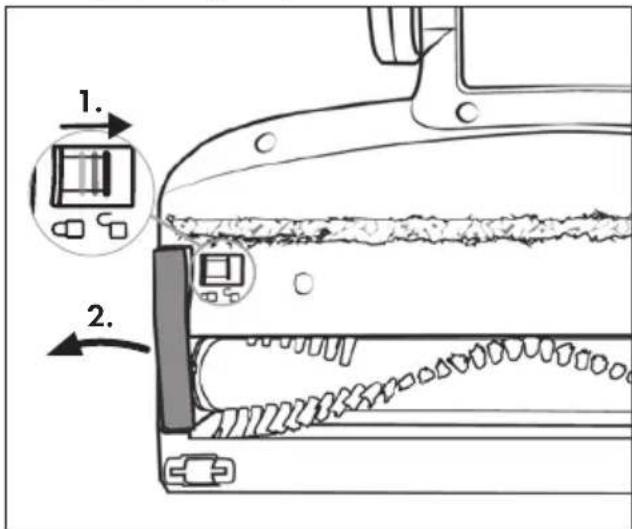
2) Unlock the rotary brush 21 by sliding the rotary brush release 19 to the right with your finger and then remove the rotary brush holder 20 from the floor brush 22 (see Fig. 24).
text_image
Diagram showing a device with two labeled parts (1 and 2) pointing to a component, likely illustrating a mechanical or electrical assembly.Fig. 24
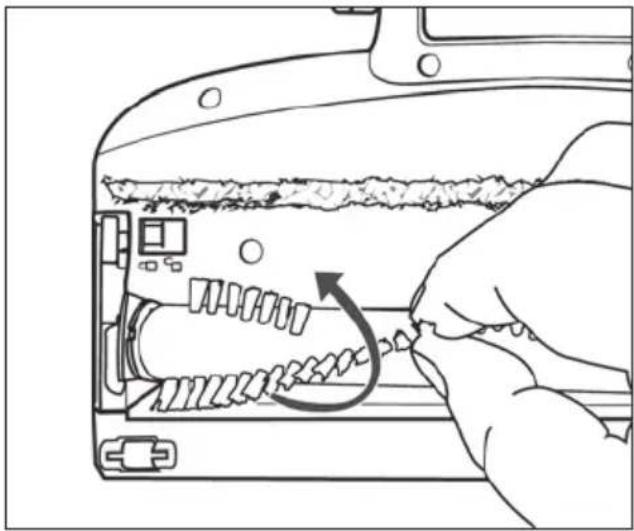
3) Pull the rotary brush 21 out of the floor brush 22 by the bristles. Turn the rotary brush 21 slightly to make it easier to remove (see Fig. 25).
natural_image
Line drawing of a hand inserting into a device into a slot, showing internal components and a curved arrow indicating rotation (no text or symbols)Fig. 25
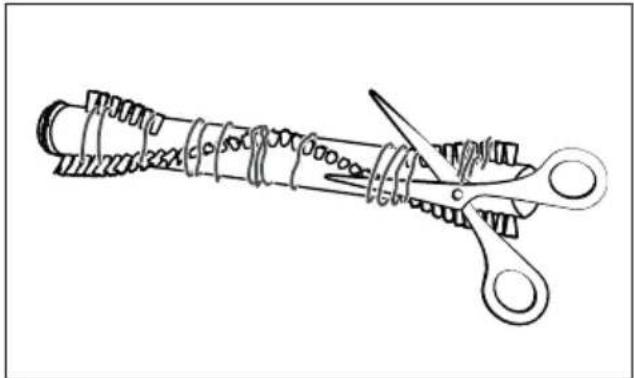
4) Cut threads and hairs along the bristles of the rotary brush 21 with scissors (see Fig. 26). Remove threads and hair from the rotary brush 21.
natural_image
Line drawing of a coiled spring with scissors cutting through it (no text or symbols)Fig. 26
5) Insert the rotary brush 21 into the floor brush 22. Turn the rotary brush 21 slightly to make it easier to insert.
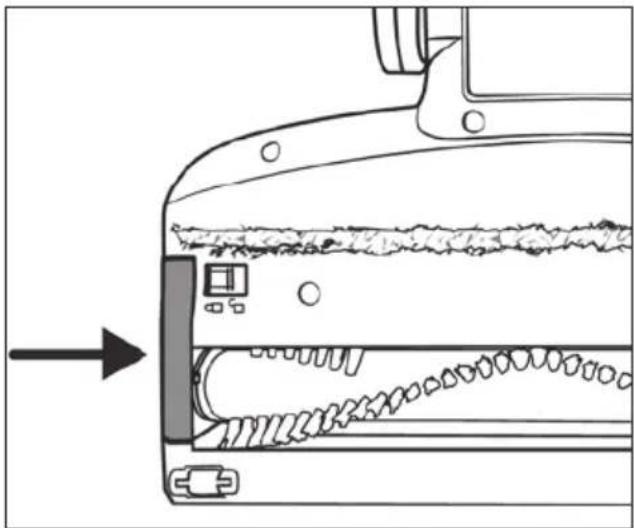
6) Put the rotary brush holder 20 back into the floor brush 22. Push it down until it audibly clicks into the floor brush 22 (see Fig. 27).
natural_image
Diagram of a mechanical device with internal components and an arrow indicating direction (no text or symbols)Fig. 27
Cleaning the appliance
ATTENTION!
▶ Do not use aggressive, chemical or abrasive cleaning agents. They could damage the outer surfaces of the appliance.
- Clean the appliance housing and the attachments with a slightly damp cloth. For stubborn soiling use a mild detergent on the cloth.
◆ Dry all parts thoroughly before using the appliance again or storing it.
Storage
Place the appliance on the wall bracket ⑱ when you are not using it.
◆ Store the accessories in the accessories hold.
◆ Store the appliance in a dust-free and dry location out of direct sunlight.
Disposal
Applies only to France:
The product, its packaging and the operating instructions are recyclable. They are subject to an extended manufacturer responsibility and will be collected separately.
Disposal of the appliance
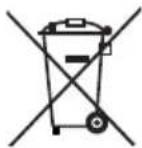
The adjacent symbol of a crossed-out dustbin means that this appliance is subject to Directive 2012/19/EU. This directive states that this appliance may not be disposed of in the normal household waste at the end of its useful life, but must be taken to specially set-up collection locations, recycling depots or disposal companies.
The disposal is free of charge for the user. Protect the environment and dispose of this appliance properly.
If your old appliance has stored any personal data, you are responsible for deleting it yourself before returning it.
If it is possible to do so without destroying the old appliance, remove the old batteries or rechargeable batteries before returning the appliance for disposal and take them to a separate collection point. In the case of permanently installed rechargeable batteries, you must indicate during disposal that the appliance contains a battery.

Your local community or municipal authorities can provide information on how to dispose of the worn-out product.
Disposal of the packaging

The packaging materials have been selected for their environmental friendliness and ease of disposal and are therefore recyclable. Dispose of packaging materials that are no longer needed in accordance with applicable local regulations.

Dispose of the packaging in an environmentally friendly manner. Note the labelling on the packaging and separate the packaging material components for disposal, if necessary. The packaging material is labelled with abbreviations (a) and numbers (b) with the following meanings: 1–7: plastics, 20–22: paper and cardboard, 80–98: composites.
Disposal of batteries
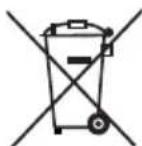
Batteries/rechargeable batteries must be treated as hazardous waste and must therefore be disposed of in an environmentally sound manner by appropriate bodies (dealers, specialist dealers, public municipal bodies, commercial disposal companies). Batteries/rechargeable batteries may contain toxic heavy metals.
The heavy metals contained are identified by letters below the symbol: Cd = cadmium, Hg = mercury, Pb = lead.
For this reason, do not dispose of batteries/rechargeable batteries in domestic waste. Take them to a specialist collection point.
Only return batteries that are fully discharged.
Ordering replacement parts
You can order replacement parts for this product on the Internet at www.kompernass.com.
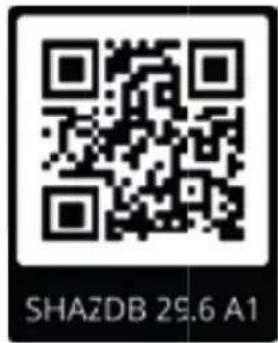
text_image
SHAZDB 29.6 A1Scan the QR code with your smartphone/tablet. You can use this QR code to go directly to our website to view and order the available spare parts.
i Note
▶ If you have problems with your online order, you can contact our service centre by phone or e-mail.
▶ Always quote the article number (IAN) 424821 2301 in your order.
▶ Please note that online ordering of replacement parts is not possible for all countries.
This appliance has a 3-year warranty valid from the date of purchase. If this product has any faults, you, the buyer, have certain statutory rights. Your statutory rights are not restricted in any way by the warranty described below.
Warranty conditions
The warranty period starts on the date of purchase. Please keep your receipt in a safe place. This will be required as proof of purchase.
If any material or manufacturing fault occurs within three years of the date of purchase of the product, we will either repair or replace the product for you or refund the purchase price (at our discretion). This warranty service requires that you present the defective appliance and the proof of purchase (receipt) within the three-year warranty period, along with a brief written description of the fault and of when it occurred.
If the defect is covered by the warranty, your product will either be repaired or replaced by us. The repair or replacement of a product does not signify the beginning of a new warranty period.
Warranty period and statutory claims for defects
The warranty period is not prolonged by repairs effected under the warranty. This also applies to replaced and repaired components. Any damage and defects present at the time of purchase must be reported immediately after unpacking. Repairs carried out after expiry of the warranty period shall be subject to a fee.
Scope of the warranty
This appliance has been manufactured in accordance with strict quality guidelines and inspected meticulously prior to delivery.
The warranty covers material faults or production faults. The warranty does not extend to product parts subject to normal wear and tear or to fragile parts which could be considered as consumable parts such as switches, batteries or parts made of glass.
The warranty does not apply if the product has been damaged, improperly used or improperly maintained. The directions in the operating instructions for the product regarding proper use of the product are to be strictly followed. Uses and actions that are discouraged in the operating instructions or which are warned against must be avoided.
This product is intended solely for private use and not for commercial purposes. The warranty shall be deemed void in cases of misuse or improper handling, use of force and modifications / repairs which have not been carried out by one of our authorised Service centres.
Warranty claim procedure
To ensure quick processing of your case, please observe the following instructions:
■ Please have the till receipt and the item number (IAN) 424821_2301 available as proof of purchase.
■ You will find the item number on the type plate on the product, an engraving on the product, on the front page of the operating instructions (below left) or on the sticker on the rear or bottom of the product.
If functional or other defects occur, please contact the service department listed either by telephone or by e-mail.
■ You can return a defective product to us free of charge to the service address that will be provided to you. Ensure that you enclose the proof of purchase (till receipt) and information about what the defect is and when it occurred.

You can download these instructions along with many other manuals, product videos and installation software at www.lidl-service.com.
This QR code will take you directly to the Lidl service page (www.lidl-service.com) where you can open your operating instructions by entering the item number (IAN) 424821_2301.
Service
GB Service Great Britain
Tel.: 0800 404 7657
E-Mail: kompernass@lidl.co.uk
IE ServiceIreland
Tel.: 1800 101010
E-Mail: kompernass@lidl.ie
IAN 424821_2301
Importer
Please note that the following address is not the service address. Please use the service address provided in the operating instructions.
KOMPERNASS HANDELS GMBH
BURGSTRASSE 21
44867 BOCHUM
GERMANY
www.kompernass.com
Inhaltsverzeichnis
Einleitung 32
natural_image
Technical line drawing of a mechanical device with a close-up view showing internal components and an upward arrow (no text or symbols)Abb. 1
natural_image
Line drawing of a vacuum cleaner with a downward arrow indicating motion (no text or symbols)Abb. 2
natural_image
Line drawing of a device being placed on top, showing a handle and a separate device (no text or symbols present)Abb. 3
natural_image
Cross-sectional diagram of a plug-in socket with internal components and wiring (no text or labels)Abb. 4
natural_image
Line drawing of hands installing or adjusting a mechanical component with a tool (no text or symbols)Abb. 5
natural_image
Technical diagram of a mechanical device with an inset showing a close-up of a component (no text or symbols present)Abb. 8
text_image
Diagram illustrating a mechanical device with a circular no-smoking symbol and a curved arrow indicating motion or change.Abb. 9

natural_image
Technical line drawing of a vacuum cleaner with three mounting brackets and a vertical support (no text or symbols)Abb. 10
Gerät einschalten
text_image
Technical diagram showing a mechanical assembly with labeled parts 1 and 2, likely illustrating a component or assembly.Abb. 11
Bodenbürste
text_image
Diagram of a hairdryer with labeled parts 1 and 2, showing internal structure and directional arrows.Abb. 13
Zubehör verwenden
i Hinweis
natural_image
Technical line drawing of a mechanical device with an arrow indicating assembly or operation (no text or symbols present)Abb. 14
text_image
Technical diagram of a mechanical device with labeled parts 1 and 2, showing internal components and directional arrows.Abb. 15
Nach dem Gebrauch
text_image
Diagram illustrating a hand holding a container with labeled arrows and a magnified inset showing internal components.Abb. 16
natural_image
Diagram of a vacuum cleaner pouring liquid into a container (no text or symbols)Abb. 17
natural_image
Diagram of a mechanical device with a top component and a side view showing internal structure (no text or symbols)Abb. 18
natural_image
Diagram showing a mechanical device with a downward arrow indicating a process or transformation (no text or symbols present)Abb. 21
natural_image
Diagram showing a mechanical component with a downward arrow indicating a process or transformation (no text or symbols present)Abb. 22
text_image
Diagram illustrating a hand holding a device with directional arrows and a magnified inset showing a close-up of the device's internal structure.Abb. 23
Bürstenrolle reinigen
! ACHTUNG!
text_image
Diagram showing a device with labeled parts and directional arrows, including a zoomed-in inset of a component.Abb. 24
natural_image
Line drawing of a hand inserting into a device into a housing panel (no text or symbols)Abb. 25
natural_image
Line drawing of a coiled spring with scissors cutting through it (no text or symbols)Abb. 26
natural_image
Diagram of a mechanical device with internal components and an arrow indicating direction (no text or symbols)Abb. 27
Gerät reinigen
! ACHTUNG!
KOMPERNASS HANDELS GMBH
BURGSTRASSE 21
44867 BOCHUM
DEUTSCHLAND
www.kompernass.com
Table des matières
Introduction 62
natural_image
Technical line drawing of a mechanical device with a close-up view showing internal components (no text or symbols)Fig. 1
natural_image
Line drawing of a vacuum cleaner with a downward arrow indicating motion (no text or symbols)Fig. 2
natural_image
Line drawing of a device being placed on top, showing a handle and a separate device (no text or symbols present)Fig. 3
natural_image
Cross-sectional diagram of a mechanical device showing internal components and wiring (no text or labels)Fig. 4
natural_image
Line drawing of hands installing or adjusting a mechanical component with a tool (no text or symbols)Fig. 5
natural_image
Line drawing of a device with an inset showing a close-up of its internal components (no text or symbols)Fig. 6

text_image
Technical diagram of a handheld device with labeled buttons and a battery icon pointing to the right button.Fig. 7
natural_image
Technical diagram of a mechanical device with an inset showing a close-up of a component (no text or symbols present)Fig. 8
text_image
Diagram illustrating a no-smoking device with a circular stop sign and a curved arrow indicating motion or change.Fig. 9

natural_image
Technical line drawing of a vacuum cleaner assembly with mounting bracket and handle (no text or symbols)Fig. 10
Allumer l'appareil
text_image
Technical diagram of a mechanical clamp or bracket assembly with numbered parts and directional arrows indicating assembly steps.Fig. 11
Brosse de sol
natural_image
Technical line drawing of a mechanical device with a handle and lever mechanism (no text or symbols)Fig. 14
text_image
Technical diagram of a mechanical device with labeled parts 1 and 2, showing directional arrows indicating movement or assembly.Fig. 15
Après utilisation
text_image
Diagram illustrating a mechanical or fluidic process with labeled components and directional arrows, including a magnified inset showing a component with internal features.Fig. 16
natural_image
Diagram of a vacuum cleaner pouring liquid into a container (no text or symbols)Fig. 17
natural_image
Diagram of a mechanical device with a top component and a side view showing internal structure (no text or symbols)Fig. 18
natural_image
Diagram showing a mechanical device with a top component and a side view of its base, both with an upward arrow indicating direction (no text or symbols present)Fig. 19
natural_image
Illustration of a water tap and two washers with different shapes, alongside a stopwatch showing 24 hours (no text or symbols on devices)Fig. 20
natural_image
Diagram showing a mechanical device with a downward arrow indicating a process or transformation (no text or symbols present)Fig. 21
natural_image
Diagram showing a mechanical component with a downward arrow indicating a process or transformation (no text or symbols present)Fig. 22
text_image
Diagram illustrating a hand holding a device with motion arrows and an inset showing a close-up of a device's motion.Fig. 23
text_image
Diagram showing a device with two labeled parts (1 and 2) pointing to a component, likely illustrating a mechanical or electrical assembly.Fig. 24
natural_image
Line drawing of a hand inserting into a device into a housing panel (no text or symbols)Fig. 25
natural_image
Line drawing of a coiled spring with scissors cutting through it (no text or symbols)Fig. 26
natural_image
Diagram of a mechanical device with internal components and an arrow indicating direction (no text or symbols)Fig. 27
Nettoyer l'appareil
ATTENTION!
KOMPERNASS HANDELS GMBH
BURGSTRASSE 21
44867 BOCHUM
ALLEMAGNE
www.kompernass.com
Inhoud
Inleiding....96
⚠ WAARSCHUWING! LETSELGEVAAR!
natural_image
Technical line drawing of a mechanical device with a close-up view showing internal components and an upward arrow (no text or symbols)Afb. 1
natural_image
Line drawing of a vacuum cleaner with a downward arrow indicating motion (no text or symbols)Afb. 2
natural_image
Line drawing of a device being placed on top, showing a handle and a separate device (no text or symbols present)Afb. 3
natural_image
Cross-sectional diagram of a mechanical device showing internal components and wiring (no text or labels)Afb. 4
natural_image
Line drawing of hands holding a tool inside a mechanical component (no text or symbols)Afb. 5
natural_image
Line drawing of a device with an inset showing internal components (no text or symbols)Afb. 6

text_image
Technical diagram of a handheld device with labeled buttons and a battery icon pointing to the right button.Afb. 7
natural_image
Technical diagram of a mechanical device with an inset showing a close-up of a component (no text or symbols present)Afb. 8
text_image
Diagram illustrating a mechanical device with a circular no-smoking symbol and a curved arrow indicating motion or change.Afb. 9

natural_image
Technical line drawing of a vacuum cleaner with three mounting brackets and a vertical support (no text or symbols)Afb. 10
text_image
Technical diagram showing a mechanical assembly with labeled parts 1 and 2, likely illustrating a component or assembly.Afb. 11
Vloerborstel
text_image
Diagram of a hairdryer with labeled parts and directional arrows indicating movement or positioning.Afb. 13
natural_image
Technical line drawing of a mechanical device with a handle and connector, showing a close-up of the component (no text or symbols)Afb. 14
text_image
Diagram showing a hand holding a container with labeled parts and an inset magnified view of a water surface with measurement indicators.Afb. 16
natural_image
Diagram of a laboratory filtration setup with a container and granular material being poured into a container (no text or symbols)Afb. 17
natural_image
Diagram of a mechanical component with a top view and an arrow indicating upward motion (no text or symbols)Afb. 18
natural_image
Diagram showing a mechanical device with a top component and a side view of its base, both with an upward arrow indicating motion (no text or symbols present)Afb. 19
natural_image
Illustration of a water tap and two washers with different shapes, alongside a stopwatch showing 24 hours (no text or symbols on devices)Afb. 20
natural_image
Diagram showing a mechanical device with a downward arrow indicating a process or transformation (no text or symbols present)Afb. 21
natural_image
Diagram showing a mechanical component being lifted by a force, with no visible text or symbols.Afb. 22
text_image
Diagram illustrating a hand holding a device with motion arrows and a magnified inset showing a close-up of a device's internal structure.Afb. 23
Borstelrol reinigen
! LET OP!
text_image
Diagram showing a device with labeled parts and two directional arrows indicating movement or assembly steps.Afb. 24
natural_image
Line drawing of a hand inserting into a device into a housing panel, showing internal components and a curved arrow indicating rotation (no text or symbols)Afb. 25
natural_image
Line drawing of a coiled spring with scissors cutting through it (no text or symbols)Afb. 26
natural_image
Diagram of a mechanical device with internal components and an arrow indicating direction (no text or symbols)Afb. 27
Apparaat reinigen
! LET OP!
Cd = cadmium, Hg = kwik, Pb = lood.
KOMPERNASS HANDELS GMBH
BURGSTRASSE 21
44867 BOCHUM
DUITSLAND
www.kompernass.com
Obsah
Úvod....126
! POZOR! HMOTNÉ ŠKODY!
natural_image
Technical line drawing of a mechanical device with a close-up view showing internal components (no text or symbols)Obr. 1
natural_image
Line drawing of a vacuum cleaner with a downward arrow indicating motion (no text or symbols)Obr. 2
natural_image
Line drawing of a device being placed on top, showing a handle and a separate device (no text or symbols present)Obr. 3
natural_image
Cross-sectional diagram of a mechanical device with internal components and a cable (no text or symbols)Obr. 4
natural_image
Line drawing of hands installing or adjusting a mechanical component with a tool (no text or symbols)Obr. 5
natural_image
Line drawing of a device with an inset showing a close-up of its internal component (no text or symbols present)Obr. 6

text_image
35:00 1 2ccObr. 7
natural_image
Technical diagram of a mechanical device with an inset showing a close-up of a component (no text or symbols present)Obr. 8
Obsluha a provoz
! POZOR!
text_image
Diagram illustrating a no-smoking device mechanism with a circular sign and directional arrow indicating motion.Obr. 9

natural_image
Technical line drawing of a vacuum cleaner with three mounting brackets and a vertical support (no text or symbols)Obr. 10
Zapnutí prístroje
text_image
Technical diagram of a mechanical clamp or bracket assembly with numbered parts and directional arrows indicating assembly steps.Obr. 11
podlahový kartáč
natural_image
Technical line drawing of a mechanical device with an arrow indicating assembly or operation (no text or symbols present)Obr. 14
text_image
Diagram illustrating a hand holding a device with labeled components and directional arrows, including a magnified inset showing internal components.Obr. 16
natural_image
Diagram of a laboratory filtration setup with a container and granular material being poured into a container (no text or symbols)Obr. 17
natural_image
Diagram of a mechanical component with a top view and an arrow indicating upward motion (no text or symbols)Obr. 18
natural_image
Diagram showing a mechanical device with a top component and a side view of its base, both with an upward arrow indicating direction (no text or symbols present)Obr. 19
natural_image
Illustration of a water dispenser with a watering can and a stopwatch showing 24 hours (no text or symbols)Obr. 20
natural_image
Diagram showing a mechanical device with a downward arrow indicating a process or transformation (no text or symbols present)Obr. 21
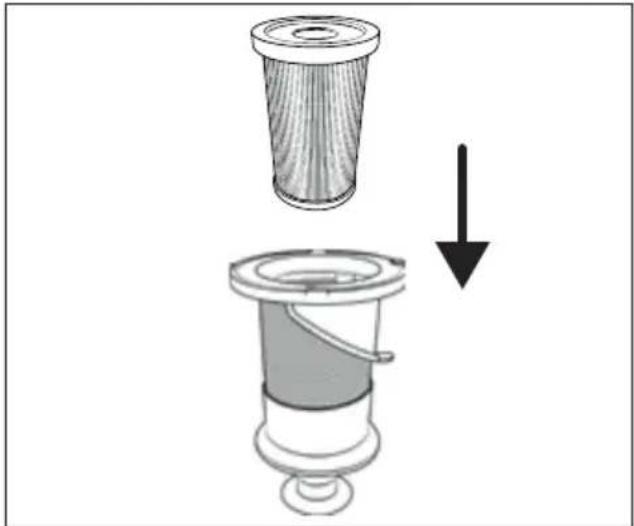
7) HEPA filt 5 vložte do filtru z ušlechtilé oceli 6 (viz obr. 22).
natural_image
Diagram showing a mechanical component with a downward arrow indicating a process or transformation (no text or symbols present)Obr. 22
natural_image
Line drawing of a hand inserting into a device into a housing panel, showing internal components and a curved arrow indicating rotation (no text or symbols)Obr. 25
natural_image
Line drawing of a coiled spring with scissors cutting through it (no text or symbols)Obr. 26
natural_image
Diagram of a mechanical device with internal components and an arrow indicating direction (no text or symbols)Obr. 27
Čištění přístroje
! POZOR!
KOMPERNASS HANDELS GMBH
BURGSTRASSE 21
44867 BOCHUM
NĚMECKO
www.kompernass.com
Spis treści
W step 156
natural_image
Technical line drawing of a mechanical device with a close-up view showing internal components and an upward arrow (no text or symbols)Rys. 1
natural_image
Line drawing of a vacuum cleaner with a downward arrow indicating motion (no text or symbols)Rys. 2
natural_image
Line drawing of a device being placed on top, showing a handle and a separate device (no text or symbols present)Rys. 3
natural_image
Cross-sectional diagram of a plug-in socket with internal components and wiring (no text or labels)Rys. 4
natural_image
Line drawing of hands installing or adjusting a mechanical component with a tool (no text or symbols)Rys. 5
natural_image
Line drawing of a device with an inset showing a close-up of its internal component (no text or symbols present)Rys. 6

text_image
Technical diagram of a handheld device with labeled buttons and a battery icon pointing to the right button.Rys. 7
natural_image
Technical diagram of a mechanical device with an inset showing a close-up of a component (no text or symbols present)Rys. 8
text_image
Diagram illustrating a no-smoking device mechanism with a circular stop sign and directional arrow indicating motion.Rys. 9

natural_image
Technical line drawing of a vacuum cleaner with three mounting brackets and a vertical support (no text or symbols)Rys. 10
natural_image
Technical line drawing of a mechanical device with an arrow indicating assembly or operation (no text or symbols present)Rys. 14
text_image
Technical diagram of a mechanical device with labeled parts 1 and 2, showing internal components and directional arrows.Rys. 15
Po użyciu
text_image
Diagram illustrating a hand holding a container with directional arrows and a magnified inset showing internal components with symbols like 'B' and 'Q'.Rys. 16
natural_image
Diagram of a laboratory filtration setup with a funnel and granular material (no text or symbols)Rys. 17
natural_image
Diagram of a mechanical component with a top view and an arrow indicating upward motion (no text or symbols)Rys. 18
natural_image
Diagram showing a mechanical device with a top component and a base, both with an upward arrow indicating direction (no text or symbols present)Rys. 19
natural_image
Illustration of a water dispenser with a watering can and two washers, alongside a stopwatch showing 24 hours (no text or symbols on main objects)Rys. 20
text_image
Diagram illustrating a device's motion with magnified view showing internal components and directional arrowsRys. 23
text_image
Diagram showing a device with labeled parts and two directional arrows indicating movement or assembly steps.Rys. 24
natural_image
Hand inserting a cable into a device casing, showing internal components and a curved arrow indicating rotation (no text or symbols)Rys. 25
natural_image
Line drawing of a coiled spring with scissors cutting through it (no text or symbols)Rys. 26
natural_image
Diagram of a mechanical device with internal components and an arrow indicating direction (no text or symbols)Rys. 27
KOMPERNASS HANDELS GMBH
BURGSTRASSE 21
44867 BOCHUM
NIEMCY
www.kompernass.com
Obsah
Úvod....186
natural_image
Technical line drawing of a mechanical device with a close-up view showing internal components (no text or symbols)Obr. 1
natural_image
Line drawing of a vacuum cleaner with a downward arrow indicating motion (no text or symbols)Obr. 2
natural_image
Line drawing of a device being placed on top, showing a handle and base with an arrow indicating direction (no text or symbols)Obr. 3
natural_image
Cross-sectional diagram of a mechanical device showing internal components and wiring (no text or labels)Obr. 4
natural_image
Line drawing of hands installing or adjusting a mechanical component with a tool (no text or symbols)Obr. 5
4) Vrtákom s priemerom 5 mm vyvítajte naznačené otvory.
natural_image
Line drawing of a device with an inset showing a close-up of its internal component (no text or symbols present)Obr. 6

text_image
35:00 1 2ccObr. 7
natural_image
Technical diagram of a mechanical device with an inset showing a close-up of a component (no text or symbols present)Obr. 8
Obsluha a prevádzka
! POZOR!
text_image
Diagram illustrating a no-smoking device with a circular stop sign and a right-hand rule for reducing the height of the horizontal floor.Obr. 9

natural_image
Technical line drawing of a right-angle mechanical device with mounting bracket and vertical guide rail (no text or symbols)Obr. 10
Zapnutie prístroja
text_image
Diagram showing a hand holding a water can with directional arrows indicating flow or movement, and an inset magnified view of a container with labeled parts.Obr. 16
natural_image
Diagram of a mechanical device with a cylindrical component and granular material inside, showing fluid flow direction (no text or symbols)Obr. 17
3) Vyberte filter HEPA ⑤ z filtra z ušl'achtilej ocele ⑥ tak, že siahnete do otvoru filtra HEPA ⑤ a vytiahnete tento z filtra z ušl'achtilej ocele ⑥ (pozri obr. 18).
natural_image
Diagram of a mechanical device with a top component and a side view showing internal structure (no text or symbols)Obr. 18
natural_image
Diagram showing a mechanical device with a top component and a side view of its base, both with an upward arrow indicating direction (no text or symbols present)Obr. 19
natural_image
Illustration of a water tap and two washers with different shapes, alongside a stopwatch showing 24 hours (no text or symbols on devices)Obr. 20
natural_image
Diagram showing a mechanical device with a downward arrow indicating a process or transformation (no text or symbols present)Obr. 21
natural_image
Diagram showing a mechanical component with a downward arrow indicating a process or transformation (no text or symbols present)Obr. 22
text_image
Diagram illustrating a hand holding a device with directional arrows and a magnified inset showing a close-up of the device's internal structure.Obr. 23
text_image
Diagram showing a device with labeled parts and two directional arrows indicating movement or assembly steps.Obr. 24
natural_image
Line drawing of a hand inserting into a device into a housing panel, showing internal components and a curved arrow indicating rotation (no text or symbols)Obr. 25
natural_image
Line drawing of a coiled spring with scissors cutting through it (no text or symbols)Obr. 26
5) Rotačnú kefu 21 vložte do podlahovej kefy 22. Rotačnú kefu 21 pritom trochu otočte, aby ste ju mohli l'ahko vložit.
natural_image
Diagram of a mechanical device with internal components and an arrow indicating direction (no text or symbols)Obr. 27
Čistenie prístroja
! POZOR!
KOMPERNASS HANDELS GMBH
BURGSTRASSE 21
44867 BOCHUM
NEMECKO
www.kompernass.com
Índice
Introducción....216
Uso previsto 216
natural_image
Technical line drawing of a mechanical device with a close-up view showing internal components (no text or symbols)Fig. 1
natural_image
Cross-sectional diagram of a mechanical device showing internal components and wiring (no text or labels)Fig. 4
natural_image
Line drawing of hands installing or adjusting a component with a tool (no text or symbols)Fig. 5
natural_image
Line drawing of a device with an inset showing internal components (no text or symbols)Fig. 6

text_image
Technical diagram of a handheld device with labeled buttons and a battery icon pointing to the right button.Fig. 7
natural_image
Technical diagram of a mechanical device with an inset showing a close-up of a component (no text or symbols present)Fig. 8
text_image
Diagram illustrating a no-smoking device with a circular stop sign and a curved arrow indicating motion or change.Fig. 9

natural_image
Technical line drawing of a vacuum cleaner assembly with mounting bracket (no text or symbols)Fig. 10
text_image
Diagram of a mop with labeled parts and directional arrows indicating movement or positioningFig. 12
Batería
text_image
Diagram of a cleaning or cleaning device with labeled parts 1 and 2, showing a brush and handle mechanism.Fig. 13
natural_image
Technical line drawing of a mechanical device with an arrow indicating assembly or operation (no text or symbols present)Fig. 14
text_image
Technical diagram of a mechanical device with labeled parts 1 and 2, showing directional arrows indicating movement or assembly.Fig. 15
Después del uso
text_image
Diagram illustrating a hand holding a beverage container with labeled parts and an inset showing a magnified view of the liquid level.Fig. 16
natural_image
Diagram of a mechanical device with a cylindrical component and granular material inside, showing fluid flow direction (no text or symbols)Fig. 17
natural_image
Diagram of a mechanical device with a top component and a side view showing internal structure (no text or symbols)Fig. 18
natural_image
Diagram showing a mechanical device with a top component and a side view of its base, both with an upward arrow indicating direction (no text or symbols present)Fig. 19
natural_image
Illustration of a water tap and two washers with different shapes, alongside a stopwatch showing 24 hours (no text or symbols on devices)Fig. 20
natural_image
Diagram showing a mechanical device with a downward arrow indicating a process or transformation (no text or symbols present)Fig. 21
natural_image
Diagram showing a mechanical component with a downward arrow indicating a process or transformation (no text or symbols present)Fig. 22
text_image
Diagram illustrating a hand holding a device with directional arrows and a magnified inset showing a close-up of the device's internal structure.Fig. 23
text_image
Diagram showing a device with two labeled parts (1 and 2) pointing to a component, likely illustrating a mechanical or electrical assembly.Fig. 24
natural_image
Line drawing of a hand inserting into a device into a housing panel (no text or symbols)Fig. 25
natural_image
Line drawing of a coiled spring with scissors cutting through it (no text or symbols)Fig. 26
natural_image
Diagram of a mechanical device with internal components and an arrow indicating direction (no text or symbols)Fig. 27
KOMPERNASS HANDELS GMBH
BURGSTRASSE 21 • 44867 BOCHUM
ALEMANIA
www.kompernass.com
Indholdsfortegnelse
Indledning 246
Anvendelsesområde 246
Anvendte advarsler og symboler 246
natural_image
Technical line drawing of a mechanical device with a close-up view showing internal components (no text or symbols)Fig. 1
natural_image
Line drawing of a vacuum cleaner with a downward arrow indicating motion (no text or symbols)Fig. 2
natural_image
Line drawing of a hand holding a device with an arrow pointing to it, showing no text or symbols.Fig. 3
natural_image
Cross-sectional diagram of a mechanical device with internal components and wiring (no text or labels)Fig. 4
natural_image
Line drawing of hands installing or adjusting a mechanical component with a tool (no text or symbols)Fig. 5
natural_image
Line drawing of a device with an inset showing a close-up of its internal component (no text or symbols present)Fig. 6

text_image
35:00 1 200Fig. 7
natural_image
Technical diagram of a mechanical device with an inset showing a close-up of a component (no text or symbols present)Fig. 8
text_image
Diagram illustrating a device with a no-smoking sign and a lever mechanism, showing a downward arrow indicating motion or change.Fig. 9

natural_image
Technical line drawing of a vacuum cleaner assembly with mounting bracket and vertical guide (no text or symbols)Fig. 10
text_image
Diagram of a hairdryer with labeled parts and directional arrows indicating movement or positioning.Fig. 13
natural_image
Technical line drawing of a mechanical device with a handle and connector, showing a close-up of the component (no text or symbols)Fig. 14
text_image
Technical diagram of a mechanical device with labeled parts 1 and 2, showing directional arrows indicating movement or assembly.Fig. 15
Efter brug
text_image
Diagram illustrating a hand holding a container with labeled arrows and a magnified inset showing a water level measurement.Fig. 16
natural_image
Diagram of a laboratory apparatus with a container and droplet, showing fluid flow and an arrow indicating direction (no text or symbols)Fig. 17
natural_image
Diagram of a mechanical component with a top view and an arrow indicating upward motion (no text or symbols)Fig. 18
natural_image
Diagram showing a mechanical device with a top component and a side view of its base, both with an upward arrow indicating motion (no text or symbols present)Fig. 19
natural_image
Illustration of a water tap and two washers with different shapes, alongside a stopwatch showing 24 hours (no text or symbols on devices)Fig. 20
natural_image
Diagram showing a mechanical device with a downward arrow indicating a process or transformation (no text or symbols present)Fig. 21
7) Sæt HEPA-filtered ind i filteret af rustfrit stål 6 (se fig. 22).
natural_image
Diagram showing a mechanical component with a downward arrow indicating a process or transformation (no text or symbols present)Fig. 22
text_image
Diagram showing a hand holding a device with directional arrows and a magnified inset highlighting a component with labeled parts 'B' and 'u'.Fig. 23
text_image
Diagram showing a device with labeled parts and two directional arrows indicating movement or assembly steps.Fig. 24
natural_image
Line drawing of a hand inserting into a device into a housing panel (no text or symbols)Fig. 25
natural_image
Line drawing of a coiled spring with scissors cutting through it (no text or symbols)Fig. 26
natural_image
Diagram of a mechanical device with internal components and an arrow indicating direction (no text or symbols)Fig. 27
KOMPERNASS HANDELS GMBH
BURGSTRASSE 21
44867 BOCHUM
TYSKLAND
www.kompernass.com
Indice
Introduzione....276
Uso conforme 276
natural_image
Technical line drawing of a mechanical device with a close-up view showing internal components (no text or symbols)Fig. 1
natural_image
Line drawing of a vacuum cleaner with a downward arrow indicating motion (no text or symbols)Fig. 2
natural_image
Line drawing of a device being placed on top of a base, showing the blade and base with an arrow indicating motion (no text or symbols present)Fig. 3
natural_image
Technical line drawing of a mechanical component with internal parts and a cable (no text or symbols)Fig. 4
natural_image
Line drawing of hands installing or adjusting a mechanical component with a tool (no text or symbols)Fig. 5
natural_image
Line drawing of a device with an inset showing a close-up of its internal component (no text or symbols present)Fig. 6

text_image
Technical diagram of a handheld device with labeled buttons and a battery icon pointing to the right button.Fig. 7
natural_image
Technical diagram of a mechanical device with an inset showing a close-up of a component (no text or symbols present)Fig. 8
text_image
Diagram illustrating a device with a no-smoking sign and a lever mechanism, showing a downward arrow indicating motion or change.Fig. 9

natural_image
Technical line drawing of a vacuum cleaner assembly with mounting bracket and vertical guide (no text or symbols)Fig. 10
text_image
Technical diagram of a mechanical clamp or bracket assembly with numbered parts and directional arrows indicating assembly steps.Fig. 11
natural_image
Technical line drawing of a mechanical device with an arrow indicating assembly or operation (no text or symbols present)Fig. 14
text_image
Technical diagram of a mechanical device with labeled parts 1 and 2, showing directional arrows indicating movement or assembly.Fig. 15
Dopo l'uso
text_image
Diagram showing a hand holding a container with labeled parts and an inset magnified view of a water surface with measurement indicators.Fig. 16
natural_image
Diagram of a mechanical device with a cylindrical component and granular material inside, showing fluid flow direction (no text or symbols)Fig. 17
natural_image
Diagram of a mechanical device with a top component and a side view showing internal structure (no text or symbols)Fig. 18
natural_image
Diagram showing a mechanical device with a top component and a side view of its base, both with an upward arrow indicating direction (no text or symbols present)Fig. 19
natural_image
Illustration of a water dispenser with a watering can and two washers, alongside a stopwatch showing 24 hours (no text or symbols on main objects)Fig. 20
natural_image
Diagram showing a mechanical device with a downward arrow indicating a process or transformation (no text or symbols present)Fig. 21
natural_image
Diagram showing a mechanical component with a downward arrow indicating a process or transformation (no text or symbols present)Fig. 22
text_image
Diagram illustrating a hand holding a device with directional arrows and a magnified inset showing internal components with symbols like 'B' and 'W'.Fig. 23
text_image
Diagram showing a device with two labeled parts (1 and 2) pointing to a component, likely illustrating a mechanical or electrical assembly.Fig. 24
natural_image
Diagram of a mechanical device with internal components and an arrow indicating direction (no text or symbols)Fig. 27
natural_image
Technical line drawing of a mechanical device with a close-up view showing internal components (no text or symbols)- ábra
natural_image
Cross-sectional diagram of a mechanical device with internal components and a cable (no text or symbols)- ábra
natural_image
Line drawing of hands installing or adjusting a mechanical component with a tool (no text or symbols)- ábra
natural_image
Line drawing of a device with an inset showing a close-up of its internal component (no text or symbols present)- ábra

text_image
35:00 1 200- ábra
natural_image
Technical diagram of a mechanical device with an inset showing a close-up of a component (no text or symbols present)- ábra
text_image
Diagram illustrating a mechanical device with a circular no-smoking symbol and an arrow indicating motion or change.- ábra

natural_image
Technical line drawing of a vacuum cleaner with three mounting brackets and a vertical support (no text or symbols)- ábra
natural_image
Technical line drawing of a mechanical device with an arrow indicating assembly or operation (no text or symbols present)- ábra
text_image
Technical diagram of a mechanical device with labeled parts 1 and 2, showing directional arrows indicating movement or assembly.- ábra
Használat után
text_image
Diagram illustrating a device's internal components with labeled parts and directional arrows, including a magnified inset showing internal structure.- ábra
natural_image
Diagram of a mechanical device with a cylindrical component and granular material inside, showing fluid flow direction (no text or symbols)- ábra
natural_image
Diagram of a mechanical device with a top component and a side view showing internal structure (no text or symbols)- ábra
natural_image
Diagram showing a mechanical device with a top component and a side view of its base, both with an upward arrow indicating direction (no text or symbols present)- ábra
natural_image
Illustration of a water tap and two washers with different shapes, alongside a stopwatch showing 24 hours (no text or symbols on devices)- ábra
natural_image
Diagram showing a mechanical device with a downward arrow indicating process or transformation (no text or symbols present)- ábra
natural_image
Diagram showing a mechanical component being lifted by a force, with no visible text or symbols.- ábra
text_image
Diagram illustrating a device's motion with labeled components and an inset showing a close-up of a component with arrows indicating movement.- ábra
text_image
Diagram showing a device with labeled parts and two directional arrows indicating movement or assembly steps.- ábra
natural_image
Line drawing of a hand inserting into a device into a housing panel (no text or symbols)- ábra
natural_image
Line drawing of a coiled spring with scissors cutting through it (no text or symbols)- ábra
natural_image
Diagram of a mechanical device with internal components and an arrow indicating direction (no text or symbols)- ábra
KOMPERNASS HANDELS GMBH
BURGSTRASSE 21
44867 BOCHUM
NÉMETORSZÁG
www.kompernass.com

text_image
FR © ©KOMPERNASS HANDELS GMBH
BURGSTRASSE 21
44867 BOCHUM
GERMANY
www.kompernass.com
Last Information Update · Stand der Informationen · Version des informations · Stand van de informatie · Stav informaci Stan informacji · Stav informácií · Estado de las informaciones · Tilstand af information · Versione delle informazioni Információk állása: 06 / 2023 · Ident.-No.: SHAZDB29.6A1-062023-1