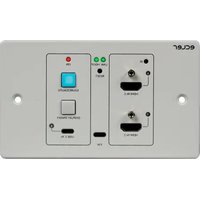
VEO-XWT44E - Audio/video converter Ecler - Free user manual and instructions
Find the device manual for free VEO-XWT44E Ecler in PDF.


| Product Type | Audio/video converter – HDBaseT transmitter on wall plate |
| Brand | Ecler |
| Model | VEO-XWT44E |
| Dimensions (approx.) | EU format for 2 modules (approx. 90 x 90 x 30 mm) |
| Weight | Approx. 200 g (estimation) |
| Power Supply | DC 24 V, 1.25 A (power adapter included); Bidirectional PoC (12-48 V) |
| Video Inputs | 2 x HDMI 2.0 (type A), 1 x USB-C |
| Video Output | 1 x HDBaseT (RJ45) – 4K@60Hz 4:4:4 up to 40 m, 1080p up to 70 m |
| Maximum Resolution | 4K@60Hz with 4:4:4 chroma subsampling, HDR10, 18 Gbit/s |
| HDCP | HDCP 2.2 |
| Control | Front panel buttons, RS-232, IR, CEC; IR learning and RS-232 programming |
| Main Functions | Automatic source switching, EDID management, display commands (ON/OFF, volume), key lock, firmware update via USB-C |
| Protection | ESD protection (electrostatic discharge) |
| Maintenance and Cleaning | Clean with a dry cloth; do not use water or liquids |
| Safety | Do not expose to rain or moisture; unplug during storms; refer repairs to qualified technician |
| Spare Parts and Repairability | Power adapter supplied; repair by Ecler approved technical services |
| General Information | Manufactured by NEEC AUDIO BARCELONA S.L.; warranty according to conditions (see www.ecler.com) |
Frequently Asked Questions - VEO-XWT44E Ecler
User questions about VEO-XWT44E Ecler
0 question about this device. Answer the ones you know or ask your own.
Ask a new question about this device
Download the instructions for your Audio/video converter in PDF format for free! Find your manual VEO-XWT44E - Ecler and take your electronic device back in hand. On this page are published all the documents necessary for the use of your device. VEO-XWT44E by Ecler.
USER MANUAL VEO-XWT44E Ecler
Supported Resolutions Up to 4Kx2K@60Hz 4:4:4 8bit HDR10
Colorspace RGB, YCbCr
Chroma Subsampling 4:4:4, 4:2:0
Color depth 8-bit, 10-bit, 12-bit, 16-bit only @4K30
Signal Bandwidth 18 Gbps
HDCP 2.2/1.4 Compliant
Video Connectors 2xType-A Female HDMI, Type-C Female USB
Audio performances
Audio Formats PCM 2Ch, PCM 5.1, PCM 7.1, Dolby Digital, DTS, Dolby TrueHD, DTS-HD Master Audio
Sample Rate 32kHz, 44.1kHz, 48kHz, 88.2kHz, 96kHz, 176.4kHz, 192kHz
Bit rate up to 24-bit
Frequency Response 20Hz – 20KHz, ±3dB
Max Output Level 2.0Vrms ± 0.5dB
SNR > 85dB 20Hz-20 kHz bandwidth
Control performances
TX Control ports IR Receiver IR Sensor Embedded
RESET Button
SOURCE/AUTO Back-lit button
IR Control 2-pin Euroblock
RS-232 3-pin Euroblock
FW Type-C USB Female
CEC ON/OFF commands Back-lit button or RS-232
VOL+, VOL- RS-232
MUTE RS-232
General
HDMI Distance up to 10 meters / 33 ft with Ecler VEO cables
Transmission Standard HDbaseT
Cat.5e/6 Distance CAT5e/6 @ 4K up to 35 m / up to 115 feet
CAT6a/7 @ 4K up to 40 m/ up to 130 feet
CAT5e/6 @ 1080p up to 60 m / up to 197 feet
CAT6a/7 @ 1080p up to 70 m / up to 230 feet
Operating Temperature -10 to +55°C (14 to +131 °F)
Humidity 10 to 90 % RH (no condensation)
Power Consumption 22W (Max)
Power Supply Input: AC 100V \~ 240V 50/60Hz
Output: DC 24V---1.25A
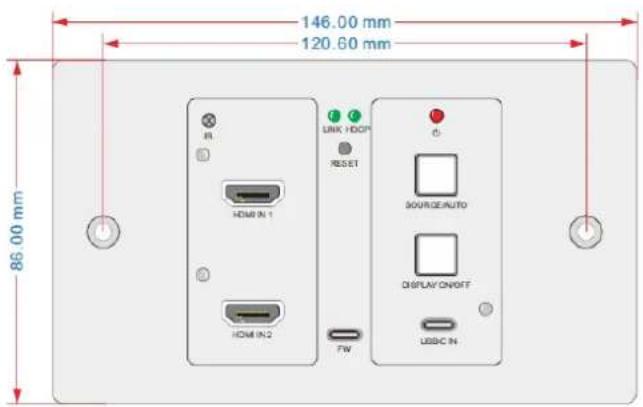
Dimensions 146mm × 86mm × 42mm (5.75" x 3.39" x 1.65")
Weight 294g (0.648 lbs)
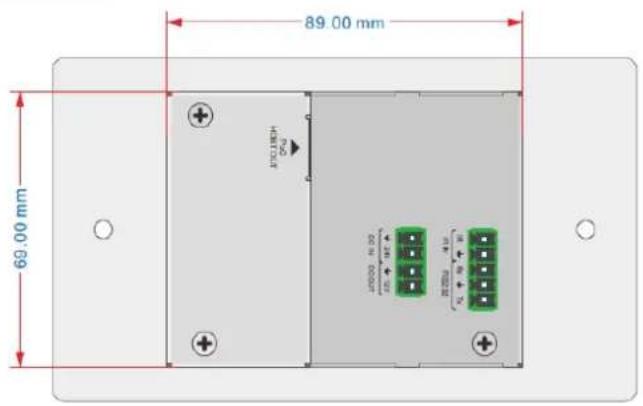
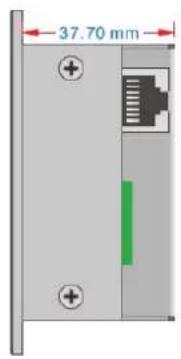
13. SCHÉMA AVEC COTES

ecler
VIDEO SYSTEMS
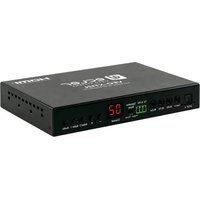
Brand : Ecler
Model : VEO-XWT44E
Category : Audio/video converter