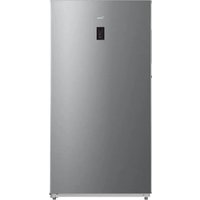
MRU21B6ASL - Freezer MIDEA - Free user manual and instructions
Find the device manual for free MRU21B6ASL MIDEA in PDF.


User questions about MRU21B6ASL MIDEA
0 question about this device. Answer the ones you know or ask your own.
Ask a new question about this device
Download the instructions for your Freezer in PDF format for free! Find your manual MRU21B6ASL - MIDEA and take your electronic device back in hand. On this page are published all the documents necessary for the use of your device. MRU21B6ASL by MIDEA.
USER MANUAL MRU21B6ASL MIDEA
natural_image
Empty rectangular frame with two small gray corner brackets at the bottom (no text or symbols)Upright Freezer
SINGLE DOOR SERIES
USER MANUAL
MRU21B6ASLMRI
MRU21F6AWW
THANK YOU LETTER
Thank you for choosing Midea! Before using your new Midea product, please read this manual thoroughly to ensure that you know how to operate the features and functions that your new appliance offers in a safe way.
CONTENTS
THANK YOU LETTER 03
PRODUCT OVERVIEW 04
PRODUCT INSTALLATION 05
OPERATION INSTRUCTIONS 12
CLEANING AND MAINTENANCE 15
TROUBLESHOOTING 17
PRODUCT OVERVIEW
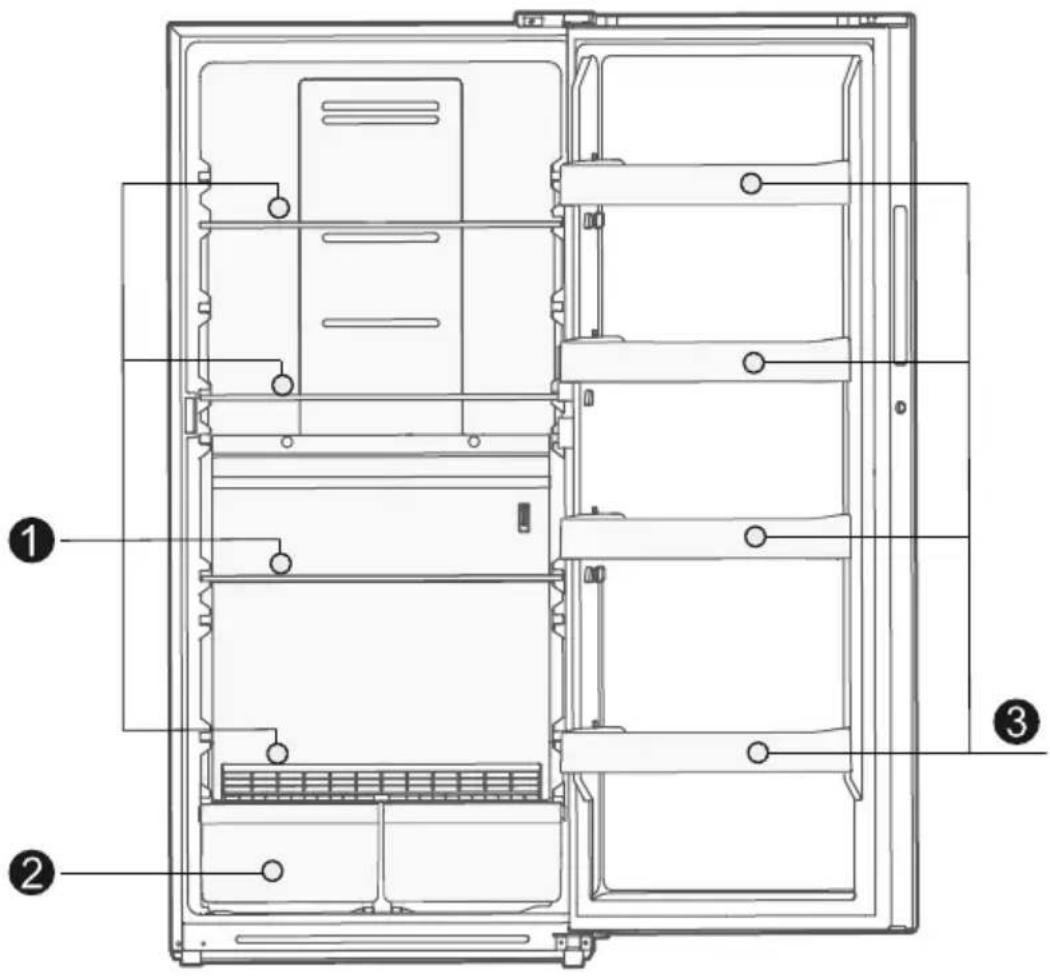
Names of components
text_image
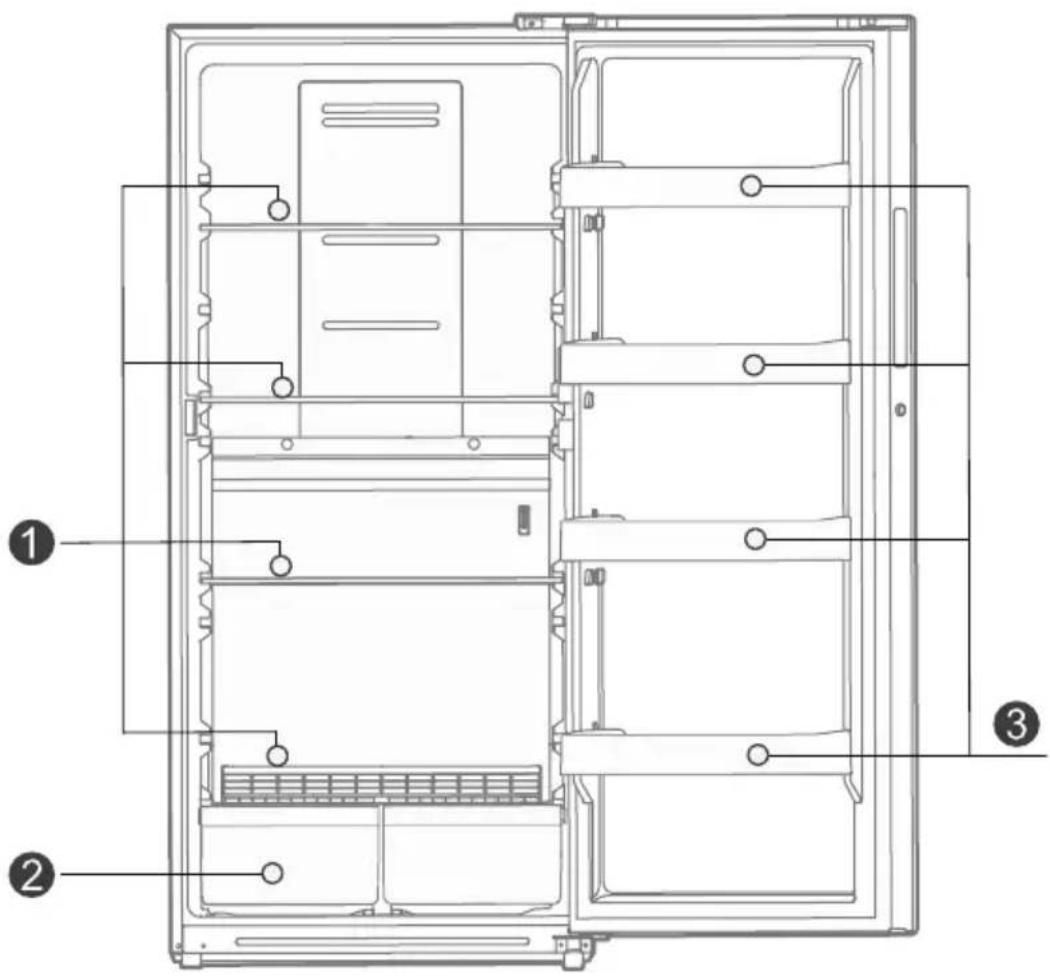
Technical diagram of a refrigerator internal structure with numbered annotations indicating components1 Shelf
3 Door tray
2 Drawer

ATTENTION
This model can be optionally equipped with a lock configuration. If you choose this configuration, please keep the lock key safe to avoid loss.
PRODUCT INSTALLATION
Install Instruction
Finding a suitable location
- This refrigerator is designed to be free standing only, and should not be recessed or built-in.
- The refrigerator should be placed in a well-ventilated indoor place; the ground shall be flat and sturdy.
- Keep away from heat and avoid direct sunlight. Do not place the refrigerator in moist or watery places to prevent rust or reduction of insulating effect.
Dimensions and Clearances
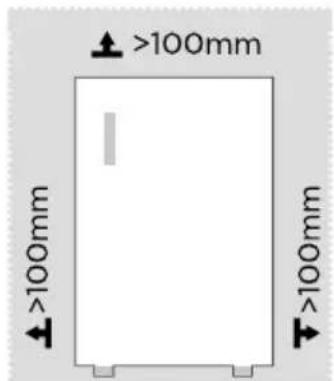
- Too small of a distance from adjacent items may result in the degradation of freezing capability and increased electricity costs. The refrigerator both sides should be placed against the wall with a free distance more than 100mm, and the refrigerator back against the wall distance not more than 75mm.
text_image
>100mm >100mm >100mm >100mm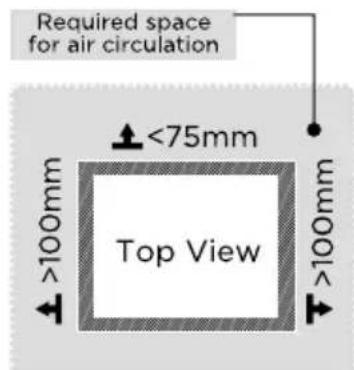
text_image
Required space for air circulation <75mm Top View >100mm >100mmProviding a proper power supply
- Check your local power source. This refrigerator requires a 115 V, 60 Hz power supply.
- Use a receptacle that accepts the grounding prong. The power cord is equipped with a 3-prong (grounding) plug which mates with a standard 3-prong (grounding) wall outlet to minimize the possibility of electric shock hazard from this refrigerator.

CAUTION
The freezer should always be plugged into its own individual electrical outlet which has a voltage rating that matches the rating plate.
Never unplug your freezer by pulling on the power cord. Always grip the plug firmly and pull straight out from the outlet.
Start to use
- The freezer shall stay for half an hour before connecting power when it is firstly started.
- The freezer shall run 2 to 3 hours before loading fresh or frozen foods; the freezer shall run for more than 4 hours in summer in advance considering that the ambient temperature is high.
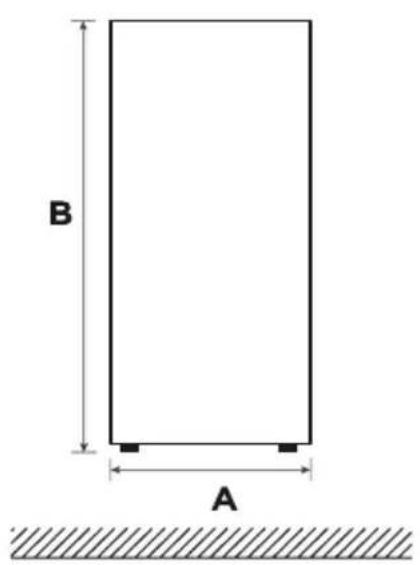
Space requirement diagram (when the door is open and when the door is closed)
text_image
B A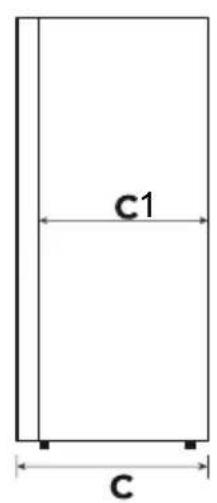
text_image
c1 c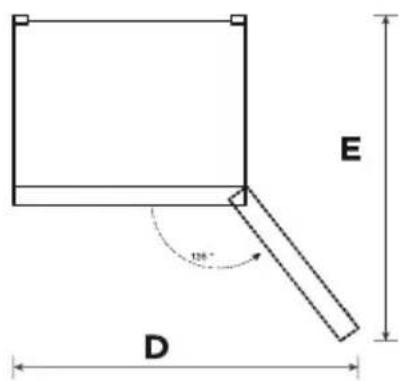
text_image
E 120° DEN
| Width | Overall Height | Depth | Depth Only Cabinet | Width doors open 135° | Depth doors open 135° |
| A B C | C1 D E | ||||
| 755 169 | 2 830 734 | 1275 1395 |
Notice: All dimensions in mm
Door reversal (Please contact Midea after sales team to help you with this, do not change the door by yourself)
Based on the location where you plan to use your refrigerator, you may find it more convenient to reverse the position of the door.

CAUTION
CAUTION: To avoid injury to yourself or your property, we recommend that someone assist you during the door reversal process.
Preparing to reverse the door position
You will need: A standard screwdriver, a Phillips screwdriver, and the included Allen wrench.
- Make sure that your refrigerator is unplugged and empty.
- Have someone available to assist you in the process.
- Keep all of the parts you remove to reuse them later.
Parts included with the hinge kit:
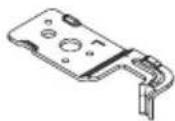
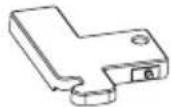
Left top hinge Left top hinge cover
Parts already mounted on the door (as shipped):
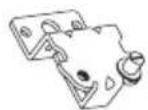
Bottom hinge
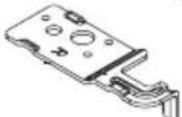
Right top hinge

Right top hinge cover
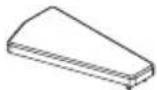
Hole cap
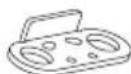
Door-open stopper
Step
- Unplug your refrigerator and remove all food from the door shelves.
- Dismantle the screw hole caps, screws and handle, and remove the plastic screw hole caps from the other side.
- Dismantle the upper hinge cover, screws and upper hinge, and remove the hole cover from the other side. Unplug the wiring connector on the right side of refrigerator top

ATTENTION
- Images show a refrigerator that opens on the left side. Your refrigerator may open on the right side.
- If you need to change the door left and right, please contact professional after-sales personnel.
②
Hinge cover
Hole cover
Hinge
①
-
Dismantle the door and right bottom hinge assembly (hinge shaft & adjustable foot & hinge), disassemble the right bottom hinge assembly, and assemble the hinge shaft and adjustable foot on the other side of hinge, then assemble the whole hinge assembly on the other side of refrigerator.
-
Remove the stop block and shaft sleeve and install them on the other side of the door body.
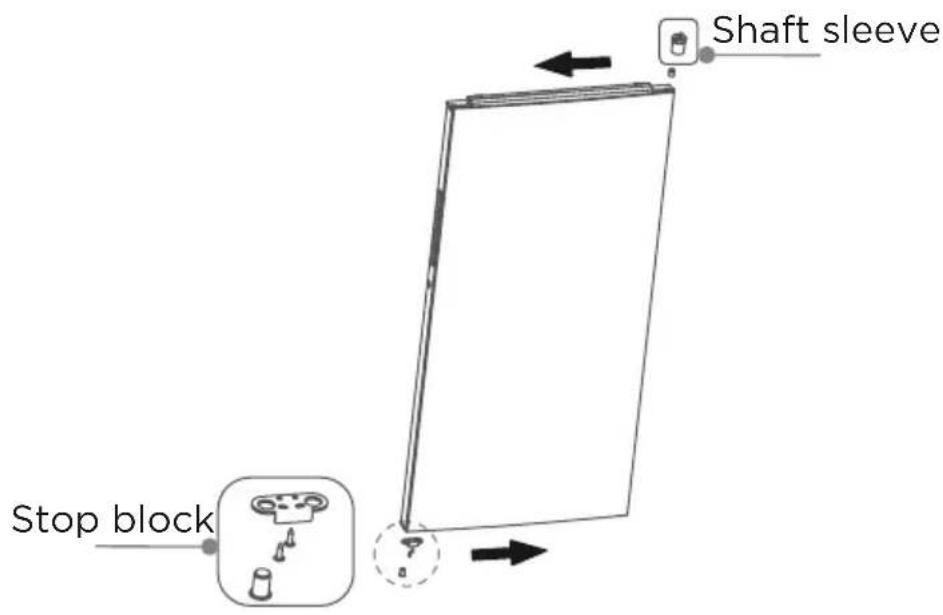
text_image
Stop block Shaft sleeve- Take out the left top hinge, left top hinge cover from accessories package. Connect signal line terminal ① to the door switch, place the door on bottom hinge and mount left top hinge.
- Mount top hinge cover and hole cover.
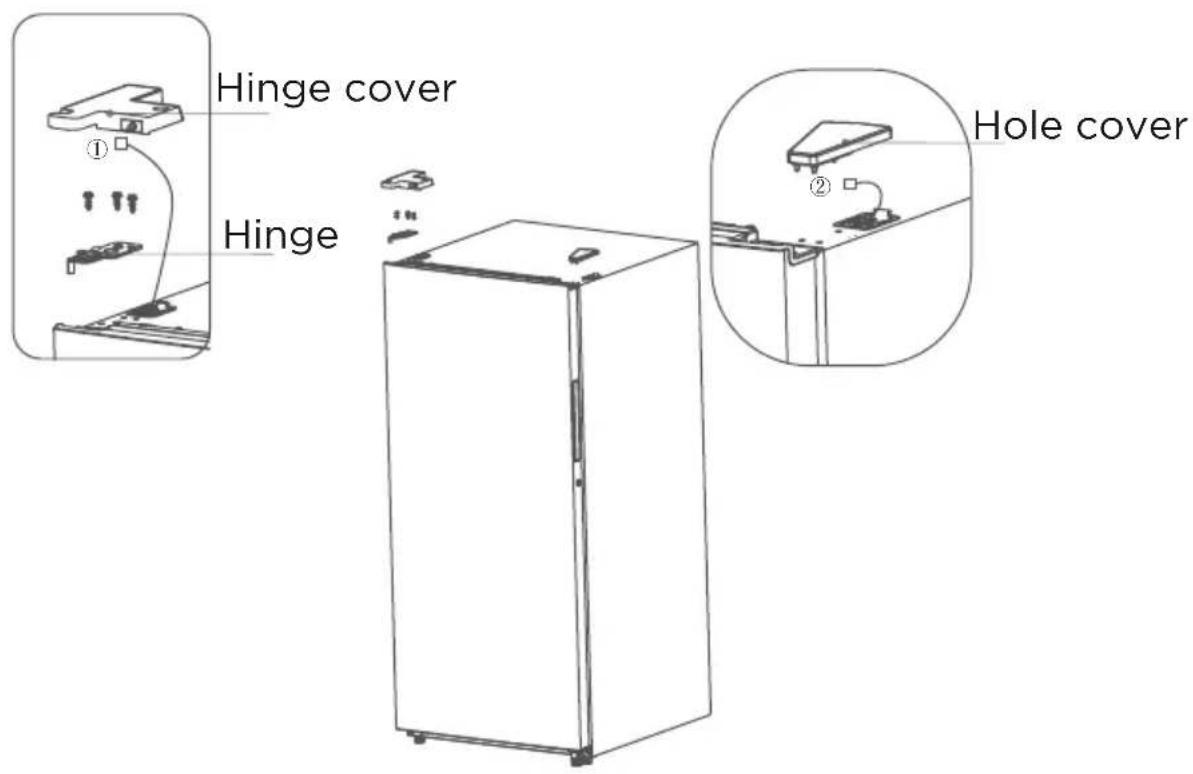
text_image
Hinge cover Hinge Hole cover- The picture above is only for reference. The actual configuration will depend on the physical product or statement by the distributor.
Leveling feet
To avoid vibration, the unit must be leveled.
If required, adjust the leveling screws to compensate for the uneven floor.
The front should be slightly higher than the rear to aid in door closing.
Leveling screws can be turned easily by tipping the cabinet slightly.
Turn the leveling screws counterclockwise to raise the unit, clockwise to lower it.
Moving the appliance
- Remove all food from inside the appliance.
- Pull the power plug out, insert and fix it into the power plug hook at the rear or on top of the appliance.
- Tape parts such as shelves and the door handle to prevent from falling off while moving the appliance.
- Move the appliance with more than two people carefully. When transporting the appliance over a long distance, keep the appliance upright.
- After installing the appliance, connect the power plug into a socket out to switch on the appliance.

ATTENTION
Precautions before operation:
Before making changes the refrigerator must be disconnected from power.
Precautions should be taken to prevent any personal injury.
Changing the light
- Any replacement or maintenance of the LED lamps is intended to be made by the manufacturer, its service agent or similar qualified person.
Connecting the appliance
After installing the appliance, connect the power plug into a socket outlet.

ATTENTION
After connecting the power supply cord (or plug) to the outlet, wait 2 or 3 hours before you put food into the appliance. If you add food before the appliance has cooled completely, your food may spoil.
Tips for energy saving
- Do not place the appliance near cookers, radiators or other heat sources. If the ambient temperature is high, the compressor will run more frequently and for longer, resulting in increased energy consumption.
- Ensure that there is sufficient ventilation at the base of the appliance, on the sides of the appliance and at the back of the appliance. Never cover ventilation openings.
- Please also observe the spacing dimensions in the chapter "Installation".
- The arrangement of drawers, shelves and racks as shown in the illustration offers the most efficient use of energy and should therefore be retained as far as possible. All drawers and shelves should remain in the appliance to keep the temperature stable and save energy.
- To obtain a larger storage space (e.g. for large refrigerated/frozen goods), the middle drawers can be removed. The top and bottom drawers and shelves should be removed last if necessary.
- An evenly filled refrigerator/freezer compartment contributes to optimal energy use. Therefore, avoid empty or half-empty compartments.
- Allow warm food to cool before placing it in the refrigerator/freezer. Food that has already cooled down increases energy efficiency.
- Allow frozen food to defrost in the refrigerator. The coldness of the frozen food reduces the energy consumption in the refrigerator compartment and thus increases the energy efficiency.
- Open the door only as briefly as necessary to minimise cold loss. Opening the door briefly and closing it properly reduces energy consumption.
- The door seals of your appliance must be perfectly intact so that the doors close properly and energy consumption is not increased unnecessarily.
OPERATION INSTRUCTIONS
Control panel
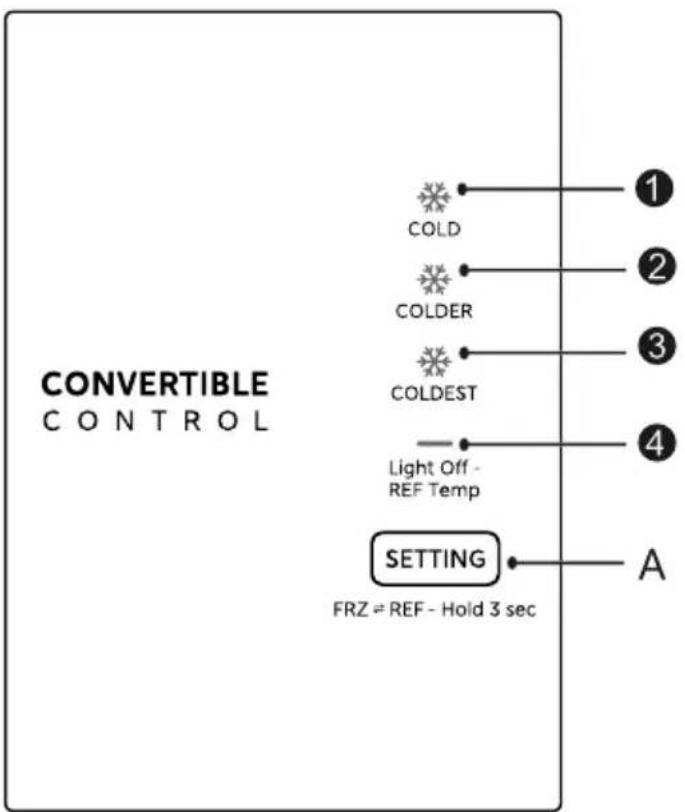
text_image
CONVERTIBLE CONTROL COLD COLDER COLDEST Light Off- REF Temp SETTING FRZ ≠ REF - Hold 3 sec A ① ② ③ ④ AEN
| Display Button | |||
| 1 | Setting 1: COLD | A | Temperature setting button of refrigerator compartment |
| 2 | Setting 2: COLDER | ||
| 3 | Setting 3: COLDEST | ||
| 4 | Setting 4: Light Off - REF Temp |
Display
All Once initially powered on, the display screen is on full display for 3 seconds. and then the refrigerator runs according to COLDER / FRZ.
In case of a failure: the corresponding LED blinks.
In case of no failures: it shows the actual temperature setting of refrigerator.

ATTENTION
The actual control panel may differ from model to model.
Operating instructions
Temperature settings
- Each time the temperature setting button “ is pressed once, the temperature setting changes one time.
- After the temperature setting has been completed, the refrigerator will run according to the set value after 15 seconds. The shift regulation is:

flowchart
graph LR
    A["COLDER"] --> B["COLDEST"]
    B --> C["COLD"]
Freezer / Refrigerator conversion
- In the unlocking state
- Long press for 3 seconds, then the icon goes out, the appliance runs as a refrigerator.
- Long press ← SETTING another 3 seconds, then icon ← shining the appliance runs as a freezer.
Fault indication
- When the error occurs, the display panel shows the error code. Otherwise, the display panel shows the set temperature.
- The display panel will light up in case of error with "visible error code".
Fault Code Fault Description
LED3/LED4 flashing Refrigerator temperature sensor fault
LED2/LED4 flashing Freezing frost sensor faults
LED1/LED4 flashing Ambient temperature sensor fault
Tips on storing food
Cooling compartment
- To reduce moisture and subsequent ice build-up, never put liquid into the refrigerator in unsealed containers. Frost tends to concentrate in the coolest parts of the evaporator. Storing uncovered liquids results in a more frequent need for defrosting.
- Never put warm foods in the refrigerator. These should first cool down at room temperature and then be placed so as to ensure adequate air circulation in the refrigerator.
- Foods or food containers should not touch the back wall of the refrigerator because they could freeze to the wall. Do not keep regularly opening the door of the refrigerator.
- Meat and clean fish (packed in a package or plastic foil) can be placed in the refrigerator, which can be used in 1-2 days.
- Fruit and vegetables without packaging can be placed in the part designated for fresh fruit and vegetables.

ATTENTION
The optimal temperature setting of each compartment depends on the ambient temperature. Above optimal temperature is based on the ambient temperature of 25 °C .
CLEANING AND MAINTENANCE
Defrosting
- The refrigerator is made based on the air-cooling principle and thus has automatic defrosting function. Frost formed due to change of season or temperature may also be manually removed by disconnection of the appliance from power supply or by wiping with a dry towel.
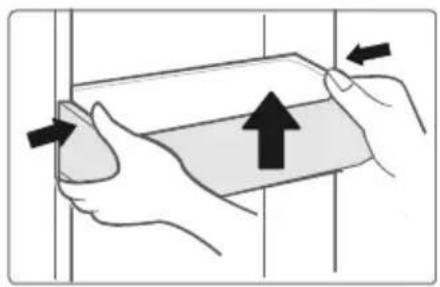
Cleaning of door tray
- According to the direction arrow in the gure below, use both hands to squeeze the tray, and push it upward, then you can take it out. - After washing the tray having been taken out, you can adjust its installing height in accordance with your requirement.
natural_image
Illustration of hands holding a rectangular object with an upward arrow, no text or symbols presentCleaning of glass shelf
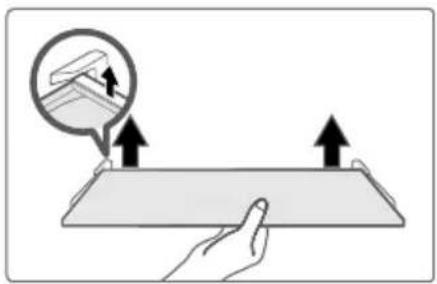
- As the innermost part of the refrigerator liner where contacting the shelves has a backstop, you shall raise the shelves upward, then you can be able to take it out. - Adjust or clean the shelves according to your requirement.
natural_image
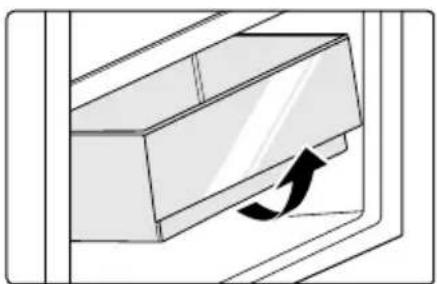
Illustration of a hand pressing down on a flat surface with two arrows indicating upward motion, and a magnified inset showing a terrain feature (no text or symbols)Cleaning the vegetable drawer
- Remove the contents of the drawer. Hold the handle of the vegetable drawer and pull it out completely until it stops. - Lift the vegetable drawer up and remove it by pulling it out.
natural_image
Diagram of a door handle with an arrow indicating direction (no text or symbols)ATTENTION
Soft towels or sponge dipped in water and non-corrosive neutral detergents are suggested for cleaning. The freezer of shall be nally cleaned with clean water and dry cloth. Open the door for natural drying before the power is turned on. Do not use hard brushes, clean steel balls, wire brushes, abrasives, such as toothpastes, organic solvents (such as alcohol, acetone, Isoamyl acetate, etc.), boiling water, acid or alkaline items clean refrigerator considering that this may damage the fridge surface and interior.
Stop using
Power failure:
- In case of power failure, even if it is in summer, foods inside the appliance can be kept for several hours; during the power failure, the times of door opening shall be reduced, and no more fresh food shall be put into the appliance.
Long-time nonuse:
- The appliance shall be unplugged and then cleaned; then the doors are left open to prevent odor.
Moving:
- Before the refrigerator is moved, take all objects inside out, fix the glass partitions, vegetable holder, freezing chamber drawers and etc. with tape, and tighten the leveling feet; close the doors and seal them with tape. During moving, the appliance shall not be laid upside down or horizontally, or be vibrated; the inclination during movement shall be no more than 45°.
- When the refrigerator is not connected to electricity, the power cord hook is used to hang the power cord.
ATTENTION
The appliance shall run continuously once it is started. Generally, the operation of the appliance shall not be interrupted; otherwise the service life may be impaired.
Foods can be preserved for a couple of hours even in summer in case of power failure; it is recommended to reduce the frequency of opening door.
TROUBLESHOOTING
The following simple issues can be handled by the user. Please call the after-sale service department if the issues are not solved.
| Problem Possible reason | |
| Failed operation | ·Check whether the appliance is connected to power or whether the plug is in well contact |
| ·Check whether the voltage is too low | |
| ·Check whether there is a power failure or partial circuits have tripped | |
| Odor | ·Odorous foods shall be tightly wrapped |
| ·Check whether there is any rotten food | |
| ·Clean the inside of the refrigerator | |
| Long-time operation of the compressor | ·Long operation of the refrigerator is normal in summer |
| ·When the ambient temperature is high It is not suggestible having too much food in the appliance at the same time | |
| ·Food shall get cool before being put into the appliance | |
| ·The doors are opened too frequently | |
| Light fails to get lit | ·Check whether the refrigerator is connected to power supply and whether the illuminating light is damaged |
| ·Have the light replaced by a specialist | |
| Door can not be properly closed | ·The door is stuck by food packages too much food is placed |
| ·The refrigerator is tiltedr. | |
| Loud noises | ·Check whether the floor is level and whether the refrigerator is placed stably |
| ·Check whether accessories are placed at proper locations | |
EN
| Problem Possible reason | |
| Door seal fails to be tight | Remove foreign matters on the door seal |
| Heat the door seal and then cool it for restoration (or blow it with an electrical drier or use a hot towel for heating) | |
| Water pan overflows | There is too much food in the chamber or food stored contains too much water, resulting in heavy defrosting |
| The doors are not closed properly, resulting in frosting due to entry of air and increased water due to defrosting | |
| Hot housing | Heat dissipation of the built-in condenser via the housing, which is normal when housing becomes hot due to high ambient temperature, storage of too much food or shutdown of the compressor is shut down, provide sound ventilation to facilitate heat dissipation |
| Surface condensation | Condensation on the exterior surface and door seals of the refrigerator is normal when the ambient humidity is too high. Just wipe the condensate with a clean towel. |
| Abnormal noise | Buzz: The compressor may produce buzzes during operation, and the buzzes are loud particularly upon start or stop. This is normal.Creak: Refrigerant flowing inside of the appliance may produce creak, which is normal. |

text_image
Mideamake yourself at home
natural_image
Empty rectangular frame with two small gray corner brackets at the bottom (no text or symbols)Congélateur armoire
APERÇU DU PRODUIT 04
INSTALLATION DU PRODUIT 05
INSTRUCTIONS D'UTILISATION 12
NETTOYAGE ET ENTRETIEN 15
DÉPANNAGE 17
FR
APERÇU DU PRODUIT
Noms des composants
text_image
Technical diagram of a refrigerator internal structure with numbered annotations indicating componentsINSTALLATION DU PRODUIT
text_image
>100mm >100mm >100mm >100mm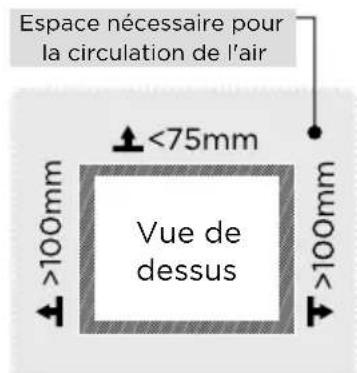
text_image
CONVERTIBLE CONTROL COLD COLDER COLDEST Light Off - REF Temp SETTING FRZ = REF - Hold 3 sec A ① ② ③ ④ AFR
natural_image
Illustration of hands holding a rectangular object with an upward arrow, no text or symbols presentnatural_image
Illustration of a hand holding a flat object with arrows indicating upward motion, no text or symbols present
natural_image
Diagram of a door handle with an arrow indicating clockwise motion (no text or symbols)ATTENTION
natural_image
Line drawing of a door with a clip and a cable inserted into a wall, showing structural details (no text or symbols)
ATTENTION
make yourself at home