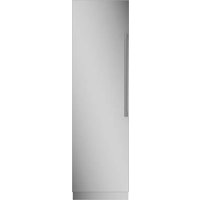
Monogram ZIR241NBRII - Refrigerator

ZIR241NBRII - Refrigerator Monogram - Free user manual and instructions

Find the device manual for free ZIR241NBRII Monogram in PDF.

📄 48 pages English EN Download 💬 AI Question 10 questions ⚙️ Specs
Notice Monogram ZIR241NBRII - page 22
View the manual : Français FR English EN Español ES
Pick your language and provide your email: we'll send you a specifically translated version.
Brand Monogram
Model ZIR241NBRII
Product Type Built-in column refrigerator
Width 24 inches (61 cm)
Power Supply 115 V AC, 60 Hz, 15 or 20 A, grounded
Water Supply Cold water, pressure 40-120 psi (275-827 kPa)
Refrigerant R600a (isobutane)
Control Panel Digital display, temperature adjustment, door alarm, Sabbath mode, Wi-Fi
Interior Lighting LED
Ice Maker Not applicable (refrigerator model)
Auto-fill Pitcher Yes (some models)
Water Filter XWF or XWFE cartridge, replace every 6 months
Air Filter Yes, replace every 6 months
Drawers and Shelves Adjustable glass shelves, humidity-controlled drawer, temperature-adjustable drawer (some models)
Sabbath Mode Yes, disables displays and alarms for 96 hours
Wi-Fi Connection Yes, compatible with Monogram app
Maintenance and Cleaning Mild cleaner for stainless steel, baking soda for interior
Safety Anti-tip, child safety, mandatory grounding
Warranty 2 years parts and labor, 5 years on refrigeration circuit
Customer Service monogram.com or 800.444.1845 (U.S.)

Frequently Asked Questions - ZIR241NBRII Monogram

How to adjust the refrigerator temperature?
Use the (+) and (-) buttons on the control panel to adjust the temperature. The recommended range is 34°F to 42°F (1°C to 6°C). Wait 24 hours for the temperature to stabilize.
What to do if the door does not close properly?
Check that no packaging is blocking the closure, that the gasket is in place, and that the appliance is level. Refer to the installation instructions to adjust the clearances.
How to replace the water filter?
Open the filter compartment, turn the filter 1/4 turn counterclockwise, remove it, insert the new filter (XWF or XWFE) aligning the arrow, turn 1/4 turn, then flush 2 gallons of water. Reset the indicator by holding the (+) button for 3 seconds.
What does Sabbath mode mean?
Sabbath mode disables displays, alarms, and lighting to respect Jewish holidays. Cooling continues to operate. To activate, hold the (+) and DOOR ALARM buttons simultaneously. It disables automatically after 96 hours.
Why does moisture form inside?
This may be due to frequent or prolonged door openings, especially in humid weather. Use a dehumidifier to reduce ambient humidity. Also check that food is well wrapped.
How to clean stainless steel?
Use a soft cloth and an approved stainless steel cleaner, or a mild detergent. Never use abrasive pads, bleach, or citrus-based cleaners. Avoid contact with plastic parts.
The refrigerator is not cooling, what to do?
Check that the appliance is plugged in, that the circuit breaker has not tripped, and that the temperature control is not set to OFF. Wait 24 hours after initial installation. If the problem persists, contact customer service.
How to disable the door alarm?
Press the DOOR ALARM button once to disable the alarm. The OFF indicator lights up. To reactivate, press again. The alarm sounds if the door remains open for more than 2 minutes.
Can I use an adapter for the power outlet?
No, never use an adapter or extension cord. The appliance must be plugged directly into a grounded outlet. Using an adapter may cause electric shock or fire.
How to change the display from Fahrenheit to Celsius?
Hold the (-) button until the display changes to °C. To return to °F, hold the (-) button again.

User questions about ZIR241NBRII Monogram

0 question about this device. Answer the ones you know or ask your own.

Ask a new question about this device

The email remains private: it is only used to notify you if someone responds to your question.

No questions yet. Be the first to ask one.

Download the instructions for your Refrigerator in PDF format for free! Find your manual ZIR241NBRII - Monogram and take your electronic device back in hand. On this page are published all the documents necessary for the use of your device. ZIR241NBRII by Monogram.

USER MANUAL ZIR241NBRII Monogram

Au Canada: Prodsupport.mabe.ca/crm/Products/ProductRegistration.aspx

SERVICE DE RÉPARATION

Garant: GE Appliances, a Haier company, Louisville KY, 40225

Au Canada,Garant: MC Commercial, Burlington, ON, L7R 5B6

NOTES

NOTES

49-1000529 Rev.3

03-24

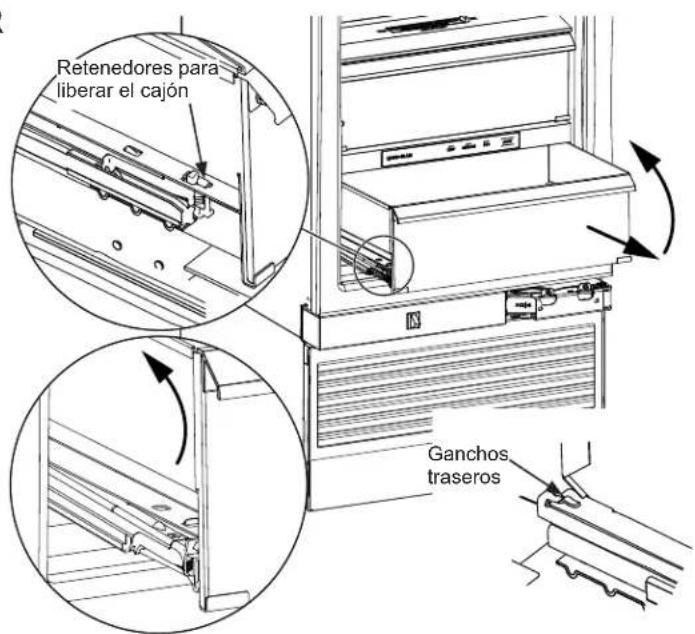
Drawers in the refrigerator will stop before coming all the way out, to help prevent contents from spilling onto floor.

To remove a drawer: Pull the drawer out and press the snaps at the front of both sides to release the drawer. Lift the front of the drawer up while pulling forward to move the pan free of the back slide hooks.

To replace a drawer: Place the back of the pan under the hooks on the back of the slides. Rotate the drawer down until the front snaps are securing the front of the pan.
Monogram ZIR241NBRII - NOTES - 1

Table of contents Click a title to access it
Manual assistant
Powered by Anthropic
Waiting for your message
Product information

Brand : Monogram

Model : ZIR241NBRII

Category : Refrigerator