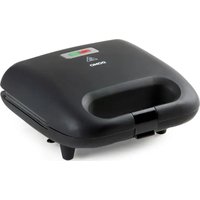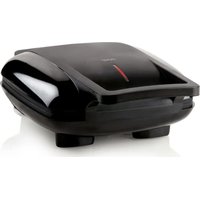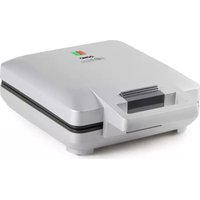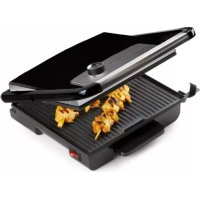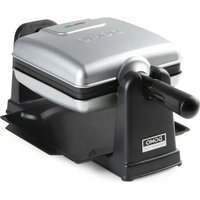
DO9272W - Waffle Maker DOMO - Free user manual and instructions
Find the device manual for free DO9272W DOMO in PDF.


User questions about DO9272W DOMO
0 question about this device. Answer the ones you know or ask your own.
Ask a new question about this device
Download the instructions for your Waffle Maker in PDF format for free! Find your manual DO9272W - DOMO and take your electronic device back in hand. On this page are published all the documents necessary for the use of your device. DO9272W by DOMO.
USER MANUAL DO9272W DOMO
natural_image
Black and white photo of a Domo griddle grater with open lid, no visible text or symbols on the device itself.EN Instruction booklet Rotating waffle maker
Read all instructions carefully.
Save this instruction manual for future reference.
⚠PRODUCTSPECIFIEKE WAARSCHUWINGEN

natural_image
Exterior view of a silver portable electronic device with black base (no visible text or symbols)PROBLEMEN EN OPLOSSINGEN
natural_image
Symbol of a trash bin crossed with diagonal lines, no text or numbers present⚠AVERTISSEMENTS SPÉCIFIQUES AU PRODUIT
natural_image
Exterior view of a silver and black electronic device with a red indicator light (no text or symbols visible)natural_image
Symbol of a trash bin crossed with a diagonal line, no text or numbers presentnatural_image
Exterior view of a silver and black electronic device with a red stripe on the front panel (no text or symbols visible)natural_image
Symbol of a trash bin crossed with two crossed lines, no text or numbers presentThank you for your confidence in DOMO. We do hope you enjoy your new purchase.
Before reaching you, all our products undergo a strict quality inspection. Should you still encounter problems with your appliance, then we are truly sorry and will do everything possible to resolve the situation quickly. Do not hesitate to contact our customer service.
Our staff will do all they can to help you!
+32 14 21 71 91 info@linea2000.be

Monday - Thursday: 8.30 - 12.00 and 13.00 - 17.00
Friday: 8.30 - 12.00 and 13.00 - 16.30
This device has a warranty period of 2 years from the date of purchase. During this warranty period, the distributor will assume responsibility for any defects that can be shown to be the result of material, construction or manufacturing errors. Such defects will be remedied by repair or replacement of the device. The 2-year warranty period will be suspended during the repair period and will continue after the repair has taken place for the remaining duration of the warranty period. The warranty will be honoured if proof of purchase clearly showing the date of purchase is provided. If your device becomes defective within the 2-year warranty period, please return it with your proof of purchase to the store you purchased it from or follow the procedure of the relevant webshop if you bought it online.
The warranty does not cover damage to the device, accessories or parts caused by:
• normal wear and tear from use;
• non-compliance with the instructions for use, maintenance and cleaning in the manual;
- incorrect connection, e.g. electrical voltage too high;
- incorrect, heavy-handed or abnormal use;
• repairs or alterations carried out by the consumer or unauthorised third parties;
- use of parts or accessories not recommended nor supplied by the distributor.
SAFETY INSTRUCTIONS
When using electrical appliances, basic safety precautions should always be taken, including the following. Any injury or damage caused by failure to comply with these rules are at your own risk. Neither the manufacturer, importer, or the supplier may be held liable.
- Read all instructions carefully.
• Make sure all packaging materials and promotional stickers have been removed before using the appliance for the first time. Make sure children cannot play with the packaging materials. -
This appliance is only suitable for use in domestic and similar environments, such as:
-
staff kitchen areas in shops, offices and other working environments;
- farm houses;
- by clients in hotels, motels and other residential type environments;
• bed and breakfast type environments.
• Children should be supervised to ensure that they do not play with the appliance.
- This appliance can be used by children aged from 16 years and above and persons with reduced physical, sensory or mental capabilities or lack of experience and knowledge if they have been given supervision or instruction concerning use of the appliance in a safe way and understand the hazards involved.
• Children shall not play with the appliance.
- Cleaning and user maintenance shall not be made by children unless they are older than 16 or supervised.
- Keep the appliance and its cord out of reach of children younger than 16 years.
- All repairs should be carried out by the manufacturer or its aftersales service.
▲ELECTRICAL WARNINGS
- In order to avoid a hazard this appliance must not be supplied through an external switching device, such as a timer or a
separate remote control, or connected to a circuit that is regularly switched on and off by the utility.
- The appliance must be disconnected from its power source when not in use, during service and when replacing parts. If present, first turn all the buttons to the 'off' position, then pull the plug out of the socket by grasping the plug itself. Never pull the cord or appliance to remove the plug from the socket.
- Before use, check carefully that the electric tension and frequency of the power net at your home match the indications on the rating label of the appliance.
- The appliance must be plugged into an appropriate outlet that is installed and grounded in accordance with local installation regulations.
- Do not let the power supply cord hang over the edge of a counter, or touch hot surfaces.
- Keep the power cord away from hot parts and don't cover the appliance.
- Unwrap the cord completely to prevent overheating of the cord. Do not allow the power cord supply to run underneath or around the unit.
- For safety reasons, never use the appliance if the cord, plug, or appliance itself is damaged, or after a malfunction of the appliance. Return the appliance to the DOMO Service Department or its service agent for examination, repair, or electrical or mechanical adjustment. Do not try to repair the appliance yourself.
⚠️INSTALLATION
- Do not place near flammable materials, gases or explosives.
- Do not use or store this appliance outdoors.
• Always use the appliance on a steady, dry and level surface.
- Never place this appliance near a gas stove or electrical stove or in a place where it may come into contact with a warm appliance.
⚠ USE
- Do not use this appliance for other than intended use.
- Never leave the appliance unattended while it is functioning.
- Do not operate the appliance with wet hands.
- The use of accessories that are not recommended or sold by the manufacturer can cause fire, electrical shock or injuries. Only use the utensils delivered with the appliance.
⚠ CLEANING AND MAINTENANCE
- To protect against electrical shock or burns, do not immerse unit, cord, or plug in water or other liquid.
- Failure to maintain this appliance in a clean condition could adversely affect the life of the appliance and possibly result in a hazardous situation.
⚠PRODUCTSPECIFIC WARNINGS
CAUTION: the appliance gets very hot during use and stays hot for some time after use. Keep the power cord away from hot parts and don't cover the appliance.
- Do not touch any hot surfaces, use the handles.
- Make sure that there is enough room around the appliance, so that the heat can escape and the air can circulate.
- Do not let the baking plates come into contact with any metal cutlery or other metal objects to avoid damaging of the non-stick coating.
• Always unplug the appliance when cleaning it. Also let the appliance cool down completely.
SAVE THESE INSTRUCTIONS FOR FUTURE REFERENCE
All images and descriptions in this manual are purely indicative and may differ slightly from the actual device.
PARTS
- Handle
- Baking plates
- 'On/off' indicator light
- 'Ready to use' indicator light
- Collection tray
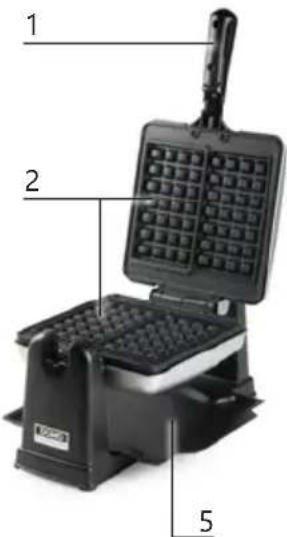
text_image
1 2 5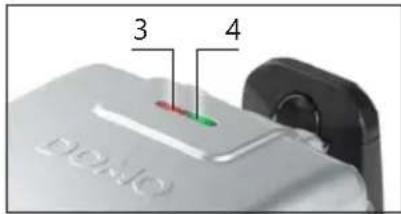
text_image
3 4 DENO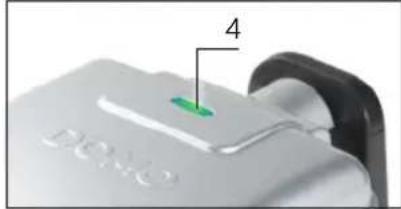
text_image
DONO 4BEFORE THE FIRST USE
- Remove all packaging materials and any promotional stickers.
- Wipe the inside and outside of the waffle maker clean with a soft cloth.
- When using the appliance for the first time there may be a slight smell and light smoke from the cooking plates. This is normal. For hygienic reasons, do not the first wafers made, throw them away.
USE
- Make sure the appliance is closed. Plug the power cord into a socket. The red indicator light means the appliance is switched on. The appliance will start to heat up.
- The green indicator light means the appliance has reached the right temperature and is ready to bake waffles.
Note: The 'ready to use' indicator light will turn off and on regularly as the appliance continuously maintains its temperature.
- Open the waffle iron and pour the waffle batter into the bottom baking plates. Do this evenly so that the dough spreads well over the baking plates.
- Close the waffle iron and use the handle to turn it 180^ . This will ensure the batter is spread properly over the surface to create evenly cooked waffles. The rotating movement may cause a small amount of batter to leak from the appliance, so always make sure to place the collection tray underneath the waffle iron before you start. This collection tray catches the excess batter.
- After a few minutes, use the handle to turn the waffle iron back 180°.
- Open the waffle iron. Remove the waffle when you are happy with the result. If you prefer to bake the waffle for longer, close the waffle iron again and turn it 180^ again. Wait a moment and open the waffle iron once again as described above.
- Carefully remove the waffles from the waffle iron with a wooden or heat-resistant plastic spatula. Never use metal objects, as these may damage the non-stick coating of the appliance.
- To bake another waffle, wait for the green indicator light to indicate the appliance is ready to be used again.
- We recommend switching the appliance off immediately after use by removing the plug from the socket. Allow the appliance to cool down before cleaning.
The waffle iron is locked when turned 180^ . This is when the side with only the green indicator light is turned upwards. It is not possible to open the waffle iron in this position. Turn the waffle iron back 180^ to open the appliance. The side with the two indicator lights is now facing upwards.
CLEANING AND MAINTENANCE
- Clean the appliance after each use. Unplug the electric lead and wait until the appliance has cooled sufficiently. It is easier to clean your waffle-maker if it's a bit warm.
- Clean the outside and the baking sheets with a damp clean cloth. Dry the appliance off well.
- Clean the collection tray using warm water and a mild detergent and dry properly.
⚠️Do not immerse unit, cord, or plug in water or other liquid.
⚠️ Never use aggressive or abrasive cleaning agents.
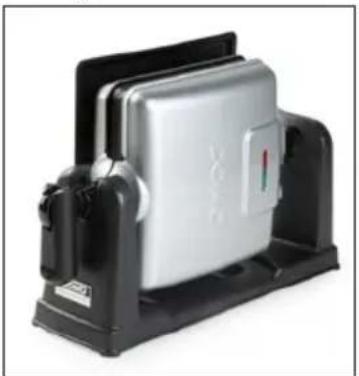
- When not in use, store the appliance on a flat dry surface. Turn the waffle iron for compact storage.
natural_image
Exterior view of a silver rectangular electronic device mounted on a black base (no visible text or symbols)PROBLEMS AND SOLUTIONS
| PROBLEMS SOLUTIONS | |
| The waffle is not cooked all the way through. | • Let the waffle cook a little longer in the appliance until it reaches the desired baking finish. The waffle is fully cooked when moisture is no longer emitted from the appliance. |
| The waffle was cooked too much. | • Reduce the time you cook the waffle in the waffle iron, regularly check the consistency and remove the waffle from the appliance when it reaches the desired consistency. |
| The waffles stick to the baking trays. • There is not enough fat in the batter. Add some oil or melted butter to the batter or grease the baking trays.There is too much sugar in the batter. Reduce the amount of sugar in your batter. Sugar can caramelise during baking, which causes your waffles to stick to the waffle iron.The waffle is not yet cooked all the way through. Let the waffle cook a little longer, which reduces the chance it will stick. The waffle is fully cooked when moisture is no longer emitted from the appliance. | |
| The appliance does not heat up. • Check that the red indicator light is on and that the appliance is connected to a working power socket. | |
| The appliance emits a burnt smell. • When using the appliance for the first time, the baking trays may emit a little smoke and odour. This is normal. If there is a burnt smell after some use, clean the baking trays as described in the ‘Cleaning and maintenance’ section. | |
GUIDELINES
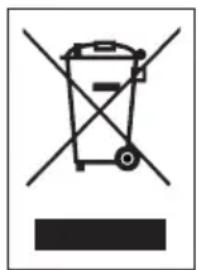
text_image
Warning symbol for a trash bin with crossed and unshaded lanes, indicating no waste or discharge.This symbol on the product or on its packaging indicates that this product may not be treated as household waste. Instead it must be brought to the applicable collection point for recycling of electrical and electronic equipment. By ensuring this product is disposed of correctly, you will help prevent potential negative consequences for the environment and human health, which could otherwise be caused by inappropriate waste handling of this product. For more detailed information about recycling of this product, please contact your local city office, your household waste disposal service or the shop where you purchased the product.

The packaging is recyclable. Please treat the packaging ecologically.

This appliance conforms to all European requirements in the areas of safety, health, and environmental protection.
The EU declaration concerning this appliance can be requested at any time from info@linea2000.be
GARANTIA
Estimado cliente,
natural_image
Exterior view of a silver rectangular electronic device with black base (no visible text or symbols)PROBLEMAS Y SOLUCIONES
natural_image
Symbol of a trash bin crossed with no text or numbers, indicating no waste or discharge (no text present)natural_image
Exterior view of a silver rectangular electronic device mounted on a black base (no visible text or symbols)natural_image
Symbol of a trash bin with crossed lines indicating no waste or discharge, and a solid black rectangle below (no text or labels)natural_image
Exterior view of a silver rectangular electronic device with black base (no visible text or symbols)natural_image
Symbol of a trash bin crossed with two crossed lines, no text or numbers presentnatural_image
Exterior view of a silver rectangular electronic device mounted on a black base (no visible text or symbols)PROBLÉMY A RIEŠENIA
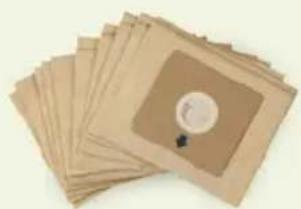
Looking for extra accessories or you have a broken piece?
ORDER the original DOMO accessories and parts on our webshop.
text_image
QR code image containing encoded data, no visible human-readable textWebshop

natural_image
Stack of sheets of paper with a circular inset showing a small object, no visible text or symbols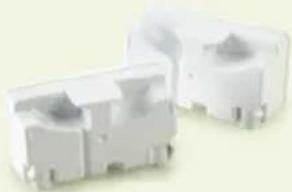
natural_image
Two white plastic electrical connectors with mounting holes (no text or symbols visible)
natural_image
White rectangular container with black interior, no visible text or symbols