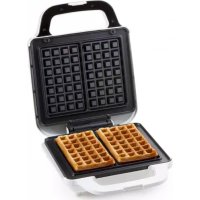
DO9222W - Waffle Maker DOMO - Free user manual and instructions
Find the device manual for free DO9222W DOMO in PDF.



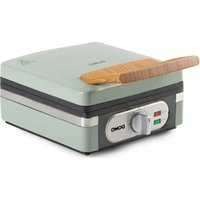
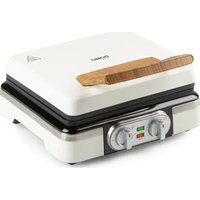
| Product type | Waffle iron |
| Brand | Domo |
| Model | DO9222W |
| Power supply | Mains (electrical plug) |
| Plate material | Non-stick coating |
| Temperature control | Yes, variable thermostat from min to max |
| Indicator lights | On (red) and ready (green) |
| Safety lock | Yes, for storage |
| Cord storage | Integrated under the appliance |
| Cleaning | Damp cloth, do not immerse |
| Use | Domestic |
| Appliance warranty | 2 years |
| Accessories warranty | 6 months |
| Customer service | info@linea2000.be / +32 14 21 71 91 |
| Safety | Do not use with external timer, do not immerse |
| Repairability | Entrust to a professional in case of damage |
| Recommended accessories | Wooden or heat-resistant plastic spatula |
| Food use | Only thawed foods |
| Instructions | Read the user manual |
Frequently Asked Questions - DO9222W DOMO
User questions about DO9222W DOMO
0 question about this device. Answer the ones you know or ask your own.
Ask a new question about this device
Download the instructions for your Waffle Maker in PDF format for free! Find your manual DO9222W - DOMO and take your electronic device back in hand. On this page are published all the documents necessary for the use of your device. DO9222W by DOMO.
USER MANUAL DO9222W DOMO
natural_image
White square grater with control knob labeled LOW, MIN, MIDDLE, MAX (no visible text or symbols beyond labels)DO9222W
| Handleiding Wafelijzer | |
| Mode d'emploi Gaufrier | |
| Gebrauchsanleitung Waffeleisen | |
| Instruction booklet Waffle maker | |
| Manual de instrucciones Gofrera | |
| Istruzioni per l'uso Piastra per cialde | |
| Návod k použití Vaflovač XL | |
| Návod na použitie Vaflovač XL |

natural_image
Two black-and-white icons: a triangular warning triangle with an exclamation mark and an open book with stacked pages (no text or symbols)natural_image
Close-up of a transparent plastic device and a white electronic device with a black strap (no visible text or symbols)MILIEURICHTLIJNEN

natural_image
Recycling symbol icon with three chasing arrows forming a triangle (no text or labels)AVANT LA PREMIÈRE UTILISATION
natural_image
Close-up of a white kitchen appliance control knob with labeled buttons (MIN, LOW, MINDLE, MAX) and a small indicator symbol (no readable text beyond labels)natural_image
Close-up of a transparent plastic device and a black-and-white photo of a mechanical component (no visible text or symbols)MISE AU REBUT
FR

natural_image
Recycling symbol icon with three chasing arrows forming a triangle (no text or labels)natural_image
Close-up of a transparent plastic device and a black-and-white photo of a mechanical component (no visible text or symbols)ENTSORGEN

natural_image
Recycling symbol icon with three chasing arrows forming a triangle (no text or labels)All of our products are always submitted to a strict quality control before they are sold to you.
Should you nevertheless experience problems with your device, we sincerely regret this. In that case, we kindly request you to contact our customer service.
Our staff will gladly assist you.

+32 14 21 71 91

info@linea2000.be
Monday – Thursday: 8.30 – 12.00 and 13.00 – 17.00
Friday: 8.30 - 12.00 and 13.00 - 16.30
This appliance has a two year warranty period. During this period the manufacturer is responsible for any failures that are the direct result of construction failure. When these failures occur the appliance will be repaired or replaced if necessary. The warranty will not be valid when the damage to the appliance is caused by wrong use, not following the instructions or repairs executed by a third party. The guarantee is issued with the original till receipt. All parts, which are subject to wear, are excluded from the warranty. If your device breaks down within the 2-year warranty period, you can return the device together with your receipt to the shop where you purchased it.
The guarantee on accessories and components that are liable to wear-and-tear is only 6 months.
The guarantee and responsibility of the supplier and manufacturer lapse automatically in the following cases:
- If the instructions in this manual have not been followed.
· In case of incorrect connection, e.g., electrical voltage that is too high.
· In case of incorrect, rough or abnormal use.
· In case of insufficient or incorrect maintenance.
In case of repairs or alterations to the device by the consumer or non-authorised third parties.
- If the customer used parts or accessories that are not recommended or provided by the supplier / manufacturer.
SAFETY INSTRUCTIONS
When using electrical appliances, basic safety precautions should always be taken, including the following:
- Read all instructions carefully. Keep this manual for future reference.
- Make sure all packaging materials and promotional stickers have been removed before using the appliance for the first time. Make sure children cannot play with the packaging materials.
· This appliance is intended to be used in household and similar applications such as:
- staff kitchen areas in shops, offices and other working environments;
· farm houses; - by clients in hotels, motels and other residential type environments;
- bed and breakfast type environments.
· Children should be supervised to ensure that they do not play with the appliance.
This appliance can be used by children aged from 16 years and above and persons with reduced physical, sensory or mental capabilities or lack of experience and knowledge if they have been given
supervision or instruction concerning use of the appliance in a safe way and understand the hazards involved. Children shall not play with the appliance. Cleaning and user maintenance shall not be made by children unless they are older than 16 and supervised.
- Keep the appliance and its cord out of reach of children younger than 16 years.
• Attention: This appliance cannot be used with an external timer or a separate remote control.

The appliance can become hot during use. Keep the power cord away from hot parts and don't cover the appliance.
· Do not touch any hot surfaces, use the handles.
· Do not put the appliance in water or any other liquid.
· Do not use the appliance near any inflammable materials or hot ovens.
· Make sure that the air can circulate freely around the appliance.
· Have the appliance repaired by a professional if it has been dropped and/or damaged.
- Do not use any sharp objects to remove any remains.
· Never use the appliance when the cord or plug is damaged.
- Do not use the appliance with wet hands.
- Place the appliance on a dry and flat surface.
· Always unplug the appliance when cleaning it. Also let the appliance cool down completely.
- Regularly check the cord for damage. Never let the cord hang over the edge of the table or never let it touch hot surfaces.
- Only use the appliance indoors.
- Only use the appliance for the purpose it was made for.
· This appliance is only suitable for household use.
SAVE THESE INSTRUCTIONS FOR FUTURE REFERENCE
PARTS
-
Baking plates
-
Handle
-
Safety lock
-
Temperature knob
-
'On/off' indicator light
-
'Ready to use' indicator light
-
Cord storage

BEFORE THE FIRST USE
- Remove all packaging materials and any promotional stickers.
· Wipe the inside and outside of the fryer clean with a soft cloth.
- When using the appliance for the first time there may be a slight smell and light smoke from the cooking plates. This is normal. For hygienic reasons, do not the first wafers made, throw them away.
USE
PLEASE NOTE: do not use this appliance to cook or defrost frozen food. Any food you wish to cook using this appliance must be thoroughly defrosted.
-
Plug the power cord into a socket. The red indicator light means the appliance is switched on.
-
Turn the temperature control knob to the desired setting between minimum and maximum. The higher you turn the knob, the hotter the waffle iron becomes.
-
The green indicator light means the appliance has reached the right temperature and is ready to bake waffles.
Note: The 'ready to use' indicator light will turn off and on regularly as the appliance continuously maintains its temperature.

-
Pour the waffle dough into the baking plates. Do this evenly so that the dough spreads well over the baking plates.
-
Use the handle to close the waffle iron.
⚠ Attention: never close the safety lock while the appliance is cooking. This lock is only for easy storage of the appliance.
-
Open the waffle iron when the desired baking time has passed. Remove the waffle when you are happy with the result. If you prefer to bake the waffle for longer, close the waffle iron again. Wait a moment and open the waffle iron once again as described above.
-
Carefully remove the waffles from the waffle iron with a wooden or heat-resistant plastic spatula. Never use metal objects, as these may damage the non-stick coating of the appliance.
-
To bake another waffle, wait for the green indicator light to indicate the appliance is ready to be used again.
-
When finished, turn the temperature control knob to minimum and switch the appliance off by removing the plug from the socket. Allow the appliance to cool down before cleaning.
CLEANING AND MAINTENANCE
- Clean the appliance after each use. Turn the temperature control knob to minimum. Unplug the electric lead and wait until the appliance has cooled sufficiently. It is easier to clean your waffle-maker if it's a bit warm.
- Clean the outside and the baking sheets with a damp clean cloth. Dry the appliance off well. Never use aggressive or abrasive cleaning agents.
- Never submerge the appliance, the electric cord or the plug into water or another liquid.
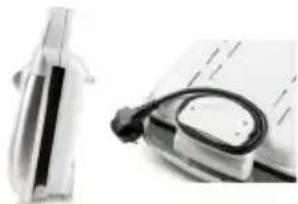
- When not in use, store the appliance on a flat dry surface. Close the safety lock to store the appliance in an upright position. Simply wrap the cord around the cord storage bar.
natural_image
Close-up of a transparent plastic device and a magnifying glass (no visible text or symbols)ENVIRONMENTAL GUIDELINES

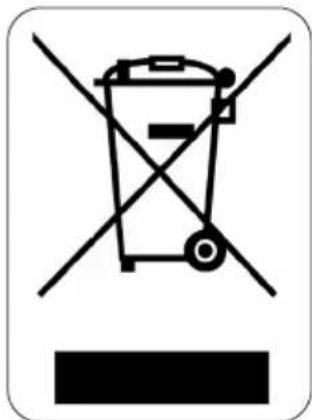
This symbol on the product or on its packaging indicates that this product may not be treated as household waste. Instead it must be brought to the applicable collection point for recycling of electrical and electronic equipment. By ensuring this product is disposed of correctly, you will help prevent potential negative consequences for the environment and human health, which could otherwise be caused by inappropriate waste handling of this product. For more detailed information about recycling of this product, please contact your local city office, your household waste disposal service or the shop where you purchased the product.

natural_image
Recycling symbol icon with three chasing arrows forming a triangle (no text or labels)The packaging is recyclable. Please treat the packaging ecologically.
GARANTIA
natural_image
Close-up of a white kitchen appliance control knob with labeled buttons (MUN, LOW, MINDLE, MAX) and a small indicator symbol (no readable text beyond labels)natural_image
Close-up of a transparent plastic device and a white electronic device with a black strap (no visible text or symbols)natural_image
Recycling symbol icon with three chasing arrows forming a triangle (no text or labels)PRIMA DELL'USO
natural_image
Close-up of a transparent plastic device and a white electronic device with a black strap (no visible text or symbols)MISURE AMBIENTALI

natural_image
Recycling symbol icon with three chasing arrows forming a triangle (no text or labels)PŘED PRVNÍM POUŽITÍM
natural_image
Close-up of a white appliance control knob with labeled buttons (MOW, MINDLE, MAX) and a central knob (no readable text beyond labels)ČIŠTĚNÍ A ÚDRŽBA
natural_image
Close-up of a transparent plastic device and a black-and-white photo of a notebook with a magnifying glass (no visible text or symbols)OHLED NA ŽÍVOTNÍ PROSTŘEDÍ

natural_image
Recycling symbol icon with three chasing arrows forming a triangle (no text or labels)PRED PRVÝM POUŽITÍM
natural_image
Close-up of a transparent plastic device and a mechanical component with a black handle (no visible text or symbols)OHL'AD NA ŽIVOTNÉ PROSTREDIE
natural_image
Recycling symbol icon with three chasing arrows forming a triangle (no text or labels)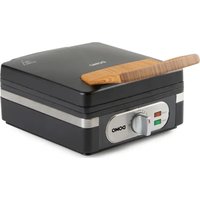


- MILIEURICHTLIJNEN
- AVANT LA PREMIÈRE UTILISATION
- MISE AU REBUT
- ENTSORGEN
- SAFETY INSTRUCTIONS
- PARTS
- BEFORE THE FIRST USE
- USE
- CLEANING AND MAINTENANCE
- ENVIRONMENTAL GUIDELINES
- GARANTIA
- PRIMA DELL'USO
- MISURE AMBIENTALI
- PŘED PRVNÍM POUŽITÍM
- ČIŠTĚNÍ A ÚDRŽBA
- OHLED NA ŽÍVOTNÍ PROSTŘEDÍ
- PRED PRVÝM POUŽITÍM
- OHL'AD NA ŽIVOTNÉ PROSTREDIE
Brand : DOMO
Model : DO9222W
Category : Waffle Maker