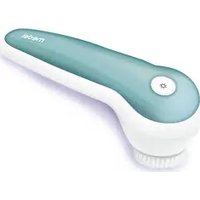
Face Brush - Face cleansing Medel - Free user manual and instructions
Find the device manual for free Face Brush Medel in PDF.


| Product type | Face cleansing brush |
| Brand | Medel |
| Model | Face Brush |
| Dimensions (L x W x H) | 16 x 5.6 x 7.5 cm |
| Weight | Approximately 140 g |
| Power supply | 100-240 V~, 50/60 Hz, 0.5 A (power adapter) |
| Battery type | Ni-MH, 600 mAh, 2.4 V |
| Charging time | At least 6 hours for the first charge |
| Charging indicator | Blue LED flashes during charging, stays on continuously when fully charged |
| Speeds | 3 speeds: low, normal, high |
| Main functions | Vibration (gentle cleansing), pulsation (deep cleansing), blue light (anti-blemish) |
| Blue light | Yes, can be activated separately; in pulsation mode, the light pulses |
| Built-in timer | 1 minute with a pause every 20 seconds (change area), automatic shut-off after 3 cycles |
| Brush head | Soft, removable (pull forward) |
| Water resistance | Suitable for use in the bathtub or shower (not submersible) |
| Cleaning the device | Slightly damp soft cloth; do not immerse |
| Cleaning the brush head | Remove and clean with water after each use |
| Box contents | Device, 1 brush head, 1 protective cap, charging station, power adapter, instruction manual |
| Recommended use | Face only, not on eyes; do not use on chapped skin, open wounds, after sunbathing |
| Minimum age | 8 years (with supervision) |
| Spare parts | Brush heads available via after-sales service |
| Warranty | Not specified in the manual; contact the retailer |
Frequently Asked Questions - Face Brush Medel
User questions about Face Brush Medel
0 question about this device. Answer the ones you know or ask your own.
Ask a new question about this device
Download the instructions for your Face cleansing in PDF format for free! Find your manual Face Brush - Medel and take your electronic device back in hand. On this page are published all the documents necessary for the use of your device. Face Brush by Medel.
USER MANUAL Face Brush Medel
natural_image
Illustration of a medical or cosmetic brush tool with teal and white body, no visible text or symbols on the device itself.IT Spazzola facciale
Istruzioni per l'uso ....2
GB Facial brush
Instructions for use 8
DE Gesichtsbürste Gebrauchsanweisung......14
Read these instructions for use carefully and keep them for later use, be sure to make them accessible to other users and observe the information they contain.
Table of contents
- Getting to know your device 9
- Included in delivery 9
- Signs and symbols 9
- Intended use 9
- Warnings and safety notes.... 10
- Device description .... 10
- Initial use....10
7.1 Charging the device 10
7.2 Attaching the brush....11 - Use....11
- Cleaning 11
9.1 Cleaning the device and the charger.... 11
9.2 Cleaning the brush attachment.... 11
10.Disposal.... 11
11.Replacement parts and wearing parts.... 12
12.Troubleshooting.... 12 - Technical data.... 13
WARNING
- The device is only intended for domestic/private use, not for commercial use.
- This device may be used by children over the age of eight and by people with reduced physical, sensory or mental skills or a lack of experience or knowledge, provided that they are supervised or have been instructed on how to use the device safely, and are fully aware of the consequent risks of use.
• Children must not play with the device. - Cleaning and user maintenance must not be performed by children unless supervised.
- If the mains connection cable of this device is damaged, it must be disposed of. If it cannot be removed, the device must be disposed of.
8
100129_MEDEL BD FACE BRUSH 95158_USER MANUAL_REV.01_05.06.2017.indd 8-9 05/06/2017 13:54:16


Dear customer.
Thank you for choosing one of our products. Our name stands for high-quality, thoroughly tested products for applications in the areas of heat, gentle therapy, blood pressure/diagnosis, weight, massage and air.
With kind regards,
Your Medel team
1. Getting to know your device
The Model FACE BRUSH facial brush offers gentle, thorough cleansing of facial skin. The facial brush not only cleanses facial skin, it also improves circulation. As well as the vibration function, the facial brush also features a pulsation function for thorough and deep cleansing. In addition, the facial brush has a blue light which is ideal for treating facial blemishes and impurities.
2. Included in delivery
Check that the delivery has not been tampered with and make sure that all components are present. Before use, ensure that there is no visible damage to the device or accessories and that all packaging material has been removed. If you have any doubts, do not use the device and contact your retailer or the specified Customer Services address.
1 x protective cap 1 x hand-held device
1 x brush attachment 1 x charger
1 x mains adapter 1 x set of instructions for use
3. Signs and symbols
The following symbols appear in these instructions for use and on the device:
| WARNINGWarning instruction indicating a risk of injury or damage to health | |
| IMPORTANTSafety note indicating possible damage to the device/accessory | |
| NoteSuitable for use in a bath or shower | |
| Observe the instructions for use | |
| The device is double-protected | |
| Disposal in accordance with the Waste Electrical and Electronic Equipment EC Directive – WEEE | |
| Manufacturer | |
| NoteNote on important information | |
| Only use indoors |
4. Intended use
The device is only to be used on the human face (apart from the eye area).

9

Do not use the facial brush on animals. The device is not suitable for children under 8 years.
The device is only intended for the purpose described in these instructions for use. The manufacturer is not liable for damage resulting from improper or careless use.
5. Warnings and safety notes WARNING
- Danger of suffocation by packaging material. Keep packaging material away from children.
- Before use, inspect the device and accessories for visible damage. If you have any doubts, do not use the device and contact your retailer or the specified Customer Services address.
- Keep the mains adapter away from water.
- Protect the device and the charger from knocks, damp, dust, chemicals, drastic changes in temperature and nearby sources of heat (ovens, heaters).
• To prevent damage to the eyes never look directly at the blue light!
WARNING
Do NOT use the device
• on broken skin
- on Broken skin.
- on Open Wounds
- on open wounds.
- If you suffer from a skin disease or irritated skin.
- immediately after sunbathing.
- if you are taking medication that contains steroids.
Notes on handling rechargeable batteries
- If your skin or eyes come into contact with fluid from the battery cell, flush out the affected areas with plenty of water and seek medical assistance.
- Risk of explosion! Never throw batteries into a fire.
- Do not disassemble, split or crush the rechargeable batteries.
- DO NOT DISASSEMBLE, split or crush the rechargeable be
- Only use chargers specified in the instructions for use
- Batteries must be charged correctly prior to use. The instructions from the manufacturer and the specifications in these instructions for use regarding correct charging must be observed at all times.
- Fully charge the battery prior to initial use (see Chapter 7.1).
- In order to achieve as long a battery service life as possible, fully charge the battery at least twice per year.
IMPORTANT
Only specialist personnel may perform repairs on electrical devices. Improper repairs may subject users to considerable danger. In the event of a fault or damage, have the device repaired by a certified specialist workshop.
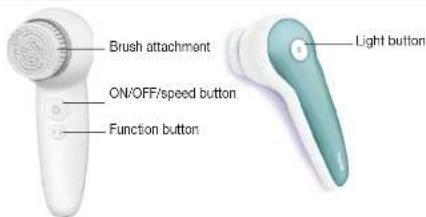
- Device description


7. Initial use
7.1 Charging the device
Charge the device for at least 6 hours before initial operation. To do this, proceed as follows:
- Insert the mains cable into the charger.
- Plug the mains adapter into the socket.
- Insert the facial brush into the charger from above. Whilst charging, the blue LED light in the brush head flashes. As soon as the facial brush is fully charged, the blue LED light is lit permanently.
7.2 Attaching the brush
The device features a soft brush attachment.
1. Fit the soft brush attachment onto the mounting fixture of the device from the front.
2. To remove the brush attachment after use, pull it forwards.
8. Use
- Moisten the attached brush attachment with water. Never use the device with a dry brush attachment as this can imitate the skin.
- Apply the cleansing gel to your facial skin.
- To switch on the device, press and hold the ON/OFF/speed button for one second. The brush attachment will begin to vibrate.
- The device features a slow, medium and fast speed setting. To switch between the individual speed settings, briefly press the ON/OFF/speed button.
- Using the function button, select your desired function. The device has a vibration function for gentle facial cleansing and a pulsation function for thorough facial cleansing.
- If you have problem skin, you can switch on a blue light during use which combats skin impurities and blemishes. To add the blue light function, press the light button. If you have activated the pulsation function, the blue light pulsates and is not permanently lit.
- Now apply the device gently to your face and cleanse your facial skin using even movements to remove residue, dirt and dead skin cells.
Note
To ensure comfortable treatment, do not press the brush attachment too firmly against the skin. Treat each section of skin for a maximum of 20 seconds.
The brush features a 1-minute timer and stops every 20 seconds for 1 second to indicate that you should switch to cleaning a different area. The facial brush switches itself off automatically after 3x 20 seconds. The recommended application period per use is 1 minute.
-
Switch off the device after use. To switch off the device, press and hold the ON/OFF/speed button for one second.
-
Cleanse your face thoroughly with water to remove any residue from your skin.
-
Pat your skin dry with a towel and then apply a moisturising cream using even, circular movements.
9. Cleaning
IMPORTANT
Before beginning cleaning, always pull the mains adapter out of the socket.



9.1 Cleaning the device and the charger
- Clean the device using only the methods specified.
- Clean the device after use with a soft, slightly clamp cloth. If it is very dirty, you can also moisten the cloth with a mild soapy solution. Do not use any abrasive cleaning products.
- Clean the charger with a soft, slightly damp cloth from time to time.
- Esure that no water enters the device or the charger. If this should happen, the device and the charger should only be used again once they have fully dried out.
9.2 Cleaning the brush attachment
• To clean the brush attachment, pull it forwards off the device.
- Clean the brush attachment thoroughly with water after each use.
10. Disposal
- The empty, completely flat rechargeable batteries must be disposed of using specially designated collection boxes, recycling points or electronics retailers. You are legally required to dispose of the rechargeable batteries.
- Remove the battery by removing the cover of the facial brush.
- Remove the battery by removing the cover of the facial brush.
- The codes below are printed on rechargerable batteries containing harmful substances.
- The dose below are printed on rechargeable batteries containing harmful substances.
Ph - Battery contains lead
Cd = Battery contains cadmium.
Hg = Battery contains mercury.
For environmental reasons, do not dispose of the device in the household waste at the end of its useful life. Dispose of the unit at a suitable local collection or recycling point. Dispose of the device in accordance with EC Directive – WEEE (Waste Electrical and Electronic Equipment). If you have any questions, please contact the local authorities responsible for waste disposal.
The device battery must be disposed of separately. The battery must not be disposed of with domestic waste.
To remove the battery, use a screwdriver to force open the cover for the brush attachment on the device. The battery located inside the device must then be disconnected from the device. Now remove the battery from the device and dispose of it at a suitable collection point. For information on disposal, please contact the authorised seller or the public authority responsible for waste disposal.

11. Replacement parts and wearing parts
Replacement parts and wearing parts are available from the corresponding listed service address under the stated material number.
- Troubleshooting
| Problem Solution | |
| The device does not charge. | Ensure that the charger is connected to a functioning socket and that the device is correctly positioned on the charger. If you have connected everything correctly and the device still fails to charge, contact Customer Services. |
| The device will not switch on. | When switching the device on, ensure that you press the ON/OFF button with sufficient force and hold the button down for a sufficient amount of time. Charge the device as described in these instructions for use. If it is still not possible to switch on the device, contact Customer Services. |
| The device does not cleanse as well as it did to begin with. | The brush is worn. Replace the brush. If you do not have any replacement brushes, they can be reordered (see “11. Replacement parts and wearing parts”). |
If you cannot find a solution to your problem here, contact our Customer Services.
- Technical data
| Supply 100-240 V-; 50/60 Hz; 0.5 A | |
| Dimensions 16 x 5.6 x 7.5 cm | |
| Weight approx. 140 g | |
| Battery:Capacitynominal voltagetype designation | 600 mAh2.4VNI-MH |

DEUTSCH

Remarques relatives aux batteries
REV.01 June 2017 CODE 100129

- Table of contents
- WARNING
- Dear customer.
- Getting to know your device
- Included in delivery
- Signs and symbols
- Intended use
- Warnings and safety notes WARNING
- Notes on handling rechargeable batteries
- IMPORTANT
- Initial use
- Charging the device
- Attaching the brush
- Use
- Note
- Cleaning
- Cleaning the device and the charger
- Cleaning the brush attachment
- Disposal
- Replacement parts and wearing parts
- DEUTSCH
- Remarques relatives aux batteries
Brand : Medel
Model : Face Brush
Category : Face cleansing