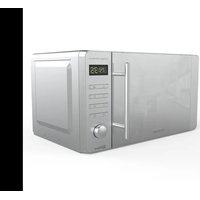
ProClean 5020 Mirror - Microwave Oven CECOTEC - Free user manual and instructions
Find the device manual for free ProClean 5020 Mirror CECOTEC in PDF.


| Product type | Microwave oven |
| Brand | Cecotec |
| Model | ProClean 5020 Mirror |
| Reference | 01532 |
| Capacity | 20 L |
| Microwave power | 700 W |
| Input power | 1150 W |
| Voltage / Frequency | 230 V ~ 50 Hz |
| Power levels | 5 (20%, 40%, 60%, 80%, 100%) |
| Functions | Microwave, Grill, Combi (1,2,3), Defrost, Express, 8 automatic programs |
| Turntable | Yes |
| Interior light | Yes |
| Child safety | Yes (panel lock) |
| Timer | Up to 60 minutes |
| Installation type | Freestanding |
| Material | Mirror glass door, stainless steel interior |
| Grill | Yes (upper heating element) |
| ISM class | Group 2 Class B |
| Warranty | 2 years |
| Country of manufacture | China (designed in Spain) |
Frequently Asked Questions - ProClean 5020 Mirror CECOTEC
User questions about ProClean 5020 Mirror CECOTEC
0 question about this device. Answer the ones you know or ask your own.
Ask a new question about this device
Download the instructions for your Microwave Oven in PDF format for free! Find your manual ProClean 5020 Mirror - CECOTEC and take your electronic device back in hand. On this page are published all the documents necessary for the use of your device. ProClean 5020 Mirror by CECOTEC.
USER MANUAL ProClean 5020 Mirror CECOTEC
natural_image
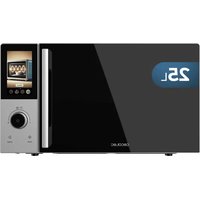
Exterior view of a modern microwave oven with ProClean 5020 Mirror and 3D Wave control panel (no text or symbols on main body)Safety instructions 8
-
Parts and components 47
-
Before use 47
-
Operation 47
-
Tips 52
-
Cleaning and maintenance 53
-
Technical specifications 53
-
Disposal of old electrical appliances 53
-
Technical support and warranty 54
SOMMAIRE
- Read these instructions thoroughly before using the appliance. Keep this instruction manual for future reference or new users.
- Make sure that the mains voltage matches the voltage stated on the rating label of the appliance and that the wall outlet is grounded.
- Do not operate outdoors.
- This product is designed only for household use.
- Use this appliance only for its intended purpose, as described in this manual. Do not use corrosive chemicals or vapours in this appliance, it is not designed for industrial or laboratory use.
- If the door or door seals are damaged, the product must not be operated until it has been repaired by a competent person.
- Do not operate the microwave when empty.
- Do not operate this appliance if it has a damaged cord or plug or if it is not operating properly. If the cord is damaged, it must be replaced by the official Technical Support Service of Cecotec in order to avoid any type of danger.
- Only use utensils that are suitable for microwaves. Make sure utensils do not touch the interior walls during operation.
- Do not use the cavity for storage purposes.
- Do not attempt to deep-fry in this oven.
- In order to reduce fire risk:
- Do not overcook food.
- Remove wire twist-ties from paper or plastic bags before placing them inside the microwave.
- Do not heat liquids or other foods in sealed
containers.
- In case of smoke or fire inside the device, keep the door closed, turn the product off and disconnect it from the power supply.
- In order to prevent the glass tray from breaking, do not place hot foods, hot utensils, frozen foods or frozen utensils on it.
- After operating, the container is likely to be very hot. Use gloves in order to avoid burns and injuries.
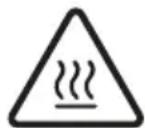
- In Grill or Combination (1, 2, 3) mode, all oven parts
will be very hot during and after operation, including door and top part of the microwave. Remember to use handle, gloves or any other type of protection.
- The appliance is not intended to be used by children under the age of 8. It can be used by children over the age of 8, as long as they are given continuous supervision.
- This appliance can be used by children aged 8 and above, and persons with reduced physical, sensory or mental capabilities or lack of experience and knowledge, as long as they have been given supervision or instruction concerning the use of the appliance in a safe way and understand the hazards involved.
- Children shall not play with the appliance. Close supervision is necessary when the appliance is being used by or near children.
- This product is a Group 2 Class B ISM equipment. The definition of Group 2 which contains all ISM (Industrial, Scientific and Medical) equipment in which radio-frequency energy is intentionally generated and/or used in the form of electromagnetic radiation for the treatment of material, and spark erosion equipment. Class B equipment is suitable for domestic use and in establishments directly connected to a low voltage power supply network, which supplies buildings used for domestic purpose.
- Technical service and reparations that involve cover removals or exposure to cables must always be carried out by a competent, professional and qualified person.
- It is important to use materials and containers which are suitable and safe for microwave cooking. The table below shows which materials are suitable and which are not:
| Material of container | Microwaves W | Warnings |
| Heatproof ceramics. | Yes Never use | ceramics which are decorated with metal rim or glazed. |
| Heatproof plastic | Yes Cannot be used | ed for long time microwave cooking. |
| Heatproof glass. Yes | ||
| Plastic film. Yes It should not be used when cooking meat, high temperature might damage the film. | ||
| Grill. No | ||
| Metal container. No Microwave cannot cook through metal. | ||
| Lacquer. | No Poor heat-resistance. | |
| Cannot be used for high-temperature cooking. | No Poor heat-resistance. | |
INSTRUCTIONS DE SÉCURITÉ
- Door safety lock system
- Microwave window
- Rotating axis
- Roller ring
- Rotary plate
- Control panel
- Mica panel
- Grill
2. BEFORE USE
- Never remove the mica plate.
- Take the product out of the box. If the microwave has a protective film, tear it off before starting operation. Check carefully if there is any damage, and if there is, immediately notify the Technical Support Service of Cecotec.
- The product must be placed on a flat, stable and dry place and kept away from corrosive materials, heat and humidity, such as gas burners or water.
- To ensure enough ventilation, minimum distances have to be kept:
- From the back part to the wall: 10 cm.
- From the side to the wall: 5 cm.
- Free distance from the top surface: 20 cm.
- From the microwave to the ground: 85 cm.
- The product must be placed, at least, at 5 m from the TV, Radio or antenna.
- The product must be placed in such way that the plug is accessible and must ensure an effective grounding in case of leakage in order to avoid electric shocks.
- The microwave door must be closed in order to operate.
- In case there is any manufacturing rests in the microwave cavity or on the heating elements, leave the microwave open to ensure good ventilation. In such case, it is recommended to heat a glass of water at high power for several times.
3. OPERATION
Fig. 2
-
On button
-
Express button
-
Cooking button
ENGLISH
- Defrost button
- Timer button
- Settings button
- Start button
- Pause/Cancel button
- Time/weight knob
Before cooking
- Connect the appliance to a power outlet. Once it is connected, the LED light will flash 3 times and will show colon (:).
- Enter the cooking function and the cooking time.
- Time/weight knob Cooking time and food weight can be increased or decreased during operation by turning the Time/Weight knob. According to the operating mode, select time or weight.
Pause/Cancel
- Before operation: Press once in order to reset settings and return to to initial stage.
- During operation: Press once in order to interrupt operation or press twice in order to cancel pre-set cooking program.
Reminder
Once the pre-set cooking process is over, it will say END on the LED display panel and the microwave will beep 3 times. Press Pause/Cancel button or open the microwave door in order to stop the alarm, if not, the alarm will sound every 3 minutes.
Clock/timer setting
Press the Timer button and then turn the knob clockwise or anticlockwise to set the hour. When the correct time is displayed, press the timer button again and turn the knob to set the minutes. Once the correct minutes are displayed, wait 5 seconds or press the timer button to confirm.
| Example: Setting clock at 12:30 | ||
| Steps Display | ||
| 1 After powering up, the display panel shows the colon sign. : | ||
| 2 Press the Timer button once. 00:00 | ||
| 3 | Turn the knob to set the exact hour. | 12:00 |
| 4 | Press the Timer button once. 12:00 | |
| 5 | Turn the knob to set the exact number of minutes. | 12:30 |
| 6 Press the Timer button once to confirm the set time or wait for 5 seconds for the microwave to set it automatically. | ||
Microwave cooking
- Use this function in order to cook or heat food.
- Press the On button and select on the LED display panel between:
| High power 100 % microwave power. Perfect for quick and thorough cooking. | |
| Medium-High power 80 % microwave power. Perfect for medium express cooking. | |
| Medium power 60 % microwave power. Perfect for steaming food. | |
| Medium-Low power 40 % microwave power. Perfect for defrosting food. | |
| Low power 20 % microwave power. Perfect for keeping food warm. |
- The microwave function can be programmed for a maximum of 60 minutes.
- Cooking or heating time may be changed during operation. It is recommended to turn or stir food at least once during the process. Press the Start button once to resume operation.
- If food is removed before the pre-set time, make sure you press Pause/Cancel once in order to stop operation and avoid the microwave from operating automatically and empty when closed.
- When operating at maximum power, the microwave will automatically lower power after a certain time in order to lengthen the appliance's shelf life.
| Example: Cooking at P80 for 10 minutes. | ||
| Steps Display | ||
| 1 After powering up, the display panel shows the colon sign.: | ||
| 2 | Select the desired microwave power by pressing the On button consecutively. | 80 P |
| 3 | Turn the knob to select the desired cooking time. | 10:00 |
| 4 | Press the Start button to start operation. The LED will display the countdown. | |
Express
This mode allows heating drinks without setting the timer. Press the Express button, the display will show the following options: 0:30, 1:00 and 1:30. Select the heating time according to the amount of drink.
| Example: Heating drink during 1 minute with the Express programme. | ||
| Steps | Display | |
| 1 | After powering up, the display panel shows the colon sign. | : |
| 2 | Press the Express button to select the mode. | 1:00 |
| 4 Press the Start button once to resume operation. | ||
ENGLISH
Defrost
Function designed to defrost different types of food. Press the Defrost button consecutively to set the Defrost mode.
| d.1 Perfect for defrosting meat (0.1 kg-2.0 kg). | |
| d.2 Perfect for defrosting poultry (0.2 kg-3.0 kg). | |
| d.3 Perfect for defrosting fish/seafood (0.1 kg-0.9 kg). |
- When the desired mode is displayed, turn the knob to set an approximate weight of the food to be defrosted.
- It is highly recommended to turn over food during the defrost process in order to obtain uniform effect.
- Usually defrosting will need longer time than cooking food.
- If the food can be cut by knife, the defrosting process can be considered completed.
- Defrosted food should be used as soon as possible. It is not recommended to freeze or put back in the fridge again.
| Example: Defrosting 0.5 kg of chicken | ||
| Steps Display | ||
| 1 After powering up, the display panel shows the colon sign.: | ||
| 2 Press the Defrost button to select the type of food. d.2 | ||
| 3 Turn the knob to set food weight. 0.4 | ||
| 4 Press the Start button once to resume operation. | ||
| 5 | Halfway through the defrost process, you will hear an alarm reminding you to turn food over. Press the Pause/Cancel button once. Turn food over, close the microwave's door and press the Start button again to resume the defrost process. | |
Preset programs
The microwave has 8 default programmes, select the most appropriate one according to the food type and weight. Press the Cooking button consecutively, the LED display panel will show different programmes. Choose between:
| Display Food Dish | |
| A.1 Popcorn Perfect for cooking 85 g of popcorn. | |
| A.2 Popcorn Perfect for cooking 100 g of popcorn. | |
| A.3 Pizza Perfect for cooking 0.15 kg of pizza. | |
| A.4 Liquids Perfect for heating 250 ml of liquid. Liquid must be between 5 °C and 10 °C. Do not seal the liquid container. | |
| A.5 Liquids Perfect for heating 500 ml of liquid. Liquid must be between 5 °C and 10 °C. Do not seal the liquid container. | |
| A.6 Potato Perfect for cooking potato cubes (5 mm height and width), 0.45 kg maximum. Place potato cubes on a large tray or container and cover it with a thin film to prevent water loss. | |
| A.7 Potato | Perfect for cooking potato cubes (5 mm height and width), 0.65 kg maximum. Place potato cubes on a large tray or container and cover it with a thin film to prevent water loss. |
| A.8 Fish Perfect steaming 0.45 kg of fish. | |
These data are approximate and depend on many different factors.
Before cooking or heating food, its temperature must be about 20-25 °C. Higher or lower temperature of the food before cooking would require increasing or decreasing cooking time. Food's temperature, weight and shape will strongly influence the microwave effect on the cooking process. Adjust time in order to obtain the best result.
| Example: Steaming 0.45 kg of fish. | ||
| Steps Display | ||
| 1 | After powering up, the display panel shows the colon sign. | : |
| 2 | Press the Cooking button to select the preset programme. | A.8 |
| 3 | Press the Start button to start operation. The LED will display the countdown. | |
Automatic start
- This function allows you to set cooking program and time, so at the pre-set time, the pre-set programme will automatically start operating. In order to activate this mode:
- Set the time. If the time is correctly set, move on to step 2 on the table.
- Set the cooking programme.
ENGLISH
| Example: It is 12:30 and you want to programme the microwave at 100 P, for 9 minutes and 30 seconds at 14:20. | ||
| Steps Display | ||
| 1 After powering up, the display panel shows the colon sign.: | ||
| 1.1 Press the Timer button. 00:00 | ||
| 1.2 Set hour by turning the knob. 12:00 | ||
| 1.3 Press the Timer button to confirm the hour. 12:00 | ||
| 1.4 Set the minutes by turning the knob. 12:30 | ||
| 1.5 Press the Timer button to confirm the set time or wait for 5 seconds for the microwave to set it automatically. | 12:30 | |
| 2 Set the cooking programme and cooking time. | ||
| 2.1 Select power by pressing the On button. 100P | ||
| 2.2 | Turn the knob to set the cooking time. | 9.30 |
| 3 Press the Settings button once to go back to the clock. | ||
| 3.1 | Set the start time by turning the knob. | 14:00 |
| 3.2 Press the Settings button again to confirm time. | ||
| 3.3 Set the minutes by turning the knob. 14:20 | ||
| 4 | Press the Settings button to confirm the selected cooking programme. Now the programme has been activated and operation will start at 14.20. | |
| 5 You may check the pre-set starting time by pressing the Settings button. | ||
Safety child lock
- Security system that blocks control panel to ensure small children do not use the appliance without supervision.
- To activate lock: Hold the Pause/Cancel button for 3 seconds.
- To deactivate lock: Hold the Pause/Cancel button for 3 seconds.
4. TIPS
- Food arrangement: Place the thickest food parts towards the edge of the glass tray. If possible, do not overlap food.
-
Watch cooking time: Cook for the shortest amount of time at first, and add more minutes in case it is necessary. Over-cooking may result in smoke and burns.
-
Cover food while cooking: Covering the food you are going to cook avoids spattering and allows for a more even cooking.
- Flip or stir food once during the cooking process.
- Respect pre-heating time. Pre-heating time specified on the food's label must not be exceeded.
5. CLEANING AND MAINTENANCE
- The device, as well as food rests, must be cleaned and removed regularly.
- Disconnect the power cord from the wall socket before cleaning. Do not immerse the product in water or any other fluid during cleaning.
- Failure to maintain the product in clean conditions could lead to surface deterioration and could adversely affect the product's shelf life, resulting in possible hazard.
- Never use strong detergents, abrasive powder or metal brush to clean any part of the product.
- Do not remove the wave guide.
- When the microwave has been used for a long time, some strong odours may arise from inside. To eliminate these odours, follow one of the below methods: Place several lemon slices in a cup and heat them at high power for 2 or 3 minutes.
- Place a cup of red tea inside the microwaves and heat it at high power for 2 or 3 minutes.
- Place orange peels inside the microwaves and heat it at high power for 1 minute.
- Use a dampened soft cloth to clean enclosures, door, interior walls and the door frame.
6. TECHNICAL SPECIFICATIONS
Model: ProClean 5010 Inox/ProClean 5020 Mirror
Product reference: 01534/01532
Inlet power: 1150 W
Microwave power: 700 W
Voltage and frequency: 230 V AC, 50 Hz
Capacity: 20L
Made in China | Designed in Spain
7. DISPOSAL OF OLD ELECTRICAL APPLIANCES
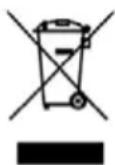
The European directive 2012/19/EU on Waste Electrical and Electronic Equipment (WEEE), specifies that old household electrical appliances must not be disposed of with the normal unsorted municipal waste. Old appliances must be collected separately, in order to optimise the recovery
ENGLISH
and recycling of the materials they contain and reduce the impact on human health and the environment.
The crossed out "wheeled bin" symbol on the product reminds you of your obligation to dispose of the appliance correctly.
Consumers must contact their local authorities or retailer for information concerning the correct disposal of old appliances and/or their batteries.
8. TECHNICAL SUPPORT AND WARRANTY
This product is under warranty for 2 years from the date of purchase, as long as the proof of purchase is submitted, the product is in perfect physical condition, and it has been given proper use, as explained in this instruction manual.
The warranty will not cover the following situations:
The product has been used for purposes other than those intended for it, misused, beaten, exposed to moisture, immersed in liquid or corrosive substances, as well as any other fault attributable to the customer.
The product has been disassembled, modified, or repaired by persons, not authorised by the official Technical Support Service of Cecotec.
Faults deriving from the normal wear and tear of its parts, due to use.
The warranty service covers every manufacturing defects of your appliance for 2 years, based on current legislation, except consumable parts. In the event of misuse, the warranty will not apply.
If at any moment you detect any problem with your product or have any doubt, do not hesitate to contact Cecotec Technical Support Service at +34 963 210 728.
1. PIÈCES ET COMPOSANTS
Img. 1
Made in China | Designed in Spain
7. RECYKLING SPRZĘTU AGD
Fig./Img./Abb./Afb./Rys./Obr.1
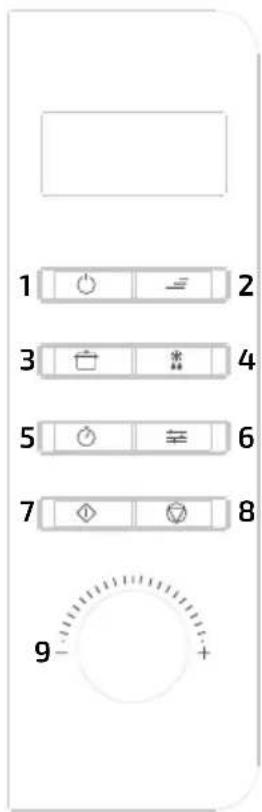
Fig./Img./Abb./Afb./Rys./Obr.2
www.cecotec.es
Quart de Poblet, Valencia (Spain)
IC02210201

- SOMMAIRE
- INSTRUCTIONS DE SÉCURITÉ
- BEFORE USE
- OPERATION
- Fig. 2
- ENGLISH
- Before cooking
- Pause/Cancel
- Reminder
- Clock/timer setting
- Microwave cooking
- Express
- Defrost
- Preset programs
- Automatic start
- Safety child lock
- TIPS
- CLEANING AND MAINTENANCE
- TECHNICAL SPECIFICATIONS
- DISPOSAL OF OLD ELECTRICAL APPLIANCES
- TECHNICAL SUPPORT AND WARRANTY
- PIÈCES ET COMPOSANTS
- Img. 1
- RECYKLING SPRZĘTU AGD
Brand : CECOTEC
Model : ProClean 5020 Mirror
Category : Microwave Oven