
HyperX Alloy Core RGB - Keyboard HP - Free user manual and instructions
Find the device manual for free HyperX Alloy Core RGB HP in PDF.
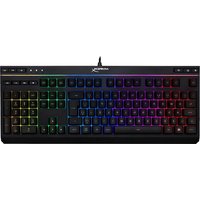


| Product type | Membrane gaming keyboard |
| Brand | HP (HyperX) |
| Model | HyperX Alloy Core RGB |
| Backlight | RGB with 5 zones and 6 lighting effects |
| Brightness levels | 3 (off, 50%, 100%) |
| Connection type | USB 2.0 |
| Polling rate | 1000 Hz |
| Anti-ghosting | Yes, full key rollover |
| Media controls | Yes, dedicated keys |
| Game mode | Yes, disables Windows key |
| Spill resistance | Yes, tested up to 120 ml |
| Cable | Braided, fixed, 1.8 m length |
| Dimensions (W x D x H) | 443.20 x 175.31 x 35.68 mm |
| Weight (keyboard and cable) | 1121 g |
| Compatible operating systems | Windows 10, 8.1, 8, 7 |
| Package contents | HyperX Alloy Core RGB keyboard |
| Keyboard lock function | Yes, with white breathing light effect |
| Color customization | 9 solid colors in Fixed mode |
| Zone customization | 5 independent zones |
| Chassis material | Durable plastic |
| Keys | Silent, membrane type |
Frequently Asked Questions - HyperX Alloy Core RGB HP
User questions about HyperX Alloy Core RGB HP
0 question about this device. Answer the ones you know or ask your own.
Ask a new question about this device
Download the instructions for your Keyboard in PDF format for free! Find your manual HyperX Alloy Core RGB - HP and take your electronic device back in hand. On this page are published all the documents necessary for the use of your device. HyperX Alloy Core RGB by HP.
USER MANUAL HyperX Alloy Core RGB HP
HyperX Alloy Core RGB™ Membrane Gaming Keyboard
Find the language and latest documentation for your HyperX Alloy Core RGB here.
HyperX Alloy Core RGB Installation Guide
For instructions in English, Spanish, German, French, Italian, Portuguese, Polish, Russian, Turkish, Japanese, Korean, Thai, Vietnamese, Simplified Chinese, and Traditional Chinese.
HyperX Alloy Core RGB™
Membrane Gaming Keyboard
Part numbers
| HX-KB5ME2-US | HX-KB5ME2-BR |
| HX-KB5ME2-US/WW | HX-KB5ME2-DE |
| HX-KB5ME2-NO | HX-KB5ME2-DE/WW |
| HX-KB5ME2-NO/WW | HX-KB5ME2-FR |
| HX-KB5ME2-RU | HX-KB5ME2-FR/WW |
| HX-KB5ME2-RU/WW | HX-KB5ME2-JP |
| HX-KB5ME2-UK | HX-KB5ME2-LA |
| HX-KB5ME2-UK/WW | HX-KB5ME2-LA/WW |
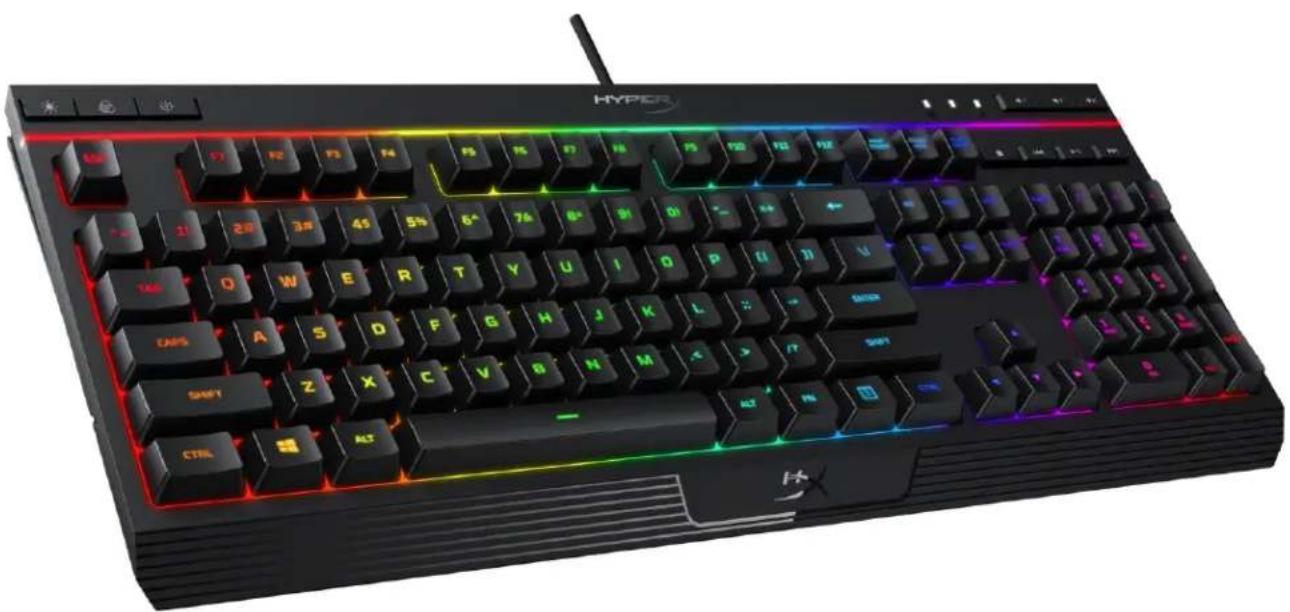
Featuring HyperX's signature radiant light bar and smooth, dynamic RGB lighting effects, the HyperX Alloy Core RGB™ is ideal for gamers looking to enhance their keyboard's style and performance without breaking the bank. With six different lighting effects and three brightness levels, it balances both brilliance and budget. Crafted with a durable, reinforced plastic frame, the Alloy Core RGB was constructed for stability and reliability for gamers who want a keyboard that will last. The soft-touch keys have a tactile feel, yet are tuned to be quiet, and they also feature gaming-grade anti-ghosting functionality and key rollover. It's spill resistant, tested to withstand 120ml of liquid, so beverage accidents won't put an end to your game. The dedicated media controls and quick-access buttons for lighting and Game Mode place control right at your fingertips. Keyboard Lock allows you to lock your keyboard down without having to put your entire system on standby. The Alloy Core RGB is stylish, nicely-featured, and durable, making it a great all-around multimedia keyboard for gamers.
What's included:
○ HyperX Alloy Core RGB Keyboard
Specifications:
Keyboard
Type: Membrane
Backlight: RGB (5 zones multi-colour customisation)
Light effects: 6 LED modes and 3 brightness levels
Connection type USB 2.0
Polling rate 1000Hz
Anti-ghosting Multi-key anti-ghosting
Media control Yes
Game Mode Yes
Spill resistance Tested up to 120ml of liquid
OS compatibility Windows® 10, 8.1, 8, 7
Cable
Type Attached, braided
Length 1.8m
Dimensions
Width 443.20mm
Depth 175.31mm
Height 35.68mm
Weight (keyboard and cable) 1121g

Keyboard overview:
![A B C HYPERI ESC F1 F2 F3 F4 F5 F6 F7 F8 F9 F10 F11 F12 FIRST ORDER 1000000000000000000000000000000000000000000000000000000000000000000000000000000000000000 ~ 1! 2# 3# 4$ 5% 6^ 7& 8+ 9( 0) ~ = + ← TAB Q W E R T Y U I O P [ ( ] ) \ / CAPS A S D F G H J K L : : - ENTER SHIFT Z X C V B N M ,< > /? SHIF…](/content/2026/04/708840/images/8c8303f175c2a3806e3c94f8a00fa8629154553d9f0c400f7296fb5a9d309b40.jpg)
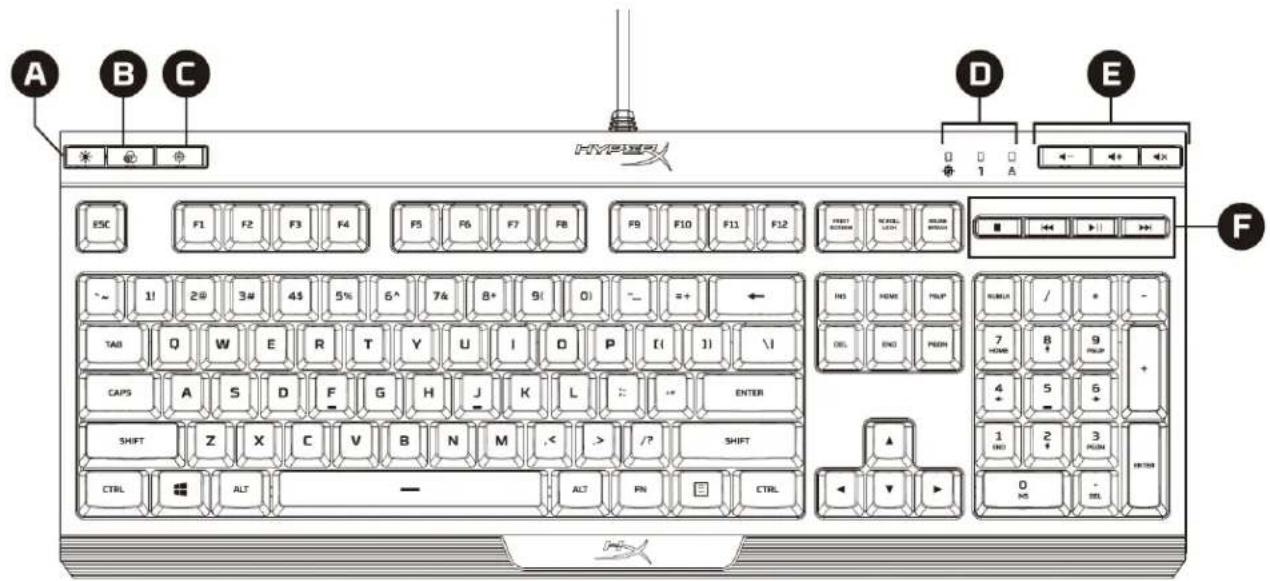
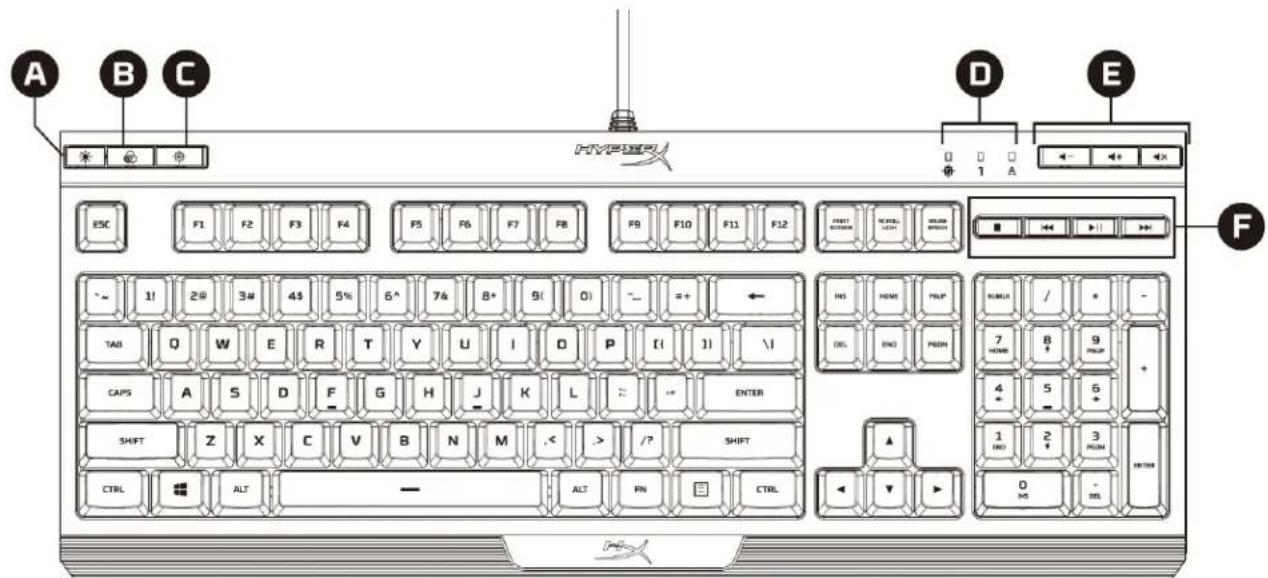
A Brightness control button B LED mode control button C Game Mode button
D Game Mode / Num Lock / Caps Lock indicators E Volume control buttons F Media control buttons
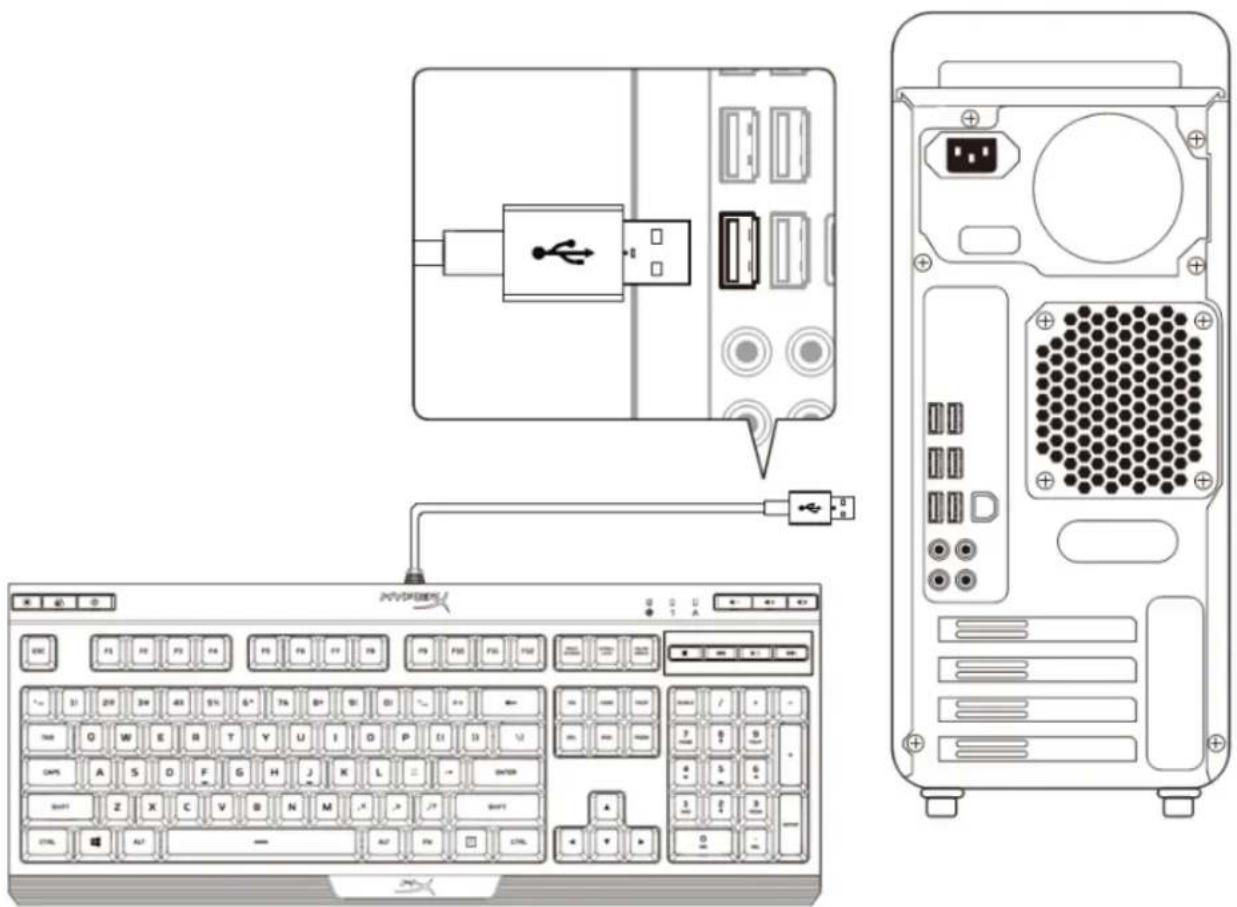
Keyboard installation:
Connect the USB connector to the computer USB port.
Function keys:
| Function keys | Secondary feature |
 | Switch between the three brightness levels: OFF, 50% and 100%. |
 | Switch between the LED modes. † |
 | Enabling Game Mode ( Ⓞ ) will disable the Windows key to avoid any inconvenience during gaming. When Game Mode is enabled, the indicator will illuminate. |
 | Mute ( ⬆ × ), decrease ( ⬆ - ) or increase ( ⬆ + ) your computer audio. |
 | Stop ( ■ ), play/pause ( ▶ II ), skip backwards ( ⬆◀ ) or skip forward ( ▶▶ ) your music or video. |
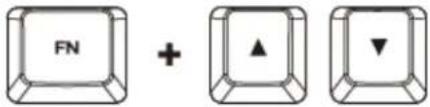 | Increase ( ⬆ or decrease ( )effect speed † . There are 3 levels of speed: low, medium and high. |
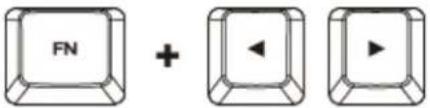 | Switch between solid colours ( ⬆† . There are 9 different colours: red, orange, yellow, green, teal, blue, purple, pink and white. |
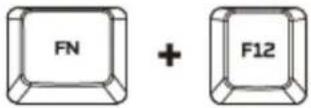 | Enable the keyboard Lock Mode. When Lock Mode is enabled, the light effect will change to breathing white. |
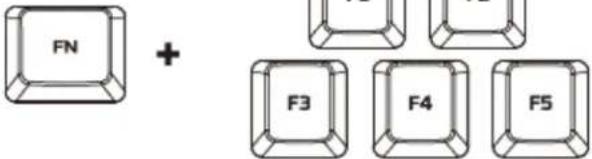 | Customise colours for each zone in 5-zone mode.F1 controls the zone on the left and F5 the zone on the right. Press multiple times to cycle through the 9 colours or turn the zone lighting OFF. |
† See customisation table below for more detail.
| Effect Name | Speed Customisation | Colour Customisation | Zones Customisation |
| Colour Cycle (default) | ✓ | ✕ | ✕ |
| Spectrum Wave | ✓ | ✕ | ✕ |
| Breathing | ✓ | ✓ | ✕ |
| Solid | ✕ | ✓ | ✕ |
| 5 Zones | ✕ | ✕ | ✓ |
| Aurora | ✓ | ✕ | ✕ |
Questions or setup issues?
Contact the HyperX support team at: hyperxgaming.com/support/keyboards
HyperX Alloy Core RGB™
Part numbers
| HX-KB5ME2-US | HX-KB5ME2-BR |
| HX-KB5ME2-US/WW | HX-KB5ME2-DE |
| HX-KB5ME2-NO | HX-KB5ME2-DE/WW |
| HX-KB5ME2-NO/WW | HX-KB5ME2-FR |
| HX-KB5ME2-RU | HX-KB5ME2-FR/WW |
| HX-KB5ME2-RU/WW | HX-KB5ME2-JP |
| HX-KB5ME2-UK | HX-KB5ME2-LA |
| HX-KB5ME2-UK/WW | HX-KB5ME2-LA/WW |
Function keys:
Part numbers
| HX-KB5ME2-US | HX-KB5ME2-BR |
| HX-KB5ME2-US/WW | HX-KB5ME2-DE |
| HX-KB5ME2-NO | HX-KB5ME2-DE/WW |
| HX-KB5ME2-NO/WW | HX-KB5ME2-FR |
| HX-KB5ME2-RU | HX-KB5ME2-FR/WW |
| HX-KB5ME2-RU/WW | HX-KB5ME2-JP |
| HX-KB5ME2-UK | HX-KB5ME2-LA |
| HX-KB5ME2-UK/WW | HX-KB5ME2-LA/WW |
Keyboard overview:
![A B C HYPER ESC F1 F2 F3 F4 F5 F6 F7 F8 F9 F10 F11 F12 FIRST ORDER NEW LUX NO. NO. NO. ~ 1! 2# 3# 4$ 5% 6^ 7& 8+ 9( 0) ~ = + ← TAB Q W E R T Y U I O P [ ( ] ) \ / CAPS A S D F G H J K L : : - ENTER SHIFT Z X C V B N M ,< > /? SHIFT CTRL ALT ALT FN CTRL D E F USB / * - OIL ENO PRDN 7 HOME 8 # 9 PRUP…](/content/2026/04/708840/images/2ee1aa876b0644e35c7ec25337733388dc206ef0826053d147c46c5284e90acf.jpg)
Function keys:
Product references
| HX-KB5ME2-US | HX-KB5ME2-BR |
| HX-KB5ME2-US/WW | HX-KB5ME2-DE |
| HX-KB5ME2-NO | HX-KB5ME2-DE/WW |
| HX-KB5ME2-NO/WW | HX-KB5ME2-FR |
| HX-KB5ME2-RU | HX-KB5ME2-FR/WW |
| HX-KB5ME2-RU/WW | HX-KB5ME2-JP |
| HX-KB5ME2-UK | HX-KB5ME2-LA |
| HX-KB5ME2-UK/WW | HX-KB5ME2-LA/WW |
Part numbers
| HX-KB5ME2-US | HX-KB5ME2-BR |
| HX-KB5ME2-US/WW | HX-KB5ME2-DE |
| HX-KB5ME2-NO | HX-KB5ME2-DE/WW |
| HX-KB5ME2-NO/WW | HX-KB5ME2-FR |
| HX-KB5ME2-RU | HX-KB5ME2-FR/WW |
| HX-KB5ME2-RU/WW | HX-KB5ME2-JP |
| HX-KB5ME2-UK | HX-KB5ME2-LA |
| HX-KB5ME2-UK/WW | HX-KB5ME2-LA/WW |
Function keys:
Part numbers
| HX-KB5ME2-US | HX-KB5ME2-BR |
| HX-KB5ME2-US/WW | HX-KB5ME2-DE |
| HX-KB5ME2-NO | HX-KB5ME2-DE/WW |
| HX-KB5ME2-NO/WW | HX-KB5ME2-FR |
| HX-KB5ME2-RU | HX-KB5ME2-FR/WW |
| HX-KB5ME2-RU/WW | HX-KB5ME2-JP |
| HX-KB5ME2-UK | HX-KB5ME2-LA |
| HX-KB5ME2-UK/WW | HX-KB5ME2-LA/WW |
Anti-ghosting Multi-key anti-ghosting
Function keys:
Part numbers
| HX-KB5ME2-US | HX-KB5ME2-BR |
| HX-KB5ME2-US/WW | HX-KB5ME2-DE |
| HX-KB5ME2-NO | HX-KB5ME2-DE/WW |
| HX-KB5ME2-NO/WW | HX-KB5ME2-FR |
| HX-KB5ME2-RU | HX-KB5ME2-FR/WW |
| HX-KB5ME2-RU/WW | HX-KB5ME2-JP |
| HX-KB5ME2-UK | HX-KB5ME2-LA |
| HX-KB5ME2-UK/WW | HX-KB5ME2-LA/WW |
Function keys:
Part numbers
| HX-KB5ME2-US | HX-KB5ME2-BR |
| HX-KB5ME2-US/WW | HX-KB5ME2-DE |
| HX-KB5ME2-NO | HX-KB5ME2-DE/WW |
| HX-KB5ME2-NO/WW | HX-KB5ME2-FR |
| HX-KB5ME2-RU | HX-KB5ME2-FR/WW |
| HX-KB5ME2-RU/WW | HX-KB5ME2-JP |
| HX-KB5ME2-UK | HX-KB5ME2-LA |
| HX-KB5ME2-UK/WW | HX-KB5ME2-LA/WW |
Function keys:
Part numbers
| HX-KB5ME2-US | HX-KB5ME2-BR |
| HX-KB5ME2-US/WW | HX-KB5ME2-DE |
| HX-KB5ME2-NO | HX-KB5ME2-DE/WW |
| HX-KB5ME2-NO/WW | HX-KB5ME2-FR |
| HX-KB5ME2-RU | HX-KB5ME2-FR/WW |
| HX-KB5ME2-RU/WW | HX-KB5ME2-JP |
| HX-KB5ME2-UK | HX-KB5ME2-LA |
| HX-KB5ME2-UK/WW | HX-KB5ME2-LA/WW |
Keyboard overview:
![A B C HYPER ESC F1 F2 F3 F4 F5 F6 F7 F8 F9 F10 F11 F12 FIRST ORDER NEW LUX NO. NO. NO. ~ 1! 2# 3# 4$ 5% 6^ 7& 8+ 9( 0) ~ = + ← TAB Q W E R T Y U I O P [ ( ] ) \ / CAPS A S D F G H J K L : : - ENTER SHIFT Z X C V B N M ,< > /? SHIFT CTRL ALT ALT FN CTRL D E F USB / * - OIL ENO PRDN 7 HOME 8 # 9 PRUP…](/content/2026/04/708840/images/77bf9b7c9074ece10159434c95c4042a0222f567e2405388acc774c95667ea7b.jpg)
Product numbers
| HX-KB5ME2-US | HX-KB5ME2-BR |
| HX-KB5ME2-US/WW | HX-KB5ME2-DE |
| HX-KB5ME2-NO | HX-KB5ME2-DE/WW |
| HX-KB5ME2-NO/WW | HX-KB5ME2-FR |
| HX-KB5ME2-RU | HX-KB5ME2-FR/WW |
| HX-KB5ME2-RU/WW | HX-KB5ME2-JP |
| HX-KB5ME2-UK | HX-KB5ME2-LA |
| HX-KB5ME2-UK/WW | HX-KB5ME2-LA/WW |
Keyboard overview:
A Brightness control button
Function keys:
Function keys

Secondary functions
Part number
| HX-KB5ME2-US | HX-KB5ME2-BR |
| HX-KB5ME2-US/WW | HX-KB5ME2-DE |
| HX-KB5ME2-NO | HX-KB5ME2-DE/WW |
| HX-KB5ME2-NO/WW | HX-KB5ME2-FR |
| HX-KB5ME2-RU | HX-KB5ME2-FR/WW |
| HX-KB5ME2-RU/WW | HX-KB5ME2-JP |
| HX-KB5ME2-UK | HX-KB5ME2-LA |
| HX-KB5ME2-UK/WW | HX-KB5ME2-LA/WW |
Keyboard overview:
Function keys:
Part number
| HX-KB5ME2-US | HX-KB5ME2-BR |
| HX-KB5ME2-US/WW | HX-KB5ME2-DE |
| HX-KB5ME2-NO | HX-KB5ME2-DE/WW |
| HX-KB5ME2-NO/WW | HX-KB5ME2-FR |
| HX-KB5ME2-RU | HX-KB5ME2-FR/WW |
| HX-KB5ME2-RU/WW | HX-KB5ME2-JP |
| HX-KB5ME2-UK | HX-KB5ME2-LA |
| HX-KB5ME2-UK/WW | HX-KB5ME2-LA/WW |
Function keys
Function keys
Anti-ghosting: Multi-key anti-ghosting
Media controls: Yes
Game mode: Yes
Function keys:
Product model
| HX-KB5ME2-US | HX-KB5ME2-BR |
| HX-KB5ME2-US/WW | HX-KB5ME2-DE |
| HX-KB5ME2-NO | HX-KB5ME2-DE/WW |
| HX-KB5ME2-NO/WW | HX-KB5ME2-FR |
| HX-KB5ME2-RU | HX-KB5ME2-FR/WW |
| HX-KB5ME2-RU/WW | HX-KB5ME2-JP |
| HX-KB5ME2-UK | HX-KB5ME2-LA |
| HX-KB5ME2-UK/WW | HX-KB5ME2-LA/WW |
Keyboard overview:
![A B C HYPER ESC F1 F2 F3 F4 F5 F6 F7 F8 F9 F10 F11 F12 FIRST SCREEN SWITCH TURN ON ~ 1! 2# 3# 4$ 5% 6^ 7& 8+ 9( 0) ~ = + TAB Q W E R T Y U I O P [ ( ] ) \ / CAPS A S D F G H J K L : : - ENTER SHIFT Z X C V B N M < > /? SHIFT CTRL ALT ALT FN CTRL D E F H0 HOME HELP DEL END PESH RUMLA / * - 7 HOME 8 +…](/content/2026/04/708840/images/d1eaea4c1a57c3ef09927940c683317a89aeec01d3fc413c7a7c9b964e554c55.jpg)
A Brightness control button
D Game mode/Num lock/Caps lock indicator
B LED mode control button
E Volume control button
C Game mode button
F Media control button
Keyboard installation:
Function keys:
Product model
| HX-KB5ME2-US | HX-KB5ME2-BR |
| HX-KB5ME2-US/WW | HX-KB5ME2-DE |
| HX-KB5ME2-NO | HX-KB5ME2-DE/WW |
| HX-KB5ME2-NO/WW | HX-KB5ME2-FR |
| HX-KB5ME2-RU | HX-KB5ME2-FR/WW |
| HX-KB5ME2-RU/WW | HX-KB5ME2-JP |
| HX-KB5ME2-UK | HX-KB5ME2-LA |
| HX-KB5ME2-UK/WW | HX-KB5ME2-LA/WW |
Keyboard overview:
![A B C HYPER ESC F1 F2 F3 F4 F5 F6 F7 F8 F9 F10 F11 F12 FIRST ORDER 1000 LUX 1000 MIRCU ~ 1! 2# 3# 4$ 5% 6^ 7& 8+ 9( 0) ~ = + ← TAB Q W E R T Y U I O P [ ( ] ) \I CAPS A S D F G H J K L : : - ENTER SHIFT Z X C V B N M ,< > /? SHIFT CTRL ALT ALT FN CTRL D E F INS HOME TRIP DEL END PRDN RUMLA / * - 7 H…](/content/2026/04/708840/images/7aaa6d99d33455ebf9d8c1c87e6cfe6afd5ec3f1052be446e32f3c0d1c4c8d8d.jpg)
A Brightness control key
Function keys:


Brand : HP
Model : HyperX Alloy Core RGB
Category : Keyboard