
Conga Connected Gyro - Robot vacuum CECOTEC - Free user manual and instructions
Find the device manual for free Conga Connected Gyro CECOTEC in PDF.
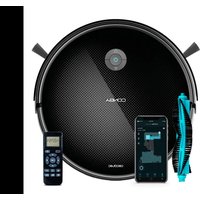


| Product type | Robot vacuum |
| Brand | Cecotec |
| Model | Conga Connected Gyro |
| Dimensions (diameter x height) | 33 cm x 7.5 cm |
| Weight | 2.8 kg |
| Power supply | 100-240 V ~ 50/60 Hz, charger output 19 V / 0.6 A |
| Battery type | Lithium-ion |
| Battery capacity | 2600 mAh |
| Estimated runtime | 90-120 minutes (depending on mode) |
| Connectivity | Wi-Fi 2.4 GHz, mobile app, remote control |
| Cleaning modes | Auto, Random, Edge, Spiral, Manual, Floor cleaning (mopping) |
| Suction power | 3 levels: Eco, Normal, Turbo |
| Mopping function | Yes, with combined tank and cloth (3 water flow levels) |
| Scheduling | Yes, via app (daily) |
| Filtration system | High-efficiency filter (non-washable), primary mesh filter, sponge filter (washable) |
| Sensors | Anti-drop, anti-collision, proximity |
| Brushes | Rotating central brush, 2 side brushes |
| Recommended maintenance | Clean high-efficiency filter: once/week; replace: every 160 h; central brush: once/week; replace: every 320 h; side brushes: once/week; replace: every 220 h; sensors: every 35 h |
| Safety data | Automatic stop in case of obstacle, child safety, lithium-ion battery with protection |
| Box contents | Robot, charging base, charger, remote control (AAA batteries), 2 side brushes, central brush, combined tank, cloth holder, 2 cloths, self-cleaning brush, multi-function brush, manual |
Frequently Asked Questions - Conga Connected Gyro CECOTEC
User questions about Conga Connected Gyro CECOTEC
0 question about this device. Answer the ones you know or ask your own.
Ask a new question about this device
Download the instructions for your Robot vacuum in PDF format for free! Find your manual Conga Connected Gyro - CECOTEC and take your electronic device back in hand. On this page are published all the documents necessary for the use of your device. Conga Connected Gyro by CECOTEC.
USER MANUAL Conga Connected Gyro CECOTEC
Safety instructions 8
- Parts and components 50
- Before use 51
- Installation 52
- Operation 52
- Cleaning and maintenance 54
- Troubleshooting 57
- Technical specifications 58
- Disposal of old electrical and electronic appliances 58
- Technical support and warranty 59
- Copyright 59
- Declaration of conformity 59
TABLE OF CONTENTS
Read these instructions thoroughly before using the appliance. Keep this instruction manual for future reference or new users.
- All safety instructions must be closely followed when using the appliance.
- This appliance is designed for domestic use only and is not intended for bars, restaurants, farmhouses, hotels, motels, and offices.
- Inspect the cable and housing of the charging base regularly for visible damage. Do not use the appliance if the cable, socket, or structure are damaged, do not work properly, or have fallen, and contact the official Cecotec Technical Support Service immediately.
- If the power cable is damaged, it must be replaced with a special cable or set to be supplied by the official Cecotec Technical Support Service.
- The appliance must be powered at a low safety voltage as stated on the marking.
- This appliance can be used by children aged 8 years old and above and persons with reduced physical, sensory, or mental capabilities or lack of experience and knowledge if they have been given supervision or instruction concerning the use of the appliance in a safe way and understand the hazards involved. Children must not play with the appliance. Cleaning and user maintenance should not be carried out by unsupervised children.
- Unplug the appliance from the mains before removing the battery.
- Unplug the power cable of the charging base before cleaning or maintenance.
- Before turning the appliance on, make sure to remove
objects and cords that may get in the way and affect proper operation of the appliance.
- This icon means: do not use the power cable if the plug is damaged.
- CAUTION: hazards may occur if the appliance runs over the power cable.
- WARNING: the appliance has rotating parts which may pose a risk of entrapment. Exercise extreme caution.
- Supervise children to prevent them from playing with the appliance. Close supervision is necessary when the appliance is being used by or near children.
- This appliance must be used in accordance with this instruction manual. Cecotec will not be held liable or responsible for any damages or injuries caused by improper use.
- Make sure that the mains voltage matches the voltage stated on the appliance marking and that the wall outlet is earthed.
- This appliance can only be disassembled by qualified personnel.
- Do not touch the cable, the socket, or the charging base with wet hands.
- Keep the robot vacuum cleaner away from clothing, curtains, and any other similar materials.
- Do not expose the robot to direct sunlight, open fire, or wet environments.
- Do not sit or place heavy or sharp objects on top of the appliance.
- Always place the appliance on a flat and stable surface. Avoid placing it in unstable places where there is risk of falling, such as tables or chairs.
- Turn off the robot vacuum cleaner if it's not going to be used for an extended period of time.
- Before turning the robot vacuum cleaner on, check that all connections, both on the robot and on the charging base, are in good condition.
- Avoid operating the robot vacuum cleaner under extremely high or low temperatures.
- Use only the charging base supplied with the appliance.
- Do not use accessories that are not compatible and/or not approved by Cecotec.
- Disconnect the appliance from the power socket before removing the battery or carrying out any maintenance tasks.
- Remove the battery from the appliance interior before disposing of the robot vacuum cleaner.
- The charging base must not be plugged to the mains socket when cleaning or maintenance tasks are to be carried out.
Battery instructions
- The appliance includes a Li-ion battery. Do not incinerate or expose it to high temperatures, as it may explode.
- Batteries may leak under extreme conditions. Do not touch any liquid that leaks from the battery. If the liquid gets into contact with skin, wash immediately with soap and water. If the liquid gets into the eyes, wash them immediately with clean water for a minimum of 10 minutes and seek medical attention. Wear gloves to handle the battery and dispose of it immediately in accordance with local regulations.
- Avoid contact between the battery and small metallic objects such as paper clips, coins, keys, nails, or screws.
- Before a new battery is used or the battery is used for the first time after long-term storage, fully charge the battery.
- After long periods of storage, it may be necessary to charge and discharge the battery several times to obtain maximum performance.
- Keep batteries out of the reach of children when there is a risk of ingestion.
- Battery ingestion can cause burns, soft tissue perforation, and death. It can cause severe burns within two hours of the ingestion.
- In case of battery ingestion, please seek medical help immediately.
- Keep the original instruction manual for future reference.
- Use the battery only for its intended purpose.
- WARNING: to recharge the battery, use only the power supply included with the appliance, with reference BZ015-190060-AG.
SAFETY INSTRUCTIONS
Conga Connected Gyro
- Flashing blue light: Back Home/charging
- Steady blue light: charged
- Red light: fault
Fig. 1.2
- Back Home
- Start/Pause button
- Wi-Fi signal
- Anti-collision sensor
- Top cover
- Mixed-tank release button
- Free-detection sensor
- Side brushes
- Drive wheels
- Mixed tank
- Omnidirectional wheel
- Battery
- Main brush
Charging base. Fig. 1.3:
- Indicator light
- Charging connector
- Charging terminals
Remote control. Fig. 1.4:
- Power button
- Auto mode
- Edge Mode
- Manual mode
- Random mode
- Suction power level
- Scrubbing level
- Start/Pause
- Spiral mode
- Back Home
Please note
The graphics in this manual are schematic representations and may not exactly match the appliance.
2. BEFORE USE
- This robot vacuum cleaner includes a package designed to protect it during transport. Take the robot vacuum cleaner out of the box. Keep the original box and other elements in a safe place, as this will help you prevent damage to the robot vacuum cleaner when transporting it in the future. In case the original packaging is disposed of, make sure all packaging materials are recycled accordingly.
- Make sure all parts and components are included and in good conditions. If there is any piece missing or in bad conditions, contact the official Cecotec Technical Support Service immediately.
Box content. Fig. 1.5:
- Robot vacuum cleaner
- Charging base
- 2 side brushes
- Mop bracket and mop
- Charger
- Self-cleaning brush
- Mixed tank
- Multifunctional brush
- Instruction manual
- Spare mop
- Remote control with AAA batteries
Warnings
- Remove all objects around the robot vacuum cleaner such as clothing, papers, cables, curtains, or other fragile objects which may block or slow down the operation of the robot vacuum cleaner. Fig. 2
- If the room to be cleaned is near a balcony or stairs, a physical barrier must be placed to prevent damage to the robot vacuum cleaner and ensure safe operation. Fig. 3
- Direct exposure to sunlight or heavy light contrasts may affect the correct operation of the sensors. If this happens, the robot vacuum cleaner will cease operation. Move it to a new location for it to start running again.
3. INSTALLATION
- Place the charging base against a wall and leave a minimum free space of 1.5 metres to the front and 0.5 metres to each side. Fig. 4.
- Connect the charging base to a power socket. Coil and store the remaining cable at the back of the charging base to avoid accidents.
- Install both side brushes in their corresponding slots, located on the bottom part of the robot vacuum cleaner. Press until they click well into place. Fig. 5
- Place the robot vacuum cleaner in the charging base and make sure the charging terminals on the robot match those of the base. Once the robot vacuum cleaner is properly placed, it will beep once and the indicator light will come on. If the light is flashing, it means the battery is not completely charged. To ensure the maximum cleaning time, wait until the light turns steady, as this will indicate the battery is fully charged and the robot vacuum cleaner is ready to clean. Fig. 6.
4. OPERATION
Start cleaning
- Hold down the Start/Pause button on the robot vacuum cleaner to turn it on.
- Press the Start/Pause button on the robot vacuum cleaner, on the remote control, or on the app to start cleaning.
Note
- If the robot vacuum cleaner runs out of battery while cleaning, it will automatically return to the charging base. Once the battery is fully charged, the robot can start a new cleaning cycle.
- If there is no good access to the charging base, the robot vacuum cleaner will not be able to return to it. If this happens, place it manually on the charging base.
End cleaning
- Press the Start/Pause button on the robot vacuum cleaner, on the remote control, or on the app to pause the cleaning process.
- Press the Start/Pause button on the robot vacuum cleaner, on the remote control, or on the app to resume the cleaning process.
Return to the charging base
Press the Back Home button on the robot vacuum cleaner, on the remote control (house symbol), or select the option in the app to send the robot vacuum cleaner to the charging base. The robot vacuum cleaner will stop vacuuming until it reaches the base.
Switch-off
Hold down the Start/Pause button on the robot vacuum cleaner to turn it off.
Warning
If you are not going to use the robot vacuum cleaner for an extended period of time, it is advisable to leave it switched off until new use.
Cleaning modes
The robot vacuum cleaner includes different modes and functions that can be toggled from the app.
Auto Mode
- Press the Start/Pause button on the robot vacuum cleaner, on the remote control or select the automatic cleaning mode on the app, then the robot vacuum cleaner will start the automatic cleaning.
- The robot vacuum cleaner will clean the whole surface, edges, around objects such as tables, chairs etc., until the battery is low, then it will return to the charging base.
Random mode
- The robot vacuum cleaner will clean randomly until the battery percentage is low and it will return to the charge base.
- To activate this mode, press the random cleaning button on remote control or on the app.
Scrubbing mode. Fig. 7.
- Fill up the water tank.
- Attach the mop to the bracket and the latter to the mixed tank.
- Place the mixed tank on the robot vacuum cleaner and select the scrubbing level on the app. There are three scrubbing levels: Low, Medium, High.
- Once you have selected the desired scrubbing level from the remote control or the app, the robot vacuum cleaner will start the All in One function to vacuum, scrub, and sweep simultaneously thanks to its mixed tank.
Note
- If you only wish to mop, do not fill the water tank.
- When the robot vacuum cleaner has the mixed tank with water in it, it will rotate on its own to dampen the mop as it leaves the base.
- To ensure a perfect scrubbing from the start, it is suggested to dampen the mop evenly with water before fixing it to the mixed tank. It is also recommended to wash the mop after every use.
- It is recommended to be present when the robot vacuum cleaner is scrubbing.
- When the robot vacuum cleaner returns to the charging base, you must remove the mop. Do not leave the robot vacuum cleaner charging with the mop assembled.
Spiral mode
- When you select this mode, the robot vacuum cleaner will intensively clean a specific spot at maximum power. It will start cleaning at a specific spot and will move outwards in a spiral motion (1 metre). Then, it will return to the starting spot in an inwards spiral motion again.
- Before using this mode, place it in the spot you wish to clean.
- When it finishes and returns to the starting point, the robot vacuum cleaner will stop at the same point where it started cleaning.
- Press the Spiral cleaning button on the remote control or the app to activate this mode.
Edge Mode
- When this mode is selected, the robot vacuum cleaner will clean along walls and around furniture (e.g., table or chair legs).
- Press the Edge cleaning button on the remote control or on the app.
Back Home mode
Press the Back home button on the robot vacuum cleaner, on the remote control, or on the app (with a house icon) to send the robot to the charging base. The robot vacuum cleaner will stop vacuuming until it reaches the base.
Manual mode
Select the manual cleaning option in the app or use the directional arrows on the remote control to manually control your robot vacuum cleaner.
Power Level function
Select the power level on the remote control or on the app to control the robot vacuum cleaner's suction power level during cleaning. There are 3 power levels: Eco, Normal, and Turbo.
Cleaning schedule
To make cleaning easier, the robot vacuum cleaner has a function that allows it to be programmed daily from the app. According to the setting, the robot vacuum cleaner will automatically start cleaning on the selected days at the desired time.
5. CLEANING AND MAINTENANCE
High-efficiency filter. Fig. 8.
- The high-efficiency filter is designed with fibers that help trap dust particles, dust mites, pollen... It is very important to periodically clean the filter, to prevent these particles from building up in the filter, causing efficiency loss. It is convenient to carry out this maintenance once a week.
- It is recommended to replace the high-efficiency filter with a new one without exceeding 160 cleaning hours.
Recommendation
You can remove dirt from the high-efficiency filter with a small brush or gently shake the filter on a hard surface to remove the dust. The high-efficiency filter cannot be washed.
Primary mesh filter and sponge filter. Fig. 8.
The filtering system is featured with a primary mesh filter and a sponge filter, located next to the high-efficiency filter. It is suggested to replace them either after a maximum of 160 hours of use or when they are worn out due to operation.
Recommendation
Dirt can be removed with a small brush or by shaking carefully against a hard surface for dust to fall off. You can also use warm water without detergents to obtain better results. Always make sure they are completely dry before installing them again; otherwise, moisture can reach the robot vacuum cleaner's motor and damage it.
Cleaning the fall-detection sensors
Use a clean, dry, and soft cloth to wipe off any dust from the fall-detection sensors located on the robot vacuum cleaner's lower part.
Warning
Do not apply cleaning products directly on the sensors.
Cleaning the main brush. Fig. 9.
- The main brush rotates at high speed and helps pushing the dirt into the suction mouth. This brush is in contact with the floor, and therefore with dirt, so it can wear out overtime, negatively affecting cleaning efficiency. For this reason, it is suggested to replace the main brush after a maximum of 320 hours or less.
- Slightly press the main brush frame's tabs to open the main brush compartment and remove it.
- Remove hair, lint, and other dirt trapped in the brush and around the shafts with the help of the self-cleaning brush.
- Clear and clean the robot vacuum cleaner's suction channel.
- Reinstall the main brush and its frame.
Recommendation
It is recommended to clean the main brush once a week with the help of the self-cleaning brush.
Side brushes. Fig. 10.
Side brushes are designed with multiple bristles and are used to push dirt towards the suction mouth and to thoroughly clean edges and corners. These brushes can wear out over time, negatively affecting cleaning efficiency. For this reason, it is suggested to replace each side brush after a maximum of 220 hours or less.
Recommendation
It is recommended to clean the side brushes once a week with the help of the self-cleaning brush.
Sensors
- The robot vacuum cleaner has different types of sensors, for example, proximity sensors that allow the robot to move around while detecting obstacles, or fall-detection sensors that help the robot detect slopes or possible gaps/unevenness such as staircases. These sensors are always in contact with dust particles, and therefore can deteriorate over time, causing possible navigation errors.
- It is suggested to clean all the robot sensors with a dry and soft cloth after a maximum of 35 hours of operation or less.
Charging and replacing the battery
- To lengthen the battery shelf life, leave the robot vacuum cleaner to charge in the charging base when not in use.
- Remove the battery and store it in a safe, dry place if the robot vacuum cleaner will not be used for a long period of time.
Follow the below instructions to replace the batteries: Fig. 11:
- Unscrew the battery compartment screws and remove the battery-compartment cover and the battery.
- Insert the new battery with the battery label facing up.
- Put the battery and the battery-compartment cover back in place and properly fix the screws again.
Charging base. Fig. 12:
Use a clean, dry, soft cloth to wipe dust off the charging terminals of the base.
6. TROUBLESHOOTING
Beeps while the indicator light is red:
| Beeps Error Solution | ||
| 1 | Driving-wheel fault | Check if the drive wheel is blocked. |
| 2 Side | brush error. Check if | the side brushes are blocked and clean them. |
| 3 | Fan error Clean the dust or objects that may be blocking the air inlet channel. | |
| 4 Main-brush fault. Check if | the main brush is blocked or tangled and clean it. | |
Other possible scenarios:
| Problem Solution | |
| The robot vacuum cleaner does not activate. | Make sure the battery is fully charged.If the problem persists, reset the robot vacuum cleaner by pressing the RESET button. |
| The robot vacuum cleaner suddenly stops working. | Check if the robot vacuum cleaner is trapped or stuck with any obstacle.Check the battery level.If the problem persists, turn the robot off and then on again. If the issue persists, press the RESET button. |
| The programming function does not work. | Check if the robot vacuum cleaner battery is too low to turn on. |
| Suction power level is very low. | Check if there are obstructions blocking the air inlet.Empty the tank.Clean the filters with a vacuum cleaner or a self-cleaning brush.Check if the filters are wet.Leave the filters to dry naturally before reinstalling them. Make sure they are completely dry to prevent any remaining moisture to reach the motor and damage the robot vacuum cleaner. |
| The robot vacuum cleaner does not charge. | Check if the charging base indicators are on. Otherwise, contact the official Technical Support Service of Cecotec.Clean the charging terminals with a clean, dry cloth.Check if the robot vacuum cleaner beeps when it gets to the charging base. Contact the official Technical Support Service of Cecotec. |
ENGLISH
| The robot vacuum cleaner does not return to the charging base. | Remove the objects 1 metre on the left and right, and 2 metres in front of the charging base.The robot vacuum cleaner will return to the charging base faster when it is near it. When it is far, it will take more time to identify it.Clean the charging terminals. |
| The main brush does not spin. | Clean the main brush.Check if the main brush is installed correctly. |
| The robot vacuum cleaner movements or route are unusual. | Carefully clean the sensors with a clean, dry cloth.Restart the robot vacuum cleaner. To do this, switch the robot off and on or do a RESET. |
7. TECHNICAL SPECIFICATIONS
Conga Connected Gyro
Product reference: 08605
Voltage: 100-240 V AC 50/60 Hz
Battery: 14.4 V DC Li-ion 2600 mAh
Frequency bands: 2.4 GHz
Maximum Transmission Power: 17.5 dBm
Technical specifications may change without prior notification to improve product quality. Made in China | Designed in Spain
8. DISPOSAL OF OLD ELECTRICAL AND ELECTRONIC APPLIANCES
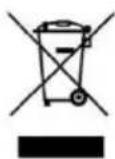
This symbol indicates that, according to the applicable regulations, the appliance and/or batteries must be disposed of separately from household waste. When this product reaches the end of its shelf life, you should dispose of the batteries/accumulators and take them to a collection point designated by the local authorities.
Consumers must contact their local authorities or retailer for information concerning the correct disposal of old electrical and electronic appliances and/or their batteries.
Compliance with the above guidelines will help protecting the environment.
9. TECHNICAL SUPPORT AND WARRANTY
Cecotec shall be liable to the end user or consumer for any lack of conformity that exists at the time of delivery of the product under the terms, conditions, and deadlines established by the applicable regulations.
It is recommended that repairs be carried out by qualified personnel.
If at any moment you detect any problem with your product or have any doubt, do not hesitate to contact the official Cecotec Technical Support Service at +34 96 321 07 28.
10. COPYRIGHT
The intellectual property rights over the texts in this manual belong to CECOTEC INNOVACIONES, S.L. All rights reserved. The contents of this publication may not, in whole or in part, be reproduced, stored in a retrieval system, transmitted, or distributed by any means (electronic, mechanical, photocopying, recording or similar) without the prior authorization of CECOTEC INNOVACIONES, S.L.
11. DECLARATION OF CONFORMITY
CE Cecotec Innovaciones hereby declares this robot vacuum cleaner, model 08605_Conga Connected Gyro, complies with the Directive 2014/53/EU on radio equipment.
The full text of the EU Declaration of Conformity can be found on the following website: www.cecotec.es
FRENCH
1. PARTS AND COMPONENTS
Conga Connected Gyro
Reference: 08605
Voltage: 100-240 V AC 50/60 Hz
Battery: 14.4 V DC Lithium-ion 2600 mAh
Conga Connected Gyro
Conga Connected Gyro
Conga Connected Gyro
6. TROUBLESHOOTING
Conga Connected Gyro
Conga Connected Gyro
Conga Connected Gyro
Product reference: 08605
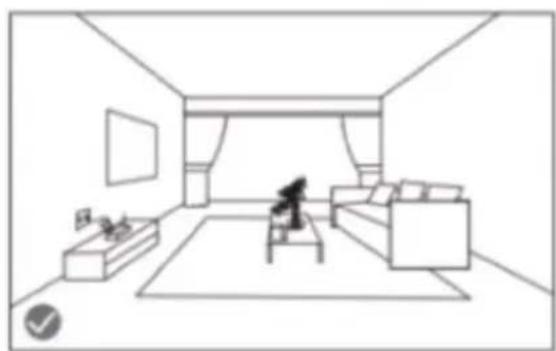
Fig./Img./Abb./Afb./Rys. 2
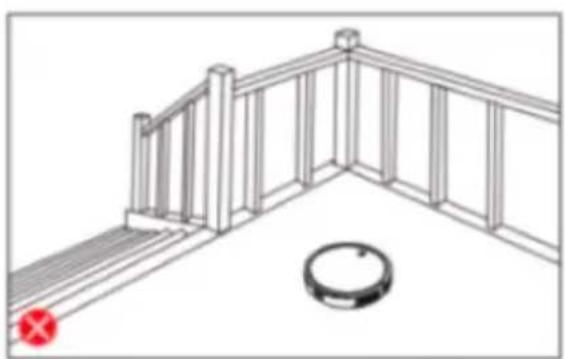
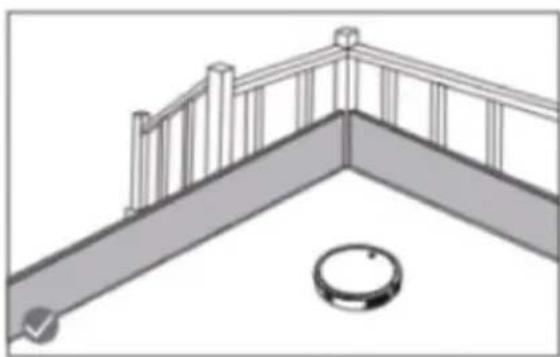
Fig./Img./Abb./Afb./Rys. 3
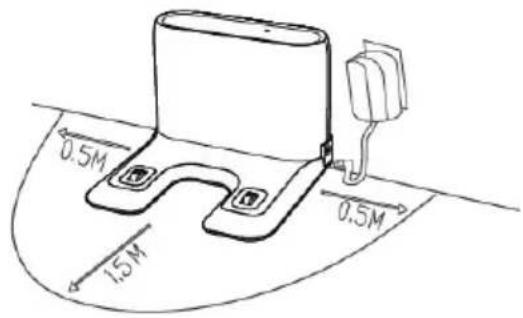
Fig. 4
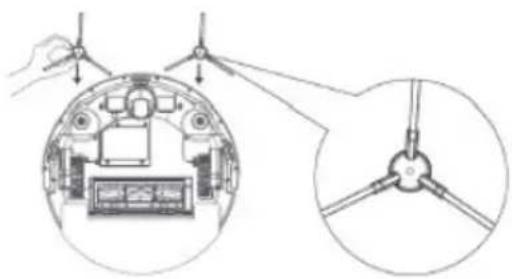
Fig. 5
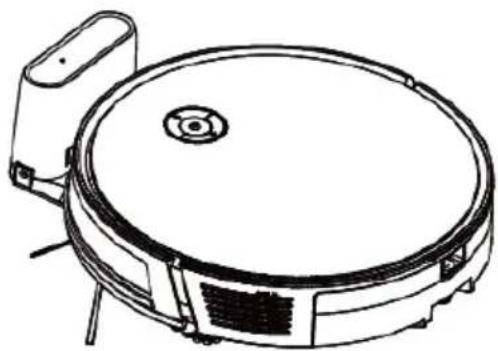
Fig. 6
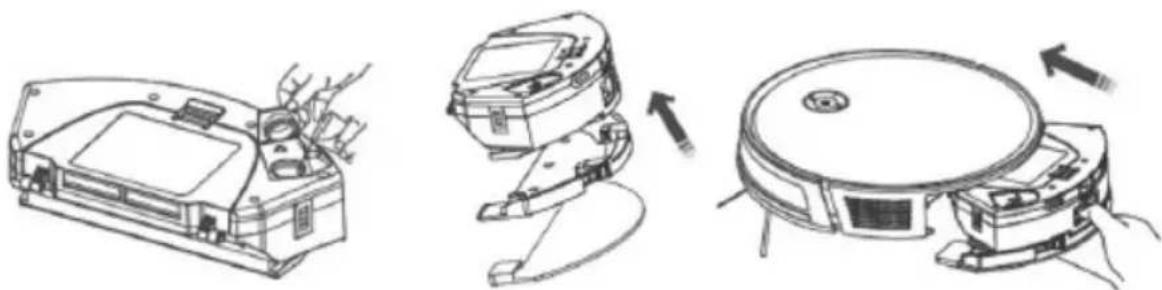
Fig. 7
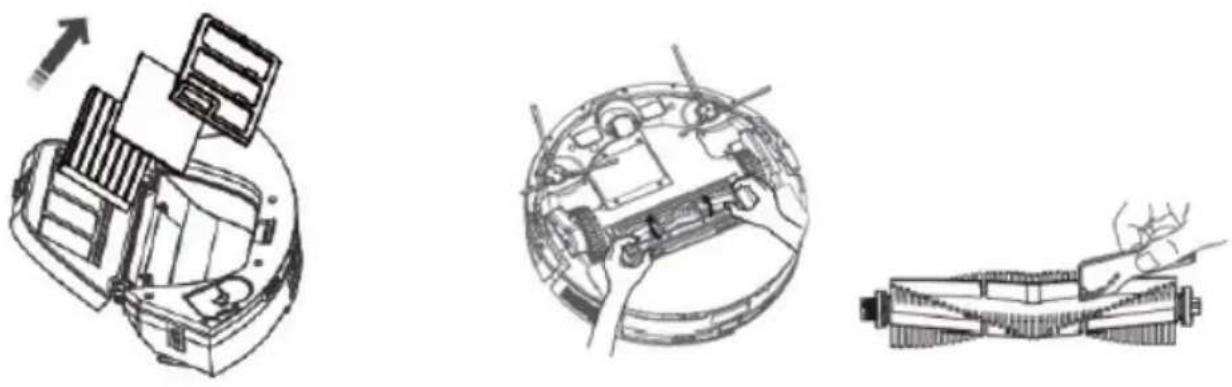
Fig. 8, Fig. 9, Fig. 10, Fig. 11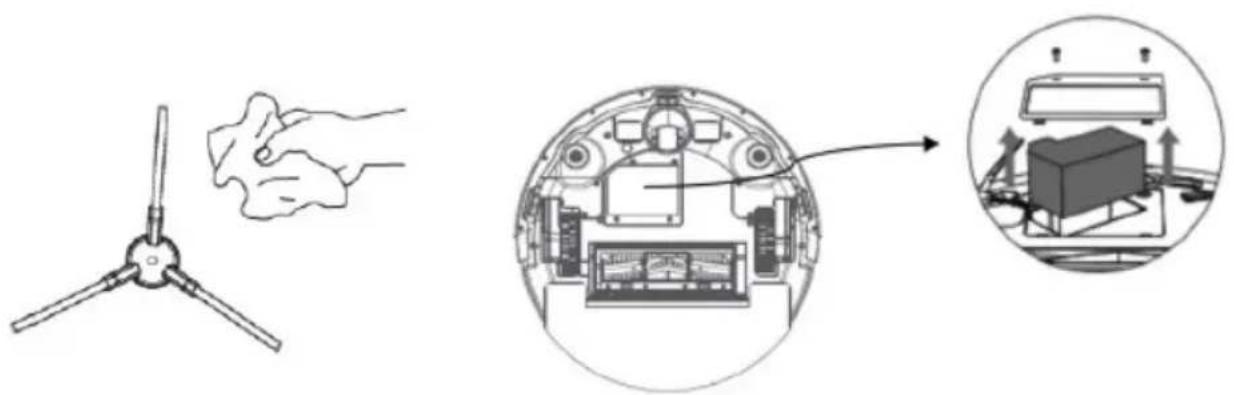
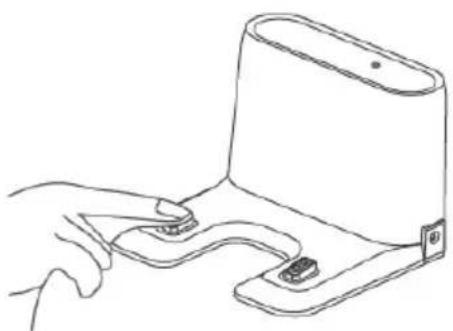
Fig. 12
www.cecotec.es


- TABLE OF CONTENTS
- BATTERY INSTRUCTIONS
- SAFETY INSTRUCTIONS
- CONGA CONNECTED GYRO
- FIG
- CHARGING BASE. FIG
- REMOTE CONTROL. FIG
- PLEASE NOTE
- BEFORE USE
- BOX CONTENT. FIG
- WARNINGS
- INSTALLATION
- OPERATION
- START CLEANING
- NOTE
- END CLEANING
- RETURN TO THE CHARGING BASE
- SWITCH-OFF
- WARNING
- CLEANING MODES
- AUTO MODE
- RANDOM MODE
- SCRUBBING MODE. FIG
- SPIRAL MODE
- EDGE MODE
- BACK HOME MODE
- MANUAL MODE
- POWER LEVEL FUNCTION
- CLEANING SCHEDULE
- CLEANING AND MAINTENANCE
- HIGH-EFFICIENCY FILTER. FIG
- RECOMMENDATION
- PRIMARY MESH FILTER AND SPONGE FILTER. FIG
- CLEANING THE FALL-DETECTION SENSORS
- CLEANING THE MAIN BRUSH. FIG
- SIDE BRUSHES. FIG
- SENSORS
- CHARGING AND REPLACING THE BATTERY
- FOLLOW THE BELOW INSTRUCTIONS TO REPLACE THE BATTERIES: FIG
- TROUBLESHOOTING
- ENGLISH
- TECHNICAL SPECIFICATIONS
- DISPOSAL OF OLD ELECTRICAL AND ELECTRONIC APPLIANCES
- TECHNICAL SUPPORT AND WARRANTY
- COPYRIGHT
- DECLARATION OF CONFORMITY
- FRENCH
- PARTS AND COMPONENTS
Brand : CECOTEC
Model : Conga Connected Gyro
Category : Robot vacuum