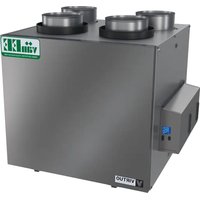
V210E75RT - Air Conditioning vänEE - Free user manual and instructions
Find the device manual for free V210E75RT vänEE in PDF.


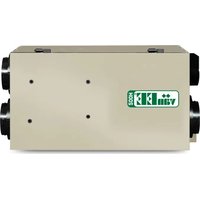
| Product Type | Dual-Core Heat Recovery Ventilator (HRV) |
| Model | V210E75RT |
| Brand | vänEE |
| Maximum Airflow | 210 CFM |
| Adjustable Minimum Airflow | Adjustable via LCD screen |
| Recovery Core Efficiency | 75% (HRV core) |
| Power Supply | 120 V AC, 60 Hz |
| Filters | MERV8 washable and reusable filter (plus optional disposable exhaust filter) |
| Operating Modes | Standby, Min, Max, Intermittent, Recirculation, Auto, Smart, Turbo, Defrost, OVR (20/40/60 min), AHU |
| Control Options | Built-in control (LCD screen) + optional wall control (dehumidistat, advanced touch, auxiliary 20-40-60 or dry contact) |
| Installation Configurations | T-1 (independent), T-2, T-3, T-4 (simplified), T-5 |
| Technology | Virtuo Air Technology™ – self-balancing and synchronization with forced air central system |
| Protections | Fuse protection, high static pressure protection, electronic overload protection, under-voltage, over-voltage, overheat |
| Quarterly Maintenance | Clean filters, inspect condensation pan, check exterior hood |
| Annual Maintenance | Core cleaning (soak for HRV, vacuum for ERV), clean fan assemblies |
| Parts Warranty | 5 years |
| HRV Core Warranty | 10 years |
| ERV Core Warranty | 5 years |
| Intended Use | Canada only – residential and light commercial buildings (groups C, D, E, F2/F3) |
Frequently Asked Questions - V210E75RT vänEE
User questions about V210E75RT vänEE
0 question about this device. Answer the ones you know or ask your own.
Ask a new question about this device
Download the instructions for your Air Conditioning in PDF format for free! Find your manual V210E75RT - vänEE and take your electronic device back in hand. On this page are published all the documents necessary for the use of your device. V210E75RT by vänEE.
USER MANUAL V210E75RT vänEE
USER AND INSTALLER MANUAL
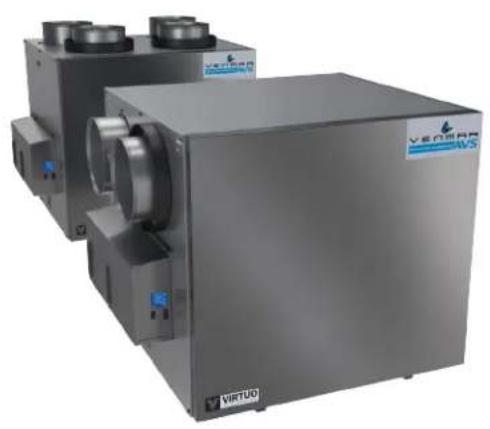
| A180H75RT* | |
| A180E75RT* | |
| A230H75RT* A230H75RS* | |
| A210E75RT* A210E75RS* |
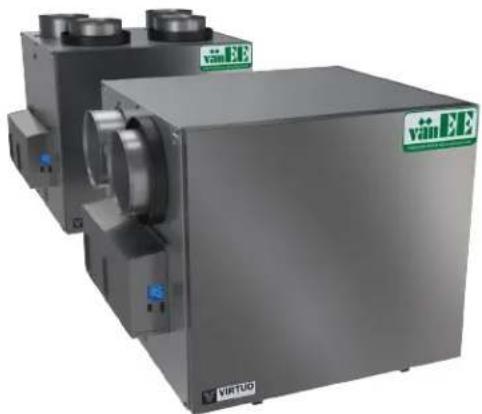
| V180H75RT* | |
| V180E75RT* | |
| V230H75RT* V230H75RS* | |
| V210E75RT* V210E75RS* |
REGISTER YOUR PRODUCT ONLINE AT:
www.venmar.ca/register-your-product.html or
www.vanee.ca/en/register-your-product.html
For additional information, visit venmar.ca or vanee.ca
INSTALLER: READ THESE INSTRUCTIONS SAVE THEM FOR USER
Please take note that this manual uses the following symbols to emphasize particular information:
WARNING
Identifies an instruction which, if not followed, might cause serious personal injuries including possibility of death.
CAUTION
Denotes an instruction which, if not followed, may severely damage the unit and/or its components.
NOTE: Indicates supplementary information needed to fully complete an instruction.
LIMITATION
For an installation and use in Canada only. Intended for a building on which Part 9 of division B from the effective version of the National Building Code of Canada applies with additional restrictions and exception (see page 25 for more details). Installation work and electrical wiring must be done by a qualified person in accordance with all applicable codes and standards, including fire-rated construction codes and standards.
WARNING
TO REDUCE THE RISK OF FIRE, ELECTRIC SHOCK, OR INJURY TO PERSON(S) OBSERVE THE FOLLOWING:
- Use this unit only in the manner intended by the manufacturer.
- Before servicing or cleaning this unit, disconnect power cord from electrical outlet.
- This unit is not designed to provide combustion and/or dilution air for fuel-burning appliances.
- When cutting or drilling into a wall or ceiling, do not damage electrical wiring and other hidden utilities.
- Do not use this unit with any solid-state speed control device other than those specified in section 3.1.
- This unit must be grounded. The power supply cord has a 3-prong grounding plug for your personal safety. It must be plugged into a mating 3-prong grounding receptacle, grounded in accordance with the national electrical code and local codes and ordinances. Do not remove the ground prong. Do not use an extension cord.
- Do not install in a cooking area or connect directly to any appliances.
- Do not use to exhaust hazardous or explosive materials and vapors.
- When performing installation, servicing or cleaning this unit, it is recommended to wear safety glasses and gloves.
- When applicable local regulation comprises more restrictive installation and/or certification requirements, the aforementioned requirements prevail on those of this document and the installer agrees to conform to these at his own expenses.
CAUTION
- To avoid prematurely clogged filters, turn the unit OFF during construction or renovation.
- Please read specification label on product for further information and requirements.
- Be sure to duct air outside - Do not intake/exhaust air into spaces within walls or ceiling or into attics, crawl spaces, or garage. Do not attempt to recover the exhaust air from a dryer or a range hood.
- Do not run any air ducts directly above or within 2 ft (0.61 m) of a furnace or its supply plenum, boiler, or other heat producing appliance. If a duct has to be connected to the furnace return plenum, it must be connected 10 (3.1 m) away from plenum's connection to the furnace.
- The ductwork is intended to be installed in compliance with all applicable local and national codes.
- When leaving the house for a long period of time (more than two weeks), a responsible person should regularly check if the unit operates adequately.
- If the ductwork passes through an unconditioned space (e.g.: attic), the unit must operate continuously except when performing maintenance and/or repair. Also, the ambient temperature of the house should never drop below 18°C (65°F) .
- At least once a year, the unit mechanical and electronic parts should be inspected by qualified service personnel.
- Do not use your unit during construction or renovation of your house or when sanding drywall. Certain types of dust and vapors may damage your system.
- Make sure at all times that the outside intake and exhaust hoods are free from any snow during the winter season. It is important to check your unit during a big snow storm, so it doesn't draw in any snow. If this is the case, please turn the unit OFF for a few hours.
- Since the electronic control system of the unit uses a microprocessor, it may not operate correctly because of external noise or very short power failure. If this happens, unplug the unit and wait approximately 10 seconds. Then, plug the unit in again.
- Do not make excessive use of fragrance appliances or chemicals since some may damage the unit components material.
TABLE OF CONTENT
1. TECHNICAL DATA 4
1.1 AIR DISTRIBUTION (NORMAL OPERATION) 4
2. INSTALLATION 4
2.1 LOCATING AND MOUNTING THE UNIT 4
2.2 INSTALLING THE DUCTWORK AND THE REGISTERS 6
2.2.1 FuLLy DUCTED SYSTEM (T-1) (THIS CONFIGURATION ALLOWS RECIRCULATION MODE TO OPERATE.) 6
2.2.2 EXHAUST DUCTED SYSTEM (T-2) (THIS CONFIGURATION ALLOWS RECIRCULATION MODE TO OPERATE.) 6
2.2.3 SIMPLIFIED INSTALLATION (T-4) (THIS CONFIGURATION DOES NOT ALLOW RECIRCULATION MODE TO OPERATE.) 7
2.3 CONNECTING THE DRAIN (HRV ONLY) 8
2.4 INSTALLING THE EXTERIOR HOODS 9
2.5 CONNECTING THE DUCTS TO THE UNIT 9
2.5.1 DUCTS CONNECTION 10
3. CONNECTIONS 11
3.1 ELECTRICAL CONNECTION TO OPTIONAL MAIN WALL CONTROL 11
3.1.1 ELECTRICAL CONNECTION TO DEHUMIDISTAT OR AUTOMATIC OPTIONAL MAIN WALL CONTROL 11
3.1.2 ELECTRICAL CONNECTION TO ADVANCED OPTIONAL MAIN WALL CONTROL 11
3.2 ELECTRICAL CONNECTION TO OPTIONAL AUXILIARY WALL CONTROL 12
3.2.1 ELECTRICAL CONNECTION TO 20-40-60 OPTIONAL AUXILIARY WALL CONTROL 12
3.2.2 ELECTRICAL CONNECTION TO DRY CONTACT OPTIONAL AUXILIARY WALL CONTROL (E.G. CRANK TIMER) 12
3.3 CONNECTION TO THE CENTRAL FORCED-AIR SYSTEM 13
3.3.1 UNIT OPERATION USING A DRY CONTACT CONNECTION 13
3.3.2 UNIT INTERCONNECTION WITH CENTRAL FORCED-AIR SYSTEM (R/C/G/GF) 13
3.3.3 SYNCHRONIZATION WITH CENTRAL FORCED-AIR SYSTEM FUNCTION 13
4.WIRING DIAGRAM 14
5. NAVIGATION ON LCD SCREEN 15
5.1 LCD SCREEN 16
5.2 UNIT FIRST BOOT 16
5.3 SETTINGS MODIFICATION 16
5.3.1 PROCEDURE TO MODIFY MIN CFM SETTING 16
5.3.2 PROCEDURE TO MODIFY MAX CFM SETTING 16
5.3.3 PROCEDURE TO MODIFY OPTIONS SETTING 16
5.3.4 PROCEDURE TO MODIFY INDEPENDENT AIRFLows SETTING 16
5.4 FACTORY SETTINGS RESET 17
6. USING THIS UNIT 17
6.1 YOUR VENTILATION SYSTEM 17
6.2 INTEGRATED CONTROL 17
6.3 AHU MODE DISPLAY 17
7. SERVICE PARTS 18
8. INSTALLER'S TROUBLESHOOTING 20
8.1 ELECTRONIC PROTECTION TO PREVENT ABNORMAL HIGH STATIC PRESSURE 22
9.MAINTENANCE 23
9.1 QUARTERLY 23
9.2 ANNUAL (AT FALL) 24
10. USER'S TROUBLESHOOTING 24
11.WARRANTY 25
Consumer Information
A. To ensure quiet operation of the ENERGY STAR certified H/ERV, each product model must be installed using sound attenuation techniques appropriate for the installation.
B. The way your heat/energy-recovery ventilator is installed can make a significant difference to the electrical energy you use. To minimize the electricity use of the heat/energy-recovery ventilator, a stand-alone fully ducted installation is recommended. If you choose a simplified installation that operates your furnace air handler for room-to-room ventilation, an electrically efficient furnace that has an electronically commutated (EC) variable speed blower motor will minimize your electrical energy consumption and operating cost.
C. Installation of a user-accessible control with your product model will improve comfort and may significantly reduce the product model's energy use.
1. TECHNICAL DATA
1.1 AIR DISTRIBUTION (NORMAL OPERATION)
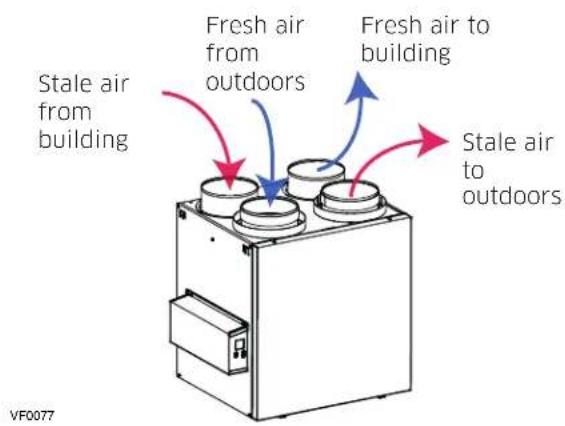
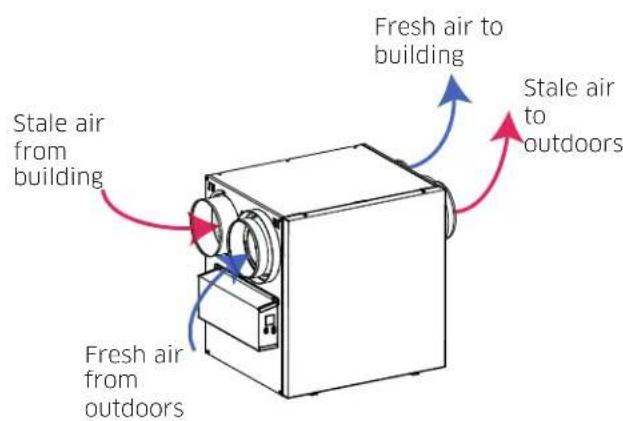
NOTE: The dimensions, performance charts and specifications are listed on the specification sheets of the unit. Visit our website at venmar.ca or vanee.ca.
2. INSTALLATION
WARNING
The wearing of safety glasses and gloves is recommended when installing, maintaining or cleaning the unit to reduce the risk of injury that could be caused by the presence of thin metal and/or high moving parts.
CAUTION
Make sure that no piece of mineral wool will enter in the unit during installation. Otherwise, this could reduce airflow and generate vibrations and noise in the unit.
2.1 LOCATING AND MOUNTING THE UNIT
Choose an appropriate location for the unit:
- Within an area of the house where the ambient temperature is kept between 10 ° C( 50 ° F) and 65 ° C( 149 ° F) ;
- Away from living areas (dining room, living room, bedroom), if possible;
So as to provide easy access to the interior cabinet for maintenance, and to the control panel on the side of the unit; - Close to an exterior wall, so as to limit the length of the insulated flexible ducts to and from the unit;
- HRV units only: close to a drain. If no drain is close by, use a pail to collect run-off;
- Away from hot chimneys, electrical panel and other fire hazards;
- Within 6 feet of a power source (standard outlet).
2.1 LOCATING AND MOUNTING THE UNIT (CONT'D)
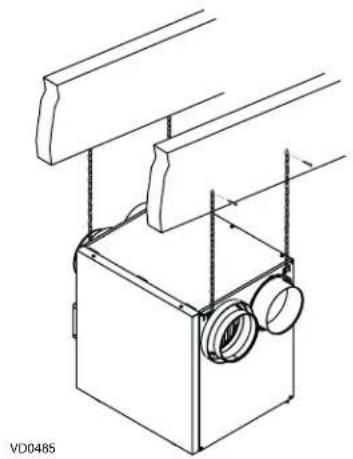
Suspended to the joists or trusts:
- Slightly bend the brackets on the unit to insert the provided chains.
- Hang the unit to the joists using the provided chains. Springs are not required.
Always make sure that the unit is no more than 1 / 4 off level.
OR
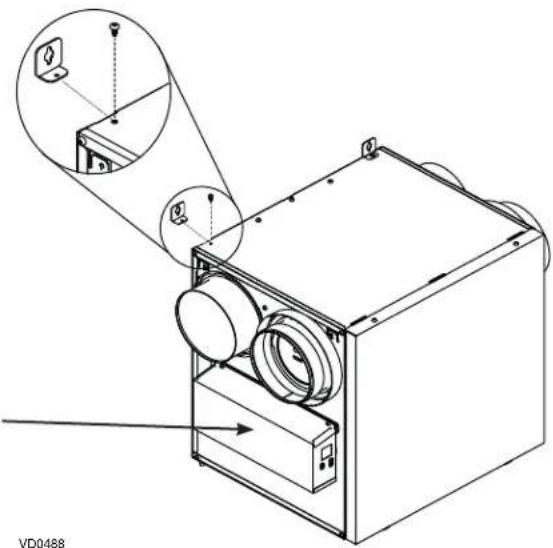
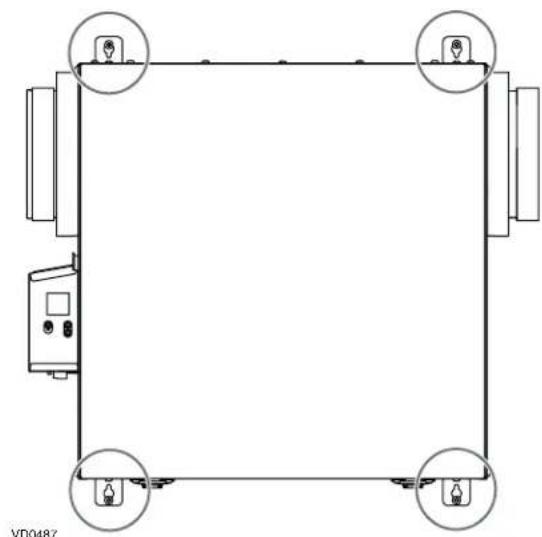
Wall mounted:
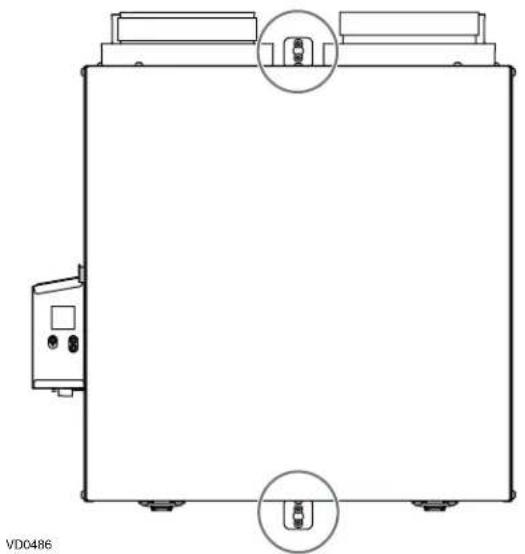
- Choose the appropriate location(s) for the mounting brackets (see illustration below) according to stud(s) position.
- Insert the provided brackets under the unit frame (see illustration hereafter).
Fix the bracket using the screw no. 8 × 3/8 . - Using the 4 no. 8 × 1 1/2 screws provided, secure the unit to the wall making sure that the 4 screws engage into a stud.
Always make sure that the unit is no more than 1 / 4'' off level.
NOTE: Keep 3" clearance on electrical box side for cooling and servicing.
INSTALLATION WITH 2 BRACKETS INSTALLATION WITH 4 BRACKETS
2.2 INSTALLING THE DUCTWORK AND THE REGISTERS
WARNING
Never install a stale air exhaust register in a room where there is a combustion device, such as a furnace, gas water heater, fireplace or any appliance or equipment that can generate gaseous contaminants, or pollutants. The negative pressure this could create in the room may impair proper evacuation of the gas or pollutants, which may have severe health consequences.
CAUTION
If ducts have to go through an unconditioned space (e.g.: attic), always use insulated ducts to prevent condensation formation inside and outside ducts, which could cause material damage and/or mold growth. Moreover, if fresh air to building duct and/or stale air from building duct goes/go through an unconditioned space, the unit must be set to operate continuously in cold conditions (below 10°C / 50°F ). Continuous air movement inside ducts will prevent condensation formation. The unit can be stopped temporarily for maintenance and/or repair purposes in such conditions.
2.2.1 FULLY DUCTED SYSTEM (T-1) (THIS CONFIGURATION ALLOWS RECYCURLATION MODE TO OPERATE.)
STALE AIR FROM BUILDING:
- Install registers in areas where contaminants and humidity are produced: kitchen, bathrooms, laundry room, etc.
- Install registers on an interior wall, 6 to 12 inches away from the ceiling OR in the ceiling.
- Install the kitchen register at least 4 feet away from the range.
- Bathroom fans and range hoods can be used to better exhaust stale air.
Homes with more than one level require at least one exhaust register at the highest level.
FRESH AIR TO BUILDING:
- Install registers in bedrooms, dining room, living room and basement.
- Install registers in the ceiling OR high on the walls with the airflow directed towards the ceiling.
- If a register must be installed in the floor, direct the airflow up the wall.
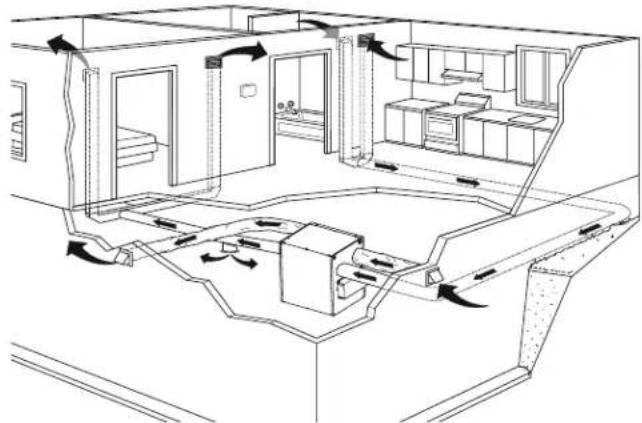
NOTE: For this type of configuration, the T-1 option must be selected on the LCD screen when auto-balancing the unit.
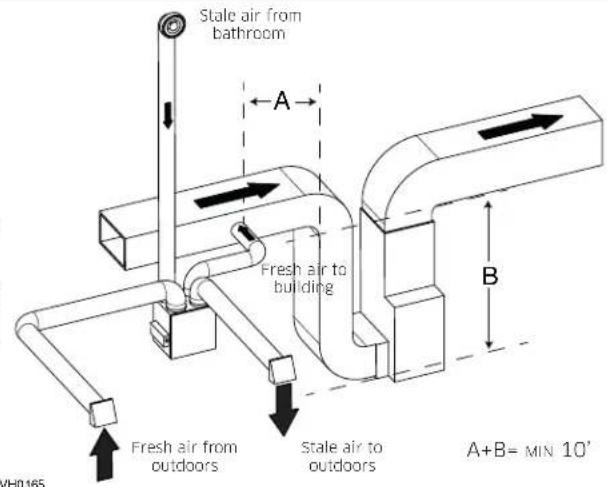
2.2.2 EXHAUST DUCTED SYSTEM (T-2) (THIS CONFIGURATION ALLOWS RECIRCULATION MODE TO OPERATE.)
WARNING
Duct connection to the central forced-air system can be regulated by some codes and standards. It is your responsibility to consider and comply with your local requirements to avoid any non-compliance.
STALE AIR FROM BUILDING:
Same as for Fully Ducted System, described on point 2.2.1.
FRESH AIR TO BUILDING:
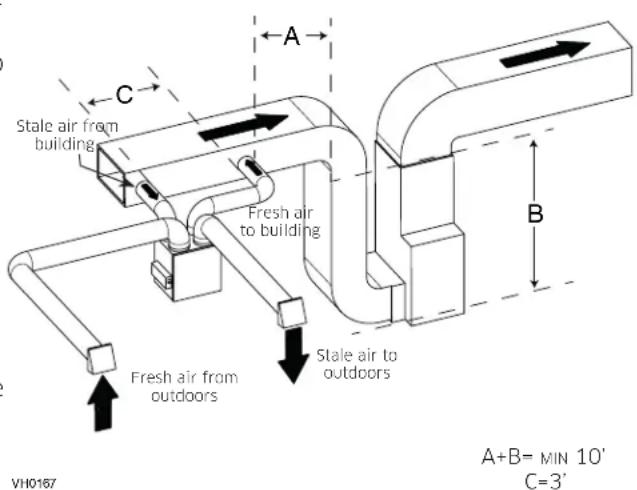
- Connect the fresh air distribution duct of the unit to the central forced-air system return duct at least 10 feet away from the central forced-air system (A + B)* .
- This 10-ft. distance applies only in areas where the outside temperature falls below the freezing point 0 ° C( 32 ° F) .
NOTE: The central forced-air system blower operation can be synchronized with the unit (see Section 3.3). It is recommended, but not essential that the central forced-air system blower runs when the unit is in operation.
NOTE: For this type of configuration, the T-2 option must be selected on the LCD screen when auto-balancing the unit.
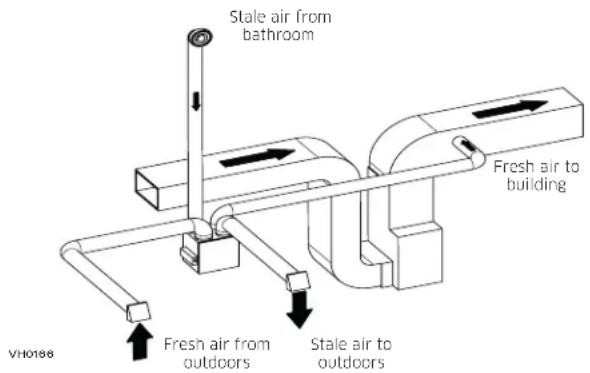
ALTERNATE INSTALLATION (T-3) (THIS CONFIGURATION ALLOWS RECIRCULATION MODE TO OPERATE.)
Unit should be synchronized with central forced-air system operation to avoid condensation and mold growth in central forced-air system distribution ducting if cooling mode of central forced-air system is used.
CAUTION
This configuration is not recommended with high velocity central forced-air system. High pressures produced by these systems could affect unit proper operation and generate errors.
NOTE: For this type of configuration, the T-3 option must be selected on the LCD screen when auto-balancing the unit.
2.2.3 SIMPLIFIED INSTALLATION (T-4) (THIS CONFIGURATION DOES NOT ALLOW RECIRCULATION MODE TO OPERATE.)
CAUTION
The central forced-air system must be synchronized with the unit since fresh air evacuation and distribution come from the same section. The central forced-air system must operate to avoid fresh air to be directly drawn by the evacuation, which would reduce significantly fresh air supply to the building. See Section 3.3 for ducting.
WARNING
Duct connection to the central forced-air system can be regulated by some codes and standards. It is your responsibility to consider and comply with your local requirements to avoid any non-compliance.
Fresh air and exhaust air flow through the central forced-air system ducts, which simplifies the installation. The use of bathroom fans and a range hood is suggested to exhaust stale air.
STALE AIR FROM BUILDING:
Connect the stale air intake port of the unit to the central forced-air system return duct at least 3 feet ahead of the fresh air distribution from the unit.
FRESH AIR TO BUILDING:
Connect the fresh air distribution duct of the unit to the central forced-air system return duct at least 10 feet away from the central forced-air system (A + B)*
- This 10-ft. distance applies only in areas where the outside temperature falls below the freezing point 0 ° C( 32 ° F) .
NOTE: For this type of configuration, the T-4 option must be selected on the LCD screen when auto-balancing the unit.
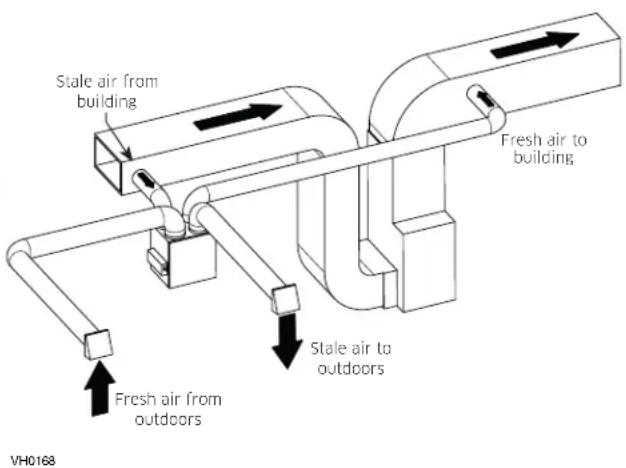
ALTERNATE INSTALLATION (T-5) (THIS CONFIGURATION DOES NOT ALLOW RECIRCULATION MODE TO OPERATE.)
Unit should be synchronized with central forced-air system operation to avoid condensation and mold growth in central forced-air system distribution ducting if cooling mode of central forced-air system is used.
CAUTION
This configuration is not recommended with high velocity central forced-air system. High pressures produced by these systems could affect unit proper operation and generate errors.
NOTE: For this type of configuration, the T-5 option must be selected on the LCD screen when auto-balancing the unit.
2.3 CONNECTING THE DRAIN (HRV ONLY)
CAUTION
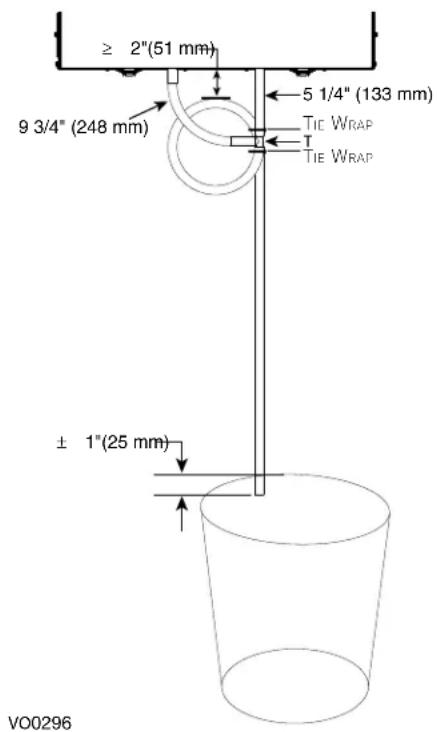
Install the drain hose included and run it to a drain or a pail. This unit may generate a large amount of water in cooler weather. It is necessary to install the drain hose properly to prevent water damage and/or material damage.
- Cut the appropriate length of drain tubing (see illustration at right).
- Connect the tubing to the provided adaptor.
- Make a water trap loop in the tube to prevent the unit from drawing unpleasant odors from the drain source.
- Add water in the loop to prevent noise or hiss.
- Make sure there is a distance of at least 2 between the unit and the tubing loop (see illustration at right).
- Using tie wraps provided, attach the tubing as illustrated.
- Run the tube to the floor drain or to an alternate drain pipe or pail.
- IMPORTANT: If using a pail to collect water, place the tube end approximately 1" inside the pail in order to prevent water from being drawn back up into the unit.
2.4 INSTALLING THE EXTERIOR HOODS
To avoid cross-contamination:
- Keep at least 6 feet between both hoods.
- Install hood(s) at least at 18 inches away from the ground OR depth of expected snow accumulation, whichever is greater.
WARNING
Make sure intake hood is at least 6 feet (1.8 m) away from any of the following:
- Dryer exhaust, high efficiency central forced-air system vent, central vacuum vent
Gas meter exhaust, gas barbecue-grill - Any exhaust from a combustion source
- Garbage bin and any other source of contamination. Ignoring these recommendations could significantly degrade the quality of the incoming air which, in some cases, could result in health consequences.
In the event of a conflict between our conditions and local requirements, the latter will have priority.
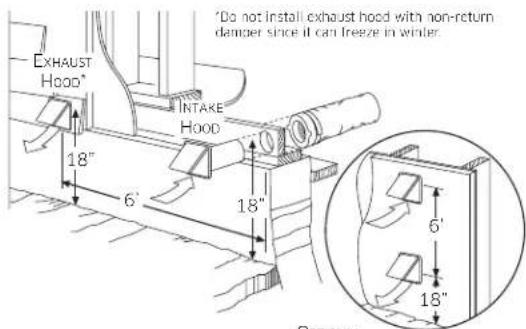
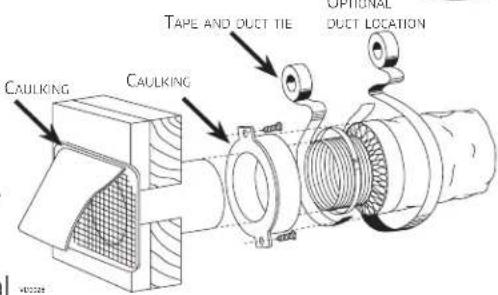
Refer to illustration above for proper connection method of the insulated ducts to the hoods. An "Anti-Gust Intake Hood" should be installed in regions where a lot of snow is expected to fall.
2.5 CONNECTING THE DUCTS TO THE UNIT
CAUTION
If ducts have to go through an unconditioned space (e.g.: attic), always use insulated ducts to prevent condensation formation inside and outside ducts, which could cause material damage and/or mold growth.
- Do not use screws to connect the ducts or transitions to the ports so as not to interfere with ports inner dampers operation. A non-functioning damper could freeze the unit, which could cause damages.
INSULATED FLEXIBLE DUCTS
Use the following procedure to connect the insulated flexible ducts to the ports of the unit (exhaust to outside and fresh air from outside).
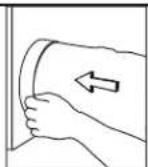
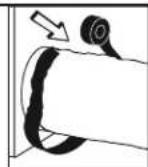
- Expose the flexible duct by pulling back the insulation, and place it over the inner port ring.
- Attach the flexible duct to the port using a tie wrap.
- Seal the joint using duct tape.
- Pull the insulation and vapor barrier over the joint, tuck them between the inner and outer rings of the double collar and fasten them in place using duct tape.
CAUTION
The vapor barrier should remain intact and free of cracks or openings. An opening could produce condensation inside or outside duct, which could cause material damage and/or mold growth in the long run.
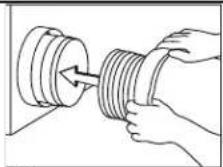
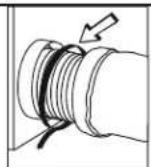
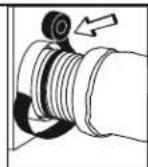
V0157
TRANSITIONING TO 8-IN.DUCTS
If using 8-in. ducts, install 6-in. to 8-in. transitions on the ports, and secure using duct tape only. If rigid ducting is used, install a 12-in. section of flexible duct between the transition and the rigid ducting (see above). Rigid ducts
To prevent potential water leakage in cold side rigid ducting insulation, seal all rigid ducting joints with duct tape. To avoid transmission of vibrations, always use a 12-inch section of flexible duct to connect rigid ducts to the unit. To connect insulated rigid ducts to the unit (cold side) using insulated flexible ducts, follow instructions in section 2.4. To connect regular rigid ducts (warm side) to the unit using non-insulated flexible ducts, use a tie wrap.
NOTE: It is recommended to use 8'' ducting instead of 6'' ducting if required airflow is over 200 CFM and long run of ducting or high quantity of elbows is used. It will prevent having too high static pressure in the ducting.
2.5.1 DUCTS CONNECTION
IMPORTANT: Make sure to connect ducting as illustrated below to get airflows reading accuracy. Correct installation will also allow proper drainage of water that may accumulate in ducting.
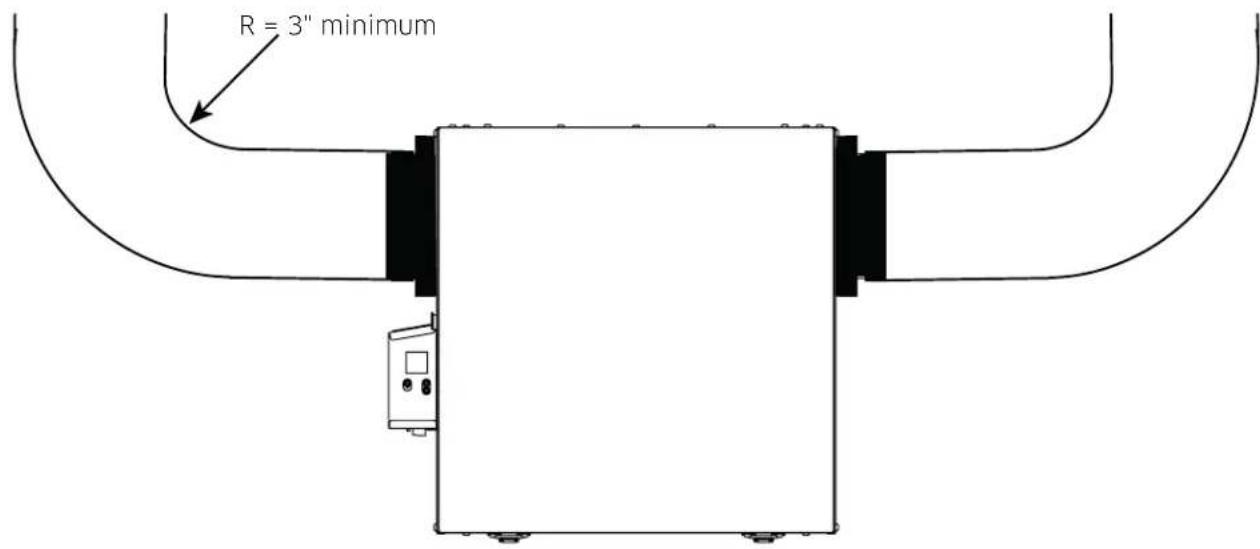
CORRECT INSTALLATION
VD0489
CAUTION
Ducting must not be too crushed. Otherwise, airflows reading accuracy will be affected.
CAUTION
Insulated ducts must have the same diameter as the ports to ensure proper drainage of water that may accumulate in ducts.
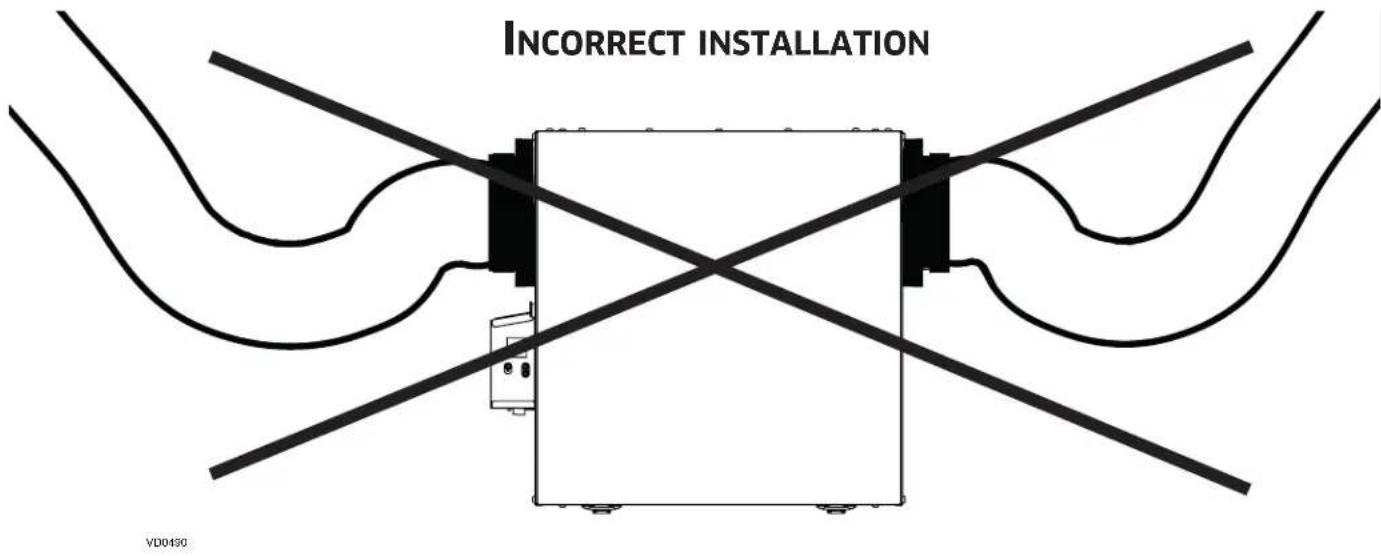
NOTE: Route ducts as straight as possible, minimize the number of elbows and design and install ducts in accordance with HRAI best practices.
3. CONNECTIONS
3.1 ELECTRICAL CONNECTION TO OPTIONAL MAIN WALL CONTROL
WARNING
Always disconnect the unit before making any connections. Failure to cut power could result in electrical shock or damage to the wall control or electronic module inside the unit.
CAUTION
Never install more than one optional main wall control per unit. Make sure that the wires do not short-circuit between themselves or by touching any other components on the wall control. Avoid poor wiring connections. To reduce the risk of electrical interference (noise), do not run wall control wiring next to control contactors or near light dimming circuits, electrical motors, dwelling/building power or lighting wiring or power distribution panel.
HD0491
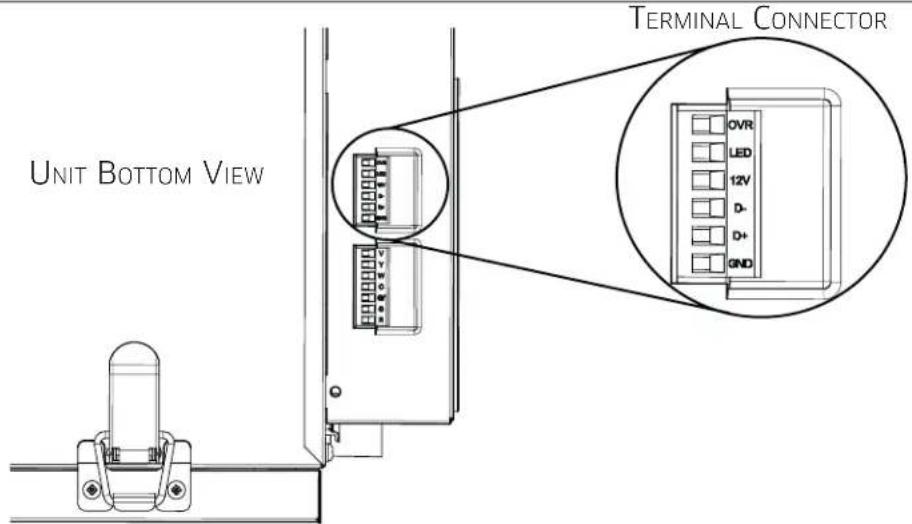
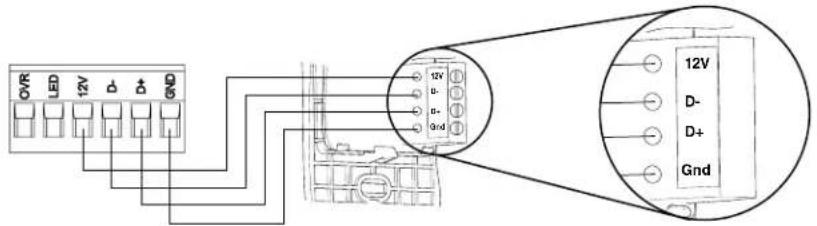
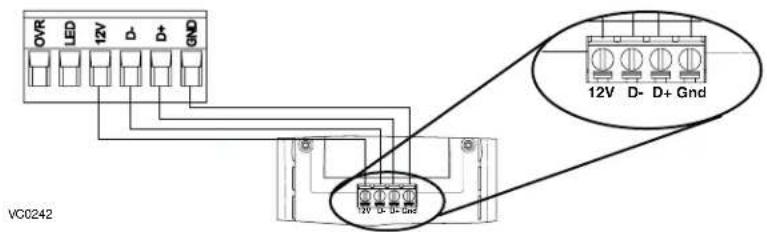
Use the terminal connector included to perform the electrical connection for optional main wall control. Check if all wires are correctly inserted in their corresponding holes in the terminal connector. Use screws to fix wires in the terminal connector. Once the wall control connections have been made, insert the terminal connector in the electrical compartment.
NOTE: For information about the operation of the wall control, refer to the corresponding Installation and User Guide, available at vanee.ca or venmar.ca.
3.1.1 ELECTRICAL CONNECTION TO DEHUMIDISTAT OR AUTOMATIC OPTIONAL MAIN WALL CONTROL
VC0241
3.1.2 ELECTRICAL CONNECTION TO ADVANCED OPTIONAL MAIN WALL CONTROL
3. CONNECTIONS (CONT'D)
3.2 ELECTRICAL CONNECTION TO OPTIONAL AUXILIARY WALL CONTROL
3.2.1 ELECTRICAL CONNECTION TO 20-40-60 OPTIONAL AUXILIARY WALL CONTROL
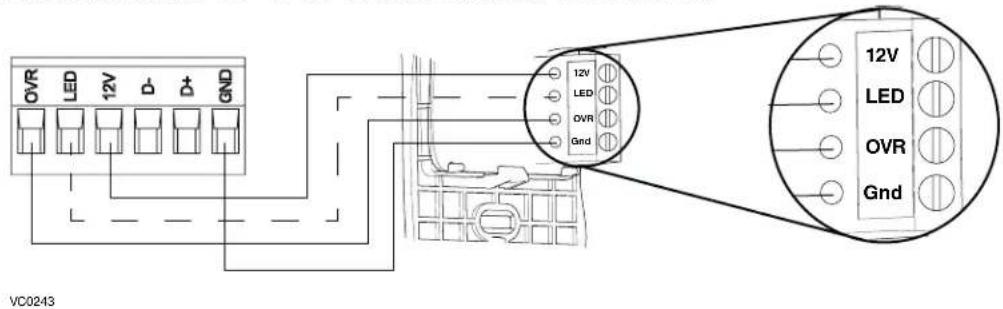
When configuring OVR option on the LCD screen, choose among these 3 configurations: BAL (the unit remains balanced while providing maximum airflow), PER (the unit is slightly unbalanced since the distribution motor is in MAX speed while allowing maximum exhaust ventilation) and DIS (the unit is unbalanced since air distribution is constant despite a higher need in exhaust ventilation).
NOTE : The auxiliary wall control can be used with a 3-wire connection by removing the LED signals. This optional wiring will not allow an installation with more than 1 auxiliary wall control to properly synchronize their LEDs on an event requested from a peer. Only the auxiliary wall control having requested the timer event will have the LEDs updated accordingly.
3.2.2 ELECTRICAL CONNECTION TO DRY CONTACT OPTIONAL AUXILIARY WALL CONTROL (E.G. CRANK TIMER)
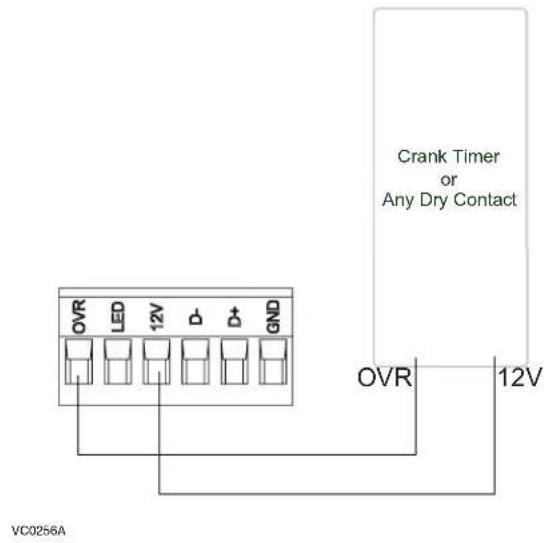
WARNING
A miswiring that sends a 24 VAC signal to the 6-position terminal block (OVR, LED, 12V, D-, D+, GND) could permanently damage the control circuit. Verify carefully wire connections before powering-up the unit.
3.3 CONNECTION TO THE CENTRAL FORCED-AIR SYSTEM
WARNING
Never connect a 120-volt AC circuit to the terminals of the central forced-air system interlock (standard wiring). Only use the low voltage class 2 circuit of the central forced-air system blower control. The unit is designed for low voltages only. Connecting the unit on 120-volt circuit would damage it instantly.
3.3.1 UNIT OPERATION USING A DRY CONTACT CONNECTION
This unit can be controlled by any dry contact connection such as the thermostat equipped with an optional ventilation output.
Once wired, unit will toggle between the Standby mode when contact is opened and the selected mode when contact is closed. Choose among these 4 configurations: minimum (unit operating in MIN speed), intermittent (unit operating in MIN speed 20 min/hr then as per INT configuration selection for 40 min), auto* (unit operating according to outdoor temperature) and maximum (unit operating in MAX speed) in DRY option on the LCD screen when the VENT contact is activated. Refer to section 5 for more details.
- In auto mode, the unit will operate as follows:
Less than -25°C = 10min / hr
-25°C to -7°C = 20 min/hr
- 7°C to 10°C = 40min / hr
10°C to 25°C = MIN speed
- 25 ° C to 28 ° C = 30 min/hr
- 28 ° C to 33 ° C = 20 min/hr
- Above 33 ° C = 10 min/hr
3.3.2 UNIT INTERCONNECTION WITH CENTRAL FORCED-AIR SYSTEM (R/C/G/GF)
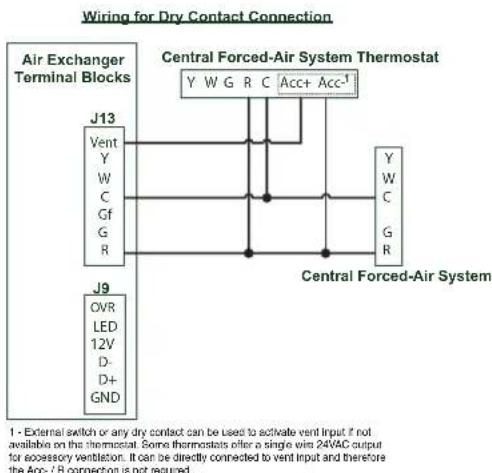
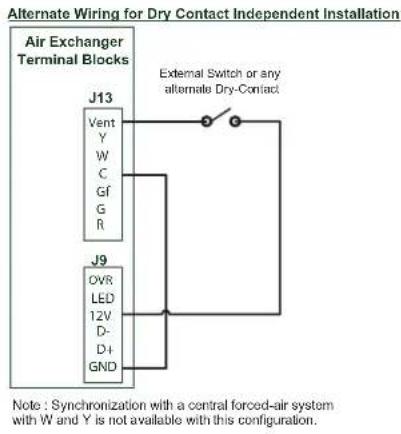
NOTE : This dry contact option will override the main wall control so we do not recommend the use of a wall control with this type of connection.
NOTE : Following ducting installation configuration and temperature conditions, it may be necessary for the unit to operate continuously. Refer to section 2.2 for more details.
AL FORCED-AIR SYSTEM (R/C/G/GF)
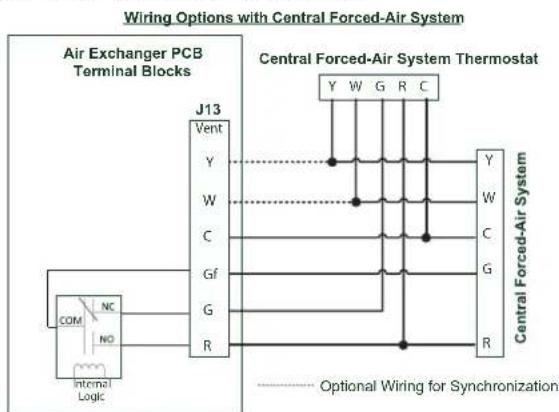
These connections must be done if you want the unit to force the central forced-air system blower operation when ventilating (refer to solid lines in above diagram).
NOTE: These connections are required for installation configuration T-4. Refer to section 2.2 for more details.
3.3.3 SYNCHRONIZATION WITH CENTRAL FORCED-AIR SYSTEM FUNCTION
The Virtuo technology allows synchronizing the unit operation with the central forced-air system operating time. It prevents unnecessary central forced-air system operating time while providing a better air distribution. To use this function, W and Y connections must be added to R and C connections to inform the unit that the central forced-air system is running (refer to dotted lines in above diagram).
4. WIRING DIAGRAM
WARNING
- Risk of electric shocks. Before performing any maintenance or servicing, always disconnect the unit from its power source.
- This product is equipped with an overload protection (fuse). A blown fuse indicates an overload or a short-circuit situation. If the fuse blows, unplug the product from the outlet. Discontinue using the unit and contact technical support.
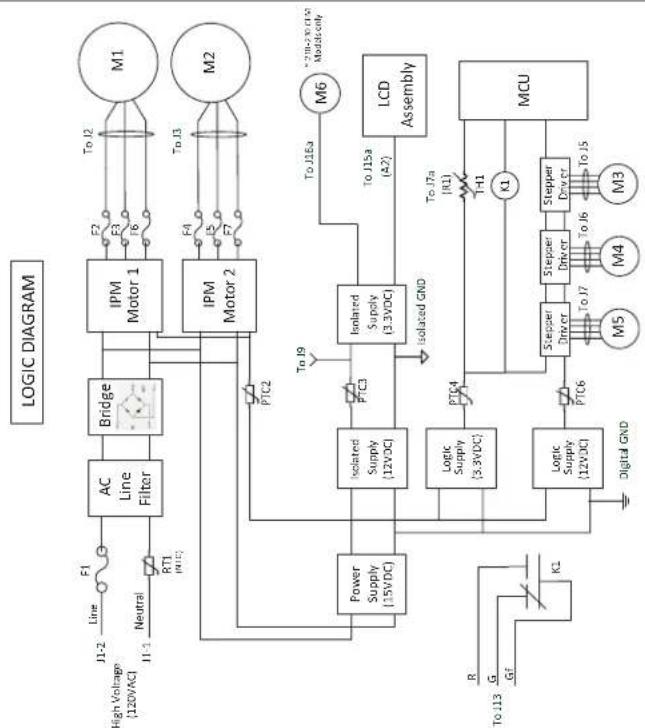
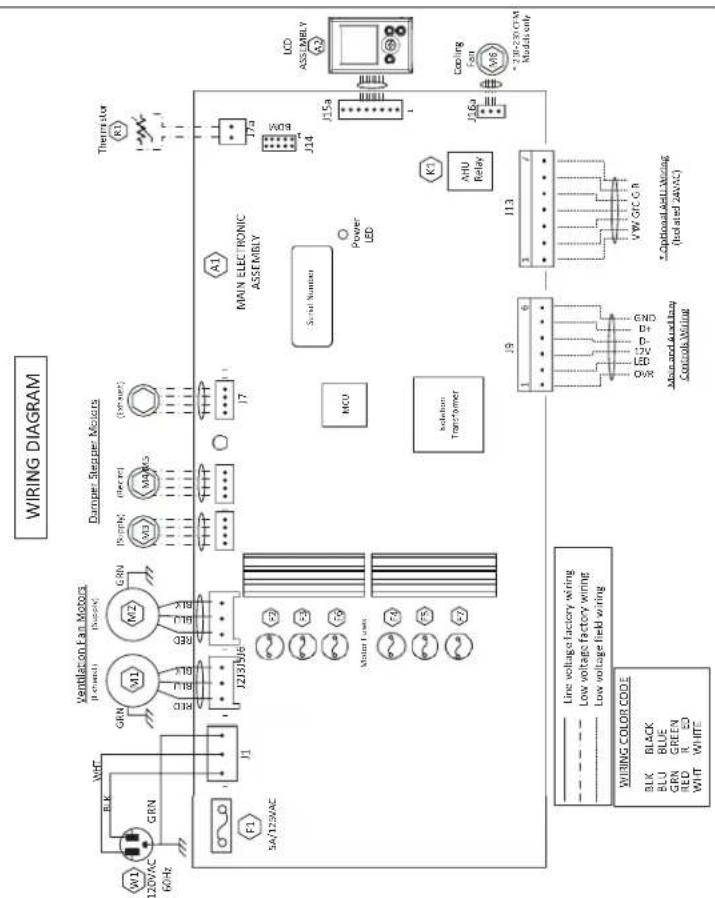
VE0481A
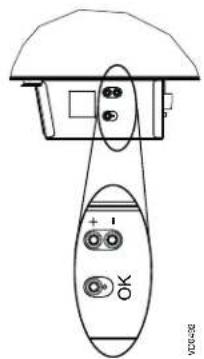
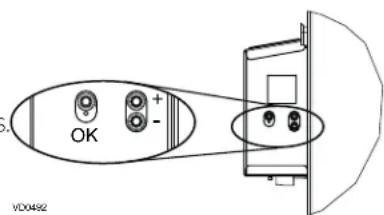
| OK button To confirm a selection. | |
| + button | To increase a value. |
| To scroll up in a selection. | |
| - button | To decrease a value. |
| To scroll down in a selection. | |
PRESS ON OK BUTTON TO CHANGE THE OPERATING MODE. PRESS ON + BUTTON OR - BUTTON TO MODIFY MAX CFM, MIN CFM OR OPTIONS CONFIGURATION.
USE + BUTTON OR - BUTTON
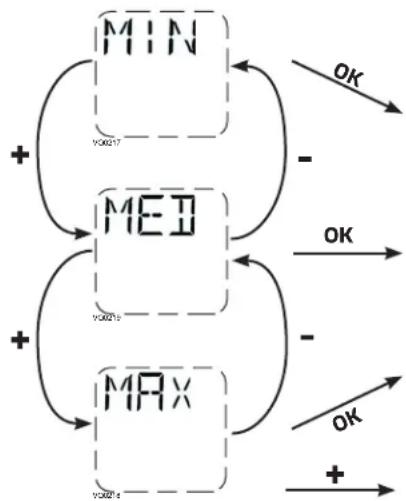
TO SELECT THE DESIRED OPERATING MODE.
(二)
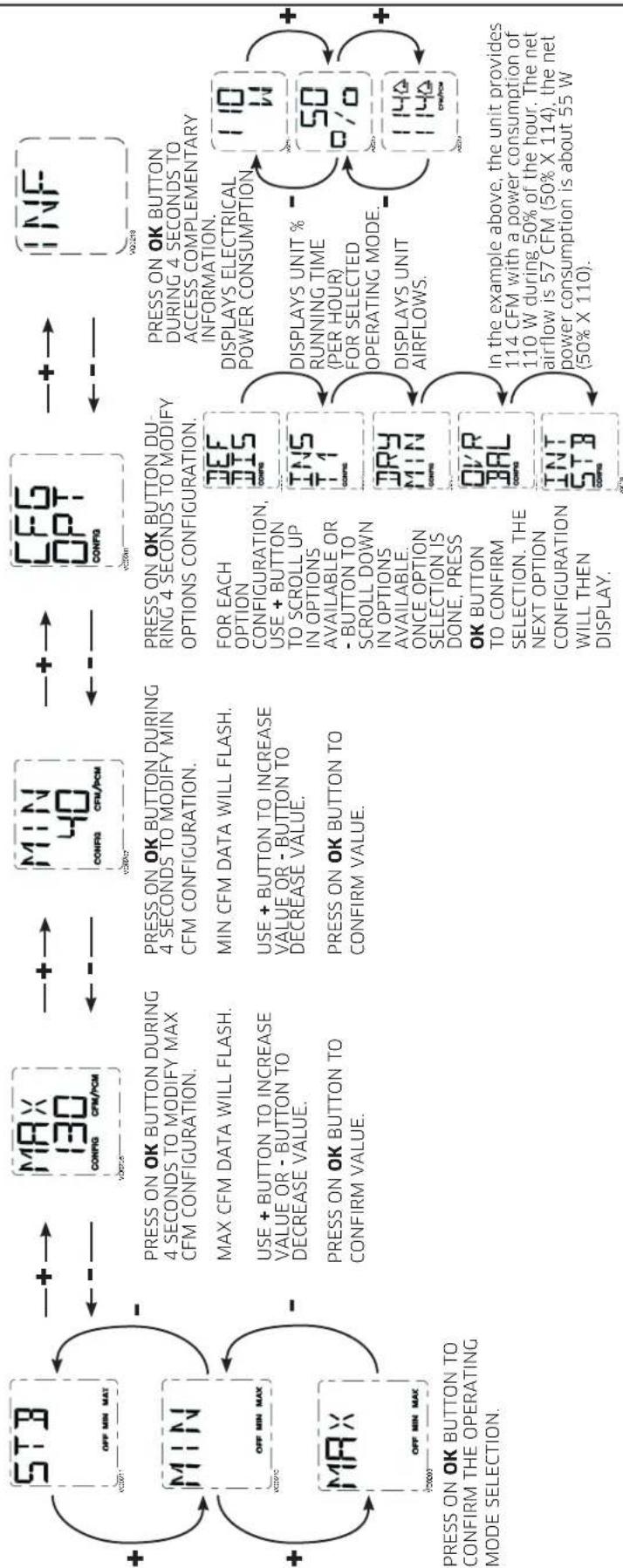
NOTE: According to unit model and configuration, some menus may not be available.
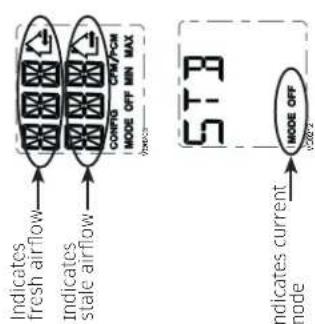
5.1 LCD SCREEN
| DISPLAY DEFINITION | |
| STB Standby mode | |
| MED MED speed | |
| INT Intermittent mode | |
| REC Recirculation mode | (Min, Med or Max speed) |
| AUT AUTO mode | |
| SMT SMART mode | |
| OVR 20 Override 20 min | |
| OVR 40 Override 40 min |
| DISPLAY DEFINITION | |
| OVR 60 Override 60 min | |
| OVR CNT Override by dry contact | |
| AHU Refer to section 6.3 for explanation | |
| HUM | Humidistat or Dehumidistat override |
| TUR | Turbo mode |
| OTH | Away mode or Scheduling mode |
| DEF | Defrost mode |
| EXX or WXX (XX referring to error or warning number) | Refer to section 8 for each error/warning explanation |
5.2 UNIT FIRST BOOT
PREPARATION
Follow these steps to ensure accurate measurements:
- Seal all the ductwork with tape. Close all windows and doors.
- Turn off all exhaust devices such as range hood, dryer and bathroom fans.
If the installation is in any way connected to a ductwork of a central forced-air system, make sure that the central forced-air system blower is ON. If not, leave central forced-air system blower OFF.
AUTO-BALANCING PROCEDURE
Plug the unit and wait for the maximum CFM to display on the LCD screen. If unit is colder than ambient temperature, it is normal to experience a 60 s longer boot-up since motors have to preheat. Refer to section 8.1 if errors E22 or E32 display.
The maximum CFM will display on the LCD screen. Use (+ / - ) to adjust the CFM and OK to confirm.
The minimum CFM will display on the LCD screen. Use (+ / - ) to adjust the CFM and OK to confirm.
The house that flashes on the LCD screen indicates which side currently limits the airflow (supply or exhaust). If the airflow reached is not sufficient, the installer can improve the installation to increase airflow.
INSTALLATION CONFIGURATION SELECTION
INS will display on the LCD screen. Choose among T-1, T-2, T-3, T-4 or T-5 following the installation configuration (Refer to section 2.2 for more details).
- Auto-balancing is completed.
5.3 SETTINGS MODIFICATION
5.3.1 PROCEDURE TO MODIFY MIN CFM SETTING
- Go to MIN using (+/-) then press on the OK button for 4 seconds.
- Use (+/-) to increase/decrease CFM and OK to confirm.
5.3.2 PROCEDURE TO MODIFY MAX CFM SETTING
- Go to MAX using (+ / - ) then press on the OK button for 4 seconds.
- Use (+/-) to increase/decrease CFM and OK to confirm.
5.3.3 PROCEDURE TO MODIFY OPTIONS SETTING
- Go to CFG OPT using (+ / - ) then press on the OK button for 4 seconds.
5.3.4 PROCEDURE TO MODIFY INDEPENDENT AIRFLOWS SETTING
- Press simultaneously (+/-) buttons for 4 seconds.
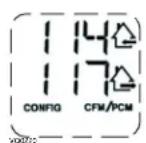
SUPPLY AIRFLOW VALUE WILL FLASH.
PRESS ON + BUTTON OR - BUTTON TO
INCREASE/DECREASE VALUE.
PRESS OK BUTTON.
EXHAUST AIRFLOW VALUE WILL FLASH.
PRESS ON + BUTTON OR - BUTTON TO
INCREASE/DECREASE VALUE.
PRESS OK BUTTON.
WHEN MAX DISPLAYS, PRESS ON + BUTTON TO EXIT INDEPENDENT AIRFLOWS SETTING.
| Options Configurations available | |
| DEF (Defrost) | DIS* (Discretion - defrost without speed variation for more comfort), PLU (Plus - extended defrost for colder areas) |
| INS (Installation) | T-1, T-2, T-3, T-4*, T-5 (Refer to section 2.2) |
| DRY (Dry contact) | MIN* (Minimum), INT (Intermittent), AUT (AUTO), MAX (Maximum) (Refer to section 3.3.1) |
| OVR (Override) | BAL* (Balanced), PER (Performance), DIS (Discretion) (Refer to section 3.2.1) |
| INT (Intermittent) | STB* (Standby - 20 min in MIN speed and 40 min in standby mode), REC** (Recirculation - 20 min in MIN speed and 40 min in recirculation mode) **REC (Recirculation) configuration is not available for T-4 and T-5 installation configurations. NOTE: Following ducting installation configuration and temperature conditions, it may be necessary for the unit to operate continuously. Refer to section 2.2 for more details. |
- Factory setting
NOTE: If no selection is confirmed within 10 minutes, the unit will exit the menu without saving any changes.
5.4 FACTORY SETTINGS RESET
If any change is made to the ducting, reset settings to restart the airflow test.
PROCEDURE TO RESET SETTINGS
Press on the OK and (-) buttons simultaneously for 4 seconds. Use (+/-) to select Yes or No and OK to confirm.
Then perform the auto-balancing procedure.
6. USING THIS UNIT
6.1 YOUR VENTILATION SYSTEM
This balanced ventilation unit is designed to provide fresh air to your home while exhausting stale, humid air. Thanks to its energy/heat recovery module, the unit recovers a large proportion of heat or energy that is part of indoor or outdoor air according to the seasons to improve comfort and energy efficiency during the heating and the cooling periods. With the Virtuo Air Technology™, this unit responds to the variations in its environment in an autonomous way, ensuring to provide a proper level of ventilation and air quality. This unit also features automatic modes (AUTO or SMART) that manage autonomously the required ventilation level as per indoor and/or outdoor conditions. In colder areas, the unit will perform, at intervals, recovery module discreet defrost to maintain performance and comfort.
6.2 INTEGRATED CONTROL
All units are equipped with an integrated control, located in front of the electrical compartment. For more convenience, these units can be controlled using an optional wall control or the central forced-air system thermostat equipped with external fan activation.
MODE SELECTION
- To change the mode, use (+/-) to access the Mode screen. Press OK to edit the mode and use (+/-) to change the mode (Standby, Min, Max).
- Press OK to confirm selection. The airflows will be displayed for both MIN and MAX modes
NOTE: If an optional auxiliary wall control or the central forced-air system thermostat equipped with external fan activation is used, it overrides the integrated control.
6.3 AHU MODE DISPLAY
Depending on unit configuration and/or installation, the unit could not be able to reach desired set minimum CFM. This situation could happen with installed configurations T-2 to T-5 due to AHU static pressure and a set minimum CFM below 75. In such a case, AHUXX (XX referring to desired minimum CFM value) will display on LCD screen. In AHU mode, the unit operates in intermittent mode to reach desired minimum CFM value. Intermittent mode duration varies as per desired minimum CFM value.
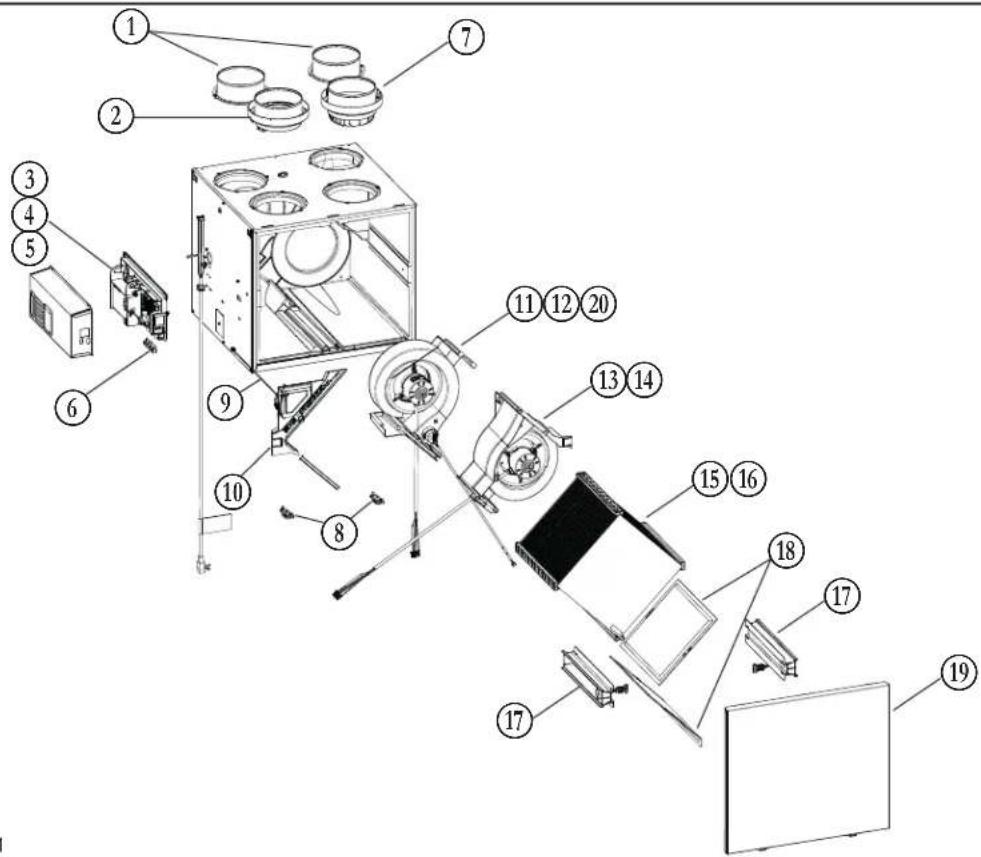
VL0091
| ITEM | DESCRIPTION | PART NUMBER | A180H75RT V180H75RT | A180E75RT V180E75RT | A230H75RS V230H75RS | A230H75RT V230H75RT | A210E75RS V210E75RS | A210E75RT V210E75RT |
| 1 6" port warm side SV66139 2 2 2 2 2 | ||||||||
| 2 6" metal port motorized damper SV66135 1 1 1 1 1 | ||||||||
| 3 Electronic assembly (180 models) SV68027** 1 1 | ||||||||
| 4 Electronic assembly with cooling fan kit (210-230 models) SV68028** 1 1 1 | ||||||||
| 5 Cooling fan kit for electronic (210-230 models) SV68031 1 1 1 | ||||||||
| 6 Terminal blocks SV66145 1 1 1 1 1 | ||||||||
| 7 6" exhaust port assembly | SV66137 1 1 | 1 1 1 1 | ||||||
| 8 Door latches and keepers for door | SV61218 1 1 | 1 1 1 1 | ||||||
| 9 Thermistor | SV66134 1 1 | 1 1 1 1 | ||||||
| 10 Recirculation damper with thermistor | SV68029 1 | 1 1 1 1 | 1 1 | |||||
| 11 Exhaust blower assembly with damper (180 models) | SV68022 1 | 1 | ||||||
| 12 Exhaust blower assembly with damper (210-230 models) | SV68024 | 1 | 1 | 1 | 1 | 1 | ||
| 13 Supply blower assembly (180 models) | SV68021 1 | 1 | ||||||
| 14 Supply blower assembly (210-230 models) | SV68023 1 | 1 1 1 | ||||||
| 15 Core ERV 75 % | SV68018 | 1 | 1 | 1 | 1 | |||
| 16 Core HRV 75 % | SV68019 1 | 1 1 | ||||||
| 17 Core sliders kit with screws | SV68026 1 | 1 1 1 1 | 1 1 | |||||
| 18 MERV8 filters kit | SV68020 1 | 1 1 1 1 | 1 1 | |||||
| 19 Door | SV68030 1 | 1 1 1 1 | 1 1 | |||||
| 20 Exhaust damper | SV68025 1 | 1 1 1 1 | 1 1 | |||||
| * Hardware kit | SV66146 1 | 1 1 1 1 | 1 1 | |||||
| * Fuse for PCB | SV66147 1 | 1 1 1 1 | 1 1 | |||||
| * ½" hose | SV00592 1 | 1 1 |
* Not shown.
** See next page to get the part number that corresponds to the ventilation unit model.
7. SERVICE PARTS (CONT'D)
| VENTILATION UNIT MODEL | ||||||
| ELECTRONIC ASSEMBLY PART NUMBER | A/V180H75RT | A/V180E75RT | A/V230H75RS | A/V230H75RT | A/V210E75RS | A/V210E75RT |
| SV68027-01 | X | |||||
| SV68027-02 | X | |||||
| SV68028-01 | X | |||||
| SV68028-02 | X | |||||
| SV68028-03 | X | |||||
| SV68028-04 | X | |||||
REPLACEMENT PARTS AND REPAIRS
In order to ensure your ventilation unit remains in good working condition, you must use the manufacturer's genuine replacement parts only. The manufacturer's genuine replacement parts are specially designed for each unit and are manufactured to comply with all the applicable certification standards and maintain a high standard of safety. Any third party replacement part used may cause serious damage and drastically reduce the performance level of your unit, which will result in premature failing. The manufacturer recommends to contact a certified service depot for all replacement parts and repairs.
8. INSTALLER'S TROUBLESHOOTING
WARNING
The wearing of safety glasses and gloves is recommended since a few diagnosis procedures may require the unit to be in operation while proceeding. Be careful with moving and live parts to prevent any risk of injury.
| ERROR DESCRIPTION SOLUTION | ||
| E01 | Supply damper range | STEP 1: Unplug unit, inspect the damper system, remove any undesirable obstacle or dirt (filters and core may have to be removed to access the damper system). Plug unit. |
| E02 | Supply damper timeout | If STEP 1 did not fix the problem, perform STEP 2: Open electrical compartment, check if connector J5 (white) is well inserted, check for any loose wires. If STEP 2 did not fix the problem, perform STEP 3: If the damper is not moving at all, unplug J7 (red) from the electronic assembly, connect the white damper system connector into J7. If the damper moves (but the system still shows an error), the electronic assembly must be replaced. Otherwise, replace the damper system. |
| E03 | Supply damper | |
| E05 | Exhaust damper range | STEP 1: Unplug the unit, inspect the damper system, remove any undesirable obstacle or dirt (filters and core may have to be removed to access the damper system). Plug the unit. |
| E06 | Exhaust damper timeout | If STEP 1 did not fix the problem, perform STEP 2: Open electrical compartment, check if connector J7 (red) is well inserted, check for any loose wires. If STEP 2 did not fix the problem, perform STEP 3: If the damper is not moving at all, unplug J5 (white) from the electronic assembly, connect the white damper system connector into J5. If the damper moves (but the system still shows an error), the electronic assembly must be replaced. Otherwise, replace the damper system. |
| E07 | Exhaust damper | |
| E09 | Recirculation damper range | STEP 1: Unplug the unit, inspect the damper system, remove any undesirable obstacle or dirt (filters and core may have to be removed to access the damper system). Plug the unit. |
| E10 | Recirculation damper timeout | If STEP 1 did not fix the problem, perform STEP 2: Open electrical compartment, check if connector J6 (blue) is well inserted, check for any loose wires. If STEP 2 did not fix the problem, perform STEP 3: If the damper is not moving at all, unplug J5 (white) from the electronic assembly, connect the blue damper system connector into J5. If the damper moves (but the system still shows an error), the electronic assembly must be replaced. Otherwise, replace the damper system. |
| E11 | Recirculation damper | |
| E22 | Supply airflow | STEP 1: Unplug the unit. Perform a visual inspection of the supply damper system. Clean filters, distribution registers and outside supply hood. Inspect ducting to ensure it is not squeezed or bent. Plug the unit. If STEP 1 did not fix the problem, perform STEP 2: Remove ducting of the supply path. On the LCD screen, select MAX to check if the unit is able to reach the selected flow. If so, review the ducting path. If STEP 2 did not fix the problem, perform STEP 3: On the LCD screen, select the MIN and MAX flow setting values then reset the unit. MAX flow value will display on the LCD screen. If MAX flow is above desired MAX flow, set MAX and MIN flows. If STEP 3 did not fix the problem, perform STEP 4: Replace the supply blower and repeat STEP 3. If STEP 4 did not fix the problem, perform STEP 5: Replace the electronic assembly. See also section 8.1. |
| E23 | Supply motor (drive over current) | STEP 1: Unplug/plug unit. If STEP 1 did not fix the problem, perform STEP 2: Remove core and clear the ventilation wheel from any dirt or obstacles. If STEP 2 did not fix the problem, perform STEP 3: Disconnect J2 (white) and connect a spare blower system. If it works, replace supply blower. If STEP 3 did not fix the problem, perform STEP 4: Replace the electronic assembly. |
| E27 | Supply motor (drive foc duration) | |
| E28 | Supply motor (drive speed feedback) | |
| E29 | Supply motor (startup) | |
| E24 | Supply motor (drive over voltage) | STEP 1: Unplug/plug unit. Under and over voltage may be detected with severe in-house power supply fluctuation and stop the motor for protection. If STEP 1 did not fix the problem, perform STEP 2: Replace the electronic assembly. |
| E25 | Supply motor (drive under voltage) | |
- INSTALLER'S TROUBLESHOOTING (CONT'D)
| ERROR DESCRIPTION SOLUTION | ||
| E26 | Supply motor (drive over temp) | STEP 1: Validate if the air exchanger is exposed to ambient temperatures within the operating limits (see p. 4)If STEP 1 did not fix the problem, perform STEP 2: Replace the electronic assembly. |
| E32 | Exhaust airflow | STEP 1: Unplug the unit. Perform a visual inspection of the exhaust damper system. Clean filters, distribution registers and outside exhaust hood. Make sure no non-return damper is installed in exhaust hood since it can freeze in winter. Inspect ducting to ensure it is not squeezed or bent. Plug the unit. If STEP 1 did not fix the problem, perform STEP 2: Remove ducting of the supply path. On the LCD screen, select MAX to check if the unit is able to reach the selected flow. If so, review the ducting path.If STEP 2 did not fix the problem, perform STEP 3: On the LCD screen, select the MIN and MAX flow setting values then reset the unit. MAX flow value will display on the LCD screen. If MAX flow is above desired MAX flow, set MAX and MIN flows.If STEP 3 did not fix the problem, perform STEP 4: Replace the exhaust blower and repeat STEP 3.If STEP 4 did not fix the problem, perform STEP 5: Replace the electronic assembly. See also section 8.1. |
| E33 | Exhaust motor (drive over current) | STEP 1: Unplug/plug unit.If STEP 1 did not fix the problem, perform STEP 2: Remove core and clear the ventilation wheel from any dirt or obstacles.If STEP 2 did not fix the problem, perform STEP 3: Disconnect J3 (red) and connect a spare blower system. If it works, replace exhaust blower.If STEP 3 did not fix the problem, perform STEP 4: Replace the electronic assembly. |
| E37 | Exhaust motor (drive foc duration) | |
| E38 | Exhaust motor (drive speed feedback) | |
| E39 | Exhaust motor (startup) | |
| E34 | Exhaust motor (drive over voltage) | STEP 1: Unplug/plug unit. Under and over voltage may be detected with severe in-house power supply fluctuation and stop the motor for protection.If STEP 1 did not fix the problem, perform STEP 2: Replace the electronic assembly. |
| E35 | Exhaust motor (drive under voltage) | |
| E36 | Exhaust motor (drive over temp) | STEP 1: Validate if the air exchanger is exposed to ambient temperatures within the operating limits (see p. 4)If STEP 1 did not fix the problem, perform STEP 2: Replace the electronic assembly. |
| E40 | Outside air thermistor | STEP 1: Check if thermistor is well connected in connector J7A.If STEP 1 did not fix the problem, perform STEP 2: Disconnect connector J7A and check if the measured resistance (thermistor connector) is within 5 Kohms to 120 Kohms. If outside the range, replace the thermistor.If STEP 2 did not fix the problem, perform STEP 3: Replace the electronic assembly. |
| E41 | Distribution air thermistor | STEP 1: Check if thermistor is well connected in connector J7B.If STEP 1 did not fix the problem, perform STEP 2: Disconnect connector J7B and check if the measured resistance (thermistor connector) is within 5 Kohms to 120 Kohms. If outside the range, replace the thermistor.If STEP 2 did not fix the problem, perform STEP 3: Replace the electronic assembly. |
| E42 | PCBA thermistor fault | STEP 1: Replace the electronic assembly. |
| E43 | PCBA temperature over limit | STEP 1: Validate if the air exchanger is exposed to ambient temperatures within the operating limits (see p. 4)If STEP 1 did not fix the problem, perform STEP 2: Replace the electronic assembly. |
| E50 | Wall control communication lost | STEP 1: Unplug unit, inspect wires, plug unit.If STEP 1 did not fix the problem, perform STEP 2: Remove wall control from the wall installation and test with a short cable. If it works, bring a new cable to the wall installation location.If STEP 2 did not fix the problem, perform STEP 3: Test the air exchanger with a spare wall control. If it works, replace the wall control.If STEP 3 did not fix the problem, perform STEP 4: Replace the electronic assembly. |
| E51 | Wall control sensor | STEP 1: Unplug unit, inspect wires, plug unit.If STEP 1 did not fix the problem, perform STEP 2: Replace the wall control. |
| E60 | Protection mode | STEP 1: Perform general inspection of the unit (dampers, core, filters). |
8. INSTALLER'S TROUBLESHOOTING (CONT'D)
| WARNING DESCRIPTION SOLUTION | ||
| W22 | Supply airflow | STEP 1: Unplug the unit. Perform a visual inspection of the supply damper system. Clean filters, distribution registers and outside supply hood. Inspect ducting to ensure it is not squeezed or bent. Plug the unit.If STEP 1 did not fix the problem, perform STEP 2: Remove ducting of the supply path. On the LCD screen, select MAX to check if the unit is able to reach the selected flow. If so, review the ducting path.If STEP 2 did not fix the problem, perform STEP 3: On the LCD screen, select the MIN and MAX flow setting values then reset the unit. MAX flow value will display on the LCD screen. If MAX flow is above desired MAX flow, set MAX and MIN flows.If STEP 3 did not fix the problem, perform STEP 4: Replace the supply blower and repeat STEP 3.If STEP 4 did not fix the problem, perform STEP 5: Replace the electronic assembly. |
| W32 | Exhaust airflow | STEP 1: Unplug the unit. Perform a visual inspection of the exhaust damper system. Clean filters, distribution registers and outside exhaust hood. Make sure no non-return damper is installed in exhaust hood since it can freeze in winter. Inspect ducting to ensure it is not squeezed or bent. Plug the unit.If STEP 1 did not fix the problem, perform STEP 2: Remove ducting of the supply path. On the LCD screen, select MAX to check if the unit is able to reach the selected flow. If so, review the ducting path.If STEP 2 did not fix the problem, perform STEP 3: On the LCD screen, select the MIN and MAX flow setting values then reset theunit. MAX flow value will display on the LCD screen. If MAX flow is above desired MAX flow, set MAX and MIN flows.If STEP 3 did not fix the problem, perform STEP 4: Replace the exhaust blower and repeat STEP 3.If STEP 4 did not fix the problem, perform STEP 5: Replace the electronic assembly. |
| W52 | Initial setting incomplete | STEP 1: Press + or - to access the selection menu.STEP 2: Complete configuration. (Refer to section 5 for more details). |
| W61 | Protection mode electronics overheating | The unit is currently in protection mode. The power transmitted to the motor is deliberately reduced to decrease electronics temperature. The unit will exit this mode by itself once conditions are back to normal. It is normal to observe reduction in airflows during this period. This condition should appear only when the unit is set in high speed and located in a warmer environment, for example over 30°C (86°F). |
CAUTION
Make sure that no piece of mineral wool will enter in the unit during installation. Otherwise, this could reduce airflow and generate vibrations and noise in the unit.
NOTE: 210 and 230 CFM models have a cooling fan in electrical box that can start if ambient temperature near the unit is over 40°C (104°F).
8.1 ELECTRONIC PROTECTION TO PREVENT ABNORMAL HIGH STATIC PRESSURE
180 CFM ERV Models
The unit will reduce airflow by 30 CFM if the max airflow during auto-balancing procedure is 130 CFM or less to prevent ERV core membrane deformation due to very high static pressure (over 1.3 in. w.g.).
All 180 CFM Models
Error E22 or E32 will display if the maximum airflow is 90 CFM or less during the auto-balancing procedure (the unit will attempt to execute auto-balancing procedure 3 times before displaying an error). Static pressure of ducting shall be reduced to allow good operation of the unit.
210 CFM ERV Models
The unit will reduce airflow by 30 CFM if the max airflow during auto-balancing procedure is 160 CFM or less to prevent ERV core membrane deformation due to very high static pressure (over 1.3 in. w.g.).
All 210 and 230 CFM Models
Error E22 or E32 will display if the maximum airflow is 120 CFM or less during the auto-balancing procedure (the unit will attempt to execute auto-balancing procedure 3 times before displaying an error). Static pressure of ducting shall be reduced to allow good operation of the unit.
9. MAINTENANCE
WARNING
High voltage risk. During maintenance or repairs, always stop the unit then unplug it to prevent any risk of electric shock. The wearing of safety glasses and gloves is recommended when handling unit components to prevent any risk of injury that could be caused by the presence of thin metal.
9.1 QUARTERLY
- Disconnect power cord.
- The door of this unit is hinged and maintained closed by 2 latches. Open them and set aside.
- Clean the inside of the door with a damp cloth.
-
Clean filters:
-
Remove filters.
Vacuum to remove most of the dust. - Wash with a mixture of warm water and mild soap. You may add bleach if you wish to disinfect (one tablespoon per gallon). Rinse thoroughly. Shake filters to remove excess water and let dry.
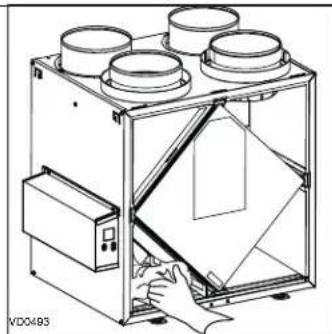
Note: The optional filter is a disposable filter. It should be replaced when it is too dirty.
- Remove the core.
- Clean the condensing tray with a damp cloth.
- Check the exterior air intake hood:
- Make sure there are no leaves, twigs, ice or snow that could be drawn into the vent.
CAUTION
A blocked air vent or filter, even partially, could cause the unit to malfunction. The comfort provided by the unit could be reduced and the risk of unit frost could increase. This could cause unit breakdown and/or damage to property.
Clean if necessary.
- Rotate the blower wheels by hand. If one of the wheels does not rotate easily, contact your installer.
- Reassemble the components. Pay special attention to the filters by making sure that they are engaged in their slots.
- Close the unit door and reconnect power supply.
- Reset filters, if required. If using an optional main wall control (DEHUMIDISTAT OR AUTOMATIC), press on the INT/AUTO button for 5 seconds to reset the filters. If using the ADVANCED optional main wall control, follow the instructions on the touch screen.
MERV8 FILTER INCLUDED
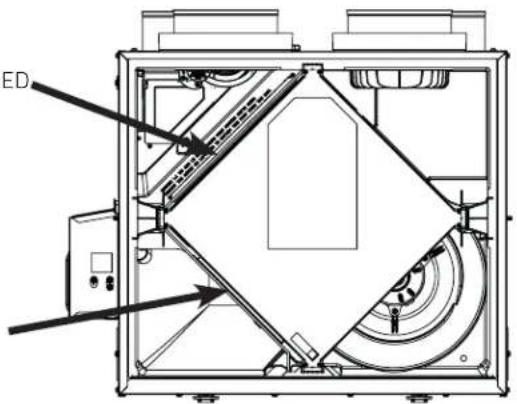
EXHAUST FILTER INCLUDED
Pull the core 3" to 4" out.
Bend the two filter frame flaps to form a 45-degree angle, as illustrated below.
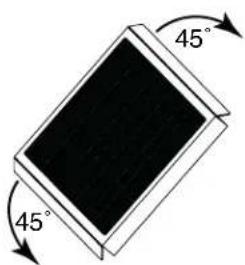
Install the filter over the core as illustrated hereafter.
Push the core and the filter to the bottom of the unit.
OPTIONAL FILTER (EXHAUST FILTER NOT INCLUDED)
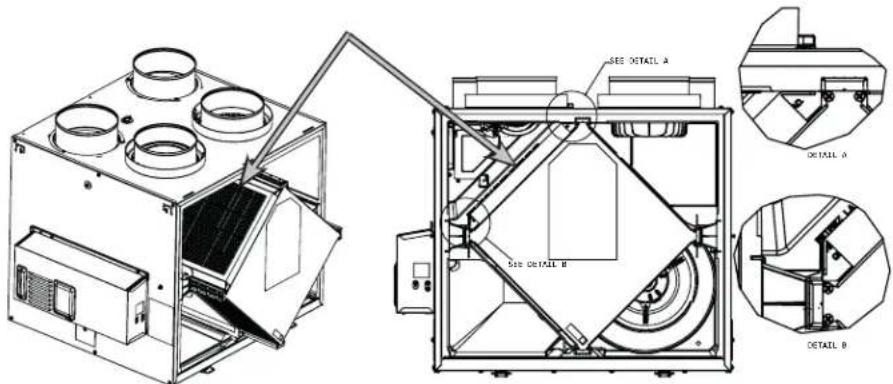
NOTE: The optional filter replaces the MERV8 filter.
9. MAINTENANCE (CONT'D)
9.2 ANNUAL (AT FALL)
- Repeat steps 1 to 6 from the previous section and continue with the following steps:
CAUTION
-
Handle the recovery core with care.
-
Clean the recovery core:
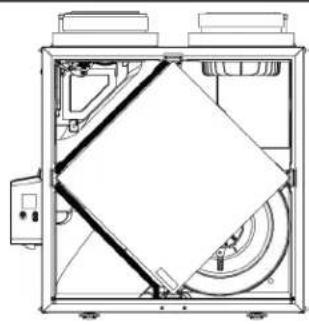
| HRV MODELS ERV MODELS | |
| ·Remove the core. ·Let it soak in a mixture of cold or lukewarm water and mild soap (dishwashing liquid). ·Rinse thoroughly. ·Shake the core to remove excess water and let it dry. | Remove the dust on the core using a vacuum cleaner and a soft brush attachment. CAUTION: DO NOT SOAK THE ENERGY RECOVERY CORE IN WATER |
- Clean the blower assemblies. Do not disassemble the blower assemblies.
- Remove the dust using a vacuum cleaner with a soft brush attachment.
- Reassemble the components.
- Reconnect power supply.
10. USER'S TROUBLESHOOTING
If the unit does not work properly, reset the unit by unplugging it for one minute then replug it.
Contact customer service at 1-800-567-3855 for any unresolved issue.
| PROBLEM TRY THIS | |
| 1. Nothing works. • See if the unit is plugged in. • See if the unit is receiving power from the house circuit breaker or fuse. | • Clean the unit (see Section 9). If the problem is not solved, contact your installer. |
| 2. Noisy unit. | |
| 3. Condensation inside windows under cold weather conditions. | • Operate the unit at MAX speed during activities generating excess humid (family gatherings, extra cooking, etc.). • Leave curtains half-open to allow air circulation. •Store all firewood in a closed room with a dehumidifier or in a well ventilated room, or store the wood outdoors. •Keep the temperature in your house above 18 °C (64°F). |
| 4. Humidity inside under hot/humid weather conditions. | • Operate the unit in MIN speed. •Temporarily switch to INT mode (if available). •Use a dehumidifier. |
| 5. Air too dry. • Operate the unit at MIN speed. | •Make sure the outdoor hoods are not blocked. •Operate the unit at MIN speed. •Install a duct heater (contact your installer). |
| 6. Air too cold at the air supply register. |
11. WARRANTY
This ventilation unit is a high quality product, built and packaged with care. The manufacturer warrants to the original purchaser of its product, that such products will be free from defects for the period stated below, from date of original purchase. For all units, the warranty covers parts only against any operational defect. This 5-year warranty is subject to performance of the core maintenance according to recommendations in this manual. The heat recovery core (HRV) has a 10-year warranty, and the energy recovery core (ERV) has a 5-year warranty. If any defect should occur, we urge you to read the user guide carefully. If the problem persists, observe the following rules:
RULES TO FOLLOW
If the unit is defective, contact your ventilation contractor (see address on your user manual cover page). The contractor will determine with you the reason for the defect, and if needed, do the replacement or repair. If ever it is impossible to reach your ventilation contractor, call 1-800-567-3855 (in North America); the personnel will be pleased to give you the phone number of a distributor or a service center near you.
REPLACEMENT PARTS AND REPAIR
In order to ensure your ventilation unit remains in good working condition, you must use the manufacturer's genuine replacement parts only. The manufacturer's genuine replacement parts are specially designed for each unit and are manufactured to comply with all the applicable certification standards and maintain a high standard of safety. Any third party replacement part used may cause serious damage and drastically reduce the performance level of your unit, which will result in premature failing. The manufacturer also recommends contacting a service depot certified by the manufacturer for all replacement parts and repair.
BILL OF PURCHASE
No replacement or repair covered by the warranty will be carried out unless the unit is accompanied by a copy of the original bill of purchase. Please retain your original.
MISCELLANEOUS COSTS
In each case, the labor costs for the removal of a defective part and/or installation of a compliant part will not be covered by the manufacturer.
CONDITIONS AND LIMITATIONS
Intended for a building on which Part 9 of division B from the effective version of the National Building Code of Canada applies with additional restrictions and exception as described below.
Part 9 of Division B application according to the effective version of the National Building Code of Canada:
Part 9 of Division B applies to all buildings falling under the effective version of the Canadian Building Code definitions and conditions as listed below:
All building* of 3 storeys or less in building height, having a building area not exceeding 600m2 and used for major occupancies classified as of:
Group C1, residential occupancies,
Group D2, business and personal services occupancies,
Group E3, mercantile occupancies, or
Group F, Divisions 2 and 35 medium- and low-hazard industrial occupancies.
And all major occupancies classified as of:
Group C1, residential occupancies exceeding 600m
2 in building area or exceeding 3 storeys in building height
However, Group F buildings are excluded since the H/ERV have only been evaluated for installation in non-hazardous locations as per the applicable Canadian safety standard.
Refer to the table below for some common examples included in each building group.
| Group & Division Major Occupancy Examples | |
| C Residential Single-family houses, Hostels, | Multi-family buildings |
| D Business and Personal Services Banks, Offices | |
| E Mercantile Department stores, Supermarkets |
Refer to note A-3.1.2.1 from the effective version of theNational Building Code of Canada for more examples.
*Building size determination consider internal separation and shall be evaluated in accordance with section 1.3.3.4 from the effective version of the National Building Code of Canada.
Residential occupancy means the occupancy or use of a building or part thereof by persons for whom sleeping accomodation is provided but who are not harbored for the purpose of receiving care of treatment and are not involuntarily detained.
2Business and personal services occupancy (Group D) means the occupancy or use of a building or part thereof for the transaction of business or the rendering or receiving of professional or personal services.
3Mercantile occupancy (Group E) means the occupancy or use of a building or part thereof for displaying or selling of retail goods, wares or merchandise.
4Medium-hazard industrial occupancy (Group F, Division 2) means an industrial occupancy in which the combustible content is more than 50kg / m2 or 1200MJ / m2 of floor area and no classified as a high-hazard industrial occupancy.
5Low-hazard industrial occupancy (Group F, Division 3) means an industrial occupancy in which the combustible content is not more than 50kg / m2 or 1200MJ / m2 of floor area.
Exception:
Installation within a single classroom is acceptable provided the unit is installed with an independent ducting system, distinct from the HVAC system, which is limited to that classroom and used to ventilate that classroom only. Additional restrictions from this section remain applicable.
Restrictions:
The H/ERV shall not be installed within or be used to exhaust air from an environment that contains:
- Corrosive gas, vapor, emanations or solvents.
-
Flammable or explosives gas, vapor, emanations, solvents or dusts.
-
Highconcentrationsof perfumes,nailpolishorhairtreatmentproducts(bleaching,coloringagents,etc)suchasfrom or nail salons.
- High concentration of chemical emanations from solvents, paints or other chemical cleaning agent products.
The H/ERV shall not be used to exhaust air exceeding 50% RH and 11° dew point over an extended period (more than 24 hours) when outdoor temperature is below -15°C .
The H/ERV shall not be used to exhaust air from an environment that contains high levels of particles concentration unless the exhaust air is pre-filtered with capture efficiency filters selected relative to the particle size distribution before entering the H/ERV.
The H/ERV shall not be used to exhaust air cooking effluents but could be used to provide ventilation for a kitchen in a group C building of 3 storeys or less in building height, having a building area not exceeding 600m2 only. The stale air exhaust register location must comply with the requirement from the building code and the user manual.
Applications involving airborne pathogens or virus, smoke, harmful gas are not recommended. Such application requires extra care to avoid recirculation and internal cross-contamination. Please contact customer service for more information.
The above warranty applies to all cases where the damage is not a result of poor installation, improper use, mistreatment or negligence, acts of God, or any other circumstances beyond the control of the manufacturer. Furthermore, the manufacturer will not be held responsible for any bodily injury or damage to personal property or real estate, whether caused directly or indirectly by the unit. This warranty supersedes all prior warranties.
Venmar Ventilation ULC, 550 Lemire Blvd., Drummondville, Quebec, Canada J2C 7W9 venmar.ca / vanee.ca 800-567-3855
GUIDE D'INSTALLATION ET D'UTILISATION
| A180H75RT* | |
| A180E75RT* | |
| A230H75RT* A230H75RS* | |
| A210E75RT* A210E75RS* |
| V180H75RT* | |
| V180E75RT* | |
| V230H75RT* V230H75RS* | |
| V210E75RT* V210E75RS* | |
ENREGISTREZ VOTRE PRODUIT EN LIGNE AU :
2.2.2 SYSTE M E D'EVACUATION A LA SOURCE (T-2) (LE MODE RECIRCULATION PEUT FONCTIONNER AVEC CETTE CONFIGURATION.)
A AVENTISSEMENT
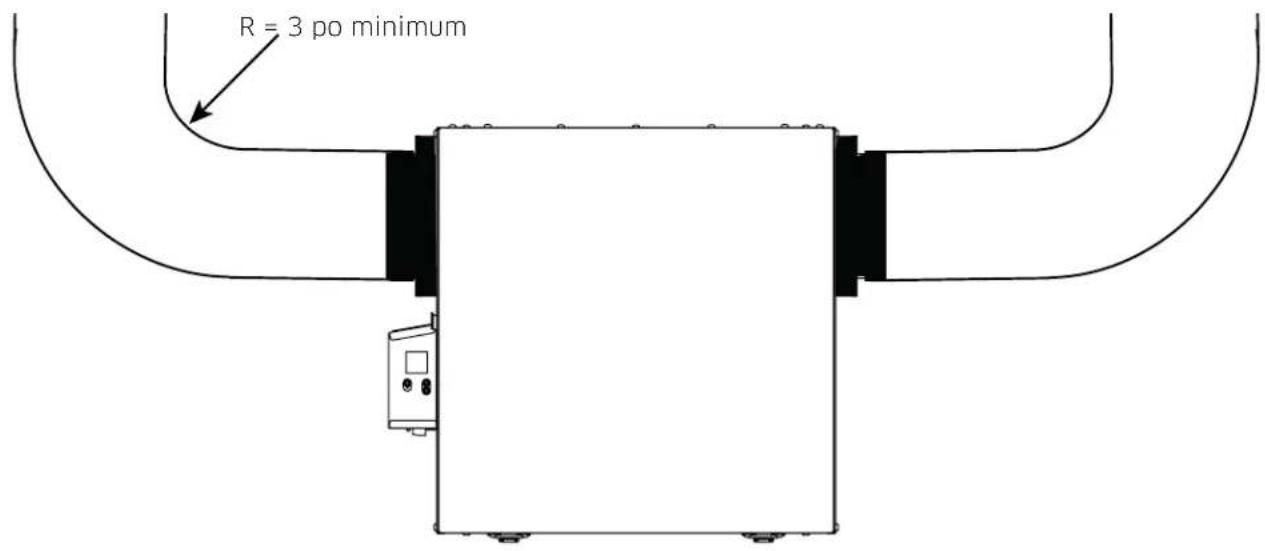
INSTALLATION CORRECTE
VD0489
ATTENTION

- USER AND INSTALLER MANUAL
- INSTALLER: READ THESE INSTRUCTIONS SAVE THEM FOR USER
- WARNING
- CAUTION
- LIMITATION
- TABLE OF CONTENT
- TECHNICAL DATA 4
- INSTALLATION 4
- CONNECTIONS 11
- 4.WIRING DIAGRAM 14
- NAVIGATION ON LCD SCREEN 15
- USING THIS UNIT 17
- SERVICE PARTS 18
- INSTALLER'S TROUBLESHOOTING 20
- 9.MAINTENANCE 23
- USER'S TROUBLESHOOTING 24
- 11.WARRANTY 25
- CONSUMER INFORMATION
- TECHNICAL DATA
- 1.1 AIR DISTRIBUTION (NORMAL OPERATION)
- INSTALLATION
- 2.1 LOCATING AND MOUNTING THE UNIT
- 2.1 LOCATING AND MOUNTING THE UNIT (CONT'D)
- SUSPENDED TO THE JOISTS OR TRUSTS
- OR
- WALL MOUNTED
- INSTALLATION WITH 2 BRACKETS INSTALLATION WITH 4 BRACKETS
- 2.2 INSTALLING THE DUCTWORK AND THE REGISTERS
- 2.2.1 FULLY DUCTED SYSTEM (T-1) (THIS CONFIGURATION ALLOWS RECYCURLATION MODE TO OPERATE.)
- STALE AIR FROM BUILDING
- FRESH AIR TO BUILDING
- 2.2.2 EXHAUST DUCTED SYSTEM (T-2) (THIS CONFIGURATION ALLOWS RECIRCULATION MODE TO OPERATE.)
- 2.3 CONNECTING THE DRAIN (HRV ONLY)
- 2.4 INSTALLING THE EXTERIOR HOODS
- 2.5 CONNECTING THE DUCTS TO THE UNIT
- 2.5.1 DUCTS CONNECTION
- CONNECTIONS
- CONNECTIONS (CONT'D)
- 3.3 CONNECTION TO THE CENTRAL FORCED-AIR SYSTEM
- 3.3.1 UNIT OPERATION USING A DRY CONTACT CONNECTION
- 3.3.3 SYNCHRONIZATION WITH CENTRAL FORCED-AIR SYSTEM FUNCTION
- WIRING DIAGRAM
- 5.1 LCD SCREEN
- 5.2 UNIT FIRST BOOT
- PREPARATION
- AUTO-BALANCING PROCEDURE
- INSTALLATION CONFIGURATION SELECTION
- 5.3 SETTINGS MODIFICATION
- 5.4 FACTORY SETTINGS RESET
- USING THIS UNIT
- 6.1 YOUR VENTILATION SYSTEM
- 6.2 INTEGRATED CONTROL
- MODE SELECTION
- 6.3 AHU MODE DISPLAY
- SERVICE PARTS (CONT'D)
- INSTALLER'S TROUBLESHOOTING
- INSTALLER'S TROUBLESHOOTING (CONT'D)
- 8.1 ELECTRONIC PROTECTION TO PREVENT ABNORMAL HIGH STATIC PRESSURE
- 180 CFM ERV MODELS
- ALL 180 CFM MODELS
- 210 CFM ERV MODELS
- ALL 210 AND 230 CFM MODELS
- MAINTENANCE
- 9.1 QUARTERLY
- MAINTENANCE (CONT'D)
- 9.2 ANNUAL (AT FALL)
- USER'S TROUBLESHOOTING
- WARRANTY
- RULES TO FOLLOW
- REPLACEMENT PARTS AND REPAIR
- BILL OF PURCHASE
- MISCELLANEOUS COSTS
- CONDITIONS AND LIMITATIONS
- EXCEPTION
- RESTRICTIONS
- GUIDE D'INSTALLATION ET D'UTILISATION
- 2.2.2 SYSTE M E D'EVACUATION A LA SOURCE (T-2) (LE MODE RECIRCULATION PEUT FONCTIONNER AVEC CETTE CONFIGURATION.)
- A AVENTISSEMENT
- ATTENTION
Brand : vänEE
Model : V210E75RT
Category : Air Conditioning