
OTL200 - Lamp Schwaiger - Free user manual and instructions
Find the device manual for free OTL200 Schwaiger in PDF.


| Product type | RGB LED table lamp |
| Dimensions (W x H x D) | 120 x 380 x 120 mm |
| Weight | 854 g |
| Power supply | 5 V DC, 1000 mA via USB Type C port |
| Battery type | Lithium-ion 4000 mAh (built-in, non-replaceable) |
| Charging time | Approx. 6.5 hours |
| Battery life | Approx. 15 h (RGB mode) / 8 h (warm white light) |
| LED | 8 RGB LEDs + 18 warm white LEDs |
| Luminous flux | 200 Lm |
| Color temperature | 3000 K (warm white) |
| Product material | Metal |
| Available colors | White (OTL200 012) / Black (OTL200 013) |
| Protection rating | IP44 (suitable for outdoor use under conditions) |
| Control | Touch sensor with on/off switch and RGB adjustment ring |
| Brightness adjustment | Yes, only in warm white mode (by long press) |
| Lighting modes | Warm white, fixed RGB color, automatic color change |
| Assembly required | Screw the rod into the base (pre-assembled) |
| Care and cleaning | Soft dry cloth; do not immerse; no harsh chemicals |
| Warranty | According to conditions from date of purchase (proof required) |
| LED lifespan | Approx. 50,000 h |
Frequently Asked Questions - OTL200 Schwaiger
User questions about OTL200 Schwaiger
0 question about this device. Answer the ones you know or ask your own.
Ask a new question about this device
Download the instructions for your Lamp in PDF format for free! Find your manual OTL200 - Schwaiger and take your electronic device back in hand. On this page are published all the documents necessary for the use of your device. OTL200 by Schwaiger.
USER MANUAL OTL200 Schwaiger
GB USER GUIDE AND SAFETY INSTRUCTIONS
RGB LED TABLE LAMP WITH TOUCH CONTROL
MODE D'EMPLOI ET CONSIGNES DE SÉCURITÉ
LAMPE DE TABLE À LED RVB À COMMANDE TACTILE
ISTRUZIONI PER L'USO E AVVERTENZE DI SICUREZZA
LAMPADA DA TAVOLO A LED RGB CON CONTROLLO TATTILE
natural_image
Two adjustable table lamps with black and white shades, one emitting a rainbow-colored light on top (no text or symbols visible)ALLGEMEINES
Read the user guide and keep it in a safe place
Congratulations and thank you for purchasing this SCHWAIGER Product.
This user manual is an integral part of this product. It contains important information on commissioning and handling.
This user manual is intended to assist you in using the product. Read through the instructions for use carefully. Store this guide safely throughout the product's entire service life and pass it on to any subsequent users or owners. Check that the supplied package is complete and ensure that none of the parts are defective or damaged.
INTENDED USE
The product is designed exclusively for atmospheric table lighting indoors or outdoors.
The product is intended for private use only and is not suitable for commercial use.
Only use the product as described in this user manual. Any other use is considered improper and may result in property damage.
PACKAGE CONTENTS
Device overview
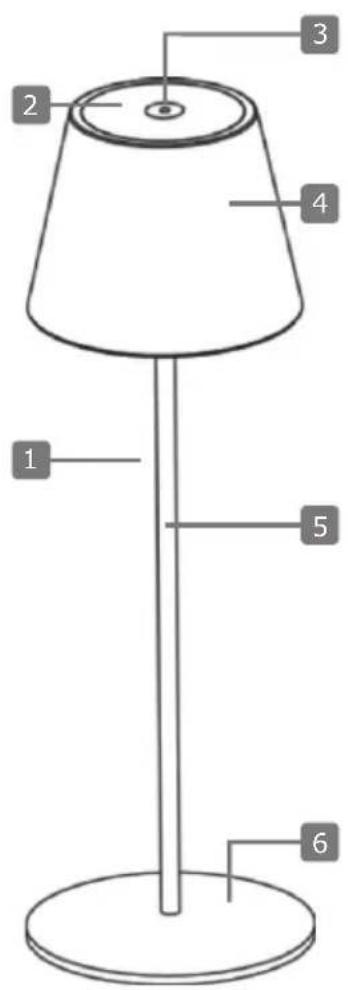

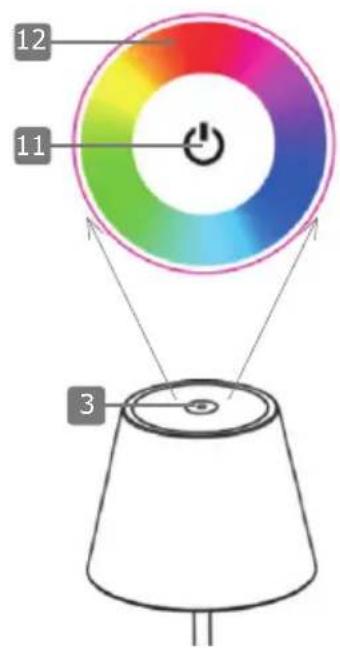
| Keys & Components | |||
| 1 RGB LED table lamp 7 Screw thread | |||
| 2 LED light surface 8 LED spots | |||
| 3 Touch sensor 9 USB Type C charging socket | |||
| 4 Lampshade 10 USB Type C charging cable | |||
| 5 Stand tube 11 On/Off switch | |||
| 6 Stand base 12 RGB color setting | |||
General safety and warning instructions

WARNING!
Risk of electric shock!
Faulty electrical installation or excessive mains voltage can lead to electric shock.
- If you use a USB charger, only connect it if the mains voltage of the socket matches the specification on the type plate.
- To charge the installed Li-ion battery, use only power supplies that com-ply with the SELV standard according to IEC 61558-2-6 or IEC 61347-2-13 or ES1 / IEC 62368-1 according to IEC 62368-3.
- Do not operate the product if it has visible damage or the USB charging cable is defective.
- Do not open the housing but entrust the repair to specialists. Contact a specialist workshop for this purpose. Liability and warranty claims are excluded in the event of repairs carried out independently, improper connection or incorrect operation.
- Only parts that correspond to the original device data may be used for repairs. This product contains electrical and mechanical parts which are essential for protection against sources of danger.
- Do not immerse the product or the USB charging cable in water or other liquids.
- Never touch the USB plug with wet hands.
- Never pull the USB plug out of the charging socket by the USB charging cable, but always hold the USB plug.
- Never use the USB charging cable as a carrying handle.
- Keep the product and the USB charging cable away from open flames and hot surfaces.
- Route the USB charging cable so that it does not become a tripping hazard.
- Do not bend the USB charging cable or place it over sharp edges.
- Never operate the product in wet areas or in the rain.
- Do not expose the product to rain or extreme weather conditions e.g., subzero temperatures, hail, extreme heat.
- Never place the product in such a way that it can fall into a pond, pool or similar.
- Charge the product indoors.
- Never reach for an electrical device if it has fallen into water. In such a case, immediately pull the USB charger out of the charging socket.
- Make sure that no liquid gets into the product and, if necessary, dry the product thoroughly before using it again.
- Ensure that children do not insert any objects into the product.
- When you are not using the product, cleaning it, or if interference occurs, always turn off the product and disconnect the USB charging cable from the charging port.
- The light source of this fixture is not replaceable; when the light source reaches its end of life, replace the entire fixture.

WARNING!
Hazards for children and persons with reduced physical, sensory or mental abilities (for example, partially disabled persons, elderly persons with reduced physical and mental abilities) or lack of experience and knowledge (for example, older children).
- This product can be used by children aged from eight years and above and persons with reduced physical, sensory, or mental capabilities or lack of experience and knowledge if they have been given supervision or instruction concerning use of the product in a safe way and understand the hazards involved. Children must not play with the product. Cleaning and user maintenance must not be carried out by children without supervision.
- Keep children younger than eight years away from the product and the connecting cable.
- Do not leave the product unattended during operation.
- Do not allow children to play with the packaging film. Children can get caught in it while playing and suffocate.

WARNING!
Fire hazard!
Improper handling of the product and battery may cause an explosion or fire.
- The battery is permanently installed in the case; it cannot be replaced.
- Keep the product away from water, other liquids, open flames, and hot surfaces.
- Do not cover the product and the USB charging cable with objects or clothing.
- Do not place open fire sources, such as lighted candles, on or near the product.
- Keep a distance of at least 5 cm from easily flammable materials.
- Charge the battery of the device regularly, even if you do not use it for a longer period of time (about every 3 months). Otherwise, the battery may become deeply discharged and permanently unusable.
- Due to the battery technology used, no previous discharge of the battery is necessary during the charging process, so it can be recharged regardless of the charge status.
- Place the product on a surface that is not sensitive to heat during the charging process. Slight heating during charging is normal.
- Leaking or damaged batteries can cause burns if they come into contact with the skin. Therefore, use suitable protective gloves in this case.
- Liquids leaking from batteries are chemically very aggressive. Objects or surfaces that come into contact with them can be severely damaged.

CAUTION!
Risk of injury!

The light from the LED lamp is bright and can damage the eyes when viewed from an insufficient distance.
- Never look into the illuminated LED lamp from a short distance.
- Never look at the illuminated LED lamp with a magnifying glass or other optical instruments .

IMPORTANT!
Risk of damage!
Improper handling of the product may result in damage to the product.
- Place the product on an easily accessible, level, dry, heat-resistant, and sufficiently stable work surface. Do not place the product on the edge of the work surface.
- Never place the product on or near hot surfaces (e.g., stove tops).
- Do not bring the product and the USB Type C charging cable into contact with hot parts.
- Never expose the product to high temperature (heating, etc.) or weather (rain, etc.).
- Never pour liquid into the product.
- Never immerse the product in water for cleaning and do not use a steam cleaner for cleaning. The product may otherwise be damaged.
- Do not use the product if the plastic components of the product are cracked or deformed. Replace damaged components only with suitable original spare parts.
OPERATION IN DETAIL
Assembling the product
For a secure hold, mount the RGB LED table lamp (1) before first use.
Take the stand tube (5) and screw it tightly into the screw thread (7) on the top of the stand base (6).

Stand tube (5) and lampshade (4) are already connected to each other and do not need to be mounted.
Charging the product
It is recommended to fully charge the built-in battery of the RGB LED table lamp (1) before using the product for the first time.

IMPORTANT!
Risk of damage!
Charging the product with an unsuitable USB charger may cause damage to the product.
- Only use USB chargers with max. 5 V DC output voltage for charging.
- Place the product on a dry, horizontal surface that is not sensitive to heat for charging.
- Unwrap the supplied USB Type C charging cable (10) completely.
- Open the plastic cover on the bottom of the lampshade (4).
- Insert the USB Type C plug into the USB Type C charging socket (9).
- Insert the USB plug into a suitable USB charger or into an active USB socket (e.g., laptop, computer).
During the charging process, the LED light surface (2) on the top of the lampshade (4) lights up red.
The charging time is about 6.5 hours.
When the product is fully charged, the LED light surface (2) turns green.
You can use the product afterwards.
Switching the product on/off
The product has a touch sensor (3) on the top of the lampshade (4) for control. The On/Off switch (11) is located in the center of the touch sensor. The RGB color setting (12) is arranged in a ring around this switch.
- Briefly press the On/Off switch (11) on the touch sensor (3) once to switch on the product. Both the LED light surface (2) on the top and the LED spots (8) on the bottom of the lampshade (4) now glow warm white.
- Briefly press the On/Off switch (11) on the touch sensor (3) again to switch on the RGB color change mode. Both the LED light surface (2) and the LED spots (8) now light up automatically in different colors.
- Briefly press the On/Off switch (11) on the touch sensor (3) again to switch the product off.
Setting brightness
The LED light surface (2) and the warm white LED spots (8) are dimmable. To adjust their brightness, proceed as follows:
- Switch on the product as described above.
- Press and hold the On/Off switch (11) on the touch sensor (3) to increase the brightness. Release the On/Off switch (11) when you have reached the desired brightness level.
- Press and hold the On/Off switch (11) on the touch sensor (3) again to decrease the brightness. Release the On/Off switch (11) when you have reached the desired brightness level.
You can repeat this process as often as you like. The "Increase brightness" and "Decrease brightness" functions alternate in the process.
To switch the product off again, briefly press the On/Off switch (11) on the touch sensor (3) twice.
The product has a total of 8 RGB LEDs and 18 warm white LEDs. De-pending on whether the product is warm white or in RGB color mode, different LEDs will light up. All LEDs never light up together.
Setting luminous color
The LED light surface (2) and the RGB LED spots (8) can light up in different colors. To switch them on, proceed as follows:
- Switch on the product as described above.
- Touch the RGB color setting (12) at the position with the desired color to set the corresponding light color. Both the LED light surface (2) and the LED spots (8) light up permanently in the set light color.
- Briefly press the On/Off switch (11) on the touch sensor (3) to switch on the RGB color changing mode. The product now lights up automatically alternating in different colors.
To switch the product off again, briefly press the On/Off switch (11) on the touch sensor (3).
TECHNICAL DATA
| Item number OTL200 012 / | OTL200 013 | Dimmable Yes (only warm white LED) |
| Connections 1x USB Type C | socket Charging time approx. 6,5 h | |
| Power supply 5 V DC, 1000 | mA Lighting time | |
| Battery Lithium-ion-battery | Protection IP44 | |
| Battery capacity 4000 mAh | Protection class III | |
| LED 8x RGB LED | 18x LED warm white | Product material |
| LED power | 0,18 W (RGB LED)0,20 W (LED warm white) | Color |
| Luminous flux | 200 Lm | Dimensions (WxHxD) |
| Color temperature | 3000 K | Weight |
| Life time | approx. 50000 h |
MAINTENANCE & CLEANING
i IMPORTANT!
Short circuit hazard!
Water or other liquids entering the housing can cause a short circuit.
- Never immerse the product in water or other liquids.
• Make sure that no water or other liquids get into the housing.
i IMPORTANT!
Risk of damage!
Improper handling of the product may result in damage to the product.
- Do not use aggressive cleaning agents, brushes with metal or nylon bristles, or sharp or metallic cleaning objects such as knives, hard spatulas, and the like. These can damage the surfaces.
- Before cleaning, turn off the product and remove the USB cable.
- Clean the product with a soft, dry cloth.
- If the product is stubbornly dirty, use a slightly damp cloth and a little mild detergent if necessary.
- Allow all parts to dry completely afterwards.
Storage
All parts must be completely dry before storing.
• Always store the product in a dry place.
- Store the product out of children's reach in a securely locked place and at a storage temperature between 5 °C and 20 °C (room temperature).
Conformity
CE The CE marking is Schwaiger GmbH's declaration that the product meets the essential protection requirements stipulated in the applicable directives and regulations.
Disposal
Do not dispose of batteries or electric and electronic devices in the normal household waste. The consumer is legally obliged to return electrical and electronic devices and batteries that are at the end of their useful life to the point of sale or public collection points that have been set up for this purpose. Legislation in the country of use governs individual details regarding disposal. The symbol on the product, the user guide or the packaging indicates this legal requirement.
Batteries and rechargeable batteries must not be disposed of with household waste!
As a consumer, you are required by law to return all batteries and rechargeable batteries, whether they contain harmful substances* or not, to a collection point in your municipality / district or in the trade, so that they can be disposed of in an environmentally friendly manner.
*marked with: Cd = cadmium, Hg = mercury, Pb = Lead
- Return the product completely (with the integrated battery) and only in discharged condition to your collection point.
Disclaimer
Schwaiger GmbH does not accept any liability or warranty for damages that are sustained due to improper installation or mounting, improper use of the product or non-compliance with the safety instructions.
Manufacturer's information
Dear Customer,
Please contact our Technical Support if you need technical advice and your retailer is unable to help you.
Warranty
The warranty period starts when the product is purchased. The purchase receipt, such as a till receipt, invoice or delivery slip, serves as proof of this date. Keep these documents in a safe place. Our warranty is based on our warranty conditions valid at the time of purchase.
Office Hours (Technical Support in German)
Monday to Friday: 8:00 a.m. - 5:00 p.m.
GÉNÉRAL
- GB USER GUIDE AND SAFETY INSTRUCTIONS
- MODE D'EMPLOI ET CONSIGNES DE SÉCURITÉ
- ISTRUZIONI PER L'USO E AVVERTENZE DI SICUREZZA
- ALLGEMEINES
- Read the user guide and keep it in a safe place
- INTENDED USE
- PACKAGE CONTENTS
- General safety and warning instructions
- WARNING!
- Risk of electric shock!
- Fire hazard!
- CAUTION!
- Risk of injury!
- IMPORTANT!
- Risk of damage!
- OPERATION IN DETAIL
- Assembling the product
- Charging the product
- Switching the product on/off
- Setting brightness
- Setting luminous color
- MAINTENANCE & CLEANING
- i IMPORTANT!
- Short circuit hazard!
- Storage
- Conformity
- Disposal
- Batteries and rechargeable batteries must not be disposed of with household waste!
- Disclaimer
- Manufacturer's information
- Warranty
- Office Hours (Technical Support in German)
- GÉNÉRAL
Brand : Schwaiger
Model : OTL200
Category : Lamp