
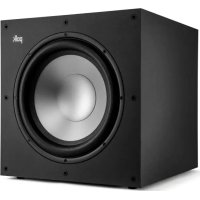
Signature Elite Subwoofer ES12 - Subwoofer DENON - Free user manual and instructions
Find the device manual for free Signature Elite Subwoofer ES12 DENON in PDF.


| Product Type | Active subwoofer with vent, dual internal Power Port |
| Brand | Denon |
| Model | Signature Elite Subwoofer ES12 |
| Speaker | Subwoofer |
| Amplifier Type | Class D |
| Continuous Power (RMS) | 300 W |
| Frequency Response (-3 dB) | 22 Hz - 250 Hz |
| Frequency Response (-10 dB) | 18 Hz - 350 Hz |
| Low-Pass Crossover Frequency | 50 Hz - 160 Hz + LFE |
| Phase Adjustment | -135° to +180° in 45° increments |
| Dimensions (W x H x D) | 362 x 483 x 483 mm |
| Weight | 21.6 kg |
| Inputs | LFE (RCA), left/right RCA line inputs |
| Controls | Volume, phase, low-pass, auto standby/always on mode, main switch |
| LED Indicators | Volume, low-pass frequency, phase setting |
| Power Supply | AC, power cable included |
| Power Consumption | Not specified |
| Feet | Permanently installed (non-leveling) |
| Maintenance and Cleaning | Occasionally dust with a dry cloth. Do not use abrasive or solvent-based cleaners. |
| Safety | Do not expose to water, moisture, high temperatures. Do not block vents. Unplug during thunderstorms. |
| Warranty | 3 years electronics and amplifier, 5 years subwoofer and speaker (USA and Canada) |
| Included Accessories | Removable grille, power cable, documentation |
Frequently Asked Questions - Signature Elite Subwoofer ES12 DENON
User questions about Signature Elite Subwoofer ES12 DENON
0 question about this device. Answer the ones you know or ask your own.
Ask a new question about this device
Download the instructions for your Subwoofer in PDF format for free! Find your manual Signature Elite Subwoofer ES12 - DENON and take your electronic device back in hand. On this page are published all the documents necessary for the use of your device. Signature Elite Subwoofer ES12 by DENON.
USER MANUAL Signature Elite Subwoofer ES12 DENON
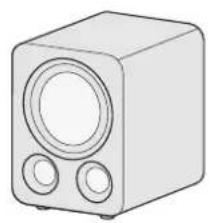
Check that the following items came in the box.
natural_image
Line drawing of a rectangular speaker with two circular buttons (no text or symbols)Signature Elite Subwoofer


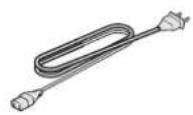
DocumentationRemovable Griflower Cable

Position the subwoofer
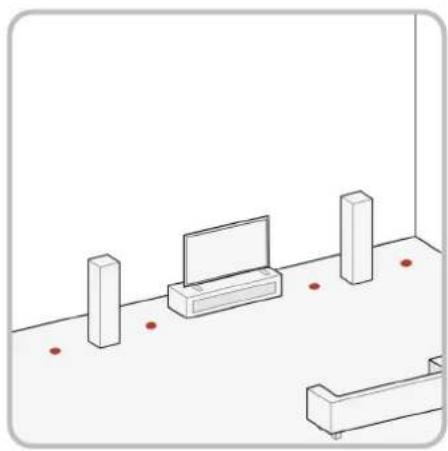
Your subwoofer offers many placement options: in an entertainment center, behind furniture, or next to a sofa or chair.
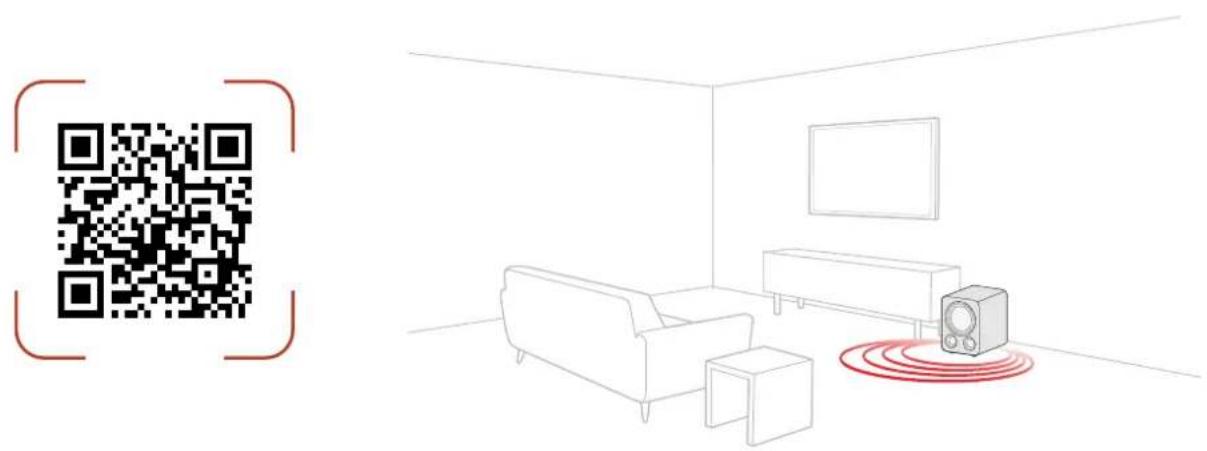
You may place your subwoofer anywhere in the room, but you'll enjoy the best performance when it's on the same side of the room as your system's front speakers. See the image to the right for potential placement options.
Placing your subwoofer near a wall or in a corner will increase its loudness. When placing your subwoofer in the room, always place your subwoofer on its base feet side down. If you can at all avoid it, do not place your subwoofer next to an open door.
We recommend placing your subwoofer in different locations within your room to learn what produces the best sound quality for your listening environment.
natural_image
Isometric line drawing of a room with a TV, benches, and a wall-mounted platform (no text or symbols)
Connect the subwoofer to your AV receiver or amplifier
LFE setup
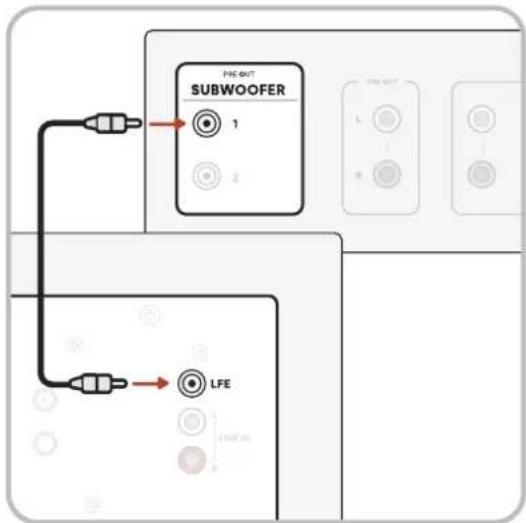
LFE (low-frequency effects) is recommended for AV receivers with a dedicated LFE channel or subwoofer pre-out.
- Turn off the power on your amplifier/receiver.
- Connect the LFE cable from your receiver to the dedicated LFE input.
- The subwoofer detects when an LFE cable has been connected and automatically sets to LFE mode and bypasses the low-pass filter.
- Follow the bass management instructions on your AV receiver to integrate the subwoofer into the rest of your audio system.
Line in setup
This method is recommended for systems with no LFE/subwoofer output jack, such as 2-channel systems.
-
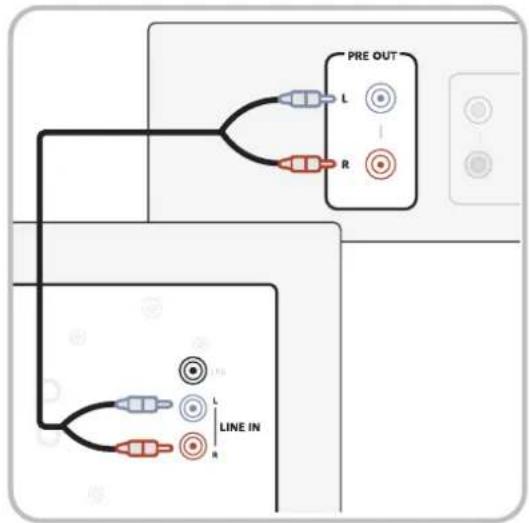
Turn off the power of the device (such as a pre-amplifier) you intend to connect to the subwoofer.
-
Connect standard RCA cables from the left and right inputs of the subwoofer to the appropriate output of the device, usually a left and right post-volume pre-out.
NOTE: Do not use a tape-out or record-out as these will not track the volume control.
- Adjust the volume, lowpass, and phase controls on the subwoofer as needed. You can start at 80Hz and 0 degrees and adjust from there.
4 Plug in the power cable and turn on the subwoofer
-
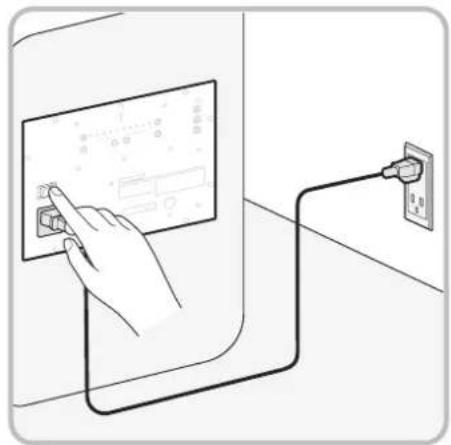
Plug the power cable into the subwoofer, then into a power outlet.
-
Turn on the subwoofer by switching the Main On/Off Switch. See the next page for more information.
natural_image
Illustration of a hand interacting with a touchscreen device connected to a wall-mounted power outlet (no text or symbols visible)5 Setup is now complete!
Watch TV or listen to music and adjust the subwoofer settings to your preferences. See the next page for a diagram of the subwoofer back panel.
For support, FAQs, and more information about the subwoofer, visit polkaudio.com/SignatureElite.
Subwoofer features
Subwoofer back-panel controls
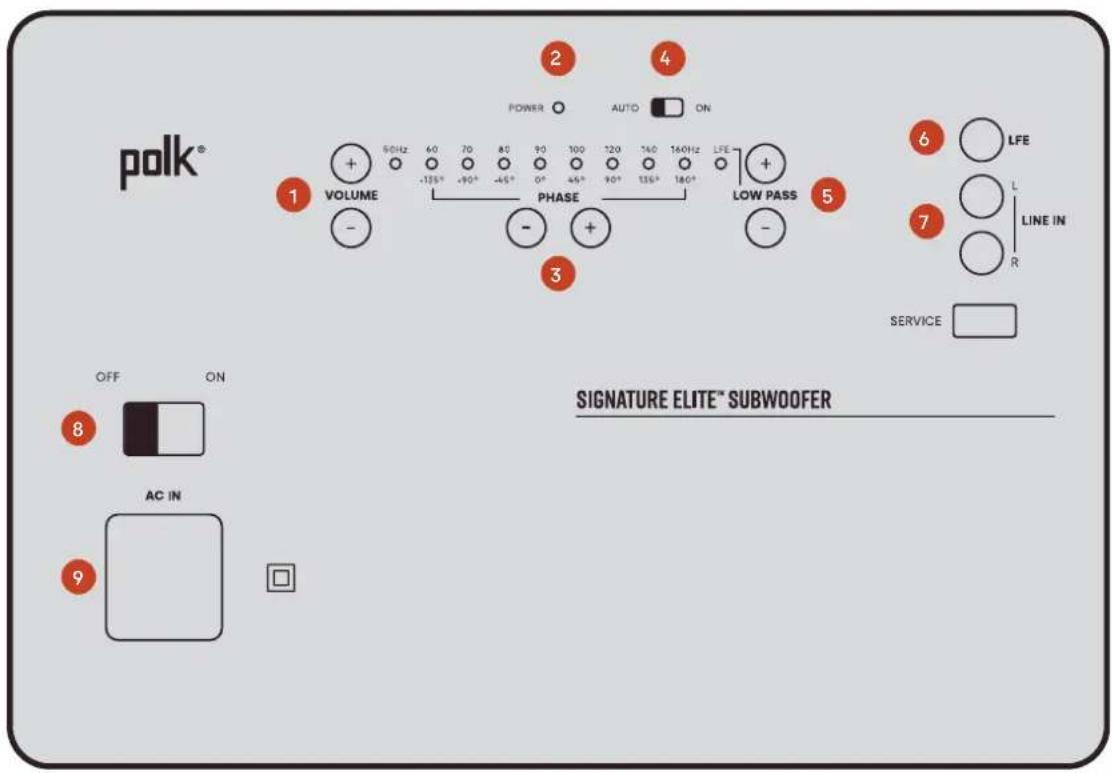
| 1 Volume control | When you set up your subwoofer for the first time, you may have to make adjustments several times before you hear what you personally like. Start with the volume at 50%. Adjust by ear using a wide variety of CDs and video sources. Adjust for deep, powerful bass without "boominess."We recommend that you use your AV receiver to run room correction features (like Audyssey or Dirac) and allow the receiver to optimize your speakers and subwoofer(s). |
| 2 LED power indicator | Amber: The subwoofer is connected to power and in standby mode.Green: The subwoofer is on and ready to use. |
| 3 Phase control | Tap the +/- buttons next to Phase to adjust the phase setting. If you're using a single subwoofer, you can generally leave the phase at 0 degrees. However, you may need to change the phase depending on your speaker arrangement. |
| 4 Auto on / Always on switch | Auto On: Subwoofer wakes up as soon as it receives an audio signal and goes into standby ~20 minutes after the audio signal is stopped.Always On: Subwoofer never enters Standby. Use this mode if you have a means of controlling the main AC power to the subwoofer. |
| 5 Low-pass control | If your AV equipment doesn't have its own low-pass filter, you can adjust the low-pass filter higher or lower as preferred. If you connect an LFE cable from your AV receiver to the subwoofer, the subwoofer automatically switches to LFE mode. With the subwoofer in LFE mode, configure crossover settings in you AV receiver. |
| 6 LFE Input | LFE (low-frequency effects) is recommended for AV receivers with a dedicated LFE channel or subwoofer pre-out. See the previous page for connection instructions. |
| 7 Line Inputs | This method is recommended for systems with no LFE/subwoofer output jack, such as 2-channel systems. See the previous page for connection instructions. |
| 8 Main On/Off Switch | Use to completely cut the power to the subwoofer. Similar to removing the power cord. |
| 9 AC power inlet | Used to provide power to the subwoofer with the included power cable. |
Subwoofer adjustments & status lights
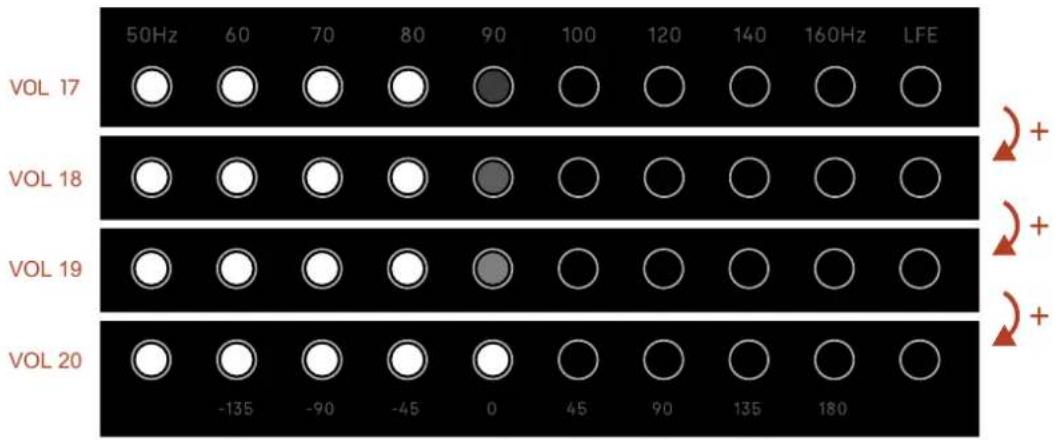
The Signature Elite Subwoofers include LED status lights to indicate the volume level, low-pass frequency, and phase setting. You can control these levels by pressing the corresponding + or - button on the back panel.
NOTE: The default subwoofer volume is 20, the default low-pass frequency is 80Hz, and the default phase setting is 0 degrees.
Volume levels
The subwoofer volume can be set between 1 and 40. Each LED light can shine at four different brightness levels to indicate the volume. See below for an example of some of the volume levels.
other
| VOL | 50Hz | 60 | 70 | 80 | 90 | 100 | 120 | 140 | 160Hz | LFE | |---|---|---|---|---|---|---|---|---|---|---| | VOL 17 | ○ | ○ | ○ | ○ | ● | ○ | ○ | ○ | ○ | ○ | | VOL 18 | ○ | ○ | ○ | ○ | ● | ○ | ○ | ○ | ○ | ○ | | VOL 19 | ○ | ○ | ○ | ○ | ● | ○ | ○ | ○ | ○ | ○ | | VOL 20 | ○ | ○ | ○ | ○ | ○ | ○ | ○ | ○ | ○ | ○ | | -135, -90, -45, 0, 45, 90, 135, 180; +/+ indicated by red arrows in the top-right panel.Low-pass frequency
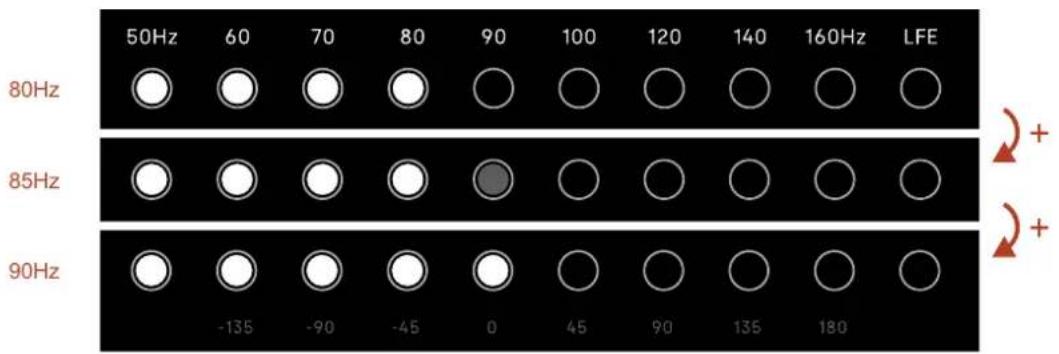
The low-pass frequency levels are labeled above the LED light strip. When one LED is dim, you're half way to the next frequency level. In the example below, the dim LED means 85Hz, half way between 80Hz and 90Hz.
other
| Frequency | 50Hz | 60Hz | 70Hz | 80Hz | 90Hz | 100Hz | 120Hz | 140Hz | 160Hz | LFE | |---|---|---|---|---|---|---|---|---|---|---| | 80Hz | ○ | ○ | ○ | ○ | ○ | ○ | ○ | ○ | ○ | ○ | | 85Hz | ○ | ○ | ○ | ○ | ● | ○ | ○ | ○ | ○ | ○ | | 90Hz | ○ | ○ | ○ | ○ | ○ | ○ | ○ | ○ | ○ | ○ | | -135 | -135 | -90 | -45 | 0 | 45 | 90 | 135 | 180 | + | + | The diagram shows a repeating pattern of circles aligned horizontally between the 80Hz and 90Hz rows. The rightmost circle is marked with '+'.Phase setting
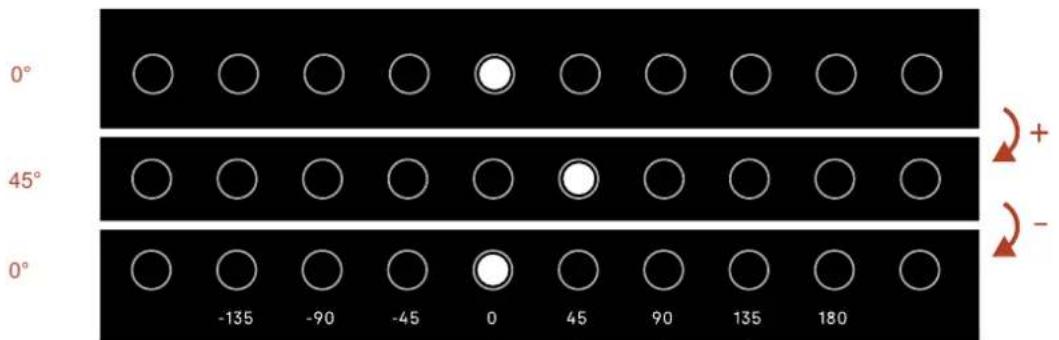
A single LED will light up to show where the phase is set. The phase levels are labeled on the back panel of the subwoofer, below the LED light strip. In the example below, phase is set to 0 degrees and 45 degrees.
Subwoofer specifications
| Type, power, and frequency | |||
| ES8 ES10 ES12 | |||
| Speaker type Subwoofer Subwoofer Subwoofer | |||
| Bass type | Vented with Single Internal Power PortTM | Vented with Double Internal Power PortTM | Vented with Double Internal Power PortTM |
| Frequency Range -3dB 32Hz - 180Hz 28Hz - 250Hz 22Hz - 250Hz | |||
| Frequency Range -10dB 28HZ - 400Hz 22Hz - 375Hz 18Hz - 350Hz | |||
| Continuous (RMS) 100W 200W 300W | |||
| Amplifier type | Class D | Class D | Class D |
| Phase adjustment | -135° to +180° in 45° increments | -135° to +180° in 45° increments | -135° to +180° in 45° increments |
| Low-pass crossover frequency | 50Hz-160Hz + LFE | 50Hz-160Hz + LFE | 50Hz-160Hz + LFE |
| Dimensions and weight | |||
| Product dimensions (W x H x D) | 325 x 383 x 386mm | 331 x 438 x 419mm | 362 x 483 x 483mm |
| Product weight (each) | 13kg | 17.7kg | 21.6kg |
| Cabinetry | |||
| Feet | Permanently installed (no levelling) | Permanently installed (no levelling) | Permanently installed (no levelling) |
| Inputs | |||
| Line level | RCA Left + Right | RCA Left + Right | RCA Left + Right |
| LFE | Single RCA Single RCA Single RCA | ||
| Controls | |||
| Main power | On / off rocker | On / off rocker | On / off rocker |
| Auto Power | Auto-on / always-on | Auto-on / always-on | Auto-on / always-on |
| Gain | Volume +/- pushbuttons | Volume +/- pushbuttons | Volume +/- pushbuttons |
| Low-pass filter | Low Pass +/- pushbuttons | Low Pass +/- pushbuttons | Low Pass +/- pushbuttons |
| Phase | Phase +/- pushbuttons | Phase +/- pushbuttons | Phase +/- pushbuttons |
Specifications are subject to change without notice.
Technical assistance
If your product was damaged during shipping, please contact the authorized Polk Audio retailer where you purchased your product. For technical support, FAQs, and repair information, visit support.polkaudio.com. Support email addresses and phone numbers vary based on the region where you purchased your product.
Product information
WARNING: Listen carefully
Polk Audio speakers are capable of playing at extremely high volume levels, which could cause serious or permanent hearing damage. Polk Audio accepts no liability for hearing loss, bodily injury, or property damage resulting from the misuse of its products. Keep these guidelines in mind and always use good judgment when controlling volume:
Limit prolonged exposure to volume levels that exceed 85 decibels (dB). For more information about safe volume levels, please review the Occupational Health and Safety Administration (OSHA) guidelines at www.osha.gov/.
Care and cleaning
The only thing you should ever need to do to your speakers is dust them occasionally. Never apply any abrasive or solvent-based cleaner or any harsh detergent.
Important safety instructions
- Read these instructions.
- Keep these instructions.
- Heed all warnings.
- Follow all instructions.
- Do not use this apparatus near water.
- Clean only with dry cloth.
- Do not block any ventilation openings. Install in accordance with the manufacturer's instructions.
- Do not install near any heat sources such as radiators, heat registers, stoves, or other apparatus (including amplifiers) that produce heat.
- Only use attachments/accessories specified by the manufacturer.
- Unplug this apparatus during lightning storms or when unused for long periods of time.
- Refer all servicing to qualified service personnel. Servicing is required when the apparatus has been damaged in any way, such as power-supply cord or plug is damaged, liquid has been spilled or objects have fallen into the apparatus, the apparatus has been exposed to rain or moisture, does not operate normally, or has been dropped.
- The equipment can be used at a maximum ambient temperature of 113 °F ( 45 °C ).
Notes on use
- Avoid high temperatures.
- Keep the unit free from moisture, water, and dust.
- Do not let foreign objects into the unit.
- Do not let insecticides, benzene, and thinner come in contact with the unit.
- Never disassemble or modify the unit in any way.
- Naked flame sources such as lit candles should not be placed on the unit.
- Do not expose the unit to dripping or splashing fluids.
- Do not place objects filled with liquids, such as vases, on the unit.
- Do not handle the power cable with wet hands.
- The equipment shall be installed near a power outlet so that the power is easily accessible.

Pour en savoir plus
www.quefairedemesdechets.fr
Disposal of old equipment
This marking indicates that this product should not be disposed with other household waste throughout the EU. To prevent possible harm to the environment or human health from uncontrolled waste disposal, recycle it responsibly to promote the sustainable reuse of material resources. To return your used device, please use the return and collection systems or contact the retailer where the product was purchased. They can take this product for environmentally safe recycling.
Warranty
U.S. and Canada Limited 3-year warranty for electronics and amplifier and Limited 5-year warranty for subwoofer and cabinet
Polk Audio, LLC (hereinafter "Polk" or "Polk Audio") provides this limited warranty to the original retail purchaser only. This warranty will terminate automatically prior to its stated expiration if the original retail purchaser sells or transfers the Product to any other party.
Polk Audio warrants to the original retail purchaser only, that the electronics and amplifier will be free from defects in material and workmanship for a period of (3) three years from the date of original retail purchase from an authorized Polk Audio Dealer, and the subwoofer and cabinet will be free from defects in material and workmanship for a period of (5) five years from the date of original retail purchase from an authorized Polk Audio Dealer.
To allow Polk to offer the best possible warranty service, please register your new product ("Product") online. To register, please visit support.polkaudio.com and click Register a Product, or call Polk Customer Service at 1-800-377-7655 in the USA or Canada within ten (10) days of the date of original purchase.
For Products that have a defect in material or workmanship, the Product must be shipped as designated by Polk, together with proof of purchase, prepaid and insured to either the Polk Authorized Dealer from whom you purchased the Product, or to a location designated by Polk. When returning products for warranty repair, you will be required to provide an original receipt or bill of sale, identifying you as the original purchaser and identifying that the purchase was made through a Polk Authorized Dealer. Products must be shipped in the original shipping container or its equivalent; in any case, the risk of loss or damage in transit is to be borne by you. If upon examination by Polk or Polk Authorized Dealer, it is determined that the unit was defective in materials or workmanship at any time during the limited warranty period, Polk or the Polk Authorized Dealer will, at its option, repair or replace the Product at no additional charge, except as set forth below. All replaced parts and Products become the property of Polk. Products replaced or repaired under this warranty will be returned to you, within a reasonable time, freight prepaid. If you have questions about warranty coverage or the warranty return process, please visit support.polkaudio.com and click Warranty. To contact Polk Customer Service from the United States or Canada, call 1-800-377-7655.
This warranty does not include service or parts to repair damage caused by accident, disaster, misuse, abuse, negligence, inadequate packing or shipping procedures, commercial use, voltage inputs in excess of the rated maximum of the unit, cosmetic appearance of cabinetry not directly attributable to defect in materials or workmanship, or service, repair, installation, or modification of the Product which has not been authorized or approved by Polk. This warranty shall terminate if purchased from an unauthorized dealer or if any of the serial numbers on the Product has been removed, tampered with, or defaced. If the Product is defective in materials or workmanship, your sole remedy shall be repair or replacement as provided in this limited warranty. In no event will Polk Audio be liable to you for any incidental or consequential damages arising out of the use or inability to use the Product, even if Polk Audio or a Polk Authorized Dealer have been advised of the possibility of such damages, or for any claim by any other party.
TO THE MAXIMUM EXTENT ALLOWED BY LAW, ALL WARRANTIES, INCLUDING BUT NOT LIMITED TO EXPRESS WARRANTY, IMPLIED WARRANTY, WARRANTY OF MERCHANTABILITY, FITNESS FOR PARTICULAR PURPOSE, AND WARRANTY OF NON-INFRINGEMENT OF INTELLECTUAL PROPERTY ARE EXPRESSLY EXCLUDED, AND POLK NEITHER ASSUMES NOR AUTHORIZES ANY PERSON OR ENTITY TO ASSUME FOR IT ANY DUTY, OBLIGATION OR LIABILITY IN CONNECTION WITH ITS PRODUCTS. POLK HEREBY DISCLAIMS AND HAS ABSOLUTELY NO LIABILITY FOR ANY AND ALL ACTS OF THIRD PARTIES. POLK IS NOT RESPONSIBLE FOR DIRECT, INDIRECT, SPECIAL, INCIDENTAL, OR CONSEQUENTIAL DAMAGES RESULTING FROM BREACH OF WARRANTY OR CONDITION OR UNDER ANY OTHER LEGAL THEORY, INCLUDING BUT NOT LIMITED TO, LOSS OF REVENUE, LOSS OF PROFITS, LOSS OF BUSINESS, OPPORTUNITY, GOODWILL, REPUTATION, COMPROMISE OR CORRUPTION OF DATA, OR ANY INDIRECT OR CONSEQUENTIAL LOSS OF DAMAGE. SOME STATES OR PROVINCES DO NOT ALLOW THE EXCLUSION OR LIMITATION OF INCIDENTAL OR CONSEQUENTIAL DAMAGES, SO THE ABOVE LIMITATION OR EXCLUSION MAY NOT APPLY TO YOU.
All implied warranties on this Product are limited to the duration of this expressed warranty. Some states or provinces do not allow limitations on how long an implied warranty or condition lasts, so the above limitations may not apply to you. This warranty gives you specific legal rights, and you also may have other rights that vary from state to state or province to province. This Warranty applies only to Products purchased in the United States of America or Canada, except Quebec. Residents of Quebec are governed by that province's consumer protection legislation. Polk reserves the right to modify this warranty statement at any time.
Garantie
natural_image
Line drawing of a rectangular speaker with two circular buttons (no text or symbols)Signature Elite Subwoofer


natural_image
Isometric line drawing of a room with a TV, two pillars, and a bed (no text or symbols)Configuration Line in
natural_image
Line drawing of a hand pressing a button on a screen while connecting to an electrical outlet (no text or symbols present)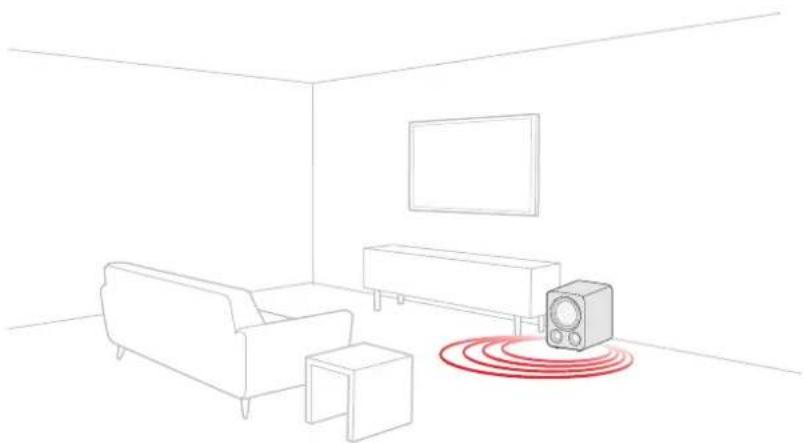
natural_image
Line drawing of a living room interior with sofa, TV, and speaker emitting sound waves (no text or symbols)Assistance technique
Disposal of old equipment
This marking indicates that this product should not be disposed with other household waste throughout the EU. To prevent possible harm to the environment or human health from uncontrolled waste disposal, recycle it responsibly to promote the sustainable reuse of material resources. To return your used device, please use the return and collection systems or contact the retailer where the product was purchased. They can take this product for environmentally safe recycling.
natural_image
Line drawing of a rectangular speaker with two circular buttons (no text or symbols)Signature Elite Subwoofer


natural_image
Simple line drawing of a room with a TV, two pillars, and a bed (no text or symbols)natural_image
Illustration of a hand interacting with a touchscreen device and connected to an electrical outlet (no text or symbols present)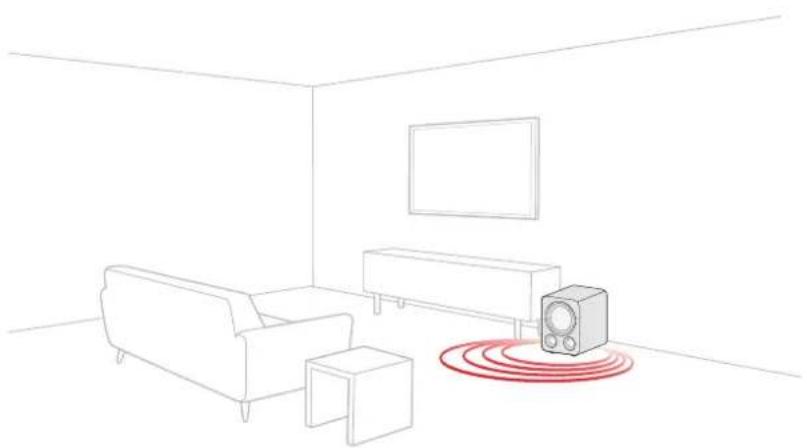
natural_image
Line drawing of a living room interior with sofa, TV, and speaker emitting sound waves (no text or symbols)Disposal of old equipment
This marking indicates that this product should not be disposed with other household waste throughout the EU. To prevent possible harm to the environment or human health from uncontrolled waste disposal, recycle it responsibly to promote the sustainable reuse of material resources. To return your used device, please use the return and collection systems or contact the retailer where the product was purchased. They can take this product for environmentally safe recycling.
GREAT SOUND FOR ALL®
Share Photos | Partager Des Photos | Compartir Fotos


PolkAudio
Sound United, LLC
5541 Fermi Court
Carlsbad, CA 92008
U.S.A.
EU Contact:
D&M Europe B.V.
Oude Stadsgracht 1
5611 DD Eindhoven
UK Importer:
D&M Audiovisual Ltd
Dale Road, Worthing,
West Sussex, United
Kingdom, BN11 2BH

- Position the subwoofer
- Connect the subwoofer to your AV receiver or amplifier
- LFE setup
- Line in setup
- Plug in the power cable and turn on the subwoofer
- Setup is now complete!
- Subwoofer features
- Subwoofer back-panel controls
- Subwoofer adjustments & status lights
- Volume levels
- Low-pass frequency
- Phase setting
- Subwoofer specifications
- Technical assistance
- Product information
- WARNING: Listen carefully
- Care and cleaning
- Important safety instructions
- Notes on use
- Disposal of old equipment
- Warranty
- U.S. and Canada Limited 3-year warranty for electronics and amplifier and Limited 5-year warranty for subwoofer and cabinet
- Garantie
- Configuration Line in
- Assistance technique
- GREAT SOUND FOR ALL®
- PolkAudio
Brand : DENON
Model : Signature Elite Subwoofer ES12
Category : Subwoofer