
ToneX One - Audio recorder IK Multimedia - Free user manual and instructions
Find the device manual for free ToneX One IK Multimedia in PDF.


| Product Type | Micro stompbox amplifier and distortion with AI modeling (Machine Modeling) |
| Brand | IK Multimedia |
| Model | ToneX One |
| Category | Audio recorder / Multi-effects pedal |
| Estimated dimensions | Approximately 5 x 10 x 5 cm (standard mini pedal format) |
| Weight | 160 g |
| Power supply | 9V DC 120 mA (center negative) or USB-C (5V 260 mA) |
| Modeling technology | AIMM™ (Artificial Intelligence Machine Modeling) |
| Number of built-in presets | 20, assignable to 3 active slots |
| Performance modes | Dual (A/B toggle) and Stomp (on/off) |
| Built-in effects | Noise gate, compressor, tone equalizer (bass, mid, treble), reverb, built-in tuner |
| Cabinet bypass | Yes, configurable in global mode |
| USB audio interface | Yes, 24-bit/44.1 kHz, 2 inputs/2 outputs |
| Connectivity | 6.35 mm mono input jack, 6.35 mm mono/stereo output jack, USB-C, 9V power input |
| Compatibility | Guitar and bass |
| Headphone output | Yes, via the output jack (adapter possible) |
| Included software | TONEX for Mac/PC SE (librarian/editor), AmpliTube 5 SE, TONEX Capture (modeling) |
| Sharing platform | ToneNET (tone.net) to download and share Tone Models |
| Chassis material | Anodized aluminum, Italian design and manufacturing |
| Care and cleaning | Clean with a soft, dry cloth. Do not use solvents or liquids. |
| Safety | Do not expose to humidity, extreme temperatures, or shocks. Use the recommended power supply. |
| Spare parts and repairability | Not intended for user repair. Contact technical support for any service. |
Frequently Asked Questions - ToneX One IK Multimedia
User questions about ToneX One IK Multimedia
0 question about this device. Answer the ones you know or ask your own.
Ask a new question about this device
Download the instructions for your Audio recorder in PDF format for free! Find your manual ToneX One - IK Multimedia and take your electronic device back in hand. On this page are published all the documents necessary for the use of your device. ToneX One by IK Multimedia.
USER MANUAL ToneX One IK Multimedia
But what's a Tone Model? 5
What if I have no amplifier to capture? 5
Presets 5
TONEX ONE overview 7
Connections 8
TONEX ONE into a power amplifier with your own cabinet 8
TONEX ONE feeding a FRFR or powered cabinet 10
TONEX ONE feeding a PA system 12
TONEX ONE for silent practicing 14
TONEX ONE for recording 15
TONEX ONE as a stomp in front of a real amp 16
TONEX ONE for practicing 17
Front panel & connections 18
Auto save 19
Clip 19
Safe mode 19
Tuner 19
Performance modes 20
Mode selector 20
Preset browsing mode 21
Browsing mode 21
Import Custom IR 22
Signal Flow 23
Parameters 24
Main parameters 24
Alternative parameters 24
Setup 25
Mode selector 25
Cab bypass 26
Input trim 27
Global volume 28
TONEX ONE as an audio interface 29
TONEX ONE for play-along 29
TONEX ONE for recording 30
TONEX Librarian 31
Features 32
Support 33
TONEX Ecosystem
Welcome to TONEX, a new ecosystem aimed at capturing, playing and sharing the best-sounding amplifiers on earth.
This ecosystem comprises these parts:
• TONEX PEDAL: a guitar and bass stomp box to play Tone Models live.
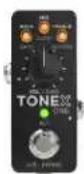
• TONEX ONE: a streamlined guitar and bass mini-stomp box to play Tone Models live.
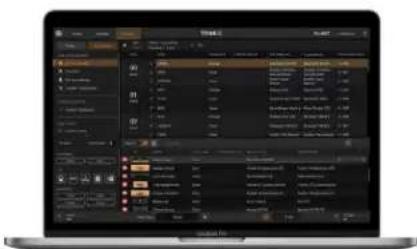
- TONEX for Mac/PC: a standalone application to play, manage and model Tone Models. Includes TONEX Librarian to transfer presets from your computer to TONEX hardwares and vice versa.
• TONEX Plug-in: to play any Tone Model inside your favorite DAW.
- AmpliTube 5 TONEX amp and stomp: to play any Tone Model inside AmpliTube 5.
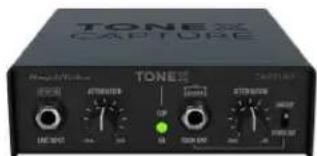
- TONEX Capture: a hardware device specifically designed for modeling any amplifier using TONEX Modeler.
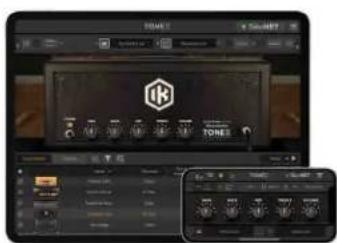
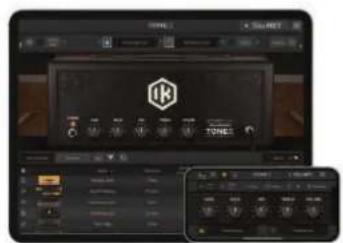
• TONEX App: to play Tone Models on your iOS device (both iPhone and iPad).
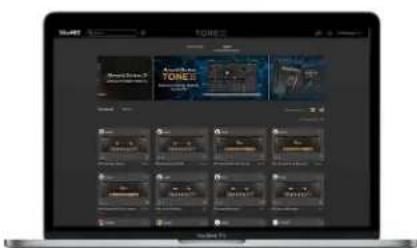
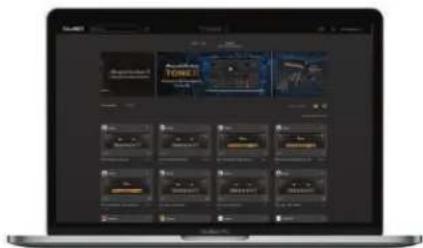
• ToneNET: a free tone-sharing platform for Tone Models.
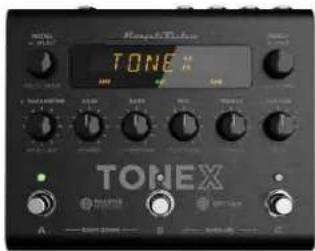
TONEX Pedal
TONEX ONE
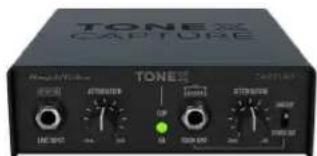
TONEX Capture
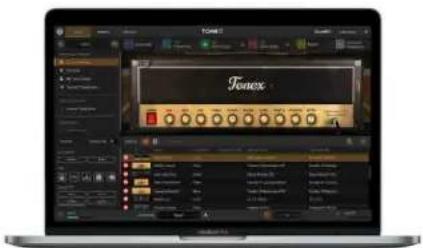
TONEX for Mac/PC
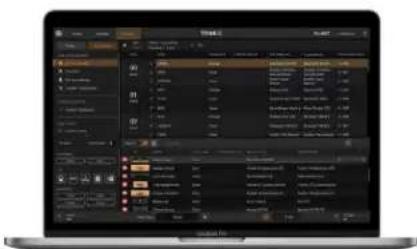
TONEX Librarian
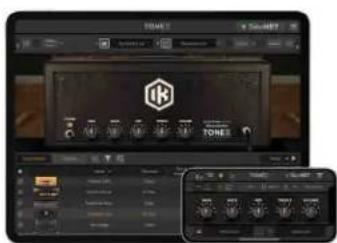
TONEX for iPhone/iPad
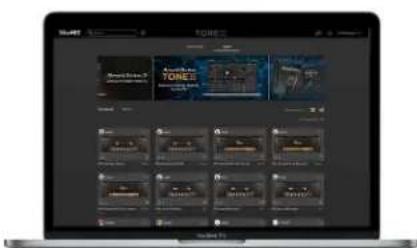
TONEX in ToneNET
But what's a Tone Model?
A Tone Model is the capture of a real guitar or bass rig with all its nuances and non-linearities. It aims to provide the same sound characteristics inside a computer so you no longer need the real rig itself for performing and recording. You can collect thousands of amplifiers, stomps and cabs inside TONEX, which will become a digital locker for all your gear.
A Tone Model can have various types:
- Stomp(s)
- Stomp(s) + amp
• Stomp(s) + amp + cab - Amp
- Amp + cab
A stomp(s) is any combination of guitar pedals: boost, overdrive, fuzz, distortion, EQ, preamplifier, etc...
N.B.
The stomp can't be a time-based or phase-based pedal such as: compressor, reverb, delay, chorus, phaser, flanger, etc...
Also some vintage fuzzes and overdrives that have parallel paths inside can't be modeled.
What if I have no amplifier to capture?
Don't worry, even if you don't have any amplifier to capture, you can play all the Tone Models available in TONEX Pedal, TONEX ONE and TONEX for Mac/PC plus any Tone Model made by other users available on our free platform ToneNET (tone.net).
Presets
These Tone Models are used inside TONEX presets.
TONEX presets consist of the following effects for tweaking any Tone Model:
- Noise gate
- Compressor
- Tone Model
- Tone EQ
- Reverb
A preset is the perfect foundation for any guitar tone.
Inside a preset, a Tone Model is divided in 2 parts: amp and cab.
Doing so lets us swap any amp/cab module with another Tone Model's amp/cab module to create new combinations of rigs.
If a stomp is paired with an amp creating a “stomp + amp” or a “stomp + amp + cab” Tone Model, the stomp part is tied to the amp and when swapping the amp part, the stomp follows as well.
TONEX ONE overview
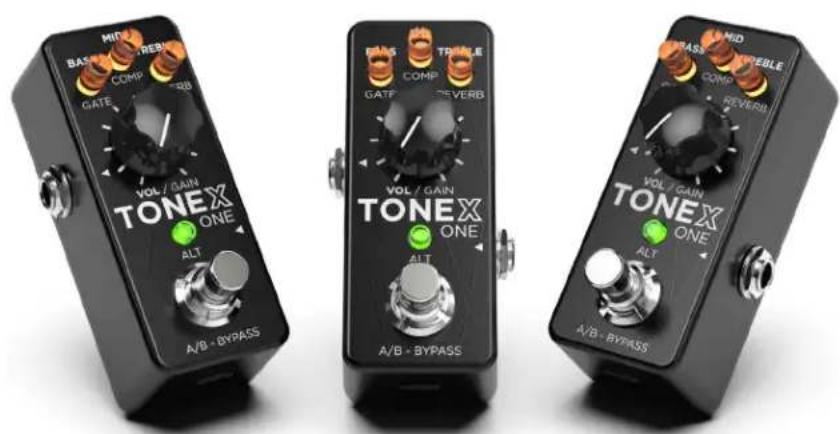
Machine Modeling amp and distortion micro-pedal
TONEX ONE is the ultimate amp and distortion stompbox micro-pedal, using IK's breakthrough AI Machine Modeling technology (AIMM™).
Play on stage with hundreds of included Tone Model rigs, your own generated ones, or an unlimited number from a community of users. Or use the same exact Tone Models in the studio with TONEX plug-in, TONEX for Mac/PC and TONEX amp and stomp inside AmpliTube 5.
Connections
TONEX ONE into a power amplifier with your own cabinet
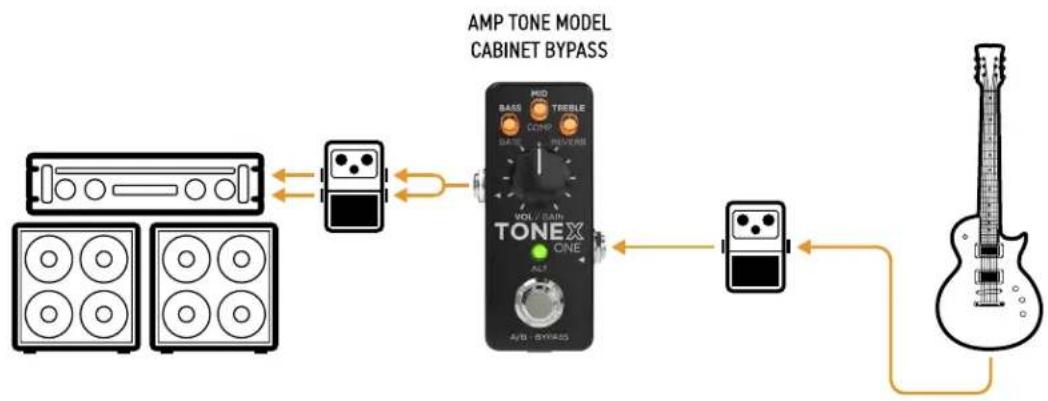
If you want to use TONEX ONE with your own cabinet, you can plug it directly to a power amplifier.
This is perfect if you want to have the flexibility and tone quality of TONEX using your own cabinet on stage. Remember to bypass the cab section to avoid unwanted double cab filtering.
PRO TIP: You can bypass the preamp section of your guitar or bass amplifier by plugging TONEX ONE into the return input of the amp's FX Loop.
This is an example of using the pedal inside a pedalboard connected to a power amplifier feeding a guitar or bass cabinet:
flowchart
graph LR
    A["Speaker with four circular indicators"] --> B["Speaker with three dots"]
    B --> C["TONEX Device with MDD, BASB, TREBLE, COMP, SPECTR, REVERSE"]
    C --> D["Speaker with four dots"]
    D --> E["TONEX Device with A/B, BYPASS"]
    E --> F["Speaker with four dots"]
    F --> G["Engine"]
    style A fill:#f9f,stroke:#333
    style G fill:#ccf,stroke:#333
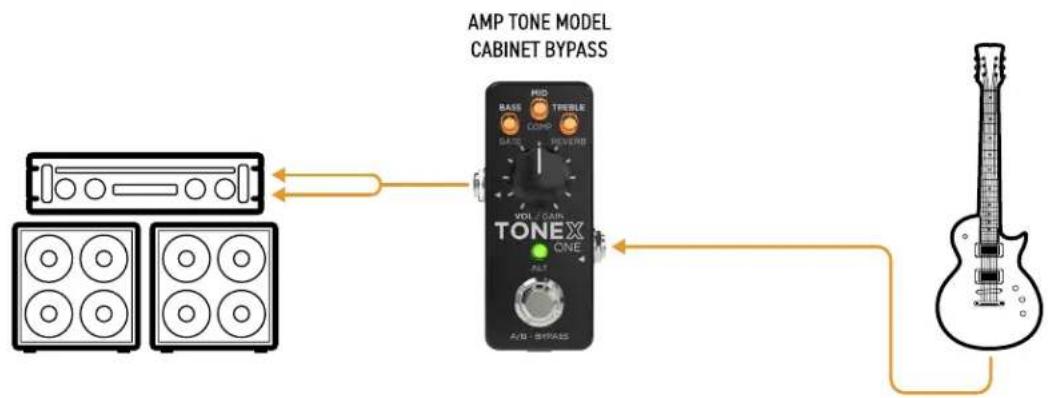
This is an example of using the pedal alone connected to a power amplifier feeding a guitar or bass cabinet:
flowchart
graph LR
    A["Speaker with four circles"] --> B["TONEX ONE"]
    C["Speaker with four circles"] --> B
    D["Speaker with four circles"] --> B
    B --> E["A/B - BYPASS"]
    F["Speaker with four circles"] --> G["TONEX ONE"]
    H["Speaker with four circles"] --> I["TONEX ONE"]
    J["Speaker with four circles"] --> K["TONEX ONE"]
    L["Speaker with four circles"] --> M["TONEX ONE"]
    N["Speaker with four circles"] --> O["TONEX ONE"]
    P["Speaker with four circles"] --> Q["TONEX ONE"]
    R["Speaker with four circles"] --> S["TONEX ONE"]
    T["Speaker with four circles"] --> U["TONEX ONE"]
    V["Speaker with four circles"] --> W["TONEX ONE"]
    X["Speaker with four circles"] --> Y["TONEX ONE"]
    Z["Speaker with four circles"] --> AA["TONEX ONE"]
    AB["Speaker with four circles"] --> AC["TONEX ONE"]
    AD["Speaker with four circles"] --> AE["TONEX ONE"]
    AF["Speaker with four circles"] --> AG["TONEX ONE"]
    AH["Speaker with four circles"] --> AI["TONEX ONE"]
    AJ["Speaker with four circles"] --> AK["TONEX ONE"]
    AL["Speaker with four circles"] --> AM["TONEX ONE"]
    AN["Speaker with four circles"] --> AO["TONEX ONE"]
    AP["Speaker with four circles"] --> AQ["TONEX ONE"]
    AR["Speaker with four circles"] --> AS["TONEX ONE"]
    AT["Speaker with four circles"] --> AU["TONEX ONE"]
    AV["Speaker with four circles"] --> AW["TONEX ONE"]
    AX["Speaker with four circles"] --> AY["TONEX ONE"]
    AZ["Speaker with four circles"] --> BA["TONEX ONE"]
    BB["Speaker with four circles"] --> BC["TONEX ONE"]
    BD["Speaker with four circles"] --> BE["TONEX ONE"]
    BF["Speaker with four circles"] --> BG["TONEX ONE"]
    BH["Speaker with four circles"] --> BI["TONEX ONE"]
    BJ["Speaker with four circles"] --> BK["TONEX ONE"]
    BL["Speaker with four circles"] --> BM["TONEX ONE"]
    BN["Speaker with four circles"] --> BO["TONEX ONE"]
    BP["Speaker with four circles"] --> BQ["TONEX ONE"]
    BR["Speaker with four circles"] --> BS["TONEX ONE"]
    BT["Speaker with four circles"] --> BU["TONEX ONE"]
    BV["Speaker with four circles"] --> BW["TONEX ONE"]
    BX["Speaker with four circles"] --> BY["TONEX ONE"]
    BZ["Speaker with four circles"] --> CA["TONEX ONE"]
    CB["Speaker with four circles"] --> DA["TONEX ONE"]
    DB["Speaker with four circles"] --> DBT["TONEX ONE"]
    DC["Speaker with four circles"] --> DD["TONEX ONE"]
    EE["Speaker with four circles"] --> EEY["TONEX ONE"]
    BFY["Speaker with four circles"] --> BZ
    BGX["Speaker with four circles"] --> BBX["TONEX ONE"]
    BHX["Speaker with four circles"] --> BBX
    BIY["X/A/B - BYPASS"] --> BBX
You can use a regular instrument cable if you want to run you TONEX ONE in mono.
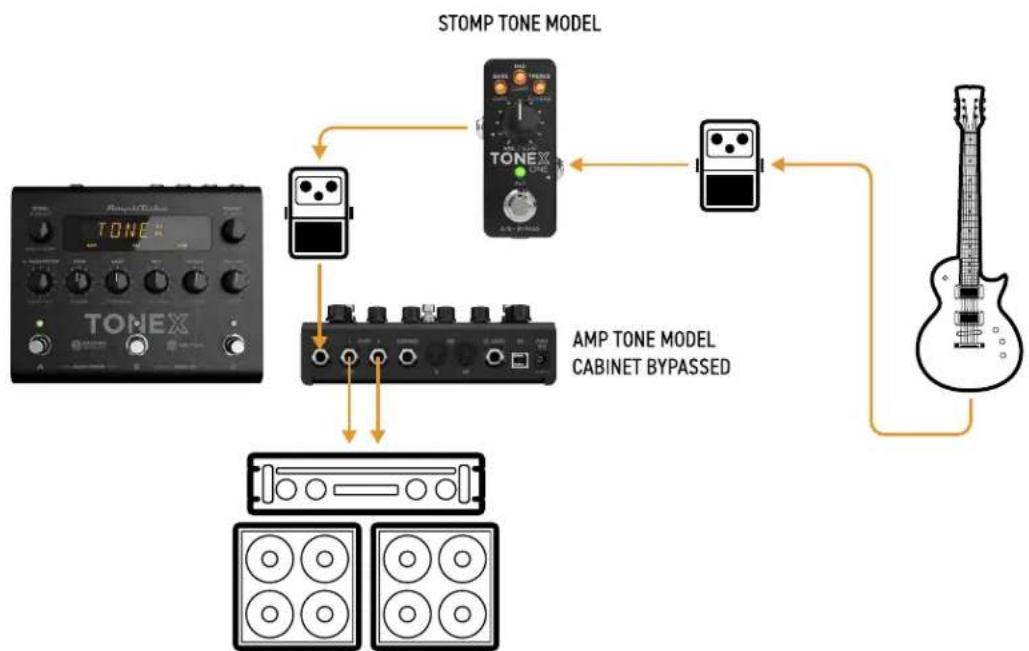
This is an example of using TONEX ONE together with TONEX Pedal connected to a power amplifier feeding a guitar or bass cabinet.
TONEX ONE in this case is used as a stomp, while TONEX Pedal is used as the amplifier.
flowchart
graph TD
    A["Audio Modulator TONE"] --> B["Diper"]
    B --> C["AMP Tone Model Cabinet BY PASSED"]
    C --> D["Guitar"]
    E["TONEX"] --> B
    F["TONEX"] --> C
    G["STOMP TONE MODEL"] --> B
    style A fill:#f9f,stroke:#333
    style E fill:#ccf,stroke:#333
    style F fill:#cfc,stroke:#333
    style G fill:#fcc,stroke:#333
TONEX ONE feeding a FRFR or powered cabinet
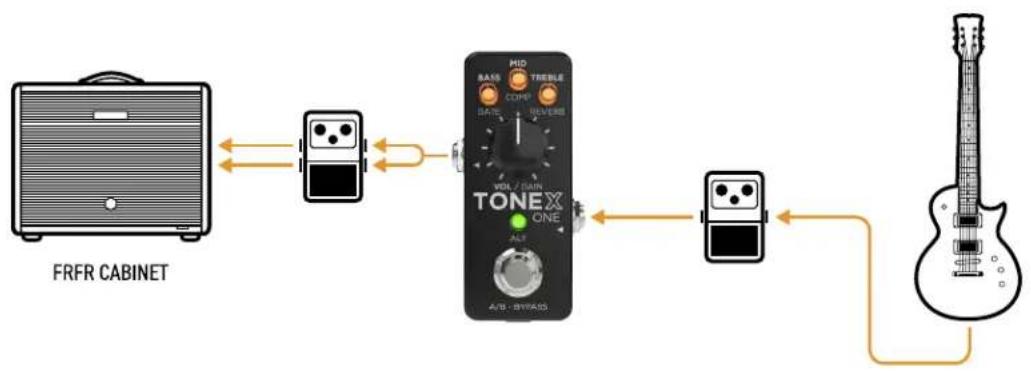
If you want to use TONEX with your FRFR Cabinet (or powered cabinet), you can plug in directly. Remember to activate the cab section.
This is an example of using the pedal inside a pedalboard connected to a FRFR Cabinet:
flowchart
graph LR
    A["FRFR CABINET"] <--> B["Amplifier"]
    B <--> C["TONEX ONE"]
    C --> D["Antenna"]
    C --> E["Antenna"]
    C --> F["Antenna"]
    D <--> G["Output"]
    E <--> G
    F <--> G
This is an example of using the pedal alone with an FRFR Cabinet:
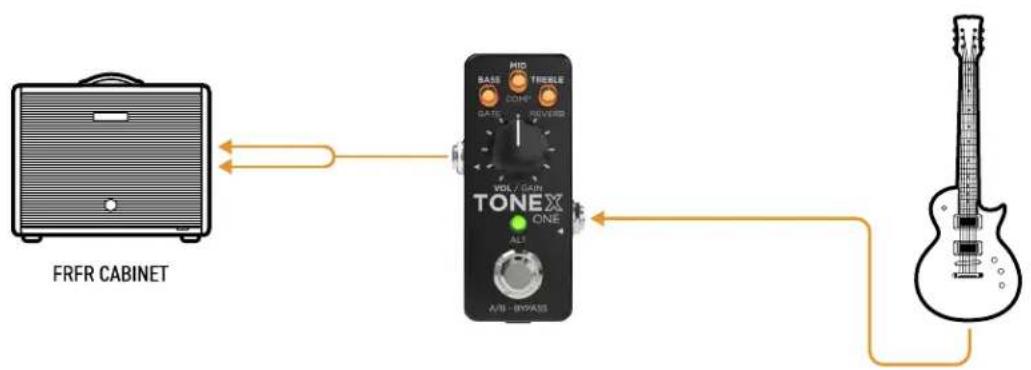
flowchart
graph LR
    A["FRFR CABINET"] --> B["TONEX ONE"]
    B --> C["VOLT-GAIN"]
    C --> D["Electric Guitar"]
You can use a regular instrument cable if you want to run you TONEX ONE in mono.
This is an example of using TONEX ONE together with TONEX Pedal connected to a FRFR cabinet. TONEX ONE in this case is used as a stomp, while TONEX Pedal is used as the amplifier.

flowchart
graph TD
    A["FRFR CABINET"] --> B["TONE X"]
    B --> C["STOMP TONE MODEL"]
    C --> D["AMP TONE MODEL"]
    D --> E["GRASSIC TONE"]
    E --> F["BRIDGE"]
    style A fill:#f9f,stroke:#333
    style B fill:#ccf,stroke:#333
    style C fill:#cfc,stroke:#333
    style D fill:#fcc,stroke:#333
    style E fill:#cff,stroke:#333
    style F fill:#ffc,stroke:#333
TONEX ONE feeding a PA system
TONEX ONE can also be connected directly to a PA System using one (or two if you prefer going stereo) DI Box(es). This is great for keeping your stage volume silent. Remember to activate the cab section.
This is an example of using the pedal inside a pedalboard connected to a PA System in stereo using a Y cable:
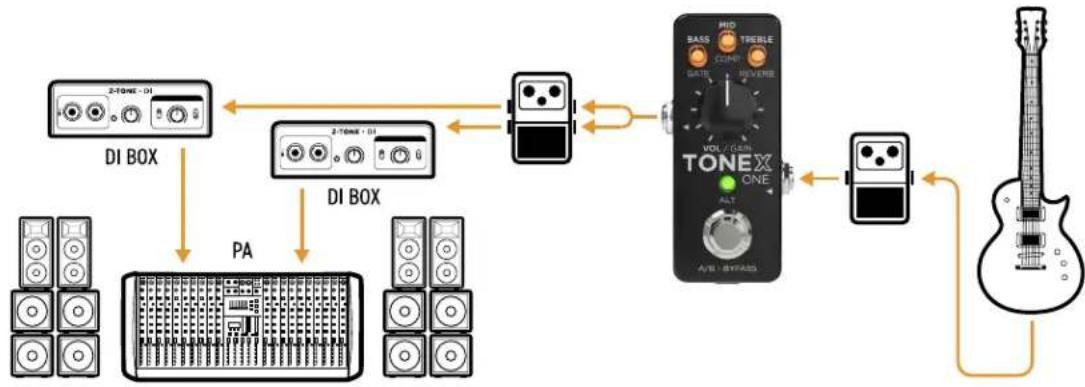
flowchart
graph LR
    A["2-TONE - DI"] -->|DI BOX| B["DA"]
    C["2-TONE - DI"] -->|PA| D["DA"]
    E["2-TONE - DI"] --> F["DA"]
    G["TONEX ONE"] --> H["DA"]
    I["A/B / BYPASS"] --> J["DA"]
    K["Guitar"] --> L["DA"]
    B --> F
    D --> H
    F --> J
    H --> L
This is an example of using the pedal alone with a PA System in stereo using a Y cable:
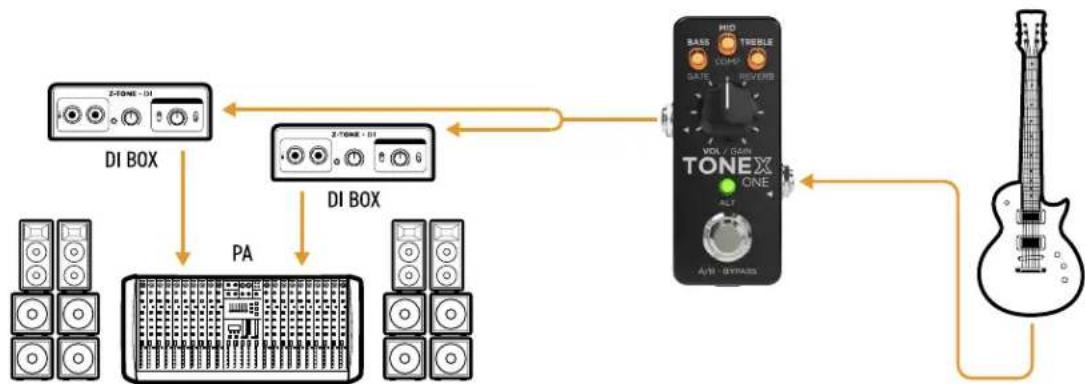
flowchart
graph TD
    A["DAI BOX"] -->|DI BOX| B["DAI BOX"]
    B -->|PA| C["DAI BOX"]
    C --> D["TONE CINE"]
    D --> E["A/B/10 - BYRASS"]
    E --> F["Guitar"]
    style A fill:#f9f,stroke:#333
    style B fill:#ccf,stroke:#333
    style C fill:#cfc,stroke:#333
    style D fill:#fcc,stroke:#333
    style E fill:#cff,stroke:#333
    style F fill:#ffc,stroke:#333
You can use a regular instrument cable and a single DI box if you want to run you TONEX ONE in mono.
This is an example of using TONEX ONE together with TONEX Pedal inside a PA system. In this case TONEX ONE is used as a stomp while TONEX Pedal is used as the amp.
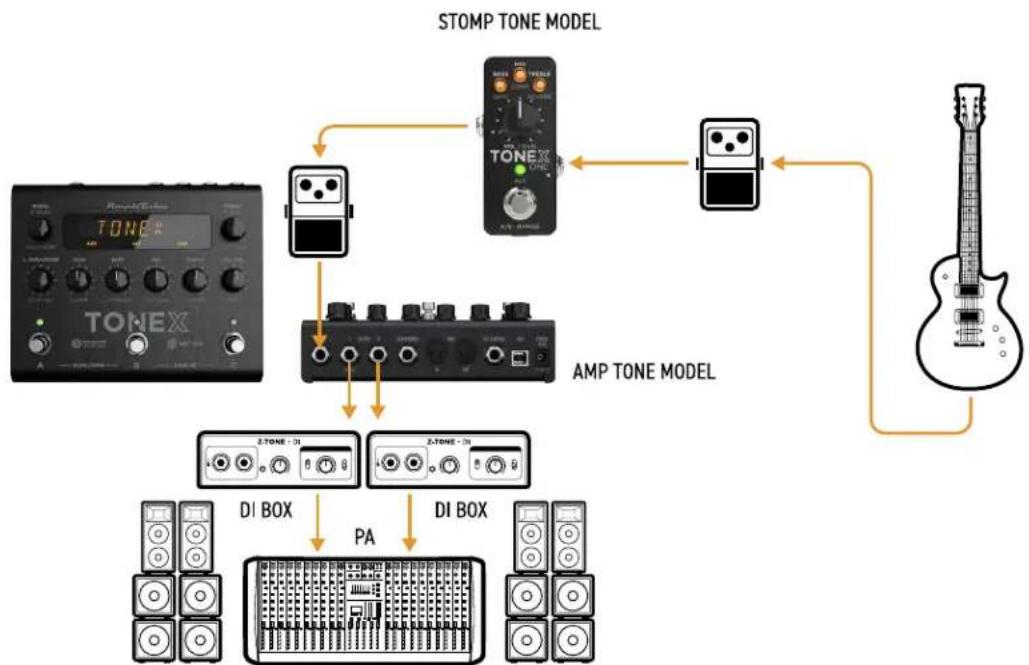
flowchart
graph TD
    A["Audio Input"] --> B["STOMP TONE MODEL"]
    B --> C["AMP TONE MODEL"]
    C --> D["Di Box"]
    C --> E["2-TONE - IN"]
    C --> F["2-TONE - DI"]
    D --> G["DAI Box"]
    E --> H["DAI BOX"]
    F --> I["DAI BOX"]
    G --> J["DAI Box"]
    H --> K["DAI Box"]
    I --> L["DAI Box"]
    J --> M["DAI Box"]
    K --> N["DAI Box"]
    L --> O["DAI Box"]
    M --> P["DAI Box"]
    N --> Q["DAI Box"]
    O --> R["DAI Box"]
    P --> S["DAI Box"]
    Q --> T["DAI Box"]
    R --> U["DAI Box"]
    S --> V["DAI Box"]
    T --> W["DAI Box"]
TONEX ONE for silent practicing
If you need to warm up before the gig or just practice without bothering anyone around, you can use TONEX ONE with headphones. Remember to activate the cab section.
This is an example of using the pedal into a pedalboard for silent practicing:
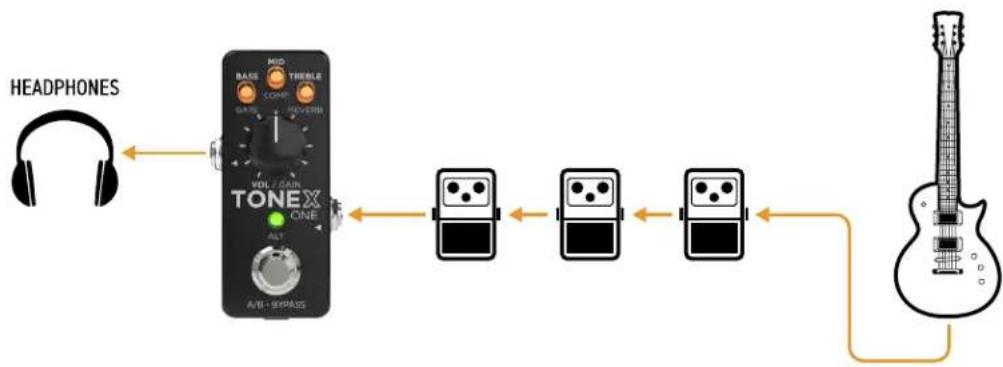
flowchart
graph LR
    A["HEADPHONES"] --> B["TONEX CINE"]
    B --> C["Dial 1"]
    B --> D["Dial 2"]
    B --> E["Dial 3"]
    B --> F["Dial 4"]
    C <--> G["Dial 5"]
    D <--> H["Dial 6"]
    E <--> I["Dial 7"]
    F <--> J["Dial 8"]
    G <--> K["Output"]
    H <--> K
    I <--> K
    J <--> K
    K --> L["Output"]
This is an example of using the pedal alone for silent practicing:
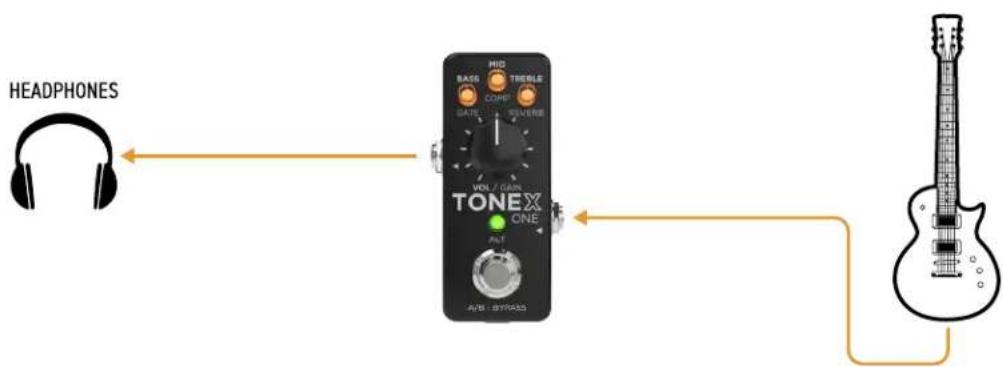
flowchart
graph LR
    A["HEADPHONES"] --> B["TONEX CONE"]
    B --> C["AVB - STRASS"]
    C --> D["EDUCTOR"]
    B --> E["BASS"]
    B --> F["TREBLE"]
    B --> G["COMP"]
    B --> H["SVERSE"]
TONEX ONE for recording
You can also use TONEX ONE as an audio interface to record your guitar parts by connecting it to your computer via USB. You can monitor with zero latency through the pedal using headphones or by connecting active monitors to the stereo output of TONEX ONE using a Y cable.
This is an example of using the TONEX ONE for recording:
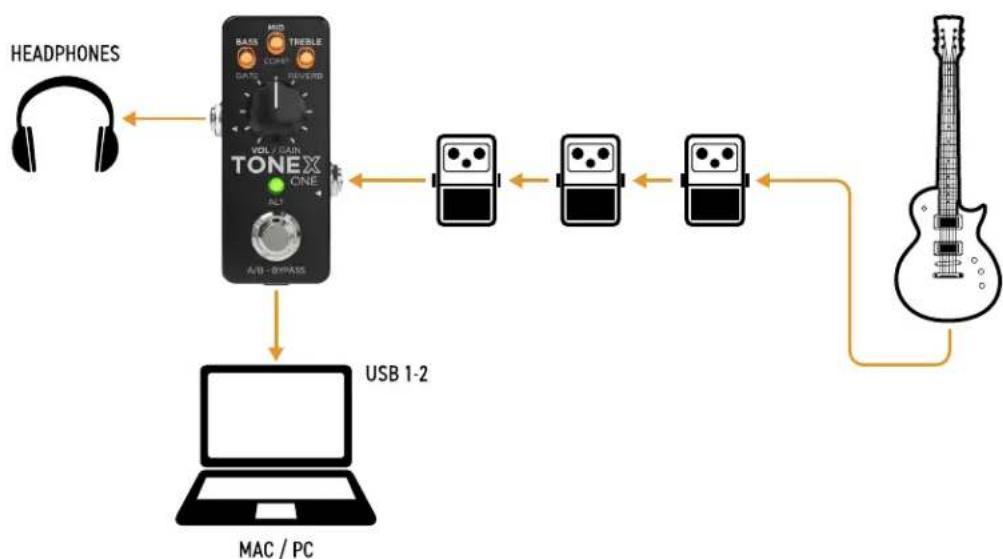
flowchart
graph TD
    A["HEADphones"] --> B["TONEX CONE"]
    B --> C["USB 1-2"]
    C --> D["Laptop MAC/PC"]
    D --> E["Speaker with Ratio Switch"]
    E --> F["Speaker with Ratio Switch"]
    F --> G["Speaker with Ratio Switch"]
    G --> H["Speaker with Ratio Switch"]
    H --> I["Guitar"]
Disable direct monitoring from the TONEX Librarian if you monitor through your DAW to avoid double monitoring effect while recording.
If you are using TONEX ONE to feed TONEX software or another amp simulator software, remember to bypass TONEX ONE internal processing by going to stomp mode and set the pedal to bypass to send only the DI signal to the amp simulator.
TONEX ONE as a stomp in front of a real amp
You can use TONEX ONE as your overdrive/distortion/fuzz pedal before your amplifier by connecting it in mono...
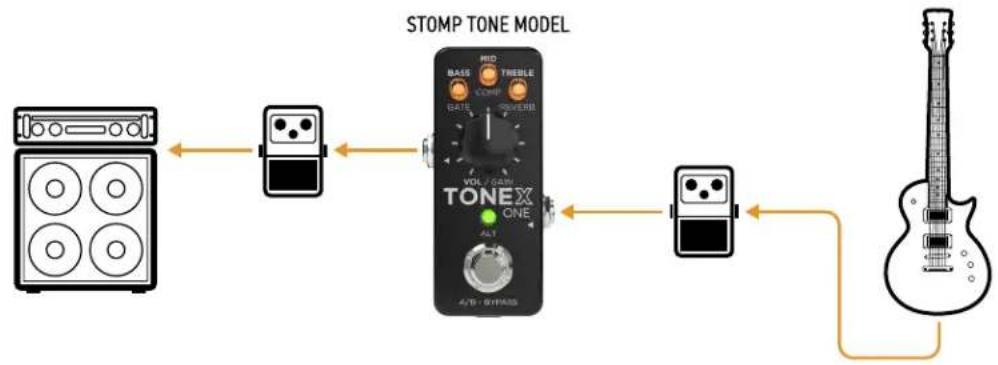
flowchart
graph LR
    A["Speaker with four circles"] --> B["Adder"]
    B --> C["TONEX CIVE"]
    C --> D["BASS TIREBLE"]
    C --> E["BASS TIREBLE"]
    C --> F["BASS TIREBLE"]
    C --> G["BASS TIREBLE"]
    C --> H["BASS TIREBLE"]
    C --> I["BASS TIREBLE"]
    C --> J["BASS TIREBLE"]
    C --> K["BASS TIREBLE"]
    C --> L["BASS TIREBLE"]
    C --> M["BASS TIREBLE"]
    C --> N["BASS TIREBLE"]
    C --> O["BASS TIREBLE"]
    C --> P["BASS TIREBLE"]
    C --> Q["BASS TIREBLE"]
    C --> R["BASS TIREBLE"]
    C --> S["BASS TIREBLE"]
    C --> T["BASS TIREBLE"]
    C --> U["BASS TIREBLE"]
    C --> V["BASS TIREBLE"]
    C --> W["BASS TIREBLE"]
    C --> X["BASS TIREBLE"]
    C --> Y["BASS TIREBLE"]
    C --> Z["BASS TIREBLE"]
    C --> AA["BASS TIREBLE"]
    C --> AB["BASS TIREBLE"]
    C --> AC["BASS TIREBLE"]
    C --> AD["BASS TIREBLE"]
    C --> AE["BASS TIREBLE"]
    C --> AF["BASS TIREBLE"]
    C --> AG["BASS TIREBLE"]
    C --> AH["BASS TIREBLE"]
    C --> AI["BASS TIREBLE"]
    C --> AJ["BASS TIREBLE"]
    C --> AK["BASS TIREBLE"]
    C --> AL["BASS TIREBLE"]
    C --> AM["BASS TIREBLE"]
    C --> AN["BASS TIREBLE"]
    C --> AO["BASS TIREBLE"]
    C --> AP["BASS TIREBLE"]
    C --> AQ["BASS TIREBLE"]
    C --> AR["BASS TIREBLE"]
    C --> AS["BASS TIREBLE"]
    C --> AT["BASS TIREBLE"]
    C --> AU["BASS TIREBLE"]
    C --> AV["BASS TIREBLE"]
    C --> AW["BASS TIREBLE"]
    C --> AX["BASS TIREBLE"]
    C --> AY["BASS TIREBLE"]
    C --> AZ["BASS TIREBLE"]
    C --> BA["BASS TIREBLE"]
    C --> BB["BASS TIREBLE"]
    C --> BC["BASS TIREBLE"]
    C --> BD["BASS TIREBLE"]
    C --> BE["BASS TIREBLE"]
    C --> BF["BASS TIREBLE"]
    C --> BG["BASS TIREBLE"]
    C --> BH["BASS TIREBLE"]
    C --> BI["BASS TIREBLE"]
    C --> BJ["BASS TIREBLE"]
    C --> BK["BASS TIREBLE"]
    C --> BL["BASS TIREBLE"]
    C --> BM["BASS TIREBLE"]
    C --> BN["BASS TIREBLE"]
    C --> BO["BASS TIREBLE"]
    C --> BP["BASS TIREBLE"]
    C --> BQ["BASS TIREBLE"]
    C --> BR["BASS TIREBLE"]
    C --> BS["BASS TIREBLE"]
    C --> BT["BASS TIREBLE"]
    C --> BU["BASS TIREBLE"]
    C --> BV["BASS TIREBLE"]
    C --> BW["BASS TIREBLE"]
...or stereo
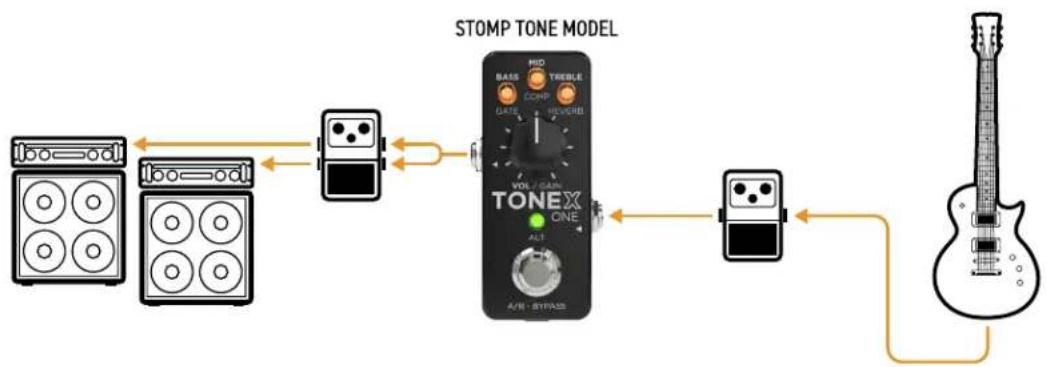
flowchart
graph LR
    A["Speaker with four ovals"] --> B["Amplifier"]
    B --> C["TONEX CONE"]
    C --> D["Amplifier"]
    D --> E["Electric Guitar"]
    style A fill:#f9f,stroke:#333
    style B fill:#ccf,stroke:#333
    style C fill:#cfc,stroke:#333
    style D fill:#fcc,stroke:#333
    style E fill:#ffc,stroke:#333
TONEX ONE for practicing
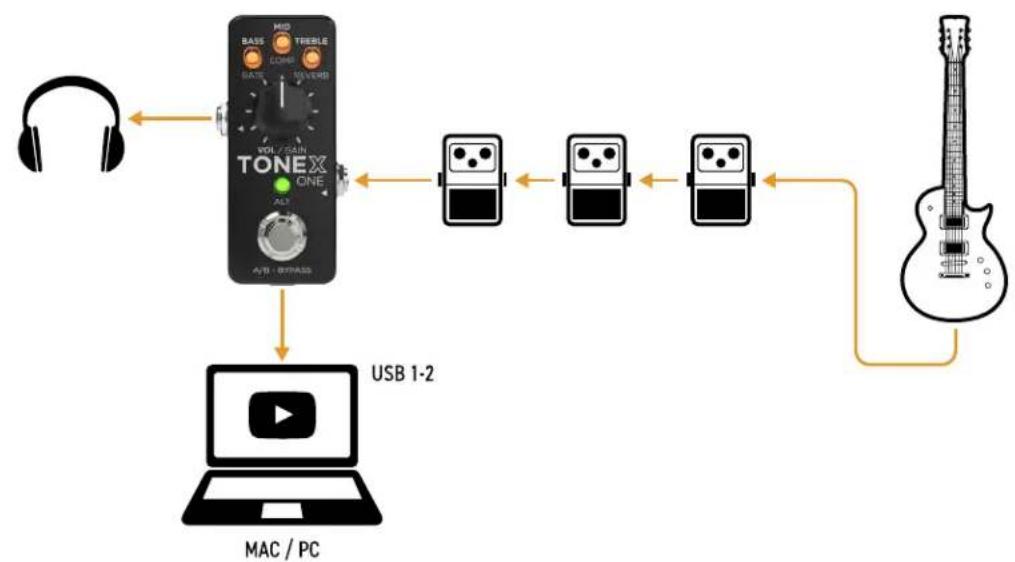
You can use TONEX ONE to practice silently (Figure A) or through active monitors (Figure B) by connecting it to a computer and selecting it as an output interface.
Use the controls on your computer/application to adjust the volume of the playback and the TONEX ONE volume to adjust your guitar level.
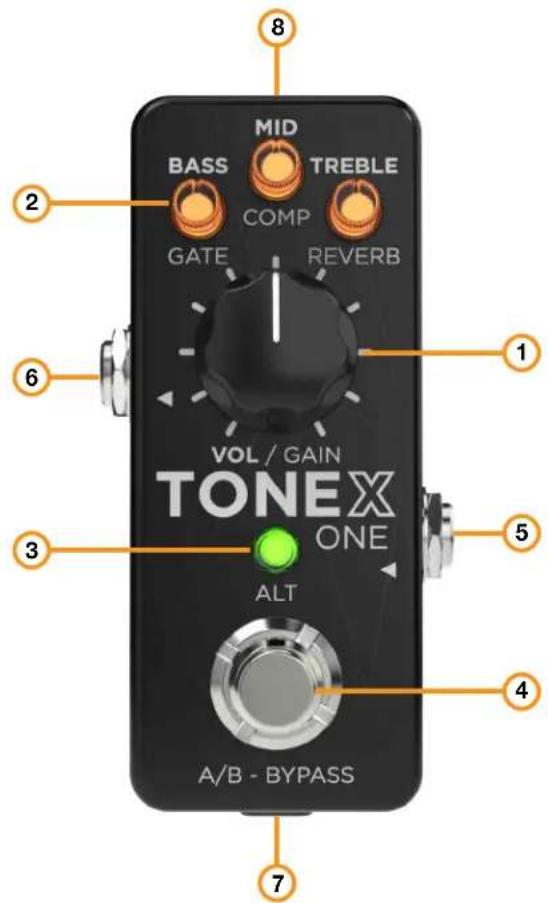
Front panel & connections
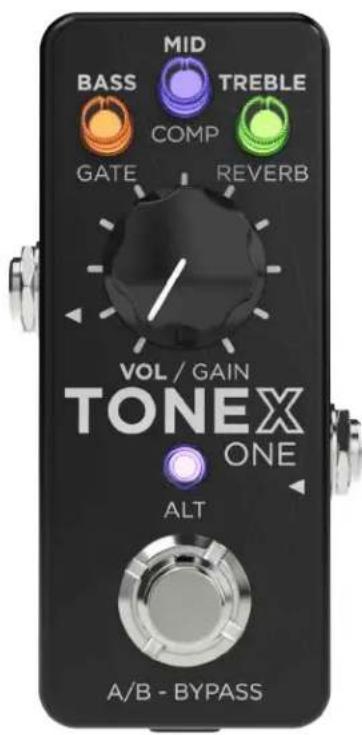
1. Main knob
Rotate to edit the main parameter preset volume or the alternative parameter gain.
2. Micro knobs
Rotate to edit the preset main parameters: bass, mid and treble or alternative parameters: gate, comp and reverb.
The LED color indicates which preset is selected.
3. ALT button
Press to access the alternative parameters.
Hold for 3 seconds to lock the device.
Hold for 6 seconds to access setup mode.
4. Footswitch
Press to toggle between preset A and preset B in dual mode or to bypass the pedal in stomp (on/off) mode.
Hold to access the tuner.
5. Input jack
Mono unbalanced.
Plug your instrument here.
6. Output jack
Mono/Stereo unbalanced.
Can be connected to other pedals, a PA (using a DI), an amplifier, an FRFR cabinet, headphones or studio monitors.
7. USB C
To manage TONEX ONE presets with the librarian or to use it as an audio interface.
It can also power the unit (5V 260 mA).
8. Power in
9V DC 120 mA center negative
Auto save
TONEX ONE automatically saves any changes applied to the current preset in real time. This “analog-like” behavior avoids any edit loss for a faster and smoother experience without the need to manually save changes.
Clip
If you are running a signal that is too hot and is clipping TONEX ONE's output stage, the display ALT ALT led becomes red.
Lower TONEX ONE volume to avoid clipping.
ALT colors
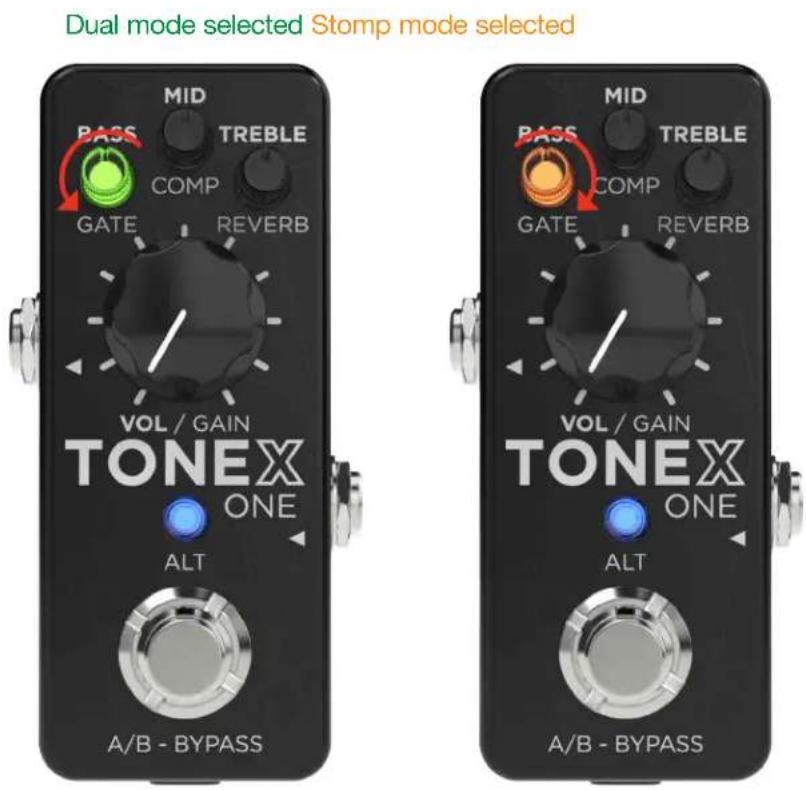
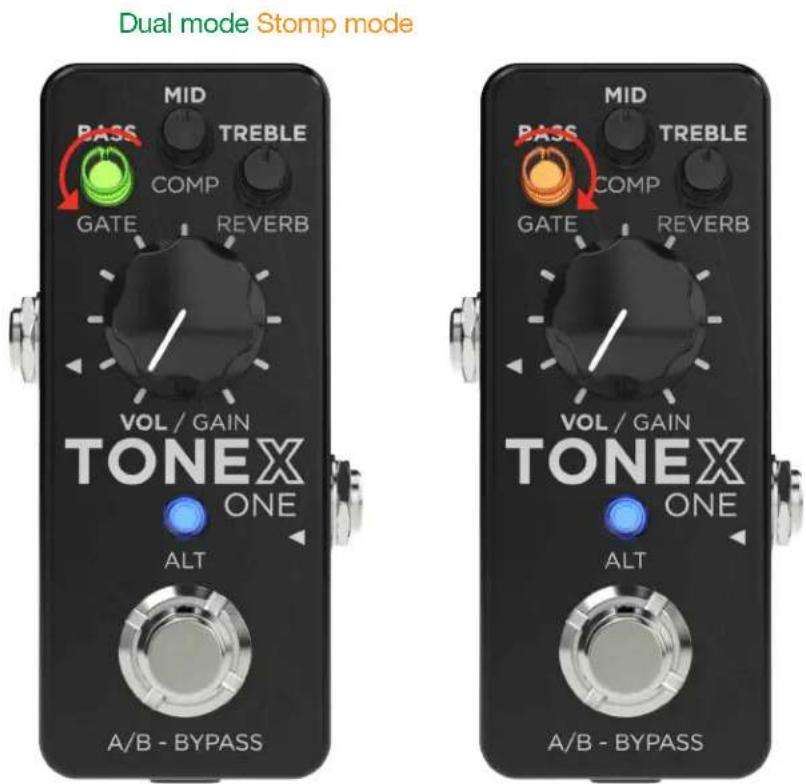
- Green – indicates that the pedal is running in dual mode, the footswitch toggles between preset A and preset B.
- Amber – indicates that the pedal is running in stomp mode, the footswitch activates or bypasses the selected preset.
- Blue – indicates that the pedal is in setup mode.
- Shell pink – indicates that the pedal is in tuning mode.
- Purple – indicates that the pedal is in preset browsing mode.
Safe mode
The safe mode is helpful when performing where you may want to lock the entire front panel to avoid unwanted parameter changes, but still use the footswitch to operate with presets.
Access and exit the safe mode by holding down the ALT button for 3 seconds until the micro knobs blink.
Tuner
Hold the footwitch to access the tuner, the ALT led turns shell pink.
While the tuner is active use the ALT button to change tuning mode between:
- Mute – while the tuner is active the output is muted.
- Thru – while the tuner is active the signal passes through.
Press the footswitch to exit the tuner.
Performance modes
TONEX ONE can operate in 2 different modes:
- Dual mode – lets you toggle between 2 presets using the footswitch.
In this mode there is not a bypass option.
When the pedal is in dual mode, the ALT led is green.
- Stomp mode – The stomp mode lets you use the pedal as a typical on/off stomp to activate or bypass the selected preset.
When the pedal is in stomp mode the ALT led is amber.
Mode selector
To change the performance mode, access the global setup and turn the bass micro knob (mode selector).
To learn more, reference the "Setup" chapter.
Preset browsing mode
TONEX ONE comes with 20 built-in customizable presets assignable to 3 active slots (2 for the dual mode, 1 for the stomp mode).
Browsing mode
To browse the 20 presets and assign them to the 3 active slots, press the ALT button and the footswitch together to access the browsing mode. The ALT led turns purple.
Once accessed the browsing mode, the 3 micro knobs refer to the 3 active slots:
• BASS – dual mode, preset A.
• MID – dual mode, preset B.
- TREBLE – stomp mode.
Use the footswitch to select which active slot you want to edit, then turn the corresponding micro knob to select its preset assignment (the micro knob changes colors following the selected preset color).
While browsing you can use the main knob to edit the preset volume and, by pressing the ALT button, the gain of the selected preset.
Once the assignments are done, press the ALT button and the footswitch together to confirm and go back to the selected preset.
TIP: If you need to use 3 presets while performing you can leave the browsing mode on and use the footswitch to cycle among the 3 active slots.
Import Custom IR
Custom IRs are automatically imported when a preset containing a Custom IR as a cabinet is imported into TONEX ONE.
To import a Custom IR into TONEX ONE, create a preset with the Custom IR using TONEX for Mac/PC application and import the preset into TONEX ONE using the TONEX librarian section.
Signal Flow
The following flow chart shows the DSP audio signal flow.
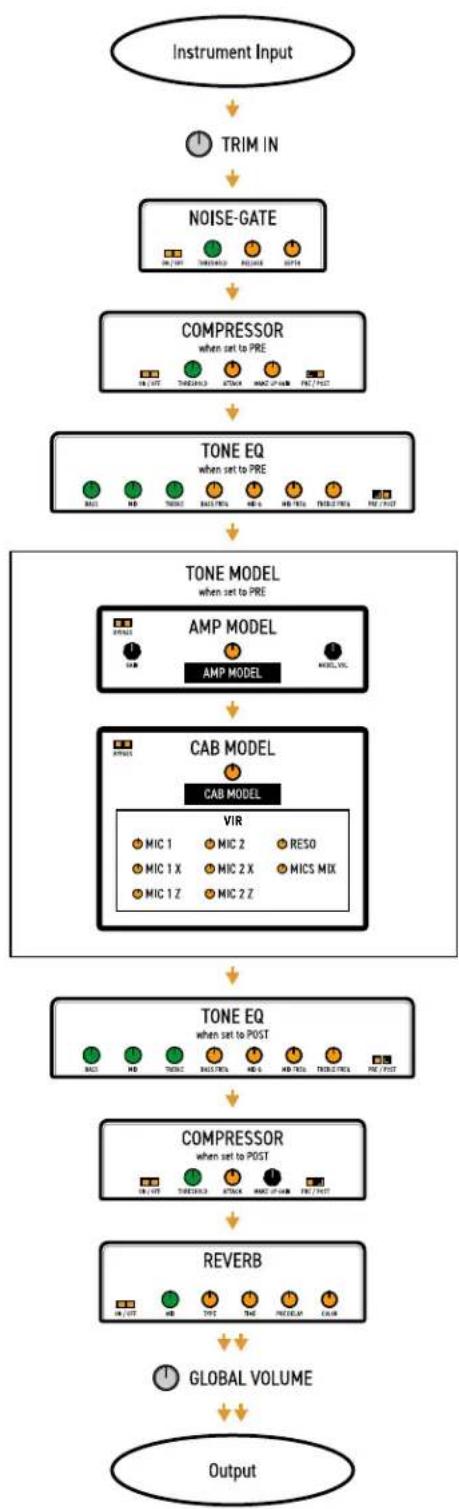
flowchart
graph TD
    A["Instrument Input"] --> B["TRIM IN"]
    B --> C["NOISE-GATE"]
    C --> D["COMPRESSOR when set to PRE"]
    D --> E["TONE EQ when set to PRE"]
    E --> F["TONE MODEL when set to PRE"]
    F --> G["AMP MODEL AMP MODEL"]
    G --> H["CAB MODEL CAB MODEL"]
    H --> I["TONE EQ when set to POST"]
    I --> J["COMPRESSOR when set to POST"]
    J --> K["REVERB"]
    K --> L["GLOBAL VOLUME"]
    L --> M["Output"]
Editable Parameter
Main Knob Parameter
Global Setup Parameter
Editable In Application
Parameters
Main parameters
The main parameters are accessible using the 3 micro knobs and the main knob. These are:
• Volume (main knob)
Adjusts the preset volume.
It's automatically assigned to the:
- Tone Model's volume (when compressor is set to pre).
- Compressor's make up gain (when compressor is set to post).
- Bass
Adjusts the level of low frequencies with a shelf EQ.
Mid
Adjusts the level of mid frequencies with a bell EQ.
- Treble
Adjusts the level of high frequencies with a shelf EQ.
Alternative parameters
The alternative parameters are accessible by pressing the ALT button (the ALT led and micro knobs start blinking) and rotating the 3 micro knobs and the main knob:
- Gain (main knob)
Adjusts the Tone Model's input gain.
Use this parameter to saturate more or less your Tone Model.
- Noise-gate
Adjust the noise-gate threshold.
- Compressor
Adjusts the compressor's threshold.
- Reverb
Adjusts the reverb's mix.
Setup
To access the setup, hold the ALT led for 6 seconds until it becomes blue.
While in setup mode each micro knob and the main knob are controlling 4 different setup options:
• Mode selector – micro knob 1
• Cab bypass – micro knob 2
- Input trim- micro knob 3
• Global volume— main knob
Mode selector
Micro knob 1
Turn the first micro knob counter-clockwise until it becomes green to operate in dual mode. Turn it clockwise until it becomes amber to operate in stomp mode.
Cab bypass
Micro knob 2
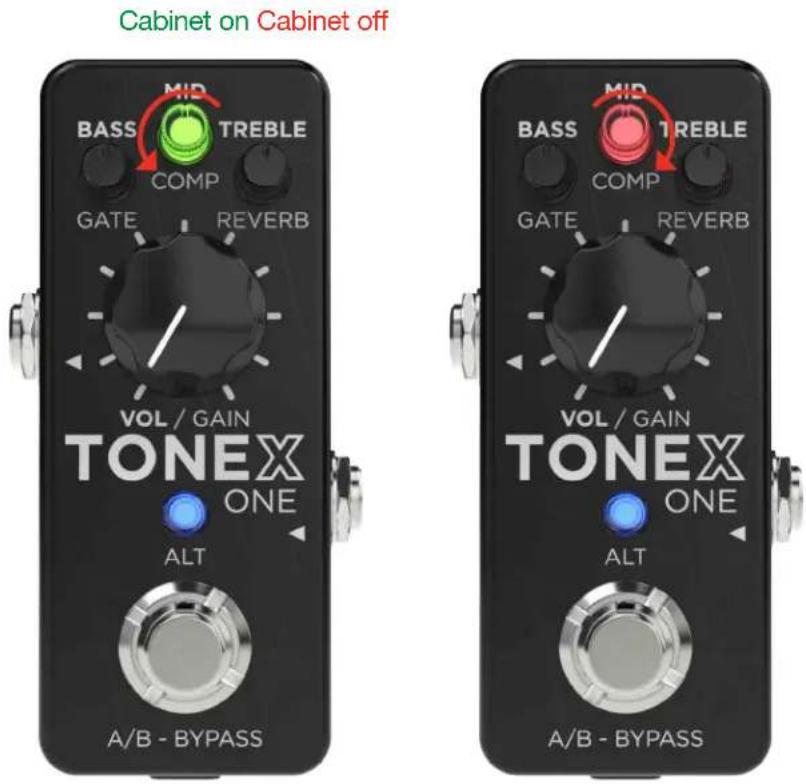
Turn the second micro knob counter-clockwise until it becomes green to activate the cabinet on all presets. Turn it clockwise until it becomes red to bypass the cabinet on all presets.
When the cabinet is bypassed the ALT LED blinks red.
When the cabinet is bypassed, during regular use, the ALT led blinks every 5 seconds.
Input trim
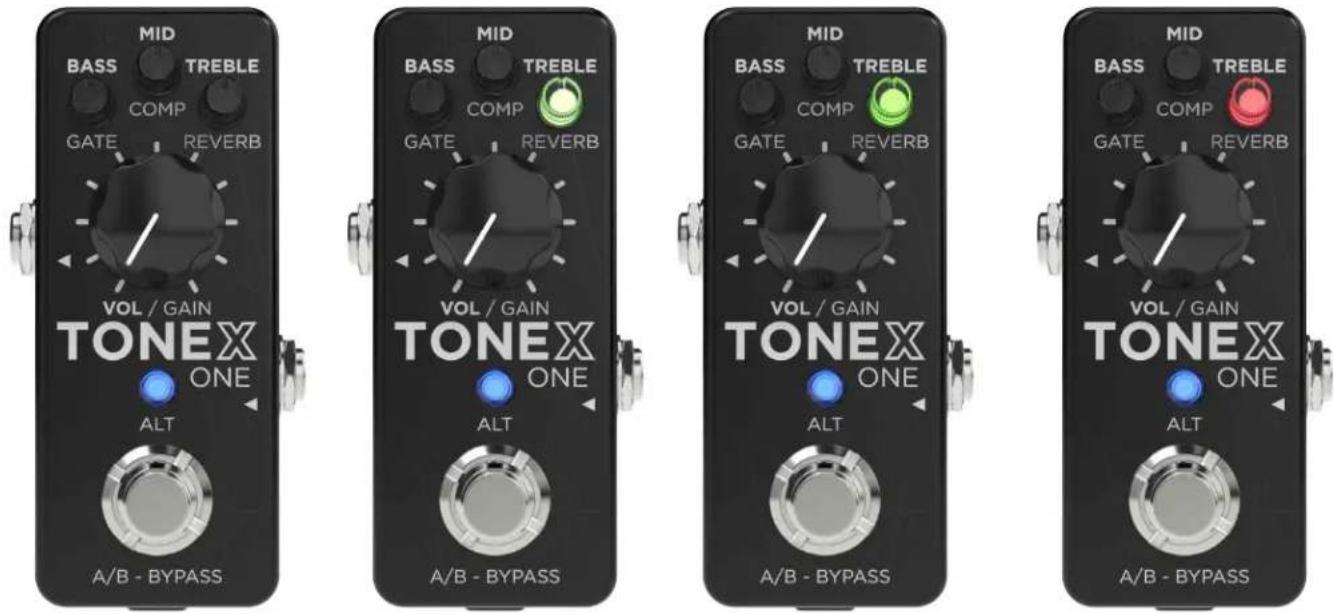
Micro knob 3
Turn the third micro knob counter-clockwise/clockwise to lower/raise the input trim volume while using its LED as a meter.
No input Low input Good input Clip
Global volume
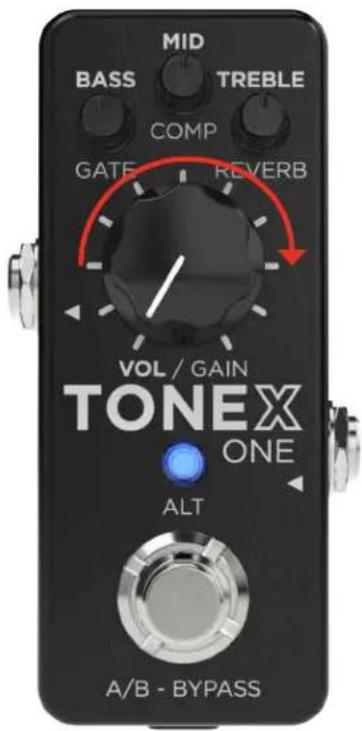
Main knob
Turn the main knob to adjust the global volume of TONEX ONE.
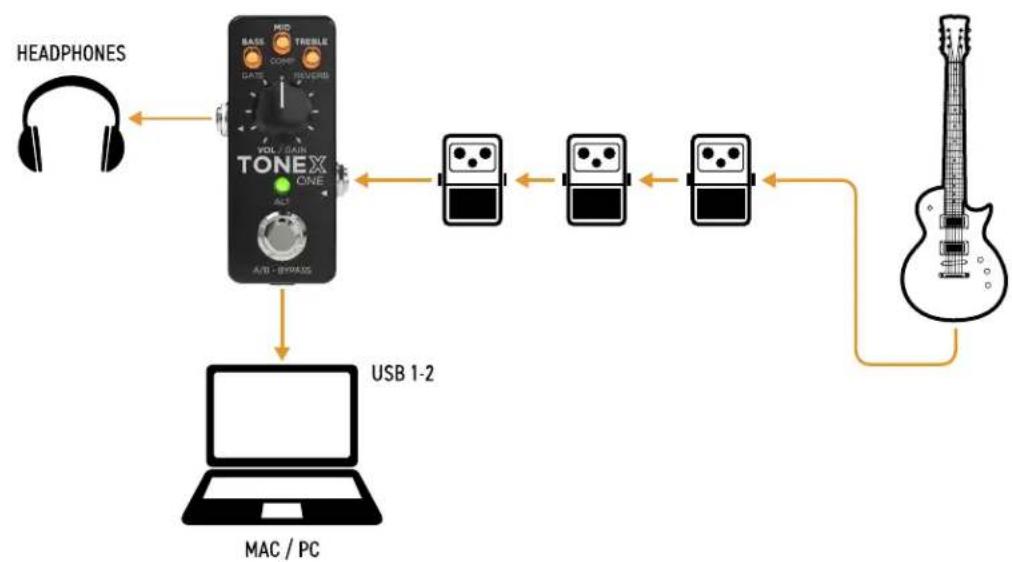
TONEX ONE as an audio interface
TONEX ONE can be used for playing along your to favorite tracks to practice, or it can be used to record your guitar tracks by connecting it to your computer. This audio interface feature works at 44.1 kHz and 24 bits.
TONEX ONE for play-along
To use TONEX ONE for playing along to your favorite music, connect it to your PC or Mac and select it as your output audio interface.
Use the controls on your computer/playback application to adjust the volume of the computer. Use the controls on TONEX ONE to adjust your instrument signal's volume and tone.
TONEX ONE for recording
To use TONEX ONE for recording into your computer, connect it to your PC or Mac and select it as your input and/or output interface.
TONEX ONE acts as a 2-input and 2-output interface.
While recording you can record the processed or unprocessed stereo signal by selecting TONEX ONE's inputs 1 and/or 2.
Use the controls on your DAW/application to adjust the volume of the playback.
Use the controls on TONEX ONE to adjust your instrument signal's input volume and tone.
Disable direct monitoring from the TONEX Librarian if you monitor through your DAW to avoid double monitoring effect while recording.
If you are using TONEX ONE to feed TONEX software or another amp simulator software, remember to bypass TONEX ONE internal processing by going to stomp mode and set the pedal to bypass to send only the DI signal to the amp simulator.
TIP: When connecting TONEX ONE to your computer, you don't need any additional power supply other than the USB C cable.
TONEX ONE can be powered via its USB C port when connected to a computer.
flowchart
graph TD
    A["HEADphones"] --> B["TONEX ONE"]
    B --> C["USB 1-2"]
    C --> D["Mac / PC"]
    D --> E["Guitar"]
    E --> F["Output"]
TONEX Librarian
Use the TONEX Librarian inside TONEX for Mac/PC to manage and transfer presets from your computer to the pedal and vice-versa.
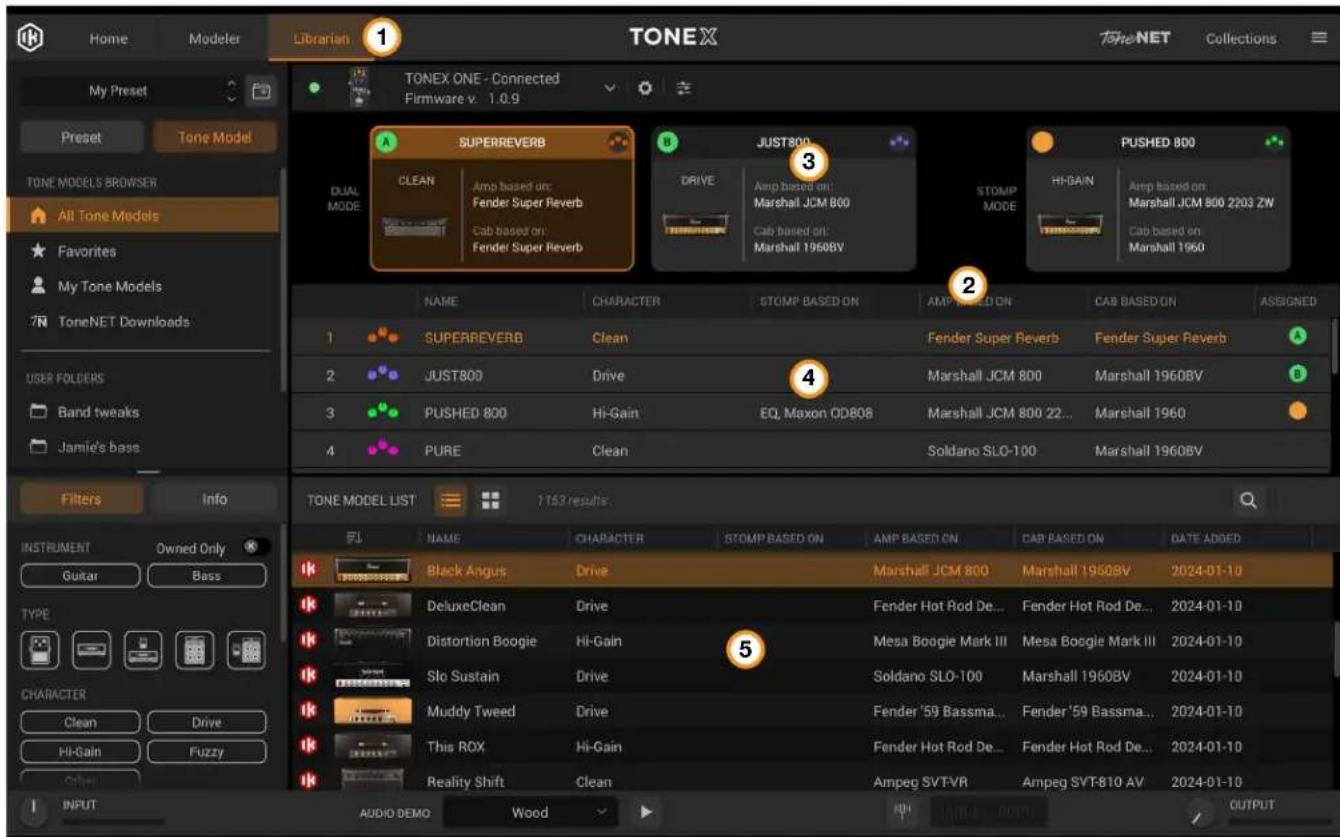
Press the Librarian tab (1) in TONEX for Mac/PC to open the librarian section.
- Pedal library: the pedal library (2) is populated in real-time with the 3 presets available on TONEX ONE. The top section (3) is divided into 3 sections, 1 for each active slot. The middle section (4) lists the 20 available presets loaded on TONEX ONE.
Drag & drop presets or Tone Models from the computer library into the pedal library to transfer them to TONEX ONE (Tone Models are automatically converted into presets).
The selected slot in the pedal library is always selected on the TONEX ONE so that it can be easily monitored while using the device.
- Computer library: the computer library (5) is populated with presets and Tone Models available on your computer.
Drag & drop presets from the pedal library into the computer library to transfer them to your computer.
To learn more about TONEX Librarian, see the TONEX for Mac/PC User Manual.
Features
- AIMM™ DSP technology. Artificial Intelligence Machine Modeling proprietary technology capable of recreating the essence of amplifiers and distortion pedals, or everything together.
• 20 prests assignable to 3 playable active slots.
• 2 performance modes to use the pedal with two preset A/B or as a stomp on/off.
- Includes tuner.
• Option to bypass the cabinet.
• 3 micro knobs with customaziable led color.
• Ultra-low noise, 24-bit/192k Hz converters for class-leading sound quality.
- 5 Hz–24 kHz frequency response to capture the full scope of your guitar's sound.
- Up to 123 dB dynamic range provides whisper-quiet operation at any gain setting.
- Sculpt your presets with additional DSP processors such as noise gate, compressor, tone EQ and reverb.
- Fast and straight-forward interface with 1 main knob, 3 quick accessible micro knobs.
- The state-of-the-art DSP is enclosed in a sturdy anodized aluminum chassis designed and crafted in Italy.
• Suitable for both guitar and bass.
• Headphones output lets you practice in silence with your favorite tone.
• Size: 48 mm/1.89" (W) x 94 mm/3.7" (D) x 53 mm/2.09" (H)
• Weight: 160 grams.
- Model any rig you want using the companion software TONEX for Mac/PC, capable of capturing the behavior of distortion/overdrive/fuzz/boost/EQ pedals, amps and cabs or everything together as a Tone Model to play in your TONEX ONE.
- TONEX Plug-in virtual pedal and amp for AmpliTube included to play your Tone Models easily in AmpliTube.
- Swap the cab in the captured Tone Model rig with any third-party IR you want or use the advanced included VIR technology module which features a double customizable microphone placement.
- TONEX for Mac/PC SE included. It works as a player, librarian and preset editor to create, organize and swap presets between TONEX ONE and the computer.
• AmpliTube 5 SE included
- Built-in USB port to use TONEX ONE as a 24-bit/44.1 kHz audio interface for recording or for preset management.
- Tone.net sharing platform for exploring and exchanging Tone Models.
Support
For any questions you may have, please refer to the FAQ webpage at: www.ikmultimedia.com/faq
Here you will find answers to the most commonly asked questions.
To submit a Technical Support Form, go to: www.ikmultimedia.com/support
For warranty information, please visit: www.ikmultimedia.com/warranty
For other requests such as Product, Sales, or Web info, please go to: www.ikmultimedia.com/contact-us
User Area
The User Area is a special section of our website specifically designed for our users.
Here you can easily edit your personal data, manage your product authorizations and licenses, and download the latest IK products updates.
Access your User Area to:
• Edit your Personal data.
• View and download the latest product updates, free content, and Sound Libraries.
• Access any current Promotions.
• View exclusive offers and pricing.
- Manage your earned JamPoints.
• View your Orders.
• Download firmware and hardware drivers.
• Access the IK Forum and more.
To access the User Area go to: www.ikmultimedia.com/userarea
To access your User Area, please log in with your User Name and Password created upon registration and emailed to your registered email address. If you need to update your Password, you may do so at the User Area login.
IK Multimedia Production Srl
IK Multimedia US, LLC
590 Sawgrass Corporate Pkwy.
Sunrise, FL 33325
USA
IK Multimedia Asia
TB Tamachi Bldg. 1F, MBE #709
4-11-1 Shiba
Minato-ku, Tokyo 108-0014
Japan
www.ikmultimedia.com
TONEX®, AI Machine Modeling™, AmpliTube®, ToneNET™, VIR™ are trademarks or registered trademark property of IK Multimedia Production Srl. All rights reserved.
Mac, the Mac logo, the Audio Units logo, iPhone®, iPod touch®, iPad® are trademarks of Apple Computer, Inc., registered in the U.S. and other countries. App Store is a service mark of Apple Inc. Windows and the Windows logo are trademarks or registered trademarks of Microsoft Corporation in the United States and/or other countries. VST is a trademark of Steinberg Media Technologies GmbH. AAX, Avid, the Avid logo, Pro Tools, and RTAS are trademarks or registered trademarks of Avid Technology, Inc. in the U.S. and other countries.
All other product names and images, trademarks and artists names are the property of their respective owners, which are in no way associated or affiliated with IK Multimedia. Product names are used solely for the purpose of identifying the specific products that were studied during IK Multimedia's sound model development and for describing certain types of tones produced with IK Multimedia's digital modeling technology. Use of these names does not imply any cooperation or endorsement.
IK Multimedia disclaims any ownership over content uploaded by users to ToneNET, including but not limited to Tone Models, presets, and any text or symbols that users upload with their content. IK Multimedia does not endorse or represent any users of ToneNET, and any names, trademarks, or tradenames that users may upload with their content on ToneNET should not be construed as an endorsement, association, or affiliation with IK Multimedia. Users represent and warrant that they own or are licensed to use all intellectual property, including copyrights and trademarks, in any content that they upload. IK Multimedia disclaims that any content uploaded by users is non-infringing. Please see the ToneNET Terms of Use with ways that you can notify us if you believe content on ToneNET infringes your rights.
All specifications are subject to change without further notice.
Document Version: 1.1
Latest Update: 2024/07/02
© 2023-2024 IK Multimedia. All rights reserved.
AmpliTube
TONEX ONE
MANUEL DE L'UTILISATEUR
Table des matières
Contenu 2
TONEX Pedal
TONEX ONE
TONEX Capture

TONEX for Mac/PC
TONEX Librarian
TONEX for iPhone/iPad
TONEX in ToneNET
flowchart
graph TD
    A["HEADphones"] --> B["TONEX CONE"]
    B --> C["USB 1-2"]
    C --> D["Laptop MAC/PC"]
    D --> E["Speaker with Ratio Switch"]
    E --> F["Speaker with Ratio Switch"]
    F --> G["Speaker with Ratio Switch"]
    G --> H["Speaker with Ratio Switch"]
    H --> I["Guitar"]
• Volume (bouton principal)
• Gain (bouton principal)
- Dimensions: 48 mm/1.89" (L) x 94 mm/3.7" (P) x 53 mm/2.09" (H)
IK Multimedia US, LLC
590 Sawgrass Corporate Pkwy.
Sunrise, FL 33325
USA
IK Multimedia Asia
TB Tamachi Bldg. 1F, MBE #709
4-11-1 Shiba
Minato-ku, Tokyo 108-0014
Japan
www.ikmultimedia.com
TONEX®, AI Machine Modeling™, AmpliTube®, ToneNET™, VIR™ are trademarks or registered trademark property of IK Multimedia Production Srl. All rights reserved.
Mac, the Mac logo, the Audio Units logo, iPhone®, iPod touch®, iPad® are trademarks of Apple Computer, Inc., registered in the U.S. and other countries. App Store is a service mark of Apple Inc. Windows and the Windows logo are trademarks or registered trademarks of Microsoft Corporation in the United States and/or other countries. VST is a trademark of Steinberg Media Technologies GmbH. AAX, Avid, the Avid logo, Pro Tools, and RTAS are trademarks or registered trademarks of Avid Technology, Inc. in the U.S. and other countries.
All other product names and images, trademarks and artists names are the property of their respective owners, which are in no way associated or affiliated with IK Multimedia. Product names are used solely for the purpose of identifying the specific products that were studied during IK Multimedia's sound model development and for describing certain types of tones produced with IK Multimedia's digital modeling technology. Use of these names does not imply any cooperation or endorsement.
IK Multimedia disclaims any ownership over content uploaded by users to ToneNET, including but not limited to Tone Models, presets, and any text or symbols that users upload with their content. IK Multimedia does not endorse or represent any users of ToneNET, and any names, trademarks, or tradenames that users may upload with their content on ToneNET should not be construed as an endorsement, association, or affiliation with IK Multimedia. Users represent and warrant that they own or are licensed to use all intellectual property, including copyrights and trademarks, in any content that they upload. IK Multimedia disclaims that any content uploaded by users is non-infringing. Please see the ToneNET Terms of Use with ways that you can notify us if you believe content on ToneNET infringes your rights.
All specifications are subject to change without further notice.
Document Version: 1.1
Latest Update: 2024/07/02
© 2023-2024 IK Multimedia. All rights reserved.
AmpliTube
TONEX ONE
ユーザーマニュアル
目次
目次2
TONEXのエコシステム4
Tone Modelとは?5
実機のアンプがない場合は?5
プリセット5
TONEX ONE 概要 7
接続方法8
TONEX Librarian
TONEX for iPhone/iPad
TONEX in ToneNET
Tone Modelとは?
flowchart
graph TD
    A["HEADPHONES"] --> B["TONEX CINE"]
    B --> C["USB 1-2"]
    C --> D["Mac / PC"]
    D --> E["Handheld Device"]
    E --> F["Handheld Device"]
    F --> G["Handheld Device"]
    G --> H["Handheld Device"]
    H --> I["Guitar"]
    I --> J["Handheld Device"]
    J --> B
IK Multimedia US, LLC
590 Sawgrass Corporate Pkwy.
Sunrise, FL 33325
USA
IK Multimedia Asia
TB Tamachi Bldg. 1F, MBE #709
4-11-1 Shiba
Minato-ku, Tokyo 108-0014
Japan
www.ikmultimedia.com
TONEX ^® , AI Machine Modeling ^™ , AmpliTube ^® , ToneNET ^™ , VIR ^™ are trademarks or registered trademark property of IK Multimedia Production Srl. All rights reserved.
Mac, the Mac logo, the Audio Units logo, iPhone ^® , iPod touch ^® , iPad ^® are trademarks of Apple Computer, Inc., registered in the U.S. and other countries. App Store is a service mark of Apple Inc. Windows and the Windows logo are trademarks or registered trademarks of Microsoft Corporation in the United States and/or other countries. VST is a trademark of Steinberg Media Technologies GmbH. AAX, Avid, the Avid logo, Pro Tools, and RTAS are trademarks or registered trademarks of Avid Technology, Inc. in the U.S. and other countries.
All other product names and images, trademarks and artists names are the property of their respective owners, which are in no way associated or affiliated with IK Multimedia. Product names are used solely for the purpose of identifying the specific products that were studied during IK Multimedia's sound model development and for describing certain types of tones produced with IK Multimedia's digital modeling technology. Use of these names does not imply any cooperation or endorsement.
IK Multimedia disclaims any ownership over content uploaded by users to ToneNET, including but not limited to Tone Models, presets, and any text or symbols that users upload with their content. IK Multimedia does not endorse or represent any users of ToneNET, and any names, trademarks, or tradenames that users may upload with their content on ToneNET should not be construed as an endorsement, association, or affiliation with IK Multimedia. Users represent and warrant that they own or are licensed to use all intellectual property, including copyrights and trademarks, in any content that they upload. IK Multimedia disclaims that any content uploaded by users is non-infringing. Please see the ToneNET Terms of Use with ways that you can notify us if you believe content on ToneNET infringes your rights.
All specifications are subject to change without further notice.
Document Version: 1.1
Latest Update: 2024/07/02
© 2023-2024 IK Multimedia. All rights reserved.
- TONEX ONE overview 7
- Performance modes 20
- Preset browsing mode 21
- Import Custom IR 22
- Signal Flow 23
- Parameters 24
- Setup 25
- TONEX Ecosystem
- But what's a Tone Model?
- What if I have no amplifier to capture?
- Presets
- TONEX ONE overview
- Connections
- TONEX ONE into a power amplifier with your own cabinet
- TONEX ONE feeding a FRFR or powered cabinet
- TONEX ONE feeding a PA system
- TONEX ONE for silent practicing
- TONEX ONE for recording
- TONEX ONE as a stomp in front of a real amp
- TONEX ONE for practicing
- Front panel & connections
- Main knob
- Micro knobs
- ALT button
- Footswitch
- Input jack
- Output jack
- USB C
- Power in
- Auto save
- Clip
- ALT colors
- Safe mode
- Tuner
- Performance modes
- Mode selector
- Preset browsing mode
- Browsing mode
- Import Custom IR
- Signal Flow
- Parameters
- Main parameters
- • Volume (main knob)
- - Bass
- Mid
- - Treble
- Alternative parameters
- - Gain (main knob)
- - Noise-gate
- - Compressor
- - Reverb
- Setup
- Cab bypass
- Input trim
- Global volume
- TONEX ONE as an audio interface
- TONEX ONE for play-along
- TONEX Librarian
- Features
- Support
- User Area
- IK Multimedia Production Srl
- IK Multimedia US, LLC
- IK Multimedia Asia
- www.ikmultimedia.com
- AmpliTube
- TONEX ONE
- MANUEL DE L'UTILISATEUR
- Table des matières
- Contenu 2
- • Volume (bouton principal)
- • Gain (bouton principal)
- 目次
- 目次2
- TONEXのエコシステム4
- TONEX ONE 概要 7
- Tone Modelとは?
Brand : IK Multimedia
Model : ToneX One
Category : Audio recorder