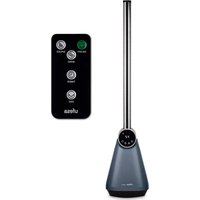
TK50 - Fan UFESA - Free user manual and instructions
Find the device manual for free TK50 UFESA in PDF.


| Product Type | Tower Fan |
| Brand | Ufesa |
| Model | TK50 |
| Power Supply | 220-240 V ~ 50/60 Hz |
| Power | 52.3 W |
| Standby Power Consumption | 0.1 W |
| Maximum Airflow | 6.17 m³/min |
| Noise Level | 51.7 dB(A) |
| Speeds | 3 (Low, Medium, High) |
| Timer | 1 to 15 hours |
| Ventilation Modes | Natural, Sleep |
| Remote Control | Yes, CR2025 battery included |
| Oscillation | Yes |
| Display | LED Screen |
| Remote Battery | CR2025 (3V) |
| Usage | Domestic, room ventilation |
| Child Safety | Use from age 8 with supervision |
| Cleaning | Damp cloth, do not immerse |
| Warranty | Compliant with applicable legislation (Directive 1999/44/EC) |
Frequently Asked Questions - TK50 UFESA
User questions about TK50 UFESA
0 question about this device. Answer the ones you know or ask your own.
Ask a new question about this device
Download the instructions for your Fan in PDF format for free! Find your manual TK50 - UFESA and take your electronic device back in hand. On this page are published all the documents necessary for the use of your device. TK50 by UFESA.
USER MANUAL TK50 UFESA
WE WOULD LIKE TO THANK YOU FOR CHOOSING UFESA. WE WISH THE PRODUCT PERFORMS TO YOUR SATISFACTION AND PLEASURE.
WARNING
PLEASE READ THE INSTRUCTIONS FOR USE CAREFULLY PRIOR TO USING THE PRODUCT. STORE THESE IN A SAFE PLACE FOR FUTURE REFERENCE.
DESCRIPTION
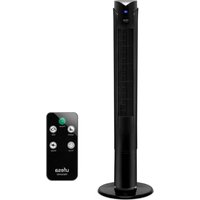
- Air Outlet
- Led Display
- Control Board
- Air Inlet
- Base
DISPLAY
a) Power Button
b) Speed Button
c) Timer Button
d) Swing Button
e) Sleeping Mode Icon
f) Natural Mode Icon
g) Timer Icon
REMOTE CONTROL
Same as control panel.
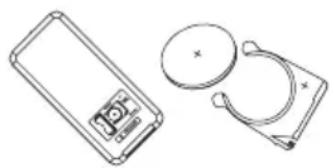
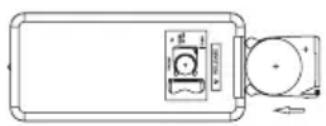
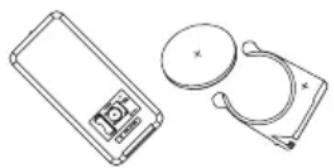
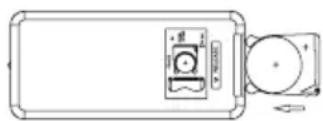
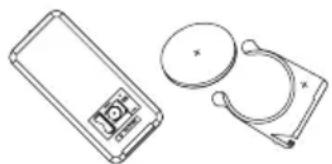
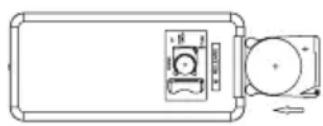
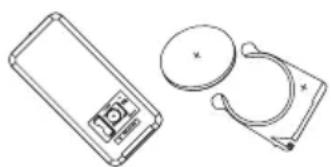
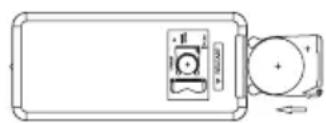
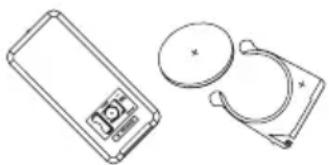
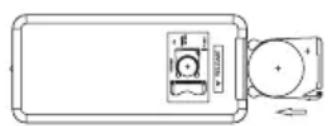
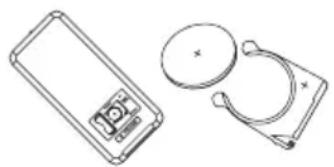
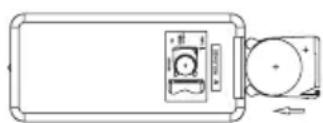
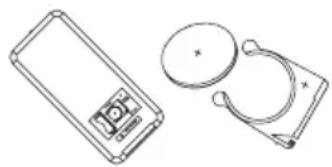
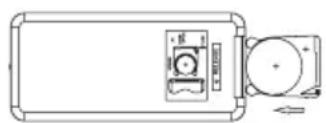
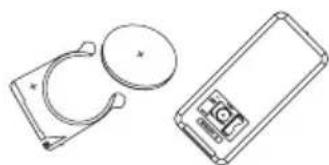
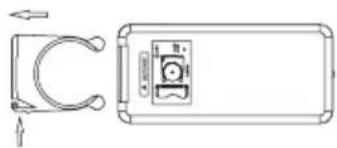
The remote control works with one button-type battery. Model No. CR2025 (3V). We recommend the use of Lithium type battery for longer service.
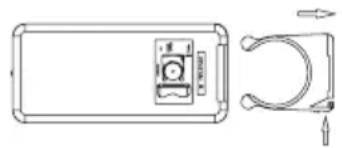
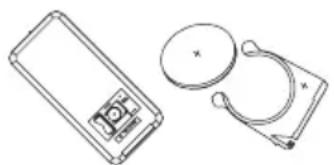
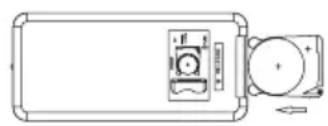
Note: Please follow battery disposal instruction on battery packaging, or contact your local authorities for safely disposal of batteries.
SAFETY INSTRUCTIONS
- This appliance can be used by children aged from 8 years and above and persons with reduced physical, sensory or mental capabilities or lack of experience and knowledge if they have
been given supervision or instruction concerning use of the appliance in a safe way and understand the hazards involved. Children should not play with the appliance. Cleaning and user maintenance shall not be made by children without supervision.
- If the supply cord is damaged, it must be replaced by the manufacturer, its service agent or similarly qualified persons in order to avoid a hazard.
- It is necessary to disconnect the appliance before assembling, disassembling and cleaning.
- This appliance is designed for use at a maximum altitude up to 2000m above sea level.
IMPORTANT INFORMATION
This appliance is intended exclusively for domestic use for the ventilation of rooms. Do not use it for other purposes. Any other use should be considered improper and dangerous. The manufacturer shall not be held responsible for any damage resulting from improper, incorrect and irresponsible use and/or for repairs made by unqualified technicians. Do not insert your fingers or any other objects through the fan's protector grille. The appliance must be kept out of the reach of children.
Do not use the appliance if it is not working properly, or if it appears to be damaged. If in doubt, take it to a professional, qualified technician.
Do not move the appliance while it is operating.
When the appliance is not being used, remove the plug from the mains socket. Do not touch the appliance with wet hands or feet.
Do not drag the appliance by the cable to move it.
Do not pull the cable or the appliance itself to remove the plug from the mains socket.
To clean the appliance, follow the instructions in the manual in the section dedicated to cleaning and maintenance.
B&B TRENDS, S.L. will not be held liable for any harm or damage which may occur to people, animals or objects as a result of failure to observe the aforementioned warnings.
INSTALLATION
After removing the packing, check the condition of the appliance. If in doubt, do not use it and take it to a professional, qualified technician. The packaging (plastic bags, polystyrene, fixtures, etc.) should be kept out of the reach of children. They are a potential source of danger and they should be disposed of in the appropriate specific containers for selective waste collection.
Warning: any stickers or leaflets attached to the grille must be removed before using the appliance. Before connecting the appliance, check that the voltage values indicated on the characteristics plate correspond to those of the electric mains supply. In the event that the mains socket and the appliance plug are incompatible, have the plug changed to one that is suitable by a professional, qualified technician.
Make sure that the cable part of the power cord is adapted to the power used by the appliance. In general, the use of adapters or extension cables are not advisable. If this is necessary, they must be in accordance with the safety regulations and their amperage capacity must not be less than the maximum capacity of the appliance.
Before each usage, check that the appliance is in good condition and the power cord is not damaged. If in doubt, check with a professional, qualified technician.
The mains socket must be easily accessible in order to disconnect the appliance with ease in case of emergency.
Position the appliance away from:
- sources of heat (e.g. open flames, gas ovens, etc.)
- deposits of liquids (e.g. sinks, etc.) to avoid falling into or splashing with water (minimum distance 2 meters).
- fabrics (curtains, etc.) or loose materials, which may obstruct the ventilation grille. Additionally, make sure that the front part is free from volatile materials (dust, etc.).
The supporting surface must be stable, flat and even (so that the appliance does not tip over).
FUNCTIONS & OPERATION
After unpacking, check whether the body is in good condition and whether there is any defect.
Plug in first
Insert the plug into the socket, product will be in standby mode.
POWER button
Push "POWER" button to turn on the appliance and it will start in Speed 1 (F1 will appear on the digital display). Push it again to switch the appliance in standby mode.
SPEED button
Push "SPEED" button to change the speed between LOW (F1), MIDDLE (F2) and HIGH (F3).
OSC button
Push "OSC" button to activate the swing function, push it again to stop the function.
Note: Do not turn the body directly by hand and change the air supply direction forcibly, otherwise the swing function will get damaged.
TIMER button
Push "TIMER" button to set the auto shut-off function. Each time you press this button, the time will change by 1 hour. You can set this time from 1h to 15h.
WIND button (ON THE REMOTE CONTROL ONLY)
Push "WIND" button to select Natural Mode or Sleeping Mode. The related icon on the appliance will light up.
Natural Mode: The current speed will drop 1 level after 20 seconds and when it reaches the lowest level, the speed will increase 1 level after 20 seconds. The appliance will operate in this cycle.
Sleeping Mode: The current speed will drop 1 level after 30 minutes until it reaches the lowest speed.
If no operation is performed within 180 seconds, the digital display will automatically turn off.
CLEANING AND MAINTENANCE
Warning: before carrying out regular cleaning operations, disconnect the plug from the mains socket.
- To clean the appliance, use a soft, slightly damp cloth. Do not use abrasive or corrosive products.
- Do not immerse any part of the fan in water or any other liquid. If this accidentally happens, under no circumstances should hands be put into the liquid. Immediately disconnect the plug from the mains socket. Then dry the appliance carefully and check that all the electrical parts are dry. If in doubt, check with professional qualified technician.
- It is essential that the air inlet and air outlet holes are free of dust and fibres.
- In case of long periods of non-use, store the fan, protecting it from dust and moisture. We recommend using the original packaging.
PRODUCT DISPOSAL
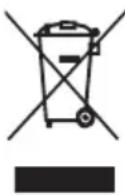
This product complies with European Directive 2012/19/EU on Waste Electrical and Electronic Equipment, known as WEEE, which establishes the legal framework applicable in the European Union for the disposal and recycling of electrical and electronic appliances. Do not throw this product into the bin. Take it to the nearest electrical and electronic waste treatment plant. The product may contain batteries. Remove them before disposing of the product and dispose in special containers approved for this purpose.
We hope you are satisfied with this product.
The product may contain batteries. Remove them before disposing of the product and dispose in special containers approved for this purpose.
| Description Symbol Value Unit | |||
| Maximum fan flow rate F 6.17 m3/min | |||
| Fan power input P 52.3 W | |||
| Service value SV 0.12 (m3/min)/W | |||
| Standby power consumption | PSB 0.1 W | ||
| Fan sound power level LWA 51.7 dB(A) | |||
| Maximum air velocity C 1.8 meters/s | |||
| Seasonal electricity consumption | Q | 16.8 kWh/a | |
| Measurement standard for service value | IEC 60879:2019 – Comfort fans and regulators for household and similar purposes – Methods for measuring performance |
FRANÇAIS
NOUS VOUS REMERCIONS D'AVOIR CHOISI UFESA. NOUS ESPÉRONS QUE CE PRODUIT RÉPOND À VOS BESOINS ET À VOS GOÛTS.
AVERTISSEMENT
VEUILLEZ LIRE ATTENTIVEMENT LE MODE D'EMPLOI AVANT D'UTILISER LE PRODUIT. CONSERVEZ-LE DANS UN ENDROIT SÛR POUR POUVOIR LE CONSULTER ULTÉRIEUREMENT.
DESCRIPTION
B&B TRENDS, SL. guarantees compliance of this product, for the use for which it is, during the period established by the legislation in force in the country of sale. In the case of breakdown during the term of this warranty, users are entitled to repair or else the replacement of the product at no charge if the former is unavailable, unless one of these options proves impossible to fulfil or is disproportionate. In this case, you can then opt for a reduction in price or cancellation of the sale, which must be dealt with directly with the sales vendor. This also covers replacement of spare parts provided that the product has been used according to the recommendations specified in this manual for both cases, and has not been tampered with by any third party that is not authorised by B & B TRENDS, SL. The warranty will not cover any parts subject to wear and tear. This warranty does not affect your rights as a consumer in accordance with the provisions in Directive 1999/44/EC for member states of the European Union.
USE OF WARRANTY
Customers must contact a B&B TRENDS, SL., authorised Technical Service for repair of the product. Since any tampering of the same by anyone not authorised by B&B TRENDS, SL., or the careless or improper use of the same shall render this warranty null and void. You must keep the purchase invoice, receipt or delivery docket in order to exercise your warranty rights. For technical service and after-sales care outside the Spanish territory, please submit your query to the point of sale where you purchased the item.
BON DE GARANTIE
Check out your nearest service station at https://sat.ufesa.com/
ufesa
B&B TRENDS, S.L. · C.I.F. B-86880473
- WARNING
- DESCRIPTION
- DISPLAY
- REMOTE CONTROL
- SAFETY INSTRUCTIONS
- IMPORTANT INFORMATION
- INSTALLATION
- FUNCTIONS & OPERATION
- PLUG IN FIRST
- POWER BUTTON
- SPEED BUTTON
- OSC BUTTON
- TIMER BUTTON
- WIND BUTTON (ON THE REMOTE CONTROL ONLY)
- CLEANING AND MAINTENANCE
- PRODUCT DISPOSAL
- FRANÇAIS
- AVERTISSEMENT
- USE OF WARRANTY
- BON DE GARANTIE
- UFESA
Brand : UFESA
Model : TK50
Category : Fan