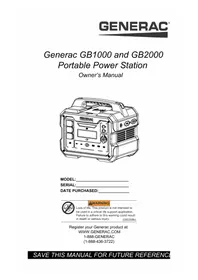
G0080250 - Generator Generac - Free user manual and instructions
Find the device manual for free G0080250 Generac in PDF.


| Brand | Generac |
| Model | G0080250 (GB1000 / GB2000) |
| Product type | Portable power station / Battery generator |
| Dimensions (L x W x H) | 359 mm x 258 mm x 305 mm (GB1000) / 425 mm x 265 mm x 384 mm (GB2000) |
| Weight | 12.3 kg (GB1000) / 19.5 kg (GB2000) |
| Battery type | Li-ion NMC |
| Battery capacity | 1086 Wh (GB1000) / 2106 Wh (GB2000) |
| AC outlet (x3) | 120 V AC, 13.3 A, 1600 W (3200 W peak) |
| USB-A output (x2) | 5 V DC, 3.1 A (15.5 W max each) |
| USB-C output (x2) | 5-20 V DC, 3.3 A (65 W max each) |
| 12V car outlet | 12 V DC, 10 A (120 W max) |
| Wireless charger | 15 W max |
| AC charging input | 120 V AC, 60 Hz, 450 W max |
| DC / Solar charging input | 10-28 V DC, 30 A max, 468 W max |
| Estimated runtime (example) | Lighting 10 W: 90 h (GB1000), 180 h (GB2000); Refrigerator 120 W: 7.5 h / 15 h |
| Discharge temperature | -20 °C to 40 °C |
| Charge temperature | 0 °C to 40 °C |
| Protections | Overload, overcurrent, undervoltage, short circuit, high/low temperature |
| Key features | LCD screen, LED lighting, wireless charger, parallel operation, pass-through charging |
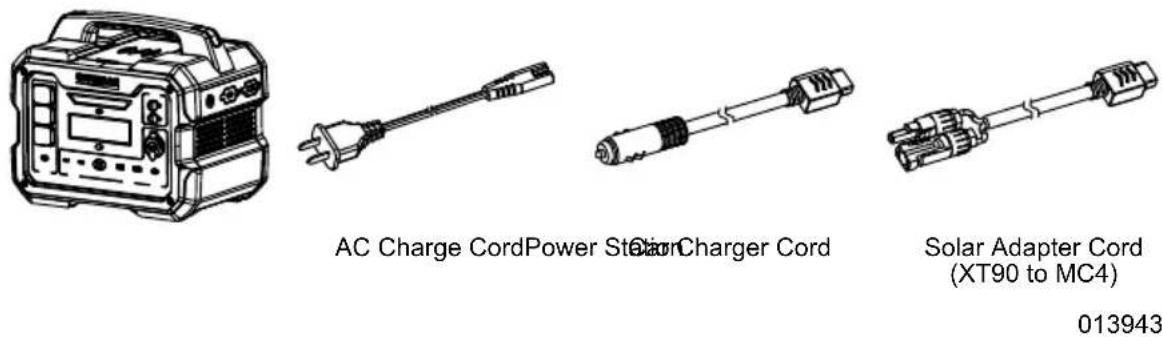
| Included accessories | AC charging cord, car charger cord, solar adapter cord (XT90 to MC4) |
| Maintenance | Clean with damp cloth and mild soap; discharge/recharge every 3 months |
| Spare parts | Contact an authorized Generac dealer |
Frequently Asked Questions - G0080250 Generac
User questions about G0080250 Generac
0 question about this device. Answer the ones you know or ask your own.
Ask a new question about this device
Download the instructions for your Generator in PDF format for free! Find your manual G0080250 - Generac and take your electronic device back in hand. On this page are published all the documents necessary for the use of your device. G0080250 by Generac.
USER MANUAL G0080250 Generac
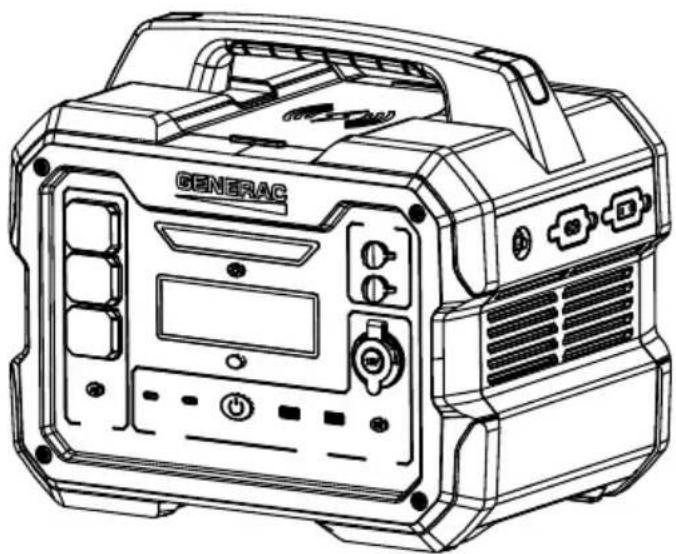
Generac GB1000 and GB2000 Portable Power Station
Owner's Manual
MODEL:
SERIAL:
DATE PURCHASED:

WARNING
Loss of life. This product is not intended to be used in a critical life support application. Failure to adhere to this warning could result in death or serious injury. (000209b)
Register your Generac product at:
WWW.GENERAC.COM
1-888-GENERAC
(1-888-436-3722)
SAVE THIS MANUAL FOR FUTURE REFERENCE
Section 1 Introduction and Safety 1
Introduction 1
Safety Rules 1
Important Alerts 1
FCC Statement 2
Section 2 General Information and Setup 3
What's Included 4
Know Your Power Station 4
Know Power Station Limits 6
Estimated Operating Time 6
Section 3 Operation 7
Operation and Use Questions 7
General Use 7
Using the Power Station (Discharging) 7
Charging the Power Station 7
Simultaneous Charge Inputs 8
Pass-Through Charging 8
Parallel Connection 8
Transportation 9
Section 4 Maintenance and Troubleshooting 10
Product Maintenance 10
Storage 10
Disposal 10
FAQ 10
Troubleshooting 10
Notes 12
Section 1 Introduction and Safety
Introduction
Read This Manual Thoroughly

WARNING
Consult Manual. Read and understand manual completely before using product. Failure to completely understand manual and product could result in death or serious injury. (000100a)
If any section of this manual is not understood, contact the nearest Independent Authorized Service Dealer (IASD) or Generac Customer Service at 1-888-436-3722 (1-888-GENERAC), or visit wwwgenerac.com for starting, operating, and servicing procedures. The owner is responsible for proper maintenance and safe use of the unit.
SAVE THESE INSTRUCTIONS for future reference. This manual contains important instructions that must be followed during placement, operation, and maintenance of the unit and its components. Always supply this manual to any individual that will use this unit, and instruct them on how to correctly start, operate, and stop the unit in case of emergency.
The information in this manual is accurate based on products produced at the time of publication. The manufacturer reserves the right to make technical updates, corrections, and product revisions at any time without notice.
Safety Rules
The manufacturer cannot anticipate every possible circumstance that might involve a hazard. The alerts in this manual, and on tags and decals affixed to the unit, are not all inclusive. If using a procedure, work method, or operating technique that the manufacturer does not specifically recommend, verify that it is safe for others and does not render the equipment unsafe.
Throughout this publication, and on tags and decals affixed to the unit, DANGER, WARNING, CAUTION, and NOTE blocks are used to alert personnel to special instructions about a particular operation that may be hazardous if performed incorrectly or carelessly. Observe them carefully. Alert definitions are as follows:
DANGER
Indicates a hazardous situation which, if not avoided, will result in death or serious injury.
(000001)
WARNING
Indicates a hazardous situation which, if not avoided, could result in death or serious injury.
(000002)
CAUTION
Indicates a hazardous situation which, if not avoided, could result in minor or moderate injury.
(000003)
NOTE: Notes contain additional information important to a procedure and will be found within the regular text of this manual.
These safety alerts cannot eliminate the hazards that they indicate. Common sense and strict compliance with the special instructions while performing the action or service are essential to preventing accidents.
Important Alerts
Electrical Hazards
DANGER
Electrocution. Water contact with a power source, if not avoided, will result in death or serious injury.
(000104)
DANGER
Electrocution. Contact with bare wires, terminals, and connections will result in death or serious injury.
(000756)
DANGER
Electrocution. In the event of electrical accident, immediately shut power OFF. Use non-conductive implements to free victim from live conductor. Apply first aid and get medical help. Failure to do so will result in death or serious injury. (000145)
WARNING
Electrocution. Never charge a battery in wet conditions. Doing so could result in death, serious injury, equipment or property damage.
(000482)
WARNING

Electrocution. Never operate this unit in wet conditions, and always store it under a cover or in a dry location. Failure to do so could result in death, serious injury, or equipment or property damage.
(000713a)

WARNING
Electrocution. Grasp electrical cord plug when unplugging the electrical cord from the outlet. Do not touch metal prongs. Failure to do so could result in death or serious injury.
(000714a)
Fire and Explosion Hazards

AWARNING
Explosion. Do not dispose of batteries in a fire. Batteries are explosive. Electrolyte solution can cause burns and blindness. If electrolyte contacts skin or eyes, flush with water and seek immediate medical attention. (000162)

WARNING
Risk of fire. Do not crush, puncture, or subject battery units or modules to strong impacts. Failure to do so could result in death, serious injury, property damage, or equipment damage. (000730)
Additional Personal Property Hazards
| WARNING Equipment and property damage. Do not operate unit on uneven surfaces, or areas of excessive moisture, dirt, dust or corrosive vapors. Doing so could result in death, serious injury, property and equipment damage. (000250) |
| WARNING Injury and equipment damage. Do not use battery as a step. Doing so could result in falling, damaged parts, unsafe equipment operation, and could result in death or serious injury. (000757) |
| WARNING Injury and equipment damage. The use of non-Generac equipment could result in unit damage, death or serious injury. (000752) |
| WARNING Risk of burn. Do not open or mutilate batteries. Batteries contain electrolyte solution which can cause burns and blindness. If electrolyte contacts skin or eyes, flush with water and seek immediate medical attention. | (000163a) |
| AWARNING |
| Personal injury. Keep out of reach of children. |
| Failure to do so could result in death or serious injury. |
| (000128a) |
FCC Statement
The equipment complies with part 15 of the FCC rules. The operation shall meet the following two conditions:
- The device may not cause harmful interference, and
- The equipment must accept any interference received, including interference that may lead to accidental operation.
- The equipment complies with FCC radiation exposure limits for uncontrolled environments. The equipment shall be installed and operated at a minimum distance of 20~cm between the radiator and the vehicle body.
NOTE: According to part 15 of the FCC rules, the equipment has been tested and found to comply with the limitations of class B digital equipment. These restrictions are intended to provide reasonable protection against harmful interference with residential facilities. The equipment can be used and radiate RF energy. If it is not installed and used according to the instructions, it may cause harmful interference to radio communication. However, there is no guarantee that interference will not occur in a specific installation. If the equipment does cause harmful interference to radio or television reception, it can be determined by turning off the equipment, and users are encouraged to correct the interference by one or more of the following measures:
- Reposition or reposition the receiving antenna.
- Increase the distance between the device and the receiver.
- Connect the device to an outlet on a circuit different from the circuit to which the receiver is connected.
- Consult your dealer or experienced radio / TV technician for assistance.
Section 2 General Information and Setup
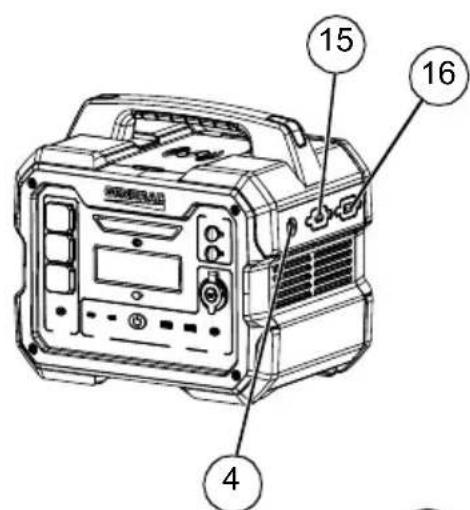
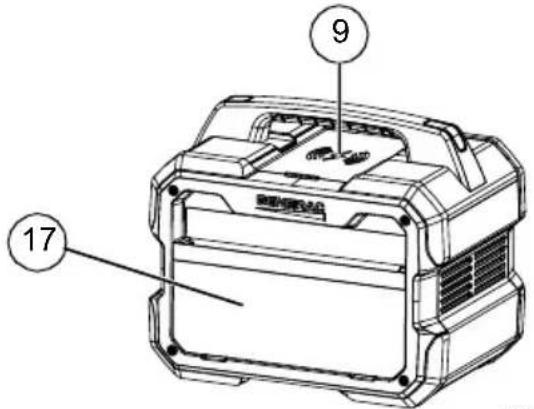
013615013617
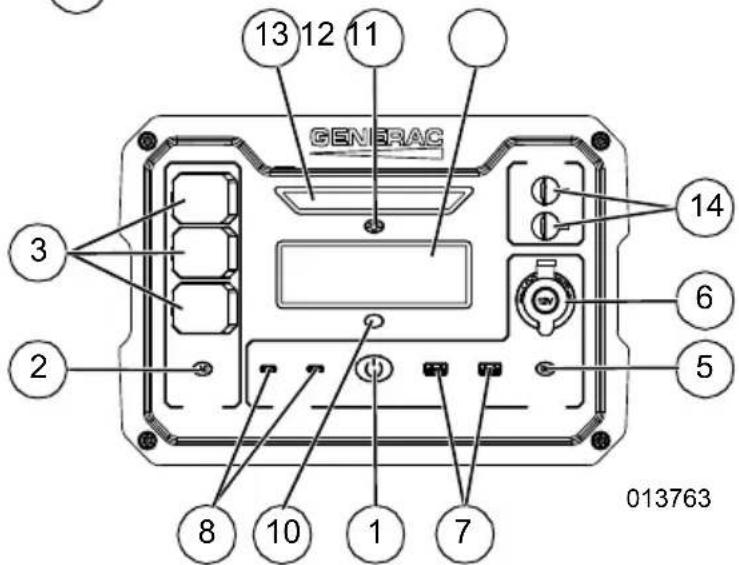
Figure 2-1. Features and Controls
TABLE 1. Components
| 1 Main ON/OFF Button |
| 2 AC Output ON/OFF Button |
| 3 NEMA 1-15R AC Receptacles |
| 4 AC Output Circuit Breaker |
| 5 DC Output ON/OFF Button |
| 6 12V Car Port |
| 7 USB-A Output Receptacle |
| 8 USB-C Output Receptacle |
| 9 Wireless Charging Pad |
| 10 Display ON/OFF Button |
| 11 Display Screen |
| 12 LED ON/OFF Button |
| 13 Diffused LED Light |
| 14 Parallel Ports |
| 15 AC Charging Port |
| 16 DC Charging Port |
| 17 Cord Storage Pocket |
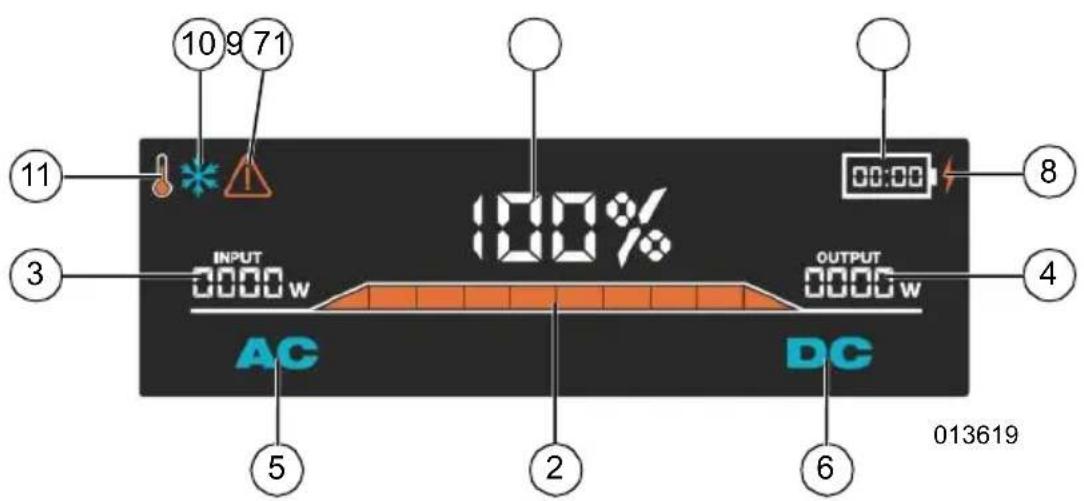
Figure 2-2. Control Panel and LCD Display
TABLE 2. Display Screen Icons
| 1 Battery State of Charge |
| 2 Battery State of Charge Indicator Bar |
| 3 Input Power (Charging) |
| 4 Output Power |
| 5 AC Output ON/OFF Icon |
| 6 DC | Output ON/OFF Icon |
| 7 Estimated Charge / Discharge Time Remaining | |
| 8 Low Battery Power Indicator | |
| 9 Fault Warning | |
| 10 Low Temperature Warning | |
| 11 High Temperature Warning | |
What's Included
Know Your Power Station

WARNING
Consult Manual. Read and understand manual
completely before using product. Failure to
completely understand manual and product
could result in death or serious injury. (000100a)
Replacement owner's manuals are available at wwwgenerac.com.
TABLE 3. Product Specifications
| GB1000 GB2000 | ||
| GENERAL | ||
| Dimensions(L x W x H) | 14.1 x 10.2 x 12.0 in(359 x 258 x 305 mm) | 16.8 x 10.4 x 15.1 in(425 x 265 x 384 mm) |
| Weight 27.1 lbs (12.3 kg) | 43 lbs (19.5 kg) | |
| Output | ||
| AC Output (x3) 120VAC / USB-A (x2) 5VDC / 3.1A / USB-C (x2) 5-20VDC / 3.3A (65W max ea.) | 13.3A (1600W / 3200W Surge) | |
| 12V Car Port 12VDC / 10A (120W max) | ||
| Wireless Charger 15W max | ||
| Charge Input | ||
| AC Wall Charger 120VAC 60Hz 450W max | ||
| DC / Solar Charger 10-28 VDC / 30A (468W max) | ||
| Battery | ||
| Cell Chemistry Li-ion NMC | ||
| Pack Capacity 1086Wh 2106Wh | ||
| Cycle Life* 800 cycles to 80% capacity 1000 cycles to 80% capacity | 106Wh | |
| Shelf Life Charge every 3-6 months | ||
| Management System | High / Low temperature protection | |
| Overload protection | ||
| Over voltage protection | ||
| Under voltage protection | ||
| Short circuit protection | ||
| Environmental | ||
| Discharge Temperature | -4°F to 104°F (-20°C to 40°C) | |
| Charge Temperature | 32°F to 104°F (0°C to 40°C) | |
| Storage Temperature | ||
| Optimal | 59°F to 77°F (15°C to 25°C) | |
| Max | -4°F to 113°F (-20°C to 45°C) | |
| Exposure Rating | Temporary Outdoor Use | |
| *Cycle life based on charge rate of 0.5C and discharge rate of 1C @ 25°C | ||
Know Power Station Limits
Overloading a Power Station can result in damage to the Power Station and connected electrical devices. Observe the following to prevent overload:
- Add the total wattage of all electrical devices to be connected at one time. This total should NOT be greater than the Power Station's wattage capacity.
- The rated wattage of lights can be taken from light bulbs. The rated wattage of tools, appliances, and motors can be found on a data label or decal affixed to the device.
-
If the appliance, tool, or motor does not give wattage, multiply volts times ampere rating to determine watts (volts x amps = watts).
-
Some electric motors, such as induction types, require approximately three times more watts of power for starting than for running. This surge of power lasts only a few seconds when starting such motors. Make sure to allow for high starting wattage when selecting electrical devices to connect to the Power Station:
- Calculate the watts needed to start the largest motor.
- Add the starting watts to the running watts of all other connected loads.
The Wattage Reference Guide is provided to assist in determining how many items the Power Station can operate at one time.
NOTE: All figures are approximate. See data label on appliance for wattage requirements.
Estimated Operating Time
| Device | Image | Watts | GB1000 Runtime | GB2000 Runtime |
| Light | 10W | 90.0 Hrs | 180.0 Hrs | |
| CPAP | 40W | 22.5 Hrs | 45.0 Hrs | |
| Refrigerator | 120W | 7.5 Hrs | 15.0 Hrs | |
| Microwave | 1200W | 0.8 Hrs | 1.5 Hrs | |
| 50" TV | 110W | 8.2 Hrs | 16.4 Hrs | |
| Phone | 11Wh | 82 Full Charges | 164 Full Charges | |
| Laptop | 60Wh | 15 Full Charges | 30 Full Charges | |
| Car Fridge | 60W | 15.0 Hrs | 30.0 Hrs | |
| Circular Saw | 1400W | 0.6 Hrs | 1.3 Hrs | |
| Electric Drill | 1000W | 0.9 Hrs | 1.8 Hrs | |
| Electric Grill | 1150W | 0.8 Hrs | 1.6 Hrs | |
| Portable Heater | 1500W | 0.6 Hrs | 1.2 Hrs |
Section 3 Operation
Operation and Use Questions
Call Generac Customer Service at 1-888-GENERAC (1-888-436-3722) with questions or concerns about equipment operation and maintenance.
General Use
Powering ON the Power Station
Press and hold the ON/OFF button to turn ON the Power Station. The ON/OFF button will illuminate, and the LCD display will turn ON.
NOTE: The Power Station will automatically shut down after 60 minutes of idle operation to conserve the battery.
Press and hold the ON/OFF button again to turn off the Power Station.
LCD Display
The LCD display automatically turns ON when the Power Station is turned ON. Once the Power Station is ON, the display can be toggled ON and OFF by pressing the Display Button.
NOTE: The Power Station display will enter sleep mode after 10 minutes of idle operation.
LED Light
With the Power Station powered ON, press the LED button once to turn ON the low flood light. Press the LED Button again to turn ON the high flood light. Press the LED Button again to turn off the light.
Wireless Charger
With the Power Station powered ON, press the DC Button to turn ON the wireless charger.
NOTE: Ensure the device is centered on the wireless charging pad. Wireless charger may not be compatible with certain devices or cases on devices.
AC Output
With the Power Station powered ON, press the AC Button to use the 120V AC receptacles. The AC Button will illuminate, and the AC icon will appear on the display.
NOTE: If the AC Button is flashing, press and hold the AC Button to reset the circuit. See Troubleshooting if the flashing persists.
DC Output
With the Power Station powered ON, press the DC Button to use the USB's, 12V car adapter and wireless charger. The DC Button will illuminate, and the DC icon will appear on the display.
NOTE: If the DC Button is flashing, press and hold the DC Button to reset the circuit. See Troubleshooting if the flashing persists.
Using the Power Station (Discharging)
Starting the Power Station
NOTE: If using only one, or all three AC receptacle(s), the load must not exceed 13.3A current, 1600 watts of power.
-
Confirm the device or equipment requiring power is OFF.
-
Press and hold ON/OFF button for three (3) seconds to turn unit ON.
-
Connect equipment.
-
AC Power - Turn ON AC power switch.
-
DC Power (USB/vehicle charging) - Turn ON DC power switch.
NOTE: Power Station will automatically turn off after 60 minutes if not in use.
Charging the Power Station
WARNING
Injury and equipment damage. The use of non-Generac equipment could result in unit damage, death or serious injury.
(000752)
IMPORTANT NOTE: Always use the charging cord(s) supplied with the unit.
NOTE: The ambient temperature for product use should be between 0^ to 40^ (32°F to 104°F).
Place the Power Station on a clean, dry, level surface.
The Power Station can be charged three (3) separate ways.
- See Figure 3-1. AC Power Supply - Insert AC charging cord from the AC charging port to the wall electrical outlet.
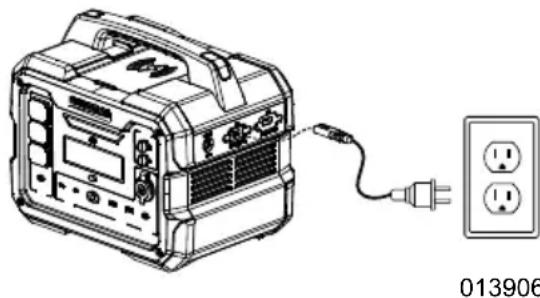
Figure 3-1. AC Wall Charging
- See Figure 3-2. Solar Panels - Insert DC charging cord from the solar panel into the DC charger port.
NOTE: Charging time is dependent on the solar panel power and light intensity.
NOTE: Confirm the solar panel is compatible with the power station before connecting the solar panel. Power stations support 10-28VDC, 30A max, up to 468W of solar input. Solar panels not meeting these requirements may damage the power station.
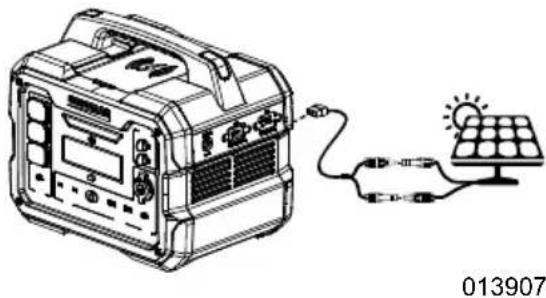
Figure 3-2. Solar Charging
- See Figure 3-3. Car Charging - Insert DC charging cord from the car power supply into the DC charger port.
NOTE: Car charging the power station will drain the vehicles battery. It is recommended to only charge the power station while the vehicle is running to prevent depletion of the vehicle's battery.
NOTE: Always disconnect the power station when the vehicle is turned off.
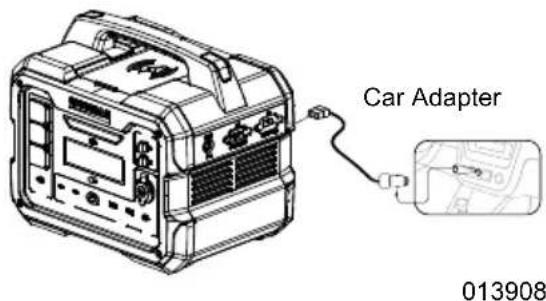
Figure 3-3. Car Charging
Simultaneous Charge Inputs
Power Stations are compatible with simultaneous AC and DC charge inputs (example: solar + generator).
The charging input reference guide provides suggested charge input power range.
NOTE: Exceeding suggested charge input power can reduce battery life.
| BATTERY LIFE | GB1000 | GB2000 |
| Best | <540W | <1000W |
| Good | 540W - 800W | — |
| Not Advised | >800W | — |
Pass-Through Charging
Power Stations support simultaneous charging and discharging of the battery during operation.
NOTE: This device is not designed to be used as a UPS (Uninterrupted Power Supply).
NOTE: Pass-through charging can reduce battery life.
Parallel Connection
WARNING
Injury and equipment damage. The use of non-Generac equipment could result in unit damage, death or serious injury.
(000752)
The rated power of equipment should not exceed the total rated power of parallel products.
- Only use with compatible Power Stations and Generac Portable Inverter Generators. See parallel kit manual for complete list of compatible devices.
The use of non-Generac equipment could cause unit damage or personal injury.
-
Connect parallel devices before turning the power ON.
-
Turn the power OFF before disconnecting parallel devices.
Paralleling two Power Stations provides almost twice the power.
-
See Figure 3-4. Insert the parallel plugs from the parallel box into the Power Stations.
-
Press ON/OFF button on the Power Stations.
-
Press AC button on the Power Stations.
-
Plug electrical equipment into the AC outlets. Turn ON equipment.
NOTE: If a fault occurs, the AC power will turn off and the fault light will flash for 10 seconds.
NOTE: AC and DC Power Station outlets can be used at the same time as the parallel kit although output is limited to the Power Station's rating.
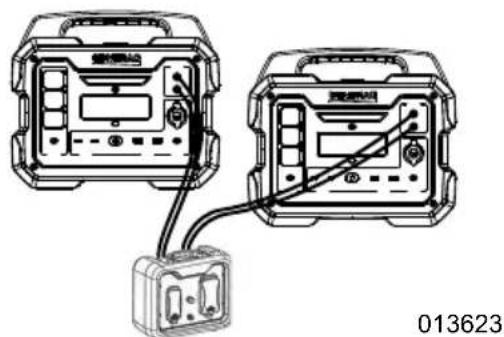
Figure 3-4. Parallel Connections
Transportation
- Position and/or tie-down power station securely during travel to prevent rolling or tipping of the product. Failure to secure the power station may result in unit damage or personal harm.
Refer to FAA regulations regarding air travel. Power stations with lithium batteries (>160Wh) are not permitted for commercial air travel.
Section 4 Maintenance and Troubleshooting
Product Maintenance
- Use a damp cloth with mild soap to wipe exterior surfaces clean.
NOTE: Avoid cleaning solvents harmful to plastics to prevent damage to the power station.
- Visually inspect unit to ensure vents are clear before each use.
- Clean dust and debris from vent(s) with a clean cloth before each use.
- Discharge and charge battery once every three (3) months. See Using the Power Station (Discharging).
- Charge the Power Station as soon as the display reads 20% state of charge or less.
Storage
- Store unit in a clean, dry, ventilated area.
- Store at an optimal temperature of 59^ - 77^ (15^ - 25^) and a max temperature of -4^ - 113^ (-20^ - 45^) .
The Power Station should be between 30- 60% state of charge for long term storage. Recharge every three (3) months to maintain battery life.
Disposal
Contact an IASD to return Power Station for disposal.
FAQ
Q: Why does the power station show power output when I don't have anything plugged in?
A: The power station uses power for the display, fans, inverter, etc. Power usage is shown on the LCD display for user awareness.
Q: Can the GB1000/GB2000 be discharged at the same time it is charging?
A: Yes, both models can be simultaneously charged and discharged.
NOTE: Pass-through charging can reduce battery life.
Q: How do I estimate the operating time for a device?
A: Estimated operating time (hrs) = Capacity (Wh) * 0.8 / Device Load (W).
Q: Can I use the GB1000/GB2000 outside?
A: Yes, both models are rated for temporary outdoor use.
NOTE: The power stations should NOT be exposed to rain or moisture.
Q: How do I silence the beeping sound when pressing buttons?
A: Hold the DISPLAY button for five (5) seconds.
Troubleshooting
| PROBLEM CAUSE CORRECTION | ||
| Unit does not have output power. | 1. Unit turned off.2. AC or DC output turned off.3. AC circuit breaker OPEN.4. Unit is overloaded. (Solid Fault Warning on display)5. Unit temperature is below -4 °F (-20 °C). (Low Temp Warning Icon on display)6. Unit temperature is above 104 °F (40 C°). (High Temp Warning Icon on display)7. AC or DC circuit error (AC / DC display icon flashing).8. Unit is defective. (Flashing Fault Warning on Display) | 1. Hold ON/OFF power button on the power station.2. Press AC or DC button to power on circuit.3. Reset circuit breaker.4. See Know Power Station Limits5. Move power station inside to warm up. (This may take some time.)6. Move power station to cooler location. (This may take some time.)7. Hold AC or DC button for three (3) seconds to reset circuit.8. Contact IASD. |
| Unit will not charge. 1. Bad | power source. 2. Loose connection. 3. Unit temperature is below 32 °F (0 °C). (Low Temp Warning Icon on display). 4. Unit temperature is above 104 °F (40 °C). (High Temp Warning Icon on display). 5. Defective charger (Alarm display icon flashing two (2) times). | 1. Confirm power source is compatible with the power station. 2. Confirm plugs are firmly connected. 3. Move power station inside to warm up. (This may take some time.) 4. Move power station to cooler location. (This may take some time.) 5. Contact IASD. |
| Unit will not start. 1. Power | station powered ON incorrectly. 2. Battery at 0% state of charge. 3. Unit is defective. | 1. Hold ON/OFF button for three (3) seconds to power ON the power station. 2. Charge the power station. 3. Contact IASD. |
| Unit starts, then shuts down. | 1. No load present on unit. A. Display sleeps after 10 minutes. B. Power station automatically shuts down after 60 minutes to conserve battery. 2. Unit is defective. (Flashing Fault Warning on Display). | 1. Hold ON/OFF button to power on the power station. Ensure AC or DC output is turned ON and load is connected. 2. Contact IASD. |
| Unit is overheating - (High Temp Warning on Display). | 1. Unit temperature is too high (High Temp Warning Icon on display). 2. Dirty or clogged vents. 3. Defective cooling fan. | 1. Move power station to cooler environment. (This may take some time.) 2. Clean vents. 3. Contact IASD. |
| Wireless charger not working. | 1. DC output turned OFF. 2. Device not centered on wire-less charging pad. 3. Device not compatible. 4. Case on device. | 1. Press DC button to power on circuit. 2. Center device on wireless charging pad. 3. Confirm device is compatible with wireless charging. 4. Remove case from device and try again. |
Notes
Part No. A0002236216 Rev. A 05/09/2022
©2022 Generac Power Systems, Inc.
All rights reserved
Specifications are subject to change without notice.
No reproduction allowed in any form without prior
written consent from Generac Power Systems, Inc.
GENERAC
Generac Power Systems, Inc.
S45 W29290 Hwy. 59
Waukesha, WI 53189
1-888-GENERAC (1-888-436-3722)
wwwgenerac.com
©2022 Generac Power Systems, Inc.
©2022 Generac Power Systems, Inc.
- Generac GB1000 and GB2000 Portable Power Station
- WARNING
- Section 1 Introduction and Safety 1
- Section 2 General Information and Setup 3
- Section 3 Operation 7
- Section 4 Maintenance and Troubleshooting 10
- Section 1 Introduction and Safety
- Introduction
- Read This Manual Thoroughly
- Safety Rules
- DANGER
- CAUTION
- Important Alerts
- Electrical Hazards
- Fire and Explosion Hazards
- AWARNING
- Additional Personal Property Hazards
- FCC Statement
- Section 2 General Information and Setup
- What's Included
- Know Your Power Station
- Know Power Station Limits
- Section 3 Operation
- Operation and Use Questions
- General Use
- Powering ON the Power Station
- LCD Display
- LED Light
- Wireless Charger
- AC Output
- DC Output
- Using the Power Station (Discharging)
- Starting the Power Station
- Charging the Power Station
- IMPORTANT NOTE: Always use the charging cord(s) supplied with the unit.
- Simultaneous Charge Inputs
- Pass-Through Charging
- Parallel Connection
- Transportation
- Section 4 Maintenance and Troubleshooting
- Product Maintenance
- Storage
- Disposal
- FAQ
- Troubleshooting
- Notes
Brand : Generac
Model : G0080250
Category : Generator