TS-24N30AEZ - TV PANASONIC - Free user manual and instructions
Find the device manual for free TS-24N30AEZ PANASONIC in PDF.


User questions about TS-24N30AEZ PANASONIC
0 question about this device. Answer the ones you know or ask your own.
Ask a new question about this device
Download the instructions for your TV in PDF format for free! Find your manual TS-24N30AEZ - PANASONIC and take your electronic device back in hand. On this page are published all the documents necessary for the use of your device. TS-24N30AEZ by PANASONIC.
USER MANUAL TS-24N30AEZ PANASONIC
Markings on the Product.... 2
Assembling / Removing the pedestal 4
When using the wall-hanging bracket.... 4
Environmental Information.... 5
Features 5
Accessories Included.... 5
TV Control Button & Operation....5
Using Main TV Menu....6
Inserting the Batteries into the Remote 6
Power Connection 6
Antenna Connection....6
Switching On/Off....6
First Time Installation....7
Media Playback via USB Input 7
Software Upgrade....7
Specification 7
Remote Control 8
Troubleshooting & Tips....9
Licence Notification 9
Disposal of Old Equipment and Batteries....9
Declaration of Conformity (DoC) 10
More Information 10
Safety Information

CAUTION
RISK OF ELECTRIC SHOCK DO NOT OPEN
CAUTION: TO REDUCE THE RISK OF ELECTRIC SHOCK DO NOT REMOVE COVER (OR BACK).

NO USER-SERVICEABLE PARTS INSIDE. REFER SERVICING TO QUALIFIED SERVICE PERSONNEL.
In extreme weather (storms, lightning) and long inactivity periods (going on holiday) disconnect the TV set from the mains.
The mains plug is used to disconnect TV set from the mains and therefore it must remain readily operable. If the TV set is not disconnected electrically from the mains, the device will still draw power for all situations even if the TV is in standby mode or switched off.
Note: Follow the on screen instructions for operating the related features.
IMPORTANT - Please read these instructions fully before installing or operating
WARNING: This device is intended to be used by persons (including children) who are capable / experienced of operating such a device unsupervised, unless they have been given supervision or instruction concerning the use of the device by a person responsible for their safety.
- Use this TV set at an altitude of less than 5000 metres above the sea level, in dry locations and in regions with moderate or tropical climates.
- The TV set is intended for household and similar indoor use but may also be used in public places.
- For ventilation purposes, leave at least 5cm of free space around the TV.
- The ventilation should not be impeded by covering or blocking the ventilation openings with items, such as newspapers, table-cloths, curtains, etc.
- The power cord/plug should be easily accessible. Do not place the TV, furniture, etc. on the power cord. A damaged power cord/plug can cause fire or give you an electric shock. Handle the power cord by the plug, do not unplug the TV by pulling the power cord. Never touch the power cord/plug with wet hands as this could cause a short circuit or electric shock. Never make a knot in the power cord or tie it with other cords. When damaged it must be replaced, this should only be done by qualified personnel.
-
Do not expose the TV to dripping or splashing of liquids and do not place objects filled with liquids, such as vases, cups, etc. on or over the TV (e.g. on shelves above the TV).
-
Do not expose the TV to direct sunlight or do not place open flames such as lit candles on the top of or near the TV.
- Do not place any heat sources such as electric heaters, radiators, etc. near the TV set.
- Do not place the TV on the floor or inclined surfaces.
- To avoid danger of suffocation, keep plastic bags out of the reach of babies, children and domestic animals.
- Carefully attach the stand to the TV. If the stand is provided with screws, tighten the screws firmly to prevent the TV from tilting. Do not over-tighten the screws and mount the stand rubbers properly.
- Do not dispose of the batteries in fire or with hazardous or flammable materials.
WARNING
- Batteries must not be exposed to excessive heat such as sunshine, fire or the like.
- Excessive sound pressure from earphones or headphones can cause hearing loss.
ABOVE ALL - NEVER let anyone, especially children, push or hit the screen, push anything into holes, slots or any other openings in the TV.
| Caution | Serious injury or death risk |
| Risk of electric shock | Dangerous voltage risk |
| Maintenance | Important maintenance component |
Markings on the Product
The following symbols are used on the product as a marker for restrictions and precautions and safety instructions. Each explanation shall be considered where the product bears related marking only. Note such information for security reasons.

Class II Equipment: This appliance is designed in such a way that it does not require a safety connection to electrical earth.

Hazardous Live Terminal: The marked terminal(s) is/are hazardous live under normal operating conditions.

Caution, See Operating Instructions: The marked area(s) contain(s) user replaceable coin or button cell batteries.
Class 1 Laser Product: This product contains Class 1 laser source that is safe under reasonably foreseeable conditions of operation.
WARNING
Do not ingest the battery, Chemical Burn Hazard This product or the accessories supplied with the product may contain a coin/button cell battery. If the coin/button cell battery is swallowed, it can cause severe internal burns in just 2 hours and can lead to death. Keep new and used batteries away from children. If the battery compartment does not close securely, stop using the product and keep it away from children. If you think batteries might have been swallowed or placed inside any part of the body, seek immediate medical attention.
Warning Stability Hazard
A television may fall, causing serious personal injury or death. Many injuries, particularly to children, can be avoided by taking simple precautions such as:
- ALWAYS use cabinets or stands or mounting methods recommended by the manufacturer of the television set.
- ALWAYS use furniture that can safely support the television set.
- ALWAYS ensure the television set is not overhanging the edge of the supporting furniture.
- ALWAYS educate children about the dangers of climbing on furniture to reach the television set or its controls.
- ALWAYS route cords and cables connected to your television so they cannot be tripped over, pulled or grabbed.
• NEVER place a television set in an unstable location. - NEVER place the television set on tall furniture (for example, cupboards or bookcases) without anchoring both the furniture and the television set to a suitable support.
- NEVER place the television set on cloth or other materials that may be located between the television set and supporting furniture.
- NEVER place items that might tempt children to climb, such as toys and remote controls, on the top of the television or furniture on which the television is placed.
- The equipment is only suitable for mounting at heights ≤ 2 m.
If the existing television set is going to be retained and relocated, the same considerations as above should be applied.
Apparatus connected to the protective earthing of the building installation through the MAINS connection or through other apparatus with a connection to protective earthing – and to a television distribution system using coaxial cable, may in some circumstances create a fire hazard. Connection to a television distribution system has therefore to be provided through a device providing electrical isolation below a certain frequency range (galvanic isolator).
WALL MOUNTING WARNINGS
- Read the instructions before mounting your TV on the wall.
- The wall mount kit is optional. You can obtain from your local dealer, if not supplied with your TV.
- Do not install the TV on a ceiling or on an inclined wall.
- Use the specified wall mounting screws and other accessories.
- Tighten the wall mounting screws firmly to prevent the TV from falling. Do not over-tighten the screws.
WARNING
- Using other wall-hanging brackets, or installing a wall-hanging bracket by yourself have the risk of personal injury and product damage. In order to maintain the unit's performance and safety, be absolutely sure to ask your dealer or a licensed contractor to secure the wall-hanging brackets. Any damage caused by installing without a qualified installer will void your warranty.
- Carefully read the instructions accompanying optional accessories, and be absolutely sure to take steps to prevent the TV from falling off.
- Handle the TV carefully during installation since subjecting it to impact or other forces may cause product damage.
• Take care when fixing wall brackets to the wall. Always ensure that there are no electrical cables or pipes in the wall before hanging bracket. - To prevent fall and injury, remove the TV from its fixed wall position when it is no longer in use.
DAMAGES
- Excepting cases where responsibility is recognised by local regulations, Panasonic accepts no responsibility for malfunctions caused by misuse or use of the product, and other problems or damages caused by use of this product.
- Panasonic accepts no responsibility for loss, etc., of data caused by disasters.
- External devices separately prepared by the customer are not covered by the warranty. Care for the data stored in such devices is the responsibility of the customer. Panasonic accepts no responsibility for abuse of this data.
Figures and illustrations in these operating instructions are provided for reference only and may differ from the actual product appearance. Product design and specifications may be changed without notice.
Assembling / Removing the pedestal
Preparations
Take out the pedestal(s) and the TV from the packing case and put the TV onto a work table with the screen panel down on the clean and soft cloth (blanket, etc.)
• Use a flat and firm table bigger than the TV.
- Do not hold the screen panel part.
• Make sure not to scratch or break the TV.
Assembling the pedestal
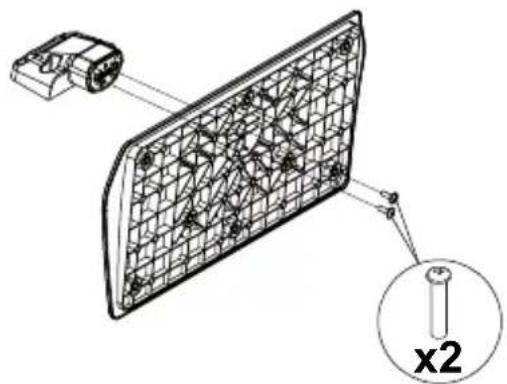
- The stand of the TV consists of two pieces. Install these pieces together.
natural_image
Technical diagram of a mechanical component with grid pattern and cross-section view, labeled 'x2' (no text or symbols beyond label)- Place the stand(s) on the stand mounting pattern(s) on the rear side of the TV.
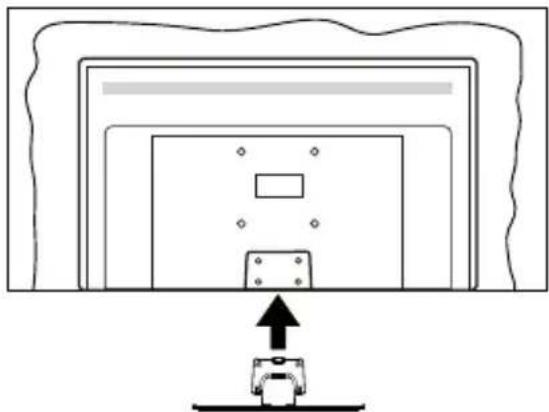
natural_image
Simple line drawing of a device with an upward arrow pointing to it, no text or symbols present.- Insert the screws (M4 x 12 mm) provided and tighten them gently until the stand is properly fitted.
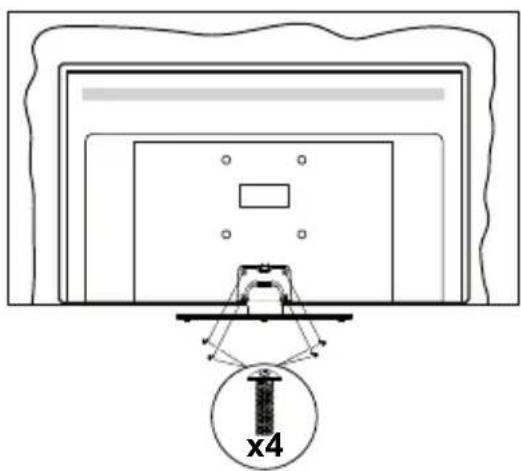
natural_image
Diagram of a monitor setup with a bracket and a magnified view labeled 'x4' (no text or symbols beyond label)Removing the pedestal from the TV
Be sure to remove the pedestal in the following way when using the wall-hanging bracket or repacking the TV.
- Put the TV onto a work table with the screen panel down on the clean and soft cloth. Leave the stand(s) protruding over the edge of the surface.
• Unsrew the screws that fixing the stand(s). - Remove the stand(s).
When using the wall-hanging bracket
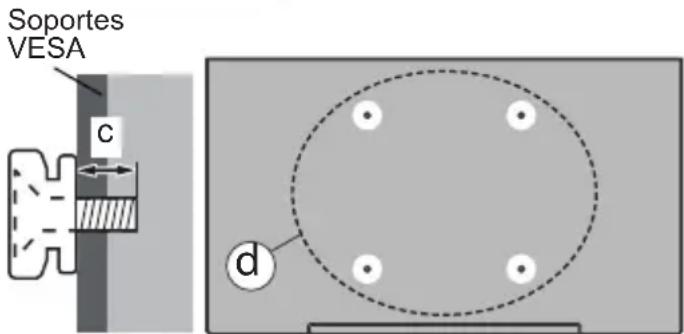
Please contact your local Panasonic dealer to purchase the recommended wall-hanging bracket.
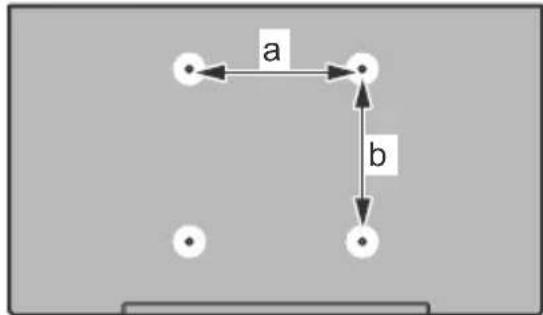
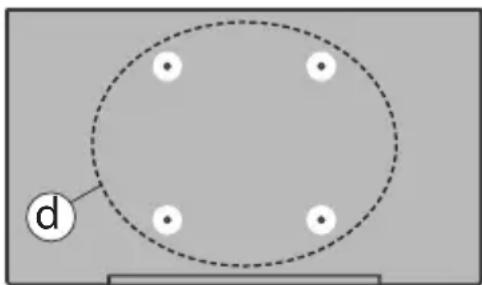
Holes for wall-hanging bracket installation;
Rear of the TV
flowchart
graph TD
    A["●"] -->|a| B["●"]
    B -->|b| C["●"]
    C --> D["●"]
    style A fill:#fff,stroke:#000
    style B fill:#fff,stroke:#000
    style C fill:#fff,stroke:#000
    style D fill:#fff,stroke:#000
| a (mm) | 75 |
| b (mm) | 75 |
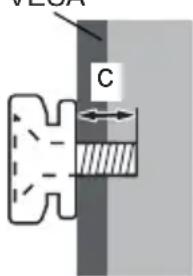
View from the side
VESA
Bracket

Note: The screws for fixing the TV onto the wall-hanging bracket are not supplied with the TV.
Environmental Information
This television is designed to be environment friendly. To reduce energy consumption, you can follow these steps:
If you set the Energy Saving to Minimum, Medium, Maximum or Auto the TV will reduce the energy consumption accordingly. If you like to set the Backlight to a fixed value set as Custom and adjust the Backlight (located under the Energy Saving setting) manually using Left or Right buttons on the remote. Set as Off to turn this setting off.
Note: Available Energy Saving options may differ depending on the selected Mode in the Picture menu.
The Energy Saving settings can be found in the Picture menu. Note that some picture settings will be unavailable to be changed.
If pressed Right button while Auto option is selected or Left button while Custom option is selected, "Screen will be off in 15 seconds." message will be displayed on the screen. Select Proceed and press OK to turn the screen off immediately. If you don't press any button, the screen will be off in 15 seconds. Press any button on the remote or on the TV to turn the screen on again.
Note: Screen Off option is not available if the Mode is set to Game.
When the TV is not in use, please switch off or disconnect the TV from the mains plug. This will also reduce energy consumption.
Features
• Remote controlled colour TV
- Fully integrated digital terrestrial/cable/satellite TV (DVB-T-T2/C/S-S2)
- HDMI inputs to connect other devices with HDMI sockets
- USB input
- OSD menu system
- Scart socket for external devices (such as DVD Players, PVR, video games, etc.)
- Stereo sound system
- Teletext
• Headphone connection
• Automatic programming system
- Manual tuning
• Automatic power down after up to eight hours
- Sleep timer
- Child lock
• Automatic sound mute when no transmission
- NTSC playback
• AVL (Automatic Volume Limiting)
• PLL (Frequency Search)
- PC input
• Game Mode (Optional)
• Picture off function
Accessories Included
- Remote Control
- Batteries: 2 x AA
- Quick Start Guide
- Power Cord
- Detachable stand
• Stand mounting screws (M4 x 12 mm)
TV Control Button & Operation
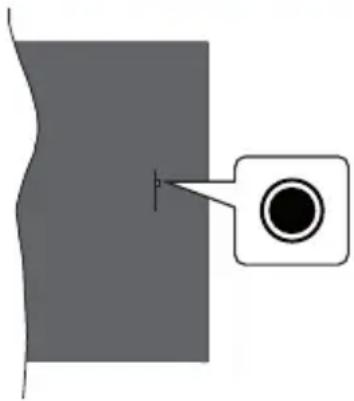
natural_image
Simple diagram showing a gray rectangular area with a black circular shape inside, connected by a line to a white square (no text or symbols)Note: The position of the control button may differ depending on the model.
Your TV has a single control button. This button allows you to control the Standby-On / Source / Programme and Volume functions of the TV.
Operating with the Control Button
- Press the control button to display the function options menu.
- Then press the button consecutively to move the focus to the desired option if needed.
- Press and hold the button for about 2 seconds to activate the selected option. The icon colour of the option changes when activated.
- Press the button once again to use the function or enter the sub menu.
- To select another function option, you will need to deactivate the last activated option first. Press and hold the button to deactivate it. The icon colour of the option changes when deactivated.
- To close the function options menu do not press the button for a period of about 5 seconds. The function options menu will disappear.
Using Main TV Menu
When the Home button is pressed, the main TV menu will appear on the screen. You can navigate through the menu items using the directional buttons on the remote. To select an item or see the sub-menu options of the highlighted menu press OK button. Press Exit button to close the main menu.
Inserting the Batteries into the Remote
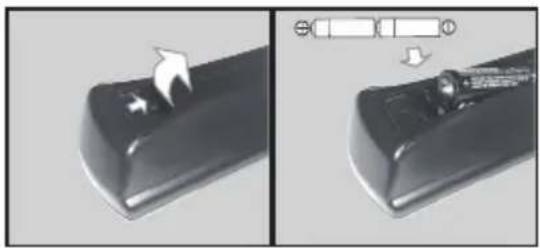
Remove the back cover to reveal the battery compartment. Insert two size AA batteries. Make sure the (+) and (-) signs match (observe correct polarity). Do not mix old and new batteries. Replace only with same or equivalent type. Place the cover back on.
Batteries should not be exposed to excessive heat such as sunshine, fire or the like.
natural_image
Close-up of a black remote control knob with a white arrow pointing to the knob area, shown in two views (no text or symbols)Power Connection
IMPORTANT: The TV set is designed to operate on a 220-240V AC, 50 Hz supply. After unpacking, allow the TV set to reach the ambient room temperature before you connect the set to the mains.
natural_image
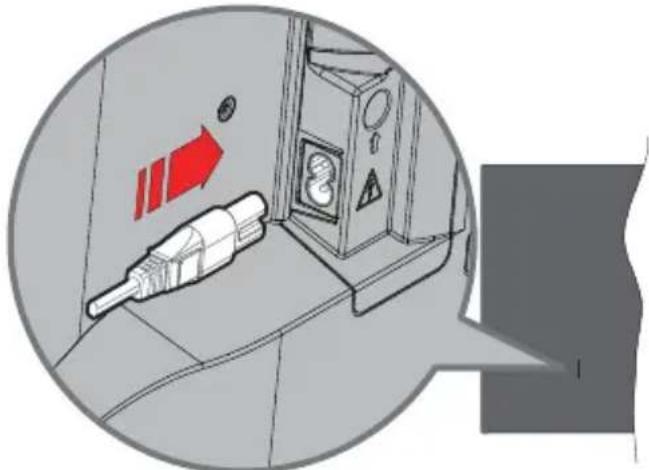
Diagram of a flight suit with an attached propeller and directional arrows, no readable text or symbols present.Plug one end (the two-hole plug) of the supplied detachable power cord into the power cord inlet on the rear side of the TV as shown above. Then plug the other end of the power cord into the mains socket outlet.
Note: The position of the power cord inlet may differ depending on the model.
Antenna Connection
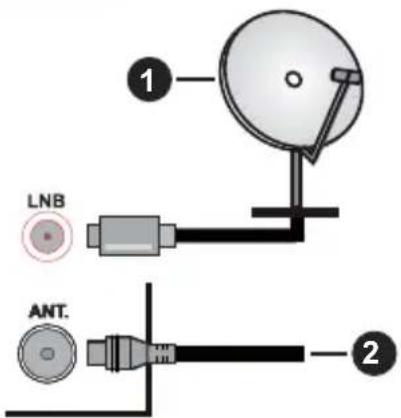
Connect the aerial or cable TV plug to the AERIAL INPUT (ANT.) socket or satellite plug to the SATELLITE INPUT (LNB) socket located on the rear side of the TV.
Rear side of the TV
-
Satellite
-
Aerial or cable

If you want to connect a device to the TV, make sure that both the TV and the device are turned off before making any connection. After the connection is done, you can turn on the units and use them.
Switching On/Off
To Switch the TV On
Connect the power cord to a power source such as a wall socket (220-240V AC, 50 Hz).
To switch on the TV from standby mode either:
- Press the Standby button, Programme +/- or a numeric button on the remote control.
- Press the control button on the TV.
To Switch the TV Off
- Press the Standby button on the remote control.
- Press the control button on the TV, the function options menu will be displayed. The focus will be on the Standby option. Press and hold the button for about 2 seconds to activate this option. The icon colour of the option will change. Then press the button once again, the TV will switch into standby mode.
To power down the TV completely, unplug the power cord from the mains socket.
Note: When the TV is switched into standby mode, the standby LED can blink to indicate that features such as Standby Mode Search, Over Air Download or Timer is active. The LED can also blink when you switch on the TV from standby mode.
First Time Installation
When turned on for the first time, the language selection screen is displayed. Select the desired language and press OK. In the following steps of the installation, set your preferences using the directional buttons and OK button. The installation wizard will guide you through the setup process. You can perform first time installation anytime using the option in the Setup menu.
Media Playback via USB Input
You can connect 2.5" and 3.5" inch (HDD with external power supply) external hard disk drives or USB memory stick to your TV by using the USB inputs of the TV.
IMPORTANT! Back up the files on your storage devices before connecting them to the TV. Manufacturer will not be responsible for any file damage or data loss. Certain types of USB devices (e.g. MP3 Players) or USB hard disk drives/memory sticks may not be compatible with this TV. The TV supports FAT32 and NTFS disk formatting.
Wait a little while before each plugging and unplugging as the player may still be reading files. Failure to do so may cause physical damage to the USB player and the USB device itself. Do not pull out your drive while playing a file.
You can use USB hubs with your TV's USB inputs. External power supplied USB hubs are recommended in such a case.
It is recommended to use the TV's USB input(s) directly, if you are going to connect a USB hard disk.
Note: When viewing image files the Media Player menu can only display 1000 image files stored on the connected USB device.
Software Upgrade
Your TV is capable of finding and updating the firmware automatically via the broadcast signal.
Software upgrade search via user interface
On the main menu select Setup and press the OK button. Setup Menu will be displayed. Then select More and press the OK button. Navigate to Software upgrade and press the OK button. In Upgrade options menu select Scan for upgrade and press OK button to check for a new software upgrade.
If a new upgrade is found, it starts to download the upgrade. After the download is completed confirm the question asking about rebooting the TV by pressing the OK to continue with the reboot operation.
3 AM search and upgrade mode
Your TV will search for new upgrades at 3:00 o'clock if Automatic scanning option in the Upgrade options menu is set to Enabled and if the TV is connected to an aerial signal. If a new software is found and
downloaded successfully, it will be installed at the next power on.
Note: Do not unplug the power cord while led is blinking during the reboot process. If the TV fails to come on after the upgrade, unplug, wait for two minutes then plug it back in.
Specification
| TV Broadcasting | PAL BG/I/DKSECAM BG/DK |
| Receiving Channels | VHF (BAND I/III) - UHF(BAND U) - HYPERBAND |
| Digital Reception | Fully integrated digital terrestrial-cable-satellite TV (DVB-T-C-S)(DVB-T2, DVB-S2 compliant) |
| Number of Preset Channels | 8 000 |
| Channel Indicator On Screen Display | |
| RF Aerial Input 75 Ohm (unbalanced) | |
| Operating Voltage 220-240V AC, 50Hz. | |
| Audio A2 Stereo+Nicam Stereo | |
| Headphone 3.5 mm mini stereo jack | |
| Audio Output Power (WRMS.) (10% THD) | 2 x 2,5 W |
| Power Consumption (W) | 45 W |
| Weight (kg) 3,75 Kg | |
| TV Dimensions DxLxH (with stand) (mm) | 134 x 553 x 372 |
| TV Dimensions DxLxH (without stand) (mm) | 63 x 553 x 334 |
| Display 16/9 24" | |
| Operation temperature and operation humidity | 0°C up to 40°C, 85% humidity max |
For more product information, please visit EPREL: https://eprel.ec.europa.eu.
EPREL registration number is available on https://eprel.panasonic.eu/product.
Remote Control
-
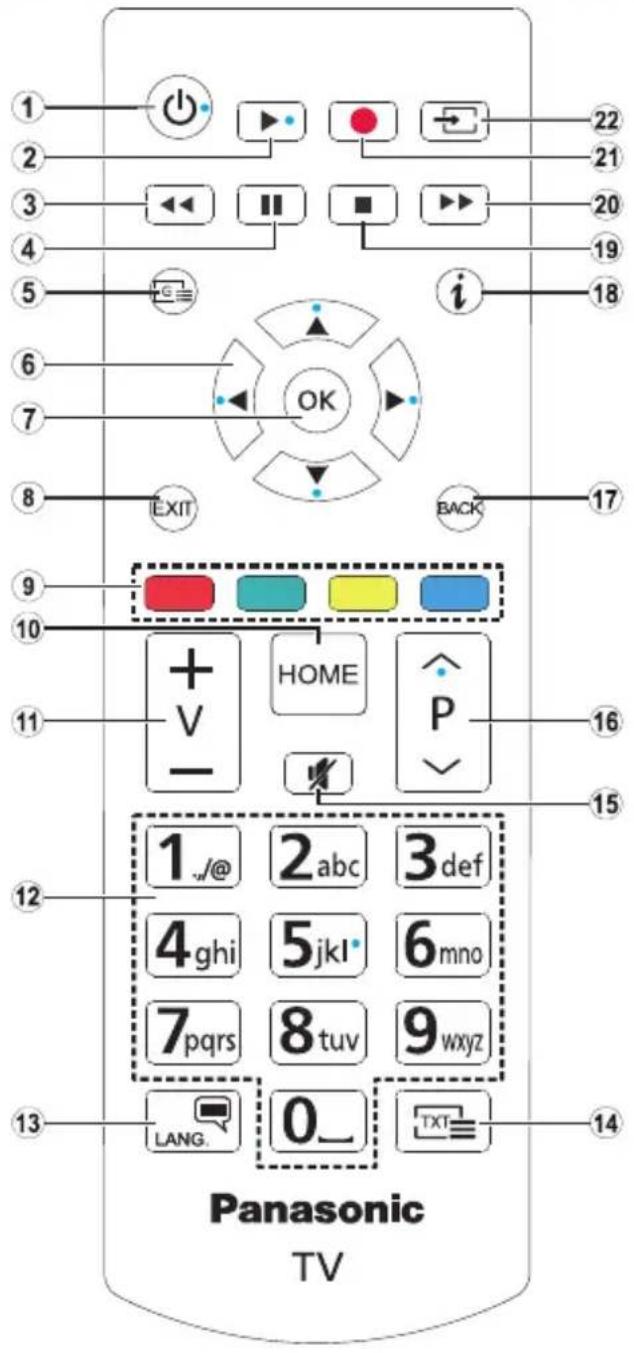
Standby: Switches On / Off the TV
-
Play: Starts to play selected media
-
Rewind: Moves frames backwards in media such as movies
-
Pause: Pauses the media being played
-
Guide: Displays the electronic programme guide
-
Directional buttons: Helps navigate menus, content etc. and displays the subpages in TXT mode when pressed Right or Left
In media player mode;
Left: Rapid reverse Right: Rapid advance
-
OK: Confirms user selections, holds the page (in TXT mode), views channel list (DTV mode), Pause (in media player mode)
-
Exit: Closes and exits from displayed menus or returns to previous screen
-
Coloured Buttons: Follow the on-screen instructions for coloured button functions
In media player mode;
Red: Stop / Play
Green: Play / Jump
Yellow: Pause / Subtitle time correction
Blue: Stop
-
Home: Displays TV menu
-
Volume +/-
-
Numeric buttons: Switches the channel, enters a number or a letter in the text box on the screen, switches the TV on when in standby mode
-
Language: Switches among sound modes (analogue TV), displays and changes audio/subtitle language (digital TV, where available)
-
Text: Displays teletext (where available), press again to superimpose the teletext over a normal broadcast picture (mix)
-
Mute: Completely turns off the volume of the TV
-
Programme +/-: Programme up-down, Page up-down (in TXT mode), switches the TV on when in standby mode
-
Back/Return: Returns to previous screen, previous menu, opens index page (in TXT mode)
-
Info: Displays information about on-screen content, shows hidden information (reveal - in TXT mode)
-
Stop: Stops the media being played
-
Fast Forward: Moves frames forward in media such as movies
-
No function
-
Source: Shows available broadcast and content sources
Troubleshooting & Tips
TV will not turn on
Make sure the power cord is plugged in securely to a wall outlet. Press the Power button on the TV.
Poor picture
- Check if you have correctly tuned the TV.
- Low signal level can cause picture distortion. Please check antenna connections.
- Check if you have entered the correct channel frequency if you have performed manual tuning.
No picture
• TV is not receiving any signal. Make sure the correct source has been selected.
• Is the antenna connected properly?
• Is the antenna cable damaged?
• Are suitable plugs used to connect the antenna?
• If you are in doubt, consult your dealer.
No sound
- Check if the TV sound is muted. Press the Mute button or increase the volume to check.
- Sound may be coming from only one speaker. Check the balance settings from Sound menu.
Remote control - no operation
- The batteries may be exhausted. Replace the batteries.
- The batteries maybe inserted incorrectly. Refer to the section "Inserting the Batteries into the Remote".
No signal on an input source
• It is possible that no device is connected.
- Check the AV cables and connections from your device.
- Check the device is switched on.
Licence Notification
The terms HDMI, HDMI High-Definition Multimedia Interface, HDMI trade dress and the HDMI Logos are trademarks or registered trademarks of HDMI Licensing Administrator, Inc.

Manufactured under licence from Dolby Laboratories. Dolby, Dolby Audio, and the double-D symbol are trademarks of Dolby Laboratories Licensing Corporation.

The "CI Plus" Logo is a trademark of CI Plus LLP.

Disposal of Old Equipment and Batteries
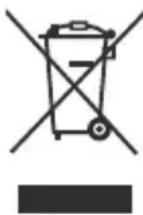
Only for European Union and countries with recycling systems
These symbols on the products, packaging, and/or accompanying documents mean that used electrical and electronic products and batteries must not be mixed with general household waste.
For proper treatment, recovery and recycling of old products and batteries, please take them to applicable collection points in accordance with your national legislation.
By disposing of them correctly, you will help to save valuable resources and prevent any potential negative effects on human health and the environment.
For more information about collection and recycling, please contact your local municipality.
Penalties may be applicable for incorrect disposal of this waste, in accordance with national legislation.
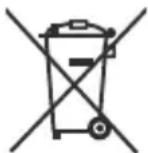
Note for the battery symbol (bottom symbol):
This symbol might be used in combination with a chemical symbol. In this case it complies with the requirement set by the Directive for the chemical involved.
Declaration of Conformity (DoC)
Hereby, Panasonic Marketing Europe GmbH, declares that this TV is in compliance with the essential requirements and other relevant provisions of the Directive 2014/53/EU.
If you want to get a copy of the original DoC of this TV, please visit the following website:
http://www.ptc.panasonic.eu/doc
Authorized Representative:
Panasonic Testing Centre
Panasonic Marketing Europe GmbH
Winsbergring 15, 22525 Hamburg, Germany
Web Site: http://www.panasonic.com
More Information
For more information, please visit the Support page on Panasonic website, where you can find the full manual instruction.
Inhalt
Sicherheitsinformationen....2
natural_image
Technical diagram of a mechanical component with grid pattern and labeled section 'x2' (no text or symbols beyond label)natural_image
Diagram of a computer monitor with an upward arrow pointing to the bottom portion of the screen (no text or symbols present)natural_image
Diagram of a monitor setup with a central screen and an inset view labeled 'x4' (no text or symbols on the diagram itself)natural_image
Simple diagram showing a circle with four dots and a labeled point 'd' on the left side (no text or symbols beyond the label)| (d) | Schraubenlänge (c) | min. 7 mm |
| max. 10 mm | ||
| Durchmesser M4 | ||
natural_image
Pure diagram of a mechanical component with a circular feature and a pointer, no text or symbols presentnatural_image
Close-up of a black remote control knob with a white arrow pointing to the knob area, shown in two different angles (no text or symbols visible)Netzanschluss
natural_image
Diagram showing a connector inserted into a device with red directional arrows and warning symbols (no readable text or labels)Panasonic Testing Centre
Panasonic Marketing Europe GmbH
Winsbergring 15, 22525 Hamburg, Germany
Website: http://www.panasonic.com
Mehr Informationen
natural_image
Technical diagram of a grid-patterned panel with a small inset showing a screw and a cross symbol (x2), no readable text or labels present.natural_image
Diagram of a monitor with an upward arrow pointing to a small device (no text or symbols present)natural_image
Diagram of a mechanical assembly with a bracket and mounting base, showing no text or symbols.flowchart
graph TD
    A["●"] -->|a| B["●"]
    B -->|b| C["●"]
| a (mm) | 75 |
| b (mm) | 75 |
Vue de côté
Supports de disque dur VESA
natural_image
Simple diagram showing a circle with four white dots and a dashed outline, labeled 'd' pointing to the circle (no text or symbols beyond label)natural_image
Pure diagram of a mechanical component with a circular feature and a pointer, no text or symbols presentnatural_image
Close-up of a black remote control knob with a white arrow pointing to the knob area, shown from two different angles (no text or symbols visible)natural_image
Diagram showing a device with a red directional arrow and warning symbol, enclosed in a circular frame (no readable text or labels)Winsbergring 15, 22525 Hamburg, Germany
Site Internet : http://www.panasonic.com
natural_image
Technical diagram of a mechanical component with grid pattern and labeled section 'x2' (no text or symbols beyond label)natural_image
Diagram of a device with an upward arrow pointing to a component, no text or symbols presentnatural_image
Diagram of a monitor setup with a bracket and a circular inset showing a screw (no text or symbols)flowchart
graph TD
    A["•"] -->|a| B["•"]
    B -->|b| C["•"]
| a (mm) | 75 |
| b (mm) | 75 |
Vista desde un lado
natural_image
Simple diagram showing a dark circular object with an arrow pointing to it, next to a gray rectangular area (no text or symbols)natural_image
Close-up of a black remote control knob with a white arrow pointing to the knob area, shown in two views (no text or symbols visible)Conexión Eléctrica
natural_image
Diagram showing a device connected to a control panel with directional arrows and warning symbols (no readable text or labels)Panasonic Testing Centre
Panasonic Marketing Europe GmbH
Winsbergring 15, 22525 Hamburg, Germany
Sitio Web: http://www.panasonic.com
Más información
natural_image
Technical diagram of a grid-patterned panel with a small component labeled 'x2' (no text or symbols on the panel itself)natural_image
Diagram of a monitor with an upward arrow pointing to the bottom portion of the screen (no text or symbols present)natural_image
Technical diagram of a mechanical assembly with a cross-sectional view and a circular inset labeled 'x4' (no text or symbols on the diagram itself)natural_image
Simple diagram showing a dark circular object with a pointer and a rectangular box, no text or symbols present.natural_image
Close-up of a black remote control knob with a white arrow pointing to the knob area, shown from before and after states (no text or symbols visible)natural_image
Diagram showing a device with a red arrow and warning symbol, enclosed in a circular frame (no readable text or labels)Winsbergring 15, 22525 Hamburg, Germany
Sito web: http://www.panasonic.com
natural_image
Simple diagram showing a gray rectangular area with a small black circle inside, connected by a line to a white rectangle (no text or symbols)natural_image
Close-up of a black remote control knob with an arrow pointing to the knob area, shown from two different angles (no text or symbols visible)Strømforsyning
natural_image
Diagram of a fuel pump or fuel injector with directional arrows and warning symbols (no readable text)Winsbergring 15, 22525 Hamburg, Germany
Website: http://www.panasonic.com
Mere information
natural_image
Technical diagram of a solar panel with a component and a magnified view labeled 'x2' (no text or symbols beyond label)natural_image
Diagram showing a device with an upward arrow pointing to a panel or component, no text or symbols present.natural_image
Technical diagram showing a mechanical assembly with a cross-sectional view and a labeled component 'x4' (no text or symbols beyond the label)Jalustan irrottaminen televisiosta
natural_image
Simple diagram showing a vertical line with a circular target and arrow pointing to it, no text or symbols present.natural_image
Close-up of a black remote control knob with a white arrow pointing to the knob area, shown in two different angles (no text or symbols visible)Virtaliitäntä
natural_image
Diagram showing a device with red directional arrows and warning symbols, enclosed in a circular frame (no readable text or labels)Panasonic Testing Centre
Panasonic Marketing Europe GmbH
Winsbergring 15, 22525 Hamburg, Germany
Programvaruppgradering....7
Specifikationer....7
Fjärrkontroll....8
WARNING: FÖR ATT MINSKA RISKEN FÖR ELCHOCK, TA EJ

BORT SKYDDET (ELLER BAKPANELEN). DET FINNS SERVICEDELAR SOM ANVÄNDAREN INTE KAN SERVA INUTI. LÄT KVALIFICERAD PERSONAL UTFÖRA SERVICEARBETE.
natural_image
Technical diagram of a mechanical component with grid pattern and cross-section view (no text or symbols)natural_image
Simple line drawing of a device with an upward arrow pointing to it, no text or symbols present.natural_image
Diagram of a monitor setup with a bracket and a circular inset showing a bolt labeled 'x4' (no text or symbols on the diagram itself)natural_image
Simple diagram showing a gray rectangular area with a black circular shape inside, connected by a line to a white rectangle (no text or symbols)natural_image
Close-up of a black remote control knob with an arrow pointing to the knob area, shown in two different angles (no text or symbols visible)Strömanslutning
natural_image
Diagram of a vehicle fuel pump with directional arrows and warning symbols (no readable text or labels)Winsbergring 15, 22525 Hamburg, Germany
Websida: http://www.panasonic.com
Mer information
natural_image
Technical diagram of a grid-patterned panel with a small component labeled 'x2' (no text or symbols on the panel itself)natural_image
Simple line drawing of a device with an upward arrow pointing to it, no text or symbols present.natural_image
Technical diagram of a mechanical assembly with a bracket and mounting base, showing no text or symbols.natural_image
Pure diagram of a mechanical or structural component with no visible text, numbers, or symbolsnatural_image
Close-up of a black remote control knob with a white arrow pointing to the knob area, shown in two different angles (no text or symbols visible)Strømtilkobling
natural_image
Diagram of a mechanical device with a connector and directional arrows, no readable text or symbols present.Panasonic Testing Centre
Panasonic Marketing Europe GmbH
Winsbergring 15, 22525 Hamburg, Germany
Nettsted: http://www.panasonic.com
Mer informasjon
- Safety Information
- CAUTION
- IMPORTANT - Please read these instructions fully before installing or operating
- WARNING
- Markings on the Product
- Warning Stability Hazard
- WALL MOUNTING WARNINGS
- DAMAGES
- Assembling / Removing the pedestal
- Preparations
- Assembling the pedestal
- Removing the pedestal from the TV
- When using the wall-hanging bracket
- Rear of the TV
- View from the side
- Environmental Information
- Features
- Accessories Included
- TV Control Button & Operation
- Operating with the Control Button
- Using Main TV Menu
- Inserting the Batteries into the Remote
- Power Connection
- Antenna Connection
- Rear side of the TV
- Switching On/Off
- To Switch the TV On
- To Switch the TV Off
- To power down the TV completely, unplug the power cord from the mains socket.
- First Time Installation
- Media Playback via USB Input
- Software Upgrade
- Software upgrade search via user interface
- AM search and upgrade mode
- Remote Control
- Troubleshooting & Tips
- TV will not turn on
- Poor picture
- No picture
- No sound
- Remote control - no operation
- No signal on an input source
- Licence Notification
- Disposal of Old Equipment and Batteries
- Only for European Union and countries with recycling systems
- Note for the battery symbol (bottom symbol):
- Declaration of Conformity (DoC)
- More Information
- Inhalt
- Netzanschluss
- Mehr Informationen
- Vue de côté
- Conexión Eléctrica
- Más información
- Strømforsyning
- Mere information
- Jalustan irrottaminen televisiosta
- Virtaliitäntä
- Strömanslutning
- Mer information
- Strømtilkobling
- Mer informasjon
Brand : PANASONIC
Model : TS-24N30AEZ
Category : TV