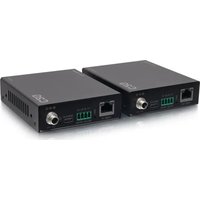
C2G54265 - Audio/video extension C2G - Free user manual and instructions
Find the device manual for free C2G54265 C2G in PDF.


| Product Type | Audio/Video Extender (USB 3.2 Gen 1 over CAT6a cable) |
| Brand | C2G |
| Model | C2G54265 |
| Technology | USB 3.2 Gen 1 (5 Gbps), compatible with USB 2.0/1.1 |
| Number of ports | 4 USB-A ports (2 ports 5V/1.5A, 2 ports 5V/1A) |
| Maximum distance | 100 m (328 ft) over CAT6a cable |
| Power supply | 24 V DC / 1.5 A (power adapter included) |
| Connectivity | Host USB input, CAT6a output, RS-232, FSYNC, service port |
| Special features | RS-232 pass-through, FSYNC GPIO pass-through, bidirectional 24V PoC, hardware acceleration |
| Installation | Plug and play, no driver or configuration required |
| Package contents | Transmitter, receiver, 24V/1.5A adapter, 2 Phoenix 4-pin connectors, 4 mounting ears, 8 screws, manual |
| Dimensions (estimated) | Each unit: 10 x 7 x 2 cm |
| Weight (estimated) | Approximately 200 g per unit |
| Care and cleaning | Clean with a dry, soft cloth. Do not use liquids or aerosols. |
| Safety | Do not open the device. Disconnect during thunderstorms. Avoid moisture and heat sources. |
| Spare parts and repairability | No user-serviceable parts. Contact C2G support for repairs. |
| Warranty | C2G manufacturer warranty (contact customer service for an RMA number) |
| General information | Indoor use only. Operating temperature: 0 to 50 °C. |
Frequently Asked Questions - C2G54265 C2G
User questions about C2G54265 C2G
0 question about this device. Answer the ones you know or ask your own.
Ask a new question about this device
Download the instructions for your Audio/video extension in PDF format for free! Find your manual C2G54265 - C2G and take your electronic device back in hand. On this page are published all the documents necessary for the use of your device. C2G54265 by C2G.
USER MANUAL C2G54265 C2G
- Extension of USB 3.0 up to 100m/328ft over CAT6a cable
• USB 3.0 connectivity with data transfer rate up to 5Gbps - Backwards compatible with USB 2.0 and 1.1
- Hardware acceleration for isochronous and bulk transfer
- USB-A port 1 and 2 support 5V/1.5A, port 3 and 4 support 5V/1A on the Receiver
- Support RS-232 pass-through and FSYNC GPIO pass-through (for industry camera use)
• Support bi-directional 24V PoC - Simple plug and play, no driver and setting installation required
PACKAGE CONTENTS
- 1 × USB 3.0 Extender (Transmitter)
• 1 × USB 3.0 Extender (Receiver)
• 1 × 24V/1.5A Power Supply
• 2 × 4pin-3.5mm Phoenix Connector (male) - 4 × Mounting Ear
• 8 × Machine Screw (KM3*4) - 1 × User Manual
4-Port USB OVER CAT6A SUPERBOOSTER™ EXTENDER KIT - USB 3.2 GEN 1 (5GBPS)
(US)
PRODUCT OVERVIEW
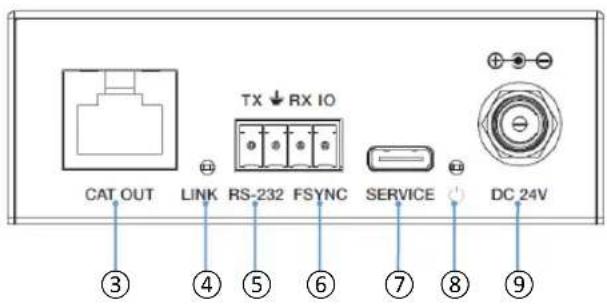
TRANSMITTER PANEL
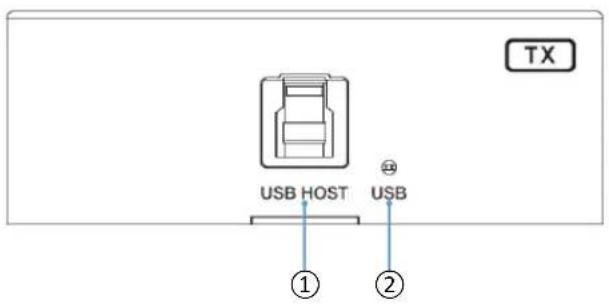
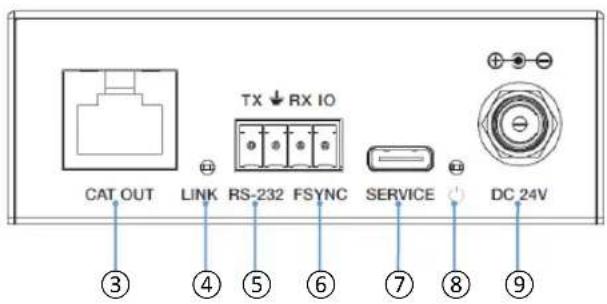
FRONT PANEL DESCRIPTION
| 1 | USB HOST | Host port, supporting USB 3.2 Gen 1.Connects to a PC or host. |
| 2 | USB LED | Connection signal indicator.On:The USB port is connected to a PC or host.Off:The USB port is not connected to a PC or host. |
| 3 | CAT OUT Connects to the CAT IN port on Receiver with Cat6/6a/7 cable. | |
| 4 | LINK LED | Connection signal indicator.On:Transmitter and Receiver are in good connection status.Flashing:Transmitter and Receiver are in poor connection status.Off:Transmitter and Receiver are not connected. |
REAR PANEL DESCRIPTION
| 5 | RS-232 | 3pin phoenix connector, connected to a PC or control system for RS-232 command pass-through. |
| 6 | FSYNC | FSYNC port, used for level pass-through to the Receiver, and synchronizing the external devices. The default level is 3.3V. |
| 7 | SERVICE Firmware update port. | |
| 8 | POWER LED The LED will be on when the Transmitter is powered on. | |
| 9 | DC 24V DC 24V/1.5A power input port. | |
4-PORT USB OVER CAT6A SUPERBOOSTER™ EXTENDER KIT - USB 3.2 GEN 1 (5GBPS)
(US)
PRODUCT OVERVIEW
RECEIVER PANEL
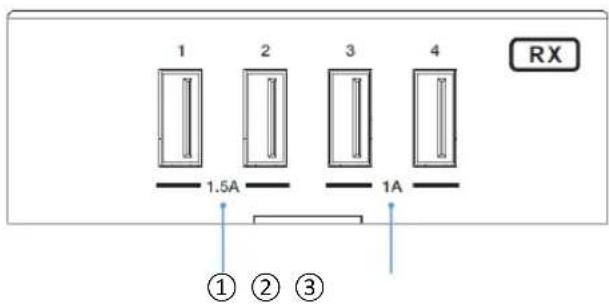
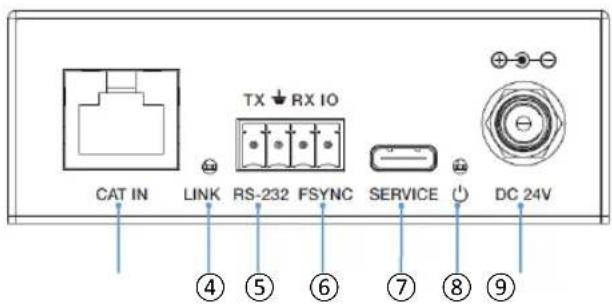
FRONT PANEL DESCRIPTION
| 1 | USB 1/2 Connect to USB devices, max output power up to 5V/1.5A. |
| 2 | USB 3/4 Connect to USB devices, max output power up to 5V/1A. |
| 3 | CAT IN Connects to the CAT OUT port on Transmitter with Cat6/6a/7 cable. |
| 4 | LINK LED Connection signal indicator.On: CAT OUT and CAT IN are in good connection status.Flashing: CAT OUT and CAT IN are in poor connection status.Off: CAT OUT and CAT IN are not connected. |
REAR PANEL DESCRIPTION
| 5 | RS-232 | 3pin phoenix connector, connected to a PC or control system for RS-232 command pass-through. Default baud rate is 38400. |
| 6 | FSYNC | FSYNC port, used for level pass-through to the Receiver, and synchronizing the external devices. The default level is 3.3V. |
| 7 | SERVICE Firmware update port. | |
| 8 | POWER LED The LED will be on when the Receiver is powered on. | |
| 9 | DC 24V DC 24V/1.5A power input port. | |
4-Port USB OVER CAT6A SUPERBOOSTER™ EXTENDER KIT - USB 3.2 GEN 1 (5GBPS)
(US)
APPLICATION EXAMPLE
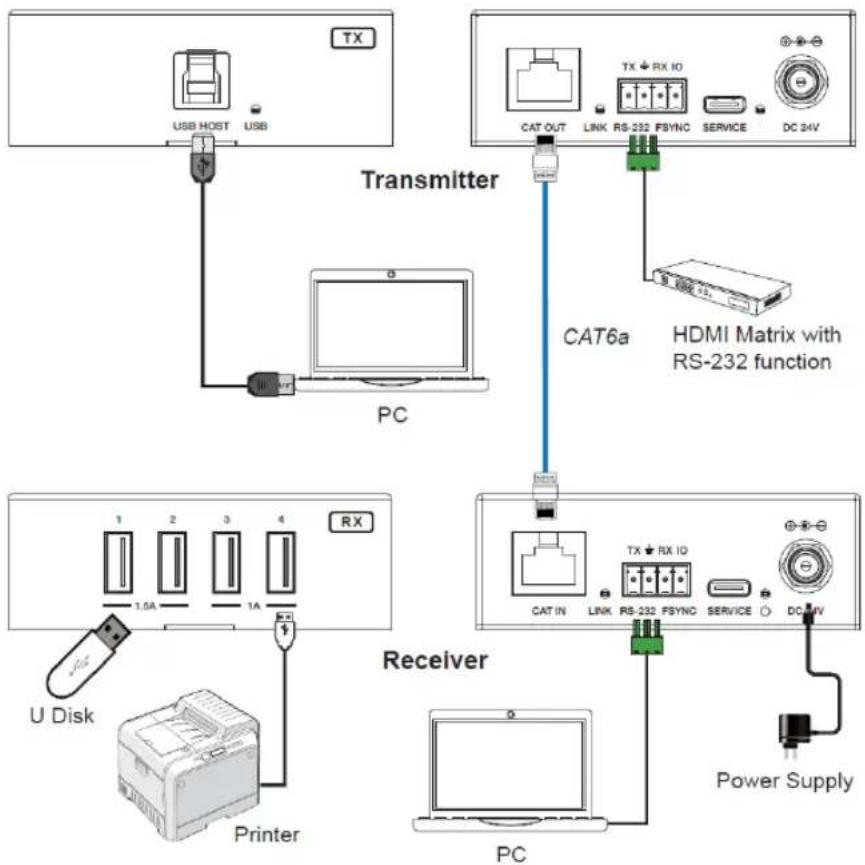
flowchart
graph TD
    A["Transmitter"] -->|USB HOST| B["PC"]
    A -->|USB| C["Printer"]
    A -->|TX| D["Receiver"]
    D -->|PC| E["DC 24V"]
    D -->|TX + RX IO| F["RS-232 FSYNC"]
    F --> G["HDMI Matrix with RS-232 function"]
    D --> H["PC IN"]
    H --> I["Link RS-232 FSYNC"]
    I --> J["Power Supply"]
    style A fill:#f9f,stroke:#333
    style D fill:#ccf,stroke:#333
    style E fill:#cfc,stroke:#333
4-PORT USB OVER CAT6A SUPERBOOSTER™ EXTENDER KIT - USB 3.2 GEN 1 (5GBPS)
(US)
IMPORTANT SAFETY INFORMATION
Do not plug the unit in any outlet that does not have enough current to allow the device to function. Refer to the specifications in this manual for power level of the unit.
Liquid: If this unit or it's corresponding power adapter has had liquid spilled on or in it, do not attempt to use the unit. Do not attempt to use this product in an outdoor environment as elements such as rain, snow, hail, etc. can damage the product.
In case of a storm, it is recommended that you unplug this device from the outlet.
Avoid placing this product next to objects that produce heat such as portable heaters, space heaters, or heating ducts.
THERE ARE NO USER SERVICEABLE PARTS. Do not attempt to open this product and expose the internal circuitry. If you feel that the product is defective, unplug the unit and refer to the warranty information section of this manual.
C2G WARRANTY
At C2G we want you to be totally confident in your purchase. That is why we offer a warranty on this device. If you experience problems due to workmanship or material defect for the duration of this warranty, we will repair or replace this device.
To request a Return Merchandise Authorization (RMA) number, contact customer service at 800-506-9607 or www.c2g.com.
4-Port USB OVER CAT6A SUPERBOOSTER™ EXTENDER KIT - USB 3.2 GEN 1 (5GBPS)
(US)
NOTES
KIT D'EXTENSION 4 PORTS USB SUR CAT6A SUPERBOOSTER™ - USB 3.2 GEN 1 (5GBPS)
(FR)
CARACTÉRISTIQUES
Note: This device complies with part 15 of the FCC Rules. Operation is subject to the following two conditions:
(1) This device may not cause harmful interference, and
(2) This device must accept any interference received, including interference that may cause undesired operation.
FCC Statement - §15.105(b):
"This equipment has been tested and found to comply with the limits for a Class B digital device, pursuant to part 15 of the FCC Rules. These limits are designed to provide reasonable protection against harmful interference in a residential installation. This equipment generates, uses and can radiate radio frequency energy and, if not installed and used in accordance with the instructions, may cause harmful interference to radio communications. However, there is no guarantee that interference will not occur in a particular installation. If this equipment does cause harmful interference to radio or television reception, which can be determined by turning the equipment off and on, the user is encouraged to try to correct the interference by one or more of the following measures:
● Reorient or relocate the receiving antenna.
- Increase the separation between the equipment and receiver.
- Connect the equipment into an outlet on a circuit different from that to which the receiver is connected.
- Consult the dealer or an experienced radio/TV technician for help.
FCC Caution - §15.21:
"Changes or modifications not expressly approved by the party responsible for compliance could void the user's authority to operate the equipment."

© 2023 Legrand All Rights Reserved rev.11/23 Manual_C2G54265
C2G®
A brand of legrand®
6500 Poe Avenue
Dayton, OH 45414
Phone 800.506.9607
www.c2g.com
www.legrandav.com/c2g


- PACKAGE CONTENTS
- 4-Port USB OVER CAT6A SUPERBOOSTER™ EXTENDER KIT - USB 3.2 GEN 1 (5GBPS)
- PRODUCT OVERVIEW
- IMPORTANT SAFETY INFORMATION
- C2G WARRANTY
- NOTES
- KIT D'EXTENSION 4 PORTS USB SUR CAT6A SUPERBOOSTER™ - USB 3.2 GEN 1 (5GBPS)
- (FR)
- CARACTÉRISTIQUES
- FCC Statement - §15.105(b):
- FCC Caution - §15.21:
- C2G®
Brand : C2G
Model : C2G54265
Category : Audio/video extension