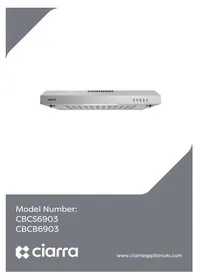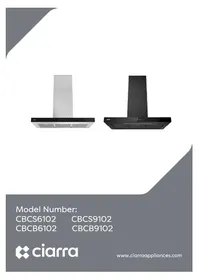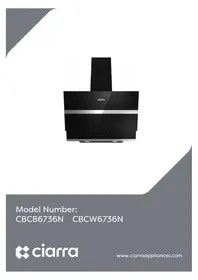
CBCB6736N - Basket CIARRA - Free user manual and instructions
Find the device manual for free CBCB6736N CIARRA in PDF.


User questions about CBCB6736N CIARRA
0 question about this device. Answer the ones you know or ask your own.
Ask a new question about this device
Download the instructions for your Basket in PDF format for free! Find your manual CBCB6736N - CIARRA and take your electronic device back in hand. On this page are published all the documents necessary for the use of your device. CBCB6736N by CIARRA.
USER MANUAL CBCB6736N CIARRA
natural_image
Exterior view of a black Milan air conditioner unit with a stainless steel chimney (no text or symbols visible on the appliance itself)Model Number:
CBCB6736N CBCW6736N
ciarra
Make life easier
Dear customer:
Thank you so much for your purchase, please read this instruction manual carefully before installation & use.
If you have any question, please contact us at:
E-mail: info@ciarraappliances.com
| ENGLISH | INSTALLATION AND USER'S MANUAL | Page3-27 |
| DEUTSCH | BENUTZERHANDBUCH&INSTALLATION SANLEITUNG | Seite29-55 |
| FRANÇAIS | MANUEL DE L'UTILISATEUR ET D'INSTALLATION | Page57-83 |
| ITALIANO | INSTALLAZIONE E MANUALE DELL'UTENTE | Pagina84 |
| ESPAÑOL | MANUAL DE USUARIO E INSTRUCCIONES DE INSTALACIÓN | Página85 |
| NEDERLANDS | INSTALLATIE- EN GEBRUIKERSHANDLEIDING | Pagina86 |
| SVENSKA | INSTALLATION- OCH BRUKSANVISNING | Sida87 |
| POLSKI | INSTRUKCJA INSTALACJI I UŻYTKOWANIA | Strona88 |
CONTENTS
Safety 3-4
Specifications----5
Before Using the Cooker Hood ----6
Prepare for Installation ----7
Installation----8-17
Install the Hood----8-16
Carbon Filter Installation ----17
Operation 18-22
Cleaning and Maintenance ----23-25
Grease Filter----23
Carbon Filter 23
Stainless Steel Cleaning 23
Painted Finish Cleaning----23
LED Replacement----24-25
Troubleshooting----26
Environmental Protection----27
WARNING
TO REDUCE THE RISK OF FIRE, ELECTRIC SHOCK, OR INJURY TO PERSONS, OBSERVE THE FOLLOWING:
■ Use this unit only in the manner intended by the manufacturer. If you have questions, contact the manufacturer at the address or telephone number listed in the warranty.
■ Before servicing or cleaning unit, unplug or disconnect the cooker hood from the power supply.
This appliance is not intended for use by persons (including children) with reduced physical, sensory or mental capabilities, or lack of experience and knowledge, unless they have been given supervision or instruction concerning use of the appliance by a person responsible for their safety.
■ Installation work and electrical wiring must be done by a qualified person(s) in accordance with all applicable codes and standards, including fire-rated construction.
■ Sufficient air is needed for proper combustion and exhausting of gases through the flue (chimney) of fuel burning equipment to prevent back drafting.
■ When cutting or drilling into a wall or ceiling, do not damage electrical wiring and other hidden utilities.
■ Ducted fans must always be vented to the outdoors.
■ Ensure the requirements of the local authorities are adhered to concerning the discharge of exhaust air.
■ This unit must be grounded.
■ When applicable local regulations comprise more restrictive installation and/or certification requirements, the aforementioned requirements prevail on those of this document and the installer agrees to conform to these at his own expense.
■ Clean cooker hood frequently. Grease should not be allowed to accumulate on fans, filters or in exhaust ducts.

Warning: Failure to install the screws or fixing device in accordance with these instructions may result in electrical hazards.

WARNING
TO REDUCE THE RISK OF INJURY TO PERSONS IN THE EVENT OF A RANGE TOP GREASE FIRE, OBSERVE THE FOLLOWING\*:
- SMOTHER FLAMES with a close-fitting lid, cookie sheet or metal tray, then turn off the burner. BE CAREFUL TO PREVENT BURNS. IF THE FLAMES DO NOT GO OUT IMMEDIATELY, EVACUATE AND CALL THE FIRE DEPARTMENT.
- NEVER PICK UP A FLAMING PAN — You may be burned.
- DO NOT USE WATER, including wet dishcloths or towels — This could cause a violent steam explosion.
- Use an extinguisher ONLY if:
a) You own a Class ABC extinguisher and you know how to operate it.
b) The fire is small and contained in the area where it started.
c) The fire department has been called.
d) You can fight the fire with your back to an exit.
CAUTION
■ For indoor use only.
■ For general ventilating use only. Do not use to exhaust hazardous or explosive materials and vapors.
■ To avoid motor bearing damage and noisy and/or unbalanced fan blade, keep drywall spray, construction dust, etc. off cooker hood.
- Your hood motor has a thermal overload which will automatically shut off the motor if it becomes overheated. The motor will restart when it cools down. If the motor continues to shut off and restart, have the hood serviced.
- Always follows the cooking equipment manufacturer's requirements regarding the ventilation needs.
■ To reduce the risk of fire and to properly exhaust air, be sure to duct air outside — Do not exhaust air into spaces within walls or ceiling or into attics, crawl space or garage.
■ When installing, servicing or cleaning the unit, it is recommended to wear safety glasses and gloves.
■ Please read specification label on product for further information and requirements.
CBCB6736N
CBCW6736N
text_image
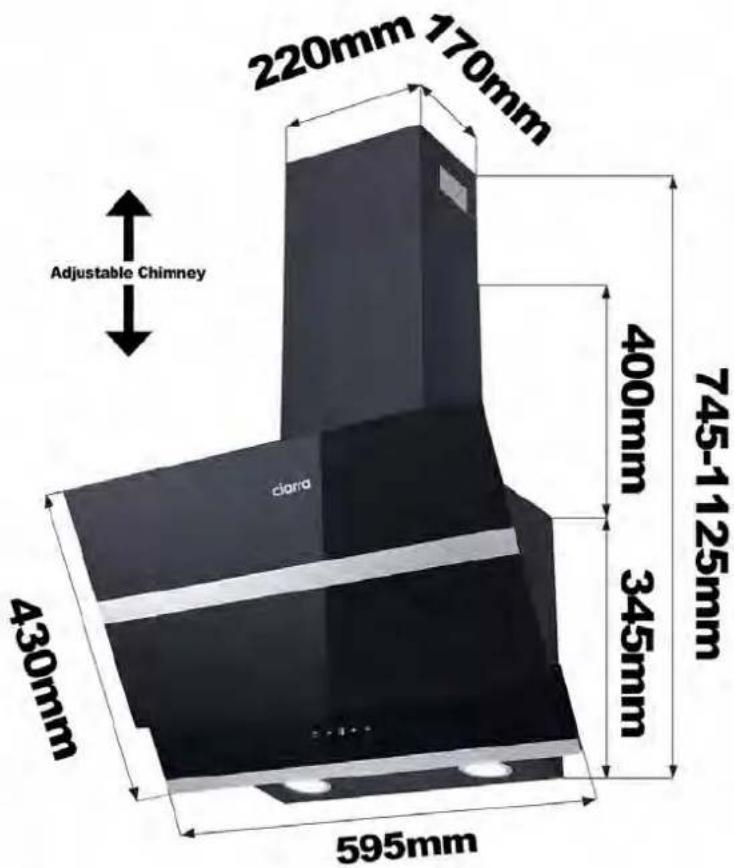
220mm 170mm Adjustable Chimney 430mm 595mm 745-1125mm 400mm 345mm ciano| Voltage 220V-240V~50Hz | |
| Power of Motor | 1 x 85W |
| Power of lamps | 2 x 1W |
| Appliance Dimension | 595*430*745~1125mm(W x D x H) |
| Note: The manufacturer reserves the right to change any technological improvement or modification without prior notice. | |
Before Using the Cooker Hood

CAUTION: Before proceeding to the installation, check if items are missing or damaged, contact the manufacturer.
Observe all governing codes and ordinances. Have a qualified technician install the cooker hood. It is the installer's responsibility to comply with installation clearances specified on the model/serial rating plate. The manufacturer declines all responsibility for improper installation and does not accept responsibility for appliance warranty in the event of damage caused by incorrect installation.
COMPONENTS:

Part1: Wall Plug X 9

Part 2: 4*30mm Screws X 9

Part 3: 4*8mm Screws X 6

Part 4: Aluminum Exhaust Pipe X1

Part 5: Cable Ties X 2
Part 6: Installation Manual X1

Part 7: 1:1 Installation Diagram X1
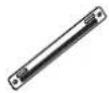
Part 8: Lower Chimney Bracket X1
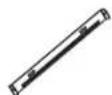
Part 9: Upper Chimney Bracket X1
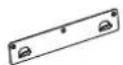
Part 10: Wall Bracket X 1
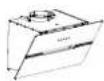
Part 11: Cooker Hood Body X 1
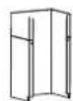
Part 12: Lower Chimney X 1

Part 13: Upper Chimney X1

Part 14: Carbon Filter X 2 (CBCF003)
YOU WILL BE NEEDING THESE TOOLS FOR INSTALLATION

- Protective Gloves

- Double Sided Tape or Tape

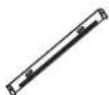
2.Spirit Level Ruler

- Cross-Head Screwdriver Set

3.Measuring Tape

- Electric drill and 8mm drill
Prepare for Installation
Prepare for Installation:
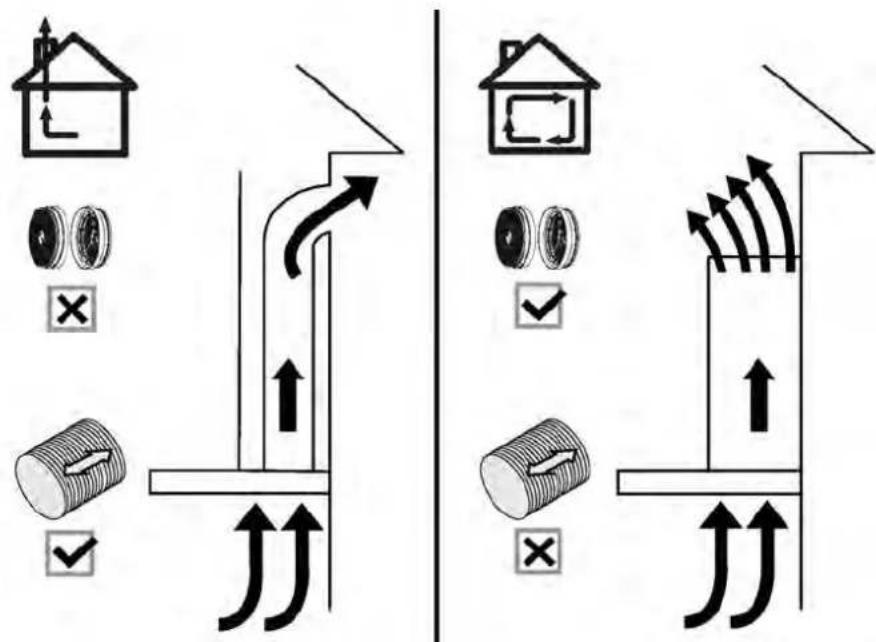
a) Ventilation Mode
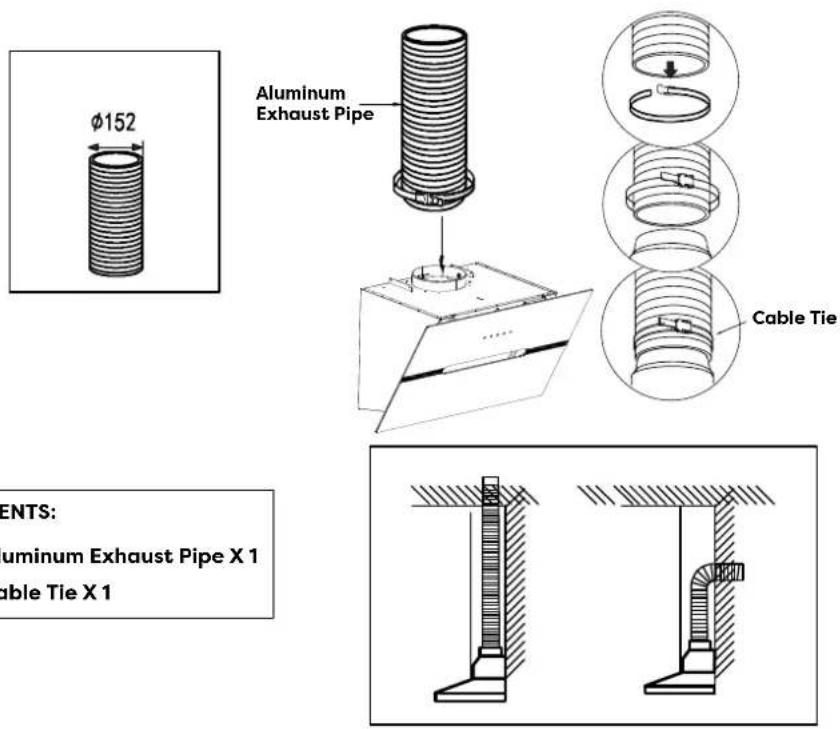
Recirculation Mode: Recirculating with carbon filter (required), the smells and odors can be filtered and vented through the top vented hole and the exhaust pipe is not required.
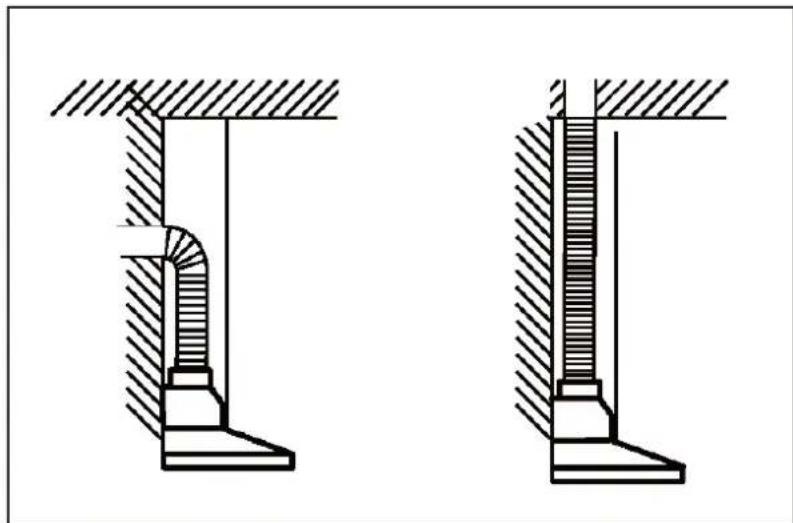
Extraction Mode: You can install the 1.5m long and 150mm diameter aluminum exhaust pipe for extracting, which is included in the installation kit.
text_image
Diagram illustrating airflow or traffic flow between a house and a cylindrical object, with checkmarks indicating failure or rejection.b) When possible, use at least 60cm straight runs before any turns. Larger duct work may be required for best performance with longer duct runs.
natural_image
Technical line drawing of two mechanical components with hatched areas indicating material (no text or symbols)c) Before installation, don't connect the power.
Install the Hood (Extraction) :
1) Remove all protective poly film from the hood and/or parts.
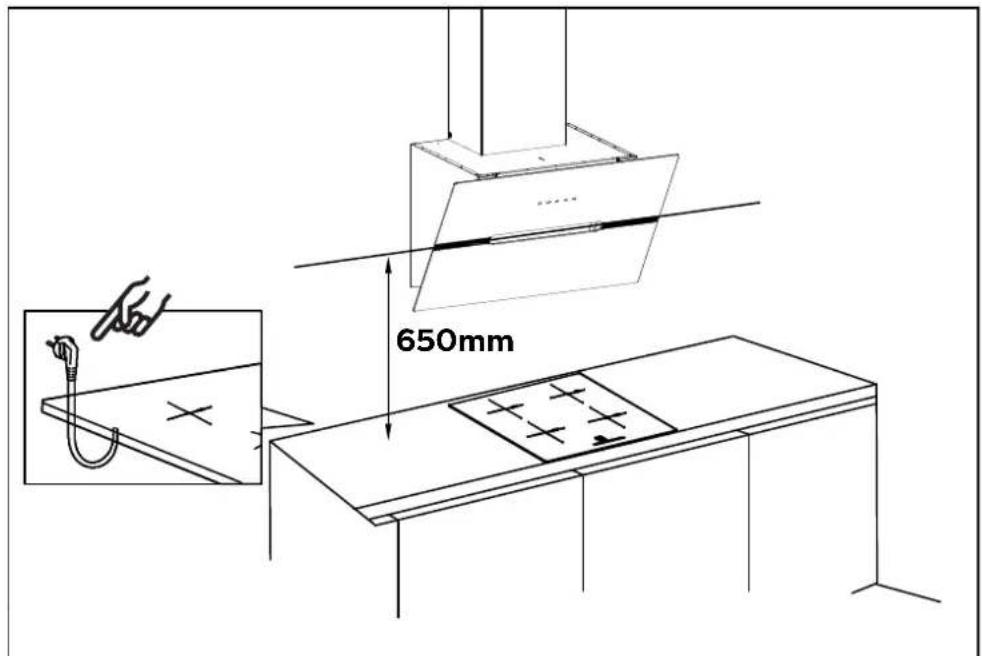
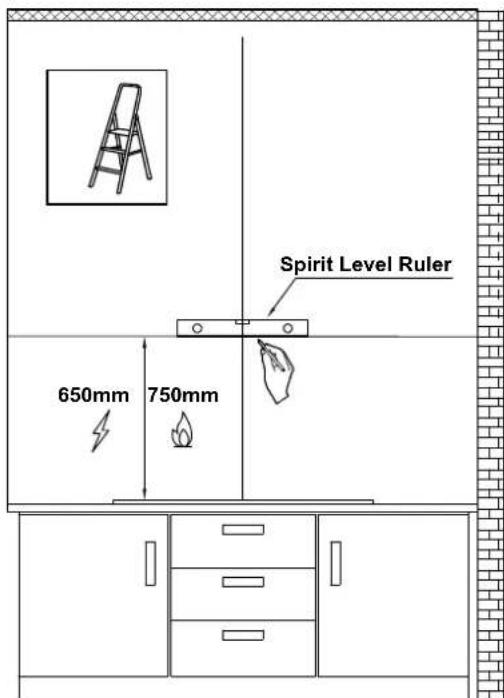
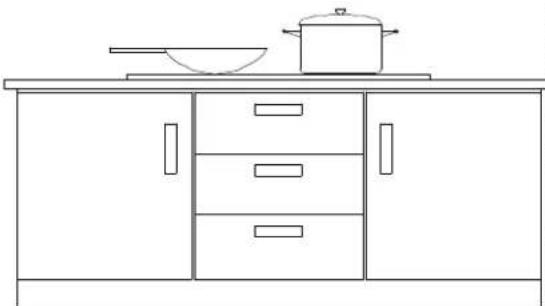
2) Recommend installation height: 65\~75cm above the cooktop for best extraction.
◆ Required height over gas hob: 750mm;
◆ Required height over electric hob: 650mm.
text_image
650mm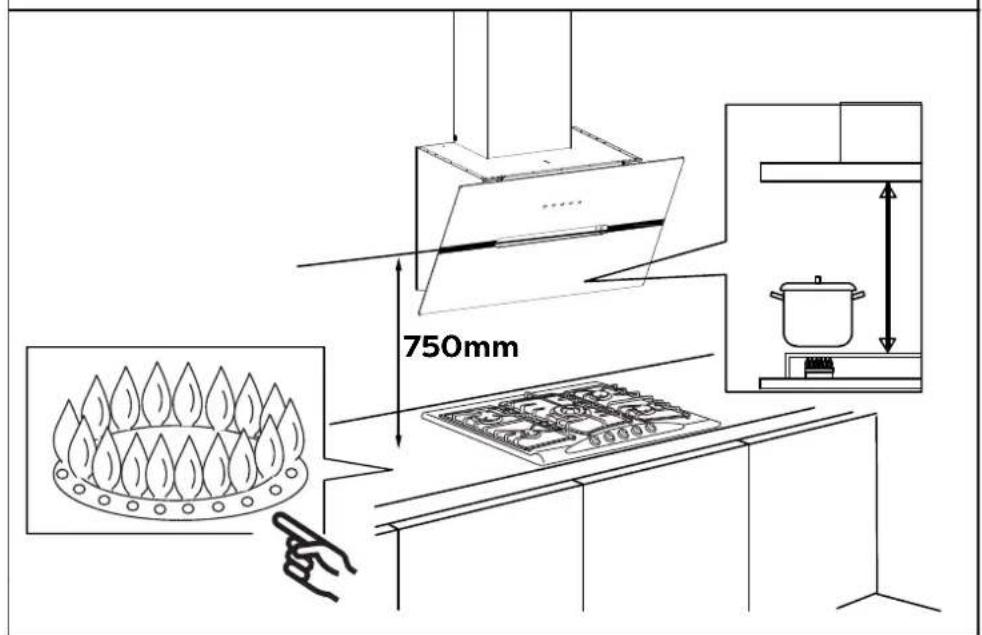
text_image
750mm3) First use a pencil to mark the installation position on the wall, then use a Measuring Tape to measure the height from the stove surface to the hood (the center point of aluminum grease filter) and use a Spirit Level Ruler to maintain the level, then use a pencil to draw a horizontal line along the level.
text_image
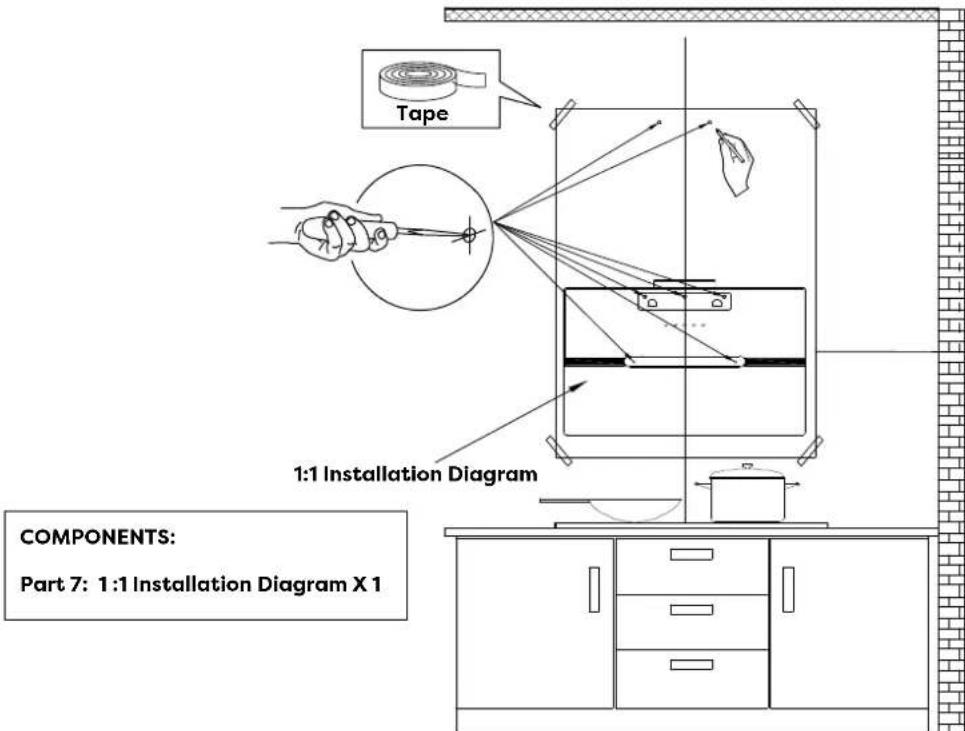
Spirit Level Ruler 650mm 750mm4) Poke the 7 perforated positions on the 1:1 Installation Diagram, then align with the center point of aluminum grease filter on the Installation Diagram with the horizontal line on the wall, then tape the Installation Diagram to the wall, and use a pencil to mark the perforated positions on the wall in the corresponding positions.
text_image
Tape 1:1 Installation Diagram COMPONENTS: Part 7: 1:1 Installation Diagram X 1Installation
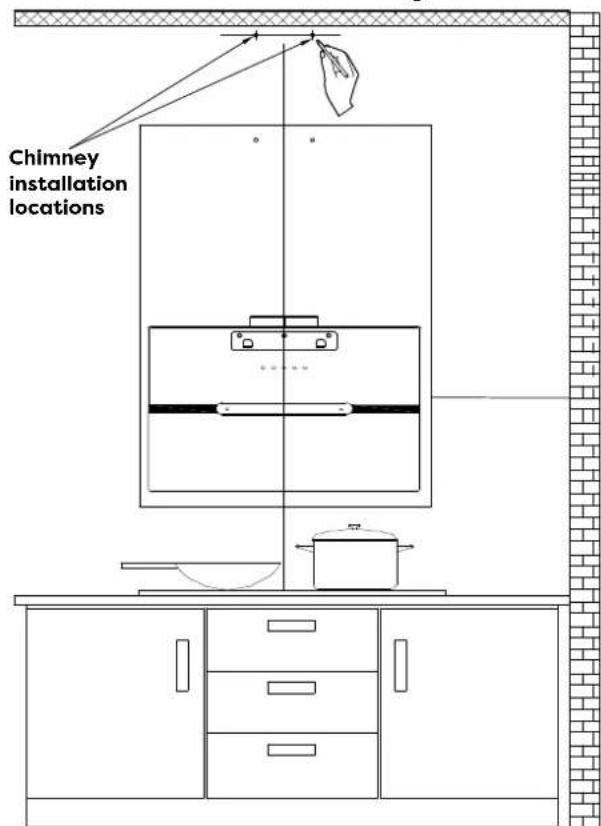
5) Determine the maximum chimney installation height according to the actual scenario and mark the chimney installation locations along the center line of the Installation Diagram.
text_image
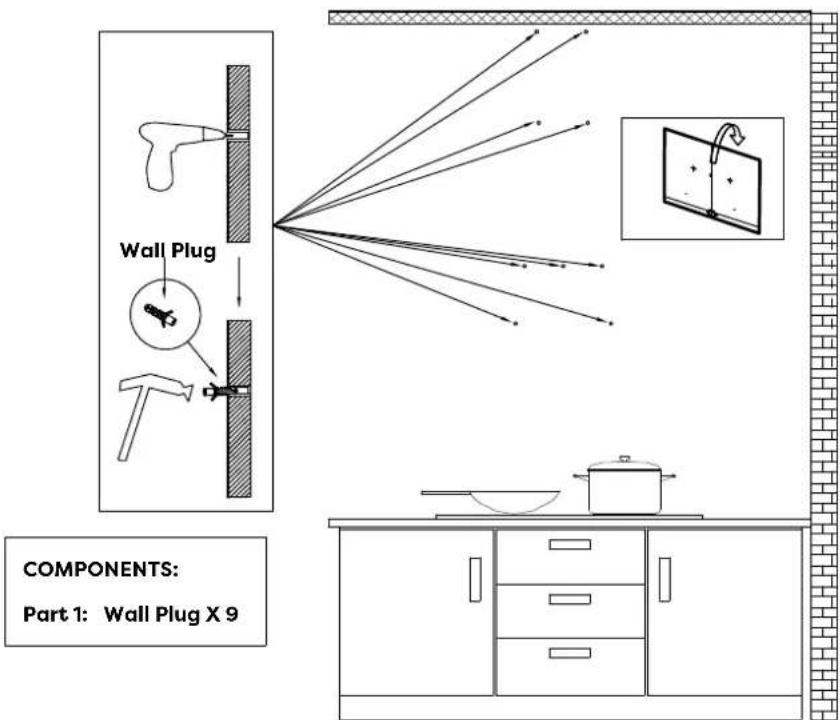
Chimney installation locations6) Remove the Installation Diagram, drill the holes that have been marked on the wall with an Electric Drill (8mm drill), and hammer the Wall Plug into the wall.
text_image
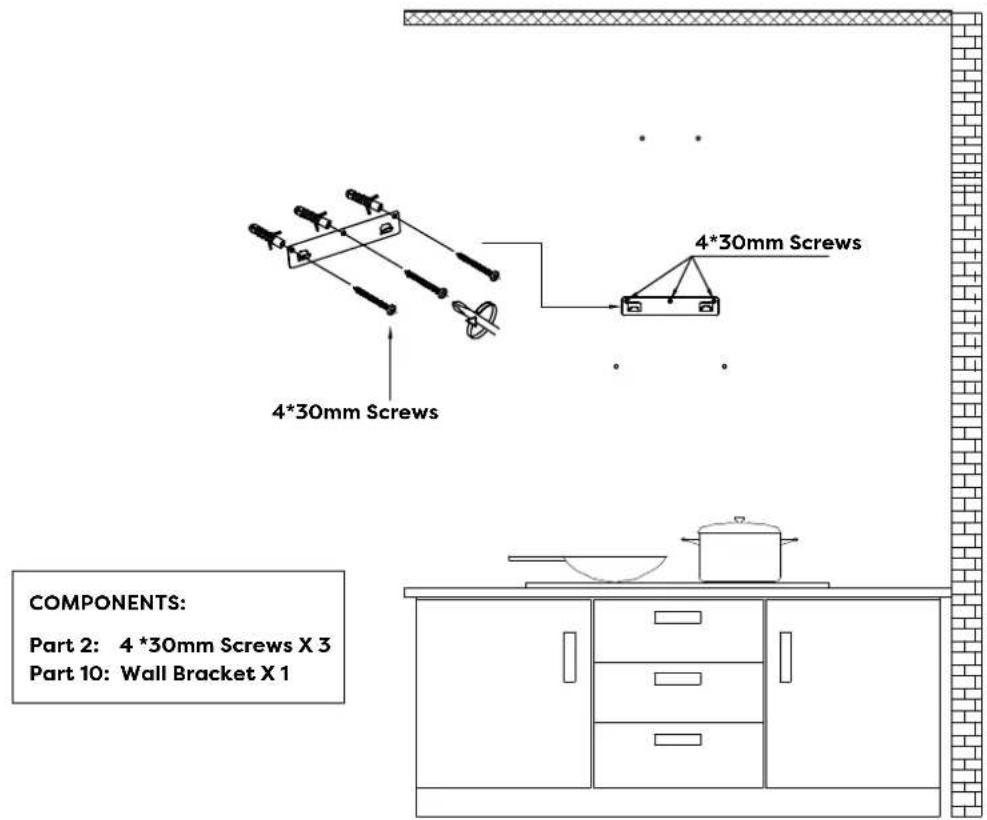
Wall Plug COMPONENTS: Part 1: Wall Plug X 97) Use three 4*30mm Screws to fasten the Wall Bracket on the wall.
text_image
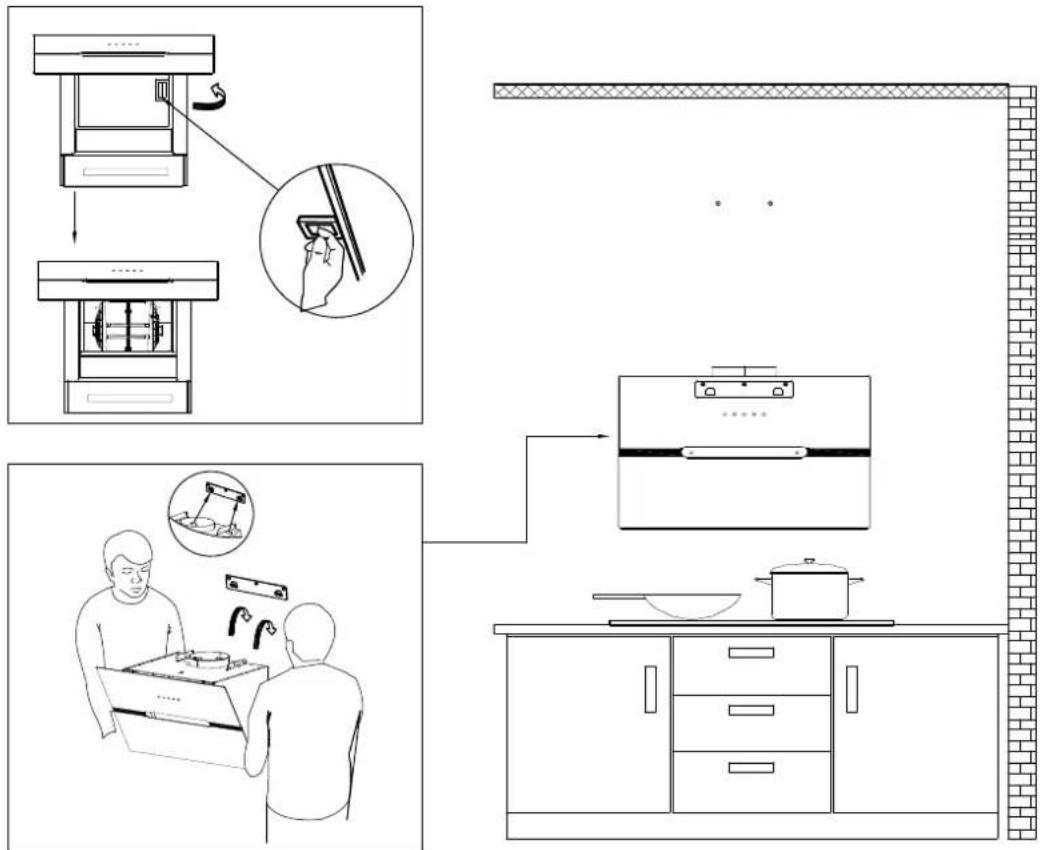
4*30mm Screws 4*30mm Screws COMPONENTS: Part 2: 4 *30mm Screws X 3 Part 10: Wall Bracket X 18) Remove the aluminum grease filter and hang the hood on the corresponding hook of the Wall Bracket.
text_image
Diagram illustrating kitchen appliance assembly and cleaning steps, showing hand positioning, washing machine, kitchen setup, and kitchenware.Installation
9) Use a Spirit Level Ruler to measure whether the hood is in a horizontal level, and use two 4*30mm Screws to lock into the safety hole position of the hood (not mandatory, according to user's wishes to choose whether to lock).
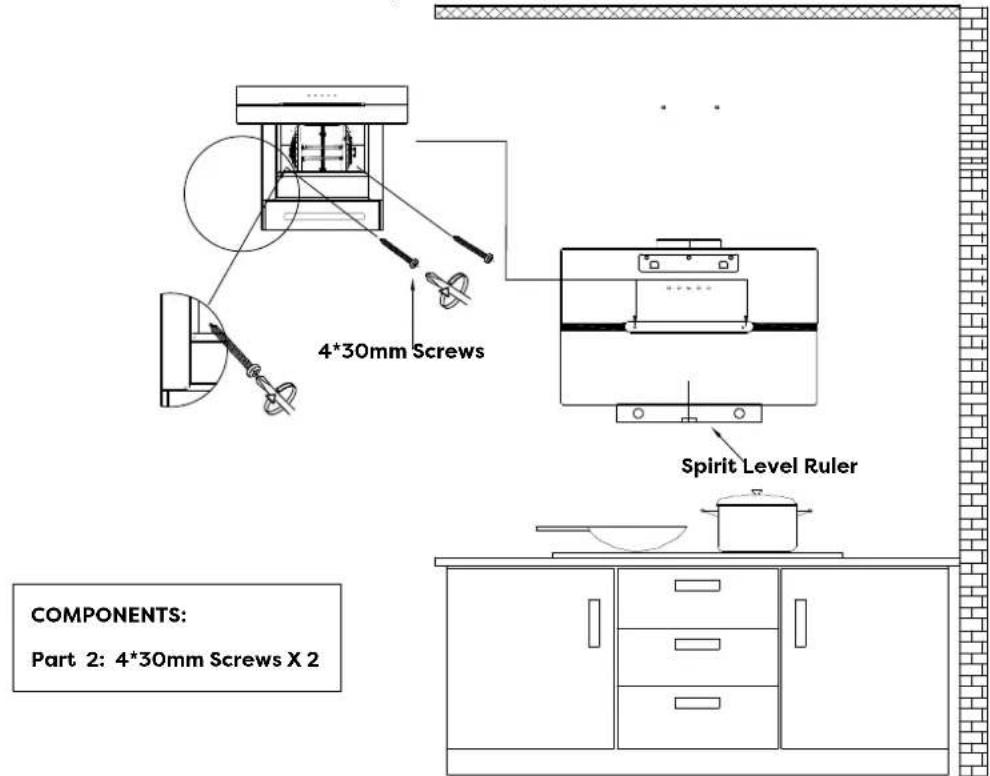
text_image
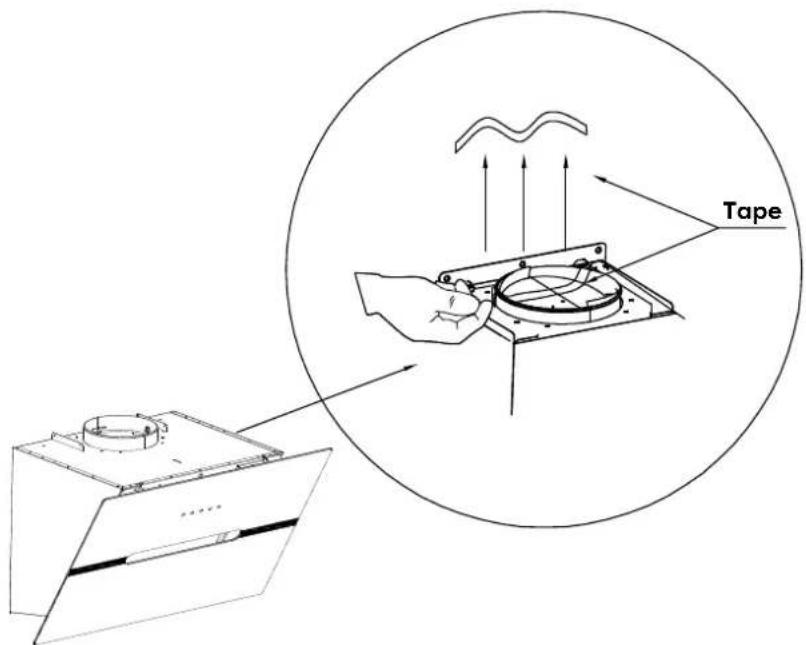
4*30mm Screws Spirit Level Ruler COMPONENTS: Part 2: 4*30mm Screws X 210) Tear off the tape from the air outlet.
text_image
TapeNOTE:
Make sure you remove the tape on the damper and check if the damper opens and closes freely, otherwise it make noises, and the cooker hood will be shaking.
11) Install the Aluminum Exhaust Pipe into the air outlet and lock it with a Cable Tie; the other end of the Aluminum Exhaust Pipe will be pulled upward to outdoor and lock it with a Cable Tie (Note: This step can be ignored if use as recirculation mode with carbon filter).
text_image
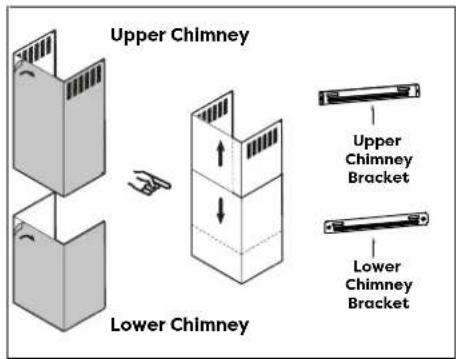
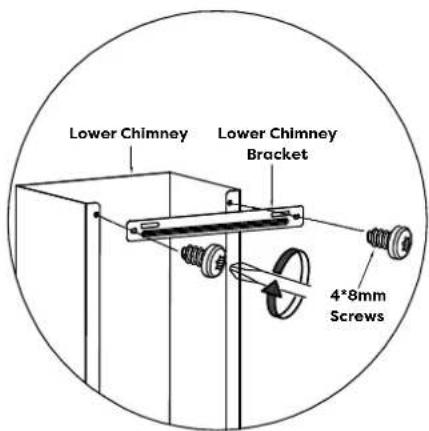
φ152 Aluminum Exhaust Pipe Cable Tie ENTS: aluminum Exhaust Pipe X 1 able Tie X 112) Use two 4*8mm Screws to fasten the Lower Chimney Bracket on the Lower Chimney.
text_image
Upper Chimney Lower Chimney Upper Chimney Bracket Lower Chimney BracketCOMPONENTS:
Part 8: Lower Chimney Bracket X 1
Part 12: Lower Chimney X 1
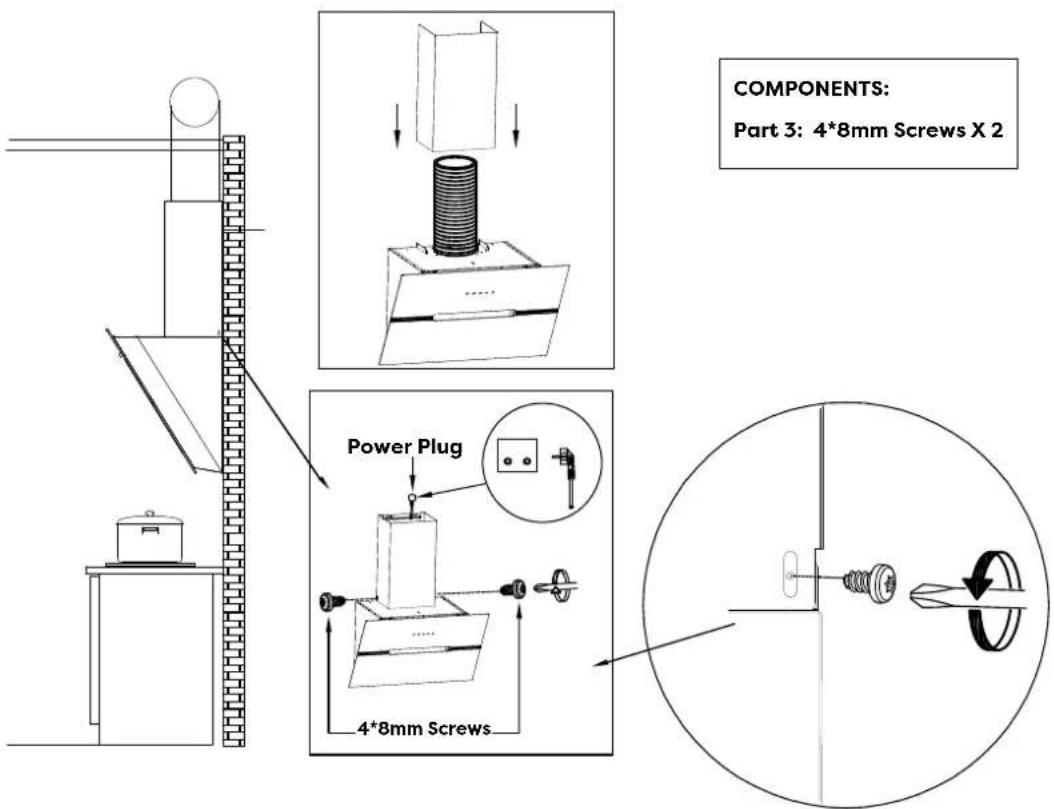
Part 3: 4*8mm Screws X 2
text_image
Lower Chimney Lower Chimney Bracket 4*8mm ScrewsInstallation
13) Insert the Lower Chimney into the hood and fix it to the corresponding positioning hole with two 4*8mm Screws. (Note: That the power cord needs to go through the chimney and connect the power).
text_image
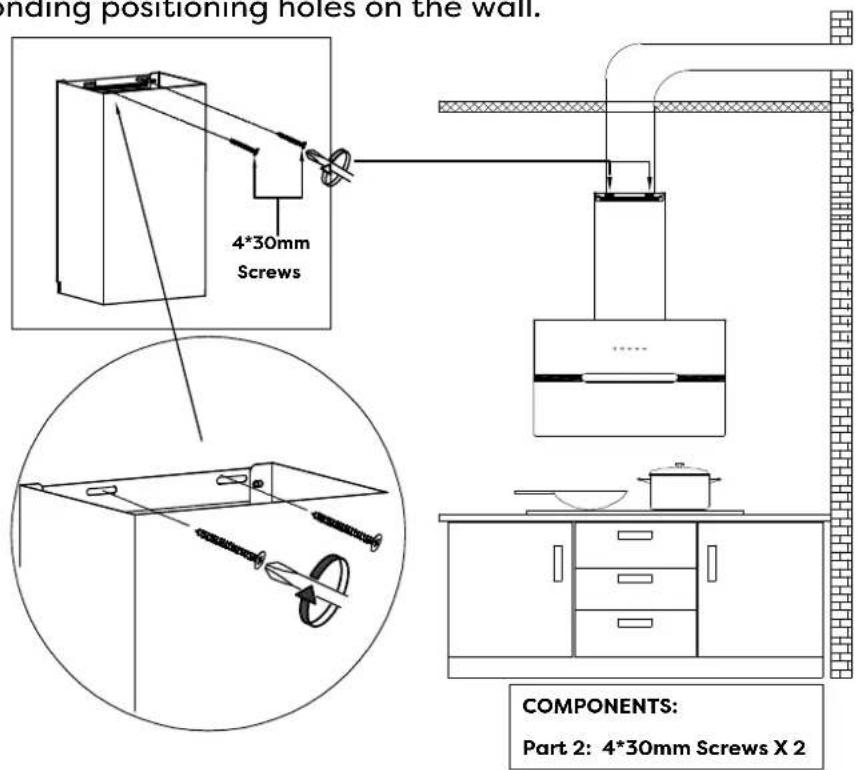
COMPONENTS: Part 3: 4*8mm Screws X 2 Power Plug 4*8mm Screws14) Use two 4*30mm Screws to lock the Lower Chimney Bracket into the corresponding positioning holes on the wall.
text_image
Opening positioning holes on the wall. 4*30mm Screws COMPONENTS: Part 2: 4*30mm Screws X 215) Use two 4*30mm Screws to lock the Upper Chimney Bracket to the corresponding positioning holes on the wall.
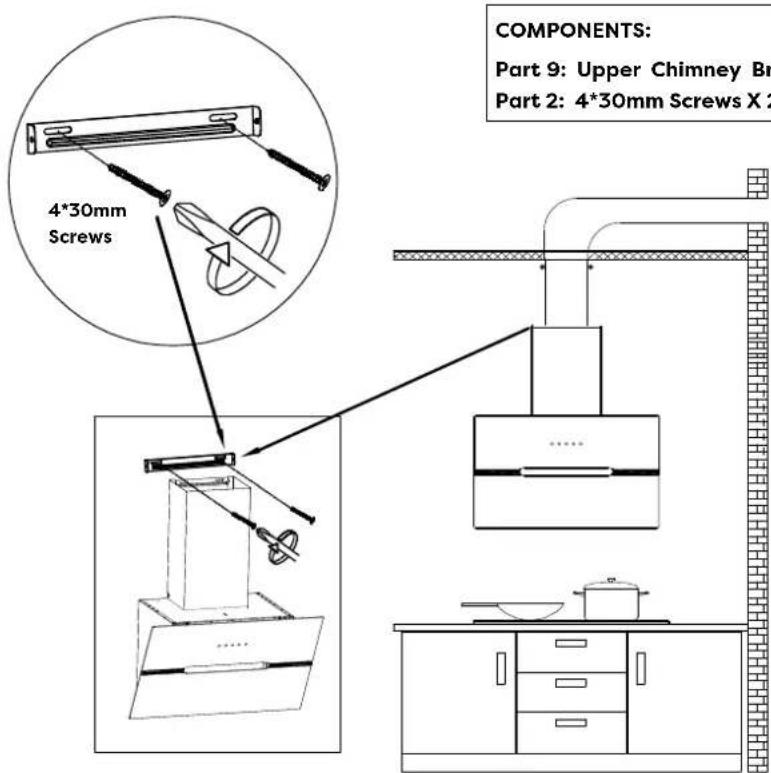
text_image
COMPONENTS: Part 9: Upper Chimney Br Part 2: 4*30mm Screws X 216) Put the Upper Chimney into the Lower Chimney, and then pulled to the height of the Upper Chimney Bracket.
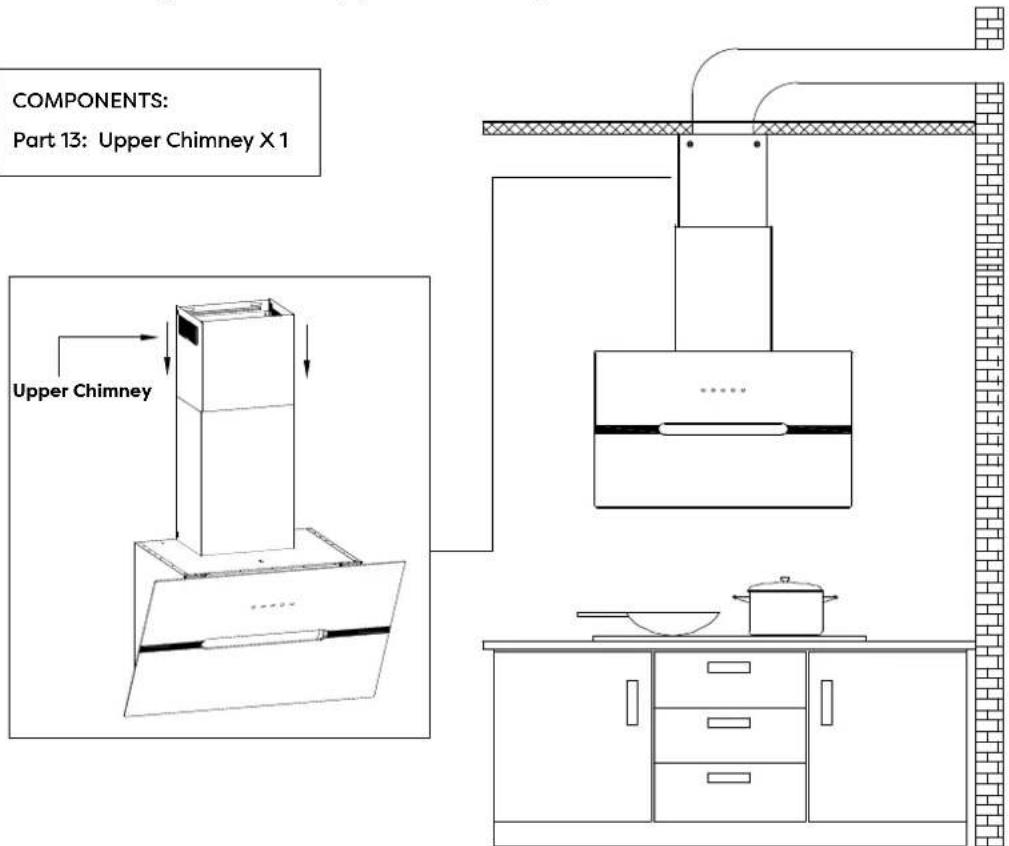
text_image
COMPONENTS: Part 13: Upper Chimney X 1 Upper Chimney17) Use two 4*8mm Screws to assemble the Upper Chimney on the Upper Chimney Bracket.
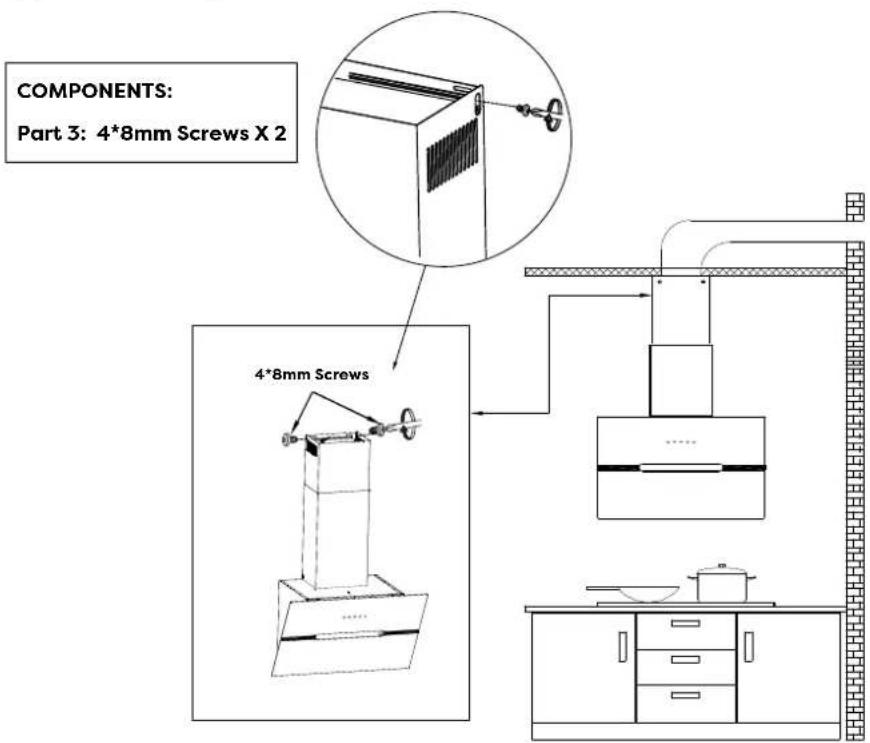
text_image
COMPONENTS: Part 3: 4*8mm Screws X 2 4*8mm Screws18) Turn the LED lights on/off, and test whether the functions are working properly.
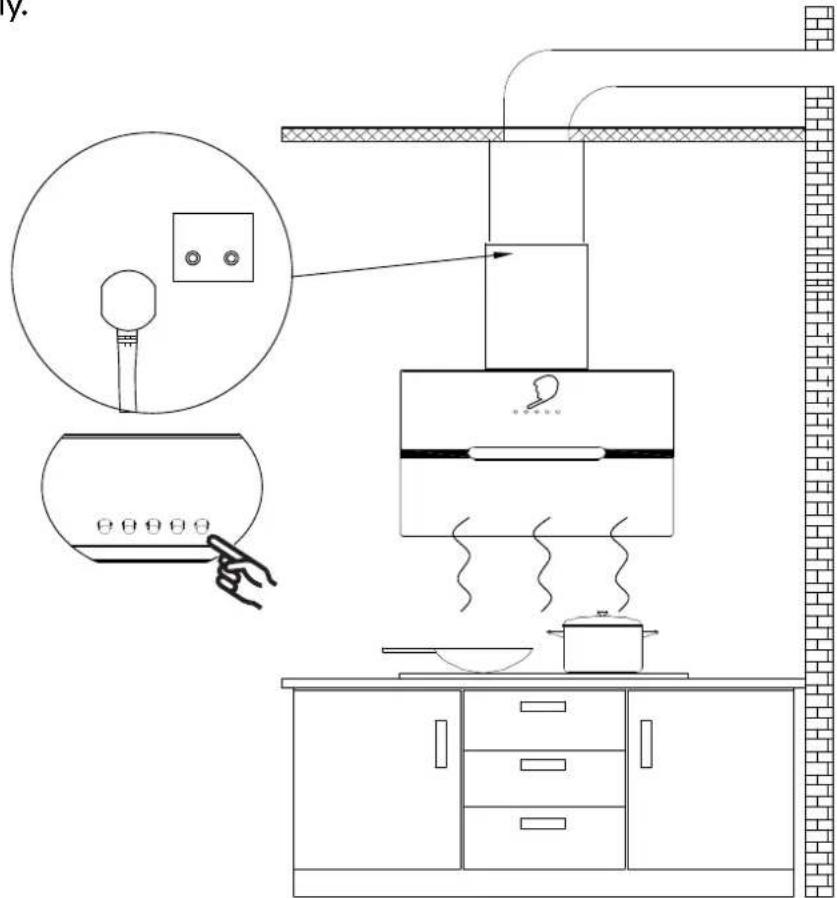
text_image
Diagram of a kitchen appliance setup with labeled components and a hand pointing to a device, including a magnified view of the device's screen.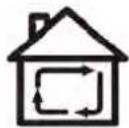
Carbon Filter Installation (Recirculation):
- Carbon filter can be used to trap odors.
In order to install the carbon filter, the grease filter should be detached first. Press the lock and pull it down.
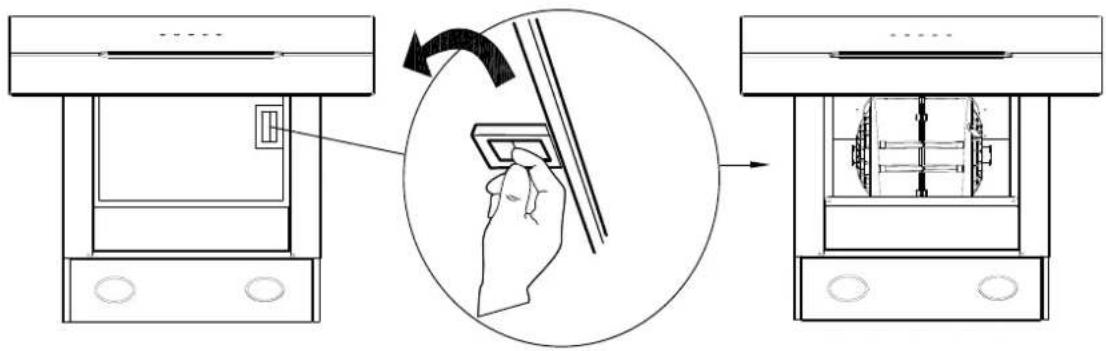
text_image
Diagram illustrating a hand operating a device with a close-up view showing the process from front to side.- Place the carbon filter into the unit and turn it in the clockwise direction to lock it in place.
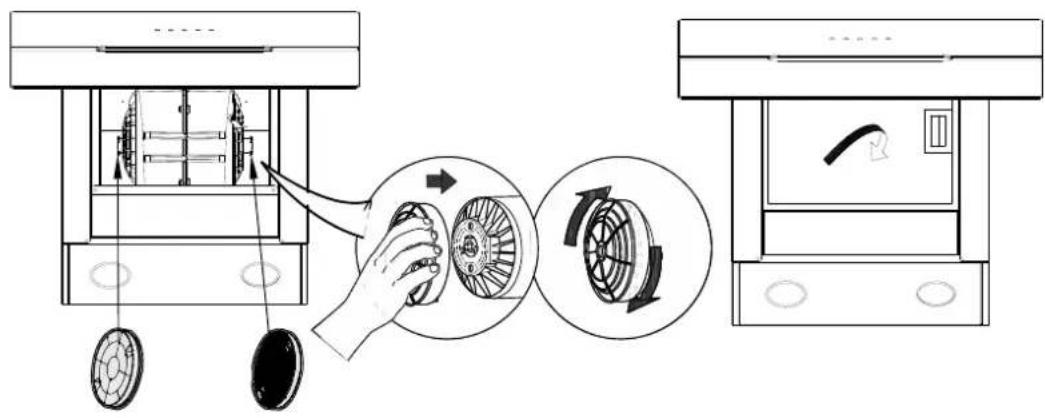
text_image
Diagram illustrating the process of a mechanical device with labeled components and directional arrows indicating rotation or adjustment.- If the carbon filter needs to be replaced, please turn it in the anticlockwise direction.
NOTE:
Make sure the carbon filter is securely locked.
When the carbon filter is installed, the suction of the cooker hood will be reduced.
The carbon filter should be changed every 2-4 months depending on the conditions of use.
Operation
Always turn your hood on before you begin cooking to establish an airflow in the kitchen.
Let the blower run for a few minutes to clear the air after you turn off the hood. This will help to keep the entire kitchen clean and fresh.
Electronic button
Operate the hood as follows:

text_image
○ - 8 + ⚙
On/Off button
Press 2S to power on, press 1S to power off.

Speed increase button
For increasing the speed of the fan.

Speed decrease button
For decreasing the speed of the fan.

Light button
Press once, turn on the LED light in level 1, Press for the second time, turn on the LED light in level 2, increase brightness; Press for the third time, turn off the LED light.

Digital display
Fan speed display:"1" for Low speed, "2" for Medium speed, "3" for High speed, "4" for Booster button, Instant access to maximum suction power, jump to 3 speed after 10 minutes.
Quick timer
Press [+] & [-] hold for more then 1 second, Digital display will flashing & into 5 minutes count down, after 5 minutes motor & light will turn off automatic & Buzzer sound for 1 second.
Smart Life APP
Download and Installation of Smart Life APP
- You must use an Android phone or an iPhone to download and use this APP.
- Search "Smart Life" in the Googel Play store for Android or IOS App Store to download and install the APP.

Video Guide

text_image
QR code image containing a central Apple logo, likely for digital scanning and linking to online content.
text_image
QR code with central logo containing Android text and 'm23015' branding
text_image
QIARRACooker Hood and Smart Life APP pairing
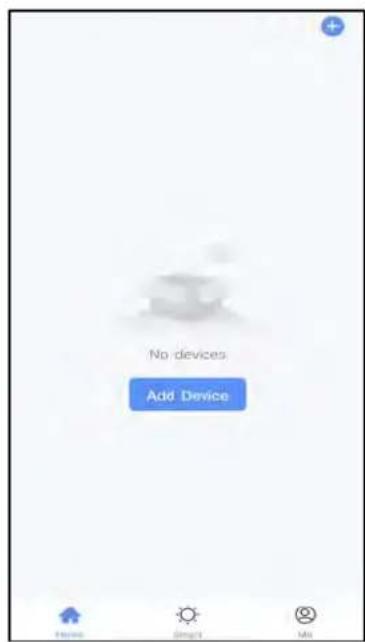
- When you log in to Smart Life APP for the first time, you need to create a new account. When creating a new account, follow the app's instruction to register.
- If you already have an account, you can use the existing account to log in.
- After logging in, follow the steps below to connect the cooker hood (the operating procedures of Android and IOS systems are the same)
text_image
No devices Add Device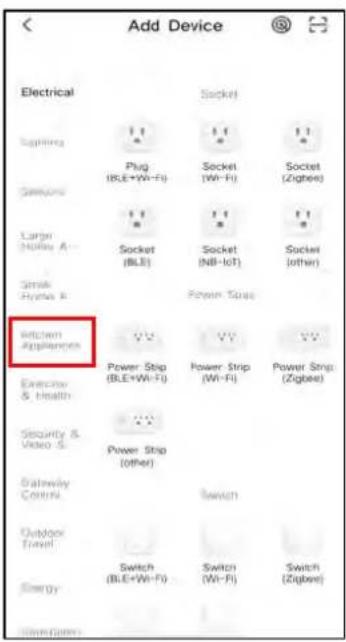
text_image
Add Device Electrical Slighting Capacitor Large Hobby A Stroke Hybrid A Kitchen Appliances Electricity & Health Security & Video S Gateway Control Outdoor Travel Energy Switch (BLE+Wi-Fi) Switch (Wi-Fi) Switch (Zigbee) Socket (BLE+Wi-Fi) Socket (Wi-Fi) Socket (Zigbee) Socket (BLE+Wi-Fi) Socket (Wi-Fi) Socket (Zigbee) Power Strip (BLE+Wi-Fi) Power Strip (Wi-Fi) Power Strip (Zigbee) Power Strip (BLE+Wi-Fi) Power Strip (Wi-Fi) Power Strip (Zigbee)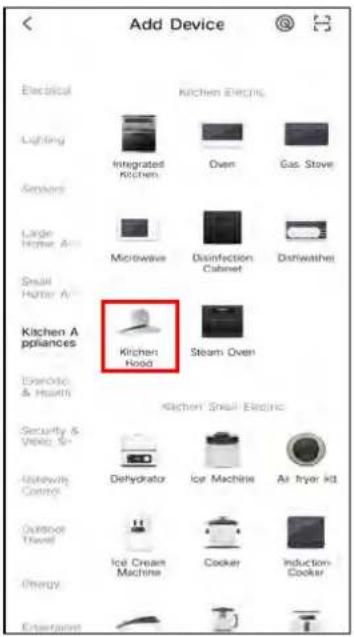
text_image
Add Device Electrical Lighting Sensors Large Hotter A Small Hotter A Kitchen Appliances Electric & Health Security & Video Gateway Control Outdoor Travel Energy Entertainment Kitchen Electric Integrated kitchen Oven Gas Stove Microwave Disinfection Cabinet Dishwasher Kitchen Hood Steam Oven Kitchen Small Electric Dehydrator Ice Machine Air hyer kit Ice Cream Machine Cooker Induction Cooker-
Open the smart life app, Click Add Device.
-
Choose kitchen appliances from the menu bar on the left.
-
Choose kitchen hood.
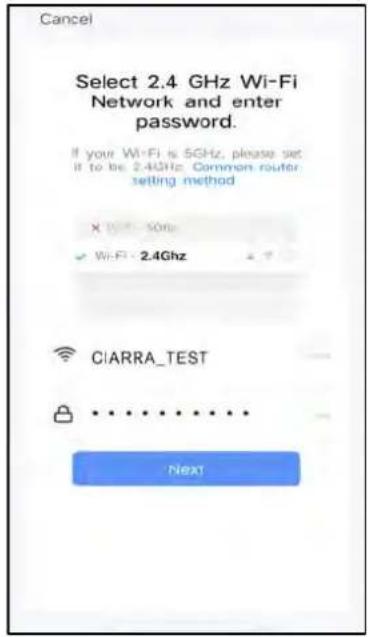
text_image
Cancel Select 2.4 GHz Wi-Fi Network and enter password. If your WiFi is 5GHz, please set it to be 2.4GHz. Common router setting method X Wi-Fi: 5GHz Wi-Fi: 2.4GHz CIARRA_TEST NEXT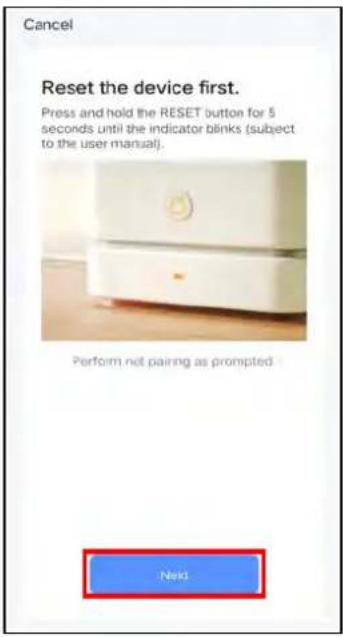
text_image
Cancel Reset the device first. Press and hold the RESET button for 5 seconds until the indicator blinks (subject to the user manual). Perform not pairing as prompted. Next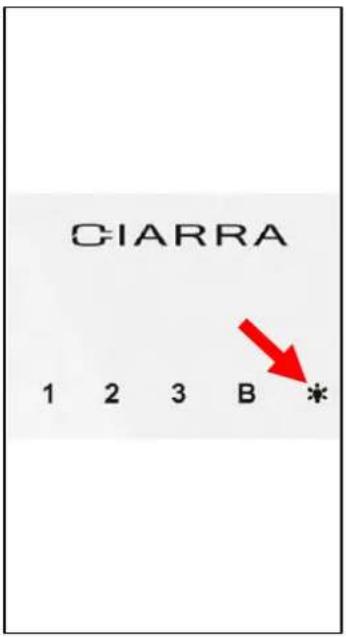
text_image
CIARRA 1 2 3 B * Red Arrow-
Connect your home Wi-Fi and enter the password, then click Confirm.
-
Click "Next" to go to the next step.
-
Press the "Light" button for 5 seconds, you will hear the beeping sound, and all button lights will be flashing, enter Wi-Fi pairing mode.
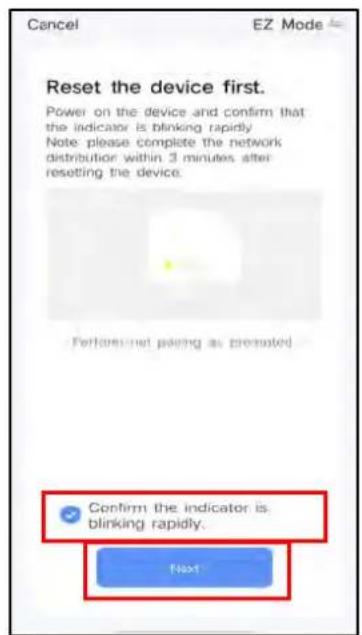
text_image
Cancel EZ Mode Reset the device first. Power on the device and confirm that the indicator is blinking rapidly! Note: please complete the network distribution within 3 minutes after resetting the device. Performed net paging as promoted Confirm the indicator is blinking rapidly. Next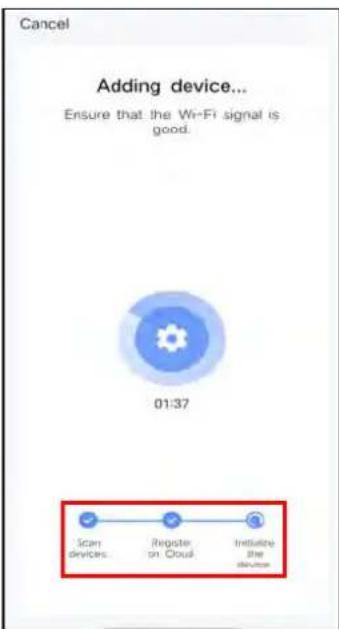
text_image
Cancel Adding device... Ensure that the Wi-Fi signal is good. 01:37 Scan devices. Register on Cloud Initiate the device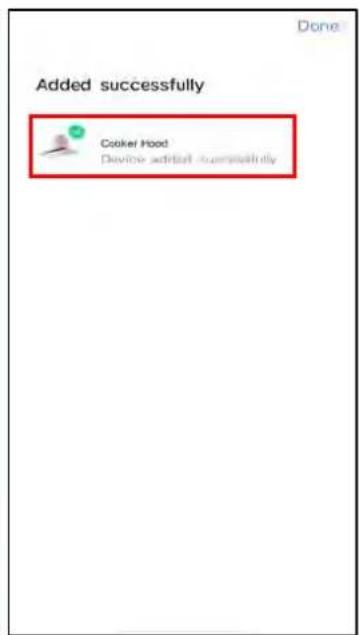
text_image
Added successfully Cooker Hood Device added successfully-
Click "Confirm the indicator is blinking rapidly" and chick "Next".
-
Adding device...
-
When you see this interface it means you have successfully connected your device.
text_image
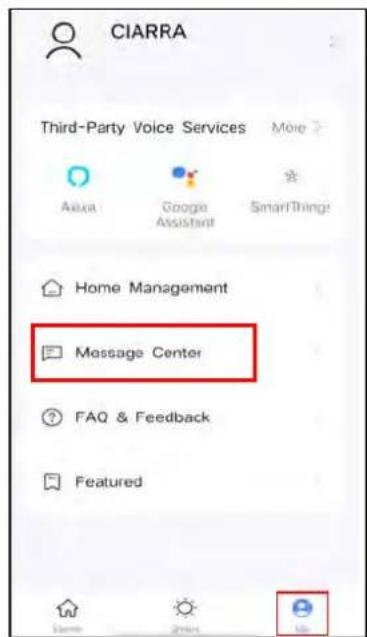
CIARRA Third-Party Voice Services More ? Alexa Google Assistant SmartThing! Home Management Message Center FAQ & Feedback Featured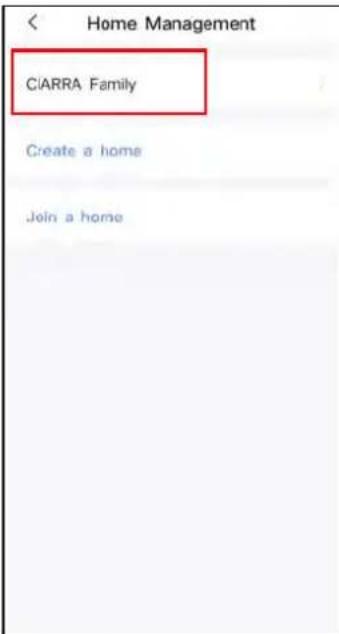
text_image
Home Management CIARRA Family Create a home Join a home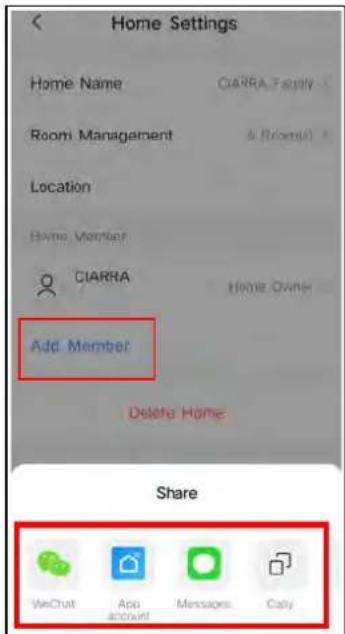
text_image
Home Settings Home Name CIARRA-Form1 Room Management & Room1 Location Home Member CIARRA Home OAN Add Member Delete Home Share WeChat App accrual Messages Copy10.Click "Me" and select "Message Center".
-
You can create a home or join a home in this area. Click "my family management".
-
Select "Add members" and share to members, after members are successfully join the same family, they can remotely control "Cooker Hood" through WiFi.
About operation interface:

ON/Off Button

Light Button
Light
When lights are OFF, press once to turn ON the lights. Press this button again to turn OFF the lights.

Fan Speed Button
You can control the corresponding gears of 1-2-3-P on the cooker hood.
Quick Delay Off

Quick Delay Setting
When cooker hood is working, you can set the delay timer through delay function.
Push this button, the cooker hood will stop working in 5 minutes.
Cleaning and Maintenance
Proper maintenance of the Cooker Hood will assure proper performance of the unit. Before cleaning unit, unplug or disconnect the cooker hood from the power supply.
GREASE FILTERS
The grease filters should be cleaned frequently. Can be cleaned in dishwasher under high temperature without using any detergent.
CARBON FILTER
The carbon filter should be changed every 2-4 months depending on the conditions of use. Replace more often if your cooking style generates lots of greases, such as stir frying. These filters are not washable and cannot be reused. Refer to installation instructions included with a carbon filter.
STAINLESS STEEL CLEANING
Do:
● Regularly clean it with a cloth or rag soaked with warm water and mild soap or liquid dish detergent.
- You may also use a specialized household stainless steel cleaner.
Don't:
- Use any steel or stainless-steel wool or any other scrapers to remove stubborn dirt.
- Use any harsh or abrasive cleansers.
- Let plaster dust or any other construction residues reach the hood. During construction/ renovation, cover the cooker hood to make sure no dust sticks to the stainless-steel surface.
Avoid when choosing a detergent:
● Any cleaners that contain bleach will attack stainless steel.
- Any products containing: chloride, fluoride, iodide, bromide will deteriorate surfaces rapidly.
- Any combustible products used for cleaning such as acetone, alcohol, ether, benzol, etc., are highly explosive and should never be used close to a range.
PAINTED FINISH CLEANING:
Clean with warm water and mild detergent only. If discoloration occurs, use a finish polish such as automotive polish. (DO NOT use a rough abrasive cleaner or porcelain cleaner.)
Cleaning and Maintenance
LED REPLACEMENT
■ Rectangle LED lamp:
natural_image
Simple concentric circle diagram with no text or symbols
CAUTION:
Before cleaning or repairing and replacing accessories, please make sure to shut down the power before operation, so as to avoid electric shock, damage to human body and even endanger life safety!
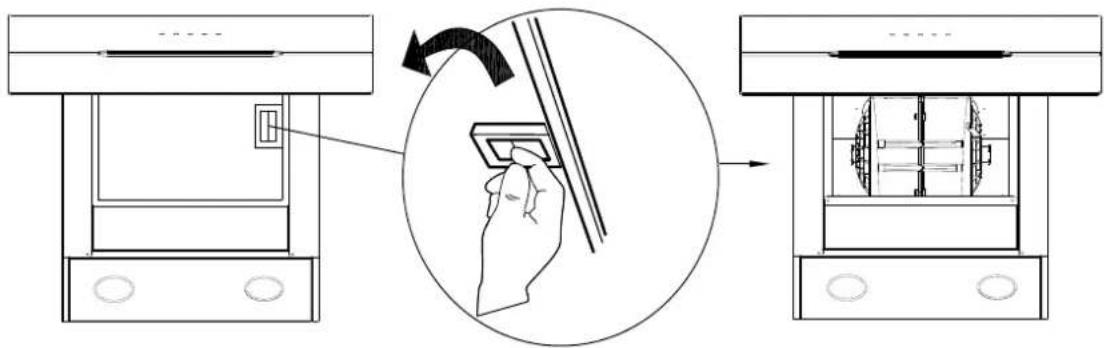
- Turn off the hood and unplug the power outlet. Detach the grease filter in order for you to replace the LED lamp.
text_image
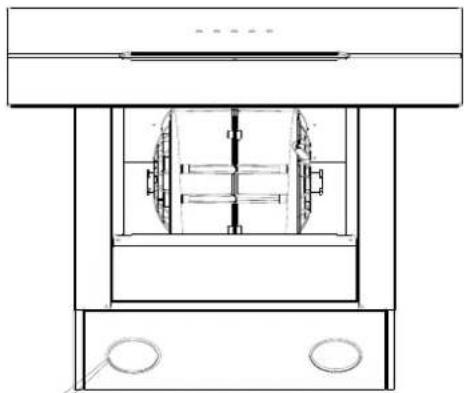
Diagram illustrating a mechanical device operation with labeled components and a hand interacting with a component.- Push the LED lamp holder out from the cabinet by hand, or use screwdriver to prize up the LED lamp around the edges, pull out slotted the LED lamp and the wire together.
natural_image
Technical line drawing of a mechanical device with internal components and mounting base (no text or symbols)Cleaning and Maintenance
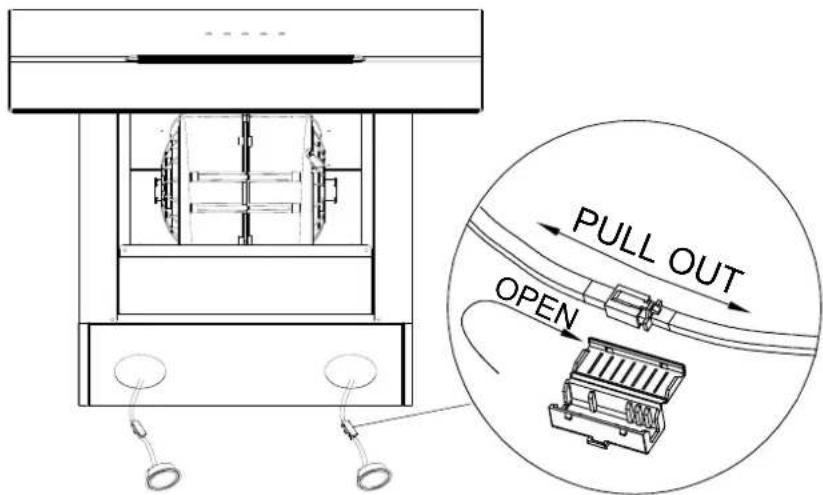
- Open the power protection cover, pull out the plug and replace the corresponding model of the LED lamp.
text_image
PULL OUT OPEN- Turn the power on and test all blower and light functions to ensure they are operating properly.
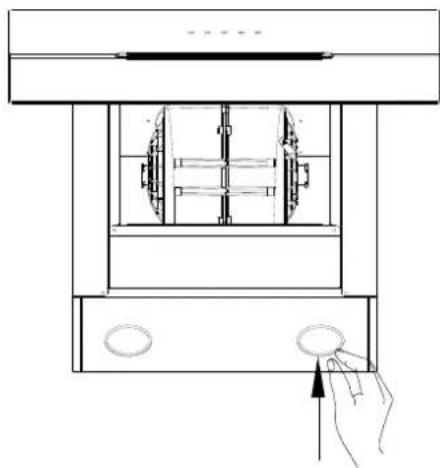
Insert the new LED light gently into the light socket, please make sure you aim at the grooves on the lighting panel when installing. Push the LED light in until it is flushed with the light panel.
natural_image
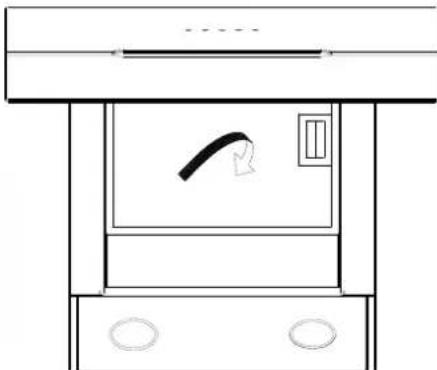
Technical line drawing of a mechanical device with a hand pressing a button (no text or symbols)- Put the grease filter back on, you are good to go.
natural_image
Simple line drawing of a mechanical device with no text or symbolsTroubleshooting
| Problem | Possible Cause | Solution |
| Extractor hood does not turn on | No electrical supply | Make sure that range hood is plugged into powered outlet. Test outlet with other device if not working |
| My range hood has poor performance | Inadequate ventilation | Ensure that the kitchen is sufficiently ventilated to allow entry of fresh air |
| The range hood and cooktop are too far away from each other | Optimal distance is 65~75cm above the cooktop for best extraction | |
| Check and make sure the tape holding down the damper flaps at the vent hole are removed before use | Remove the tape holding down the damper | |
| Grease filters clogged with grease build-up | Clean the grease filters or replace the grease filters | |
| Carbon filters clogged with grease build-up | Replace new carbon filters | |
| Motor is running but no extraction | Please contact CIARRA Customer Care Service | |
| My range hood is noisy | Check inside the range hood for any loose debris and remove | Please contact CIARRA Customer Care Service |
| If the noise is from the motor, please contact our Customer Care Service | ||
| Lights are not working | Light is damaged | Replace with new LED lamp; remove grease filters, reach inside behind the control panel and locate the wire with clip behind the light housing. |
| The light wire terminal is loose | Reset the connection |
If problem persists after the above checks, please contact CIARRA Customer Care Centre for assistance.
Waste electrical products should not be disposed with household waste. Please recycle where facilities exist. Check with your Local Authority or retailer for recycling advice.
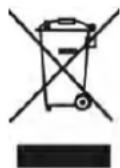
This appliance is marked according to the European directive 2012/19/EU on Waste Electrical and Electronic Equipment (WEEE).
By ensuring this product is disposed of correctly, you will help prevent potential negative consequences for the environment and human health, which could otherwise be caused by inappropriate waste handling of this product.
The symbol on the product indicates that this product may not be treated as household waste. Instead it shall be handed over to the applicable collection point for the recycling of electrical and electronic equipment.
Disposal must be carried out in accordance with local environmental regulations for waste disposal.
For more detailed information about treatment, recovery and recycling of this product, please contact your local city office, your household waste disposal service or the shop where you purchased the product.
ciarra
Make life easier
text_image
Diagram illustrating airflow or traffic flow between buildings, showing directional arrows and checkmarks indicating failure or rejection.natural_image
Technical diagram showing two mechanical assembly views with hatched sections (no text or labels)text_image
Schornstein installationsortetext_image
Diagram illustrating kitchen appliance inspection and cleaning process, showing steps from washing machine to kitchen setup with labeled components.Installation
text_image
Diagram of a kitchen appliance setup with labeled components and a magnified view showing a device with a speaker and fan.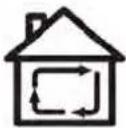
text_image
Diagram illustrating a mechanical device operation with labeled components and a hand interacting with a component, showing a rotation arrow.text_image
Diagram illustrating the process of a mechanical device with labeled components and directional arrows indicating rotation or adjustment.text_image
QR code image containing an Apple logo in the center
text_image
QR code with central logo containing Android robot icon and text 'GO2303'
text_image
CIARRAItext_image
No devices Add Device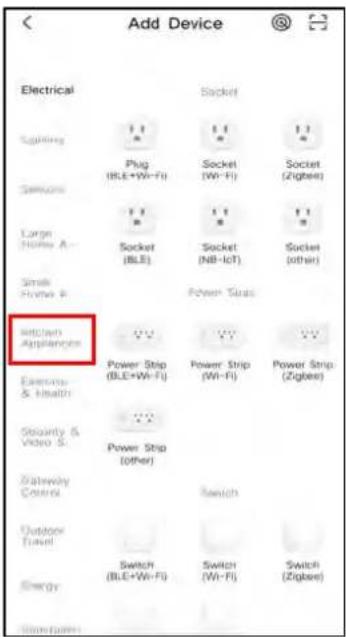
text_image
Add Device Electrical Signaling Plug (BLE+Wi-Fi) Socket (Wi-Fi) Socket (Zigbee) Smartors Large Home A- Socket (BLE) Socket (NB-IcT) Socket (other) Small Home B- Power Switch Smart Appliances Power Strip (BLE+Wi-Fi) Power Strip (Wi-Fi) Power Strip (Zigbee) Exercise & Health Security & Video S. Power Strip (other) Gateway Control Switch Outdoor Travel Switch (BLE+Wi-Fi) Switch (Wi-Fi) Switch (Zigbee) Energy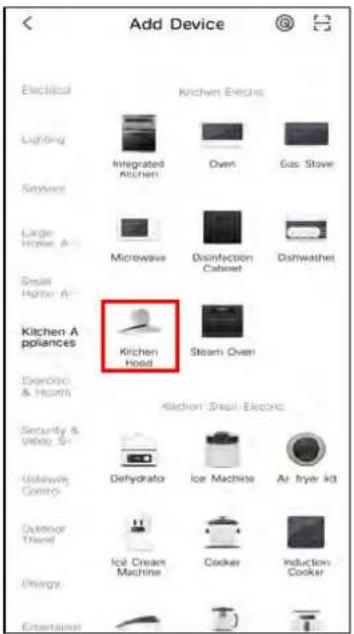
text_image
Add Device Electrical Lighting Sensors Large Horse, A- Small Higher A- Kitchen Appliances Exercise, & Histrin Security & Video S- Gateway, Cycling Outdoor Travel Energy Kitchen Electric Integrated kitchen Oven Gas Stove Microwave Disinfection Cabinet Dishwashet Kitchen Hood Steam Oven Kitchen Sheep Electric Dehydrator Ice Machine Air Fryer IQ Ice Cream Machine Cooker Induction Cookertext_image
Cancel Select 2.4 GHz Wi-Fi Network and enter password. If your WiFi is 5GHz, please set if to be 2.4GHz. Common router setting method X Wi-Fi: 5GHz Wi-Fi: 2.4GHz CIARRA_TEST NEXT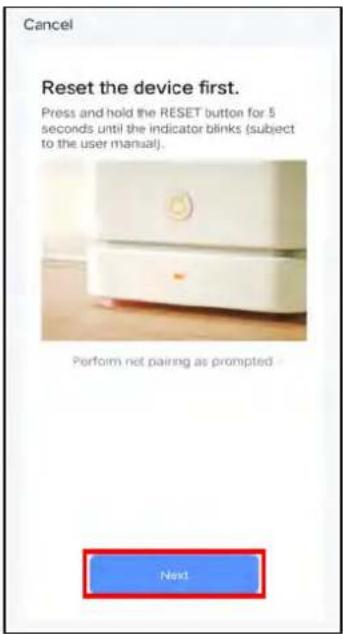
text_image
Cancel Reset the device first. Press and hold the RESET button for 5 seconds until the indicator blinks (subject to the user manual). Perform net pairing as prompted. Next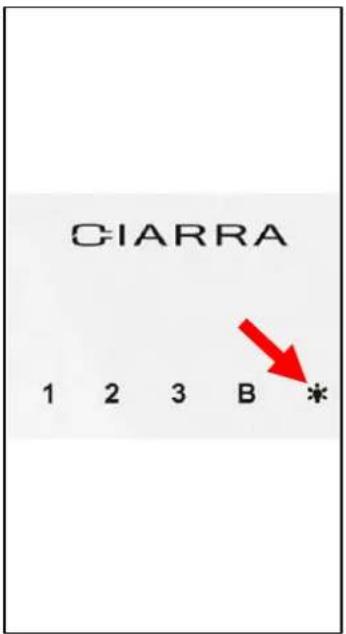
text_image
CIARRA 1 2 3 B * Red Arrowtext_image
Cancel EZ Mode Reset the device first. Power on the device and confirm that the indicator is blinking rapidly! Note: please complete the network distribution within 3 minutes after resetting the device. Performed net paging as promoted Confirm the indicator is blinking rapidly. Next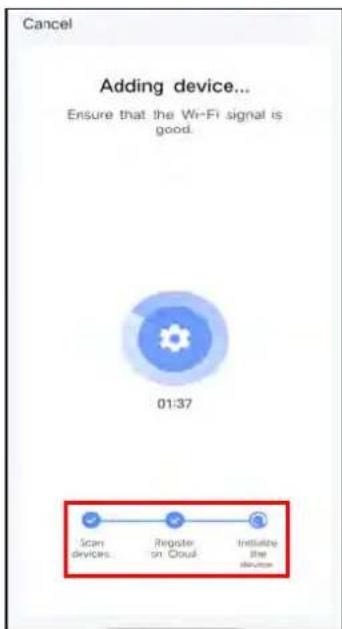
text_image
Cancel Adding device... Ensure that the Wi-Fi signal is good. 01:37 Scan devices Register on Cloud Initiate the device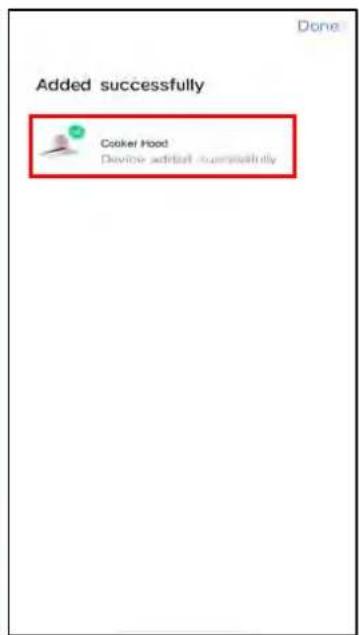
text_image
Added successfully Cooker Hood Device added successfullytext_image
CIARRA Third-Party Voice Services More ? Alexa Google Assistant SmartThing! Home Management Message Center FAQ & Feedback Featured
text_image
Home Management CIARRA Family Create a home Join a home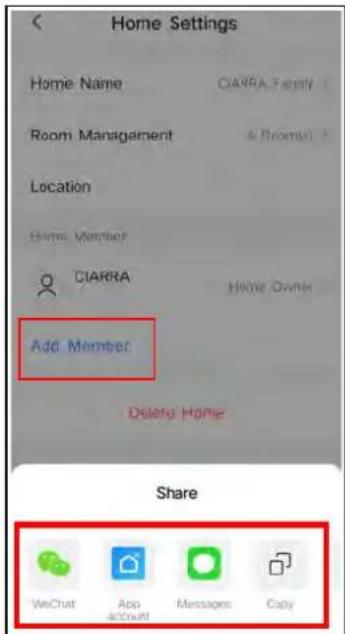
text_image
Home Settings Home Name CIARRA Family Room Management & Room(s) Location Home Member CIARRA Home GAIN Add Member Delete Home Share WeChat App account Messages Cobynatural_image
Simple concentric circle diagram with no text or symbols
VORSICHT :
text_image
Diagram illustrating a mechanical device operation with a hand pressing a component, showing step-by-step assembly and final state.natural_image
Technical line drawing of a mechanical device with internal components and mounting base (no text or symbols)natural_image
Technical line drawing of a mechanical device with a hand pressing a button (no text or symbols)natural_image
Simple line drawing of a mechanical device with no text or symbolsStörungssuche
Part 2: 4*30mm Vis X 9
Part 10: Support mural × 1

Part 11: Corps de hotte × 1

Part 5: Câble de serrage X 2
text_image
Diagram illustrating two scenarios of building ventilation or ventilation system with directional arrows and checkmarks indicating failure or completion.natural_image
Technical drawing of two mechanical components with hatched areas indicating material (no text or symbols)Installer la hotte (Evacuation):
Part 10: Support mural X 1
natural_image
Line drawing of a kitchen cabinet with three drawers, a cooking pot on top, and a pan on the table (no text or symbols)text_image
Diagram illustrating kitchen appliance assembly and cleaning steps, showing hand positioning, washing machine, kitchen setup, and interior lighting.Montage
text_image
Composants: Part 3: 4*8mm Vis X 2 Power Plug 4*8mm Vistext_image
Diagram of a kitchen appliance setup with labeled components and a hand pointing to a device, including a magnified view of the oven.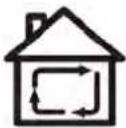
text_image
Diagram illustrating a door lock operation with hand placement and directional arrow, showing step-by-step assembly from device to machine.text_image
Diagram illustrating the process of a mechanical device with labeled components and rotation arrows, showing hand operating a wheel.text_image
QR code image containing the Apple logo in the center
text_image
QR code with central logo containing Android app icon
text_image
CIARRAItext_image
No devices Add Device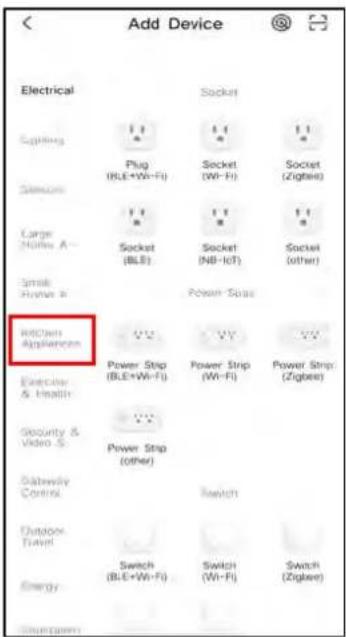
text_image
Add Device Electrical S Lighting Plug (RLE+Wi-Fi) Socket (Wi-Fi) Socket (Zigbee) Large Home A Socket (BLE) Socket (NB-IcT) Socket (other) Small Home B Power Strip MCCW Appliances Power Strip (BLE+Wi-Fi) Power Strip (Wi-Fi) Power Strip (Zigbee) Exercise & Health Security & Video S Power Strip (other) Switch Gateway Control Switch (BLE+Wi-Fi) Switch (Wi-Fi) Switch (Zigbee) Energy Switch (Gesamt)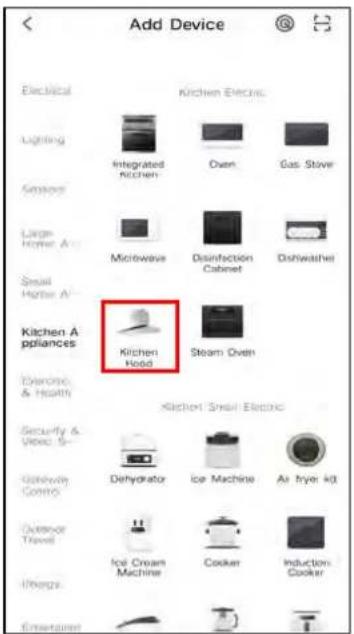
text_image
Add Device Electrical Lighting Sensors Large Heater A Small Heater A Kitchen Appliances Dynelectric & Health Security & Privacy S- Gateway Control Outdoor Travel Air Dryer Kit Ice Cream Machine Cooker Induction Cooker Entertainment Kitchen Electric Integrated Kitchen Microwave Disinfection Cabinet Steam Oven Kitchen Hoodtext_image
Cancel Select 2.4 GHz Wi-Fi Network and enter password. If your Wi-Fi is 5GHz, please set if to be 2.4GHz. Common router setting method X Wi-Fi: 5GHz Wi-Fi: 2.4GHz CIARRA_TEST Next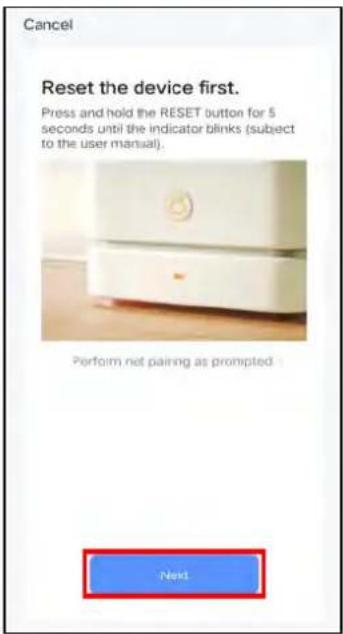
text_image
Cancel Reset the device first. Press and hold the RESET button for 5 seconds until the indicator blinks (subject to the user manual). Perform net pairing as prompted. Next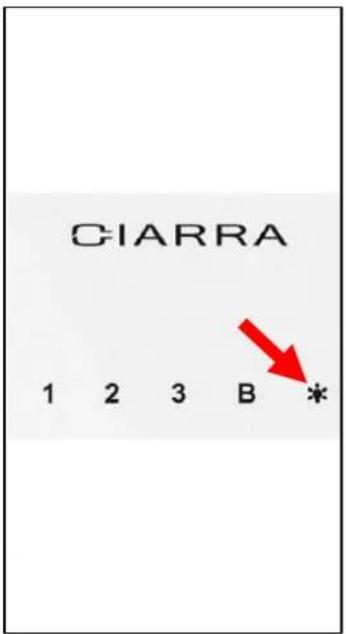
text_image
CIARRA 1 2 3 B * Red Arrowtext_image
Cancel EZ Mode Reset the device first. Power on the device and confirm that the indicator is blinking rapidly. Note: please complete the network distribution within 3 minutes after reseting the device. Performed not playing as promoted Confirm the indicator is blinking rapidly. Next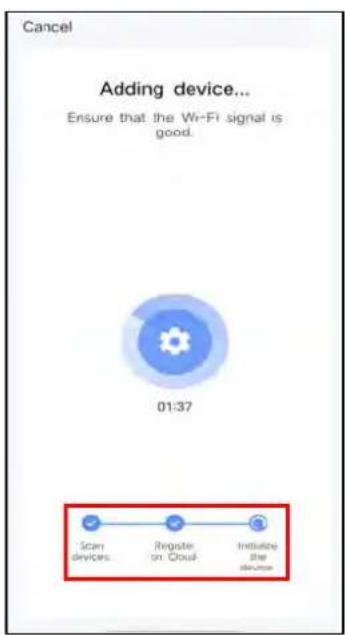
text_image
Cancel Adding device... Ensure that the Wi-Fi signal is good. 01:37 Scan devices Register on Cloud Initiating the devices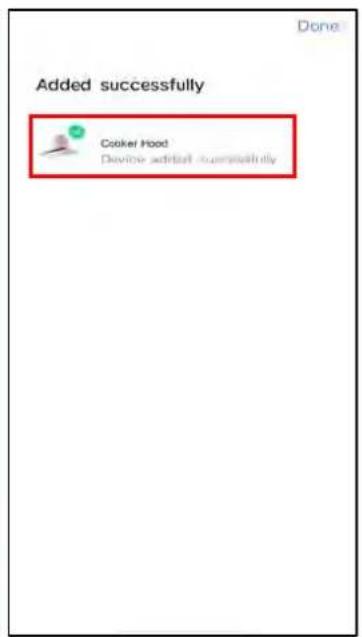
text_image
Added successfully Cooker Hood Device installed successfullytext_image
CIARRA Third-Party Voice Services More ? Alexa Google Assistant SmartThing! Home Management Message Center FAQ & Feedback Featured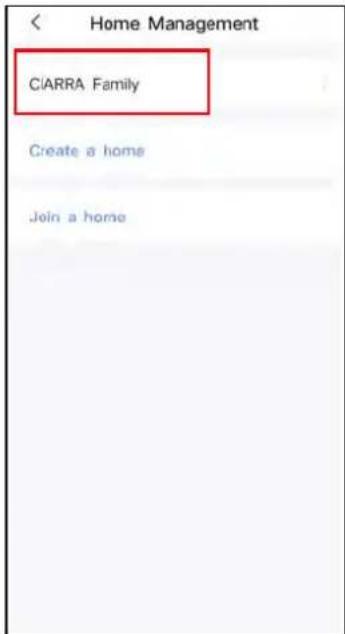
text_image
Home Management CIARRA Family Create a home Join a home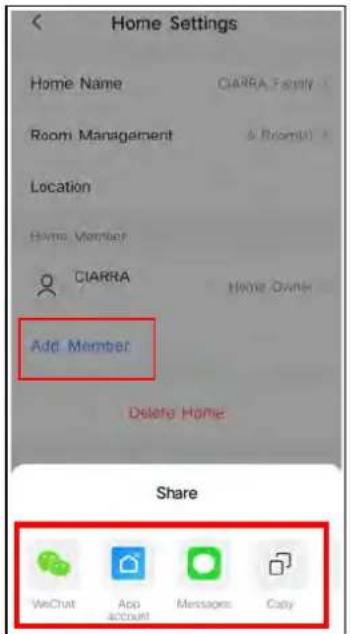
text_image
Home Settings Home Name CIARRA_Family Room Management & Room(1) Location Home Member CIARRA Home Owns Add Member Delete Home Share WeChat App account Messages Cabynatural_image
Simple concentric circle diagram with no text or symbols
AVERTISSEMENT:
text_image
Diagram illustrating a hand pressing a button on a device, showing the process from receipt to collection or disassembly.natural_image
Technical line drawing of a mechanical device with internal components and mounting base (no text or symbols)natural_image
Technical line drawing of a mechanical device with a hand pressing a button (no text or symbols)natural_image
Simple line drawing of a mechanical device with no text or symbolsDépannage
text_image
QR code image with a central logo, likely linking to a digital resource or website.text_image
QR code image with a central logo, likely linking to a digital resource or website.
ciarra
Make life easier
Estimado cliente:
text_image
QR code image with a central logo, likely linking to a digital resource or website.text_image
QR code image with a central logo, likely linking to a digital resource or website.ciarra
Make life easier
Geachte klant:
text_image
QR code image with a central logo, likely linking to a digital resource or website.text_image
QR code image with a central logo, likely linking to a digital resource or website.ciarra
Make life easier
Kära kund:
text_image
QR code image with a central logo, likely linking to a digital resource or website.text_image
QR code image with a central logo, likely linking to a digital resource or website.ciarra
Make life easier
Drogi kliencie:
text_image
QR code image with a central logo, likely linking to a digital resource or website.text_image
QR code image with a central logo, likely linking to a digital resource or website.