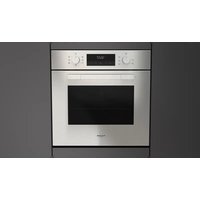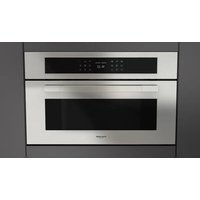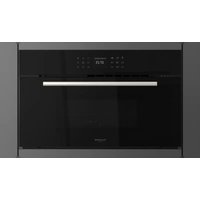
FCMO 7510 TEM - Oven Fulgor Milano - Free user manual and instructions
Find the device manual for free FCMO 7510 TEM Fulgor Milano in PDF.


User questions about FCMO 7510 TEM Fulgor Milano
0 question about this device. Answer the ones you know or ask your own.
Ask a new question about this device
Download the instructions for your Oven in PDF format for free! Find your manual FCMO 7510 TEM - Fulgor Milano and take your electronic device back in hand. On this page are published all the documents necessary for the use of your device. FCMO 7510 TEM by Fulgor Milano.
USER MANUAL FCMO 7510 TEM Fulgor Milano
natural_image
Simple geometric diagram with a black rectangle inside a larger rectangle (no text or symbols)FCMO 4510 TEM
FCLMO 4510 TEM
FCLCMO 4510 TEM
FUTMO 4510 TEM
FGMO 4508 TEM
FCLGMO 4508 TEM
FPCMO 300 TEM
FCMO 310 TEM
FUTMO 310 TEM
FCLMO 7510 TEM
FCMO 7510 TEM
FORNO A MICROONDE
MICROWAVE OVEN
FOUR A MICRO-ONDES
MIKROWELLE
HORNO MICROONDAS
MAGNETRONOVEN
FORNO MICROONDAS
natural_image
Two glass glasses: one with a spoon inside, the other with a black X symbol (no text or labels)natural_image
Diagram of a device interior with labeled components and an upward arrow indicating orientation (no text or symbols present)Primo utilizzo
natural_image
Interior view of an oven with metal grating and ventilation grilles (no text or symbols visible)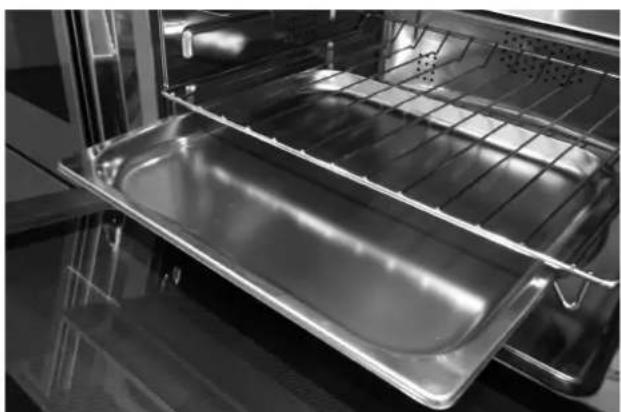
natural_image
Interior view of an oven with a metal tray and rack (no text or symbols visible)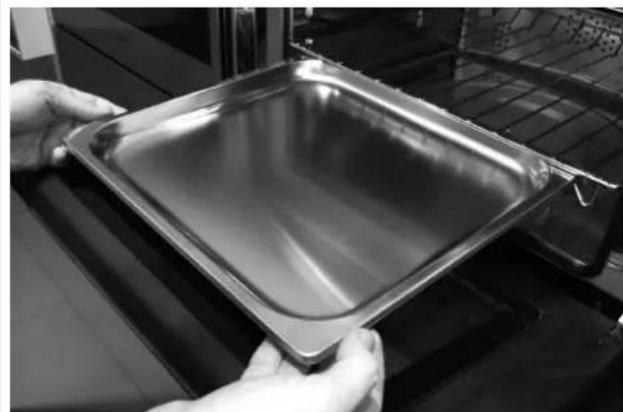
natural_image
Close-up of hands holding a metallic baking tray with a tray on a stove (no visible text or symbols)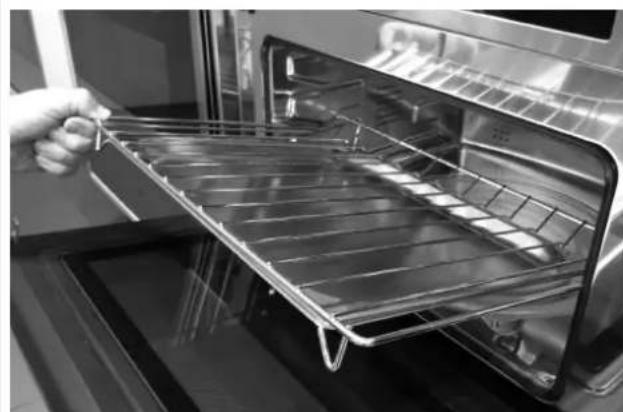
natural_image
Interior view of an oven with a hand holding a metal tray (no text or symbols visible)
IMPORTANTE
natural_image
Recycling symbol composed of five gray arrows forming a triangle (no text or labels)text_image
VEMERDI 11/20/2015 04:26 CETastiera
text_image
D.M.Y. Y.M.D. M.D.Y. 12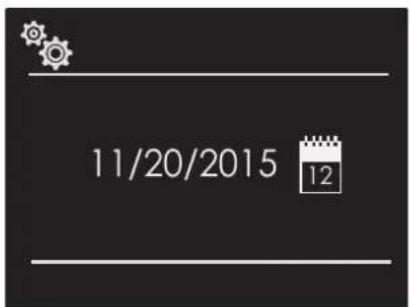
text_image
11/20/2015 12Luminosità
natural_image
Pure geometric diagram with shaded regions and arrows, no text or symbols presenttext_image
Technical diagram of a mechanical assembly with labeled parts L and N, including a magnified inset showing internal components.1 - Warnings for Microwave Ovens 4
Food preparation 4
Pots and pans 4
Microwave power and duration 4
Packaging 4
Beverages 4
Foods for newborns 4
Foods with skin or peel 5
Drying foods 5
Oil 5
Causes of damage 5
First use 7
Assembling and disassembling the flat grill 7
Respect for the environment 8
2 - The Control Panel 9
Keypad 9
Control panel 9
3 - General Oven Information 10
Error codes 10
Beeps 10
Default Settings 10
F Failure Number Codes 10
Preheat 10
Locking the keyboard 10
Timer 10
4 - General Oven Tips 11
Preheating the Oven 11
Operational Suggestions 11
Operation with microwaves 11
Oven Condensation and Temperature 11
High Altitude Baking 11
5 - Getting Started 12
Instructions for initial switch-on 12
6 - User Settings 13
Language 13
Temperature & Weight 13
Time 13
Date 14
Brightness 14
Volume 14
TABLE OF CONTENTS
PAGE
7 - System Setting 15
Event Log 15
Demo 15
8 - Starting Your Oven 16
Switching the oven on and off 16
Cooking Mode Tables 17
9 - Traditional Cooking 18
Changing the cooking mode 18
Changing temperature 18
Cooking mode quick menu 18
Pre-heating phase 18
10 - Time Oven Mode Operation 19
Cook Time 19
Stop Time 19
11 - Microwave Cooking 20
Timed Thawing Function 20
Weight Thawing Function 20
Microwave Function 20
Microwave + Grill Function 21
Microwave + Ring Function 21
Changing Watts Power 22
Changing Time 22
AirFry function 22
Changing Temperature 22
Changing Weight 22
12 - Using Oven Lights 23
13 - Recipes 24
14 - For the Installer 26
Electrical Hook-Up 31
15 - Solving Traditional Baking Problems 32
16 - Solving Operational Problems 33
17 - Assistance or Service 34
Service Data Record 34

IMPORTANT INSTRUCTIONS AND SAFETY WARNINGS
Read carefully and keep for future use

Dear Customer,
We would like to thank you and congratulate you on your choice.
This new product has been carefully designed and built using top quality materials, and meticulously tested to ensure that it meets all your culinary requirements.
Please read and observe these simple instructions, which will enable you to achieve excellent results from the very first time you use it. This state-of-the-art appliance comes to you with our very best wishes.
THIS PRODUCT IS DESIGNED FOR DOMESTIC USE. THE MANUFACTURER DECLINES ALL RESPONSIBILITY FOR PERSONAL INJURY OR PROPERTY DAMAGE DERIVING FROM INCORRECT INSTALLATION OR IMPROPER, ERRONEOUS OR UNSUITABLE USE.
THE APPLIANCE MUST NOT BE USED BY PEOPLE (INCLUDING CHILDREN) WITH PHYSICAL, SENSORIAL OR MENTAL IMPAIRMENTS, OR BY PEOPLE WITHOUT THE NECESSARY EXPERIENCE OR KNOWLEDGE, UNLESS THEY ARE SUPERVISED OR INSTRUCTED IN THE USE OF THE APPLIANCE BY A PERSON RESPONSIBLE FOR THEIR SAFETY.
CHILDREN MUST BE SUPERVISED TO ENSURE THAT THEY DO NOT PLAY WITH THE APPLIANCE. DO NOT PLACE ALUMINIUM FOIL, POTS OR SIMILAR OBJECTS IN CONTACT WITH THE BASE INSIDE THE OVEN FOR COOKING. THE HEATING ACTION OF THE LOWER HEATING ELEMENT CAUSES OVERHEATING OF THE LOWER PART OF THE OVEN CAUSING DAMAGE AND SERIOUS CONSEQUENCES (RISK OF FIRE) EVEN TO THE COUNTER UNDER THE OVEN.
THE APPLIANCE GETS VERY HOT DURING USE.
WARNING: DON'T TOUCH THE HEATING ELEMENTS INSIDE THE OVEN.

ATTENTION
- If the door or the gasket seals of the door are damaged, the oven may not gb be used until it repaired by a qualified service technician;
- It dangerous for anyone other than a service technician to perform any maintenance or repairs that involve the removal of any cover that protects against exposure to microwaves;
- Liquids or other foods must not be heated in air-tight contains because they could explode;
- Children may not use the oven without supervision until they have been adequately instructed in its safe use and understand the dangers of using it incorrectly;
- Only use untensils that are appropriate for microwave ovens;
- When heating food in plastic or paper containers, check the oven frequently because of the risks of fire;
- If you see smoke coming out, turn off the appliance or remove its plug and keep the door closed to extinguish any flames;
- Heating beverages in the microwave oven can cause a delayed boil-over, so be careful when handling the container;
- The contents of baby bottles and baby food in jars must be mixed or shaken and their temperature must be checked before feeding to avoid scalding;

ATTENTION
- Eggs in the shell and whole hardboiled eggs must not be heated in microwave ovens because they could explode even after the end of heating in the microwave;
- A detailed explanation for cleaning the gasket seals of the doors of the cavity and adjacent parts;
- The oven must be cleaned periodically and all food residues must be removed;
- Failure to keep the oven clean could cause deterioration of the surfaces that could reduce the life of the appliance and cause dangerous conditions;
- Do not use rough abrasives or sharp metal scrapers to clean the glass door of the oven because they could scratch the surface and cause the glass to shatter.
- Do not use steam cleaners to clean the appliance.

ATTENTION
THE FULL WIDTH RECTANGULAR WIRE RACK AND PAN ARE INTENDED FOR USE WITH CONVENTIONAL COOKING MODES ONLY.
DO NOT USE THESE ACCESSORIES WITH ANY OF THE MICROWAVE FUNCTIONS. DOING SO WILL CAUSE ARCING AND WILL DAMAGE THE INTERIOR OF YOUR APPLIANCE AND WILL CREATE A RISK OF FIRE.
THE ONLY INCLUDED ACCESSORY THAT MAY BE USED WITH MICROWAVE FUNCTIONS IS THE ROUND METAL WIRE STAND.
Food preparation
Danger of fire!
Only use the microwave function for the preparation of food to be eaten.
Any other uses can be dangerous or cause damage.
For example, heated slippers or pillows filled with grain or cereals can catch fire even after several hours.
Pots and pans
Danger of injury!
Porcelain and ceramic crockery can have small holes in the handles and cover.
There can be cavities hidden behind these holes. If water gets into these cavities, the crockery could break.
Do not use crockery that is unsuitable for microwave ovens.
Danger of burns!
The heat of the food can heat the dish. Always use a pot holder to remove dishes and accessories from the cooking chamber.
Microwave power and duration
Danger of fire!
Never set values that are too high for the microwave power or the cooking time. The food could catch fire and damage the appliance. Follow the rules in these instructions.
Packaging
Danger of fire!
Never heat food in thermal packaging.
Food in containers made of plastic, paper or other inflammable materials must be watched constantly.
Danger of burns!
Air-tight packaging can explode. Follow the instructions shown on the package. Always use a pot holder to remove dishes.
Beverages
Danger of burns!
When heating liquids, boiling can be delayed.
This means that the boiling temperature has been reached without forming the typical little steam bubbles. Even a slight knock can cause the sudden overflow of liquid or sprays.
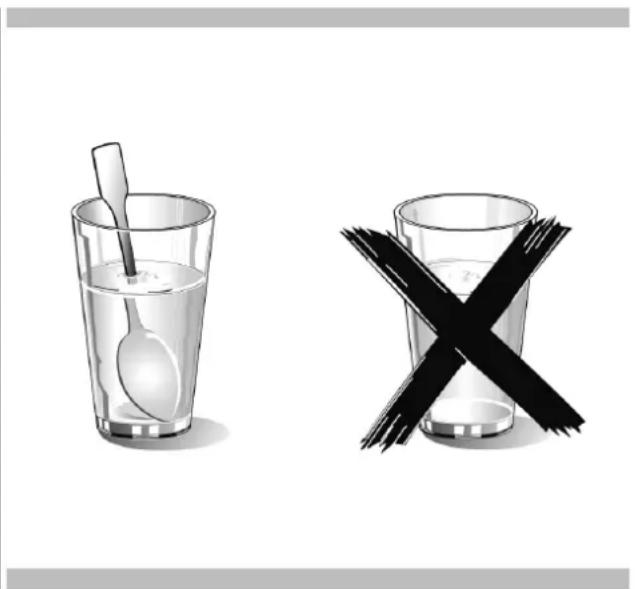
When heating liquids, always put a spoon in the container to avoid delayed boiling.
Danger of explosion!
Never heat beverages or other types of food in covered containers.
Never heat alcoholic beverages excessively.
natural_image
Two glassware illustrations: a spoon inside and a crossed-out black X symbol (no text or symbols present)Foods for newborns
Danger of burns!
Never heat baby foods in a covered container. Always remove the cover or nipple.
When finished heating, always carefully shake or mix so that the heat is evenly distributed.
Test the temperature before giving the food to the baby.
Foods with skin or peel
Danger of burns!
Never cook eggs in the shell. Never heat hard-boiled eggs because they could explode even after the microwave is turned off. This also goes for molluscs and crustaceans.
In the case of fried eggs, first pierce the yolk.
In the case of foods with a hard peel or skin like apples, tomatoes, potatoes or sausage, the peel or skin could explode.
Pierce the peel or skin before cooking.
Drying foods
Danger of fire!
Never dry food in the microwave.
Foods with low water content
Danger of fire!
Never defrost or heat foods with low water content, like bread, for too long or at an excessive power.
Oil
Danger of fire!
Never use the microwave to heat just oil.
Causes of damage
Juice leaking from fruit
When preparing sweets containing very juicy fruit, do not overfill the baking dish. Fruit juices that overflow the baking dish can leave indelible stains.
Technical breakdown
Never use enamelled baking dishes in the microwave because it could cause a technical breakdown.
Cooling with the door of the appliance open
The cooking chamber must only be cooled with the door closed. Check that nothing is stuck on the door of the appliance. Even if the door is only ajar, nearby cabinets can be damaged over time.
Very dirty gasket seal
If the gasket seal is very dirty, the door of the appliance does not close correctly during operation. The surfaces of nearby cabinets can be damaged. Always keep the gasket seal clean.
Using the door of the appliance as a support surface
Do not rest or lean on the open door of the appliance and do not put dishware or accessories on it.
Using the microwave without food in the chamber
Only turn on the microwave after you have put the food in the cooking chamber. Without food inside, the appliance can become overloaded. The only exception allowed are brief tests of dishware (in this regard, see the warnings about pots and pans).
Moist foods
Do not leave moist foods in the cooking chamber for extended periods of time.

IMPORTANT
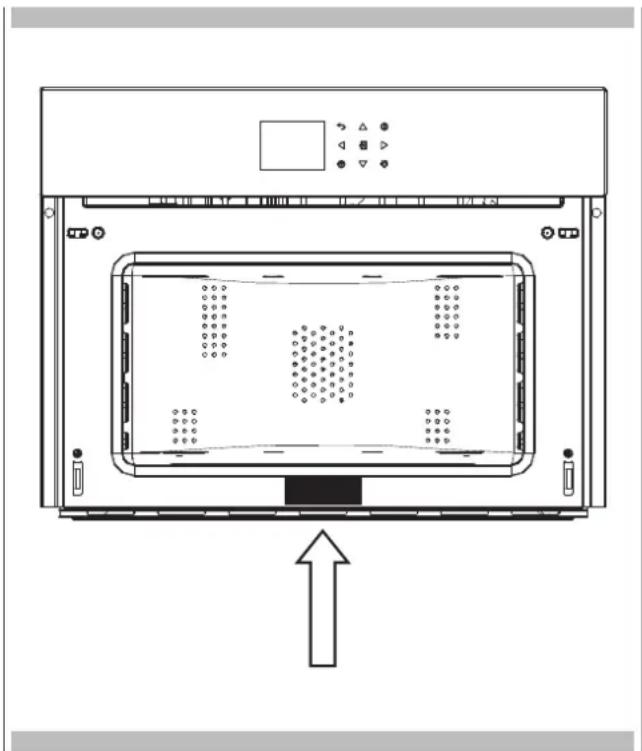
The oven's identification plate is even accessible when the appliance is installed. This identification plate, which is visible when you open the door, shows all the information you will need when requesting replacement parts for the appliance.
natural_image
Technical line drawing of a front view of an oven or enclosure with internal compartments and control panel (no text or symbols)First use
The oven should be thoroughly cleaned with soap and water and carefully rinsed.
Heat the oven for about 30 minutes at the maximum temperature; this eliminates all the residual manufacturing oils that could cause unpleasant odours during cooking. Use the circular plus fan function without accessories in the oven. Before using the accessories for the first time, clean them carefully with a very hot alkaline washing solution and a soft cloth.
Assembling and disassembling the flat grill
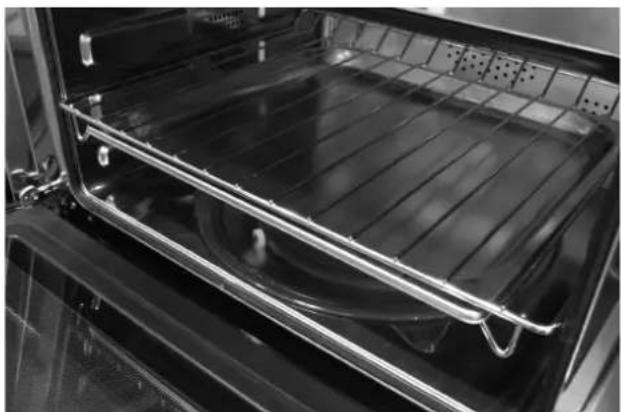
To remove the flat grill, pull the grill towards you until it stops and then lift, by pulling upwards, until it comes completely out. To put the flat grill back in, insert it at a 45-degree angle and then position it horizontally and push it all the way in to the end of the grill track.
If the flat grill has a drip-pan (tray), to remove it, lift slightly and slide it towards you. To reinsert it, slide it back until it is correctly seated.
natural_image
Interior view of an oven with metal grating and ventilation grilles (no text or symbols visible)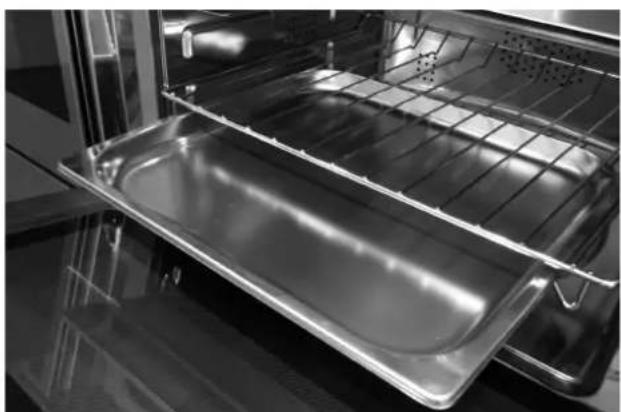
natural_image
Interior view of an oven with a metal tray and rack (no text or symbols visible)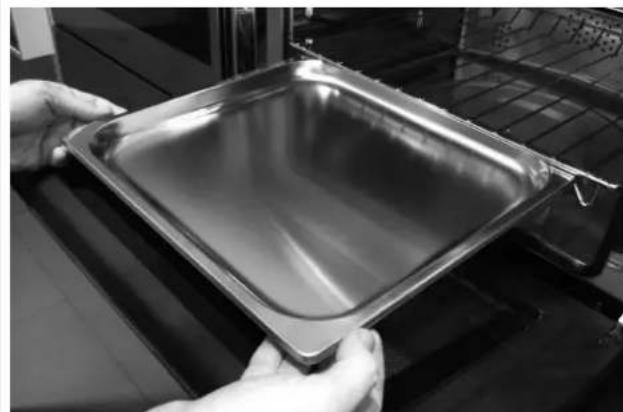
natural_image
Close-up of hands holding a square metal baking pan (no text or symbols visible)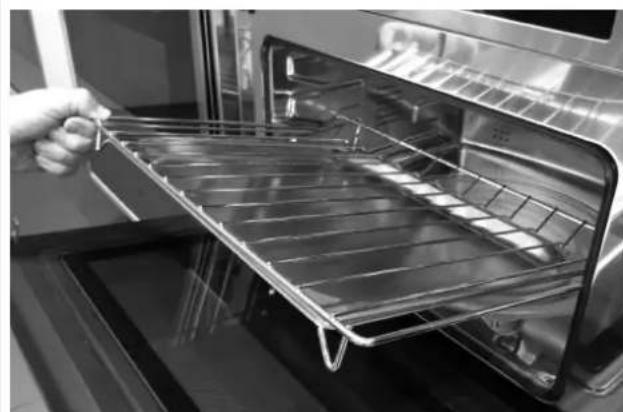
natural_image
Interior view of an oven with a hand holding a metal tray (no text or symbols visible)
IMPORTANT
As a safety precaution, before cleaning the oven, always disconnect the plug from the outlet or remove the appliance's power cord. In addition, avoid using acid or alkaline substances such as lemon, vinegar, salt, tomatoes, etc.). Avoid using products containing chlorine, acids or abrasives, especially for cleaning the painted walls.
Respect for the environment
The documentation for this appliance is printed on paper bleached without chlorine or recycled paper to contribute to protecting the environment. The packaging was designed to prevent damage to the environment; they are ecological products that can be recovered or recycled.
Recycling the packing saves raw materials and reduces the volume of industrial and domestic waste.
THE SYMBOL on the product or accompanying documentation indicates that this product must not be treated as domestic waste but must be delivered to a suitable collection point for the recycling of electrical and electronic equipment.

natural_image
Recycling symbol composed of four arrows forming a circle, no text or labels presentTHE PACKING MATERIAL is 100% recyclable and marked with the recycling symbol. Dispose of in conformity with local law. The packing material (plastic bags, polystyrene parts, etc.) must be kept out of the reach of children because it is potentially dangerous.
THIS APPLIANCE is marked in conformity with European Directive 2002/96/EC, Waste Electrical and Electronic Equipment (WEEE). By making sure that this product is disposed of correctly, the user contributes to preventing potential negative consequences for the environment and health.
natural_image
Pure electrical circuit lines without any symbolsDISPOSAL MUST BE MADE in conformity with local laws on waste disposal.
FOR ADDITIONAL INFORMATION about the treatment, recovery and recycling of this product, contact the local office of competence, the domestic waste collection service or the store where the product was purchased.
BEFORE SCRAPPING, make it unusable by cutting the electrical cord.
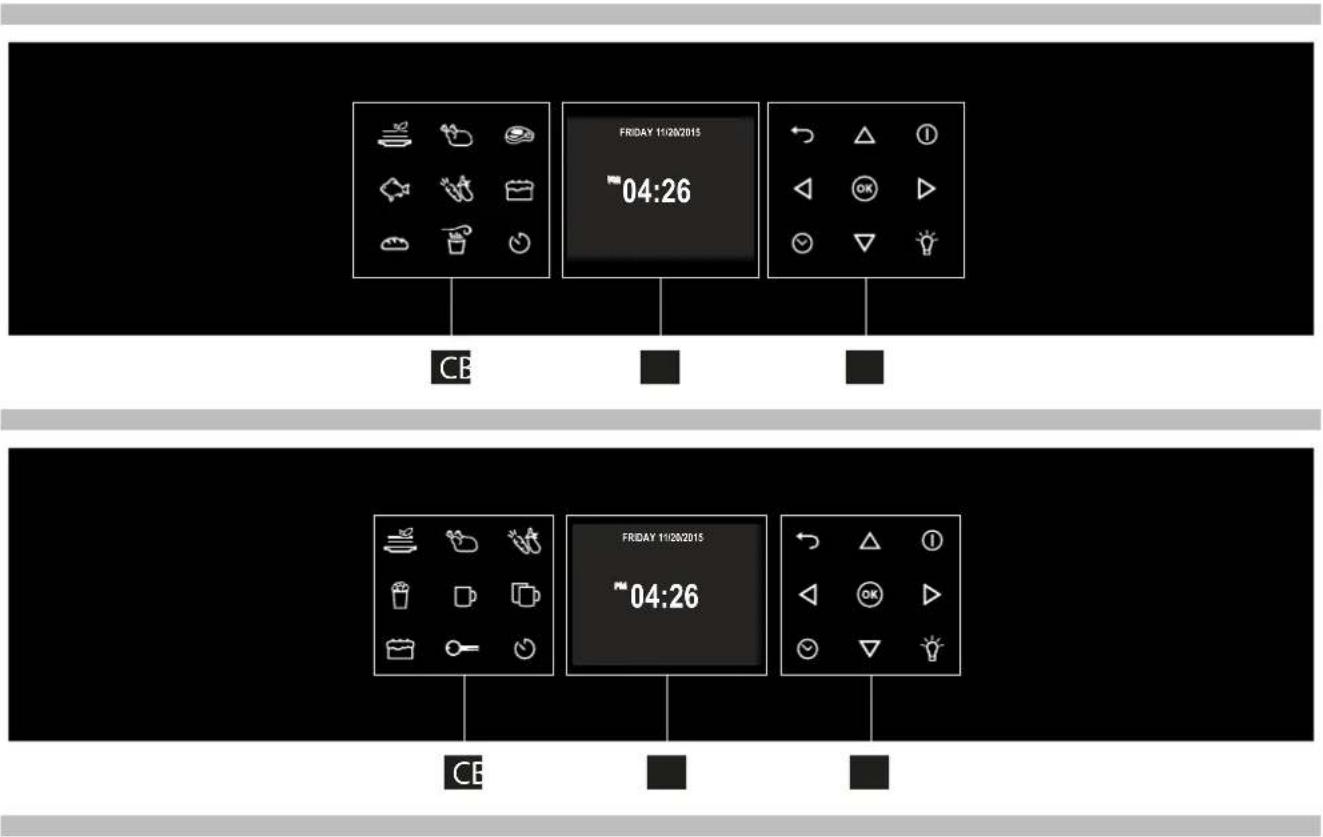
Your appliance could vary slightly compared to the illustrations below.
A - Function keypad
B - Display screen
C - Shortcut keypad
flowchart
graph TD
    A["CE"] --> B["Friday 11/20/2015"]
    B --> C["04:26"]
    C --> D["CE"]
    style A fill:#f9f,stroke:#333
    style B fill:#ccf,stroke:#333
    style C fill:#cfc,stroke:#333
    style D fill:#fcc,stroke:#333
Keypad
To operate the key, press gently. The keypad will not work if more than one key is pressed at the same time.
 | - Movement arrows |
 | - To set the timer.- Enter the functions menu during cooking. |
 | - Switches the inner oven light on and off.The light cannot be switched on duringthe self-cleaning cycle. |
 | - Switches the oven on and off. |
| [GBYG] | - Confirms the settings and starts cookingoperations. When pressed duringa cooking operation, the function isplaced in pause. Press again to restart. |
 | - Return to previous display page. Keeppressed to return to Home page |
The Control Panel
| Multifunction Microwaves | Static microwaves | |
 |  | Cooking mode quick menu |
 |  | |
 |  | |
 |  | |
 |  | |
 |  | |
 |  | |
 |  | Airfry |
| Locking the keyboard | ||
 | Timer | |
Before using your oven for the first time remove all packing and foreign materials from the oven(s). Any material of this sort left inside may melt or burn when the appliance is used.
Error codes
This code appears in the event of the electronic control indicating a fault. When the error appears, the current function is blocked. If the type of error is related to a safety function, the oven becomes unusable and every time a start attempt is made, the same error appears (in which case call in the after-sales service), while if the error relates to a minor fault, after being restarted the oven can be used for the functions that do not involve the faulty part (e.g., a heating element).
Beeps
Confirms that the command has been received after a key has been pressed.
It also indicates that a time function has been completed (e.g. Timer or Timed Cooking). During the execution of a recipe, an acoustic signal warns the user that the oven is waiting for operation by the user (e.g., insert the dish or turn it over).
Beeps also signal an oven fault.
Default Settings
The cooking modes automatically select a suitable temperature when the cooking mode is selected, these can be changed when a different one is needed.
F Failure Number Codes
These codes are displayed when the electronic control detects a problem in the oven or in the electronics.
The error code is recorded in the Error Log in the Setup menu. This error can be communicated to the service technician so he/she can understand the possible cause of the problem in advance.
Preheat
Whenever a cooking mode is set and the oven is heating, the preheating starts, during this period, the instantaneous temperature is displayed together with the thermometer icon.
As soon as the 100% is reached, the control sounds an "end of preheat" tone and the current temperature value disappears.
Locking the keyboard (only for static microwave)
Hold the key for 3 seconds. Commands are now locked and a "Key icon" will be displayed.
Repeat the same operation for 3 seconds to unlock the keyboard.
NOTE: The power off operation is always available.
Timer

WARNING
The timer on your oven does not turn the appliance on or off, its only purpose is to alert you through the buzzer. When you want to turn off the oven automatically, use the end-of-cooking or delayed cooking function.
NOTE: Pressing the OFF button does not reset or stop the timer.
- Press the button √ and set the desired time using the arrows △ and confirm with the button . To switch the selection between hours and minutes use the arrows ◀ ▶.
- The time can be set from 1 minute to 12 hours and 59 minutes and, when set, the remaining time is always visible in the bottom status bar until the time expires or is reset.
- To change or cancel the time set, you must reset the timer by pressing and holding the button ☑ for a few seconds.
- Timer format is usually HR:MIN, switching into MIN:SEC during the last minute.
- When the time expires, the display shows 00:00 and the buzzer will sound for one minute or until the button ☑ is pressed.
Preheating the Oven
- Selecting a higher temperature does not shorten the preheat time.
- Preheating is necessary for good results when baking cakes, cookies, pastry and breads.
- Preheating will help to sear roasts and seal in meat juices.
- Place oven racks in their proper position before preheating.
- During preheating, the selected cooking temperature is always displayed.
- A beep will confirm that the oven is preheated and the "detected temperature" will turn off.
Operational Suggestions
- Do not set pans on the open oven door.
- Use the interior oven lights to view the food through the oven door window rather than opening the door frequently.
Operation with microwaves
The microwaves are transformed into heat inside foods. The microwave oven can be used by itself or in combination with other types of heating. This section contains information about the dishware and instructions for setting the microwave oven.
WARNINGS FOR DISHWARE
Suitable dishware
You can use heat-resistant dishware made of glass, glass ceramic, porcelain, ceramic or refractory plastics. These materials are permeable to microwaves.
It is also possible to use normal plates. In this way, it won't be necessary to transfer the food.
Dishware with gold or silver decorations can only be used if the manufacture guarantees that they can be used in microwave ovens.
Remember that, when using the oven in microwave mode, the dish must be placed on the rotating plate.
When using the oven in combination mode, it is preferable to place the dish to be cooked on the low, round grill, supported so that it is centred on the rotating plate.
Unsuitable dishware
Metal dishware cannot be used.
Metal is not permeable to microwaves. Food in metal containers will remain cold.
Warning! Metal components, such as spoons in glasses, must stay at least 2 cm from the walls of the oven and the inside of the door. In fact, sparks could seriously damage the inside of the glass door.
Warning! The flat grill must be removed when using the microwave and combined modes. Use it only with traditional oven functions.
Testing dishware
Never turn on the microwave oven before you have put in the food.
The only exception allowed is testing dishware.
If you unsure if your dishware can be used in the microwave oven, we
recommend performing the following test:
place the empty pot in the appliance for 12 - 1 minute at the maximum
power. Check the temperature. The pat must be cold or slightly warm. If it is
hot or there are sparks, the pot is not suitable.
Oven Condensation and Temperature
- It is normal for a certain amount of moisture to evaporate from the food during any cooking process. The amount depends on the moisture content of the food. The moisture may condense on any surface cooler than the inside of the oven, such as the control panel.
- Your new oven has an electronic temperature sensor that allows maintaining an accurate temperature.
High Altitude Baking
- When cooking at high altitude, recipes and cooking time will vary from the standard.
Instructions for initial switch-on
Once the oven has been connected to the power supply for the first time, the control automatically prepares for setting a number of user settings, which remain stored in case of any subsequent switch-on.
NOTE: Both at the first and subsequent connections to the power supply, the door lock mechanism performs a calibration run – in this phase, always keep the door closed.
- Language
• Temperature & Weight - Time
- Date
Refer to the USER SETTING paragraph for setting instructions.
After making the user settings, the control moves automatically to the "Standby" display page.
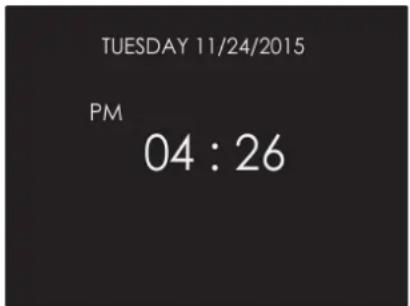
text_image
TUESDAY 11/24/2015 PM 04 : 26With the oven on, select the icon and confirm with the key to enter the SETTINGS menu. This menu permits personalizing the settings of your oven. To make access, no active cooking or any set time functions must be in progress.
NOTE: The Setting menu can never be set if any time function is already set: first delete all the active time functions.
- Press the keys ◀ to select the sub menu and confirm by means of the okey.
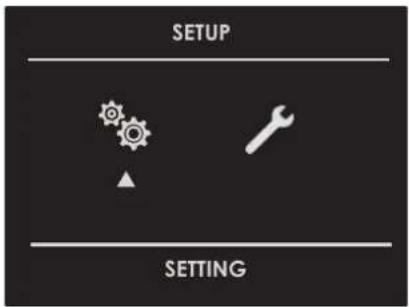
text_image
SETUP SETTING- Use this menu to change the following settings: Press the keys ◀ ▷ or △ to select the setting or change a sub menu from among the six available ones and confirm by means of the @key.
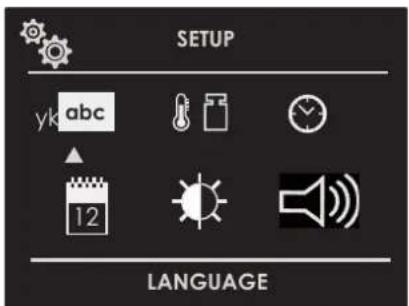
text_image
SETUP yk abc 12 LANGUAGELanguage
Press the arrow key △ to select a language from among those available, and confirm with the ⓗkey.

text_image
Italiano English Deutsch Francaise Espanol Nederlands yk abcTemperature & Weight
Press the arrow key ◀ and to select one of the two temperature options "C/F" or weight options Kg/ib and confirm with the ⓣkey.
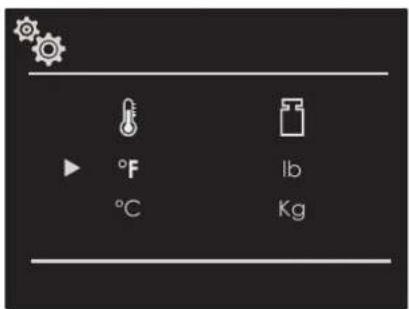
text_image
°F °C lb KgTime
Press the arrow key △ to select the time format between the options "12h AM/PM or 24h" and confirm with the Ⓞ key. Subsequently, set the time using the arrows △ and confirm with the Ⓤ key.
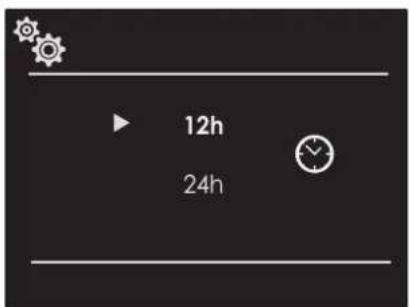
text_image
12h 24h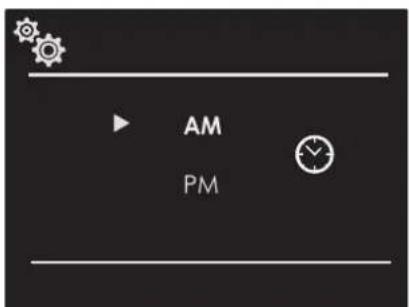
text_image
AM PM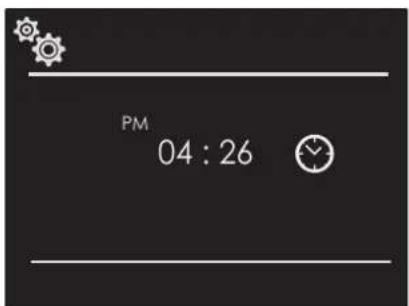
text_image
PM 04 : 26Date
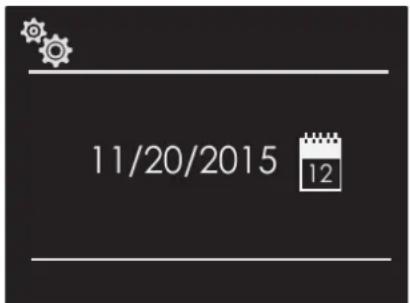
Press the arrow key to select the date format from among the options "D.M.Y. - Y.M.D. - M.D.Y." and confirm with the okey. Subsequently set the value using the arrows and confirm with the okey.
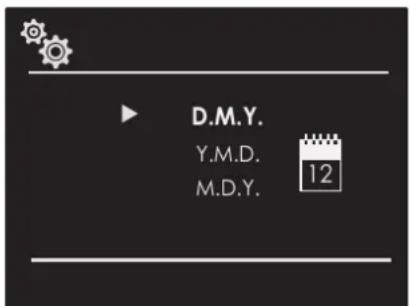
text_image
D.M.Y. Y.M.D. M.D.Y. 12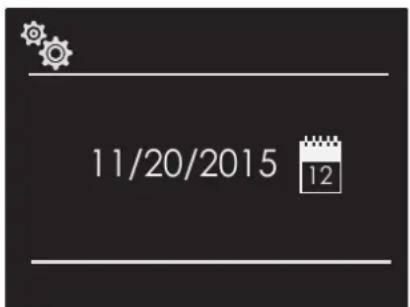
text_image
11/20/2015 12Volume
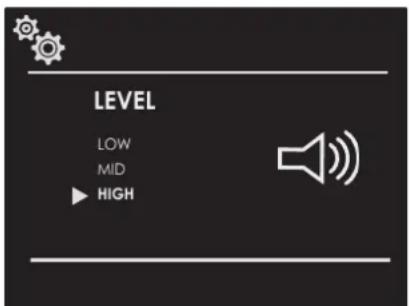
Press the arrow △ to select the desired volume level and confirm by pressing the ⓚkey.
text_image
LEVEL LOW MID ▶ HIGHBrightness
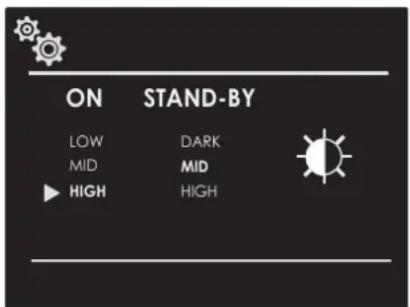
Press the arrow key ◀ to choose which luminosity setting to change between ON or STANDBY, then by means of the arrows △ select the required degree of luminosity and confirm with the ⓗkey.
text_image
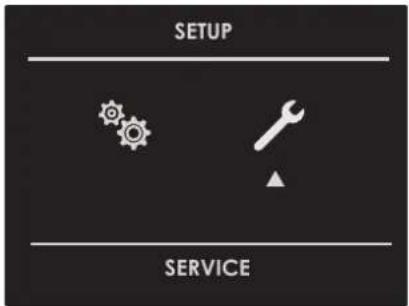
ON STAND-BY LOW DARK MID MID HIGH HIGHWith the oven on, select the icon ⚙ and confirm with the key Ⓞ to enter the SETTINGS menu. This menu permits setting a number of parameters or special functions. It also permits accessing the error events list.
- Press the keys ◀ ▷ to select the sub menu and confirm with the Ⓞ key.
text_image
SETUP SERVICE- Use this menu to change the following settings:
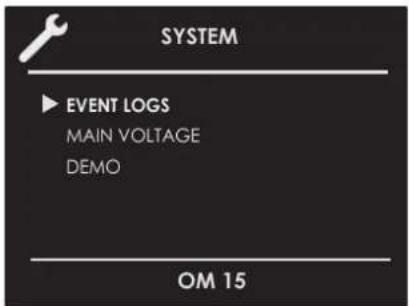
Press the keys △ ▽ to select the item to be set or to be displayed from among the three available ones and confirm with the Ⓞ key.
text_image
SYSTEM ▶ EVENT LOGS MAIN VOLTAGE DEMO OM 15Event Log
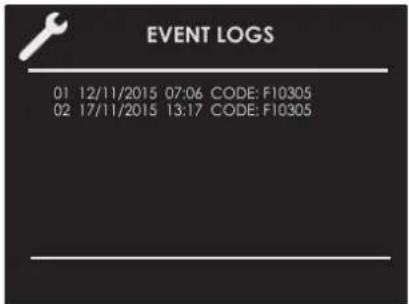
The menu permits checking any recorded errors. These codes can be notified to the after-sales service.
text_image
EVENT LOGS 01 12/11/2015 07:06 CODE: F10305 02 17/11/2015 13:17 CODE: F10305Demo
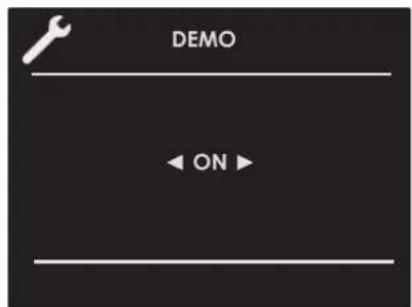
The purpose of this function is to set the DEMO mode, which makes the oven useless for cooking but automatically performs a demonstration of functions.
- Press the keys ◀ to select the item ON.
- Confirm with the Ⓞ key.
- Press the ① key.
After about 30 seconds, the oven starts to operate in this mode.
To temporarily stop the DEMO function, simply keep any key pressed for a few seconds until the oven switches to standby. To start it again, press the ① key.
To disable the function, enter the DEMO display page and set OFF. Confirm using the OK key.
NOTE: Once set, the function remains enabled even if the oven is disconnected from the power mains.
text_image
DEMO ← ON ►Switching the oven on and off

IMPORTANT
• The okey does not stop the function.
- After switching off the oven, the cooling fan could continue to operate until the inner parts of the oven have cooled down.
Press ① to switch the oven on and press again to switch it off. The oven returns to standby mode.
| Multifunction Oven | |
| Traditional Cooking | |
 | TRUE CONVECTION(FAN HEAT) |
 | RING & GRILL(FAN HEAT & GRILL) |
 | CONVECTION BROIL(TURBO GRILL & BASE HEAT) |
 | BROIL(ECO GRILL) |
| Microwave Cooking | |
| DEFROST BY TIME | |
| DEFROST BY WEIGHT | |
| MICROWAVE COOKING | |
| MICROWAVE AND GRILL | |
| MICROWAVE AND RING(MICROWAVE AND FAN HEAT) | |
| Thermal Oven | ||
| Traditional Cooking | ||
 | BROIL(ECO GRILL) | |
| Microwave Cooking | ||
 | DEFROST BY TIME | |
 | DEFROST BY WEIGHT | |
 | MICROWAVE COOKING | |
 | MICROWAVE AND GRILL | |
- Select the icon and press the key OK Select the appropriate cooking mode according to the food to be cooked using the arrows and confirm with the key OK.
- On this display page, it is still possible to change the cooking mode by using the ◀ keys.
- If the proposed temperature is correct, confirm with the OK key to start cooking, otherwise, if the OK key is not pressed within 10 seconds, the oven switches to automatic mode and the cooking mode icon becomes animated.
Cooking Mode Tables
| Traditional Cooking | |||
| COOKING MODE ICON TEMPERATURE | Min. Preset Max. | ||
| TRUE CONVECTION(FAN HEAT) |  | 50 C 165 | C 230 C |
| RING & GRILL(FAN HEAT & GRILL) |  | 50 C 210 | C 230 C |
| CONVECTION BROIL(TURBO GRILL & BASE HEAT) |  | 50 C 165 | C 230 C |
| BROIL(ECO GRILL) |  | 50 C 230 | C 230 C |
| AIRFRY 150 C 180 C 230 C |  | ||
| MICROWAVE Cooking | |||||||||||
| COOKING MODE ICON SET WEIGHT WATT TEMPERATURE | |||||||||||
| Min. | Preset | Max. | Min. | Preset | Max. | Min. | Preset | Max. | |||
| DEFROST BY TIME |  | 150 W | |||||||||
| DEFROST BY WEIGHT |  | Bread | 100 g | 500 g | 600 g | 150 W | |||||
| Vegetable | 100 g | 500 g | 1000 g | 150 W | |||||||
| Meat | 100 g | 500 g | 1500 g | 150 W | |||||||
| Fish | 100 g | 500 g | 800 g | 150 W | |||||||
| MICROWAVE COOKING |  | 150 W | 900 W | 900 W | |||||||
| MICROWAVE AND GRILL |  | 150W | 150 W | 200 C | |||||||
| 300W | 300 W | ||||||||||
| 450W | 450 W | ||||||||||
| MICROWAVE AND RING (MICROWAVE AND FAN HEAT) |  | 150W | 150 W | 50 C | 100 C | 200 C | |||||
| 300W | 300 W | ||||||||||
| 450W | 450 W | ||||||||||
Changing the cooking mode
- During untimed cooking, a cooking pause can be set by pressing the okey.
All the settings of the suspended cooking operation remain stored and can be reactivated by pressing the same key again.
- To change the cooking mode while the oven is working, press the okay and then the , key.
At this point, another cooking mode can be selected from among those available in the group by means of the arrows ◀.
Changing temperature

IMPORTANT
- At the end of a function, the display screen shows the residual compartment heat temperature from the standby page.
-
From the cooking mode preview display page, the temperature can be changed by means of the arrows △ ▽ subsequently confirming by means of the okey.
-
Once cooking has started, the temperature can in any case be changed, at any time, by means of the arrows .
Cooking mode quick menu
The quick menu function allows you to rapidly select the most suitable cooking modes for the type of dish you want to cook.
| MAIN COURSES | ||||
| POULTRY | ||||
| MEAT | ||||
| FISH | ||||
| VEGETABLES | ||||
| DESSERTS | ||||
| BREAD/PIZZA | ||||
| POPCORN | ||||
| MUG | ||||
| MUG DOUBLE |
Pre-heating phase
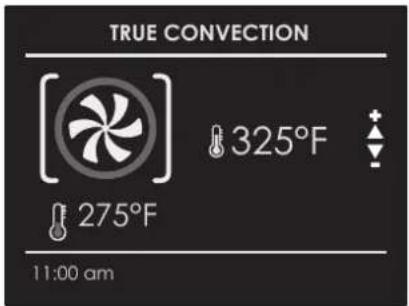
While the oven is in pre-heating phase, the instantaneous temperature is displayed underneath the cooking mode icon.
text_image
TRUE CONVECTION 325°F 275°F 11:00 amJust as soon as the set temperature is reached, an acoustic signal is heard and the instantaneous temperature indication disappears.
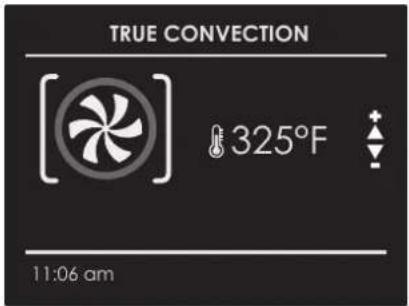
text_image
TRUE CONVECTION 325°F 11:06 amBe sure that the time-of-day clock is displaying the correct time.
The timed mode turns off the oven at the end of the cook time.

CAUTION
Never leave food in the oven for more than one hour before and after cooking. This could deteriorate the properties of the food itself.
NOTE: The maximum cooking time that can be set is 12 h.
Cook Time
Use the "Cook Time" function to operate the determinate period of time. The oven starts immediately and switches off automatically once the time has expired.
To Set a Timed Mode
- Select the cooking mode and temperature.
- There are two ways to set the function.
a) Select 📋 to set the duration and press OK
b) Select 🔍 to set the stop time and press ⓄK - After selecting one of the two above options, set the time by means of the arrows and confirm with the OK key.
-
After pressing the Ⓞ key, cooking starts and the time cooking information is shown on the display page.
-
Cooking mode
- Temperature
- Cooking time
• End of cooking time
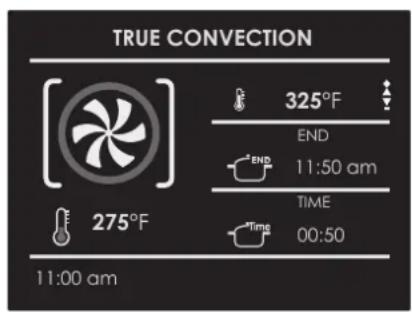
text_image
TRUE CONVECTION 325°F END 11:50 am TIME 00:50 275°F 11:00 am5 After cooking, the oven switches off and an acoustic signal warns that cooking has terminated.
To change the cooking time when the oven is already operating, simply press the ⏻ e key and enter the new cooking time before pressing the Ⓤkey again.
Stop Time
Use the "Stop Time" function to delay the start cooking. Enter the cooking stop time and the oven will automatically calculate the start time. The oven switches on and off automatically.
To Delay the Start of a Timed Mode
1 First of all set the required timed cooking as indicated in the "COOK TIME" paragraph.
2 Select 📋 to set the stop time and press OK
-
Set the cooking stop time by means the arrows and confirm by means of the OK key.
4 After pressing the Ⓞ key, the function positions in standby and the postponed cooking details are shown on the screen. -
Cooking mode
- Temperature
- Cooking stop time
- Cooking start time
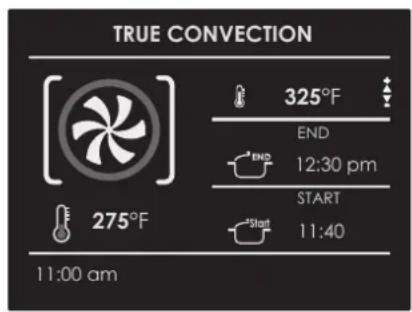
text_image
TRUE CONVECTION 325°F END 12:30 pm START 11:40 275°F 11:00 amAfter cooking, the oven switches off and an acoustic signal warns that cooking has terminated.
To change the cooking time and stop time when the oven is already operating, simply press the key and enter the new cooking time or cooking stop time and press the key again.
EN 11 - Microwave Cooking
NOTE: it is essential to carefully read the instructions and warnings to ensure correct use.

ATTENTION
Microwave functions will not start until the door has been closed. If the door is opened while the oven is on, the oven will go into pause mode and the message "DOOR OPEN" will appear on the display.
For functions that include microwave operation, after closing the door, press the "confirm" button again OK.
The appliance starts working again.
The function can be paused at any time using the key ⑨ when it is pressed again Ⓤa funzione riparte.

Timed Thawing Function
Select the timed thawing icon using the arrows and press the key OK then set the thawing time using the arrows △ and ∇. To start the function press the key .OK
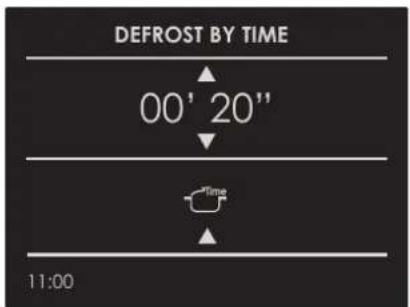
text_image
DEFROST BY TIME 00' 20" Time 11:00Once the function has been started, a countdown will be shown on the display. The time can be changed at any time using the arrows and
When thawing is complete, the message "DEFROSTING FINISHED" will appear on the display.

Weight Thawing Function
Select the weight thawing icon using the arrows and press the key OK.
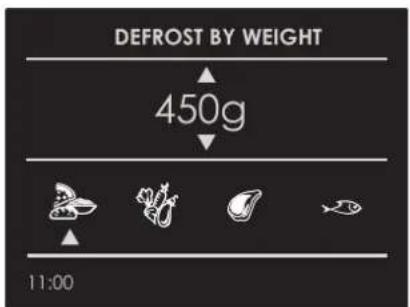
text_image
DEFROST BY WEIGHT 450g 11:00Select the type of meal using the arrows ◀ and , then set the weight using the arrows △ and ▽ finally start thawing using the key OK
Following are types of meals and relative weights that can be set:
| MEAL | MIN Weight (g) | MAX Weight (g) | |
 | Bread Pizza Pasta Dishes | 100 600 | |
 | Vegetables 100 1000 | ||
 | Meat 100 1500 | ||
 | Seafood 100 800 | ||
The thawing time is calculated completely automatically and without needing to set any time parameters, based on the set type of meal and weight.
When thawing is complete, the message DEFROSTING FINISHED will appear on the display.

Microwave Function
Select the Microwave function icon using the arrows and press the key OK
If you wish to start the function immediately with a preset time of 30 sec and a preset output of 900W, press the key OK.
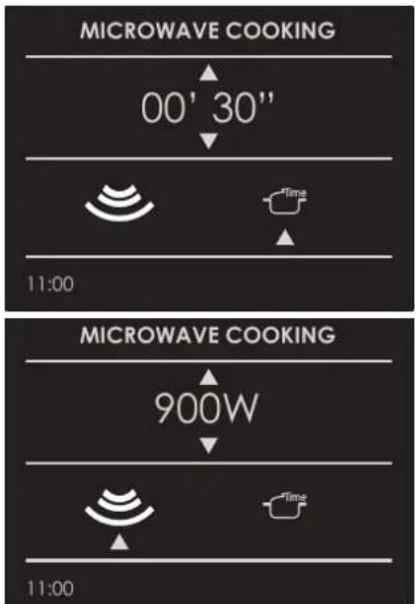
text_image
MICROWAVE COOKING 00' 30" 11:00 MICROWAVE COOKING 900W 11:00If you wish to personalise the time and output, open the submenu managed as follows:
- TIME: Select the icon 📋 and use the keys △ and 10 personalise the time.
- MICROWAVE OUTPUT: Select the icon 🕒 and use the keys △ and ▽ to select the microwave output setting from the 6 possible levels, 150W - 300W - 450W - 600W - 750W - 900W.
Once the new parameters have been set, press the key OK to start cooking.
Once cooking has started, a countdown will be shown on the display. The time can be changed at any time using the arrows △ and ▽
At the end of cooking, the message "END COOKING" will appear on the display.
Microwave + Grill Function
Select the Microwave+Grill function icon using the arrows and press the key OK then set the thawing time using the arrows △and .▽
If you wish to start the function immediately with the preset time and a preset output of 300W, press the key ⓄK
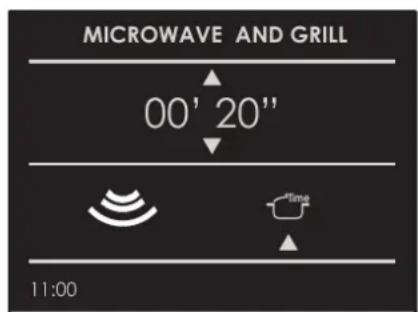
text_image
MICROWAVE AND GRILL 00' 20" Time 11:00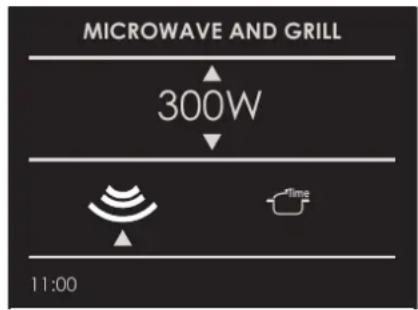
text_image
MICROWAVE AND GRILL 300W 11:00If you wish to personalise the output, open the sub-menu managed as follows:
- MICROWAVE OUTPUT: Select the icon 📋 and use the keys △ and ☑ select the microwave output setting from the 3 possible levels, 150W - 300W - 450W.
Once the new parameter has been set, press the key oko start cooking.
Once cooking has started, a countdown will be shown on the display. The time can be changed at any time using the arrows and
At the end of cooking, the message "END COOKING" will appear on the display.
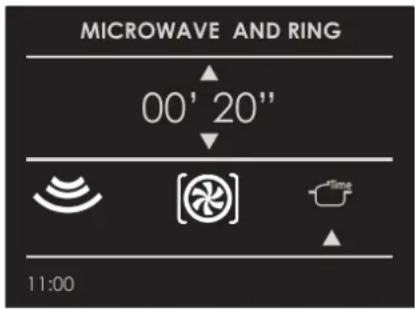
Microwave + Ring Function
Select the Microwave+Ring function icon using the arrows and press the key OK then set the thawing time using the arrows △and .▽
If you wish to start the function immediately with the preset time and a preset temperature of 100 C, with a microwave output of 300W, press the key OK
text_image
MICROWAVE AND RING 00' 20" 11:00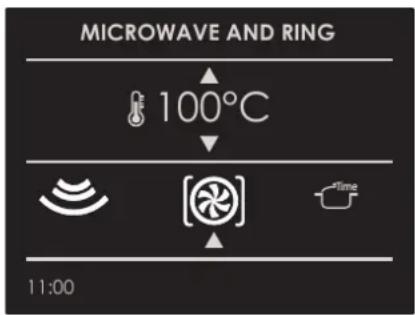
text_image
MICROWAVE AND RING 100°C 11:00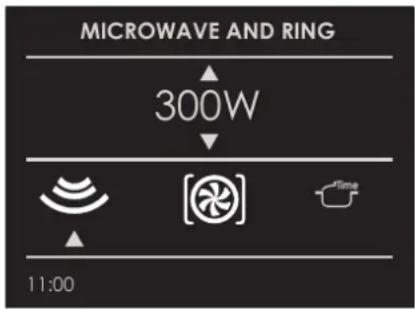
text_image
MICROWAVE AND RING 300W 11:00If you wish to personalise the temperature and output, open the sub-menu managed as follows:
- TEMPERATURE: Select the icon ⚙️ and use the keys △ and ▽o personalise the temperature between 50 C and 200 C.
- MICROWAVE OUTPUT: Select the icon 📋 and use the keys △ and ☑ select the microwave output setting from the 3 possible levels, 150W - 300W - 450W.
Once the new parameters have been set, press the key OK to start cooking.
Once cooking has started, a countdown will be shown on the display. The time can be changed at any time using the arrows and
At the end of cooking, the message "END COOKING" will appear on the display.
Changing Watts Power
Press the icon Ⓤ and press the key Select the microwave icon and change the power wattage by means the arrows △ ▽ and confirm with the key Ⓤ
Changing Time
Press the icon Ⓤ and press the key Select the time icon and change the time value by means the arrows △ ∨ and confirm with the key Ⓤ.
AirFry function
The AirFry function or frying of food in the oven, thanks to a perfectly distributed air flow, promises to cook crunchy and perfectly cooked food with very little oil and, in some cases, without oil. Eating healthy, cooking dishes in a tasty way and without exaggerating with fats and condiments, is possible.
AirFry by Fulgor Milano allows you to set the function and temperature from the control panel, from 150 to 290 C, with a default temperature of 180 C. The special tray, supplied or sold separately, is equipped with small openings which allow the air to circulate uniformly throughout the oven.
Changing Temperature
(only available for microwave and ring)
Press the icon ☐ and press the key Select the cooking mode icon and change the setting temperature by means the arrows △ and confirm with the key . OK
Changing Weight
(only available for defrost by weight)
Press the icon OK and change the weight by means the arrows △ and confirm with the key . OK
A single light key activates the lights.
Touch 📋 to turn lights on or off.
Oven lights turn on automatically when the door is opened.
When an oven is in use, oven lights turn on automatically when a mode is started.
Oven lights will turn off automatically when the oven mode is cancelled.
NOTE: Once switched on, the lights go off automatically after 3 minutes. To switch them back on, press the key or open the door.
EN 13 - Recipes
The Recipe function of your oven gives you the chance to cook food without having to set the oven manually every time. By selecting a "SET" recipe, the cooking mode, the temperature and the time are automatically set according to the recipe selected from the menu.
| Recipe List Type of Food Food condition Recipes List Information displayed | ||||
| PRESET OR PERSONAL |  | FRESH | BREAD PIZZA FIRST | TYPE OF ACCESSORYLEVEL POSITIONFOOD WEIGHTCOOKING TIMEPREHEAT REQUIRED(YES/NO) |
| FROZEN | ||||
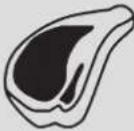 | WHOLE | MEAT | ||
| IN PEICES | ||||
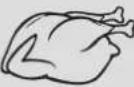 | WHOLE | POULTRY | ||
| IN PEICES | ||||
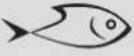 | WHOLE | FISH | ||
| IN PEICES | ||||
 | - | VEGETABLES | ||
| - | ||||
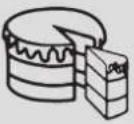 | - | PIES | ||
| - | ||||
Select an already-set recipe:
- Switch the oven, select the icon 📂nd press the button OK.
- Using the arrows △ select the list between "PRESET" or "PERSONAL" and confirm by means of the OK key.
- Choose the type of food to be cooked using the arrows △ and the arrows ◀ and confirm by means of the Ⓞ key.
- Using the arrows △ ▽ choose between "FRESH" or "FROZEN" or in other cases between "WHOLE" or "IN PEICES" and confirm with the OK key.
- Select the required recipe by means of the arrows △▽ and confirm using the okey.
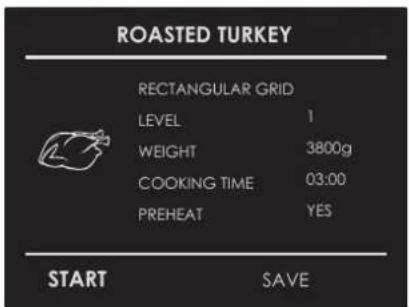
- When the recipe is selected, the following display page appears on the screen:
text_image
ROASTED TURKEY RECTANGULAR GRID LEVEL 1 WEIGHT 3800g COOKING TIME 03:00 PREHEAT YES START SAVE- To start the recipe, confirm with the okey.
During a recipe, a number of acoustic and visual messages will ask you to perform the following operations. Simply follow the instructions on the screen.
- Upon termination, the oven switches off and an acoustic and visual signal warns that the recipe has terminated.
Saving a personalized recipe:
Once a recipe has been selected, the "Time" and "Weight" setting can be changed and the recipe can be saved among the "PERSONAL" ones.
- Once a recipe has been selected, press the key and confirm by means of the okey.
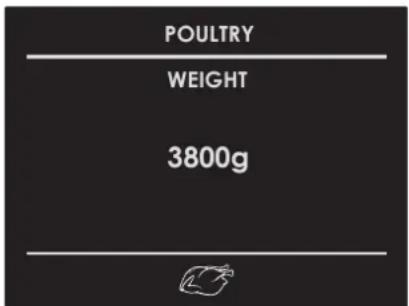
- To change the weight, enter the desired weight by means of the arrows and confirm by means of the key.
text_image
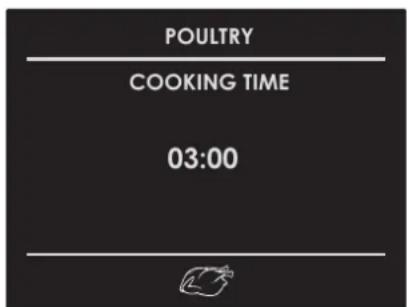
POULTRY WEIGHT 3800g- The oven switches automatically to the cooking time. To change this time, use the arrows and confirm again by means of the key.
text_image
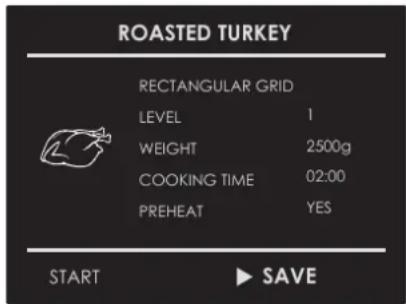
POULTRY COOKING TIME 03:00- At this point, the recipe can be saved in the list of "PERSONAL" recipes by selecting "SAVE" and confirming by means of the OK key.
text_image
ROASTED TURKEY RECTANGULAR GRID LEVEL 1 WEIGHT 2500g COOKING TIME 02:00 PREHEAT YES START ▶ SAVENOTE: If the time and weight values are changed and not saved straight away, at the end of the recipe, a message appears which asks whether you want to save it.
- To start the recipe press the okey.
Cancelling a Personalized recipe:
- To eliminate a recipe from the list of personalized recipes, select the recipe.
- Press the key ◀ and select the choice and confirm with the Ⓞkey.
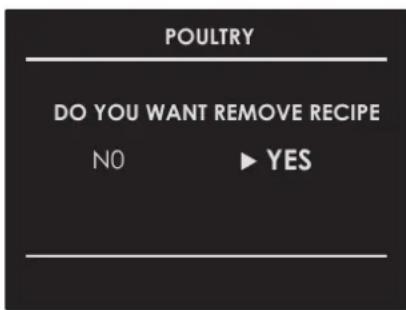
text_image
POULTRY DO YOU WANT REMOVE RECIPE NO ▶ YESEN 14 - For the Installer
Install the oven in the counter
The oven must be installed under a cook top, in a column, or combined with the relative food-warmer drawer.
The dimensions of the space must be those shown in figure.
The cabinet material must be able to withstand the heat.
The oven must be centred within the walls of the cabinet and fixed with the screws and bushings that are provided.
CUTOUT & DIMENSIONS 60 cm
Models:
FCMO 4510 TEM
FCLMO 4510 TEM
FCLCMO 4510 TEM
FGMO 4508 TEM
FCLGMO 4508 TEM
FUTMO 4510 TEM
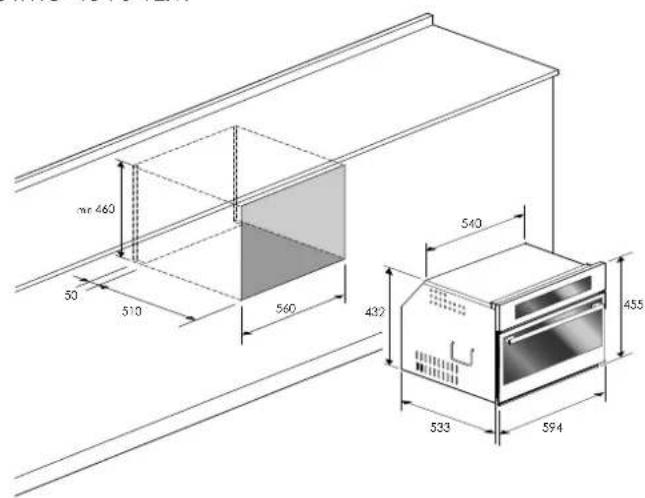
text_image
mr 460 50 510 560 432 540 455 533 594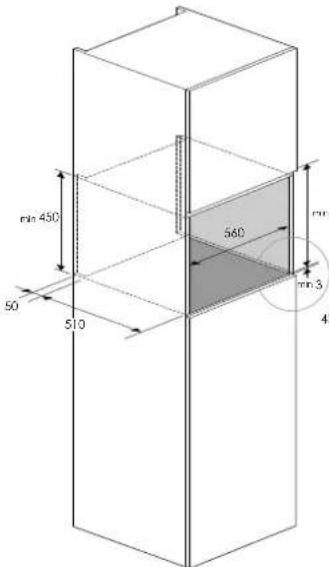
text_image
min 450 50 510 560 min 3 43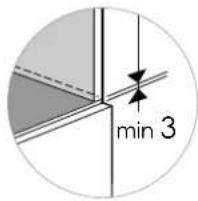
text_image
min 3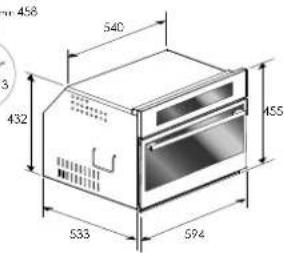
text_image
458 540 432 455 533 594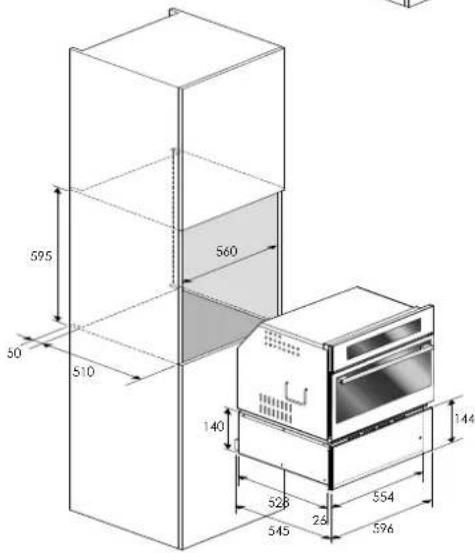
text_image
595 50 510 560 140 528 23 554 545 596 144CUTOUT & DIMENSIONS 75 cm
Models:
FCLMO 7510 TEM
FCMO 7510 TEM
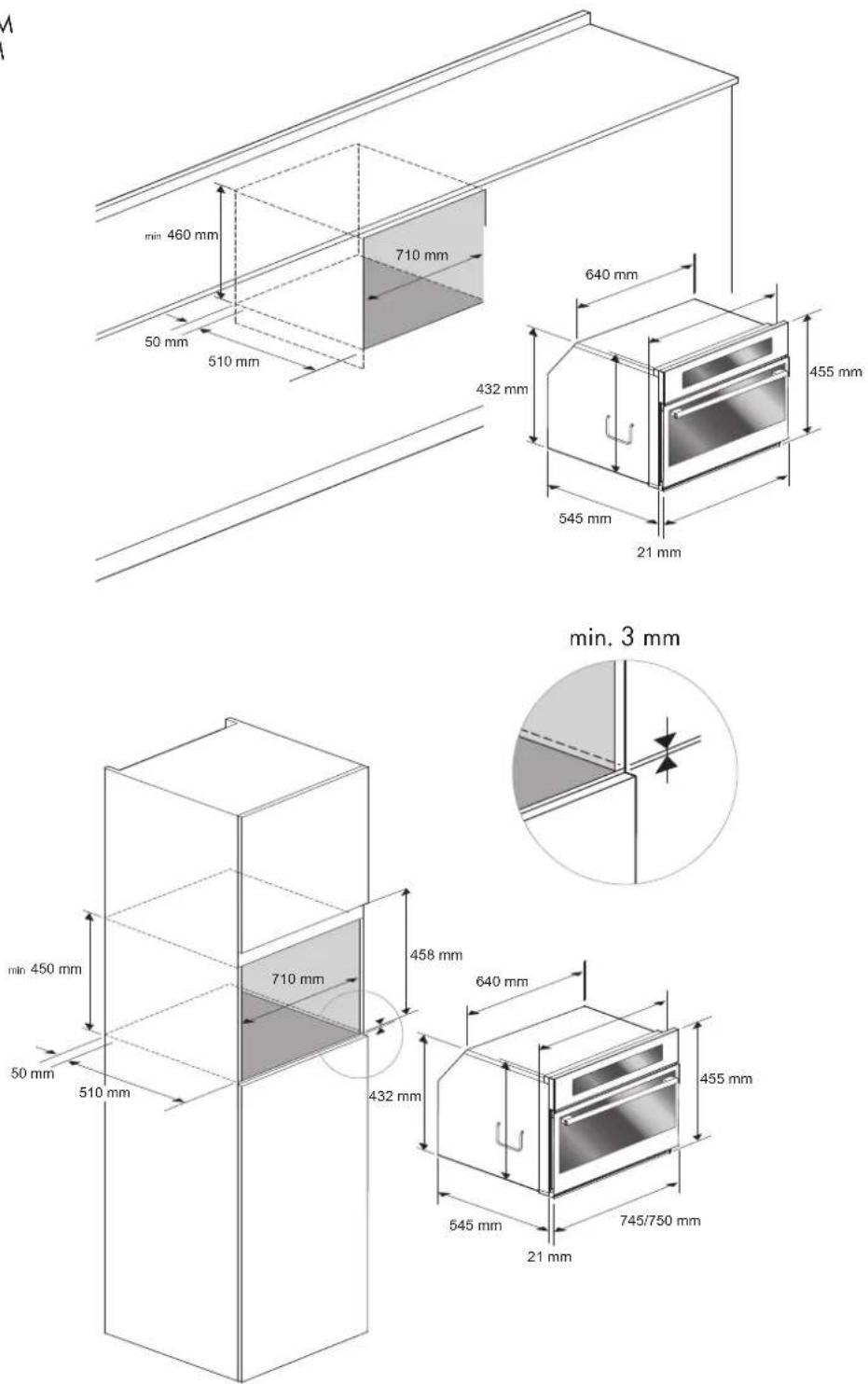
Dimensions are in millimeters
CUTOUT & DIMENSIONS 30"
Models:
FPCMO 300 TEM
FCMO 310 TEM
FUTMO 310 TEM
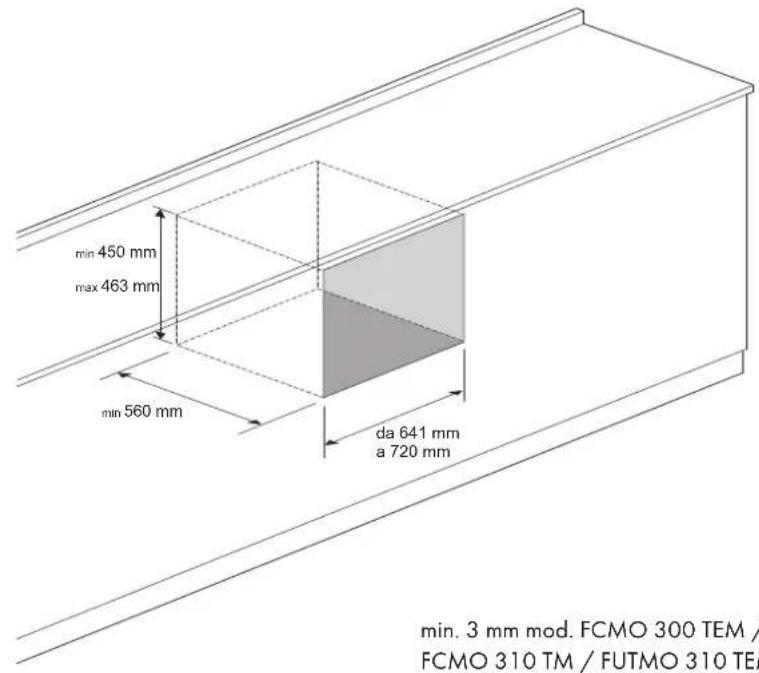
text_image
min 450 mm max 463 mm min 560 mm da 641 mm a 720 mm min. 3 mm mod. FCMO 300 TEM / FCMO 310 TM / FUTMO 310 TEMmin. 3 mm mod. FCMO 300 TEM /
FCMO 310 TM / FUTMO 310 TEM
min. 30 mm mod. FPCMO 300 TEM
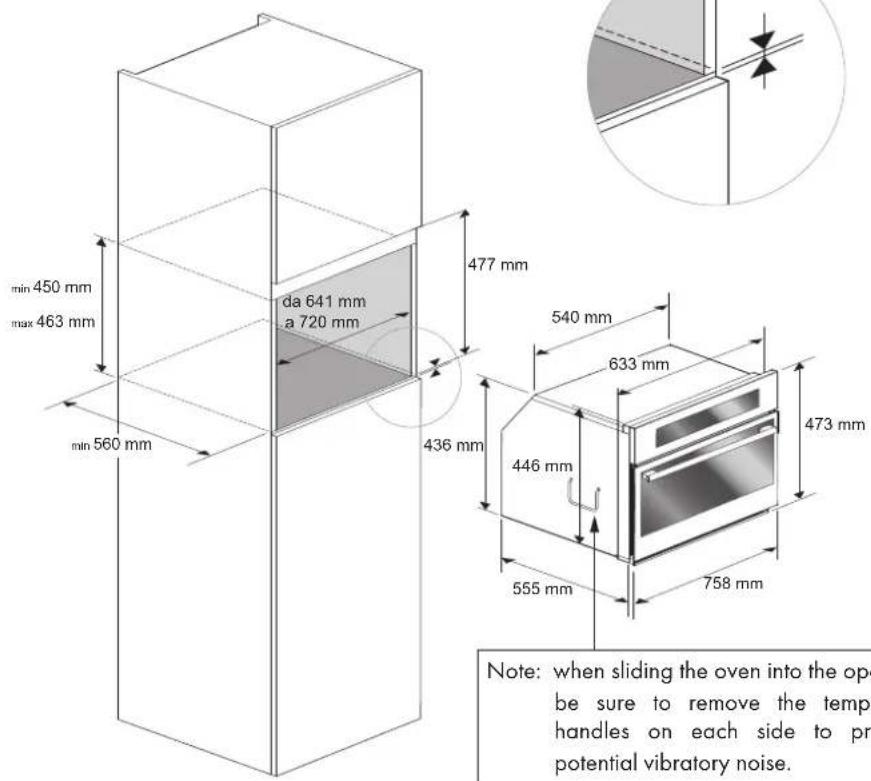
text_image
min 450 mm max 463 mm da 641 mm a 720 mm min 560 mm 477 mm 540 mm 633 mm 436 mm 446 mm 555 mm 758 mm 473 mm Note: when sliding the oven into the op be sure to remove the temp handles on each side to pr potential vibratory noise.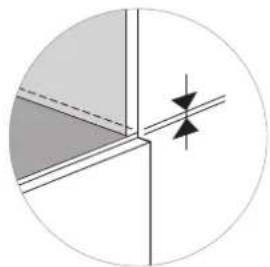
natural_image
Pure geometric diagram with shaded regions and arrows, no text or symbols presentNote: when sliding the oven into the opening be sure to remove the temporary handles on each side to prevent potential vibratory noise.
FLUSHMOUNT INSTALLATION
CUTOUT & DIMENSIONS 30"
DISTINTO mod. FCMO 300 TEM / FCMO 310 TM/ FUTMO 310 TEM
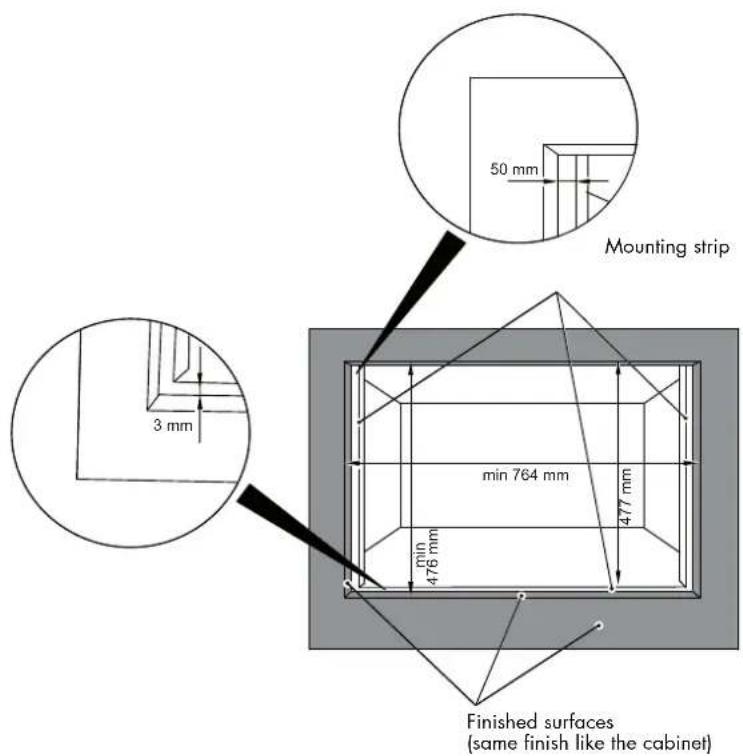
text_image
50 mm Mounting strip 3 mm min 764 mm 477 mm min 476 mm Finished surfaces (same finish like the cabinet)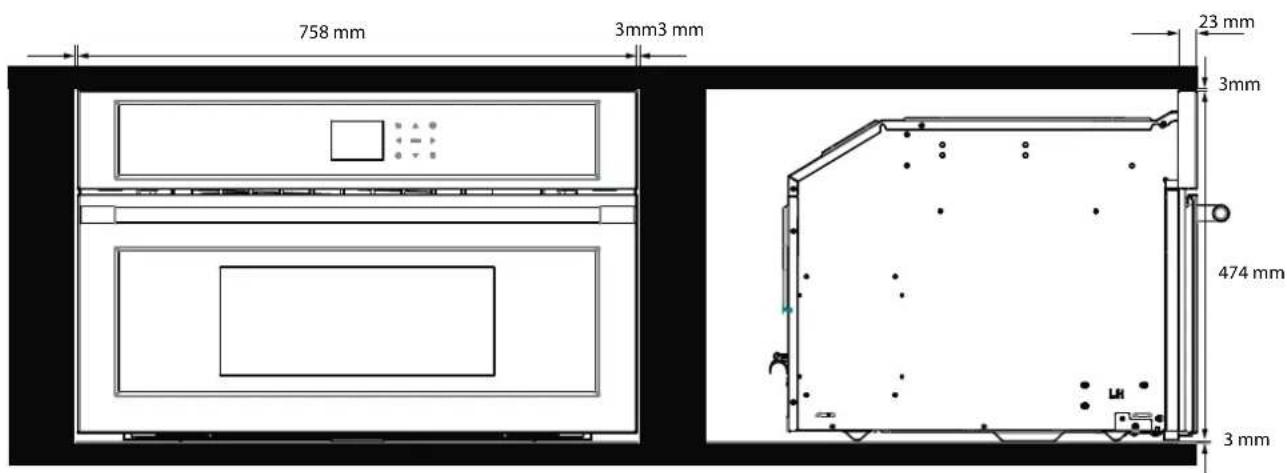
text_image
758 mm 3mm3 mm 23 mm 3mm 474 mm 3 mmFLUSHMOUNT INSTALLATION
CUTOUT & DIMENSIONS 30"
PROFESSIONAL mod. FPCMO 300 TEM
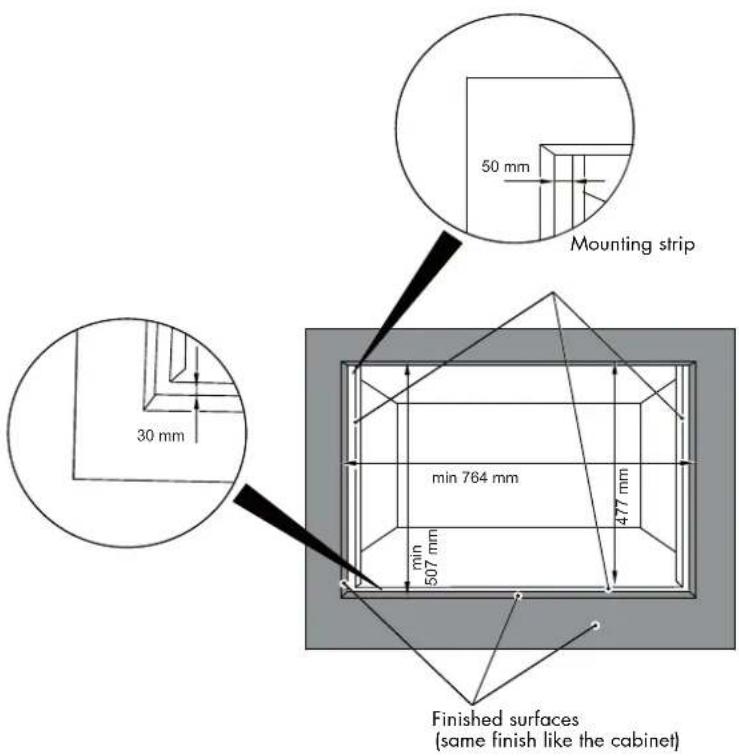
text_image
50 mm Mounting strip 30 mm min 764 mm min 507 mm 477 mm Finished surfaces (same finish like the cabinet)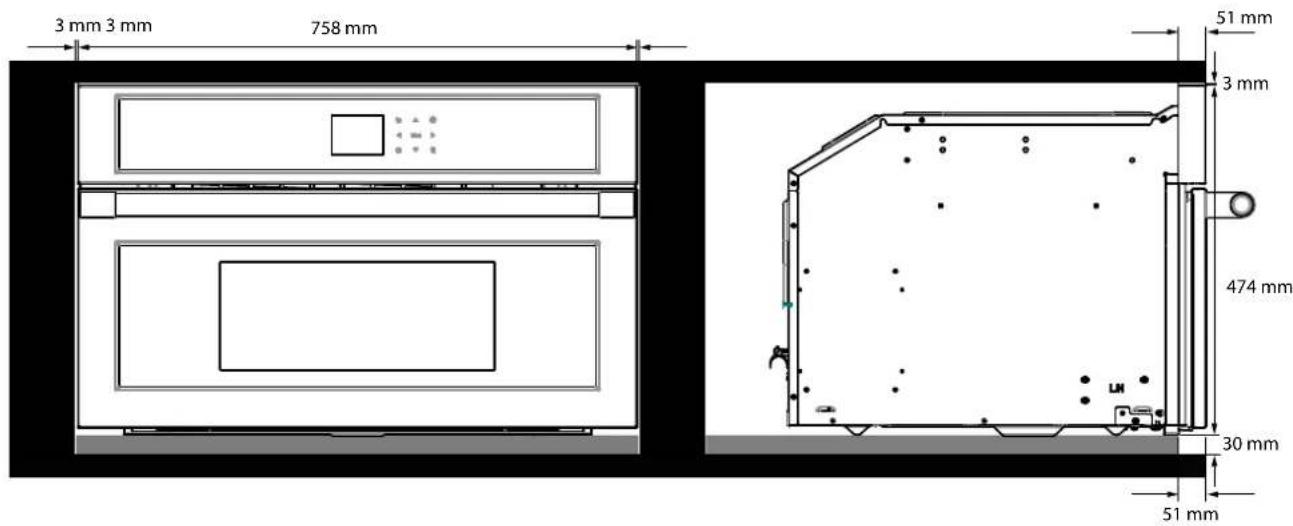
text_image
3 mm 3 mm 758 mm 51 mm 3 mm 474 mm 30 mm 51 mm| TECHNICAL DATA | |||
| Power supply | 220-240 V~, | 50 Hz | |
| Maximum power absorbed | 3200 | W | |
| Microwave power 900 W | |||
| Grill 1500 W | |||
| Hot air 1500 W | |||
| Microwave frequency 2450 MHz | |||
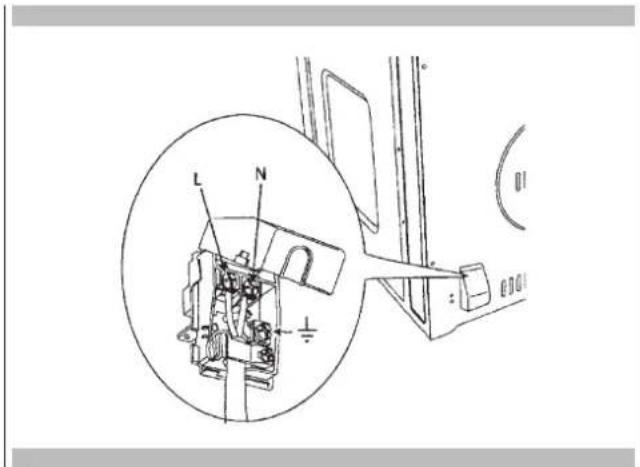
Electrical Hook-Up
Before making the electrical hook-up, make sure that:
- the characteristics of the electrical system satisfy what is shown on the serial number plate applied to the front of the oven;
- the electrical system has an effect earth connection conforming to standards and current law.
The earth connection is required by law.
The cable must not, at any point, reach a temperature greater than 50 C above the ambient temperature.
This oven must be connected to the supply by a supply cord fitted with an appropriately rated plug that is compatible with the socket-outlet fitted to the final sub-circuit in the fixed wiring that is intended to supply this oven.
If a fixed appliance does not have a power cord and plug, or another device that ensures disconnection from the mains, with an opening distance of the contacts that allows complete disconnection under the conditions of excessive voltage category III, such disconnection devices must be provided in the power supply mains conforming to the installation rules.
The omnipolar socket or switch must be easy to reach when the appliance is installed.
NOTE: The manufacturer declines all liability if the usual accident prevention standards and the above instructions are not followed.
| TYPE AND MINIMUM DIAMETER OF THE CABLES | |
| SASO | |
| H05RR-F 3x1,5 mm H05RR-F 3x2,5 mm | |
| H05VV-F 3x1,5 mm H05VV-F 3x2,5 mm | |
| H05RN-F 3x1,5 mm H05RN-F 3x2,5 mm | |
| H05V2V2-F 3x1,5 mm | H05V2V2-F 3x2,5 mm |
text_image
Technical diagram of a mechanical assembly with labeled parts L and N, including a magnified inset showing internal components.EN 15 - Solving Traditional Baking Problems
With either Bake or Convection Bake, poor results can occur for many reasons other than a malfunction of the oven. Check the chart below for causes of the most common problems. Since the size, shape and material of baking utensils directly affect the baking results, the best solution may be to replace old baking utensils that have darkened and warped with age and use.
| Baking Problem Cause | |
| Food browns unevenly - Oven not preheated | - Aluminum foil on oven rack or oven bottom- Baking utensil too large for recipe- Pans touching each other or oven walls |
| Food too brown on bottom - Oven not preheated | - Using glass, dull or darkened metal pans- Incorrect rack position- Pans touching each other or oven walls |
| Food is dry or has shrunk excessively - Oven temperature | too low- Oven not preheated- Oven door opened frequently- Tightly sealed with aluminum foil- Pan size too small |
| Food is baking or roasting too slowly - Oven temperature | too low- Oven not preheated- Oven door opened frequently- Tightly sealed with aluminum foil- Pan size too small |
| Pie crusts do not brown on bottom or have soggy crust - Baking time not long enough- Using shiny steel pans- Incorrect rack position- Oven temperature is too low | |
| Cakes pale, flat and may not be done inside - Oven temperature too low- Incorrect baking time- Cake tested too soon- Oven door opened too often- Pan size may be too large | |
| Cakes high in middle with crack on top - Baking temperature too high- Baking time too long- Pans touching each other or oven walls- Incorrect rack position- Pan size too small | |
| Pie crust edges too brown - Oven temperature too high | - Edges of crust too thin |
Before contacting service, check the following to avoid unnecessary service charges.
| Oven Problem Problem Solving Steps | |
| Other F__ Error appears in the display window. | Remove power and turn it back on again after a few seconds.If condition persists, note the code number (in the EVENT LOG list) and contact service. |
| The oven display stays OFF Turn off power at the main power supply (fuse or breaker box).Turn breaker back on.If condition persists, call an authorized service. | |
| Cooling fan continues to run after oven is turned off | The fan turns off automatically when the electronic components have cooled sufficiently. |
| Oven is not heating Check the circuit breaker or fuse box to your house. Make sure there is proper electrical power to the oven. Make sure the oven temperature has been selected. | |
| Oven is not cooking evenly Refer to cooking charts for recommended rack position. Always reduce recipe temperature by 25 F (15 C) when baking with Convection Bake mode. | |
| Clock and timer are not working properly | Make sure there is proper electrical power to the oven. See the Clock sections on pages 10 and 13. |
| Excessive moisture Convection modes will eliminate any moisture in oven (this is one of the advantages of convection). |
EN 17 - Assistance or Service
Before contacting service, please check "Troubleshooting." It may save you the cost of a service call.
If you still need help, follow the instructions below. When calling, please know the purchase date and the complete model and serial number of your appliance. This information will help us to better respond to your request.
Service Data Record
For authorized service or parts information see paragraph "WARRANTY for Home Appliances".
For serial tag location see Page 5. Now is a good time to write this information in the space provided below. Keep your invoice for warranty validation.
Service Data Record
Model Number ____
Serial Number ____
Date of Installation or Occupancy ____
TABLE DES MATIERES
PAGE
natural_image
Two glassware illustrations: a spoon inside and a cross symbol crossed out (no text or symbols present)natural_image
Technical line drawing of a front view of an appliance or oven with internal compartments and control panel (no text or symbols)natural_image
Interior view of an oven with metal grating and ventilation grilles (no text or symbols visible)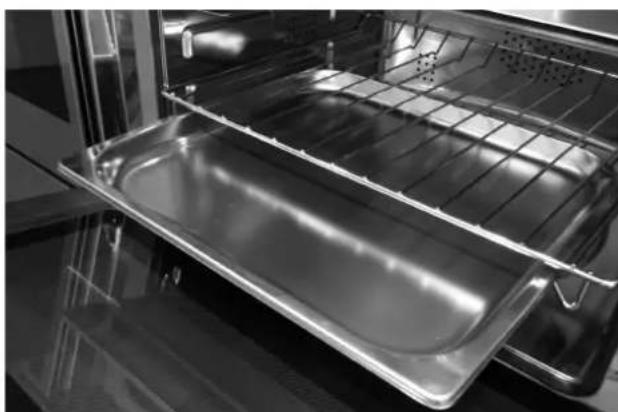
natural_image
Interior view of an oven with a metal tray and rack (no text or symbols visible)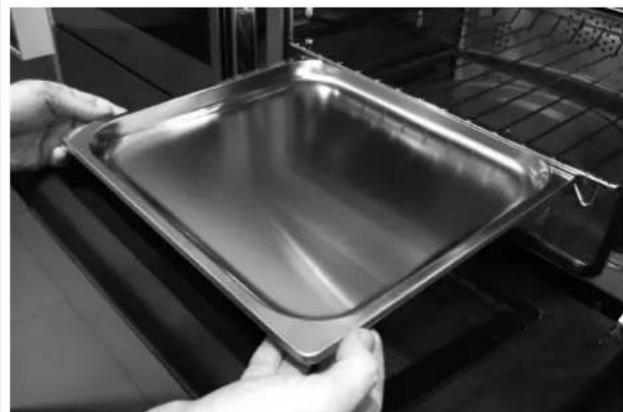
natural_image
Close-up of hands holding a square metal baking pan (no text or symbols visible)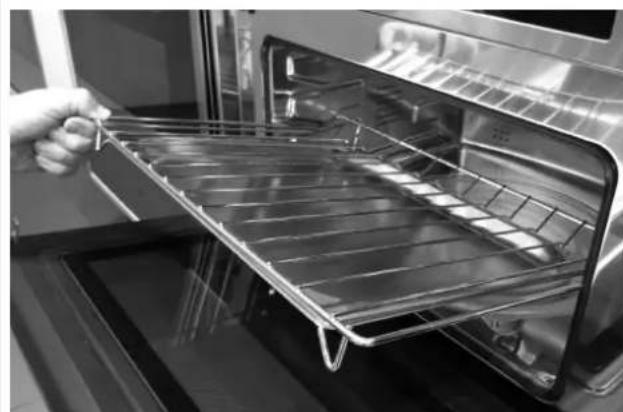
natural_image
Interior view of an oven with a hand holding a metal tray (no text or symbols visible)
IMPORTANT
natural_image
Recycling symbol composed of five gray arrows forming a triangle (no text or labels)text_image
11/20/2015 12Luminosité
[icon] Fonction Micro-ondes
natural_image
Pure diagram of a structural joint or connection with no text, numbers, or symbolstext_image
Technical diagram of a mechanical assembly with labeled parts L and N, including a magnified inset view showing internal components.natural_image
Two glassware illustrations: a spoon inside and a cross symbol crossed out (no text or symbols present)natural_image
Technical line drawing of a microwave oven with mounting base and control panel (no text or symbols)Erste Anwendung
natural_image
Interior view of an oven with metal grating and ventilation grilles (no text or symbols visible)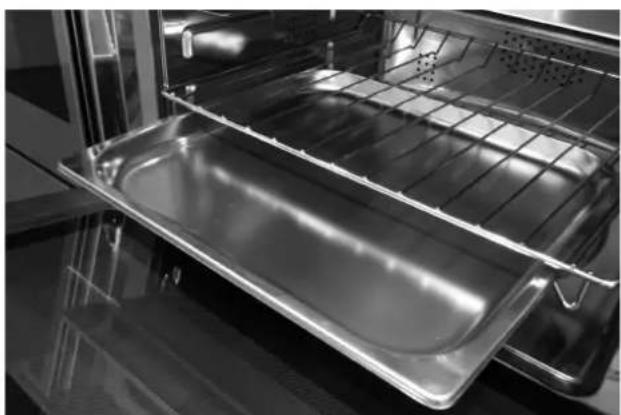
natural_image
Interior view of an oven with a clear glass tray and metal grating (no text or symbols visible)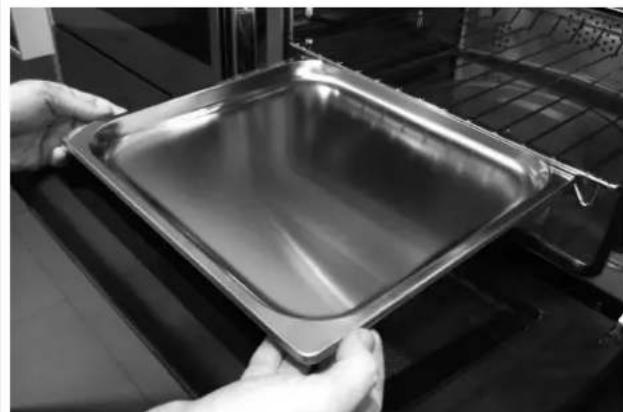
natural_image
Close-up of hands holding a square metal baking pan (no text or symbols visible)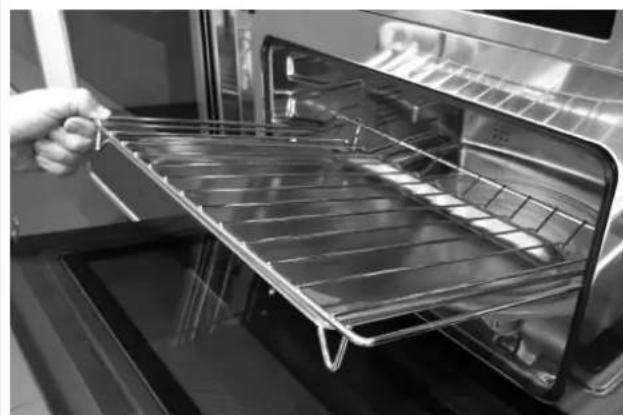
natural_image
Close-up of a hand holding a metal rack inside an oven (no text or symbols visible)
WICHTIG
natural_image
Recycling symbol composed of five gray arrows forming a circle (no text or labels)CB
The image is too blurry to recognize any text content.
The image is too blurry to recognize any text content.

text_image
FREITAG 11/20/2015 04:26CE
The image is too blurry to recognize any text content.
The image is too blurry to recognize any text content.
Tastenfeld
text_image
D.M.Y. Y.M.D. M.D.Y. 12
text_image
11/20/2015 12Helligkeit
natural_image
Pure geometric diagram with shaded regions and arrows, no text or symbols presenttext_image
Technical diagram of a mechanical assembly with labeled parts L and N, including a magnified inset showing internal components.natural_image
Two glass glasses: one with a spoon and the other with a black X symbol (no text or labels)natural_image
Technical line drawing of a front view of an oven or rack unit with internal compartments and control panel (no text or symbols)Primer uso
natural_image
Interior view of an oven with metal grating and ventilation grilles (no text or symbols visible)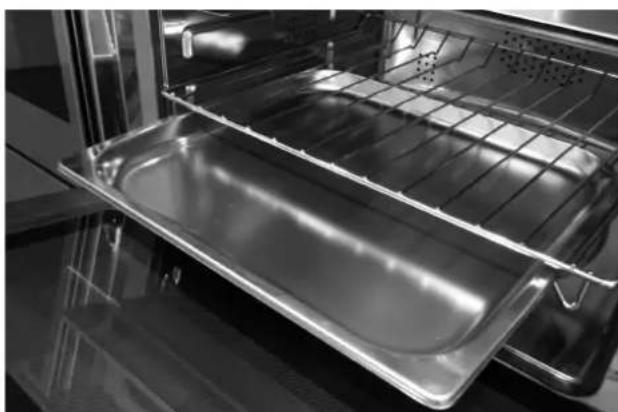
natural_image
Interior view of an oven with a metal tray and rack (no text or symbols visible)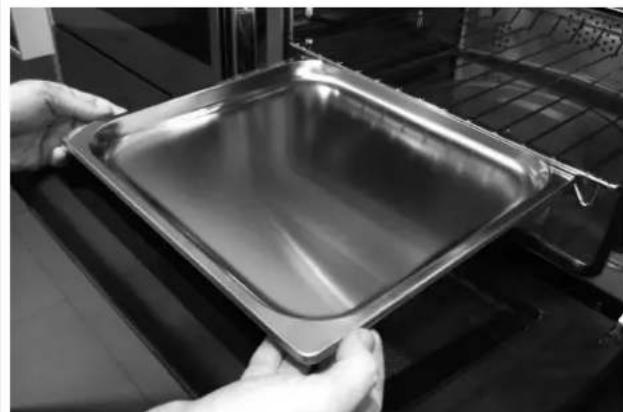
natural_image
Close-up of hands holding a square metal baking pan (no text or symbols visible)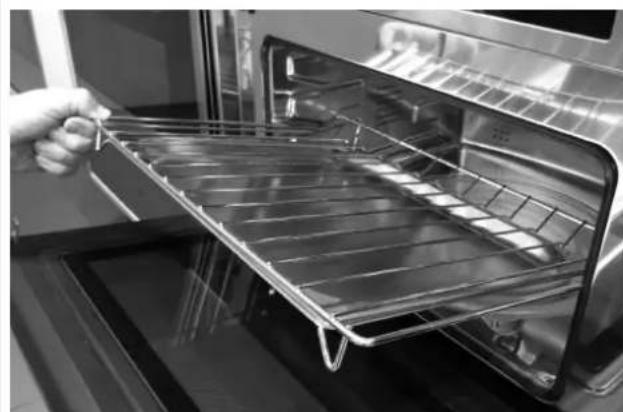
natural_image
Interior view of an oven with a hand holding a metal tray (no text or symbols visible)
IMPORTANTE
natural_image
Recycling symbol composed of five gray arrows forming a triangle (no text or labels)text_image
D.M.A. A.M.D. M.D.A. 12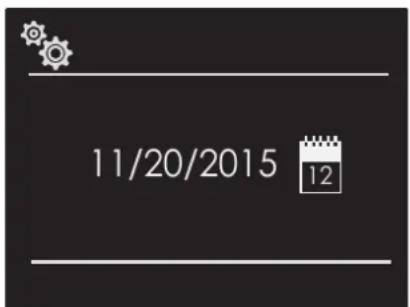
text_image
11/20/2015 12Volumen
text_image
Technical diagram of a mechanical assembly with labeled parts L and N, including a magnified inset showing internal components.natural_image
Two glassware illustrations: a spoon inside and a cross symbol crossed out (no text or symbols present)Voeding voor baby's
natural_image
Technical line drawing of a front view of a rectangular appliance with internal compartments and a central display (no text or symbols)Eerste gebruik
natural_image
Interior view of an oven with metal grating and ventilation grilles (no text or symbols visible)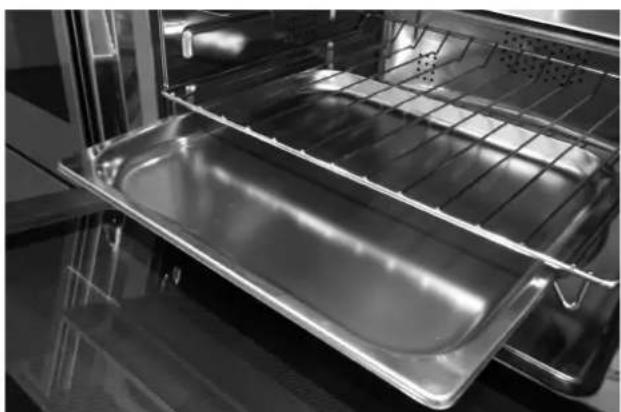
natural_image
Interior view of an oven with a metal tray and rack (no text or symbols visible)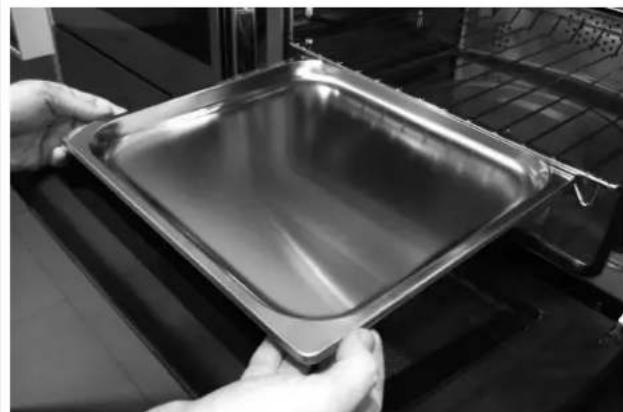
natural_image
Close-up of hands holding a metallic baking tray with a tray on a stove (no visible text or symbols)
natural_image
Interior view of an oven with a hand holding a metal tray (no text or symbols visible)
BELANGRIJK
natural_image
Recycling symbol composed of five gray arrows forming a triangle (no text or labels)text_image
11/20/2015 12Helderheid
natural_image
Pure geometric diagram with shaded regions and arrows, no text or symbols presenttext_image
Technical diagram of a mechanical assembly with labeled parts L and N, including a magnified inset showing internal components.NL 15 - Traditionele Bakproblemen Oplossen
natural_image
Two glass glasses: one with a spoon inside, the other with a black X symbol (no text or labels)natural_image
Technical line drawing of a front view of an oven or oven unit with internal compartments and a directional arrow (no text or symbols)Primeira utilização
natural_image
Interior view of an oven with metal grating and ventilation grilles (no text or symbols visible)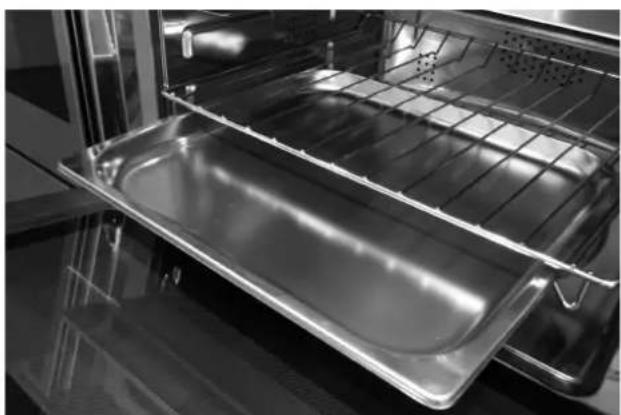
natural_image
Interior view of an oven with a metal tray and rack (no text or symbols visible)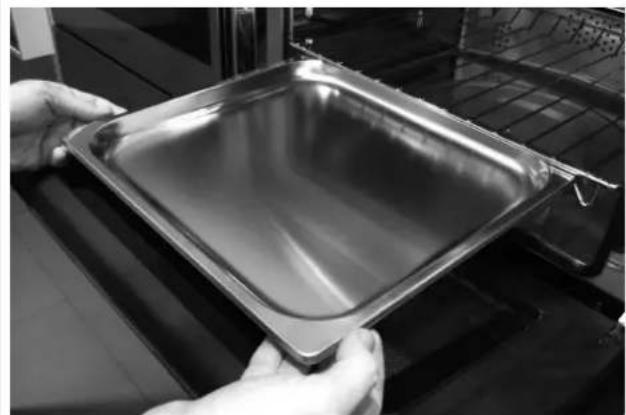
natural_image
Close-up of hands holding a square metal baking pan (no text or symbols visible)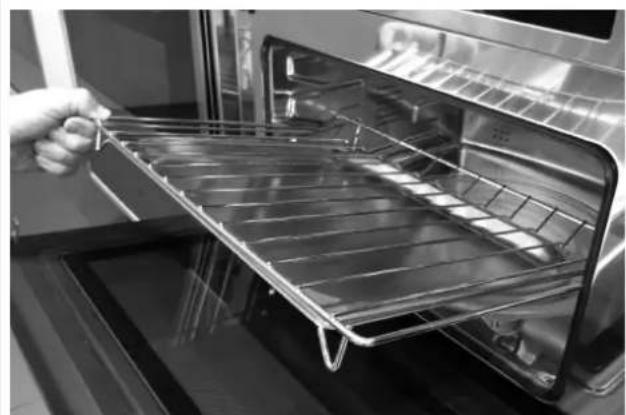
natural_image
Close-up of a hand holding a metal rack inside an oven (no text or symbols visible)
IMPORTANTE
natural_image
Recycling symbol composed of five gray arrows forming a circle (no text or labels)text_image
D.M.Y. Y.M.D. M.D.Y.