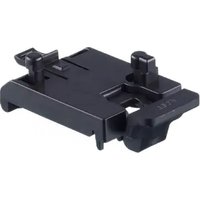
E30575 - Industrial accessory IFM - Free user manual and instructions
Find the device manual for free E30575 IFM in PDF.


User questions about E30575 IFM
0 question about this device. Answer the ones you know or ask your own.
Ask a new question about this device
Download the instructions for your Industrial accessory in PDF format for free! Find your manual E30575 - IFM and take your electronic device back in hand. On this page are published all the documents necessary for the use of your device. E30575 by IFM.
USER MANUAL E30575 IFM
Installation instructions
Mounting bracket for DIN rail mounting
E30575
1 Safety instructions
- The product described is a subcomponent for integration into a system.
- The system architect is responsible for the safety of the system.
-
The system architect undertakes to perform a risk assessment and to create documentation in accordance with legal and normative requirements to be provided to the operator and user of the system. This documentation must contain all necessary information and safety instructions for the operator, the user and, if applicable, for any service personnel authorised by the architect of the system.
-
Read this document before setting up the product and keep it during the entire service life.
- The product must be suitable for the corresponding applications and environmental conditions without any restrictions.
- Only use the product for its intended purpose (→ Intended use).
- If the operating instructions or the technical data are not adhered to, personal injury and/or damage to property may occur.
- The manufacturer assumes no liability or warranty for any consequences caused by tampering with the product or incorrect use by the operator.
- Installation, set-up, operation and maintenance of the product must be carried out by qualified personnel authorised by the machine operator.
- Protect the product against damage.
• Store the product in its original packaging.
2 Intended use
The mounting bracket makes it possible to install ifm sensors of types PQSxxx and PQCxxx on a 35 mm DIN rail.
3 Installation
▶ Hook the device into a 35 mm DIN rail and clip it into place.
Place the device onto the attachment pins (1) of the mounting bracket and push it downwards until it locks into place.


Fig. 1: DIN rail mounting with mounting bracket
Removal
▶ Press the upper lever of the mounting bracket (2) in the direction of the arrow and pull the device upwards.
▶ Press the lower lever of the mounting bracket (3) upwards and remove the mounting bracket from the DIN rail.


Fig. 2: Removal


Brand : IFM
Model : E30575
Category : Industrial accessory