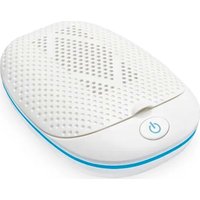
DB 130 - Hearing aid Amplicomms - Free user manual and instructions
Find the device manual for free DB 130 Amplicomms in PDF.


| Product type | UV drying and disinfection station for hearing aids |
| Brand | Amplicomms |
| Model | DB 130 |
| Power supply | 5 V / 5 W, mains adapter (Model SW0501000-F01/F02) included |
| Drying temperature | 50°C ± 5°C |
| UV-C wavelength | 253,7 nm |
| Cycle duration | 4 hours (6 min UV disinfection + 3h48 drying + 6 min disinfection) |
| Main functions | Drying, UV disinfection, automatic shut-off after cycle |
| Care and cleaning | Clean with a soft, lint-free cloth, without cleaning product |
| Safety | Do not look at UV lamps, remove batteries before use, use only the supplied adapter |
| Spare parts and repairability | Specific mains adapter; contact the retailer for any repairs |
| Warranty | 2 years from date of purchase (excluding rechargeable batteries) |
| General information | Indoor use only; do not expose to water |
Frequently Asked Questions - DB 130 Amplicomms
User questions about DB 130 Amplicomms
0 question about this device. Answer the ones you know or ask your own.
Ask a new question about this device
Download the instructions for your Hearing aid in PDF format for free! Find your manual DB 130 - Amplicomms and take your electronic device back in hand. On this page are published all the documents necessary for the use of your device. DB 130 by Amplicomms.
USER MANUAL DB 130 Amplicomms
natural_image
White computer mouse with perforated surface and power button (no text or symbols)DB 130
Operating Instructions (GB)
Mode d'emploi (FR)
text_image
Diagram of a food processor with labeled parts, showing internal components and a button.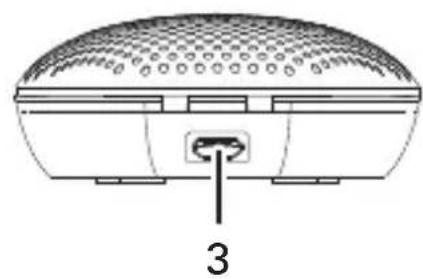
natural_image
Technical line drawing of a dome-shaped electronic device with a labeled connector (no text or symbols present)text_image
Diagram of a food processor with labeled parts, showing internal components and parts numbered 1 and 2.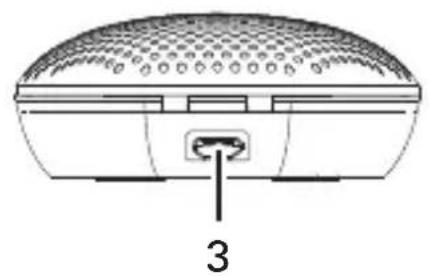
natural_image
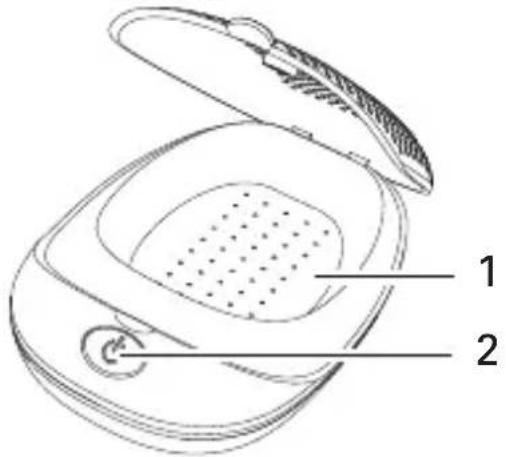
Diagram of a device rear panel with a labeled connector (3), showing no text or symbols beyond the number and a grid-patterned top surface.1 Drying compartment
2 Power button (for starting/stopping the drying cycle)
3 Power adaptor jack (please use only the original ac adapter).
Do not look directly at the two UV lights located in the drying compartment.
2 Drying Cycle
- Insert the USB-cable into the 5V power supply and the Micro USB connector into the jack on the rear side of your drying station. Then plug the power supply into a power socket.
- Press and hold the POWER button to wake up the unit and start disinfection and drying process.
- Open the lid of your unit.
- Place the hearing instrument on the tray inside your drying station (Note – instrument have to be clean from any debris).
- Close the lid. NOTE: The full Disinfection and Drying circle is 4 hours.
- After completion of the process open the lid.
- Remove the dried and hygienically cleaned instrument.
Important:
- Batteries must be removed from your instrument before the Disinfection and Drying Process begins. (It is prohibited to place batteries in the Drying Compartment.)
- The Disinfection and Drying Process will be pause when you open the lid. The Power logo light and Blue ring LED will be blinks. To restart the process please restart the unit.
• After 4 hours, the unit will turn off automatically and all the LED light will switch off.
2.1 Disinfection and Drying Process:
During the first 6 minutes of the 4 hours circle the UV lamp and Power Logo will be lit, and the blue LED ring will blink.
2.2 Drying Process:
In the next 3 hours and 48 minutes the UV lamp and Power logo light will off and the blue LED ring will be on solid.
2.3 Disinfection Process:
In the last 6 minutes of the 4 hour circle the UV lamp will on again, the Power logo light will be lit and the Blue LED ring will blink.
Appendix
Safety notes
- Please make sure you read this user guide carefully and keep it for further use.
- Only use the power adapter plug supplied as other power supplies could damage the appliance.
- Ensure access to the power adapter plug is free from obstructions.
- To reduce the risk of injury, close supervision is necessary when an appliance is used near children.
- Do not look directly at the two UV lights located in the drying compartment.
- Do not use outdoors. Do not use near water.
- To disconnect, turn all controls to the off position, then remove plug from outlet.
- Unplug from outlet when not in use and before servicing or cleaning.
- Do not unplug by pulling on cord. To unplug, grasp the plug, not the cord.
- Do not operate any appliance with a damaged cord or plug, or after the appliance malfunctions or is dropped or damaged in any manner. Return appliance to the nearest authorized service facility for examination, repair, or electrical or mechanical adjustment.
Helpline
If you need some help and you're in the UK, please call us on 0844 800 6503 (using a UK landline, at the time of going to print: calls cost 6p for connection charge and then 5p a minute. Mobile costs may vary). Lines are open Monday to Friday, 9am to 5pm, excluding public holidays. If you've a claim on your 2-year guarantee, please contact your supplier.
Power supply
The included mains adapter meets the eco-design requirements of the European Union (Directive 2009/125/EC). Thus, its power consumption is considerably lower, both in operated as well as in non-operated mode, compared with the mains adapter of previous design.
Disposal
You are obliged to dispose of consumable goods properly in accordance with the applicable legal regulations. The symbol on this product indicates that electrical and electronic apparatus and batteries must be disposed of separately from domestic waste at suitable collection points provided by the public waste authorities. Batteries can also often be disposed of at the point of sale. Packaging materials must be disposed of according to local regulations.

Maintenance
- Please clean your equipment's surfaces with a soft, fluff-free cloth.
- Never use cleaning agents or solvents.
Guarantee
This equipment is produced and tested according to the latest production methods. The implementation of carefully chosen materials and highly developed technologies ensure trouble free functioning and a long service life.
The terms of the guarantee do not apply to the rechargeable batteries or power packs used in the products. The period of guarantee is 24 months from the date of purchase.
All deficiencies resulting from material of production faults which occur during the period of guarantee will be eliminated free of charge. Rights to claims under the terms of guarantee are annulled following intervention by the purchaser or third parties. Damage caused as a result of improper handling or operation, incorrect positioning or storing, improper connection or installation, Acts of God or other external influence are not covered by the terms of guarantee.
In the case of complaints, we reserve the right to repair or replace defect parts or provide a replacement device. Replacement parts or devices become our property. Rights to compensation in the case of damage are excluded where there is no evidence or intent or gross negligence by the manufacturer.
Declaration of conformity
This device fulfils the requirements stipulated in the EU directive:

2014/30/EU. Conformity with the above mentioned directive is confirmed by the CE symbol on the device. Please contact supplier to get a copy of EU declaration of conformity.
Specifications
• Compartment temperature 50°C +/- 5°C
• Wavelength UV-C 253.7 nm
• Drying Box 5 V= / 5 W / Class III
Informations about the Power Adapter
• Modell: SW0501000-F01/ SW0501000-F02
• Input: 100-240V\~/ 50/60Hz
• Output: 5 V= / 1000 mA / Class II
- Manufacturer: Brightpower Optoelectronic Technology Co., Ltd., No. 7 Junye Road, Dongkeng Village, Dongkeng Town, Dongguan City, Guangdog Province, P.R.China.
Important note: Please use only the original adapter.
1 Aperçu
text_image
Diagram of a device with labeled parts, showing a closed lid and internal mesh structure with numbered annotations.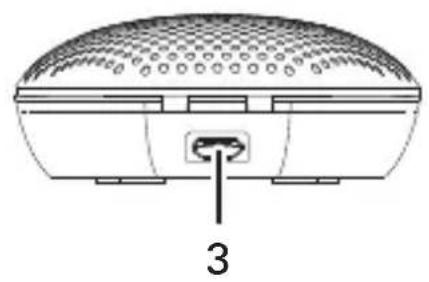
natural_image
Technical diagram of a device housing with a labeled component (3), showing internal structure and mounting bracket (no text or symbols beyond label)text_image
Diagram of a food processor with labeled parts, showing internal components and parts numbered 1 and 2.
natural_image
Technical diagram of a device with a labeled component (3), showing a dome-shaped top and internal slots, with no readable text or symbols beyond the number '3'1 Droogkamer
Information over adapter
• Model: SW0501000-F01/ SW0501000-F02
• Input: 100-240V\~/ 50/60Hz
• Output: 5 V= / 1000 mA / Class II
- Fabrikant: Brightpower Optoelectronic Technology Co., Ltd. No. 7 Junye Road, Dongkeng Village, Dongkeng Town, Dongguan City, Guangdog Province, P.R.China.
text_image
Diagram of a food processor with labeled parts, showing internal components and a button
natural_image
Technical line drawing of a dome-shaped electronic device with a labeled connector (no text or symbols present)natural_image
Recycling symbol with three arrows and a vertical 'E' on the right side (no text or numbers present)Manutenzione
text_image
Diagram of a food processor with labeled parts, showing internal components and parts numbered 1 and 2.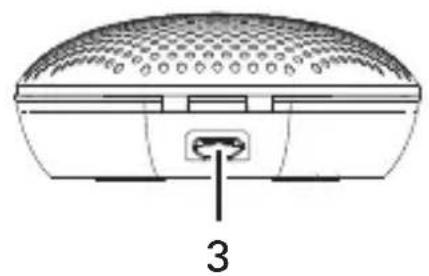
natural_image
Diagram of a device rear panel with a labeled connector (3), showing no text or symbols beyond the number and arrow.text_image
Diagram of a food processor with labeled parts, showing internal components and a button.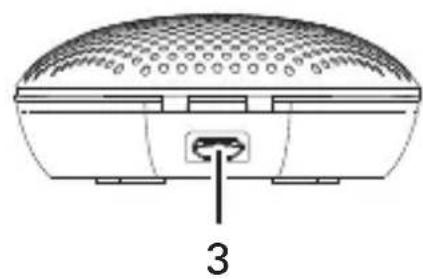
natural_image
Technical line drawing of a dome-shaped electronic device with a labeled connector (no text or symbols present)1 Torkkammare
text_image
Diagram of a food processor with labeled parts, showing internal components and parts numbered 1 and 2.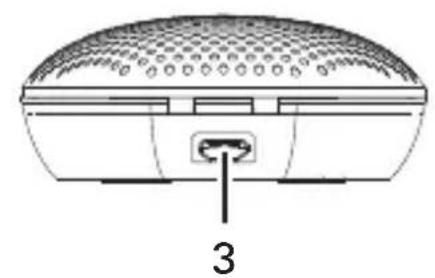
natural_image
Technical diagram of a device with a labeled component (3), showing a dome-shaped top and internal slots, with no readable text or symbols beyond the number '3'1 Câmara de secagem
text_image
Diagram of a food processor with labeled parts, showing internal components and a button.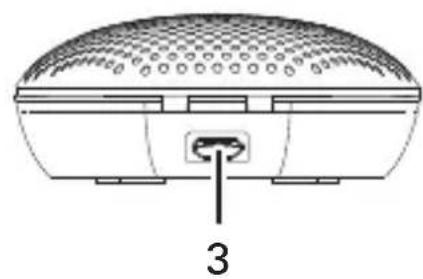
natural_image
Technical line drawing of a dome-shaped electronic device with a labeled connector (no text or symbols present)1 Tørkekammer
text_image
Diagram of a food processor with labeled parts, showing internal components and parts numbered 1 and 2.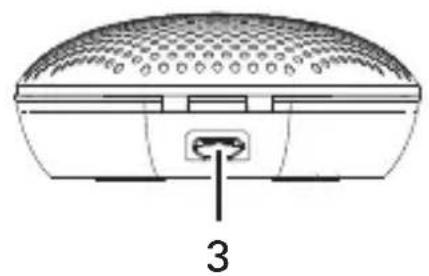
natural_image
Diagram of a device rear panel with a labeled connector (3), showing no text or symbols beyond the number and arrow.1 Tørrekammer