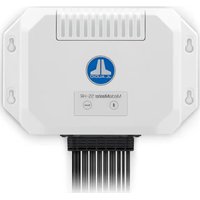
MediaMaster 55-HR - Audio System JL Audio - Free user manual and instructions
Find the device manual for free MediaMaster 55-HR JL Audio in PDF.


| Product type | Marine audio system |
| Brand | JL Audio |
| Model | MediaMaster 55-HR |
| Power supply | 12 V DC (10-16 V), 15 A fuse |
| Power consumption | 15 A max, 100 mA standby |
| Amplified audio outputs | 4 channels, 25 W x 4 @ 4 Ω, min impedance 2 Ω |
| Preamp outputs | 3 zones, stereo RCA + mono subwoofer, 4 V RMS max (relative/absolute) |
| Auxiliary input | 1 stereo RCA pair, sensitivity 1 V or 2 V RMS |
| Radio receiver | FM (87.5-107.9 MHz), AM (530-1710 kHz), DAB+ (170-230 MHz) |
| Bluetooth | Version 2.1+EDR, A2DP and AVRCP profiles, range 11 m, SBC and aptX codecs |
| USB port | USB 2.0, 1 A charging, formats MP3, MP4, WAV, AAC, M4A, M4B |
| Network | NMEA 2000 via micro-C connector |
| Remote control | Compatibility with MMR-40, MMR-5N2K, MMR-25W, MMR-20-BE, mobile app, MFD |
| Dimensions (W x H x D) | 195 x 58 x 126 mm (7.68 x 2.28 x 4.96 in) |
| Weight | Approximately 1.0 kg |
| Protection rating | Water resistant (do not immerse or spray with high-pressure water) |
| Operating temperature | -20 °C to +65 °C (-4 °F to +149 °F) |
| Firmware update | Via USB key, automatic update at startup |
| Maintenance and cleaning | Clean with a soft, dry cloth; avoid excessive moisture |
| Safety | Professional installation; do not replace the fuse with a different rating |
| Spare parts and repairability | Contact JL Audio customer service or an authorized dealer |
| Certifications | FCC, ISED Canada, EU and UK compliance |
Frequently Asked Questions - MediaMaster 55-HR JL Audio
User questions about MediaMaster 55-HR JL Audio
0 question about this device. Answer the ones you know or ask your own.
Ask a new question about this device
Download the instructions for your Audio System in PDF format for free! Find your manual MediaMaster 55-HR - JL Audio and take your electronic device back in hand. On this page are published all the documents necessary for the use of your device. MediaMaster 55-HR by JL Audio.
USER MANUAL MediaMaster 55-HR JL Audio
natural_image
Front view of a white audio device labeled 'MeJ Audio' with control buttons and a black connector (no readable text beyond branding)MediaMaster® 55-HR
HIDDEN MARINE SOURCE UNIT
OWNER'S MANUAL
FCC COMPLIANCE STATEMENT
This device complies with Part 15 of the FCC Rules. Operation is subject to the following two conditions:
(1) this device may not cause harmful interference, and (2) this device must not accept any interference received, including interference that may cause undesired operation. These limits are designed to provide reasonable protection against harmful interference in a residential installation.
This equipment generates, uses and can radiate radio frequency energy and, if not installed in accordance with the instructions, may cause harmful interference to radio communications. However, there is no guarantee that interference will not occur in a particular installation. If this equipment does cause harmful interference to radio or television reception, the user is encouraged to try to correct the interference by one or more of the following measures:
- Reorient or relocate the receiving antenna. - Increase separation between the equipment and the receiver.
- Connect the equipment to an outlet on a circuit different
from that to which the receiver
is connected.
- Consult the dealer or an experienced radio/TV technician for help.
Any changes or modifications not expressly approved by the party responsible for compliance could void the user's authority to operate this equipment.
FCC RADIATION EXPOSURE STATEMENT
This device complies with FCC radiation exposure limits set forth for an uncontrolled environment. This equipment should be installed and operated with a minimum distance of 20 cm between the radiator and any part of your body.
CANADA STATEMENT
This device contains licence-exempt transmitter(s)/receiver(s) that comply with Innovation, Science and Economic Development Canada's licence-exempt RSS(s). Operation is subject to the following two conditions:
(1) This device may not cause interference. (2) This device must accept any interference, including interference that may cause undesired operation of the device.
The device meets the exemption from the routine evaluation limits in section 2.5 of RSS-102 and compliance with RSS-102 RF exposure, users can obtain Canadian information on RF exposure and compliance. This equipment meets the exemption from the routine evaluation limits in section 2.5 of RSS-102. It should be installed and operated with a minimum distance of 20cm between the radiator and any part of your body.
SAFETY CONSIDERATIONS
- Only use this product in vehicles with 12 volt, negative-ground electrical systems. This product is not certified or approved for use in aircraft.
- Mount this product securely to prevent damage or injury in severe conditions.
- Do not replace the power wire fuse with one of a different value. Never bypass the fuse.
- Listen to your audio system at levels appropriate for operating conditions and hearing safety.
INSTALLATION CONSIDERATIONS
• Installation requires appropriate tools and safety equipment. Professional installation is recommended.
• This product is water-resistant. Do not submerge or subject to high-pressure water spray.
- Before installation, turn off the audio system and disconnect the battery system from the audio system.
- Install in a dry, well-ventilated location that does not interfere with your factory-installed systems. If a dry environment is not available, a location that is not exposed to heavy splashing may be used.
- Before cutting or drilling, check for potential obstacles behind mounting surfaces.
- Carefully route all system wiring away moving parts and sharp edges; secure with cable ties or wire clamps and use grommets and loom where appropriate to protect from sharp edges.
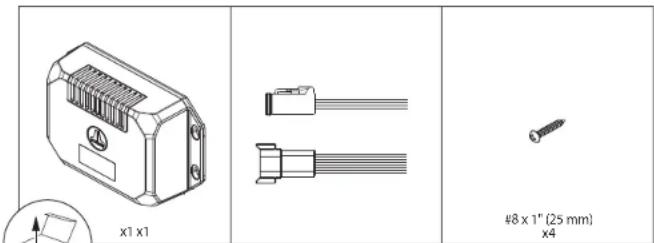
CONTROL OPTIONS ^1
To operate, the MM55-HR must be connected with a compatible NMEA 2000 ^® device (not included) using applicable NMEA 2000 ^® cables and connectors (sold separately).
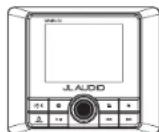
MediaMaster® MMR-40 Network Controller
Full-function, water-resistant (IP66 rated) controller with full-color LCD display

Connection for NMEA 2000 ^® Networks
Micro-C plug permits direct connection to a vessel network using accessory cables and connectors (sold separately). Note: Functionality requires compatible entertainment protocols (PGN) for NMEA 2000 ^4 networks and may require a software upgrade of your multifunction display (MFD). Refer to your MFD manufacturer for device compatibility info.
- Control functionality will vary depending on the connected controller option. Full functionality requires connection to a MMR-40 Network Controller (sold separately) or your compatible MFD with a MMA-1-HTML MFD Data Interface (sold separately).
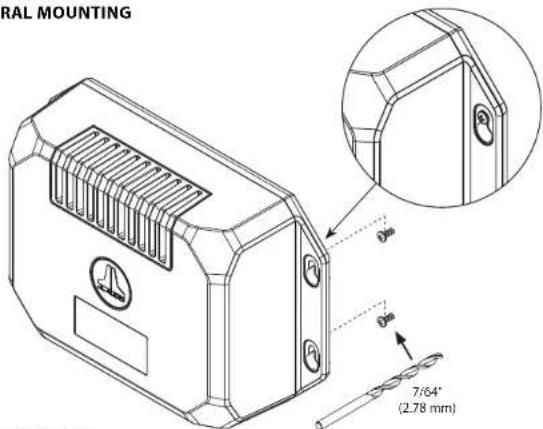
GENERAL MOUNTING
BASIC CONTROLS
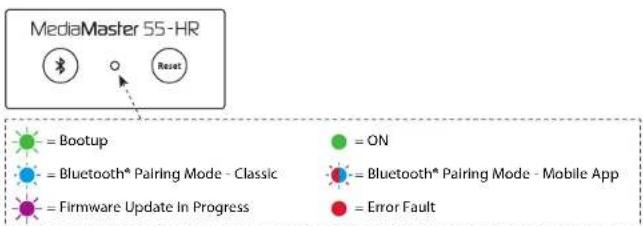
flowchart
graph TD
    A["MediaMaster 55-HR"] --> B["bootup"]
    A --> C["ON"]
    A --> D["Bluetooth* Pairing Mode - Classic"]
    A --> E["Firmware Update In Progress"]
    A --> F["Error Fault"]
    B --> G["Reset"]
| Control Function | |||
| Bluetooth®Pairing - Classic | Use to connect streaming audio devices• Short press to enter pairing mode• Fast blinking Blue LED until connection | • Blue LED for 10 seconds after connection, then returns to Green• Times out after 60 seconds | |
| Bluetooth®Pairing - Mobile App | Use to connect mobile application controllers• Long press to enter pairing mode• Fast blinking Red/Blue LED until connection | ||
| Reset | Reset • Short press to reboot the source unit | • LED blinks Green, then returns to Green | |
NOTE: When connected to +12V DC, the source unit will automatically connect to any previously paired device. If a paired device is out of range, or if there are no previously paired devices, the source unit will enter pairing mode for sixty seconds.
GENERAL CONNECTIONS
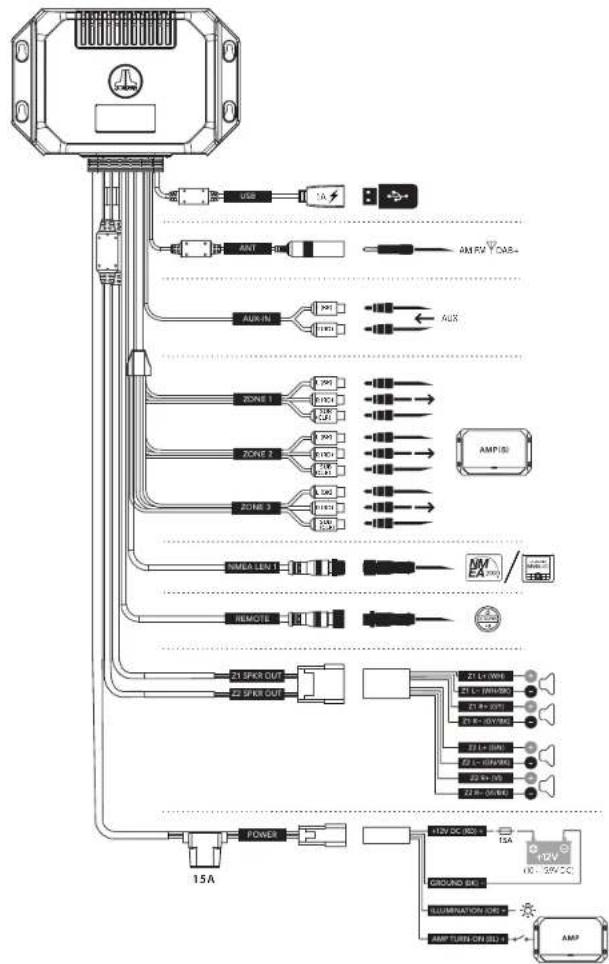
CONTROL PANEL (using MMR-40)
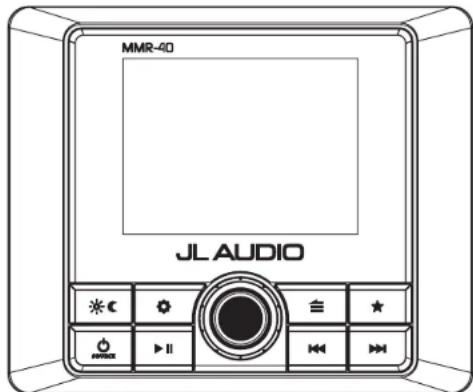
GENERAL CONTROL FUNCTIONS (using MMR-40)
| Control Function | ||
| Source/Power | • Short press to turn ON; Long press to turn OFF• While on, short press to display the SOURCE: Select menu | |
| Volume/Select | • Rotate to adjust Audio Zone Levels (volume)• Rotate to navigate• Press to make selections• Long press to access Subwoofer Trim Level settings | |
| Settings | • Short press to access the Audio Zone: Tone & Balance settings• Long press to access the System Settings: Main Menu | |
| Back/Menu | • Short press to go back one step or access source specific menus | |
| Favorites | • Short press to access stored presets• Long press to store a frequency as a preset (up to 18) | |
| Mute/Pause | • Short press to mute/unmute audio (AM/FM/DAB+/AUX) or pause/resume the current selection (USB/Bluetooth*)• When the Audio Zone Levels screen is displayed, short press to mute all audio (AM/FM/DAB+/AUX/USB/Bluetooth*) | |
| Forward | Short press to:• Manually adjust tuner forwards (AM/FM/DAB+)• Select the next track (USB/Bluetooth*)Long press to:• Seek to the next channel (FM); Skip forward ten frequency steps (AM)• Fast-forward (USB) | |
| Backward | Short press to:• Manually adjust tuner backwards (AM/FM/DAB+)• Restart track/select the previous track (USB/Bluetooth*)Long press to:• Seek to the previous channel (FM); Skip backwards ten frequency steps (AM)• Fast-rewInd (USB) | |
| Day/Night | • Short press to switch between Day/Night display settings• Long press to access the System Settings: Display menu | |
| SYSTEM MENU SETTINGS (using MMR-40) | ||
| • Long press to access the System Settings: Main Menu | ||
 | • Rotate to navigate• Press to make selections | |
| Setting Function | ||
| Name this Device | Create a custom name to display on devices connected with Bluetooth ^ wireless technology or for NMEA 2000 ^ networks | |
| Audio Zone Setup Configures each set of audio zone outputs | ||
| AUX Input Sensitivity | Configures AUX input sensitivity: 2V or 1V RMS (default) | |
| Diagnostic Displays serial number, hardware and software version info | ||
| Display Configures display and brightness settings | ||
| Battery Monitor | Notifies when +12VDC supply voltage drops below 10 volts or above 16 volts | If triggered, the unit will enter Safe Mode with a message to turn the unit off until normal operating voltage is restored |
| Scrolling Text Enables continuous scrolling of available RDS/track text info | ||
| Tuner Region Configures AM/FM tuner range/scale for a specific region | ||
| Power-up Settings Configures display and volume settings upon activation | ||
| Mobile Application Access pairing options for mobile device application control | ||
| Remote Control | Access pairing options for controllers equipped with Bluetooth ^ wireless technology | |
| Language Configures displayed navigation controls and user interface language | ||
| AUDIO ZONE SETUP MENU SETTINGS (using MMR-40) | |||
| • Long press to access the System Settings: Main Menu | |||
| • Rotate to navigate• Press to make selections | |||
| Zone Function Setting 1 Setting 2 | |||
| Z1: Zone 1Z2: Zone 2Z3: Zone 3 | Level Control Mode | Relative: Links the volume levels of Zones 2 - 3 with the level of Zone 1. (Linked zones will proportionally follow Zone 1's volume.) Each zone's offset level is independently adjustable, allowing you to create a customized level controller, specific to a vessel's layout. | |
| Absolute: Creates an independent level control for selected zones, each with its own separate volume level slider. | |||
| Fixed | 4V RMS Max (default)2V RMS Max1V RMS Max | ||
| Off | |||
| Rename Zone | Bow, Bridge, Cabin, Cockpit, Galley, Helm, Stateroom 1, Stateroom 2, Tower, Transom | ||
| Custom Name | Alphanumeric Input | ||
| Factory Default | |||
| Max Volume Limit | Max Vol Limit | ||
| HPF | High Pass Filter | Off (default)80 Hz100 Hz120 Hz | |
| Sub 1Sub 2Sub 3 | LPF (Low Pass Filter) | Off (default)60 Hz80 Hz100 Hz | |
| Sub Off | |||
AUDIO STREAMING WITH BLUETOOTH® WIRELESS TECHNOLOGY
You may listen to audio wirelessly from up to 35 feet away (11 m) using compatible devices equipped with Bluetooth ^® wireless technology. Up to eight devices can be paired, but only one streaming device can connect at a time.
| SETTINGS FOR DEVICES WITH BLUETOOTH® WIRELESS TECHNOLOGY (using MMR-40) | |
| With Bluetooth® selected as a source, short press to display the Bluetooth® : Main Menu | |
 | Rotate to navigatePress to make selections |
| Setting Function | |
| Now Playing Return to the Now Playing Screen | |
| Pair New Device Initiates Pairing Mode (connected devices will be disconnected) | |
| Connect Paired Device | Display all paired devices for connection |
| Set Primary Device Assign priority to a paired device for automatic connection | |
| Delete a Paired Device | Select from paired devices for removal |
| Delete All Paired Devices | Removes all paired devices from memory |
NOTE: When connected to +12V DC, the source unit will automatically connect to any previously paired device. If a paired device is out of range, or if there are no previously paired devices, the source unit will enter pairing mode for sixty seconds.
! IMPORTANT
- Hereby, Garmin declares that the radio equipment type MM55HR is in compliance with Directive 2014/53/EU. The full text of the EU declaration of conformity is available at the following internet address: www.garmin.com/compliance
- MM55HR Wireless Specification: Bluetooth transmitter frequency range: 2400 MHz - 2483.5 MHz Bluetooth transmitter power: <14 dBm (EIRP)
! IMPORTANT
- Hereby, Garmin declares that this MM55-HR is in compliance with the essential requirements and other relevant provisions of Radio Equipment Regulations 2017. The full text of the UK declaration of conformity is available at the following internet address: www.garmin.com/compliance
USB CONNECTIONS
Use the USB port to connect with USB storage class devices (thumb drive, digital audio player, etc.). Includes 1 A charging output.
| USB MENU SETTINGS (using MMR-40) | |
| With USB selected as a source, short press to display USB: Main Menu | |
| Rotate to navigatePress to make selections | |
| Setting Function | |
| Now Playing Return to the Now Playing Screen | |
| Shuffle Activate Shuffle: On or Off (default) | |
| Repeat Activate Repeat: All, Song or Off (default) | |
| Play All Plays all content within all folders | |
! IMPORTANT
- Properly secure the connected device before driving to prevent damage from dropping or sudden acceleration/braking.
- Control, functionality and display may vary depending on the model and version of the connected device.
- When connected via USB port, make sure to unpair or disable the Bluetooth® connection to avoid possible playback conflicts.
- If you experience abnormal performance during operation, disconnect the device and check its condition. Restart your device if performance does not improve.
USB FIRMWARE UPDATE
When powered ON with a connected USB drive loaded with firmware, the source unit will automatically begin the firmware update process. During this time, the LED will blink Purple throughout the entire update procedure. Once completed, the LED will return to solid Green.
OPTIONAL CONTROLLER AND INTERFACE ACCESSORIES
The following connections are included for adding accessories (sold separately). Refer to the supplied owner's manual of each accessory for specific user and installation instructions.
Connection for NMEA 2000® Networks
Micro-C plug permits direct connection to a vessel network using accessory cables and connectors (sold separately).
Note: Functionality requires compatible entertainment protocols (PGN) for NMEA 2000 ^® networks and may require a software upgrade of your multifunction display (MFD). Refer to your MFD manufacturer for device compatibility info.
MediaMaster® MMR-40 Network Controller
Full-function, water-resistant (IP66 rated) controller with full-color LCD display

MediaMaster® MMR-5N2K
Network Volume Controller Water-resistant (IPX7 rated) controller
Multifunction Display (MFD) Control Achieve control functionality using your vessel's multifunction display MFD
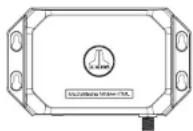
MediaMaster® MMA-1-HTML MFD Data Interface
Digital interface generates themed navigation and controls onto your vessel's multifunction display (MFD)
Connection using Bluetooth® Wireless Technology
Ultra-efficient Bluetooth® Low Energy technology permits wireless control from up to 35 feet (11 m) away. Pair up to eight remotes to a single source unit.
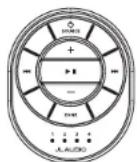
MediaMaster ^® MMR-25W Wireless Controller
Water-resistant (IP68 rated) controller

MediaMaster® Remote Controller App Free, full-function, application controller using your compatible wireless device Note: App functionality may require update of source unit software. Visit: www.jlaudio.com/support
Connection for Wired Remotes
Remote plug permits direct connection of wired controllers using accessory cables and splitters. Add up to three remotes to a single source unit, at up to 75 feet (23 m) away.
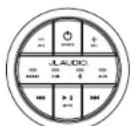
MediaMaster® MMR-20-BE
Wired Remote Controller
Water-resistant (IP67 rated) controller
SPECIFICATIONS
| Electrical | |
| Operating Voltage | 14.4V DC (10V - 16V) |
| Operating Temp Range | -4 F to +149 F (-20 C to +65 C) |
| Current Draw / Fuse Value | 5 A (max) / 100 mA (standby) / 15 A |
| NMEA 20003 LEN | (Micro-C connector) |
| Compatible Multifunction Display | Garmin, Simrad, Lowrance, Raymarine |
| Preamp Audio Outputs/Inputs | |
| Output Channels | One stereo pair and mono subwoofer RCA plugs per zone |
| Output Configuration | Relative, Absolute, Fixed or Off |
| Maximum Output Voltage | Relative or Absolute: 4V RMSFixed: Selectable 4V/2V/1V RMS |
| Output Impedance | 250 Ω |
| Auxiliary Input | One stereo pair of RCA plugs (2V/1V RMS Input Sensitivity) |
| Amplified Audio Outputs | |
| Rated RMS Power @ 14.4V | 25W x 4 @ 4 Ω |
| Minimum Impedance | 2 Ω per channel |
| Sound Control Options | |
| Tone and Balance | Treble, Midrange, Bass and Balance (all zones) |
| High-Pass Filter | Off, 80 Hz, 100 Hz and 120 Hz (each zone) |
| Low-Pass Filter | Off, 60 Hz, 80 Hz and 100 Hz (each subwoofer zone) |
| Tuner | |
| FM Tuner with RDS | 87.5 MHz to 107.9 MHz (0.2 MHz step) |
| AM Tuner | 530 kHz to 1710 kHz (10 kHz step) |
| DAB+ Tuner | 170 MHz to 230 MHz |
| Favorites | 8 presets across all tuners |
| Bluetooth* | |
| Profile | AZDP v1.2, AVRCP v1.4 |
| Core Specification | Version 2.1 + EDR |
| Codec | SBC, Qualcomm® aptXTM audio |
| Connection Range | Up to 35' (11 m) |
| USB | |
| Interface | USB 2.0 |
| Maximum Charging Output | A |
| Supported Audio Formats | MP3, MP4, WAV, AAC, M4A, M4B |
| Dimensions | |
| Unit W x H x D | 7.68" x 2.28" x 4.96" (195 mm x 58 mm x 126 mm) |
A Garmin Brand
natural_image
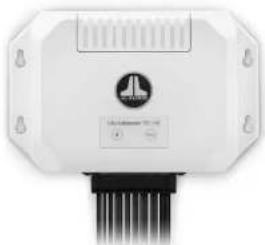
Front view of a white industrial control unit with a circular logo and visible wiring (no readable text or symbols)MediaMaster® 55-HR
RÉCEPTEUR MARITIME INVISIBLE
MANUEL D'UTILISATION
Bluetooth


CQR·D·S

DÉCLARATION DE CONFORMITÉ À LA FCC
natural_image
Front view of a white industrial control unit with black connectors and a circular logo (no visible text or symbols)MediaMaster® 55-HR
RECEPTOR MARINO OCULTO
MANUAL DEL PROPIETARIO
Bluetooth


CORD-S

OPCIONES DE CONTROL ^1
natural_image
Front view of a white industrial control unit with black connectors and a circular logo (no visible text or symbols)MediaMaster® 55-HR
VERSTECKTES STEUERGERÄT FÜR DEN MARINEEINSATZ
BEDIENUNGSANLEITUNG
Bluetooth


CQR·D·S

flowchart
graph TD
    A["AC Motor"] --> B["USB"]
    A --> C["AMP"]
    A --> D["AUX"]
    A --> E["ZONE 1"]
    A --> F["ZONE 2"]
    A --> G["ZONE 3"]
    A --> H["SINEMA LEN 1"]
    A --> I["REMOTE"]
    A --> J["POWER"]
    A --> K["15A"]

    B --> L["1A"]
    C --> M["10V"]
    D --> N["10V"]
    E --> O["10V"]
    F --> P["10V"]
    G --> Q["10V"]

    H --> R["20V"]
    I --> S["20V"]

    J --> T["40V"]
    K --> U["40V"]

    L --> V["AM/FW"]
    M --> W["AUX"]

    N --> X["AMP (8)"]

    O --> Y["AM/FW"]
    P --> Z["AMP (8)"]

    Q --> AA["AM/FW"]

    R --> AB["AM/FW"]

    S --> AC["AM/FW"]

    T --> AD["AM/FW"]

    U --> AE["AM/FW"]

    V --> AF["AM/FW"]

    W --> AG["AM/FW"]

    X --> AH["AM/FW"]

    Y --> AI["AM/FW"]

    Z --> AJ["AM/FW"]

    AA --> AK["AM/FW"]

    AB --> AL["AM/FW"]

    AC --> AM["AM/FW"]

    AD --> AN["AM/FW"]

    AE --> AO["AM/FW"]

    AF --> AP["AM/FW"]

    AG --> AQ["AM/FW"]

    AH --> AR["AM/FW"]

    AI --> AS["AM/FW"]

    AJ --> AT["AM/FW"]

    AK --> AU["AM/FW"]

    AL --> AV["AM/FW"]

    AM --> AW["AM/FW"]

    AN --> AX["AM/FW"]

    AO --> AY["AM/FW"]

    AP --> AZ["AM/FW"]

    AQ --> BA["AM/FW"]

    AR --> BB["AM/FW"]

    AS --> BC["AM/FW"]

    AT --> BD["AM/FW"]

    AU --> BE["AM/FW"]

    AV --> BF["AM/FW"]

    AW --> BG["AM/FW"]

    AX --> BH["AM/FW"]

    AU --> BI["AM/FW"]

    AV --> BJ["AM/FW"]

    AW --> BK["AM/FW"]

    AX --> BL["AM/FW"]

    AU --> BM["AM/FW"]

    AV --> BN["AM/FW"]

    AW --> BO["AM/FW"]

    AX --> BP["AM/FW"]

    AU --> BQ["AM/FW"]

    AV --> BR["AM/FW"]

    AW --> BS["AM/FW"]

    AX --> BT["AM/FW"]

    AU --> BU["AM/FW"]

    AV --> BV["AM/FW"]

    AW --> BW["AM/FW"]

    AX --> BX["AM/FW"]

    AU --> BY["AM/FW"]

    AV --> BZ["AM/FW"]

    AW --> CA["AM/FW"]

    AX --> CB["AM/FW"]

    AU --> CC["AM/FW"]

    AV --> CD["AM/FW"]

    AW --> CE["AM/FW"]

    AX --> CF["AM/FW"]

    AU --> CG["AM/FW"]

    AV --> DH["AM/FW"]

    AW --> DI["AM/FW"]

    AX --> DJ["AM/FW"]

    AU --> DE["AM/FW"]

    AV --> DF["AM/FW"]

    AW --> DG["AM/FW"]

    AX --> DH
    AU --> DG

    BW --> DH
    AU --> DG

    BX --> DH
    AU --> DG

    BY --> DH
    AU --> DG

    BZ <--> DC
    AC <--> DC
natural_image
Front view of a white industrial control unit with a circular logo and ventilation duct (no visible text or symbols)MediaMaster® 55-HR
UNITÀ SORGENTE NASCOSTA PER LA NAUTICA
MANUALE DEL PROPRIETARIO
Bluetooth


CORD-S

© 2024 Garmin Ltd. or its subsidiaries
All rights reserved. Garmin reserves the right to change or improve its products and to make changes in the content of this manual without obligation to notify any person or organization of such changes or improvements. For help with your product, go to https://www.jlaudio.com/support.
Garmin®, JL Audio and MediaMaster are trademarks of Garmin Ltd. or its subsidiaries, registered in the USA and other countries. The JL Audio logo and the MediaMaster logo are trademarks of Garmin Ltd. or its subsidiaries. These trademarks may not be used without the express permission of Garmin.
The BLUETOOTH® word mark and logos are owned by Bluetooth SIG, Inc. and any use of such marks by Garmin is under license. NMEA 2000®, and the NMEA 2000 logo are registered trademarks of the National Marine Electronics Association. Other trademarks and trade names are those of their respective owners.
- MediaMaster® 55-HR
- FCC COMPLIANCE STATEMENT
- FCC RADIATION EXPOSURE STATEMENT
- CANADA STATEMENT
- SAFETY CONSIDERATIONS
- INSTALLATION CONSIDERATIONS
- CONTROL OPTIONS 1
- MediaMaster® MMR-40 Network Controller
- Connection for NMEA 2000 ® Networks
- AUDIO STREAMING WITH BLUETOOTH® WIRELESS TECHNOLOGY
- ! IMPORTANT
- USB CONNECTIONS
- USB FIRMWARE UPDATE
- OPTIONAL CONTROLLER AND INTERFACE ACCESSORIES
- Connection for NMEA 2000® Networks
- Connection using Bluetooth® Wireless Technology
- Connection for Wired Remotes
- RÉCEPTEUR MARITIME INVISIBLE
- DÉCLARATION DE CONFORMITÉ À LA FCC
- OPCIONES DE CONTROL 1
Brand : JL Audio
Model : MediaMaster 55-HR
Category : Audio System