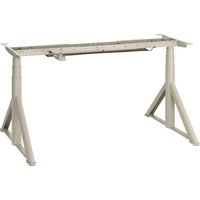
IDÅSEN 802.995.34 - Office IKEA - Free user manual and instructions
Find the device manual for free IDÅSEN 802.995.34 IKEA in PDF.


User questions about IDÅSEN 802.995.34 IKEA
0 question about this device. Answer the ones you know or ask your own.
Ask a new question about this device
Download the instructions for your Office in PDF format for free! Find your manual IDÅSEN 802.995.34 - IKEA and take your electronic device back in hand. On this page are published all the documents necessary for the use of your device. IDÅSEN 802.995.34 by IKEA.
USER MANUAL IDÅSEN 802.995.34 IKEA
This appliance can be used by children aged from 8 years and above and persons with reduced physical, sensory or mental capabilities or lack of experience and knowledge if they have been given supervision or instruction concerning use of the appliance in a safe way and understand the hazards involved. Children shall not play with the appliance.
Cleaning and user maintenance shall not be made by children without supervision.
Advice and instructions for IDÅSEN.
Sound level:
Lower than 55 dB(A).
Height setting interval:
60-124 cm/23.6-48.8 inch
Maximum load:
75kg/165lbs.
Temperature interval at usage:
+50 up to +104 °F/+10 °C up to +40 °C.
Temperature interval at storage:
0 up to 158°F/-18°C up to 70°C.
Humidity:
20% up to 90% at 104°F/40°C.
Power supply unit:
DC 24-29 V, 140-175 W.
Model:
ASW0539-24020002A
ASW0551-24020002A
ASW0552-29020002B
This appliance shall only be used together with the included power supply unit.
Every person who is responsible for this table at installation or employment of the table in daily use or in service and repair work should carefully read these instructions. Keep these instructions close to your sit/stand table.
Installation instructions
— The table is assembled according to separate assembly instructions.
— Connect the cable from one leg to the other. Connect the hand control and the power supply to the leg. The cables to legs, hand control and power supply should be placed in the tray created by the frame. Place the electrical cables so that they do not get damaged, see assembly instruction.
— Connect the electrical cable to a wall socket.
NOTE! The electrical cable must have full mobility.
— The table is now ready for use. The motors stop automatically when the table reaches its lowest and highest position respectively.
Usage of the table
— The table shall only be used as a working table with the possibility to continuously adjust working height between sitting and standing position. The table shall only be used indoors and in dry premises (office environment or similar).
The table must not be overloaded - maximum load is 75 kg/165 lbs. The system may be run continuously for maximum 2 minutes. Afterward, the motors must stand by for approx. 18 minutes before they can be used again.
QUICK GUIDE
If you have an IOS device:
Go to the App Store and download the Desk Control app. The app will take you through the process of installing your Desk control.
If you have an Android device:
Go to Google Play and download the Desk Control app. The app will take you through the process of installing your Desk control.
Add additional Bluetooth device(s)
(max 8 devices)
- Go to your Bluetooth menu on your mobile device and connect to DESK-xxxxx.
- Once Bluetooth connection is established, the blue LED stops blinking.
Up to 8 devices can be stored by the system. When the 9th device is paired the system will remove the device that have not been connected for longest time
Factory reset:
Press manoeuvre button for 10 sec. This deletes all paired Bluetooth devices.
Follow these instructions when adjusting table height:
- Make sure no objects are in the way of the table adjusting height freely.
- In order to run the table up/down, press the manoeuvre button up and down respectively or use your Desk control app.
Safety regulations
— When the table is run up/down, keep the necessary safety distance to avoid the risk to get squeezed between the moving table top and fixed objects in the surrounding area.
— When the table is run up/down the user shall keep watch so that nobody is injured or no object is damaged. The table top must not bump into a fixed object so that the table is overturned. Always remove any office chair before the table is run up/down.
— The table tripod must not be altered or reconstructed in any way. In service and repair work of the table, the electrical cable must always be disconnected from the wall socket.
— Modifications to the legs are absolutely forbidden!
— The table must not be used as a hoisting device for persons.
Maintenance and repair instructions
— After approx. 1 week of use, check that the screws are properly tightened.
— If the table cannot be lowered or raised, check the connections between the legs and the wall socket and be sure your phone/Bluetooth device is turned on and connected through the Desk Control app.
— If any part of the electrical system is replaced, the electrical cable must first be disconnected from the wall socket. Replace the electrical part and then connect the electrical cable to the wall socket. The table is now ready for use.
If the table still does not work, please contact your nearest IKEA store or customer service.
Product servicing
Do not attempt to repair this product yourself, as opening or removing covers may expose you to dangerous voltage points or other risks.
Manufacturer: IKEA of Sweden AB
Address:
Box 702, SE-343 81 Älmhult, SWEDEN
SAVE THESE INSTRUCTIONS
Trouble shooting guide
NOTE!
Do always disconnect the cable from the wall socket before maintenance!
| Symptom Check Try | ||
| The desk does not run | Is the main connected to the leg? | Try to connect a lamp or similar to the main supply to check that the supply voltage is OK. |
| Are all plugs mounted correctly between the legs and power supply? See assembly instruction. | Check all connections. | |
| Are there visual damages on the cables, controls or the legs? | Damaged parts must be exchanged - Contact IKEA Customer Service. | |
| The desk stops and can only run in the opposite direction. | Is the desk in fully extracted position? | When the desk has reached its upper position it can only run downwards. |
| Is there much load on the desk compared to when the desk functioned normally? | Remove some of the load and try again. | |
| The desk will only run downwards even though the desk is not overloaded. | Perform Basic settings. | |
| The desk does not run with full stroke length upwards. Always stops at the same position. | The system has a new endstop outwards. Perform Basic settings to remove this stop. | |
| The desk does only run a little upwards and stops. | Has the correct screws been used when mounting the frame to the legs? | Check if the screw used have the correct length (assembly instruction). If the screw is too long it can damage the leg. |
| Is all connections correct? Check all connections. | ||
| Is the desk loaded much? Reduce weight load and try again. A Basic setting might be needed before the desk will drive upwards. | ||
| Basic Setting:Push the controller downwards. Run the table to the bottom position and keep the pressure on the controller for min. 6 seconds after both legs have reached bottom position.At certain errors types this must be done twice in succession. Now the desk is in initial position. | ||
| Technical data | ||
| Model Name IDÅSEN Motorised desk/table | ||
| Type number D1801 | ||
| Input 100-240VAC 50-60Hz | ||
| Standby Power Consumption <0.1 W | ||
| Operating temperatures 10°C to 40°C | ||
| Operating humidity 20 to 90%RH at 40°C | ||
| Sound level: <55 dB(A) | ||
| Height setting interval: 60-124 cm/23.6-48.8 inch | ||
| Maximum load: 75kg/165lbs | ||
| Bluetooth Version V 4.2 | ||
| Wireless range in open air 8-10 m/315 - 394 inch | ||
| Operating frequency 2.4 - 2.48 GHz | ||
| Radio output power +4dBm | ||
Bluetooth®
The Bluetooth® word mark and logos are registered trademarks owned by Bluetooth SIG, Inc. and any use of such marks by IKEA is under license. Other trademarks and trade names are those of their respective owners.

The crossed-out wheeled bin symbol indicates that the item should be disposed of separately from household waste. The item should be handed in for recycling in accordance with local environmental regulations for waste disposal. By separating a marked item from household waste, you will help reduce the volume of waste sent to incinerators or land-fill and minimize any potential negative impact on human health and the environment. For more information, please contact your IKEA store.
RÉPARATION DU PRODUIT
Fabricant : IKEA of Sweden AB
Adresse :
Box 702, SE-343 81 Älmhult, SUÈDE
CONSERVEZ CES INSTRUCTIONS.
Producent: IKEA of Sweden AB
Adresse:
Framleiðandi: IKEA of Sweden AB
Heimilisfang:
Box 702, SE-343 81 Älmhult, SWEDEN
GEYMDU LEIDBEININGARNAR
Vandamál og lausnir
ATHUGID!
Framleiðandi: IKEA of Sweden AB
Heimilisfang:
Box 702, SE-343 81 Älmhult, SWEDEN
TA VARE PÅ DISSE INSTRUKSENE
Feilsøking
OBS!
Producent: IKEA of Sweden AB
Adres:
Box 702, SE-343 81 Älmhult, SZWECJA
ZACHOWAJ TE INSTRUKCJE
Tootja: IKEA of Sweden AB
Aadress:
Box 702, SE-343 81 Älmhult, SWEDEN