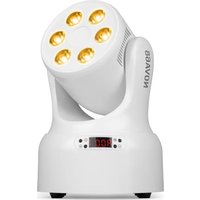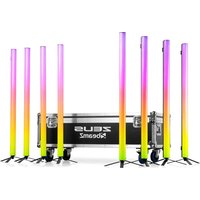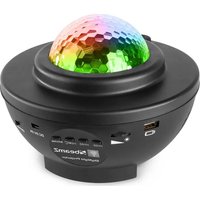
SKYNIGHT - Lamp BeamZ - Free user manual and instructions
Find the device manual for free SKYNIGHT BeamZ in PDF.


User questions about SKYNIGHT BeamZ
0 question about this device. Answer the ones you know or ask your own.
Ask a new question about this device
Download the instructions for your Lamp in PDF format for free! Find your manual SKYNIGHT - BeamZ and take your electronic device back in hand. On this page are published all the documents necessary for the use of your device. SKYNIGHT by BeamZ.
USER MANUAL SKYNIGHT BeamZ
WARNING! Before carrying out any operations with the unit, carefully read this instruction manual and keep it with care for future reference. It contains important information about the installation, usage and maintenance of the unit.
• Unpack and check carefully that there is no transportation damage before using the unit
- Please read these instructions carefully and follow the instructions.
- Observe all safety warnings. Never remove safety warnings or other information from the equipment.
- Be sure that no ventilation slots are blocked; otherwise the unit will overheated.

WARNING! Before connecting the equipment to the power outlet, first verify that the mains voltage and frequency match the values specified on the equipment. If the equipment has a voltage selection switch, connect the equipment to the power outlet only if the equipment values and the mains power values match. If the included power cord or power adapter does not fit in your wall outlet, contact your electrician.
• After connecting the unit, check all cables in order to prevent damage or accidents, e.g., due to tripping hazards.
• Make sure that the power cord is never crimped or damaged. Check the unit and the power cord from time to time.
- Always disconnect power from the mains, when unit is not used or before cleaning! Only handle the power cord by the plug. Never pull out the plug by tugging the power cord.
- Unplug the power cord and power adapter from the power outlet if there is a risk of a lightning strike or before extended periods of disuse.
- Do not switch the unit on and off in short intervals.
- Do not connect the unit to a dimmerpack.
• Install the unit in a well ventilated place.
- Never place any material over the lens.
- Never let the sunlight lights directly to the front lens, even when the unit is not working.
• Always allow free air space of at least 50 cm around the unit for ventilation.
• Make sure that the area below the installation place is blocked when rigging, derigging or servicing the unit.
- For mounting height >100 cm, always fix the unit with an appropriate safety-rope. Fix the safety-rope at the correct fixation points only. The safety-rope must never be fixed at the transport handles!
- Never look directly at the light beam. Please note that fast changes in lighting, e.g. flashing light, may trigger epileptic seizures in photosensitive persons or persons with epilepsy.
- This unit is not designed for permanent operation. Consistent operation breaks will ensure that the unit will serve you for a long time without defects.

WARNING! If the power cord of the unit is equipped with an earthing contact, then it must be connected to an outlet with a protective ground. Never deactivate the protective ground of a power cord.
• Make sure that the unit is not exposed to extreme heat, moisture or dust.
- Clean the unit using a dry cloth.
- Do not touch the unit bare-handed during its operation (housing becomes very hot). Allow the unit to cool for at least 5 minutes before handling.
- This unit is designed exclusively for indoor use, do not use this equipment in the immediate vicinity of fluid (does not apply to special outdoor equipment – in this case, observe the special instructions noted below). Do not expose this unit to flammable materials, fluids or gases.
- If the unit has been exposed to drastic temperature fluctuation (e.g. after transportation), do not switch it on immediately. The arising condensation water might damage your unit. Leave the unit switched off until it has reached room temperature.
- Never attempt to bypass the thermostatic switch or fuses.
- Do not dismantle or modify the unit.
- For replacement use fuses/bulb of same type and rating only.
• Repairs, servicing and electric connection must be carried out by a qualified technician.
- The ambient temperature must always be between -5^ and +45^ .
- If this unit is operated in any other way, than the one described in this manual, the product may suffer damages and the warranty becomes void.
- Plastic bags must be kept out of reach of children.
- Unit must be installed out of the reach of children. Never leave the unit running unattended.

This symbol on the product or on its packaging indicates that this product shall not be treated as household waste. Instead it shall be handed over to the applicable collection point for the recycling of electrical and electronic equipment.
By ensuring this product is disposed of correctly, you will help prevent potential negative consequences for the environment and human health, which could otherwise be caused by inappropriate waste handling of this product. The recycling of materials will help to conserve natural resources. For more detailed information about recycling of this product, please contact your local Civic Office, your household waste disposal service or the shop where you purchased the product.
UNPACKING INSTRUCTION

CAUTION! Immediately upon receiving the product, carefully unpack the carton, check the contents to ensure that all parts are present, and have been received in good condition. Notify the shipper immediately and retain packing material for inspection if any parts appear damage from shipping or the package itself shows signs of mishandling. Save the package and all packing materials. In the event that the product must be returned to the factory, it is important that the product be returned in the original factory box and packing.
If the unit has been exposed to drastic temperature fluctuation (e.g. after transportation), do not switch it on immediately. The arising condensation water might damage your unit. Leave the unit switched off until it has reached room temperature.
FUNCTION DESCRIPTION
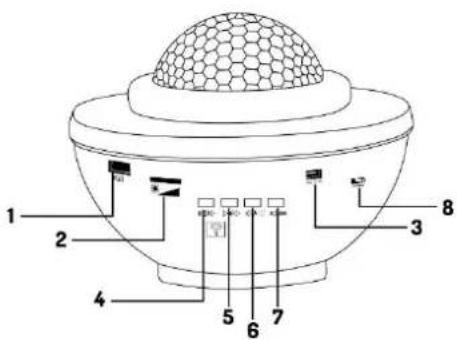
- USB input. Note that this projector can automatically recognize and play music while USB memory is inserted. USB must contain some songs.
- a. Adjust the brightness of the ocean waves at 3 levels. b. When power on, LED light and laser light will stay on, short press control LED light switch, long press control laser light switch.
- DC input: 5V/2A.
- Short press to play the previous track, long press to decrease volume.
- Short press to play the next track, long press to decrease volume.
- Short press to play or pause music, long press to turn BT on or off.
- Press button to switch between USB to BT (Connect BT and USB stick at the same time, then USB stick has music for priority).
- Power on/off.
text_image
1 2 3 4 5 6 7 8REMOTE CONTROL
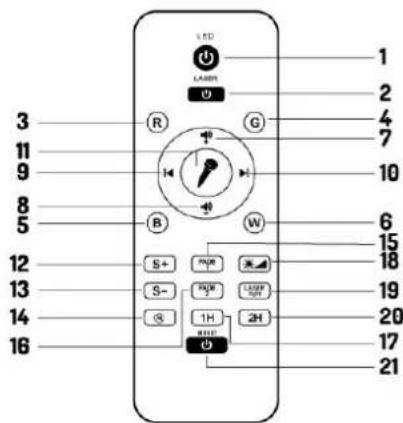
- LED ocean wave light ON/OFF.
- Laser light ON/OFF.
- Press "R", red light ON. Press again, red light OFF (at basic of light on at first time)
- Press "G", green light ON. Press again, green light OFF (at basic of light on at first time).
- Press "B", blue light ON. Press again, blue light OFF (at basic of light on at first time).
- Press "W", white light ON. Press again, white light OFF (at basic of light on at first time).
- Volume up.
- Volume down.
- Previous track
- Next track
- Sound to light control: Connect with BT or USB memory playing music, press "MIC" icon, ocean wave and star light ill respond to the sound of the music.
- Control ocean wave moving speed up (Pause-Slow-Medium-Fast).
- Control ocean wave moving speed down (Fast-Medium-Slow-Pause).
- Long press (3 seconds) to stop timer function.
- Press "FADE1" ocean wave move circularly in R-G-B-W single color mode double-color mode and laser light changed to graduation mode. (the same features as power On).
- Control LED ocean wave light brightness(In order of 70%-40%-40%-70%-100%).
- Press "LASER light" for stay on or enter into programm mode.
- Music Switch On/Off.
text_image
LED 1 2 3 4 5 6 7 8 9 10 11 12 13 14 15 16 17 18 19 20 21 S+ S- G H I J K L M N O P Q R S T U V W X Y Z A B C D E F G H I J K L M N O-
Press "FADE 2" ocean wave move circularly in RB-RG-RW-BG-BW-GW double-color mode and laser light changed to program mode.
-
Long press (3 seconds) control timing function for 1 hour. When LED, laser light flash and emit "bleep" sound once time as prompting. One hour later, it'll automatically switch off.
-
Long press (3 seconds) control timing function for 2 hours. When LED, laser light flash and emit "bleep" sound 2 times as prompting. Two hours later, it'll automatically switch off.
CLEANING
The buildup of dust, dirt and other airborne particles will reduce the unit's light output. It will also prevent the unit from cooling correctly, and this will reduce the unit's lifetime. The rate of dirt buildup will vary depending on environmental factors such as airborne dust, use of smoke machines, airflow from ventilation systems, etc. The unit's cooling fans will accelerate buildup, and any smoke particles that are present in the atmosphere will increase the tendency for dirt to clog.
To get the best performance and lifetime from the unit, inspect it regularly and clean it as soon as you see signs of dirt buildup.
Assess the operating environment each time you begin to use the unit. In dusty or smoky conditions, inspect the unit after a few hours and check it frequently the unit may attract dirt faster than you expect. Draw up a cleaning schedule that will make sure that dirt is removed before it can build up.
Use the following guidelines:
- Disconnect the unit from power and allow it to cool completely before cleaning.
- Do not use solvents, abrasives or any other aggressive product to clean the unit.
• Vacuum or use low-pressure compressed air to remove dust and loose particles from surfaces and air vents. Prevent the blades of cooling fans from turning before you aim a vacuum or air jet at the fan, or you may spin the fan too fast and damage it. - Clean glass components by wiping gently with a soft, clean, lint-free cloth moistened with a weak detergent solution. Put the solution on the cloth and not on the surface to be cleaned. Avoid rubbing glass surfaces.
- Dry the unit with a soft, clean, lint-free cloth or low-pressure compressed air before reapplying power.
VEILIGHEIDSINSTRUCTIES

text_image
LTD 1 2 3 4 5 6 7 8 9 10 11 12 13 14 15 16 17 18 19 20 21 S+ S- R G W S+ R R R R R R R R R R R R R R R R RREINIGUNG
text_image
Labeled diagram of a food item with numbered parts and a mesh dome structureCONTRÔLE À DISTANCE
LED : 2x3Watt 4-in-1 LED Red, Green, Blue, White
Flash rate :1-20 Hz
Laser class :2
Functions : Automatic programs, Sound to light and manual.
Dimensions per unit : 155 x 155 x 125mm
Weight (per unit) : 0.48 kg
Design and product specifications are subject to change without prior notice.
The products referred to in this manual is conforming European and UK legislation directives to which they are subject:
European Union
United Kingdom
Tronios B.V.,
7602KR Almelo, The Netherlands
2014/35/EU
2014/30/EU
2011/65/EC

Tronios Ltd.,
130 Harley Street,
London W1G 7JU, United Kingdom
S.I. 2016:1101
S.I. 2016:1091
S.I. 2012:3032

BEAMZ
is a leading developer of lighting products, including intelligent DMX moving heads, wireless battery operated DMX effects, static washes, sound-activated club effects, strobes & blacklights, LED lighting, fog and special effects machines, lasers and indoor and outdoor architectural lighting, as well as lighting controllers and protective bags.