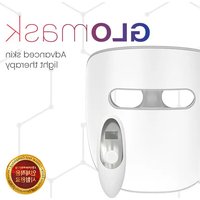
Glomask - Light therapy TensCare - Free user manual and instructions
Find the device manual for free Glomask TensCare in PDF.


| Product type | LED light therapy mask |
| Brand | TensCare |
| Model | Glomask |
| Mask dimensions | 19.5 x 22.3 x 9.3 cm |
| Mask weight | 314 g |
| Remote control dimensions | 4.5 x 13.3 x 3.2 cm |
| Remote control weight | 50 g |
| Mask power supply | Lithium polymer battery 3.7V / 1000mAh, rechargeable via Micro-USB |
| Charging time | Approximately 3 hours |
| Battery life | Up to 5 sessions of 20 minutes (depending on mode) |
| Remote control power supply | 1 CR2032 battery (included) |
| Treatment modes | Red 5 min, Red 10 min, Blue 5 min, Blue 10 min, Blue+Red 20 min |
| Wavelengths | Blue: 415 nm ± 5 nm; Red: 633 nm ± 5 nm; NIR: 830 nm ± 5 nm |
| Included accessories | LED mask, remote control, USB charging cable, travel pouch, instruction manual |
| Material | ABS and others |
| Manufacturer | Shenzhen Rainbow Technologies |
| Distributor | TensCare Ltd |
| Warranty | 6 months against manufacturing defects |
| Cleaning and maintenance | Wipe with an antibacterial wipe or damp cloth. Store in the travel pouch. |
| Usage precautions | Consult a specialist in case of pregnancy, children, elderly. Avoid if undergoing photosensitizing treatments or history of skin cancer. |
Frequently Asked Questions - Glomask TensCare
User questions about Glomask TensCare
0 question about this device. Answer the ones you know or ask your own.
Ask a new question about this device
Download the instructions for your Light therapy in PDF format for free! Find your manual Glomask - TensCare and take your electronic device back in hand. On this page are published all the documents necessary for the use of your device. Glomask by TensCare.
USER MANUAL Glomask TensCare
Instructions for Use
Please read carefully
TensCare™
Introduction
Glomask uses combination light therapy to give healthy and radiant skin. Scientifically proven and used in professional beauty salons, Glomask uses blue, red and near infrared (NIR) light to repair, protect and rejuvenate your skin.
The Glomask comes with a wireless, hand-held controller for easy mode selection. The mask features an adjustable headband and unique eye-pad and chin rest design, allowing the user to wear the mask comfortably whilst minimising skin contact. Unlike other face masks, Glomask's eye-pad design also restricts eye exposure to light whilst not obstructing vision.
The Glomask has been clinically tested and improvements including appearance of fine lines, reduction of wrinkles, improved skin tone and restored oil balance can be seen within just 12 weeks.
Contents
1 x LED mask 1 x USB charging cable
1 x Remote control 1 x Instructions for use
1 x Travel bag
Light Therapy Technology
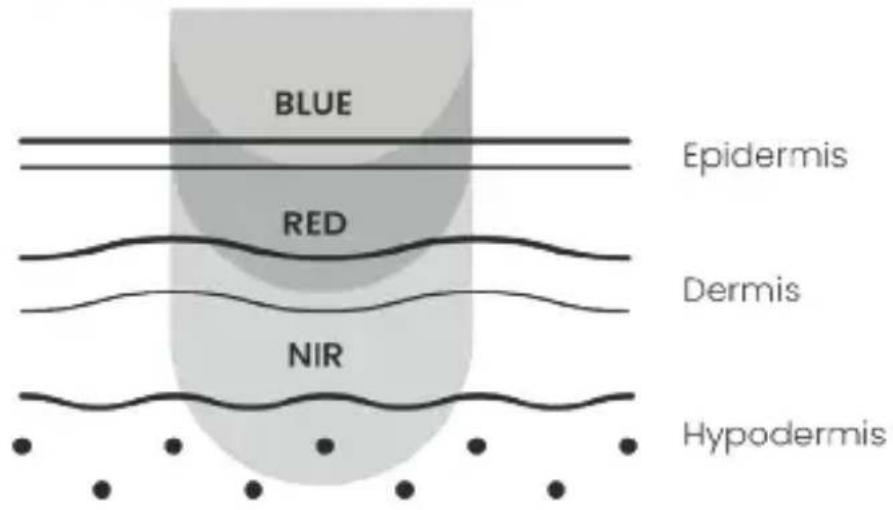
Blue Light
Glomask uses precise wavelengths of blue light to stimulate the top layers of the skin. The light has an antibacterial effect. This not only provides a deep cleanse but can also have the following benefits:
- Break down bacteria
- Restore oil balance
- Reduce and prevent acne
- Improve overall skin condition
RED + Near Infrared (NIR) Light
Glomask combines red and near infrared light to penetrate deeper layers of the skin. Red light is thought to have a positive impact on the mitochondria within the cells in your body. By increasing the function of the mitochondria using red light, a cell can produce more energy. With more energy, cells can function more efficiently, rejuvenate themselves, and repair damage. Red + NIR light has the following effects:
- Promotes collagen production and improves skin elasticity
- Minimises the appearance of wrinkles
• Anti-inflammatory effect
• Improves the appearance of facial scars and sun-damage
• Improves skin radiance and complexion
Treatment Modes
Glomask has fives modes of use to choose from:
Mode Light Therapy Duration
Red 5 Red + NIR 5 minutes
Red 10 Red + NIR 10 minutes
Blue 5 Blue 5 minutes
Blue 10 Blue 10 minutes
Red Blue Red + NIR, Blue 20 minutes
How To Use
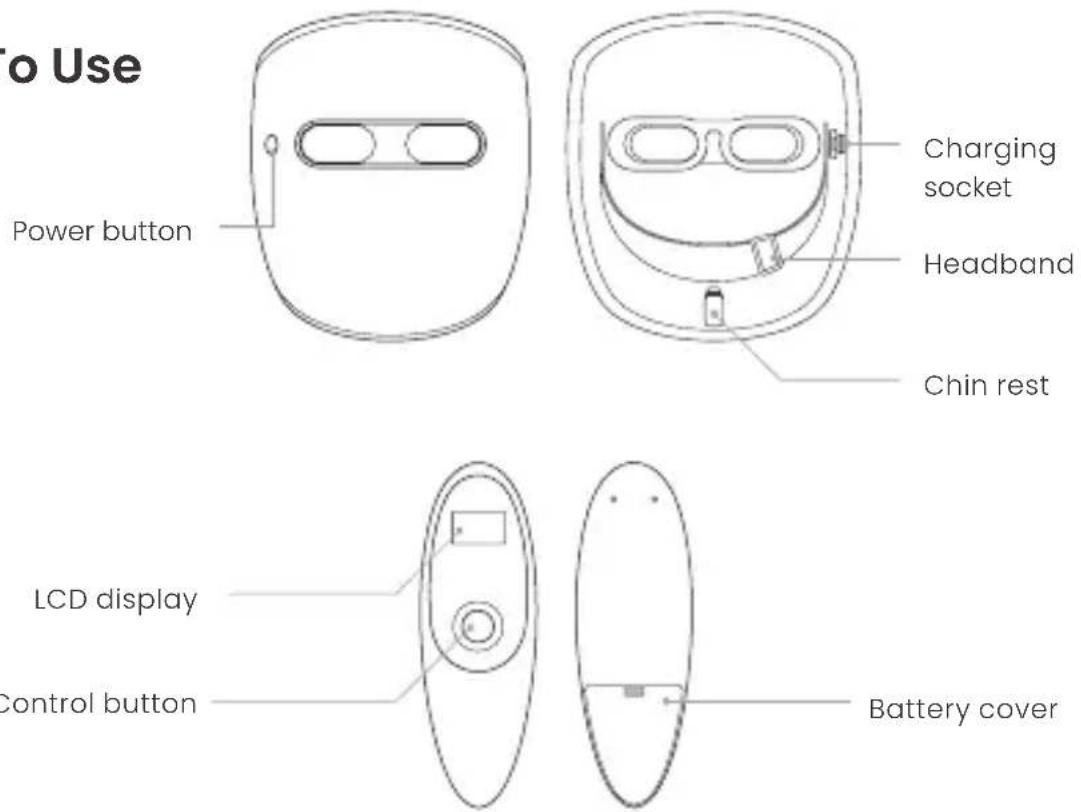
Power button
Preparing for a session
- Before first use, be sure to fully charge the Glomask (see charging section).
- Clean the Glomask by wiping with an antibacterial wipe or damp cloth.
- Wash and dry your face, ensuring any make-up has been removed.
- Remove the battery protection plastic liner from the remote control battery.
- Turn the mask on by pressing the power button on the mask. This will be indicated by a flashing green light.
- Wear the mask on your face. You may need to adjust the headband and height of the chin rest to find a comfortable fit.
Note: Glomask can be used alongside TensCare's Unigel. This contains hyaluronic acid and can help improve the light therapy effectiveness whilst also moisturising your skin. If using the Unigel, apply to your face before wearing the Glomask.
Completing a session
- Select the desired light therapy mode on the remote controller by pressing the control button. LEDs will automatically turn on when a mode is selected.
Warning: Make sure you are wearing the mask before selecting a therapy mode. Avoid looking directly at the LEDs. This could cause damage to your eyes.
-
The Glomask will automatically turn off when the session is complete. This will be indicated by two beeps.
-
Remove the Glomask and wipe clean with an antibacterial wipe or damp cloth.
-
The Glomask should be stored in the travel bag between uses.
Charging
When the Glomask power button flashes red, the battery is low and needs charging.
Connect the Glomask to a power source via the Micro-USB cable provided. The charging socket is located on the inside of the mask, near the headband strap.
The power button will flash red when the Glomask is charging.
The battery is fully charged when the power button light is green. This will take approximately 3 hours.
Note: The remote-control button can be changed by removing the battery cover on the rear of the controller.
Cautions
- Children, pregnant women and elderly people should consult with a specialist before use.
- Do not use if you take certain medications that increase sensitivity to sunlight, such as isotretinoin and lithium.
- Do not use if you have a history of skin cancer and inherited eye diseases.
- If you experience any side effects due to use of the product, discontinue use and consult with a healthcare professional.
-
Keep out of reach from children.
-
Do not store in direct sunlight, in high temperatures or near fire. This product has a built-in rechargeable battery. High temperatures increase risk of explosion.
- Do not store in a humid place.
- Do not store in a place where it can be affected by magnets or magnetic force. This may cause the device to malfunction.
- Do not let other metals or liquids come in contact with the charging terminals of this product.
- If there is a problem with the product, discontinue use and contact TensCare.
- Do not disassemble, repair or modify the device. This may cause it to malfunction.
Warranty
The product is warranted to be free from manufacturing defects for 1 year from the date of purchase.
This warranty is void if the product is modified or altered, is subject to misuse or abuse; damaged in transit; lack of responsible care; is dropped; if the unit has been immersed in water; if damage occurs by reason of failure to follow the user manual; or if product repairs are carried out without authority from TensCare Ltd. Our goods come with guarantees that cannot be excluded under the UK consumer Law. You are entitled to have the goods repaired or replaced if the goods fail to be of acceptable quality.
Before you send your unit for service, please be sure to read the user manual and follow all the instructions.
Should repair be needed within the warranty period, please return the device with the following details:
Name:
Address:
Telephone:
Email:
Date of Purchase:
Proof of Purchase:
Returns should be sent to the following address:
TensCare Ltd
9 Blenheim Road, Epsom, Surrey
KT19 9BE, U.K.
For more information, please call +44 (0) 1372 723 434.
Technical Specification
Mask Controller
| Name Glomask Glomask Controller | ||
| Model number VHL-120 VHLR-120 | ||
| Mask - R-R-2mo-VHL-120Battery - YU10770-18001B | R-R-2mo-VHLR-120 | |
| Rated voltage 5V 1A N/A (1 x CR2032 battery) | ||
| Battery ratings 3.7V / 1,000mAh LithiumPolymer | CR2032, one 3V lithiumbattery | |
| Size 19.5 x 22.3 x 9.3cm 4.5 x 13.3 x 3.2cm | ||
| Weight 314g 50g | ||
| Blue light wavelength 415nm±5nm | ||
| Red light wavelength | 633nm±5nm | |
| NIR light wavelength | 830nm±5nm | |
| Material | ABS and others | |
| Manufacturer | Shenzhen Rainbow Technologies | |
| Distributor | TensCare Ltd | |
Introducción
9 Blenheim Road, Epsom, Surrey
KT19 9BE, REINO UNIDO.
9 Blenheim Road, Epsom, Surrey
KT19 9BE, ROYAUME-UNI.
9 Blenheim Road, Epsom, Surrey
KT19 9BE, U.K.
9 Blenheim Road, Epsom, Surrey
KT19 9BE, REGNO UNITO.
Glomask has fives modes of use to choose from:
9 Blenheim Road, Epsom, Surrey
KT19 9BE, U.K.
9 Blenheim Road, Epsom,
Surrey, KT19 9BE, U.K.
+44 (0) 1372 723434
I-GLOMASK-ML [UK,ES,FR,DE,IT,NL] Rev 1.0 05.23



Brand : TensCare
Model : Glomask
Category : Light therapy