
iTouch Go - Medical device TensCare - Free user manual and instructions
Find the device manual for free iTouch Go TensCare in PDF.


| Product type | Transcutaneous Electrical Nerve Stimulation (TENS) device |
| Brand | TensCare |
| Model | iTouch Go |
| Dimensions | Approximately 10 x 5 x 2 cm |
| Weight | Approximately 100 g (with batteries) |
| Power | 2 AAA batteries (not included) |
| Main functions | 8 preset massage programs, adjustable intensity, timer up to 60 minutes, self-adhesive electrodes |
| Maintenance and cleaning | Wipe with a soft, damp cloth; do not immerse in water |
| Safety | Automatic shutdown after use, use in accordance with medical contraindications |
| Spare parts and repairability | Replacement electrodes available (TensCare reference) |
| General information | User manual included (110 pages), multiple languages available |
Frequently Asked Questions - iTouch Go TensCare
User questions about iTouch Go TensCare
0 question about this device. Answer the ones you know or ask your own.
Ask a new question about this device
Download the instructions for your Medical device in PDF format for free! Find your manual iTouch Go - TensCare and take your electronic device back in hand. On this page are published all the documents necessary for the use of your device. iTouch Go by TensCare.
USER MANUAL iTouch Go TensCare
- Clean the wireless probe with a damp cloth.
- Limpia la sonda inalámbrica con un paño húmedo.
- Nettoyez la sonde sans fil avec un chiffon humide.
- Reinigen Sie die drahtlose Sonde mit einem feuchten Tuch.
- Pulisci la sonda wireless con un panno umido.

-
Hold the power button to switch the device on.
-
Mantén presionado el botón de encendido para encender el dispositivo.
- Maintenez le bouton d'alimentation enfoncé pour allumer l'appareil.
- Halten Sie die Ein-/Austaste gedrückt, um das Gerät einzuschalten.
- Tieni premuto il pulsante di accensione per accendere il dispositivo.

- Switch the device off before removing the probe.
- Apaga el dispositivo antes de retirar la sonda.
- Éteignez l'appareil avant de retirer la sonde.
- Schalten Sie das Gerät aus, bevor Sie die Sonde entfernen.
- Spegni il dispositivo prima di rimuovere la sonda.
Contents
- Intended use
- Kit Contents
- Safety guidelines
- Programmes 6
- Using iTouch Go 8
- iTouch Go features
- Performing Kegel exercises 12
- Charging 13
- Cleaning & storage 14
- Replacement parts 14
- Warranty 14
- Troubleshooting 15
- EMC 17
- Disposal of electronic products (WEEE) 17
- Technical specification 18
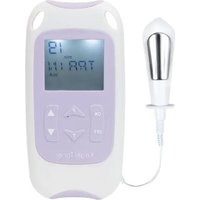
Wireless probe

Control hub

1. Intended use
iTouch Go is a medical device designed to be used in the home healthcare environment to treat symptoms of urinary incontinence via electrical stimulation to the pelvic floor muscle.
iTouch Go also helps to relieve symptoms of chronic pelvic pain.
iTouch Go is suitable for use by adults (18 years+) who can control the device and understand the instructions.
iTouch Go is a variant of the D-Stim TENS & EMS stimulator.
Do not use the device for any purpose other than this intended use.
2. Kit Contents
1 x iTouch Go Wireless probe
1x iTouch Go Control hub
1x Go Gel
1 x Type-C charging cable
1 x Instructions for use
3. Safety guidelines

Contraindications
- Do NOT use if you are or may be pregnant. It is not known whether TENS may affect foetal development.
- Do NOT use if you have a pacemaker (or if you have a heart rhythm problem) or with any electronic medical devices. Using this unit with electronic medical devices may cause erroneous operation of the device. Stimulation in the direct vicinity of an implanted device may affect some models.
- Do NOT use in the first 6 weeks following a pelvic surgery or vaginal childbirth. Stimulation may disrupt the healing process.
- Do NOT use if you have symptoms of active urinary tract infection, vaginal infections, or localized lesions. Introducing the probe may irritate sensitive tissue.
- Do NOT use if you have poor sensation in the pelvic region. You may not be able to control the intensity of stimulation safely.
- Do NOT use with electrical stimulation in patients with a history of carcinoma at the site of stimulation.

Warnings
- Do NOT use if you are unable to properly insert the vaginal probe. If you have a severe prolapse, or if any discomfort occurs when inserting the probe, consult your healthcare professional before use.
- Do NOT use when driving, operating machinery, or similar actions needing muscular control. Damaged leads or sudden changes in contact may cause brief involuntary muscle movements.
- Do NOT use to mask or relieve undiagnosed pain. This may delay diagnosis of a progressive condition.
- Do NOT use if you have, in the area being treated: active or suspected cancer or undiagnosed pain with a history of cancer. Stimulation directly through a confirmed or suspected malignancy should be avoided as it may stimulate growth and promote spread of cancer cells.
- Do NOT use iTouch Go in proximity (e.g. 1 m) to a shortwave or microwave as this may produce instability in the stimulator output.
- Do NOT use simultaneously with high frequency hospital diagnostic/therapeutic
equipment. Doing so may result in burns at the site of the electrodes and possible damage to device.
- Do NOT insert the wireless probe in any other orifice other than the vagina.
- Stop using the device and consult a health care professional if you experience any adverse reactions from the device.

Cautions
- Caution should be used if you have a bleeding disorder as stimulation may increase blood flow to the stimulated region.
- Caution should be used if you have suspected or diagnosed epilepsy as electrical stimulation may affect seizure threshold.
- Caution should be observed when using the device at the same time as being connected to monitoring equipment with body worn electrode pads. It may interfere with the signals being monitored.
- Caution should be used following recent surgical procedures. Stimulation may disrupt the healing process.
- Caution: Do not permit use by persons unable to understand the instructions or persons with cognitive disabilities, i.e., Alzheimer's disease or dementia.
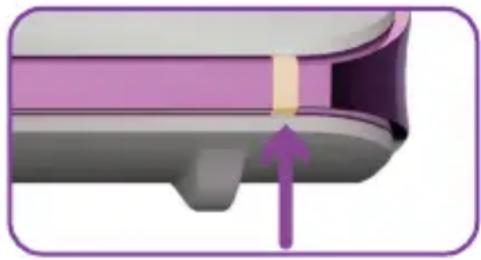
- Caution should be observed when using the iTouch Go at high strength settings. iTouch Go has a Yellow LED light on output socket which means the output will exceed 10 mA (R.M.S) or 10 V (R.M.S) averaged over any period of 1 sec. Prolonged use at high settings may cause muscle injury or tissue inflammation.
- Not intended for use in an oxygen rich environment.
-
Not intended for use in conjunction with flammable anaesthetics or flammable agents.
-
The patient is an intended operator.
- Do not service and maintain the device while in use.
- Keep away from pets and pests.
- Maintenance and all repairs should only be carried out by an authorized agency. The manufacturer will not be held responsible for the results of maintenance or repairs by unauthorized persons.
- If necessary, we will provide circuit diagrams, component part lists or other information that will assist authorized service personnel to repair the device.
- Do not immerse your device in water or place it close to excessive heat such as a fireplace or radiant heater or sources of high humidity such as a nebulizer or kettle as this may cause it to cease to operate correctly.
- Keep the device away from sunlight, as long-term exposure to sunlight may affect the silicone causing it to become less elastic and crack.
- Keep the device away from lint and dust, as long-term exposure to lint or dust may affect the sockets or cause the battery connector to develop a bad contact.
Temperature & Relative Humidity of storage: -25°C-+60°C , 15%-90% R.H. Temperature & Relative Humidity of transportation: -25°C-+60°C , 15%-90% R.H.
There are no user serviceable parts. Do not attempt to open or modify the unit. This may affect the safe operation of the unit and will invalidate the warranty.

Note: The iTouch Go has no essential performance characteristics. Device failure will not cause unacceptable clinical risk for the user.
Note: No serious or long-term adverse effects have been reported. Mild adverse reactions are very rarely reported, but these have included muscular pain and cramps, vaginal tenderness, irritation and bleeding, mild or short-term urge incontinence, and tingling sensation in legs. If you experience any of these, stop use. When symptoms have gone, try resuming at a lower intensity setting.

Probe Cautions
- The iTouch Go vaginal probe is intended for single patient use only. Do not share your iTouch Go probe with anyone else. Improper treatment or cross-infection may occur.
- The stainless steel in the probe's metal plates contain some Nickel. This could cause a reaction if you have a Nickel allergy.
- It is important that the vaginal probe is cleaned after each use. Ineffective cleaning may lead to irritation or infection.
- Never insert or remove vaginal probe unless the control unit is powered OFF as insertion or removal when stimulation is active may cause discomfort or tissue irritation.
- If tissue irritation occurs, discontinue treatment immediately. Ask your healthcare professional for advice before continuing further treatment to prevent injury.
- Do not use a silicone-based lubricant on the metal plates of the probe as it may decrease the effectiveness of iTouch Go's muscle stimulation.
4. Programmes
The iTouch Go has five preset programmes. One for each type of incontinence (Stress, Urge and Mixed), one for toning the pelvic floor muscles (Tone), and one for chronic pelvic pain (Pain).
P1 - Stress Incontinence
If you leak urine when you cough, sneeze, laugh, strain, or make sudden movements, this is called Stress Incontinence.
It is particularly common in women who have had a natural childbirth and occurs when the bladder neck and the other mechanisms that act to hold urine in the bladder are not working properly. The most common cause is a weak pelvic floor.
The Stress incontinence programme strengthens the muscles of the pelvic floor using gentle stimulation. Once these muscles are stronger, they are better able to resist urinary leakage caused by external pressure being applied to the bladder such as with a cough, sneeze, or physical exertion.
The stimulation causes the muscles to contract and relax through a work and rest phase. This builds their strength. Like other fitness training, successful treatment requires stimulation once a day for one to three months. Improvement starts becoming apparent after about four weeks.
The sensation is like a strong drawing in of the muscles of the vagina, pulling up the pelvic floor. Your natural reaction will be to pull your muscles in and up, and this exercises and strengthens them.
P2 - Urge Incontinence
Describes an overactive bladder. A person may experience a strong and sudden urge to go
to the toilet but are not always able to hold on or must go so frequently that it becomes inconvenient.
The urge programme works in a different way to the stress programme. The gentle continuous stimulation soothes the bladder (detrusor) muscle, reducing its involuntary contractions. This prevents the unwanted and unexpected emptying of the bladder.
Successful treatment requires stimulation once a day and improvements can sometimes be seen in as little as two weeks.
The sensation is a softer, vibrating, stimulation.
P3 - Mixed Incontinence
Is a combination of both Stress and Urge Incontinence.
The first 10 minutes uses the Urge programme to reduce sensitivity, then in the second 10 minutes, the Stress programme exercises the pelvic floor muscles through a work and rest phase. You may need to increase the strength to feel the muscle contraction when the Stress programme starts.
P4 - Tone
Once the pelvic floor muscles
have been strengthened with the iTouch Go, it is important to continue to exercise them.
Regular use of this programme, about twice a week, will ensure that your muscles remain fit and toned.
This programme may also be used as an alternative treatment for stress incontinence.
The sensation when using the Tone programme is a mixture of a strong drawing in of the muscles and then releasing through a work and rest phase.
A strong and fit pelvic floor may also increase sexual health and enjoyment.
P5 - Pain
Pelvic pain can be due to several causes such as: Vulvodynia, Symphysis Pubis, or Interstitial Cystitis.
The Pain programme can be used to alleviate chronic pelvic pain from many causes. As with all TENS, it does not treat the underlying condition and you should obtain a professional diagnosis of the cause before starting use. It gives a constant soothing tingling sensation. Use for at least 40 minutes two or three times a week. Set the
| Prog. P1 - Stress | P2 - Urge | P3 - Mixed P4 - Tone | P5 - Pain | ||
| Treatment type | EMS EMS | EMS EMS TENS | |||
| Duration (min) | 20 20 10-Urge | 10-Stress | 20 Continuous | ||
| Work/Rest Phase (s) | Work: 6 Rest: 10 | N/A Work: N/a-6 Rest: N/a-10 | Work: 5 Rest: 6 | N/A | |
| Frequency of use | Daily Daily Daily | 2 | times a week | 2 or 3 times a week | |
strength as high as you can while remaining comfortable.
Programmes 1 to 4 use EMS which stands for electrical muscle stimulation. EMS helps you to contract your pelvic floor muscles via gentle stimulation enabling you to develop your own muscle control. These contractions exercise the muscles and, as with any kind of
exercise if performed regularly, build strength and tone.
Programme 5 uses TENS which stands for Transcutaneous Electrical Nerve Stimulation. Low frequency TENS promotes the release of endorphins, the body's natural pain killer.
Endorphin Release builds up over 40 minutes and will last several hours after stimulation is ended.
5. Using iTouch Go
Controls and Interface


Preparing for a session
-
Before using iTouch Go you will need to visit the toilet.
-
Lubricate the wireless probe with a water-based lubricant, such as TensCare Go Gel.
Caution: Do not use a silicone-based lubricant on the stimulation contacts as it may decrease the effectiveness of the iTouch Go's muscle stimulation.
- Lie down on your back in a comfortable position with your legs apart.
Note: Avoid lying on your side with your thighs tightly closed as this can interfere with the wireless connection to the probe.
Warning: Ensure the iTouch Go is switched OFF before inserting the probe.
- Insert the probe into your vagina, in the same way as you would a tampon, until only the plastic rim at the base of the probe is visible.

- The metal rings conduct the electrical pulse and should always be in contact with the main part of the muscle. The tissues close to the entrance are more sensitive, so you should avoid stimulating them.
Completing a session
1. Turning on/off
Press and hold the power button on the control hub for 3 seconds to switch the device on.
Note: The device will automatically turn off at the end of a session.
Note: The device will automatically turn off after 5 minutes if the device is idle and not in use.
2. Connecting the probe
With the wireless probe inserted in the vagina, the control hub will automatically connect to the probe as soon as it is turned on.
The control hub and probe will take about 10 seconds to connect successfully. This is indicated on the LCD display with a connection animation.

Note: If the probe cannot make a connection to the control hub or is not removed from the control hub, the connection animation will be displayed.
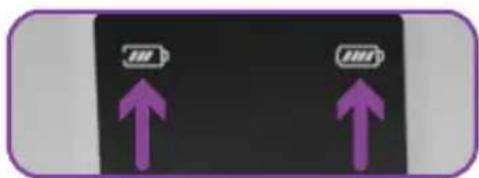
Once the probe and control hub are connected, the connection animation will disappear, and the probe battery level will be visible in the top right corner of the screen. You may now start your treatment.
3. Selecting programme
You can select from the five preset programmes. Details in section 4 will help you identify the best programme to suit you. To change between the programmes, press the power button repeatedly. The selected programme is indicated on the LCD display.
4. Selecting intensity
With your programme selected, you can now adjust the intensity of the muscle stimulation. Increase and decrease the intensity of the selected programme by using the intensity increase and decrease buttons. Press and hold the increase/decrease intensity button to rapidly increase/decrease the selected intensity. Intensity selected is displayed in the bottom right of the LCD display.

Note: The iTouch Go strength will go up at 1 mA ments.

Note: When the output exceeds 10mA, the intensity will drop to 0 if the probe does not have good contact with the body.
During a session
Once you have reached a strong but comfortable intensity, 5 seconds after you stop changing the intensity the treatment time will be displayed.

Note: If the probe is disconnected from the control hub during use, the probe will continue to work until the treatment is completed. The control hub will keep trying to reconnect to the probe automatically. The connection animation will be displayed on the control hub until the probe and control hub reconnect.
During treatment, if the probe is disconnected from the control hub, the control hub intensity buttons will not work. However, intensity can still be adjusted using the +/- buttons on the tail of the probe. Once the connection between the control hub and the probe is restored, the intensity adjusted through the probe will be synchronized
to the control hub and the connection animation will disappear.

Note: Ensure to reduce intensity to 0mA using the ns on the tail of the probe e removing the probe.
If you are using programmes PI Stress, P4 Tone or reach the final 10 minutes of P3 Mixed the intermittent work/rest phase will start.
The machine will take itself to 0 mA for a rest period and then take itself back up to the level of intensity you chose to work the muscle.
For best results in these programmes try to contract the pelvic floor muscles along with the iTouch Go, and to sustain the contraction into the rest interval. If possible, link the contraction to your breathing to get into a gentle rhythm.
Initially the sensation in the muscles around your vagina may be limited but will improve as you complete more sessions.
Take care not to use too much strength and thereby over stimulate the muscle. The sensation may not be even as it may vary depending on the sensitivity of the nerves.

Note: If the sensation becomes uncomfortable, since the intensity using the lease intensity button.
The Urge and Pain (P2 & P5) programmes work differently. There is no need to have a contraction. The strength should be comfortable, but always remain noticeable. You may need to increase it over the course of the treatment.
The length of each session for muscle strengthening will also depend on your ability to contract and your resistance to fatigue. Be careful not to overuse
early on, as the resulting aches may not be felt until the next day.

Note: If you experience cramping, switch the unit off until the symptoms go away then continue the session with the intensity set at a lower level.
After your session
When the timer reaches zero, your session is complete, and the unit will automatically turn off.
- Check that the control unit is off. If it is not, hold down the OFF button to switch off then remove the probe from your vagina by holding the probe tail and gently pulling outwards.
- Wash and thoroughly dry the probe and return it to the control hub. See section 9 for instructions on cleaning & storage.
- The iTouch Go will not only improve your pelvic floor muscles but also help you to recognise the correct sensation you need to feel when doing your Kegel exercises explained in section 7.
6. iTouch Go features
Open circuit cut-out
If the iTouch Go probe is unable to provide treatment due to poor/no connection, the strength will automatically reset to zero. This is to prevent sudden changes in sensation if a broken connection is re-made.
During treatment if there is an active output of 10mA or higher and probe connection is lost, intensity resets to zero and 0mA will flash for 5 seconds. Intensity cannot be increased during this 5 second period.
Usage Memory
1) Programme Retention. When you switch the unit on, it will automatically start in the programme which was being used when it was switched off.
2) Usage. Press Power and – button on the control hub together and hold down for 3 to 5 seconds. The display will show the number of times the unit has been used (displayed in the programme number location) and the duration of use in hours (intensity setting number location).
Press the same buttons again to return to normal controls.
3) Memory Reset. To reset memory to zero, hold down the + and power buttons together for 3 to 5 seconds.
Keypad Lock

The control hub auto-locks after 30 seconds if no buttons are pressed. This is indicated on the display by the lock icon. To unlock the device, press the decrease intensity button on the control hub once.
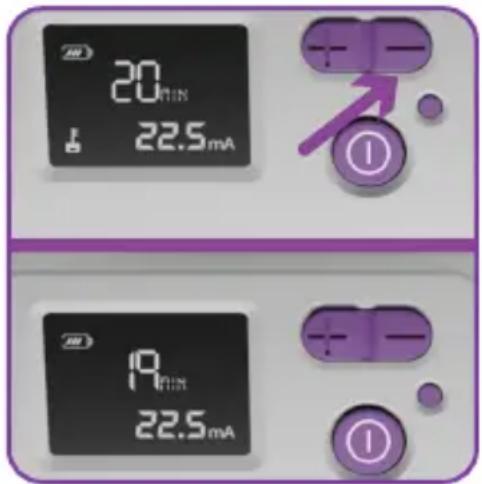
Once output is increased above 0mA, the LED indicator on the control hub will turn yellow.
Prolonged use at high settings
may cause muscle injury or tissue inflammation. User should take caution when using the device at high strength settings.
Probe pairing
To pair a new wireless probe with your control hub, first turn off the device and remove the faulty probe from the control hub for 2 minutes.
The removed probe will disconnect automatically.
Next place the replacement probe into the hub and charge the device for 30 seconds.
A green LED will flash indicating the probe has successfully paired with the control hub.

i Note: If the probe does not pair within 2 minutes, it will exit the pairing mode, and the control hub will continue to charge.
7. PerformingKegel exercises
It is recommended to make Pelvic Floor Exercises (Kegel Exercises) part of your daily life.
Kegel exercises can be done at any time and are very discreet so you can do them almost anywhere. It is a good idea to try and develop a routine which you can repeat each day.
- First, it is important to identify your pelvic floor muscles. To identify your pelvic floor muscles, try to stop your urine flow mid-stream. The muscles you use for this action are the ones you need to engage during Kegel exercises.
i Note: This method should only be used to identify the muscles and not as a regular exercise routine, as frequently stopping urine flow can lead to urinary problems.
-
It is important to have an empty bladder before starting the exercises.
-
Try to remember the lifting and squeezing sensation from step 1. When you are ready try to recreate the sensation just using the muscles you identified earlier; don't tense the muscles in your legs, stomach or buttocks and remember to breathe normally.
-
Aim to hold each squeeze or 'contraction' for three to five seconds, then release and relax. You should feel a 'letting go' of the muscles. Rest for five seconds and then repeat.
-
Try and do about ten squeezes in this way.
-
Repeat the whole process three or four times a day.
-
Over a period of time try to increase the muscle contractions up to about ten seconds but remember to rest in between each squeeze for longer periods.
Note: It is important to aim for quality contractions, not quantity, so a few good hard squeezes are better than a series of weak ones.
Do not worry if you find holding for 3 seconds difficult at first. Just squeeze for as long as you feel comfortable to do so. The more exercise you do, the stronger the muscles will become and the longer you will be able to squeeze.
- Using your iTouch Go pelvic floor stimulator in conjunction with Kegel exercises will give you a better understanding of how they work and how to get the greatest benefit from them.
8. Charging
The control hub acts as a charging hub for the wireless probe. The hub features a Type C charging socket found on the side of the control hub.
Control hub battery level is displayed in the top left of the LCD display.
Probe battery level is displayed in the top right of the LCD display.
When remaining battery life is below 20% please charge the device.

A charging cable is included in the kit. To fully charge the battery from 0% to 100% will take around 4 hours.
The charging hub should remain closed while the probe is charging.
Do not use charging cable other than one provided with the kit.
The LED indicator flashes green when the device is charging and remains lit when fully charged.
Battery icons on the display flash and animate increasing during charging and displays full battery icons when fully charged. The device cannot be used during charging.
The device should last at least 10 hours from 100% charge to 0%.
i Note: The device should be charged at least once every 3 months to ensure battery life is maintained.
! Battery warnings
This product is equipped with a Lithium-ion battery. Failure to follow these instructions could cause the lithium-ion battery to leak acid, become hot, explode, or ignite and cause injury and / or damage:
Do not pierce, open, disassemble, or use in a humid and/or corrosive environment.
Do not expose to temperatures over 60°C(140F).
Do not put, store, or leave near sources of heat, in direct strong sunlight, in a high temperature location, in a pressurized container or in a microwave oven.
Do not immerse in water.
Do not short-circuit.
Do not transport and store the battery together with sharp metal objects that could pierce the battery. i.e. necklaces, hairpins, nail etc.
Do not strike at pack with any sharp edge or throw the pack.
To avoid the risk of electric shock, this equipment must only be connected to a mains supply with a protective earth connection.
Only use the battery charger provided for recharging batteries.
Keep batteries out of the reach of children to prevent them from swallowing them by mistake. If swallowed by child, contact your healthcare professional
immediately.
If battery leakage occurs and comes in contact with the skin or eyes, wash thoroughly with lots of water and immediately seek medical attention.

Battery cautions
Do not use in a location where there is a large amount of static electricity, otherwise, the safety devices in the battery pack may be compromised.
Disposal: Always dispose of batteries and device responsibly according to local government guidelines. Do not throw batteries onto a fire. Risk of explosion.
9. Cleaning & storage
It is important that the probe is cleaned before using for the first time and after each use. Clean with either an alcohol-free antibacterial wipe such as TensCare Wipes (see X-WIPES) or by washing with a damp cloth and warm soapy water.
Rinse in clean water and dry thoroughly and return the probe to the control hub.
Do not immerse the wireless probe in a liquid.
Clean the control hub at least once a week using the same method.
Do not immerse your iTouch Go unit in water.
Do not use any other cleaning solution than soap and water.
10. Replacement parts
Expected Service Life
The machine will often last
for more than 5 years, but is warranted for 2 years. Accessories are not covered by the warranty.
The following replacement parts may be ordered from your supplier or distributor (see back cover for contact details) or from TensCare at www.tenscare.co.uk or +44(0) 1372 723434.
| X-VPGO iTouch GoReplacementvaginal probe | |
| A-CHGO iTouch GoReplacementcontrol hub | |
| K-G0100 Go Gel personalwater-basedlubricant | |
| X-WIPES Pack of 30 wipes | |
| X-T YPC Type-Ccharging cable |
11. Warranty
This warranty refers to the wireless probe and control hub only. This warranty does not cover the charging cable and go gel included in the kit.
This product is warranted to be free from manufacturing defects for 2 years from date of purchase.
This warranty is void if the product is modified or altered, is subject to misuse or abuse; damaged in transit; lack of responsible care; is dropped; if incorrect battery has been fitted; if the unit has been immersed in water; if damage occurs by reason of failure to follow the written instruction booklet enclosed; or if product repairs are carried out without authority from TensCare Ltd.
We will repair, or at our option replace free of charge, any parts necessary to correct material
or workmanship, or replace the entire unit and return to you during the period of the warranty. Otherwise, we will quote for any repair which will be carried out on acceptance of our quotation. The benefits conferred by this warranty are in addition to all other rights and remedies in respect of the product, which the consumer has under the Consumer Protection Act 1987.
If necessary, we will provide circuit diagrams, component part lists or other information that will assist authorized service personnel to repair the device.
Our goods come with guarantees that cannot be excluded under the UK consumer Law. You are entitled to have the goods repaired or replaced if the goods fail to be of acceptable quality.
Before you send your unit for service
Before sending in your unit for service, please take a few minutes to do the following:
Read your manual and make sure you follow all the instructions.
DEVICE AND PROBE SHOULD BE CLEANED THOUROUGHLY BEFORE RETURNING.
Returning your unit for service
Should repair be needed within the warranty period, enclose the tear off section of the warranty card and your proof of purchase receipt. Please ensure all relevant details are completed before sending your unit in for service. Please ensure your contact details are still current and include a brief description of the problem you are experiencing together with your purchase receipt.
Please return the unit and warranty card (see page 21):
TensCare Ltd
9 Blenheim Road,
Epsom, Surrey,
KT19 9BE, UK.
Should you require any further information please do not hesitate to contact us by calling our number:
+44 (0) 1372 723 434.
12. Troubleshooting
Problem Possible causes Solution
| No display Flat battery Charge battery. See section 08. | ||
| Damaged battery Contact supplier. There is no maintenance or calibration other than charging the battery. Do not modify the device as this may reduce safety or effectiveness. | ||
| Low battery display | Low batteries Charge battery. See section 08. | |
| Controls will not work | Keypad is locked If the lock icon is shown, press the decrease intensity button to unlock the device. | |
| Wireless connection between hub and probe is faulty | Contact supplier. | |
| No sensation and display is not flashing | Intensity is not strong enough | Increase the intensity until you feel a strong but comfortable sensation. |
| Reduced sensitivity in the area being treated. | You may have reduced sensitivity due to previously damaged or desensitised pudendal nerves (this can happen in childbirth or some surgical procedures). Please consult your healthcare professional. | |
| Probe battery is empty | Charge battery. See section 08. | |
| Wireless connection between hub and probe is faulty | Contact supplier. | |
| No sensation and display is flashing | The unit is faulty You | can try to test the unit by holding the probe in your hand: Dampen your hand with water and a little table salt. Squeeze the probe firmly and make sure your skin is covering the metal parts of the probe and carefully increase strength until you can feel something. Most people will start to feel the stimulation in their hand at around 25 mA. If the display flashes and the unit will not allow you to pass 20 mA. The unit is faulty. |
| Intensity setting returns to 0mA. | There is an open circuit leading to a connection error. | The iTouch Go wireless probe is unable to provide treatment due to poor/no connection. Ensure the positioning of the probe is correct. |
| No sensation on one side of the probe | Position is not optimal and needs adjusting. | The current flows from one side of the probe to the other, so it is not possible to have one side “not working”. However, the strength of the sensation depends on how close to the nerve the current flows, and in which direction it flows relative to the nerve. You can try slightly adjusting the position of the probe. |
| Sudden change in sensation | If you disconnect and re-connect a few minutes later, the signal will feel quite a lot stronger. | Always return strength to zero after disconnecting the probe. |
If the above review has failed to resolve your problem, to report unexpected operation or events, or to provide feedback call TensCare or your local dealer (address on back cover) for advice.
Contact TensCare customer service on +44 (0) 1372 723 434. Our staff are trained to assist you with most issues you may have experienced, without the need to send your product in for service.
European Medical Device Regulation requires that any serious incident that has occurred in relation to this device should be reported to the manufacturer and the competent authority in your country. This can be found at:
https://ec.europa.eu/docsroom/documents/36683/attachments/1/translations/en/renditions/pdf
13. EMC
Wireless communications equipment such as wireless home network devices, mobile phones, cordless telephones and their base stations, walkie-talkies can affect this equipment and should be used no closer than 30cm (12 inches) to any part of the device.
(Note. As indicated in 5.2.1.1(f) of IEC 60601-1-2 for ME EQUIPMENT).

Note: See end of user manual for full EMC tables.
14. Disposal of electronic products (WEEE)
One of the provisions of the European Directive 2012/19/EU is that anything electrical or electronic should not be treated as domestic waste and simply thrown away. To remind you of this Directive all affected products are now being marked with a crossed-out wheelie bin symbol, as depicted below.
To comply with the Directive, you can return your old electro-therapy unit to us for disposal. Simply print a postage- paid PACKETPOST RETURNS label from our website www.tenscare.
co.uk, attach this to an envelope or padded bag with the unit enclosed, and post it back to us. Upon receipt, we will process your old device for components recovery and recycling to help conserve the world's resources and minimise adverse effects on the environment.

15. Technical specification
| Waveform Symmetrical Bi-Phasic Rectangular | |
| Amplitude(over 500 Ohm load) | 99.0 mA zero to peak (99 steps of intensity) +/- 10% |
| Maximum intensity 50V zero to peak across 500Ω +/- 10%Constant voltage over 500-2000 Ohm | |
| Maximum charge per pulse | 25uC |
| Output plug Fully shielded: touch proof | |
| Channels Single channel | |
| Batteries Controller: 3.7V/900mAhProbe:3.7V/320mAh | |
| Weight Wireless probe: 54g | Control hub: 173gTotal: 227g |
| Dimensions Wireless probe: 26 x 157 x 26 mmControl hub: 173 x 81.5 x 40 mm | |
| Safety Classification Internal power source.Designed for continuous use.No special moisture protection. | |
| Software version Controller: R3_00Probe: R3_00 | |
| Environmental specifications | |
| Operating conditions Temperature range: +5°C to +40°CHumidity: 15% to 90% RH non-condensingAtmospheric pressure: 700hPa to 1060hPa | |
Storage conditions Temperature range: -25°C to +60°C
Humidity: 15% to 90% RH non-condensing
Atmospheric pressure: 700hPa to 1060hPa

Note: The electrical specifications are nominal and subject to variation from the listed values due to normal production
tolerances of at least 5%.

Note: At least 30min required for the device to warm / cool from the minimum / maximum storage temperature between uses until ready for intended use.
Programme parameters
| Prog 1 - Stress | 2 - Urge | 3 - Mixed | 4 - Tone | 5 - Pain |
| Ramp Up & Down (s) | 1 Constant Constant | / 1 | 2 Constant | |
| Plateau (s) 5 Constant | / 5 | 3 | ||
| Rest (s) 10 Constant | / 10 | 6 | ||
| Duration (min) | 20 20 20 20 Continuous | |||
Symbols Table


TYPE BF APPLIED PART: Equipment providing a degree of protection against electric shock, with isolated applied part. Indicates that this device has conductive contact with the end user.
This symbol on the unit means "Refer to instructions for use".
Temperature Limitation: indicates the temperature limits to which the medical device can be safely exposed.
Humidity Limitation: indicates the humidity limits to which the medical device can be safely exposed.
Atmospheric Pressure: indicates the atmospheric limits to which the medical device can be safely exposed.
Lot Number: indicates the manufacturer's batch code so that the batch or lot can be identified.
| SN | Serial Number: indicates the manufacturer's serial number so that a specific medical device can be identified. |
| REF | Catalogue Number: indicates the manufacturer's catalogue number so that the device can be identified. |
| Do not dispose in household waste. | |
| Manufacturer Symbol | |
| Date of Manufacture: indicates the date which the medical device was manufactured. This is included within the serial number found on the device (usually on the back of the device), either as "E/Year/Number" (YY/123456) or "E/Month/Year/Number" (MM/YY/123456). | |
| CE0197 | CE Mark |
| MD | Medical Device |
| This medical device is indicated for home use. | |
| Importer Symbol | |
| IP22 | This medical device is not water resistant and should be protected from liquids.The first number 2: Protected from touch by fingers and objects greater than 12 millimeters.The second number 2: Protected from water spray less than 15 degrees from vertical. |
| EU REP | Authorized representative in the European Community / European Union |
| UDI | Unique Device Identified : Indicates a carrier that contains Unique Device Indentifie information |
| Notes are used to provide clarification or recommendation. | |
| A Warning is used when failure to follow the instructions may result in serious injury or death. | |
| A Caution is used when failure to follow the instructions may result in a minor or moderate injury, or damage to the device or other property. | |
| A Contraindication is used when a device should not be used because the risk of use clearly outweighs any foreseeable benefits and may result in serious injury or death. |
Warranty Card
RETURN THIS PORTION ONLY WHEN YOU RETURN YOUR PRODUCT FOR REPAIR UNDER WARRANTY
DEVICE AND PROBE SHOULD BE CLEANED THOUROUGHLY BEFORE RETURNING.
Name:
Address:
Postcode:
Telephone:
E-Mail:
Model:
Date of Purchase:
ATTACH PROOF OF PURCHASE
Retailer's Name:
Retailer's Address:
Retailer's Postcode:
Brief description of the problem you are experiencing:
WARRANTY IS VOID UNLESS THE ABOVE INFORMATION IS COMPLETED AND CORRECT
Contenido
Centro de control

1. Uso previsto
https://ec.europa.eu/docsroom/documents/36683/attachments/1/translations/en/renditions/pdf
13. EMC
Hub de contrôle


https://ec.europa.eu/docsroom/documents/36683/attachments/1/translations/en/renditions/pdf
13. EMC
Steuerzentrale

Kopplung der Sonde
https://ec.europa.eu/docsroom/documents/36683/attachments/1/translations/en/renditions/pdf
13. EMC
Hub di controllo

1. Uso previsto
https://ec.europa.eu/ docsroom/documents/36683/ attachments/1/translations/en/ renditions/pdf
13. EMC
Wireless communications equipment such as wireless home network devices, mobile phones, cordless telephones and their base stations, walkie-talkies can affect this equipment and should be used no closer than 30cm (12 inches) to any part of the device.
(Note. As indicated in 5.2.1.1(f) of IEC 60601-1-2:2014 for ME EQUIPMENT).
Use special precautions regarding EMC according to the information provided below.
- Other portable and mobile RF communications equipment can affect performance.
- Do not use when adjacent to or stacked with other electrical equipment.
- Use of leads or electrodes other than those listed in this manual may affect EMC performance.
Warning: Use of this equipment adjacent to or stacked with other equipment should be avoided because it could result in improper Electromagnetic Emissions
Wireless communications equipment such as wireless home network devices, mobile phones, cordless telephones and their base stations, walkie-talkies can affect this equipment and should be used no closer than 30cm (12 inches) to any part of the device.
(Note. As indicated in 5.2.1.1(f) of IEC 60601-1-2:2014 for ME EQUIPMENT).
Use special precautions regarding EMC according to the information provided below.
- Other portable and mobile RF communications equipment can affect performance.
- Do not use when adjacent to or stacked with other electrical equipment.
- Use of leads or electrodes other than those listed in this manual may affect EMC performance.
Warning: Use of this equipment adjacent to or stacked with other equipment should be avoided because it could result in improper operation. If such use is necessary, this equipment and the other equipment should be observed to verify that they are operating normally."
Warning: Use of accessories, transducers and cables other than those specified or provided by the manufacturer of this equipment could result in increased electromagnetic emissions or decreased electromagnetic immunity of this equipment and result in improper operation."
Warning: Portable RF communications equipment (including peripherals such as antenna cables and external antennas) should be used no closer than 30 cm (12 inches) to any part of the ME equipment, including cables specified by the manufacturer. Otherwise, degradation of the performance of this equipment could result."
| Declaration - Electromagnetic Emission | |
| Emissions test Compliance | |
| RF emissionsCISPR 11 | Group 1 |
| RF emissionsCISPR 11 | Class B |
| Harmonic emissions IEC61000-3-2 | Class A |
| Voltage fluctuations/flicker emissionIEC 61000-3-3 | Clause 5 |
| Declaration - Electromagnetic Immunity | ||
| Immunity test IEC 60601 test level Compliance level | ||
| Electrostatic discharge (ESD)IEC 61000-4-2 | ±8 kV contact±2 kV, ±4 kV, ±8 kV, ±15 kV air | ±8 kV contact±2 kV, ±4 kV, ±8 kV, ±15 kV air |
| Electrical fast transient/burstIEC 61000-4-4 | ±2 kV for power supply lines±1 kV for input/output lines | ±2 kV for power supply lines±1 kV for input/output lines |
| SurgeIEC 61000-4-5 | ±0.5kV, ±1 kVline(s) to lines±0.5kV, ±1 kV, ±2 kV line(s) to earth | ±0.5kV, ±1 kV line(s) to lines±0.5kV, ±1 kV, ±2 kV line(s) to earth |
| Voltage dips, short interruptions and voltage variations on power supply input linesIEC 61000-4-11 | 0 % UT; 0.5 cycleAt 0°, 45°, 90°, 135°, 180°, 225°, 270°and 315°0 % UT; 1 cycle and=70 % UT; 25/30 cyclesSingle phase: at 0°0 % UT; 250/300 cycles | 0 % UT; 0.5 cycle At 0°, 45°, 90°, 135°, 180°, 225°, 270°and 315°0 % UT; 1 cycle and 70 % UT; 25/30 cyclesSingle phase: at 0°0 % UT; 250/300 cycles |
| Power frequency (50/60 Hz)magnetic fieldIEC 61000-4-8 | 30 A/m 30 A/m | |
| NOTE: UT is the a.c. mains voltage prior to application of the test level. | ||
| Conducted RFIEC 61000-4-6 | 3 V0.15 MHz to 80 MHz6 V in ISM bands between 0.15 MHz and 80 MHz | 3 V0.15 MHz to 80 MHz6 V in ISM bands between 0.15 MHz and 80 MHz |
| Radiated RFIEC 61000-4-3 | 10V/m80 MHz to 2.7 GHz | 10V/m |
Declaration - IMMUNITY to proximity fields from RF wireless communications equipment
| Immunity test | IEC60601 test level Comp- | liance level | |||
| Test frequency | Modulation | Maximum power | Immunity level | ||
| Radiated RF IEC 61000-4-3 | 385 MHz **Pulse Modulation: 18Hz | 1.8W 27 V/m | 27 V/m | ||
| 450 MHz *FM+ 5Hz deviation: 1kHz sine | 2 W 28 V/m | 28 V/m | |||
| 710 MHz 745 MHz 780 MHz | **Pulse Modulation: 217Hz | 0.2 W 9 V/m | 9 V/m | ||
| 810 MHz 870 MHz 930 MHz | **Pulse Modulation: 18Hz | 2 W 28 V/m | 28 V/m | ||
| 1720 MHz 1845 MHz 1970 MHz | **Pulse Modulation: 217Hz | 2 W 28 V/m | 28 V/m | ||
| 2450 MHz **Pulse Modulation: 217Hz | 2 W 28 V/m | 28 V/m | |||
| 5240 MHz 5500 MHz 5785 MHz | **Pulse Modulation: 217Hz | 0.2 W 9 V/m | 9 V/m | ||
Note* - As an alternative to FM modulation, 50 % pulse modulation at 18 Hz may be used because while it does not represent actual modulation, it would be worst case.
Note** - The carrier shall be modulated using a 50 % duty cycle square wave signal.

EasyMed Instruments co. Ltd.
3/F-6/F, Block A, No. 4, Fengxin
Rd, Fengxiang Industrial
District, Daliang, Shunde,
Foshan, Guangdong, China
EU REP
mdi Europa GmbH,
Langenhagener Str. 71 D-30855
Langenhagen, Germany

TensCare Europe BV.
Beukenlaan 23-033, 1701 DA,
Heerhugowaard, Netherlands

Complies with Medical Device
Directive 93/42/EEC
0197


- CONTENTS
- INTENDED USE
- KIT CONTENTS
- SAFETY GUIDELINES
- CONTRAINDICATIONS
- WARNINGS
- CAUTIONS
- PROBE CAUTIONS
- PROGRAMMES
- P1 - STRESS INCONTINENCE
- P2 - URGE INCONTINENCE
- P3 - MIXED INCONTINENCE
- P4 - TONE
- P5 - PAIN
- USING ITOUCH GO
- PREPARING FOR A SESSION
- COMPLETING A SESSION
- TURNING ON/OFF
- CONNECTING THE PROBE
- SELECTING PROGRAMME
- SELECTING INTENSITY
- DURING A SESSION
- AFTER YOUR SESSION
- ITOUCH GO FEATURES
- OPEN CIRCUIT CUT-OUT
- USAGE MEMORY
- KEYPAD LOCK
- PROBE PAIRING
- PERFORMINGKEGEL EXERCISES
- CHARGING
- BATTERY WARNINGS
- BATTERY CAUTIONS
- CLEANING & STORAGE
- REPLACEMENT PARTS
- EXPECTED SERVICE LIFE
- WARRANTY
- BEFORE YOU SEND YOUR UNIT FOR SERVICE
- DEVICE AND PROBE SHOULD BE CLEANED THOUROUGHLY BEFORE RETURNING
- RETURNING YOUR UNIT FOR SERVICE
- TROUBLESHOOTING
- EMC
- DISPOSAL OF ELECTRONIC PRODUCTS (WEEE)
- TECHNICAL SPECIFICATION
- SYMBOLS TABLE
- WARRANTY CARD
- ATTACH PROOF OF PURCHASE
- CONTENIDO
- USO PREVISTO
- KOPPLUNG DER SONDE
Brand : TensCare
Model : iTouch Go
Category : Medical device