304626 - Mobile phone accessory Aplic - Free user manual and instructions
Find the device manual for free 304626 Aplic in PDF.


| Product type | Phone mount and protective case |
| Brand | Aplic |
| Model | 304626 |
| Smartphone compatibility | Apple iPhone 6 / 6s / 7 / 8 |
| Materials | Plastic, rubber |
| Water splash protection | IPX4 |
| Maximum handlebar diameter | 31.8 mm |
| Adjustable ball joint | 360° |
| Rear camera opening | Yes |
| Smartphone use in case | Yes (access to buttons and screen) |
| Delivery contents | Case for iPhone 6/7/8, bike mount, strap, user manual |
| Mounting | On bicycle handlebar (non-slip rubber inserts) |
| Case attachment | By lever on mount |
| Case closure | Two side flaps |
| Care and cleaning | Clean with a soft, dry cloth |
| Safety | Do not open, avoid moisture, high temperatures |
| Warranty | Void if repaired improperly |
| Directives | RoHS, WEEE 2012/19/EU |
| Manufacturer | WD Plus GmbH, Hanover, Germany |
Frequently Asked Questions - 304626 Aplic
User questions about 304626 Aplic
0 question about this device. Answer the ones you know or ask your own.
Ask a new question about this device
Download the instructions for your Mobile phone accessory in PDF format for free! Find your manual 304626 - Aplic and take your electronic device back in hand. On this page are published all the documents necessary for the use of your device. 304626 by Aplic.
USER MANUAL 304626 Aplic
natural_image
Blue and gray abstract logo design with stylized letter 'a' and partial text 'aplic' below (no readable text or symbols)iPhone 6/7/8 Protective Cover Mod.-Nr.: 304626/20200428TW002
Table of contents
- Deutsch....3
- English....7
- Français....11
- Italiano....15
- Español....19
natural_image
Diagram of an open and closed smartphone case with a device inside, showing internal components and directional arrows indicating movement (no text or symbols)natural_image
Mechanical component diagram showing a rotating knob with directional arrows (no text or symbols)natural_image
Technical line drawing of a mechanical component with two arrows indicating assembly or connection (no text or symbols present)Thank you for having chosen this Aplic product and for placing your trust in our company. Please read this manual carefully before use to ensure your long-term enjoyment of this product. For future reference, please keep this manual.
1. Scope of delivery
- iPhone 6/7/8 protective cover
- Bike mount
- Lanyard
- User manual
2. Technical specifications
| Max. diameter of handlebar 31,8 mm | |
| Suitable smartphone Apple iPhone 6/7/8 | |
| Features • Shock resistant/splash | sh waterproof IPX4• 360° rotatable ball joint• Notch for the camera• Smartphone remains operable |
natural_image
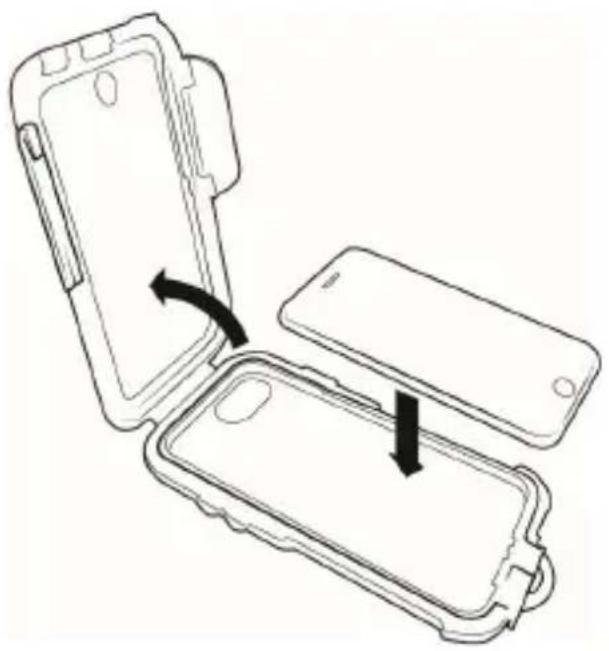
Diagram of a device open with a closed casing, showing internal components and directional arrows indicating movement (no text or symbols)Remove the protective cover from its packing and open the two quick locks on the left and right side.
Flip the cover upwards and remove the placeholder and the printed insert on the inside of the display cover. Now insert your smartphone into the tray and close the cover.
3. Installation
Remove the two screws as are illustrated in the following figure, to disassemble the mount into its components.
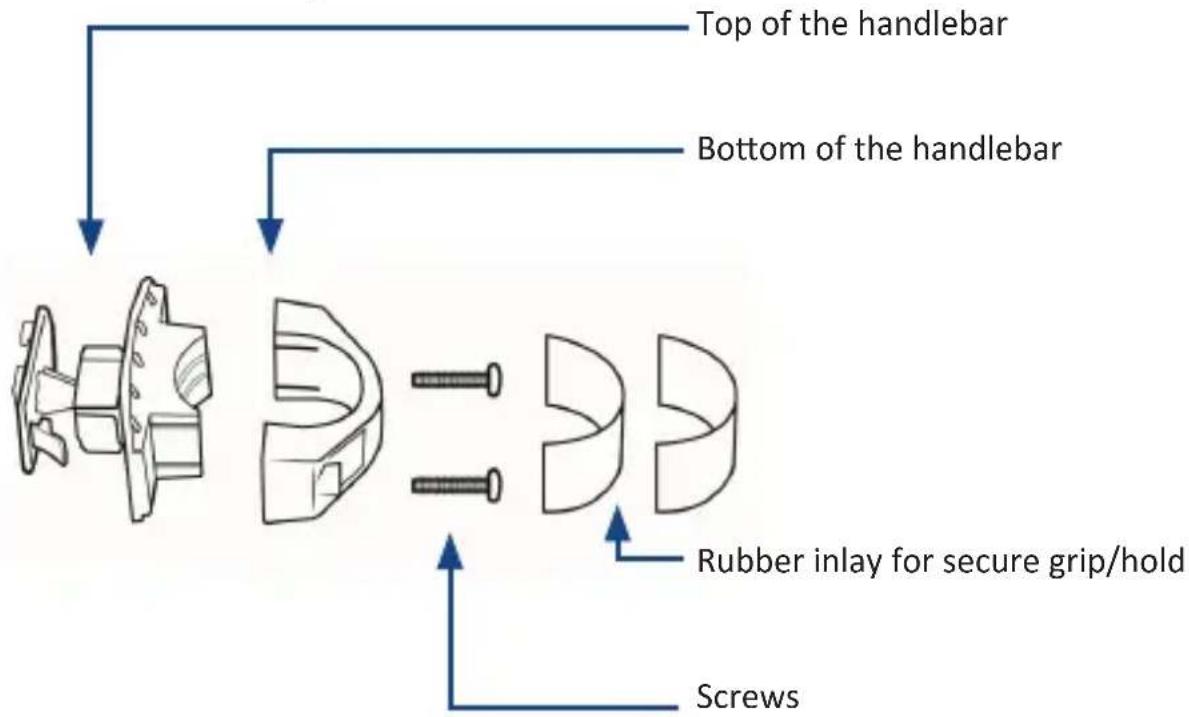
Position the two plastic pieces at the top and the bottom of the handlebar. For this purpose, please apply the attached rubber inlay to prevent the mounting from slipping after installation. Lead the screws from above through the holes provided and tighten the screws.

natural_image
Mechanical component diagram showing a rotating mechanism with arrows indicating motion (no text or symbols)To adjust the angle and position of the smart phone, a rotable ball joint is integrated. Rotate the fastening ring (shown in the upper picture) counterclockwise to align the ball joint in conformity with your requirements. After that turn the ring into the opposite direction and tighten it, so that the rotatable ball joint can no longer be moved.
natural_image
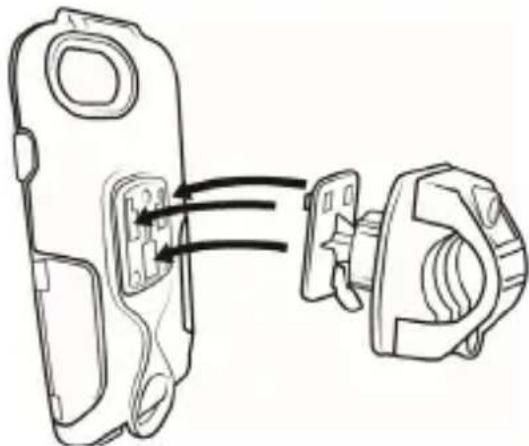
Technical line drawing of a mechanical component with two connected parts (no text or symbols)You can attach the protection cover to the bike mount now as shown. Press the lever to release the cover.
4. Safets instructions and disclaimer
Do not attempt to service this product by yourself as opening or removing covers may result in fire, electric shock or equipment damage. The product is only disconnected from the voltage system when the plug has been removed from the socket. Please avoid any contact to the electric current. Disregard of this warning could lead to contact with the operating voltage, or could generate a short circuit. Pull out the plug before a lightning storm or if you do not regularly use the product to prevent a short-circuit. This device is only licensed for indoor use and dry areas. Please protect it from water, rain, snow or high humidity and keep it away from high temperatures and direct sunlight. Do not expose this product to extreme and sudden changes of temperature or heavy vibrations; this may lead to damage to the electronic part of this unit. Check the product for signs of damage before putting it in operation.
In case the device is damaged, it should not be used. Please contact our customer support. Please observe the relevant national provisions and legal restrictions. Do not use the device for anything other than intended and as described in the manual. Any attempt of repairs or alterations by someone other than the original supplier will invalidate the guarantee and result in refusal of warranty claims. The machine may only be used by persons who are familiar with the operating manual and the applicable regulations concerning working safety and accident prevention. This device is not intended to be used by persons (including children) with limited physical, sensory or mental aptitude or lack of experience and/or knowledge unless they are supervised by a person responsible for their safety or have received instructions as to how the device is used properly. The technical specifications of this product may change without prior notice.
RoHS
WEEE guideline 2012/19/EU WEEE register number: DE 67896761
WD Plus GmbH, herewith declares that this product 304626/20200428TW002 conforms to the principle requirements and other relevant stipulations. The complete Declaration of Conformity can be obtained from: WD Plus GmbH, Wohlenbergstraße 16, 30179 Hanover
natural_image
Diagram of a device open with an open case, showing internal components and directional arrows indicating movement (no text or symbols)natural_image
Mechanical component diagram showing a rotating mechanism with curved arrows indicating motion (no text or symbols)natural_image
Technical line drawing of a mechanical component with two arrows indicating assembly or connection (no text or symbols present)natural_image
Diagram of an open and closed smartphone case with a device inside, showing internal components and directional arrows indicating movement (no text or symbols)natural_image
Mechanical component diagram showing a rotating assembly with curved arrows indicating motion (no text or symbols)natural_image
Technical line drawing of a mechanical component with two arrows indicating assembly or connection (no text or symbols present)natural_image
Diagram of a device casing with an open lid and internal components, showing a black arrow indicating rotation or movement (no text or symbols present)natural_image
Mechanical component diagram showing a rotating knob with directional arrows indicating motion (no text or symbols)natural_image
Technical line drawing of a mechanical component with two arrows indicating assembly or connection (no text or symbols present)Brand : Aplic
Model : 304626
Category : Mobile phone accessory