305592 - LED Lighting Aplic - Free user manual and instructions
Find the device manual for free 305592 Aplic in PDF.


| Product type | LCD Writing Tablet |
| Brand | Aplic |
| Model | 305592 |
| Power supply | 1 CR2025 3V battery |
| Ambient temperature | 0°C to 40°C |
| Max. write operations | ≥ 100000 |
| Main functions | Stylus writing, button erasure |
| Display | LCD display panel |
| Package contents | LCD Writing Tablet, stylus, instruction manual |
| Cleaning | Damp cloth, no abrasive detergents |
| Safety instructions | Do not open, avoid contact with mains, indoor dry use |
| WEEE | Directive 2012/19/EU, registration number DE: 67896761 |
| Warranty | Void if modified or repaired by unauthorized persons |
Frequently Asked Questions - 305592 Aplic
User questions about 305592 Aplic
0 question about this device. Answer the ones you know or ask your own.
Ask a new question about this device
Download the instructions for your LED Lighting in PDF format for free! Find your manual 305592 - Aplic and take your electronic device back in hand. On this page are published all the documents necessary for the use of your device. 305592 by Aplic.
USER MANUAL 305592 Aplic
natural_image
Blue abstract logo shape resembling a stylized letter 'Q' or partial circle (no text or symbols)aplic
LED-Schreibtafel
Mod.-Nr.: 305592
Table of contents
- Deutsch .... 3
- English 6
- Français 9
- Italiano 12
- Español....15
Thank you for choosing an aplic product. Please read the following user manual carefully so that you can enjoy the purchased product for a long time. Before using the delivered product, check that it is complete, faultless and undamaged.
1. Scope of delivery
- LCD writing board
- Pen
- User manual
2. Technical data
| Battery 1x 3V Type CR2025 | |
| Max. Write operations ≥ 100000 | |
| Display panel LCD | |
| Ambient temperature 0°C until 40°C |
3. Product details
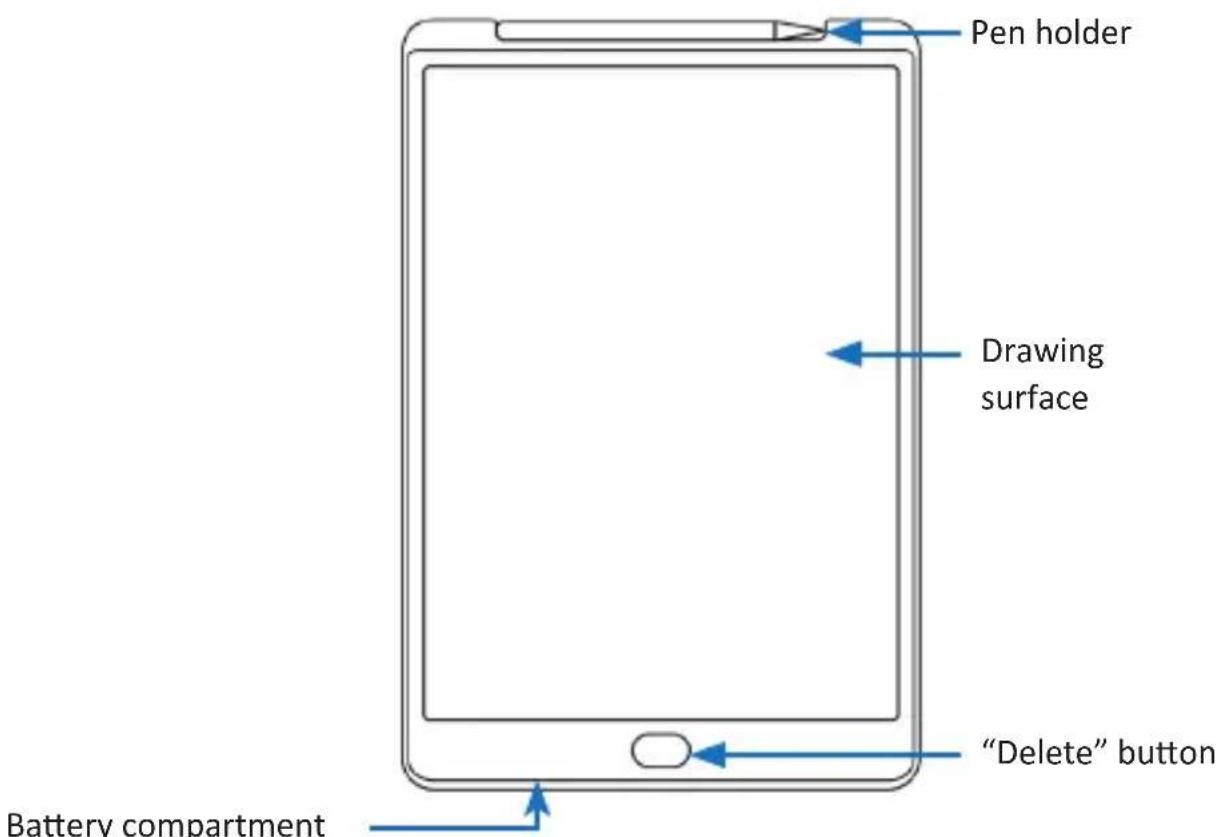
4. Start-up
Remove the unit from the packaging and remove any packaging material. Remove the battery compartment from the unit and insert a 3V CR2025 battery into the battery compartment and reinsert the battery compartment into the writing tablet.
The on/off button on the back switches the „erase“ function on or off. Turn the switch to the „Off“ position if you do not want to accidentally erase the drawing. To erase the drawing, the „ON/OFF“ switch on the back of the unit must be in the „ON“ position.
To erase the entire drawing area, press the „Erase“ button.

Make sure to reset the entire drawing area by pressing the „delete“ key!
5. Safety instructions and liability disclaimer
Never try to open the device to carry out repairs or conversions. Avoid contact with mains voltages. Do not short-circuit the product. The device is not certified for use in the open air; only use it in dry conditions. Protect it from high humidity, water and snow. Keep it away from high temperatures. Do not subject the device to sudden changes in temperature or heavy vibration as this might damage electronic components. Examine the device for damage before using it. The unit should not be used if it has received an impact or has been damaged in any other way. Please observe national regulations and restrictions. Do not use the device for purposes other than those described in the instructions. This product is not a toy. Keep it out of the reach of children or mentally impaired persons. Any repair or alteration to the device not carried out by the original supplier, will invalidate the warranty or guarantee. The product may only be used by persons who have read and understood these instructions. The device specifications may change without any separate prior notice to this effect.
6. Disposal instructions
Electrical and electronic devices may only be disposed of in accordance with the European WEEE Directive and not with household rubbish. Components must be disposed of or recycled separately as dangerous, toxic elements can inflict sustained damage on the environment if they are disposed of incorrectly. As a consumer, you are bound by the Electrical and Electronic Devices Act (ElektroG) to return electrical and electronic goods free of charge at the end of their useful life to the manufacturer, the place of purchase or to specially set up, public collection points. The details in each case are governed by national law. The symbol on the product, the operating instructions and/or the packaging refers to these regulations. By separating materials in this way, recycling and disposing of old devices, you are making an important contribution towards protecting our environment.

WEEE guideline: 2012/19/EU WEEE register number: DE 67896761
WD Plus GmbH, herewith declares that this product 305592 conforms to the principle requirements and other relevant stipulations. The complete Declaration of Conformity can be obtained from: WD Plus GmbH, Wohlenbergstraße 16, 30179 Hanover
Brand : Aplic
Model : 305592
Category : LED Lighting