
301508 - Loudspeaker Aplic - Free user manual and instructions
Find the device manual for free 301508 Aplic in PDF.


| Brand | Aplic |
| Model | 301508 |
| Product type | Wireless mouse |
| Connection technology | Wireless 2.4 GHz |
| Interface | USB (receiver) |
| Sensor | Optical |
| Resolution | 1200 DPI |
| Number of buttons | 4 (including scroll wheel) |
| Scroll wheel | Yes |
| Power source | 2 AAA batteries (not included) |
| Power voltage | 1.5 V (alkaline batteries) |
| Recommended battery type | AAA alkaline batteries |
| Approximate range | 10 m |
| Plug-and-Play | Yes (automatic installation) |
| System compatibility | Windows, Mac, Linux |
| Package contents | Mouse, USB receiver, user manual |
| Weight (estimated) | 80 g |
| Dimensions (estimated) | 100 x 60 x 30 mm |
| Color (estimated) | Black |
| Material (estimated) | ABS plastic |
| Warranty (estimated) | 2 years |
| Safety | Safety instructions included |
| Recycling | WEEE compliant |
Frequently Asked Questions - 301508 Aplic
User questions about 301508 Aplic
0 question about this device. Answer the ones you know or ask your own.
Ask a new question about this device
Download the instructions for your Loudspeaker in PDF format for free! Find your manual 301508 - Aplic and take your electronic device back in hand. On this page are published all the documents necessary for the use of your device. 301508 by Aplic.
USER MANUAL 301508 Aplic
natural_image
Blue abstract logo shape resembling a stylized letter 'Q' or droplet (no text or symbols)aplic
Wireless Mouse, 2,4GHz
Thank you for having chosen this aplic product and for placing your trust in our company. Please read this manual carefully before installation to ensure your long-term enjoyment of this product. For future reference, please keep this manual.
1 Scope of delivery
- Wireless mouse
- User manual
2 Technical specifications
| Polling rate | 1200 DPI |
| Sensor | optical |
| Port | 2,4 Ghz (via receiver) |
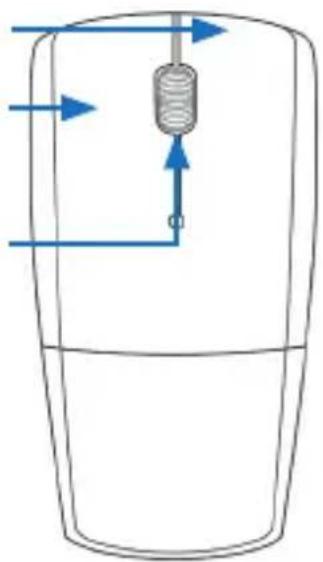
| Features | • 2 buttons• 1 button scroll wheel• Vertical scroll wheel |
| Power supply | 2x AAA Batteries (not included in scope of delivery) |
3 Product details
Right mouse button Left mouse button Vertical scroll wheel / middle mouse button
natural_image
Diagram of a cylindrical object with fluid flow arrows, no text or symbols present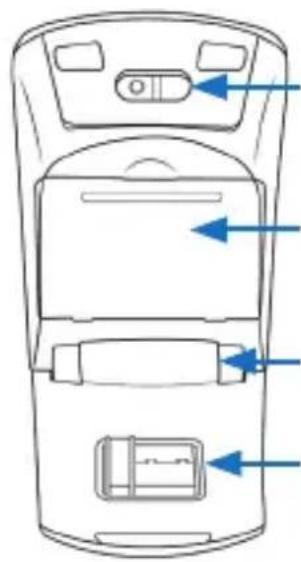
natural_image
Top-down line drawing of a mobile phone rear panel with control buttons and indicator lights (no text or symbols)Sensor Battery compartment Pivot 2,4GHz receiver
4 Getting started
Remove the mouse from the packing and connect the USB receiver stick to your computer. The included USB 2,4GHz dongle is situated on the bottom side of the mouse. Put it into a free USB port of your computer. Due to „Plug and Play“, this can even be done during current operation.
A manual driver installation is not required.
Take the mouse and open the battery compartment on the bottom side and insert 2 new 1,5V AAA batteries. Attention! Please be sure to observe the correct polarity when inserting the batteries.
Information concerning the use of batteries:
Due to the lower battery- voltage of 1,2V, the function of the mouse cannot be guaranteed for each type of battery. Moreover, it is possible that malfunctions like mouse pointer jumps or reduced battery life can occur. For that reason, we recommend the use of 1,5V type AAA alkaline batteries.
5 Safety instructions and liability disclaimer
Never try to open the device to carry out repairs or conversions. Avoid contact with mains voltages. Do not short-circuit the product. The device is not certified for use in the open air; only use it in dry conditions. Protect it from high humidity, water and snow. Keep it away from high temperatures. Do not subject the device to sudden changes in temperature or heavy vibration as this might damage electronic components. Examine the device for damage before using it. The unit should not be used if it has received an impact or has been damaged in any other way. Please observe national regulations and restrictions. Do not use the device for purposes other than those described in the instructions. This product is not a toy. Keep it out of the reach of children or mentally impaired persons. Any repair or alteration to the device not carried out by the original supplier, will invalidate the warranty or guarantee. The product may only be used by persons who have read and understood these instructions. The device specifications may change without any separate prior notice to this effect.
6 Disposal instructions
Electrical and electronic devices may only be disposed of in accordance with the European WEEE Directive and not with household rubbish. Components must be disposed of or recycled separately as dangerous, toxic elements can inflict sustained damage on the environment if they are disposed of incorrectly. As a consumer, you are bound by the Electrical and Electronic Devices Act (ElektroG) to return electrical and electronic goods free of charge at the end of their useful life to the manufacturer, the place of purchase or to specially set up, public collection points. The details in each case are governed by national law. The symbol on the product, the operating instructions and/or the packaging refers to these regulations. By separating materials in this way, recycling and disposing of old devices, you are making an important contribution towards protecting our environment.

WEEE guideline: 2012/19/EU WEEE register number: DE 94495668
WD Plus GmbH, herewith declares that this product 301508/20161114SZ104 conforms to the principle requirements and other relevant stipulations of Directive 1999/5/EG. The complete Declaration of Conformity can be obtained from: WD Plus GmbH, Wohlenbergstraße 16, 30179 Hanover
natural_image
Diagram of a cylindrical device with internal flow arrows, no text or symbols present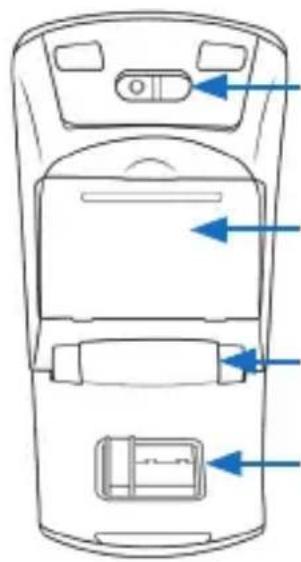
natural_image
Top-down line drawing of a mobile phone rear panel with buttons and ventilation slots (no text or symbols)Sensore
natural_image
Diagram of a mechanical device with fluid flow arrows and a central component (no text or labels)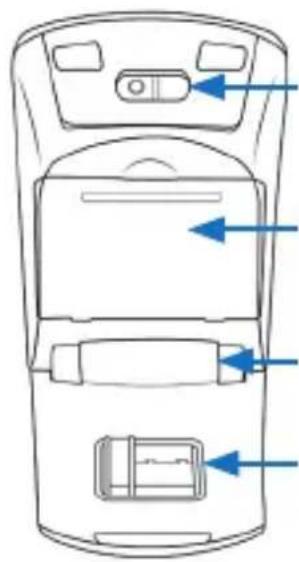
natural_image
Top-down schematic of a mobile phone rear panel showing front, back, and side panels with blue arrows pointing to ports (no text or labels)Sensor

Brand : Aplic
Model : 301508
Category : Loudspeaker